1
"
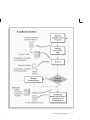
To manually reconcile a previously–entered bank statement:
1.
Import or manually enter the statement information.
If you don’t use Oracle Receivables Automatic Lockbox, and
your bank statement includes direct deposits or bank transfers,
you must create the related receipts manually in Receivables
before you can reconcile them in Cash Management. For more
information on Automatic Lockbox, see your Oracle Receivables
User’s Guide.
2.
Navigate to the Find Bank Statements window.
3.
Enter the query criteria for the statement you want to reconcile, or
leave the criteria blank to query all existing statements.
4.
Choose Find to see the Reconcile Bank Statements window
containing the statements that meet your query criteria.
You can open custom folders that display statement
information in a custom format if you or your organization has
defined any. Refer to the Oracle Applications User’s Guide for
more information on modifying and saving folders.
5.
Select the statement you want to reconcile, and choose Review.
Cash Management displays the Bank Statement window, with the
header information for the account you queried, including Bank
Name, Bank Branch, statement Date, bank Currency, Document
Number, and Statement Number. You can update any of the
header information except for the bank information and the
Currency. If you use automatic document sequence numbers, you
cannot change the Document Number either.
The GL date defaults to the bank statement date. You can update
it, or override it on the individual payment or receipt transaction.
6.
Choose Lines to see the Bank Statement Lines window.
7.
Select the statement line that you want to reconcile.
8.
Choose Available to search for detail or batch transactions that are
available for reconciliation.
9.
Enter your search criteria in the Find Transactions window.
10. Select the available detail and batch transactions that apply to the
current bank statement line.
11. (Optional) Choose the Recalculate button.
12. Reconcile the available detail or batch transactions.
13. Reconcile other statement lines.
Reconciling Bank Statements
4 – 23