1
Data Mining ActiveX
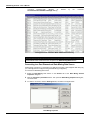
Table Column Displayed in Data Mining ActiveX Grid
Connecting to a Multidimensional Data Mining Data Source
A data mining connection is a connection to a data source through a preconfigured data mining tag
(i.e. a data tag that was configured using the Data Mining Configurator). To connect to a Data
Mining data source:
1. Select the Data Mining radio button on the General tab of the Data Mining ActiveX
Properties dialog box.
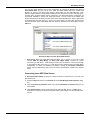
2. Click the Connection parameters button. This opens the Data Mining Properties dialog box,
as shown below.
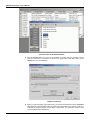
3. To create a connection, click the Add Tags button, as shown in the figure below.
Data Mining Properties
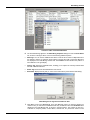
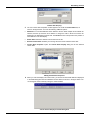
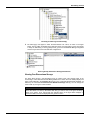
4. This opens the Unified Data Browser. Select one or more data tags from the Unified Data
Browser, as shown in the figure below. In this example, we will use the following
multidimensional database mining tag:
SMAR.DatabaseOPCServer.3\AccessConnection.DataSource04.Tag4
11