1
Mitel NuPoint Messenger Technical Documentation - Release 7.0
Reference and Configuration Manual
Volume 1, Reference Information
2700-1398-B1, Issue 2
Contents ©Copyright 2002, Mitel Networks Corporation
Distributed Courtesy of
http://www.promemoinc.com
P.O. Box 1899
Brentwood, CA 94513
Main: (925) 513-7510
Fax: (925) 775-7039
Support: [email protected]
Sales: [email protected]
General: [email protected]
©Copyright 2002, Mitel Networks Corporation
1
Mitel NuPoint Messenger Technical Documentation - Release 7.0
About This Manual
This manual describes how to configure the NuPoint Voice™ software in any of these NuPoint
Messenger™ servers:
•
Model 640
•
Model 120
•
Model 70
Who Should Read This Manual
This manual is intended for technicians and administrators who are responsible for configuring
software on the NuPoint Messenger system.
How to Use This Manual
This manual contains two volumes. Volume 1 includes reference chapters and a glossary.
Volume 2 includes tasks lists, procedures, and user aids, such as worksheets and menu maps.
Reference Chapters
The reference chapters, 1 through 12, located in Volume 1, provide details about the NuPoint
Messenger software configuration. These chapters discuss how components are related,
elaborate on concepts, give operational details, and contain tables and figures about
configuration. The System Implementation Guide gives suggestions and recommendations on
preparing for a NuPoint Messenger server installation. The Installation and Service Manual (for
your system) provides installation procedures.
Task List
Task lists appear in Volume 2. To use a task list, start with a principal task (shown in boldface)
to configure a new system. Each task listed is described in more detail in a procedure. If you
want to perform other tasks on a system that is already configured, look up the task you want to
perform in the task list.
Procedures
Each reference chapter in Volume 1 contains a list, by title and number, of related Procedures
(CPs). The collection of those configuration CPs follows the task lists in Volume 2; the number of
a CP does not indicate a sequence of performance. Follow the steps in the CPs to accomplish
desired tasks. A reference list in each CP contains pointers to supplemental information, such as
other procedures, other manuals, menu maps, and so forth.
©Copyright 2002, Mitel Networks Corporation
2
Mitel NuPoint Messenger Technical Documentation - Release 7.0
Worksheets
Volume 1 includes information about completing worksheets, which helps you perform
procedures. Volume 2 includes blank worksheets. You many need to complete a worksheet
before you begin performing the steps in a CP.
Navigation Aids
Volume 1 contains a glossary of NuPoint Messenger, telecommunications and telephony terms.
Volume 2 contains menu maps, or “road maps,” which help you reach a menu or see which task
to perform next.
Which Document Do I Use?
Topics listed below are described in NuPoint Messenger documents, as indicated. This table lists
documents for the base hardware and software only, not optional features.
Topics
Notice to
Installer
Installation
and Service
Manual
Technical
Reference
Manual
Reference
and
Configuration
Manual
Activating an inactive
configuration
√
Administration by Phone
√
Billing
√
Call placement
√
√
Card configuration
Card replacement
√
√
√
Defining a line group
√
Diagnostics
√
DID NuPoint Voice™
application
Disk replacement
Diagnostics
Manual
(Model 640
only)
√
Distribution lists
√
Duplicating a configuration
√
Error Log messages
√
Event Recorder messages
√
√
FCOSs and feature bits
Floppy backup and restore
√
FPSA
√
GCOSs and groups
√
Glossary
√
©Copyright 2002, Mitel Networks Corporation
3
Mitel NuPoint Messenger Technical Documentation - Release 7.0
√
Greetings
Hardware changes
√
√
√
Hardware descriptions
Installation procedures
√
√
LCOSs and limits
√
Mailboxes
√
Message delivery
√
Message waiting lights
√
Paging
√
Passcode - mailbox
√
√
Password - console
Phoneline exceptions
√
Power information
√
√
Prompts
√
√
RCOSs (NPA/NXX)
Release Notes
√
Repairing a server
√
Replacing a server
√
√
Reports
√
Resource Manager
Service procedures
√
Site preparation
√
√
System administration
√
System maintenance
√
System security
System verify
√
Testing a configuration
√
√
√
Troubleshooting
Updating
√
√
Upgrading
√
√
Verifying configuration
parameters
√
NuPoint Voice application
√
©Copyright 2002, Mitel Networks Corporation
4
Mitel NuPoint Messenger Technical Documentation - Release 7.0
What If Information Is Missing?
If information you need is not available in the documents listed above, go to these documents:
•
Release Notes
•
Other documents, as applicable
How Do I Obtain the Documents I Need?
To obtain other documents, contact your distributor.
Conventions Used in This Manual
The procedures, located in Volume 2, use certain conventions to describe how you enter
configuration data and to indicate information displayed at the server maintenance console.
Press Enter
Press the Enter key. For example, “Press Enter if the current number is
correct.” On some keyboards, this key is labeled “Return” or has a return
arrow.
Enter
Type the text shown, then press the Enter key. For example, “Enter the line
number (1-24)” means to type a number from 1 through 24 then press the
Enter key.
bold
Words or characters in bold type indicate either a value to be entered by you
exactly as shown or, when used to indicate a variable entry, describe the
type of value to be supplied by you.
Note: Unless otherwise stated, press Enter after each response you enter.
User Advisories
Reader advisories are given in this manual as shown below.
Note
Information especially useful in relation to this procedure.
CAUTION!
Information that helps you prevent equipment or software damage.
CAUTION!
Information that helps you avoid electrostatic discharge (ESD) damage
to the equipment.
WARNING!
Information that helps you prevent an interruption to telecommunications
traffic.
WARNING!
A hazard that can cause you personal injury.
©Copyright 2002, Mitel Networks Corporation
5
Mitel NuPoint Messenger Technical Documentation - Release 7.0
DANGER!
Warns of a condition that could severely injure or kill you.
Before You Start
This manual assumes that you are familiar with using a console and keyboard. This section
describes how to use the NuPoint Messenger server effectively.
Console Tips and Techniques
The tips and techniques offered in the following paragraphs can make configuration entry
sessions at the NuPoint Messenger server console more productive.
Viewing Menus
•
When you finish entering a value for a parameter, the server displays an abbreviated form of
the current menu, called the "short menu." To view the complete current menu when a short
menu is displayed, press Enter.
•
To return to the Main Menu from any NuPoint Voice configuration menu, press X (Exit), until
the Main Menu appears.
Accepting Defaults
•
To accept a default displayed in a prompt, just press Enter.
•
To accept a default displayed in a menu, no action is necessary.
Quitting an Entry Session
You can quit at any point during entry of offline or online parameters and Class of Service menus.
Quitting discards all entries you have made and leaves the NuPoint Voice configuration the way it
was before you started entering parameters.
To quit from the NuPoint Voice Configuration Offline or Online menu:
Select:
(Q) Quit -- Forget Changes
Prompt:
Quit and Forget changes? (y/n) =
Response:
Y to return to the NuPoint Voice Configuration Main Menu.
Shortcut Commands
You can use the Ctrl (Control) key or the / (slash) key while simultaneously pressing another key
to execute shortcut commands at a system maintenance console.
To do this...
Activate a timed-out console
Exit from the offline or online menus, or FCOS, LCOS, GCOS
menus, and save any entries.
©Copyright 2002, Mitel Networks Corporation
Type...
any key
X
6
Mitel NuPoint Messenger Technical Documentation - Release 7.0
Exit from the offline or online menus, or FCOS, LCOS, GCOS
menus, without saving any entries.
Stop scrolling a displayed report.
Q+Y
Resume scrolling a displayed report.
Ctrl-Q
Return to the NuPoint Voice application when a # prompt is
displayed.
Ctrl-D or
type exit
Return to the Reports Menu if you paused the display
Q + return or
Esc,Esc + return
Ctrl-S
Preparing for a Configuration Session
•
Before you begin a configuration session, you need the following:
•
The Reference and Configuration Manual
•
A NuPoint Messenger server console (video monitor and keyboard) and NuPoint Voice
module, with power on
•
At least two telephones for configuration testing
•
A blank 3.5-inch diskette on which you can copy your configuration
•
Completed worksheets (blank worksheets are included in Volume 2)
1
Using NuPoint Voice Software
The NuPoint Messenger server (the server) is a set of hardware and software used for adaptive
information processing. When you configure your software, you need to choose one or more
applications, then configure a number of modifiers common to all of the applications. Each
application is discussed in its own chapter. The modifiers are discussed in this chapter and
following chapters where applicable. When one of the modifiers operates differently in one
application compared to the others, this is highlighted in the application chapter.
“Configuration” is the process of organizing application and modifier data on worksheets, then
entering the data at a server console. This data is stored in a configuration file on the hard disk,
and controls call processing.
Procedures
The following frequently-used procedures do not fit into any one category. You must use them
when performing many other procedures that are mentioned elsewhere in this manual. These
procedures are located in Volume 2 of this manual.
Procedure
Activate the Inactive Configuration
Add or Delete Feature Bits
Assign an FCOS to a Mailbox
Customize an FCOS Copy
Define a Line Group
Duplicate a Configuration
Perform a Floppy Backup
Run a System Configuration Report
©Copyright 2002, Mitel Networks Corporation
Number
CP 7002
CP 5011
CP 5003
CP 5007
CP 5010
CP 5044
CP 5703
CP 4353
7
Mitel NuPoint Messenger Technical Documentation - Release 7.0
Verify Configuration Parameters
CP 5015
Applications
These are the applications provided with your NuPoint Messenger server. Your server may use
one or more of them. Each of these applications must be in a separate line group (a group of
telephone lines connected to the server) if you have more than one application running, with the
exception of NP Receptionist and NuPoint Agent™.
NuPoint Voice Application
This is the basic business application, used for message taking and retrieval. Most of the
modifiers discussed later are explained in terms of this application. In addition, many of the
modifiers are discussed in some detail in the NuPoint Voice Application chapter.
DID NuPoint Voice Application
Similar to the NuPoint Voice application, but for direct-inward dial telephone lines. The hardware
setup is very different, and additional configuration steps are needed.
Pager Application
This application is used for a number of features that place telephone calls out of the server.
Paging can call a radio pager to let the user know there is a message waiting. The user must call
into the server to receive the message. Message delivery calls a telephone and allows the user to
log in and receive a message. Call placement calls a telephone number to deliver a message.
Some optional features, such as NuPoint Fax™ and Cut-through Paging, also use this application
to place outdials.
Message Waiting Applications
These applications allow a message waiting indicator at users’ phones to signal that a new
message has arrived. Typically, these indicators are lights, but this depends on the telephone
equipment and switch installed. The software supports 24 kinds of message waiting indicators.
Optional Features
Optional features are not discussed in this manual. If you purchase them, you will receive the
documentation to place in your Optional Features Manual. However, they are configured with
many of the same modifiers discussed in this manual. Optional features often purchased are
listed below.
•
AMIS Analog Network
•
NP WakeUp
•
NuPoint Agent
•
Call Detail Recorder
•
NP CSO
•
Cut-Through Paging
©Copyright 2002, Mitel Networks Corporation
8
Mitel NuPoint Messenger Technical Documentation - Release 7.0
•
NuPoint Fax
•
Integrations
•
NP Forms
•
NP Net Digital Network
•
NP Receptionist
Note: NP Receptionist and NuPoint Agent can work in the same line group as the NuPoint Voice
application, depending on your integrations. Most other optional features use different line groups.
Use by the Hearing Impaired
Almost all the functions and capabilities in a standard NuPoint Messenger server are available to
hearing-impaired mailbox owners and callers. NP TDD is an optional feature that you can
configure at any NuPoint Messenger server site where a TDD machine is installed.
Modifiers
These characteristics of NuPoint Messenger server software are common to all applications. By
configuring the modifiers, the capabilities and behavior of the application can change.
Most modifiers are introduced in the NuPoint Voice Application chapter.
Types of Configuration
The NuPoint Messenger server has two different kinds of configuration, online and offline
configuration. Offline configuration handles server settings that cannot be changed immediately.
This includes setting up line groups. Online configuration includes the remainder of server
settings that can be modified at any time. However, since many offline and online configuration
settings work together, there are two kinds of online configuration as well: the active and the
inactive configuration. The active configuration is the online configuration currently in use, and
any changes you make to it take effect immediately. The inactive configuration is the online
configuration that is in reserve, and this option should be used when you also make changes in
the offline configuration. Then activate the configuration to implement all the changes you made,
both online (inactive) and offline.
Line Groups
A line group is a set of one or more incoming telephone lines, which come into line card ports on
the server hardware. Each application you use must be assigned to its own line group (except for
NP Receptionist and NuPoint Agent). Any of the various operations involving outdials can,
however, use the same line group assigned to the Pager application. Most of the modifications
you may want to make to an application are made to its line group.
Dialing Plan
To configure each application, you must define its dialing plan, which is the structure of how the
mailboxes are numbered. Related features include which key a user presses to speak to a
system attendant, or to use call placement.
©Copyright 2002, Mitel Networks Corporation
9
Mitel NuPoint Messenger Technical Documentation - Release 7.0
Day and Night Hours
This feature of the NuPoint Voice application lets you set the work schedule: both office hours
and which days are handled as weekends. This also handles certain situations such as a user
wishing to speak to a system attendant.
Mailboxes
Every user of the server needs a mailbox, and all applications require mailboxes. The
administrator’s mailbox and attendant’s mailbox are special mailboxes that interact with
applications; they are discussed in the NuPoint Voice Application chapter. Other special
mailboxes – tree, rotational, and broadcast, for example – are discussed in the Mailboxes
chapter. Mailbox features, such as Distribution Lists and receipts, are also discussed in that
chapter.
Classes of Service
There are several classes of service, which are groups of characteristics that affect how the
server operates. The different classes of service are assigned to each mailbox by the system
administrator.
Features Class of Service
The NuPoint Voice software has over two hundred feature bits that allow users to perform
functions or that control how the server can be used. These features are grouped into a set called
a Features Class of Service (FCOS), that define who can do what, and how. One FCOS is
assigned to each mailbox. FCOSs are explained in the Features Class of Service chapter.
Limits Class of Service
A Limits Class of Service (LCOS) is a group of limitations on each user, such as length and
number of messages. LCOSs also affect how some optional features work. One LCOS is
assigned to each mailbox. These are explained in the Other Classes of Service chapter.
Group Class of Service
A Group Class of Service (GCOS) determines which users can send messages or respond to
messages from other users. There are two kinds of GCOSs, affinity and bit-mapped. One GCOS
is assigned to each mailbox. These are explained in the Other Classes of Service chapter.
Network Class of Service
A Network Class of Service (NCOS) controls users’ network access and is a part of the NP Net
Digital Network optional feature. More NCOS information is contained in the NuPoint Voice NP
Net Optional Feature Manual.
Restriction Class of Service
A Restriction Class of Service (RCOS) is an element of NPA/NXX call screening that restricts
mailbox outdials to certain area codes or to certain prefixes within an area code. One RCOS is
assigned to each mailbox. These are explained in the Other Classes of Service chapter.
Tenant Class of Service
A Tenant Class of Service (TCOS) is used with the ESMDI “Multi-Tenant” application, to govern
©Copyright 2002, Mitel Networks Corporation
10
Mitel NuPoint Messenger Technical Documentation - Release 7.0
mailbox interaction between user communities. Refer to the NuPoint Voice Enhanced SMDI
Integration Manual for more information.
Billing and Reports
You can generate reports from information on the existing applications and whatever
modifications you have put into effect. Billing is an application that collects call and message
information so users can be billed for their server usage. Refer to the Billing chapter for
information on how to set up billing and different rate structures, and to the Reports chapter for
more information on different reports available.
Worksheets
Worksheets are supplied (see Volume 2 of this manual) to help you organize configuration data
before you enter it at the NuPoint Messenger server maintenance console. There is a worksheet
for each application, for different kinds of mailboxes, and for FCOSs, LCOSs, and GCOSs.
Complete the worksheets for all applications that you wish to add to the configuration before you
begin entering data at a server maintenance console. This prevents duplication of line group
assignments, and gives an accurate picture of how server resources have been divided among
the applications. Fields of data on these worksheets are explained in the application chapters that
follow.
Optional features are shipped with instructions similar to the worksheet format.
NuPoint Messenger Server Software at a Glance
Figure 1-1 shows how the various parts of NuPoint Messenger server software work together. It
illustrates how line groups are made up of phone lines, how each application is assigned one line
group, and how modifiers work on all applications. In addition, it shows how mailboxes have a
number of different configuration parameters. Finally, it shows how Billing and Reports use all
server information.
Figure 1-1 NuPoint Messenger Server Software Overview
2
NuPoint Voice Application
This chapter covers:
•
Overview of the NuPoint Voice application
•
Default software configuration
•
NuPoint Voice Application Worksheet
•
Line group definition
•
Configuring the application
•
Using the NuPoint Voice application
©Copyright 2002, Mitel Networks Corporation
11
Mitel NuPoint Messenger Technical Documentation - Release 7.0
Overview
The NuPoint Voice application provides voice messaging capability where each server user can
have a personal mailbox. It is the standard business application for NuPoint Messenger servers.
The NuPoint Voice application can be used with most Central Offices (COs), PBXs, and with all
key systems. Other applications, such as DID NuPoint Voice or the Pager application are
variations of the NuPoint Voice application, and are used either together with, or instead of, the
NuPoint Voice application.
Numerous customized integrations, which are also variations of the NuPoint Voice application,
are available. These are optional features; they provide message waiting control, and functions
such as personal greetings for forwarded calls. See the specific integration documents in the for
more information.
To use the NuPoint Voice application on your server, you must perform any necessary system
level configuration. System level configuration through the NuPoint Voice application involves two
steps: defining the line group, and configuring the application. In the first step, you assign server
ports to the NuPoint Voice application. In the second step, you customize the application for your
server. Procedures covering these steps are available in Volume 2 of this manual.
Once you have completed the NuPoint Voice configuration, you must activate changes, create
mailboxes, record a company greeting, and test the configuration. Procedures covering these
steps are listed below.
Procedures
You can perform the following procedures with the NuPoint Voice application. These procedures
are located in Volume 2 of this manual.
Procedure
NuPoint Voice Application Configuration
Configure a Dialing Plan
Configure for Transfer to a System Attendant
Configure for Unaddressed Messages
Configure Speech Quality for an Application
Configure NP TDD
Enable Multiple Messages for Outside Callers
Enable the Dial-by-Name Function
Prevent Unaddressed Messages
Test the NuPoint Voice Application
Number
CP 3301
CP 5002
CP 5020
CP 3314
CP 5053
CP 3291
CP 5022
CP 3309
CP 5023
CP 5315
Default Software Configuration
The NuPoint Voice application is the only application that is pre-installed in the factory
configuration. To add capabilities, and to meet the requirements of a particular site, you usually
must change one or more of the defaults. All of the defaults can be changed at a server
maintenance console.
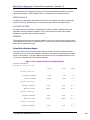
The default configuration has the values shown in Table 2-1.
Table 2-1
NuPoint Voice Application Defaults
©Copyright 2002, Mitel Networks Corporation
12
Mitel NuPoint Messenger Technical Documentation - Release 7.0
Parameter
Administrator’s mailbox number
Allow dial an extension for callers
Allow dial an extension for users
Allow multiple messages for outside caller
Answer delay
Attendant’s mailbox number
Attendant transfer string
Dial by name, last name first
Exact match break
General greeting mailbox number
Group name
Key 0 for attendant transfer
Line group number
Line(s) in group
Mailbox dialing plan
Number of names threshold
Passcode length
Passcode trip count
Passcode trip period
Pre-company name dial string
Pre-mailbox greeting dial string
Prompts language
Single digit access
Speech quality for messages
Speech quality for names and greetings
Suppress mailbox number
System attendant’s extension
Wait prompt
Weekend days table
Work day
NuPoint Voice Application
Default
998
N
N
Y
0
999
S+
Y
Y
None
None
N
1
All on server
3,3,3,3,3,3,3,3,3
3 names
4 digits min. – 10 digits max.
5
24 hours
None
None
English
None
18
18
None
0
Y
DDDDDNN
8 a.m. – 5 p.m.
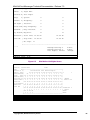
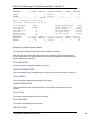
NuPoint Voice Application Worksheet
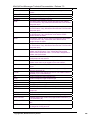
Use the NuPoint Voice Application Worksheet (Figure 2-2) to organize the data. The rest of this
chapter explains concepts you need to know for completing the worksheet and using it to
configure the NuPoint Voice application.
The following paragraphs explain sections of the worksheet. Pre-programmed (default) values are
given, where applicable. If you want to use a default value, indicate that fact on the worksheet.
Then you do not have to select or enter any information for that parameter during reconfiguration.
Configuration Types
The NuPoint Voice application has two different kinds of configuration, online and offline. The
©Copyright 2002, Mitel Networks Corporation
13
Mitel NuPoint Messenger Technical Documentation - Release 7.0
NuPoint Voice Application Worksheet is divided into these two types to help you enter settings
into the console in the right order.
Offline configuration handles server settings that cannot be changed immediately, such as setting
up line groups. Online configuration includes the remainder of server settings that can be
modified at any time. Many offline and online configuration settings work together, so there are
two kinds of online configuration: the active and the inactive configuration.
The active configuration is the online configuration currently in use, and any changes you make
to it take effect immediately after exiting the menus. The inactive configuration is the online
configuration that is in reserve; changes made to it do not take effect until you perform an
additional step. This option should be used when you also make changes in the offline
configuration. Then you activate the configuration to implement all the changes you made, both
online (inactive) and offline.
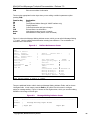
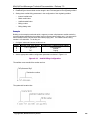
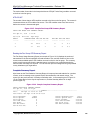
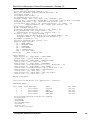
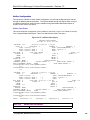
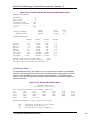
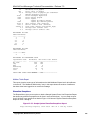
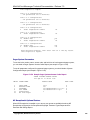
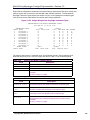
Figure 2-1 shows the relationship between the different configuration types.
Figure 2-1
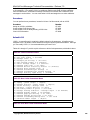
Figure 2-2
Handling Configuration Types
Sample NuPoint Voice Application Worksheet
Defining a Line Group
All NuPoint Messenger server ports (telephone lines) are assigned to line groups. Each line
group, in turn, is assigned to a single application, and any programming that is done for that
application applies to every port in the line group. The number of ports you assign to each line
group depends on how heavy you expect the phone traffic to be for the particular application.
At the PBX or CO level, all telephone lines connected to the ports of an individual line group are
typically assigned to a hunt group, ACD group, UCD group, etc. to ensure that incoming calls are
answered by the first port that is available for the particular application.
Line Group Number
Each line group is represented by a discrete number. Valid line group numbers are 1 through 24.
The preset default for the NuPoint Voice application is 1.
Group Name
The group name identifies the line group’s purpose. For example, a line group could be called
“Message Center.” There is no default group name.
Line(s) in Group
You identify each line (or port) in a group with three identifiers, which indicate a module, a line
card, and a port on a line card. “Module” refers to a CPU, the server’s main processor. Modules
are numbered from 1 through 4. Line cards are numbered 0 through 15. Each line card has a
number of ports, and you can connect one telephone line to each port. Port numbering also starts
at 0 and the upper limit depends on the type of line card you are using. The set of three identifiers
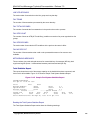
(module, line card, and port) is called a “triplet,” and is used in this format:
The default setting has all telephone lines on the server assigned to group 1.
©Copyright 2002, Mitel Networks Corporation
14
Mitel NuPoint Messenger Technical Documentation - Release 7.0
If you have more than one line in the group, separate the line numbers by commas as you enter
them on the worksheet. For example, write 1:0:0,1:0:1,1:1:0 since this is how you must enter
them. If you are entering a range of lines, you must use the full triplet on both sides of the range,
such as 1:0:0-2:7:2 for everything on module 1, and everything on module 2 up to slot 7, port 2.
(You can omit the module number if it is module 1; for example, 0:1-3:7.) For each module, line
card, and port,s.here are several valid values. Table 2-2 describes them.
Table 2-2
Module
Line card
Port
Module, Line Card, and Port Values and Interpretations
Valid Value
Interpretation
blank
Module 1
number
Specified module
*
All line cards controlled by the specified host
number
Specified line card
*
All ports on the specified line card(s)
number
Specified port
As Table 2-2 implies, there are many possible combinations. Table 2-3 shows several examples
of valid module, line card, and port combinations and how the server interprets them.
Table 2-3
Module, Line Card, and Port Combinations
Expression
Interpretation
1:*
All the line cards controlled by module 1 on a multimodule server; for a single-module server this means all
ports on line card 1
1:2:*
All ports controlled by module 1, line card 2
1:0-3:7
Module 1, all ports on line cards 1-3 (assuming 8-port
cards)
2:1:2, 2:2:0-2:3:7
Module 2, line card 1, port 2 plus all ports on line cards
2 and 3 (assuming 8-port cards)
Configuring the Application
Configuring the NuPoint Voice application consists of establishing day and night hours,
establishing a mailbox dialing plan, specifying call transfers and the use of attendants, and
identifying administrator’s and attendant’s mailboxes.
You must also decide whether to configure other operations such as a wait prompt, the default
language for prompts, and passcodes.
Day and Night Hours
The NuPoint Voice application can issue different company greetings for day answering and
night/weekend answering. With the NP Receptionist optional feature, the software can treat
individual extensions differently when calls are received during night and weekend hours, rather
than during normal business hours. The hours that constitute a normal work day, and the days of
the week that are considered a weekend, can be customized for the individual installation. The
company greeting is the greeting in the administrator’s mailbox.
Day and night hours are scheduled for each line group. If you have different day and
night/weekend hours for each line group on the server, the greeting that an outside caller hears
©Copyright 2002, Mitel Networks Corporation
15
Mitel NuPoint Messenger Technical Documentation - Release 7.0
depends on the line group used to access the mailbox. Of course, if you don’t record any custom
greetings then all callers hear the same default greeting.
Start Time of the Work Day
This is the time for the start of the work day in the format “hh:mm AM (or PM)”; where hh is the
hour and mm is the minute. The default start time for the work day is 8 a.m. If neither AM nor PM
is specified, the server assumes that the time is AM.
End Time of the Work Day
This is the time for the end of the work day in the format “hh:mm AM (or PM)”; where hh is the
hour and mm is the minute. The default end time for the work day is 5 p.m. If neither AM nor PM
is specified, the server assumes that the time is PM.
If you want to use the same greeting 24 hours a day, enter “12:00AM” in both Start and End time.
Weekend Days Table
This is a table that tells the NuPoint Voice application when to treat calls that are answered during
the work day interval (as specified in the two entries above) as day calls, and when to treat these
calls as night/weekend calls. The table starts with Monday. The default value is DDDDDNN,
which means that the work days are Monday through Friday, and the weekend days are Saturday
and Sunday.
Mailbox Dialing Plan
The mailbox dialing plan is a string of nine elements. The elements in the string define, by
position, the number of digits in valid mailbox numbers. The first element shows the number of
digits allowed for mailboxes that begin with 1. The next element shows the number of digits
allowed for mailboxes that begin with 2, and so on up to mailboxes that begin with 9. Each
element is separated by commas.
You must reenter the entire mailbox dialing plan when you change any element.
Valid mailbox numbers can be up to 11 digits long, so valid numeric elements can be 0 (zero)
through 11. When an element is zero, no mailboxes beginning with that digit are allowed.
For example, if your dialing plan is 0, 3, 3, 7, 3, 3, 3, 3, 10, the NuPoint Voice application
interprets the string as follows:
Table 2-4
Mailbox Dialing Plan Example (0,3,3,7,3,3,3,3,10)
Digit
Element
Interpretation
1
0
No mailboxes start with 1. Mailbox numbers 1, 11, 111, and so
on are all invalid.
2
3
Mailboxes starting with 2 are three digits long. Mailbox numbers
2, 22, 2222 are invalid. Mailbox numbers 222 and 246 are valid.
3
3
Mailboxes starting with 3 are three digits long. Mailbox numbers
3, 33, and 3333 are invalid. Mailbox number 333 is valid.
4
7
Mailboxes starting with 4 are seven digits long. Valid mailboxes
are 434-1234 and 499-8765.
©Copyright 2002, Mitel Networks Corporation
16
Mitel NuPoint Messenger Technical Documentation - Release 7.0
5
6
7
8
9
3
3
3
3
10
1
0
Mailboxes starting with 5, 6, 7, and 8 are three digits long.
Mailbox numbers starting with 9 are ten digits long. Valid
mailbox numbers are 916-456-7777 and 912-456-7777.
No mailboxes start with 1. Mailbox numbers 1, 11, 111, and so
on are all invalid.
The default dialing plan is 3,3,3,3,3,3,3,3,3 meaning all mailboxes have 3 digits.
Other entries allowed in the dialing plan allow other NuPoint Messenger server features. Table 25 lists these entries for your reference.
Table 2-5
Dialing Plan Elements
Element
Explanation
0-11
Length of the mailbox. Zero means none may start with this number.
V
Variable number (1 through 11) of digits; server uses timeout to determine
end of mailbox number
M
Analog networking (AMIS) mailboxes leading digit
A
Dial-by-Name (ASCII) leading digit
T
Call placement leading digit
An
Networked mailboxes, n = mailbox number length. NV (variable number
length) acceptable
Pn
Network mailbox prefix used, n = mailbox length including prefix digit
If the extension numbers at your site use too many starting digits to implement all these
capabilities in your dialing plan, you could use the optional star prefix dialing plan, described
below.
Optional Star Prefix Dialing Plan
The dialing plan described above tells the NuPoint Voice application how to handle DTMF digits 1
through 9. If you have mailbox numbers and other features that use all ten of these digits, you
can implement the optional star prefix dialing plan. This allows additional features using digit entry
followed by the star (*) key. You can implement several features with the optional dialing plan, as
shown in Table 2-6.
Table 2-6
Optional Star Prefix Dialing Plan Capabilities
Optional Dialing Plan Choices
Counterpart in Regular
Dialing Plan
Dial-by-Name
A
Analog Networking
M
Networking without prefix
N
Networking with prefix
P
Call Placement
T
PBX Considerations
A PBX only allows a certain range of extension numbers. Ideally, employees’ mailbox numbers
©Copyright 2002, Mitel Networks Corporation
17
Mitel NuPoint Messenger Technical Documentation - Release 7.0
should match their extension numbers. This makes it easier for callers to remember the proper
mailbox number. If the numbers do not match, and the optional NP Receptionist program is
installed, you can program certain conversion factors to allow the NuPoint Voice application to
match the extension with the correct mailbox number.
If the company has employees in the field who do not have regular PBX extension numbers, you
can give them mailbox numbers that do not fall in the range of allowable PBX extensions, even if
there are enough mailbox numbers in this range. You can reserve these extra mailboxes for
future expansion of in-house staff. For example, if the PBX allows extensions 200 to 399, you can
keep the dialing plan at the default setting of 3,3,3,3,3,3,3,3,3, and assign all field personnel
mailboxes 600 through 799.
Dial-by-Name
To configure the Dial-by-Name function, you need to:
•
Change the dialing plan to specify a digit for Dial-by-Name.
•
Specify the name dialing sequence.
•
Set a threshold for playing matching names.
•
Specify whether a caller must enter a complete name or just enough letters to get a match.
•
Specify whether a caller can press a single digit to reach a mailbox or must enter the entire
mailbox number.
•
Specify whether a caller hears matched names and mailbox numbers or just the matched
names.
•
Determine the grouping of access within the Dial-by-Name database (sometimes called
“Partitioned Dial-by-Name”). Even though mailbox owners may all be in the same Dial-byName database, they can only reach others in the database who share the same GCOS
group (in a bit-mapped GCOS) or affinity group. Refer to the GCOS section in Chapter 8 for
more information on GCOSs,
Dialing Plan
In the Dialing Plan Menu, coding a digit with the A element reserves that digit for dialing names.
Name Dialing Sequence
You specify the name dialing sequence with the Last Name First Flag parameter. This parameter
determines whether a user’s name must be dialed in the last name-first name sequence or the
first name-last name sequence. In most cases, callers need not enter user’s full name. When a
caller finishes pressing a series of keys, the NuPoint Messenger server searches a special file for
entries that match the series. If it finds more than one match, it plays the names and mailbox
numbers of the partial matches. If the server finds a unique match, it plays either the user’s name
or personal greeting.
Matching Threshold
Setting a threshold for playing matching names determines the maximum number of names and
mailboxes the server plays in response to a partial name match. A partial name match occurs in
either of these cases:
•
Callers enter some portion, but not all, of a recipient’s name.
•
Callers enter a complete name, but the server finds more than one recipient that matches the
entry.
©Copyright 2002, Mitel Networks Corporation
18
Mitel NuPoint Messenger Technical Documentation - Release 7.0
If more than one name is found that matches the name dialed, the server plays the specified
number of matching names. A threshold of 3, for example, means that up to three matching
names will be recited, even if there are more than three. If the number of names for a partial
match is greater than the threshold, the server prompts a caller to continue entering letters.
Exact Match Break
Specifying an exact match break determines how callers can enter the partial name of a user.
When “yes” is specified, the caller hears the name and mailbox number play as soon as there is a
match. The caller can, however, end a name entry with the pound (#) key; the caller hears
whatever names match. When “no” is specified and a caller stops entering letters, the server
waits for a time out period before responding; if a caller presses the # key, the server responds
immediately. If the server can determine exactly who the intended recipient is, it plays that
recipient’s name (and mailbox number if not suppressed). Alternatively, the server plays, for
outside callers, that recipient’s personal greeting. If more than one recipient’s name matches the
caller’s input, the server plays the names and mailbox numbers of the possible recipients. A caller
can interrupt the server during name or greeting play by pressing any key on the telephone
keypad.
Single Digit Access
Specifying single digit access means that a caller can enter a single digit to reach a mailbox after
matched names have been played, similar to a tree mailbox operation. When single digit access
is allowed, a match with the name dialed by a caller causes the server to play a prompt such as:
“There are three entries: Jean Brown, mailbox 4321, press 1; John Brown, mailbox 4222, press 2;
Jill Brown, mailbox 4567, press 3. Enter a mailbox number. Press 0 to return to Dial-by-Name.”
The caller can then press the appropriate digit to reach the desired person instead of entering the
entire mailbox number.
When no single digit access is allowed, a caller must enter an entire mailbox number to reach a
mailbox after matched names have been played. A match with the name dialed by a caller
causes the server to play a prompt like the one shown above except that there is no single digit
stated. The caller must enter the entire mailbox number.
Suppressing Mailbox Numbers
Suppressing the mailbox number means the server omits the mailbox numbers in the list of
names played when there is a match with a dialed name. The default is to include the mailbox
number.
Dial-by-Name Database
Each mailbox that can be reached by name must be configured with an FCOS that includes
feature bit 92, which places users’ mailbox numbers in the Dial-by-Name database. The server
searches this database for entries to match a caller’s input. See the FCOS chapter for more
information on this feature bit and how to implement FCOSs.
Even with all the parameters just described set, a mailbox owner’s name can be listed only when
the mailbox owner’s name is specified in the mailbox configuration. Once all these requirements
are met, the name goes into the database as soon as you exit from the respective configuration
menus.
To make sure there is only one mailbox per user’s name, you can print out a phone book for your
©Copyright 2002, Mitel Networks Corporation
19
Mitel NuPoint Messenger Technical Documentation - Release 7.0
site. This phone book shows the mailbox owners accessible through the Dial-by-Name function
and their mailbox numbers.
Same Digit for Dial-by-Name and Mailbox Numbers
Occasionally you may need the same digit for a Dial-by-Name trigger and in a mailbox number.
With the optional star prefix dialing plan (described above), the digit specified for Dial-by-Name
can still be used for mailbox numbers when the digit is not followed by a star (*). Suppose, for
example, that your server has mailboxes beginning with 1 but you also need the digit 1 for Dialby-Name. You can specify 1 as the Dial-by-Name dialing plan digit, which causes the server to
prompt the caller to press 1 and * to dial by name.
Transfers and Attendants
The NuPoint Voice application allows you to specify dial strings and methods for transferring
callers, and to specify the use of a wait prompt. If the NP Receptionist optional feature is installed,
you can specify the conditions for a company greeting and mailbox greeting.
Attendant’s Transfer String and System Attendant’s Extension
These two dial strings together describe the steps needed to transfer a call to a live attendant, or
other general assistance number. These steps are PBX-dependent, and can be determined by
actually transferring a call to the attendant from a station set. Use the dial string characters in
Table 2-7.
The attendant’s transfer string contains the coding for all the steps that the PBX must take before
dialing the attendant’s extension number. The default attendant’s transfer string is S+ which
means “do a switch hook flash, then pause for one second.” This string is also used when
transferring a caller to a mailbox attendant’s extension number.
The system attendant’s extension consists of the PBX extension number of the live attendant (or
a “must answer” number, with no mailbox), plus coding that describes any subsequent steps
necessary to complete the call. Up to 30 characters can be entered in this field.
Table 2-7
Character
0-9, *, #
(
)
+
A-D
E
F
G
H
L
N
O
P
S
Transfer Dial String Characters
Explanation
Keys on a standard pushbutton telephone
The following digits should be dial pulsed (10 PPS)
Stop pulsing; resume sending DTMF tones
Pause for one second
Fourth column DTMF keys
Go off-hook, wait for dial tone or other steady tone (pager go-ahead or
confirmation tone, for example), then do next item in string
Switch hook flash and wait for dial tone
Greet - Wait for a voice or computer tone answer
Hang up (go on-hook)
Answer supervision - Wait for telephony signal from destination. Use only
with trunk (four-wire) connections.
Start a new activity; do not go off-hook
Ring once
Go off-hook, do not wait for dial tone
Switch hook flash, no wait required
©Copyright 2002, Mitel Networks Corporation
20
Mitel NuPoint Messenger Technical Documentation - Release 7.0
T
V
Go off-hook, wait for dial tone
Voice pager: play the first unplayed message and update mailbox
The default system attendant’s extension number is 0. In addition, the NuPoint Voice application
automatically appends an H (hang up) command to the end of the string. This allows the PBX to
drop the call if the caller hangs up before the NuPoint Messenger server completes the transfer to
the attendant. If your PBX does not allow blind transfers to the attendant, add a G (the code for
“wait for a greeting”) to the end of the system attendant’s extension.
If the PBX allows trunk-to-trunk transfer, you can program an off-site system attendant’s
extension number.
Each mailbox can be programmed to direct calls to an intermediate attendant when the caller
requires assistance. In the absence of an intermediate attendant, calls are routed to the system
attendant. Transfer to an attendant can occur in the following situations:
1. When the Key_0 for Attendant Transfer During Greeting parameter is enabled, a caller can
press 0 while listening either to the server greeting or to a mailbox greeting. When 0 is
pressed during the server greeting, the caller is transferred to the system attendant’s
extension. When 0 is pressed during a mailbox greeting, the server first checks the mailbox
for the attendant’s extension number; if none is present, the caller is transferred to the system
attendant’s extension.
2. While logged in, a mailbox owner can press 0 to be transferred to an attendant, if the
mailbox’s FCOS includes feature bit 002 (Can Reach Mailbox Attendant). The server first
checks the mailbox for the attendant’s extension number; if none is present, the caller is
transferred to the system attendant’s extension. (See the Features Class of Service chapter
for more information on FCOSs and feature bits.)
3. If the called party’s mailbox FCOS includes outside caller functions, a caller can press 0, after
recording a message, to send the message and transfer to an attendant. If the message is
left in the attendant’s mailbox, the caller is always transferred to the system attendant. If the
message is left in a personal mailbox, the caller is transferred to the system attendant only if
no attendant’s extension number is present in the mailbox.
4. If the attendant’s mailbox has been deleted, or has a Greeting-Only FCOS, and the wait
prompt is enabled, the outside caller who waits is transferred to the system attendant’s
extension.
Key_0 for Attendant Transfer During Greeting
This function designates the 0 key as either an attendant access number or a log in code. The
default is N, or disabled.
To enable the Key_0 function, you must enter Y. If this function is enabled, be sure to define a
suitable system attendant’s extension number and dial string.
When the Key_0 for Attendant Transfer During Greeting parameter is enabled:
•
The server allows an outside caller to press the zero key, while either the company greeting
or a mailbox greeting is playing, to be transferred to the system attendant’s extension.
•
Mailbox owners must log in by pressing the star (*) key either before or after entering their
mailbox numbers. The zero key cannot be used to signal a login.
When the Key_0 for Attendant Transfer During Greeting parameter is disabled:
©Copyright 2002, Mitel Networks Corporation
21
Mitel NuPoint Messenger Technical Documentation - Release 7.0
•
Mailbox owners can press either the zero or star (*) key, before or after entering their mailbox
number, to log in. (The zero option is essential when telephones at the installation-site do not
have a * key.)
Automatic access to the attendant on time out (that is, when the caller waits in response to the
“Please enter a mailbox number or wait” prompt) can be provided, if necessary, by assigning a
Greeting-Only class of service to the attendant’s mailbox. The attendant’s mailbox can then be
used only to make messages of the day.
Pre-Company Name Dial String
The NuPoint Voice application outputs this dial string immediately after going off-hook, and before
playing the Company Greeting (either the standard “Welcome to the message center” prompt, or
the Administrator’s mailbox greeting).
This string is used only if the NP Receptionist (Receptionist) optional feature has been installed
on your server, and employees can manually call forward their phones directly to the message
center number. In this situation, an NP Receptionist port may inadvertently be connected to one
of the ports that is running the message center application. The pre-company name dial string
forces NP Receptionist to drop the call, and instructs the server to wait a designated number of
seconds before playing the company greeting.
There is no pre-programmed default.
•
The pre-company name dial string must include a pound sign (#). You can configure DTMF A
(fourth column DTMF key) in place of the pound sign if the PBX recognizes the pound tone
as a code for some other function. The port that answers the call issues this tone, which
forces NP Receptionist to release the call. Be aware that callers and mailbox owners always
hear this dial string when a mailbox is reached through the NuPoint Voice application.
•
To give the PBX time to make the connection before the company greeting is played,
program a series of plus signs (+++) after the # or A. Each + in the NuPoint Voice application
configuration means “wait one second.” To determine how many pluses are needed, forward
one station to another station, make a test call to the first station, then count the number of
seconds that elapse before the second station rings.
•
If the test call showed that it takes two seconds for a forwarded call to connect to the second
extension, for example, use “#++” for the pre-company name dial string.
•
You can experiment to find the optimum number of seconds to wait for call connection. If the
first half of the message center greeting does not play when NP Receptionist calls are
forwarded, add more pluses to the string. If there is a long silence before the greeting is
played, delete pluses from the string.
Pre-Mailbox Greeting Dial String
The NuPoint Voice application outputs this dial string immediately after receiving a valid mailbox
number, and before playing the mailbox’s greeting.
This string is used only if 1) the NP Receptionist optional feature has been installed on your
server and 2) employees may manually call forward their phones directly to their mailboxes. In
this situation, an NP Receptionist port may inadvertently be connected to one of the ports that is
running the message center application. The pre-mailbox greeting dial string forces NP
Receptionist to drop the call, and instructs the server to wait a designated number of seconds
before playing the mailbox greeting.
There is no pre-programmed default. The same conditions apply as listed above in “PreCompany Name Dial String.”
©Copyright 2002, Mitel Networks Corporation
22
Mitel NuPoint Messenger Technical Documentation - Release 7.0
Wait Prompt
When the Wait prompt is enabled, the server issues the prompt “Please enter a mailbox number,
or wait” immediately after the server greeting is played. The default value is Y (enabled).
To disable this prompt, you must enter N. In some cases, you must disable the Wait prompt for
any number of reasons, among them:
•
To record the company greeting (administrator’s mailbox greeting) and the Wait prompt in the
same voice. The text of the Wait prompt is recorded as the last sentence of the company
greeting.
•
When neither a system attendant’s number nor an attendant’s mailbox is defined, and the
Wait prompt is enabled, callers who wait are thanked for calling, then disconnected.
•
If you disable the Wait prompt and are using the Dial-by-Name function, you must record the
“Press [digit] to dial by name” prompt in your own voice. The server prompt for Dial-by-Name
plays if the Wait prompt is enabled.
Administrator’s Mailbox Number
The initial software installation contains 10 possible default administrator’s mailboxes. They are
as follows:
98
998
9998
99998
999998
9999998
99999998
999999998
9999999998
99999999998
Since the default dialing plan is 3,3,3,3,3,3,3,3,3, the default administrator’s mailbox number is
998. If the ninth position digit is changed to any number between 2 and 11, the default
administrator’s mailbox number should be changed to the corresponding 9.....8 number. An error
message is generated if the number does not match the mailbox dialing plan.
The administrator’s mailbox can be any mailbox number on the server; but if you select a mailbox
number other than one of the defaults, you must create the mailbox before it can be used. The
mailbox number you select must be allowed by the Dialing Plan.
Note: For server security, you should change the administrator’s mailbox number from the default. (See
“Mailboxes” in the task list for administrator’s mailbox procedures, Volume 2 of this manual.)
The administrator’s mailbox number has special privileges:
•
The administrator’s mailbox day and night greetings are the day and night company
greetings. If you do not record one or both of these greetings, the default (“Welcome to the
message center”) is played instead.
•
Distribution lists that are created from the administrator’s mailbox are server-wide master lists
that can be used by any mailbox owner on the server.
•
The system administrator may add/delete/modify mailboxes over the telephone, from the
Telephone Administration Menu.
Attendant’s Mailbox Number
The initial software installation contains 10 possible default attendant’s mailboxes. They are as
©Copyright 2002, Mitel Networks Corporation
23
Mitel NuPoint Messenger Technical Documentation - Release 7.0
follows:
99
999
9999
99999
999999
9999999
99999999
999999999
9999999999
99999999999
Since the default dialing plan is 3,3,3,3,3,3,3,3,3, the default attendant’s mailbox number is 999. If
the ninth position digit is changed to any number between 2 and 11, the default attendant’s
mailbox number should be changed to the corresponding 9.....9 number. An error message is
generated if the number does not match the mailbox dialing plan.
The attendant’s mailbox can be any mailbox number on the server; but if you select a mailbox
number other than one of the defaults, you must create the mailbox before it can be used. The
mailbox number you select must be allowed by the Dialing Plan.
Note: For server security, you should change the attendant’s mailbox number from the default. (See
“Mailboxes” in the task list for attendant’s mailbox procedures, Volume 2 of this manual.)
The attendant’s mailbox also has special privileges:
•
Its greeting is the message of the day. This message is heard by all mailbox owners whose
FCOSs include feature bit 043 immediately after they log in. The message is played twice
(after two separate logins), the first time hard-played and the second time soft-played. (Hardplayed prompts cannot be interrupted; soft-played prompts can.)
•
The message of the day is stored only in the attendant’s mailbox. Once it has been deleted,
no mailbox owners hear the message, even if they have not logged in since the last message
was created. Conversely, if an old message of the day is not deleted, or replaced by a new
message, all newly created mailboxes receive the outdated message. For procedures on
enabling and disabling the message of the day, see “NuPoint Voice Application” in the task
list, Volume 2 of this manual.
•
A customized site tutorial greeting can also be recorded from the attendant’s mailbox. When
the system administrator presses G to record a company greeting, the server prompts, “Press
M to record the message of the day; press T to record a site tutorial.” See “NuPoint Voice
Application” in the task list for procedures on recording a site tutorial, Volume 2 of this
manual.
•
When outside callers access the message center, they are prompted to “Please enter a
mailbox number or wait” after the company greeting is played. Callers who wait (because
they have rotary dial phones, or do not know the correct mailbox number, for example) are
then prompted, “Please leave your name, the name of the person you are calling, and a
message.” These unaddressed messages go into the attendant’s mailbox.
Multiple Attendant’s Mailboxes
If a large number of unaddressed messages is expected, up to five Attendant’s Mailboxes may be
configured by entering the mailbox numbers, separated by commas (for example, 999, 910, 911,
912, 913). The message of the day and the site tutorial can be made only from the first
attendant’s mailbox that is configured; the other mailboxes are used only for storing unaddressed
messages. When the first mailbox is full, NuPoint Voice begins using the second mailbox until it is
full, and so on until all attendant’s mailboxes are full.
You can configure any mailbox as the attendant’s mailbox by entering the mailbox number in this
field. If you select a mailbox number other than one of the defaults, you must create the mailbox
before it can be used. (See “Mailboxes” in the task list.)
©Copyright 2002, Mitel Networks Corporation
24
Mitel NuPoint Messenger Technical Documentation - Release 7.0
Disabling the Attendant’s Mailbox
When an outside caller accesses the message center number, NuPoint Voice issues the prompt,
“Please enter a mailbox number or wait.” Callers who wait are prompted to leave a message in
the attendant’s mailbox. Some installations require these callers to be transferred to the system
attendant’s extension, instead. There are two ways to do this:
•
If the system administrator does not issue messages of the day, delete the attendant’s
mailbox.
•
Assign a Greeting-Only FCOS to the attendant’s mailbox.
Note: If you disable the attendant’s mailbox, and you do not define a system attendant’s extension
number, be sure to disable the Wait prompt. Otherwise, when a caller waits, NuPoint Voice says
“Thank you for calling,” then hangs up!
Default Language for Prompts
This entry specifies the primary language in which prompts are issued. The default language is
English. You must purchase and install language prompts diskettes in order to use any other
language on your server. Table 2-8 lists some of the languages available. Contact your distributor
for further information.
A mailbox’s LCOS can specify a different prompts language. The prompts set of diskettes in the
secondary language must be installed before these mailboxes issue any prompts at all. Callers
hear prompts in the default language.
Table 2-8
Some Supported Languages
Full Set and Hotel Set
Full Set Only
American English
Australian, British, or New Zealand English
French
NP TDD
Japanese
German
Korean
Latin American or Mexican
Spanish
Mandarin
Portuguese
A server can have one default language and up to eleven alternate languages, depending on the
number and size of the hard drives. For more details about the number and kinds of languages
supported, see the Other Classes of Service chapter.
NP TDD can be installed like any of the language prompts. If NP TDD is installed, selecting it as a
response to the Default Language for Prompts parameter enables the NP TDD feature of the
NuPoint Voice application in the current line group. When any mailbox owner receives or makes a
call through that line group, NP TDD replaces voice prompts with TDD tones. (See “NP TDD for
the Hearing Impaired” below for more information.)
NP TDD for the Hearing Impaired
The NP TDD feature of the NuPoint Voice application supports telecommunications devices for
the deaf (TDDs). With NP TDD, hearing-impaired mailbox owners can receive TDD-generated
©Copyright 2002, Mitel Networks Corporation
25
Mitel NuPoint Messenger Technical Documentation - Release 7.0
text from other users.
NP TDD users can be notified about messages by message waiting lights or any other message
waiting indication supported by a NuPoint Messenger server, just as other users can.
Outside callers with a TDD can call a mailbox configured for NP TDD prompts, be answered by a
TDD greeting, and leave a message for the mailbox owner. Standard user options such as
reviewing and recording over a message, making a message urgent, appending to a message,
and dialing an extension are also allowed.
Configuring NP TDD
You can configure NP TDD to apply to either an entire line group or specific mailboxes. To
configure NP TDD, make the following changes:
•
Set the default language for prompts to TDD in the NuPoint Voice application (if configuring
the line group).
•
Assign an NP TDD LCOS or another LCOS specifying NP TDD as the prompts language to
any mailboxes using NP TDD. This LCOS should also have the Greeting Length and User
Name Length limits parameters appropriately set for NP TDD.
•
Change the Stop Record Timeout and Dial Tone Detect Time telephony parameters
(phoneline exceptions) for the line group in which NP TDD is configured.
Refer to the Task List (Volume 2 of this manual) for specific instructions on configuring NP TDD.
For more information configuring NP TDD, refer to NP TDD Configuration Note 14.
Effect of NP TDD on Other Server Features
Certain NuPoint Messenger server features and user options are not available to any mailbox
associated with the line group in which NP TDD is configured. These features are:
•
NP WakeUp optional feature
•
Call scheduling for pages
•
Future delivery
•
Standard tutorial
Answer Delay
You may set a variable answer delay with the Delay Before Answer parameter. The default for
this parameter is zero (no delay), and in most cases, it does not need to be changed. A delay of
up to 1/2 second can be required for certain applications (for example, the NuPoint Voice
application and the NP Receptionist optional feature) that use E & M trunks.
Users need to use this delay if the application software sometimes answers an incoming call
before all the digits are received, causing the switch to stop sending digits. This can happen when
E & M trunks are being used.
The Delay Before Answer parameter can be helpful with other types of trunks and applications. In
cases where the DID application does not work for a customer because the server answers too
fast, this parameter should resolve the problem.
Note: The answer delay for the first call into a port after any online configuration change (FCOS, LCOS,
GCOS, NCOS, line group, phoneline exceptions) is up to a second longer than for subsequent calls
©Copyright 2002, Mitel Networks Corporation
26
Mitel NuPoint Messenger Technical Documentation - Release 7.0
on the port. Consequently, changes to the answer delay parameter do not become effective until the
second call is made into the port.
Mailbox Passcodes
NuPoint Messenger includes security devices to protect your installation at a server level and
mailbox level. A device for use at the mailbox level is mailbox passcodes, which you configure
through the NuPoint Voice application. The following paragraphs outline the configuration of
mailbox passcodes; for more complete information, see the Server Security chapter.
Minimum and Maximum Passcode Length
Minimum and maximum passcode length sets the range for the number of digits a passcode can
be.
Enter the minimum number of digits that constitute a valid passcode for users of this line group.
The minimum passcode length can be any number from 4 through 10. The default value is 4. This
means no user can enter a new passcode shorter than 4 digits. If you want users to have longer
passcodes (for security reasons) then you can specify a larger minimum length.
Enter the maximum number of digits that constitute a valid passcode for users of this line group.
The maximum passcode length can be any number from 4 through 10. The default value is 10.
If you leave the maximum passcode length at the default, 10, then all passcodes can be no
longer than 10 digits. You cannot enter a value greater than 10, and users cannot enter a
passcode longer than 10 digits.
Passcode Trip Count, Passcode Trip Period
These two entries set the parameters for the passcode break-in warning, which is a server
security feature. The default values for the passcode trip count and the passcode trip period are 5
and 24. This means that a warning is issued to a mailbox if someone attempts to enter an
incorrect passcode for that mailbox at least 5 times (the passcode trip count) within a 24 hour
period (the passcode trip period).
The passcode trip count can be set to any value from 0 to 255. The passcode trip period can
range from 0 to 240 hours. In both cases, zero means the passcode break-in warning function is
disabled.
The passcode break-in warning function is enabled when you configure both a trip count and trip
period.
Using the NuPoint Voice Application
This section covers the final steps toward using the NuPoint Voice application.
Activate Changes
After the necessary configuring has been completed, and you have returned to the Main Menu,
the NuPoint Messenger server makes all active configuration online changes effective
immediately.
©Copyright 2002, Mitel Networks Corporation
27
Mitel NuPoint Messenger Technical Documentation - Release 7.0
WARNING!
Activating the inactive configuration causes the server to restart all tasks,
resulting in an interruption to call processing. You should perform the
next step only during periods of low call traffic.
To make offline and inactive online configuration changes take effect, activate the inactive
configuration. When you activate the inactive configuration, the server automatically shuts down
and resets the software to the new configuration, then returns to the NuPoint Voice Active
Configuration Menu.
Create Mailboxes
The final step for making NuPoint Voice operational is to create mailboxes. Refer to the
Mailboxes chapter for more information.
If the administrator’s or the attendant’s mailbox is set to a number other than the default, you
must create the mailbox before using it. Identifying the mailboxes in the NuPoint Voice application
line group gives them the ability to perform their special functions, but the functions are not
enabled until the mailboxes are added to the server. The recommended FCOS for both mailboxes
is 10 (VIP), the LCOS is 1 (Default), the GCOS is 1, and the message waiting type should be
whatever is available for your server.
Record a Company Greeting
When callers reach NuPoint Voice by dialing its number, they hear the administrator’s mailbox
greeting, which is the company greeting. (DID callers hear the mailbox’s personal greeting.) It is
possible to record separate day and night greetings. See the Mailboxes chapter for more
information.
Test the Configuration
After phone lines have been installed, and you have completed all the applicable steps discussed
so far, test your NuPoint Voice application. See the task list for the procedure in Volume 2 of this
manual.
3
DID NuPoint Voice Application
This chapter covers:
•
Overview of the DID NuPoint Voice application
•
Default software configuration
•
DID NuPoint Voice Application Worksheet
•
Line group definition
•
Configuring the application
•
Using the DID NuPoint Voice application
•
Usage Considerations
©Copyright 2002, Mitel Networks Corporation
28
Mitel NuPoint Messenger Technical Documentation - Release 7.0
Overview
The DID NuPoint Voice application is a software application that uses the DID lines to answer a
call with the mailbox owner’s personal greeting. In other words, the DID NuPoint Voice
application gives the server the ability to manipulate and translate the digits received from the
Central Office (CO).
Each voice mailbox owner has either a four digit telephone number or seven digit telephone
number, depending on the digits received from the CO. Calling that number causes the
telephone company’s central office to seize one of the several DID lines connecting the CO to the
NuPoint Messenger server, and to dial some or all of those digits into the server. The server
matches the dialed number to the appropriate mailbox, and answers with the personal greeting of
the mailbox owner.
DID mailboxes allow callers to dial a telephone number that is answered with the mailbox
greeting. While some servers can use the PBX’s forwarding capability to allow the server to
answer calls with the user’s mailbox greeting, DID mailboxes answer the calls directly.
To use the DID NuPoint Voice application on your server, you should confirm that the line cards
are set to DID settings. You must also perform any necessary server level configuration. Server
level configuration through the DID NuPoint Voice application involves two steps: defining the line
group, and configuring the application. In the first step, you assign server ports to the DID
NuPoint Voice application. In the second step, you customize the application for your server.
Procedures covering these steps are listed below, and presented in detail in Volume 2 of this
manual.
A third step is necessary if your CO requires wink start: you need to make a phoneline exception.
Once you have completed the DID NuPoint Voice application configuration, you need to activate
changes, create mailboxes, and test the configuration. Procedures covering these steps are
listed below.
When configuring the DID NuPoint Voice application, it helps to keep in mind the DID sequence
that occurs between the server and the CO. Figure 3-1 gives a general view of the progress of a
typical DID call into the server.
Figure 3-1
Typical Steps in the DID Sequence
Procedures
You can perform the following procedures with the DID NuPoint Voice application. These
procedures are located in Volume 2 of this manual.
Procedure
DID VoiceMemoConfiguration
Set Parameters for Digit Absorption and Offset
Test the DID NuPoint Voice Application
Number
CP 3320
CP 6000
CP 3413
DID NuPoint Voice Application Worksheet
Use the DID NuPoint Voice Application Worksheet (Figure 3-2) to organize the data. The rest of
©Copyright 2002, Mitel Networks Corporation
29
Mitel NuPoint Messenger Technical Documentation - Release 7.0
this chapter explains concepts you need to know for completing the worksheet and using it to
configure the DID NuPoint Voice application.
Sections of the worksheet are explained in the following paragraphs. Pre-programmed (default)
values are given, where applicable. If you want to use a default value, indicate that fact on the
worksheet. Then you do not have to select or enter any information for that parameter during
reconfiguration.
Many of the parameters on this worksheet are identical to those explained in the NuPoint Voice
Application chapter. The parameters that are the same are identified in the following sections,
and you can refer to the NuPoint Voice Application chapter for the information you need.
Defining a Line Group
When you configure a line group, you dedicate certain ports to a single application. After you
arrange line groups, you set parameters for the entire group, which eliminates the need to enter
information for each individual port. For example, you can assign all ports for the DID NuPoint
Voice application to a single line group; then you can specify the dial plan, dial strings, etc., for
this entire group. The server software recognizes line groups by their number.
Line Group Number
Each line group is represented by a discrete number. Valid line group numbers are 1 through 24.
Group Name
The group name, though optional, should identify the line group’s purpose. For example, a line
group could be called “DID SYS.” There is no default group name.
Line(s) in Group
You identify each line (or port) in a group the same as for the NuPoint Voice application. For
more information on identifying lines in a group, see the NuPoint Voice Application chapter.
Configuring the Application
Configuring the DID NuPoint Voice application consists of configuring digit manipulation, then, as
with the NuPoint Voice application, establishing day and night hours, establishing a mailbox
dialing plan, specifying call transfers and the use of attendants, and identifying administrator’s
and attendant’s mailboxes. You must also decide whether to configure other operations such as
a Wait prompt, the default language for prompts, and passcodes.
Digit Manipulation
The CO typically transmits, as requested, the last three, four, five, or seven digits of the dialed
number. The server accepts the transmitted digits and the application software manipulates them.
Digit manipulation means one or more of the following:
•
Ignoring one or more of the leading transmitted digits
•
Adding a fixed quantity (offset) to the received digits
•
Subtracting a fixed quantity from the received digits
©Copyright 2002, Mitel Networks Corporation
30
Mitel NuPoint Messenger Technical Documentation - Release 7.0
When the server has received the proper number of digits, it answers the call with the mailbox
owner’s greeting.
Digits Expected
Enter the number of digits that are supplied by the CO to this DID trunk group (1-11 digits).
Digits Absorbed
If the number of digits expected is greater than the number of digits in a valid mailbox number,
the DID NuPoint Voice application can be programmed to ignore or “absorb” these extra digits.
The digits are absorbed in the order received. For example, if Digits Absorbed = 2, the software
absorbs (ignores) the first two digits that it receives. See examples 1 and 2 at the end of this
discussion for a more complete illustration of this operation.
On the DID NuPoint Voice Application Worksheet, enter the number of digits supplied by the CO
to this DID trunk group that are to be ignored or “absorbed” (1 through 9 digits).
Offset (+/-)
Ideally, the digits that the server receives from the CO should match the mailbox number. If this
is not possible, the server must map these digits (or convert them) into the corresponding mailbox
numbers. One method of doing this is to absorb digits, as mentioned above. Another option
(which can be combined with the absorption of digits) is to add a signed offset number:
•
To subtract from prefix digits, use a minus (-) offset.
•
To add to prefix digits, use a + offset.
•
Use offset = 0 to pass digits through unchanged.
The process of mapping DID received digits into mailbox numbers can be seen in the following
examples:
Figure 3-2
Sample DID NuPoint Voice Application Worksheet
Example 1. Assume:
Digits expected
Digits absorbed
Offset
4
1
-100
This means that any set of four digits, as received on DID, maps as follows:
3275
275
-100
175
(digits received on DID)
(absorb one digit)
(add signed offset)
(mailbox number)
Under the same circumstances, receiving a sequence of 3276 results in mailbox number 176, a
3280 is converted to mailbox number 180, and so on.
Example 2. Assume:
Digits expected
2
©Copyright 2002, Mitel Networks Corporation
31
Mitel NuPoint Messenger Technical Documentation - Release 7.0
Digits absorbed
Offset
0
200
This means that any set of two digits received on DID maps as follows:
17
17
+200
217
(digits received on DID)
(do not absorb any digits)
(add signed offset)
(mailbox number)
Notice that, given the DID parameters in example 2, only mailbox numbers 200 through 299 can
be accessed from this DID trunk.
Example 3. This example illustrates a situation where the offset plus the dialed number leads to
digit carrying. Assume:
Digits expected
Digits absorbed
Offset
4
0
250
This means that any set of four digits received on DID will map as follows:
1587
1587
+250
1837
(digits received on DID)
(do not absorb any digits)
(add signed offset)
(mailbox number)
Note: DID NuPoint Voice uses “normal” addition, adding 1587 and 250 to get 1837. Applications using
“no-carry” math, such as Enhanced Inband, add each digit separately, discarding any carried digits.
Day and Night Hours
Parameters that establish day and night hours (and work days versus weekend days) operate in
the DID NuPoint Voice application the same as in the NuPoint Voice application. See the
NuPoint Voice Application chapter for more information.
Mailbox Dialing Plan
The available DID number block may only allow a certain range of extension numbers. Ideally,
mailbox numbers should match the DID numbers. This makes it easier for callers to remember
the proper mailbox number. While a mailbox owner with a single mailbox could get along fine
without ever knowing his mailbox number, owners of multiple mailboxes often need access to a
series of mailboxes without the inconvenience of making a telephone call to each DID number.
This is a particularly valuable feature for mailbox owners who are traveling and call from a long
distance away.
In all other respects, you establish a DID NuPoint Voice mailbox dialing plan the same as
described for NuPoint Voice. For more information on the dialing plan, see the NuPoint Voice
Application chapter.
©Copyright 2002, Mitel Networks Corporation
32
Mitel NuPoint Messenger Technical Documentation - Release 7.0
Transfers and Attendants
Note: Transfers involving a pre-company name dial string, a pre-mailbox greeting dial string, and a system
attendant’s extension generally are not used in DID applications. However, if the switch integrated
with your installation does support these operations, the following paragraphs apply.
Pre-Company Name Dial String
This string is the sequence of digits or pauses that the server inserts before playing the company
greeting (administrator’s mailbox greeting). It is generally not used in DID applications.
Pre-Mailbox Greeting Dial String
Similarly, this is the string of activities that the server executes before playing out a mailbox
greeting. In some telephone offices, the forwarding and answer is so fast that it is disconcerting
to some callers. Putting a + sign in this position causes the server to wait a second after
answering, before playing the greeting.
For more information, see the NuPoint Voice Application chapter.
System Attendant’s Extension (Optional)
The DID NuPoint Voice application supports Return to Operator for DID line groups. The system
attendant’s extension is used to process the call being returned to the operator.
In most cases, DID NuPoint Voice does not use a system attendant’s mailbox, extension, or dial
string. This is because only some COs support this feature. If your CO does support Return to
Operator, then you should also configure the Key_0 for Attendant Transfer During Greeting
parameter and the Attendant’s Transfer String parameter when setting up this application. See
the NuPoint Voice Application chapter for more information on these parameters.
Wait Prompt
The Wait prompt operates in DID NuPoint Voice the same as in NuPoint Voice. See the NuPoint
Voice Application chapter for more information.
Administrator’s and Attendant’s Mailboxes
For most DID applications it is appropriate to remove these mailboxes. If you do use them,
however, the following information applies.
The default mailbox file contains 10 possible default administrator’s mailboxes. It also contains
10 possible default attendant’s mailboxes. The defaults are:
Administrator’s Mailbox Defaults
Attendant’s Mailbox Defaults
98
99
998
999
9998
9999
99998
99999
©Copyright 2002, Mitel Networks Corporation
33
Mitel NuPoint Messenger Technical Documentation - Release 7.0
999998
999999
9999998
9999999
99999998
99999999
999999998
999999999
9999999998
9999999999
99999999998
99999999999
See the NuPoint Voice Application chapter for more information on these two mailboxes.
While 0 through 11 are acceptable entries for each position in the dial plan, if you wish to use one
of these default mailboxes, the dial plan entry for mailboxes that begin with 9 must be within the
range 2-11.
Mailbox Passcodes
Passcode parameters operate in the DID NuPoint Voice application the same as in the NuPoint
Voice application. See the NuPoint Voice Application chapter for more information.
Default Language For Prompts
The default language for prompts operates in the DID NuPoint Voice application the same as in
the NuPoint Voice application. See the NuPoint Voice Application chapter for more information.
Answer Delay
You may set a variable answer delay. The default for this parameter is zero (no delay), and in
most cases, it does not need not be changed. A delay of up to 1/2 second may be required for
certain applications (for example, NuPoint Voice and NP Receptionist) that use E & M trunks.
Users need this delay if the application software sometimes answers an incoming call before all
the digits are received, causing the switch to stop sending digits. In cases where the DID
NuPoint Voice application does not work for a customer because the server answers too fast, this
parameter should solve the problem.
For more information on this parameter, see the NuPoint Voice Application chapter.
Making a Phoneline Exception for Wink Start
The NuPoint Messenger server is compatible with both rotary and DTMF outpulsing from the CO.
However, the telephone company normally requires wink start operation with DID service. To
enable the NuPoint Messenger server to send wink to the CO on seizure, you must change the
Wink Start telephony parameter (24) to 1 (yes) for each DID trunk. See “DID NuPoint Voice
Application” in the task list for the procedure, Volume 2 of this manual.
©Copyright 2002, Mitel Networks Corporation
34
Mitel NuPoint Messenger Technical Documentation - Release 7.0
Using the DID NuPoint Voice Application
This section covers the final steps to take in order to use the DID NuPoint Voice application.
Activating Changes
Activating changes for the DID NuPoint Voice application is identical to activating changes as
discussed in the NuPoint Voice Application chapter.
Creating Mailboxes
The final step for making DID NuPoint Voice operational is to create mailboxes. Refer to Chapter
6, Mailboxes, for more information.
If the administrator’s or the attendant’s mailbox is desired and is set to a number other than the
default, you must create the mailbox before using it. Identifying the mailbox numbers in the DID
NuPoint Voice application gives the mailboxes the ability to perform their special functions, but
the functions are not enabled until the mailboxes are configured. The recommended FCOS for
both mailboxes is 10 (VIP), the LCOS is 1 (Default), the GCOS is 1, and the message waiting
type should be whatever is available for your server.
Testing
After phone lines have been installed, and you have completed all the applicable steps discussed
so far, test your DID NuPoint Voice application. In addition to the testing tips listed in the
following paragraphs, see the task list for the procedure in Volume 2 of this manual.
•
For test purposes, standard single line telephones perfectly mimic a CO; a rotary dial
telephone mimics dial pulse signaling, and a pushbutton phone generates the DTMF of tone
trunks.
•
Unplugging a CO line makes the line neither idle nor busy to the CO. The CO’s automatic
testing eventually discovers the unplugged line, and takes it out of service. You must then
call the telephone company and have them reactivate the line manually, unless the local
phone company has configured the trunk group for auto-restore. Whenever possible, it is
better to make a line busy to the CO than to unplug it. Make a line busy by reversing its
polarity (grounding the M lead).
•
Once the server is working, use caution when substituting telephone line cords. Two kinds of
line cords are commonly available. You can tell them apart by the positions of the two tabs
on their end connectors. The standard cord (that is, the most readily available) has tabs on
opposite sides of the line cord. The other type, which is sometimes called a data cord, has
tabs that are both on the same side of the line cord. Replacing an existing line cord with a
different type can take the port out of service.
–
The standard cord (tabs on opposite sides) reverses the positions of the E & M leads, but
maintains Tip & Ring polarity. Plugging in a cord that switches E & M lead positions
between the Tellabs cards and the NuPoint Messenger server immediately takes the
server off-hook, and holds the port out of service.
–
The data cord (tabs on the same side) maintains E & M continuity, but reverses Tip &
Ring polarity. Plugging in a cord that reverses polarity between the CO and the Tellabs
equipment automatically makes the trunk busy, and effectively takes it out of service.
©Copyright 2002, Mitel Networks Corporation
35
Mitel NuPoint Messenger Technical Documentation - Release 7.0
Usage Considerations
In a DID environment, there are mailbox login differences if you are using Greeting-Only DID
mailboxes. In addition, a DID environment can confuse new mailbox owners when they record
their first greeting. These considerations are discussed in the following paragraphs.
Logging Into Greeting-Only DID Mailboxes
DID mailboxes with FCOS 6 (Greeting Only) or with any other FCOS that issues greetings but
does not allow receipt of outside caller messages, have a different login procedure. To log into
one of these DID mailboxes, a mailbox owner must:
1. Press the star (*) or zero key during the playing of the greeting. This does not interrupt the
greeting.
2. When the entire greeting has been played, the server asks the mailbox owner to enter a
passcode, if there is one. The mailbox owner is not required to wait for the prompt, but is
required to wait until the entire greeting plays before entering the passcode. The mailbox
owner is now logged in.
Recording the First Greeting for Greeting-Only DID Mailboxes
Newly created Greeting-Only DID mailboxes do not have greetings; when new mailbox owners try
to reach their mailbox to record a greeting, the server responds, “That is not a valid mailbox
number.”
Mailbox owners can log into a Greeting-Only mailbox that does not have a greeting by pressing
the star (*) key or zero key during the playing of “That is not a valid mailbox number,” then
entering the passcode after the prompt has finished playing. However, this procedure can be
confusing to a new mailbox owner and can make the first experience with the server
unnecessarily difficult.
To avoid this situation and to create goodwill, follow this procedure:
1. Initially assign FCOS 1 (Unlimited) to the mailbox when you create it.
2. Log into the mailbox and record a greeting that welcomes the new mailbox owner.
3. After the greeting is recorded, modify the mailbox configuration to give the mailbox the
correct FCOS.
4
Pager Application
This chapter covers:
•
Paging, Message Delivery, and Call Placement
•
Configuration Requirements and Worksheets
•
Line Group Definition
•
Mailbox Configuration
•
Examples
•
Testing the Configuration
•
Billing Issues
©Copyright 2002, Mitel Networks Corporation
36
Mitel NuPoint Messenger Technical Documentation - Release 7.0
•
The User Interface
Overview
The Pager application causes the NuPoint Messenger server to initiate, rather than receive, a
telephone call. Don’t let the name “Pager application” confuse you. It is used for paging, but also
for a number of other functions that require outdials. An outdial is a call placed by the server. Two
other uses of this application are message delivery and call placement. Some optional features,
such as NuPoint Fax and Cut-through Paging, use the Pager application as well.
Paging is a function that allows the server to notify a mailbox owner when a message arrives in
the mailbox by activating a radio pager. Parameters can be set to limit the hours that a page may
be sent, or the types of messages that activate a page. For information on Cut-through Paging,
see the Cut-through Paging optional feature documentation.
Message delivery is a function that allows the server to notify a mailbox owner when a message
has been received, by calling the mailbox owner at a predefined telephone number and allowing
the owner to log into the mailbox. Parameters can be set to limit the hours that a message
delivery may be made, or the types of messages that activate the message delivery.
Call placement is similar to message delivery, in that it places a call to a telephone number. In
this case, the message is made by (rather than to) the mailbox owner. The message is addressed
to a telephone number rather than to a mailbox. The answering party does not have to log in to
hear the message. Call placement was formerly known as “off-system messaging.”
Procedures
You can perform the following procedures with the Pager application. These procedures are
located in Volume 2 of this manual.
Procedure
Number
Call Placement
Enable Call Placement
CP 3306
Test Call Placement
CP 3362
Message Delivery Configuration
Message Delivery Configuration
CP 3337
Allow Mailbox Owners to Control Message Delivery
CP 3339
Allow Receipt of Urgent Pages or Urgent Message Delivery Only
CP 3344
Configure a Mailbox For Message Delivery
CP 5018
Define a Pager System for Message Delivery
CP 5013
Set Limits for Message Delivery
CP 3338
Set Paging or Message Delivery Schedules and Intervals
CP 3321
Test Message Delivery
CP 3361
Turn All Pagers or Message Delivery in a Mailbox On or Off
CP 5014
Paging
Display Pager Configuration
CP 3330
Tone Pager Configuration
CP 3343
Voice Pager Configuration
CP 3335
Allow Mailbox Owners to Control Paging
CP 3332
Allow Receipt of Urgent Pages or Urgent Message Delivery Only
CP 3344
Assign an Alternate Pager to a Mailbox
CP 3334
Configure a Mailbox for Paging
CP 5019
©Copyright 2002, Mitel Networks Corporation
37
Mitel NuPoint Messenger Technical Documentation - Release 7.0
Define a Pager System
Set Limits for Paging
Set Paging or Message Delivery Schedules and Intervals
Test a Pager
Turn All Pagers or Message Delivery in a Mailbox On or Off
View Pager Configuration
CP 5012
CP 3336
CP 3321
CP 3358
CP 5014
CP 6001
Paging
The NuPoint Messenger server supports three pager types: tone pagers that beep when they are
activated, display pagers that show the paging party’s telephone number, and voice pagers that
play a few seconds of a message that was left. Servers can access any of these types of pagers,
and can activate the display of a display pager or issue a message for a voice pager when the
message is left in a mailbox.
Figure 4-1 shows one way paging works in the server. When a message is left in a mailbox
configured for paging, the server places a call to the paging company (through the PBX and the
CO). The pager then indicates the call. BBL paging and the TNPP integration are optional
features that supply a direct RS-232 link to the paging system, rather than the dial-up system
shown here.
Figure 4-1
Pager Call Processing
Paging has these features:
•
Three types of pager support (tone, display, voice)
•
Paging can be activated for specific types of messages.
•
Users can specify the hours available for paging.
•
Users can enter the number to be paged.
•
Limits for paging can be set through the Limits Class of Service (LCOS).
•
The server can track number of pages for billing purposes.
•
Pages can be billed to a credit card or other billing account.
Message Delivery
Message delivery provides message waiting indication by calling a mailbox owner at a preconfigured telephone number. When the phone is answered, the server says, “Hello [user’s
name]. You have [number] unplayed message(s) in your mailbox. Please enter your passcode.”
When the mailbox owner enters a passcode, the server says, “You have [number] unplayed
messages in your mailbox. Press P to play the first message.” The mailbox owner is now logged
into the mailbox, and can use any of the features (Play, Make, Give, etc.) available to that
mailbox.
The server prompts for the passcode once, then waits 30 seconds for a response. If someone
other than the user answers, and does not know the passcode, the server says “Call back when
you can remember your passcode. Good-bye.” and hangs up.
Message delivery is particularly valuable for users who do not work on-site, and so cannot use
ordinary message waiting indicators. Without message delivery, they might have to call in many
times a day to receive messages in a timely manner.
©Copyright 2002, Mitel Networks Corporation
38
Mitel NuPoint Messenger Technical Documentation - Release 7.0
Message delivery has these features:
•
Message delivery can be activated for specific types of messages.
•
Users can specify the hours available for message delivery.
•
Users can enter the number to be called.
•
Limits for message delivery can be set through the LCOS.
•
The server can track number of messages delivered for billing purposes.
•
Message delivery calls can be billed to a mailbox owner’s credit card or other billing account.
Call Placement
Call placement (formerly known as “off-system messaging”) allows server users to send
messages to the telephones of people who are not server users, that is, who do not have
mailboxes. For example, users can send messages when their time at a phone is limited (at a pay
phone, for example) and expect the other party to receive their information. A company can send
a product announcement to many target customers at once, or a volunteer group can notify its
members of a meeting time change. Any mailbox owner can have this feature if you configure the
mailbox properly.
Call placement provides voice message delivery by dialing a telephone number entered by the
caller. When the phone is answered, the server says, “Hello [recipient’s name]. You have a call
from [user name].” The recipient can accept, reject, delay, or hold the call for 30 seconds. If the
call is accepted, the message plays and the recipient can reply to the message.
Call placement is compatible with all applications and integrations. It has these features:
•
Users can send a single message to any number and combination of mailboxes and call
placement numbers.
•
The server retries delivery until successful.
•
The server administrator can adjust redialing interval and frequency.
•
A user can give an existing message to an outside number.
•
Calls can be passcode protected, to ensure only the intended recipient can play the
message.
•
Limits for call placement can be set through the LCOS and RCOS (see the Other Classes of
Service chapter).
•
The server notifies users about calls that cannot be delivered.
•
The server can track the number of calls for billing purposes.
•
Message delivery calls can be billed to a mailbox owner’s credit card or other billing account.
Summary of Configuration Requirements
Paging configuration occurs in two primary areas, the server configuration data and the mailbox
configuration of each mailbox that uses the Pager application. You may also need to set up the
Feature Class of Service (FCOS) and Limits Class of Service (LCOS) used in the mailbox
configuration.
Message delivery is implemented the same way as paging, with one addition: when configuring a
mailbox, the Message Delivery parameter is set to Yes. The Busy Pager Attempts parameter and
Busy Pager Interval parameter are not listed. The server uses only the Pager Frequency
©Copyright 2002, Mitel Networks Corporation
39
Mitel NuPoint Messenger Technical Documentation - Release 7.0
parameter and Pager Interval parameter in the message delivery process.
Call placement configuration occurs in the same two areas for each mailbox: the NuPoint Voice
application configuration data and the mailbox configuration file. Message waiting indicators are
not used with call placement.
NuPoint Voice Configuration Data
Paging, message delivery, and call placement require this information in the NuPoint Voice
configuration data:
•
The line group used for outdials
•
Pager system names. These are unique names, also called “pager names,” to help you
identify which pager system you are referring to. An example of a pager system name is
“Outside Access.”
•
Hold time. This is the number of seconds that the outdial port remains off-hook after all
outdialing is performed. It should be long enough to allow a reorder or busy tone to be
returned, which alerts the server that a page has failed. The default value is 20 seconds. The
maximum hold time allowed is 90 seconds. Set a value of 3 seconds to clear the port more
quickly.
•
Pager systems. These are outdial indexes that outdial a certain dial string when accessed.
Each pager system is represented by a number. (You later enter this number as an internal
outdial index, billed outdial index, or unbilled outdial index, and specify the access code index
when adding a pager, message delivery, call placement, or fax retrieval to a mailbox.)
Message delivery also requires the server features that make it possible for the user to log into a
mailbox, and to interact with the server .
Call placement also requires:
•
Server features that make it possible for the user to send messages to outside telephone
numbers
•
Modification of the NuPoint Voice line group’s dialing plan
Mailbox Configuration Data
Paging, message delivery, and call placement require this information in the user’s mailbox
configuration:
•
A properly modified FCOS
•
A properly modified LCOS
•
The outdial indexes (which point to a specific pager system)
•
The pager access type (which points to an internal outdial index, billed outdial index, or
unbilled outdial index)
Both paging and message delivery need this information:
•
The pager number (the telephone number that the server outdials to)
•
The pager frequency (the number of times that the server attempts to notify the user of an
unplayed message)
•
The pager interval (the number of minutes the server waits between repages)
©Copyright 2002, Mitel Networks Corporation
40
Mitel NuPoint Messenger Technical Documentation - Release 7.0
For paging you also need:
•
The post-pager number (used with display pagers). Once the server has reached the pager
number and the call is answered, it then sends the post-pager number to be displayed on the
pager.
•
The busy pager attempts (the number of times that the server attempts to notify the user of
an unplayed message when it receives a busy tone on the last page attempt)
•
The busy pager interval (the number of minutes the server waits between repages when it
receives a busy tone on the last page attempt)
Pager Application Worksheets
Use the combined information from three worksheets to organize data for configuring a Pager
application: the NuPoint Voice (or DID NuPoint Voice) Application Worksheet, the Mailbox
Individual Worksheet, and the Outdial Line Group Worksheet.
•
The NuPoint Voice (or DID NuPoint Voice) Application Worksheet you completed for the
NuPoint Voice or DID NuPoint Voice application contains information applicable to message
delivery and call placement.
•
If you are including message delivery in this application, you set all parameters in the Other
Pager Features Menu to the same settings as the primary application that is configured on
your server. For example, if the NuPoint Voice application is used for processing most calls
on your server, copy the entries from the NuPoint Voice Worksheet into the Other Pager
Features Menu. (The primary application could be NuPoint Voice, or one of the integrations,
such as SL-1/IVMS, NEC 2400, Intecom, ITT, or Centrex.)
•
If you are including call placement in this application, establish a dialing plan on this
worksheet that tells the server that mailboxes starting with the specified digit are actually
telephone numbers. Figure 4-2 shows a sample NuPoint Voice Application Worksheet for call
placement. See the NuPoint Voice Application chapter for more information.
•
The Mailbox Worksheet organizes information you need to configure individual mailboxes for
paging, message delivery, or call placement, or any combination of these functions. Figure 43 shows a sample Mailbox Worksheet for paging.
•
If you are including call placement in this application, specify the appropriate outdial index
and access type for call placement. Also specify the appropriate FCOS and LCOS for call
placement.
•
The Outdial Line Group Worksheet organizes information you need to configure the line
group that outdials paging and message delivery calls and identify the pager system. Figure
4-4 shows a sample Outdial Line Group Worksheet for paging.
Figure 4-2
Sample NuPoint Voice Application Worksheet for Call Placement
Figure 4-3
Figure 4-4
Sample Mailbox Worksheet for Paging
Sample Outdial Line Group Worksheet for Paging
Defining a Line Group
Use the information in the following paragraphs for entries on the NuPoint Voice Worksheet and
Outdial Line Group Worksheet.
©Copyright 2002, Mitel Networks Corporation
41
Mitel NuPoint Messenger Technical Documentation - Release 7.0
Guidelines for Port Allocation
The server requires at least one port to outdial calls for paging, message delivery, and call
placement. Outdialing ports must be dedicated exclusively; this means that there are fewer ports
available to accept incoming calls. If not enough ports are reserved to handle the outdial traffic,
however, the requests are queued, and users do not receive message waiting notification or
messages in a timely manner. In addition, certain other types of message waiting indicators
require the exclusive use of at least one server line card port. Before assigning pagers or
message delivery to mailboxes, you should analyze call traffic flow and decide how much of the
server you wish to devote to outdials.
Each call to a radio pager ties up an outdialing port for less than a minute; queuing becomes a
problem only when there are a great many users with pagers. Message delivery can require more
ports than paging, since each port is tied up for the entire time that the user is logged in. For
example, if a user does more than simply play the unplayed message(s) that activated message
delivery, the outdialing port can be in use for a considerable amount of time. Call placement is
more like message delivery because ports are in use for more time than for paging.
Note: The server installation site, as the calling party, is responsible for any charges that accrue when
paging, message delivery or call placement calls are made to numbers outside of the PBX system.
Line Group Information
All the server ports are assigned to line groups. Each line group, in turn, is assigned to a single
application, and any configuring that is done for that application applies to every port in the line
group. The number of ports in each line group depends on how heavy the phone traffic is
expected to be for the particular application.
Line Group Number
Each line group is represented by a discrete number. Valid line group numbers are 1 through 24.
Group Name
The group name should identify the line group’s purpose. For example, “Pager Outdialer.”
Line(s) in Group
You identify each line (or port) in a group by a triplet, which represent the module, slot (line card),
and port on a line card. Module refers to a CPU, the server’s main processor. Modules are
numbered 1 through 4. Slots are numbered 0 through 15. Ports are numbered from 0 to the
number of ports on the line card; you can connect one telephone line to each port.
For more information on line groups, see the NuPoint Voice Application chapter.
Call Placement
To use call placement, you must change the dialing plan. Use the letter T as a dialing plan entry.
For example, if you entered T in position 8 of the plan, users would enter 8 from the keypad to
activate the call placement function. You can use T in any position of the dialing plan, but only
once. Refer to the NuPoint Voice Application chapter for more information on the dialing plan.
You may also want to define a new pager system or dial string (see the following) to implement
call placement.
©Copyright 2002, Mitel Networks Corporation
42
Mitel NuPoint Messenger Technical Documentation - Release 7.0
Pager Systems Supported
You can configure the server with up to 16 different outdial access codes, each identified by an
index number (0-15). Each outdial line group does not need to support all access codes; for
example, a line group dedicated to radio paging for the local area code does not need to support
an access code designed for long distance call placement. Assigning only the required access
codes to an outdial line group makes it easier to plan and control traffic and prevent abuse.
The mailbox configuration specifies these access codes for use in placing internal calls, unbilled
external calls, and external calls charged to a billing number. You enter the appropriate pager
system numbers as the internal outdial index, billed outdial index, and unbilled outdial index.
The Pager Systems supported parameter assigns specific pager systems to the line group that is
currently selected. You should analyze your needs carefully before assigning pager systems. For
example, if your server will have message delivery, call placement, and outdialing to radio
pagers, you should take into account the fact that a single message delivery can take several
minutes (while the user plays the message, answers it, etc.), while activating a radio pager takes
a fraction of that time. Therefore, you might want to assign pager systems that outdial call
placement or message delivery calls to a larger line group.
Configuring a Dial String
Use the information in the following paragraphs for entries on the Mailbox Worksheet and Outdial
Line Group Worksheet.
When you are configuring the server to outdial, you want it to duplicate the steps that you would
perform to dial a pager or place a phone call.
Paging
Many telephone switches require that you dial an access code to get an outside line. To call the
pager, you usually dial the pager company telephone number, listen for a pager tone, then dial
the code number of the pager. Before you dial the pager company telephone number, however,
you pick up the receiver on the telephone, and listen for a dial tone to be sure that the telephone
system is ready to accept the number that you dial. The steps for successfully activating this
pager, therefore, are to (1) go off-hook and listen for the dial tone, (2) dial any access code
necessary to get an outside line, (3) dial the pager company telephone number, (4) listen for the
pager tone, then (5) dial the pager number. All these steps must be configured.
Message Delivery and Call Placement
Many telephone switches require that you dial an access code to get an outside line. Anything
you must do, such as waiting for tones, other than dialing the actual number, must be configured.
Translate Operations to a Dial String
The server recognizes certain characters, which allow you to duplicate the steps required to page
or place a telephone call. The pager dial strings consist of the characters listed in Table 4-1.
Note: The server always assumes a G (wait for greeting) as the last character in a message delivery dial
string.
Pager System Dial Strings
The server divides the characters for the sequence of events into three parts: the access code
©Copyright 2002, Mitel Networks Corporation
43
Mitel NuPoint Messenger Technical Documentation - Release 7.0
(defined in one of the 16 pager systems), the pager number and the post-pager number. The
access code contains the part of the dial string that is stored in the online configuration. The
pager number and post-pager number are the parts of the dial string that are stored in an
individual user’s mailbox configuration. Assign dial strings to each section using the following
structure:
•
The access code, identified by the pager system index number, contains the first part of the
dial string necessary to reach the user’s pager. It is usually the part of the dial string that is
common to some group of users.
•
The pager number is the balance of the dial string necessary to reach the user’s pager.
•
The post-pager number is used as the data to display on a display pager.
Note: If there is no pager or post pager dial string entered, a page will not be sent.
Table 4-1
Character
0-9, *, #
(
)
+
A-D
E
F
G
H
L
N
O
P
S
T
V
Pager Dial String Characters
Explanation
Keys on a standard pushbutton telephone
The following digits should be dial pulsed (10 PPS)
Stop pulsing; resume sending DTMF tones
Pause for one second
Fourth column DTMF keys
Go off-hook, wait for dial tone or other steady tone (pager go- ahead or
confirmation tone, for example), then do next item in string
Switch hook flash followed immediately by dialing
Greet - Wait for a voice or computer tone answer
Hang up (go on-hook)
Answer Supervision - Wait for telephony signal from destination. Use only
with trunk (four-wire) connections.
Start a new activity; do not go off-hook
Ring once
Go off-hook, do not wait for dial tone
Switch hook flash, no wait required
Go off-hook, wait for dial tone
Voice pager: play first unplayed message (and update mailbox to count it as
played)
When designing your dial strings, observe the following rules in assigning each of the three
components:
•
The first character in the dial string must make the server go off-hook and wait for a dial tone.
A T is recommended.
•
An F (switch hook flash) produces the switch hook flash followed immediately by dialing
•
The access code is always outdialed before the pager number. The dial string used is
dependent on the pager system selected.
•
The pager system part of the dial string is limited to 30 characters.
•
Only 16 pager systems can be stored in the NuPoint Voice configuration at any one time,
regardless of the number of paging groups configured. However, each pager system can be
shared by many users or line groups.
©Copyright 2002, Mitel Networks Corporation
44
Mitel NuPoint Messenger Technical Documentation - Release 7.0
•
The pager number is limited to 16 characters. The server administrator enters it in a
mailbox’s configuration.
For example, you might configure a pager system of T9T, since everyone must dial this to reach
an outside number. You would then configure the digits of the mailbox owner’s telephone number
as the pager number when entering a pager message waiting type into the mailbox’s
configuration. As an alternative, if many mailbox owners have message delivery to the local prefix
292 you might choose to configure a pager system of T9T292.
The choice of where to assign each portion of the dial string is flexible. In this example, you have
three pager systems available, which contain the following dial strings:
Pager System Index
Number
0
2
4
Access Code*
T9T
T9T1408
T
* Same as “Dial String” in the report of outdial indexes, Figure 4-5.
If the dial string that you have formulated is T9T14085551313++G1234#, you can set up your
pager number in three different ways, depending on which access code you select:
Access Code*
Pager System
Index Number
Pager Number
Post-Pager
Number
0
T9T
14085551313++G
1234#
2
T9T1408
5551313++G
++G1234#
4
T
9T14085551313++G
++G1234#
* Same as “Dial String” in the report of outdial indexes, Figure 4-5.
In each of these examples, the individual pager number was put in the post-pager number. You
can see that the page works no matter how the balance of the string is split between pager and
post-pager numbers.
Note: When designing your paging setup, choose your pager system dial strings carefully. You can only
refer to 16 pager system access codes per server.
Mailbox Configuration
To use the Pager application, you must configure mailbox parameters as well as offline and
online parameters. Use this section to see which parameters you must change. You must set
different mailbox parameters for each capability (paging, message delivery, call placement). The
specifics of each capability are discussed at the end of this section.
General Considerations
Since you are configuring the server to outdial, you want it to duplicate the steps that you would
take to activate the pager, or to place the phone call. You must configure these steps into the
©Copyright 2002, Mitel Networks Corporation
45
Mitel NuPoint Messenger Technical Documentation - Release 7.0
pager system and pager number. You can configure up to four pagers per mailbox.
Creating or Modifying Mailboxes for a Pager Application
After specifying the classes of service, you identify the outdial index for the pager system as an
internal outdial, billed outdial, or unbilled outdial.
When you select message waiting type 5 (pager) while creating or modifying a mailbox, you must
set the parameters in the following list:
•
Pager access type
•
Pager access code index
•
Pager number
•
Post-pager number
•
Pager frequency
•
Pager interval
•
Message delivery enabled or disabled
•
Suppressing of pages enabled or disabled
•
Busy pager attempts
•
Busy pager interval
•
Pager start time
•
Pager stop time
•
Additional pager , if any
•
Call placement access type pager access code index
•
Pager/outcall notification enabled or disabled
For procedures on creating or modifying mailboxes with paging or message delivery notification
or call placement ability, see “Message Delivery” or “Paging” in the task list, Volume 2 of this
manual. The material in this section explains how the mailbox configuration works.
Pager System Access Code
The dial string that you formulate is divided into three parts. The first part of the string is the pager
system access code, which is represented in the mailbox by the internal outdial index, billed
outdial index, or unbilled outdial index. The balance of the string is split between the pager
number and the post-pager number. See “Pager System Dial Strings” in the previous section for
information on configuring the pager system.
An outdial index is a number from 0 to 15. It assigns a pager system to the mailbox. Even if you
want to enter the entire outdial string into the pager number field, you still must choose an outdial
index to assign a pager system. If you do not select an outdial index for a pager schedule, the
server cannot issue a page when a message is left in that mailbox.
You can obtain a printout of pager systems, and their indexes and dial strings, either by running
the pager access codes report from the Reports Menu or, when you are creating a mailbox and
the server prompts for the outdial index, by requesting help. The server displays the available
indexes, dial strings, and pager names (“paging system names”) as in the following example
(Figure 4-5).
©Copyright 2002, Mitel Networks Corporation
46
Mitel NuPoint Messenger Technical Documentation - Release 7.0
Figure 4-5
Sample Report of Pager Systems Access Codes
Enter one of the following index numbers:
Index
Dial String
Paging System Name
0...
T9T
Outside line
1...
T9T1415
415 Area Code
2...
T9T1408
408 Area Code
3...
T9T1916325
PAGER 916-325
4...
T
Internal Pager calls
5...
Empty
6...
[ No Name ]
7...
[ No Name ]
8...
[ No Name ]
9...
[ No Name ]
10...
[ No Name ]
11...
[ No Name ]
12...
[ No Name ]
13...
[ No Name ]
14...
[ No Name ]
15...
[ No Name ]
Note that, in this sample, pager systems 6 through 15 have no name. These are pager systems
that are not yet set up. Pager system 5 (Empty) is set up for use with pagers whose entire dial
strings are contained in the pager number.
If you need to add a pager that requires the outdialing of more than 16 characters (thus the
coding string is too long to fit into the pager number field) and no appropriate outdial index
already exists, you must configure a new pager system before you can add the pager.
Pager Number
The pager number tells the server what numbers and/or characters to dial after the pager system
dial string, and before the post-pager number. See “Pager System Dial Strings” in the previous
section.
Pager numbers are limited to 16 characters.
A mailbox FCOS with feature bit 124 (User can change paging phone number) or 143 (User can
change message delivery number) allows the user to change the pager number without affecting
the post-pager number. Refer to the Features Class of Service chapter for more information
about FCOSs and feature bits.
Post-Pager Number
The post-pager number is used in two cases. With display pagers, the post-pager number
(typically the NuPoint Voice telephone number or the mailbox owner’s mailbox number) is
displayed on the pager screen. A second use is when the mailbox owner can change the pager
number, and non-numeric pager dial string characters must be transmitted after the pager
number to ensure a successful page. If the mailbox owner changes the pager number, then these
non-numeric characters cannot be entered on the telephone set. In this case the post-pager
number tells the server what numbers and/or characters to dial after the paging or message
delivery number a user enters from the keypad. Such characters include G, +, and T. Mailbox
owners cannot alter this post-pager number from the keypad.
Post-pager numbers are limited to 24 digits.
©Copyright 2002, Mitel Networks Corporation
47
Mitel NuPoint Messenger Technical Documentation - Release 7.0
Pager Frequency
The pager frequency is the maximum number of times that the server attempts to notify the user
of an unplayed message, if each page is successful. The default pager frequency is 3.
A page is considered successful if the server places the call and it is answered. In other words,
the server does not encounter a busy signal, reorder tone, or Ring No Answer after the
pager/message delivery call is made. After a successful page is made, the server waits the
number of minutes that are specified for the pager interval (see below), then, if there is still an
unplayed message in the mailbox, repeats the page.
If the page is unsuccessful, the server retries the number until a successful page is made. For
this reason, it is very important that you make a test call to verify that pager configuration is
correct.
Alternate Pagers
Each mailbox can be configured with up to three message waiting types, and all are activated
simultaneously. For example, the first message waiting type could be a pager, and the second
message waiting type could be a message waiting light. You do not need a message waiting type
to use call placement.
Note: You cannot use the third message waiting type for the Pager application, because it can only be
used for the Centrex message waiting type.
By setting up two message waiting types as pagers, each with a primary and an alternate
number, your mailbox can be configured to contact up to four pagers or four message delivery
numbers, or any combination of the two. Message waiting type 1 and message waiting type 2
both can have a primary pager number and an alternate pager number. When you designate two
message waiting types as pagers, both are activated. The alternate pager numbers, however, are
only activated if the primary pager numbers do not get a successful response. If you want to use
one pager number as a primary and one as a backup, and no other message waiting function,
then set up one primary and one alternate pager number (for example, through just the first
message waiting type parameter).
The alternate pager numbers can also be used to assign a second frequency and/or interval to
the same pager number. The pager frequency is the maximum number of times that the server
attempts to notify the mailbox owner of an unplayed message, if each page is successful. The
pager interval is the number of minutes that the server waits before re-paging, when the previous
page was successful. If you want the server to place a page twice, five minutes apart, then (if the
message still has not been played) to page the mailbox owner three times, at 30 minute intervals,
you would assign a frequency of 2 and an interval of 5 to the primary pager in the mailbox, and a
frequency of 3 and an interval of 30 to the alternate pager (both through the first message waiting
type parameter).
Note: The pager numbers are sometimes called “pager 1,” “pager 2,” “pager 3,” and “pager 4.” Pager 2 is
an alternate for pager 1, using the first message waiting type parameter, and pager 4 is an alternate
for pager 3, using the second message waiting type parameter. See the following table. (These
numbers are allocated by how many pager numbers are set up, however.)
Designation
Message
Waiting
Type
Parame
ter 1
©Copyright 2002, Mitel Networks Corporation
Message
Waiting
Type
Parame
ter 2
48
Mitel NuPoint Messenger Technical Documentation - Release 7.0
Primary
Alternate
Pager 1
Pager 2
Pager 3
Pager 4
Paging and Message Delivery in the Same Mailbox
You cannot assign both paging and message delivery to the same Message Waiting Indicator. If
you want to assign both Paging and Message Delivery to the same mailbox, be sure each has a
different indicator. You can use any of the four different indicators: MWI1 primary, MWI1
alternate, MWI2 primary, MWI2 alternate to accomplish this.
Other Mailbox Parameters
Other Pager application parameters that you can set in the mailbox configuration are listed below.
Pager interval
This is the length of time (0-255 minutes) the server waits between pages. The default is 30 (wait
half an hour between pages).
Busy pager attempts
This is the number of times (0-255) the server retries the page until it completes the specified
number of pages or completes a successful page. Set the number of attempts to a high number if
the server will be encountering busy pager systems.
The default is 0, unlimited retries.
Busy pager interval
This is the length of time (0-255 minutes) the server waits between pages when a busy signal has
been received. Set the Busy Pager Interval lower than the Pager Interval setting. The idea is that
if a busy signal has been received, the page should be retried sooner than if speech or silence
was received.
The default is 0, retry every minute.
Message delivery
This activates the message delivery option of paging. When enabled (set to Y), a new message
causes the server to call the telephone number defined for message delivery, and ask whomever
answers to log into the user’s mailbox. Then the user can hear the message and perform other
NuPoint Voice operations.
If message delivery is enabled, paging is not available for that message waiting type. However,
you can set one message waiting type can for paging and another for message delivery. Or, on
the same message waiting type, you can set the primary for paging and the alternate for
message delivery.
The default is N, no message delivery.
Suppress pages
This parameter turns off the paging feature without removing all the settings. Use this option to
temporarily remove the paging option from a mailbox.
©Copyright 2002, Mitel Networks Corporation
49
Mitel NuPoint Messenger Technical Documentation - Release 7.0
Enter Y or N; Y to suppress pages. The default is N, do not suppress pages. Set this field to N to
resume the paging option after turning it off.
Pager start time
This is the time that the server starts sending pages for this mailbox. By setting both start and
stop time to 12:00 a.m., paging is available 24 hours.
Enter the time in the form “hh:mm xm”, where “hh” is hours, “mm” is minutes, and “xm” is either
a.m. or p.m. The default is 12:00 a.m.
Pager stop time
This works with Pager start time, above, and is the time the server stops sending pages for this
mailbox. The default is 12:00 a.m.
Paging Considerations
This section covers specifics applicable only to paging.
Changes by the Server Administrator
You can alter the following mailbox information to use paging:
•
FCOS
•
LCOS
•
Pager number
•
Post-pager number
Changes by Mailbox Owners
From a pushbutton telephone, mailbox owners can modify the following parameters:
•
Telephone number to send pages
•
Time at which the server starts paging
•
Time at which the server stops paging
To allow mailbox owners to reset these parameters, you might need to modify the mailbox
owners’ mailbox configuration:
•
An FCOS that includes feature bit 070, and either 077 or 124 or both
•
The LCOS that sets limits for the length of paging phone numbers
•
The post-pager number
Feature Bits Used in Paging Mailboxes
Feature bits listed in Table 4-2 control paging. Two that deserve special mention affect changes
to the weekday/weekend schedule and pager re-queuing.
Change Weekday/Weekend Schedule
With one exception users of any Pager application can set schedules for weekdays or weekends,
showing when they can be reached. The exception is that when NP TDD is enabled, call
scheduling is not available.
©Copyright 2002, Mitel Networks Corporation
50
Mitel NuPoint Messenger Technical Documentation - Release 7.0
To change a paging schedule, a mailbox owner’s mailbox must have an FCOS that includes
feature bit 077 (Change pager schedule). To change a paging number, a mailbox owner’s
mailbox must have an FCOS that includes bit 124 (Change paging phone number). Both these
bits require bit 070 (User Options Menu) to work. The mailbox owner’s mailbox FCOS must
contain bit 182 or 183 to change the schedule according to the weekday or weekend.
Note: If mailbox owners’ pager numbers contain characters not on the keypad, such as G or T, put a postpager number in their mailboxes to transmit these codes.
Table 4-2
Feature Bits That Control Paging
Feature
070
077
079
080
124
168
169
181
182
183
212
Function
User Options Menu
Enable paging from a telephone; allow schedule changes from a telephone
Set message wait # 1 for urgent messages only
Set message wait # 2 for urgent messages only
Change paging number
Message wait 1, pager requeue
Message wait 2, pager requeue
Paging over message delivery, message waiting 1 over message waiting 2
Use pri/alt as week/weekend for MWI (message waiting type) 1
Use pri/alt as week/weekend for MWI (message waiting type) 2
Send page upon answer, greeting-only mailbox
Pager Re-Queue
The pager re-queue feature is activated by feature bit 168 for schedule one and bit 169 for
schedule two. If you have paging scheduled from 9 a.m. to 5 p.m. and receive a call at midnight,
the server does not automatically page you at 9 a.m., and does not page until another message
arrives during the scheduled time period. By including these feature bits in the FCOS you
assigned to the paging mailbox, you are called as soon as the scheduled start time begins,
instead of having to wait for another message.
For further information on FCOSs and feature bits, see the Features Class of Service chapter.
Changing an LCOS Definition
The limits listed in Table 4-3 affect paging mailboxes. You might need to change the LCOS
assigned to the paging mailbox accordingly. The limits listed in the table and discussed in the
following paragraphs are:
•
Pagers per billing period
•
Paging—phone length
•
Receipt retention, regular
Pages Per Billing Period
This limit can control the number of pages allowed for a billing period. This allows server
administrators to control the number of paging functions allowed a user per billing period, and can
©Copyright 2002, Mitel Networks Corporation
51
Mitel NuPoint Messenger Technical Documentation - Release 7.0
be used where a paging service is sold for a flat fee per month. A limit of 0 means no limit is set.
Table 4-3
Limit
Pages per billing period
Paging—phone length
Receipt retention, regular
Paging Limits
Unit
pages
digits
hours
Default
0
7
0
Valid Values
0-999
3–11
0-8760
Paging—Phone Length
This controls user modification of paging. The paging phone length determines the maximum
number of digits users can enter for a paging number. The default is 7, the allowable range is 3 to
11 digits. It is useful for preventing long-distance calls.
Note: This does not apply to phone numbers entered at a server maintenance console.
Receipt Retention, Regular
This is used in the Pager application to limit the amount of time regular receipts are kept. (The
Receipt Retention, CTP limit is used with the Cut-through Paging optional feature.) The limit can
be up to 8760 hours (1 year). Alternatively, you can specify unlimited receipt retention by entering
0.
For more information about LCOSs and limits, see the Other Classes of Service chapter.
Action at the End of a Dial String
After the last character is outdialed, the server goes on-hook (hangs up) automatically when
dialing a pager.
Voice Pager Code in the Dial String
A V (Voice Pager) anywhere in the dial string causes the server to play the first unplayed
message only. If there is more than one message in the mailbox, the user is paged again almost
immediately and the next unplayed message is played.
Greet Code in the Dial String
When the server is configured to outdial a telephone number, and the number is followed by a G
(Greet) code, the “clicks” and “pops” of particularly noisy switching equipment could be
misinterpreted as a greeting. You can usually avoid this by inserting a + before the Greet code;
for example, T9T5551212+G. If this still does not prevent the misinterpretation, dial the telephone
number, then count the number of seconds that it takes for the pager to answer. Insert the
appropriate number of plus signs (+) between the number and the G. (For example, if the dial
string is T9T5551212G, and it takes the pager five seconds to answer, change the string to
T9T5551212+++++G.)
Answer Supervision Code in the Dial String
•
You can use the Answer Supervision (L) code if you have analog phone lines. This is a good
alternative to the Greet (G) code, because answer supervision can increase reliability and
lower connect time.
•
Answer supervision time out controls how many seconds the line card waits until issuing a
©Copyright 2002, Mitel Networks Corporation
52
Mitel NuPoint Messenger Technical Documentation - Release 7.0
time out. If the line card does not detect answer supervision (a ringing on the line) by the
number of seconds set in this exception, the page is considered a failure. This time out can
be set between 0 and 255 seconds, where 0 means no time out period is enforced (wait
forever).
Message Delivery Considerations
This section covers specifics applicable only to message delivery. Remember that you must set
the Message Delivery parameter to Yes in the mailbox owner’s mailbox configuration to enable
message delivery.
Changing an FCOS Definition
You must modify an existing FCOS or create a new one to give mailbox owners with message
delivery control of their schedules and telephone numbers.
Feature bits listed in Table 4-4 control message delivery.
Change Weekday/Weekend Schedule
Message delivery users can set schedules for weekdays or weekends , showing when they can
be reached.
To change a message delivery schedule, a user’s mailbox must have an FCOS that includes
feature bit 094 (Enable message delivery; change message delivery options). To change a
message delivery number, a user’s mailbox must have an FCOS that includes bit 143 (Change
message delivery phone number). Both these feature bits require bit 070 (User Options Menu) to
work.
Pager Re-Queue
The pager re-queue functionality is activated by feature bit 168 for schedule one and bit 169 for
schedule two. If you have message delivery scheduled from 9 a.m. to 5 p.m. and receive a call at
midnight, the server does not automatically call you at 9 a.m., and does not call you until another
message arrives during the scheduled time period. With this feature, the server calls you at the
beginning of the next scheduled message delivery start time.
For further information on FCOSs and feature bits, see the Features Class of Service chapter.
Table 4-4
Feature Bits That Control Message Delivery
Feature
070
079
080
094
143
168
169
181
Function
User Options Menu
Set message wait # 1 for urgent messages only
Set message wait # 2 for urgent messages only
Enable message delivery; change message delivery options
Change message delivery phone number
Message wait 1, pager requeue
Message wait 2, pager requeue
Paging over message delivery, message waiting 1 over message waiting 2
©Copyright 2002, Mitel Networks Corporation
53
Mitel NuPoint Messenger Technical Documentation - Release 7.0
182
183
Use pri/alt as week/weekend for message waiting type 1
Use pri/alt as week/weekend for message waiting type 2
Changing an LCOS Definition
Only one limit applies to message delivery, the Message Delivery-Phone Length limit. It controls
user modification of message delivery. The message delivery phone lengths determine the
maximum number of digits users can enter for a message delivery number. The default is 7, the
allowable range is 3 to 11 digits. The limit is useful for preventing long-distance calls.
Note: This limit does not apply to phone numbers entered at a server maintenance console.
For more information on LCOSs and limits, see the Other Classes of Service chapter.
Action at the End of a Dial String
When a mailbox is configured for message delivery, the server automatically waits for a greeting.
(If a G is erroneously included at the end of the dial string, the server ignores it.)
Noisy Switching Equipment
When the server is configured to outdial a telephone number, the “clicks” and “pops” of
particularly noisy switching equipment could be misinterpreted as a greeting. To avoid this, dial
the telephone number, then count the number of seconds that it takes for the telephone at the
other end to ring or the pager to answer. Since message delivery always assumes a G at the end
of the dial string, put the appropriate number of pluses (+) at the end of the pager number.
Answer Supervision Code in the Dial String
•
You may want to use the Answer Supervision (L) code if you have the appropriate switches
or use certain cellular exchanges (MTSO). This is a good alternative to the Greet (G) code
where progress tones or noise can cause the server to erroneously assume success.
•
Answer supervision time out controls how many seconds the line card waits until issuing a
time out. If the line card does not detect answer supervision (a ringing on the line) by the
number of seconds set in this exception, the page is considered a failure. This time out can
be set between 0 and 255 seconds, where 0 means no time out period is enforced (wait
forever).
Call Placement Considerations
This section covers specifics applicable only to call placement. Remember that you must set the
outdial indexes and the call placement pager access type parameters in the user’s mailbox
configuration to enable call placement.
Changing Mailbox Information
You may want to alter the following mailbox information to use call placement:
•
FCOS
•
LCOS
•
RCOS
•
Call placement pager access type
©Copyright 2002, Mitel Networks Corporation
54
Mitel NuPoint Messenger Technical Documentation - Release 7.0
Changing an FCOS Definition
To use call placement, you must add feature bit 110 (Give/make to telephone number) to an
existing FCOS or create a new one with this feature in it.
Changing an LCOS Definition
The limits listed in Table 4-5 control call placement. You might need to change the LCOS
assigned to the call placement mailbox configuration accordingly.
Table 4-5
Limit
Ring No Answer retry limit
Ring No Answer retry interval
Busy retry limit
Busy retry interval
Phone length
Count
Length
Call Placement Limits
Unit
no. of retries
minutes
no. of retries
minutes
digits
no. of messages
minutes
Default
10
60
10
10
7
73
5
Valid Values
1-255
1-255
1-255
1-255
3–11
1–73
0–60
RNA Retry Limit
This limit determines the maximum number of times the server redials a call placement phone
number when no one answers the phone on the first delivery attempt.
RNA Retry Interval
This limit determines how often the server redials a call placement phone number when no one
answers the phone on the first delivery attempt.
Busy Retry Limit
This limit determines the maximum number of times the server redials a call placement phone
number when the server detects a busy signal on the first delivery attempt.
Busy Retry Interval
This limit determines how often the server redials a call placement phone number when the
server detects a busy signal on the first delivery attempt
Phone Length
This limit determines the maximum number of digits users can enter for a call placement phone
number. Setting this limit higher accommodates long-distance calls.
Note: This limit does not apply to phone numbers entered at a server maintenance console.
Count
The count determines the maximum number of undelivered messages for a call placement phone
number per mailbox.
Length
©Copyright 2002, Mitel Networks Corporation
55
Mitel NuPoint Messenger Technical Documentation - Release 7.0
The length determines the maximum size of a single message made for a call placement phone
number.
If you send a message to both mailboxes and telephone numbers, this limit interacts with the limit
on the size of messages sent to mailboxes; the shorter of the two limits overrides the longer. For
instance, if you limit messages sent to mailboxes to a maximum of five minutes and limit call
placement messages to two minutes, the server enforces the two-minute limit for both kinds of
messages.
For more information on LCOSs and limits, see the Other Classes of Service chapter.
Call Placement Pager Access Type
This parameter identifies whether call placement calls are to be internal, billed, or unbilled. The
call placement pager access type points to the corresponding internal outdial index (I), billed
outdial index (B), or unbilled outdial index (U) specified earlier in the originating mailbox. Users
cannot alter this index from the keypad.
The indexes refer to the same set of access codes used for standard paging. This means you
might be able to use the same indexes as those already set up for paging.
The server prompts you to enter a call placement pager access type after it prompts you for
message waiting types. For more information on creating access codes, see “Configuring a Dial
String” earlier in this chapter.
Pager Application Examples
This section shows examples of how to program the pager application for paging, message
delivery and call placement.
Paging Examples
Pager Dial Strings
Dial strings for pagers can be divided into several parts.
Outside Access Code
This code allows access to the public switched network. For PBXs, this is normally 9.
Pager Company Telephone Number
This is a 7- or 11-digit telephone number (including 1 then an area code) used to access the
pager system. Calls to the pager company telephone number are answered with signals or
recorded instructions, which indicate that the system is ready to accept the individual pager
number. (Many pagers use DID, where each radio pager is assigned its own unique telephone
number. In these cases, there is no pager company telephone number.)
Individual Pager Number
This is the address of the specific pager, and is usually 4 to 6 digits long. For DID pagers, the
pager number is a regular 7- or 11-digit phone number. When the pager is activated, the system
normally returns a “beep-beep-beep” signal or recorded instructions. For a display pager, this
means that the system is ready to receive display information.
©Copyright 2002, Mitel Networks Corporation
56
Mitel NuPoint Messenger Technical Documentation - Release 7.0
Display Number
This is the string of digits that is displayed on the viewer of a display pager. Most display pagers
accommodate a 16-digit number. Usually this string is specified as the post-pager number.
Other Activation Codes
Each pager manufacturer has modifications to the activation code that you must identify before
configuring pagers. For example, most paging systems encourage a # tone to be sent after the
display information to speed call processing.
Example 1: A DID Tone Pager
To page John Smith manually, you lift the telephone receiver; wait for a dial tone, dial 9 to get an
outside line, listen for another dial tone, dial 1-408-555-9876, listen for a computer tone, then dial
555-1234 and press # to finish the page. This causes John’s pager to “beep” only.
The dial strings for these actions is:
Caller Action
Wait for dial tone.
Tell the PBX that you want an outside line.
Wait for dial tone to confirm that you have the outside line.
Call the pager company’s number.
Wait 2 seconds for the line to settle.
Wait for a computer tone.
Dial the call-back number.
Enter # to indicate end and make paging terminal hang up.
Dial Strings
T
9
T
14085559876
++
G
555-1234
#
When a number outside the PBX is outdialed, followed by a G (Greet), extra + characters (Wait
One Second) should precede the G. This is done because line noise during call setup of
particularly noisy switching equipment can be misinterpreted as a greeting by the server.
If pagers are in widespread use at John’s company, it is very likely that more than one
employee’s pager is on the same pager company system number, so the dial string for this pager
can be organized like this
Pager system dial string
Pager number
Post-pager number
T9T14085559876++G+
1234# (or PIN)
(None)
If you do not reach John on the first page, he wants you to try again every 10 minutes, for a
maximum of four tries. The other information needed for the Mailbox Worksheet for the pager as
follows
Pager frequency
Pager interval
Message delivery
4
10
N
Example 2: Non-DID Display Pager
In this example, John’s pager allows display of numeric data, so you can leave your phone
number when you page him. The phone number is displayed on the pager when John is paged.
The dial string for these actions is:
Caller Action
Wait for dial tone.
©Copyright 2002, Mitel Networks Corporation
Dial String
T
57
Mitel NuPoint Messenger Technical Documentation - Release 7.0
Dial 9 to get outside access.
Wait for second dial tone.
Dial pager company system number.
Wait two seconds for line to settle.
Wait for pager tone.
Wait one second for pager tone to finish.
Dial individual pager number (or PIN)
Wait for pager tone.
Wait for pager tone to finish.
Dial display data.
Enter # to indicate end and make paging terminal hang up.
9
T
18005552368
++
G
+
458216
G
+
2374444
#
The dial string to accomplish the actions listed above is organized like this:
Pager system dial string
Pager number
Post-pager number
T9T18005552368++G+
458216G+
2374444#
Other information needed for the Mailbox Worksheet is:
Pager frequency
Pager interval
Message delivery
4
10
No
Example 3: DID Display Pager
Jane Jones has a DID display pager. To access this pager manually, you lift the telephone
receiver; wait for a dial tone; dial 9 to get an outside line; listen for a dial tone; dial 1-213-5559116; wait for a computer tone; dial the display data, 1-415-555-6644; then dial # to tell the pager
that all the display data has been entered. (This activates the pager). The dial string for these
actions is:
Caller Action
Wait for dial tone.
Dial 9 to get outside access.
Wait for second dial tone.
Dial individual pager number is.
Wait four seconds for line to settle.
Wait for computer (dial) tone.
Dial display data.
Enter # to indicate that all the data has been entered and make
paging terminal hang up.
Dial String
T
9
T
12135559116
++++
G
14155556644
#
When a number outside the PBX is outdialed, followed by a G (Greet), extra + characters (Wait
One Second) should precede the G. This is done because line noise during call setup of
particularly noisy switching equipment could be misinterpreted as a greeting by the server.
In this case, configuration is more involved, since there is insufficient room in the mailbox Pager
Number parameter to specify the individual pager number and the display data, both of which are
unique to this pager. In most installations, however, DID display pagers share a common area
code and prefix (1-213-555, in this case), and configuring the area code and prefix into the outdial
index allows more than one pager to use that pager system.The organization of the dial string is:
Pager system dial string
T9T1213555
©Copyright 2002, Mitel Networks Corporation
58
Mitel NuPoint Messenger Technical Documentation - Release 7.0
Pager Number
Post-Pager Number
9116++++G+
14155556644#
Jane wants you to make 3 attempts to reach her, and each attempt should be 30 minutes apart.
These are the default values for pager frequency and pager interval.
The paging Mailbox Worksheet entries are:
Pager access type
Pager frequency
Pager interval
Message delivery
I, B or U (internal, billed, or unbilled outdial index)
3 (default)
30 (default)
No
Example 4: Voice Pager
Joe Stockman works in a huge warehouse that is located behind the factory. Since the only
telephone is located in the warehouse office, Joe was given a voice pager, which allows
employees to notify him when they want to pick up stock. To access this pager manually, you lift
the telephone receiver; wait for a dial tone; dial extension 6457; wait for his mailbox to answer,
leave your order (as a message), then hang up. The dial string for these actions is:
Caller Action
Wait for dial tone and go off-hook.
Dial extension number.
Wait for answer (“hello”) and speak your order.
Play newest message to Joe’s voice pager, and hang up.
Dial String
T
6457
G
V
Note: If you enter a V (for voice pager), do not turn message delivery on when configuring the mailbox.
For in-house paging, it is useful to set up a pager system that either has no dial string or has the
T (Wait for Dial Tone) code. Since this call does not access an outside line, no pluses need to be
added before the Greet command.
This is organized into the following dial string:
Pager system dial string
Pager number
Post-pager number
T
6457GV
(None)
Joe is so efficient that he only needs to be paged once per message. The appropriate pager
Mailbox Worksheet entries are:
Pager Frequency
Pager Interval
Message Delivery
1
0
No
Message Delivery Example
Message delivery configuration is usually simpler than paging configuration. Here is an example.
Anita Pacheque is a contractor who works off-site. When she is not working at her office, she
©Copyright 2002, Mitel Networks Corporation
59
Mitel NuPoint Messenger Technical Documentation - Release 7.0
wants the server to try to reach her at home. Her office phone number is (415) 555-6836, and her
home number is (408) 555-0921. She wants the server to try her office number three times, with
calls that are 10 minutes apart, then to try her home twice, with 30 minutes between calls. When
test calls are made, it takes five seconds for her office telephone to ring, after dialing is
completed, and three seconds for her home telephone to ring. The dial string to call her office is:
Caller Action
Wait for dial tone.
Tell the PBX that you want an outside line.
Wait for a dial tone, to confirm that you have the outside line.
Dial the office number.
Wait 5 seconds for the connection to be completed.
Dial String
T
9
T
14155556836
+++++
Similarly, the dial string to call her home is T9T14085550921+++++. Remember that the server
automatically appends a G (Greet) code at the end of the pager string for message delivery calls.
In addition, you need to set phone line exception 11 to 1 and line exception 170 to 1700.
To add message delivery to Anita’s mailbox, specify the following on an Outdial Line Group
Worksheet:
Pager system index
Access code
1
T9T
On the message delivery Mailbox Individual Worksheet, entries are:
Pager system Pager access code index
1 (defined as T9T)
Pager number
5556836
Post-Pager number
+++++
Pager frequency
3 or press Enter
Pager interval
10
Pager access type
U (unbilled)
Message delivery
Yes
To add additional pagers or message delivery numbers to Anita’s mailbox, the server prompts for
additional pagers. If you answer Yes, the server prompts you for the next pager’s information.
Note: Selecting message delivery in the mailbox automatically tells the server to wait for a greeting. Do not
include a V or G in the dial string.
Call Placement Example
Call placement only has to be configured once. The following example shows how you might use
call placement.
Call placement is an efficient way to contact large numbers of people in an emergency. For
example, a pharmacy chain can quickly notify its branches of a product recall.
Caller Action
Wait for dial tone.
Tell the PBX that you want an outside line.
©Copyright 2002, Mitel Networks Corporation
NuPoint Voice Code
T
9
60
Mitel NuPoint Messenger Technical Documentation - Release 7.0
Wait for a dial tone, to confirm that you have the outside line.
Dial the number of the pharmacy branch.
T
12135556598
To send the message, the pharmacy headquarters makes the message and sends it to a
distribution list that contains all the pharmacies’ numbers. This list is created either at the server
maintenance console or by the user at a telephone (see the Distribution Lists chapter). If the
dialing plan is set to make 8 the call placement digit (for example, 3,3,3,3,3,3,3,T,3), the
distribution list looks like this:
Distribution List:
01
Members:
T12135556598
T12135551434
T12135557969
etc.
This sends the message to each phone number in the list.
To add call placement to a mailbox, specify the pager system in the appropriate outdial index
prompt, then respond to the call placement pager access type prompt as follows:
Billed outdial index or unbilled outdial index
Call Placement access type
1 (A pager system set to T9T)
B or U
Testing the Configuration
After telephone lines have been installed, and after you create mailboxes for a Pager application,
test each mailbox.
Note: It is very important to test a pager immediately after it is added to a mailbox, since a seemingly
minor error in configuration can cause every page to fail. Furthermore, the server can tie up pager
ports for a long time dialing invalid paging codes.
Testing Paging
Before performing individual test steps, configure the Event Recorder and enable it. After testing
is completed, disable the Event Recorder. For detailed instructions about the Event Recorder,
see the NuPoint Messenger Installation and Service Manual.
Briefly, you test paging by leaving a message in the mailbox, then contacting the user to be sure
that the page was successful. You can use the Lights Test option from the server maintenance
console to test each display or tone pager mailbox. See the task list for procedures, Volume 2 of
this manual.
Testing Alternate Pager Activation
If you have configured an alternate pager, it is activated after the frequency and interval of the
primary pager have expired, but before the message has been played. After testing the primary
pager, repeat the test for the alternate pager dial strings. (See the task list for procedures,
Volume 2 of this manual.)
©Copyright 2002, Mitel Networks Corporation
61
Mitel NuPoint Messenger Technical Documentation - Release 7.0
Testing Message Delivery
For message delivery, the server should call the appropriate telephone number and, when the
call is answered, should prompt, “Hello, [user’s name]. You have unplayed message(s) in your
mailbox. Please enter your passcode.” If the first part of the greeting has been cut off, add more
plus signs to the end of the pager number or post-pager number. Conversely, if the user answers
and there is a long silence before the server plays the greeting, decrease the number of plus
signs at the end of the pager number or post-pager number.
Message delivery calls can be tested using the Lights Test option mentioned earlier; however, if
an actual test call is made, you can check server prompts and the mailbox user interface at the
same time. (See the task list for procedures, Volume 2 of this manual.)
The server can outdial very quickly—too quickly for some PBXs. One result can be that the server
fails to get an outside line. To prevent this situation, try slowing down the server’s outdialing
speed. You do this by inserting pluses (++) in dial strings. Each plus tells the server to pause for
one second.
For example, suppose you have the following outdial string:
•
T9T4155551212++
You can slow the pacing of the sequence by inserting two pluses after each major step in the
string. The result would be as shown below.
•
T9T++4155551212++++
If this result works, you can experiment by removing one pause at a time to achieve the fastest
speed that your PBX can handle.
Testing Call Placement
To test call placement, log into the server and press M to make a message. If you configured the
mailbox with the correct FCOS, you are prompted about which digit to press for making a
message for a telephone number. Address the message to a telephone number, make the
message, then send it. Verify that the message is delivered to the telephone number.
Make a message for a telephone number by specifying the call placement dialing plan digit, and
the phone number itself. Do not include the numbers to get an outside line; this should be in the
call placement pager system access code. If you have DID, you can make a message for your
own number as if it were outside the server. For example, if your call placement dialing plan digit
is 2, and your telephone number is 555-4567, then make a message for mailbox 25554567.
See the task list for procedures, Volume 2 of this manual, on the testing discussed in this section.
Successful vs. Unsuccessful Outdialing
The server applies specific criteria to call processing and treats an outdial as successful or
unsuccessful accordingly.
Successful Outdialing
If the server encounters speech, other than a lengthy greeting, after outdialing, it considers the
call successful.
©Copyright 2002, Mitel Networks Corporation
62
Mitel NuPoint Messenger Technical Documentation - Release 7.0
Successful pages are retried a specified number of minutes apart (the pager interval), for a
maximum number of times (the pager frequency). Paging is discontinued when any of the
following occurs:
•
The frequency number is reached
•
The user listens to all unplayed messages in the mailbox and logs out
•
The user disables paging
Unsuccessful Outdialing
If the server encounters a Busy or Reorder tone, or a Ring No Answer condition after outdialing,
the call is considered unsuccessful. Other examples of unsuccessful calls are if no dial tone is
detected, or no tone or voice “greets” the server after the page is made. The server retries the
page according to the busy frequency and busy interval.
When the server detects that an “illegal” dial string (that is, a string that does not conform to
configuration rules) has been outdialed, it considers the page successful. This prevents the
server from continually retrying the page. However, if a dial string is configured incorrectly (that is,
it cannot activate the pager), but conforms to pager configuration rules, the server continually
retries the page. This is why it is critical to test every pager immediately after configuring is
completed.
Note: If you are using answer supervision (the L code) in any of your outdial strings, your outdial is
considered a failure unless the server detects a ringing on the line.
Billing Considerations
The billing function is capable of billing both paging and message delivery on a per-call basis.
Remember, however, that the server site is the calling party and thereby responsible for any
charges that accrue when paging or message delivery calls are made to the outside telephone
network. As stated earlier, pager calls are usually of very short duration, but message delivery
calls can be quite long. Since the cost of each call depends on the time of day that it is made, the
duration of the call, the distance between the server and the user, and the rates of the local
telephone company, the server makes no provisions for this aspect of the billing.
Outdial Billing
Outdials such as paging calls can, however, be billed back to a mailbox owner’s account. This
form of outdial billing can be implemented through individual mailboxes’ configuration and is
explained more fully in the Mailboxes chapter.
Here is an example:
Henry Huggins has a pager and has his pager calls billed to his calling card number. To perform
this manually, you lift the telephone receiver; wait for a dial tone; dial 9 to get an outside line;
listen for a dial tone; dial 0-612-555-4534 (0 indicates you will charge the call); wait for a
computer tone; dial the calling card number; wait for another tone; dial his mailbox number, 6446;
then dial # to tell the pager that all the display data has been entered. (This activates the pager).
The dial string for these actions is:
Caller Action
Wait for dial tone.
Dial 9 to get outside access.
Wait for second dial tone.
©Copyright 2002, Mitel Networks Corporation
Dial String
T
9
T
63
Mitel NuPoint Messenger Technical Documentation - Release 7.0
Dial individual pager number is.
Wait four seconds for line to settle.
Wait for computer tone.
Dial calling card number
Wait four seconds for line to settle.
Wait for computer (dial) tone.
Dial display data (mailbox).
Enter # to indicate that all the data has been
entered and make paging terminal hang up.
06125554534
++++
G
503102533346666
++++
G
6446
#
In this case, such as in Example 3 (DID Display pager), configuration is complex, since there is
insufficient room in the mailbox Pager Number parameter to specify the individual pager number,
the calling card number, and the display data, all of which are unique to this pager. In most
installations, however, DID display pagers share a common area code and prefix (0-612-555, in
this case), and configuring the area code and prefix into the outdial index allows more than one
pager to use that pager system.
The organization of the dial string is:
Pager system dial string
Pager Number
Post-Pager Number
T9T0612555
4534++++G503102533346666
++++G6446#
The paging Mailbox Worksheet entries are:
Pager access type
Billing order
Message delivery
B (billed outdial index)
nb
No
Finally, to use the calling card capability, you must set Phoneline Exception 32 to a value
between 35 and 40. (The default is 24.) Refer to the NuPoint Messenger Installation and Service
Manual for your platform to do this.
Individual Rates
The server’s billing rates structure does allow you to specify an individual rate for each pager
system. This rate is multiplied by the number of pages that are issued for the mailbox. If you put
message delivery accounts and radio pager accounts on separate pager systems, you can
increase the charges on the pager systems that serve message delivery subscribers to
compensate for any toll charges that the telephone company levies.
User Telephone Interface
The following paragraphs discuss the user telephone interface for paging, message delivery, call
placement, and passcode protection.
Paging and Message Delivery Telephone Interface
Users control their schedules and phone numbers by beginning at the Call Schedule Options
Menu, an option on the User Options Menu. From there, they go to the Paging/Message Delivery
Schedule Menu, where they can alter the start and stop times and phone numbers.
©Copyright 2002, Mitel Networks Corporation
64
Mitel NuPoint Messenger Technical Documentation - Release 7.0
Note: When NP TDD is enabled, call scheduling is not available.
When users make a choice from the Paging/Message Delivery Schedule, the server gives them a
series of prompts to guide them through each change they make. Whether users hear the
prompts for paging or message delivery depends on the FCOS, and whether the Message
Delivery parameter was set to Y in the mailbox configuration.
Call Placement Telephone Interface
To use this feature, users begin with these steps:
1. Press M to start making a message.
2. Press the key (set in the dialing plan) that activates call placement.
3. Dial the destination phone number.
The server automatically prompts users to record the name of a recipient, and then to record a
message. After recording, users can send their messages immediately (with “normal” delivery), or
use message addressing options, including passcode protection (see below). When users send
their messages, the server dials the specified phone number.
When someone answers the phone at the destination number, the server announces, “This is a
message for [recipient’s name] from [sender’s name].” Recipients then have the following options
from the keypad:
•
Accept this message.
•
Delay the message for 30 seconds.
•
Reject this message.
•
Tell the server to try to redeliver in an hour.
Note: All options require recipients to have a pushbutton phone.
If recipients accept the message, they can replay it and/or answer the sender. If recipients reject
the message or the server cannot deliver it, the server notifies the sender with a non-delivery
receipt—even if the sender did not request a receipt. Of course, users can still request the
standard receipt.
Passcode Protection
As a message addressing option, users can attach a 4- to 10-digit passcode to their messages,
which recipients must enter before they can play the messages. Of course, a sender and
recipient must agree on this passcode beforehand.
To use this feature, a user presses M for message addressing options when making the message
for a call placement number. The user then presses O for off-site passcode, and is prompted for a
4- to 10-digit passcode. The user then exits message addressing options and sends the
message.
The called person is prompted for the passcode before the message can be played.
©Copyright 2002, Mitel Networks Corporation
65
Mitel NuPoint Messenger Technical Documentation - Release 7.0
5
Message Waiting Application
This chapter describes the two standard message waiting applications in a NuPoint Messenger
server that can turn PBX message waiting indicators on and off, and explains how to use the
appropriate worksheet for configuring the desired application. Topics covered include:
•
DTMF to PBX MWI Worksheets and Configuration
•
RS-232 MWI Worksheets and Configuration
•
Pre-Programmed and Programmable Interfaces
•
PBX Information
•
Testing
Note: Many PBX integration optional features have their own method for turning message waiting
indicators on and off, and do not use the functions discussed in this chapter.
Overview
Two message waiting applications can be used when an integration itself does not handle
message waiting indicators. The two applications, DTMF-to-PBX Message Lights and RS-232
Message Waiting Indicators Interfaces, allow the server to turn PBX message waiting on and off.
•
DTMF-to-PBX uses one or more line card ports to send DTMF signals over the telephone
lines
•
RS-232 uses one or more serial ports to send signals to the PBX over an RS-232 data link or
modem between the server and the PBX.
You may wish to refresh or supress the message waiting indicators. Reach the Supress/Refresh
MWI menu from the Main Menu by selecting (S) System Manitenance, (R) Reconfiguration, then
(C) Supress/Refresh MWI.
At the Supress/Refresh MWI menu, you can set parameters to refresh some or all message
waiting indicators, supress message waiting indicators for specific MWI types, and view the
current MWI types and settings. When you set the first and last mailboxes, be sure that the range
is a maximum of 2400 mailboxes.
Procedures
These procedures are located in Volume 2 of this manual.
Procedure
Number
DTMF-to-PBX Message Waiting Indicator Configuration
CP 3323
Programmable RS-232 Interface Configuration
CP 3324
Pre-Programmed RS-232 Interface Configuration
CP 3325
Assign Message Waiting Indicators to a Mailbox
CP 5031
©Copyright 2002, Mitel Networks Corporation
66
Mitel NuPoint Messenger Technical Documentation - Release 7.0
Compensate for Different Directory and Mailbox Numbers
CP 5032
Create an RS-232 Programmable Interface String
CP 5036
Define an RS-232 Serial Port
CP 5038
Enable/Disable Light-on Requests for Successive Messages
CP 5034
Send the Number of Unplayed Messages
CP 5039
Set Delay times for RS-232 Message Waiting Requests
CP 5040
Assign Additional Serial Ports for RS-232 Programmable Interface
CP 5055
Set DTMF-to-PBX Protocols
CP 8008
DTMF-to-PBX Message Waiting Indicators
This application allows the server to turn PBX message waiting indicators on and off by sending
DTMF signals over the telephone lines. Some PBXs allow telephone users to turn message
waiting indicators on and off by dialing in a code. If your PBX has this capability, and if the code
is not sent using proprietary signaling, you may be able to configure the server to behave as if it
were a station user.
When a message is left in a mailbox that uses this type of message waiting, the server takes a
line-card port off-hook, dials a string of DTMF digits, then goes on-hook. The PBX translates
these digits and turns the appropriate indicator on. When all unplayed messages have been
played, the server follows the same procedure (dialing a different string of digits) to turn the
indicator off.
You need to set up a line group of at least one line, which is dedicated to outdialing DTMF-toPBX message waiting signals.
DTMF-to-PBX Message Lights Worksheet
Configuring these message indicators involves two steps: setting up a line group of at least one
line to serve as an outdialer of message indicators requests, and configuring the dial strings that
constitute these requests. Complete the worksheet (Figure 5-1), then see "Message Waiting
Indicators" in the task list for configuration procedures.
Configuring the PBX
Assign, to each server line that is dedicated to this application, a PBX class of service that
permits the server to turn message waiting indicators on and off.
Configuring the Application
There are three steps to configuring DTMF-to-PBX message indicators:
©Copyright 2002, Mitel Networks Corporation
67
Mitel NuPoint Messenger Technical Documentation - Release 7.0
1. Determine what DTMF strings the PBX uses to turn message waiting indicators on and off,
and use this information to complete the DTMF-to-PBX Message Lights Worksheet. A blank
worksheet is located in Volume 2 of this Manual.
2. Create a line group with one or more lines to be used as an outdialer port. If your PBX only
allows a message waiting indicator to be turned off by the same extension that turned it on,
you can still configure a multi-line group if needed for heavy traffic volumes. The NuPoint
Messenger server uses the correct port to turn off message waiting indicators for specific
extensions.
3. Enter the information at the server maintenance console.
All configuring of the DTMF-to-PBX message waiting indicators is PBX-dependent. If your PBX
allows users to turn the message indicators of other users on and off, then the proper coding can
usually be found in the PBX users' guide. Otherwise, consult the PBX operating manual or your
PBX vendor for the necessary codes.
The DTMF-to-PBX Message Lights application menu prompts for specific sections of the dial
strings. The dial strings are dialed out in the following order:
1. PBX special access code
2. Pre-DN on or off string (after dial tone confirmation)
3. Directory number
4. Post-DN on or off string (followed by a wait for dial tone)
Figure 5-1
Sample DTMF-to-PBX Message Lights Worksheet
Line Group Information
All server ports are assigned to line groups. Each line group is then assigned to a single
application, and any configuring that is done for that application applies to every port in the line
group. The number of ports in each line group depends on how heavy the phone traffic is
expected to be for that particular application.
Line Group #
Each line group is represented by a distinct number. Valid line group numbers are 1 through 24.
Group Name
The group name is optional. It serves to easily identify the line group's purpose; for example, the
line group for this application can be called "DTMF-to-PBX Outdialer."
Line(s) in Group
You identify each line (or port) in a group using a triplet, which stand for a module, the slot
number for a line card, and a port on the line card. Module refers to a CPU, the server's main
processor. Slot numbers are 0 through 15. Ports are numbered 0 through n (the highest port
number on the line card); you can connect one telephone line to each port.
For more information on triplets and line group numbering, see the NuPoint Voice Application
chapter.
Initial Dial Tone Detection
When building outdial strings, the Initial Dialtone Detect parameter gives you precise control.
©Copyright 2002, Mitel Networks Corporation
68
Mitel NuPoint Messenger Technical Documentation - Release 7.0
This parameter allows you to include a T code (Go Off-Hook, Wait for Dial Tone) if you are
integrating with most PBXs, or delete a T code in the dial string if you are integrating with cellular
or other non-PBX equipment that cannot produce a dial tone.
The outdial string consists of the following parts:
•
Initial T code produced by this parameter, if enabled
•
PBX special access code parameter, if any
•
Appropriate on or off dial string parameter (the pre-DN on dial string, pre-DN off dial string,
post-DN on dial string, or post-DN off dial string).
Note: If you enable this parameter ("enabled" is the default), do not enter a T code as the first part of the
special access code. If you do, the server waits for two separate dial tones. But two separate dial
tones cannot occur in this context, so every message indicator request fails.
If you disable this parameter, you typically begin the special access code with the S (Go OffHook, Do Not Wait for Dial Tone) code.
PBX Special Access Code
Some PBXs require the server to dial a special access code before sending message indicators
requests. The special access code indicates to the PBX that one of its special features is about
to be invoked. Table 5-1 lists the characters allowed in this code.
Note: The NuPoint Messenger server automatically configures a T (Go Off-Hook, Wait for Dial Tone) as
the first part of the outdial string. DO NOT enter a T as the first part of the special access code
because then the server waits for two separate dial tones.
There is no default PBX special access code.
Dial Tone Confirmation
Answer Yes to this parameter only if (1) a PBX special access code is required and (2) if, after
the special access code has been sent, the PBX expects the server to wait for a dial tone before
the server outdials any other digits. The default is No (no wait).
Pre-DN On or Off String
This string is sent before the directory number (extension number) to instruct the PBX to turn the
message waiting indicator on or off at that station. There is no default Pre-DN on or off string.
Note: Never enter a T as the first part of the Pre-DN on string because then the server waits for two
separate dial tones.
Enter the coding, if any, that must be sent before the directory number to turn message waiting
indicators on or off.
Suppress Updates to MWL
Each time a mailbox receives a new message, the server sends a request to the PBX to turn on
the message indicator. However, if the user logs into the server, listens to all the new messages,
and logs out, a single indicator-off request is sent to the PBX. Some PBXs stack the indicator-on
requests. Then, when the single indicator-off request is sent, it cancels only one of the indicatoron requests, and the message indicator stays on. To prevent the server from sending an
indicator-on request when the message indicator is already activated, leave this feature at the
©Copyright 2002, Mitel Networks Corporation
69
Mitel NuPoint Messenger Technical Documentation - Release 7.0
default setting of Yes. This feature also cuts down on overall message waiting indicators traffic.
Table 5-1
Character
0-9, *, #
(
)
+
A-D
E
F
G
H
L
N
O
P
S
T
V
PBX Special Access Code Characters
Explanation
Keys on a standard pushbutton telephone
The following digits should be dial pulsed (10 PPS)
Stop pulsing; resume sending DTMF tones
Pause for one second
Fourth column DTMF keys
Go off-hook, wait for dial tone or other steady tone (pager go-ahead or
confirmation tone, for example), then do next item in string
Switch hook flash and wait for dial tone
Greet - Wait for a voice or computer tone answer
Hang up (go on-hook)
Answer Supervision - Wait for telephony signal from destination. Use only
with trunk (four-wire) connections.
Start a new activity; do not go off-hook
Ring once
Go off-hook, do not wait for dial tone
Switch hook flash, no wait required
Go off-hook, wait for dial tone
A voice pager system is being used
Post-DN ON or OFF String
This string is sent after the directory number (extension number) to instruct the PBX to turn the
message waiting indicator on or off at that station. There is no default post-DN on or off string.
Enter the coding, if any, that must be sent after the directory number to turn message waiting
indicators on or off.
Wait for Dial Tone
The default value is N. If the PBX can return dial tone to the server to indicate that a message
indicator has been turned on or off successfully, answer Yes. The server registers an error
condition if dial tone is not returned, and redials the appropriate dial string.
Enable Alternate Code
The alternate code is the DTMF string that the server transmits after the pre-DN on string.
Typically, the directory number (DN) and the mailbox number are the same. The server expects
this to be the case, because it includes the mailbox number as the DN when it sends a message
indicators request to the PBX. Sometimes, though, the DN and mailbox number are different. In
those cases, do the following to make sure users get message waiting indication:
•
Enable this parameter.
•
Put the DN in the Department Code parameter of the mailbox's configuration. (The software
supports up to 2000 department codes.)
After you complete these steps, the server uses the value of the Department Code parameter in
the mailbox's configuration as the DN when it sends the request to the PBX.
Testing
See the task list for testing procedures.
©Copyright 2002, Mitel Networks Corporation
70
Mitel NuPoint Messenger Technical Documentation - Release 7.0
RS-232 Message Waiting Indicators Interfaces
This application allows servers to turn PBX message waiting indicators on and off by sending
signals to the PBX over RS-232 data links. The data links can be either direct serial connections
to the PBX, or they can connect to modems that are connected to analog ports on the PBX.
When a message is left in a mailbox, the server sends an ASCII message that tells the PBX to
turn on the message waiting indicator at the appropriate station. Conversely, when all unplayed
messages are played, the server sends an ASCII string that directs the PBX to turn off the
message waiting indicator.
Serial Port or Modem Requirement
To use any RS-232 message waiting indicators interface, an RS-232 cable must be run from a
server serial port to the PBX (or, in the case of CentrexRS-232 MWI interface, to a modem that
communicates with the Central Office). The physical setup uses RS-232 pins 2, 3, and 4, with
communications parameters of 1200 baud, 8 data bits, 1 stop bit, no parity, full duplex, and no
flow control.
If you have an expansion serial port card installed in your server, you can use as many serial
ports as necessary for the programmable RS232 message waiting application. You first assign
and configure a single serial port using index 1, and then any additional ports assigned to the
application will adopt the configuration of the first port.
RS-232 Message Waiting Indicators Interface Worksheet
Complete an RS-232 Message Waiting Indicators Interface Worksheet. A blank worksheet is
located in Volume 2 of this Manual. Then see "Message Waiting Indicators" in the task list for
configuration procedures.
Pre-Programmed Interfaces
A server can operate with a variety of pre-programmed interfaces. These are described briefly in
the following paragraphs.
SL-1 Background Terminal Facility
Use this message waiting indicators interface when the SL-1 background terminal facility (X37
release 3) message waiting protocol is required.
Note: This option has been superseded in SL-1 software. Unresolved conflicts can occur with some newer
features.
NuPoint Messenger Standard Interface
A wide variety of PBXs can use this interface. Default settings for this interface are listed in Table
5-2.
Table 5-2
Default Settings for Standard Interface
String
Setting
Initialization string
\r\r\r (three carriage returns)
Reply string
None
Pre-DN ON string
M1
©Copyright 2002, Mitel Networks Corporation
71
Mitel NuPoint Messenger Technical Documentation - Release 7.0
Pre-DN OFF string
Post-DN ON string
Post-DN OFF string
M0
\r
\r
See the table of ASCII codes under "Configuring the Programmable Interface" for definitions of
these settings.
Specialized Message Waiting Indicator Systems
The following specialized message waiting indicator systems require the purchase of additional
hardware and software. Instructions for installing and configuring these systems are shipped with
the products.
AC Message Lamp
The server is equipped with the NuPoint Messenger AC Message Lamp system. When you
create or modify a mailbox, the server prompts for the address of the user's AC message lamp
unit, which is set with the thumbwheel switches on the message indicator box.
An AC message lamp address starts with a house code, which can be any letter from A through
P. This is followed by a unit code, which can be any number from 1 through 16. Examples are
A1, D5, P16. Address P1 is reserved for troubleshooting and diagnostics, and must not be
assigned to a mailbox.
After the address is entered, the server prompts for the number of the AC controller. The
controller number is either 1 or 2, depending on the controller unit that is shipped with the AC
message lamp system. Both controllers are equivalent; the unit shipped depends on availability.
The controller number is displayed in the server's configuration report.
Tip and Ring Message Waiting Lamps
The server sends signals over the telephone lines to either a Tip and Ring Message Waiting
Notification Controller (TRNC), which controls message waiting indicators at users' stations; or to
a dispatch indicator board, which is used for automated dispatch applications.
When this message waiting type is chosen (during mailbox create or modify), the server issues a
prompt that lets you specify the chassis number and line number. More than one TRNC unit can
be connected to a server. The chassis number is the number of the TRNC unit to which the
user's telephone line is connected. The line number is the exact position where the line is
attached to that chassis. The technician who installs the Tip & Ring message waiting indicators
system makes a list of the users' stations and their corresponding addresses.
You can also use this message waiting type with the Alltel Dispatch System.
Video Dispatch
Video Dispatch is part of the Automated Dispatch Communications System. Video terminals
display the status of dispatch mailboxes. These displays are updated as messages are received,
played, and deleted. Special hardware and software must be purchased from your distributor to
run a Video Dispatch system.
Optional Features
The other pre-programmed RS-232 message waiting indicators interfaces, listed below, are
©Copyright 2002, Mitel Networks Corporation
72
Mitel NuPoint Messenger Technical Documentation - Release 7.0
optional features. For more information about any of them, contact your distributor.
•
BBL Pager
•
Hyatt Encore PMS Integration
•
PMS Integration
•
HIS PMS Integration
•
Hitachi PMS Integration
•
Hitachi DX
•
ITT
Programmable Interface
The Programmable option allows you to customize the RS-232 message indicator software
interface between the server and the PBX. All codes are sent in ASCII. Numbers, letters, and
certain special characters (Table 5-3) are understood by the software.
Configuring a Pre-Programmed RS-232 Interface
Configuring any of these interfaces consists of defining a serial port then making selections from
the respective interface menu. See "Message Waiting Indicators" in the task list for configuration
procedures.
Use the RS-232 Message Waiting Lights Worksheet (Figure 5-2) to organize the information you
need for configuring one of these interfaces. If the interface is an optional feature, also contact
your local distributor for additional directions. A blank worksheet is located in Volume 2 of this
Manual.
Configuring the Programmable Interface
The RS-232 Message Waiting Lights Worksheet (Figure 5-2) organizes the information that is
necessary for configuring the programmable interface. You can use ASCII codes in any of the
strings described in the following paragraphs.
Table 5-3 lists the valid ASCII codes that can be used. The following descriptions can help you to
complete this worksheet.
Initialization String
This string is sent to the PBX to notify it that the server is ready to send message waiting indicator
requests.
Reply String
After the initialization string is sent, the server waits for the PBX to return this reply string, before
sending message indicators requests.
Pre-DN On String
This string is sent before the directory number (extension number) to instruct the PBX to turn the
message waiting indicator on at that station.
Pre-DN Off String
©Copyright 2002, Mitel Networks Corporation
73
Mitel NuPoint Messenger Technical Documentation - Release 7.0
This string is sent before the directory number (extension number) to instruct the PBX to turn the
message waiting indicator off at that station.
Table 5-3
RS-232 Message Waiting Indicators
Interface Codes
Code
Explanation
\r
carriage return
\n
new line
\t
tab
\b
backspace
\f
form feed
\\
backslash
\"
double quotes
\?
question mark
.
no string needed
Post-DN On String
Enter the coding, if any, that must be sent after the directory number to turn message waiting
indicators on. There is no default post-DN on string.
Post-DN Off String
Enter the coding, if any, that must be sent after the directory number to turn message waiting
indicators off. There is no default post-DN off string.
Department Code as DN?
Enter Yes if you want the server to send the department code as the DN when issuing a request
to turn indicators on or off. When this feature is set at the default value, No, the server sends the
mailbox number as the DN.
Figure 5-2
Sample RS-232 Message Waiting Lights Worksheet
Unplayed Number Sent?
Enter Yes if you want the server to send the number of unplayed messages after the DN, when
issuing a request to turn indicators on. The default value is No.
Delay After Post-DN String
This parameter is the period of time, in seconds, between the post-DN off string and the ending
trailer string. This delay gives the PBX time to process each request correctly. If requests come
too quickly, the PBX could drop or corrupt them. From 0 to 255 seconds can be specified. There
is no default delay.
Ending Trailer String
If the PBX requires this string, the server sends it after the delay just described. Use the
characters in Table 5-3 to create this string, up to 30 characters long. There is no default ending
trailer string.
Suppress Updates to MWL?
©Copyright 2002, Mitel Networks Corporation
74
Mitel NuPoint Messenger Technical Documentation - Release 7.0
A server administrator can configure whether message waiting indicator on or off requests are
sent out for every new unplayed message, or only when the message waiting indicator state
changes from off to on or from on to off. Using the latter functionality (only when the message
waiting indicator state changes) makes better use of server resources.
The server does not suppress message waiting indicator updates by default. To suppress them,
you must enter the message waiting type number of your RS-232 system, then enter Yes. (The
default is No for all types.)
Message waiting types are listed in Table 5-4.
Modem Result Code
The modem result code parameter allows the server to determine if a message waiting request
was accepted by the switch, and to retry a failed request if necessary. The modem result code
tells the server to look for a certain message from the modem to indicate that the message
waiting request was accepted by the switch. You must know the message that the modem
returns, for example, "NO CARRIER." The server looks for the exact message set in the Modem
Result Code field, and, if it does not see it, retries the message waiting request up to 18 times.
You can find out what result code the modem returns by setting this field to some value (it doesn't
matter what), and then turning on the Pager/Programmable RS232 interface in Event Recorder.
Use the Lights Test to send an MWI request to a mailbox that has its MWI type set to
Programmable RS232. The Event Recorder message will show you the actual result string that is
returned from the modem. You can then set the Modem Result Code field to that value, assuming
that the request was completed successfully.
Leave this field blank to have the server ignore any result code returned by the modem and
assume that all message waiting requests are successful. To remove a previously configured
value, enter a period.
Testing
Create at least one mailbox with the RS-232 message waiting type that is appropriate for your
server. To test RS-232 message waiting indicators, choose the Lights Test option from the
server maintenance console, and select the proper message waiting type. See the task list for
testing procedures.
Table 5-4
Number
0
1
2
3
4
5
6
7
8
9
10
11
12
13
14
Message Waiting Types
Message Waiting Type
None
Not available
AC message lamp
DTMF-to-PBX
Fixed RS-232 (and Hitachi DX)
Pager
SL-1
Program RS-232
Tip & Ring RS-232
Centrex RS-232
Intecom RS-232
NEC RS-232
Video Dispatch
ITT RS-232
Text
©Copyright 2002, Mitel Networks Corporation
75
Mitel NuPoint Messenger Technical Documentation - Release 7.0
15
16
17
18
19
20
21
22
23
24
6
AT&T System 75
HIS PMS
Unified Integrations
ROLM
Mitel
SL-1 Message Waiting
Hitachi PMS
SL-1 Enhanced Meridian
Fujitsu 960
SMS-MWI
Mailboxes
This chapter describes the most common component of the NuPoint Messenger server software
applications, the mailbox. These topics are covered:
•
Outside callers and Mailbox Owners
•
Mailbox Creation and Modification
•
Worksheets
•
Classes of Service
•
Greetings
•
Distribution Lists
•
Other Configuration Parameters
•
Unplayed Messages and Receipts
•
Types of Mailboxes
•
Outdial Billing
Overview
Mailboxes are the user component of a server. Every server user has at least one mailbox, and
the server administrator must make a number of configuration decisions that affect mailboxes.
Some configuration is server-wide, and has been discussed in the previous application chapters.
This chapter describes different mailbox configuration options and how to do them.
Procedures
You can perform the following procedures to configure mailboxes. These procedures are located
in Volume 2 of this manual.
Procedure
Distribution Lists
©Copyright 2002, Mitel Networks Corporation
Number
76
Mitel NuPoint Messenger Technical Documentation - Release 7.0
Distribution Lists Configuration
Allow Broadcasting to a Broadcast Mailbox
Configure a Mailbox for Distribution Lists
Configure for Name and Greeting Broadcast
Create a Master Distribution List
Create or Modify a List for Mailbox Owners
Delete a Distribution List
Delete a Member from All Distribution Lists
©Copyright 2002, Mitel Networks Corporation
77
Mitel NuPoint Messenger Technical Documentation - Release 7.0
Nest a Distribution List or Prevent Nesting
View All Lists Containing a Specified Member
View Members of a Single List
Greetings and Prompts
Allow a Transfer Automatically After a Greeting
Configure for Name and Greeting Broadcast
Configure for a Receipt Notice or Receipt Summary
Copy a Mailbox Greeting
©Copyright 2002, Mitel Networks Corporation
78
Mitel NuPoint Messenger Technical Documentation - Release 7.0
Enable an Alternate Company Greeting
Enable or Disable a Message of the Day
Enable or Disable Tutorials
Record an Alternate Company Greeting
Record Company Greetings
Schedule Company Greetings
Set Languages for Prompts
Test Conditional Greetings
©Copyright 2002, Mitel Networks Corporation
79
Mitel NuPoint Messenger Technical Documentation - Release 7.0
Mailboxes
Mailboxes Configuration
Configure a Broadcast Mailbox
Configure a Chain Mailbox
Configure a Rotational Mailbox
Configure a Standard Mailbox
Configure a Shared Extension Mailbox
Configure a Tree Mailbox
©Copyright 2002, Mitel Networks Corporation
80
Mitel NuPoint Messenger Technical Documentation - Release 7.0
Configure an Overflow Mailbox
Define an Administrator’s Mailbox
Define an Attendant’s Mailbox
Delete a Mailbox
Inquire About Mailboxes
Modify a Mailbox Configuration
Search for Mailboxes
Set the Passcode, Passcode Count and Tutorial
Setting for a Mailbox
©Copyright 2002, Mitel Networks Corporation
81
Mitel NuPoint Messenger Technical Documentation - Release 7.0
Test Mailbox Capabilities
Test Message Waiting Indication
Outside Callers vs. Mailbox Owners
In many discussions of server mailboxes, you encounter the terms caller, outside caller, user,
owner, or mailbox owner. There is a difference between (outside) callers and (mailbox) owners
or users. A caller dials the server number, enters a mailbox number, listens to the mailbox
greeting or prompt (such as “Please leave a message for Kim Smith”), then leaves a message. A
person who is assigned a mailbox is a “mailbox owner.” Owners can log into their own
mailboxes, play messages, choose selections from a User Options Menu, and select other voice
messaging operations. The term “user” usually refers to mailbox owners, as opposed to outside
callers, as they are users on the server.
Mailbox Creation and Modification
Mailbox creation, deletion, and modification are implemented in different ways depending on how
your terminal has been configured.
Scrolling Interface
If you are using the scrolling menu interface, then mailbox creation and modification are similar to
that used in the Release 5.04 application. Creation, deletion, and modification are three different
menu choices. Mailbox creation and modification both generate a set of prompts for the
administrator to answer, one at a time. If you mistakenly answer one prompt incorrectly, you
cannot return to it; you must finish the prompts and recreate or remodify that mailbox again. The
advantage of this method is that it works on any kind of terminal.
Full-Screen Interface
The server has a full-screen interface you use to create, modify or delete mailboxes. All three
options are combined in one menu choice. You use function keys for different options when in
this mailbox menu. The mailbox screen is shown in Figure 6-1. The function keys you can use in
the mailbox maintenance screen are:
Function Key
F1
F2
F6
F8
Explanation
Display next mailbox
Display previous mailbox
Delete mailbox
Statistics
©Copyright 2002, Mitel Networks Corporation
82
Mitel NuPoint Messenger Technical Documentation - Release 7.0
F9 or Esc
F10
Exit the Mailbox Screen
Edit current mailbox’s information
These are the appropriate function keys when you are editing a mailbox’s parameters (after
pressing F10):
Function Key
F6
F7
F8
F9
F10
Home
End
Explanation
Billing
Family/Guest Mailbox Setup (for VMUIF interface only)
Display Statistics
Cancel edit session and ignore changes
Exit and Save new information
Help (based on where cursor is located)
Edit Additional Fields (where cursor is located)
Figure 6-1 shows the Message Waiting Indicator screen, which you can edit for Message Waiting
1, 2, and 3. Use the mailbox worksheets when creating new mailboxes. The worksheets are
described in the next section.
Figure 6-1
Mailbox: 00000000998
Name:
Classes of Service
Limits:
Default
Features: UNLIMITED
Group:
Default GCOS 1
Network: Default
Bad Login Count:
Access Code:
Password:
N
Day Treatment:
M
Extension:
998
Atten DN:
Mailbox Maintenance Screen
Code:
1
1
1
1
0
Tenant:
Default TCOS 1
Restriction:
1
1
Last Login Time:
NEVER
Speech Quality Msgs: 0 Greets: 0
Tutorial:
N
Night Treatment:
M
Index:
0
Index:
0
CallPlacement Index: N TimeZone: 0
Message Waiting 1:
0 None
Message Waiting 2:
0 None
Message Waiting 3:
0 None
List Rights: Review:
Change
F1 Next F2 Prior F6 Delete F8 Stats F9 or Esc Exit F10 Edit
Enter mailbox number to modify or create.
There are additional fields to edit for the three Message Waiting Indicator Fields, and for the two
List Rights fields. In both cases, press the End key to edit the Use this screen to configure
paging or message waiting. Figure 6-2 shows the List Rights screen, which you use when editing
distribution list change or review right.
Figure 6-2
Message Waiting Indicator Screen
M A I L B O X M A I N T E N A N C E
+---------------------------------------------------------------+
Mailbox: |
Message Waiting Light Fields
|
Name:
| Pager #01
Pager #02
|
©Copyright 2002, Mitel Networks Corporation
83
Mitel NuPoint Messenger Technical Documentation - Release 7.0
Classes of| Suppress:
N
N
|
Limits: D| Pager Num:
|
Features:U| Post Pager:
|
Group:
D| System:
0
0
|
Network: D| Frequency:
0
0
|
0
0
Bad Login | Interval:
|
Access Cod| Busy Frequency:
0
0
|
Password: | Busy Interval:
0
0
|
N
N
Day Treatm| Msg dlvr:
|
Extension:| Start Time: 12:00 am
12:00 am
|
Atten DN: | Stop Time: 12:00 am
12:00 am
|
| Alt Page: N
|
+---------------------------------------------------------------+
Message Waiting 2:
0 None
Message Waiting 3:
0 None
List Rights: Review:
Change:
F9 Cancel F10 Exit and Save
Suppress Pager (Y/N)
Figure 6-3
Home
Help
End
Menu Selection
Distribution List Rights Screen
M A I L B O X
M A I N T E N A N C E
Mailbox: 00000003553
Code:
Name:
ma+-------------------------------------------------+
Classes of S|
Distribution List Review Rights
|
Limits: DDe|
02 03 04 05 06 07 08 09 10 11 12 13 14 15 |1
1
Features:UUN|
01 1 1 1 1 1 1 1 1 1 1 1 1 1 1 |
Group:
DDe| 16 17 18 19 20 21 22 23 24 25 26 27 28 29 30 31 |
Network: DDe| 1 1 1 1 1 1 1 1 1 1 1 1 1 1 1 1 |
Bad Login Co| 32 33 34 35 36 37 38 39 40 41 42 43 44 45 46 47 | NEVER
Access Code:| 1 1 1 1 1 1 1 1 1 1 1 1 1 1 1 1 | Greets: 24
Password:
| 48 49 50 51 52 53 54 55 56 57 58 59 60 61 62 63 |
Day Treatmen| 1 1 1 1 1 1 1 1 1 1 1 1 1 1 1 1 |
Extension: | 64 65 66 67 68 69 70 71 72 73 74 75 76 77 78 79 |
Atten DN:
| 1 1 1 1 1 1 1 1 1 1 1 1 1 1 1 1 |
| 80 81 82 83 84 85 86 87 88 89 90 91 92 93 94 95 |TimeZone: 0
| 1 1 1 1 1 1 1 1 1 1 1 1 1 1 1 1 |Pager
| 96 97 98 99
|None
| 1 1 1 1
|None
+------------------------------------------------F6 Billing F7 Family F8 Stats F9 Cancel F10 Exit and Save Home Help
Enter 1 to have rights; 0 to not have rights
©Copyright 2002, Mitel Networks Corporation
84
Mitel NuPoint Messenger Technical Documentation - Release 7.0
Mailbox Maintenance
Mailbox maintenance allows you to:
•
Search for mailboxes meeting specified configuration criteria (Search for Mailboxes option)
•
Obtain configuration information about a specific mailbox (Inquire About Mailboxes option)
•
Obtain configuration information about every mailbox in the system (Mailbox Data Report
option)
•
View comprehensive details about mailbox activity that is helpful for debugging mailbox
configuration (Mailbox Dump option)
You can also obtain a summary report about disk speech usage for a given mailbox. This report
shows the number of messages played, unplayed, and urgent; message receipts; and the
recorded name and greetings for the mailbox. A report option allows you to obtain the total disk
usage for a range of mailboxes.
Any of these options presents a report that you can have displayed at the server maintenance
console or printed at a console printer. For sample reports and detailed explanations about their
contents, see the Reports chapter.
Mailbox Worksheets
Before configuring a standard mailbox, complete the Mailbox Individual Worksheet. Each
worksheet entry is explained in the following sections. If you want to use a default value, indicate
that fact on the worksheet. Then you will not need to select or enter any information for that
parameter during reconfiguration. Figure 6-4 shows a sample Mailbox Individual Worksheet. A
blank Mailbox Individual Worksheet is located in Volume 2 of this manual.
To configure a mailbox for paging, message delivery, or call placement, see also “Mailbox
Configuration” in the Pager Application chapter.
Department codes are required for some message waiting applications. In addition, the billing
report includes the department code to allow billing by department. If the mailbox uses a
department code, the software supports up to 2000 department codes.
When you need to organize information for large groups of mailboxes, you can use a Mailbox
Group Worksheet (Figure 6-5). This worksheet allows you to enter configuration values for
several mailboxes on a single sheet. Use it in conjunction with the Mailbox Individual Worksheet
when appropriate. A blank Mailbox Group Worksheet is located in Volume 2 of this manual.
Classes of Service
Each mailbox is assigned classes of service. A Feature Class of Service (FCOS) is a collection
of mailbox features, options, and abilities, called feature bits. A Limits Class of Service (LCOS) is
a group of mailbox limits, such as how many messages a user can store. The LCOS also
determines the mailbox prompts language. A Group Class of Service (GCOS) determines which
mailboxes can communicate with each other. A Restriction Class of Service (RCOS) establishes
a calling area for a mailbox that is subject to NPA/NXX call screening. For further information on
FCOSs and feature bits, see the Features Class of Service chapter. For information on LCOSs
and limits, GCOSs and groups, and RCOSs, refer to the Other Classes of Service chapter.
©Copyright 2002, Mitel Networks Corporation
85
Mitel NuPoint Messenger Technical Documentation - Release 7.0
A Network Class of Service (NCOS) and Tenant Class of Service (TCOS).parts of optional
features.can also be assigned to mailboxes.
For more information about NCOSs and TCOSs, respectively, see The NP Net Digital Network
and Enhanced SMDI Integration Manual.
Figure 6-4
Sample Mailbox Individual Worksheet
Figure 6-5
Mailbox Group Worksheet
Names and Greetings
A mailbox owner can record a name for the mailbox. If the owner does not record a name, the
server uses the mailbox number instead. For example, if you have mailbox 5731 and record
“Kevin Lee” as your name, other users hear “Kevin Lee” when they make messages for your
mailbox. If you do not record a name, users hear “Mailbox fifty-seven thirty-one.” Users also
hear mailbox names when they play messages from other users. If you get a message from an
outside caller, no name is used.
Greetings are played when callers or users reach your mailbox, either by entering your mailbox
number or by dialing your extension (if you have an integration that supports this feature).
Mailbox owners can choose various types of greetings, depending on their FCOS. In many of the
integrations that a server supports, owners can choose greetings that respond to the condition
under which a call has been received by the server: Ring No Answer, Busy, or Forward.
Personal greetings for these three possible conditions are called conditional greetings. To have
the same greeting played under all conditions, a user would enable the primary greetings.
The general greeting option allows a user to select whether to use personal or server greetings.
If conditional greetings are also enabled, the user can select conditional server greetings that play
in response to line conditions as shown in Table 6-1.
Table 6-1
Condition
Ring No Answer
Busy
Call Forward
Greetings Supplied by the Server
Greeting
“I’m sorry, [name] does not answer. Please leave your message at
the tone.”
“I’m sorry, [name] is on another call. Please leave your message at
the tone.”
“I’m sorry, [name] is not available. Please leave your message at
the tone.”
You can copy a mailbox greeting to a mailbox name and copy a mailbox name to a greeting.
Distribution Lists
This section covers:
•
How distribution lists are used in the server software
•
Interactions between distribution lists and various class of service settings
•
Distribution list administration
©Copyright 2002, Mitel Networks Corporation
86
Mitel NuPoint Messenger Technical Documentation - Release 7.0
Overview
A distribution list allows a mailbox owner to send the same message to a number of recipients by
entering the distribution list number instead of entering each mailbox number. Mailbox owners
can create distribution lists by phone, or a server administrator can create them at the server
maintenance console.
There are two types of distribution lists: mailbox owner distribution lists (sometimes called “user
distribution lists”), which are only accessible by the mailbox owner, and master distribution lists
(sometimes called “system distribution lists”), which are accessible by all users of a line group.
In addition to addressing messages, distribution lists control the actions of several special
mailbox features. The distribution lists in tree mailboxes and rotational mailboxes identify child
mailboxes, and the distribution lists in broadcast mailboxes identify the recipients of broadcast
messages, greetings, and so forth.
Distribution list administration involves many parts of server administration:
•
FCOS settings allow mailbox owners to send to and receive from distribution lists.
•
LCOS settings control the maximum number of list per mailbox, up to 99, and the maximum
number of recipients per list, up to 65,535.
•
GCOS settings identify which mailboxes can exchange messages.
•
Mailbox settings control the ability of mailbox owners to review and/or modify distribution lists.
Once you have configured mailboxes appropriately, you can create distribution lists – including
master distribution lists – and maintain them from a telephone. In addition, you can create
distribution lists from the server console using the List Maintenance Menu.
Mailbox Owner Distribution Lists
Mailbox owners can create up to 99 distribution lists for groups of people that they communicate
with frequently. Mailbox owner distribution lists are only accessible by the mailbox owner.
Although a server administrator can create distribution lists for any mailbox, it is usually easier to
let the mailbox owners create and maintain their own lists.
When mailbox owners are given the capability to create and use their own distribution lists, the
server plays the appropriate prompts and options in the User Options Menu. Besides adding and
deleting members, mailbox owners can review the members of a list and record a spoken name
for it to serve as a confirmation when addressing messages to the list.
A server administrator can control whether or not a mailbox owner can review or modify
distribution lists. Turning off both capabilities can be useful for broadcast mailboxes, while turning
off the modify capability can be useful in service bureau environments in which the service
bureau maintains the lists for the customers.
Mailbox owners address messages to their distribution lists by pressing a 0 (zero) before the list
number, for example “015” to address a message to distribution list 15. If feature bit 036 is
enabled, the sender receives a receipt listing which recipients have and have not listened to the
message.
©Copyright 2002, Mitel Networks Corporation
87
Mitel NuPoint Messenger Technical Documentation - Release 7.0
Master Lists
Master lists are useful when more than one person must send messages to the same group of
people. A master list is a line group-specific distribution list that you can define in the
administrator’s mailbox for that line group. There can be up to 99 master lists. All mailbox
owners who call in on that particular line group can use a master list by pressing “00” before the
list number; for example, “009” to address a message to master distribution list 9, or “0025” for
master list 25.
A master list defined for one line group is not necessarily a distribution list for another line group.
They can share master lists if they share the same administrator’s mailbox.
Although you can create master distribution lists over the phone, it is usually easier to use the
server maintenance console due to the size of some lists. It is often necessary to add newlycreated mailboxes to one or more master list. You must use the phone to log in to the
administrator’ mailbox and record spoken names for master distribution lists.
Distribution Lists and Special Mailboxes
Several types of special-function mailboxes use distribution lists to accomplish their purposes.
These include:
•
Tree and rotational mailboxes
•
Broadcast message mailboxes
•
Broadcast password mailboxes
•
Broadcast greeting mailboxes
•
Broadcast name mailboxes
Tree, rotational, and broadcast message mailboxes all use distribution list 1 to define child or
recipient mailboxes. For tree and rotational mailboxes, the order of child mailboxes in the
distribution list can affect what callers hear.
Broadcast greeting, name and passcode mailboxes use distribution list 9 to identify the recipients
of the broadcasts. Using list 9 for these features allows these mailboxes to also perform other
special functions, such as broadcast messages, which use distribution list 1. The mailbox owner
can define the remaining distribution lists.
For more information on special mailboxes, see the Special Mailbox section, later in this chapter.
Nesting Distribution Lists
“Nesting” refers to the ability to make one distribution list a member of another list. This allows
you to create a distribution list for each department, and then create a company-wide distribution
list that only contains the department lists. Any changes to the department lists are automatically
picked up by the company-wide list.
The server allows unlimited distribution list nesting by default, except in a broadcast mailbox.
Nesting operates as shown in Figure 6-6.
Figure 6-6
Distribution List Nesting
Once the lists in Figure 6-6 are set up, mailbox 301 can make a message to list 2, and the
©Copyright 2002, Mitel Networks Corporation
88
Mitel NuPoint Messenger Technical Documentation - Release 7.0
following mailboxes receive the message: 224 through 227, 101 through 104, and 401 through
403. Mailbox 104 only receives one copy of the message, even though it appears in both lists 3
and 4.
Feature bit 222 prevents mailbox owners from nesting distribution lists.
If you are creating the distribution list from the server console, identify a nested distribution list by
including “D” before the list number (for example, D03). This is not needed when creating a list
from the telephone; just enter the list number (for example, 03). For complete information refer to
the Mailbox task list in Volume 2 of this manual.
Note: If you send a message to a nested list that contains many mailboxes, a mailbox owner can receive a
message twice. This can happen if a mailbox appears in two lists and the mailbox owner receives
the message while the server is still processing the rest of the list. If the mailbox owner discards the
message, the server can send another copy when it reaches to the second occurrence of the
mailbox. This is only an issue with very large nested distribution lists.
Distribution List Interaction With FCOS
You can use the mailbox FCOS to control the ability to send messages to distribution lists,
receive messages sent to other lists, or create or modify distribution lists. As described above, a
feature bit prevents distribution list nesting. Additional feature bits control whether mailbox
owners can use master distribution lists.
The feature bits listed in Table 6-2 affect distribution list use.
Table 6-2
Feature Bits that Control Distribution Lists
Feature Bits
032
Descriptions
Make (messages) to user distribution list
033
Give (messages) to user distribution list
034
Make to master distribution list
035
Give to master distribution list
036
Auto-receipt for user distribution list messages
044
Receive user distribution list messages
045
Receive master distribution list messages
074
Create or modify user distribution list
134
Broadcast message waiting status
222
Deny nesting of distribution lists
In addition, these limits affect distribution lists:
•
Maximum number of distribution lists (maximum 99)
•
Maximum recipients count (maximum 65,535)
For more information, see the Features Class of Service and Other Classes of Service chapters.
©Copyright 2002, Mitel Networks Corporation
89
Mitel NuPoint Messenger Technical Documentation - Release 7.0
Distribution List Interaction With LCOS
You can use LCOS settings to control the number of distribution lists per mailbox, the number of
members per list, and the maximum number of recipients for any message. The specific limits
that apply to distribution lists are:
•
Maximum members per distribution list (maximum 65,535)
•
Maximum number of distribution lists (maximum 99)
•
Maximum recipients count (maximum 65,535)
You can use the “Maximum recipients count” limit to control the impact of nested distribution lists.
The server does not deliver the message to more recipients than this limit allows, even if the total
recipients in the nested distribution lists is greater.
Note: The maximum for a distribution list in a tree or rotational mailbox is 190 members.
For more information on any of these features, see the Other Classes of Service chapter.
Distribution List Interaction With GCOS
Distribution lists are affected by the GCOS settings that control the ability of any mailbox owner to
send messages to other mailbox owners. You must ensure that all members of a master
distribution list have GCOS settings that allow them to exchange messages. Mailbox owners
cannot add recipients who do not share GCOS settings to their distribution lists.
For more information on Group Class of Service, see the Other COS Chapter.
Mailbox Settings for Distribution Lists
Each mailbox has two parameters that are specific to distribution lists:
•
Lists with review rights
•
Lists with change rights
These parameters control which lists a mailbox owner can review or change. Review rights allow
the owner to play the names and numbers of all mailboxes in a list. Denying review rights can
keep the contents of a list confidential. Change rights allow the owner to add or delete mailboxes
in a list. Denying change rights prevents the user from altering a distribution list, which is helpful
for certain applications, such as networking, that require distribution lists.
List Maintenance
The List Maintenance Menu allows you to create, modify, delete and view distribution lists in any
mailbox. You can also locate all lists that contain a specific mailbox, and delete that mailbox from
all lists.
By using Administration by Phone you can create, modify, delete and review master distribution
lists in an administrator’s mailbox, and you can record names for those lists. From an
administrator’s mailbox you can create and modify master lists from 1 to 99, just like a mailbox
owner’s personal lists. Administrators’ mailboxes do not have user (mailbox owner) distribution
lists, only master lists.
©Copyright 2002, Mitel Networks Corporation
90
Mitel NuPoint Messenger Technical Documentation - Release 7.0
Other Mailbox Configuration Parameters
Along with other parameters in a mailbox configuration, you can also specify a message waiting
type that determines how mailbox owners are notified when unplayed messages arrive in their
mailboxes. Mailboxes can also be configured for paging and message delivery. Refer to the
Pager Application chapter for more information on these topics.
Mailboxes can be password-protected.
Variable Length Mailbox Numbers
The variable length mailbox number capability allows the server administrator greater flexibility
when assigning mailbox numbers. You can configure a dialing plan to allow variable length
mailbox numbers. Code a V in the desired digit position in the dialing plan, as described in the
NuPoint Voice Application chapter under “Mailbox Dialing Plan.”
Without this capability, all mailboxes in the same line group that begin with the same digit must be
the same length. If, for example, you specify “3” as the mailbox number length for mailboxes
beginning with 1, then all 1-series mailboxes must be three digits long: 100, 101, 102-199, etc.
This means you have only 100 mailboxes available beginning with 1.
When you specify that mailboxes beginning with a certain digit can be variable length, those
mailboxes can be as short as one digit (9), or as long as 11 (99999999999). This allows you over
11 billion different mailboxes beginning with 9! (You cannot, of course, configure 11 billion
mailboxes, since that would exceed the storage capacity of the disk.)
Hotel installations can make good use of variable length mailboxes. It is convenient for a guest’s
mailbox number, telephone number, and room number to be the same, but this is impossible to
achieve with fixed length mailbox numbers and a single line group. To understand why, realize
that most hotel dialing plans assign three-digit numbers to rooms on floors one through nine, and
four-digit numbers to rooms on floor 10 and above. If the mailbox for room 111 matched the
phone number, the mailbox for room 1111 could not.
Variable length mailboxes allow you to keep all mailboxes in a single line group and still assign
mailboxes that match room and telephone numbers.
Configuration Considerations
If you configure variable length mailboxes, mailbox owners must modify their interactions in these
ways:
•
When addressing a message to multiple recipients, they must enter a pound sign (#) after
each mailbox number that is variable length, or wait for the server to prompt for the next
recipient’s mailbox number.
Note: If mailbox owners enter a pound sign after a mailbox number that is not variable length, the server
interprets it to mean that message addressing is complete. This can be confusing to mailbox
owners, who find that pressing a pound sign at “the same time” elicits differing prompts. To avoid
this confusion, it is recommended that you make either all mailboxes variable length, or none.
After entering the final mailbox number and pound sign, they must do one of the following:
•
Enter an additional pound sign to get the “Begin recording . . .” prompt.
•
Wait for the “Begin recording . . .” prompt.
©Copyright 2002, Mitel Networks Corporation
91
Mitel NuPoint Messenger Technical Documentation - Release 7.0
Integrations Supported
You can configure variable length mailboxes with all integrations which are supported except for
the Omni S1 series and the MD-110.
Server Time-and-Date Stamp for Messages
The time-and-date stamp is optional information that the server can add to every message, to tell
the recipient when the message was recorded. If a mailbox owner plays the message the same
day it arrives, only the time is given (for example, 2 p.m.). If the mailbox owner plays the
message on a later day within the same week, the day of the week and the time are announced
(for example, Monday, 2 p.m.). If the mailbox owner plays a message more than a week after it
was received, the day of the week, date, and time are given (for example, Monday, May 11, 2
p.m.).
Time Zone Offset
A mailbox time zone offset is a number the server adds to or subtracts from the hour portion of a
message’s time stamp. This allows mailbox owners to convert the time stamp on a message to
the time zone of their choice.
The server converts the time in a mailbox, so only the mailbox owner hears the converted time
stamp for a message. Users sending messages to or receiving messages from such a mailbox
hear the server’s normal time stamp.
This ability is useful for mailbox owners who live and work in a time zone different from the one
where their server is located.
The time zone offset affects all types of messages except call placement.
Mailbox Configuration Parameters
When you create a mailbox from the console, the time zone offset is one of the mailbox
configuration parameters.
The Mailbox Data Report displays the time zone offset, along with other parameter settings.
Example of Use
Suppose a mailbox owner works in Atlanta, but uses an server based in San Jose. By default, all
the mailbox owner’s messages would have a time stamp based on San Jose’s time zone. If
someone sends the mailbox owner a message at 2 p.m. Pacific Standard Time, that is the time
stamp the mailbox owner hears for this message.
However, if the time zone offset in a mailbox owner’s mailbox has a value of 3, the server tells the
mailbox owner that same message was sent at 5 p.m. The sender of the message, though,
hears that the server sent the message at 2 p.m.
Tutorials
The standard tutorial, which gives basic instructions to a mailbox owner on how to set up a new
mailbox, is automatically enabled when a mailbox is created. The standard tutorial is not
available, however, if NP TDD is enabled. When the tutorial is accessed the first time on a new
©Copyright 2002, Mitel Networks Corporation
92
Mitel NuPoint Messenger Technical Documentation - Release 7.0
mailbox, it directs the new owner to record a name and greeting, and to set a passcode. There
are times when mailbox owners do not want to hear the tutorial (for example, if they are setting up
a series of tree mailboxes for directory assistance). The Set Passcode/Tutorial option from the
Mailbox Maintenance menu is used to disable (or enable) a standard tutorial, when desired.
Instead of the standard tutorial, customized information tailored to an individual installation can be
recorded in the attendant’s mailbox and played for new mailbox owners. This is a site tutorial, a
greeting typically recorded by a server administrator.
Unplayed Messages and Message Receipts
The server offers customers message processing flexibility in two related areas:
•
Defining unplayed messages
•
Controlling when the server sends receipts
Unplayed Messages
Feature bit 145 (Message stays in original queue) determines how the server classifies a
message if a mailbox owner does not explicitly keep a message (by pressing K) or discard it (by
pressing D).
Message Receipts
Feature bit 147 (Send receipt after full play) controls whether the server waits for a mailbox owner
to explicitly keep a message (by pressing K) or discard it (by pressing D) before sending a receipt
to the sender of that message. The server makes this decision only after a mailbox owner plays
the entire message.
The presence of this feature bit works on a partially played message exactly as it does on a
completely played message. Otherwise, it would be possible for the server to put a partially
played message into a mailbox owner’s saved queue but not send a receipt.
147 has an effect only when it and feature bit 145 are in the same FCOS. Refer to the Features
Class of Service chapter for more information on how these two feature bits interact.
Types of Mailboxes in a Typical Installation
Besides standard mailboxes, a server typically has an administrator’s mailbox, up to five
attendant’s mailboxes, and other special mailboxes. Basically, special mailboxes have all the
characteristics of standard mailboxes, plus special privileges and capabilities.
Standard Mailboxes
A standard mailbox is a collection point for voice messages. It also has greetings and prompts
associated with it and can be configured to provide an array of capabilities related to voice
messaging. The classes of service mentioned earlier are the means by which you can configure
mailboxes to provide the desired capabilities.
©Copyright 2002, Mitel Networks Corporation
93
Mitel NuPoint Messenger Technical Documentation - Release 7.0
Special Mailboxes
The following sections describes the types of special mailboxes listed at the beginning of the
chapter. There are 13 types of special mailboxes:
•
Administrator’s mailbox
•
Attendant’s mailbox
•
Broadcast
•
Chain
•
Check-In and check-out mailboxes
•
Greeting-Only mailboxes
•
Guest mailboxes
•
NP OnDemand templates
•
Rotational mailboxes
•
Shared extension mailboxes (a variation of a tree mailbox)
•
Template mailboxes (NP Forms)
•
Tree (bulletin board) mailboxes
Administrator’s Mailbox
The initial software installation contains an administrator’s mailbox that has these special
privileges:
•
Contains the company greetings
•
Can create or edit master distribution lists that can be used by any mailbox owner in the
server (with an appropriate FCOS)
•
Can add mailboxes, delete mailboxes, and change mailbox configuration, by phone
For more information about the administrator’s mailbox, see the NuPoint Voice Application
chapter.
Attendant’s Mailbox
The initial software installation also contains an attendant’s mailbox. This mailbox supplies these
functions:
•
Its greeting is the message of the day, which is stored only in the attendant’s mailbox.
•
A customized site tutorial (a form of greeting) can be recorded from the attendant’s mailbox.
•
When outside callers access the message center, they are prompted to enter a mailbox
number or wait. Callers who wait are then prompted to leave a name and a message. These
unaddressed messages are stored in the attendant’s mailbox.
For more information about the attendant’s mailbox, see the NuPoint Voice Application chapter.
Broadcast Mailboxes
With a broadcast mailbox, any caller can send a single message to multiple mailboxes. In
addition, mailbox owners can send names and greetings to other mailbox owners. This capability
is particularly useful for disaster recovery or overflow mailboxes. Broadcast mailboxes other than
©Copyright 2002, Mitel Networks Corporation
94
Mitel NuPoint Messenger Technical Documentation - Release 7.0
broadcast message mailboxes can also send a message waiting status to multiple mailboxes.
To illustrate use of a broadcast message mailbox, suppose the manager of a company health
club wants club members to know about an upcoming tournament. The manager logs in to his or
her mailbox and makes a message for the broadcast message mailbox. The broadcast message
mailbox, in turn, sends the message to all members’ mailboxes (this is sometimes called the
“bulletin board feature”).
In this example, the server administrator assigns a Broadcast FCOS to one mailbox. The server
administrator then creates distribution list 01 for that mailbox, including the mailbox numbers of all
the club members, to a maximum of 65,535.
This is a useful feature if you have mailboxes accessed in different calling areas. You can update
the greeting for all the mailboxes, and then callers can reach the local mailbox to get the
information they need. Or, you could use it to broadcast to remote mailboxes through NP Net (an
optional feature).
Broadcast Message Mailbox
A broadcast message mailbox must contain a distribution list 01. If you want the broadcast
message mailbox to be able to keep messages that have been broadcasted, it must first be able
to receive messages. Add any of the “receive” feature bits to the broadcast message mailbox.
Feature bit 043 (Receive message of the day) is needed only if the broadcast message mailbox is
also the user’s only mailbox. In the LCOS assigned to this mailbox, you should set a shorter
message length so the mailbox will not fill up too quickly.
Broadcast Greeting, Name, or Passcode Mailbox
Broadcast greeting is a method of propagating a newly recorded or modified greeting to a list of
mailboxes, similar to the method used for propagating messages with broadcast messages
mailboxes. Broadcast name is identical in concept to broadcast greeting, except that newly
recorded and modified names will be propagated to the broadcast list. Broadcast passcode is
similar, except that it propagates a new mailbox passcode to the list.
You can create the broadcast list for a broadcast greeting, name or passcode mailbox like any
distribution list, either from the User Options menu or from the List Maintenance Menu at the
server maintenance console. All three of these mailbox types use distribution list 09. By
assigning the appropriate feature bits to a mailbox, one, two, or all three of these capabilities can
be performed by one mailbox.
Greeting
A broadcast greeting mailbox requires feature bit 174 (Define broadcast greeting) in its FCOS.
All types of greetings and all names created or modified on these broadcast mailboxes will be
broadcasted, including:
•
Day/night company greetings for the administrator’s mailbox
•
Message of the day
•
Site tutorial for attendant mailboxes
•
Multiple mailbox greetings
Name
You can record a name in the broadcast name mailbox and have it announced. The mailbox is
defined by the presence of feature bit 178 (Define broadcast name mailbox) in the FCOS. Since
©Copyright 2002, Mitel Networks Corporation
95
Mitel NuPoint Messenger Technical Documentation - Release 7.0
the name in the mailbox should be the name of the recipient group, such as “Sales Bulletin
Board,” users must remember to state their names at the beginning of their messages. This
name override capability is enabled through feature bit 123 (Announce broadcast mailbox name)
in the mailbox FCOS. With this feature, if you do not record a name in the broadcast mailbox, the
mailbox number is announced. In addition, answers to the messages are also broadcasted.
Without this feature, the server announces the name of the broadcast message originator, if that
person is a server user. In this case, answers to a message go to the sender only. Outside
callers must remember to announce their names if they want recipients to know who sent the
message.
Passcode
You can change the passcode in the broadcast passcode mailbox and have it transmitted to all
mailboxes in the distribution. This feature is enabled through feature bit 231 (Passcode
Broadcast Mailbox) in the mailbox FCOS.
Multiple Mailbox Greetings
Mailboxes with multiple mailbox greetings defined broadcast each individual greeting as it is
created or modified, and a recipient mailbox is checked to see if its FCOS has feature bit 175
(Receive broadcast greeting) or feature bit 179 (Receive broadcast name), or feature bit 232
(Allow receipt of passcode broadcasts). Mailboxes generating broadcast greetings that also have
multiple mailbox greetings enabled can only send messages to recipient mailboxes that also have
multiple mailbox greetings enabled.
Broadcast Message Waiting Status
The server also has the ability to automatically send the message waiting status of a mailbox to a
distribution list of mailboxes without sending the actual message. This is useful in a business
where any one of a number of people can respond to a message, but only one person needs to.
A single response eliminates redundant answers to a message, thereby raising staff productivity
and satisfying the sender of the message.
Example of Use
In a brokerage firm, any of six account executives can respond to potential clients’ requests for
information. If the request results in a sale, the account executive who answered the request
receives credit for that sale.
Broadcasting the message waiting status of a mailbox gives this firm an easy and efficient way to
pass these potential sales on to its brokers. The brokerage first routes all prospects to a main
mailbox in which they can leave requests. When callers leave requests, the server automatically
turns on the message waiting lights on brokers’ phones. The first available broker then logs into
the main mailbox and responds to the request.
Configuration Requirements
The broadcast message waiting status capability uses a server feature plus distribution list 01 of
a mailbox:
•
You must include feature bit 134 (Broadcast message waiting only) in the FCOS assigned to
a mailbox before it can send its message waiting status to a distribution list.
•
You must also set up distribution list 01 of a mailbox to include all the destination mailboxes
to which to send the message waiting status of the main mailbox.
Multiple Mailboxes per User
©Copyright 2002, Mitel Networks Corporation
96
Mitel NuPoint Messenger Technical Documentation - Release 7.0
Each mailbox in distribution list 01 always reflects the message waiting status of the main
mailbox, regardless of how many messages are in that destination mailbox. Therefore, you may
want to assign a separate mailbox to users for their messages and reserve the destination
mailbox simply to notify them a message is in the main mailbox.
Incompatibility With Broadcast Message Feature
A mailbox can either send its messages or its message waiting status to the mailbox in its
distribution list 01, but not both. This means the FCOS assigned to a mailbox cannot have both
of these feature bits:
•
122 (Define broadcast mailbox)
•
134 (Broadcast message waiting only)
Combining Broadcast Mailbox Types
In addition to being a standard mailbox, a broadcast greeting, name, or passcode mailbox can
also be a tree mailbox. A broadcast greeting, name or passcode mailbox can itself be a
broadcast message mailbox that contains different broadcast lists for messages and greetings.
To have both messages and greetings broadcasted to the same list of recipients, it is necessary
to make distribution lists 01 and 09 identical. List 01 controls the messages broadcasted to
recipients, and list 09 controls the greeting, name, or passcode broadcasted to recipients.
Limits
Standard server limits on greeting and name length also restrict the broadcast greeting or name
lengths for the sending mailbox; limits for recipient mailboxes are ignored.
Greetings will not be broadcasted when modified through the console Greeting Copy/Delete
Menu at the server maintenance console.
Statistical or billing information is not available for broadcast greeting activity.
Non-Delivery Receipts
Non-delivery receipts are deposited in the broadcast mailbox under any of the following
conditions:
•
The recipient mailbox does not have the appropriate bit in its FCOS to receive a broadcasted
greeting or name.
•
A remote recipient mailbox could not be reached because of network blockage.
•
A greeting could not be copied or recorded for a mailbox (local or remote) for miscellaneous
reasons.
Chain Mailbox
Chain mailboxes play a greeting, then route calls to the mailbox selected by the caller. The chain
mailbox itself cannot accept messages from users or callers. Chain mailboxes are useful for
routing incoming callers. For example, a chain mailbox greeting could say, “Welcome to the
Acme Company Credit Department. If you are calling about new home mortgages, enter 100 on
your pushbutton phone. If you want to refinance your existing mortgage, enter 110. For car and
truck loans, enter 120. If there is a problem with your credit report, enter 130. If you wish to
speak to an operator, or have a rotary phone, please wait.” The caller can then dial the
appropriate mailbox number and be transferred to it.
©Copyright 2002, Mitel Networks Corporation
97
Mitel NuPoint Messenger Technical Documentation - Release 7.0
A mailbox owner can log into a chain mailbox and change the mailbox name, greeting, and
passcode, but cannot make messages, or create or use distonbution lists.
Check-In/Check-Out Mailboxes1958
These mailboxes are used by hotels.
A check-in mailbox is a special mailbox that manipulates other mailboxes. When a check-in
mailbox is accessed, the server prompts for the mailbox number to be checked in, then prompts
the caller (usually a hotel or motel attendant) to record a name and enter a passcode for the
mailbox. More than one desk clerk can call into a single check-in mailbox at one time, so it is
unnecessary to create more than one check-in mailbox for your server.
A check-out mailbox is the counterpart of the check-in mailbox. When the attendant calls a
check-out mailbox, the server prompts for the mailbox number to be checked out. It then gives
the attendant the choice of either keeping or discarding any messages left in the mailbox. Finally,
the server purges the guest’s name, greeting and passcode, and follows the attendant’s
command about messages. The mailbox is then ready to be checked in for the next guest.
A check-out mailbox must also be created to use the hotel check-in/check-out feature of the
server.
Greeting-Only Mailboxes
When a caller reaches a Greeting-Only mailbox, the server plays the greeting and then hangs up.
Greeting-Only mailboxes are established by assigning FCOS 6 (Greeting Only) or a similar FCOS
to them.
To illustrate a use of a Greeting-Only mailbox, imagine that a theater manager wants callers to
hear an announcement of show times. The manager would create a mailbox with this FCOS, call
the mailbox, log in, then record a greeting.
The mailbox user can change the mailbox name, greeting, and passcode but cannot create or
use distribution lists. No one can make messages for or give messages to a Greeting-Only
mailbox.
A Greeting-Only mailbox must have a greeting; otherwise the server considers the mailbox
invalid. To log into a Greeting-Only mailbox that does not have a greeting, press the star (*) key
on the phone key pad; then enter the mailbox number. You may choose to remove feature bit
066 (Login during greeting in Greeting-Only mailbox) after you record a greeting for the mailbox.
Guest Mailboxes
A guest mailbox is one that is assigned to each guest, typically in a hotel or motel. You establish
a guest mailbox by assigning an FCOS, such as the Lodging FCOS described in the Feature
Classes of Service chapter, to it. These mailboxes are particularly appreciated by users who
might be unfamiliar with voice messaging systems, and their uninitiated callers.
The guest does not need to do any kind of mailbox set-up, such as recording a name and
passcode, before using the mailbox.
The server can usually be integrated with the hotel/motel telephone system to allow the user to
©Copyright 2002, Mitel Networks Corporation
98
Mitel NuPoint Messenger Technical Documentation - Release 7.0
log in simply by pressing a button on the telephone and entering a passcode, when prompted by
the server. Immediately after the guest logs in, the server will play the first message
automatically. The guest is given the options of keeping or discarding the message; when the
choice is made, the next message, if any, is played without any input from the guest.
Prompts for a guest mailbox are in the form, “Press P, the 7 key, to play your message....” in
order to be most helpful to the uninitiated user.
Callers also hear these expanded prompts, “Press R, the 7 key, to review your message...”
As a variation, a hotel or motel may wish to assign the full-feature guest mailbox. This is a
mailbox with FCOS 2 (Full Guest) or its equivalent in the mailbox configuration. The desk clerk
would still check in this mailbox; however, the guest would be able to change the name and
passcode, and would also be able to record a personal greeting, make messages for other
guest’s mailboxes, and so on.
NP OnDemand Template Mailboxes
NP OnDemand is an optional feature where the AIP™ system creates mailboxes only when they
are needed. A NP OnDemand template mailbox is used as a model for the temporary mailboxes
that this application creates. Typically, temporary mailboxes have their LCOS limits set to very
small numbers (such as a day or two).
Rotational Mailbox
A rotational mailbox allows callers to hear greetings that change. Greetings change either by
time and date (in a “period” rotational mailbox) or with every call (in an index type rotational
mailbox).
A rotational mailbox of either the period type or the index type plays its greeting, then plays the
greeting of a child mailbox. Distribution list 01 in the rotational mailbox controls the rotating (or
cycling) of callers through the child mailboxes. Rotational mailboxes do not require greetings,
which can be useful in some applications.
You make a standard mailbox rotational by assigning FCOS 17 (Rotational) to it. You make a
standard mailbox a child mailbox by including it in the distribution list of the rotational mailbox.
Callers cannot leave messages in the rotational mailbox itself, but they can leave messages in
one of the child mailboxes, if the child mailbox is assigned an FCOS that allows callers to leave
messages. You may have up to 190 child mailboxes in the rotational mailbox’s distribution list 01.
Period-Type Rotational Mailboxes
To illustrate a use of a period-type rotational mailbox, suppose that a restaurant owner wants all
callers to hear the special of the day. Tuesday callers, for example, would hear the restaurant
greeting and the special for Tuesday; Wednesday callers would hear the restaurant greeting and
the special for Wednesday, and so on. Figure 6-7 illustrates this example.
In this example, the restaurant owner would assign FCOS 17 (Rotational Mailboxes) to one
mailbox (mailbox 100) and record a restaurant greeting for this mailbox. For this mailbox, the
owner would also create distribution list 01 containing seven child mailboxes (mailboxes 101107). To each of the seven child mailboxes the owner would assign FCOS 6 (Greeting Only); for
each the owner would also record the daily special. The owner would then set the start date and
©Copyright 2002, Mitel Networks Corporation
99
Mitel NuPoint Messenger Technical Documentation - Release 7.0
start time for the rotation and the length of time before the server rotates to the next mailbox (24
hours in this example).
Index-Type Rotational Mailboxes
The server assigns a sequential index to each member of the rotational mailbox’s distribution list.
If a sorted list is created, mailboxes are indexed starting with the lowest-numbered mailbox. If an
unsorted list is created, mailboxes are indexed starting with the first mailbox entered in the list.
The first caller reaches the first indexed mailbox; the second caller reaches the second indexed
mailbox, and so on. When the last-indexed mailbox is reached, the cycle starts over at the first
indexed mailbox.
As an example of an index-type rotational mailbox, imagine that a veterinarian wants pet owners
to hear three pet-care messages over an unspecified period of time. Each time pet owners call
the veterinarian’s number, they (are likely to) hear a different one of the three messages.
In this example (Figure 6-8) the veterinarian assigns FCOS 17 (Rotational Mailboxes) to one
mailbox (mailbox 781) and records a standard veterinary-practice greeting for this mailbox. For
this mailbox the veterinarian also creates distribution list 01 containing three mailboxes
(mailboxes 711-713). To each of the three mailboxes, the veterinarian assigns FCOS 6 (Greeting
Only); for each, the veterinarian also records a different pet-care message.
Messages
Callers cannot leave messages in the rotational mailbox itself, but they can leave messages in
one of the child mailboxes, if the child mailbox is assigned an FCOS that allows callers to leave
messages. You may have up to 190 child mailboxes in the rotational mailbox’s distribution list 01.
Greetings
If you want the server to hang up after it plays the child mailbox greeting, assign a Greeting-Only
FCOS to these child mailboxes, including feature bit 062 (Hang up immediately after greeting).
If you want each mailbox to provide an introductory announcement before connecting the caller
with an employee, give the child mailboxes an FCOS that includes feature bit 063 (Call mailbox
attendant after greeting) or feature bit 064 (Call mailbox’s extension number after greeting). Do
not include feature bit 062 (Hang up after greeting). Be sure to include the attendant’s or
extension number in the appropriate field when creating the mailbox.
Rotational mailboxes can also be used with NP Forms applications (see FCOS 16).
Mailbox Status
You can obtain information on existing rotational mailbox parameters, such as whether the
mailbox is the period or index type, by using the MailboxDump option in the Mailbox Maintenance
menu.
Figure 6-7
Sample Period-Type Rotational Mailbox
Figure 6-8
Sample Index-Type Rotational Mailbox
Nested Rotational Mailboxes
You can build nested rotational mailbox arrangements by making a child mailbox itself a rotational
mailbox. Figure 6-9 shows an arrangement in which the rotational mailbox has three child
©Copyright 2002, Mitel Networks Corporation
100
Mitel NuPoint Messenger Technical Documentation - Release 7.0
mailboxes. One of the child mailboxes (mailbox 426) is itself a rotational mailbox, with three other
child mailboxes (mailboxes 432, 433, and 444).
Figure 6-9
Sample Nested Rotational Mailboxes
Rotational Mailbox Diagram
Before configuring a rotational mailbox, complete a Mailbox Worksheet and a Rotational Mailbox
Diagram. Each diagram entry is explained in the following paragraphs. Pre-programmed
(default) values for entries are given, where applicable. If you want to use a default value,
indicate that fact on the diagram. Then you will not need to select or enter any information for
that parameter during reconfiguration. Figure 6-10 shows a sample Rotational Mailbox diagram.
Blank worksheets and diagrams are located in Volume 2 of this manual.
Mailbox No.
Enter the number of the rotational mailbox in the topmost box on the worksheet. Enter the
numbers of all mailboxes that are members of the rotational mailbox’s distribution list 01 (child
mailboxes) in the remaining boxes. For every mailbox number you identify in the Rotational
Mailbox Diagram, you should complete a corresponding Mailbox Worksheet. Blank worksheets
are located in Volume 2 of this manual.
FCOS
The FCOS assigned to a child mailbox determines its relationship to the rotational mailbox and
also determines how it is used. For example, FCOS 17 or a customized equivalent enables a
rotational mailbox; FCOS 6 or a customized equivalent enables the mailbox to give the caller
information then hang up. Use either one of the defaults described in the Feature Class of
Service chapter or a customized FCOS that includes all the applicable feature bits.
Index
If you want rotation to start at the first child mailbox in the rotational mailbox’s distribution list 01,
just enter a check mark; otherwise, enter the index number of the mailbox you want the rotation to
start at. Rotation starts with the lowest-numbered index.
Period
If you want the rotation to cycle on a time-and-date basis, enter the number of hours in the period.
This is the length of time before the server rotates to the next child mailbox. All callers reach the
same mailbox in the distribution list during the stated period. (No index is necessary.)
Start date
For the period type of rotation, enter the date on which the rotation cycle is to start.
Start time
For the period type of rotation, enter the time at which the rotation cycle is to start.
Figure 6-10
Sample Rotational Mailbox Diagram
List
A rotational mailbox must have distribution list 01, whose members are the mailboxes that are
rotated to. If the list is sorted when it is created, the rotation cycle begins with the lowest-
©Copyright 2002, Mitel Networks Corporation
101
Mitel NuPoint Messenger Technical Documentation - Release 7.0
numbered mailbox. If the list is unsorted when it is created, the rotation cycle begins with the first
mailbox entered in the list. Distribution lists are allowed in child mailboxes (for example, to create
a nested arrangement) but they are not needed for the rotational arrangement to work.
Members
Identify all child mailboxes as members of distribution list 01 in the rotational mailbox.
Template (NP Forms) Mailboxes
NP Forms is an optional feature, and provides an information template function (voice forms) for a
server.
A NP Forms mailbox plays the greetings stored in its child mailboxes, sequentially, and records a
message after each greeting. A typical application must have a rotational mailbox, with several
child NP Forms mailboxes, all pointing to the same list of Greeting-Only mailboxes.
Tree Mailboxes
A tree mailbox provides a call routing capability. It plays a greeting then prompts the caller to
enter a single digit to obtain more information. After entering the desired digit, the caller is routed
to a child mailbox. A tree mailbox is sometimes called a “bulletin board” mailbox.
A mailbox owner can set up a tree mailbox by creating distribution list 01, then adding the
numbers of the child mailboxes into this list. The lowest-numbered mailbox number can be
reached by pressing 1 after the greeting, the next lowest-numbered mailbox number can be
reached by pressing 2, etc. Up to 190 child mailboxes can be added. A greeting that directs a
caller to enter an appropriate number must be recorded.
As an example of a tree mailbox, suppose that a major hotel chain wants to route callers to a
particular reservations desk. The tree mailbox greeting could be: “Welcome to Globe Hotels’
world-wide reservation service. Press 1 for hotels in Canada and the US; press 2 for hotels in
Mexico and South America; press 3 for hotels in Europe.” Figure 6-11 illustrates this
arrangement.
To implement this arrangement, you would first plan for two series of numbers to be processed in
the same order:
•
The mailbox numbers for the three reservations desks
•
The single-digit numbers callers press on the key pad to reach these mailboxes
The chart below gives an example.
Department
Canada/US.
Mailbox #
Digit callers press to
reach mailbox
104
1
Mexico/S. America 106
2
©Copyright 2002, Mitel Networks Corporation
102
Mitel NuPoint Messenger Technical Documentation - Release 7.0
Europe
107
3
Second, you would assign the Tree FCOS to a standard mailbox that acts as the tree mailbox.
You would then create standard mailboxes for each reservation desk to act as child mailboxes.
Next, you would add the child mailbox numbers to distribution list 01 of the tree mailbox. Finally,
you would record a greeting, similar to the one mentioned earlier, for the tree mailbox.
Types of Child Mailboxes
Child mailboxes in the distribution list of a tree mailbox can themselves be trees or any other
types of mailboxes. For example, by assigning an FCOS such as Unlimited or Restricted to a
child mailbox, callers can leave messages.
Figure 6-11
Sample Tree Mailbox Arrangement
Server Assigns Caller Input Digits
The server assigns the digits 1, 2, and 3 to the mailboxes in distribution list 01: digit 1 to the first
mailbox in the list, digit 2 to the second mailbox in the list, and so on. If the list is sorted, digit 1 is
assigned to the lowest numbered mailbox, digit 2 to the next lowest numbered mailbox , and so
on. If you assign additional mailboxes to the list, then you should change the tree mailbox’s
greeting to reflect the new choices available. For sorted distribution lists, if you delete a mailbox
from the list, or if new numbers are assigned to mailboxes, you must change the greeting to
reflect the new order. These changes would not affect unsorted distribution lists.
More Than Nine Child Mailboxes
If you have more than nine child mailboxes, the server pauses briefly after single-digit entries to
allow for more digits. To speed up processing, the greeting should tell users they can enter 2#
instead of 2 for the second branch.
Routing of Calls
If callers do not enter a digit after listening to the greeting in a tree mailbox, they are routed to the
attendant’s mailbox. If feature bit 120 (Default to first child mailbox of tree mailbox) is included in
the FCOS, callers are routed to the first mailbox in the list. The server then processes the call
according to the FCOS assigned to the first child mailbox. Feature bit 186 (Default to last child
mailbox of tree mailbox) works similarly, defaulting to the last mailbox in the list.
Shared Extension Mailbox
To configure a tree mailbox where several people share one telephone extension, you can use
the suggested additional FCOS for Shared Extension Mailbox (see Chapter 7, Features Class of
Service)
The shared extension mailbox must contain distribution list 01 with all child mailboxes as
members. You can record a greeting for the mailbox; the server automatically prompts the user
with the child mailboxes’ names.
Each child mailbox must have an FCOS that contains feature bit 134 (Broadcast message waiting
only), and distribution list 01 with the parent mailbox as the only member. Each child mailbox can
have a name recorded so the shared extension mailbox plays its greeting with user names. If
you don’t record a name, the mailbox number is played instead.
©Copyright 2002, Mitel Networks Corporation
103
Mitel NuPoint Messenger Technical Documentation - Release 7.0
Here is an example of what a caller would hear: “You have reached Ivy Dormitory, room 18” (a
custom greeting). Then follows a standard greeting: “To leave a message for Cindy Jones, press
1. To leave a message for Laura Smith, press 2.” If a user does not record a name, the prompt
would be: “To leave a message for mailbox 203, press 3.”
A user of a shared extension mailbox would be prompted to enter the same digits when logging
in, for example, “Hello Ivy Dormitory, room 18. To retrieve messages for Cindy Jones press 1, to
retrieve messages for Laura Smith, press 2.” Then the user would be prompted with a name
confirmation, and asked for the child mailbox’s passcode.
If a user moves to another room or telephone station, you can transfer the child mailbox to
another shared mailbox extension without losing any messages. To do this, you would remove
the child mailbox from distribution list 01, and add it to another shared mailbox extension’s
distribution list. Then you would change the child mailbox’s distribution list to point to the new
parent mailbox. All settings for the child mailbox, such as messages, greetings, name, etc. will
remain intact.
NP Receptionist Considerations
Feature bit 121 (Define tree mailbox) lets a child mailbox also be a tree mailbox. Feature bit 141
(Define chain mailbox in NP Receptionist) allows a child mailbox to act as a chain mailbox. In
addition, with these feature bits included in the mailbox’s FCOS, NP Receptionist can route a call
from a chain mailbox to a tree mailbox and vice-versa.
Callers can bypass the single-digit tree options if they want to enter an extension number instead.
In the greeting of the tree mailbox, tell callers they can press # to bypass the single-digit tree
options. Be sure to tell callers that they can press # only while the greeting is playing; at any
other time during the call, if callers press #, they will be disconnected. The greeting should also
state that callers can reach an attendant by pressing 0.
Tree Mailbox Diagram
Before configuring a tree mailbox, complete a Mailbox Worksheet and a Tree Mailbox Diagram.
Each diagram entry is explained in the following paragraphs. Pre-programmed (default) values
for entries are given, where applicable. If you want to use a default value, indicate that fact on
the diagram. Then you will not need to select or enter any information for that parameter during
reconfiguration. Figure 6-12 shows a sample Tree Mailbox diagram. A blank Mailbox Group
Worksheet is located in Volume 2 of this manual.
Mailbox No.
Enter the number of the tree mailbox in the topmost box on the worksheet. Enter the number of
all mailboxes that are members of the tree mailbox’s distribution list 01 (child mailboxes) in the
remaining boxes. For every mailbox number identified in the Tree Mailbox Diagram, there should
be a corresponding Mailbox Worksheet completed (see “Mailbox Worksheets” later in this
chapter).
Figure 6-12
Sample Tree Mailbox
FCOS
A The FCOS assigned to a child mailbox determines itsrelationship to the tree mailbox and also
determines how it is used. For example, FCOS 15 (Tree) or a customized equivalent enables a
tree mailbox; FCOS 17 (Rotational Mailboxes) or a customized equivalent enables branching to
another mailbox; FCOS 6 (Greeting Only) or a customized equivalent enables the mailbox to give
the caller information then hang up; FCOS 1 (Unlimited) allows the mailbox to play a greeting
©Copyright 2002, Mitel Networks Corporation
104
Mitel NuPoint Messenger Technical Documentation - Release 7.0
then allows a caller to leave a message. Use either one of the defaults described in the Feature
Class of Service chapter or a customized FCOS that includes all the applicable feature bits.
List
A tree mailbox must have distribution list 01, whose members are the mailboxes that are
branched to when a caller presses the associated digit.
Members
Identify all child mailboxes as members of distribution list 01 in the tree mailbox.
Greeting recorded
You must record a greeting in the tree mailbox, to tell callers which digit to press for the desired
mailbox. You should also record appropriate greetings or messages in the child mailboxes.
Billing Outdials to an Account or Long Distance Carrier
You can configure a mailbox so that outdials from that mailbox are charged to the individual
mailbox owner or to another billing account that you specify. This billing account can be a
telephone credit card, a service bureau account, or any other billing account. You can also
specify a carrier for long distance outdials made from a mailbox. For more information on billing
features, see the Billing chapter.
Applicable Outdial Types
Outdial billing to an account or long distance carrier applies to:
•
Pages
•
Message Delivery
•
Call placement
•
NuPoint Fax
•
NP WakeUp
•
Any other type of outdial
Any combination of these outdials can be billed or unbilled, depending on how you set the
following parameters in a mailbox configuration:
•
Billed outdial index
•
Internal outdial index
•
Unbilled outdial index
•
Access type
For example, you can have call placement outdials, but not internal NuPoint Fax deliveries or
paging calls, billed to the originating mailboxes’ accounts
Configuration Summary
Configuring this feature involves:
©Copyright 2002, Mitel Networks Corporation
105
Mitel NuPoint Messenger Technical Documentation - Release 7.0
1. Configuring the access code that the outdial index represents in the Pager application
2. Establishing a minimum billed number length in the LCOS assigned to the originating mailbox
3. Setting these outdial billing parameters in the configuration of the originating mailbox:
–
Internal outdial index
–
Billed outdial index
–
Unbilled outdial index
–
Billing number
–
Billing dialing order
Example
Building on the example mentioned earlier, suppose you want call placement outdials carried by
common carriers and billed to the mailbox owner’s common carrier calling card. You also want to
allow unbilled NuPoint Fax deliveries and unbilled paging calls. The mailbox owner’s billing
number is 103-444-9801. To do this, you:
1. Configure indexes and access codes such as
Index
3
4
5
Access code (Dial String)
T+9+T+103330+G
T
T9T
Outdial type (Outdial System Name)
Call place/Sprint
Internal
Paging
2. Set the appropriate mailbox configuration parameters as shown in Figure 6-13.
Figure 6-13
Outdial Billing Configuration
The mailbox owner would dial a number such as:
The system dial number thus:
©Copyright 2002, Mitel Networks Corporation
106
Mitel NuPoint Messenger Technical Documentation - Release 7.0
7
Features Class of Service
Updates for RSD 3 to this chapter are provided here in PDF format.
Note about Acrobat Reader
Chapter 7 - Features Class of Service (updated February 2002)
8
Other Classes of Service
A class of service differentiates privileges and functions for mailboxes. Chapter 7 discusses the
Features Class of Service (FCOS), which controls the features in mailboxes. This chapter
discusses three classes of service:
•
Limits Class of Service (LCOS) controls time and storage parameters within mailboxes, such
as the number of messages the mailbox can store, as well as the set of Prompts
•
Group Class of Service (GCOS) manages communication between mailboxes
•
Restriction Class of Service (RCOS) controls the outdial applications, such as Call
Placement, message delivery, pages, and faxes, and limits these telephone calls by either
area code or prefix.
wo classes of service are described in detail in other guides::
•
•
A Network Class of Service (NCOS) controls network access for users; see the NP Net
Manual.
A Tenant Class of Service (TCOS) manages mailbox interaction between user communities;
see the Enhanced SMDI Integration Manual.
Limits Class of Service
This section covers:
•
How an LCOS works
•
Default LCOS
•
LCOS for the administrator’s and attendant’s mailboxes
•
Interaction between LCOS and FCOS
•
Configuration requirements
•
Prompts language selection
•
Summary of limits parameters
Overview
An LCOS consists of various parameters that control time and storage functions for a mailbox,
such as how long messages can be, how many messages can be stored, as well as the Prompt
set in that mailbox. An LCOS is the best resource for controlling disk storage use. You can
configure up to 640 LCOSs in a system.
An LCOS Is part of every mailbox’s configuration. For example, in LCOS 2, you can set the
©Copyright 2002, Mitel Networks Corporation
107
Mitel NuPoint Messenger Technical Documentation - Release 7.0
Caller Message Length limits parameter to two minutes and the Message Count limits parameter
to 30 messages. If you assign LCOS 2 to mailboxes 5000 through 5899, all these mailboxes
have the same limits: each caller’s message is limited to two minutes with a maximum of 30
messages in each mailbox. You can create other LCOSs and assign them to other mailboxes.
Procedures
You can perform these procedures, located in Volume 2 of this manual, with an LCOS.
Procedure
Assign an LCOS to a Mailbox
Create a New LCOS from a Copy
Create a New LCOS or Modify Existing LCOS Limits
View LCOS Information
Number
CP 4351
CP 5054
CP 5017
CP 6048
Default LCOS
LCOS 1, is preconfigured; it contains the default values for all parameters. All mailboxes are
assigned LCOS 1 by default, unless otherwise configured by the system administrator. Although
you can modify LCOS 1, it is recommended that you leave it as is.
Tables 8-1 through 8-7 provide a quick reference to all the limits parameters, with default values.
Table 8-1 Limits Parameters Menu
(G)
(N)
(M)
(B)
(L)
(C)
(T)
(O)
(W)
(S)
(I)
(D)
Greeting length 2.0 (minutes)
User name length 2 (seconds)
Message count 73
Messages per billing 0 (no limit)
User message length 5.0 (minutes)
Caller message length 5.0 (minutes)
Maximum login time 0 (no limit)
Maximum NP View Inactivity Timeout 59 (minutes)
Network queue message count 73
Maximum attachments per message 72
Maximum attachments per network message 72
Message delivery login delay 5 (seconds)
Table 8-2 More Limits Parameters Menu
(A)
(B)
(C)
(D)
(E)
(F)
(G)
(H)
(I)
(J)
(K)
(L)
NP WakeUp - phone length 7 (digits)
Paging - phone length 7 (digits)
Message delivery - phone length 7 (digits)
Future delivery - message count 99
Max days - future delivery 60 (days)
Max family member or guest 0 (not used)
Message waiting indicator - message length 0 (no minimum)
Minimum message length 0 (no minimum)
Maximum pages per billing 0 (no limit)
Maximum wakeups per billing 0 (no limit)
Maximum outstanding wakeup calls 0 (not used)
Callback number length 7 (digits)
Table 8-3 Even More Limits Parameters Menu
©Copyright 2002, Mitel Networks Corporation
108
Mitel NuPoint Messenger Technical Documentation - Release 7.0
(A)
(B)
(C)
(D)
(E)
(F)
(G)
(H)
Max days - NP WakeUp 0 (no limit)
Max days - reminder call 0 (not used)
Max reminder calls per billing 0 (not used)
Max destinations per reminder call 0 (not used)
Max members per distribution list 200
Max recipients count 200 (per message)
Max number of distribution lists 99 (lists)
Min number of recipients for receipt summary
0 (no recipients)
(I) Minimum billed number length 0 (digits)
(J) Max hours to wait for reply from NIB 0 (not used)
Table 8-4 Call Placement Menu
(A)
(B)
(C)
(D)
(E)
(F)
(G)
RNA retry limit 10 (retries)
RNA retry interval 60 (minutes)
Busy retry limit 10 (retries)
Busy retry interval 10 (minutes)
Message phone length 7 (digits)
Recipient count 190
Maximum message length 5 (minutes)
Table 8-5 NuPoint Fax Limits Menu
(A) Maximum number of digits for telephone number 7 (digits)
(B) NuPoint Fax message count 72
(C) Pre-greet silence interval to improve walkaway CNG detection
length 0 (seconds)
(D) Fax delivery retry frequency 1 (retry)
(E) Fax deliver retry interval 1 (minute)
Table 8-6 Message Retention Limit Menu
(M)
(P)
(U)
(R)
(S)
(T)
(A)
(B)
(C)
(D)
(E)
Message retention 0 (no limit)
Played message retention 672 (hours)
Unplayed message retention 336 (hours)
Urgent message retention 336 (hours)
Cut-through paging receipt retention 672 (hours)
Receipt retention 672 (hours)
Played fax message retention 672 (hours)
Unplayed fax message retention 336 (hours)
Urgent fax message retention 336 (hours)
Fax receipt retention 672 (hours)
Absolute message retention 0 (no limit)
Table 8-7 Prompt Language Selection
(D) Use default
Other Prompt set options are listed according to which optional features are installed.
©Copyright 2002, Mitel Networks Corporation
109
Mitel NuPoint Messenger Technical Documentation - Release 7.0
LCOS for the Administrator’s and Attendant’s Mailboxes
For best results, assign the default LCOS (LCOS 1) to both the administrator’s and the
attendant’s mailboxes. LCOS 1, with the appropriate FCOS and GCOS, supports the special
functions for these mailboxes.
Interaction Between an LCOS and FCOS
When you assign an LCOS and FCOS to a mailbox, be aware that certain options interact within
and between these Classes of Service; some options require the other options, and some
combinations of options conflict.
In particular, the LCOS can affect how the FCOS functions. For example, if you allow a mailbox
owner to make messages and the LCOS that has a user message length of 0 seconds, the user
cannot record a message.
Using the Worksheet
Use an LCOS Worksheet (Figure 8-1) to organize the information you need to create an LCOS
and assign it to mailboxes. Fill in the fields according to the information listed in “LCOS
Parameter Descriptions” in this chapter.
Numbering an LCOS
Assign a number, from 1 to 640, for the new LCOS in “Limits COS.” To conserve database
space, create LCOSs in blocks of 64. For example, create 1-64, then 65-128, and so forth.
Naming an LCOS
Assign a name to identify the LCOS, up to 15 alphanumeric characters.Setting Limits
Assign a value to each parameter that you want to set and include in the LCOS. For example, to
set the Message Count limit, enter 30 in the “Maximum number of messages” box. If a current
value is acceptable, write “OK” on the worksheet to indicate that you do not need to change that
value.
Selecting the Prompts LanguageThe default language for all line groups is American
English Mnemonic Prompts; other languages and Prompt sets are optional features that must be
installed before you can select one as a language for an LCOS.
For details about using Prompt sets within the application, see chapters 2 and 7. For details about
specific Prompts sets and their availability, contact your support representative.
Figure 8-1
Sample LCOS Worksheet
LCOS Parameter Descriptions
This section describes all LCOS parameters by menu group.
©Copyright 2002, Mitel Networks Corporation
110
Mitel NuPoint Messenger Technical Documentation - Release 7.0
Limits Parameters
Includes parameters for basic mailbox functions and some optional features.
Greeting Length
Sets the maximum time for recording a personal greeting. When the user reaches this limit or the
server detects silence, the server stops recording and announces that the recording is complete.
If no limit is set, the limit is the available storage capacity.
Enter: Minutes, from 0.0 through 60.0; 0 prevents any greeting; a period (.) means no limit
Default: 2.0 minutes
User Name Length
Sets the maximum time for recording the mailbox name. When the user reaches this limit or the
server detects silence, the server stops recording and announces that the recording is complete.
If no limit is set, the limit is the available storage capacity.
This name is announced when the user makes or gives a message; also used by NP
Receptionist.
Enter: Seconds, from 0 to 240 (4 minutes); 0 means no limit
Default: 2 seconds
Tips & Techniques: Set this to the maximum (240) to allow users time to record their name and
status, such as “Lee Smith, out of the office.”
Message Count
Sets to maximum number of messages in a single mailbox. When the mailbox is 80% full, the
user hears a Prompt to “delete any unnecessary messages.” When the mailbox is full, callers
and other users cannot leave messages. When users answer or forward messages and attach
the original message(s), each attachment counts as a single message. For example, if the limit is
10 and one message has 9 attachments, it fills the mailbox.
Enter: Number from 0 to 73; 0 prevents any messages
Default: 73
Messages per Billing
Sets the number of messages that the mailbox can receive between billing gathers.
Enter: Number from 1 to 9999, or leave the field blank; 0 or a period (.) means no limit
Default: 0 (no limit)
User Message Length
©Copyright 2002, Mitel Networks Corporation
111
Mitel NuPoint Messenger Technical Documentation - Release 7.0
Sets the maximum time, in minutes, that another user can make, give or answer a message for
this mailbox. When the user reaches this limit or the server detects silence, the server stops
recording and announces that the recording is complete.
Enter: Minutes, from 0 to 60; 0 prevents any messages; a period (.) means no limit
Default: 5.0 minutes
Caller Message Length
Sets the maximum time, in minutes, that a caller can leave a message for this mailbox. When the
caller reaches this limit or the server detects silence, the server stops recording and announces
that the recording is complete.
Enter: Minutes, from 0 to 60; 0 prevents any messages; a period (.) means no limit.
Default: 5.0 minutes
Maximum Login Time
Sets how long, in minutes, a user can remain logged in to the mailbox in a single session. At the
end of this time, the server automatically logs the user out.
Enter: Minutes, from 0 to 50; 0 or a period (.) means no limit
Default: 0
Tips & Techniques: The average length of call sessions affects the number of ports required
per line group.
Maximum NP View Inactivity Timeout
Sets how long a clent user can set the inactivity timeout within NP View. For more information,
see the guides for NP View administrators and users.
Enter: Minutes, from 1 to 59; to reset to the default, enter a period(.)
Default: 59 minutes
Network Queue Message Count,
Limits how many messages a user can make or give for remote delivery. For more information,
see the NP Net Digital Networking Manual.
Enter: Number between 1 and 99; to reset to the default, enter a period (.)
Default: 73
Maximum Attachments per Message
Limits the number of messages that the user can attach when making or giving a message.
©Copyright 2002, Mitel Networks Corporation
112
Mitel NuPoint Messenger Technical Documentation - Release 7.0
Enter: Number between 1 and 72; to reset to the default, enter a period (.)
Default: 72
Maximum Attachments per Network Message
Limits the number of messages that the user can attach when making or giving a message in a
network environment. For more information, see the guides for the AMIS Analog, NP Net, and
VPIM optional features.
Enter: Number between 1 and 72; to reset to the default, enter a period (.)
Default: 72
Message Delivery – Login Delay
Sets how many times the server will try to deliver message a while waiting for the passcode.
Each try takes 5 seconds.
Enter: Seconds, from 0 to 255
Default: 5 seconds
More Limits Parameters
Includes parameters related to some outdial functions.
NP WakeUp - Phone Length
Sets the maximum number of digits a user can enter for a wakeup call phone number.
Enter: Number of digits from 1 to 24
Default: 7 digits
Paging – Phone Length
Sets the maximum number of digits a user can enter for a pager phone number.
Enter: Number of digits from 1 to 24
Default: 7 digits
Message Delivery – Phone Length
Sets the maximum number of digits a user can enter to for a message delivery phone number.
Enter: Number of digits from 1 through 24
Default: 7 digits
Future Delivery – Message Count
©Copyright 2002, Mitel Networks Corporation
113
Mitel NuPoint Messenger Technical Documentation - Release 7.0
Sets the maximum number of messages that can be stored in a mailbox’s future delivery queue.
Enter: Number from 1 through 99; 0 prevents storage; a period (.) resets to default
Default: 99
Max Days – Future Delivery
Sets the maximum delay, in days, to deliver a message in the future.
Enter: Number of days from 0 through 365; 0 means no future delivery
Default: 60 days
Max Family Member or Guest
Not used.
Message Waiting Indicator – Message Length
Sets the shortest time for a message that will activate message waiting or paging for the mailbox.
Enter: Number of seconds, from 1 to 5; 0 for no limit
Default: 0 (no minimum time)
Minimum Message Length
Sets the shortest time for a message to be considered valid. Shorter messages are not
delivered.
Enter: Number of seconds, from 1 through 5, or 0 for no minimum
Default: 0 (No minimum time)
Tips & Techniques: When testing the configuration, set this to 1 or 2 to accommodate quick
test messages.
Maximum Pages per Billing
Sets the maximum number of times a user can be paged during one billing cycle.
Enter: Number from 0 through 999; 0 means no limit
Default: 0
Maximum Wakeups per Billing
Sets the maximum number of wakeup calls a user can schedule during one billing cycle. See
also the NP WakeUp Guide.
Enter: Number from 0 through 999; 0 means no limit
©Copyright 2002, Mitel Networks Corporation
114
Mitel NuPoint Messenger Technical Documentation - Release 7.0
Default: 0
Maximum Outstanding Wakeup Calls
Not used.
Callback Number Length
Sets the maximum number of digits a user can enter to for a callback phone number.
Enter: Number of digits from 1 through 50
Default: 7 digits
Even More Limits Parameters
Includes options for message recipients and distribution lists
The system checks the value for Max Members per Distribution List when it sends a message.
Set the value for Max Recipients Count to be equal to or greater than the Max Members per
Distribution List. Otherwise, users may not be able to send a message to all members of a
distribution list, even if the list has a valid number of members.
You can create a distribution list with more members than the LCOS permits, but the system
sends messages only to the first n members, where n is the value for Max Members per
Distribution List.
Max Days – NP WakeUp
Limits the time in the future that a user can schedule a wakeup call. See also the NP WakeUp
Guide.
Enter: Days, from 0 through 365; 0 means no limit
Default: 0
Max Days - Reminder Call
No usefd
Max Reminder Calls per Billing
Not used.
Max Destinations per Reminder Call
Not used.
Max Members per Distribution List
©Copyright 2002, Mitel Networks Corporation
115
Mitel NuPoint Messenger Technical Documentation - Release 7.0
Sets the maximum number of members in a distribution list.
Enter: Number of members from 0 through 65,535; 0 is the same as 65535
Default: 200
Max Recipients Count
Sets the total number of possible recipients of a message in any combination of mailboxes,
distribution lists, and nested distribution lists. If the number of recipients exceeds this limit (n), the
system sends the message to only the first (n) recipients.
Enter: Number of recipients from 0 to 65535; 0 is the same as 65535
Default: 200
Max Number of Distribution Lists
Sets the maximum number of distribution lists allowed in a mailbox.
Enter: Number of lists from 0 to 99; 0 is the same as 99
Default: 99
Min Number of Recipients for Receipt Summary
Sets the minimum number of recipients needed to activate a receipt summary. The system then
plays receipts in this order: for undelivered messages, unplayed messages, then played
messages.
Enter: Number of recipients from 0 to 65535
Default: 0 (no recipients)
Minimum Billed Number Length
Sets the minimum number of digits in a dial string to activate billing for outdials.
Enter: Number of digits from 0 through 25
Default: 0 digits
Interactions & Limitations: You must also specify a billed outdial index and a billing number.
If the outdial dial string is shorter than this parameter, the server uses the unbilled outdial index
and does not charge for the outdial or use a specified long distance carrier.
Max Hours to Wait for Reply From NIB
Not used.
©Copyright 2002, Mitel Networks Corporation
116
Mitel NuPoint Messenger Technical Documentation - Release 7.0
Call Placement Menu
Includes parameters related to call placement.
RNA Retry Limit
Sets how many times the server tries to deliver a call placement message after a Ring No Answer
call.
Enter: Number of retries, from 1 through 255
Default: 10 retries
RNA Retry Interval
Sets how long the server waits between tries to deliver a call placement message after a Ring No
Answer call.
Enter: Minutes, from 1 through 255
Default: 60 minutes
Busy Retry Limit
Sets how many times the server tries to deliver a call placement message after a Busy call.
Enter: Number of retries, from 1 through 255
Default: 10 retries
Busy Retry Interval
Sets how long the server waits between tries to deliver a call placement message after a Busy
call.
Enter: Minutes, from 1 through 255
Default: 10 minutes
Message Phone Length
Sets the maximum number of digits a user can enter for a call placement phone number.
Enter: Number of digits from 1 through 25
Default: 7 digits
Recipient Count
Sets the total number of telephone numbers that the user can enter for a single message. This
applies to both the Call Placement and AMIS optional features.
©Copyright 2002, Mitel Networks Corporation
117
Mitel NuPoint Messenger Technical Documentation - Release 7.0
Enter: Number of phone numbers from 0 through 190
Default: 190
Maximum Message Length
Sets how long a message can be for a call placement phone number.
Enter: Minutes, from 0 through 60; 0 means no limit
Default: 5 minutes
Interactions & Limitations:The average length of call placement messages affects the
number of ports in a pager line group.
NuPoInt Fax Limits Menu
You must have the NuPoint Fax optional feature to use these parameters. For more information,
see the NuPoint Fax Manual.
Maximum Number of Digits for Telephone Number
Sets the maximum number of digits a user can enter to retrieve or redirect a fax to a fax phone.
Enter: Number of digits from 1 through 25
Default: 7 digits
NuPoint Fax Message Count
Sets the maximum number of faxes a user can store in a mailbox.
Enter: Number of faxes from 1 through 72; 0 means no limit
Default: 72
Pre-Greet Silence Interval to Improve Walkaway CNG Detection Length
Sets the time that the server waits (before playing the greeting) for a fax call to send the CNG
tone. Typically, set this to zero unless the site has noisy phone lines.
Enter: Parameter should be set to 0.
Default: 0
Fax Delivery Retry Frequency
Sets how many times the server tries to deliver a fax after a Busy, Ring No Answer, or faxunavailable call.
Enter: Number of retries, from 1 through 255
©Copyright 2002, Mitel Networks Corporation
118
Mitel NuPoint Messenger Technical Documentation - Release 7.0
Default: 1 retry
Fax Delivery Retry Interval
Sets how long the server waits between tries to deliver a fax after a Busy, Ring No Answer, or
fax-unavailable call.
Enter: Minutes, from 1 through 255
Default: 1 minute
Mailbox & Message Retention Limit Menu
Includes parameters that determine how long various types of messages remain in a mailbox.
If the value for Absolute Message Retention is less than the values for both or either the Played
and Unplayed message retention settings, it overrides those parameters.
LCOSs and Automatic PurgingThe server runs an automatic purge every 24 hours at
midnight. The server checks the message retention limits in the LCOS in each mailbox, then
purges any messages that are at, or over, those limits. For example, if the played message
retention is eight hours and a message was played at noon, it stays in the system for 12 hours
after it was played, until it is automatically purged at midnight. If the message was played at 10
p.m., it stays in the system for 26 hours because it does not reach the message retention limit by
the first purge.
The age of an unplayed message is calculated from the time it is left in a mailbox. If you set very
short retention limits for unplayed messages, advise users to check messages at least once a
day.
Mailbox Retention
Sets how long a mailbox can remain on the server before it is automatically deleted.
Enter: Number of days, from 0 through 255; 0 for no limit
Default: 0 (no limit)
Played Message Retention
Sets how long a played message can remain in a mailbox before it is deleted by automatic
purging.
Enter: Number of hours, from 1 through 8760 (1 year); 0 for no limit; a period (.) to prevent
automatic purging
Default: 672 hours (28 days)
Unplayed Message Retention
Sets how long an unplayed message can remain in a mailbox before it is deleted by automatic
purging.
©Copyright 2002, Mitel Networks Corporation
119
Mitel NuPoint Messenger Technical Documentation - Release 7.0
Enter: Number of hours, from 1 through 8760 (1 year); 0 for no limit; a period (.) to prevent
automatic purging
Default: 336 hours (14 days)
Urgent Message Retention
Sets how long a played or unplayed urgent message can remain in a mailbox before it is deleted
by automatic purging.
Enter: Number of hours, from 1 through 8760 (1 year); 0 for no limit; a period (.) to prevent
automatic purging
Default: 336 hours (14 days)
Cut-Through Paging Receipt Retention
Sets how long a receipt for a cut-through paging message can remain in a mailbox before it is
deleted by automatic purging. For more information, see the Cut-Through Paging guide.
Enter: Number of hours, from 1 through 8760 (1 year); 0 for no limit; a period (.) to prevent
automatic purging
Default: 672 hours (28 days)
Receipt Retention
Sets how long a receipt for a message can remain in a mailbox before it is deleted by automatic
purging.
Enter: Number of hours, from 1 through 8760; 0 for no limit; a period (.) to prevent automatic
purging
Default: 672 hours (28 days)
Played Fax Message Retention
Sets how long a played fax can remain in a mailbox before it is deleted by automatic purging.
Requires the NuPoint Fax optional feature.
Enter: Number of hours, from 1 through 8760 (1 year); 0 for no limit; a period (.) to prevent
automatic purging
Default: 672 hours (28 days)
Unplayed Fax Message Retention
Sets how long an unplayed fax can remain in a mailbox before it is deleted by automatic purging.
Requires the NuPoint Fax optional feature.
Enter: Number of hours, from 1 through 8760 (1 year); 0 for no limit; a period (.) to prevent
automatic purging
©Copyright 2002, Mitel Networks Corporation
120
Mitel NuPoint Messenger Technical Documentation - Release 7.0
Default: 336 hours (14 days)
Urgent Fax Message Retention
Sets how long an urgent fax can remain in a mailbox before it is deleted by automatic purging.
Requires the NuPoint Fax optional feature.
Enter: Number of hours, from 0 through 8760 (1 year); 0 for no limit; a period (.) to prevent
automatic purging
Default: 336 hours (14 days)
Fax Receipt Retention
Sets how long a receipt for a fax can remain in a mailbox before it is deleted by automatic
purging. Requires the NuPoint Fax optional feature.
Enter: Number of hours, from 0 through 8760 (1 year); 0 for no limit; a period (.) to prevent
automatic purging
Default: 672 hours (28 days)
Absolute Message Retention
Sets how long a message stays in the mailbox if the user does not delete it. If you set this to less
than the values for the Played and Unplayed message retention parameters, it overrides them. If
this is set to 0 (the default), it is ignored.
Enter: Number of hours, from 1 through 8760 (8760 hours = 1 year) or enter a period
(.) or 0 to ignore this
Default: 0 (no limit)
Prompt Language Selection Menu
Provides a language or Prompt Set for the mailbox that differs from the language or Prompt Set
for the line group.
Enter: The letter or digit that represents the alternate language or Prompt Set. The selections
vary according to which optional features are installed.
Default: English
Tips & Techniques:The system administrator sets the default language at the system level (line
group).
Group Class of Service
This section describes:
•
How a GCOS works
©Copyright 2002, Mitel Networks Corporation
121
Mitel NuPoint Messenger Technical Documentation - Release 7.0
•
Bitmapped GCOSs
•
Affinity group GCOSs
•
Recommendation for degrees of flexibility
•
One-way communication using an empty GCOS
•
Interaction between GCOS and FCOS
•
Configuration requirements
Overview
Mailbox owners cannot send and receive any messages unless the configuration of every
mailbox includes a Group Class of Service (GCOS). The GCOS, which is essential to the
operation of the system, manages communication among mailboxes for a particular set of users.
The GCOS allows for the following:
•
It gives a system administrator the means to manage a large system with many mailbox
owners, a useful option when some users need to exchange messages with each other but
not with the majority of other mailbox owners.
•
It is useful at sites where some employees do classified work that should not be discussed
with other employees.
You can assign up to 32,000 GCOSs.
Procedures
You can perform the following procedures with GCOS. These procedures are located in Volume
2 of this manual.
Procedure
GCOS Usage
Add or Delete a Bitmapped GCOS Group
Assign a GCOS to a Mailbox
Define a Bitmapped GCOS
Use an Empty GCOS For One-way Communication
View GCOS Information
Number
CP 3345
CP 5030
CP 4346
CP 4347
CP 3348
CP 6049
How a GCOS Works
There are two types of GCOSs, bitmapped and affinity group. Bitmapped GCOSs are GCOSs 1
through 64. Affinity group GCOSs are GCOSs 65 through 32,000. The two types work very
differently, though you can mix both types in one system.
Bitmapped GCOSs
A bitmapped GCOS is a collection of groups. A group is nothing more than a number from 1
through 128. Two users can exchange messages if their bitmapped GCOSs have any of the
same groups. To allow all users to communicate with each other, use the default GCOS 1. It
contains all 128 groups.
Figure 8-2 shows three possible ways to set up the same bitmapped GCOS. As the illustration
shows, a bitmapped GCOS can have many, a few, or no groups defined.
Figure 8-2
Versatility of a Bitmapped GCOS Configuration
©Copyright 2002, Mitel Networks Corporation
122
Mitel NuPoint Messenger Technical Documentation - Release 7.0
You can enable message exchange ranging from simple to complex, depending on which groups
you include or exclude in bitmapped GCOSs and which bitmapped GCOSs you assign to
mailboxes.
As an example, suppose that a scientist directs an experiment using target subjects and control
subjects. The target subjects and control subjects do not communicate with each other, but do
communicate with the scientist. The scientist communicates with every subject. Using
bitmapped GCOSs, you can put the target subjects in a GCOS with one group, the control
subjects in a another GCOS with a different group, and the scientist in a third GCOS, with both
groups.
The results are shown below.
Tenant
Directing scientist
Target subjects
Control subjects
GCOS
3
4
5
Groups in GCOS
1, 2
1
2
Figure 8-3 diagrams this message exchange scheme.
Figure 8-3
Grouping Scheme Using Bitmapped GCOSes
Bitmapped GCOSs work well when the mailboxes in your system have different communication
needs. Some mailboxes require universal communication, while others should be tightly
restricted. This is the more flexible, more complex of the two methods. If you want to use a
bitmapped GCOS other than default GCOS 1, you must define it before assigning it to mailboxes.
Affinity Group GCOSs
Affinity group GCOSs work well when mailboxes require communication within particular groups,
but not across groups. This is the simpler of the two methods; all mailboxes that have the same
affinity group GCOS can communicate with each other but cannot communicate with anyone
else. Affinity group GCOSs are never defined in the system; you simply assign one, numbered
from 65 through 32,000, to mailboxes.
The example in Figure 8-4 shows how affinity groups can create several communication groups
within a single system.
Figure 8-4
Grouping Scheme Using Affinity Group GCOSs
Guidelines for Deciding Which Type of GCOS to use
When deciding which type of GCOS to use, consider the following factors:
•
If you want all mailboxes to be able to exchange messages, just assign to them GCOS 1, a
bitmapped GCOS which contains all 128 groups.
•
You can mix the two GCOS types, but mailboxes with bitmapped GCOSs (numbered 1-64)
cannot interact with mailboxes that have affinity group GCOSs (numbered 65-32000), and no
single mailbox can communicate with all the mailboxes. If you assign the bitmapped GCOS 1
to one mailbox and the affinity GCOS 65 to another, those mailboxes cannot exchange
messages.
•
With bitmapped GCOSs, every mailbox that shares the same group can exchange
messages, even if the shared group is in different bitmapped GCOSs.
©Copyright 2002, Mitel Networks Corporation
123
Mitel NuPoint Messenger Technical Documentation - Release 7.0
•
Bitmapped GCOSs are useful when you need to develop complex relationships. The
communication links required for the arrangement shown in Figure 8-3, for example, are
possible only with a bitmapped GCOS.
Dial-by-Name Considerations
Even though mailbox owners may all be in the same Dial-by-Name database, they can only reach
others in the database if they share either the same affinity group or if their bitmapped GCOSs
have any of the same groups. For example, Jane Doe, Lee Bau, and John Smith are all in the
Dial-by-Name database, but Jane’s mailbox and Lee’s mailbox are configured with GCOS 1, a
bitmapped GCOS, and John’s mailbox is configured with GCOS 65, an affinity group GCOS.
Jane and Lee can reach each other but not John. This grouping, sometimes called “Partitioned
Dial-by-Name,” is illustrated in Figure 8-5.
Figure 8-5
Grouping Within the Dial-by Name Database
Jane and Lee can be in different bitmapped GCOSs but can still communicate if both GCOSs
include each of their group numbers.
Recommendations for Degrees of Flexibility
By default, GCOS 1 has all 128 groups defined, giving a mailbox with this GCOS the maximum
flexibility in exchanging messages. It is recommended that you do not alter this GCOS.
It is also recommended that you create GCOS 2, but define no groups for it. This “empty” GCOS
is useful in restricting the capabilities of a mailbox. It is also used to enable one-way
communication, as described below.
One-Way Communication Using an Empty GCOS
Though you can prevent contact between users, you can allow them to receive certain kinds of
messages, using an empty GCOS. For example, you probably want to notify users before a
system shutdown.
To enable this one-way communication, an originating mailbox must have an FCOS that allows
the originating mailbox to make messages and allows the mailbox owner to make or give
(messages) to a mailbox with an empty GCOS, a GCOS you defined without including any
groups in it. The FCOS feature bits to accomplish this are:
•
020 (Make messages)
•
126 (Make/give to mailbox with empty GCOS)
The receiving mailbox must have an FCOS that allows it to receive messages from other users
(FCOS bit 040). These features enable a user to make a message, as well as give messages
from other users, to the mailbox with the empty GCOS.
For example, suppose the local phone company notifies an answering service that maintenance
on buried phone cables will disrupt service for two hours next week. If all customers have
mailboxes with the FCOS and empty GCOS just described, and if the system administrator’s
mailbox has the same FCOS, the system administrator can notify users in advance of the system
shut down.
Interaction Between a GCOS and FCOS
©Copyright 2002, Mitel Networks Corporation
124
Mitel NuPoint Messenger Technical Documentation - Release 7.0
Interaction between mailboxes is limited by the GCOS and FCOS that are assigned to them. If,
for example, an FCOS allows a user to make confidential messages (feature bit 023), other users
within the same GCOS must be able to receive messages from other users (feature bit 040), and
to play messages (050). Otherwise, the make confidential message feature is useless.
Configuration Requirements
You must assign a GCOS to every mailbox in the system. A GCOS Worksheet (Figure 8-6) helps
you organize the information you need for assigning GCOSs to mailboxes. Fill in the fields on
this worksheet as described in the following paragraphs.
Numbering a GCOS
Put the number of the default GCOS, the number of an existing GCOS that you are modifying, or
the number of a new GCOS that you are defining in the “GCOS to modify” field. If the GCOS is
bitmapped, enter 1 through 64; if the GCOS is an affinity group, enter 65 through 32,000.
Naming a GCOS
Assign a name of your choice to identify the GCOS, up to 15 alphanumeric characters, in the
“GCOS name” field. You only name bitmapped GCOSs (1 through 64).
Assigning Groups
Put the numbers of all groups that comprise a bitmapped GCOS in the “Group numbers” field. An
affinity group GCOS does not contain groups.
Figure 8-6
Sample GCOS Worksheet
Restriction Class of Service
This section covers:
•
NPA/NXX screening process
•
Default RCOS
•
System and specific parameters
•
Sequence of NPA/NXX Screening
•
Configuration requirements for system-wide parameters
•
Configuration requirements for RCOS-specific parameters
•
RCOSs and Distribution Lists
•
Screening Examples
Overview
Restriction Class of Service (RCOS) is a system software feature that restricts mailbox outdials
to certain area codes, or to certain prefixes within an area code. It can, for example, restrict
outdials to area code 415 only or restrict area code 900 but allow outdials to anywhere else.
During creation or modification of a mailbox, you must specify the RCOS for outdial restricting
capabilities to be operational. If no RCOS is specified in a mailbox’s configuration, outdials are
not screened or restricted.
©Copyright 2002, Mitel Networks Corporation
125
Mitel NuPoint Messenger Technical Documentation - Release 7.0
RCOSs use NPA/NXX screening to determine which area codes or exchanges to restrict. The
abbreviations NPA and NXX are industry terms for the three-digit area code and the three-digit
prefix (exchange) within an area code, respectively. NPA/NXX screening is easy for the system
administrator to configure and is transparent to mailbox owners.
When a mailbox owner enters a telephone number for any type of outdial, the system checks the
number against the call screening set in the mailbox’s RCOS. If the telephone number is not
restricted, normal processing resumes. If the telephone number is restricted, the system
responds “I’m sorry that telephone number is not within your calling area,” then cycles back to
entering a telephone number.
RCOS and NPA/NXX screening have these features:
•
Outdial limits for message delivery, automatic wakeup, paging notification, call placement,
and fax delivery
•
Multiple screening levels, including
-
System screening of specific numbers
-
NPA screening
-
NXX (exchange) screening of up to 64 NPAs (area codes)
Procedures
You can perform the following procedures with RCOS. These procedures are located in Volume 2
of this manual.
Procedure
RCOS and NPA/NXX Usage
Assign an RCOS to a Mailbox
Configure an RCOS
Delete an RCOS
Modify NPA/NXX Tables
Modify the Absorption Table
Modify the Exact Match Table
Set RCOS System-Wide Parameters
View RCOS Information
Number
CP 3293
CP 4335
CP 3295
CP 5406
CP 4334
CP 4332
CP 4333
CP 5401
CP 5404
The system capacity is 640 RCOSs.
Default RCOS
You implement screening by creating a Restriction Class of Service (RCOS) and assigning it to
the mailboxes. The default RCOS is RCOS 1; it is unnamed and allows unrestricted outdial
capabilities. The RCOS 1 contents are summarized in Table 8-8. To implement NPA/NXX call
screening, you must modify RCOS 1 or configure another RCOS. RCOS configuration involves
setting both system-wide parameters and RCOS-specific parameters.
Table 8-8
Contents of Default RCOS 1
Parameter
©Copyright 2002, Mitel Networks Corporation
Value
126
Mitel NuPoint Messenger Technical Documentation - Release 7.0
Starting digit position of NPAEnding digit position of NPA
Starting digit position of NXX
Ending digit position of NXX
Home NPA
Check/do not check numbers without absorb digits
Absorption digit patterns
Exact match numbers
Exact match number patterns
NPA screening
NXX screening
00
0
0
None
Do not check
None
Disallow
None
Disallow
Disallow
Sequence of NPA/NXX Screening
Without NPA/NXX call screening, the system restricts outdials only by the number of digits to be
dialed. With NPA/NXX call screening, the system restricts the outdial capabilities for a mailbox by
allowing calls to be made only to certain area codes or to certain prefixes within an area code.
The system prioritizes the screening process in the following manner:
1. Removes the absorption digits (numbers at the beginning of the dial string that allow access
to outside lines) from the dialing string prior to the screening process. These numbers were
entered in the Digit Absorption Table, one of the RCOS menus.
2. Compares the number called to the Exact Match Table, one of the RCOS menus, which
specifies whether the number is allowed or disallowed. Table 8-9 shows the screening
method.
3. Counts the remaining number of digits. If the dial string does not contain an NPA (area
code), it adds the home NPA.
4. If the system does not receive an exact match for the dial string, it then continues with the
NPA/NXX screening.
5. Passes the NPA to the NPA Table, one of the RCOS menus, and determines if the area code
is allowed or disallowed. Table 8-10 shows the screening method.
6. If the NPA contains an NXX Table, another RCOS menu, the system disregards the selection
of the allow or disallow status for the area code. The determination of whether to allow the
call is based only on whether the prefix is allowed or disallowed in the NXX Table.
7. Screens the number with the NXX table. Table 8-11 shows the screening method.
8. Allows the number or notifies the mailbox owner that the number is not within the mailbox
owner’s calling area.
Table 8-9
Exact Match Number Table
Is the number in the
If the table is to allow the
table?
call, the system...
Yes
Allows the call
No
Blocks the call
If the table is to disallow
the call, the system...
Blocks the call
Allows the call
Table 8-10
NPA Table
Is the NPA in the table? If the table is to allow the If the table is to disallow
call, the system...
the call, the system...
Yes
Checks for NXX table. If Blocks the call
no NXX table exists,
places the call.
©Copyright 2002, Mitel Networks Corporation
127
Mitel NuPoint Messenger Technical Documentation - Release 7.0
No
Blocks the call
Checks NXX table. If no
NXX table exists, places
the call.
Table 8-11
NXX Table
Is the NXX in the table? If the table is to allow the
call, the system...
Yes
Allows the Call
No
Blocks the Call
If the table is to disallow
the call, the system...
Blocks the Call
Allows the Call
Screening Examples
Several configuration examples are offered here to show how the RCOS works. If you were to
configure an RCOS as in Table 8-12, the system would process dial strings as shown in the
following examples.
Table 8-12
Example Configuration
Parameter
Home NPA
Starting digit position of NPA
Ending digit position of NPA
Starting digit position of NXX
Ending NXX digit position of NXX
Digits to be absorbed
Exact match table is set to disallow
NPA table is set to allow
NXX table for the NPA 408 is set to disallow
Value
408
10
8
7
5
9,1,91
5551212,411
408,415,510
662,684,728
If a dial string is 914084283558, the system:
1. Removes the 91 in accordance with the absorption table.
2. Compares to the exact match table and finds no match.
3. Compares the NPA 408. Because the NPA 408 has an associated NXX table, it is used.
4. Places the call because the NXX table is a disallow table and does not contain the prefix 428.
If a dial string is 2551234, the system:
1. Compares to the exact match table.
2. Adds the home NPA.
3. Compares the NPA 408. Because the NPA 408 has an associated NXX table, it is used.
4. Places the call because the NXX table is a disallow table and does not contain the prefix 255.
If a dial string is 14154244567, the system:
1. Removes the 1 in accordance with the absorption table.
2. Compares to the exact match table.
3. Compares the NPA 415. Because the NPA 415 has an associated NXX table, it is used.
4. Blocks the call because the NXX table is a disallow table and contains the prefix 424.
If a dial string is 95551212, the system:
1. Removes the 9 in accordance with the absorption table.
©Copyright 2002, Mitel Networks Corporation
128
Mitel NuPoint Messenger Technical Documentation - Release 7.0
2. Compares to the exact match table and blocks the call because the number matches and the
table is a disallow table.
If a dial string is 15102265678, the system :
1. Removes the 1 in accordance with the absorption table.
2. Compares to the exact match table.
3. Compares the NPA 510. Places the call because the NPA 510 does not have an associated
NXX table and the NPA table is set to allow.
As the preceding examples show, NPA/NXX call screening works well for domestic outdials. For
restricting international outdials, the best method is to limit the number of digits that can be dialed
to less than the length of an international telephone number. Do this with an LCOS that includes
any of these limits parameters, as appropriate:
•
NP WakeUp – Phone Length
•
Maximum Number of Digits for Telephone Number
•
Message Delivery – Phone Length
•
Message Phone Length
•
Paging – Phone Length
Then assign this LCOS to the desired mailboxes. Refer to the Limits Class of Service section for
information on LCOS configuration.
Configuration Requirements
Organize the data you need to configure an RCOS on an RCOS Worksheet. Blank worksheets
are located near the end of this manual. The worksheet will help you set parameters, which are
located in the RCOS menu. The following paragraphs describe entries you can make on the
worksheet.
Identify the RCOS by a number from 1 through 64 and enter this number in the “RCOS to modify”
box of the worksheet. Also, you have the option of naming the RCOS to easily identify it; you can
enter up to 15 characters in the “RCOS name” box on the worksheet.
Configuration Requirements for System-Wide Parameters
Enter the system wide parameters in the “System Wide Parameters” portion of the RCOS
worksheet.
The starting and ending digit positions of the NPA and NXX are RCOS parameters that apply to
all RCOSs in the system. You can change starting and ending digit positions, of course, but any
changes apply to all RCOSs that might be configured.
You must define the starting and ending digit positions for the NPA and NXX. The counting of the
digit position starts from the right. When specifying digit positions, be aware that the system
counts the positions from right to left. This right-to-left counting operates in the screening as
shown in Figure 8-7.
Figure 8-7
©Copyright 2002, Mitel Networks Corporation
Counting Digit Positions
129
Mitel NuPoint Messenger Technical Documentation - Release 7.0
Configuration Requirements for RCOS-Specific Parameters
In addition to the RCOS number and name, you can set and modify RCOS-specific parameters
for each of the 64 RCOSs, making calling capabilities variable for different mailboxes. These
parameters are discussed in the following paragraphs. An RCOS Worksheet (Figure 8-8) helps
you organize the information you need for assigning RCOS parameters. Enter these parameters
in the “RCOS-Specific Parameters” portion of the worksheet.
Home NPA
Because a system can connect to foreign exchange trunks, you must specify the “local” NPA for
each RCOS. If a dial string does not contain an NPA, this number is added for the screening
process. The system can accept a number of up to three digits for the NPA.
Digits to Be Absorbed
Many calls contain numbers at the beginning of the dial string that allow access to outside lines,
international calling, or pager systems. You must remove these numbers before the actual
screening process can begin. Numbers entered in the Absorption Table are removed from the
dial string before the screening process. If the dial string does not contain any digits to be
absorbed, there is an option to skip the balance of the call screening process. This facilitates
outdial placement to other mailboxes on the system. The system absorbs the longest matching
string in the absorption table from the dial string starting from the first digit. The table capacity is
16 patterns, with a maximum of 10 digits per pattern.
Exact Match Database
You can enter numbers in the exact match database and specify if they are to be allowed or
disallowed. The table capacity is 100 patterns, with a maximum of 25 digits per pattern.
Entries to this database should include common numbers that you do not want used for message
addressing. Such numbers include 911, 411, 5551212, and 0.
NPA Database
The NPA database contains area codes that are screened. You can configure the database to
either allow or disallow access to specific area codes. For example, you can restrict the mailbox
to only the local NPA or restrict access to NPAs such as 900 numbers.
It is possible to restrict outdial access to only one NPA by setting the NPA allow/disallow status to
allow and creating an NPA table with only one NPA entry. Remember that if you want to set any
outdial restrictions for the home NPA, you must enter that NPA in the table.
NXX Database
After you specify an NPA, the system asks if you want NXX screening for the specific NPA. You
must also set the allow/disallow status for the NXX field. The NXX allow or disallow setting takes
priority over the NPA setting. This is useful for restricting the use of an NPA to only specific
NXXs. The setting for the NPA in this situation is not used in determining if the call is placed.
Call placement is determined only by the NXX allow/disallow setting. The system treats the
combined NPA/NXX (408/415 for example) in light of the NXX allow/disallow setting, regardless
of the NPA setting.
Figure 8-8
Sample RCOS Worksheet
Distribution Lists
©Copyright 2002, Mitel Networks Corporation
130
Mitel NuPoint Messenger Technical Documentation - Release 7.0
If an RCOS is changed, it is possible for a distribution list created before the RCOS change to
contain some restricted telephone numbers. A restriction check is performed before each
outdialing sequence to avoid calls being placed to restricted telephone numbers. If a telephone
number fails the check, a receipt is generated stating “The following telephone numbers are
restricted: [number 1], [number 2], etc.” This receipt is always generated, regardless of a mailbox
owner request for cancellation of a receipt.
9
Administration by Phone
This chapter covers:
•
Timing considerations for Administration by Phone
•
Security for the administrator’s mailbox
•
Adding, deleting, and modifying mailboxes by phone
•
Changing mailbox passcodes and enabling or disabling a tutorial by phone
•
Changing the server clock by phone
•
Performing a server backup by phone
•
Server and mailbox usage statistics
Overview
The NuPoint Messenger server allows the server administrator to perform some administrative
functions from a telephone. This feature is very convenient if the console is located at some
distance from the server administrator’s work station.
Administration by Phone cannot completely replace console administration; telephone
administration software supports only a limited number of the features that are available from the
console. However, it is very convenient for certain functions. For example, you cannot add a
mailbox with NP Receptionist treatment types over the telephone, but if the user changes offices
and you must change the mailbox number, you can do it from the nearest pushbutton telephone.
Note: If your server has more than one line group and more than one administrator’s mailbox, you must be
sure to call the line group associated with the administrator’s mailbox you are using to perform
Administration by Phone.
The Administration by Phone feature is not available to any mailboxes associated with the line
group in which NP TDD is configured.
Procedures
Use the following procedures to perform administration by phone. These procedures are located
in Volume 2 of this manual.
Procedure
Administration by Phone
Add a Mailbox by Phone
Delete a Mailbox by Phone
Modify a Mailbox by Phone
Report System Usage Statistics by Phone
©Copyright 2002, Mitel Networks Corporation
Number
CP 3401
CP 4403
CP 4404
CP 4405
CP 4409
131
Mitel NuPoint Messenger Technical Documentation - Release 7.0
Set a Mailbox Passcode and Tutorial by Phone
Set or Change Administrator’s Mailbox Passcode by Phone
Set System Date and Time by Phone
Start a Mailbox Backup to Diskette by Phone
CP 4406
CP 4402
CP 4407
CP 4408
Telephone Administration Timing
Certain timing parameters are programmed into Administration by Phone to detect inactivity and
to safeguard the server against unauthorized use. These time out factors make it essential for the
server administrator to be well prepared before beginning a telephone administration session:
•
The server allows three to five seconds of response time for each prompt before it announces
“no change” and returns to the Administration Menu.
•
During administration, any activity causes a one-minute timer to start. If one minute elapses
without input, the server automatically disconnects you, and you must repeat the entire
access procedure.
•
If you feel that you are running out of time, press 1 in response to any prompt to restart the
timer. The server issues an error message, and repeats the prompt.
Passcode Protecting the Administrator’s Mailbox
You can set or change the administrator’s mailbox passcode by phone (see “Administration by
Phone” on the Task List for the procedure, Volume 2 of this manual) or from the console. For
more information on passcode protecting the Administrator’s mailbox, see the Server Security
chapter.
Note: When your server was configured, the technician entered a passcode length, which controls the
number of digits that can be entered from the telephone. From the server console, you can ensure
greater server security by giving the administrator’s mailbox a telephone passcode that has more
digits than the other mailboxes on the server. To do this, use the Set Passcode/Tutorial option from
the Mailbox Maintenance Menu. See the “Mailboxes” chapter for more information.
Note: You cannot log into the Administrator’s mailbox unless a non-trivial passcode is set.
Recording a Name for the Administrator’s Mailbox
You can record your name with the Name command, which is also available from the User
Options Menu, if you want the server to greet you by name when you log in. For security reasons,
do not name the mailbox, “Administrator’s Mailbox.” Unauthorized users should not know that
they have accessed a special purpose mailbox.
Adding a New Mailbox
There are important differences between creating a mailbox on the console and adding a new
mailbox by phone.
•
No programming for NP Receptionist can be added over the phone. The server does not
prompt for treatment types, mailbox extension numbers, or attendant extension numbers.
•
When Administration by Phone prompts for a three-digit class of service, enter the Feature
©Copyright 2002, Mitel Networks Corporation
132
Mitel NuPoint Messenger Technical Documentation - Release 7.0
class of Service (FCOS). The server accepts any FCOS number from 1 through 640, even if
no feature bits are programmed for that FCOS. No error message is issued. Be sure to enter
the correct Feature Class of Service!
•
When Administration by Phone prompts for a three-digit limits class of service, enter the
Limits Class of Service (LCOS). The server accepts any LCOS number from 1 through 640.
Be sure that you enter the correct LCOS.
•
You can assign any valid message waiting indication to the mailbox, but you cannot add
other information by phone, such as paging. This message waiting indication does not work
without extra programming. You can create mailboxes that require extra programming at the
server maintenance console.
The single exception to this rule is the AC message lamp. The following section gives instructions
for programming an AC message lamp address by telephone.
AC Message Lamp Address Codes
An AC message lamp address consists of a House Code, which can be any letter from A
through P, followed by a Unit Code, which can be any number from 1 through 16. Examples are
A1, D5, P16. Address P1 is reserved for troubleshooting and diagnostics and cannot be assigned
to a mailbox. Due to the limitations of the telephone key pad, you must enter the address
differently.
1. House Code: Numbers 2 through 9 on your telephone key pad represent three different
letters each. In order to specify which letter is desired, the server requires that you enter two
numbers to represent a house code letter: the key number, then the letter position (from the
left). For example, you enter K as 52, because K is on the number 5 key and at the second
position from the left (JKL). Table 9-1 lists the AC message lamps house codes.
Table 9-1
Letter
A
B
C
D
E
F
G
H
AC Message Waiting Lamp House Codes
Enter
Letter
21
I
43
22
J
51
23
K
52
31
L
53
32
M
61
33
N
62
41
O
63
42
P
71
Enter
2. Unit Code: Since the server prompts for a four-digit AC message lamp address, you must
enter Unit Codes as a two-digit number. For example, numbers from 1 through 9 are entered
as 01 through 09.
Note: If you want to verify that the AC message lamp address was entered correctly, press M to modify the
mailbox you have just added, and press the star (*) key in response to each prompt to leave all
values unchanged. The server gives the current AC message waiting lamp address as “K1” (not
5201).
Deleting a Mailbox
You can delete a single mailbox, but not a range of mailboxes by phone.
©Copyright 2002, Mitel Networks Corporation
133
Mitel NuPoint Messenger Technical Documentation - Release 7.0
Modifying a Mailbox
When you select Modify from the Administration Menu, the server gives the current mailbox
number, class of service, mailbox type, and AC message lamp address, if applicable; then
prompts you for any changes. To leave any value unchanged, press the star (*) key in response
to the prompt. See “Adding a New Mailbox” for coding information.
Setting Mailbox Passcode and Tutorial
You can set or clear the passcode and enable the tutorial for a mailbox by phone. This feature
can be useful for getting new mailbox owners started on the server or for clearing the passcode
for a mailbox owner who is unable to access his mailbox because he has forgotten his passcode.
Setting the Server Clock
You can review or alter the server date and time by phone. This feature can be useful for making
a one-hour correction for daylight savings time.
Performing Backup to Diskette
You can keep backup files on diskettes for record purposes and as a precaution against
inadvertent loss or destruction of the configuration and history files of the server. It is
recommended that you regularly back up your hard disk to diskettes. The server continues to
process calls during the backup process.
The server makes backup files on specially formatted diskettes. One formatted diskette has been
included with the server. If necessary, the server can format additional diskettes as part of the
backup procedure. When purchasing diskettes, use 3.5 inch double sided, high density (1.44
MB). Be sure to label and date all backup diskettes.
To perform a floppy backup by phone, the administrator’s telephone must be close enough to the
server to permit insertion of the diskettes in the floppy disk drive while the server administrator is
on the phone.
Reporting Usage Statistics
The server administrator can get server and mailbox summary usage statistics for 30 mailboxes
at a time over the phone. This procedure can be used in place of running a statistics report during
your weekly maintenance, to determine if you need to do a purge. There are three ways to control
the report:
•
Respond to the prompt asking for the first mailbox number. The server reports the server
statistics and starts the mailbox report at the selected mailbox. To cancel the report at this
point, simply do not respond to the prompt.
•
Abort the report by pressing any key while the server is reading the statistics.
•
Extend the report by pressing C when prompted by the server, after the statistics for the first
30 mailboxes are listed. The server responds by reporting statistics for the next 30 mailboxes.
©Copyright 2002, Mitel Networks Corporation
134
Mitel NuPoint Messenger Technical Documentation - Release 7.0
Inquiring About Mailboxes
Neither the Inquire nor the Search function is available by phone, however you can get some
information by using the following techniques:
•
Usage statistics are available by pressing U from the Administration Menu, entering the
desired mailbox number in response to the prompt, “Enter mailbox to begin summary at,” and
then pressing any key to stop the report after the desired statistics have been given.
•
Class of service, limits class of service, message waiting type, and AC message lamp
address (if applicable) are given when you select Modify from the Administration Menu. Press
the star (*) key in response to each prompt to leave the current values unchanged.
10
Server Security
This chapter covers:
•
Protecting your server from outside abuse
•
Protecting your server from abuse by mailbox owners and users
•
Protecting the server maintenance and administration functions
•
Security reports and audit trails
•
FPSA
Overview
Server security refers to protecting your NuPoint Messenger server from abuse, both from outside
callers and from mailbox owners. Outside callers can attempt to “take over” mailboxes that can be
reached through the public switched telephone network and use them for their own applications.
Mailbox owners can make inappropriate use of server resources by placing long distance calls
through the server, overusing available storage, or sending messages to mailboxes that should
be “off limits.”
The server has many features that are designed to provide security at the server level and the
mailbox level. These features address server administration, mailbox usage, and access to
facilities, applications, and information.
Procedures
Use the following procedures to perform administration by phone. These procedures are located
in Volume 2 of this manual.
Procedure
Server Security Configuration
Activate or Deactivate FPSA
Add, Delete, or Unlock a User ID
Change or Reset a Password
Configure FPSA Password Parameters
Configure Mailbox Passcode Parameters by FCOS
Configure Mailbox Passcode Parameters by Line Group
Format an Audit Trail Report
Log In or Log Out of the Server Console
©Copyright 2002, Mitel Networks Corporation
Number
CP 3410
CP 4345
CP 4342
CP 4344
CP 4339
CP 3411
CP 5021
CP 4338
CP 3299
135
Mitel NuPoint Messenger Technical Documentation - Release 7.0
Modify Permission Categories for Current User IDs
Respond to “Login Incorrect” or “Permission Denied”
Restrict Line Group Access
Run an Audit Trail Report
Set the Site Name, Site Banner, and Site Code
Start or Stop an Audit Trail
View a List of Current Users
CP 4343
CP 3290
CP 3412
CP 3346
CP 5415
CP 4340
CP 4341
Protection From Outside Abuse
Mailboxes that can be reached through the telephone network are seen as the primary entry point
for “hostile invasion” of a communications server such as the NuPoint Messenger server. Service
providers and corporate telecommunications managers alike are concerned about hackers taking
over mailboxes for their own applications, or using mailboxes for toll fraud by calling through longdistance facilities accessible from the server.
You can configure your server to require access codes or passcodes before callers can reach
various functions, and you can configure mailboxes to automatically perform certain functions,
such as hanging up after playing a greeting.
Existing Mailboxes
The first level of security is protection of the mailboxes by passcodes. By default, the server
requires passcodes on all mailboxes. You can turn this feature off using feature bit 218 for direct
calls, but you should do so with caution. Mailbox owner passcodes can be up to 10 digits in
length, and users can change their passcodes at any time (feature bit 073).
The server administrator typically sets a temporary passcode for new mailboxes, but the user is
forced to enter a permanent passcode during the interactive tutorial. Using FCOS settings, you
can prevent users from setting a passcode that is the same as the mailbox number (feature bit
130), or from using trivial passcodes, such as 1234 or 8888 (feature bit 201).
If a caller enters the wrong passcode when trying to get into a mailbox, the server requires the
caller to enter the correct passcode twice, or the server hangs up. Callers are not told whether the
mailbox number or the passcode was incorrect; hackers do not know if they have even half of a
valid combination. (You can use feature bit 081 to set the server to only require a single correct
passcode after an incorrect attempt, but this reduces the effectiveness of the security feature.)
The server tracks bad passcode attempts for each mailbox and compares the number to the
parameters set for the line group. If the bad passcode attempts for a mailbox exceeds the number
allowed in the passcode trip period, the server plays a bad passcode warning at the next login so
that the mailbox owner knows that someone may have tried to gain unauthorized entry.
Feature bit 132 allows you to enable a bad passcode lockout, in which a mailbox is locked when
the threshold of bad passcode attempts is reached. Only the server administrator can unlock the
mailbox, set a new temporary passcode, reset the tutorial, and require reinitialization from the
integrated telephone number (feature bit 142).
New Mailboxes
When you create a new mailbox, you can designate a temporary passcode for that mailbox,
either by making up a passcode, or by using the server’s random passcode generation program.
©Copyright 2002, Mitel Networks Corporation
136
Mitel NuPoint Messenger Technical Documentation - Release 7.0
If you have created mailboxes but have not yet assigned them to users, you can use an FCOS to
deny login (feature bit 001).
To ensure that a new mailbox, once assigned, is not used until the owner accesses it, you can
require initialization from the integrated telephone number (feature bit 142). You can also set the
FCOS to prevent messages from being received until the mailbox has been initialized (feature bit
127).
Note: Feature bit 142 (Must run tutorial from own phone) is not supported for all integrations.
Line Groups
By dividing the total number of ports in your server into line groups, you can increase the security
for specific applications. You can configure each application to be on a different line group, and
enable an appropriate level of security for each application.
Separating the applications by line group can help prevent certain types of abuse, such as
connecting from one application to another. Incoming and outgoing calls occur on separate line
groups in a server. This keeps hackers from reaching the server and then dialing out through the
NP Receptionist or another application.
You can restrict access to certain line groups, like a toll-free dial-in line group, by setting the
FCOS to require callers to enter an access code before hearing the regular line group greeting
(feature bit 160). If a caller exits one mailbox, the server requires reentry of the access code
before allowing further progress through the server. You can also use FCOSs to completely deny
login on specific line groups (feature bits 101-109), or ensure that mailboxes cannot receive
messages when the call is received on a specific line group (feature bits 111-119).
Telephone Answering
Outside callers can abuse access to a server during a telephone answering call by trying to break
into the dialed mailbox or access other features. By correctly setting the line groups and FCOSs
in your server, you can control the feature set available during an answering session.
You can force the termination of telephone answering sessions after callers leave a single
message by setting the line group to not allow multiple messages for outside callers. For
Greeting-Only mailboxes, you can have the server hang up immediately after playing the greeting
(feature bit 062), call the mailbox attendant after the greeting (bit 063), or call the mailbox user
after the greeting (bit 064).
By customizing an FCOS to contain feature bit 004 but not contain bit 005 (Outside caller
functions and Play outside caller menu prompts, respectively), you can allow knowledgeable
users to access server functions, while not letting other callers know that the functions are
available.
Feature bit 137 (Caller must enter access code) can restrict outside callers from leaving
messages in high security mailboxes. You set the access codes when configuring each individual
mailbox.
You can further ensure the privacy of mailbox users by not putting them in the Dial-by-Name
database (feature bit 092), or by not allowing the mailbox name or extension number to be played
(bit 202). This latter feature can be especially important in hotel or dormitory situations.
©Copyright 2002, Mitel Networks Corporation
137
Mitel NuPoint Messenger Technical Documentation - Release 7.0
Audiotext (Tree Mailboxes)
You can protect audiotext applications by requiring callers to enter an access code (feature bit
137) before hearing the information. Because you can design audiotext applications as a series of
mailboxes, each with individual information, you can set a unique access code for each piece of
information to ensure corporate security.
You can configure audiotext applications to hang up after playing the greeting (feature bit 062), or
transfer to the mailbox attendant (bit 063) or mailbox extension (bit 064). You can also deny login
from within the tree (bit 152).
Protection From Mailbox Owner Abuse
The revenue of a service bureau is dependent on being able to bill mailbox owners for use of the
server. Likewise, the corporate telecommunications manager must control use and potential
abuse of corporate resources to provide the best service while controlling costs and maintaining
security. The server allows you to place controls and limits in the server to ensure that mailbox
owners use the server appropriately.
Line Groups
Service bureaus can provide mailbox owners with certain line groups for receiving messages,
while having them pick up their messages on other line groups, either to control costs or to
control call flow. To enforce this type of usage, you can use feature bits 101-109 to deny login on
specific line groups; callers can leave messages, but are not able to log into a mailbox. In this
way, you can also restrict access to certain information to internal ports only, or to “800” number
ports where the server owner must pay for connect time.
Mailbox Usage
Depending on the number of phone lines or the storage hours available on your server, or on the
levels of service that mailbox owners pay for, you can set LCOS parameters to control certain
aspects of mailbox usage, such as connect time, number of messages stored, or storage
duration.
If the number of phone lines to your server is limited, you can limit call duration by setting the
Maximum login time parameter in each LCOS to a few minutes. On the other hand, if disk storage
is a limiting factor, you can lower both the Caller message length and User message length, and
set the Message count limit to a number that is equitable to all users assigned to each LCOS.
The amount of storage used on your server is the result of the number of messages stored and
the length of storage time. You can control the storage times for played and unplayed messages
by setting the two LCOS parameters: Played message retention and Unplayed message
retention.
Besides setting limits on server usage, you must ensure that your mailbox listings are current—
remove mailboxes that are no longer being used. Once you have removed a mailbox, the server
automatically removes it from the Dial-by-Name database and from all distribution lists.
Messaging
Messaging between mailbox owners is the primary purpose of many voice mail systems, but you
©Copyright 2002, Mitel Networks Corporation
138
Mitel NuPoint Messenger Technical Documentation - Release 7.0
must use GCOS and FCOS settings to enforce restrictions on which mailboxes can exchange
messages.
The primary tool for controlling messaging between mailboxes is the GCOS. Correct GCOS
settings can effectively partition a server so that separate user groups are not aware of one
another, or so that certain mailboxes can only receive or send messages to other specific
mailboxes, such as in dispatcher situations.
GCOS structures also create partitioned Dial-by-Name. A mailbox owner cannot use Dial-byName to address a message to a mailbox that is not accessible due to GCOS restrictions; the
server does not match or play inaccessible mailbox names.
You can also use FCOS settings to control the sources and destinations for messages. Feature
bits 040 through 045 control a mailbox’s ability to receive messages from various sources, such
as other users, outside callers, or distribution lists. Feature bits 020 through 035 control the
ability to make or give messages to users and distribution lists.
Outdials
Depending on the optional features purchased with your server, mailbox owners can send a
variety of outdial calls, including call placement, message delivery, auto wakeup, fax, and paging.
To prevent abuse and to provide better call traffic, you can restrict different outgoing call types to
specific line groups and set appropriate restrictions and limits on each line group. This prevents
users from accessing other services on dedicated line groups and allows you to monitor resource
usage.
Mailbox owners can use the message delivery feature for message waiting, in which the server
calls a specified number when the mailbox owner receives a new message. The person who
answers the phone must enter the correct passcode to access the mailbox, thus ensuring that
only the mailbox owner can listen to the message.
Mailbox owners can use call placement to record a message and send it to a telephone number
(as opposed to a mailbox). The message sender can record the name of the intended recipient
and can optionally require a passcode before the message is played.
The FCOS and LCOS settings provide a tool for the administrator to control access to outdial
services. Various feature bits enable use of the different features, and LCOS limits control the
number of digits that a mailbox owner can enter for a target telephone number. You can set the
message delivery, paging, and message phone lengths to seven digits to limit calls to the local
service area, or 10 (or 11) digits to allow for long distance calls.
FPSA and Server Administration
In the hands of a trained and responsible administrator or technician, server administration
functions can be used to provide convenient and full-featured service to mailbox owners and
callers, and to keep the server functioning smoothly. In the wrong hands, the same functions can
be used to take over mailboxes, disrupt service, and even shut down the server. Security for the
administration function is extremely important. However, when Functionally Partitioned System
Administration (FPSA) is activated and configured, server security is assured because access
can be restricted to authorized persons only. (See “Functionally Partitioned System
Administration” later in this chapter for more details about FPSA.)
©Copyright 2002, Mitel Networks Corporation
139
Mitel NuPoint Messenger Technical Documentation - Release 7.0
Console
The server maintenance console is the primary point of entry for configuration and administration,
and therefore one of the most critical factors in security console access is protected by a login
sequence. The server requires a user ID and a password that verifies a user before allowing
access to any menu.
User ID
A user ID is a unique representation of a person’s identity within the server. Each user ID is
associated with one real name, though one real name can be assigned multiple user IDs. During
the login sequence, you are identified by your user ID, the terminal device, and the module where
you logged in. Each subsequent activity you perform during a session at a server maintenance
console can be recorded in the audit trail (see Security Reports and Audit Trails, later in this
chapter, for more information on the audit trail).
The server superuser can display all current user IDs, along with the name, password, permission
categories, and other statistics associated with them, at a server maintenance console (see “List
of Authorized Users” in the Reports chapter). A user ID can be up to 17 characters.
The server superuser’s ID, root, cannot be changed.
Password
A user ID can be verified by entering an optional password. The same password can be used
with different user IDs. The server superuser and console users each have their own password. A
password must meet the following requirements:
•
Its length is six to 30 alphanumeric characters, but only the first 8 are used.
•
It cannot contain a substring of the user ID that is four or more characters. For example, a
user ID of mark61 cannot have the password markey4! or n=ark60 because each contains
substrings that are part of the user ID (indicated in bold).
•
When you change your password, the new one cannot be the same as the old.
When FPSA is implemented, password requirements are strengthened. See “Functionally
Partitioned System Administration,” later in this chapter.
To set a password (without FPSA), use the Change Password option. The server stores
passwords in one-way encoded form. When you enter your password, the server encodes it then
compares it to the stored password. If you forget your password, only the server superuser can
reset it. There is no mechanism for decoding a password to tell it to a person who forgot it.
Each time you log in thereafter, the server displays the date and time of your last login. The
server also displays the number of your unsuccessful attempts, if any, since the last login. You
should review this information every time you log in.
Modem
A modem on a serial port of the server can be used by you, or by anyone else, to gain access to
all of the server maintenance and configuration capabilities. You should take care to protect this
access point from abuse. If you do not intend to perform any remote maintenance or
administration, you do not need to connect a modem to a serial port. The same login sequence
described above applies to any remote access using the modem.
©Copyright 2002, Mitel Networks Corporation
140
Mitel NuPoint Messenger Technical Documentation - Release 7.0
All servers are shipped with a default security banner. You can customize the banner, if you wish.
Administrator’s Mailbox
The administrator’s mailbox can be used to perform several administration functions, including
creating and deleting mailboxes. You can protect this mailbox by changing the mailbox number to
be any number up to 11 digits (you do not have to leave the administrator’s mailbox number at
the default setting), and by requiring a passcode for successful login. If you change the
Administrator’s mailbox to a long number, be sure the Dial Plan allows it, or change the Dialing
Plan.
Note: The administrator’s mailbox must have a passcode. The passcode cannot be the same as the
mailbox number, and it cannot be a trivial passcode (for example, 1234, 8888).
You can also set the FCOS for the administrator’s mailbox to require an access code before
callers can leave a message. If the administrator’s mailbox number is not an integrated extension
number, you have to access the mailbox by calling the server, pressing the star key (*) at the first
greeting, entering the administrator’s mailbox number, then another * and the passcode. If the
FCOS requires an access code, you would have to enter it before you could press the second *,
thus adding a second level of passcodetype protection.
You can also use FCOS settings to further restrict access to the mailbox to only certain ports, or
to deny login to the mailbox (feature bit 001). If you deny login to the mailbox, you must use the
server console to allow login prior to doing any administration by phone.
Security Reports and Audit Trails
Several of the reports available at the server console can give a clear picture of breaches in
server security or potential security or abuse concerns. For more details on any of these reports,
see the Reports chapter.
Mailbox Reports
Mailboxes with no activity are listed in the Idle Mailboxes Report (found under Mailbox Statistics
in the Reports Menu). The list in this report contains any unassigned or municipalized mailboxes
in the server. If a mailbox that you think should appear is not listed, it can be a sign that someone
is illegitimately using the mailbox. You should run a Mailbox Dump Report for the specific mailbox
to obtain more information about activity in that mailbox.
The Mailbox Dump Report allows you to obtain a comprehensive report on a specific mailbox,
including login status and usage statistics. Use this report to see detailed information on any
mailbox that you suspect of questionable activity.
The Mailbox Totals Report gives the same type of information as the Idle Mailboxes Report,
except that it is for all mailboxes in the server. The “Mailboxes With Activity” entry in this report
shows the number of mailboxes that have either been logged into or have received a message.
The Mailbox Data Inquiry Report (Inquire About Mailboxes in the Mailbox Maintenance Menu)
provides summary statistics for a single mailbox or a range of mailboxes. You can scan the
columns in this report to look for either no message storage (appropriate for uninitialized
mailboxes) or excessive message storage (possibly signaling abuse).
©Copyright 2002, Mitel Networks Corporation
141
Mitel NuPoint Messenger Technical Documentation - Release 7.0
The Mailbox Data Report (in the Reports Menu) contains information on the number of recent bad
login attempts and the date of the last mailbox owner login, indicating “Never” for a new mailbox.
Because this report covers all mailboxes and contains a lot of information, you should first use
other reports to examine potential abuse problems.
With the mailbox search option, you can find mailboxes that meet certain criteria, such as those
having a specific FCOS or GCOS, or those with no passcode or with the tutorial enabled. If you
suspect server abuse, you can identify the mailboxes involved by performing a search with the
right criteria.
You can track high levels of incoming and outgoing mailbox traffic with the Call Detail Recorder
(CDR) optional feature.
Audit Trail
If you are the Server Superuser (root), you can obtain an audit trail report of all persons who have
logged in during any given period.
The server records activities you perform at a maintenance console in a log that becomes an
audit trail. The information recorded includes the user ID, time and date of activity, the menus
reached, actions taken, and some other details that you can specify. This information can be
used after the fact to investigate unauthorized use or “hackers.”
Only the server superuser can configure and manage an audit trail. The audit trail options are:
•
Start and stop the audit trail.
•
Review the audit trail and print it as a report.
•
Format an audit trail report. Each activity recorded by the audit trail appears as a numbered
entry on a line by itself.
•
Set the maximum entries, from 1 to 999,999, in an audit trail.
To calculate the actual number of Audit Trail Entries, which is a multiple of 63, check the
value for the Maximum Number of Audit Trail Entries. Divide that number by 63, round up to
the nearest whole number, and multiply the result by 63 to find the actual number of Audit
Trail Entries.
•
Specify the types of information that comprise an entry (entry details).
•
Specify a range of entries to be reported.
The audit trail resembles the server logfile, but it does not need to be cleared. When a specified
maximum number of entries is reached, the server continues to record new information,
overwriting the oldest information and beginning again at entry 1. When the number of entries
reaches 85%, 90%, and 95% of the maximum, the server writes a warning to that effect in the
error log. This gives you an opportunity to stop the audit trail, print it, or allow it to continue if
overwriting of entries is unimportant.
Note: You can use the audit trail whether or not FPSA is activated.
Functionally Partitioned System Administration
FPSA is a standard software feature that requires you to enter your user identifier (user ID) and
password for verification before you can reach any of the server menus. Access to the menus is
based on the authorization level of your user ID and password.
©Copyright 2002, Mitel Networks Corporation
142
Mitel NuPoint Messenger Technical Documentation - Release 7.0
FPSA allows access to menus only to persons who are authorized through permission
categories. In addition, FPSA requires passwords of all users logging in.
Using FPSA
You must activate FPSA at your site from the Security menu, then configure it as desired, before
it is operational. While there is no charge for FPSA, you must specifically order it.
Once FPSA is activated, you can reach menus at the server maintenance console only if you
have the proper permission category (or categories). Every server menu is associated with one or
more permission categories.
Password
There are additional restrictions on passwords when FPSA is installed.
•
When FPSA is installed, passwords must contain at least one letter, one digit, and one
punctuation mark. For example, 13nuts)c or o;ster1.
•
Users must change their passwords periodically (default is 30 days). The new password must
be different from the old one. The server issues a reminder notice at login warning that the
password must be changed; the default reminder period is seven days. If the password is not
changed before the expiration date, the server forces the user to change passwords after
logging in. The server superuser can set the period between password changes and the
period for displaying warnings.
•
If you enter your password incorrectly, the server allows you another attempt to enter it
correctly. The number of attempts allowed before the server locks the user ID is set by the
server superuser. The default is five attempts. If a user ID should become locked, only the
server superuser can unlock it. No indication is given to a user on lockout.
Note: The number of bad login attempts is counted from midnight to midnight of the following day, and is
cleared and restarted each midnight.
•
The first time you log in, the server requires you to change the temporary password assigned
by the server superuser at the time you were added to the server.
•
If you lose or forget the password for the server superuser account, there is a procedure to
bypass the login sequence.Contact your technical support representative. Refer to Volume 2
of this manual for more information.
Permission Categories
You can use any of six permission categories to establish privileges for each user ID. These
categories and users are defined in Table 10-1.
Table 10-1
Category
1
2
3
4
FPSA Permission Category
Description
Unlimited access to all console menus and all server resources
(synonymous with server superuser access)
Unlimited access to all console menus and QNX shell, except cannot
run hardware maintenance from hard drive (See System Administrator,
below)
Access only to system configuration menus including network
configuration (see Chapter 7, Features Class of Service)
Access only to mailbox maintenance menus
©Copyright 2002, Mitel Networks Corporation
143
Mitel NuPoint Messenger Technical Documentation - Release 7.0
5
6
Access only to inquiry menus (read-only menus such as Reports,
Statistics, and Dump)
Access only to network and network-related menus
When FPSA is activated, you can perform menu-based procedures described in this manual only
if you have the appropriate permission category or categories.
FPSA limits access to menus based on a permission category or categories assigned to each
user ID. If you attempt to reach an unauthorized menu, the server responds “Permission denied.”
Each server menu also has one or more permission categories associated with it.
When you assign permission categories to each user, make sure that the combination is sensible.
For example, category 1 gives access to the entire server, so there is no need to assign any other
permission categories in addition. Categories 3 and 6 together give permission for all system
configuration menus.
Login Incorrect or Permission Denied
If your user ID is invalid or you enter it incorrectly, or if you enter your password incorrectly, the
server displays “login incorrect” and the login sequence halts. If you have exceeded the allowed
number of login attempts, or if you try to reach a menu outside your permission category or
categories, the server does not let you continue.
When the number of login attempts is exceeded, the server locks the user ID of the person
attempting to log in. The system superuser must unlock the user ID through the FPSA menu
before a locked-out user can log in. (If access to a menu is allowed, the system superuser can
modify permission categories of the person denied access, also through the FPSA Menu.)
If the system superuser encounters the “login incorrect” message, he or she should follow the
password bypass procedure described in the Task List in Volume 2 of this manual.
Users can receive “permission denied” messages when choosing a menu option that they are not
permitted to access. Permission categories must be changed for users to access menu items that
generate this message.
System Superuser
The system superuser is the only person with unlimited access to all server resources and all
menus. This individual is the only one who can perform all the activities described in this manual,
including these FPSA activities:
•
Add a user to the server
•
Delete a user from the server
•
Reset a user’s password
•
Change permission categories
•
Configure password parameters
•
Configure and manage the Audit Trail (see below)
The user ID root is the only server superuser.
©Copyright 2002, Mitel Networks Corporation
144
Mitel NuPoint Messenger Technical Documentation - Release 7.0
CAUTION!
If the system superuser forgets his or her password, he or she cannot
access the server, let alone perform any of the FPSA activities just
mentioned. The only way a system superuser can be reinstated is to
perform the password bypass in the Task List, Volume 2 of this manual.
System Administrator
NuPoint Voice system administrators can perform all activities described in this manual except
FPSA activities. They do have access to the Change Password option in the FPSA menu,
however, for changing their own passwords. This form of user is one with Category 2 permission.
Console User
Console users can configure the server or maintain mailboxes or obtain reports or administer the
network (or perform any combination of these activities (depending on their permission
categories. Console users can also change their own passwords.
Activating FPSA
You can activate and deactivate FPSA only with the FPSA diskette at the server maintenance
console. This is a controlled diskette that is released to a designated individual at your site after a
server is installed.
When activating FPSA, be prepared to take notes. All current user IDs must be given permission
categories, and each user ID must be given a password. If a user ID has a password, it is marked
for 24-hour expiration so the user should be notified to change it. User IDs without passwords are
given temporary passwords by the server, also marked to expire in 24 hours. The system
superuser should give the users these passwords. This effectively forces users to change their
passwords when they log in.
Configuring FPSA
Once you have activated FPSA, you can configure it. This involves the following steps:
•
Establishing a user ID*
•
Identifying the users by their real names*
•
Establishing a password
•
Assigning permission categories
•
Setting up an audit trail if desired*
•
Configuring password parameters
Note: Items followed by an asterisk are available to the system superuser before FPSA is activated.
Configuring is performed through the FPSA menu option of the Additional Options menu.
Deactivating FPSA
You can deactivate FPSA only with the FPSA diskette at the server maintenance console. For
directions see the Task List in Volume 2 of this manual.
©Copyright 2002, Mitel Networks Corporation
145
Mitel NuPoint Messenger Technical Documentation - Release 7.0
11
Billing
This chapter describes the billing function and gives the requirements for configuring the billing
function. Billing reports are summarized in this chapter, but the Reports chapter has more
complete information about them. Information covered in this chapter includes:
•
Setting rates
•
Gathering billing data
•
Billing reports
•
Configuration requirements
Overview
The billing function collects statistics about NuPoint Messenger server usage and calculates
charges for that usage. You can set a low-usage rate, and a high-usage rate for each statistic.
This rate-setting arrangement gives you the option to charge fixed rates, give volume discounts,
or charge for heavy use. During day-to-day server operation, over 120 different statistics can be
kept for each mailbox, grouped into these six categories:
•
Mailbox access
•
Base rates
•
Connect time
•
Disk usage
•
Messages received
•
Network rates
•
Pager calls
You can instruct the server to perform a gather of these statistics, then obtain billing reports
generated by the server from the resulting information.
Billing an outdial to a specified account and specifying a long distance carrier for outdials are
covered in the Mailboxes chapter.
Procedures
Use the following procedures to configure the billing function. These procedures are located in
Volume 2 of this manual.
Procedure
Billing Function Usage
Adjust Billing Rates for Full-Screen Interface
Bill Outdials to an Account or Long Distance Carrier
Check Current Billing Rates
Configure an Automatic Gather
Request a Gather
Set Base Rates
Set Billing Rates for Connect Time
Set Billing Rates for Disk Usage
Set Billing Rates for Mailbox Accesses
Set Billing Rates for Message Delivery
©Copyright 2002, Mitel Networks Corporation
Number
CP 3365
CP 4355
CP 3289
CP 4354
CP 4356
CP 4357
CP 4363
CP 4364
CP 4358
CP 4359
CP 5016
146
Mitel NuPoint Messenger Technical Documentation - Release 7.0
Set Billing Rates for Messages Received
Set Billing Rates for Network Usage
Set Billing Rates for Pager Calls
CP 4360
CP 4361
CP 4362
Setting Rates
Each statistic can be calculated according to a low usage rate, low/high boundary, and high
usage rate. The valid range for either rate is $0.00 through $64.99. The valid range for the
low/high boundary is 0 through 65535.
The low usage rate applies to statistics that match or fall below the low/high boundary. All
statistics that match or fall below this boundary are charged the same low usage rate. The
low/high boundary is the point at which the rate changes from the low usage rate to the high
usage rate. The high usage rate applies to statistics that fall above the low/high boundary. All
statistics that fall above this boundary are charged the same high usage rate.
A base rate can also be set. The base rate is a flat fee that is charged at every billing period,
keyed to one or more FCOSs.
To give volume discounts, specify a lower amount for the high usage rate than for the low usage
rate. To penalize heavy usage, specify a higher value for the high rate. To charge a standard
rate, enter a zero as the boundary.
Full-Screen Interface
If you are using the full-screen interface, you enter all billing rates in the same application. There
is an 11-page entry screen that lists every billing rate you can set. The Billing Worksheet,
described later in this chapter, has its parameters arranged in the order of the Adjust Billing Rates
entry screens.
You use function keys for different options when adjusting Billing Rates. Pages 1 and 7 of the
Adjust Billing Rates entry screens are shown in Figure 11-1. The function keys you can use in the
mailbox maintenance screen are:
Function Key
F1
F2
F3
F9 or Esc
F10
Home
Explanation
Display next page
Display previous page
Display first page
Display last page
Exit the Mailbox Screen
Edit current mailbox’s information
Provide context-sensitive help
A D J U S T
Page
Rate
1
B I L L I N G
R A T E S
Low Usage
Boundary
Messages Received From Users:
Messages Received From Callers:
Messages Future Deliveries:
Call Placement per minute Rate:
Call Placement per call Rate:
Urgent messages received from callers:
©Copyright 2002, Mitel Networks Corporation
0.000
0.000
0.000
0.000
0.000
0.000
0
0
0
0
0
0
High Usage
0.000
0.000
0.000
0.000
0.000
0.000
147
Mitel NuPoint Messenger Technical Documentation - Release 7.0
Automatic Wakeups or TAS messages:
0.000
0
0.000
Receipt requests:
0.000
0
0.000
Disk Usage:
0.000
0
0.000
Network Messages Sent:
0.000
0
0.000
Network Urgent Messages Sent:
0.000
0
0.000
Network Messages Received:
0.000
0
0.000
Network Urgent Messages Received:
0.000
0
0.000
Number of Network Nodes Sent to:
0.000
0
0.000
Number of Network Nodes Sent Urgent:
0.000
0
0.000
Number of Remote Network Recipients:
0.000
0
0.000
Number of Remote Network Recips Urg:
0.000
0
0.000
F1 Nxt Pg F2 Prev Pg F3 First F4 Last F9 Cancel F10 Save Home Help
Enter low usage rate,(0-64.999), with a max of 3 places after decimal.
A D J U S T
B I L L I N G
R A T E S
Page 7
Rate
Low Usage
Boundary
High Usage
Pager Number 4 Rate:
Pager Number 5 Rate:
Pager Number 6 Rate:
Pager Number 7 Rate:
Pager Number 8 Rate:
Pager Number 9 Rate:
Pager Number 10 Rate
Pager Number 11 Rate
Pager Number 12 Rate
Pager Number 13 Rate
Pager Number 14 Rate
Pager Number 15 Rate
Pager Number 16 Rate
Base Rate 1: UNLIMITED
Base Rate 2: FULL GUEST
Base Rate 3: RESTRICTED
Base Rate 4: CHECK IN
0.000
0.000
0.000
0.000
0.000
0.000
0.000
0.000
0.000
0.000
0.000
0.000
0.000
0.000
0.00
0.00
0.00
0
0
0
0
0
0
0
0
0
0
0
0
0
0.000
0.000
0.000
0.000
0.000
0.000
0.000
0.000
0.000
0.000
0.000
0.000
0.000
F1 Nxt Pg F2 Prev Pg F3 First F4 Last F9 Cancel F10 Save Home
Enter low usage rate,(0-64.999), with a max of 3 places after decimal.
Figure 11-1
Help
Full Screen Interface for Billing Rates
Scrolling Menu Interface
If you are using Scrolling Menus, then Billing Rates are set through several different menus,
depending on the type of rate. The Billing Worksheet, described later in this chapter, is divided
into sections that correspond with the separate menu choices. Some of the rates belong in other
menus, because the full-screen Adjust Billing Rate entry screens are arranged differently. These
items are indicated by having the correct section name following the rate name in parentheses.
Gathering Data
Before the server can produce billing reports, it must gather data from all the statistics that have
been specified. Gathering data is a three-step process:
1. The current billing data file, which was created during the last gather, becomes the new
previous billing data file. The server issues a warning because this step overwrites (and
thereby destroys) the previous billing data file, which was also created during the last gather.
2. The server scans the statistics in all the mailboxes. The data that is collected becomes the
new current billing data file.
©Copyright 2002, Mitel Networks Corporation
148
Mitel NuPoint Messenger Technical Documentation - Release 7.0
3. The data gathered in step 1 is subtracted from the mailbox statistics. This update zeros the
statistics in all the mailboxes (unless there was mailbox activity between steps 2 and 3 to
prepare them for the next billing cycle.
When you run a billing report, the value that is obtained during the gather for each statistic in a
mailbox is multiplied by the billing rate that you assigned to that statistic. The server then adds
the charges for all statistics with billing rates greater than zero, plus any base rate that you may
have specified, to give a total charge for each mailbox.
All billing data older than the previous billing data file is available using the regular backup
procedures recommended in the Installation and Service Manual.
Automatic Gather
You can initiate a gather as needed (single gather), or you can configure the server to run a
gather automatically (automatic gather). Automatic gathers can be run weekly, monthly, or twicemonthly.
In a busy server a gather can slow down call processing, so it is best to schedule an automatic
gather or request a gather in the early morning hours, when server resources are not in use
processing calls.
Unsuccessful Gathers
It is possible for a gather to be unsuccessful. The most likely cause would be a power loss during
the process, since gather can take from several minutes to several hours to complete, depending
on the size of the server and volume of calls. If a gather fails, you should:
1. Perform a server backup to diskette to save the previous billing data file that was created
during the unsuccessful gather (see the NuPoint Messenger Installation and Service Manual
for directions).
2. Perform another gather. The information needed for the current billing is now divided
between the current and previous billing data files that are on the hard disk.
3. Run a Previous Billing Report from the hard disk. This shows what was billed during the last
billing cycle, which gives you a starting point for determining current charges.
4. Run both a Billing Report and a Previous Billing Report from the hard disk, then combine
them to determine the correct bill for each mailbox.
Billing Reports
After the server performs a gather, the statistics and charges that are calculated go into four
types of billing reports that the server can generate. Each report gives a breakdown of charges
for individual mailboxes by statistics, then calculates the total amount that is due. Each report has
a different purpose. Table 11-1 summarizes the report types and their purposes.
Samples of these reports and explanations of their contents are contained in the Reports chapter.
Table 11-1
Types of Billing Reports
Type of Report
Purpose
Billing Report
Shows current charges for each mailbox individually by
statistics; shows total current charges.
©Copyright 2002, Mitel Networks Corporation
149
Mitel NuPoint Messenger Technical Documentation - Release 7.0
Mailbox Blocked Report
(Blocked Billing Report)
Previous Billing Report
Termination Report
Same information as in the Billing Report but with no
titles or summaries; input to other databases.
Same information as in the Billing Report but uses data
from previous billing period; determines proper billing if
a gather fails.
Final billing when a mailbox is checked out and deleted,
or when paging service is discontinued.
Configuration Requirements for Billing
Configuring for billing involves obtaining a report of current rates, using a Billing Worksheet, and
adjusting rates, if necessary.
Current Billing Rates
You can see what the current rates are for various statistics, such as base rates and pager calls,
through the Report Rates option in the Billing Menu. The reports chapter shows a sample report
of current base rates. Use any of the reports available through this option to see what the low
usage and high usage rates are and what the low/high boundary is for each statistic in the
categories mentioned earlier. When configuring for billing, you should obtain these reports to help
you determine which rates to set or adjust. If you are setting rates for many of the server usage
activities, you should also use the report of current rates as an extension of the Billing Worksheet,
marking it up to show the rates for all the various server usage activities desired.
Billing Worksheet
Complete one Billing Worksheet for each line group. For all rates except Base Rates, specify the
Low rate, the High rate, and the Boundary (the point at which the High rate applies).
A sample Billing Worksheet is shown in Figure 11-2 and Figure 11-3. A blank worksheet is
located in Volume 2 of this manual.
Note: The Billing Worksheet has two pages. Be sure you complete both pages when working on Billing
Rates.
Mailbox Accesses
There are two types of mailbox access that you can bill for, logins and greets (number of times
greeting was played), and you can set a low usage rate, high usage rate, and a low/high
boundary for each type. The two types are shown on the worksheet and in Table 11-2 at the end
of this section.
The rates you set for mailbox access apply to all calls through the specified port (line) group.
Base Rates
As mentioned earlier in this chapter, a base rate is a flat fee that is charged at every billing period.
You must set a rate for each FCOS that you want to bill. You can only differentiate among the first
64 FCOSs; any FCOS higher than 64 is billed at the rates for FCOS 64.
©Copyright 2002, Mitel Networks Corporation
150
Mitel NuPoint Messenger Technical Documentation - Release 7.0
Figure 11-2
Sample Billing Worksheet
Figure 11-3
Sample Billing Worksheet
Connect Time
There are three connect time statistics that you can bill for: user connect time, caller connect
time, and call placement connect time. All these statistics are accumulated in the same way, but
you can have a different set of rates for each port (line) group in the server. These statistics
measure off-hook to on-hook phone line usage.
•
User connect time is the time used by the mailbox owner to pick up messages and/or to
make messages for other mailbox owners. The rates you set for user connect time apply to
all calls through the specified port (line) group.
•
Caller connect time is the time charged when outside callers leave messages in a mailbox
or listen to the greeting of a Greeting-Only mailbox. The rates you set for caller connect time
apply to all calls through the specified port (line) group.
•
Call placement connect time is the amount of time required to place an off-server call,
including any greeting a caller hears. The low-usage rate and high-usage rate applies to all
line groups. The rates you set for call placement connect time apply to the entire server.
Measurement Method
Connect time other than call placement connect time is measured in tenths of minutes (6
seconds), rounded up if not exact. Call placement connect time is measured in one-minute units.
This statistic can increment to about 109 hours before the accumulator restarts at zero. This is
equivalent to about 3.5 hours per day for a month.
Calculation of Charges
When charges are calculated, they are based on minutes of connect time, rather than tenths of a
minute. This is to allow rates, which are precise to $0.001, to be adjusted by small amounts.
Disk Usage
This section explains billing for disk usage.
Measurement Method
The disk usage statistic is calculated as follows: the message size multiplied by the time on disk.
Message size is measured in tenths of a minute (6 seconds), rounded up if not exact. Time on
disk is measured in hours, rounded up to the next hour, and is calculated when the message is
deleted from the server.
The disk usage statistic resets to zero after 16,777,215 units of usage (one unit equals one-tenth
of a minute multiplied by 1 hour of storage). This is equivalent to keeping three hours of speech
for 1 year.
Calculation of Charges
Users typically accumulate several thousand units of disk usage per month, unless they delete
messages immediately after they are received. If the rate were applied to the usage as
accumulated, a rate of $.001 would be a significant charge, and the only way the rate could be
changed would be to double it. Therefore, when charges are calculated, disk usage values are
©Copyright 2002, Mitel Networks Corporation
151
Mitel NuPoint Messenger Technical Documentation - Release 7.0
divided by one hundred, and the rate is specified to the nearest mil per minute of speech that has
been kept for ten hours.
Other factors in the calculation of charges are:
•
A user is not billed for messages that have not been deleted at the time that billing data are
gathered. These messages are eventually deleted, however, and the charges are greater,
since the time on disk has increased.
•
No disk usage is accumulated for names or greetings. Charges for these can be included in
the base rates.
•
If a message is made with a distribution list, each mailbox that receives the message is
charged for it.
•
If a user gives a message, with comments, to another user, the sender is charged for the
original message for as long as it remains on the server. The recipient is charged disk usage
for both the original message, and for the comments, until each is deleted from the mailbox.
Messages Received
Every time a message is left in a mailbox, one of 14 statistics is incremented for that mailbox.
Each message statistic can accumulate up to 4095 messages before it resets to zero. This is
equivalent to 132 messages per day, for a month.
User messages are incremented in two ways:
•
When a caller phones his/her own mailbox and “makes a message” for another mailbox, the
recipient’s mailbox counter increases.
•
When a user “gives” a message, with comments, to another mailbox, the counter of the
recipient mailbox increases by one. (The message, plus the comments, are counted as one
message.)
Caller messages are incremented in several ways:
•
When a caller phones into the server directly and leaves a message.
•
When a greeting is delivered for a Greeting-Only mailbox. This includes times when the
mailbox owner logs into his mailbox by pressing the star (*) key while the greeting is playing.
•
When a caller phones into the server directly and leaves an urgent message.
•
When a caller phones into the server directly, leaves a message, and requests a receipt
response.
Network Rates
Network rates that can be set are grouped as message counts and message lengths.
Network message counts include messages sent, messages sent urgent, messages received,
and messages received urgent. Network message lengths include messages sent, messages
sent urgent, messages received, and messages received urgent. See Table 11-2 for a complete
list of network rate statistics.
Pager Calls
Pager call rates are set by pager system, not by individual pager. Pagers that have the same
access code index are on the same pager system. In the Billing Report, charges for pager calls
©Copyright 2002, Mitel Networks Corporation
152
Mitel NuPoint Messenger Technical Documentation - Release 7.0
are listed by line group.
Each time a successful page is issued, a counter is incremented in the mailbox. This does not
necessarily correspond to the number of messages received. If two messages are received at the
same time, only one page is made. If a message is not picked up within a selected period (the
pager interval, which was configured when the mailbox was created), the server repages, if the
mailbox pager frequency (which also was configured when the mailbox was created) is greater
than 1. Each repage is counted as a separate page.
Unsuccessful repages are not counted in the mailbox statistics.
Adjusting Pager Call Rates in Mid-Cycle
The rate at which a page is billed depends on the access code index (the Pager System number)
that is in the mailbox setup at the time the gather is done, not the one that is present at the time
the page is made. If the access code index or the billing rate is changed in the middle of the
billing period, all pages that were accumulated during the billing period are billed at the new rate.
Termination of Paging
When paging service is discontinued in the middle of the billing period, there is no access code
index in the mailbox at the time of billing and, therefore, no pages are billed, even if some have
accumulated. To avoid this situation, generate a Termination Report (described earlier) before
modifying the mailbox. This calculates the amount due without changing the statistics in the
mailbox; the other charges are correct at the regular billing.
Low Usage Rates, Low/High Boundary, High Usage Rate
The rates and boundary specified apply to all pagers in the specified pager system.
Message Delivery Billing Considerations
The server is capable of billing both paging and message delivery on a per-page basis. However,
keep in mind that the server installation site, as the calling party, is responsible for any charges
that accrue when paging or message delivery calls are made to the outside telephone network.
While pager calls are usually very short, message delivery calls can be quite long. Since the cost
of each call depends on the time of day that it was made, the duration of the call, the distance to
the user, and the rates of the local telephone company, the server makes no provisions for this
aspect of the billing.
The billing rates structure does allow you to specify an individual rate for each pager system. This
rate is multiplied by the number of pages that are issued for the mailbox. If you put message
delivery accounts and radio pager accounts on separate pager systems, you can increase the
charges on the pager systems that service message delivery subscribers to compensate for any
toll charges that the telephone company levies.
Adjusting Rates
You can set, adjust, or leave as is a low usage rate, low/high boundary rate, and high usage rate
for each of the statistics in the billing categories on the worksheet (Table 11-2).
Table 11-2
Billing Categories
Category
Mailbox accesses
Logins
Greets
Statistics Calculated and Reported
©Copyright 2002, Mitel Networks Corporation
153
Mitel NuPoint Messenger Technical Documentation - Release 7.0
Base rates
Connect time (by line
group)
Disk usage
Messages received
FCOS usage by FCOS number (1-64 only)
User connect time
Caller connect time
Call placement connect time
Disk usage units other Fax disk usage (length of messages x time
on disk)
Fax disk usage units (applicable if the NuPoint Fax optional feature
is installed)
User messages
Caller messages
Call placement messages
Future delivery messages
Urgent messages
Wakeup messages
Receipt responses messages
Fax received messages
Fax sent messages
Fax retrieval messages
Fax undelivered messages
Fax pages received
messages
Fax pages sent messages
Fax pages retrieval
messages
Network rates
(applicable if the NP
Net optional feature is
installed)
}
Applicable if the NuPoint
Fax optional feature is
installed.
Network messages sent
Network urgent messages sent
Number of network nodes sent to
Number of network nodes sent urgent to
Number of remote network recipients sent to
Number of remote network recipients sent urgent to
Network messages received
Network urgent messages received
Message length for network messages sent
Message length for network messages sent urgent
Message length for network messages received
Message length for urgent network received
Message length for number of network nodes sent
Message length for number of network nodes sent urgent
Message length for number of remote recipients sent
Message length for number of remote recipients sent urgent
©Copyright 2002, Mitel Networks Corporation
154
Mitel NuPoint Messenger Technical Documentation - Release 7.0
Network rates
(applicable if the NP
Net optional feature is
installed)
Network messages sent
Network urgent messages sent
Number of network nodes sent to
Number of network nodes sent urgent to
Number of remote network recipients sent to
Number of remote network recipients sent urgent to
Network messages received
Network urgent messages received
Message length for network messages sent
Message length for network messages sent urgent
Message length for network messages received
Message length for urgent network messages received
Message length for number of network nodes sent
Message length for number of network nodes sent urgent
Message length for number of remote recipients sent
Message length for number of remote recipients sent urgent
Pager Calls
Successful pages issued
12
Reports
This chapter describes NuPoint Messenger server reports available to you. These types of
reports are covered:
•
System Error Logfile
•
Statistics reports
•
Verify reports
•
Billing reports
•
Configuration and usage reports
•
Phonebook Report
Five of the reports in this chapter are also included in the Installation and Service Manual, along
with their related procedures. The duplicated reports and procedures are:
•
Hard Disk Operational Parameters Report
•
History File
•
System Error Logfile
•
System Information Report
•
Virtual Drive Statistics Report
Overview
The server records information for many uses, such as determining the status of the server,
troubleshooting a problem, maintaining a history of software installed on the server, checking
mailbox activity, or administering mailboxes. Reports can be directed to the console, to a serial
port, or a file. You can generate a hard copy of a report by connecting a printer to a serial port.
The server supports a 9600-baud, 400 cps, 75K buffer serial printer.
©Copyright 2002, Mitel Networks Corporation
155
Mitel NuPoint Messenger Technical Documentation - Release 7.0
Output Options
If the report is long, use the P option when displaying the report to the console. This displays the
report 24 lines at a time, pausing until you hit the space bar. You must enter Q to Quit out of the
pausing option. You can enter Q at any time if you do not want to see the entire report.
If the P option is not available for a particular report, use the following commands to control
scrolling:
•
To stop scrolling: Ctrl-S
•
To resume scrolling:
•
To discontinue the report: Ctrl-C
Ctrl-Q
Procedures
Use the following procedures to generate or view reports. These procedures are located in
Volume 2 of this manual.
Procedure
Report Generation
Run a Billing Report
Run a Complete Summary Report
Run a Fax Group Usage Report
Run a Group Usage - All Trunks Busy Report
Run a Line Group Usage Report
Run a Line Usage Report
Run a Logfile Report
Run a Mailbox Blocked Report
Run a Mailbox Data Report
Run a Message Usage Report
Run a Phonebook Report
Run a Previous Billing Report
Run a Speech Usage Report
Run a System Information Report
Run a System Phoneline Exceptions Report
Run a Termination Report
Run a Total Statistics Report
Run a Virtual Drive Statistics Report
Run Mailbox Statistics Reports
Run NP Receptionist Reports
Show or Edit the History File
View the Hard Disk Operational Parameters
Number
CP 3375
CP 3366
CP 5305
CP 5316
CP 5306
CP 5307
CP 5309
CP 5302
CP 4367
CP 4372
CP 5308
CP 4374
CP 4368
CP 5310
CP 1340
CP 4369
CP 3370
CP 5311
CP 5312
CP 4373
CP 4371
CP 5304
CP 5313
Logfiles
The logfile is a record of any detected module or server errors, and the date and time of any
server resets. Each module maintains its own copy of the logfile, resulting in a delay in a request
to display the logfile while the server produces the report. The larger the report becomes, the
longer the delay in the viewing process becomes.
The default is that the logfile is stored on the hard disk in a file named “/usr/vm/log/logfile,” and
that it is sent to the console when the “Show logfile” option is selected. You can save the record
into a file with another name or send the information to either the console or a serial device such
©Copyright 2002, Mitel Networks Corporation
156
Mitel NuPoint Messenger Technical Documentation - Release 7.0
as a printer.
Using the Logfile Menu, there are two ways to change where the logfile is viewed and what port it
is sent to. The menu choice “Toggle Display, Choose Logfile Serial Redirection,” changes where
the information is sent as it occurs. This is a temporary setting and is removed when the server is
reset. You can use this menu option when the hard disk has run out of room to save the log data,
or if you want to see the log activity momentarily. The menu choice “Choose logfile serial
redirection,” changes the default settings and is used after a server reset. By changing the serial
redirection to a serial port that has a printer attached, you can produce a hard copy of the
information. You can still view the report on the console using the “Show logfile” menu option.
For server maintenance, review and clear all logfiles on a weekly basis. If entries have been
made to the report since the last time it was displayed, the System Status screen above the Main
Menu shows a Y in the ERRORS: field.
Note: If you are unsure of the meaning or importance of any logfile message, do not clear the logfile until
you have consulted with the server technician or your distributor.
The logfile is in the format:
<sitecode><m> <tid>(<task_name>) <date> <time>: <error message> <code>
where:
<sitecode>
<m>
<tid>
<task_name>
<date>
<time>
<error message>
<code>
Site code assigned to the module (seen serial output only)
Module on which the failure occurred
Task id of the program reporting the problem
Name of the server resource
Date of the occurrence
Time at which this happened
Type of error that has occurred
Failure code
If your server is single module, the module number is listed as 0 instead of 1.
Failure codes are explained in the Installation and Service Manual. A Sample Logfile Report from
a single module server is shown in Figure 12-1.
Figure 12-1
Sample Logfile Report
SYSTEM ERROR LOGFILE
Thu Apr 20 17:34:39 1995
1 00151(vmnet
) 04/20 16:37:05: VMNET: NB1 skip 0 [90100000002640]
1 00151(vmnet
) 04/20 16:37:05: VMNET: set_nq_rply(4) skip 0
[90100000002640]
1 00142(vmnet
) 04/20 16:39:35: VMNET: NB1 skip 0 [90100000002640]
1 00142(vmnet
) 04/20 16:39:35: VMNET: set_nq_rply(4) skip 0
[90100000002640]
1 00115(netq_age) 04/20 16:39:35: NETQLIB: can't send to NETQ
1 00296(allocato) 04/20 16:39:35: allocator: Allocated
'/usr/vm/bin/netq' to node 1 type 5
1 00105(sendvm
) 04/20 16:39:36: aopen fail reslt=-
©Copyright 2002, Mitel Networks Corporation
157
Mitel NuPoint Messenger Technical Documentation - Release 7.0
7,rcrd=000000000000000
Statistics Reports
The server can produce many types of statistics reports, as shown in Table 12-1. You can
request reports for any or all parts of the most recent seven days’ activity. Standard reports for
each statistic show the resource usage in 15-minute increments. The server administrator has
the option of generating a summary report, where one set of data is generated for the entire time
period.
Table 12-1
Types of Statistics Reports Available
Report
Description
All Trunks Busy Statistics
Shows the number of times in a specified period that
(Group Usage)
every port within a line group was busy, and the total
number of seconds that this condition occurred within
that time period. You can display data for a single line
group or for a range of line groups.
Line Group Usage Statistics
Gives the number of seconds that an individual port was
busy and the number of calls received by that port,
within a chosen time period. You can display data for a
single port or for a range of ports. This report is similar
to Line Usage Statistics except it is at the line group
level.
Line Usage Statistics
This report shows the number of seconds during which
individual ports were busy, and how many calls each
line received, over a specified reporting period.
Mailbox Statistics
See the Mailbox Usage section of this chapter, under
Configuration and Usage Reports.
Message Count Statistics
Shows the total number of messages that were used,
how many were free, and the percentage of server
storage that was used, for a specific time period.
Speech Block Usage
Shows the amount of speech storage that was in use,
and the amount available, over a specified period of
time.
Fax Group Usage Statistics
Shows transactions, use, resources, and busy line
information for NuPoint Fax groups.
Complete Summary Report
Also called Total Statistics Summary Report, a
summary of all report statistics, containing the most
meaningful report information for each day of the entire
week.
Total System Statistics Report Shows how much storage capacity on the hard disk has
been consumed, and how much is still available.
Virtual Drive Statistics
Shows how much of the storage capacity on the each of
the drive partitions has been consumed, and how much
is still available.
Group Usage Report
This report, also called Line Groups--All Trunks Busy Report, shows how many times, and for
how many seconds, every port in a line group is busy simultaneously. This condition is called “All
©Copyright 2002, Mitel Networks Corporation
158
Mitel NuPoint Messenger Technical Documentation - Release 7.0
Trunks Busy,” or ATB. The server administrator must specify the line group(s), the start and stop
times, and the start and stop days for the report. The report can be presented in one of two
methods. The Standard Group Usage displays the All Trunks Busy data for each line group in
15-minute increments, for each hour of the chosen interval. The Group Usage Summary Report
shows a single value for each line group. Figure 12-2 shows a Sample Standard Group Usage
Report.
Figure 12-2
Sample Standard Group Usage Report
LINE GROUP ATB 15min REPORT
Thu Apr 20, 1995
04/17/95 8hr-17hr
Port Group 1 [ESMDI]
DAY=01 HOUR=08
ATB_SEC
ATB_CNT
DAY=01 HOUR=09
ATB_SEC
ATB_CNT
DAY=01 HOUR=10
ATB_SEC
ATB_CNT
DAY=01 HOUR=11
ATB_SEC
ATB_CNT
5:58 pm
--- minutes interval ---
00-14
15-29
30-44
45-59
218
10
77
1
81
8
00-14
15-29
30-44
45-59
35
6
163
10
0
0
0
0 16
00-14
15-29
30-44
45-59
44
4
13
2
0
0
0
0 6
00-14
5
1
15-29
0
0
30-44
14
3
45-59
0
0 4
TOTAL
249 625
13 32
TOTAL
198
BUSY
17 %
BUSY
6 %
TOTAL
BUSY
57
2 %
TOTAL
19
BUSY
1 %
HIGHEST ATB_SEC: 625 sec at 8 hr
LOWEST ATB_SEC: 0 sec at 12,13,14,15,16 hr
Reading the Standard Group Usage Report
The report heading shows the date and time that the report was run.
The first line of the report shows the date of the first statistic in the report and time interval during
which the data was gathered.
Port Group
The data displayed immediately below this entry refers to line group 1.
©Copyright 2002, Mitel Networks Corporation
159
Mitel NuPoint Messenger Technical Documentation - Release 7.0
DAY = 01 HOUR = 15
The data displayed immediately below refers to the hour between 3 and 4 p.m. on Monday. 0014 indicates that data in that column were gathered during the first fifteen minutes of the hour; 1529 refers to the second 15-minutes of the hour, etc.
TOTAL
The data for the four 15-minute intervals. If a hyphen appears, in place of a numerical value, it
means that the data have not yet been gathered. For example, if the report is run at 3:30 p.m.,
and the report interval is 12-15 (noon to 3 p.m.), the entries for hour 15 (3 to 4 p.m.) should be
hyphens.
BUSY
The percentage of the hour when all trunks were busy. For example, for Group 1, between 3 and
4 p.m., an ATB condition occurred for 150 seconds out of 3600, or 4% of the time.
ATB_SEC
The total number of seconds in the time period that an ATB condition occurred.
ATB_CNT
The number of times that an ATB condition occurred. The counter is incremented when an ATB
condition first occurs. The ATB condition must clear, then reoccur, before the counter is
incremented again. For example, if you had an ATB condition that lasted for 3 seconds, the ATBSEC counter increases by 3, but the ATB_CNT counter is increased by 1.
HIGHEST ATB_SEC
The greatest total amount of time during which ATB conditions occurred in a fifteen minute
interval, for the period reported. (It does not mean the longest single interval during which an
ATB occurred.) In other words, this interval is your server’s busiest period during the interval
reported.
LOWEST ATB_SEC
The least total amount of time during which ATB conditions occurred in a fifteen minute interval,
for the period reported. (It does not mean the shortest single interval during which an ATB
occurred.) This is the period of slowest traffic for your server during the interval reported.
Figure 12-3
Sample Group Usage Summary Report
>>> Acme Products System <<<
TOTAL LINE GROUP ATB SUMMARY REPORT
Mon Apr 8, 1995 2:29 pm
11/08/95
GROUP NAME
8hr-17hr
day1-day5
ATB_SEC
ATB_CNT
PERCENT
1
VMemo
200
100
5 %
2
Pager
100
50
3 %
©Copyright 2002, Mitel Networks Corporation
160
Mitel NuPoint Messenger Technical Documentation - Release 7.0
3
Sales
300
150
8 %
4
Eng
400
200
11 %
5
Exec
100
50
3 %
6
Mktg
200
100
5 %
Reading the Group Usage Summary Report
The Group Usage Summary Report (see sample in Figure 12-3) displays the line groups by
number, then gives the total seconds, the total number of times and the total percentage of time,
that an ATB condition occurred in that line group for the entire period reported. This report is
much less specific than the standard report, but it allows the server administrator to see at a
glance which line group received the most traffic for the specified time interval. In addition, by
comparing the ATB count with the ATB seconds count, the server administrator can determine
the average duration of the ATB condition during this period, for each line group.
Line Group Usage Report
This report shows the number of seconds during which individual ports in a line group were busy,
and how many calls each port received, over a specified reporting period. The server
administrator can choose to display the data for a single group, or for a range of group numbers.
The reporting period can be any hour, or range of hours, from the current day or portions of the
most recent seven days. The server administrator can choose to run either a full report, which
gives the statistics in 15-minute increments for each hour of the reporting period, or a summary
report, which shows the average line group usage for each hour. Figure 12-4 shows Sample
Standard Line Group Usage Report.
Figure 12-4
Sample Standard Line Group Usage Report
LINE GROUP USAGE 15 min REPORT
Fri, Apr 6, 1995 4:42 pm
06/06/95
15hr-16hr
--- minutes interval ---
Group = 1
LINE 1:0:0
SECONDS
CALLS
HOUR=14
00-14
10
1
15-29
40
1
30-44
200
10
45-59
50
2
TOTAL USAGE
300
8 %
14
LINE 1:0:1
SECONDS
CALLS
HOUR=14
00-14
5
1
15-29
100
2
30-44
40
3
45-59
70
4
TOTAL USAGE
215
6 %
10
LINE 1:0:2
SECONDS
CALLS
HOUR=14
00-14
0
0
15-29
0
0
30-44
0
0
45-59
0
0
TOTAL USAGE
0
0 %
0
LINE 1:0:3
SECONDS
CALLS
HOUR=14
00-14
0
0
15-29
0
0
30-44
0
0
45-59
0
0
TOTAL USAGE
0
0 %
0
Reading the Line Group Usage Report
The report heading shows the date and time that the report was run.
©Copyright 2002, Mitel Networks Corporation
161
Mitel NuPoint Messenger Technical Documentation - Release 7.0
The first line of the report shows the date and time interval during which the data were gathered.
GROUP
The lines belong to Line Group 1.
LINE 1:0:3 HOUR=14
The data displayed immediately below refer to the triplet 1:0:3, during the hour between 2 and 3
p.m. 00-14 indicates that data in that column were gathered during the first fifteen minutes of the
hour; 15-29 refers to the second 15-minutes of the hour, etc.
TOTAL
The data for the four 15-minute intervals. If a hyphen appears, in place of a numerical value, it
means that the data have not yet been gathered. For example, if the report is run at 3:30 p.m.,
and the report interval is for hours 12-15 (noon to 3 p.m.), the entries for hour 15 (3 to 4 p.m.)
show hyphens.
USAGE
The percentage of the hour the line was busy. Line 1:0:0, for example, was busy for 300 seconds
out of 3600, or 8% of the time between 2 and 3 p.m.
SECONDS
The total number of seconds in the time period during which the line was busy.
CALLS
The number of calls that were received by that line for the time period.
Figure 12-5
Sample Line Group Usage Summary Report
>>> Acme Products System <<<
TOTAL USAGE PER GROUP SUMMARY REPORT
Tue Aug 24, 1995
Hours 8-17
GROUP
1
SECONDS
515
2:43 pm
Days 1-5
CALLS
24
Reading the Line Group Usage Summary Report
The Line Group Usage Summary Report (see sample in Figure 12-5) displays the line groups by
number, then gives the total seconds, the total number of times, that a line in that line group was
used for the entire period reported. This report is much less specific than the standard report, but
it allows the server administrator to see at a glance which line group received the most traffic for
the specified time interval.
©Copyright 2002, Mitel Networks Corporation
162
Mitel NuPoint Messenger Technical Documentation - Release 7.0
Line Usage Report
This report shows the number of seconds during which individual lines were busy, and how many
calls each line received, over a specified reporting period. You can display the data for a single
line, or for a range of line numbers. The reporting period can be any hour, or range of hours,
from the current day or portions of the most recent seven days. Figure 12-6 shows a Sample
Standard Line Usage Report.
Figure 12-6
Standard Line Usage Report
LINE USAGE 15min REPORTFri Apr 21, 1995 10:28 am
04/21/95
8hr-12hr
--- minutes interval ---
DAY=01 LINE=1:3:0
HOUR=08
SECONDS
CALLS
00-14
0
0
15-29
0
0
30-44
0
0
45-59
0
0
TOTAL USAGE
0
0 %
0
HOUR=09
SECONDS
CALLS
00-14
0
0
15-29
0
0
30-44
0
0
45-59
0
0
TOTAL USAGE
0
0 %
0
HOUR=10
SECONDS
CALLS
00-14
0
0
15-29
0
0
30-44
0
0
45-59
0
0
TOTAL USAGE
0
0 %
0
HOUR=11
SECONDS
CALLS
00-14
0
0
15-29
0
0
30-44
0
0
45-59
0
0
TOTAL USAGE
0
0 %
0
HOUR=12
SECONDS
CALLS
00-14
0
0
15-29
0
0
30-44
0
0
45-59
0
0
TOTAL USAGE
0
0 %
0
30-44
0
0
45-59
0
0
TOTAL USAGE
0
0 %
0
HIGHEST USAGE: 0 sec at 8,9,10,11,12 hr
LOWEST USAGE: 0 sec at 8,9,10,11,12 hr
DAY=01 LINE=1:3:
HOUR=08
SECONDS
CALLS
00-14
0
0
15-29
0
0
Reading the Standard Line Usage Report
The report heading shows the date and time that the report was run.
The first line of the report shows the date and time interval during which the data were gathered.
DAY=01 LINE = 1:3:0
The data displayed immediately below refer to module 1, slot 3, port 0 (the triplet 1:3:0), on
Monday. 00-14 indicates that data in that column were gathered during the first fifteen minutes of
the hour; 15-29 refers to the second 15-minutes of the hour, etc.
TOTAL
©Copyright 2002, Mitel Networks Corporation
163
Mitel NuPoint Messenger Technical Documentation - Release 7.0
The data for the four 15-minute intervals. If a hyphen appears, in place of a numerical value, it
means that the data have not yet been gathered. For example, if the report is run at 3:30 p.m.,
and the report interval is for hours 12-15 (noon to 3 p.m.), the entries for hour 15 (3 to 4 p.m.)
show hyphens.
USAGE
The percentage of the hour the line was busy.
SECONDS
The total number of seconds in the time period during which the line was busy.
CALLS
The number of calls that were received by that line for the time period.
HIGHEST USAGE
The greatest total amount of time during which the line was busy, in a single fifteen minute
interval of the reporting period.
LOWEST USAGE
The least total amount of time during which the line was busy, in a single fifteen minute interval of
the reporting period. This was the period of slowest traffic for that line during the reporting
interval.
Figure 12-7
Line Usage Summary Report
TOTAL USAGE PER LINE SUMMARY REPORT
Fri Apr 21, 1995 10:37 am
Hours 8-12
Days 1-5
TRIPLET
SEC_BUSY
CALLS
1:3:0
22703
168
1:3:1
4069
31
1:3:2
695
4
1:3:3
108
1
1:5:0
44
1
1:5:1
57
1
Reading the Line Usage Summary Report
The Line Usage Summary Report (see sample in Figure 12-7) displays the ports by triplet, then
gives the total seconds during which each line was busy, and the total number of calls that each
line received, during the entire report period. The summary report is much less specific than the
standard report, but it allows the server administrator to see at a glance which line received the
most traffic for the specified time interval. In addition, by comparing the number of seconds that a
©Copyright 2002, Mitel Networks Corporation
164
Mitel NuPoint Messenger Technical Documentation - Release 7.0
port was busy with the number of calls that the line received, the server administrator can
determine the average duration of a call during this period, for each port.
Message Usage Report
The Message Usage Report (see sample in Figure 12-8) shows the number of messages that
were received, the number of messages that were still available, and the percent of message
storage available, during a specified reporting period.
The reporting period can be any hour, or range of hours, from the current day or portions of the
most recent seven days. The server administrator can choose to run either a full report, which
gives the statistics in 15-minute increments for each hour of the reporting period, or a summary
report, which shows the average message usage for each hour. Figure 12-8 shows a Sample
Standard Message Usage Report.
Figure 12-8
Sample Standard Message Usage Report
MESSAGE USAGE 15min REPORT
Fri Apr 21, 1995 10:42 am
04/17/95 8hr-11hr --- minutes interval ---
Max Messages=90000
MESSAGE
MESSAGE
PERCENT
HOUR=07
FREE
USED
00-14
86534
4 %
15-29
86533
4 %
30-44
86534
4 %
45-59 AVERAGE
86533
86533
4 %
4 %
MESSAGE
MESSAGE
PERCENT
HOUR=08
FREE
USED
00-14
86518
4 %
15-29
86501
4 %
30-44
86484
4 %
45-59 AVERAGE
86508
86502
4 %
4 %
MESSAGE
MESSAGE
PERCENT
HOUR=08
FREE
USED
00-14
86484
4 %
15-29
86508
4 %
30-44
86484
4 %
45-59 AVERAGE
86508
86496
4 %
4 %
MESSAGE
MESSAGE
PERCENT
HOUR=09
FREE
USED
00-14
86512
4 %
15-29
86515
4 %
30-44
86558
4 %
45-59 AVERAGE
86568
86538
4 %
4 %
MESSAGE
MESSAGE
PERCENT
HOUR=09
FREE
USED
00-14
86558
4 %
15-29
86568
4 %
30-44
86558
4 %
45-59 AVERAGE
86568
86563
4 %
4 %
MESSAGE
MESSAGE
PERCENT
HOUR=10
FREE
USED
00-14
86611
4 %
15-29
86636
4 %
30-44
86641
4 %
45-59 AVERAGE
86621
86627
4 %
4 %
MESSAGE
MESSAGE
PERCENT
HOUR=10
FREE
USED
00-14
86641
4 %
15-29
86621
4 %
30-44
86641
4 %
45-59 AVERAGE
86621
86631
4 %
4 %
MESSAGE
MESSAGE
HOUR=11
FREE
00-14
86593
15-29
86598
30-44
86592
45-59 AVERAGE
86583
86591
PERCENT
USED
4 %
4 %
4 %
4 %
4%
Reading the Standard Message Usage Report
The report heading shows the date and time that the report was run.
©Copyright 2002, Mitel Networks Corporation
165
Mitel NuPoint Messenger Technical Documentation - Release 7.0
The first line of the report shows the date and time interval during which the data were gathered,
and the total number of messages that were received during that time period. This line is
repeated for each day of the report.
MESSAGE HOUR = 07
The data displayed immediately below was gathered during the hour between 7 and 8 a.m. 0014 indicates that data in that column were gathered during the first fifteen minutes of the hour; 1529 refers to the second 15-minutes of the hour, etc. Note how the report covers data from 7 to 8
a.m., 8 to 9 a.m., and so on.
AVERAGE
The average value of the four 15-minute samples. If a hyphen appears, in place of a numerical
value, it means that the data have not yet been gathered.
MESSAGE FREE
The number of messages that were not in use at the time of sampling.
PERCENT USED
The number of messages that were in use as percentage of the maximum number of messages
that are allowed on the server.
Figure 12-9
Message Usage Summary Report
AVERAGE MESSAGE USAGE SUMMARY REPORT
Fri Apr 21, 1995 10:50 am
04/14/95
DAY
1
1
1
1
13hr-16hr Max Messages=90000
HOUR
FREE
USED
PERCENT
13
86512
3488
4%
14
86518
3482
4%
15
86489
3511
4%
16
86472
3528
4%
04/14/95
DAY
2
2
2
2
13hr-16hr Max Messages=90000
HOUR
FREE
USED
PERCENT
13
86210
3790
4%
14
86189
3811
4%
15
86271
3729
4%
16
86227
3773
4%
04/14/95
DAY
3
3
3
3
13hr-16hr Max Messages=90000
HOUR
FREE
USED
PERCENT
13
86138
3862
4%
14
86096
3904
4%
15
86062
3938
4%
16
86015
3985
4%
Reading the Message Usage Summary Report
The Message Usage Summary Report ( see sample in Figure 12-9) displays the by day and hour,
the total number of messages used, the total number of messages available, and the percent of
message storage used. The summary report is much less specific than the standard report, but it
allows you to determine the hours at which message storage was at its peak, and which hours
©Copyright 2002, Mitel Networks Corporation
166
Mitel NuPoint Messenger Technical Documentation - Release 7.0
had relatively little message storage.
You can report the hours immediately before and after midnight to judge the effectiveness of the
automatic purge. If message storage is near or above 80% on a regular basis, for example, most
mailbox LCOSs on the server should be adjusted, to give these mailboxes a shorter message
retention time. This makes the purge more effective, and frees message storage more quickly.
As an alternative, the maximum number of messages and maximum message length can be
decreased on as many of the server’s LCOSs as is feasible.
Speech Usage Report
Each server has a maximum number of storage units available on the hard disk. The number of
these speech storage units, called “speech blocks,” depends on the storage hour capacity of the
hard disk. In addition to messages, mailbox names and greetings, prompts, and distribution list
names all consume speech storage blocks. The Speech Usage Report (see sample in Figure 1210) shows the maximum number of speech blocks for your server, the number of blocks in use,
and the percent of message storage still available, during a specified reporting period.
The reporting period can be any hour, or range of hours, from the current day or portions of the
most recent seven days. The server administrator can choose to run either a full report, which
gives the statistics in 15-minute increments for each hour of the reporting period, or a summary
report, which shows the average speech block usage for each hour.
Figure 12-10 Sample Standard Speech Block Usage Report
SPEECH USAGE 15min REPORT
Fri Apr 21, 1995 10:54 am
04/17/95
15hr-16hr
--- minutes interval ---
Max Speech Blks=0
SPEECH
BLOCKS
PERCENT
HOUR=15
FREE
USED
00-14
-
15-29
328304
15 %
30-44
327818
15 %
45-59
AVERAGE
327603
327908
15 %
15 %
SPEECH
BLOCKS
PERCENT
HOUR=16
FREE
USED
00-14
327708
15 %
15-29
327400
15 %
30-44
326773
15 %
45-59
AVERAGE
326367
327062
15 %
15
Reading the Standard Speech Block Usage Report
The report heading shows the date and time that the report was run.
The first line of the report shows the date and time interval during which the data were gathered,
and the maximum number of available speech storage blocks on the server (Max Speech Blks).
This line is repeated for each day in the report.
SPEECH HOUR = 15
The data displayed immediately below were gathered during the hour between 3 and 4 p.m. An
entry of 00-14 indicates that data in that column were gathered during the first fifteen minutes of
the hour; an entry of 15-29 refers to the second 15-minutes of the hour, etc.
AVERAGE
©Copyright 2002, Mitel Networks Corporation
167
Mitel NuPoint Messenger Technical Documentation - Release 7.0
The average value of the four 15-minute samples. If a hyphen appears, in place of a numerical
value, it means that the data have not yet been gathered.
BLOCKS FREE
The number of speech blocks that were not in use at the time of sampling.
PERCENT USED
The number of speech blocks that were in use, as percentage of the maximum number of speech
blocks that are allowed on the server.
Figure 12-11 Speech Block Usage Summary Report
AVERAGE SPEECH_BLOCK USAGE SUMMARY REPORT
Fri Apr 21, 1995 10:58 am
04/17/95
HOUR
8
9
10
11
12
13
14
15
16
17
8hr-17hr MAX BLOCKS=384000
FREE
USED
PERCENT
327175
327723
329312
328879
328290
328231
328473
327908
327062
325930
56825
56277
54688
55121
55710
55769
55527
56092
56938
58070
15
15
14
14
15
15
14
15
15
15
%
%
%
%
%
%
%
%
%
%
Reading the Speech Usage Summary Report
The Speech Usage Summary Report (see sample in Figure 12-11) displays the number of
speech blocks used and free, and the percent of speech storage used, by hour. The summary
report is much less specific than the standard report, but it allows you to determine the hours
when speech storage is at its peak, and which hours have relatively little speech storage.
The results of this report can be compared with the results of the Message Usage Report, to
obtain an accurate picture of message and non-message related speech storage. If names and
greetings consume too large a percentage of speech storage, leaving too little storage for
transient messages, the server administrator can either decrease the maximum greeting length
allowed in the LCOSs for that server, or limit the recording of names for certain FCOSs, or both.
Fax Group Usage Report
This report covers NuPoint Fax statistics, showing transactions, use, resources, and busy line
information for NuPoint Fax groups. A NuPoint Fax group is a set of fax ports on an MVIP bus.
Each MVIP bus is specific to one module. Line groups can be assigned to a NuPoint Fax group
so the fax resources are shared. Figure 12-12 shows a Sample Standard Fax Group Usage
Report. Figure 12-13 shows a sample Fax Group Usage Summary Report.
Figure 12-12 Sample Fax Group Usage Report
FAX GROUP USAGE 15min REPORT
Fri Apr 21, 1995 9:12 am
©Copyright 2002, Mitel Networks Corporation
168
Mitel NuPoint Messenger Technical Documentation - Release 7.0
04/17/95 8hr-17hr
Fax Group 1 []
--- minutes interval ---
DAY=01 HOUR=08
00-14
Transactions
0
Total Use
0
No Resource Count
0
ATB Seconds
0
ATB Count
0
15-29
0
0
0
0
0
30-44
0
0
0
0
0
45-59
0
0
0
0
0
TOTAL
0
0
0
0
0
BUSY
DAY=01 HOUR=09
00-14
Transactions
2
Total Use
102
No Resource Count
0
ATB Seconds
0
ATB Count
0
15-29
1
51
0
0
0
30-44
0
0
0
0
0
45-59
0
0
0
0
0
TOTAL
3
153
0
0
0
BUSY
DAY=01 HOUR=10
00-14
Transactions
0
Total Use
0
No Resource Count
0
ATB Seconds
0
ATB Count
0
15-29
0
0
0
0
0
30-44
0
0
0
0
0
45-59
2
85
0
0
0
TOTAL
2
85
0
0
0
BUSY
0 %
0 %
0 %
HIGHEST ATB_SEC: 0 sec at 8,9,10,11,12,13,14,15,16,17 hr
LOWEST ATB_SEC: 0 sec at 8,9,10,11,12,13,14,15,16,17 hr
Reading the Fax Group Usage Report
The report heading shows the date and time that the report was run.The first line of the report
shows the date and time interval during which the data were gathered. This line is repeated for
each day in the report.
DAY=01 HOUR=08
The data displayed immediately below refer to 8 a.m. Monday, for example. 00-14 indicates that
data in that column were gathered during the first fifteen minutes of the hour; 15-29 refers to the
second 15-minutes of the hour, and so on.
TRANSACTIONS
The number of fax connection requests during the time intervals that used a NuPoint Fax
resource. A transaction starting during one interval and ending in another is counted in the
starting interval only. However, the Total Use and ATB Seconds fields (following) accumulate for
their respective intervals.
TOTAL USE
The number of seconds that fax resources were used during that interval.
NO RESOURCE COUNT
The number of times a transaction could not be completed because no fax resources were
available.
©Copyright 2002, Mitel Networks Corporation
169
Mitel NuPoint Messenger Technical Documentation - Release 7.0
ATB SECONDS
The total number of seconds in the time period that an ATB (All Trunks Busy) condition occurred
to the lines in the fax group.
ATB COUNT
The number of times that an ATB condition occurred to the lines on the fax group. The counter is
incremented when an ATB condition first occurs. The ATB condition must clear, then reoccur,
before the counter is incremented again.
Figure 12-13 Sample Fax Group ATB Summary Report
TOTAL FAX GROUP ATB SUMMARY REPORT
Fri Apr 21, 1995
04/17/95
GROUP
------
9:10 am
8hr-17hr day1-day5
TRANSACTIONS TOT SEC NO RES
------------ ------- ------
ATB CNT ATB SEC BUSY
------- ------- ----
1
83
4278
0
0
0
0 %
2
17
513
1
0
0
0 %
Reading the Fax Group ATB Summary Report
The Fax Group Usage Summary Report (see sample in Figure 12-13) displays the number of
transactions for the interval specified, the total seconds of use, and the number of time no fax
resource was available and an ATB condition occurred on lines in the fax group. The summary
report is much less specific than the standard report, but it allows you to easily determine the
hours at which fax usage is at its peak. You can use this report to reassign the fax groups based
on any imbalances you might detect.
Complete Summary Report
Also known as the Total Statistics Summary Report, this report prints total statistics for a number
of items, such as message count, speech blocks, fax transactions, and network usage. The
report is for the previous week, in Sunday to Saturday order. In the example given in Figure 1214, the Friday data is for the day the report was run, and the Saturday data is for six days
previous (April 15).
Figure 12-14 Sample Complete Summary Report
TOTAL STATISTICS SUMMARY REPORT
Fri Apr 21, 1995 12:26 pm
------------------------------< SUNDAY >-------------------------------Date:
Sun Apr 16 23:15:07 1995
Last Reset: Sat Apr 15 08:52:55 1995
Total Messages:
Total Speech:
Total Calls:
Line ATB Count:
Fax Trans:
Fax ATB Count:
Fax No Res Cnt:
90000
384000
0
0
2
0
0
©Copyright 2002, Mitel Networks Corporation
Lowest Messages Free:
Lowest Speech Free:
Total Seconds:
Line ATB Seconds:
Fax Total Secs:
Fax ATB Seconds:
86377
325480
0:00:00
0:00:00
0:00:02
0:00:00
170
Mitel NuPoint Messenger Technical Documentation - Release 7.0
NETWORKING
<=========== PEAKS ==========><=========== TOTALS =========>
MESSAGES:
IN QUEUE
MINUTES
LATENCY DELIVERED
UNDELIV
RECEIVED
BATCH:
9
0
0:00:00
0
0
27
URGENT:
0
0
0:00:00
0
1-----------------------------< MONDAY >-------------------------------------Date:
Mon Apr 17 23:15:06 1995
Last Reset: Mon Apr 17 15:14:50 1995
Total Messages:
90000
Lowest Messages Free:
86234
Total Speech:
384000
Lowest Speech Free:
324377
Total Calls:
0
Total Seconds:
0:00:00
Line ATB Count:
0
Line ATB Seconds:
0:00:00
Fax Trans:
20
Fax Total Secs:
0:00:20
Fax ATB Count:
0
Fax ATB Seconds:
0:00:00
Fax No Res Cnt:
0
NETWORKING
<=========== PEAKS ==========><=========== TOTALS ========>
MESSAGES:
IN QUEUE
MINUTES
LATENCY DELIVERED
UNDELIV RECEIVED
BATCH:
55
0
0:00:00
0
0
354
URGENT:
0
0
0:00:00
0
34
Reading the Complete Summary Report
The Total System Statistics Report entries have the following meanings:
Each day of the week has a banner with the day name, followed by the date, and the date the
server was last reset. In the example above, the last reset for Sunday was on Saturday, the last
reset for Monday was on Monday.
TOTAL MESSAGES
This is the number of messages available on the server.
LOWEST MESSAGES FREE
This is the smallest number of messages not in use that day (server checked every 15 minutes).
TOTAL SPEECH
This is the number of speech blocks available on the server.
LOWEST SPEECH FREE
This is the smallest number of speech blocks not in use that day (server checked every 15
minutes).
TOTAL CALLS
The number of calls processed by the server that day.
TOTAL SECONDS
The number of seconds that ports were busy.
LINE ATB COUNT
©Copyright 2002, Mitel Networks Corporation
171
Mitel NuPoint Messenger Technical Documentation - Release 7.0
The number of times an ATB (All Trunks Busy) condition occurred on a line group.
LINE ATB SECONDS
The total number of seconds the entire line group was busy that day.
FAX TRANS
The number of fax transactions processed by the server that day.
FAX TOTAL SECONDS
The number of seconds the fax transactions in the previous item took to process.
FAX ATB COUNT
The number of times an ATB (All Trunks Busy) condition occurred on fax ports organized into fax
groups.
FAX ATB SECONDS
The total number of seconds the ATB conditions in the previous item was in effect.
FAX NO RES CNT
The number of fax transactions that could not be processed because no fax resource was
available.
NETWORKING MESSAGES
These numbers give peak and total amounts for network delivery of messages (NP Net), both
regular and urgent queues. It differentiates between peak times and total per day.
Total Statistics Report
This report shows how much of the storage capacity on the hard disk has been consumed, and
how much is still available. Figure 12-15 shows a Sample Total System Statistics Report.
Figure 12-15 Sample Total System Statistics Report
SYSTEM STATISTICS
Fri Apr 21 11:05:40 1995
Total
Free
Used
Message Numbers
90000
85909
5 %
Speech Blocks
384000
314271
18 %
Account Sectors
57344
54218
5 %
-------- Sectors ----------- Speech Blocks ---Prompt Vid
Total
Free
Used
Total
Free
english
1
6000
4894
18 %
13365
11759
Calls answered since Thu Apr 20, 1995 12:12 pm: 1116
Used
12 %
Reading the Total System Statistics Report
The Total System Statistics Report entries have the following meanings:
©Copyright 2002, Mitel Networks Corporation
172
Mitel NuPoint Messenger Technical Documentation - Release 7.0
MESSAGE NUMBERS
The links between the messages, greetings, and names associated with mailboxes, and the
mailboxes themselves. Each message, name, or greeting uses one message number.
SPEECH BLOCKS
All speech recorded through the telephone in the form of messages, comments, greetings, list
names, and names. Approximately 2.2 seconds of speech consume one speech block.
ACCOUNT SECTORS
All mailbox and server information, including users’ mailbox numbers, distribution lists, and
passcodes; and any phoneline exceptions. One account sector is used for each mailbox,
distribution list, and line with phoneline exceptions.
PROMPTS
This new section lists each set of prompts loaded on your server, and how much space is used,
in both hard drive sectors and in speech blocks. You can use this data to determine whether you
have room for additional prompts.
Virtual Drive Statistics Report
This report shows how much of the storage capacity on each of the drive partitions has been
consumed, and how much is still available. Hard disks in the server are partitioned into multiple
logical, or virtual drives. The report fields are the same as in the Total Statistics Report. Figure
12-16 shows a Sample Virtual Total Statistics Report.
Figure 12-16 Sample Virtual Drive Statistics Report
SYSTEM STATISTICS
Fri Apr 21 12:18:03 1995
Total
Free
Used
Message Numbers
3750
3560
0 %
Speech Blocks
16000
13056
18 %
Message Numbers
3750
3570
0 %
Speech Blocks
16000
13060
18 %
Message Numbers
3750
3552
0 %
Speech Blocks
16000
13056
18 %
3750
3573
0 %
Virtual Drive #5
Virtual Drive #6
Virtual Drive #7
Virtual Drive #8
Message Numbers
©Copyright 2002, Mitel Networks Corporation
173
Mitel NuPoint Messenger Technical Documentation - Release 7.0
Speech Blocks
Total for all Virtual Drives
16000
13065
18 %
Message Numbers
90000
85821
5 %
Speech Blocks
384000
313264
18 %
Account Sectors
57344
54208
----- Sectors ------- ----- Speech Blocks ---Prompt Vid
Total
Free
Used
Total
Free
Used
english
1
6000
4894
18 %
13365
11759
12 %
Calls answered since Fri Apr 21, 1995 12:07 pm: 16
5 %
System Information
The System Information Report (see sample in Figure 12-17) contains the serial numbers of all
disks in the server, all optional features loaded, and the number of hours of speech storage
(based on 18 kbps speech quality). The hour, port, and link locks indicate the maximum number
of hours, ports, and links that the current server can support. The UI (Unified Integration) lock lists
the number of ports allowed for a Smartcard or multiple serial port card, used with an integration.
If you have the NP View optional feature installed, this report lists the number of session and
client licenses.
Figure 12-17 Sample System Information Report
SYSTEM INFORMATION
Fri Dec 1 09:59:37 1995
Thu Oct 26 14:19:45 PDT 1995
NuPoint Voice NuPoint Fax Release 6.00 Rev A23 Sat Oct 21 15:21:58 1995
Wed Nov 22 14:10:43 PST 1995
NuPoint Voice NP Net Async Release 6.00 Rev A23.03 Wed Nov 22 10:09:45 1995
* * *
D I S K
DISK
SERIAL
ID
NUMBER
====
========
I N F O R M A T I O N
* * *
CONFIG
SPEECH
ACCOUNTS
CAPACITY
TYPE
(Messages)
(Mailboxes etc.)
========
======
==========
======================
0:0
1234
2049 MB
1
240 Hours
57344 Account Records
0:1
1234
2049 MB
1
240 Hours
57344 Account Records
Redundant Drives Lock : 8
System hours : 40
Hour Lock : 0
Port Lock : 0
Link Lock : 0
UI Lock : 0
NP View session licenses: 100
NP View client licenses: 300
NP View remote licenses: 300
©Copyright 2002, Mitel Networks Corporation
174
Mitel NuPoint Messenger Technical Documentation - Release 7.0
Verify Reports
There are two verify reports that record the results of the verify program differently. You can
review the results from the Offline Verify from the Reports Menu. You can review the results from
the Online Verify from the System Verify Menu. There are two types of Online System Verify
reports, Speech and Records. If you compare the results of an Offline System Verify with an
Online System Verify, the number of messages will differ. The Offline Verify (see sample in
Figure 12-18) reports the actual number of messages contained in the server. The Online Verify
(see sample in Figure 12-19) reports the maximum number of messages the server can contain.
For complete information on both Online and Offline Verify, refer to the appropriate Installation
and Service Manual for your platform.
Figure 12-18 Sample Offline System Verify Report
>>> Acme Products System <<
SYSTEM VERIFY LOGFILE
Tue Feb 9, 1995 12:33 pm
>>> Acme Products System <<<
Verify Speech File Utility
Tue Feb 7, 1995 2:42 pm
Verify virtual speech drive 2:
Verifying master control sector...
Verifying prompt speech...
Verifying transient speech...
--- Summary of Speech File System Status ---
Number
Number
Number
Number
Number
of
of
of
of
of
Prompt Directory Sectors
Prompt Pointer Sectors
Transient Pointer Sectors
Prompt Speech Blocks
Transient Speech Blocks
TOTAL
USED
0020
0fa0
55f0
0fa0
00fa00
0475
0000
0679
000000
FULL (%)
28
29
0
41
0
%
%
%
%
%
1141 prompt(s) verified.
0 prompt(s) contained errors.
0 transient message(s) verified.
0 message(s) contained errors.
0 message(s) fixed.
>>> Acme Products System <<<
Verify OAA Records Utility
Tue Feb 7, 1995 2:45 pm
New verify sequence number = -111
New verify create sequence number = -110
Verifying mailboxes...
Verifying distribution lists...
Verifying copy lists...
Verifying amis lists...
Verifying amis lists...
©Copyright 2002, Mitel Networks Corporation
175
Mitel NuPoint Messenger Technical Documentation - Release 7.0
Verifying sibling lists...
Verifying phoneline exceptions...
Verifying statistics data...
Compiling reference count statistics...
No errors found.
--- NuPoint Voice Record Summary --35 mailboxes verified.
No errors found.
0 queue errors.
No queue errors found.
0 messages referenced.
No errors found.
0 distribution lists verified.
No errors found.
0 copy lists verified.
No errors found.
0 sibling lists verified.
No errors found.
1 phoneline exceptions verified.
No errors found.
Figure12-19 shows a sample of an Online Record Verify Report.
Figure12-20 shows a sample of an Online Sppech Verify Report
Figure 12-19 Sample Online Records Verify Report
SYSTEM ACCOUNT VERIFY LOGFILE
Fri Jun 16 13:05:39 1995
Verify OAA Records Utility
Thu Apr 27 15:20:35 1995
New verify sequence number = 39
New verify create sequence number = 40
Verifying mailboxes...
Error in mailbox 3824: Total message count is inaccurate by -1
Error in mailbox 3846: Total message count is inaccurate by -4
Verifying distribution lists...
Member count Out of Range for list 09, Mailbox 3828.
Verifying copy lists...
Orphanded receipt 01 found for mailbox 3837
Verifying amis lists...
Verifying amis lists...
Verifying message records..
Verifying sibling lists...
©Copyright 2002, Mitel Networks Corporation
176
Mitel NuPoint Messenger Technical Documentation - Release 7.0
annot find copy list for sibling 560100000003602, rslt = -20.
Verifying phoneline exceptions...
Verifying statistics data...
Compiling
[rc_stat]
[rc_stat]
[rc_stat]
[rc_stat]
[rc_stat]
[rc_stat]
[rc_stat]
[rc_stat]
--502
2
2
reference count statistics...
**** ERROR - Refcnt discrepancy
Warning
- Refcnt discrepancy
Warning
- Refcnt discrepancy
Warning
- Refcnt discrepancy
Warning
- Refcnt discrepancy
Warning
- Refcnt discrepancy
Warning
- Refcnt discrepancy
**** ERROR - Refcnt discrepancy
for
for
for
for
for
for
for
for
msg
msg
msg
msg
msg
msg
msg
msg
359844: is 0, should be 1
556336: is 2, should be 1
556371: is 14, should be 13
622013: is 2, should be 1
687398: is 7, should be 6
687405: is 2, should be 1
1539530: is 1, should be 0
1670481: is 18, should be 19
NuPoint Voice Record Summary --mailboxes verified.
mailboxes contained errors.
mailboxes fixed.
2 queue errors.
2 errors found:
0 out of
0 out of
0 bad or
0 double
range queue head pointers.
range queue tail pointers.
inconsistent queue links.
allocated queue links.
3942 messages referenced.
8 errors found:
0 out of range message numbers.
0 inactive message references.
0 truncated message references.
0 mid-message references.
8 reference count discrepancies.
506 distribution lists verified.
1 distribution lists links verified.
No errors found.
65
1
1
0
copy lists verified.
incorrect or orphaned copy lists found.
copy lists fixed,
copy list links fixed.
25
1
0
1
sibling lists verified.
orphaned sibling lists found and deleted.
incorrect sibling lists found.
sibling lists fixed.
38 message records verified.
No errors found.
0 phoneline exceptions verified.
No errors found.
Reference counts saved.
Figure 12-20 Sample Online Speech Verify Report
Verify Speech/Prompt File System Utility
Fri Jun 16 13:17:54 1995
Verify virtual prompt drive 1:
©Copyright 2002, Mitel Networks Corporation
177
Mitel NuPoint Messenger Technical Documentation - Release 7.0
Verifying master control sector...
Verifying prompt speech...
..........................
--- Summary of Prompt File System Status --TOTAL
Number of Prompt Directory Sectors
Number of Prompt Pointer Sectors
Number of Prompt Speech Blocks
USED
002f
1770
3435
0538
0a4b
FULL (%)
22 %
22 %
20 %
1336 prompt(s) verified.
0 prompt(s) contained errors.
Verify virtual speech drive 5:
Verifying master control sector...
Verifying transient speech...
Out of range block pointer count (0x00cd)
- Summary of Speech File System Status ---
Number of Transient Pointer Sectors
Number of Transient Speech Blocks
0 transient message(s) verified.
0 message(s) contained errors.
0 message(s) fixed.
TOTAL
USED
FULL (%)
0ea6
003e80
0000
000000
0 %
0 %
Verify virtual speech drive 35:
Verifying master control sector...
Verifying transient speech...
[Note on
1: Previously truncated to length 0]
--- Summary of Speech File System Status --TOTAL
Number of Transient Pointer Sectors
0ea6
Number of Transient Speech Blocks
003e80
174
1
1
2
1
transient message(s)
message(s) contained
message(s) fixed.
message(s) truncated
truncated message(s)
USED
FULL (%)
00ae
5 %
ffffffff0a6d
104465 %
verified.
errors.
to length 0.
found.
Billing Reports
You can run any of five billing reports:
•
Current Billing Rates
•
Billing Report
•
Mailbox Blocked Report (Blocked Billing Report)
•
Previous Billing Report
•
Termination Report
©Copyright 2002, Mitel Networks Corporation
178
Mitel NuPoint Messenger Technical Documentation - Release 7.0
Current Billing Rates
This report (see sample in Figure 12-21) shows you the current rates for various statistics, such
as base rates and pager calls, through the Report Rates option in the Billing Menu. Remember
that you can set rates only for FCOSs 1 through 64; any FCOS higher than 64 is billed at the
rates for FCOS 64.
Refer to the Billing Tasklist, Volume 2 of this manual, for a procedure to run the Base Rates
Report.
Figure 12-21 Sample Base Rates Report
BASE RATES
1: UNLIMITED
$000.00
2: FULL GUEST
$000.00
3: RESTRICTED
$000.00
4: CHECK IN
$000.00
5: CHECK OUT
$000.00
6: GREETING ONLY
$000.00
7: DEMO
$000.00
8: CHAIN
$000.00
9: TIME
$000.00
10: VIP
$000.00
11: Res Call Ans
$000.00
12: Res Call Ans +
$000.00
13: Bus Call Ans
$000.00
14: Bus Call Ans +
$000.00
15: TREE
$000.00
16: TEMPLATE
$000.00
17: ROTATIONAL
$000.00
62: <No name>
$000.00
63: <No name>
$000.00
64: <No name>
$000.00
Billing Report
The Billing Report (see sample in Figure 12-22) is usually run monthly or weekly, but can be run
©Copyright 2002, Mitel Networks Corporation
179
Mitel NuPoint Messenger Technical Documentation - Release 7.0
as many times as you wish during a single billing cycle, as long as you do not request another
gather. You can even run the report, change billing rates, then rerun the report if you wish.
The Billing Report first shows charges for each mailbox individually by GCOS, then reports the
charge for the FCOS assigned to the mailbox, then lists the charges for each statistic that applies
to the mailbox. Next, the Billing Report lists charges for each statistic that applies to a port (line)
group, such as user connect time and caller connect time. When charges have been reported for
all mailboxes, the server gives a Billing Report summary, then returns to the Billing menu. See
the sample in Figure 12-22. Statistics for which the dollar amount is zero are not reported.
Charges are based on the rates that are in effect at the time the report is generated. No mailbox
data is changed by adjusting rates or generating the report, as long as a new gather is not
performed. If you find any errors in rates after the report is run, adjust the rates; then run the
report again (omitting the gather).
Note: If you are counting the fields in the Blocked Billing Report, please be aware that the department
code field may be blank. If there is no department code for a mailbox there will be a blank space
(not a zero). All other fields will be represented by a zero. There are 102 possible fields in the
Blocked Billing Report.
When charges have been reported for all mailboxes, the server concludes this report with a
Billing Report Summary. Statistics are not reported if the dollar amount is zero.
Figure 12-22 Sample Billing Report
Billing Report of a Greeting-Only Mailbox
Greeting-Only mailboxes (also called information-only mailboxes) have an FCOS that does not
allow them to receive messages. Statistics that can be incremented for Greeting-Only mailboxes
are the user connect time (that is, the amount of time that the user is logged in) and the caller
connect time (the accumulated time that callers have used to listen to the greeting). A base rate
can also be set. See Figure 12-23 for a Sample Billing Report, Greeting-Only Mailbox.
Figure 12-23 Sample Billing Report, Greeting-Only Mailbox
MAILBOX:
303
ID: MOVIE TIMES
CODE: Region 3
GROUP: SELF
$ 20.00
FCOS 6: GREETING ONLY
base rate
$
6.48
648 greetings played
$
2.00
1 times logged
$
.75
.2 user connect time
$
1.30
129.6 caller connect time
$
2.40
.50 disk usageTotal Charges = $ 32.93
Mailbox Blocked Report
The Mailbox Blocked Report (Blocked Billing Report) (see sample in Figure 12-24) is in a special
format that can be sent to other databases. It presents the same information as the Billing
Report, but in blocked form; that is, with no titles or summaries. Use this report if you want to
organize the billing data into your own format, such as for an invoice or monthly statement.
Note: If you are counting the fields in the Blocked Billing Report, please be aware that the department
code field is blank (not a zero) if there is no department code for a mailbox. All other fields are
represented by a zero. There are 102 possible fields in the Blocked Billing Report.
©Copyright 2002, Mitel Networks Corporation
180
Mitel NuPoint Messenger Technical Documentation - Release 7.0
Figure 12-24 Sample Mailbox Blocked Report
Use the Table 12-2 to identify the field names and field lengths of statistics provided in the
Mailbox Blocked Report. All fields are right justified; all fields other than the mailbox number are
blank filled.
Table 12-2
Field Descriptions for a Mailbox Blocked Report
Number of
Characters
Field Name
Mailbox number
Department code (supports up to 2000 codes)
User messages
Caller messages
Wakeup messages
Login
Greets
User connect time
Caller connect time
(these four fields can be repeated up to 16 times for line group
billing)
Disk usage
Calls to pagers
Calls for message delivery
FCOS number
LCOS number
GCOS number
Number of network messages
Number of urgent network messages
Number of network nodes sent to
Number of network nodes sent urgent to
Number of remote network recipients sent to
Number of remote network recipients sent urgent to
0.1-minute-increments of network messages sent
0.1-minute-increments of network messages sent urgent
0.1-minute-increments of network nodes sent to
0.1-minute-increments of network nodes sent urgent to
0.1-minute-increments of remote network recipients sent to
0.1 minutes of remote network recipients sent urgent to
Number of network receipt responses
Number of network messages received
Number of network urgent messages received
0.1-minute-increments of message length received over network
0.1-minute-increments of urgent message length received over
network
Number of fax messages received
Number of fax messages made
Number of fax messages retrieved
Number of failed fax retrievals
Fax disk usage
Number of fax pages received
Number of fax pages made
Number of fax pages retrieved
Number of fax retrievals billed
Number of fax pages retrieved, billed
©Copyright 2002, Mitel Networks Corporation
16
10
5
5
5
5
5
5
5
10
5
5
3
3
5
5
5
5
5
5
5
5
5
5
5
10
10
5
5
5
5
5
5
5
5
5
10
5
5
5
5
5
181
Mitel NuPoint Messenger Technical Documentation - Release 7.0
Previous Billing Report
You can run a Previous Billing Report when a copy of the Billing Report from the previous billing
period is desired, or to determine proper billing when a gather has failed. This report is identical
to the Billing Report, except that it uses the data from the previous billing data file. The server
gives you the option of running this report from either the hard disk or the backup diskette.
Termination Report
You can run a Termination Report (see sample in Figure 12-25) when a mailbox is checked out
and deleted, or when paging service is discontinued in the middle of a billing cycle. The
Termination Report shows charges for each mailbox individually by statistic, then gives a total, in
the same format as the Billing Report.
A typical use of the Termination Report is in the hotel or motel environment. The report can be
run either before or after the mailbox is checked out, but the results can be different:
•
If you run the Termination Report before the mailbox is checked out, and there are unplayed
messages, the server does not charge for disk usage for these messages, since this
resource is calculated when messages are deleted.
•
If you run the Termination Report after the mailbox is checked out, the server charges for all
messages, since all messages must be deleted in order to check out the mailbox. To zero the
billing counters, you must delete, then recreate, the mailbox.
Figure 12-25 Sample Termination Report
MAILBOX:
3550 ID: Miller,Andrea
CODE: g&a
GROUP : GCOS 1
$
229.44
FCOS 61: VIP no urgent base rate
$
465.41 1041.20 disk usage
$
44.34
6 # of network nodes sent urgent to
$
0.17
17.90 # of network nodes .1 mins sent to
$
0.03
0.43 # of network nodes .1 mins sent urgent
$
0.21
21.21 # of remote network recipients .1 mins sent
$
247.96
0.43 # of remote network recipients .1 mins sent urgent
$
529.46
12 fax messages made
$
0.01
15 fax message retrievals non-billed
$
0.04
3 fax message retrieval failures
$
0.00
0.67 fax disk usage
$
1375.64
34 fax pages made
Total Charges = $
2892.71
The Termination Report can be done only for one mailbox at a time.
The Termination Report uses the same billing rates as the Billing Report, but the server allows
you to enter a new base rate, in order to prorate charges over the length of time that the mailbox
was in use. For example, if the base rate is $10.00 per month and the mailbox was in use for 15
days, you can change the base rate to $5.00.
The Termination Report gathers data from the mailbox, but it does not create a previous billing
data file, nor does it update the billing counters. Thus, you can use this report to simply
interrogate the status of a mailbox. To zero the billing counters, delete the mailbox, then create it
again.
©Copyright 2002, Mitel Networks Corporation
182
Mitel NuPoint Messenger Technical Documentation - Release 7.0
If there are any unplayed messages in the mailbox at the time the Termination Report is run, the
server displays a warning that reports the number of unplayed messages in the mailbox and
reminds you that generating a Termination Report at this point will not include these unplayed
messages.
To charge only for messages that the mailbox holder has played, run the Termination Report
before the unplayed messages are deleted.
To charge for all messages received, whether they were played or not, check the mailbox out
first, then run the termination report.
Configuration and Usage Reports
The reports discussed in this section are designed for maintaining and debugging the software
configuration and operation of a server. They give you information about:
•
Application and optional feature (including integration) configuration
•
Mailbox configuration
•
Mailbox usage
•
Phoneline exceptions
•
Pager system parameters
•
The NP Receptionist optional feature (reports on the NP Receptionist optional feature are
available only if it is installed)
•
Authorized users
•
Names and extensions of mailbox owners (Phonebook Report)
In most cases, you have a choice of report destinations: as a display at the server maintenance
console, or as output to a printer or other output device on serial port 1 or serial port 2. An
exception is the Mailbox Dump Report, which can only be displayed.
Application and Optional Feature Configuration
The System Configuration Report (see sample in Figure 12-26) allows you to see the parameters
that have been set for each configured application and each configured optional feature, by line
group.
Figure 12-26 Sample Configuration Report
SYSTEM CONFIGURATION
Fri Apr 21 16:23:04 1995
VOICEMEMO SYSTEM CONFIGURATION
Group #2: "pager"
Module 2: Lines 1:6 1:7
Fax Conn: Fax Group 2 (4 channels shared w/ other line groups)
Module 3: Lines 1:6 1:7
Fax Conn: Fax Group 3 (4 channels shared w/ other line groups)
Module 4: Lines 2:6 2:7
Fax Conn: Fax Group 5 (2 channels serving 2 lines) --DEDICATED
Application = [PAGER DIALER]
Dial plan = [4,4,4,4,4,4,4,4,N7]
Administrator mbox # = [5852]
General Greeting mbox # = []
©Copyright 2002, Mitel Networks Corporation
183
Mitel NuPoint Messenger Technical Documentation - Release 7.0
Attendant mbox # = [5851]
Wait Prompt = [Y]
Caller multiple messages enabled = [Y]
KEY_0 for attendant transfer during greeting = [N]
Disconnect string = []
Pre-company name string = []
Pre-mailbox greeting string = []
Passcode Length Min = [4], Max = [10], Language = [E]
Start of day = [08:00 AM], End of day = [05:00 PM], Days of Week =[DDDDDNN]
Passcode trip count = [5], Passcode trip period = [24]
Dial-by-name: Last First = [Y], Match Threshold = [3], Exact = [Y]
Suppress Number = [N], Single Digit Access = [N]
Delay Before Answer = [30]
E-mail Transfer String = []
Allow Dial an Extension for callers = [N], users = [N]
Analog Networking: Call Setup timeout = [6]
International Access Code = [], Country code = []
Area/City code = [], 1plus dialing = []
Area/City code is dialed with Local Telephone Number = [N]
Telephone number = [], Loop-back Test Mailbox = []
Attendant's extension = [0]
Pre DN or attendant xfer string = [S+]
Supports pager systems:
[3] = "TEST DEMO"
[4] = "OUTSIDE LINE"
[7] = "SKYPAGER"
[8] = "800 PAGER"
[11] = "FaxInternal"
[15] = "NP View Pager"
Group #24:
End of Group Info
Pager Systems:
Pager System [3], Pager Name = "TEST DEMO"
Access code = [t9t1], Hold time = [5]
Pager System [4], Pager Name = "OUTSIDE LINE"
Access code = [t9t], Hold time = [5]
Pager System [7], Pager Name = "SKYPAGER"
Access code = [t9t18007597243++++++++++], Hold time = [5]
Pager System [8], Pager Name = "800 PAGER"
Access code = [t9t18009464646++++g++], Hold time = [5]
Pager System [11], Pager Name = "FaxInternal"
Access code = [t], Hold time = [5]
Pager System [15], Pager Name = "NP View Pager"
Access code = [], Hold time = [2]
Wakeup configured.
Port $cti1 RS-232 Serial Port application = [Centrex]
SMARTCARD TABLE
host
1
1
1
1
card
1
1
1
1
port_name
$cti1
$cti2
$cti3
$cti4
cpu
R3051
R3051
R3051
R3051
owner
Centrex
EMPTY
MESA_NET
MESA_NET
intr
N/A
N/A
N/A
N/A
addr
324
324
324
324
The following optional features are enabled:
Receptionist
NP WakeUp
Networking
Cut Through Pager
NP Forms
NuPoint Fax
Call Detail Recorder
©Copyright 2002, Mitel Networks Corporation
184
Mitel NuPoint Messenger Technical Documentation - Release 7.0
NP View
Mailbox Configuration
Two reports are available to show mailbox configuration, one through the Reports Menu and one
through the Mailbox Maintenance Menu. The report available through the Reports Menu is keyed
to mailboxes themselves, while the report available through the Mailbox Maintenance Menu is
keyed to search criteria you specify.
Mailbox Data Report
This report shows the configuration of every mailbox in the server. Figure 12-27 shows an excerpt
from a sample Mailbox Data Report. Table 12-3 describes the fields in the report.
Figure 12-27 Mailbox Data Report
MAILBOX DATA REPORT
Fri Apr 21 16:34:34 1995
MAILBOX: 998
Created: 12/05/94 1:30 pm
MSGS: 0
UNPLAYED: 0
URGENT: 0
RECEIPT: 0
LCOS: Default : 1
FCOS: FAX+MSGUNDELETE: 1
GCOS: Default GCOS 1
: 1
NCOS: Default: 1
TCOS: Default TCOS 1
: 1
RCOS:: 1
BAD LOGS: 0
LAST LOG: NEVER
MINS: 0.0
PASSWD: N
TUTOR: N
DAY: M
NIGHT: M
NAME:
CODE:
EXTEN: 998
INDEX: 0
ATTEN DN:
INDEX: 0
ACCESS: NONE
NOTIFICATION: Y
INTERNAL INDEX: 0
BILLED INDEX: 0
NON-BILLED INDEX: 0
CALL PLACEMENT INDEX:
NONE
TIME ZONE OFFSET: 0
DISTRIBUTION LISTS WITH CHANGE RIGHTS:
all
DISTRIBUTION LISTS WITH REVIEW RIGHTS:
all
MAILBOX: 999
Created: 12/05/94 1:30 pm
MSGS: 0
UNPLAYED: 0
URGENT: 0
RECEIPT: 0
LCOS: Default : 1
FCOS: FAX+MSGUNDELETE: 1
GCOS: Default GCOS 1
: 1
NCOS: Default: 1
TCOS: Default TCOS 1
: 1
RCOS:: 1
BAD LOGS: 0
LAST LOG: 12/19/94 1:42 pm
MINS: 0.0
PASSWD: N
TUTOR: N
DAY: M
NIGHT: M
NAME:
CODE:
EXTEN: 999
INDEX: 0
ATTEN DN:
INDEX: 0
ACCESS: NONE
NOTIFICATION: Y
INTERNAL INDEX: 0
BILLED INDEX: 0
NON-BILLED INDEX: 0
CALL PLACEMENT INDEX:
NONE
TIME ZONE OFFSET: 0
DISTRIBUTION LISTS WITH CHANGE RIGHTS:
all
DISTRIBUTION LISTS WITH REVIEW RIGHTS:
all
TOTAL
Mailboxes: 35
Messages: 0
Unplayed: 0
Minutes: 0.0
Table 12-3
Mailbox Data Field Report
Field
©Copyright 2002, Mitel Networks Corporation
Description
185
Mitel NuPoint Messenger Technical Documentation - Release 7.0
MAILBOX
MSGS
UNPLAYED
URGENT
RECEIPT
LCOS
FCOS
GCOS
NCOS
TCOS
RCOS
BAD LOGS
LAST LOG
MINS
PASSWD
TUTOR
DAY
NIGHT
NAME
CODE
EXTEN
INDEX
ATTEND DN
INDEX
ACCESS
NOTIFICATION
INTERNAL INDEX
BILLED INDEX
The number of the mailbox being reported
The total number of played and unplayed messages in this
mailbox
The number of unplayed messages
The number of urgent messages
The number of messages received
The Limits Class of Service (LCOS) assigned to this mailbox;
the LCOS name, if any, follows the colon and the LCOS number
follows the name.
The Feature Class of Service (FCOS) assigned to this mailbox;
the FCOS name, if any, follows the colon and the FCOS number
follows the name.
The Group Class of Service (GCOS) assigned to this mailbox;
the GCOS name, if any, follows the colon and the GCOS
number follows the name.
The Network Class of Service (NCOS) assigned to this mailbox;
the NCOS name, if any, follows the colon and the NCOS
number follows the name.
The Tenant Class of Service (TCOS) assigned to this mailbox;
the TCOS name, if any, follows the colon and the TCOS number
follows the name.
The Restriction Class of Service (RCOS) assigned to this
mailbox; the RCOS name, if any, follows the colon and the
RCOS number follows the name. If no RCOS is assigned to a
mailbox, this field is blank.
The number of times in the present passcode trip period that an
invalid passcode was entered.
The data of the last Mailbox owner login. “Never” means the
mailbox owner has not yet logged into the new mailbox.
Disk usage in minutes of speech, to the nearest tenth of a
minute
Indicates whether the mailbox is passcode protected (Y) or not
passcode protected (N)
Indicates whether the default tutorial for a new mailbox owner is
activated (Y) or not activated (N)
The NP Receptionist day treatment type
The NP Receptionist night treatment type
The name assigned to this mailbox
The department code assigned to this mailbox
For NP Receptionist only, the extension number to call
For NP Receptionist only, the extension pre-dial index
The extension of a human attendant, such as a lobby
receptionist
The pre-dial index for the human attendant’s extension
The code a caller must enter to hear a mailbox greeting
Indicates whether the mailbox has pager/outdial notification (Y)
or no notification (N)
The index number representing the access code for internal
calls.
The index number representing the access code for outdials to
be charged to a billing account.
©Copyright 2002, Mitel Networks Corporation
186
Mitel NuPoint Messenger Technical Documentation - Release 7.0
NON-BILLED INDEX
The index number representing the access code for outdials not
charged to a billing account.
CALL PLACEMENT
Shows whether call placement outdials are billed (B) or unbilled
INDEX
(U), or treated as internal outdials (I).
TIME ZONE OFFSET The offset, in hours, between the time zone in which the mailbox
owner is located and the time zone in which the server is
located
DISTRIBUTION LISTS The number(s) of distribution lists in this mailbox that the
WITH CHANGE
mailbox owner is allowed to change; “all” indicates all lists have
RIGHTS
change rights.
DISTRIBUTION LISTS The number(s) of distribution lists in this mailbox that the
WITH REVIEW
mailbox owner is allowed to review; “all” indicates all lists have
RIGHTS
review rights.
Mailbox Search Utility Report
The Mailbox Search Utility Report (see sample in Figure 12-28) shows the results of a search for
mailboxes meeting configuration criteria that you can specify. You can select from the following
configuration criteria:
•
All mailboxes
•
Attendant extension
•
Attendant pre-dial index
•
Billed outdial dialing order
•
Billed outdial index
•
Billing number
•
Department code
•
FCOS
•
GCOS
•
Internal outdial index
•
LCOS
•
Mailbox’s extension
•
Mailbox’s extension pre-dial index
•
Mailbox name
•
Message waiting type
•
NCOS
•
No passcode
•
Range of mailboxes
•
TCOS
•
Tutorial enabled
•
Unbilled outdial index
Figure 12-28 Sample Mailbox Search Utility Report
Mailbox Search Utility
Fri Apr 21 16:53:51 1995
©Copyright 2002, Mitel Networks Corporation
187
Mitel NuPoint Messenger Technical Documentation - Release 7.0
MAILBOX: 1000
Created: 12/20/94 12:49 pm
MSGS: 0
UNPLAYED: 0
URGENT: 0
RECEIPT: 0
LCOS: Default
: 1
FCOS: FAX+MSGUNDELETE : 1
GCOS: Default GCOS 1 : 1
NCOS: Default
: 1
TCOS: Default TCOS 1 : 1
RCOS: : 1
BAD LOGS: 0
LAST LOG: 12/20/94 12:53 pm MINS: 0.0
PASSWD: N
TUTOR: N
DAY: M
NIGHT: M
NAME:
CODE:
EXTEN: 1000
INDEX: 0
ATTEN DN:
INDEX: 0
ACCESS: NONE
NOTIFICATION: Y
INTERNAL INDEX: NONE
BILLED INDEX: NONE
NON-BILLED INDEX: NONE
CALL PLACEMENT INDEX:
NONE
TIME ZONE OFFSET: 0
DISTRIBUTION LISTS WITH CHANGE RIGHTS:
all
DISTRIBUTION LISTS WITH REVIEW RIGHTS:
all
MAILBOX: 1111
Created: 01/18/95 3:23 pm
MSGS: 0
UNPLAYED: 0
URGENT: 0
RECEIPT: 0
LCOS: NYNEX-Basic
: 2
FCOS: FAX+MSGUNDELETE
GCOS: Default GCOS 1
: 1
NCOS: Default
TCOS: Default TCOS 1
: 1
RCOS:
BAD LOGS: 0
LAST LOG: NEVER MINS: 0.0
PASSWD: N
TUTOR: N
DAY: M
NIGHT: M
NAME:
CODE: ?
EXTEN:
INDEX: 0
ATTEN DN:
INDEX: 0
ACCESS: NONE
NOTIFICATION: Y
INTERNAL INDEX: 0
BILLED INDEX: 0
NON-BILLED INDEX: 0
WAKEUP: Defined
SYSTEM: 0
FREQ: 0
INTERVAL: 0
NUMBER:
CALL PLACEMENT INDEX:
NONE
TIME ZONE OFFSET: 1
DISTRIBUTION LISTS WITH CHANGE RIGHTS:
all
DISTRIBUTION LISTS WITH REVIEW RIGHTS:
all
TOTAL Mailboxes:2
Messages:0 Unplayed:0
Minutes:0.0
Urgent:0
: 1
: 1
: 1
Receipt:0
Mailbox Usage
Several different reports are available to show mailbox usage statistics.
Mailbox Data Inquiry Report
This report shows message counts, class of service assignments, message waiting type, the
passcode status, and login status. You can obtain this information for one mailbox or a range of
mailboxes. The sample in Figure 12-29 shows a Sample Mailbox Data Inquiry Report for a range
of mailboxes.
Figure 12-29 Sample Mailbox Data Inquiry Report
Mailbox Data Inquiry
Fri Apr 21 16:57:50 1995
Box
3550
3551
3552
22
0
0
Msgs Unp Urg Rec
Mins FCOS LCOS GCOS NCOS MWI
2
0
0
42.3 61
1
1
1
None
0
0
0
0.0 31
1
1
1
None
0
0
0
0.0 31
1
1
1
None
©Copyright 2002, Mitel Networks Corporation
Passwd
Y
Y
Y
188
Mitel NuPoint Messenger Technical Documentation - Release 7.0
3553
3555
6
15
0
3
TOTAL Mailboxes:5
0
0
0
0
14.6 44
48.8 14
1
1
Messages:43 Unplayed:5
Minutes:105.7
1
1
1
1
Urgent:0
None
None
Y
Y
Receipt:0
The columns of data in the Mailbox Data Inquiry Report are as follows:
Box
Msgs
Unp
Urg
Rec
Mins
FCOS
LCOS
GCOS
NCOS
MWI
Passwd
The number of the mailbox inquired about
Total played, unplayed, and urgent messages in the mailbox
Unplayed messages
Urgent messages
Receipts, requested and forced
Length of all messages, in tenths of a minute
Classes of Service assigned to the mailbox
Message waiting type assigned to this mailbox
Digits means there is a temporary passcode for this mailbox and the mailbox
owner has not yet logged into it.
“T” means that the tutorial for a new mailbox owner has been activated.
“Y” or “N” means there is or is not a passcode for this mailbox and that the
mailbox owner has logged into the mailbox.
Mailbox Block Inquiry Report
The Mailbox Block-Inquiry Report (see sample in Figure 12-30) is the same report as the Mailbox
Blocked Report described earlier under “Billing Reports.” It is available through the Mailbox
Maintenance Menu, while the Mailbox Blocked Report is available through the Billing Menu.
Figure 12-30 Sample Mailbox Block Inquiry Report
MAILBOX: 3553
Login status:
Version
Bad logs
= 600A03
= 1
Configuration:
Name #
Greeting3
Alt greet2
Fax Cov/Grt
Default Fax#
Family Name1
Passcode
Ext index
Code
Day_treat
Lcos
Rcos
Rot index
Rot start
intern index
Bill number
Dial order
Attend Xfers
Msg speech q
=
=
=
=
=
=
=
=
=
=
=
=
=
=
=
=
=
=
=
2129233
622340
p
0
3732
0
XXXXXXXXXX
0
eng
2
1
1
0
-11
bn
2
0
©Copyright 2002, Mitel Networks Corporation
Last log
= 06/13/95 12:01 pm
Greeting1 = 1867011
Greeting2 = 1604963
Greeting4
= 2260310
Alt greet1
= p
Alt greet3
= p
Alt greet4
= p
Fax Index
= I
Family Name2
Tutorial = N
Attendant
ID
Night_treat
Gcos
= 0
Rot period
= 0
=
=
=
=
Family Name3 = 0
Extension
= 3553
Attend index = 0
Harper, Maryjane
2
Fcos
= 44
1
Ncos
= 1
Billed index = 0
OffSys index = -1
NoBill index = 0
Email Xfers = 0
Grt speech q = 0
189
Mitel NuPoint Messenger Technical Documentation - Release 7.0
wkup defined = N
wkup index
= 0
T zone offset= 0
Contents:
Motd_seq
= 0
Caller_msgs = 5
Sent_urg_msgs= 0
Receipt
= 0
Net_urg_mlen = 0
Net_sent_node= 13
Fax_msg_rcvd = 0
Fax_msg_dlvd = 0
Fax_page_rcvd = 0
Greet_count = 5
Mobile logins= 0
Recpt_complt = 0
Recpt_msgs
= 0
Clr_connect = 61
Fax_disk_use = 0
Net_sent_mlen= 267
Net_node_mlen= 267
Text_msg_cnt = 0
wkup freq
= 0
wkup number =
wkup message = 0
wkup_intvl
= 0
wkup enabled = N
Vac Sequence= 75
Motd_played =
Sent_cpx_msgs=
Wakeups
=
Sent_to_node =
Net_msgs_rcv =
Net_send_nurg=
Fax_msg_sent =
Fax_page_dlvd=
N
0
0
13
44
0
0
0
User_msgs
=
Sent_fdx_msgs=
Pages
=
Urg_to_node =
Net_urg_rcv =
Net_send_rcp =
Fax_page_sent=
Fax_undlvd
=
Successlogins=
Msg Delivery=
Recpt_busy
=
Recpt_attend =
Callp_connect=
26
0
0
0
0
Recpt_calls
Messages: 10
# msg #
DATE
TIME
Played Queue
52 1867277 05/19/95
kept
05/19/95
56 1801655 05/18/95
62 2063758 05/18/95
48 425226 05/18/95
29 425324 05/18/95
38 1932613 05/17/95
61 2457056 06/07/95
2457055
kept
06/07/95
35 2129425 06/07/95
1474042
30 1474043 06/06/95
2129426
21 2063930 06/06/95
2063929
7:49
12:05
2:03
12:05
10:29
6:26
12:15
12:16
LENGTH
(MINS)
am
pm
pm
pm
am
am
pm
pm
4:08 pm
12:06 pm
6:47 pm
6:27 pm
SENDER
= 0
Recpt_rna
= 0
User_connect = 654
Disk_use
= 20441
Net_rcvd_mlen= 0
Net_recip_mlen=267
Message Queues:
TYPE
COUNT TOTAL HEAD TAIL
Free
63
--60
59
Played
2
8.9
52
61
Receipts
0
---1
-1
Future delivery
0
---1
-1
15
0
0
0
1
13
0
0
Net_rcvd_urg = 0
Net_node_urg = 0
TYPE
COUNT TOTAL HEAD TAIL
Unplayed
0
---1
-1
Urgent
0
---1
-1
Undelivered
0
---1
-1
PORT
FLAGS
MSG
SIBL
NXT PRV NXT PRV
0.6
000000000003644----------
61
-1
56
-1
1.1
0.2
0.8
1.5
2.5
0.2
0.1
000000000003553---------000000000003644---------000000000003553---------000000000003644---------000000000000000---------000000000002622---------from node 1
-1
-1
-1
-1
-1
-1
-1
-1
-1
-1
-1
52
62
48
29
38
-1
35
52
56
62
48
29
-1
0.1
0.1
1.7
0.1
0.6
0.1
000000000003685---------from node 1
000000000003685---------from node 1
000000000003603---------from node 1
-1
-1
30
61
-1
-1
21
35
-1
-1
-1
30
Total Speech and Account Breakdown Report
This report (see sample in Figure 12-31) is one of three reports (statistics on idle mailboxes and
mailbox statistic totals are the other two) that give you a “snapshot” of current mailbox usage and
speech storage in summary form. (If you need detailed information about speech storage usage
on your server, see System Statistics in the Installation and Service Manual.) All three of these
reports are available through the Statistics option of the Reports Menu. The Total Speech and
Account Breakdown Report (see sample in Figure 12-30) summarizes account (mailbox) statistics
and speech statistics for all mailboxes in the server. Speech storage is used for messages,
©Copyright 2002, Mitel Networks Corporation
190
Mitel NuPoint Messenger Technical Documentation - Release 7.0
names, and greetings.
Figure 12-31 Sample Total Speech and Account Breakdown Report
ACCOUNT STATISTICS
Mailboxes:
Dist Lists:
Copy Lists:
Config Records:
Statistics Records:
------------------Total:
35
4
1
347
168
----555
----Total
132000
384000
Message Numbers
Speech Blocks
Free
119610
107693
Used
9 %
53 %
SPEECH STATISTICS
greet1:
greet2:
greet3:
greet4:
names:
dlnames:
fax greet:
fax msg:
messages:
Amount
-----794
113
84
67
606
577
616
880
10149
Frames
-----135499
22665
15227
12475
20142
22789
604438
1300502
8580576
Blocks
-----4618
766
516
420
866
978
19186
41070
268143
Blocks
-----1 %
0 %
0 %
0 %
0 %
0 %
4 %
10 %
69 %
blocks used by greets and names:
7186
blocks used by fax messages/greets:
60256
average time in seconds for messages: 59
Idle Mailboxes Report
The Idle Mailboxes Reporty (see sample in Figure 12-32) shows the numbers of all mailboxes
that have not been logged into by their owners; summarizes mailbox usage statistics; and lists
FCOSs, LCOSs, and department codes assigned to idle mailboxes. The “Mailboxes With
Activity” entry in this report shows the number of mailboxes that have either been logged into or
received a message.
Figure 12-32 Sample Idle Mailbox Report
MAILBOX STATISTICS
Fri Jun 16 13:39:28 1995
The following mailboxes have NEVER logged in:
22
998
1111
2606
2630
2647
2648
2658
2663
2665
2677
2678
2680
3053
3087
6635
6644
6829
6859
7000
8472
80000
6875734
MAILBOX STATISTICS
518
195
185
2632
2675
3088
8464
2636
2676
3089
8468
since System was created
Mailboxes included in this report
Mailboxes with activity
Mailboxes have never logged in
©Copyright 2002, Mitel Networks Corporation
191
Mitel NuPoint Messenger Technical Documentation - Release 7.0
333
12
248
20.0
0
10727
3868
4462
0
4462
11633.0
2539.9
810533.5
2.6
0.6
Mailboxes have logged in
Mailboxes with pagers
Total calls to pagers
Average calls to pagers per subsriber
Wakeup messages received
Total messages deposited
Total greets played
Total logins
logins by mobile phones
logins by landline phones
User connect time (minutes)
Caller connect time (minutes)
Disk usage (minute_size*hours_kept)
Average user connect time
Average caller connect time
MAILBOXES BY FCOS
FCOS Mailboxes
____ _________
1
8
6
1
61
2
62
10
63
5
100
1
MAILBOXES BY LCOS
LCOS Mailboxes
____ _________
1
517
2
1
MAILBOXES BY DEPARTMENT CODE
Department Code
Mailboxes New Since Last Gather
__________ ____
________________________________
No code
280
280
eng
104
104
mfg
8
8
marketing
16
16
sales
18
18
test
6
6
_______________________________
TOTAL NEW SINCE LAST GATHER
518
Mailbox Totals Report
This report gives the same type of information as the Idle Mailboxes Report but for all mailboxes
in the server. The “Mailboxes With Activity” entry in this report shows the number of mailboxes
that have either been logged into or received a message.
Phoneline Exceptions
The Reports Menu gives you an option to obtain a Sample System Phone Line Exceptions Report
that shows any phoneline exceptions set for lines in each module (host). You can obtain a report
for all 128 lines or any specific lines desired. Figure 12-33 shows a System Phoneline Exceptions
Report on lines 1 through 4.
Figure 12-33 Sample System Phoneline Exceptions Report
Keep entering triplets, then enter <CR> on a line by itself.
©Copyright 2002, Mitel Networks Corporation
192
Mitel NuPoint Messenger Technical Documentation - Release 7.0
line triplets to report: *
line triplets to report:
Line 1:3:0 configuration:
...all parameters set to defaults
Line 1:3:1 configuration:
...all parameters set to defaults
Line 1:3:1 configuration:
...all parameters set to defaults
Line 1:4:0 configuration:
4
Pause compression enable
no
Line 1:4:1 configuration:
4
Pause compression enable
no
Line 2:1:0 configuration:
13 Enable AGC
4
Pause compression enable
yes
no
Line 2:1:1 configuration:
13 Enable AGC
4
Pause compression enable
yes
no
Keep entering triplets, then enter <CR> on a line by itself.
line triplets to report:
Pager System Parameters
To see the index number, name, access code, and hold time of each supported pager system,
you can obtain a Pager Systems Access Codes Report (see sample in Figure 12-34).
To see all parameters configured for supported pager systems, you should obtain a System
Configuration Report (see sample in Figure 12-26).
Figure 12-34 Sample Pager Systems Access Codes Report
PAGER SYSTEMS ACCESS CODES
Fri Apr 21 17:20:58 1995
INDEX
3
4
7
8
11
15
PAGER NAME
TEST DEMO
OUTSIDE LINE
SKYPAGER
800 PAGER
FaxInternal
NP View Pager
ACCESS CODE
t9t1
t9t
t9t18005554244++++++++++
t9t18005551616++++g++
t
HOLD TIME
5
5
5
5
5
2
NP Receptionist Optional Feature
When NP Receptionist is installed on your server, two reports are available that show NP
Receptionist configuration: the Receptionist Day/Night Treatment Types Report and PreExtension Dial Strings Report.
©Copyright 2002, Mitel Networks Corporation
193
Mitel NuPoint Messenger Technical Documentation - Release 7.0
Receptionist Day/Night Treatment Types Report
Each mailbox configuration contains day and night treatment types that tell the server exactly how
mailbox owners wish to have their calls handled under different conditions. The Receptionist
Day/Night Treatment Types Report (see sample in Figure 12-35) displays the treatment types
from which the server administrator can choose when creating mailboxes.
Figure 12-35 Sample Receptionist Day/Night Treatment Types
RECEPTIONIST DAY/NIGHT TREATMENT TYPES
Fri Apr 21 17:24:10 1995
EXTENSION TYPES
Index Name
1
treatment 1
2
treatment 2
3
treatment 3
4
treatment 4
5
treatment 5
6
treatment 6
7
treatment 7
8
treatment 8
9
treatment 9
10
treatment 10
TRUNK TYPES
Index Name
Auth
Time Auth Code
A
A
A
A
A
A
A
A
A
A
Auth
Time Auth Code
Redial
Dflt RNA BUSY REJ SCREEN
D
R
R
R
Y
D
R
R
R
N|
A
R
R
R
Y
M
R
R
R
Y
M
M
M
R
N
M
M
M
M
Y
R
M
R
M
Y
R
R
R
M
Y
R
R
R
R
N
M
A
A
A
Y
Redial
Dflt Connect Fail
The sample report shows 11 treatment types: nine Extension and two Trunk treatment types.
Read the report line by line, from left to right, and refer to Table 12-4 for field descriptions.
Table 12-4
Fields in Day/Night Treatment Report
Field
Description
EXTENSION TYPES The treatment types that follow are extension treatment types.
Index
The Index number that represents each treatment type
Name
A descriptive name that identifies each treatment type
Auth Time
The authorized time period(s) during which this number may be
accessed
(A = all, D = day, N = night).
Table 12-4
Fields in Day/Night Authorization Time
Field
Description
EXTENSION TYPES
The treatment types that follow are extension treatment types.
Index
The Index number that represents each treatment type
Name
A descriptive name that identifies each treatment type
Auth Time
The authorized time period(s) during which this number may be
accessed
(A = all, D = day, N = night).
©Copyright 2002, Mitel Networks Corporation
194
Mitel NuPoint Messenger Technical Documentation - Release 7.0
Auth Code
An authorization code, usually numerical, that the caller must enter
before NP Receptionist rings the extension. Special character
codes are M (enter any valid mailbox number) and P (enter a valid
passcode). A blank field means that no authorization code is
required.
Redial Dflt
The redial menu that is played when “Redial” is selected for any
extension failure condition
RNA
The action taken when the extension rings, but there is no answer.
R = play the default Redial menu (see “Redial Default” above), A =
transfer to an assistance number, M = prompt the caller to leave a
message in the mailbox.
BUSY
The action taken when the extension is busy. R = play the default
Redial menu, A = transfer to an assistance number, M = prompt the
caller to leave a message in the mailbox.
REJ
The action taken when call screening is in effect, and the recipient
rejects the call. R = play the default Redial menu, A = transfer to an
assistance number, M = prompt the caller to leave a message in the
mailbox.
SCREEN
Indicates whether the user wants NP Receptionist to screen all
outside calls. Y = yes, N = no.
TRUNK TYPES
The following treatment types are Trunk treatment types:
Index, Name, Auth Time, Auth Code
Connect
The connect criteria, that is, the conditions under which the server
should consider the trunk call to be successful. C = Cut through, R
= Ring, T = Tone (dial or modem).
Failure
The action taken when the connect criteria for trunk calls are not
met. R = play the default Redial menu, A = transfer to an assistance
number, M = prompt the caller to leave a message in the mailbox.
Pre-Extension Dial Strings Report
Another report available to you when NP Receptionist is installed is the Pre-Extension Dial
Strings Report. This report (see sample in Figure 12-36) shows pre-extension dial strings
associated with each index configured for mailboxes served by NP Receptionist.
Figure 12-36 Sample Pre-Extension Dial Strings Report
>>> Acme Products System <<<
PRE-EXTENSION DIAL STRINGS
Fri Apr 27, 1995 9:52 am
INDEX
1
PRE-DIAL STRINGS
T9T+
©Copyright 2002, Mitel Networks Corporation
DESCRIPTION
Outside line
195
Mitel NuPoint Messenger Technical Documentation - Release 7.0
2
T9T+23759
Non-Dial Account
List of Authorized Users
You can view a list of users who have access to the server. The list is displayable at a server
maintenance console, through the List All Users option in the Security or the FPSA Menu. Figure
12-37 shows a sample list when FPSA is not running, Figure 12-38 shows the output when FPSA
is running.
Figure 12-37 Sample List of Authorized Users (without FPSA)
User ID-------------UID---Last Login---PW-Bad------Real Name------------root
0 Nov 14 17:26 Y
bob
101
<none>
Robert A. Robertson
spencer
100 Oct 20 14:59 Y
1
Spencer F. Hire
Figure 12-38 Sample List of Authorized Users (with FPSA)
User ID-----------UID---Last Login---PW Exp---Perm---Bad--Lock--Lock Time-------Real
Name-------------------------------------------------root
bob
mary
spencer
0
101
102
100
Nov 14 17:26
<none>
<none>
Oct 20 14:59
Nov
Nov
Nov
Nov
15
15
15
15
******
....56
.234..
.2345.
1
Robert A. Robertson
Mary Contrary
Spencer F. Hire
History File
The History File is a record of modifications made to the server. Entries are made to this record
by the server administrator, a distributor, or technical personnel. You must review this record
before updating software on the server to verify that no custom changes have been made that are
over-written with the new software.
You can view the current History File, and add entries to it (update it), at a server maintenance
console
Operational Parameters for a Hard Disk
To get information about the size and model of the hard disk installed in a module, you can
display or print a report of operational parameters for the hard disk. This report also shows error
recovery parameters, disconnect and reconnect parameters, format parameters, and other drive
parameters such as the number of cylinders. Figure 12-39 shows a Sample Report of Hard Disk
Operational Parameters.
Figure 12-39 Sample Report of Hard Disk Operational Parameters
Operational Parameters for Hard Disk 0:0
Vendor: IBM
Model: 0664M1H
Rev:
6 61
!P
Page 1 - Error Recovery Parameters
©Copyright 2002, Mitel Networks Corporation
196
Mitel NuPoint Messenger Technical Documentation - Release 7.0
AWRE: TRUE
ARRE:
TB : FALSE
RC :
EER : FALSE
PER :
DTE : FALSE
DCR :
Read retry count:
Correction span:
Head offset count:
Data strobe offset count:
Write retry count:
Recovery time limit:
TRUE
FALSE
TRUE
FALSE
4
48
0
0
1
0
Changeable page 1 data:
flags=0xf7, rd_retry=255, c_span=0, hd=0, ds=0, wt_retry=0, rcv=0
Page 2 - Disconnect/Reconnect Parameters
Buffer full ratio:
0
Buffer empty ratio:
0
Bus inactivity limit:
0
Disconnect time limit:
0
Connect time limit:
0
Maximum burst size :
0
Data transfer disconnect control: 0
Changeable page 2 data:
bf_ratio=255, be_ratio=255, inact=0, disc=0, con=0, burst=0, dtdc=0
Page 3 - Format Parameters
Tracks per zone:
Alternate sectors per zone:
Alternate tracks per zone:
Alternate tracks per logical unit:
Sectors per track:
Data bytes per sector:
Interleave factor:
Track skew factor:
Cylinder skew factor:
Flags:
15
34
0
0
94
512
1
8
17
0x40
Changeable page 3 data:
tpz=0, aspz=0, atpz=0
atpl=0, sec_per_trk=0, data_bytes=0
interleave=0, trk_skew=0, cyl_skew=0, flags=0x0
Page 4 - Drive Geometry Parameters
Number of cylinders:
2857
Number of heads:
15
Write precomp cylinder:
0
Redunced write current cylinder: 0
Step rate:
0
Landing zone:
3069
RPL:
0
Rotational offset:
0
Rotational offset:
5400
Disk capacity:
3933039
Phonebook Report
The server allows you to produce a phonebook listing mailbox owners.
If the Dial-by-Name function is enabled and the FCOS assigned to a mailbox includes feature bit
©Copyright 2002, Mitel Networks Corporation
197
Mitel NuPoint Messenger Technical Documentation - Release 7.0
092 (User will be in Dial-by-Name database), the mailbox owner’s name is included in the Dialby-Name database. The server uses the Dial-by-Name database to create a telephone book,
when you choose the Phonebook Report option in the Reports Menu. The Phonebook Report is
an alphabetic listing of mailbox names that shows the corresponding mailbox number and GCOS
assigned to the mailbox (see sample in Figure 12-40). As with other reports, you can print the
Phonebook Report on a serial printer or other output device connected to your server through
serial port 1 or serial port 2, or display it at the server maintenance console.
Figure 12-40 Sample Phonebook Report
>>>Acme Management Systems<<<
PHONEBOOK
Tue Apr 31, 1995 12:57 pm
NAME
-------------------------ATTEND. MB
Allen, Debbi
Allen, Richard
Bau, Lee
Barry, Randall
Borregas, Rita
MAILBOX
-------3850
3852
511
255
601
3809
GCOS
----2
9
14
14
14
9
Glossary
Access code.
A dial string used by the Pager application. See Pager system.
ACD.
Automatic Call Distributor; a specialized phone system used for handling a large number of
incoming calls, which includes recorded announcements, routing, and call data logging.
Administration by phone.
The capability to perform certain server administrative functions through a telephone set instead
of the server console. This is usually done by the Administrator.
Administrator.
Person responsible for day-to-day server implementation, changes and maintenance.
Administrator’s mailbox.
Special mailbox belonging to the Administrator, with system-wide abilities.
Affinity group.
See GCOS.
Alternate MWI.
A “backup” message waiting indicator, used when the mailbox owner does not respond to
the primary MWI.
Alternate pager
A “backup” pager, used when the mailbox owner does not respond to the primary pager; also,
©Copyright 2002, Mitel Networks Corporation
198
Mitel NuPoint Messenger Technical Documentation - Release 7.0
a mailbox configuration parameter that sets message delivery.
AMIS
Audio Messaging Interchange Specification; a council set up to develop a standard for exchange
of voice messages between different vendors. Used with the AMIS Analog Optional Feature.
Analog networking
Networking scheme that reconverts voice messages to analog signals for transmission between
two or more voice messaging systems. Voice messages are sent over regular telephone lines.
Append
Add comments to the end of a message.
Answer
Send a new message to a user in response to the original message.
Application
A set of voice processing functions assigned to a line group. The NuPoint Voice application
is an example.
Attendant
Person responsible for handling live telephone calls, such as a switchboard operator.
Attendant’s mailbox
Special mailbox belonging to the Attendant, with server-wide abilities.
BBL paging
Paging system with direct RS-232 connection from server, instead of a dial-up system. This is
an optional feature.
Billed outdial index
See Outdial index.
Bitmapped group
See GCOS.
Broadcast mailbox
Mailbox address that sends simultaneous messages to a group of users without requiring use
of a distribution list. The distribution list assigned to the broadcast mailbox determines which
users get the broadcast message.
Callers
People who do not have voice mailboxes on the server, also called “outside callers.” Callers
usually have fewer call processing options than users (mailbox owners). Callers can call in to
extensions, route their calls to other extensions and listen to greetings; they may also be able to
leave messages.
Call placement
The ability to send a message to an outside telephone number instead of a mailbox.
Call placement pager access type
©Copyright 2002, Mitel Networks Corporation
199
Mitel NuPoint Messenger Technical Documentation - Release 7.0
Used with call placement, this works the same as the access type for a pager. It is stored in
the user’s mailbox.
Centrex
Central Exchange; a business telephone system where the equipment is at the CO instead of at
the customer site. Contrast with CPE.
Child mailboxes
Mailboxes assigned to distribution lists of parent mailboxes. Child mailboxes can give
information to users and callers, or can connect users and callers to other extensions and allow
them to make messages.
CO
Central Office; of a telephone company.
Confidential message
A message that cannot be Given to another user.
Console
See server maintenance console.
Console user
When FPSA is activated, persons who have access to the Change Password option in the FPSA
Menu and to all options in any combination of other menus except the network configuration
menus. This classification is the most restricted level of access.
CPE
Customer Premise Equipment; equipment at customer’s site.
CSO
NP CSO; an optional feature that allows the server to continue operation when individual
modules or assemblies experience hardware or software failures.
Cut-through paging
An optional feature that allows a caller to page a user by entering a telephone number on the
keypad. The telephone number will then be displayed on the user’s pager.
Day and night programming
A feature of the NuPoint Voice application that sets the work schedule and handles certain
situations such as a user wishing to speak to an Attendant.
DDD
Direct Distance Dialing; telephone calls placed over the public telephone network.
Default
The value a NuPoint Voice parameter takes if not specifically changed by the Administrator.
Dial-by-Name
A NuPoint Voice application capability that allows someone to leave a message for a user
without knowing the mailbox number. Instead, the caller can enter the user’s name on the
keypad.
©Copyright 2002, Mitel Networks Corporation
200
Mitel NuPoint Messenger Technical Documentation - Release 7.0
Dialing plan
A numerical structure of how mailbox numbers are assigned, and their length. Also used to
determine which digit implements a capability, such as call placement.
Dial string
Group of alphanumeric characters dialed or outdialed by the server. Often used to facilitate call
transfers. Outdialing is used in the Pager application.
DID
Direct Inward Dialing; routes outside calls to a specific station without operator or attendant
assistance.
DID line
Direct Inward Dial Line; a trunk line that accepts incoming calls only. You cannot use this line to
make outcalls or transfers. If you try to make an outcall or transfer a call, you will not get a dial
tone. This trunk line uses E & M signaling and requires special trunk circuits from the telephone
company, and interfacing circuitry for the server.
DID NuPoint Voice application
A NuPoint Voice application that handles DID lines.
DIL
Direct In-Line; an outside caller can reach a specific extension by dialing the seven-digit
telephone number. The caller does not go through an attendant or switchboard.
Digit absorption
Used by the DID NuPoint Voice application, this process ignores leading DN digits not
needed for a user’s extension or mailbox number.
Digit offset
Used by the DID NuPoint Voice application, this process adds digits to or subtracts digits
from the DN to correspond a user’s extension or mailbox number.
Digital networking
Networking method that transmits voice messages to remote servers as digital files. See NP
Net.
Distribution list
A group of mailboxes to which the NuPoint Voice application sends the same message.
Distribution lists allows a user to send the same message to a number of recipients at the same
time. Users and the Administrator can assign mailbox numbers to distribution lists.
DN
Directory number; a telephone number.
DTMF tone
Dual Tone Multi Frequency; the sounds created by pressing the keys on a pushbutton telephone.
E & M signaling
Ear and mouth signaling; a pair of wires carrying signals between trunk equipment and separate
signaling equipment. The E lead receives, the M lead transmits.
©Copyright 2002, Mitel Networks Corporation
201
Mitel NuPoint Messenger Technical Documentation - Release 7.0
ESMDI
Enhanced Simplified Message Desk Interface; a standard call data packet format used in
Centrex applications, with additional features not found in SMDI. used in unified integrations.
ESS
Electronic Switching System; switching equipment used in Bell System COs.
FCOS
Features Class of Service; a combination of features. By assigning an FCOS to a mailbox, the
Administrator determines what capabilities a mailbox has.
Feature bit
The smallest unit of NuPoint Voice mailbox capability, also called a feature or an FCOS bit
(avoid the latter term as it is often confused with FCOS). Each feature bit has a number and a
name. Example: Feature bit 053 (Keep messages), allows users to store messages in their
mailboxes after they have played them. You cannot assign an individual feature bit to a mailbox;
you must assign a feature bit to an FCOS and assign the FCOS to the mailbox.
FPSA
Functionally Partitioned System Administration. Server software that prevents unauthorized
changes and offers better security.
Functionally Partitioned System Administration
See FPSA.
Full-screen interface
An input screen on the server maintenance console where data is entered in different places
by moving the cursor around the screen. Items can be changed and then all are saved at the
same time. Contrast with scrolling interface.
Give
Ability to send an existing message to another user.
Greetings
Information meant to welcome callers when they reach the NuPoint Voice application or a
mailbox. Typically, callers hear a general company greeting, directions for using the system and
a greeting from a user when they call from outside the system. Administrators, Attendants
and users can record greetings.
Greeting-Only Mailbox
Mailbox that does not allow callers to leave a message.
GCOS
Group Class of Service; a method of restricting communication between mailboxes. By
assigning a GCOS to a each mailbox, the Administrator determines which users can exchange
messages. There are two types, affinity GCOS and bitmapped GCOS. An affinity GCOS
consists only of a GCOS number, whereas a bitmapped GCOS is a set of groups. A bitmapped
GCOS can have from 0 to 128 groups.
Group
A component of a bitmapped GCOS. A single group has no intrinsic meaning; it simply acts as an
“on/off” switch within a bitmapped GCOS. You cannot assign an individual group to a mailbox;
©Copyright 2002, Mitel Networks Corporation
202
Mitel NuPoint Messenger Technical Documentation - Release 7.0
you must assign a group to a bitmapped GCOS.
Guest mailbox
A temporary mailbox set up by a subscriber for guests. Used in the hotel/motel environment.
Hard play prompt
An instruction from the NuPoint Voice application that cannot be interrupted by pressing a key
on the telephone keypad. The keypress must send a DTMF tone to NuPoint Voice before it will
interrupt the instruction. See also Prompts.
Idle mailbox
A mailbox that has been created and assigned but which has not yet been logged into.
Integration
Hardware and software used to interface the server with a specific PBX or switch. Allows the
NuPoint Voice application to know what telephone number was originally dialed, for example.
Internal outdial index
See Outdial index.
Keep
The ability to store a message for future playing.
Keypad
The set of pushbuttons on a telephone set.
Keypress
Data entry using a telephone keypad.
LCOS
Limits Class of Service; a set of options that restricts the capabilities of a mailbox. By assigning
an LCOS to each mailbox, the Administrator determines the controls, or limits, on a mailbox.
Limit
A single restriction on one of the capabilities of a mailbox. Limits may be on such things as time
length of messages and number of messages per mailbox. You cannot assign an individual limit
to a mailbox; you must assign an LCOS.
Line
Telephone line input to a NuPoint Voice port.
Line card
Hardware circuit board in a server with ports for each telephone line. The line card interfaces
between the caller and NuPoint Voice software.
Line group
A set of one or more lines that are configured the same way. Line groups are assigned to
specific applications such as the NuPoint Voice application or the Pager application.
Login
The process of entering a (1) passcode from the telephone keypad to use various server
©Copyright 2002, Mitel Networks Corporation
203
Mitel NuPoint Messenger Technical Documentation - Release 7.0
functions from within a mailbox; or (2) a user ID then a password at a server maintenance
console to gain access to menus, if FPSA is activated; or (3) a user ID and then an optional
password at a server maintenance console to gain access to menus, if FPSA is not activated.
Logout
The user’s process of exiting (1) a mailbox by entering the proper command from the telephone
keypad; or (2) from the server maintenance console, by selecting Exit when in the Main
Menu.
Mailbox
The area set apart for each user’s messages, distribution lists, and other options.
Mailbox owner distribution list
A distribution list created by a user, assigned to that user’s mailbox, and not accessible to
any other server user.
Mailbox passcode
A mailbox security feature that requires a numeric security code to verify a mailbox owner’s
access to a mailbox; can be used whether FPSA is activated or not. Contrast with password.
Main Menu
The first and top-level set of choices that the NuPoint Voice application offers people who
have voice mailboxes in the server and are logged into it (for example, users).
Master feature bit
A feature bit that must be included in an FCOS in order for related features to work. For
example, if you include feature bit 021 (Make and request receipt) in an FCOS, you must also
include the master feature bit 020 (Make messages).
Master distribution list
A distribution list created by an Administrator (which is assigned to the Administrator’s
mailbox), accessible to many users with the proper FCOS.
Manu parameter
A particular menu choice whose value you can alter through the server console.
Message
Also voice message; a voice recording left by users and callers in a mailbox, and stored by the
server.
Message delivery
A message waiting indication that places a telephone call to a user, asks for a passcode,
and plays the user’s messages.
Message of the day
The “message of the day” is actually a greeting. Mailbox users hear it when they log in. It is
stored in the Attendant’s mailbox.
Message Waiting Indication/Indicator
See MWI.
©Copyright 2002, Mitel Networks Corporation
204
Mitel NuPoint Messenger Technical Documentation - Release 7.0
Message waiting type
A number used to indicate which form of MWI is being used by a particular mailbox.
Modifier
NuPoint Voice characteristics common to all applications. Changing them alters the behavior
of the application. Example: Dialing plan.
Module
An individual processor (CPU) and attached components on a server. The server can have
between one and four modules. Modules are sometimes called “hosts.”
MWI
Message waiting indication/indicator; a way to inform users of new messages. Examples
include pagers and message waiting lights. There are 3 message waiting indication parameters
for each mailbox, and each can have both a primary MWI and an alternate MWI.
NCOS
Network Class of Service; a mailbox option that controls access to network features. Examples
include the ability to send, receive, or give messages across the network, and access to urgent
or batch queues when sending messages.
New user tutorial
See Standard tutorial.
NP Forms
Voice forms; question and answer mailboxes.
NP Net
An optional feature used for digital networking a server.
NP Receptionist
An optional feature that allows callers and users to reach extensions by keypad inputs. This
is the only application that can be assigned to a line group that already has another
application configured.
NP TDD
An optional feature for the server that furnishes English prompts for a TDD. This functionality
allows the hearing-impaired to use NuPoint Voice software.
NPA
A communications industry term for the area code of a DN.
NPA/NXX screening
A communications industry term for restricting telephone calls based on the area code and
exchange. See NPA, NXX, and RCOS.
NuPoint Voice application
The basic software application for the server that provides voice messaging.
NuPoint Voice superuser
When FPSA is activated, persons have access to the Change Password option in the FPSA
©Copyright 2002, Mitel Networks Corporation
205
Mitel NuPoint Messenger Technical Documentation - Release 7.0
Menu and to all options in all other menus. This classification is the second-widest level of
access.
NuPoint Voice tutorial
See Standard tutorial.
NXX
A communications industry term for the exchange (prefix) of a DN. The exchange follows the
area code and is a grouping of telephone numbers coming from the same CO.
Off-system messaging
See Call placement.
Optional feature
A capability that is not included in the base NuPoint Voice software, and must be specifically
configured.
Outcall
See Outdial.
Outdial
Creation of DTMF tones by the server when it originates a telephone call, such as when paging
a user.
Outdial index
A number from 0 to 15 that indicates which pager system to use. There are three available
outdial indexes: internal, billed, and unbilled. This information is set up in a user’s mailbox.
Formerly called “pager system access code index.”
Pager
Also radio pager; the device activated by a Paging system.
Pager application
The NuPoint Voice application that allows paging, message delivery and call placement.
Pager number
A dial string used to dial a pager. Used with the outdial index and the post-pager number,
all three of which are stored in the user’s mailbox.
Pager system
A dial string used to access a group of pagers. This information is stored when configuring the
Pager application. Referred to by the outdial index, and used with the pager number and
post-pager number to reach a particular pager. Sometimes called “access code.”
Pager system access code
See Outdial index.
Paging
Process where the NuPoint Voice application outdials a pager number to activate a user’s
pager when a new message is received.
©Copyright 2002, Mitel Networks Corporation
206
Mitel NuPoint Messenger Technical Documentation - Release 7.0
Parent mailbox
Mailbox that routes users and callers to child mailboxes. Parent mailboxes must contain a
distribution list so that the server knows how to route users and callers. Parent mailboxes can
be broadcast, rotational, or tree mailboxes.
Passcode
See Mailbox passcode.
Password
A server security feature consisting of an alphanumeric code required during login to verify a
user’s access to server menus. See also mailbox passcode.
PBX
Private Branch Exchange; a business telephone system, usually on premises, that switches calls
from public telephone network to stations in the system.
Permission category
When FPSA is activated, one of five levels of access that the server superuser assigns to
NuPoint Voice superusers and console users. At least one category is associated with a user
ID and every server menu.
Phoneline exceptions (LEs)
Parameters that tell the NuPoint Voice application how to handle phone lines, in terms of
dialing speed, voltages, etc.
Play message
To listen to a voice message.
Played message
A message which the user has heard and decides to keep.
PMS
Property Management System. Integrated with a server, allows mailbox creation directly from
the PMS.
Port
A physical hardware connection. A server port is the physical telephone line connection to the
server. Also see Serial port.
Post-pager number
A dial string used to control a pager, either to display a set of numbers or to enter special
codes. Used with the outdial index and the pager number, all three of which are stored in the
user’s mailbox.
Primary MWI
The message waiting indication that is signaled when a mailbox gets a new message. If an
alternate MWI is also defined, that one will be signaled if the user does not respond by calling
into the server.
Primary pager
The pager that is signaled when a mailbox gets a new message. If an alternate pager is also
©Copyright 2002, Mitel Networks Corporation
207
Mitel NuPoint Messenger Technical Documentation - Release 7.0
defined, that one will be signaled if the user does not respond by calling into the server.
Prompts
Recorded instructions that offer options to users and callers. For example, after users and
callers reach a mailbox, they may hear the prompt, “Record your message.” Prompts can be
given in foreign languages (an optional feature). See also Hard play and Soft play prompts.
Queue
A group of related messages. Each mailbox should have a queue for unplayed messages,
played messages, receipts, and urgent messages.
Receipt
Notification to a user about a message’s status.
Return receipt
Request by a user for notification when a sent message has been played.
RCOS
Restriction Class of Service; a parameter assigned to mailboxes which limit what telephone
numbers they can outdial. Limits are placed on the area codes or exchanges a mailbox can
outdial. See NPA/NXX screening.
RNA
Ring No Answer; a condition where an extension rings but no one answers the telephone.
Rotational mailbox
Information-only mailbox whose prompts are changed on time or usage-sensitive basis.
Scrolling interface
An input menu on the server maintenance console where data is entered one line at a time.
You are prompted for each item by the server. Contrast with full-screen interface.
Serial port
A physical interface to a serial data connection. Also see Serial port index.
Serial port index
A numeric pointer to the serial port number to be used by an application. This number can be
0 (don’t use), 1, or 2. Each serial port can then be assigned to a device name.
Serial port number
A number assigned to a serial port index that points to a device name. For a CPU serial port,
the number 1 or 2 will refer to $term1 or $term2. For a serial port hardware card, the numbers 1
through 32 refer to names $cti1 through $cti32.
Server
The NuPoint Messenger server, both hardware and software used to run NuPoint Voice.
Server administrator
See Administrator.
Server greeting
©Copyright 2002, Mitel Networks Corporation
208
Mitel NuPoint Messenger Technical Documentation - Release 7.0
Initial greeting heard by callers who dial into a voice processing system.
Server maintenance console
The video display monitor and keyboard, (the terminal) connected to the server.
Server superuser
When FPSA is activated, the only person who has unlimited access to all server menus. This
classification is the widest level of access.
Shared extension mailbox
A kind of tree mailbox used when several people share one telephone. Each user has a
personal mailbox, which is a child mailbox of the shared extension (parent) mailbox. Callers
leave a message by pressing a digit to chose a user.
Site Tutorial
A company-specified tutorial that you can create for your users. It is a form of greeting.
SMDI
Simplified Message Desk Interface. A standard call data packet format used in Centrex
applications.
Soft play prompt
An instruction from the NuPoint Voice application that can be interrupted by pressing a key on
the telephone keypad. The keypress must send a DTMF tone to the server to interrupt the
instruction. See also Prompts.
Standard tutorial
A tutorial supplied that is set to play by default when a new mailbox is created and logged into
for the first time. Sometimes called user tutorial, new user tutorial, and NuPoint Voice tutorial.
Station
Telephone set.
System attendant
See Attendant.
TCOS
Tenant Class of Service; a mailbox option used with the SMDI integration. This feature
governs mailbox interaction between user communities.
TDD
Telecommunications Device for the Deaf; a terminal used by a hearing-impaired person to
communicate over telephone lines. A TDD operator relays information from the TDD to another
party, and types in any spoken information, which is sent back to the TDD.
Tie trunks
Private telephone circuits used to connect two or more telephone systems together, or to connect
a telephone system to a voice processing system.
Time stamp
Voice prompts that inform a user of the time and date each message was recorded.
©Copyright 2002, Mitel Networks Corporation
209
Mitel NuPoint Messenger Technical Documentation - Release 7.0
Tip & Ring
Telephony term for the ground (tip) and positive (ring) wires in an electrical circuit. Also known as
Tip-Ring or T-R.
Transfer
Moving a call from one station to another within a telephone network or site.
Tree mailbox
Mailbox that routes users and callers to child mailboxes, based on keypad input. Tree
mailboxes must contain a distribution list so that the server knows how to route users and
callers.
Triplet
A set of three numbers, separated by colons, that refer to a specific line connected to the
server. Triplets use the form m:s:p, where m refers to the module number (1-4), s the line card
slot number (0-15), and p the port number (starting from 0) on the line card.
Trunk.
A telephone communication channel between two points, where one is usually the CO or
switching center.
Tutorial
A user option which is a series of detailed prompts that guides the user through simple
mailbox operation.
UCD
Uniform Call Distributor; a device to handle incoming calls and distribute them among several
agents. Less “intelligent” than ACD.
Unbilled outdial index
See Outdial index.
Unplayed message
A message that has not been played (heard) by the user.
Urgent message
A message that is played before normal messages. Messages marked Urgent are put in a
different queue and can be treated differently.
User
Also called “mailbox user.” A person who has one or more voice mailboxes in the server and is
logged into it. Users may have extensive call processing options, such as play messages, answer
messages, give messages, keep messages and use distribution lists. Contrast with server
superuser, NuPoint Voice superuser, and console user.
User Distribution list
See Mailbox owner distribution list.
User ID
(User identifier). A security feature consisting of a unique identifier of up to 17 letters that is
required as the first step in logging in to a server. The server superuser, each NuPoint Voice
©Copyright 2002, Mitel Networks Corporation
210
Mitel NuPoint Messenger Technical Documentation - Release 7.0
superuser, and each console user have a user ID.
User options
Choices that the server announces to users during a call. When a user presses the U key (8 on
the keypad) while listening to the main menu, the server presents the user with some or all of
these options: name, greeting, passcode, distribution lists, tutorial, pagers.
User tutorial
See Standard tutorial.
VMUIF
A set of voice messaging prompts used by a number of vendors. This user interface is distinct
from the standard NuPoint Voice application user interface.
Voice message
See message.
Voice processing
Generic term for any equipment that can handle voice messages from callers.
Wink
A short interruption in single-frequency tone, showing the CO is ready to receive digits you just
dialed.
©Copyright 2002, Mitel Networks Corporation
211