1
R&S®FSW
Instrument Tour
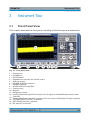
Front Panel View
3.1.1.4
On-screen Keyboard
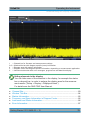
The on-screen keyboard is an additional means of interacting with the instrument
without having to connect an external keyboard.
The on-screen keyboard display can be switched on and off as desired using the
"On-Screen Keyboard" function key beneath the screen.
When you press this key, the display switches between the following options:
● Keyboard displayed at the top of the screen
● Keyboard displayed at the bottom of the screen
● No keyboard displayed
You can use the TAB key on the on-screen keyboard to move the focus
from one field to another in dialog boxes.
3.1.2
POWER Key
The POWER key is located on the lower left corner of the front panel. It starts up
and shuts down the instrument.
See also chapter 2.1.5, "Switching the Instrument On and Off", on page 15.
3.1.3
SYSTEM Keys
SYSTEM keys set the instrument to a predefined state, change basic settings,
and provide print and display functions.
Getting Started 1312.9420.02 ─ 15
40