1
MAC 2000 Wash Service Manual
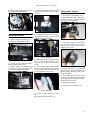
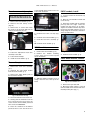
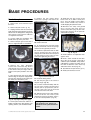
CMYC belts and flags,
replace
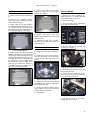
6 If you need to remove the bottom
set of filters (magenta or CTC), first
remove the idle rail for the top filters.
T h e n r e p ea t s t e p s 3 , 4 , a n d 5 t o
remove the bottom filters.
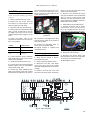
7 If replacing the belt or filters, unlock
and remove the belt clamp from each
slide. Remove the belt.
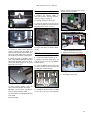
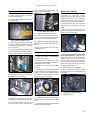
ule with the X filter on top. Skip to step
13.
X
Y
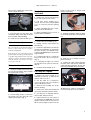
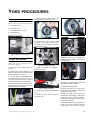
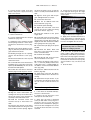
Fig. 71 X filter on top
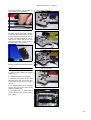
Fig. 67 Remove clamp from slide
Fig. 64 Color flag order
1 Remove and separate the CMYC
module. (p. 11)
2 Place the module half that needs
servicing on a clean surface with the filters up.
3 Starting with the top set of filters
(cyan or yellow), release tension and lift
the belt off the pulleys.
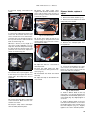
8 Clean the rails and lubricate with a
drop of high viscosity silicone oil.
9 Slide the flags onto the rail with the
coated (text true) sides facing each
other.
10 Magenta and CTC only: Clamp
the belt to the inside slot of the Y slide.
Lay the flag pair one the rails with the Y
filter on top. Skip to step 12.
4 Gently pry the drive rail out of its clip
on one end. Pull the rail lengthwise out
of the other clip.
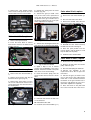
Fig. 70 Clamp to inside of X slide
12 Install the idle rail for the top flag
set.
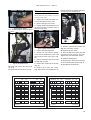
13 Arrange the belt and make sure the
ends are outside the rail clips. Center
the rail on the clips and snap it into the
clips on each end. Work the belt onto
the pulleys.
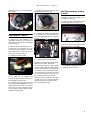
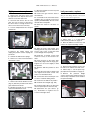
14 Set the filters an equal distance
from the clip using any convenient
spacer.
Fig. 68 Clamp belt to inside of Y slide
Fig. 65 Gently pry out drive rail
X
Y
5 Lift the drive rail, filters, and belt out
of the assembly.
Fig. 69 Y filter on top
11 Cyan and yellow only: Clamp
the belt to the i n s i d e slot of the X
slide. Position the flag pair in the modFig. 72 Equal distance
Fig. 66 Remove flags, rail, & belt
12