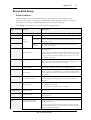
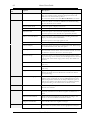
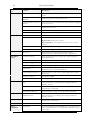
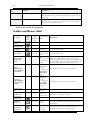
1
Norav Users Guide 0473 ii Norav Users Guide Norav Users Guide For Models: S, M, HR, W and Blue-ECG software versions: 5.34 Copyright © Norav, November 10. All rights reserved. Document Number: NV-54/PCECG1200 No part of this publication may be reproduced in any material form (including photocopying or storing it in any medium by electronic means whether or not transiently or incidentally to some other use of this publication) without the prior written permission of the copyright owner, or under the terms of a license issued by the copyright owner. The information contained in this document is subject to change without notice. Norav is neither responsible for nor liable to anyone in connection with this document. Contact Information: Norav Medical Kreuzberger Ring 23, 65205 Wiesbaden, Germany Tel: +49-611-7788345, Fax: +49-611-7788330 Email: [email protected] Standards Compliance The interference generated by the device was tested according to the EMC 89/336/EEC and found compliant with the standard. The software complies with Standards for Analysis of Ventricular Late Potentials Using High Resolution or Signal Averaged Electrocardiography, published in 1991 by the Task Force Committee of the European Society of Cardiology, the American Heart Association, and the American College of Cardiology. The PC-ECG conforms to MDD 93/42 EEC Annex V, EC11 and EN 60601-2. MDD authorized representative in Europe is: Norav Medical GmbH Kreuzberger Ring 23, 65205 Wiesbaden, Germany Tel: +49-611-7788345, Fax: +49-611-7788330 Email: [email protected] ! Cau t io n US Federal Law restricts this device to sale by, or on the order of, a physician iii The PC-ECG 1200 is tested and certified for the following standards: EN60601/1: International EN60601/2/25: International EN60601/2/27: International Protection type and class: Model M – II BF, Model S – II CF Defibrillation protection: Built in for Models 1200M, 1200HR, 1200W, BlueECG and 1200S. Disclaimer This system is intended as a decision support system for persons who have received appropriate medical training, and should not be used as a sole basis for making clinical decisions pertaining to patient diagnosis, care, or management. Any application of medical information from the program, other than the original design or intended use thereof, is not advised and considered a misuse of the software product. Norav Limited Warranty Norav products are warranted to be free from manufacturing and material defects for a period of one (1) year from the date of shipment from Norav or the dealer to the original purchaser. Excluded from this warranty are expendable supply items including, but not limited to, electrodes, lead wires, patient cables, and batteries. This warranty does not apply to any product that Norav determines that it has been modified or damaged by the customer. Except for the express warranties stated above, Norav disclaims all warranties including implied warranties of merchantability and fitness. The stated express warranties are in lieu of all obligations or liabilities on the part of Norav for damages, including but not limited to, special, indirect, or consequential, arising out of or in connection with the use or performance of Norav products. Any action for breach of warranty shall be commenced within one (1) year of said breach or be forever barred. Any repairs made to the product that are not covered by the warranty shall be billed to the customer. For service or technical support contact your local supplier or Norav Medical. v Document History Version 060408 060708 Date 06/04/2008 06/07/08 100708 181110 241110 10/07/2008 18/11/2010 24/11/2010 Updates Norav Logo; Document history; RS232 controlled treadmill types; Stress – Add Dynamic ST function Updates Updates Changed by David David David David David vi Norav Users Guide Table of Contents CHAPTER 1: INTRODUCTION .......................................................................... 1 MANUAL ORGANIZATION .......................................................................................................... 1 DOCUMENT CONVENTIONS ....................................................................................................... 1 Notes and Cautions ..................................................................................................................... 1 Abbreviations and Acronyms ....................................................................................................... 2 Equipment Symbols..................................................................................................................... 2 CHAPTER 2: OVERVIEW .................................................................................... 3 PACKAGE CONTENTS .................................................................................................................. 3 PROGRAMS .................................................................................................................................... 4 PC-ECG MODELS ....................................................................................................................... 4 INDICATIONS FOR USE OF THE PC-ECG 1200 ....................................................................... 5 ECG Intended Use ..................................................................................................................... 5 Stress Testing Intended Use.......................................................................................................... 5 CONTRAINDICATIONS FOR USE AND ADVERSE EFFECTS ..................................................... 7 CHAPTER 3: SOFTWARE INSTALLATION ..................................................... 9 SYSTEM REQUIREMENTS AND PREREQUISITES ....................................................................... 9 Hardware .................................................................................................................................... 9 INSTALLING OR UPDATING THE PC SOFTWARE .................................................................. 10 To Install PC-ECG 1200 ........................................................................................................ 11 To Uninstall PC-ECG 1200 ................................................................................................... 12 To Free Disk Space and Ensure Smooth Operation ................................................................... 13 BACKING UP AND RESTORING SETUPS AND PROTOCOLS ................................................... 13 To Save Stress Test Setup .......................................................................................................... 14 To Load Stress Test Setup ......................................................................................................... 14 To Save Stress Protocols............................................................................................................. 14 To Load Stress Protocols ........................................................................................................... 15 To Set Preferences ...................................................................................................................... 15 CHAPTER 4: HARDWARE INSTALLATION................................................... 17 SAFETY ........................................................................................................................................ 17 CLASSIFICATION OF THE EQUIPMENT ..................................................................... 19 INSTALLING MODEL 1200S AND MODEL 1200M ................................................................. 20 To Connect Via USB ............................................................................................................... 23 To Verify the Connections ......................................................................................................... 23 To Perform Maintenance............................................................................................................ 24 Calibration ................................................................................................................................ 24 INSTALLING MODEL 1200HR .................................................................................................. 25 To Connect Via USB ............................................................................................................... 25 To Verify the Connections ......................................................................................................... 26 vii To Connect to the Patient and the Computer ..............................................................................26 To Verify the Connections ..........................................................................................................26 To Perform Maintenance ............................................................................................................26 Calibration ................................................................................................................................26 INSTALLING MODEL 1200W .....................................................................................................27 To Connect Via USB................................................................................................................29 To Verify the Connections ..........................................................................................................30 To Perform Maintenance ............................................................................................................30 Calibration ................................................................................................................................30 INSTALLING MODEL BLUE ECG .............................................................................................31 To install the Blue ECG device ..................................................................................................32 CONNECTING AN EXERCISE DEVICE ......................................................................................33 To Connect an RS232 Controlled Treadmill/Ergometer ............................................................33 To Connect an Analog Controlled Treadmill/Ergometer ............................................................33 Cabling ......................................................................................................................................33 To Determine Treadmill Cabling ................................................................................................33 CHAPTER 5: ACCESSORIES INSTALLATION............................................... 35 INSTALLATION OF THE TANGO AUTOMATIC BP UNIT .....................................................35 CHAPTER 6: PATIENT PREPARATION ......................................................... 39 CHAPTER 7: RESTING ECG ............................................................................. 41 QUICK START ..............................................................................................................................42 To Perform a New Test ..............................................................................................................42 Operation with Function Keys.....................................................................................................42 RESTING 12 LEAD ECG ............................................................................................................42 LEADS PLACEMENT ....................................................................................................................42 To Define the Lead System.........................................................................................................43 TOOLBAR OVERVIEW ................................................................................................................43 The Toolbar (Easy Toolbars Mode)............................................................................................43 RESTING ECG SETUP ................................................................................................................44 TOOLBAR AND MENUS ..............................................................................................................48 USING THE MATLAB FEATURE WITHIN PC-ECG 1200 ........................................................53 Example of ECG Display with MATLAB .............................................................................53 CHAPTER 1: STRESS ECG................................................................................. 55 To Customize the Display ..........................................................................................................55 To Lock Screen Window Borders ...............................................................................................55 QUICK START ..............................................................................................................................56 To Perform a New Test ..............................................................................................................56 To Print an ECG .....................................................................................................................56 To Print a Report ......................................................................................................................56 LEADS PLACEMENT ....................................................................................................................57 To Define the Lead System.........................................................................................................57 OPERATION WITH FUNCTION KEYS ........................................................................................57 viii Norav Users Guide TOOLBAR OVERVIEW ................................................................................................................ 58 Main Toolbar (Easy Toolbars Mode) ........................................................................................ 58 Stress Test Commands ............................................................................................................... 58 Views and Filters Toolbar ......................................................................................................... 59 Average Viewer Toolbar............................................................................................................ 59 Post Processing Options Toolbar ................................................................................................ 60 STRESS ECG SETUP ................................................................................................................... 61 TOOLBAR AND MENUS: MAIN ................................................................................................. 66 TOOLBAR AND MENUS: STRESS TEST COMMANDS ............................................................... 68 TOOLBAR AND MENUS: AVERAGE VIEWER........................................................................... 69 TOOLBAR AND MENUS: POST PROCESSING ........................................................................... 69 To Start the Stress Recording Program ....................................................................................... 70 To Start a New Test ................................................................................................................. 70 Play Back display ...................................................................................................................... 71 Recovery Phase........................................................................................................................... 72 VIEWING RESULTS ..................................................................................................................... 72 To View Study Results.............................................................................................................. 72 To Display the Review Screen Automatically.............................................................................. 72 To Display the Review Screen Manually .................................................................................... 72 To Save Study Results ............................................................................................................... 73 METABOLIC STRESS ESTIMATION (METS) ............................................................................ 74 TRANSFER FILE “TRNSF.TXT” .................................................................................................. 74 To Transfer a File ..................................................................................................................... 74 EXPORT THE EXERCISE PROTOCOL REAL TIME VALUES. ..................................................... 74 To enable the exercise protocol export file feature ......................................................................... 75 ADDITIONAL FEATURES ........................................................................................................... 77 To Define Max. HR................................................................................................................. 77 To Define Worst ST ................................................................................................................. 77 A Dynamic ST function ............................................................................................................ 77 RS232 CONTROLLED TREADMILL TYPES .............................................................................. 78 RS232 CONTROLLED BICYCLE ERGOMETERS....................................................................... 79 CHAPTER 2: LATE POTENTIAL SIGNAL AVERAGING .............................. 81 QUICK START ............................................................................................................................. 82 To Start a New Test ................................................................................................................. 82 To Print .................................................................................................................................... 82 OPERATION WITH FUNCTION KEYS ....................................................................................... 83 LEADS .......................................................................................................................................... 83 LP SIGNAL AVERAGING SETUP ............................................................................................... 84 TOOLBAR AND MENUS.............................................................................................................. 86 INTERPRETING RESULTS........................................................................................................... 88 Numerical Results ..................................................................................................................... 89 CHAPTER 3: MONITORING ............................................................................. 91 QUICK START ............................................................................................................................. 92 ix To Start a New Test ..................................................................................................................92 To Print .....................................................................................................................................92 Print Study (print a selected time range and leads) .......................................................................92 MONITORING ECG SETUP .......................................................................................................92 TOOLBAR AND MENUS ..............................................................................................................96 CHAPTER 4: HEART RATE VARIABILITY (HRV) ........................................ 99 QUICK START ........................................................................................................................... 100 To Start a New Test ............................................................................................................... 100 To Print an HRV Report ...................................................................................................... 100 To Print an ECG .................................................................................................................. 101 HRV SETUP .............................................................................................................................. 101 STARTING A STUDY ................................................................................................................. 103 To Add or Subtract an Interval ............................................................................................... 103 To Edit Interval Names.......................................................................................................... 103 To Import or Save GDT/BDT Format ................................................................................. 103 RESULTS DISPLAY .................................................................................................................... 104 HRV INTERVAL MEASUREMENT .......................................................................................... 104 CHAPTER 5: MEASUREMENTS/ INTERPRETATION (MEANS) ............105 QUICK START ........................................................................................................................... 106 To Start Measurements ........................................................................................................... 106 To Print Reports ..................................................................................................................... 106 PERFORMING CHANGES IN CALCULATIONS ....................................................................... 106 To Move the QRS Marker ..................................................................................................... 106 To Add or Remove a Wave Marker........................................................................................ 106 To Move the Wave Marker ..................................................................................................... 107 FEATURES ................................................................................................................................. 107 To View the Measurements on a QRS .................................................................................... 107 To View the Measurements on a Channel ............................................................................... 107 To View the Measurements on All Channels for QT............................................................... 107 TABULAR SCREEN .................................................................................................................... 107 AVERAGES DISPLAY ................................................................................................................ 108 QRS DISPLAY ........................................................................................................................... 109 TOOLBAR OF AVERAGES/QRS DISPLAYS ........................................................................... 110 CALIPER DISPLAY .................................................................................................................... 111 Toolbar of Caliper Display ...................................................................................................... 111 TOOLBAR AND MENUS ........................................................................................................... 112 CHAPTER 6: NEMS APPLICATION ............................................................... 115 First Time Use ....................................................................................................................... 116 COMPARING REST TESTS........................................................................................................ 117 To Compare Rest Tests ........................................................................................................... 117 NEMS SETUP ........................................................................................................................... 118 TOOLBAR AND MENUS ........................................................................................................... 118 x Norav Users Guide APPENDIX A: INTERFACING WITH INFORMATION SYSTEMS .............. 121 DEMOGRAPHIC DATA ............................................................................................................. 121 HL7 FORMAT FILE .................................................................................................................. 123 GDT/BDT TYPE COMMUNICATION ................................................................................... 125 DICOM COMMUNICATION.................................................................................................... 126 SAVING THE STRESS TEST AS A RAW DATA (“NATIVE BINARY”) FORMAT FILE ........... 128 SAVING THE MONITOR TEST AS A RAW DATA (“NATIVE BINARY”) FORMAT FILE ...... 129 APPENDIX B: TECHNICAL SPECIFICATIONS ............................................. 130 APPENDIX C: REPORT SAMPLES.................................................................... 132 APPENDIX D: TROUBLESHOOTING.............................................................. 137 USB DRIVER IS NOT INSTALLED PROPERLY ON WINDOWS XP DURING PC-ECG INSTALLATION ......................................................................................................................... 137 Problem ................................................................................................................................... 137 Solution ................................................................................................................................... 137 RECOVERING ECG DATA AFTER UNEXPECTED SHUTDOWN OF THE STRESS APPLICATION ............................................................................................................................ 138 Problem ................................................................................................................................... 138 Solution ................................................................................................................................... 138 WORKING IN AUTOSAVE MODE WITHOUT SAVING MODIFICATIONS ........................... 138 A THICK STRAIGHT LINE IS DISPLAYED FOR ALL LEADS................................................. 139 Problem ................................................................................................................................... 139 Solution ................................................................................................................................... 139 NOISY ECG SIGNAL ON LEADS ............................................................................................ 139 Problem ................................................................................................................................... 139 Solution ................................................................................................................................... 139 MISSING DATA AFTER A THICK LINE ..................................................................................... 140 Problem ................................................................................................................................... 140 Solution ................................................................................................................................... 140 xi List of Figures FIGURE 1: SAVING STRESS SETUP ................................................................................... 14 FIGURE 2: PC-ECG 1200S / PCECG 1200M.................................................................. 20 FIGURE 3: PATIENT CABLE ............................................................................................. 21 FIGURE 4: USB CABLE ................................................................................................... 22 FIGURE 5: PC-ECG 1200HR (WITH BUILT-IN USB CABLE) ............................................ 25 FIGURE 6: PC-ECG 1200W ............................................................................................ 27 FIGURE 7: USB CABLE ................................................................................................... 28 FIGURE 8: 1200 WR RECEIVER ....................................................................................... 30 FIGURE 9: PC-ECG 1200 BLUE ECG ............................................................................. 31 FIGURE 10: ELECTRODE PLACEMENT ............................................................................. 39 FIGURE 11: RESTING ECG MAIN SCREEN ....................................................................... 41 FIGURE 12: RESTING ECG TOOLBAR .............................................................................. 43 FIGURE 13: STRESS ECG RESULTS SCREEN .................................................................... 55 FIGURE 14: MAIN STRESS TOOLBAR ............................................................................... 58 FIGURE 15: STRESS TEST COMMANDS TOOLBAR ............................................................ 58 FIGURE 16: STRESS ECG VIEWS AND FILTERS TOOLBAR ............................................... 59 FIGURE 17: STRESS ECG POST PROCESSING DISPLAY TOOLBAR.................................... 59 FIGURE 18: STRESS ECG PLAYBACK TOOLBAR .............................................................. 60 FIGURE 19: CHANGE TEST PROTOCOL ............................................................................ 70 FIGURE 20: PATIENT DATA ENTRY ................................................................................. 70 FIGURE 21: PLAY BACK WINDOW .................................................................................. 71 FIGURE 22: CAREFUSION LAB5 CPET SETTINGS .......................................................... 76 FIGURE 23: LATE POTENTIAL SIGNAL AVERAGING SCREEN ........................................... 81 FIGURE 24: LP SIGNAL AVERAGING REVIEW SCREEN .................................................... 88 FIGURE 25: MONITORING SCREEN .................................................................................. 91 FIGURE 26: HRV RESULTS ........................................................................................... 104 FIGURE 27: MEASUREMENTS—TABULAR SCREEN ....................................................... 105 FIGURE 28: MEASUREMENTS—AVERAGES DISPLAY .................................................... 108 FIGURE 29: MEASUREMENTS—QRS DISPLAY .............................................................. 109 FIGURE 30: TOOLBAR OF AVERAGES/QRS ................................................................... 110 FIGURE 31: MEASUREMENTS—CALIPER ...................................................................... 111 FIGURE 32: TOOLBAR OF CALIPER ................................................................................ 111 FIGURE 33: DATABASE MAIN SCREEN .......................................................................... 115 FIGURE 34: DATABASE PATIENT QUERY ...................................................................... 116 FIGURE 35: DATABASE PROPERTIES OF SELECTED TEST ............................................... 117 FIGURE 36: EXTERNAL PATIENT LIST ........................................................................... 126 FIGURE 37: REST REPORT ............................................................................................. 132 FIGURE 38: STRESS APPLICATIONS - COMPREHENSIVE REPORT.................................... 133 FIGURE 39: ECG MONITORING REPORT ....................................................................... 134 FIGURE 40: HEART RATE VARIABILITY REPORT .......................................................... 135 FIGURE 41: LATE POTENTIAL REPORT .......................................................................... 136 xii Norav Users Guide List of Tables TABLE 1: MINIMUM COMPUTER CONFIGURATION ............................................................. 9 TABLE 2: PRINTERS INSTALLATION REQUIREMENTS ....................................................... 10 TABLE 3: PROGRAM ICONS .............................................................................................. 11 TABLE 4: OPERATION WITH FUNCTION KEYS .................................................................. 42 TABLE 5: RESTING ECG SETUP OPTIONS ........................................................................ 48 TABLE 6: RECORDING RESTING ECG .............................................................................. 52 TABLE 7: STRESS FUNCTION KEYS .................................................................................. 57 TABLE 8: STRESS ECG SETUP OPTIONS .......................................................................... 66 TABLE 9: MAIN STRESS TOOLBAR AND MENUS .............................................................. 67 TABLE 10: STRESS TEST COMMANDS .............................................................................. 68 TABLE 11: AVERAGE VIEWER TOOLBAR ......................................................................... 69 TABLE 12: POST PROCESSING TOOLBAR AND MENUS ..................................................... 70 TABLE 13: TRANSFER FILE FORMAT................................................................................ 74 TABLE 14: CONTROLLED TREADMILLS ............................................................................ 78 TABLE 15: CONTROLLED ERGOMETERS........................................................................... 79 TABLE 16: LP SIGNAL AVERAGING FUNCTION KEYS ...................................................... 83 TABLE 17: LP SIGNAL AVERAGING LEADS PLACEMENT ................................................. 83 TABLE 18: LP SIGNAL AVERAGING SETUP ...................................................................... 85 TABLE 19: LP SIGNAL AVERAGING TOOLBAR AND MENUS ............................................ 87 TABLE 20: LP SIGNAL AVERAGING NUMERICAL RESULTS.............................................. 89 TABLE 21: MONITORING SETUP OPTIONS ........................................................................ 95 TABLE 22: MONITORING TOOLBAR AND MENUS ............................................................. 97 TABLE 23: HRV SCREEN ............................................................................................... 100 TABLE 24: MEASUREMENTS TOOLBAR AND MENUS ..................................................... 114 TABLE 25: DATABASE SETUP OPTIONS ......................................................................... 118 TABLE 26: DATABASE TOOLBAR AND MENUS ............................................................... 120 TABLE 27: STRESS RAW DATA FILE FORMAT................................................................ 128 TABLE 28: MONITOR RAW DATA FILE FORMAT ............................................................. 129 Introduction 1 CHAPTER 1: INTRODUCTION Manual Organization This manual explains in detail how to install and use the PC-ECG 1200. At the beginning of each application chapter, there is a Quick Start section, which is a brief explanation of how to carry out a study, including the keyboard short-cuts for the main functions. If you are familiar with ECG procedures, you can use this Quick Start section to get up and running quickly. The software must be installed before the hardware. See Software Installation, page 9 and Hardware Installation, page 17. Document Conventions Notes and Cautions Pay particular attention at specific points in a procedure when one of the following messages appears: Warnings call attention to possible hazards involving potential damage or injury to persons. W A RN ING ! Cautions refer to practices necessary to protect against potential damage or loss to equipment. Pay careful attention to instructions. Cau t io n No te Notes provide pertinent information to help obtain optimum performance from the software or signify an important step or procedure that requires special attention. NV-54/PCECG1200 Norav Users Guide 2 Abbreviations and Acronyms Abbreviation Meaning BP Blood pressure ECG Electrocardiogram Database Database application HRV Heart Rate Variability ID Identification LP Late Potential LQTS Long QT Syndrome METS Metabolic Stress Estimation SN Serial Number USB Universal Serial Bus Equipment Symbols Symbol Description Type BF equipment Type CF equipment Class II equipment Complies with the Medical Device Directive of the European Union Non-ionizing radiation. Norav Medical Overview CHAPTER 2: OVERVIEW Package Contents The PC-ECG 1200 package contains the following elements: • Acquisition box • Patient cable • Data cable combined with power supply or USB cable • Software CD with the PC-ECG 1200 installation package, including: ◊ Rest ◊ Measurements and Interpretation (MEANS) ◊ Stress ◊ Monitor ◊ HRV ◊ LP ◊ Database • Software key (if optional software is included) • One of the following devices: ◊ PC-ECG 1200S (page 20) ◊ PC-ECG 1200M (page Error! Bookmark not defined.) ◊ PC-ECG 1200HR (page 25) ◊ PC-ECG 1200W (page 27) ◊ Blue-ECG (page 31 ) NV-54/PCECG1200 3 Norav Users Guide 4 Programs Each program has a specific purpose. The following is a brief description of when to use each one: Rest Records and measures short ECG tests on patients in resting position (up to 10 seconds) Records and measures ECG tests on patients under stress conditions using a predefined test protocol. The stress test includes 3 basic stages: • Rest Stress • Stress • Recovery Each stage may be divided into more than one phase according to the testing protocol used. Monitor Works with an ECG device to record, monitor and save a prolonged ECG test in rest condition HRV Tests according to time how patient pulse and heart rate varies with load, medication, etc. LP Predicts tendency to ventricular tachycardia Database ECG Database Management System. Manages patients and ECG tests details. PC-ECG Models 1200 S Record ECG test during stress condition (stationed on table) 1200 M Record ECG test at rest condition 1200 HR Portable device to record ECG during stress condition (attached to patient’s body) 1200 W Wireless RF ECG Recording test during stress and rest condition (attached to patient’s body) Blue-ECG Wireless Bluetooth ECG Recording test during rest condition (attached to patient’s body) Norav Medical Overview 5 Indications for Use of the PC-ECG 1200 ECG Intended Use ECG is intended to disclose either normal condition or patterns of arrhythmia, myocardial ischemia, rate abnormalities, or features of prognostic value in the following cases: ◊ Patients with suspected cardiac abnormalities ◊ Populations of patients at an age or period in which a routine baseline evaluation of ECG characteristics is desired. QT Analysis is useful in the assessment of long QT syndrome (LQTS). In some instances, LQTS can be corrected by pharmacological therapy. QT analysis is also used to measure QT dispersion, the difference between maximal and minimal QT values. QT dispersion is a measure of the in homogeneity of ventricular repolarization. The PC ECG 1200 has been tested to measure Heart Rate Variability to within 1 millisecond tolerance. The clinical significance of Heart Rate Variability measures should be determined by a physician. The PC ECG 1200 has been tested to measure Late Potential to a tolerance of within 1 millisecond, and 1 microvolt. The clinical significance of Late Potential measures should be determined by a physician. Stress Testing Intended Use Angina pectoris (chest pain) is a clinical syndrome resulting from myocardial ischemia, indicative of reduced blood supply to the cardiac muscle. The electrocardiogram may establish the diagnosis of ischemic heart disease if characteristic changes are present. Stress testing is the most widely used method to decide whether this chest pain is related to myocardial ischemia, and thus to coronary artery disease. In stress testing, the contractile capability of the heart muscle is monitored via ECG during patient exercise. Patients exercise by bicycle, treadmill, or other means, while the ECG is monitored continuously. Exercise loads are determined by predefined protocols. The ECG signals are recorded for the resting, exercise, and recovery phase portions of the exercise protocol. The changes in ECG waveforms are compared to the resting ECG records. Most of the commercial stress test systems control the bicycle or treadmill automatically according to the requirements of the chosen protocol, although this is not essential. ST segment monitoring is intended as an aid in the evaluation of myocardial ischemia in patients with known or suspected coronary artery disease. The ST segment algorithm has been tested for accuracy of the ST segment data, and a database is used as a tool for performance testing. NV-54/PCECG1200 6 Norav Users Guide The significance of the ST segment changes must be determined by a physician. Norav Medical Overview Contraindications for Use and Adverse Effects The device has no contraindications or adverse events. NV-54/PCECG1200 7 Software Installation CHAPTER 3: SOFTWARE INSTALLATION System Requirements and Prerequisites Hardware Stress application with real-time printout is resource intensive. No te No te To optimize performance, we recommend that you disable “Start Up” programs to free system resources. For instructions, see Windows help. The PC should not be set up to work under saving power conditions. Do not enable PC sleep mode (standby), hibernate, or turning off the hard disk while running an ECG test. PC Minimum Configuration Application CPU Speed (MHz) RAM Memory (MB) Disk Space (GB) Number of Free RS232 or USB Ports Rest 100 32 2 1 Monitoring Application 200 32 4 1 LP 450 128 2 1 HRV 450 128 2 1 Database 200 64 8 1 Stress 1000 128 20 2 Stress + R trigger 1300 128 20 2 Stress + Blood pressure monitor 1500 128 20 3 Table 1: Minimum Computer Configuration NV-54/PCECG1200 9 Norav Users Guide 10 Installing Printers Application Technology RAM Memory (MB) Driver Rest LASER/INK 2 Vendor / MS Monitoring Application LASER/INK 2 Vendor / MS LP LASER/INK 2 Vendor / MS HRV LASER/INK 2 Vendor / MS Database LASER/INK 2 Vendor / MS Stress Fast LASER 8 MS Table 2: Printers Installation Requirements Installing the Thermal Printer Use a 4 inch or 8 inch thermal printer. The thermal printer driver is installed separately from the PC-ECG 1200 program. A thermal printer can be supplied by Norav (MP200, 8 inch). This printer requires the purchase of a dongle with P1 license permission. The MP200 driver is available on the PC-ECG 1200 CD at the following path: "<CD>:\MP200\OEMPRINT.inf". Installing or Updating The PC Software Install the software before installing the hardware. If the device is connected to the PC, disconnect the device before installing the software. No te: The software package works under Windows XP, VISTA, Windows 7 OS. Norav Medical Software Installation 11 To Install PC-ECG 1200 1. Insert the CD in the drive. The installation program starts automatically. Follow the instructions on-screen.0. After you have completed installation, a group icon called PC-ECG 1200 is added to the desktop. Double-click the group icon to display the following program icons: Icons are displayed only for those programs for which you have purchased the license No te: Icon Explanation Heart Rate Variability Late Potential Signal Averaging Monitoring Resting ECG Stress Test Database application Table 3: Program Icons Resting ECG is the basic software package. It does not require a software key. The following are optional and require software keys: ◊ Measurement and interpretation functions for Resting ECG NV-54/PCECG1200 Norav Users Guide 12 ◊ ECG Database ◊ Heart Rate Variability ◊ Late Potential ◊ Monitoring ◊ Stress Test You can activate optional packages that have no key by selecting Simulator in Setup (see Simulator ECG, Page 44). If you have purchased the S2 remote viewing, install the Remote View program from the Remote View directory on the CD. This program enables a remote viewer for an ECG study. The image is displayed in JPEG format. No te Only one HASP key/dongle per computer is possible. If you already have a HASP key/dongle with a Norav option and would like to add an additional option/s it will need to be added to your present key. When requesting an additional software option, kindly inform your local supplier that you already have a HASP key/dongle, its serial number and the option codes. To find this information go to Help-About and copy HASP ID Number and Permissions. To Uninstall PC-ECG 1200 New Version Replacing Old Version There is no need to remove the previous installation. The existing setup will remain for the new version. If the new software version does not operate properly, remove the old installation (see Old Version Replacing New Version, below) and then remove the old existing setup as follows: Start Run Type regedit OK Choose HKEY_CURRENT_USER Software NORAV MEDICAL Edit Delete Old Version Replacing New Version Uninstall the existing version as follows: My Computer Control Panel Add/Remove Programs PC-ECG 1200 Add/Remove OK Norav Medical Software Installation 13 To Free Disk Space and Ensure Smooth Operation Windows provides utilities to delete superfluous files, and to defragment the disk. Refer to Windows help for instructions on using Disk Cleanup and Defragment. Backing up and Restoring Setups and Protocols When you reinstall or upgrade PC-ECG 1200, the program overwrites your existing configurations and protocols. To save the configuration data for stress application, follow these procedures: NV-54/PCECG1200 Norav Users Guide 14 To Save Stress Test Setup Start Stress ECG. Click View\Save Setup (see Figure 1). Figure 1: Saving Stress Setup Name the file. Provide a location in which to save the file and Click OK. To Load Stress Test Setup 1. Start Stress ECG. Click View\Load Setup. Click Browse and find the location in which the file is saved. Select the file (with the name you gave it and the suffix ‘STF’) and click OK. To Save Stress Protocols 1. Create a new directory in C:\My Documents, with a name like PcBackup. Copy file StWorked.mdb from the directory where PC-ECG is installed (normally C:\Program Files\PC-ECG). Paste it into a backup directory (e.g., C:\My Documents\PcBackup). Norav Medical Software Installation 15 To Load Stress Protocols 1. Copy the file StWorked.mdb from the directory where you saved it (e.g., C:\My Documents\PcBackup). Paste it into the directory where PC-ECG is installed (normally C:\Program Files\PC-ECG). A window is displayed, asking you if you would like to replace the existing file. Click Yes. To Set Preferences 1. After installing the PC-ECG 1200 package, and prior to operation, click Setup to tailor your preferences. Begin with Environment, which configures the hardware. Continue with the other tabs in any order. NV-54/PCECG1200 Hardware Installation CHAPTER 4: 17 HARDWARE INSTALLATION Safety The PC-ECG 1200 uses mains power supply (unless connected via the USB port). It is also sensitive to electrical interference. The wireless PC-ECG 1200W transmitter uses battery power supply. PCECG1200WR receiver uses Power supply via USB port. It is also sensitive to electrical interference. The wireless Blue-ECG uses battery power supply. It is also sensitive to electrical interference. W A RN ING The PC-ECG 1200 controls exercise machines. To prevent possible injury, read this page carefully prior to installing the device. • A patient undergoing a test must be at a distance of at least: 1.5 meters from the computer, printer and other peripherals, and 2.5 meters from the ceiling. • If such conditions cannot be fulfilled, the entire system needs to be connected to the A/C power supply through an Isolation transformer meeting the EN60601/1 standard. • Use only the original data cable/power adaptor assembly. • Use only the recommended battery type as instructed in the technical specifications to operate the PCECG1200W (4 - AA alkaline or NIMH rechargeable) or for Blue-ECG (2 batteries). • Do not use batteries with expired dates. • Remove batteries form the unit (PCECG1200W/Blue-ECG) when it is not in use. • Any treadmill used with the PC-ECG 1200 must contain a manual control in order to allow the user to stop the operation of the treadmill in case of emergency. • In the event of apparent changes in the performance of the device, discontinue use immediately. Do not resume use until the device is approved by the manufacturer or by a representative of the manufacturer. NV-54/PCECG1200 Norav Users Guide 18 • If audio is playing on the PC, the ECG shows interference. Do not run an audio CD on the PC while running an ECG test via the USB connection. • Defibrillation protection is built in for Models W, M, HR, S and BlueECG. • Operate the unit only at clinics and hospitals. Do not use at home. • Operation only by trained medical staff. This device complies with Part 15 of the FCC Rules. Operation is subject to the following two conditions: (1) This device may not cause harmful interference and (2) This device must accept any interference received, including interference that may cause undesired operation. No te The manufacturer is not responsible for any Radio or TV interference caused by unauthorized modifications to this equipment. Such modifications could void the user’s authority to operate the equipment. Install hardware only after software installation. No te Norav Medical Hardware Installation 19 CLASSIFICATION OF THE EQUIPMENT o According to the type of protection against electric shock: INTERNALLY POWERED EQUIPMENT o According to the degree of protection against electric shock: TYPE CF APPLIED PART o According to the degree of protection against ingress of water: ORDINARY EQUIPMENT o According to the degree of safety of application in the presence of a flammable anaesthetic mixture with air or with oxygen or nitrous oxide: EQUIPMENT NOT SUITABLE FOR USE IN THE PRESENCE OF A FLAMMABLE ANAESTHETIC MIXTURE WITH AIR OR WITH OXYGEN OR NITROUS OXIDE. o According to the mode of operation: CONTINUOUS OPERATION NV-54/PCECG1200 Norav Users Guide 20 Installing Model 1200S and Model 1200M The PC-ECG 1200S or PCECG 1200M kit contains the following items: ◊ Acquisition box (see Figure 2, below) ◊ Patient cable (see Figure 3, page 21) ◊ USB cable (see Figure 4, Page 22) ◊ Software CD of PC-ECG 1200 installation package. ◊ Software key (if optional software is included) 1 2 3 Figure 2: PC-ECG 1200S / PCECG 1200M Norav Medical Hardware Installation Clip connections 8 Banana type connections Press-stud type connections Figure 3: Patient Cable NV-54/PCECG1200 21 Norav Users Guide 22 1 2 Figure 4: USB Cable Norav Medical Hardware Installation 23 To Connect Via USB ! Make sure the device is switched off Cautions refer to practices necessary to protect against potential damage or loss to equipment. Cau t io n 1. Connect the A-type connector of the USB cable (Figure 4, Page 22, detail 1) to the PC. 2. Connect the B-type connector of the USB cable (Figure 4, Page 22, detail 2) to the input of the 1200 S unit (Figure 2, Page 20. detail 1). A wizard for installing new hardware driver appears. Follow the instructions. If working under Windows XP press “Continue anyway” on message regarding the digital signature. After the driver is installed make sure the green light is illuminated on the 1200 S unit (Figure 2, detail 3). Verify that the ON light is illuminated (Figure 2, detail 3). Connect the patient cable (Figure 3, Page 21, detail 8) to the 15-pin plug of the PC-ECG 1200S (Figure 2, page 20, detail 1). If the optional software key is included, connect it to the parallel port of the computer or USB (if of such type). If a printer is connected, plug the printer cable into the key. To Verify the Connections 1. Run REST application. 2. Press F1 for a new test. 3. Insert patient details in the dialog and then press OK. 4. Verify that traces are acquired and displayed on the screen. NV-54/PCECG1200 Norav Users Guide 24 To Perform Maintenance ! The device is not waterproof. Do not expose the device to water or any kind of liquid. Maintain in a dry place. Cau t io n Use alcohol pads to clean the device of moisture and hairs. Calibration The device does not need any calibration. Norav Medical Hardware Installation 25 Installing Model 1200HR The PC-ECG 1200HR kit contains the following items: ◊ Acquisition box (see Figure 5, below) ◊ Patient leads ◊ Built-in USB cable (see Figure 5, below) ◊ Software CD of PC-ECG 1200 installation package. ◊ Software key (if optional software is included) 2 4 1 3 Figure 5: PC-ECG 1200HR (with built-in USB cable) To Connect Via USB ! Make sure the device is switched off Cautions refer to practices necessary to protect against potential damage or loss to equipment. Cau t io n 1. Connect the USB A-type connector of the USB cable (Figure 5, Page 25, detail 3) to the PC. 2. A wizard for installing new hardware driver appears. Follow the instructions. If working under Windows XP press “Continue anyway” on message regarding the digital signature (each time it appears). After the driver is installed make sure the green light is illuminated on the 1200 HR (Figure 5, Page 25, detail 4) NV-54/PCECG1200 Norav Users Guide 26 3. Connect the patient cable (Figure 3, page 21, detail 8) to the 15pin plug of the PC-ECG 1200HR (Figure 5, Page 25, detail 2). To Verify the Connections 1. Run REST application. 2. Press F1 for a new test. 3. Insert patient details in the dialog and then press OK. 4. Verify that traces are acquired and displayed on the screen. To Connect to the Patient and the Computer 1. Verify that the indication LED is on. 2. Connect the electrode leads to the electrodes, starting with RL. 3. If the optional software key is included, connect it to the parallel port of the computer. 4. If a printer is connected, plug the printer cable into the key. To Verify the Connections 1. Connect the PC-ECG 1200 to the patient. 2. Connect the electrode leads to the electrodes, starting with RL. 3. Verify that an ECG is acquired and displayed on the screen. To Perform Maintenance ! The device is not waterproof. Do not expose the device to water or any kind of liquid. Maintain in a dry place. Cau t io n Use alcohol pads to clean the device of moisture and hairs. Calibration No calibration is required. Norav Medical Hardware Installation 27 Installing Model 1200W The PC-ECG 1200W kit contains the following items: ◊ Acquisition box (see Figure 6, below) ◊ Patient leads ◊ USB cable (see Figure 7, page 28) ◊ Antenna ◊ 1200 WR receiver (see Figure 8, page 30) ◊ Software CD of PC-ECG 1200 installation package. ◊ Software key (if optional software is included) 2 4 3 Figure 6: PC-ECG 1200W 1 NV-54/PCECG1200 Norav Users Guide 28 1 2 Figure 7: USB Cable Norav Medical Hardware Installation 29 To Connect Via USB ! Make sure the device is switched off Cautions refer to practices necessary to protect against potential damage or loss to equipment. Cau t io n 1. Connect Antenna (Figure 8, Page 30, detail 4) to the connector on 1200WR Receiver (Figure 8, Page 30, detail 2). 2. Connect the A-type connector of the USB cable (Figure 7, Page 28, detail 1) to the PC. 3. Connect the B-type connector of the USB cable (Figure 7, Page 28, detail 2) to the input of the 1200WR Receiver (Figure 8, Page 30, detail 1). 4. A wizard for installing new hardware driver appears. Follow the instructions. If working under Windows XP press “Continue anyway” on message regarding the digital signature (each time it appears). After the driver is installed make sure the green light is illuminated on the 1200 WR Receiver (Figure 8, Page 30, detail 3) 5. Insert 4 - AA alkaline or NIMH rechargeable batteries into the battery compartment of the PCECG1200W unit. 6. Switch on the PC-ECG 1200W (Figure 6, Page 27, detail 2) and verify that the ON light is illuminated Figure 6, Page 27, detail 3). 7. Connect the 10 patient leads according to the lables to the 10 connectors of the PC-ECG 1200W (Figure 6, Page 27, detail 1). 8. If the optional software key is included, connect it to the parallel port of the computer. 9. If a printer is connected via the parallel port, plug the printer cable into the key. The optional BNC output (Figure 8, Page 30, detail 5) is a trigger control for connecting to an external device, such as an ergometer or the Tango unit. NV-54/PCECG1200 Norav Users Guide 30 3 5 2 1 4 Figure 8: 1200 WR Receiver To Verify the Connections 10. Connect the PC-ECG 1200W to the patient. 11. Connect the electrode leads to the electrodes, starting with RL. 12. Verify that an ECG is acquired and displayed on the screen. To Perform Maintenance ! The device is not waterproof. Do not expose the device to water or any kind of liquid. Maintain in a dry place. Cau t io n 1. Use alcohol pads to clean the device of moisture and hairs. Calibration The device does not need any calibration. Norav Medical Hardware Installation Installing Model Blue ECG The PC-ECG 1200 Blue ECG kit contains the following items: ◊ Acquisition box ◊ Patient cable ◊ Two AA size alkaline batteries (optional) ◊ Bluetooth USB adaptor ◊ USB extension cable ◊ Software CD of PC-ECG 1200 installation package ◊ Software key (if optional software is included) Figure 9: PC-ECG 1200 Blue ECG NV-54/PCECG1200 31 Norav Users Guide 32 To install the Blue ECG device 1. If PC doesn’t have built-in Bluetooth device connect the Bluetooth adapter to computer’s USB port and check that it installed correctly. The Blue ECG is only compatible with Microsoft Bluetooth Stack communication software. No te Toshiba laptops and other computers having Toshiba Bluetooth Stack software are not compatible. Check that Bluetooth icon appears in system tray: Figure 10: Bluetooth Icon on system tray 2. Add the Blue ECG to Bluetooth devices list: a. Switch ON the Blue ECG device b. Double click on the Bluetooth icon in the system tray. c. On the Bluetooth Devices tab, click on the Add button. d. Check the “My device is setup and ready to be found” option and click on the Next button. e. When Windows will detect the Blue ECG device select it in a list then click on the Next button. f. On next panel select “Use the passkey found in the documentation”. Enter 12345 as the passkey and click on the Next button. g. Click Finish button to finalize registration. 3. Run the Resting ECG program, select Bluetooth option in setup ENVIRONMENT panel. 4. Close the Resting ECG program. 5. Connect the patient cable. 6. If the optional software key is included, connect it to USB port of the computer. Norav Medical Hardware Installation 33 Connecting an Exercise Device You can connect a treadmill or ergometer to the computer independently of the PC-ECG 1200S/M/HR/W/Blue-ECG. You can also operate the exercise device without using an ECG recorder by using the software with Simulator option selected. To Connect an RS232 Controlled Treadmill/Ergometer Connect the RS232 cable (as specified by the vendor) to COM 2 (if COM 2 is in use, then wait until the software has been installed and use the assigned COM port). To Connect an Analog Controlled Treadmill/Ergometer A digital/analog converter (D/A) board converts the digital signal from the computer into an analog signal that the treadmill or ergometer can read. 1. Insert the D/A board into the PC. Connect the cable from the D/A board as specified in the D/A board table. Cabling The connection cables may be purchased from Norav Medical distributors. The RS232 cable should contain at least 3 wires: TD, RD using pin 2 and 3 and GROUND using pin 5. Straight type means that pin 2 on the PC side connects to pin 2 on the exercise device side, pin 3 on the PC side connects to pin 3 on the exercise device side, and pin 5 on the PC side connects to pin 5 on the exercise device side. Crossed type means that pin 2 on the PC side connects to pin 3 on the exercise device side, pin 3 on the PC side connects to pin 2 on the exercise device side and pin 5 on the PC side connects to pin 5 on the exercise device side. To Determine Treadmill Cabling Check which pins are assigned for TD and RD on the exercise device connector. • If pin 2 is RD and pin 3 is TD, then the exercise device requires a crossed cable • If pin 2 is TD and pin 3 is RD, then the exercise device requires a straight cable. NV-54/PCECG1200 34 Norav Users Guide Norav Medical Accessories Installation CHAPTER 5: 35 ACCESSORIES INSTALLATION Installation of the TANGO Automatic BP Unit Norav Stress ECG Tango+ Interface Notes To setup Tango+ with the Norav Stress ECG system, simply follow the directions below. 1. Verify Correct RS-232 and ECG Trigger Cables • RS-232 Cable – used to communicate with the stress system. This cable enables the stress system to prompt Tango+ when it needs a BP measurement, and allows the Tango+ BP reading to be transferred to the stress system’s display and reports. o SunTech Part Number = 91-0013-00 o Connection Ends: orav Stress ECG Connection 9 pin female Figure 11: Stress ECG Connection • Tango+ Connection 9 pin female Figure 12: Tango+ connection ECG Trigger Cable – provides the ECG signal from the stress system to the Tango+. o SunTech Part Number = 91-0011-00 o Connection Ends: orav Stress ECG Connection BC male Figure 13: BNC Connection to Stress Tango+ Connection BC male Figure 14: BNC Connection to Tango+ NV-54/PCECG1200 Norav Users Guide 36 Figure 15: Tango+ monitor back side 2. Connect the RS-232 Cable From: the RS-232 connection on the rear panel of the Tango+. To: a COM port on the back of the stress system PC. 3. Connect the ECG Trigger Cable From: the BNC External ECG connection on the rear panel of the Tango+. To: the BNC connection on the 1200 USB-A adapter part of the Norav Stress ECG. 4. Tango+ Monitor Setup a. When the operating screen is displayed, press the SELECT button 2 times. This will bring up the MAIN MENU screen. b. Using the UP or DOWN arrows, highlight MONITOR SET UP and press the SELECT button. c. Using the UP or DOWN arrows, highlight STRESS SYSTEM and press the SELECT button. d. Using the UP or DOWN arrows, scroll through the list until CUSTOM is highlighted and press the SELECT button to confirm the choice. e. With PROTOCOL highlighted, press the SELECT button. f. Using the UP or DOWN arrows, scroll through the list until SUNTECH is highlighted and press the SELECT button to confirm the choice. g. Press the DOWN arrow to highlight ECG Trigger, and press the SELECT button. h. Using the UP or DOWN arrows, scroll through the list until DIGITAL is highlighted and press the SELECT button to confirm the choice. Norav Medical Accessories Installation i. 37 Using the UP or DOWN arrows, select EXIT twice to return to the operating screen. 5. Norav Stress ECG System Setup a. In the Stress ECG software, go to Setup -> Environment b. Open the Automatic BP COM Port scroll box and choose the communications port to which you connected the RS-232 cable in Step 2. c. Check Measure BP by automatic device option. d. Click Advance header, select R-wave Trigger/Rising option on USB frame. e. Click OK to close the Setup dialog. f. To check functionality, start a new stress test and when you click the Measure BP option under the Test main menu, the Tango+ will take a measurement. FAQs for Tango+ Q. The Tango+ displays a status message. What does it mean and what do I do? A. See the Quick Set-Up guide (that is attached to your Tango+) or the Troubleshooting section in your User’s Guide for details on the Status Message and solution. Q. The Tango+ monitor returns results of 0/0 after blood pressure measurements. What do I need to do to get a BP reading? A. There are certain noisy conditions where the Tango+ cannot accurately measure BP. When the Tango+ encounters these situations, it returns a reading of 0/0. Placement of the microphone attached to the cuff is critical for reliable operation of the Tango+. Follow the instructions in the Cuff Tutorial (located on the SunTech Medical website under Products-> Tango+) for correct microphone placement. Follow steps 1 and 2 in Conducting the Stress Test in the User's Guide to provide the best conditions to obtain a measurement. Q. Can I use a heart rate or blood pressure simulator to test whether the Tango+ is working correctly with my stress system? A. You cannot use a heart rate or blood pressure simulator to test whether the Tango+ is working with your stress system. The Tango+ monitor requires that the ECG signal and the Korotkoff sounds, collected by the microphone in the cuff, originate from the same source, meaning the patient. Q. I cannot clearly see the Tango+ display. How do I fix this? A. If you cannot clearly read Tango+, you can adjust the contrast of the display by following these steps: 1. When the operating screen is displayed, press the SELECT button 2 times. This will bring up the MAIN MENU screen. 2. Using the UP or DOWN arrows, highlight MONITOR SET UP and press the SELECT button. 3. Using the UP or DOWN arrows, highlight CONTRAST and press the SELECT button. 4. Using the UP or DOWN arrows, modify the contrast of the screen. When you are finished, and press the SELECT button to confirm the choice. 5. Using the UP or DOWN arrows, select EXIT twice to return to the operating screen. Q. My Tango+ displays a message, “Please VERIFY CALIBRATION” or “Equipment Maintenance and Calibration Required.” What do I do? NV-54/PCECG1200 38 Norav Users Guide A. Verification of Pressure Calibration Equipment Required: 1. Calibrated electronic manometer or equivalent. 2. 500mL volume or the Orbit-K Adult Plus cuff wrapped around something that will not break or crush (no glass). 3. Hand Inflation Bulb with bleed valve. 4. Tubing, Tee pieces, and miscellaneous connectors or you can order the T-Tube Kit (SunTech Part # 98-0030-00). Procedure: 1. When the operating screen is displayed, press the SELECT button 2 times. This will bring up the MAIN MENU screen. 2. Using the UP or DOWN arrows, highlight MONITOR SET UP and press the SELECT button. 3. Using the UP or DOWN arrows, highlight VERIFY CALIBRATION and press the SELECT button. The monitor will close its bleed valves and will display on its screen the pressure applied to the patient hose connector. 4. Verify the Tango+ calibration by manually inflating and checking the manometer against the pressure reading on the Tango+ display. 5. Once the calibration has been completed, use the UP or DOWN arrows to select EXIT twice and return to the operating screen. Norav Medical Patient preparation CHAPTER 6: 39 PATIENT PREPARATION The ECG traces quality depends very much on the stability and conductivity of the electrodes during the test, especially during high stages when the patient movements can cause artifacts. Here are some basic rules to ensure good electrical contact: ◊ Shave hair at the electrode contact points ◊ Use a special shirt that attaches the electrodes and lead wires to the body ◊ Use high quality liquid gel electrodes ◊ Make sure that the lead wires do not swing Attach the leads as shown in Figure 16, below (RA=right arm, LA=left arm, RL=right leg, LL=left leg). Figure 16: Electrode Placement NV-54/PCECG1200 Resting ECG CHAPTER 7: Program Timed recording RESTING ECG Menu bar Toolbar Selected strip display (strip lead) Blood pressure systole/diastole (user input) Multiple lead display Figure 17: Resting ECG Main Screen NV-54/PCECG1200 Heart rate (beats/min) Horizontal (mm/sec) and vertical (mm/mV) scale 41 Norav Users Guide 42 Quick Start To Perform a New Test Click F1 (or the New button on the tool bar). Insert patient details in the dialog box. Click OK. Enter blood pressure. Click F2 to stop data collection or F3 to start data collection (10 seconds). Operation with Function Keys F1 New Recording F2 Start/Stop F3 10 sec. recording F6 Print F11 Open Saved Study Table 4: Operation with Function Keys For an example of a printed report, see Appendix C:, page 132. Resting 12 Lead ECG This application uses the standard 10 contact cables. It contains four limbs (RA, LA, LL, and RL) and six chest (V1-V6) contacts. 12 derivations are recorded and displayed: • 3 Bipolar derivations: I, II, III • 3 Augmented derivations: aVR, aVL, aVF • 6 Unipolar derivations: V1-V6 • You can use a simpler cable with four contacts (only limbs). It produces six derivations only: three Bipolar and three Augmented Leads Placement You can place the leads on the patient in various ways. The usual method is to place the leads in the standard positions on the chest (V1-V6). To identify the placement of the leads, the channels are renamed. Additional options for lead placement are Posterior (V7-V9), Right side chest Lead system (V3R-V6R) and Pediatric Lead system (V7, V3R, V4R). Norav Medical Resting ECG 43 To Define the Lead System Click Setup > Lead. Select the lead system to use (Default: Standard). Toolbar Overview The Toolbar (Easy Toolbars Mode) New Print Open Show patient View/modify Set QRS values Start/stop details preferences PDF report Supervising Physician Add remarks Select leads to display Record 10 seconds Select Filters 60 sec ECG test Standard Lead system Figure 18: Resting ECG Toolbar The icons shown on page 48 are from the full toolbar. You can use the view menu to show an abbreviated display with or without captions. No te NV-54/PCECG1200 Norav Users Guide 44 Resting ECG Setup Click Setup on the Toolbar to access the following parameters: Tab Leads Option Description Lead Systems Define the lead system to be used and displayed according to the electrode placement on the patient. Choose between Standard, Cabrera, Posterior (V7-V9), Right side (V3R-V5R) and Pediatric (V7, V3R, V4R) lead systems (default: standard system). Default 3 leads Define the 3 leads that will be displayed as default when using 3x1-view format. Default 6 leads Define the 6 leads that will be displayed as default when using 6x1 or 3x2-view format. Strip Lead 10 sec lead to appear in 4x3 and 6x2 formats. Default is cleared. ECG Recording Filter 50/60Hz EMG Filter Baseline Filter When checked, the default status of 50/60Hz filter is ON (according to the checked frequency 50 or 60). Default is cleared. When checked, the default status of the EMG filter is ON. Default is cleared. When checked, the default status of the Baseline filter is ON. If Auto Save is ON, the file is stored by last name or by ID. Save options If Auto Save is OFF, a dialog box is displayed asking the user to enter a file name. Auto stop after 10 sec If cleared (default), recording runs till stopped by the user. Auto Print If checked, stops recording automatically after 10 sec. Use this option for automatic printing of the test at the end of the Rest test. If more than one printer is defined in the network, select the appropriate one from the list. If cleared (default), ECG recording is done from the PC-ECG unit. Simulator ECG If checked, the ECG recording is done from the demo file included in the software package. In this case, the recording unit is not needed. ECG Status Enables to set a long rest test (up to 60 seconds). User can select to view and report 30 sec back and 30 sec ahead or 60 sec ahead. Minimum Test Time Set minimum test time for any test (in seconds). Data Directory Allows the user to define a directory for saved ECG recordings (if ECG database is not used). Use a secondary hard disk, if one is available. Norav Medical Resting ECG Tab Option Description Use ECG Database Select this option to connect to the default ECG database. When this option is selected (checked) the ECG tests are saved in the database. BACKUP Data directory for AutoSave mode When Auto Save option is selected, this allows the user to define a local path for a backup directory. The backup directory is useful when the data directory or database is not on the same computer. In such a case, ECG file save can fail due to failure in connection. Diagnosis View 45 Optional. Active only if the measurement option (I1/I3) is installed. ST after J Defines the ST spot relative to the J point. Default “Confirm Diagnosis” status Relates to the checkbox status of the “Confirm Diagnosis” on the Remarks dialog of the Interpretations. If checked, the default value of the checkbox on the Remarks dialog will be checked. If not checked, the checkbox on the dialog will be unchecked. Print Options Allows the user to determine if and when to have automatic results printed. Define if measurements and/or interpretations should be added to printouts. Options are Never, After Confirmation, or Always. Draw over lead borders View calibration pulse 1 mV Leads Base line shift If checked (default), does not limit the extreme high amplitude ECG pulses from exceeding the borders. If cleared, chops the pulses at the borders. If cleared (default), the 1-mV pulse will appear only in printing. If checked, the 1-mV pulse will also appear on the screen. If cleared (default), the base line of each lead is exactly in the middle of the lead’s area. If checked, a special shift is added to each lead to view its maximum. For example: lead V6, being positive pulsed, gets negative shift. If checked, leads are displayed framed and separated from each other. Separate Leads If cleared, leads are not separated. Default is checked. If checked, displays grid lines when the application is opened. Draw Grid If cleared, the application is opened with no grid lines Default is checked. Open in Tile mode Select Tile mode to set the mode (horizontal or vertical) which 2 or more opened tests will be viewed. Horizontal Scale Sets the default value for the horizontal scale window on the screen (mm/sec). Vertical Scale Sets the default value for the vertical scale window on the screen (mm/mV). Rest ECG color selection Allows the user to choose colors for the Rest ECG application for background, traces, grid, and text. Restore Defaults When activated, restores the factory default colors: black for background, yellow for traces, green for grid, turquoise for text. NV-54/PCECG1200 Norav Users Guide 46 Tab Option Description Easy Toolbar Mode If checked, allows the user to use the regular Icons. Text Label If cleared, allows the user to use the optional Icons Adds text to the Icons. Enables use by keyboard. Saves users’ data (hospital, physician and modality name). This data is printed on any print out and sent as email. Installation Supervising Physician Add/Remove Physician name to list (Add/Remove button). Select from list and set as default Supervising Physician. Measurement Standard Define whether measurements will be calculated according to the metric or the USA standard. Default is metric. Magnetic Card Reader Select this option to use a magnetic card with bar-code to insert patient details. (Select the magnetic card type.) Select the option button (COM port/USB/Bluetooth), to choose the port the device should be connected through. Environment Connection If the COM port option is selected, select the serial input for the PCECG unit from the COM port selection list. If the USB/Bluetooth connection is selected, the COM PC-ECG selection list is disabled. (Default at installation is USB). Display Size Choose between 14/15-inch, 17-inch (default), 19 inch, W22 inch screen or custom screen (X, Y settings). This setting is required in order to display the ECG and grid in the correct scale. If set to On, prints 1mm and 5 mm squares on printouts. Graph paper Regular Grid is guaranteed to fit any printer. Improved Grid shows a fine grid but may not work on some printers. Paper Size Large Remarks Font Picture Format Sets paper size. either conventional printer or 4-inch thermal printer. Enables large font for user entered free text. Color Printout Select this option for colored printouts. Shadow/Frame For Area of Interest Allows the user to choose between shadow and frame to highlight the interest area. AutoSave ECG in Picture Format Select this option to save the test automatically as a JPG image. Set File Name By Set the file names to include Patient Last Name or Patient ID. Check date and/or hour to include them in the file name. Picture Format Select the resolution of the picture (normal or high resolution). Picture File Type Select picture JPG/TIF/Both as file type for picture Norav Medical Resting ECG Tab GDT/BDT Format Text File FDA XML\SCP\Mckesson \DICOM 47 Option Description Picture Directory Set the directory for saved pictures. The default is C:\Program Files\PCECG\Data. Automatic Setup automatic GDT/BDT format. Save test in GDT/BDT If checked, save test automatically to GDT/BDT format. Import from GDT/BDT If checked, imports tests automatically as GDT/BDT format. File Format Select the file format: GDT or BDT. Import Codepage 437 Check this option to import Code page 437. Export Codepage 437 Check this option to export Code page 437. Edit Labels Click this button to open a dialog box with an editable list of the field labels used in the GDT and BDT files. GDT/BDT Data Directory Define the directory path where the GDT/BDT files should be maintained. Token for PCECG Default is PEKG. Token for Practice EDP Default is EDV1. Auto Save Test Data in Text file Select this option to save the test data in a text file automatically at the end of the rest test. Set Text file Name by Set the text file name according to Test File Name or according to the fields Patient ID and/or Patient Last Name. Text File Data Directory Set the directory path to maintain the text files with the ECG data. Default is C:\Program Files\PCECG\Data. FDA XML format Set FDA XML saving options, ID Root and directory Auto Save in FDA XML format Select this option to save the test data in a FDA XML file automatically at the end of the rest test. Annotations for leads Check this option to set annotations for leads. Select the leads that should be annotated. If not checked, the leads are disabled and no annotations will be saved in the FDA XML file. File Data directory Set the directory path to maintain the FDA XML files with the ECG data. Default is C:\Program Files\PCECG\Data. Parameters Insert ID Root for the FDA XML file SCP format Set Autosave option for SCP format and the SCP files directory. Default is C:\Program Files\PCECG\Data. NV-54/PCECG1200 Norav Users Guide 48 Tab PDF File Option Description Mckesson format Set Autosave option for Mckesson format and the Mckesson files directory. Default is C:\Program Files\PCECG\Data. DICOM format Set Autosave option for DICOM ECG format and the DICOM ECG files directory. Default is C:\Program Files\PCECG\Data. Autosave in PDF format Select this option to save the test data as a PDF file automatically at the end of the rest test. Set PDF file name Set the PDF file name according to Test File Name or according to the selected field. PDF file data directory Set the directory path to maintain the PDF files with the ECG data. Default is C:\Program Files\PCECG\PDF. Table 5: Resting ECG Setup Options Toolbar and Menus To do this Click this icon Or use this shortcut key Or select this menu Description Start a new study F1 File > New Rest Test Starts a new 12 lead recording. The patient data can be entered prior to ECG recording, but this is not mandatory. The recording time is according to the setup for ECG Recording: either continuous or limited to 10 sec. To stop recording, click GO/STOP. Open an existing study F11 File > Open Shows recordings that are saved on disk. File > Import from SCP Format (Select the required file(s) and path from the dialog box and click OK) SCP format is a European format for ECG files. The Rest application can identify these files, import them, and save them as Rest files, either to the database or to the defined folder for the Rest files. File > GDT/BDT Format This file always contains the last patient data. Import Data from SCP Format Import demographic data from HIS to PC-ECG For details see Import from GDT/BDT, page 125 Norav Medical Resting ECG To do this Click this icon Or use this shortcut key Description File > GDT/BDT Format Export the GDT/BDT file from PC-ECG to HIS Save a recording Or select this menu 49 For details see Save Test in GDT/BDT page 125 Ctrl+S File > Save This file always contains the last patient data. Saves recording on disk (default file name: REST). Sends recording data via email. If the large icons are used the operation must be performed through the FILE menu Prerequisites: e-mail software package, modem, and internet provider (not included in the PC-ECG 1200 package). Send results via email File > Send Export to MATLAB format File > Export to Matlab Format Ctrl+E Once an ECG study is displayed on the screen of the transmitting side, click this icon to attach the ECG file and send an e-mail to a specified address. The receiver must have the PC-ECG 1200 software installed. A regular email is sent with the ECG as an attached file. The receiver can either double click the file to display the ECG on the screen, or save it in the PC-ECG 1200 studies default directory. Saves ECG results in MATLAB format. (For details see Using the Matlab Feature within PCECG 1200, page 53). Export to FDA XML format File > Export to FDA Format Saves ECG results in FDA XML format. Export to SCP format File > Export to SCP Format Saves ECG results in SCP format. Export to Mckessen format File > Export to Mckessen Format Saves ECG results in Mckessen format. Export to DICOM format File > Export to DICOM Format Create a text file File > Create Text File Saves ECG results in DICOM format. (For details see DICOM Communication, page 126). Saves ECG data in text format. NV-54/PCECG1200 Norav Users Guide 50 Click this icon Or use this shortcut key Or select this menu Description Save the test as an image File > Save ECG to Picture Format Saves ECG test as a JPG image. Print a miniature printout of results File > Print Average Mini Card Prints results as a mini-card that can be carried in the pocket or wallet. File > Print Prints the recordings currently shown on the screen. Note that the 1-mV signal is always printed. PDF Report of 10 sec ECG File-> PDF Report for 10 sec. ECG Create PDF file of 10 sec ECG. PDF Report of Entire ECG File -> PDF Report of entire ECG Create PDF file of the entire ECG (up to 60 sec. If the ECG is longer than 10 sec.) To do this Print results F6 Set preferences View > Setup Allows the user to set preferences for Leads, ECG Recording, Diagnosis, View, Installation, Environment, Picture Format, GDT/BDT Format, and Text File. For details see Table 5, page 48. Change Supervising Physician Display program, hardware, and contact information Print patient data Add remarks View -> Change Supervising Physician Opens a dialog with list of supervising physicians which enables to select a different supervising Physician from the list. Help > About Displays software version number (which should be quoted on any software inquiry) software key, and permissions; Norav contact information; memory size and free disk space; HASP ID number (ID of existing software keys). This ID number is used for adding software options. — View > Patient Data — View > Remarks\ Interpretation Can be added to the recording. It will be printed together with ECG traces. If the recording is saved, then the PATIENT DATA will be saved together with the ECG traces. Use the Previous option if the same patient undergoes a second study. Allows the user to enter free text during or after the ECG recording. This is printed and saved together with ECG traces. If the Interpretation option is installed, then Interpretation Statements is also displayed. Norav Medical Resting ECG To do this Click this icon Or use this shortcut key Or select this menu 51 Description An optional feature that requires a software key (I1 or I2 license). View and modify QRS values — View > Measurements Displays a comprehensive table of measured values. You can alter the values either by editing them in the table or by using Caliper to change the horizontal and vertical markers. When Caliper is activated, a large QRS is shown with the standard markers. Open the Standard Markers window (upper right side) and select the QRS interval of interest for modification. The area changes to blue. Use the mouse to move the markers. (For details see Measurements/ Interpretation, page 105). Display/hide the grid — View > Grid Displays or hides the 5mm raster grid. Print outs are always with 1mm raster. Display 3x4 — View > Leads Format > 3x4 Windows Classical format. 12 lead ECG of 2.5sec ECG + 10sec trace.* Display 6x2 — View > Leads Format > 6x2 Windows 12 lead ECG of 5sec ECG + 10sec trace.* Display 12x1 — View > Leads Format > 12 Leads 12 lead ECG of 10sec ECG.* Display 6x1 — View > Leads Format > 6 Leads 6 lead ECG of 10sec ECG.* Display 3x1 — View > Leads Format > 3 Leads 3 lead ECG of 10sec ECG.* Display information from different leads (5 options) View/print averages Scroll between displays from different leads Produces a typical QRS for every lead from the raw ECG data. The averages can be printed either full size or minimized in a credit card size. — To perform a miniature print, enter FILE and then PRINT MINIATURE. — View > Leads Format > Next leads Double function: Scrolls for all leads in the 3X1 display Points to the requested lead NV-54/PCECG1200 Norav Users Guide 52 To do this Click this icon Or use this shortcut key Or select this menu Description Start/stop ECG F2 ECG > Start/Stop Controls start and stop of ECG recording. Record a 10 second segment F3 ECG > 10 Sec Start 10-sec timer for recording ECG data. Start/stop 50/60 Hz filter — ECG > Filters > 50/60 Hz ON/OFF for line interference filter. Set Options for 50 or 60 Hz prior to operation. Start/stop EMG filter — ECG > Filters > EMG ON/OFF for muscle noise filter. ECG-> Filters -> Baseline ON/OFF for baseline filter. Start/stop Baseline filter — Select Lead System — ECG Status Compare * Select the Lead system to display and report, according to the lead placement on the patient. ECG->ECG Status View > Compare Tests ON/OFF long ECG test (60 sec or 30/30 sec) according to the set-up status. Select two or more Rest tests from the Database interface and click Compare. This option is only available when you check Setup > ECG Recording > Use ECG Database. Click Compare again to end Compare mode and display the Rest test. ECG data can be set up as limited amplitude or unlimited amplitude, which can cause one lead data to overlap a neighboring lead. Table 6: Recording Resting ECG Norav Medical Resting ECG Using the Matlab Feature within PC-ECG 1200 Record a rest study and apply the MATLAB function under the File menu. A file with extension LIB is created in the default data folder. The file has the following structure: 10,000 bytes X 12 Leads (I, II, III, AVR, AVL, AVF, V1, V2, V3, V4, V5, V6); 1sec = 1000 bytes = 500 samples. Start Matlab (not included in PC-ECG software) and perform the required operation. Example of ECG Display with MATLAB 1. Open a file: handle = fopen('c:\default_\ patient_name.lib,'r') Choose from which lead and which second to display the ECG: fseek(handle, (Lead-1) * 10000 + (Sec-1) * 500,-1) where Lead (1,2,3,...,12) and Sec (1,2,3,...10) For example, if lead AVR (number 4) from the second 3 is requested: fseek(handle,3*10000+2*500,-1) t = fread(handle, [sec * 500 ,1], 'int16') where sec(1,2,3,4,...,10) Type: plot(t) The graph is displayed. NV-54/PCECG1200 53 Stress ECG CHAPTER 1: STRESS ECG (This option is available with S1 and S2 licenses) Multiple lead display Numerical display Selected display: ST trends, 12 averages, Single QRS (current) Enter blood pressure Separating bars Current protocol HR/BP trend Figure 19: Stress ECG Results Screen To Customize the Display Click and drag the separating bar between two sections with the mouse cursor. To Lock Screen Window Borders If you want to keep the display in its present format: Click Setup > View tab. Check Lock Splitter. NV-54/PCECG1200 55 56 Norav Users Guide Quick Start To Perform a New Test 1. Click F1 (or the New button on the toolbar). Insert patient details in the dialog box. Click OK. The preliminary Rest phase begins. Click F3 (or Stress button) to start the Stress phase. Insert blood pressure and/or remarks (if relevant) in the dialog box and click OK. Click F5 (or Recovery button) to begin the Recovery phase. Enter blood pressure and/or remarks (if relevant) in the dialog box and click OK. Click F4 (or Stop button) to stop the test. To Print an ECG 1. Select Print ECG from File menu. Select Current Stage\Entire Study from the Print ECG submenu. Select the printer from the print dialog box. Click OK to close the dialog box and start printing. To Print a Report 1. Click Print on the toolbar. Select the report/s to print. Click OK to start printing to the default printer. Or 1. Select Print Reports item from the File menu. Select the report. Define the printer in the Print dialog box. Click OK to start printing the report. For an example of a printed report, see Appendix C: page 132. Norav Medical Stress ECG 57 Leads Placement You can place the leads on the patient in various ways. The usual method is to place the leads in the standard positions on the chest (V1-V6). To identify the placement of the leads, the channels are renamed. One option for standard lead placement is V7-V9. Another is the Right chest Lead system. To Define the Lead System Click Setup > Lead. Select the lead system to use (the default is Standard). Operation with Function Keys F1 New recording F2 Run/stop pre-test monitoring F3 Begin stress test F4 Stop test F5 Begin Recovery phase F6 Set Event F7 Freeze stage F8 Next stage F9 Manual control F10 Previous stage F11 Open saved study F12 Stop treadmill or ergometer in emergency Table 7: Stress Function Keys Before using the stress test package define preferred parameters in Setup. Otherwise the program will operate according to the factory setup. No te NV-54/PCECG1200 58 Norav Users Guide Toolbar Overview Main Toolbar (Easy Toolbars Mode) This toolbar is displayed at startup. Use it to open an existing test or to begin a new one. Change protocol New Setup About Supervising Physician Open saved study Figure 20: Main Stress Toolbar Stress Test Commands This toolbar is displayed at the start of a new test. Run/stop pre-test monitoring Add remarks Setup Change Supervising Physician Manual control Set event Previous stage Begin recovery Begin stress test Stop test Figure 21: Stress Test Commands Toolbar Norav Medical Freeze stage Next stage Zoom heart rate Emergency stop treadmill Stress ECG 59 Views and Filters Toolbar The toolbar controlling views filters appears beneath the main toolbar. Select leads to display Select filters Display next leads Display Play Back Select horizontal/vertical scale Display ECG only Figure 22: Stress ECG Views and Filters Toolbar Average Viewer Toolbar The toolbar displaying various post processing views appears to the right of the Views and Filters toolbar. Display QRS Select leads to display Select next leads Figure 23: Stress ECG Post Processing Display Toolbar NV-54/PCECG1200 60 Norav Users Guide Post Processing Options Toolbar When the test is complete you can review it using the Post Processing Options Toolbar. Open saved study Print results Save results Create PDF file Show patient details Display stages/events as table Setup Add remarks Display next leads Figure 24: Stress ECG Playback Toolbar Norav Medical Skip to previous event Display ECG test in new window Skip to next event Play current event Stress ECG 61 Stress ECG Setup Printer Definition: Printer definition is very important because of the high data rate during real time printing. If the printer has about 8–10 MB RAM, set the graphic resolution at 600 dpi. If the printer has about 2 MB RAM, reduce the resolution to 300 dpi. Click Setup on the Toolbar to access the following parameters: Tab & Secondary Tab Option Description ECG Recording Default filters Defines the filter’s initial status in ECG recording. Save Options Save format Defines the amount of data to be saved on the disk. Auto Save Select this option to save the ECG test automatically at the end of the test. The test will be saved into the defined directory or to the database (if used). Set File Name by To add the Patient ID or Patient Last Name to the file name, select the required option. When cleared (default), ECG recording is performed from the PC-ECG unit. Simulator ECG When checked, the ECG recording is performed from the demo file included in the software package. In this case, the recording unit is not needed. On leads display (and on reports). the word “Simulator” will appear Alert Signal OFF There is an alert (beep) when reach the target\warning zone of HR. If this option is marked, there is no alert. Beep on QRS When marked, beep is heard every time QRS is detected. ECG Leads When using the standard 12 lead patient cable, select the “12 Leads” option to read and display up to 12 leads (default). When using a 6 lead cable, select the “6 Leads” option to read and view up to 6 leads. Use ECG Database Select this option to connect to the default ECG database. If this option is selected (checked) the ECG tests are saved in the database. Data Directory Allows the user to define a directory for saved ECG recordings (if ECG database is not used). Use a secondary hard disk, if one is available. Lead Systems View Default 3 leads Define the 3 leads that are displayed as default when using 3x1 view format. Default 6 leads Define the 6 leads that are displayed as default when using 6x1 or 3x2 view format. Strip Lead 10 sec lead to appear in 4x3 and 6x2 formats. Count Recovery Time Separately from Stress Check this option to have separate times for the Stress phases and the Recovery phases. Clear this option to have the time displayed on screen (in Real time and in Review Screen) as the overall test time including the Stress and the Recovery phases. NV-54/PCECG1200 62 Tab & Secondary Tab Norav Users Guide Option Description Default Colors To define the default colors for background, traces, grid, light grid, text, and base average, click the appropriate button and select the color from the color palette. To restore the default colors click Restore Default in the frame. Select the default on screen lead display from the list in the combo box. When “6 Leads” is defined in the ECG Recording tab, the maximum view is 6 leads. Default ECG View Easy Toolbar mode Check this option to display fewer icons. Text Labels Check this option to add text labels to the toolbar buttons. Separate Leads Check this option to have the leads separated by borders. Clear this option to have the leads not separated by borders. Draw over Leads Border Check this option to have high signals (exceeding the channel display) drawn beyond the lead border. Clear this option to have high signals cut off. Draw Grid Check to display grid lines. Uncheck to hide gridlines. Cabrera Display Check this option when using a Cabrera lead system. When using the standard LEDs system, clear this option. Lock Splitter When this option is checked, the window splitters cannot be moved and the sections in the viewer cannot be resized. To resize the different sections in the viewer, clear this option. Clock count up Check this option to set the time from beginning of the current stage (count up). If not checked, the time displayed is the time left until the end of the current stage (count down). The default: not checked. Horizontal scale Sets the default value for the horizontal scale window on screen (mm/sec). Vertical scale Sets the default value for the vertical scale window on screen (mm/mV). Ergometer METS/Watt Applies to an Ergometer test. The selected units (METS or WATT) are displayed for the Workload on the Review Screen (post-processing). Real Time Average QRS Select Static or Dynamic (worst case ST) to display Average QRS. If Static option is selected, the Average QRS displayed is of the default strip channel selected in the setup. If Dynamic option is selected, the channel of the displayed Average QRS dynamically changed according to the channel with the worst case ST. Smooth ECG Trace Check this option to display a smooth ECG trace on the screen. Default: Not checked. Installation Environment Saves user data (hospitaldetails, Modality name and supervising physician). This data is recorded on any print out and sent as email. Measurement Standard Define whether measurements are calculated according to the metric or the USA standard. The default is metric. Magnetic Card Reader Select this option to use a magnetic card with bar-code to insert patient details. Select the magnetic card type. Connection If an automatic blood pressure monitor (Tango) is to be connected to the system, checks for the appropriate COM port. Norav Medical Stress ECG Tab & Secondary Tab Advance 63 Option Description Display Size Choose between 14/15-inch, 17-inch (default), 19 inch, W22 inch screen or custom screen (X, Y settings). This setting is required in order to display the ECG and grid in the correct scale. Measure BP by Automatic Device If a blood pressure monitor is used, define whether automatic measurements should be performed in addition to manual measurements. Automatic BP COM Port Set the COM Port that the BP device (optional) is connected to. Exercise Device COM Port Select the COM port that the exercise device is connected to from the list. Cards R wave trigger (requires D1-t board) should be ticked if a blood pressure monitor is used or if external synchronization is needed. If analog out (requires D/A board) for metabolic or exercise device control is needed, select the appropriate options. The software is compatible with a metabolic chart manufactured by Ganshorn, Germany. USB Check R wave trigger option (when using USB connection with BNC output) if a blood pressure monitor is used or if external synchronization is needed. Select the required R-wave trigger width from the option list. Check ECG option for analog ECG signal. Use Transfer file “Trnsf.txt” Check this option to use Trnsf.txt file (see page 74). Use real time protocol export file Check this option to use external CareFusion LAB 5 CPET system to export ECG exercise real time data. When checked, the path and file name can be defined. (Default: C:\LAB5\DB\ERGOSPIR.DAT) Exercise device Type Set up for PC-ECG connection, the external device (treadmill or ergometer) connection, and type. The factory default setup for the external device type is "None". In this mode, the software does not control an external device. Define the type of ergometer or treadmill that is being used. Exercise Device Default protocol Valid for S1, S2 options. Choose one of the available protocols or define your own protocol. Exercise Device Speed unit Set up for MPH or KPH. This option refers to treadmills only. Exercise Device Emergency STOP Select the procedure for Emergency STOP. Select “Immediately” for abrupt stop of the treadmill or “Slow Down” for gradually slowing down the treadmill until final stop. Metabolic Card Control Metabolic Card Control Check this option to control an external metabolic testing device for blood gas content. If this option is cleared (default) no communication is made with the metabolic testing device. Metabolic Card Manufacturer Printouts Select the metabolic card manufacturer from the list. Auto Print (Print Report) Check this option to print the metabolic test report automatically at the end of the test. Auto Print Default Reports on End Test Check this option to automatically print the default reports at the end of each test. Default Reports Define the default reports. NV-54/PCECG1200 64 Tab & Secondary Tab Norav Users Guide Option Description Paper Size for ECG Printing Set paper size, either conventional printer or 4-inch thermal printer. Use Large fonts for Remarks Enables large font for user entered free text. Shadow/Frame for Area of Interest Allows the user to choose between shadow and frame to highlight the area of interest . Load Printer Drivers Ahead Check this option to save time by reading the driver before sending the print action. ECG Line Define the line width in the printouts, either Normal or Bold. Event Format Set Event format for printout to either 3 lead or 12 leads format. Tabular Results Format Check this option to print out results in a tabular format. Graph Paper When set to On, prints 1mm and 5 mm squares on printouts. Regular Grid works with any printer. Improved Grid shows a fine grid but may not work on some printers. GDT/BDT Format Text File PDF File Target HR/METS Color printout Select this option for colored printouts. Blending out ST values Select this option to print results without ST values. Rest Event Select Interpretation and/or Measurements to display Interpretation and/or Measurements on Rest stage printout. Automatic Options Setup automatic options for saving and/or importing files in GDT/BDT format. File Format Select the file format: GDT or BDT. Import Codepage 437 Check this option to import Code page 437. Export Codepage 437 Check this option to export Code page 437. Edit Labels Click this button to open a dialog box with an editable list of the field labels used in the GDT and BDT files. GDT/BDT Data Directory Define the directory path where the GDT/BDT files should be maintained. Token for PCECG The default is PEKG. Token for Practice EDP The default is EDV1. Auto Save Test Data in Text File Check this option to save the test data automatically to a text file at the end of the test (according to the naming and directory defined in this tab). Set Text File Name by Define the naming convention of the text file, created automatically or on demand. Text File Data Directory Define the directory where the text files will be maintained. Auto Save Test Data in PDF File format Check this option to save the test data automatically to a PDF file at the end of the test (according to the naming and directory defined in this tab). Set PDF File Name by Define the naming convention of the PDF file, created automatically or on demand. PDF File Data Directory Define the directory where the PDF files will be maintained. Target HR Set the maximum male and female HR for to be allowed for use in the Target HR equation . The target HR is affected by the age of the patient. Norav Medical Stress ECG Tab & Secondary Tab 65 Option Description Target HR warning zone % Set the percentage of target HR for warning. Above this level, the HR trend is displayed in a different color. If the percentage value is reached during the test and “Switch to Recovery when reaches HR Warning zone” option is checked, the stress test stops automatically and recovery phase begins. Stop Stress and start Recovery Check this option to stop stress test when HR reaches the target HR or warning zone and start the recovery phase. When “Switch to Recovery when reaches HR Warning Zone" is cleared, the Stress test continues according to the test protocol. METS/VO2 Formula selection Set the formula to calculate the METS/VO2 values: • To use a single formula check “single formula for any speed”. • To use one formula for speed up to 3.7 m/h and a second formula above that speed, set the option “Two formulas (Up to and from 3.7 m/h)”. METS/VO2 Updating Method Select the method for updating the METS/VO2 values. The values can: • remain constant through the entire stage • switch to the current METS value 1 or 2 minutes after the stage begun • have values vary during the stage (at every quarter of the stage time). ST.VPB Options Real Time ST Measurements After J Choose the number of milliseconds after the J point at which the ST is measured. The factory set up is 60 Ms. Detect ST Event Define the mm level for elevation and depression. This option also allows the user to save only deteriorated ST episodes. Worst case ST Report Select ST Elevation, ST Depression or both to be reported as Worst case ST. Arrhythmia Detection Select VPB or SVPB event to be detected and stored. Check “Store one event per stage only” option or clear this option if you wish all selected event type to be stored. Printing Set the events to print (including ST/VPB/SVPB). Any checked event will be printed. Cleared events will not be printed (9 events). Show Dialog Check events to display a dialog box at the beginning. Clear events to prevent display of dialog box. Print Page Format Check the required option for printout format. Print Scale Format Select the scale for printout format. ST, Slope Printing Select this option to print the ST and ST slope values. Clear to prevent printing. Use last saved BP value during the stage Select this option to continue to use the same BP value that was last saved. When not selected, the last BP value will not be used. Switch to Review Automatically Check this option to switch automatically to the Review screen at the end of the test. When cleared, the real-time screen remains Print User Event Select “5 sec Prior and 5 sec Post Request” or “10 sec Prior” to set the time of ECG printed in reference to the time the Print button is pressed. NV-54/PCECG1200 66 Norav Users Guide Tab & Secondary Tab Option Description Remarks Defines statements that can be entered during the test. It is divided into five sets of statements used during real time and post processing. Remote View Valid for option S2. Enables viewing a study that takes place in any of the network stations, across the whole network. Enables a physician to view a study remotely. Table 8: Stress ECG Setup Options Toolbar and Menus: Main To do this Start a new study Open an existing study Save a recording Print results Click this icon Or use this short-cut key Or select this menu Description F1 File > New Creates a new study F11 File > Open Opens an existing study Ctrl+S File > Save Saves the active study Ctrl+P File > Print Report or Print ECG Prints the active study File > Recovery File to Monitoring Format Enables saving and viewing data if the Stress application crashes. Select this option in the main frame. In the dialog box, provide a name and path for the file (*.TMP). To view the ECG open this file with the Monitoring application (main frame menu). Recover file to Monitoring format File > GDT/BDT Format For details see Import from GDT/BDT, page 125 File > GDT/BDT Format For details see Save Test in GDT/BDT page 125 Import demographic data from HIS to PC-ECG Export the GDT/BDT file from PC-ECG to HIS Create a text file File > Create Text File View > Set Default Window Size Restore default window size Set/change patient data Add/view remarks Change Supervising Physician Ctrl+R This file always contains the last patient data. This file always contains the last patient data. Saves ECG data in text format. Restores the default window size of the sections in the window. (Available in realtime) View > Patient Sets or changes patient data View > Remarks Allows you type free text during or after the ECG recording. It is printed and saved together with the ECG traces. View->Change Suprvising Physician Opens a dialog with a list of defined physicians to enable to change the supervising physician. Norav Medical Stress ECG Select a different protocol Set preferences To display information Ctrl+T 67 View > Change current protocol Changes the protocol View > Setup Displays the setup dialog box Help > About Stress… Displays program information, version number, and copyright Table 9: Main Stress Toolbar and Menus NV-54/PCECG1200 68 Norav Users Guide Toolbar and Menus: Stress Test Commands To do this Click this icon Or use this short-cut key Or select this menu Description Start/stop monitoring F2 Test > Run/stop monitoring Runs/stops monitoring Start stress test F3 Test > Stress test begin Starts stress test Start recovery phase F5 Test > Recovery begin Starts recovery phase Stop test/recovery phase F4 Test > Stop test Stops stress test or recovery phase Set an event F6 Test > Set event Sets events and prints according to options Test > Measure BP Activates the blood pressure monitor Measure blood pressure Freeze the current stage F7 Test > Freeze stage Freezes the current protocol stage Return to the previous protocol stage F10 Test > Previous stage Returns to the next protocol stage Advance to the next protocol stage F8 Test > Next stage Advances to the next protocol stage Control the exercise device manually F9 Test > Manual management Manually controls the exercise device Stop the treadmill or ergometer in an emergency F12 Test > Stop exercise device Emergency stop for treadmill or ergometer Display enlarged heart rate Ctrl+H View > Zoom up heart rate Enlarges display of heart rate window Test->Play back Opens window to Play-Back any previous 10 second selected section during real time. Test > Review Displays study results Display Play Back during Real-Time Display study results Space bar key Table 10: Stress Test Commands Norav Medical Stress ECG 69 Toolbar and Menus: Average Viewer To do this Click this icon Description Display 3 lead average Averages of 3 leads and ST trends Display 12 lead average 12 leads averages Display single QRS Single QRS Double function: a) scroll for all leads in the 3X1 display Scroll between lead displays b) point to the requested lead Display QRS Base line QRS in white and current QRS in yellow Table 11: Average Viewer Toolbar Toolbar and Menus: Post Processing (Right hand side of tool bar) To do this Click this icon Or use this short-cut key Or select this menu View 12 leads ST trends results View > 12 Leads ST View 3 leads ST trends results View > 3 Leads ST View next ST trends Triplet View > Next ST Leads View numerical results Ctrl+V Undo the last action Ctrl+Z View ECG 10 sec data Move marker to previous event Move marker left 10 sec Enter Ctrl+ Play back results Move marker right 10 sec Move marker to next event View > Properties View > Open ECG Data (requires I1 or I2 license). View > Event > Previous Event View > Event > Left View > Play ECG Data Ctrl+ View > Event > Right View > Event > Next Event Add (create) a new event View > Add New Event Delete the current event View > Delete Current Event Set preferences Ctrl+T View > Setup NV-54/PCECG1200 70 Norav Users Guide Or use this short-cut key Or select this menu Print the study File/Print ECG This enables you to print the entire study or a single stage Position the ST marker View/Rec alculate ST This enables you to position the ST marker for the entire study To do this Click this icon Table 12: Post Processing Toolbar and Menus To Start the Stress Recording Program Double click the stress icon. The initial screen is displayed. To Start a New Test 1. Define the exercise machine (Treadmill/Ergometer). (See page 63.) 2. If necessary, click the Change Protocol icon protocol. to select a test Figure 25: Change Test Protocol 3. Click the white page icon. The Stress working screen and patient data entry screen are displayed. Figure 26: Patient Data Entry Norav Medical Stress ECG 71 Enter patient data and click OK. Monitoring of 12 leads begins. After about 15 sec the average QRS is displayed. Inspect the protocol label in the lower right hand corner. To choose another protocol, click the Change Protocol icon (or select View > Change Protocol), select the requested protocol, and click Change. Enter blood pressure for rest. You can print a Rest printout using the EVENT icon without starting the Stress program. This enables multiple Rest printouts. To start the stress session, click the Stress icon (running man). The stress time is displayed in the lower left-hand corner. The following options are available: ◊ Define events ◊ Go to Manual ◊ Freeze Stage ◊ Advance Stage ◊ Go to Recovery phase. Play Back display During a Stress test at real time a period of any 10 second period of the recorded ECG can be viewed in a separate window. This option is enabled 10 seconds after beginning of the stress test (available only for S2 software key option). To start play back: 1. Press on or on space-bar key or select Test->Play Back menu to open the Play Back window (See Figure 27, 71 ) ECG Period displayed Play Back Play Back Figure 27: Play Back Window NV-54/PCECG1200 72 Norav Users Guide 2. Navigate with the scroll bar to the requested time. 3. Press on or on space-bar key or select Test->Play Back menu to close the Play Back window. Recovery Phase When you switch to recovery phase, the recovery phase elapsed time is counted as well as the total elapsed time. Wait for recovery phase to finish according to protocol or stop it using the stop icon. Both TEST time and RECOVERY time are fixed. Patient monitoring continues. Click and disable Go to stop it. Viewing Results There are two options for completing a stress test. • Display the post-processing data screen (Review Screen) automatically • Remain in ECG display. To View Study Results Click the Post Processing icon. This enables display and printout of the entire study. Note that before saving the study to disk, the entire ECG is kept for review. To Display the Review Screen Automatically In Setup, click the Real-Time tab and check Switch to Review Automatically. At the end of the test protocol, or after clicking F4, the display switches automatically to the Review Screen, and the post-processing information is displayed. To Display the Review Screen Manually If Switch to Review Automatically is not enabled: 1. Click F4 The test (exercise device) stops but the ECG signal continues to run. 2. Click F2 The ECG signal stops and a Review button is displayed on the tool bar. (The Review button is not displayed if Switch to Review Automatically is enabled). 3. To review the post-processing information, click Review. The Review Screen is displayed with the post processing data. It provides the following options: ◊ Print reports automatically. ◊ Save and display ORIGINAL Data with real time filters (with removal option). ◊ Print All Events in REVIEW. ◊ Print on an additional page if necessary. ◊ Print ST Measurements optionally. Norav Medical Stress ECG To Save Study Results 1. Click Setup > ECG Recording. 2. Select options for saving the study and click OK. 3. Click File > Save, define the file name and path, and click OK. NV-54/PCECG1200 73 74 Norav Users Guide Metabolic Stress Estimation (METS) A very important feature of the software is the estimation of Metabolic Equivalency (METS). This estimates how many ml of oxygen the body produces for every kg of weight per minute. The results are shown in units of METS or VO2 Max. (One unit of VO2 is 3.5 units of METS.) 1 METS corresponds to a person at rest. A higher METS indicates a higher fitness level. Transfer File “Trnsf.txt” Use this option when the PC-ECG 1200 shares the same PC with another application in real time. To Transfer a File 4. Click Setup > Environment. 5. Click the Advance tab. 6. Check Use transfer file “TRNST.TXT” A transfer file is created in the directory containing the Stress application file. The default is C:\Program Files\Pc-ecg. The transfer file receives real time data from the Stress application, such as: current Heart Rate, Workload, Speed, and Grade of external device. It is a text file, updated every 5 seconds. The format is as follows: Each text line starts with a descriptive header and a parameter that always starts at character number 13. The value of each parameter may change during the study. Parameter Current Value Range (not included in text file) 86 (0-200) Speed(mph): 3.3 (0- 25) Grade(%) : 1.0 (0 – 30) Workload : 10.1 (0 – 1000) HR : Table 13: Transfer File Format A Sharing Violation error may occur if the file is read while the Stress Application is updating it. Wait until updating is completed (a second or two). No te Export the exercise protocol real time values. Use this option when the PC-ECG 1200 shares the exercise protocol measurements with another application in real time. The protocol data stored to single line text file. Norav Medical Stress ECG 75 To enable the exercise protocol export file feature 1. Click Setup > Environment. 2. Click the Advance tab. 3. Check Use real time protocol export file 4. Insert the export file full file name including directory path. An export file is created in the specified directory. The export file receives real time data from the Stress application, such as: stage Name, exercise device type (Treadmill or Ergometer), Speed or Workload, Grade or RPM, Heart Rate, Blood Pressure, ST value and slope. It is a text file, updated every 1 second. Export file format [AAAA~BBBB~C DDDD~E~FFFF~GGGG~HHHH~IIII~JJJJ~KKKK~LLLL~MMMM~]NNPP ( where a space is shown as “~” ) AAAA – combined Phase and Stage name “Chck” – initialization “Base” - base phase (Resting stage) “Warm” – warming phase ( pre-test manual warming stage ) “Exer” – exercise phase ( stress stages ) “Reco” – recovery phase (all recovery stages) “Stop” – finish of test ( post processing, no ECG running ) BBBB – value for Load Parameter 1 C – designator for Load Parameter 1 M – treadmill Speed in [0.1 mph] K – treadmill Speed in [km/h] W – ergometer Load [Watt] DDDD – value for Load Parameter 2 E – designator for Load Parameter 2 % - treadmill Grade in [0.1 percent] U – ergometer revolutions in [/min] = [RPM] FFFF – Heart Rate in [bpm] GGGG – Ventricular Ectopic beats per minute (not used, always ~~~0) HHHH – BP measurement NBR (not used, always -999) IIII – Systolic BP in [mmHg] (-999 if unavailable) JJJJ – Diastolic BP in [mmHg] (-999 if unavailable) KKKK – ST Level for most significant ECG lead in [0.01 mV] (-999 if unavailable) LLLL – ST Slope for most significant ECG lead in [0.01 mV/s] (-999 if unavailable) MMMM – ST Integral for most significant ECG lead (not used, always -999) NN – rightmost 2 ASCII characters of checksum expressed hexadecimal in UPPER CASE PP – fixed string “CR” for Carriage return NV-54/PCECG1200 76 Norav Users Guide Example: connect the Norav Stress ECG to CareFusion LAB 5 CPET system 1. In Norav Stress ECG setup: a. Advanced panel of Environment tab - Insert “C:\LAB5\DB\ERGOSPIR.DAT” for export file name b. GDT\BDT tab - enable the Import from GDT\BDT check box - insert the “C:\LAB5\DB\” path for GDT\BDT Data Directory - insert “Hell” text to Token for PC-ECG field 2. In CareFusion LAB5 CPET system setup: a. select Extern ECG for Oxycon Configuration Tool. b. perform “Service-Login”. c. open Settings and select Norav from the ECG-Type list. d. in Path and program name field select the Stress.EXE application executable name with full path. e. insert “Stress” in Title: Use the text in ECG application field f. insert “C:\LAB5\DB\” in Path: When ECG is not located … field. Figure 28: CareFusion LAB5 CPET Settings Norav Medical Stress ECG Additional Features To Define Max. HR 1. Open a test in a Review Screen (post processing). 2. Click Properties on the toolbar The Properties dialog box is displayed. 3. Select the cell with the highest HR value. 4. Click Define Max HR. The cell is highlighted and the background color of the cell is changed. To Define Worst ST 1. Open a test in a Review Screen (post processing). 2. Click Properties on the toolbar The Properties dialog box is displayed. 3. Select a cell in one of the channels with the worst ST. 4. Click Define Worst ST. The cells in the 12 channels of the same event are highlighted and the background color is changed. A Dynamic ST function This feature automatically displays the lead with the current worst ST in the Average QRS display on the upper right hand side of the screen. To enable this function: 1. In Setup choose View and at the bottom in Real time Average QRS select the Dynamic (Worst Case ST). 2. Go to ST, VPB Options and select from amongst the 3 options in the Worst Case ST Report. 3. Press Apply and OK and you are ready to enjoy this great new tool. The Dynamic ST function is available exclusively with the S2 Advanced Stress software. No te NV-54/PCECG1200 77 78 Norav Users Guide RS232 Controlled Treadmill Types Vendor Model Vendor’s Fax Norav/ Trackmaster TM425 Norav/ Trackmaster TMX425 GE /Marquette 2000 series Email RS232 Connector on the TM RS232 Wiring Type +1-316-283-3350 D-9 female Straight +1-316-283-3350 D-9 female Straight D-9 female (RS422) M422* DIN 5 pin female Tx –5 Rx – 4 GND - 2 Cardiac Science /QUINTON TM-55 internationalservice@ca rdiacscience.com Cardiac Science /QUINTON ST-55 internationalservice@ca rdiacscience.com HP COSMOS / Schiller All models Lode Lode Valiant 110082 DB9, female Crossed Woodway PPS55-MED D-9 male Crossed Technogym (Treadmill) C-Safe protocol RAM 770 +39-049-8703388 D-9 female Straight GM, J +44-121-4333035 DB9 Male Lines: RX, TX, GND standard place in DB9 Male connector DB9, crossed Treadmill (SUBD 25) <----> PC (SUB-D 25) +49-8669-864249 D-9 female Straight D-9 female (RS422) Q422* D-9 female Crossed SBI Powerjog System Biomedical KIP Machines +91-22-4963147 KIP Series +5411-4327-2963 +54341-464-7302 +54341-463-7919 BONTE MACHINEFABRIEK B.V. Bonte + 31 038-4554030 2 ---------- 3 3 ---------- 2 7 ---------- 7 BONTE MACHINEFABRIEK B.V. Bonte2 Parker PM Parker Parker 1200 Micromed Micromed +1-334-8213221 * Requires a special adaptor, supplied by Norav Medical Table 14: Controlled Treadmills Norav Medical D-9 female Straight Stress ECG RS232 Controlled Bicycle Ergometers Vendor Model Vendor’s Fax RS232 Connector on the Ergometer LODE BV Corival LODE EXCALIBUR Ergoline SECA ER900 +49-7431-989427 DIN 5 pin CT100 +49-40-20000050 D-9 male Crossed +41-41-7618022 D-9 female Straight ERGOSANA Daum ERGOFIT Tunturi T-PROTOCOL Monark Monark, Monark 839E Technogym (Bike) C-Safe protocol Dimeq 770 +49-30-72376240 ELMED Table 15: Controlled Ergometers NV-54/PCECG1200 RS232 Wiring Type 79 Late Potential Signal Averaging CHAPTER 2: LATE POTENTIAL SIGNAL AVERAGING (This option is available with the L1 license) Signal averages Filtered averages Vector magnitude Numerical results Heart trends Figure 29: Late Potential Signal Averaging Screen NV-54/PCECG1200 81 Norav Users Guide 82 Quick Start To Start a New Test 1. Click F1 (or the New button on the tool bar). 1. Insert patient details in the dialog box. 2. Click OK. 3. Click F3 or F4 to start the LP averaging test. 4. Enter the interval name and/or remarks as appropriate in the dialog box and click OK. 5. Click F3 or F4 (or Start/Stop Averaging button) to stop the LP averaging test (or wait until it terminates). To Print 1. Click F6, or select Print item from the File menu. 1. Select the printer from the Print dialog box. 2. Click OK to close the dialog box and print the display (the LP averaging report or the ECG test). Norav Medical Late Potential Signal Averaging Operation with Function Keys F1 New recording F3/F4 Start/stop F6 Print F11 Open saved study Table 16: LP Signal Averaging Function Keys For an example of a printed report, see Appendix C:, page 132. Leads Recording is performed for leads X, Y, and Z (orthogonal) using the regular 12 lead cable. Arrange the leads as follows: 12 Lead Orthogonal Lead (position) V2 X+ left side of the chest V1 X- right side of the chest V4 Y+ lower side of the chest V3 Y- upper side of the chest V6 Z+ middle of the chest V5 Z- middle of the back RA,LA,LL,RL Same position as in 12 leads Table 17: LP Signal Averaging Leads Placement NV-54/PCECG1200 83 Norav Users Guide 84 LP Signal Averaging Setup Click Setup on the Toolbar to access the following parameters: Tab Option Description ECG Recording Auto Save(Save Options) When Auto Save is ON, the file is stored by Last name or by ID. When Auto Save is OFF, the program requests a filename. Set File Name by (Save Options) Set the naming convention for saving files (by Patient Last Name or ID) Simulator ECG When cleared (default), ECG recording is performed from the PC-ECG unit. If checked, the ECG recording is performed from the demo file included in the software package. The recording unit is not required. Stop to confirm QRS When ON, the user can choose the Normal QRS. When OFF, the program chooses the Normal QRS automatically. View Template Correlation Defines the QRS percentage match during signal averaging. A higher number corresponds to a better match. Target Number of Beats Number of typical heartbeats that will be counted during the averaging stage. Use ECG Database Check this option to connect to the default ECG database. ECG tests are saved in the database. Data Directory Defines the directory for saved ECG recordings. ECG’s Colors To modify the ECG colors, click the appropriate button and select the color from the color palette. Averages Color To modify the colors in the Averages window, click the appropriate button and select the color from the color palette. HR Trend’s Color To modify the colors in the HR Trend’s window, click the appropriate button and select the color from the color palette. Restore Defaults Click to restore the default factory colors Installation Saves hospital and physician data. This data is included in print out and email. Measurement Standard Define whether measurements will be calculated according to the metric or the USA standard. The default is metric. Norav Medical Late Potential Signal Averaging Tab Environment 85 Option Description Magnetic Card Reader Select this option to use a magnetic card with bar-code to insert patient details. Select the magnetic card type. Connection Use the option button (COM port/USB) to select the port for device connection. If COM port is selected, select the serial input for the PCECG unit from the COM port list. If the USB connection is selected, the COM PC-ECG selection list is disabled. (Default at installation is USB). Graph paper If ON, prints 1mm and 5 mm squares on printouts. Regular grid prints from all printers. Improved grid shows a fine grid but may not work on some printers. GDT/BDT Format Holter File Path Use Large Fonts for Remarks Enlarges font for free typed text. Color printouts Clear this option to force B/W printing on color printer. Display Size Choose between 14/15-inch screen (default) and 17-inch screen. This setting is required in order to display the ECG and grid in correct scale. Automatic Options Define automatic options for saving and/or importing files in GDT/BDT format. File Format Select the file format: GDT or BDT Import Codepage 437 Check this option to import Code page 437. Export Codepage 437 Check this option to export Code page 437. Edit Labels Click this button to open a dialog box with an editable list of the field labels used in the GDT and BDT files. GDT/BDT Data directory Define the directory path where the GDT/BDT files will be maintained. Token for PCECG Default is PEKG. Token for Practice EDP Default is EDV1. Download Flash Card Program Define the path for the flash card program directory. Download Directory Define the directory to maintain the downloaded Holter files. Table 18: LP Signal Averaging Setup NV-54/PCECG1200 Norav Users Guide 86 Toolbar and Menus To do this Click this icon Or use this short-cut key Or select this menu Description Start a new study F1 File > New Starts a new XYZ recording. The patient’s demographic data can be entered prior to ECG recording (optional). The three channels are displayed on the screen for quality assurance. If the results are unsatisfactory, check skin preparation and disposable electrode contacts. Then click Start/Stop Averaging. Open an existing study F11 File > Open Opens an existing study Ctrl+S File > Save Saves recording to disk (default file name: REST). File >Send... Sends recording data via email, if present on the computer. File > Print Prints the active study Save a recording Send data via email Print results Import demographic data from HIS to PC-ECG F6 File > GDT/BDT Format This file always contains the last patient data. For details see Import from GDT/BDT, page 125 File > GDT/BDT Format Export the GDT/BDT file from PC-ECG to HIS Set/change patient data For details see Save Test in GDT/BDT page 125 View > Patient Data This file always contains the last patient data. Adds this data to the recording. It is printed together with the ECG traces. If the recording is saved, then the PATIENT DATA is saved together with the ECG traces. Use the Previous option if the same patient undergoes a second study. Norav Medical Late Potential Signal Averaging Click this icon Or use this short-cut key 87 Or select this menu Description View > Remarks Allows you type free text during or after the ECG recording. It is printed and saved together with the ECG traces. View > Setup Displays the setup dialog box and allows the user to tailor operation preferences. To display information Help > About… Displays software version number (which should be quoted on any inquiry regarding the software). Also displays memory size and disk free space. Start/Stop Averaging ECG > Start/Stop Averaging Allows the user to start the averaging period. The averaging period default is 200 beats. It can be changed in OPTIONS, ECG RECORDING, and TARGET NUMBER View > Grid Optional display of 5mm raster. Print outs are always with 1mm raster. To do this Add/view remarks Set preferences Ctrl+T F3/F4 Display/Hide the grid Start monitoring. F2 ECG > Start/Stop Monitoring Starts monitoring. Stop monitoring F2 ECG > Start/Stop Monitoring Stops monitoring. Activate Onset Marker Ctrl+ ECG Onset marker Allows the user to move the Onset Marker using the direction arrow icons. Activate Offset Marker Ctrl+ ECG Offset marker Allows the user to move the Offset Marker using the direction arrow icons. Move the On and Off markers / Allows the user to move the ON/OFF markers. Table 19: LP Signal Averaging Toolbar and Menus NV-54/PCECG1200 Norav Users Guide 88 Interpreting Results When the signal-averaging phase is complete, the result screen is displayed: Numerical results Figure 30: LP Signal Averaging Review Screen Norav Medical Late Potential Signal Averaging 89 Numerical Results Averaged Beats Displays the number of averaged normal beats captured during the study. HR Average in beat/min High Frequency QRS Duration in Milliseconds from ONSET to OFFSET Displays the width of the filtered QRS containing only high frequencies. A higher number indicates higher patient risk. RMS LASTS 40 milliseconds in Microvolts Displays the total activity for the last (40ms) portion of the QRS. A lower number indicates higher patient risk. DURATION UNDER 40 Microvolts in Milliseconds Shows the period in ms from offset of the QRS till the first point of 40uV activity. A higher number indicates higher patient risk. H.F. Noise: in Microvolts Quality assurance. A lower number corresponds to higher result accuracy. The maximum number should not exceed 1 µV. Table 20: LP Signal Averaging Numerical Results The results are calculated automatically. You can overrule the automatic positioning of the ONSET/OFFSET markers with the direction keys. NV-54/PCECG1200 Monitoring CHAPTER 3: 91 MONITORING (This option is available with the M1 license) This option enables long-term recording and storage to disk. The user decides which leads and at which sample rate to monitor on screen and save to disk. During the study, you can print in real time on a thermal printer. Toolbars Horizontal scale (mm/sec) Heart rate (beats/min) Vertical scale (mm/mV) Slider time Figure 31: Monitoring Screen NV-54/PCECG1200 Total study time Norav Users Guide 92 Quick Start To Start a New Test 1. Click F1 (or the New button on the tool bar). 1. Insert patient details in the dialog box. 2. Click OK. 3. Click F2 (or Start/Stop button) to stop data collection or wait until end time. To Print 1. Click F6, or select Print item from the File menu. 1. Select the printer from the Print dialog box. 2. Click OK to close the dialog box and print the display. Print Study (print a selected time range and leads) 1. Click Print Study on the toolbar or select Print Study Item from the File menu. 1. Define the time range and select the leads to print from the dialog box. 2. Click OK to acknowledge selection and close the dialog box. 3. Select the printer in the Print dialog box. 4. Click OK to start printing. Monitoring ECG Setup Click Setup on the Toolbar to access the following parameters: Tab Option Description Sample Rate\Leads Selection Leads Allows the user to select leads. To select all leads, click Select All. To deselect all leads click Unselect. Sample rate Allows the user to choose requested samples per second per channel. Norav Medical Monitoring Tab 12 Leads View ECG recording Option Description X,Y,Z Check this option to monitor X, Y, and Z axis. Clear the option to select the other leads to be displayed and monitored on screen. With this option, monitoring other leads is not possible (default is cleared). Default 3 leads This function is available only if 12 lead monitoring is selected. 3 leads appear if 3X1 format is used. Strip Lead 10 sec. lead appears in 4X3 and 6X2 formats. Filter 50/60Hz When checked, the default status of 50/60Hz filter is ON (according to the checked frequency 50 or 60). Default is cleared. EMG Filter When checked, the default status of the EMG filter is ON. Default is cleared. Baseline filter When checked, the default status of the Baseline filter is ON. Default is cleared. Save options If Auto Save is ON the file is stored by last name or by ID. If Auto Save is OFF the program requests a filename. If cleared (default), ECG recording is performed from PC-ECG unit. Simulator ECG View 93 If checked, ECG recording is performed from the demo file included in the software package. The recording unit is not needed. ECG Recording time (h:m) Determines study duration in minutes. Data Directory Defines the directory for saved ECG recordings. Use secondary hard disk if available. Draw Over Lead Borders If checked (default), does not limit the extreme high amplitude ECG pulses from exceeding the borders. If cleared, chops the pulses at the borders. Horizontal Scale Sets the default value for the Horizontal scale window on the screen. Vertical Scale Sets the default value for the Vertical scale window on the screen. Slider step size Off line function. Sets the default value for slider steps when moved by mouse or arrow keys. Colors Allows the user to choose colors. Restore Defaults Restores factory defaults. NV-54/PCECG1200 Norav Users Guide 94 Tab Option Description Saves hospital and physician data. This data is included in print out mail. Installation Measurement Standard Define whether measurements will be calculated according to the metric or the USA standard. The default is metric. Magnetic Card Reader Select this option to use a magnetic card with bar-code to insert patient details. Select the magnetic card type. Select the option button (COM port/USB) to choose the port for device connection. Environment Connection If the COM port option is selected, select the serial input for the PC-ECG unit from the COM port list. Disabled if the USB connection is selected. (Default at installation – USB) Display Size Choose between 14/15-inch screen (default) and 17-inch screen. This setting is required to display the ECG and grid in correct scale. If set to On, it prints 1mm and 5 mm squares on printouts. Graph paper Regular Grid is guaranteed to fit any printer. Improved Grid shows a fine grid but may not work on some printers. GDT/BDT Format Large Remarks font Enlarges printed text. Color Printout Forces B/W printing on color printer. Thermal Plotter Sets LPT port for optional thermal paper. Automatic options Setup automatic options for saving and/or importing files in GDT/BDT format. File Format Select the file format: GDT or BDT Import Codepage 437 Check this option to import Code page 437. Export Codepage 437 Check this option to export Code page 437. Edit Labels Click this button to open a dialog box with an editable list of the field labels used in the GDT and BDT files. GDT/BDT Data directory Define the directory path where the GDT/BDT files will be maintained. Token for PCECG Default is PEKG. Token for Practice EDP Default is EDV1. Norav Medical Monitoring Table 21: Monitoring Setup Options NV-54/PCECG1200 95 Norav Users Guide 96 Toolbar and Menus To do this Click this icon Or use this short-cut key Or select this menu Description Start a new study F1 File > New Test Starts a new monitoring session. Patient data can be entered prior to ECG recording (optional). The recording time is set in SETUP for ECG RECORDING. The user can stop recording by clicking the GO/STOP icon. Open an existing study F11 File > Open Shows recordings saved on disk. Ctrl+S File > Save Saves recording to disk. File > Print Off line printing. Determine the time range to be printed. The acquired ECG is printed in miniature format horizontal: 6.25mm/sec and vertical: 2.5 mm/mV. Export to Rest File > Export to Rest A 10 sec segment containing original leads I,II,V1-V6 and calculated leads III, aVR, aVL, aVF is transferred into Rest format (up to 12 leads 10 sec). Calculated leads are performed only if I and II are acquired. Export to MATLAB File > Export to MATLAB A 10 sec segment containing acquired leads is transferred into MATLAB format. Import from ISHNE File > Import from ISHNE Long-term high resolution ECG recorded on Holter can be transferred into a monitoring study Save a recording Print results F6 Real time printing on a thermal printer. Can print continuously while monitoring up to 8 leads. Plot in real time Set/change patient data View > Patient data Displays patient demographic information. Add/view remarks View > Remarks Allows the user to enter free text during or after the ECG recording. This is printed and saved together with ECG traces. Set preferences Allows the user to tailor operation preferences. To display information Software version number. Quote this for any software inquiry. Also shows memory size and free disk space. The HASP ID number is the ID of existing software keys. This ID number is used for adding software options. Help > About… Norav Medical Monitoring To do this Click this icon Or use this short-cut key Display/Hide the grid Or select this menu Description View > Grid Optional display of 5mm raster. Start ECG Recording. F2 ECG > Start/Stop Starts ECG recording. Stop ECG Recording F2 ECG > Start/Stop Stops ECG recording. 97 Display 3X4 Leads Ctrl+1 View > Leads format > Windows Classical format. Displays 12 lead ECG of 2.5sec ECG + 10sec trace.* Display 12X1 Leads Ctrl+2 View > Leads format > All leads Displays 12 lead ECG of 10sec ECG.* Display 3X1 Leads Ctrl+3 View > Leads format > Lead group Displays 3 lead ECG of 10sec ECG.* Display the next leads Ctrl+0 View > Leads format > Next leads Allows the user to scroll through all leads in the 3X1 display Set 50/60 Hz filter ECG > Filters > 50/60 Hz ON/OFF for line interference filter. Set OPTIONS for 50 or 60 Hz prior to operation Set EMG filter ECG > Filters > EMG ON/OFF for muscle noise filter Set base line filter ECG > Filters > BaseLine ON/OFF for baseline filter on ECG data Table 22: Monitoring Toolbar and Menus * ECG data can be set up as limited amplitude or unlimited amplitude, which can cause one lead data to overlap a neighboring lead. NV-54/PCECG1200 Heart Rate Variability (HRV) CHAPTER 4: HEART RATE VARIABILITY (HRV) (This option is available with the H1 license) Time and frequency domain analysis is designed for short studies in which one or more time segments are measured, as in a Tilt study. Measured/reported parameters are according to NASPE/ESC Guidelines. Histogram Tachogram P.S.D. Slider NV-54/PCECG1200 HRV results 99 Norav Users Guide 100 Key: Histogram The histogram relates to the active part (yellow) of the tachogram P.S.D. The power spectrum distribution Tachogram The tachogram trend shows all intervals. Each beginning of an interval is checked with a red line followed by the interval’s name. To activate an interval, click it. To activate several neighboring segments, press SHIFT and move the slider. Use the slider at the bottom to: Slider • Define new intervals • Change interval duration, and • Activate several intervals HRV results The HRV results pane displays the results in numerical format. Table 23: HRV Screen Quick Start To Start a New Test 1. Click F1 (or the New button on the tool bar). 1. Insert patient details in the dialog box. 2. Click OK. 3. Click F3 or F4 to start the HRV test. 4. Enter the interval name and/or remarks as appropriate in the dialog box and click OK. 5. Click F3 or F4 (or the Start/Stop HRV button) to stop the HRV test (or wait until it ends). To Print an HRV Report 1. Click Print on the toolbar or select Print from the file menu. 1. Select the printer from the print dialog box. 2. Click OK and the report is printed. For an example of a printed report, see Appendix C:, page 132. Norav Medical Heart Rate Variability (HRV) 101 To Print an ECG 1. Click the Print ECG button on the toolbar or select Print ECG from the file menu. 3. Select the beats and leads to print from the dialog box and click OK. 4. Select the printer from the print dialog box. 5. Click OK to close the dialog and print the ECG. HRV Setup 1. Click the HRV icon. The HRV window is displayed. 1. Click the Setup icon (hammer). The following folders are displayed: Tab Option Description Sample Rate\Leads Selection Leads Choose leads and sampling rate. Select up to four neighboring leads for calculations. ECG Recording Filters Set filters as active. Test Duration Define the test duration either by target number of beats or by the ECG recording time. Select the preferred parameter and define the value for the test duration. Set the Preferred saving options: Save Options To save test automatically at the end of the test, check the Auto Save option. When this option is cleared, the test is saved only on demand. Define the saving format either as No ECG Data or Full Disclosure. Define the file naming convention of the saved files, either by Patient Last Name or ID. Use ECG Database Data Directory Select this option to connect to the default ECG database. When this option is checked, the ECG tests are saved in the database. Define a directory for saved ECG recordings (if ECG database is not used). Use a secondary hard disk, if one is available. When cleared (default), ECG recording is performed from the PC-ECG unit. Simulator ECG View When checked, the ECG recording is performed from the demo file included in the software package. In this case, the recording unit is not needed. Change default colors for ECG and for graphs. NV-54/PCECG1200 Norav Users Guide 102 Tab Option Description Restore Defaults Restores factory default color definitions for ECG display and graphs. Installation Saves hospital and physician data. This data is included in print out and mail. Measurement Standard Define whether measurements will be calculated according to the metric or USA standard. The default is metric. Magnetic Card Reader Select this option to use a magnetic card with bar-code to insert patient details. Select the magnetic card type. Select the option button (COM port/USB) to choose the port for device connection. Environment Connection If the COM port option is selected, select the serial input for the PC-ECG unit from the COM port list. The option is disabled if the USB connection is selected. Default at installation is USB. Display Size Choose between 14/15-inch screen (default) and 17-inch screen. This setting is required to display the ECG and grid in correct scale. When set to On, prints 1mm and 5 mm squares on printouts. Graph Paper (Print options) Regular Grid works with any printer. Improved Grid shows a fine grid but may not work on some printers. GDT/BDT Format Large Remarks Font Enlarges font for free typed text. Color Printout Clear the check-box to force B/W printing on color printer. Automatic Options Define automatic options for saving and/or importing files in GDT/BDT format. File Format Select the file format: GDT or BDT Import Codepage 437 Check this option to import Code page 437. Export Codepage 437 Check this option to export Code page 437. Edit Labels Click to open a dialog box with an editable list of the field labels used in the GDT and BDT files. GDT/BDT Data directory Define the directory path where the GDT/BDT files will be maintained. Token for PCECG Default is PEKG. Token for Practice EDP Default is EDV1. Norav Medical Heart Rate Variability (HRV) 103 Starting a Study 1. Click New. 1. Enter patient data in the Patient Data field. The ECG leads are monitored on the screen for quality check. If you are satisfied with the quality check, click the R-R icon. The display comprises three sections: ◊ The ECG leads are displayed on the upper part of the screen ◊ The tachogram trend display is built up in the middle strip. ◊ A slider shows the study status and time at the bottom During the study, define a new time segment (interval) by clicking the flag icon (interval). Name each interval during the study to retain it as a valid interval. When all predefined beats are completed, or if terminated by clicking the R-R icon, the HRV screen is displayed: To Add or Subtract an Interval 1. Select the interval with the slider. 1. Click + or – at the top of the HRV results pane. To Edit Interval Names Use the pencil icon. To Import or Save GDT/BDT Format See Import from GDT/BDT and Save Test in GDT/BDT, page 125. NV-54/PCECG1200 Norav Users Guide 104 Results Display The AVERAGE HEART RATE is displayed in the lower left side. All results are for the chosen segment (check the yellow selection or the From-To bits number). Other results are shown in the right hand side as follows: Time Domain Frequency Domain RR no. Number of beats in the active interval max RR Longest R-R period min RR Shorter R-R period Average RR Average of interval in active interval SDNN Standard deviation of all R-R periods in interval SDANN Standard deviation of the averages of R-R periods in all 5 min segments of the active interval RMSSD The square root of the mean of the sum of the squares of differences between adjacent NN intervals HRV triangular Index Total number of all R-R intervals divided by the height of the histogram of all R-R intervals measured on a discrete scale ULF Power of the ultra low frequency range VLF Power of the very low frequency range LF Power of the low frequency range HF Power of the high frequency range Figure 32: HRV Results HRV Interval Measurement A QRS detector measures the interval between any two valid beats. It calculates a sliding N-N average and compares each interval to it. When a significant change occurs, the current beat is either a premature beat (as in PVC) or a prolonged one, which may indicate either a compensatory pause following a PVC or a missing beat. A premature interval and a following prolonged interval (compensatory pause) timed in the range of twice the current N-N interval are averaged. This methodology maintains a consistent time axis in the presence of PVCs. If a prolonged interval follows a normal interval, but at twice the current N-N interval, it indicates the presence of a missing beat. Accordingly, the missing beat is computed as present. This last event is very rare, because the recording is made in rest condition and the software detects the QRS efficiently under such conditions. Norav Medical Measurements/ Interpretation (MEANS) CHAPTER 5: 105 MEASUREMENTS/ INTERPRETATION (MEANS) (This option is available with the I1, I2 or I3 license) Measurements is not an autonomous application. The Measurements application is used for calculations of QRSs and interpretation of the ECG signal. The user can manually change the QRS identification parameters. 10 seconds of data are calculated. Menu bar Toolbar Wave type Figure 33: Measurements—Tabular Screen NV-54/PCECG1200 Marker name Add/Remove ECG Wave Markers Norav Users Guide 106 Quick Start To Start Measurements Click the ruler icon in the Rest, Stress, and Monitoring applications, or click View > Measurements The application has four view formats: • Measurements Table (default display) • ECG Averages • QRS Signal • Caliper To Print Reports 1. Click the printer icon or select File > Print Reports. 2. Select the reports to print and click OK. Performing Changes in Calculations To Move the QRS Marker (Averages and QRS views only) 1. Click and drag the marker to the required position (between the previous and next markers). 2. The calculations are modified accordingly. To Add or Remove a Wave Marker 1. Click the Add/Remove ECG Wave Markers icon on the toolbar (or select File > Add/Remove ECG Wave Markers). 2. Check or clear wave markers in the dialog box displayed. 3. Click OK to save the selection, close the dialog box, and display the change. Norav Medical Measurements/ Interpretation (MEANS) 107 To Move the Wave Marker (Caliper view only) 1. Select a wave from the wave list on the left hand side of the viewer (or from the Wave Type combo box). 2. Select the marker from the Marker Name combo box in the toolbar or by clicking the marker. 3. Use the Left/Top/Right/Bottom arrows on the toolbar or drag & drop the marker to the required position. The calculations are modified accordingly. Features View all calculated parameters on every QRS, on every channel and average calculations in tabular format. The upper table displays measurements for a channel. The lower table displays measurements values for a QRS. To View the Measurements on a QRS Select a QRS from the upper table and view the results on the lower table. To View the Measurements on a Channel Select a channel from the lower table and view the values on the upper table. To View the Measurements on All Channels for QT Click “>” (between the two tables) to view measurements for All Leads for QT on the lower table. Tabular Screen The Tabular screen (see page 105) displays calculations of the QRS parameters in all the leads in a tabular format. Original calculations or changes performed in the other screens (Averages, QRS, or Caliper) are displayed in a tabular format and can be printed out. NV-54/PCECG1200 Norav Users Guide 108 Averages Display Figure 34: Measurements—Averages Display The Averages screen displays the average QRS in each of the leads and the average ECG of the Strip lead. Each QRS identified is marked with a red marker in the strip lead (The marker actually marks the R wave of every QRS). The QRS markers can be moved to the left and right (between the previous and the next marker). Changes in marker positions are recalculated and displayed in the tabular screen and the QRS screen. Norav Medical Measurements/ Interpretation (MEANS) 109 QRS Display Figure 35: Measurements—QRS display The QRS screen displays the QRS in each of the leads and a strip lead of a default lead (defined in the setup of the application from which Measurements was accessed). The QRS displayed in each of the leads is marked by a red rectangle in the strip lead. To view a different QRS in all the leads, drag and drop the square by to a different QRS. The QRS markers can be moved to the left and right (between the previous and the next marker). Changes in marker positions are recalculated and displayed in the tabular screen and the Averages screen. NV-54/PCECG1200 110 Norav Users Guide Toolbar of Averages/QRS Displays Vertical Scale Horizontal Scale Figure 36: Toolbar of Averages/QRS Norav Medical Measurements/ Interpretation (MEANS) 111 Caliper Display Figure 37: Measurements—Caliper Toolbar of Caliper Display Print Average Reset measurement Remarks Save Grid Next QRS Caliper QRS Table About Add/remove marker Left/up marker Previous QRS Next strip Wave type Back Filters Figure 38: Toolbar of Caliper NV-54/PCECG1200 Right/down marker Marker time Norav Users Guide 112 The Caliper screen (above) is opened via the menu, the toolbar, or by double clicking a lead in the QRS or Averages screens. It displays one QRS with its values. The user can edit locations of wave markers, display different QRS in the same lead, or navigate through leads and display QRS in different leads. Changes in wave marker positions are recalculated and displayed in the tabular screen. Toolbar and Menus Click this icon Or use this short-cut key Or select this menu Description Ctrl+S File > Save Saves measurements to test file on disk. Print ECG F6 File > Print ECG Off line printing. The ECG is printed in miniature format. Horizontal: 6.25 mm/sec, vertical: 2.5 mm/mV. Add/View Remarks Alt+V+R View > Remarks Lets you enter free text during or after the ECG recording. This is printed and saved together with ECG traces. Alt+F+M File > Reset Measurements Reset measurements to those calculated by the application. This option will eliminate all the modification performed manually in the measurements. To Open Measurements in Table Format View > View Format > Measurements table Displays the measurements in a table format. To Display QRS Averages View > View Format > Averages Displays the QRS averages on screen. To Display QRSs in All the Channels View > View Format > QRS Displays the QRSs in all the channels on screen . Display Caliper View > View Format > Caliper Displays the Caliper. View > View Format > Next strip Lets you scroll through all leads in the 3X1 display. View > Grid Optional display of 5mm raster. To do this Save Measurements Reset Measurements Display the Next Leads Display/Hide the Grid Ctrl+0 Norav Medical Measurements/ Interpretation (MEANS) Click this icon Or use this short-cut key 113 Or select this menu Description To Display Information Help > About… Displays software version number. Quote this for any software inquiry. Also shows memory size and free disk space. The HASP ID number is the ID of existing software keys. This ID number is used for adding software options. Previous QRS View > View Format > Previous QRS Moves to previous QRS on the same channel. Next QRS View > View Format > Next QRS Moves to next QRS on the same channel. Set 50/60 Hz Filter ECG > Filters > 50/60 Hz ON/OFF for line interference filter. Set OPTIONS for 50 or 60 Hz prior to operation. Set EMG Filter ECG > Filters > EMG ON/OFF for muscle noise filter. Set Base Line Filter ECG > Filters > BaseLine ON/OFF for baseline filter on ECG data. To do this Move Marker to Right/Bottom / ------------ Enabled in Caliper screen when a wave type and marker name are selected. Click to move the marker right or down (according to the marker selected). Disabled when no wave marker is selected or the Caliper screen is not displayed. (Averages and QRS screens) Horizontal Resolution --------------- Lets you choose between horizontal displays of 12.5, 25, 50, and 100 mm/sec. (Default: 25 mm/sec) Select QRS Wave Type ------------- In Caliper, lets you select the QRS wave type from the list to view its markers. After selecting the wave type, select a marker name to move it. (Averages and QRS screens) Vertical Resolution ------------- Lets you choose between vertical displays of 5, 10, 20, and 40 mm/mV. (Default: 10 mm/mV) NV-54/PCECG1200 Norav Users Guide 114 Click this icon Or use this short-cut key Or select this menu Description Select Name of QRS Marker ------------- In Caliper, lets you select the name of a marker to edit it (move it up/down/left/right). Add/Remove ECG Wave Marker File > Add/Remove ECG Wave Marker To do this Print Reports ------ File > Print Reports (Caliper screen only) Opens a dialog box and lets you check/clear the wave markers to be displayed and calculated. Lets you choose the report to be printed from the sub-menu: Single QRS/QT Report, Multiple QRS Report, or All Reports. Table 24: Measurements Toolbar and Menus Norav Medical EMS APPLICATION CHAPTER 6: 115 NEMS APPLICATION (This option is available with the D1\D3 license) Norav ECG Management System (NEMS) application is an optional package requiring a D1 (NEMS-A) or D3 (NEMS-Q) permission license. Install NEMS (Database) from the PC-ECG1200 package. Keep and manage ECG studies in a catalog organized according to patient name or ID. In a network, users can share the database (save it in the server). Data acquisition for all applications can be initiated either in the application itself or from the NEMS main screen. Select group field values for query of displayed list of patients List of tests referring to selected patient (selected test highlighted) Figure 39: NEMS Main Screen List of patients in database (or in selected group) NV-54/PCECG1200 Norav Users Guide 116 First Time Use When you first start NEMS application, you are prompted to confirm the location of the database. • Choose New if no database exists • Choose Open to work with an existing database Figure 40: Database Patient Query Norav Medical EMS APPLICATION Figure 41: Database Properties of Selected test Comparing Rest Tests NEMS application allows the user to compare rest tests on 1 or 12 channels. To Compare Rest Tests 1. Select two or more Rest tests from the NEMS interface 1. Click Compare NV-54/PCECG1200 117 Norav Users Guide 118 NEMS Setup Click Setup on the Toolbar to access the following parameters: Tab Description Default Workspace Select the default workspace. Choose Data Directory Input data directory (with browsing option). External Patient Data file Input the location of the external patient data file (with browsing option for PatientFile.INI file). Delete with Password Check this option to require a password for DELETE (default: unchecked). Check NET key Check this option if NET key is installed on another computer/server on the network. Uncheck this option if the dongle is installed on the local working PC (if NET key is not installed elsewhere, it is recommended to clear this option to save the software searching time). External Blood Pressure Application Browse to select the path and file name of the ABPM application. This field can be filled in only through browsing (It is not possible to insert directly in the text box). Table 25: NEMS Setup Options Toolbar and Menus To do this Click this icon Or use this shortcut key Or select this menu Description Main Toolbar Connect to Database Ctrl+W File > Database Connection Wizard Creates a new database or retrieve path for an existing one. Import tests to database Ctrl+I File > Import ECG Data File Adds studies recorded and saved outside the database. To select all patient data files within a directory, press CTRL + A and verify that all files are checked. Norav Medical EMS APPLICATION 119 Or use this shortcut key Or select this menu Ctrl+T View > Setup Defines the location of default workspace, patient identification, and a special file called External File. This file (Windows.INI format) allows the user to prepare a list of patients that can be read by PC-ECG 1200 applications. Note: This feature does not require the D3 software key. Edit Groups File > Groups Defines different patient groups, such as Private, HMO, Military, etc. View Application Information Help > About Displays version number, communication and web information, and disk and RAM memory size. The HASP ID number is used for identification of the software key for adding software options. Find a Patient Patient > Find Allows the user to find a patient by entering a string in any or all of ID, Last Name, and First Name fields. Open Patient Detail Patient > Open Patient Allows the user to check for patient information before performing a study on a patient. Add New Patient to Database Patient > New Patient Inserts a new patient. You are prompted to enter partial or complete patient details. Enter ID, Last, and First Name at least. If patient details match an existing one you cannot add this patient to the list. The existing patient matching the details will be checked to allow the user to add a study. Delete a Patient Patient > Delete Patient Deletes an entry. If the entry is not empty of studies, you will be asked to confirm deletion. Perform a New Test Patient > New Test Starts the application and starts recording. To do this Define Workspace Preferences Click this icon Description Patient Toolbar NV-54/PCECG1200 Norav Users Guide 120 To do this Click this icon Or use this shortcut key Or select this menu Description Test Toolbar Open a Test Test > Open Test Allows the user to view a study. You must first select a study to activate OPEN. Compare Rest tests Test > Compare Select two or more Rest tests from the Database interface and click Compare. This option is only available when you check Setup > ECG Recording > Use ECG Database. Click Compare again to end Compare mode and display the Rest test. Copy a Test Test > Copy Test Move a Test Test > Move Test Moves a study and deletes it from the database. The default option is to leave the study’s properties in the database: upon completion of the operation. The study remains in the list with an X sign. You can choose to remove the entire study instead. Delete a Test Test > Delete Test Deletes a study from the database. The default option is to leave the study’s property in the database: upon completion of the operation, the study remains in the list with an X sign. You can choose to delete the entire study instead. Update Database File > Update Database Updates the database. Print Setup File > Print Setup Opens the Print Setup dialog box to set printing preferences. View Test Properties Test > Test Properties Displays study properties. Table 26: NEMS Toolbar and Menus Norav Medical Copies a study. Interfacing with Information Systems APPENDIX A: 121 INTERFACING WITH INFORMATION SYSTEMS There are several ways to exchange information between PC-ECG 1200 and Hospital Information System (HIS). These are described below: Demographic Data Information System Prepares Patient Demographic Data for PC-ECG 1200: This uses a text file called PatientFile.ini. The location is defined in Database setup. File Name: PatientFile.ini File Format: [PATIENTDATAXXX] ID= LastName= FirstName= BirthDay= BirthMonth= BirthYear= Sex= Weight= Height= Address= Phone1= Phone2= Fax= E-Mail= Medications= Other= [PatientDataXXX]—Section name. XXX—number from 000 to 200. At least one of the keys ID, LastName, or FirstName must be completed. If all these keys are empty, section of this patient will be ignored. The keys Height, Address, Phone1, Phone2, Fax, Email, Medications and Other appear only with Database. NV-54/PCECG1200 122 Norav Users Guide Example: [PatientData001] ID=1234567890 LastName=Smith FirstName=Worker BirthDay=11 BirthMonth=6 BirthYear=1959 Sex=1 Weight=59 Height=170 Address=523 Main st. Tacoma Mexico Phone1=702-8765643 Phone2=702-8743031 Fax=702-8743032 [email protected] Medications=none Other=none [PatientData003] ID=123456789 LastName=Smith FirstName=Worker3 Norav Medical Interfacing with Information Systems HL7 Format File PC-ECG Prepares HL7 Format File with Stress Test Results This file is created upon demand in the study review screen. The file of Stress test in Format HL7 includes: 1. Patient Information: Name: John Last Name: Smith Id Number: 12345678 Birth Date: 24/1/1955 Sex: M Weight: 80 kg 2. Hospital and Physician Information: Hospital Name: General Hospital Hospital Address: Megapolis Physician Name: Dr. Stern 3. Test Date and Time: Test Date: 18/09/1999 Test Time: 12:41:51 4. Test Results: Protocol: Bruce Target HR: 183 Max HR: 175 (95%) Max. SBP: 200 Max. DBP: 100 Max. METS: 8.8 Max. VO2: 30.9 ST = J+60 NV-54/PCECG1200 123 124 Norav Users Guide 5. Results of Blood Pressure, HR, Double Product (HRXBP sys.), ST level (mm) and ST Slope (mV/sec) for the Most Important Stages of Stress Test: Rest: BP: 150/100, HR: 79, Product: 11850, ST Level (mm), Slope (mV/sec) (1.2/0.7, 0.2/1.8, 1.9/-0.5, -2.0/0.4, -2.9/3.3, -1.1/2.6, -1.4/2.2, -1.6/1.8, -1.3/6.1, -1.8/2.5, -1.7/1.5) Max HR: Time: 7:05, BP: 200/100, HR: 175, Product: 35000, ST Level (mm), Slope (mV/sec) (-1.2/0.7, 0.2/1.5, 1.9/-0.5, -2.0/01, -2.9/3.3, -2.1/2.6, -1.4/2.2, 1.4/1.8, -1.7/6.1, -1.2/2.4, -1.7/1.5) Worst ST: Lead aVF:-1.2 mm, Time:4:15, BP:200/100, HR:137, Product: 27400, ST Level (mm), Slope (mV/sec) (-1.3/0.4, 0.2/1.5, 1.2/-0.5, -2.0/01, -2.5/3.3, 2.1/2.6, -1.7/2.2, -1.4/1.8, -1.3/2.1, -1.2/2.4, -1.7/1.5) Recovery: Time: 10:59, BP: 170/80, HR: 127, Product: 21590, ST Level (mm), Slope (mV/sec) (-1.3/0.4, 0.6/1.5, 1.3/-0.5, -2.0/01, -1.5/3.3, -2.1/2.6, -1.5/2.2, 1.4/1.9, -1.3/2.1, -1.2/2.3, -1.7/1.5) 6. Physician Remarks and Conclusions: Reason for Test: Chest pressure Reason for Ending Test: Fatigue Conclusions: Normal blood pressure Norav Medical Interfacing with Information Systems 125 GDT/BDT Type Communication PC-ECG and HIS (Hospital Information System) Maintain Bi-Directional GDT/BDT Type Communication 1. Import demographic data from HIS to PC-ECG a. In setup, select GDT/BDT. b. Check Import from GDT/BDT. c. Define the GDT/BDT directory (in which the HIS file will be ready). d. Define the first four characters of the “Token for PC-ECG” file. This file always contains the last patient data. 7. Export the GDT/BDT file from PC-ECG to HIS. a. In setup, select GDT/BDT. b. Check Save Test in GDT/BDT. c. Define the GDT/BDT directory (in which PC-ECG file will be ready). It can be the same as in 1. d. Define the first four characters of the “Token for Practice EDP” file. This file always contains the last patient data. NV-54/PCECG1200 126 Norav Users Guide DICOM Communication The Norav PC-ECG 1200 is enabled for following DICOM operations: a. Receive ECG orders using DICOM Modality Work list (MWL). b. Store study reports as Encapsulated PDF files. c. Store Resting ECG study as 12-Lead ECG Waveform. Interaction with DICOM occurs through mediation of oravScheduler executable that exists in main PCECG folder. Receive ECG orders from DICOM MWL To enable the MWL functionality: a. Start NoravScheduler application, open OPTIONS panel. b. On Patient List section: - Mark Update Worklist checkbox - Insert correct File name for Patient List file - Insert correct path for store the Patient List file. No te - The Patient List settings must be same as selected in Database application setup ( see External Patient Data file under Database Setup chapter ) Select import from DICOM MWL option c. On DICOM section fill the DICOM MWL Server connection parameters Workflow: a. NoravScheduler utility fills the PatientFile.ini with list of orders for current date that is taken from MWL. b. On begin of a new test select the patient name from list using the EXTERNAL button on a patient dialog box Figure 42: External Patient List Norav Medical Interfacing with Information Systems 127 Store Encapsulated PDF reports to DICOM SCP Supported in Resting ECG and Stress ECG applications. To enable the Encapsulated PDF report functionality: a. In Resting ECG/Stress ECG software setup: - Enable Auto Save parameter for PDF files - Select all checkboxes under the Checked Fields option for PDF file name. b. In NoravScheduler tool OPTIONS - On Reports panel: mark Store PDF reports and send to DICOM SCP No te The FROM directory path for PDF files must be same as PDF File Data Directory parameter in Resting ECG/Stress ECG application setup - On DICOM panel fill the DICOM SCP Server connection parameters. Store 12-lead ECG Waveforms to DICOM SCP Supported in Resting ECG application. To enable the 12-lead ECG Waveform functionality: a. In Resting ECG software setup: - Enable Auto Save parameter for DICOM ECG format files b. In NoravScheduler tool OPTIONS - On Reports panel: mark Send DICOM ECG and send to DICOM SCP No te The FROM directory path for DICOM ECG files must be same as DICOM ECG File Data Directory parameter in Resting ECG application setup - On DICOM panel fill the DICOM SCP Server connection parameters. NV-54/PCECG1200 128 Norav Users Guide Saving the Stress Test as a RAW Data (“native binary”) Format File 1. Record a stress study 2. Under File menu, create a RAW Data File. A file with extension RDT is created, with the following structure: (low byte, high byte) x 12 Leads x n samples (1sec = 500 samples). Leads sentence - I, II, III, AVR, AVL, AVF, V1, V2, V3, V4, V5, V6. Byte Number Byte Type 1 Lb 2 Hb 3 Lb 4 Hb … … 21 Lb 22 Hb 23 Lb 24 Hb 25 Lb 26 Hb 27 Lb 28 Hb … … 45 Lb 46 Hb 47 Lb 48 Hb … … 1+(n-1)*24 Lb 2+(n-1)*24 Hb 3+(n-1)*24 Lb 4+(n-1)*24 Hb … … 21+(n-1)*24 Lb 22+(n-1)*24 Hb 23+(n-1)*24 Lb n * 24 Hb Lead Number Sample Number Second Number I II … 1 V5 V6 1 I II … 2 V5 V6 … … … n n/500 I II … V5 V6 Table 27: Stress Raw Data File Format Norav Medical Interfacing with Information Systems 129 Saving the Monitor Test as a Raw Data (“Native Binary”) Format File 1. Record a Monitor study. 2. Under File menu, create a RAW Data File. A file with extension RDT is created, with the following structure: Number Leads (low byte, high byte) + Sample Rate (low byte, high byte) + (low byte, high byte) x Number Leads x n samples (1sec = (sample rate)). Byte Number Byte Type 1 Lb 2 Hb 3 Lb 4 Hb … … 2N -1 Lb 2N Hb 2N +1 Lb 2N +2 Hb 2N +3 Lb 2N +4 Hb … … 2N*2-1 Lb 2N*2 Hb … … 1+(n-1)*2N Lb 2+(n-1)*2N Hb 3+(n-1)*2N Lb 4+(n-1)*2N Hb … … 2N*n-1 Lb 2N*n Hb Lead Number Sample Number Second Number 1 2 1 … N 1 1 2 2 … N … … … 1 2 … N Table 28: Monitor Raw Data file format NV-54/PCECG1200 n/ n (sample rate) 130 Norav Users Guide APPENDIX B: TECHNICAL SPECIFICATIONS Model Feature Size [mm] Weight [gram] Power Current Lead cable 1200S / 1200M 1200HR 1200W Blue-ECG 128 x 75 x 27 170 x 90 x 30 160 x 100 x 45 125 x 65 x 22 200 300 350 100 5V± 5% 5V± 5% 100mA± 10% <200mA± 10% Standard 12 leads Standard 12 leads Standard 12 leads Standard 10 leads AHA/IEC Detachable 10 wires conform to AAMI Patient leads Lead OFF detection Detached Lead or Offset >0.5 V Detached Lead or Offset >0.5 V Pacemaker Pulse detection From 0.1 to 2 ms at 2 to 700 mV From 0.1 to 2 ms at 2 to 700 mV Sensitivity (mm/mV) Horizontal scale (mm/sec) ECG Max. sample rate (samples/sec) Resolution A/D bits Defibrillation protection 5, 10, 20, 40 5, 10, 20, 40 5, 12.5, 25, 50, 100 (Stress- 1200S)) 12.5, 25, 50, 100 12.5, 25, 50, 100 12.5 , 25 , 50 , 100 4000 16,000 4000 8 channels 250 ,500 XYZ channels 250 ,500 ,1000 4 , 2 channels 250 ,500 ,1000 12 (2.44 µV/LSB) 16 bits (0.3 (V/LSB) 16 bits (0.3 V/LSB) 12 bits (2.44 µV/LSB) 12.5, 25, 50, 100 (Rest-1200M) Yes Protected against 360 J discharge Patient leakage current Simultaneously 12L 5 , 10 , 20 , 40 5, 10, 20, 40 Protected against 360 J discharge Yes <10 A Yes Yes, with sample/hold circuitry to assure zero delay between leads Yes Yes > 100 dB > 100 dB > 100 dB > 100 dB > 100Mohm > 100Mohm > 100Mohm > 100Mohm 10mV 20mV 20mV 10mV ± 300mV ± 300mV ± 300mV ± 300mV Frequency range (-3db) 0.05 – 150 Hz 0.05 - 300 Hz 0.05 – 150 Hz 0.05 – 150 Hz Low pass filter (software) 20, 35, 40 Hz 20, 35, 40 Hz 20, 35, 40 Hz 20 , 35, 40 Hz Yes Yes Yes Yes 50/60Hz 50/60Hz 50/60Hz 50/60Hz CMMR Input impedance Signal dynamic range DC max. input Base line (software) Line noise filter (software) Norav Medical Technical Specifications Communication interface USB Digital RF ------------------------------------------- 2400 – 2483.5 MHz RF output power ---------------------------------------------- 0.4mW, conform to FCC Battery ----------------------------------------------- 4 AA alkaline or NiMH rechargeable Operation Time ---------------------------------------------- Up to 40 hours with alkaline batteries -200C–600C -400C–700C Radio frequency range Storing temperature Operating temperature Certification Bluetooth 2.0+EDR, Class1 up to 100m open space 2 - AA Alkaline or NIMH Up to 12 hours 00C–500C Humidity Safety standard 131 0–85% IEC 60601-1, EN 60601-2, IEC 60601-2-25, IEC 60601-2-27, and EC11 CE , FDA NV-54/PCECG1200 -200C–600C 132 Norav Users Guide APPENDIX C: REPORT SAMPLES Figure 43: Rest Report Norav Medical Report Samples Figure 44: Stress Applications - Comprehensive Report NV-54/PCECG1200 133 134 Norav Users Guide Figure 45: ECG Monitoring Report Norav Medical Report Samples Figure 46: Heart Rate Variability Report NV-54/PCECG1200 135 136 Norav Users Guide Figure 47: Late Potential Report Norav Medical Troubleshooting APPENDIX D: 137 TROUBLESHOOTING USB Driver is not Installed Properly on Windows XP During PC-ECG Installation Problem If you connect the device to the PC via the USB before installing PC-ECG 1200 (including the USB driver), the USB driver is not installed. The Windows operating system identifies new hardware and starts the hardware installation wizard. If you complete the wizard, the driver is not found and the hardware is defined in the Device Manager as “USB device” with an icon ‘?’ indicating that the driver is not correctly installed. If the USB cable is left connected while trying to install the driver from the PCECG1200 installation CD—a message regarding Win XP signature does not appear and the driver is not installed. Solution 1. Disconnect the USB cable. 3. Install the PCECG software from the CD-ROM. During installation a message should appear about the Windows XP signature. If the message does not appear during the installation of PCECG, then the driver is not installed. If working under Windows XP press “Continue anyway” on message regarding the digital signature. 4. Check if the driver is now installed correctly (there is no question mark icon next to the USB driver in the device manager and the LED on the USB adaptor is on). If the device is still not correctly installed, then complete the following steps: 5. uninstall the unidentified USB driver as follows: a. While still connected to the USB, right click My Computer. b. Select Properties from the pop-up menu. c. Click Device Manager on the Hardware tab. d. Double click the USB Device with the ? icon in the list of devices. e. Select Driver tab. f. Click Uninstall and then OK. 6. After the driver is deleted, disconnect the USB cable from the PC. 7. Install the PC-ECG software and continue to the next step. 8. Reconnect the USB cable to the computer connector. Windows XP identifies the new hardware automatically and the new hardware wizard opens. 9. Follow the instructions on screen. If working under Windows XP press “Continue anyway” on message regarding the digital signature. After the driver is installed make sure the green light is illuminated on the 1200 USB adaptor NV-54/PCECG1200 138 Norav Users Guide Recovering ECG Data after Unexpected Shutdown of the Stress Application Problem If the application terminates unexpectedly before the ECG test is completed and saved, it may be possible to recover the ECG data of the (exhausted [??]) patient. Solution Stress ECG application stores native ECG data in the temporary file. You can convert this data into Monitoring ECG application file format as follows: 1. Start the Stress ECG application. 10. Click Recovery File to Monitoring Format… in the File main menu. The Choose files for conversion… dialog box is displayed. 11. Select the Windows\Temp folder. 12. Select strXX.tmp last created temporary file and click Open. 13. Select the Monitoring ECG files folder. 14. Insert monitoring ECG file name according to patient ID or last name and click Save. 15. Close the Stress ECG application. 16. Open the Monitoring ECG files folder and double click on the last stored file. The monitoring ECG application opens. 17. Click the Patient main menu button and insert patient data. 18. Save the updated Monitoring ECG file. You can now inspect and print ECG strip from the Monitoring ECG application. Working in AutoSave Mode Without Saving Modifications If you perform modifications (adds/edit remarks, measurements, recalculations, etc…) while in AutoSave mode, but do not wish to save the modifications, do the following: 1. Click Setup. 19. Uncheck the Auto Save option and click OK. 20. Close the application (or the file) with the X button. A dialog box is displayed requesting acknowledgement for the save. 21. Click No. 22. Reopen the application and the file. 23. Check that the modifications were not saved. 24. It is now safe to re-enable the Auto Save mode (if required). Norav Medical Troubleshooting 139 A Thick Straight Line is Displayed For All Leads Problem A thick straight line appears on screen for all leads when the connection to the acquisition box fails. Solution When using USB connection, check that the led on the 1200USB adapter is illuminated. If the led on USB adapter is not illuminated, check connections to the USB port and to the adapter. If the led on the USB adapter is illuminated or if connected through RS232, check the connection to the acquisition box and make sure the box is switched on. Noisy ECG Signal on Leads Problem A noisy ECG signal on one or more of the leads may be caused due to poor connection of the appropriate electrodes or leads on the patient. Solution Check the connection of the appropriate leads on the patient Make sure the electrodes are applied OK on the patient. NV-54/PCECG1200 140 Norav Users Guide Missing data after a thick line Problem On the screen and in printouts of the ECG, appears for a few seconds a thick strait line and after that there is missing data for a period of time. The ECG traces resume after this random period of time. This problem may be caused due sleep mode or hibernation mode the PC entered while the ECG test was running. Solution Any settings related to the power management should be disabled: no standby, no stop HD, no hibernation, etc... on the laptop during the Stress test. To set the power management do the following: 1. right click on the desktop. 2. select PROPERTIES form the pop-up menu. 3. Select SCREENSAVER tab. 4. Press on POWER button in the Monitor Power frame. 5. Select Power Schemes as either PRESENTATION or HOME\OFFICE DESK. 6. Set NEVER to "Turn off Hard Disk", "System Standby" and "System Hibernates". 7. Press OK to apply this configuration. Norav Medical