1
QUICKSTAT Justice Databases- version 2.0
5.2 The IVISION Concepts
IVISION ™ software provides simple, large-scale information management, analysis and distribution for
information providers and their customers.
Following are some commonly used Ivision concepts:
An Ivision table consists of Dimensions, Items and Cells. A Dimension describes an attribute of the
table data. Examples of dimensions are sex, geographical region and time. IVISION tables can have up
to eight dimensions. An Item is an element of a dimension. For example, June is an item of the time
dimension, and Male of the sex dimension. A Cell represent the numeric count of each Item.
5.3 Working With Tables
5.3.1 Starting the BROWSER
To start the IVISION BROWSER double- click on its icon. IVISION will open and the Find Table
dialogue box will appear.
5.3.2 Finding a Table
The Ivision tables have been categorised by subject matter. If you’re not already in the Find Table
dialogue box, click on the Find Table button in the Tool bar.
1- To find the tables included under a particular category, click on the None option.
♦ Then click on the category you wish to select.
2- To obtain more detailed information about a specific table, highlight its name in the Tables Box
♦ Then click on the Summary button.
3- You can also use the Search button to search for tables containing specific words or phrases.
5.3.3 Opening a Table
Open an IVISION table by double-clicking on a table name from the Find Table dialogue box.
5.3.4 Browsing a Table
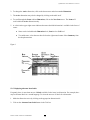
As seen in Figure 1 below, once you have opened a table, you can browse through the items in any
dimension.
1. First the Active Dimension is shown in the Dimension box.
Statistics Canada - Product No: 85F0020XCB
15