1
www.otn.ca
Personal Videoconferencing:
Troubleshooting Guide
This guide provides step by step instructions to overcome the most
common problems when getting started and when using the software.
We’re here to help make sure your videoconferencing experience is
a good one! If you have a problem that does not match any of the
conditions described below, or you have attempted the corrective
action and the problem persists, please contact OTN’s Service Desk.
Table of Contents
Installation Issues
Telemedicine Centre (tm.otn.ca) Issues
1 Login Page Hangs or Install Fails....................................3
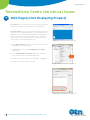
7 Web Page(s) Not Displaying Properly......................... 11
1.1
Clearing Java Cache..................................................3
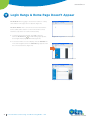
8 Login Hangs & Home Page Doesn’t Appear............. 12
Windows Systems....................................................3
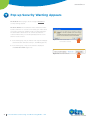
9 Pop-up Security Warning Appears.............................. 13
Mac OS X Systems...................................................4
1.2
Clearing Browser Cache..........................................5
2 Install Process Loops (the process
is running but with high CPU usage).............................6
10 User Has No Video Permission....................................... 14
Videoconferencing Issues
11 Checklist - What You Need to Succeed...................... 15
3 Using Windows Vista and IE Browser,
the Installation Fails with Security Warnings.............7
12 Audio Problems................................................................... 16
4 Using Windows Vista, the Installer
Asks to Run as Administrator ..........................................7
12.2 You Can’t Hear Others............................................ 17
12.1 Others Can’t Hear You............................................ 16
12.3 You Hear an Echo or Audio Feedback............. 18
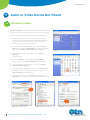
5 Audio or Video Device Not Found.................................8
12.4 Poor Quality Sound................................................. 19
Windows Systems......................................................8
13 Video Problems...................................................................20
5.2 Mac OS X Systems.....................................................9
13.1 You See Others But They Don’t See You.......20
6 Can Install and Log in, but Can’t Connect.................10
13.2 Poor Quality Video.................................................. 21
5.1
For further assistance and technical support, contact OTN’s Service Desk:
Phone: 1.866.454.6861 (Option 1) Email: [email protected]
2
Personal Videoconferencing: Troubleshooting Guide v 4.4
Telemedicine’s Leader