1
TABLE OF CONTENTS
LIST OF FIGURES ....................................................................................................................... 1
1 CRUISECOMP ORGANIZER ............................................................................................... 1
1.1
Introduction to the Organizer...................................................................................... 1
1.2
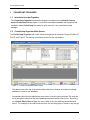
CruiseComp Organizer Main Screen .......................................................................... 1
2 CRUISECOMP ORGANIZER FUNCTIONS ......................................................................... 4
2.1
Creating a New Database ............................................................................................ 4
2.2
Opening an Existing Database ................................................................................... 5
2.3
Adding Cruisecomp CCP Files to Databases ............................................................ 6
2.3.1 Creating Expressions ................................................................................................ 7
2.3.2 Generating ID’s ....................................................................................................... 10
2.3.3 Loading the Database ............................................................................................. 11
2.4
Extracting Records to a CCP File ............................................................................. 12
2.4.1 Selection Rule ......................................................................................................... 13
2.5
Deleting Records from a Database........................................................................... 14
2.6
Printing Reports from the Organizer ........................................................................ 16
LIST OF FIGURES
Figure 1 - CruiseComp Organizer Main Screen ................................................................................. 1
Figure 2 - Selecting and Displaying Records ..................................................................................... 2
Figure 3 - Creating a New Database ................................................................................................ 4
Figure 4 - New Database File Dialog Box ......................................................................................... 4
Figure 5 - Opening Existing Databases ............................................................................................ 5
Figure 6 - Existing Database File Dialog Box .................................................................................... 5
Figure 7 - CCP Loader Interface ....................................................................................................... 6
Figure 8 - Browse for Folder Dialog Box ........................................................................................... 6
Figure 9 - CCP Selector Dialog ........................................................................................................ 7
Figure 10 - Creating Expressions ..................................................................................................... 8
Figure 11 - Expression Buttons......................................................................................................... 8
Figure 12 - Expression Manipulation ............................................................................................... 10
Figure 13 - Generating IDs ............................................................................................................ 10
Figure 14 - Loading Databases ...................................................................................................... 11
Figure 15 - Viewing New Database Entries ..................................................................................... 11
Figure 16 - Extractor Interface ....................................................................................................... 12
Figure 17 - Selecting records to be extracted ................................................................................... 13
Figure 18 Selection Rule ............................................................................................................... 13
Figure 19 - Deleting Records from a Database ................................................................................ 14
Figure 20 - Delete from Database Confirmation Prompt ................................................................... 15
Figure 21 - Items Deleted Prompt .................................................................................................. 15