1
1. Short description of the software.
The Servoconfigurator3 software is the tool for our Whale3 and Dugong servo drives’
configuration and diagnostics.
Our servo drives has an onboard USB connector, building up the connection between the
drive and host PC through the USB port gives access to the drive’s internal parameters and
registers.
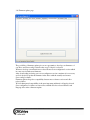
The software builds up connection with the drives automaticly with minimal user interaction,
after the connection built up the user may configure and/or make diagnostics on the drives.
2. Software Installation.
2.1. System requirements.
The software runs on Windows 2000, XP, XP x64, 2003 server, 2008 server operating
systems.
Windows Vista and Windows Seven is not yet tested.
2.2. Software Prerequirements.
To run the software .NET framework 2.0 must be installed first on the local computer.
.NET framework is not part of our installation package and it must be downloaded from
Microsoft’s website separately and must be installed on the local computer.
Today most of the computers has .NET framework 2.0 installed together with Windows. If
this prerequirement is not installed an error sign will appear when running the software
setup and the software will not start. If this sign appears, please follow instructions and
download and install the .NET framework and run the setup again.
2.3. Unzipping and Installation.
The software comes in a ZIP package for smallest possible download size.
The user must first unzip the package to the local harddrive (e.g. to a temporary directory).
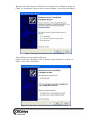
After unzipping run the setup wizard with simply starting the „setup.exe” file.
The installation wizard will guide you through the installation process.
2.4. USB drivers installation.
Installation of the USB drivers is a step which must be done before the software will
function well.
To make installation of the drivers connect one servo drive to the USB port of the PC.
Please note that the drive does not have to be powered up at this time.
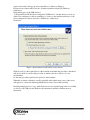
For first time, when the first piece of drive is connected to the USB port, the „New
hardwae found” wizard will pop up showing that the device is connected to the PC and
that the operation system recognises the device.