1
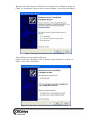
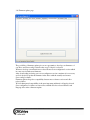
Windows will ask if it may try to find drivers for the new device on Windows update site.
Check „No, not this time” and press next as shown on Figure 1. below. Press next button.
Figure 1. New hardware found wizard, no auto installation.
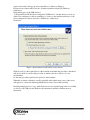
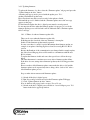
After clicking next a new window will pop up.
On this screen select „Install from a list or specific location (Advanced)” as shown on
Figure 2. below. Press next button.
Figure 2. New hardware found wizard, Install from harddrive location.