1
MicroLab Lite
Chapter 2
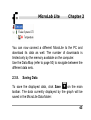
The Data Map is a separate window that displays the list of
data sets that were downloaded or opened in the current
session. Use the Data Map to navigate through the available
plots and to keep track of the data that is displayed in the
graph and/or table windows.
When you double-click on a MicroLite icon in the Data
Map, MicroLab Lite jumps to the corresponding data and
displays it in the graph and table windows. It also expands
the Data Map to show the Temperature sensor data set.
indicates that the data set is currently being
A graph icon
displayed. Double-click on the icon to clear the data set from
the display.
51