1
Digital Projection E-Vision
6000 Series
Control connections............................................................................. 27
Screen Trigger output............................................................................ 27
Serial Port........................................................................................... 27
LAN connection (
).......................................................................... 27
OPERATING GUIDE.................................................................................29
Information menu................................................................................. 46
Usage time tab..................................................................................... 46
Input tab............................................................................................. 46
Network tab......................................................................................... 46
Version tab.......................................................................................... 46
Reset menu.......................................................................................... 46
MENU MAP................................................................................... 47
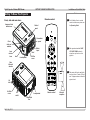
USING THE REMOTE CONTROL................................................... 31
USING THE MENUS...................................................................... 32
Opening the menus.............................................................................. 32
Inside a menu...................................................................................... 32
Navigating the menus.......................................................................... 33
Accessing sub-menus.......................................................................... 33
Editing settings..................................................................................... 33
Changing slider values......................................................................... 34
Executing commands........................................................................... 34
Editing numeric fields........................................................................... 34
A TOUR OF THE MENUS.. ............................................................. 35
Main menu........................................................................................... 35
Input menu........................................................................................... 35
Adjust menu......................................................................................... 36
Image................................................................................................ 36
Image Options..................................................................................... 39
Video................................................................................................. 40
Volume control..................................................................................... 41
Setting menu........................................................................................ 41
Basic tab............................................................................................ 41
Installation tab..................................................................................... 42
Installation tab - continued...................................................................... 43
Option tab........................................................................................... 45
Rev D July 2014
REMOTE COMMUNICATIONS GUIDE...........................................51
INTRODUCTION . . .......................................................................... 53
SERIAL PORT CONTROL COMMANDS......................................... 54
Header code........................................................................................ 54
Examples........................................................................................... 54
The commands.................................................................................... 55
Set Commands.................................................................................... 55
Get Commands.................................................................................... 56
Remote Commands.............................................................................. 57
LAN CONTROL UTILITY............................................................... 58
Power ON/OFF.................................................................................... 58
Picture and Volume controls.................................................................... 58
Source Select...................................................................................... 58
Mute.................................................................................................. 58
Projector Status.................................................................................... 58
LAN CONFIGURATION . . ................................................................ 59
Settings................................................................................................ 59
Host Name.......................................................................................... 59
Domain Name...................................................................................... 59
Mail................................................................................................... 59
PJLink............................................................................................... 60
iv