1
GA-8IDML Series
P4 Titan-SDRAM Motherboard
USER’S MANUAL
Pentium®4 Processor Motherboard
Rev. 2.0 First Edition
R-20-01-010727
12ME-8IDML-2001
GA-8IDML Series Motherboard
Table of Content
Revision History..................................................................................... 4
Item Checklist ......................................................................................... 4
WARNING! ............................................................................................... 5
Chapter 1 Introduction ............................................................................. 6
Summary of Features .................................................................................. 6
GA-8IDML Series Motherboard Layout ...................................................... 8
Chapter 2 Hardware Installation Process ................................................ 9
Step 1: Install the Central Processing Unit (CPU)..................................... 10
CPU Installation ............................................................................................................... 10
CPU Heat Sink Installation ............................................................................................... 11
Step 2: Install memory modules ................................................................ 12
Step 3: Install expension cards ................................................................. 13
Step 4: Connect ribbon cables, cabinet wires, and power supply ........... 14
I/O Back Panel Introduction ............................................................................................ 14
Connectors Introduction .................................................................................................. 16
Chapter 3 BIOS Setup .......................................................................... 20
The Main Menu (For example: BIOS Ver. :F1) ......................................... 21
Standard CMOS Features......................................................................... 23
Advanced BIOS Features .......................................................................... 27
Advanced Chipset Features ...................................................................... 29
Integrated Peripherals .............................................................................. 32
Power Management Setup ....................................................................... 39
2
Table of Content
PnP/PCI Configurations ............................................................................. 43
PC Health Status........................................................................................ 45
Frequency/Voltage Control ........................................................................ 47
Load Fail-Safe Defaults ............................................................................. 48
Load Optimized Defaults ........................................................................... 49
Set Supervisor/User Password .................................................................. 50
Save & Exit Setup ....................................................................................... 51
Exit Without Saving ................................................................................... 52
Chapter 4 Technical Reference ............................................................ 53
Performance List ....................................................................................... 53
Block Diagram ........................................................................................... 54
Four Speaker & SPDIF Introduction.......................................................... 55
@ BIOS Introduction .................................................................................. 59
Easy TuneIIITM Introduction ....................................................................... 60
Chapter 5 Appendix .............................................................................. 61
3
GA-8IDML Series Motherboard
Revision History
Revision
2.0
Revision Note
Date
Initial release of the GA-8IDML Series motherboard user's manual.
Jul.2001
Item Checklist
The GA-8IDML Series motherboard
IDE cable x 1/ Floppy cable x 1
CD for motherboard driver & utility (IUCD)
GA-8IDML Series user’s manual
I/O Back Panel
The author assumes no responsibility for any errors or omissions that may appear in this
document nor does the author make a commitment to update the information contained herein. Third-party
brands and names are the property of their respective owners.
4
WARNING!
WARNING!
Computer motherboards and expansion cards contain very delicate Integrated Circuit (IC) chips. To
protect them against damage from static electricity, you should follow some precautions whenever you
work on your computer.
1. Unplug your computer when working on the inside.
2.
Use a grounded wrist strap before handling computer components. If you do not have
one, touch both of your hands to a safely grounded object or to a metal object, such as
3.
the power supply case.
Hold components by the edges and try not touch the IC chips, leads or connectors, or
4.
other components.
Place components on a grounded antistatic pad or on the bag that came with the
5.
components whenever the components are separated from the system.
Ensure that the ATX power supply is switched off before you plug in or remove the ATX
power connector on the motherboard.
Installing the motherboard to the chassis…
If the motherboard has mounting holes, but they don’t line up with the holes on the base and there are
no slots to attach the spacers, do not become alarmed you can still attach the spacers to the mounting
holes. Just cut the bottom portion of the spacers (the spacer may be a little hard to cut off, so be careful
of your hands). In this way you can still attach the motherboard to the base without worrying about short
circuits. Sometimes you may need to use the plastic springs to isolate the screw from the motherboard
PCB surface, because the circuit wire may be near by the hole. Be careful, don’t let the screw contact
any printed circuit write or parts on the PCB that are near the fixing hole, otherwise it may damage the
board or cause board malfunctioning.
5
GA-8IDML Series Motherboard
Chapter 1 Introduction
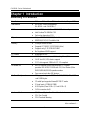
Summary of Features
Form Factor
24.4cm x 22.4cm Micro ATX size form factor, 4 layers PCB.
Motherboard
GA-8IDML Series Motherboard:
GA-8IDML and GA-8IDML-C
CPU
Socket 478 for Intel® Micro FC-PGA2 Pentium® 4 processor
Intel Pentium®4 400MHz FSB
Chipset
2nd cache depend on CPU
Chipset 82845 HOST/AGP/Controller
Memory
82801BA(ICH2) I/O Controller Hub
2 168-pin DIMM sockets
Supports PC-100/PC-133 SDRAM (Auto)
Supports only 3.3V SDRAM DIMM
No Regisitered DIMM support
Winbond 83627HF
1 CNR(Communication and Networking Riser) Slot
1 AGP slot 4X (1.5V) device support
3 PCI slot supports 33MHz & PCI 2.2 compliant
An IDE controller on the Intel 82801BA PCI chipset
I/O Control
Slots
On-Board IDE
provides IDE HDD/CD-ROM with PIO, Bus Master (Ultra
DMA33/ATA66/ATA100) operation modes.
On-Board Peripherals
Hardware Monitor
Can connect up to four IDE devices
1 Floppy port supports 2 FDD with 360K, 720K,1.2M, 1.44M
and 2.88M bytes.
1 Parallel port supports Normal/EPP/ECP mode
2 Serial ports (COMA&COMB)
4 USB ports (Rear USB x 2, Front USB x 2)
1 IrDA connector for IR
CPU/Power/System Fan Revolution detect
CPU Fan Control
CPU Overheat Warning
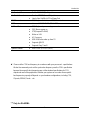
to be continued......
6
Introduction
On-Board LAN
On-Board Sound
Build in RTL8100(B)L Chipset *
Creative CT5880 Sound Chipset *
PS/2 Connector
Line In/Line Out/Mic In/CD In/Game Port
PS/2 Keyboard interface and PS/2 Mouse interace
BIOS
Additional Features
Licensed AWARD BIOS, 2M bit FWH
PS/2 Keyboard power on by password
PS/2 Mouse power on
STR(Suspend-To-RAM)
Wake on LAN
AC Recovery
USB KB/Mouse wake up from S3
Supports @BIOS
Supports Easy TuneIII
Over Clock (CPU/PCI/AGP)
Special Features
Please set the CPU host frequency in accordance with your processor’s specifications.
We don’t recommend you to set the system bus frequency over the CPU’s specification
because these specific bus frequencies are not the standard specifications for CPU,
chipset and most of the peripherals. Whether your system can run under these specific
bus frequencies properly will depend on your hardware configurations, including CPU,
Chipsets,SDRAM,Cards….etc.
"*" Only for GA-8IDML.
7
GA-8IDML Series Motherboard
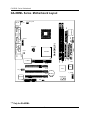
GA-8IDML Series Motherboard Layout
CPU_FAN
FLOPPY
Brookdale
DIMM1
DIMM2
AGP
CT5880*
IDE1
AC97
IDE2
AUX_12V
IR
PWR_FAN
SOCKET478
LAN*
USB
MIC_IN LINE_OUT
LINE_IN
GAME
F_AUDIO
GA-8IDML(-C)
COMB
LPT1
W83627HF
COMA
ATX
KB_MS USB_VS
SYS
FAN
PCI1
FWH
ICH2
PCI2
CD_IN
PCI3
RTL8100*
CNR
F_PANEL
BATTERY
FRONT USB
WOL
"*" Only for GA-8IDML.
8
Hardware Installation Processor
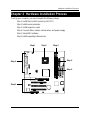
Chapter 2 Hardware Installation Process
To set up your computer, you must complete the following setups:
Step 1- Install the Central Processing Unit (CPU)
Step 2- Install memory modules
Step 3- Install expansion cards
Step 4- Connect ribbon cables, cabinet wires, and power supply
Step 5- Setup BIOS software
Step 6- Install supporting software tools
Step1
Step1
Step 2
Step 4
Step 4
Step 4
Step3
9
GA-8IDML Series Motherboard
Step 1: Install the Central Processing Unit (CPU)
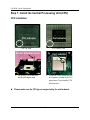
CPU Installation
Pin1 indicator
Pin1indicator
CPU Top View
CPU Bottom View
Socket Actuation Lever
Pin1 indicator
2. Locate Pin 1 in the socket and look
for a (golden) cut edge on the CPU
1. Pull up the CPU socket level
and up to 90-degree angle.
upper corner. Then insert the CPU
into the socket.
Please make sure the CPU type is supported by the motherboard.
10
Hardware Installation Processor
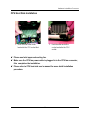
CPU Heat Sink Installation
2. Hook the other end of the
1. Hook one end of the cooler
cooler bracket to the CPU
socket.
bracket to the CPU socket first.
Please use Intel approved cooling fan.
Make sure the CPU fan power cable is plugged in to the CPU fan connector,
this completes the installation.
Please refer to CPU heat sink user’s manual for more detail installation
procedure.
11
GA-8IDML Series Motherboard
Step 2: Install memory modules
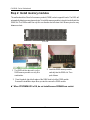
The motherboard has 2 dual in-line memory module (DIMM) sockets support 4 banks. The BIOS will
automatically detects memory type and size. To install the memory module, just push it vertically into the
DIMM Slot .The DIMM module can only fit in one direction due to the two notch. Memory size can vary
between sockets.
SDRAM
2. Insert the DIMM memory module
vertically into the DIMM slot. Then
1. The DIMM slot has two notch, so the
DIMM memory module can only fit in
push it down.
one direction.
3. Close the plastic clip at both edges of the DIMM slots to lock the DIMM module.
Reverse the installation steps when you wish to remove the DIMM module.
When STR/DIMM LED is ON, do not install/remove SDRAM from socket.
12
Hardware Installation Processor
Step 3: Install expension cards
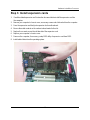
1. Read the related expansion card’s instruction document before install the expansion card into
the computer.
2. Remove your computer’s chassis cover, necessary screws and slot bracket from the computer.
3. Press the expansion card firmly into expansion slot in motherboard.
4. Be sure the metal contacts on the card are indeed seated in the slot.
5. Replace the screw to secure the slot bracket of the expansion card.
6. Replace your computer’s chassis cover.
7. Power on the computer, if necessary, setup BIOS utility of expansion card from BIOS.
8. Install related driver from the operating system.
13
GA-8IDML Series Motherboard
Step 4: Connect ribbon cables, cabinet wires, and power
supply
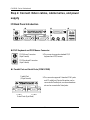
I/O Back Panel Introduction
PS/2 Keyboard and PS/2 Mouse Connector
PS/2 Mouse Connector
(6 pin Female)
This connector supports standard PS/2
keyboard and PS/2 mouse.
PS/2 Keyboard Connector
(6 pin Female)
Parallel Port and Serial Ports (COM1/COM2)
Parallel Port
(25 pin Female)
This connector supports 2 standard COM ports
and 1 Parallel port. Device like printer can be
connected to Parallel port ; mouse and modem
etc can be connected to Serial ports.
COMA
COMB
Serial Ports (9 pin Male)
14
Hardware Installation Processor
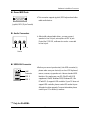
Game /MIDI Ports
This connector supports joystick, MIDI keyboard and other
relate audio devices.
Joystick/ MIDI (15 pin Female)
Audio Connectors
After install onboard audio driver, you may connect
speaker to Line Out jack, micro phone to MIC In jack.
Device like CD-ROM , walkman etc can be connected
to Line-In jack.
Line Out
MIC In
Line In
USB/LAN Connector
Before you connect your device(s) into USB connector(s),
LAN*
Connector
USB 0
USB 1
please make sure your device(s) such as USB keyboard,
mouse, scanner, zip,speaker..etc. Have a standard USB
interface. Also make sure your OS (Win 95 with USB
supplement, Win98, Windows 2000, Windows ME, Win
NT with SP 6) supports USB controller. If your OS does not
support USB controller, please contact OS vendor for possible patch or driver upgrade. For more information please
contact your OS or device(s) vendors.
"*" Only for GA-8IDML.
15
GA-8IDML Series Motherboard
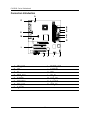
Connectors Introduction
A
O
N
B
C
D
M
E
F
G
L
K
A
B
C
D
E
F
G
H
CPU_FAN
ATX
IR
PWR_FAN
FLOPPY
IDE1/IDE2
SYS_FAN
F_PANEL
J
I
J
K
L
M
N
O
16
I
H
FRONT_USB
BATTERY
WOL
CD_IN
AUX_12V
F_AUDIO
USB_VS
Hardware Installation Processor
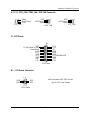
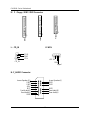
A / D / G : CPU_FAN / PWR_FAN / SYS FAN Connector
1
CPU_FAN
Sense
+12V/Control
GND
1
GND
+12V/Control
Sense
1
GND
+12V/Control
Sense
SYS_FAN
PWR_FAN
B : ATX Power
20
+12V
5V SB (Stand by +5V)
Power Good
GND
VCC
GND
VCC
GND
3.3V
3.3V
1
ATX Power
VCC
VCC
-5V
GND
GND
GND
PS-ON(Soft On/Off)
GND
-12V
3.3V
M : +12V Power Connector
1 3
GND
GND
This connector (ATX +12V) is used
+12V
+12V
only for CPU Core Voltage.
2 4
+12V Power
17
GA-8IDML Series Motherboard
E / F : Floppy / IDE1 / IDE2 Connector
1
L : CD_IN
1
CD_IN
IDE1
IDE2
1
Floppy
1
K :WOL
CD-R
GND
CD-L
1
+5V SB
GND
Signal
N: F_AUDIO Connector
Incase Speaker (R)
GND
GND
+12V
MIC
Front Audio(R)
Front Audio(L)
GND
Incase Speaker (L)
GND
GND
GND
Rear Audio(R)
Rear Audio(L)
18
Hardware Installation Processor
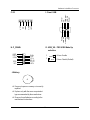
I :Front USB
Power
USB D2USB D2+
NC
GND
GND
IRTX
VCC
NC
IRRX
GND
NC
USB D3+
USB D3Power
C:IR
O: USB_VS : PS/2 USB Wake Up
selection
H :F_PANEL
RSTRST+
SPK+
PW+
PWPD+
PD_G
PD_G
HD+
SPKHD-
J:Battery
+
Danger of explosion if battery is incorrectly
replaced.
Replace only with the same or equivalent
type recommended by the manufacturer.
Dispose of used batteries according to the
manufacturer’s instructions.
19
1
1-2 close: Enable
1
2-3 close: Disable (Default)
8IDML Series Motherboard
Chapter 3 BIOS Setup
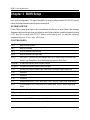
BIOS Setup is an overview of the BIOS Setup Program. The program that allows users to modify the
basic system configuration. This type of information is stored in battery-backed CMOS RAM so that it
retains the Setup information when the power is turned off.
ENTERINGSETUP
Power ON the computer and press <Del> immediately will allow you to enter Setup. If the message
disappears before you respond and you still wish to enter Setup, restart the system to try again by turning
it OFF then ON or pressing the “RESET” bottom on the system case. You may also restart by
simultaneously press <Ctrl> - <Alt>- <Del> keys.
CONTROLKEYS
<>
Move to previous item
<>
Move to next item
<>
Move to the item in the left hand
<>
Move to the item in the right hand
<Esc>
Main Menu - Quit and not save changes into CMOS Status Page Setup Menu and
Option Page Setup Menu - Exit current page and return to Main Menu
<+/PgUp> Increase the numeric value or make changes
<-/PgDn>
Decrease the numeric value or make changes
<F1>
General help, only for Status Page Setup Menu and Option Page Setup Menu
<F2>
Reserved
<F3>
Reserved
<F4>
Reserved
<F5>
Restore the previous CMOS value from CMOS, only for Option Page Setup Menu
<F6>
Load the default CMOS value from BIOS default table, only for Option Page Setup
Menu
<F7>
Load the Setup Defaults
<F8>
Reserved
<F9>
Reserved
<F10>
Save all the CMOS changes, only for Main Menu
20
BIOS Setup
GETTINGHELP
Main Menu
The on-line description of the highlighted setup function is displayed at the bottom of the screen.
Status Page Setup Menu / Option Page Setup Menu
Press F1 to pop up a small help window that describes the appropriate keys to use and the possible
selections for the highlighted item. To exit the Help Window press <Esc>.
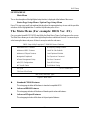
The Main Menu (For example: BIOS Ver. :F1)
Once you enter Award BIOS CMOS Setup Utility, the Main Menu (Figure 1) will appear on the screen.
The Main Menu allows you to select from eight setup functions and two exit choices. Use arrow keys to
select among the items and press <Enter> to accept or enter the sub-menu.
CMOS Setup Utility-Copyright (C) 1984-2001 Award Software
Standard CMOS Features
Frequency/Voltage Control
Advanced BIOS Features
Load Fail-Safe Defaults
Advanced Chipset Features
Load Optimized Defaults
Integrated Peripherals
Set Supervisor Password
Power Management Setup
Set User Password
PnP/PCI Configurations
Save & Exit Setup
PC Health Status
Exit Without Saving
:Select Itect
ESC:Quit
F10:Save & Exit Setup
Time, Date, Hard Disk Type...
Figure 1: Main Menu
Standard CMOS Features
This setup page includes all the items in standard compatible BIOS.
Advanced BIOS Features
This setup page includes all the items of Award special enhanced features.
Advanced Chipset Features
This setup page includes all the items of chipset special features.
21
8IDML Series Motherboard
Integrated Peripherals
This setup page includes all onboard peripherals.
Power Management Setup
This setup page includes all the items of Green function features.
PnP/PCI Configurations
This setup page includes all the configurations of PCI & PnP ISA resources.
PC Health Status
This setup page is the System auto detect Temperature, voltage, fan, speed.
Frequency/Voltage Control
This setup page is control CPU’s clock and frequency ratio.
Load Fail-Safe Defaults
Fail-Safe Defaults indicates the value of the system parameters which the system would
be in safe configuration.
Load Optimized Defaults
Optimized Defaults indicates the value of the system parameters which the system would
be in best performance configuration.
Set Supervisor password
Change, set, or disable password. It allows you to limit access to the system and Setup,
or just to Setup.
Set User password
Change, set, or disable password. It allows you to limit access to the system.
Save & Exit Setup
Save CMOS value settings to CMOS and exit setup.
Exit Without Saving
Abandon all CMOS value changes and exit setup.
22
BIOS Setup
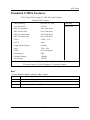
Standard CMOS Features
CMOS Setup Utility-Copyright (C) 1984-2001 Award Software
Standard CMOS Features
Date (mm:dd:yy)
Mon, Feb 21 2000
Item Help
Time (hh:mm:ss)
22:31:24
Menu Level
IDE Primary Master
Press Enter None
IDE Primary Slave
Press Enter None
IDE Secondary Master
Press Enter None
IDE Secondary Slave
Press Enter None
Drive A
1.44M, 3.5 in.
Drive B
None
Floppy 3 Mode Support
Disabled
Video
EGA / VGA
Halt On
All, But Keyboard
Base Memory
640K
Extended Memory
130048K
Total Memory
131072K
: Move Enter:Select +/-/PU/PD:Value F10:Save ESC:Exit F1:General Help
F5:Previous Values F6:Fail-Safe Defaults F7:Optimized Defaults
Figure 2: Standard CMOS Features
Date
The date format is <week>, <month>, <day>, <year>.
Week
The week, from Sun to Sat, determined by the BIOS and is display only
Month
The month, Jan. Through Dec.
Day
The day, from 1 to 31 (or the maximum allowed in the month)
Year
The year, from 1994 through 2079
23
8IDML Series Motherboard
Time
The times format in <hour> <minute> <second>. The time is calculated base on the 24-hour militarytime clock. For example, 1 p.m. is 13:00:00.
IDE Primary Master, Slave / Secondary Master, Slave
The category identifies the types of hard disk from drive C to F that has been installed in the computer.
There are two types: auto type, and manual type. Manual type is user-definable; Auto type which will
automatically detect HDD type.
Note that the specifications of your drive must match with the drive table. The hard disk will not work
properly if you enter improper information for this category.
If you select User Type, related information will be asked to enter to the following items. Enter the
information directly from the keyboard and press <Enter>. Such information should be provided in the
documentation form your hard disk vendor or the system manufacturer.
CYLS.
Number of cylinders
HEADS
Number of heads
PRECOMP
Write precomp
LANDZONE
Landing zone
SECTORS
Number of sectors
If a hard disk has not been installed select NONE and press <Enter>.
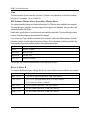
Drive A / Drive B
The category identifies the types of floppy disk drive A or drive B that has been installed in the computer.
None
No floppy drive installed
360K, 5.25 in.
5.25 inch PC-type standard drive; 360K byte capacity.
1.2M, 5.25 in.
5.25 inch AT-type high-density drive; 1.2M byte capacity
(3.5 inch when 3 Mode is Enabled).
720K, 3.5 in.
3.5 inch double-sided drive; 720K byte capacity
1.44M, 3.5 in.
3.5 inch double-sided drive; 1.44M byte capacity.
2.88M, 3.5 in.
3.5 inch double-sided drive; 2.88M byte capacity.
24
BIOS Setup
Floppy 3 Mode Support (for Japan Area)
Disabled
Normal Floppy Drive. (Default value)
Drive A
Drive A is 3 mode Floppy Drive.
Drive B
Drive B is 3 mode Floppy Drive.
Both
Drive A & B are 3 mode Floppy Drives.
Video
The category detects the type of adapter used for the primary system monitor that must match your video
display card and monitor. Although secondary monitors are supported, you do not have to select the type
in setup.
EGA/VGA
Enhanced Graphics Adapter/Video Graphics Array. For EGA, VGA,
SVGA, or PGA monitor adapters
CGA 40
Color Graphics Adapter, power up in 40 column mode
CGA 80
Color Graphics Adapter, power up in 80 column mode
MONO
Monochrome adapter, includes high resolution monochrome adapters
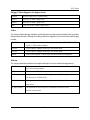
Halt on
The category determines whether the computer will stop if an error is detected during power up.
NO Errors
The system boot will not stop for any error that may be detected
and you will be prompted.
All Errors
Whenever the BIOS detects a non-fatal error the system will be stopped.
All, But Keyboar
The system boot will not stop for a keyboard error; it will stop for
all other errors. (Default value)
All, But Diskette
The system boot will not stop for a disk error; it will stop for all
other errors.
All, But Disk/Key
The system boot will not stop for a keyboard or disk error; it will
stop for all other errors.
25
8IDML Series Motherboard
Memory
The category is display-only which is determined by POST (Power On Self Test) of the BIOS.
Base Memory
The POST of the BIOS will determine the amount of base (or conventional) memory
installed in the system.
The value of the base memory is typically 512 K for systems with 512 K memory
installed on the motherboard, or 640 K for systems with 640 K or more memory
installed on the motherboard.
ExtendedMemory
The BIOS determines how much extended memory is present during the POST.
This is the amount of memory located above 1 MB in the CPU’s memory
address map.
26
BIOS Setup
Advanced BIOS Features
CMOS Setup Utility-Copyright (C) 1984-2001 Award Software
Advanced BIOS Features
First Boot Device
Floppy
Item Help
Second Boot Device
HDD-0
Menu Level
Third Boot Device
CDROM
Boot Up Floppy Seek
Disabled
Boot Up Num-Lock
On
Password Check
Setup
MPS Version Control For OS
1.4
HDD S.M.A.R.T. Capability
Disabled
: Move Enter:Select +/-/PU/PD:Value F10:Save ESC:Exit F1:General Help
F5:Previous Values F6:Fail-Safe Defaults F7:Optimized Defaults
Figure 3: Advanced BIOS Features
First / Second / Third Boot device
Floppy
Select your boot device priority by Floppy.
LS120
Select your boot device priority by LS120.
HDD-0~3
Select your boot device priority by HDD-0~3.
SCSI
Select your boot device priority by SCSI.
CDROM
Select your boot device priority by CDROM.
27
8IDML Series Motherboard
Boot Up Floppy Seek
During POST, BIOS will determine the floppy disk drive installed is 40 or 80 tracks. 360 K type is 40
tracks 720 K, 1.2 M and 1.44 M are all 80 tracks.
Enabled
BIOS searches for floppy disk drive to determine it is 40 or 80 tracks. Note
that BIOS can not tell from 720 K, 1.2 M or 1.44 M drive type as they are
all 80tracks. (Default value)
Disabled
BIOS will not search for the type of floppy disk drive by track number. Note
that there will not be any warning message if the drive installed is 360 K.
Boot Up NumLock
On
Keypad is number keys. (Default value)
Off
Keypad is arrow keys.
Password Check
This category allows you to limit access to the system and Setup, or just to Setup.
System
The system can not boot and can not access to Setup page will be denied
Setup
The system will boot, but access to Setup will be denied if the correct
if the correct password is not entered at the prompt.
password is not entered at the prompt. (Default value)
MPS Version Control For OS
(Support Multi Processor Specification revision 1.4)
1.4
Support MPS Version 1.4 . (Default Value)
1.1
Support MPS Version 1.1.
HDD S.M.A.R.T. Capability
Enabled
Enabled HDD S.M.A.R.T. Capability.
Disabled
Disabled HDD S.M.A.R.T. Capability. (Default value)
28
BIOS Setup
Advanced Chipset Features
CMOS Setup Utility-Copyright (C) 1984-2001 Award Software
Advanced Chipset Features
Configure DRAM Timing
SPD
CAS Latency Time
2
Active to Precharge Delay
5
DRAM RAS# to CAS# Delay
2
DRAM RAS# Precharge
2
Refresh Mode Select
15.6usec
DRAM Data Integrity Mode
Non-ECC
DRAM Read Thermal Mgmt
Disable
Delay Transaction
Enable
AGP Aperture Size(MB)
64
Delay Prior to Thermal
16Min
Item Help
: Move Enter:Select +/-/PU/PD:Value F10:Save ESC:Exit F1:General Help
F5:Previous Values F6:Fail-Safe Defaults F7:Optimized Defaults
Figure 4: Advanced Chipset Features
Configure DRAM Timing
SPD
Set Configure DRAM Timing Control by SPD. (Default value)
Manual
Set SConfigure DRAM Timing Control by Manual.
CAS latency Time
3
For Slower SDRAM DIMM module.
2
For Fastest SDRAM DIMM module.
(Default Value)
Active to Precharge Delay
5
Set active to Precharge delay timing is 5 clk. (Default value)
6
Set active to Precharge delay timing is 6 clk.
7
Set active to Precharge delay timing is 7 clk.
29
Menu Level
8IDML Series Motherboard
SDRAM RAS# to CAS# delay
3
Set SDRAM RAS# to CAS# delay 3 SCLKs.
2
Set SDRAM RAS# to CAS# delay 2 SCLKs.(Default value)
SDRAM RAS# Precharge
3
Set SDRAM RAS# Precharge Time to 3. (Default value)
2
Set SDRAM RAS# Precharge Time to 2.
Refresh Mode Select
7.8 usec
Set active to Refresh mode timing is 7.8 usec.
15.6 usec
Set active to Refresh mode timing is 15.6 usec.
64 usec
Set active to Refresh mode timing is 64 usec.
DRAM Data Integrity Mode
ECC
Set DRAM Data Integrity Mode by ECC.
Non-ECC
Set DRAM Data Integrity Mode by Non-ECC. (Default value)
DRAM Read Thermal Mgmt
Disabled
Disable DRAM Read Thermal Mgme . (Default value)
Enabled
Enable DRAM Read Thermal Mgme.
Delay Transaction
Disabled
Normal operation.
Enabled
For slow speed ISA device in system. (Default value)
30
BIOS Setup
AGP Graphics Aperture Size
4
AGP Graphics Aperture Size is 4MB.
8
AGP Graphics Aperture Size is 8MB.
16
AGP Graphics Aperture Size is 16MB
32
AGP Graphics Aperture Size is 32MB.
64
AGP Graphics Aperture Size is 64MB.(Default Value)
128
AGP Graphics Aperture Size is 128MB.
256
AGP Graphics Aperture Size is 256MB.
Delay Prior to Thermal
16Min
Set active CPU Thermal function after booting 16 Min.
64Min
Set active CPU Thermal function after booting 64 Min. (Default Value)
31
8IDML Series Motherboard
Integrated Peripherals
CMOS Setup Utility-Copyright (C) 1984-2001 Award Software
Integrated Peripherals
On-Chip Primary PCI IDE
Enabled
On-Chip Secondary PCI IDE
Enabled
IDE Primary Master PIO
Auto
IDE Primary Slave PIO
Auto
IDE Secondary Master PIO
Auto
IDE Secondary Slave PIO
Auto
IDE Primary Master UDMA
Auto
IDE Primary Slave UDMA
Auto
IDE Secondary Master UDMA
Auto
IDE Secondary Slave UDMA
Auto
USB Controller
Enabled
USB Keyboard Support
Disabled
USB Mouse Support
Disabled
Init Display First
AGP
AC97 Audio
Auto
AC97 Modem
Auto
Onboard LAN*
Enabled
Onboard Sound*
Enabled
Mouse Power On
Disabled
Keyboard Power On
Disabled
KB Power ON Password
Enter
Onboard FDC Controller
Enabled
Onboard Serial Port 1
3F8/IRQ4
Onboard Serial Port 2
2F8/IRQ3
UART Mode Select
Normal
RxD,TxD, Active
Hi,Lo
IR Transmission Delay
Enabled
UR2 Duplex Mode
Half
Use IR Pins
IR-Rx2Tx2
Onboard Parallel Port
378/IRQ7
32
Item Help
Menu Level
BIOS Setup
Parallel Port Mode
SPP
EPP Mode Select
EPP 1.7
ECP Mode Use DMA
3
AC BACK Function
Soft-Off
: Move Enter:Select +/-/PU/PD:Value F10:Save ESC:Exit F1:General Help
F5:Previous Values F6:Fail-Safe Defaults F7:Optimized Defaults
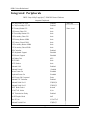
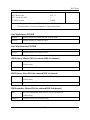
Figure 5: Integrated Peripherals
On-Chip Primary PCI IDE
Enabled
Enable onboard 1st channel IDE port. (Default value)
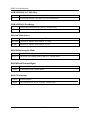
Disabled
Disable onboard 1st channel IDE port.
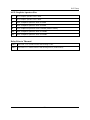
On-Chip Secondary PCI IDE
Enabled
Enable onboard 2nd channel IDE port. (Default value)
Disabled
Disable onboard 2nd channel IDE port.
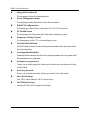
IDE Primary Master PIO (for onboard IDE 1st channel)
Auto
BIOS will automatically detect the IDE HDD Accessing mode.
(Default value)
Mode0~4
Manually set the IDE Accessing mode.
IDE Primary Slave PIO (for onboard IDE 1st channel)
Auto
BIOS will automatically detect the IDE HDD Accessing mode.
(Default value)
Mode0~4
Manually set the IDE Accessing mode.
IDE Secondary Master PIO (for onboard IDE 2nd channel)
Auto
BIOS will automatically detect the IDE HDD Accessing mode.
(Default value)
Mode0~4
Manually set the IDE Accessing mode.
33
8IDML Series Motherboard
IDE Secondary Slave PIO (for onboard IDE 2nd channel)
Auto
BIOS will automatically detect the IDE HDD Accessing mode.
(Default value)
Mode0~4
Manually set the IDE Accessing mode.
IDE Primary Master UDMA
Auto
BIOS will automatically detect the IDE HDD Accessing mode.
(Default value)
Disabled
Disable UDMA function.
IDE Primary Slave UDMA
Auto
BIOS will automatically detect the IDE HDD Accessing mode.
(Default value)
Disabled
Disable UDMA function.
IDE Secondary Master UDMA
Auto
BIOS will automatically detect the IDE HDD Accessing mode. (Default value)
Disabled
Disable UDMA function.
IDE Secondary Slave UDMA
Auto
BIOS will automatically detect the IDE HDD Accessing mode. (Default value)
Disabled
Disable UDMA function.
USB Controller
Enabled
Enabled USB Controller. (Default value)
Disabled
Disabled USB Controller.
34
BIOS Setup
USB Keyboard Support
Enabled
Enabled USB Keyboard Support.
Disabled
Disabled USB Keyboard Support. (Default value)
USB Mouse Support
Enabled
Enabled USB Mouse Support.
Disabled
Disabled USB Mouse Support. (Default value)
Init Display First
PCI
Set Init Display First to PCI Slot.
AGP
Set Init Display First to AGP. (Default value)
AC97 Audio
Auto
BIOS will automatically detect onboard AC97 Audio or Creative CT5880
audio. (Default value)
Disabled
Disabled AC97 Audio.
AC97 Modem
Auto
Bios will automatically detect onboard AC97 Modem. (Default value)
Disabled
Disabled AC97 Modem.
Onboard LAN*
Enable
Enable onboard LAN function.(Default value)
Disable
Disable onboard LAN function.
Onboard Sound*
Enable
Enable onboard LAN function. (Default value)
Disabled
Disabled onboard LAN function.
"*" Only for GA-8IDML.
35
8IDML Series Motherboard
Mouse Power On
Disabled
Disabled this function. (Default value)
Mouse Click
Power On by Mouse click.
Keyboard Power On
Password
Enter from 1 to 5 characters to set the Keyboard Power On Password.
Disabled
Disabled this function. (Default value)
Keyboard 98
If your keyboard have “POWER Key” button, you can press the key to
power on your system.
KB Power ON Password
Enter
Input password (from 1 to 5 characters) and press Enter to set the Key
board Power On Password.
Onboard FDC Controller
Enabled
Enable onboard FDC port. (Default value)
Disabled
Disable onboard FDC port.
Onboard Serial Port 1
Auto
BIOS will automatically setup the port 1 address.
3F8/IRQ4
Enable onboard Serial port 1 and address is 3F8. (Default value)
2F8/IRQ3
Enable onboard Serial port 1 and address is 2F8.
3E8/IRQ4
Enable onboard Serial port 1 and address is 3E8.
2E8/IRQ3
Enable onboard Serial port 1 and address is 2E8.
Disabled
Disable onboard Serial port 1.
36
BIOS Setup
Onboard Serial Port 2
Auto
BIOS will automatically setup the port 2 address.
3F8/IRQ4
Enable onboard Serial port 2 and address is 3F8.
2F8/IRQ3
Enable onboard Serial port 2 and address is 2F8. (Default Value)
3E8/IRQ4
Enable onboard Serial port 2 and address is 3E8.
2E8/IRQ3
Enable onboard Serial port 2 and address is 2E8.
Disabled
Disable onboard Serial port 2.
UART Mode Select
(This item allows you to determine which Infra Red(IR) function of Onboard I/O chip)
ASKIR
Set onboard I/O chip UART to ASKIR Mode.
IrDA
Set onboard I/O chip UART to IrDA Mode.
SCR
Set onboard I/O chip UART to SCR Mode.
Normal
Set onboard I/O chip UART to Normal Mode. (Default Value)
RxD, TxD Active
Hi, Hi
Set RxD,TxD Active to Hi, Hi.
Hi, Lo
Set RxD,TxD Active to Hi, Lo. (Default Value)
Lo, Hi
Set RxD,TxD Active to Lo, Hi.
Lo, Lo
Set RxD,TxD Active to Lo, Lo.
IR Transmission Delay
Enabled
Enabled IR Transmission delay. (Default Value)
Disabled
Enabled IR Transmission delay.
UR2 Duplex Mode
Half
IR Function Duplex Half. (Default Value)
Full
IR Function Duplex Full.
37
8IDML Series Motherboard
Use IR Pins
IR-Rx2Tx2
Enable On Board LPT port and address is 378.(Default Value)
RxD2,TxD2 Enable On Board LPT port and address is 278.
OnBoard Parallel port
378/IRQ7
Enable On Board LPT port and address is 378.(Default Value)
278/IRQ5
Enable On Board LPT port and address is 278.
3BC/IRQ7
Enable On Board LPT port and address is 3BC.
Parallel Port Mode
SPP
Using Parallel port as Standard Parallel Port. (Default Value)
EPP
Using Parallel port as Enhanced Parallel Port.
ECP
Using Parallel port as Extended Capabilities Port.
ECP+EPP
Using Parallel port as ECP & EPP mode.
Parallel Port EPP Type
EPP 1.9
EPP Version is 1.9. (Default value)
EPP 1.7
EPP Version is 1.7.
AC Back Function
Memory
System power on depends on the status before AC lost.
Soft-Off
Always in Off state when AC back. (Default value)
Full-On
Always power on the system when AC back.
38
BIOS Setup
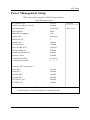
Power Management Setup
CMOS Setup Utility-Copyright (C) 1984-2001 Award Software
Power Management Setup
ACPI Suspend Type
S1(POS)
Item Help
USB Device Wake-Up From S3
Disabled
Power Management
User Define
Video Off Method
DPMS
Video Off In Suspend
Yes
Suspend Type
Stop Grant
MODEM Use IRQ
3
Suspend Mode
Disabled
HDD Power Down
Disabled
Soft-Off by PWR-BTTN
Instant-off
PME Event Wake Up
Enabled
ModemRingOn/WakeOnLan
Enabled
Resume by Alarm
Disabled
Date(of Month) Alarm
Everyday
Time(hh:mm:ss) Alarm
0
0
Menu Level
0
** Reload Global Timer Events **
Primary IDE 0
Disabled
Primary IDE 1
Disabled
Secondary IDE 0
Disabled
Secondary IDE 1
Disabled
FDD,COM,LPT Port
Disabled
PCI PIRQ[A-D]#
Disabled
: Move Enter:Select +/-/PU/PD:Value F10:Save ESC:Exit F1:General Help
F5:Previous Values F6:Fail-Safe Defaults F7:Optimized Defaults
Figure 6: Power Management Setup
39
8IDML Series Motherboard
ACPI Sleep Type
S1/POS
Set ACPI Sleep Type to S1/POS (Power On Suspend). (Default value)
S3/STR
Set ACPI Sleep Type to S3/STR (Suspend To RAM).
USB Dev Wakeup From S3
Enabled
Enable USB Device Wakeup From S3.
Disabled
Disable USB Device Wakeup From S3. (Default value)
Power Management
User Define
For configuring our own power management features (Default Value)
Min Saving
Disabled Green & software APM function.
Max Saving
Enabled Green & software APM function.
Video off Method
V/H SYNC+Blank
BIOS will turn off V/H-SYNC when gets into Green mode for Green monitor
power saving.
Blank Screen
BIOS will only black monitor when gets into Green mode.
DPMS
BIOS will use DPMS Standard to control VGA card. (The Green type VGA
card will turn off V/H-SYNC automatically.)(Default value)
Video Off In Suspend
Yes
Set Suspend type is stop grant. (Default value)
No
SuspendSet Suspend type is Power on Suspend.
Suspend Type
Stop Grant
Set Suspend type is stop grant. (Default value)
PwrOn Suspend Set Suspend type is Power on Suspend.
40
BIOS Setup
MODEM Use IRQ
N/A
Set MODEM Use IRQ to NA.
3
Set MODEM Use IRQ to 3.(Default value)
4
Set MODEM Use IRQ to 4.
5
Set MODEM Use IRQ to 5.
7
Set MODEM Use IRQ to 7.
9
Set MODEM Use IRQ to 9.
10
Set MODEM Use IRQ to 10.
11
Set MODEM Use IRQ to 11.
Suspend Mode
Disabled
Disabled Suspend Mode. (Default value)
1 min - 1 Hour Setup the timer to enter Suspend Mode.
HDD Power Down
Disabled
Disabled HDD Power Down mode function. (Default value)
1-15 mins.
Enabled HDD Power Down mode between 1 to 15 mins.
Soft-off by PWR-BTTN
Instant-off
Press power button then Power off instantly. (Default value)
Delay 4 Sec.
Press power button 4 sec to Power off. Enter suspend if button is pressed less
than 4 sec.
PME Event Wake up
Disabled
Disabled PME Event Wake up function.
Enabled
Enabled PME Event Wake up function. (Default Value)
41
8IDML Series Motherboard
Modem Ring On/ WakeOnLAN
Disabled
Disabled Modem Ring On / Wake On LAN function.
Enabled
Enabled Modem Ring On / Wake On LAN function. (Default Value)
RTC Alarm Power On
You can set “RTC Alarm Power On” item to enabled and key in Data/time to power on
system.
Disabled
Disable this function. (Default Value)
Enabled
Enable alarm function to POWER ON system.
If RTC Alarm Lead To Power On is Enabled.
RTC Alarm Date :
Every Day,1~31
RTC Alarm Hour:
0~23
RTC Alarm Minute :
0~59
RTC Alarm Second :
0~59
Primary IDE 0/1
Disabled
Disabled this function. (Default value)
Enabled
Enabled monitor Primary IDE 0/1 for Green event.
Secondary IDE 0/1
Disabled
Disabled this function. (Default value)
Enabled
Enabled monitor Secondary IDE 0/1 for Green event.
FDD,COM,LPT Port
Disabled
Disabled this function. (Default value)
Enabled
Enabled monitor FDC,COM,LPT for Green event.
PCI PIRQ[A-D] #
Enabled
Monitor PCI PIRQ[A-D]# IRQ Active.
Disabled
Ignore PCI PIRQ[A-D]# IRQ Active. (Default value)
42
BIOS Setup
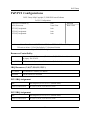
PnP/PCI Configurations
CMOS Setup Utility-Copyright (C) 1984-2001 Award Software
PnP/PCI Configurations
Resources Controlled By
Auto
Item Help
IRQ Resources
Press Enter
Menu Level
PCI1 IRQ Assignment
Auto
PCI2 IRQ Assignment
Auto
PCI3 IRQ Assignment
Auto
: Move Enter:Select +/-/PU/PD:Value F10:Save ESC:Exit F1:General Help
F5:Previous Values F6:Fail-Safe Defaults F7:Optimized Defaults
Figure 7: PnP/PCI Configurations
Resources Controlled by
Manual
User can set the PnP resource (I/O Address, IRQ & DMA channels) used
by legacy ISA DEVICE.
Auto(ESCD)
BIOS automatically use these PnP rescuers. (Default value)
IRQ Resources ( 3,4,5,7,9,10,11,12,15 )
PCI Device
The resource is used by PCI device.
Reserved
Set the resource to reserved.
PCI1 IRQ Assignment
Auto
Auto assign IRQ to PCI 1/ PCI 5. (Default value)
3,4,5,7,9.,10,11,12,15
Set 3,4,5,7,9,10,11,12,15 to PCI1/ PCI5.
PCI2 IRQ Assignment
Auto
Auto assign IRQ to PCI 2/ PCI 6. (Default value)
3,4,5,7,9.,10,11,12,15
Set 3,4,5,7,9,10,11,12,15 to PCI2/ PCI6.
43
8IDML Series Motherboard
PCI3 IRQ Assignment
Auto
Auto assign IRQ to PCI 3. (Default value)
3,4,5,7,9.,10,11,12,15
Set 3,4,5,7,9,10,11,12,15 to PCI3.
44
BIOS Setup
PC Health Status
CMOS Setup Utility-Copyright (C) 1984-2001 Award Software
PC Health Status
VCORE
1.792 V
Item Help
+3.3V
3.360V
Menu Level
+ 5V
5.053 V
+12V
12.096V
- 12V
-12.280 V
Current System Temperature
31°C~89°F
Current CPU Temperature
28°C~98°F
Current CPU FAN Speed
5443 RPM
Current POWER FAN Speed
0 RPM
Current SYSTEM FAN speed
0 RPM
CPU Warning Temperature
Disabled
CPU FAN Fail Warning
Disabled
POWER FAN Fail Warning
Disabled
SYSTEM FAN Fail Warning
Disabled
: Move Enter:Select +/-/PU/PD:Value F10:Save ESC:Exit F1:General Help
F5:Previous Values F6:Fail-Safe Defaults F7:Optimized Defaults
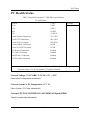
Figure8: PC Health Status
Current Voltage (V) VCORE / VCC18 / +5V / ±12V
Detect system’s voltage status automatically.
Current System / CPU Temperature (°C / °F)
Detect System / CPU Temp. automatically.
Current CPU FAN / POWER FAN / SYSTEM FAN Speed (RPM)
Detect Fan speed status automatically.
45
8IDML Series Motherboard
CPU Warning Temperature
60°C / 140°F
Monitor CPU Temp. at 60°C / 140°F.
70°C / 158°F
Monitor CPU Temp. at 70°C / 158°F.
80°C / 176°F
Monitor CPU Temp. at 80°C / 176°F.
90°C / 194°F
Monitor CPU Temp. at 90°C / 194°F.
Disabled
Disabled this function.(Default value)
Fan Fail Warning ( CPU / POWER/ SYSTEM)
Disabled
Fan Fail Alarm Function Disabled. (Default value)
Enabled
Fan Fail Alarm Function Enabled.
46
BIOS Setup
Frequency/Voltage Control
CMOS Setup Utility-Copyright (C) 1984-2001 Award Software
Frequency/Voltage Control
CPU Clock Ratio
x 15
Item Help
CPU Host Clock Control
Disable
Menu Level
CPU Host Frequency(MHz)
100
Host/DRAM Clock ratio
Auto
Memory Frequency(MHz)
133
PCI/AGP Frequency(MHz)
33/66
: Move Enter:Select +/-/PU/PD:Value F10:Save ESC:Exit F1:General Help
F5:Previous Values F6:Fail-Safe Defaults F7:Optimized Defaults
Figure 9: Frequency/Voltage Control
CPU Clock Ratio
X 8~X 16 It’s depends on CPU Clock Ratio.
CPU Host Clock Control
Disable
Disable CPU Host Clock Control.(Default value)
Enable
Enable CPU Host Clock Control.
CPU Host Frequency
100MHz ~ 200MHz
Set CPU Host Clock from 100MHz to 200MHz.
Host/DRAM Clock Ratio
1.0
Memory Frequency = Host clock X 1.0.
1.33
Memory Frequency = Host clock X 1.33.
Auto
Depend’s On SPD Data. (Default value)
47
8IDML Series Motherboard
Load Fail-Safe Defaults
CMOS Setup Utility-Copyright (C) 1984-2001 Award Software
Standard CMOS Features
Frequency/Voltage Control
Advanced BIOS Features
Load Fail-Safe Defaults
Advanced Chipset Features
Load Optimized Defaults
Integrated Peripherals
Set Supervisor Password
Power Management Setup
Set User Password
PnP/PCI Configurations
Save & Exit Setup
Load Fail-Safe Defaults? (Y/N)?Y
PC Health Status
Exit Without Saving
:SelectItect
ESC:Quit
F10:Save & Exit Setup
Load Fail-Safe Defaults
Figure 10: Load Fail-Safe Defaults
Load Fail-Safe Defaults
Fail-Safe defaults contain the most appropriate values of the system parameters that allow
minimum system performance.
48
BIOS Setup
Load Optimized Defaults
CMOS Setup Utility-Copyright (C) 1984-2001 Award Software
Standard CMOS Features
Frequency/Voltage Control
Advanced BIOS Features
Load Fail-Safe Defaults
Advanced Chipset Features
Load Optimized Defaults
Integrated Peripherals
Set Supervisor Password
Power Management Setup
Set User Password
PnP/PCI Configurations
PC Health Status
Save & Exit Setup
Load Optimized Defaults? (Y/N)?Y
Exit Without Saving
:SelectItect
ESC:Quit
F10:Save & Exit Setup
Load Optimized Defaults
Figure 11: Load Optimized Defaults
Load Optimized Defaults
Selecting this field loads the factory defaults for BIOS and Chipset Features which the
system automatically detects.
49
8IDML Series Motherboard
Set Supervisor/User Password
CMOS Setup Utility-Copyright (C) 1984-2001 Award Software
Standard CMOS Features
Frequency/Voltage Control
Advanced BIOS Features
Load Fail-Safe Defaults
Advanced Chipset Features
Load Optimized Defaults
Integrated Peripherals
Set Supervisor Password
Power Management Setup
Set User Password
PnP/PCI Configurations
Enter Password:
PC Health Status
Save & Exit Setup
Exit Without Saving
:SelectItect
ESC:Quit
F10:Save & Exit Setup
Change/Set/Disable Password
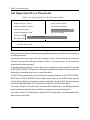
Figure 12: Password Setting
When you select this function, the following message will appear at the center of the screen to assist you
in creating a password.
Type the password, up to eight characters, and press <Enter>. You will be asked to confirm the
password. Type the password again and press <Enter>. You may also press <Esc> to abort the
selection and not enter a password.
To disable password, just press <Enter> when you are prompted to enter password. A message
“PASSWORD DISABLED” will appear to confirm the password being disabled. Once the password is
disabled, the system will boot and you can enter Setup freely.
The BIOS Setup program allows you to specify two separate passwords: a SUPERVISOR PASSWORD and a USER PASSWORD. When disabled, anyone may access all BIOS Setup program
function. When enabled, the Supervisor password is required for entering the BIOS Setup program and
having full configuration fields, the User password is required to access only basic items.
If you select “System” at “Security Option” in Advance BIOS Features Menu, you will be prompted for
the password every time the system is rebooted or any time you try to enter Setup Menu.
If you select “Setup” at “Security Option” in Advance BIOS Features Menu, you will be prompted only
when you try to enter Setup.
50
BIOS Setup
Save & Exit Setup
CMOS Setup Utility-Copyright (C) 1984-2001 Award Software
Standard CMOS Features
Frequency/Voltage Control
Advanced BIOS Features
Load Fail-Safe Defaults
Advanced Chipset Features
Load Optimized Defaults
Integrated Peripherals
Set Supervisor Password
Power Management Setup
Set User Password
PnP/PCI Configurations
& Exit
Save to CMOS and EXITSave
(Y/N)?
Y Setup
PC Health Status
Exit Without Saving
:SelectItect
ESC:Quit
F10:Save & Exit Setup
Save Datat to CMOS
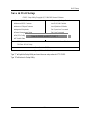
Figure 13: Save & Exit Setup
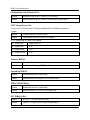
Type “Y” will quit the Setup Utility and save the user setup value to RTC CMOS.
Type “N” will return to Setup Utility.
51
8IDML Series Motherboard
Exit Without Saving
CMOS Setup Utility-Copyright (C) 1984-2001 Award Software
Standard CMOS Features
Frequency/Voltage Control
Advanced BIOS Features
Load Fail-Safe Defaults
Advanced Chipset Features
Load Optimized Defaults
Integrated Peripherals
Set Supervisor Password
Power Management Setup
Set User Password
PnP/PCI Configurations
Quit Without Saving (Y/N)?Save
N & Exit Setup
PC Health Status
Exit Without Saving
:SelectItect
ESC:Quit
F10:Save & Exit Setup
Abandon all Data
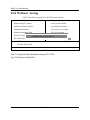
Figure 14: Exit Without Saving
Type “Y” will quit the Setup Utility without saving to RTC CMOS.
Type “N” will return to Setup Utility.
52
Technical Reference
Revision History
Chapter
4 Technical Reference
Performance List
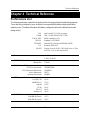
The following performance data list is the testing results of some popular benchmark testing programs.
These data are just referred by users, and there is no responsibility for different testing data values
gotten by users. (The different Hardware & Software configuration will result in different benchmark
testing results.)
CPU
DRAM
CACHE SIZE
DISPLAY
STORAGE
O.S
DRIVER
Processor
Intel Pentuim® 4 1.7GHz processor
(128 x 1) MB SDRAM (PQI PC166)
256KB included in CPU
Gigabyte GV-GF3000D
Onboard IDE (Quantum AS30000AT 30GB)
Windows 2000+ SP2
Display Driver at 1024 x 768 x 64K colors x 75Hz
IUCD ver. 1.8 For Intel chipset M.B.
Intel Pentium® 4
1.7GHz (100x17)
WCPUID 2.8 Clock Frequency
Internal MHz
SiSoft Sandra 2001
CPU/FPU Benchmark
CPU Multi-Media Benchmark
Drives Benchmark
Memory Benchmark
SPECviewperf 6.12
Pro CDRS-03
MedMCAD-01
Light-04
DX-06
DRV-07
Awadvs-04
QUAKE III Arena (without sound)
640*480*16 Demo1
1024*768*32 Demo2
1700.01
3264/887/2095
6799/8821
22971
662/669
13.42
17.90
5.093
14.05
14.83
39.38
153.3
134.2
53
GA-8IDML Series Motherboard
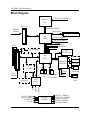
Block Diagram
Pentium 4
CPU
CPUCLK± (100MHz)
AGP 4X
System Bus 100MHz
AGPCLK
(66MHz)
100/133 MHz
Intel
82845
HCLK± (100MHz)
MCHCLK (66MHz)
66 MHz
33 MHz
14.318 MHz
48 MHz
FWH
SST49LF002
3 PCI
RJ45
SDRAM
RTL8100(B)L
Intel
ICH 2
Game Port
LPC BUS
AC97 Link
Creative
CT5880
Winbond
W83627HF
24 MHz
PCICLK
(33MHz)
4 USB
Ports
ATA33/66/100
IDE Channels
LINE-OUT
LINE-IN
MIC
PCICLK (33MHz)
USBCLK (48MHz)
14.318 MHz
33 MHz
Cypress
CY28324
54
LPT Port
PS/2
KB/Mouse
33 MHz
AC97
CODEC
Game Port
Floppy
HCLK± (100MHz)
CPUCLK± (100MHz)
AGPCLK (66MHz)
MCHCLK (66MHz)
ICH3V66 (66MHz)
COM
Ports
Technical Reference
Four Speaker & SPDIF Introduction
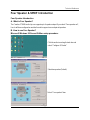
Four Speaker Introduction
A. What is Four Speaker?
The Creative CT5880 audio chip can support up to 4 speaker output. If you select “Four speaker out”,
Line In will be reconfigured as another line out to support a second pair of speakers.
B. How to use Four Speaker?
Microsoft Windows 98 Second Edition setup procedure:
Click the audio icon along the task bar and
select “Configure 3D Audio”
Select two speaker (Default)
Select “Four speaker” item.
55
GA-8IDML Series Motherboard
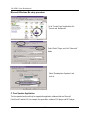
Microsoft Windows Me setup procedure:
Go to “Control Panel” and double click
“Sounds and Multimedia”.
Select “Audio” Page, and click “Advanced”
button.
Select “Quadraphonic Speakers” and
click ok.
C. Four Speaker Application
The four speaker function will only be supported in application softwares that use Microsoft
DirectX and Creative EAX, for example, the game titles, software DVD player and MP3 player.
56
Technical Reference
SPDIF Introduction
A. What is SPDIF?
The SPDIF output is capable of providing digital signal to AC3 decoder which can support upto 5.1
speakers.
B. How to use SPDIF?
Click your mouse right button in “My Computer”
and select the “Properties” item.
Click “Device Manager” item.
Click “Sound, vidio and game controllers” item
and select the “Creative Sound Blaster
PCI128” item.
57
GA-8IDML Series Motherboard
Click “Settings” item and select the “Output
Mode” item.
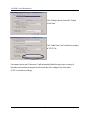
Click “Digital” item, Line Out will be reconfigure
to SPDIF Out.
Recommend you to select “Autosense”, It will automatically detect the type (mono or stereo) of
the audio connector that you plug into Line Out audio jack, then configure Line Out to either
SPDIF or Speaker accordingly.
58
Technical Reference
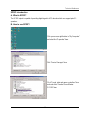
@ BIOS Introduction
Gigabyte announces @ BIOS
Windows BIOS live update utility
Have you ever updated BIOS by yourself? Or like
many other people, you just know what BIOS is,
but always hesitate to update it? Because you think
updating newest BIOS is unnecessary and actually
you don’t know how to update it.
Maybe not like others, you are very experienced in BIOS updating and spend quite a lot of time
to do it. But of course you don’t like to do it too much. First, download different BIOS from website and
then switch the operating system to DOS mode. Secondly, use different flash utility to update BIOS.
The above process is not a interesting job. Besides, always be carefully to store the BIOS source
code correctly in your disks as if you update the wrong BIOS, it will be a nightmare.
Certainly, you wonder why motherboard vendors could not just do something right to save your
time and effort and save you from the lousy BIOS updating work? Here it comes! Now Gigabyte
announces @BIOS—the first Windows BIOS live update utility. This is a smart BIOS update
software. It could help you to download the BIOS from internetand update it. Not like the other BIOS
update software, it’s a Windows utility. With the help of “@BIOS’, BIOS updating is no more than a
click.
Besides, no matter which mainboard you are using, if it’s a Gigabyte’s product*, @BIOS help
you to maintain the BIOS. This utility could detect your correct mainboard model and help you to
choose the BIOS accordingly. It then downloads the BIOS from the nearest Gigabyte ftp site
automatically. There are several different choices; you could use “Internet Update” to download and
update your BIOS directly. Or you may want to keep a backup for your current BIOS, just choose
“Save Current BIOS” to save it first. You make a wise choice to use Gigabyte, and @BIOS update
your BIOS smartly. You are now worry free from updating wrong BIOS, and capable to maintain and
manage your BIOS easily. Again, Gigabyte’s innovative product erects a milestone in mainboard
industries.
For such a wonderful software, how much it costs? Impossible! It’s free! Now, if you buy a
Gigabyte’s motherboard, you could find this amazing software in the attached driver CD. But please
remember, connected to internet at first, then you could have a internet BIOS update from your
Gigabyte @BIOS.
59
GA-8IDML Series Motherboard
Easy TuneIIITM Introduction
Gigabyte announces EasyTuneIII
Windows overdrive utility
“Overdrive” might be one of the most
common issues in computer field. But have many
users ever tried it? The answer is probably “no”.
Because “overdrive” is thought to be very difficult and
includes a lot of technical know-how, sometimes “overdrive” is even considered as special skills found only in some enthusiasts.
But as to the experts in “overdrive”, what’s the truth? They may spend quite a lot of time and money
to study, try and use many different hardware and software tools to do “overdrive”. And even with these
technologies, they still learn that it’s quite a risk because the safety and stability of an “overdrive“ system
is unknown.
Now everything is different because of a Windows overdrive utility EasyTuneIII—announced by
Gigabyte. This utility has totally changed the gaming rule of “overdrive”. This is the first overdrive utility
suitable for both normal and power users. Users can choose either “Easy Mode” or “Advanced Mode”
to run “overdrive” at their convenience. For users who choose “Easy Mode”, they just need to click
“Auto Optimize” to have auto and immediate CPU overclocking. This software will then overdrive CPU
speed automatically with the result being shown in the control panel. If someone prefers to “overdrive” by
oneself, there is also another choice. Click “Advanced Mode” to enjoy “sport drive” class overclocking.
In “Advanced Mode”, one can change the system bus speed in small increments to get ultimate system
performance. And no matter which mainboard is used, if it’s a Gigabyte’s product*, EasyTuneIII helps to
perform the best of system.
Besides, different from other traditional over-clocking methods, EasyTuneIII doesn’t require users to
change neither BIOS nor hardware switch/ jumper setting; on the other hand, they can do “overdrive” at
only one click. Therefore, this is a safer way for “overdrive” as nothing is changed on software or
hardware. If user runs EasyTuneIII over system’s limitation, the biggest lost is only to restart the
computer again and the side effect is then well controlled. Moreover, if one well-performed system speed
been tested in EasyTuneIII, user can “Save” this bus speed and “Load” it in next time. Obviously,
Gigabyte EasyTuneIII has already turned the “overdrive” technology toward to a newer generation.
This wonderful software is now free bundled in Gigabyte motherboard attached driver CD. Users
may make a test drive of “EasyTuneIII” to find out more amazing features by themselves.
60
Appendix
Revision History
Chapter
5 Appendix
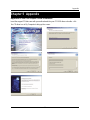
Appendix A: Intel 845 Chipset Driver Installation
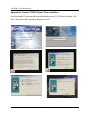
Insert the support CD that came with your motherboard into your CD-ROM driver or double –click
the CD driver icon in My Computer to bring up the screen.
61
GA-8IDML Series Motherboard
Appendix
B: Creative
CT5880 Chipset Driver Installation
Revision
History
Insert the support CD that came with your motherboard into your CD-ROM driver or double –click
the CD driver icon in My Computer to bring up the screen.
62
FCC Compliance Statement:
DECLARATION OF CONFORMITY
Per FCC Part 2 Section 21077(a)
Responsible Party Name: G.B.T. INC.
Address: 18305 Valley Blvd., Suite#A
LA Puent, CA 91744
Phone/Fax No: (818) 854-9338/ (818) 854-9339
hereby declares that the product
Product Name:MotherboardCard
Model Number:GA8IDML/GA-8IDML-C
Conforms to the following specifications:
FCC Part 15, Subpart B, Section 15.107(a) and Section 15.109(a),
Class B Digital Device
This equipment has been tested and found to comply
with limits for a Class B digital device , pursuant to Part
15 of the FCC rules. These limits are designed to
provide reasonable protection against harmful
interference in residential installations. This equipment
generates, uses, and can radiate radio frequency
energy, and if not installed and used in accordance with
the instructions, may cause harmful interference to radio
communications. However, there is no guarantee that
Supplementary Information:
This device complies with part 15 of the FCC Rules. Operation is subject to the
following two conditions: (1) This device may not cause harmful
and (2) this device must accept any inference received, including
that may cause undesired operation.
Representative Person’s Name: ERIC LU
Signature: Eric Lu
Date: July 28,2001
interference will not occur in a particular installation. If
this equipment does cause interference to radio or
television equipment reception, which can be
determined by turning the equipment off and on, the user
is encouraged to try to correct the interference by one or
more of the following measures:
-Reorient or relocate the receiving antenna
-Move the equipment away from the receiver
-Plug the equipment into an outlet on a circuit different from that to which the receiver is connected
-Consult the dealer or an experienced radio/television technician for additional suggestions
You are cautioned that any change or modifications to the equipment not expressly approve by the
party responsible for compliance could void Your authority to operate such equipment.
This device complies with Part 15 of the FCC Rules. Operation is subjected to the following two
conditions 1) this device may not cause harmful interference and 2) this device must accept any
interference received, including interference that may cause undesired operation.
Declaration of Conformity
We, Manufacturer/Importer
(full address)
G.B.T. Technology Träding GMbH
Ausschlager Weg 41, 1F, 20537 Hamburg, Germany
declare that the product
( description of the apparatus, system, installation to which it refers)
Mother Board
GA-8IDML/GA-8IDML-C
is in conformity with
(reference to the specification under which conformity is declared)
in accordance with 89/336 EEC-EMC Directive
EN 55011
Limits and methods of measurement
EN 61000-3-2*
Disturbances in supply systems cause
of radio disturbance characteristics of
industrial,scientific and medical (ISM
EN 60555-2
by household appliances and similar
electrical equipment “Harmonics”
Limits and methods of measurement
EN 61000-3-3*
Disturbances in supply systems cause
of radio disturbance characteristics of
broadcast receivers and associated
EN 60555-3
by household appliances and similar
electrical equipment “Voltage fluctuations”
EN 50081-1
Generic emission standard Part 1:
high frequency equipment
EN 55013
equipment
EN 55014
Limits and methods of measurement
of radio disturbance characteristics of
household electrical appliances,
EN 55015
Residual commercial and light industry
portable tools and similar electrical
apparatus
EN 50082-1
Generic immunity standard Part 1:
Limits and methods of measurement
of radio disturbance characteristics of
EN 55081-2
Generic emission standard Part 2:
Residual commercial and light industry
Industrial environment
fluorescent lamps and luminaries
EN 55020
Immunity from radio interference of
EN 55082-2
broadcast receivers and associated
equipment
EN 55022
Limits and methods of measurement
Industrial environment
ENV 55104
of radio disturbance characteristics of
information technology equipment
DIN VDE 0855
part 10
part 12
Cabled distribution systems; Equipment
for receiving and/or distribution from
Generic emission standard Part 2:
lmmunity requirements for household
appliances tools and similar apparatus
EN50091-2
EMC requirements for uninterruptible
power systems (UPS)
sound and television signals
(EC conformity marking)
CE marking
The manufacturer also declares the conformity of above mentioned product
with the actual required safety standards in accordance with LVD 73/23 EEC
EN 60065
Safety requirements for mains operated
EN 60950
electronic and related apparatus for
household and similar general use
EN 60335
Safety of household and similar
EN 50091-1
electrical appliances
Manufacturer/Importer
Signature:
(Stamp)
Date : Jul. 28, 2001
Name:
Rex Lin
Rex Lin