1
OrCAD® Express
User’s Guide
Copyright © 1998 OrCAD, Inc. All rights reserved.
Trademarks
OrCAD, OrCAD Layout, OrCAD Express, OrCAD Capture, OrCAD PSpice, and
OrCAD PSpice A/D are registered trademarks of OrCAD, Inc. OrCAD Capture CIS,
and OrCAD Express CIS are trademarks of OrCAD, Inc.
Microsoft, Visual Basic, Windows, Windows NT, and other names of Microsoft
products referenced herein are trademarks or registered trademarks of Microsoft
Corporation.
All other brand and product names mentioned herein are used for identification
purposes only, and are trademarks or registered trademarks of their respective
holders.
60-30-621
First edition 30 November 1998
Technical Support
Corporate offices
OrCAD Japan K.K.
OrCAD UK Ltd.
Fax
(503) 671-9400
(503) 671-9500
81-45-621-1911
44-1256-381-400
(503) 671-9501
General email
Technical Support email
[email protected]
[email protected]
World Wide Web
http://www.orcad.com
OrCAD Design Network (ODN) http://www.orcad.com/odn
9300 SW Nimbus Ave.
Beaverton, OR 97008 USA
Contents
Before you begin
ix
Product configurations . . . . . . . .
How to use this guide . . . . . . . . .
Symbols and conventions . . . .
Related documentation . . . . . .
A note to OrCAD Express v7.xx users
Chapter 1
Chapter 2
.
.
.
.
.
.
.
.
.
.
.
.
.
.
.
.
.
.
.
.
.
.
.
.
.
.
.
.
.
.
.
.
.
.
.
.
.
.
.
.
.
.
.
.
.
.
.
.
.
.
.
.
.
.
.
.
.
.
.
.
.
.
.
.
.
.
.
.
.
.
.
.
.
.
.
.
.
.
.
.
.
.
.
.
.
. xi
xiii
. xv
xvi
xvii
Designing PLDs . . . . . . . . . . . . . . . .
Design entry . . . . . . . . . . . . . . . .
Functional simulation . . . . . . . . . . .
Logic synthesis and optimization . . . .
Place and route . . . . . . . . . . . . . .
Timing simulation . . . . . . . . . . . . .
Document and archive . . . . . . . . . .
Support for designing programmable logic .
.
.
.
.
.
.
.
.
.
.
.
.
.
.
.
.
.
.
.
.
.
.
.
.
.
.
.
.
.
.
.
.
.
.
.
.
.
.
.
.
.
.
.
.
.
.
.
.
.
.
.
.
.
.
.
.
.
.
.
.
.
.
.
.
.
.
.
.
.
.
.
.
.
.
.
.
.
.
.
.
.
.
.
.
.
.
.
.
.
.
.
.
.
.
.
.
.
.
.
.
.
.
.
.
.
.
.
.
.
.
.
.
.
.
.
.
.
.
.
.
.
.
.
.
.
.
.
.
.
.
.
.
.
.
.
.
Express additions to the Capture work environment .
Express additions to the Capture toolbar . . . . . .
PLD projects in the project manager . . . . . . . . . . .
Library resources for design entry and simulation
Project outputs . . . . . . . . . . . . . . . . . . . . .
Simulation resources . . . . . . . . . . . . . . . . .
In Design . . . . . . . . . . . . . . . . . . . . . .
Timed . . . . . . . . . . . . . . . . . . . . . . . .
Managing programmable logic projects . . . . . . . . .
Creating or opening a PLD project . . . . . . . . .
File management in the project manager . . . . . .
Saving projects . . . . . . . . . . . . . . . . . . . . .
Closing projects . . . . . . . . . . . . . . . . . . . .
.
.
.
.
.
.
.
.
.
.
.
.
.
.
.
.
.
.
.
.
.
.
.
.
.
.
.
.
.
.
.
.
.
.
.
.
.
.
.
.
.
.
.
.
.
.
.
.
.
.
.
.
.
.
.
.
.
.
.
.
.
.
.
.
.
.
.
.
.
.
.
.
.
.
.
.
.
.
.
.
.
.
.
.
.
.
.
.
.
.
.
.
.
.
.
.
.
.
.
.
.
.
.
.
.
.
.
.
.
.
.
.
.
.
.
.
.
.
.
.
.
.
.
.
.
.
.
.
.
.
. 8
. 8
. 9
. 10
. 10
. 11
. 11
. 12
. 13
. 13
. 15
. 16
. 16
The PLD design flow
Getting started
.
.
.
.
.
.
.
.
.
.
.
.
.
.
.
1
1
2
3
3
4
4
5
5
7
Contents
The Simulate work environment . . . .
The Hierarchy tab in Simulate . . .
The Simulate toolbar . . . . . . . . .
The folder selection drop down list
The status bar . . . . . . . . . . . . .
The left text field . . . . . . . . .
The right text fields . . . . . . .
The command line window . . . . .
Tools for viewing signals . . . . . .
Wave window . . . . . . . . . .
List window . . . . . . . . . . .
Watch window . . . . . . . . . .
Stack View window . . . . . . .
Signal Properties window . . .
Chapter 3
iv
.
.
.
.
.
.
.
.
.
.
.
.
.
.
.
.
.
.
.
.
.
.
.
.
.
.
.
.
.
.
.
.
.
.
.
.
.
.
.
.
.
.
.
.
.
.
.
.
.
.
.
.
.
.
.
.
17
17
20
23
23
24
24
24
26
27
29
30
31
33
Designing PLDs with schematics . . . . . . . . . . . . . . . . . . . .
Accessing tools . . . . . . . . . . . . . . . . . . . . . . . . . . . .
Using PLD vendor library macros . . . . . . . . . . . . . . . . .
Using PLD vendor cores . . . . . . . . . . . . . . . . . . . . . .
Creating parameterized parts . . . . . . . . . . . . . . . . . . . .
Using previously created LogiBLOX parts in a schematic .
Referencing VHDL models from within a schematic . . . . . .
Recommended schematic design and file naming conventions
File naming conventions . . . . . . . . . . . . . . . . . . . .
Design component naming conventions . . . . . . . . . . .
Managing signal flow . . . . . . . . . . . . . . . . . . . . . .
Loading PLD vendor schematic keystroke macros . . . . .
Including optimization and timing constraints in schematics .
Assigning a part package for your PLD design . . . . . . . . . .
Schematic annotation . . . . . . . . . . . . . . . . . . . . . . . .
Checking for design rules violations . . . . . . . . . . . . . . . .
Designing with VHDL . . . . . . . . . . . . . . . . . . . . . . . . . .
Describing module behavior with VHDL . . . . . . . . . . . . .
Accessing source code samples . . . . . . . . . . . . . . . .
VHDL programmer’s editor . . . . . . . . . . . . . . . . . . . .
VHDL files, VHDL models, and VHDL file types . . . . . .
Editing files and file types . . . . . . . . . . . . . . . . . . .
Including place and route constraints in VHDL models . . . .
Checking VHDL syntax . . . . . . . . . . . . . . . . . . . . . . .
Examining the VHDL hierarchy . . . . . . . . . . . . . . . . . .
.
.
.
.
.
.
.
.
.
.
.
.
.
.
.
.
.
.
.
.
.
.
.
.
.
.
.
.
.
.
.
.
.
.
.
.
.
.
.
.
.
.
.
.
.
.
.
.
.
.
.
.
.
.
.
.
.
.
.
.
.
.
.
.
.
.
.
.
.
.
.
.
.
.
.
36
36
37
38
38
39
41
42
42
42
42
43
45
46
46
47
50
50
51
53
54
56
57
58
60
Design entry
.
.
.
.
.
.
.
.
.
.
.
.
.
.
.
.
.
.
.
.
.
.
.
.
.
.
.
.
.
.
.
.
.
.
.
.
.
.
.
.
.
.
.
.
.
.
.
.
.
.
.
.
.
.
.
.
.
.
.
.
.
.
.
.
.
.
.
.
.
.
.
.
.
.
.
.
.
.
.
.
.
.
.
.
.
.
.
.
.
.
.
.
.
.
.
.
.
.
.
.
.
.
.
.
.
.
.
.
.
.
.
.
.
.
.
.
.
.
.
.
.
.
.
.
.
.
.
.
.
.
.
.
.
.
.
.
.
.
.
.
.
.
.
.
.
.
.
.
.
.
.
.
.
.
.
.
.
.
.
.
.
.
.
.
.
.
.
.
.
.
.
.
.
.
.
.
.
.
.
.
.
.
.
.
.
.
.
.
.
.
.
.
.
.
.
.
.
.
.
.
.
.
.
.
.
.
.
.
.
.
35
Contents
Creating a VHDL model for an hierarchical block on a schematic page
61
Chapter 4
Functional simulation
63
Starting Simulate . . . . . . . . . . . . . . . . . . . . . . . . . . .
Performing functional simulation with In Design resources
Creating stimulus . . . . . . . . . . . . . . . . . . . . . . . . . .
Creating a VHDL test bench . . . . . . . . . . . . . . . . . .
Using interactive stimulus . . . . . . . . . . . . . . . . . . .
Creating basic stimulus . . . . . . . . . . . . . . . . . . .
Creating advanced stimulus . . . . . . . . . . . . . . . .
Creating clock stimulus . . . . . . . . . . . . . . . . . .
The stimulus window . . . . . . . . . . . . . . . . . . .
Editing interactive stimulus files . . . . . . . . . . . . .
Specifying signals to view . . . . . . . . . . . . . . . . . . . . .
Adding and removing signals from windows . . . . . . . .
Grouping signal displays . . . . . . . . . . . . . . . . . . . .
Editing signal groups . . . . . . . . . . . . . . . . . . . . . .
Symbolic mapping of groups . . . . . . . . . . . . . . . . .
Viewing the signals within groups . . . . . . . . . . . . . .
Simulation controls . . . . . . . . . . . . . . . . . . . . . . . . .
Loading or reloading a project . . . . . . . . . . . . . . . . .
Selecting a resource folder for simulation . . . . . . . . . .
Changing the top-level entity for your simulation . . . . .
Running a simulation . . . . . . . . . . . . . . . . . . . . . . . .
Stopping a simulation . . . . . . . . . . . . . . . . . . . . . .
Restarting a simulation . . . . . . . . . . . . . . . . . . . . .
Viewing signals and their current values . . . . . . . . . . .
Debugging schematics . . . . . . . . . . . . . . . . . . . . . . .
Viewing signal values in the schematic editor . . . . . . . .
Tracing signals selected in the schematic . . . . . . . . . . .
Debugging VHDL source code . . . . . . . . . . . . . . . . . . .
Checking VHDL syntax and hierarchy . . . . . . . . . . . .
Stepping through a simulation . . . . . . . . . . . . . . . . .
Continuing a simulation . . . . . . . . . . . . . . . . . . . .
Setting simulation breakpoints . . . . . . . . . . . . . . . .
Using the Break on Expression command . . . . . . . .
Using the Break on Line command . . . . . . . . . . . .
Editing breakpoints . . . . . . . . . . . . . . . . . . . . .
Viewing pending events . . . . . . . . . . . . . . . . . . . .
Interpreting simulation results . . . . . . . . . . . . . . . . . . .
.
.
.
.
.
.
.
.
.
.
.
.
.
.
.
.
.
.
.
.
.
.
.
.
.
.
.
.
.
.
.
.
.
.
.
.
.
.
.
.
.
.
.
.
.
.
.
.
.
.
.
.
.
.
.
.
.
.
.
.
.
.
.
.
.
.
.
.
.
.
.
.
.
.
.
.
.
.
.
.
.
.
.
.
.
.
.
.
.
.
.
.
.
.
.
.
.
.
.
.
.
.
.
.
.
.
.
.
.
.
.
.
.
.
.
.
.
.
.
.
.
.
.
.
.
.
.
.
.
.
.
.
.
.
.
.
.
.
.
.
.
.
.
.
.
.
.
.
.
.
.
.
.
.
.
.
.
.
.
.
.
.
.
.
.
.
.
.
.
.
.
.
.
.
.
.
.
.
.
.
.
.
.
.
.
. 64
. 65
. 66
. 66
. 68
. 70
. 73
. 77
. 79
. 80
. 82
. 83
. 86
. 88
. 89
. 90
. 91
. 91
. 91
. 93
. 94
. 95
. 96
. 96
. 97
. 97
100
104
104
104
104
106
106
108
109
110
111
v
Contents
Using signal traceback . . . . . . . . . . . . . . . . . . . . . .
Using delta time markers . . . . . . . . . . . . . . . . . . . .
Copying traced signals between windows and applications
Saving simulation results to a file . . . . . . . . . . . . . . .
Chapter 5
Logic synthesis and optimization
Place and route
.
.
.
.
.
.
.
.
.
.
.
.
.
.
.
.
111
112
115
116
.
.
.
.
.
.
.
.
.
.
.
.
.
.
.
.
.
.
.
.
.
.
.
.
.
.
.
.
.
.
.
.
.
.
.
.
.
.
.
.
.
.
.
.
.
.
.
.
.
.
.
.
.
.
.
.
.
.
.
.
.
.
.
.
.
.
.
.
.
.
118
120
121
122
124
126
128
131
132
136
137
138
146
148
117
An introduction to logic optimization . . . . . . .
Global synthesis and optimization constraints . .
Global technology constraints . . . . . . . . .
Actel global constraints . . . . . . . . . . .
Altera global constraints . . . . . . . . . .
Lucent global constraints . . . . . . . . . .
Xilinx global constraints . . . . . . . . . .
Global synthesis constraints . . . . . . . . . .
Global optimization constraints . . . . . . . .
Global timing constraints . . . . . . . . . . . .
Constraints for determining synthesis output
Local synthesis and optimization constraints . . .
Synthesis with the Compile command . . . . . . .
Interpreting optimization results . . . . . . . . . .
Chapter 6
.
.
.
.
.
.
.
.
.
.
.
.
.
.
.
.
.
.
.
.
.
.
.
.
.
.
.
.
.
.
.
.
.
.
.
.
.
.
.
.
.
.
.
.
.
.
.
.
.
.
.
.
.
.
.
.
.
.
.
.
.
.
.
.
.
.
.
.
.
.
.
.
.
.
.
.
.
.
.
.
.
.
.
.
.
.
.
.
.
.
.
.
.
.
.
.
.
.
.
.
.
.
.
.
.
.
.
.
.
.
.
.
.
.
.
.
153
PLD vendor considerations . . . . . . . . . . . . . . . . . . . . . . . . . . 155
Place and route constraints . . . . . . . . . . . . . . . . . . . . . . . . . . 156
Place and route controls . . . . . . . . . . . . . . . . . . . . . . . . . . . . 157
Chapter 7
Timing simulation
159
Running a timing simulation . . . .
Timing simulation considerations .
Comparing simulation results . . .
Interpreting comparison results
Chapter 8
vi
.
.
.
.
.
.
.
.
.
.
.
.
.
.
.
.
.
.
.
.
.
.
.
.
.
.
.
.
.
.
.
.
.
.
.
.
.
.
.
.
.
.
.
.
.
.
.
.
.
.
.
.
.
.
.
.
.
.
.
.
.
.
.
.
.
.
.
.
.
.
.
.
.
.
.
.
160
161
164
171
Configuring a printer or plotter . . . . . .
Printing or plotting schematic pages . . .
Printing or plotting VHDL source files .
Printing or plotting wave or list windows
Previewing printer or plotter output . . .
Scaling printer or plotter output . . . . .
Special considerations for plotting . . . .
.
.
.
.
.
.
.
.
.
.
.
.
.
.
.
.
.
.
.
.
.
.
.
.
.
.
.
.
.
.
.
.
.
.
.
.
.
.
.
.
.
.
.
.
.
.
.
.
.
.
.
.
.
.
.
.
.
.
.
.
.
.
.
.
.
.
.
.
.
.
.
.
.
.
.
.
.
.
.
.
.
.
.
.
.
.
.
.
.
.
.
.
.
.
.
.
.
.
.
.
.
.
.
.
.
.
.
.
.
.
.
.
.
.
.
.
.
.
.
.
.
.
.
.
.
.
174
174
175
176
178
180
181
Documentation and archiving
.
.
.
.
.
.
.
.
173
Contents
Plotter pen colors . . . . . . . . . . . . . . . . . . . . . . . . . . . . . 181
Archiving projects . . . . . . . . . . . . . . . . . . . . . . . . . . . . . . . 182
Chapter 9
PLD integration
183
Generating schematic parts . . . . . .
Simulating a system-level schematic
About simulation “stub” files . .
PCB simulation considerations .
Glossary
.
.
.
.
.
.
.
.
.
.
.
.
.
.
.
.
.
.
.
.
.
.
.
.
.
.
.
.
.
.
.
.
.
.
.
.
.
.
.
.
.
.
.
.
.
.
.
.
.
.
.
.
.
.
.
.
.
.
.
.
.
.
.
.
.
.
.
.
.
.
.
.
.
.
.
.
.
.
.
.
184
187
189
190
193
vii
Contents
viii
Before you begin
OrCAD offers a total solution for your core design tasks:
schematic- and VHDL-based design entry; FPGA and
CPLD design synthesis; digital, analog, and mixed-signal
simulation; and printed circuit board layout. What's more,
OrCAD's products are a suite of applications built around
an engineer's design flow, not just a collection of
independently developed point tools. OrCAD Express is
just one element in OrCAD's total solution design flow.
OrCAD Express is your complete solution for designing
programmable logic devices. OrCAD is dedicated to
providing superior solutions for developing digital
integrated circuits. The OrCAD Express product line was
developed specifically to address the needs of the
electronic engineer who must implement digital logic
designs into one or more programmable logic devices
(PLDs). Programmable logic in the form of field
programmable gate arrays (FPGAs), complex
programmable logic devices (CPLDs), and simple PLDs,
along with memory and central processors, are some of
the most popular components to implement the digital
segments of an electronic system.
Before you begin
Express (or Express Plus, which includes enhanced
synthesis capabilities required for high-performance
designs) adds everything you need to develop PLDs
within OrCAD Capture or Capture CIS. Express includes
VHSIC Hardware Design Language (VHDL) synthesis
and simulation technology and programmable logic
vendor interfaces in the form of libraries and place-androute automation. Express’s electronic design automation
(EDA) tools and robust documentation provides an ideal
compliment to the general system and printed circuit
board design efforts performed in OrCAD’s Capture and
Layout product lines.
x
Product configurations
Product configurations
The Express product line includes two editions targeted
for the generalist or high-performance/high-density PLD
developer: OrCAD Express and OrCAD Express Plus.
Express Plus provides additional Register Transfer Level
(RTL) synthesis optimization controls required for
100,000+ gate density FPGA design tasks.
In this manual, differences between Express and Express
Plus feature set are denoted with notes or comments
within the text.
The following table provides a high-level overview of the
feature sets available in Express and Express Plus.
xi
Before you begin
Feature
Express Plus
Express
Timing-driven synthesis option
✓
✓
High quality RTL synthesis and optimization powered by
Exemplar Logic
✓
✓
VHDL VITAL ‘95 compliant gate-level timing simulation
✓
✓
Register transfer level VHDL debugging and simulation
✓
✓
Command line interface
✓
✓
Graphical wave and table output
✓
✓
VHDL subprogram stack view
✓
✓
Multi-format test vector comparison
✓
✓
Multi-chip, multi-vendor simulation, 1,300 TTL models
✓
✓
Cross-probe simulation data to schematics
✓
✓
Register transfer level VHDL synthesis
VHDL and schematic simulation
Programmable logic vendor support
xii
Lucent Semiconductor ORCA 3C
✓
Xilinx SPARTAN
✓
Actel ACT1, ACT2, 1200XL, ACT3, 3200DX, MX, SX
✓
✓
Altera MAX 5000, MAX 7000/S, FLEX 6000, FLEX 8000,
FLEX 10K
✓
✓
Lattice Semiconductor ispLSI/pLSI
✓
✓
Lucent Semiconductor ORCA 2C
✓
✓
Philips CoolRunner
✓
✓
Simple PAL, GAL and PROM devices
✓
✓
Product configurations
Feature
Express Plus
Express
✓
✓
Mix VHDL models with schematics
✓
✓
Xilinx LogiBLOX interface
✓
✓
VHDL syntax checking programmer’s editor
✓
✓
Attach VHDL models to schematics
✓
✓
Graphical library part editor
✓
✓
Programmable logic vendor pin-and-signal report to
symbol generator
✓
✓
Interface for vendor-specific constraint assignment
✓
✓
VHDL style guide for synthesis
✓
✓
VHDL support index
✓
✓
VHDL Reference and syntax guide
✓
✓
Programmable logic design support topics
✓
✓
✓
✓
Vantis MACH
Design entry
Online help system
Project management
FPGA vendor project wizards
xiii
Before you begin
How to use this guide
The OrCAD Express User’s Guide contains the procedures
you need to work with Express. To help you learn and use
Express efficiently, this manual is organized based on the
tasks you perform in your programmable logic design
flow, beginning with the most basic project tasks and
moving on to more advanced Express features. Many of
the procedures described in this manual are also covered
in the online tutorial, Learning Express.
For detailed information on using Express with PLD
vendor software, specific dialog box features, and
reference information, refer to the Express online help.
xiv
How to use this guide
Symbols and conventions
OrCAD printed documentation uses a few special
symbols and conventions.
Notation
Examples
Description
C+r
Press C+r
Means to hold down the C key
while pressing r.
A, f, o
From the File menu, choose Open (A, f, o) Means that you have two options.
You can use the mouse to choose
the Open command from the File
menu, or you can press each of the
keys in parentheses in order: first
A, then f, then o.
Monospace font
In the Part Name text box, type PARAM.
Text that you type is shown in
monospace font. In the example,
you type the characters P, A, R,
A, and M.
.MODEL MLOAD NMOS
Examples of syntax, netlist output,
and source code are displayed in
monospace font. The example
shows an example of the syntax for
the PSpice .MODEL statement.
+ (LEVEL=1 VTO=0.7 CJ=0.02pF)
UPPERCASE
In Express, open CLIPPERA.DSN.
Path and filenames are shown in
uppercase. In the example, you
open the design file named
CLIPPERA.DSN.
Italics
In Express, save design_name.DSN.
Information that you are to provide
is shown in italics. In the example,
you save the design with a name of
your choice, but it must have an
extension of .DSN.
xv
Before you begin
Related documentation
In addition to this guide, you can find technical product
information in the online help, the online interactive
tutorial, online books, OrCAD’s technical web site, as well
as other books. The table below describes the types of
technical documentation provided with Express.
This documentation component . . .
Provides this . . .
This guide—
Basic information to get started in Express. The OrCAD
Express User’s Guide is an overview of the features available
in Express and Express Plus.
OrCAD Express User’s Guide
Online help
Comprehensive information about Express. If you can’t
find something in the OrCAD Express User’s Guide, look in
the online help.
You can access help from the Help menu in Capture or
Simulate, by clicking the Help button in a dialog box, or by
pressing 1. Topics include:
• Explanations and instructions for common tasks.
• Descriptions of menu commands, dialog boxes, tools on
the toolbar and tool palettes, and the status bar.
• Netlist format samples, error messages, and glossary
terms.
• Reference information.
• Product support information.
You can get context-sensitive help for a error message by
placing your cursor in the error message line in the session
log and pressing 1.
Online OrCAD VHDL Reference
Online help that details the VHDL constructs and features
that are available for synthesis and simulation.
Online OrCAD VHDL Style Guide
Online help that provides information about how to
implement VHDL constructs and features in Express.
Online interactive tutorial
A series of self-paced interactive lessons. You can practice
what you’ve learned by going through the tutorial’s
specially designed exercises that interact directly with
Express. You can start the tutorial by choosing Learning
Express from the Help menu.
xvi
A note to OrCAD Express v7.xx users
ODN—OrCAD Design Network
www.orcad.com/odn
An internet-based technical support solution. ODN
provides a variety of options for receiving and accessing
design and technical information. ODN provides:
• A Knowledge Base with thousands of answers to
questions on topics ranging from schematic design
entry and VHDL-based programmable logic design to
printed circuit board layout methodologies.
• A Knowledge Exchange forum for you to exchange
information, ideas, and dialog with OrCAD users and
technical experts from around the world. A list of new
postings appears each time you visit the Knowledge
Exchange, for a quick update of what’s new since your
last visit.
• Tech Tips that deliver up-to-the-minute product
information in your email box. Stay informed about the
latest advances, tips, and announcements on your
OrCAD product.
• Online technical support via the Tech Support
Connection. Use this service to submit technical support
incidents online. Create submissions, upload files, track
your incidents and add comments directly into
OrCAD’s support database.
A note to OrCAD Express v7.xx
users
Those of you that have used previous versions of Express
will note that Express no longer exists as a unique icon in
the Start menu. As part of an effort to simplify packaging
and licensing of the Design Desktop product line, the
architecture of Express has changed with Release 9 to
“plug” into an existing Capture or Capture CIS product.
Prior versions of Express ran as stand-alone products
independent of Capture. An icon in the Start menu
launched a session frame for OrCAD Express for
Windows and the digital simulator appeared as OrCAD
Express Simulate for Windows. With Release 9 all
programmable logic design and synthesis tools are used
Note Express Release 9 does not provide
for post-synthesis (compiled) simulation.
The new synthesis engine makes use of
look-up tables (LUTs) and configurable
logic blocks (CLBs) that can’t be simulated
without further transformation by place
and route. The new workflow includes two
simulation stages: In Design and Timed.
xvii
Before you begin
from Capture or Capture CIS after an Express license is
installed. The simulator appears as OrCAD Simulate.
To access Express functionality, you need only open or
create a PLD project from within Capture. When you do
so, all functionality unique to Express becomes available
automatically.
xviii
The PLD design flow
1
OrCAD Express® provides a complete design solution for
targeting field programmable gate arrays (FPGAs),
complex programmable logic devices (CPLDs), and
simple programmable logic devices (SPLDs). Collectively,
these devices are referred to as PLDs.
Designing PLDs
OrCAD gives you the tools you need to take your PLD
project through each phase of the design flow. With
Express, you get all of Capture’s design entry capabilities
(establishment and control of design hierarchy, schematic
development, and design rule checking), Express
development and processing tools (VHDL model
development, synthesis and optimization, and an
interface into vendor place-and-route tools), and
simulation and debugging capabilities with Simulate,
OrCAD’s digital simulation tool.
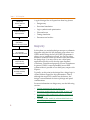
Chapter 1 The PLD design flow
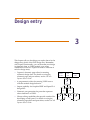
Design entry
Schematics, VHDL source
models
Functional simulation
Verify design behavior
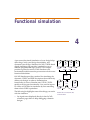
A typical design flow in Express has these key phases:
•
Design entry
•
Functional simulation
•
Logic synthesis and optimization
•
Place and route
•
Timing simulation
•
Document and archive
Logic synthesis and
optimization
Implement with Compile command
Place and route
Set up and execute
place-and-route with Build command
Timing simulation
Analyze results using
vendor-specific timing
Document and archive
Record design functionality
and particulars
Design entry
In this phase you articulate design concepts as schematic
diagrams using the OrCAD schematic page editor or as
VHDL models using the OrCAD VHDL programmer's
editor, or as a combination of both. You can use either
method to whatever extent you desire to best document
the design logic. You may wish to use a third party
application-specific tool to develop state diagrams,
waveforms, or intellectual property (IP) core components.
In general, VHDL's natural portability across EDA
systems makes it possible to use third-party output with
Express.
Typically, at this point in the design flow, design logic is
created without regard for chip performance. That is,
although the target PLD vendor may be known, the
design is unconstrained for device package and speed
considerations.
For more information on design entry, see the following
sections:
2
•
Creating parameterized parts on page 3-38.
•
Describing module behavior with VHDL on page 3-50.
•
Referencing VHDL models from within a schematic on
page 3-41.
•
Creating a VHDL model for an hierarchical block on a
schematic page on page 3-61.
Designing PLDs
•
Part Two: Creating designs in the OrCAD Capture User’s
Guide).
Functional simulation
This phase of the design flow involves debugging the
design to detect and correct errors, and to document
design logic. For functional simulation you apply input
stimuli to the design inputs and examine the outputs to
verify that the result agrees with your design
specifications. If the stimuli do not produce the expected
results, you may need to revisit the design entry phase.
OrCAD Simulate (included with Express) is used to
perform functional simulation. The simulator reads
schematic netlists and VHDL models as input, simulates
the design, and generates graphical waveform or truth
table output which model the behavior of the design logic.
You can create input stimulus using dialog boxes or
VHDL test benches. For more information, see the
following sections:
•
Starting Simulate on page 4-64.
•
Using interactive stimulus on page 4-68.
•
Creating a VHDL test bench on page 4-66.
•
Interpreting simulation results on page 4-111.
Logic synthesis and optimization
At this point of the design flow, the logic developed
during the design entry phase is compiled into a gate-level
netlist. VHDL logic synthesis technology is used to
optimize for your performance criteria. As you consider
the balance between resource utilization and performance
of your PLD design, you may direct the logic compiler to
perform specific optimizations for speed or area. Express
3
Chapter 1 The PLD design flow
Plus allows you to direct synthesis to meet specific
operating frequency requirements.
The output netlist created by synthesis is ready for
place-and-route by the PLD vendor software in the next
phase.
For more information on logic synthesis and optimization
see Chapter 5, Logic synthesis and optimization.
Place and route
In this phase, the output netlist of logic synthesis is
provided to the PLD vendor place-and-route or fitter
software. With the exception of simple PAL/GAL/PROM
devices, you must install and license the third party CPLD
or FPGA software to perform place-and-route. For
example: to place and route a Xilinx FPGA with Express,
you must install and license Xilinx Alliance vA1 software
on your system. Express provides access to the
place-and-route software in the form of a series of dialog
boxes that allow you to implement the various options
available with that particular vendor software.
For more information on place and route see Chapter 6,
Place and route.
Timing simulation
Timing simulation is performed after place and route to
verify performance of the chip implementation. You may
reapply stimuli developed during the functional
simulation phase to the design. At this point the simulator
may report timing violations or the effects of propagation
delay caused by the routing. If there are timing violations,
you may need to return to one of the prior phases to adjust
optimization or remove constraints in order to improve
operating performance.
4
Support for designing programmable logic
For more information on timing simulation see Chapter 7,
Timing simulation.
Document and archive
The final phase of a programmable logic development
effort is to document and archive the project for future
reference, engineering change orders, or transportation.
Simulation output is an important component of the
design documentation as it illustrates the chip behavior
and expected functionality.
For more information on documentation and archive tools
see the following sections:
•
Printing or plotting schematic pages on page 8-174.
•
Printing or plotting VHDL source files on page 8-175.
•
Printing or plotting wave or list windows on page 8-176.
•
Archiving projects on page 8-182.
Support for designing
programmable logic
Express adds tools to OrCAD Capture to design and
develop PLDs:
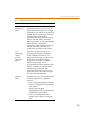
Table 1
OrCAD support for PLD design.
Feature
Description
PLD and VHDL
online help system
VHDL style guide, Esperan tutorial,
Express tutorial, and PLD design
support topics
5
Chapter 1 The PLD design flow
Table 1
6
OrCAD support for PLD design. (continued)
Feature
Description
PLD project
management
Programmable logic project wizard,
file management, and
place-and-route automation ease
development of PLD projects.
Programmable logic
vendor support
Schematic, simulation, and synthesis
libraries, and place-and-route
automation for Actel, Altera, Lattice,
Lucent, Philips, Vantis, and Xilinx
CPLDs and FPGAs. Includes
support for over 130 simple
PAL/GAL/PROM type devices.
Enhanced design
entry
VHDL programmer’s editor and
enhanced schematic editor for
VHDL and Xilinx LogiBLOX design
entry. Part generator eases PLD
integration at the system level.
VHDL and
schematic
simulation
Express includes OrCAD’s
VHDL-based digital logic simulator,
OrCAD Simulate. It simulates
schematics, debugs RTL source code,
and documents the behavior of the
design before implementation.
Register transfer
level VHDL
synthesis
Express includes Exemplar Logic’s
Leonardo Spectrum logic synthesis
to convert VHDL models into
gate-level netlists for PLD vendor
place-and-route software.
Getting started
2
This chapter provides an overview of the additional tools
and project manager enhancements provided by OrCAD
Express for OrCAD Capture. By understanding the
modifications to the work environment, you’ll be able to
quickly access the new tools and help system specific to
the PLD design flow.
Chapter 2 Getting started
Express additions to the Capture
work environment
Express adds some features to the Capture work
environment that are specifically designed to enhance
design entry for programmable logic projects.
Express additions to the Capture toolbar
For information about Capture tools
available on the Capture toolbar, see
Chapter 2: The Capture work environment
of the OrCAD Capture User’s Guide.
8
Capture’s toolbar provides quick access to some of the
most common Express commands.
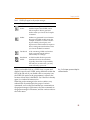
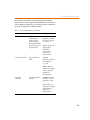
The table that follows summarizes the Express tools on the
Capture toolbar. The tasks that these tools perform are
described throughout this user’s guide.
PLD projects in the project manager
Table 2
Tool
Express additions to the Capture toolbar.
Name
Description
Compile
Create an optimized, gate level netlist
from the modules of your design.
Equivalent to choosing the Compile
command from the Tools menu. See
Chapter 5, Logic synthesis and
optimization.
Build
Build a timing-annotated netlist for
your design using the appropriate
vendor fitter or place and route tool.
Equivalent to choosing the Build
command from the Tools menu. See
Chapter 6, Place and route.
To
Simulate
Opens a Simulate session for the
current design. See Starting Simulate on
page 64.
PLD projects in the project
manager
The project manager exists in both the Capture and
Simulate session frames. It appears in the Capture session
frame whenever you open or create a project. See the
OrCAD Capture User’s Guide for a description of the
project manager’s features and functionality. This user’s
guide describes those features of the project manager that
are unique to programmable logic projects in Express.
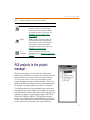
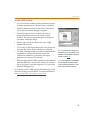
To help determine the programmable logic vendor and
chip family each project targets, PLD projects in Express
are identified by a project title in the project manager. For
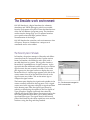
example, the figure at right displays project title “PLD
Xilinx M1 SPARTAN family.” PLD indicates that the
project was created by the Programmable Logic Design
wizard, Xilinx M1 indicates the vendor software that the
project will use for place and route, and SPARTAN
9
Chapter 2 Getting started
indicates the target CPLD or FPGA family. Specific
package and speed grades are specified later during the
build process.
Library resources for design entry and simulation
PLD projects in Express reference libraries for
programmable logic design:
•
Schematic part libraries (.OLB) are referenced for
programmable logic design entry. Several thousand
design library macros are included with Express. For
more information on each design macro, see your
third-party PLD vendor library documentation.
•
VHDL-based simulation library resources (.VHD) are
referenced for programmable logic simulation.
Schematic part libraries and simulation libraries are each
organized by PLD vendor, and sometimes further by chip
family. You can browse the contents of each library:
•
For schematic part libraries, open the Design
Resources folder, and then open the Library folder.
•
For simulation libraries, open the Simulation
Resources folder, then open the In Design or Timed
folder. For more information see Simulation resources
on page 2-11.
The programmable logic design wizard prepares the
default set of schematic part libraries and simulation
libraries required for chip design. You can, however, add
your own custom libraries later. Any number of PLD
projects may reference the same library resources.
Project outputs
When you implement your design (using the Compile and
Build commands) Express references all resulting files,
including compiled netlists, standard delay files (SDFs),
10
PLD projects in the project manager
timing-annotated netlists, pin files, fuse maps, and reports
(generated by Express or by third party place-and-route
tools) in the Outputs folder. You can open most files in the
programmer’s editor, which functions as a text editor for
non-VHDL files. For more information, see VHDL
programmer’s editor on page 3-53.
Simulation resources
This folder only exists for PLD projects. It shows all the
simulation resources you use throughout the design
process:
In Design
This folder shows the resources used to simulate the
design at the source level. These files include behavioral
VHDL source, netlists generated from schematic pages,
stimulus files, test benches, and simulation models.
Express automatically adds the simulation models
appropriate for the technology you specify when you
create your project with the project wizard. When you
start Simulate with the Simulate command, Express
generates VHDL netlists for the schematic pages of your
design and adds them to this folder. Further, any test
benches or interactive stimulus files that you create within
Simulate are added to this folder. You can also add other
files using the Project command on the Edit menu.
Note In previous versions of Express,
projects included Compiled simulation
resources for verification of the design
after synthesis, but before place and route.
Beginning with Express Release 9, the
Compiled simulation is no longer a
recommnded part of the design flow. This is
because the synthesis engine may now
include non-simulatable elements in the
Compiled netlist.
11
Chapter 2 Getting started
Timed
This folder shows the resources used when you simulate
your project after place and route, and thus includes
technology-specific timing information. These files
include standard delay files (.SDF) or timing-annotated
netlists, stimulus files, test benches, and simulation
models. Express automatically adds the simulation
models appropriate for the technology you specify when
you create your project with the project wizard. Express
also adds netlists and delay files to this folder as they are
created (using the Build command). Further, any test
benches or interactive stimulus files that you create within
Simulate are added to this folder. You can also add other
files to this folder using the Project command on the Edit
menu.
12
Managing programmable logic projects
Managing programmable logic
projects
The OrCAD Express or Express Plus installation process
adds OrCAD Express tools for PLD design to OrCAD
Capture and adds a new OrCAD Simulate shortcut icon to
the OrCAD Release 9 folder of the Programs menu
(available from the Start button).
Note Unlike prior versions of Express,
OrCAD Express Release 9 includes PLD
design tools directly inside OrCAD Capture
or Capture CIS. You will not start an
“Express” program. Once you open or
create a PLD project in Capture, all Express
functionality becomes available.
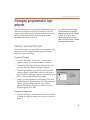
Creating or opening a PLD project
The OrCAD project wizard guides you through the steps
required to create a programmable logic project for a
particular target technology.
To create a PLD project
1
From the File menu, choose New. A dialog box
appears asking you to select an object to create.
2
Choose OrCAD Project from the displayed list, then
click OK. The New Project dialog box appears.
3
Select Programmable Logic Wizard from the listed
options, specify a name and location for the project,
then click OK. A dialog box appears prompting you to
select a vendor and family for the project.
4
Select a vendor and family for the project, then click
the Finish button. Express creates the PLD project and
opens a project manager window with all the
appropriate libraries and files necessary for you to
begin designing your PLD.
To open an existing project
1
From the File menu, choose Open, then choose Project.
A dialog box appears asking you to select a project to
open.
13
Chapter 2 Getting started
2
Note The last four projects that were
opened are listed at the bottom of the File
menu. To open one of these files, select it
from the File menu.
14
3
If the desired project is not listed in the File name text
box, do one or more of the following:
•
In the Look in box, select a new drive.
•
Choose the Up One Level button.
•
In the Files of type box, select the type of file to
open.
•
In the File name text box, enter the extension of the
file to open.
Select the project or type the name in the File name text
box, and choose the Open button. The project opens in
a new project manager window.
Managing programmable logic projects
File management in the project manager
The project manager provides full file management
capabilities.
To add a file to your project
1
In the project manager, select the folder to which you
want to add the file.
2
From the Edit menu, choose Project. Express displays
the Add Project to Folder dialog box.
3
Locate the directory that contains the file you want to
add and select that file.
4
Choose the Open button. Express adds that file to the
project in the selected folder.
Note When you add a file with a .VHD or
.VHO extension or a file with an extension
that is not recognized, the project manager
responds with a dialog box asking you to
specify a type for the file. For more
information on file types, refer to VHDL
files, VHDL models, and VHDL file types on
page 3-54.
Or
1
Drag the file from the Windows Explorer into the
folder in the project manager.
You can also add resources to your project “on the fly.”
When you create a schematic or VHDL model using the
New command on the File menu, Capture asks you if you
want to add the new file to the currently open project(s) at
that time. Files you add in this manner are placed in the
Design Resources folder. Also note, however, that your
project can include only one design (.DSN file). If you try
to add a second .DSN file to your project, Capture displays
the Overwrite dialog box, asking whether you want to
replace the existing design.
When you create new files in Simulate, they are added to
the In Design folder within Simulation Resources.
To delete a file from your project
1
In the project manager, locate and select the file you
wish to delete.
2
Press the D key. The project manager removes the
file from your project.
Note Deleting a file from your project does
not remove the file from your system, it
merely removes the reference to that file
from the project.
15
Chapter 2 Getting started
Saving projects
Note Express automatically saves your
project file whenever you deactivate the
Express session by activating another tool
in the Windows environment. Note that this
saves any open projects, but does not save
any open schematics or VHDL models within
those projects.
When the project manager window is active, you can save
a new or an existing project.
Note If you choose Save when a schematic
page window is active, only that page is
saved, instead of the entire project.
However, when you attempt to close the
project, the project manager queries you
whether you want to save any other project
elements that have been edited but not
saved.
Note
To save a project
1
From the File menu in the project manager, choose
Save. The project is saved, and remains open in the
project manager.
By default, OrCAD projects have an .OPJ extension.
Closing projects
When the project manager window is active, you can close
a project without quitting Express, or you can close and
save your project as you quit.
To close a project
1
16
From the File menu in the project manager, choose
Close. When you close a project, the project manager
asks if you want to save your changes.
The Simulate work environment
The Simulate work environment
OrCAD Simulate is a digital simulator for schematic
simulation and VHDL debugging which is accessible
from the Tools menu of Express or from the Simulate icon
of the OrCAD Release 9 program group. The simulator
verifies that the design logic you've captured matches
your specifications and helps produce robust
documentation of the design.
OrCAD Simulate has a similar work environment to that
of Express. However, Simulate has a unique set of
commands and its own toolbar.
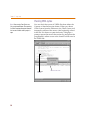
The Hierarchy tab in Simulate
In Simulate, the project manager’s Hierarchy tab differs
somewhat from its counterpart in the Capture session
frame. In Simulate, the Hierarchy tab is split (with a
movable bar) into two panes. The top pane contains a
hierarchical, expandable tree of signal contexts. A plus
sign indicates that additional context levels exist within a
signal context, but are currently invisible. Click on the
plus sign next to the signal context to display the next
hierarchical level. A minus sign appears to the left of the
context name when all of the hierarchical levels in the
signal context are visible. Click on the minus sign to
collapse the signal context.
The bottom pane displays the signals and variables in the
context currently selected in the top pane. Click a signal
context once in the top pane to display its signals and data
in the bottom pane. Filter the signal types shown by
selecting or deselecting the options in the List Signals of
Type group box. Display signal and data values by
selecting the Signal Values option. Descriptive icons to the
left of the signals and data allow you to easily identify
signal and data types. The signals listed in the bottom
pane of the Hierarchy tab can be copied into wave and list
windows using the drag-and-drop method.
Note Data items cannot be dragged into
the list or wave windows.
17
Chapter 2 Getting started
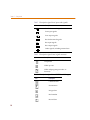
Table 3
Icon
Descriptive signal icons (ports and signals).
Description
Port bi-directional signals
Port input signals
Port output signals
Bus bi-directional signals
Bus input signals
Bus output signals
Other signals, including internal nets
Table 4
Icon
Descriptive signal icons (signal contexts).
Description
Component
VHDL process
VHDL subprogram (procedure or
function)
Table 5
Icon
Descriptive signal icons (VHDL variable types).
Description
Character data
Enumeration
Integer data
Real number
Record data
18
The Simulate work environment
Table 5
Icon
Descriptive signal icons (VHDL variable types).
Description
String vector
Vector data
Access data
19
Chapter 2 Getting started
The Simulate toolbar
By clicking buttons on the Simulate toolbar, you can
quickly perform the most frequently used Simulate
commands.
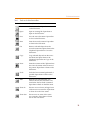
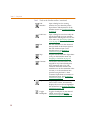
The following table briefly summarizes the functions of
the buttons on the toolbar. Their tasks are described in
more detail throughout this manual.
20
The Simulate work environment
Table 6 Tools on the Simulate toolbar.
Tool
Name
Description
New
Create a new file. Equivalent to New
on the File menu.
Open
Open an existing file. Equivalent to
Open on the File menu.
Save
Save the active document. Equivalent
to Save on the File menu.
Print
Print the active document. Equivalent
to Print on the File menu.
Cut
Remove selected objects from the
active document and place them on the
Clipboard. Equivalent to Cut on the
Edit menu.
Copy
Copy selected objects from the active
document and place them on the
Clipboard. Equivalent to Copy on the
Edit menu.
Paste
Paste the contents of the Clipboard into
the active document at the location of
the pointer. Equivalent to Paste on the
Edit menu.
Undo
Undo the last command performed, if
possible. Equivalent to Undo on the
Edit menu.
Redo
Redo the last command that was
undone. Reverts the document to its
state before the last Undo command.
Equivalent to Redo on the Edit menu.
Zoom In
Zoom in to see a closer, enlarged view
of the active wave window. Equivalent
to Zoom In on the View menu.
Zoom Out
Zoom out to see more of the active
wave window. Equivalent to Zoom
Out on the View menu.
21
Chapter 2 Getting started
Table 6 Tools on the Simulate toolbar. (continued)
22
Edit
Stimulus
Open a dialog box for creating
stimulus for your Simulate project.
Equivalent to Edit Interactive on the
Stimulus menu. See Creating stimulus
on page 66.
Edit Trace
Open a dialog box used to modify the
signals displayed in a trace window.
Equivalent to Edit Signal Traces on the
Trace menu. See Specifying signals to
view on page 82.
Run
Run the simulation for the amount of
time specified on the Project Options
Run tab. Similar to Run on the
Simulate menu. See Running a
simulation on page 94.
Stop
Stop the current simulation. Equivalent
to Stop on the Simulate menu. See
Stopping a simulation on page 95.
Continue
Continue the simulation after it has
stopped for any reason (breakpoint,
Stop command, and so on). The
Continue command continues the
simulation run for the remainder of the
run time, or to the simulation time
specified using the Run To Time
command. Equivalent to Continue on
the Simulate menu. See Restarting a
simulation on page 96.
Step
Step through the simulation one VHDL
source line at a time. Automatically
displays the source file and highlights
the current line. See Stepping through a
simulation on page 104.
Toggle
Breakpoint
Toggles a breakpoint on the selected
VHDL source line. See Setting
simulation breakpoints on page 106.
The Simulate work environment
Table 6 Tools on the Simulate toolbar. (continued)
Restart
Reset the simulation to time 0 and
initializes all signals, data, and
processes. Equivalent to Restart on the
Simulate menu. See Restarting a
simulation on page 96.
Reload
Loads or reloads the design in the
currently-open project for simulation.
Equivalent to Reload project on the
Simulate menu. See Loading or
reloading a project on page 91.
Help
Topics
Opens the online help. Equivalent to
Help Topics on the Help menu.
To display or hide the Simulate toolbar
1
From the Simulate View menu, choose Toolbar.
The folder selection drop down list
Before you run a simulation, use the folder selection
drop-down list to select the folder from which you want
Simulate to load files for simulation. The project manager
provides two folders for storing the resource files needed
for simulation at different stages in the design process:
•
The In Design folder contains files for simulation at the
source level.
•
The Timed folder contains files for simulating the
design after place and route.
Note The folder selection list contains no
entries if a project has not been opened in
Simulate. You must open a project in order
to view and select the described options in
the folder selection drop-down list. For a
detailed description of the In Design and
Timed folders, see Simulation resources on
page 2-11.
Left text field
The status bar
The status bar is located at the bottom of the session frame.
Right text fields
23
Chapter 2 Getting started
The left text field
The left text field displays context-sensitive help for
toolbar buttons or menu items, or information about the
current file status or activity.
The right text fields
The right text fields display information about the active
window.
For example, when you are in a text editor window, the
first field on the right side of the status bar indicates the
line and column in which the insertion point is located.
The second field indicates that the active text editor
window is in insertion mode (INS) or overwrite mode
(OVR). You can toggle back and forth between the modes
by pressing the Z key. The third field displays the word
“READ” if the active file is read-only. The fourth field
displays the current simulation time.
In a wave window, the first field on the right indicates the
location of the first delta time marker and its relationship
to the time cursor. The second field indicates the location
of the second delta time marker and its relationship to the
time cursor. A negative value in either field indicates that
the delta marker is located to the left of the time cursor.
The third field displays the current simulation time. See
Wave window on page 2-27 and Using delta time markers on
page 4-112 for more information.
To display or hide the status bar
1
From the Simulate View menu, choose Status Bar.
The command line window
In the command line window, you can use the keyboard
to enter a number of common Simulate commands.
The supported command set is intended to provide
control of loading, running, and debugging functions, but
24
The Simulate work environment
not to provide access to all Simulate functionality. For
example, you can load a stimulus file using the command
line, but you cannot edit stimulus descriptions from the
command line.
For a complete summary of the commands that are
supported by the command line interface, see the topic
Command line syntax in Express’s online help.
25
Chapter 2 Getting started
Tools for viewing signals
By viewing simulation signals, you can verify the
functionality of synchronous logic and measure the
periods between events.
Any signal or port of the design can be traced by Simulate.
Typically, the majority of the relevant signals appear at
the root of the design netlist or in a test bench; however, it
is possible that critical signals are buried in the internal
structure of the design netlist.
Simulate provides a variety of ways to view a simulation:
graphically as waveforms, in truth table format as a list, or
in snap-shot view. The values are updated automatically
as simulation time advances. Simulate gives you options
for grouping signals, for selecting radix display
preferences, and for ordering signals in display windows.
You can also use symbolic mapping to represent group
signal values with character strings.
During simulation, you can view signals in wave
windows, list windows, or the watch window. You use
the same process to select the signals that you want to
trace, regardless of the window type in which you want to
view them. You can use the commands on the Trace menu
(New Wave Window, New List Window, Watch Window,
and Signal Traceback) to select signals using the Select
Signals dialog box, or you can drag signals from the
Hierarchy tab of the project manager window and drop
them into any open wave, list, or watch window.
You can also use the Call Stack and Signal Properties
windows to view signal and variable values and
properties during simulation.
26
The Simulate work environment
Wave window
A wave window displays the graphical waveforms of the
signals you select to view during the simulation. The
wave window has four panes: Context, Signal, Value, and
a waveform display pane. The vertical lines that separate
the four panes in the wave window allow you to resize the
panes, or completely hide one or more panes. You can
open multiple wave windows in one session frame.
Enumerated data type
Time cursor
Scalar signal
Delta marker
Bus or vector signal
Current simulation time and
(+) delta step
You can move and copy signals into other wave windows,
and into list windows as well. You can also cut or copy
waveforms from the wave window and paste them into
other applications as graphic images.
•
Context pane. The Context pane lists the signal
context or the level of hierarchy in the structural
model.
•
Signal pane. The Signal pane displays the name of the
VHDL port, signal, or EDIF net that is traced. Keep in
mind that you can view signals with the same name
from different contexts, and signals with different
names from the same context.
•
Value pane. The Value pane displays the value of the
signals at the end of the current run duration or at the
time indicated by the location of the time cursor in the
waveform (the solid, vertical line in the waveform
display pane in the picture above). As you move the
For information on cutting and pasting
simulation results to other applications, see
Adding and removing signals
from windows on page 4-83.
27
Chapter 2 Getting started
time cursor along the waveform the values changes
accordingly.
•
Waveform display. This pane displays waveforms as
the stimulus acts on the selected signals. The top of the
waveform display pane measures the simulation time.
You can scroll left and right in the waveform pane
using Cr, Cl, or the scroll bar. A list of
commands is available via a pop-up menu within the
wave window. Click the right mouse button in the
window to view this context-sensitive menu.
•
Waveform window cursor. You can enable a time
cursor in the waveform pane by clicking the left
mouse button inside the pane. To view the value of a
signal at any particular time, select the time cursor,
and while pressing the left mouse button, move the
mouse left or right.
You can use the r and l keys to snap the time cursor
to the closest signal transition. You can also enable an
option in the Run tab of the Preferences Options or
Project Options dialog box to cause the cursor to snap
to the closest signal transition when you release the
mouse button after dragging the time cursor. Using
the Go To command on the Edit menu, you can
automatically scroll to the location of the time cursor.
•
Delta time markers. You can also enable delta time
markers in the waveform display pane. Delta time
markers are dashed vertical lines used to measure the
time between signal transitions. You can enable a delta
time marker by clicking in the ruler area of the wave
window, or by choosing Add Delta Marker from the
wave window pop-up menu. When you add a delta
marker to a wave window, the simulation time at
which you place the delta marker appears in a text
field of the status bar.
You can select a delta time marker by clicking on its
value label or its handle (shaped like a triangle). To
move a delta time marker, select it, and pressing the
left mouse button, move the mouse left or right. Or,
from the wave window pop-up menu, choose Move
Delta Marker n here.
28
The Simulate work environment
You can use the right and left arrow keys to snap
selected delta time markers to the closest signal
transition. If no delta time marker is selected, the
arrows move the time cursor.
List window
A list window displays a record of events for a set of
traced signals. Each time the value of any selected signal
changes, all of the traced signals list their value and the
time that the change occurred. The signal names display
across the top of the list window; the event times display
vertically down the left side of the window.
You can move signals around in the list window and
move and copy signals between list and wave windows.
A list of commands is available via a pop-up menu within
the list window. Click the right mouse button in the
window to view this context-sensitive menu.
For information on adding and removing
signals from an existing list window, see
Adding and removing signals
from windows on page 4-83.
29
Chapter 2 Getting started
Watch window
The watch window displays selected signals and their
values at the current simulation time only. This window is
excellent for tracking signal values if you are examining
VHDL source code or when the signal history is not
important. Unlike the wave and list window, the watch
window also displays the current values of context and
process variables in your VHDL files.
The current simulation time is displayed in the upper left
corner of the watch window. The signals and their
corresponding values are listed below.
You cannot copy watch window information into other
windows or applications. Only one watch window can be
open in the session frame at a time.
30
The Simulate work environment
Stack View window
Simulate includes a Stack View window that enhances
your ability to debug complex VHDL models that use
subprograms.
Specifically, whenever there is a pause in simulation due
to a breakpoint, ASSERT statement, or from using the Step
command to step through a VHDL model, the Stack View
window displays information about the current active
subprogram.
Context
Call Stack list
Process
Data list
The Stack View window consists of several sections:
•
Context. This field displays the design context from
which the current subprogram is called. Since VHDL
supports an unlimited number of active processes in
any number of contexts, you can change the context in
order to view processes and stack views for other
active processes within the current simulation run
using the Browse button. If the subprogram call occurs
outside of a process, the context is the top-level of the
design.
•
Processes. This list shows all the active processes in
the current context. Use this drop down list to choose
a process other than the current process to see its
subprogram calls and stack data. Simulate uses the
process label (if any) to identify the process. If,
however, the process does not have a label, Simulate
generates a name by which it identifies the process. By
default, the Simulate chooses the process within
which the break in the simulation occurred.
31
Chapter 2 Getting started
32
•
Call Stack list. This pane, which appears directly
below the Context field, shows the call stack for the
currently active subprogram, the “actuals” (the values
of any parameters) passed to that subprogram, and
the line number within that subprogram at which the
simulation stopped. Any subprograms called from
within that subprogram (including recursive calls)
appear in the stack list below the calling subprogram.
•
Data list. This pane, which appears to the right of the
Call Stack list, shows the current values of variables,
constants, and signals in the subprogram.
•
Edit command. A pop-up menu is available in Stack
View windows. Click the right mouse button to bring
up the pop-up menu. The Edit command is available
in this menu. When you choose Edit, Simulate opens
the VHDL file that contains the subprogram and
places the cursor at the specified line.
The Simulate work environment
Signal Properties window
The Signal Properties window in Simulate shows
properties for any context, process, signal, or variable
object that you can select in the project manager’s
Hierarchy tab, the local variables display area of the Call
Stack window, and the Wave, List or Watch windows.
To access the Signal Properties window, select a context,
process, signal or variable in any of these windows, then
choose Properties from the popup menu. One and only
one object can be selected in the currently active window
in order to view the Signal Properties window. If more
than one object is selected or no object is selected, you
cannot view the Signal Properties window. If the window
is already open when you select multiple signals, Simulate
reports that no properties are available.
For any selected object in the currently active view, the
Signal Properties window displays the object's name and
context path, the file in which the object is declared, and
the line number where the declaration can be found, if
available. The declaration line number should be available
for all object types except contexts.
For signals and variables, the window also shows the
object declared type as part of the object name.
For signals only, the Signal Properties window also shows
the signal's drivers (the file and line number of the VHDL
statements that affect the value of the signal), and the
signal's readers (the file, line number, and process context
of a particular statement or process that references or is
sensitive to the signal's value).
The content of the Properties dialog box is tied to the
active view, or to the last active view if the newly selected
view is not a Hierarchy, Watch, Wave, List, or Call Stack
view. So, the content of the dialog box is automatically
updated to reflect the properties of the selected object in a
particular view whenever a new view is made activate.
However, if no object or more than one object is selected
in the active view, then the dialog box is cleared.
You can use the Signal Properties window to navigate to
an object's declaration line or, for signals, to any of its
33
Chapter 2 Getting started
drivers or readers. To do this, you select the line that
contains the file name and click on the Go to file button,
which opens the corresponding VHDL file and places the
text cursor at the specified line. You can also double-click
on a file line to do the same thing.
34
Design entry
3
This chapter tells you the things you need to know for the
design entry phase of the PLD design flow. Remember,
with Express functionality, you can describe your design
in schematic form, as VHDL models, or as some
combination of the two. Express includes a collection of
tools for design entry:
•
Capture’s schematic page editor for entering
schematic design data. For details on using the
schematic page and part editors, see the OrCAD
Capture User’s Guide.
•
A programmer’s editor for entering VHDL source
code that models design behavior.
•
Import capability for Graphical EDIF and Open-PLA
design files.
•
Schematic part generation for parts that represent
other schematics or VHDL.
•
Library editing capabilities that provide a method for
developing custom parts. For details on using the
schematic page editor and part editor, see the OrCAD
Capture User’s Guide.
Schematic
page editor
VHDL
editor
Library
editor
Toplevel
file
.DSN
.EDF
Import
EDIF
.VHD
Convert PLA
to VHDL
.PLA
Chapter 3 Design entry
Designing PLDs with schematics
The schematic page editor provides a complete set of tools
to create complex hierarchical schematics, including
design partitioning, rule checking, and annotation. Again,
the mechanics of using the schematic page editor are
described in the Capture User’s Guide. This book focuses on
those particular schematic entry tasks that apply to
programmable logic designs.
Accessing tools
The Express interface is context-sensitive. That is, menu
bars and tool palette items may be enabled or disabled
depending on the window and item that is selected. All
tools that process a project, such as the digital simulator or
design compiler, are accessible when the project manager
is active.
36
Designing PLDs with schematics
Using PLD vendor library macros
Express includes libraries for thousands of functional
design elements for the different device families of all
major PLD vendors. In general, most components are
compatible across device families; however, you will find
some that are architecture specific. For more information
and a data sheet on each element, see the library
documentation published by your PLD vendor.
Express allows you to use PLD vendor library
components two ways: component instances in VHDL
source or parts placed on a schematic. All projects created
by the Programmable Logic Wizard include references to
the part library for the PLD vendor that the project targets.
Part libraries are distributed for all families with Express.
Basic primitive symbols like flip-flops and logic gates, as
well as more sophisticated macros, including counters,
registers, and many other standard medium-scale
integrated TTL-like functions are typically included with
your PLD vendor library.
To place a part from a PLD vendor library
1
On the schematic page editor’s Place menu, choose
Part. The Place Part dialog box appears.
2
Select the library that includes the part you want to
place from the Libraries list, select the part from the
part list, then click OK. A “ghost” image of the part
appears, attached to the cursor in the schematic page
editor.
3
Move the cursor to the desired location on the
schematic page and click the left mouse button. The
schematic page editor places the part at the specified
location.
4
Continue to position and place the part as described in
steps 2 and 3 above, or press E to quit placing that
part.
37
Chapter 3 Design entry
Using PLD vendor cores
Express includes the capability to include sophisticated
components generated by PLD vendor tools such as Actel
ACTgen, Lucent SCUBA, or Xilinx LogiBLOX. For more
information on including these types of components in
your design, refer to the Express online help. For
LogiBLOX components, you can also refer to Creating
parameterized parts on page 3-38.
Creating parameterized parts
For Xilinx M1 projects (only) Express includes a feature
that you use to create LogiBLOX components for inclusion
in your design. You access the LogiBLOX module
generator from the schematic page editor’s Parameterized
Part command on the Place menu.
When you create a LogiBLOX component for use with
your M1 project, Express automatically adds it to the
LOGIBLOX\USERBLOX.OLB library so that you can use
it again. If the USERBLOX.OLB library does not exist (that
is, if you are creating a LogiBLOX module for the first
time) Express creates the library and adds it to the
currently active project. The LogiBLOX component
includes a symbol (to place on the schematic page), an
EDIF netlist (for compilation), and a VHDL simulation
model (for functional simulation).
38
Designing PLDs with schematics
To create a LogiBLOX part and add it to your project
1
From the schematic page editor’s Place menu, choose
Parameterized Part. The first time you create a
parameterized part, the Xilinx LogiBLOX Setup dialog
box appears.
2
Choose the Device Family tab and specify the device
family that matches the definition of your M1 project.
The LogiBLOX Module Selector dialog box appears.
3
Select the Module Type, Bus Width, and Details as
appropriate for the new module. Specify the Module
Name and click OK. The module is generated by
LogiBLOX. A schematic part of the new module
appears attached to the cursor, and simulation and
synthesis resources are added to the project.
4
Place the part on the schematic page.
Using previously created LogiBLOX parts in a
schematic
The method you use to incorporate existing LogiBLOX
parts into your design differs depending on whether you
created the parts from within Express, or from the Xilinx
user interface.
If you created the LogiBLOX part outside Express, treat
the LogiBLOX part as a LogiCORE component and follow
the procedure outlined in the Designing with Xilinx
LogiCORE components topic in the Express online help.
To use a previously created LogiBLOX part in a schematic
1
In the schematic page editor, choose Part from the
Place menu. The Place Part dialog box appears.
2
Choose the USERBLOX library and select the part you
want to place, then click OK.
3
Place the part normally.
Note OrCAD recommends an EDIF-legal
naming convention. Avoid special
characters and numerals as the first
character. A convenient approach is to use
a style: LB_<module_type><width>.
All schematic buses must be labeled. Avoid
bus names that end in numerals. Any error
or warning messages will appear in the
LogiBLOX GUI Messages window.
For large memory (ROM/RAM)
components created with LogiBlox, use a
MEMFILE (as described in the Xilinx
documentation) to initialize the component
during simulation. This MEMFILE must exist
in the TIMED directory of your project. For
smaller memory components (no more
than 32 bits in width), you can use the INIT
attribute.
39
Chapter 3 Design entry
To delete a LogiBLOX part from a project
In some cases you may discover that your original
specification of a LogiBLOX module was incorrect, or not
required. Follow the procedure below to completely
remove it from the Express project.
1
For more information on using LogiBLOX
components in Express, see the Express
online help. The online help includes
information for specification of package
pins on LogiBLOX pad modules, and
annotation, design rules checking, and
simulation for LogiBLOX components. For
more information on LogiBLOX in general,
refer to the appropriate Xilinx
documentation.
40
Delete the part from the USERBLOX.OLB library in
the project’s Library folder.
Open the Library folder and select the
USERBLOX.OLB library. Choose the plus symbol to
expand the library contents. Select the <Module_name>
part from the list and press the Delete key. From the
File menu, choose Save. Express removes the part
from the USERBLOX.OLB library.
2
Delete all instances of the part from the schematic
design.
Select the part, and press D. Capture removes the
part from the schematic.
3
Select the Design Cache in the project manager, then
choose Cleanup Cache from the Design menu. All
occurrences of the part are removed from the design
cache.
Designing PLDs with schematics
Referencing VHDL models from within a schematic
With Express, you can create hierarchical blocks from
VHDL models for inclusion in your schematic page.
Creating hierarchical blocks in this manner is generally
termed “bottom-up” design.
To create a hierarchical block from a VHDL model
1
Open the parent schematic page in the schematic page
editor.
2
From the Place menu, choose Hierarchical Block.
3
Enter a name for the hierarchical block in the Name
text box.
4
In the Implementation Type list box, choose VHDL as
the implementation type.
5
Type the ENTITY name for the model in the
Implementation Name text box.
6
Specify the VHDL file for which you want to create a
hierarchical block in the Library or File Pathname text
box.
7
Choose the OK button.
8
Use the cursor to draw the boundaries of the
hierarchical block on the schematic page. A dialog box
appears, asking you to specify the file type for the file
you specified in step 3.
9
Select VHDL source from the list of file types and
choose the OK button. Express creates the new
hierarchical block and automatically places the
hierarchical pins according to the port list specified in
the VHDL entity.
At this point, the hierarchical block is defined and ready
to be “wired in” to the rest of the schematic design.
41
Chapter 3 Design entry
Recommended schematic design and file naming
conventions
There are a number of recommended conventions that
you should use when working with PLD schematics.
File naming conventions
In general, it is best to name project files (.OPJ) and design
files (.DSN) using alphanumeric characters. Avoid using
numeric characters as the first characters in the name.
Design component naming conventions
For more information on EDIF 2 0 0 naming
conventions, refer to the Express online
help topic, EDIF 2 0 0.
To avoid netlist generation warnings and EDIF 2 0 0
rename conditions, name hierarchical block, pin, and port,
or wire and bus labels that comply with the EDIF 2 0 0
naming standard. A good convention is to use
alphanumeric names only. Avoid special characters and
names that begin with a number.
Managing signal flow
Often, it is worthwhile to use buses (or wide nets) to group
signals in your schematic to more easily complete signal
connections. Drawing buses on the schematic page is just
like drawing wires. Special care must be taken, however,
to name bus elements. In general, follow these guidelines
when creating buses:
42
•
The bus itself, and each of its constituent signals must
be labeled with a net alias or an hierarchical port. The
bus and its constituent signals are associated through
a common label prefix. So, for example, if the
individual signals are labeled D0 through D3, the bus
is labeled D[3:0].
•
In order to connect a bus to a pin on an hierarchical
block, the hierarchical block pin must be a legal bus
name, and it must exactly match the hierarchical port
name on the lower-level schematic. For example, if
you connect a bus, DATA[2:0], to an hierarchical pin,
Designing PLDs with schematics
LOWBUS[2:0], an hierarchical port named
LOWBUS[2:0] must exist on the lower-level schematic
(the implementation of the hierarchical block) in order
for the connection to be valid. (See the illustration
below).
Upper level bus DATA[2:0]...
•
...connects with lower level bus LOWBUS[2:0]
Use bus entries and net aliases to describe the split of
merge of a primary bus. For example, a primary bus,
DATA[5:0] can be split into two secondary buses
DATA[2:0] and DATA[5:3] using bus entry parts. (See
the illustration below.
)
Loading PLD vendor schematic keystroke macros
Certain keystroke macros exist for most of the
OrCAD-supported PLD vendors. These macros make it
easy to assign part and net properties in schematics.
43
Chapter 3 Design entry
To load keystroke macros
1
From the schematic page editor’s Macro menu, choose
Configure. The Configure Macro dialog box appears.
2
Choose the Add button. The Open dialog box appears.
3
Locate the \ORCADWIN\CAPTURE\MACRO
directory, then select the files appropriate to your PLD
vendor.
4
Note the key sequence for each macro as specified in
the Keyboard Assignment text box of the dialog box.
This is the sequence you type to activate the macro.
5
Choose the Open button. The schematic page editor
loads the keystroke macros for PLD vendor
constraints.
The keystroke macros that apply to each PLD vendor are
shown in the following table.
Table 7
Note Philips and Vantis programmable
logic designs do not require constraints for
place and route.
PLD vendor keystroke macros
PLD vendor
Net constraints
macro
Part constraints
macro
Actel
ALSNET.BAS
ALSPART.BAS
Altera
ALTPART.BAS
Lattice
LATNET.BAS
LATPART.BAS
Lucent
ORCANET.BAS
ORCAPART.BAS
Simple PLD
PLDNET.BAS
PLDPART.BAS
Xilinx
XACTstep
XILNET.BAS
XILPART1.BAS
XILPART2.BAS
Xilinx Alliance
Series
M1NET.BAS
M1PART1.BAS
M1PART2.BAS
M1PART3.BAS
To assign a PLD vendor constraint with a keystroke macro
1
44
In the schematic page editor, select the part or net to
which you want to assign a constraint.
Designing PLDs with schematics
2
Press the keystroke sequence for the appropriate
macro.
3
Specify the value of the property or properties and
click OK. A property name and value are added to the
part or net.
Including optimization and timing constraints in
schematics
You can use the schematic page editor’s net and part
property capabilities to improve the optimization and
place-and-route of a PLD design. Some of these
techniques are described here. Typically, constraints of
this nature are useful for pin assignments or to identify
certain nets as critical.
For a description of optimization constraints available, see
Local synthesis and optimization constraints on page 5-138.
It is important to note that it is easy to over-constrain a
design and prevent the place and route programs from
doing the best possible job. It is best to route a design with
no constraints at all, then use them only if necessary.
You can assign pin numbers to the I/O pad parts (or, in
some cases nets) of a schematic, thus controlling the
external pin assignments. See the Design Entry topic
specific to your PLD vendor in the Express online help for
more information.
PLD global device signals influence design performance
heavily. For high performance design, use on-chip clock
buffers to maximize operating frequency. See your PLD
vendor library guide for more information on global
buffers.
45
Chapter 3 Design entry
Assigning a part package for your PLD design
You can specify the package and speed grade of the device
that the project targets when you prepare to place and
route your design in the Build dialog box. For more
information, see Chapter 6, Place and route.
Schematic annotation
Each part on your schematic page must have a unique
reference designator to identify it in the netlist. By default,
when you place a part on a schematic page in a
programmable logic project, A reference designator is
automatically assigned to that part. You control this
automatic reference designator assignment in the
Miscellaneous tab of the Preferences dialog box. See the
Capture online help for specific information about this
dialog box.
46
Designing PLDs with schematics
Checking for design rules violations
The Design Rules Check tool scans schematic designs and
checks for conformance to basic design and electrical
rules. The results of this check are marked on the
schematic pages with DRC markers, and are also listed in
a report. This makes it easy to locate and fix design or
electrical errors. You can search for DRC markers using
the Browse command on the project manager’s Edit
menu, and then double-click on any item in the resulting
list to go immediately to the location of the marker on
your schematic page. Once you are viewing the marker on
the schematic page, you can display the marker’s text by
double-clicking on it.
Note The Design Rules Check does not
check VHDL models for syntax errors.
However, in the case of hierarchical
schematic blocks with attached VHDL
models, the Design Rules Check determines
if the hierarchical pins of the block match
the port definitions in the VHDL model.
To check VHDL model syntax, you can use the VHDL
syntax checking tool described in To check the syntax in a
VHDL file on page 3-59.
You can specify the conditions that cause errors to be
generated. Optional checks performed by the Design
Rules Check tool include off-grid parts; unconnected nets,
pins, ports, and off-page connectors; identical part
references; type mismatch parts; and design elements that
are not compatible with OrCAD tools.
Note When Design Rules Check checks for
unconnected nets, it looks for nets with less
than two connection points. Thus, a net can
still have unconnected endpoints that aren’t
reported by Design Rules Check.
The Design Rules Check is helpful in preparing your
project for use with other tools. For example, you can use
the Design Rules Check tool to catch problems such as bus
contention before you generate a netlist.
The Design Rules Check reports two categories of
electrical rules violations:
•
Errors that should be fixed.
•
Warnings of situations that may or may not be
acceptable in your project.
You can control whether electrical rules violations are
reported as errors or warnings in the ERC Matrix tab of
the Design Rules Check dialog box. Errors are always
marked with DRC markers on the schematic page.
Warnings are also marked with DRC markers if you select
the Create DRC markers for warnings option in the
Design Rules Check dialog box. In the report generated by
47
Chapter 3 Design entry
Design Rules Check, however, the problems are
categorized as WARNING or ERROR so that you can
immediately identify the more critical problems.
Note You should ALWAYS run Design Rules
Check before you compile your design.
Once the Design Rules Check begins, it first removes
existing DRC markers from the schematic pages being
processed. This means that each time you run this process,
the error markers on your schematic pages reflect the
current state of your project. You can also use the Design
Rules Check tool to remove DRC markers from schematic
pages, but not do any further checking. Just select the
Delete existing DRC markers option on the Design Rules
Check dialog box.
To check for design rules violations
1
In the project manager, select the schematic pages that
you want to check for design rules violations.
2
From the project manager’s Tools menu, choose
Design Rules Check.
or
Choose the design rules check tool from the toolbar.
The Design Rules Check dialog box appears.
3
Select the settings you want in the Design Rules Check
tab and in the ERC Matrix tab.
4
When both tabs of the Design Rules Check dialog box
have the settings you want, click OK.
As the design rule check is performed, status
information appears in a dialog box. If you stop the
design rules check midstream (by choosing the Cancel
button in the status information dialog box), the
schematic pages that have already been processed will
have DRC markers marking any error situations that
were encountered.
Note To view the information contained in
a DRC report, set up a file association using
the Open With dialog box in Windows
Explorer. By doing this, you can open the
DRC report by double-clicking on it in
Windows Explorer.
48
5
Once the design rules check is complete, there are two
ways to view the results:
•
You can open the DRC report file using a text
editor or word processor. This file has a default
extension of .DRC. The session log also contains
the same information.
Designing PLDs with schematics
•
You can use the Browse command on the project
manager’s Edit menu to display a list of all DRC
markers in the project.
This list gives information about each error and
warning. Each DRC marker on a schematic page
displays this same information. Once this list
displays in the browse window, you can
double-click on an item to go directly to it on its
schematic page. Once you are viewing the marker
on the schematic page, you can display the
marker’s text by double-clicking on it. You can
also use the schematic page editor’s Find
command to find specific DRC markers. To do
this, you must enter the text associated with the
marker.
49
Chapter 3 Design entry
Designing with VHDL
Note In addition to modeling design
modules, VHDL models can also serve as
simulation models, as test benches, or as
synthesis libraries (for SPLD projects).
The Express synthesis engine can interpret
register-transfer-level VHDL models and derive gate level
netlists from them that are equivalent to netlists generated
from schematics. Your programmable logic design can
consist exclusively of VHDL models or schematics, or it
can include both schematics and VHDL models within its
hierarchy. This functionality pertains exclusively to PLD
projects.
Describing module behavior with VHDL
Express supports a subset of the IEEE VHDL 1076-1993
standard. You can use the supported language features to
describe circuit functionality, as well as to create
testability models that verify that functionality.
Express’s online help includes a style guide that provides
information on how to use VHDL within Express. The
style guide outlines the most effective methods for
modeling logic within the context of Express.
50
Designing with VHDL
Accessing source code samples
Express provides a variety of common VHDL source code
statements as samples that you can cut and paste into your
test bench. You can also create your own source code
samples by editing the STANDARD.VHX file, which is
located in the OrCAD installation directory. If you add a
sample to this file, it is then accessible (in addition to the
samples that OrCAD provides) through the VHDL
Samples dialog box as described below.
Note If you modify the standard.VHX file,
you must follow the formatting conventions
used in that file. Otherwise, when you
simulate, OrCAD Simulate may not be able
to access some or all of the samples in the
file. Also, be sure to make a backup copy;
if you install a new version of Express, the
file may be overwritten.
To access source code samples
1
Position the cursor at the point in your VHDL source
file at which you want the sample code to be inserted.
2
From the Edit menu, choose Samples. The VHDL
Samples dialog box appears.
3
Select the type of sample you need from the top pane
of source statements. When you select a sample type,
the associated sample VHDL source code appears in
the lower box.
4
Click OK. Express copies the contents of the lower
pane into the active VHDL file at the curosr location
and to the Clipboard.
Note You can double-click on the sample
name in the upper pane of the VHDL
Samples dialog box to automatically insert
the sample code into the VHDL template
and close the dialog box.
51
Chapter 3 Design entry
To access the OrCAD VHDL style guide
1
Go to the Help menu.
2
Choose OrCAD VHDL Style Guide.
Express displays the online OrCAD VHDL Style Guide
in a new window.
Express also includes a VHDL tutorial that provides a
step-by-step introduction to VHDL. This tutorial
describes the basics for model creation and
implementation of hardware constructs. It provides an
easy method for becoming familiar with the basic
concepts of hardware modeling.
For a complete list of the VHDL constructs that Express
supports, choose OrCAD VHDL Reference from the Help
menu.
To access Express’s VHDL tutorial
1
52
From the Help menu, choose Learning VHDL. Express
displays the VHDL tutorial in a new window.
Designing with VHDL
VHDL programmer’s editor
The programmer’s editor is available in both the Capture
and Simulate session frames. When you edit and save a
VHDL model in either session frame, the changes are
reflected in both. Use the VHDL editor to develop VHDL
connectivity models, simulation models, or any other text
files within Express. Express displays VHDL keywords
and comments in the colors specified in the Colors tab of
the Project Options dialog box.
VHDL comment
VHDL keyword
You can open the VHDL editor using the Open command
on the File menu, then selecting a VHDL file from the list
of items in the dialog box, or by opening a VHDL file from
the project manager. If you open a non-VHDL file
(perhaps an EDIF netlist, or some other text file) this editor
functions as a text editor.
For a complete list of the features available in the VHDL
editor, see Express’s online help.
Popup menu
53
Chapter 3 Design entry
VHDL files, VHDL models, and VHDL file types
A VHDL model (as opposed to a VHDL file) is defined as
an entity/architecture pair. The entity describes the name
and input and output ports for the model; the architecture
describes the functionality of the model. A VHDL file can
contain one or more models. In general, the VHDL models
that define design structure and functionality exist in
VHDL files within the Design Resources folder, as well as
in the Simulation Resources folders. Other VHDL models,
such as those used as test benches or simulation models,
exist in the Simulation Resources folders.
VHDL files appear as icons in the File tab. The specific
icon that appears for any VHDL file depends on the
defined type for that file. Further, the defined type of the
VHDL file determines how Express uses that file
throughout the design process. The following table shows
some of the more common VHDL file icons and their
associated types.
54
Designing with VHDL
Table 8
Icon
VHDL file types in the project manager.
File type(s)
Description
VHDL
source
A file containing behavioral VHDL
models. Express uses VHDL source
files as inputs to derive gate-level
netlists when you choose the Compile
command.
Netlist
Netlists are generated from schematic
designs and VHDL models using the
Compile command. A netlist can also
be provided by a third-party tool.
Express uses VHDL netlists as inputs to
derive timing-annotated netlists when
you choose the Build command.
Test bench
A file containing VHDL test benches
used to provide stimuli and test
functionality for a design.
Simulation
model
A VHDL model file that provides
simulation data for the simulator.
Typically, these files are provided by
OrCAD, but, in some cases, you may
want to develop your own.
When you double-click on a VHDL icon, it opens and
displays icons for each VHDL entity definition within the
file. In the File tab, if you double-click on an entity icon,
the VHDL file opens in the programmer’s editor at the
location of that entity’s definition. Or, if the file is already
open, it’s window becomes active.
Note If a file is open, you cannot drag it to
a different location.
When the project manager is the active window, any
selected files or entities limit the scope of various
commands, such as the Find and Browse commands on
the project manager’s Edit menu, the Print command on
the project manager’s File menu, and the various tools on
the Tools menu.
55
Chapter 3 Design entry
Editing files and file types
You can open EDIF 2 0 0 and VHDL files from project
manager window and edit them in the programmer’s
editor. You can edit project file descriptions in the project
manager window.
To edit an EDIF or VHDL file from the project manager window
Note In the text editor, you can use the Go
To command from the View menu to scroll
immediately to the source line of your
choice.
Note Click the right mouse button in the
text editor to display a pop-up menu with
commands such as Copy and Paste.
1
Double-click on the file name in the project manager
window. For VHDL, the double-click expands the file
to show all the defined VHDL entities within that file.
For EDIF files, double-clicking opens the file directly.
2
Double-click on an entity to open the VHDL file at the
location where that entity is defined.
3
Edit the file as needed. When you make changes to the
file, an asterisk appears to the right of the file name in
the programmer’s editor title bar.
4
From the File menu, choose Save. This saves the
changes you have made to the file. When the changes
are saved, the asterisk to the right of the file name
disappears.
5
From the File menu, choose Close to exit the editor. If
you have not done so already, Express prompts you to
save your changes.
To edit a file description
56
1
In the project manager window, select the file to which
you want to assign a different description.
2
Click the right mouse button to display a pop-up
menu.
3
From the pop-up menu, choose Properties. The
Properties dialog box appears.
4
Choose the Type tab.
5
From the drop-down list, select the file type that you
want to assign to the file.
Designing with VHDL
Including place and route constraints in VHDL
models
As with schematics, you can include constraints in VHDL
models to improve the placement and routing of a PLD
design. Typically, these constraints provide a method for
assigning signals to pins and for identifying certain nets as
critical to design performance.
It is important to note that it is easy to over-constrain a
design and prevent the place and route programs from
doing the best possible job. It is best to route a design with
no constraints at all, then use them only if necessary.
You can assign pin numbers to the I/O pad parts (or, in
some cases nets) of a schematic, thus controlling the
external pin assignments. See the Design Entry topic
specific to your PLD vendor in the Express online help for
more information.
PLD global device signals influence design performance
heavily. For high performance design, use on-chip clock
buffers to maximize operating frequency. See your PLD
vendor library guide for more information on global
buffers.
The VHDL attribute construct is used to declare design
properties. The syntax for declaring a typical PLD design
attribute for both signals or component instances in
VHDL is:
attribute <design_attribute>: string;
The syntax for assigning a particular value to the design
attribute of a signal is:
attribute < design_attribute> of <signal_name>: signal is
"<design_attribute_value>";
The syntax for assigning a particular value to the design
attribute of a component instance is:
attribute < design_attribute> of <instance_label>: label is
"<design_attribute_value>";
57
Chapter 3 Design entry
Checking VHDL syntax
Note When running Check Syntax on a
file, a project must be open. Error reporting
for the tool requires some project resources
that are not available unless a project is
open.
You can check the syntax of VHDL files from either the
Capture or Simulate session frames. When you choose
Check Syntax from the Edit menu, the Check Syntax tool
interprets each line of the source code, beginning at line 1
in the file. If it detects a syntactical error, it displays a
prompt, reports the error in the session log, and places the
programmer’s editor cursor at the location of the error in
the VHDL file.
Cursor location
near error
58
File name and line number
Designing with VHDL
To check the syntax in a VHDL file
1
Open the VHDL file that you want to check and make
sure that the editor window is active. The window is
active when the title bar is highlighted.
or
In the project manager window, use the left mouse
button to select the VHDL file that you want to check.
You can select a VHDL file from any folder; the file
does not need to be in the folder that houses the
currently open project.
2
From the Edit menu, choose Check Syntax, or choose
Check Syntax from the right mouse button pop-up
menu. Express checks the file for errors, and
highlights the area of the first error in the file. A
message appears in the session log.
3
Fix the syntax error.
4
To continue checking for errors, choose Check Syntax
from the Edit menu again.
59
Chapter 3 Design entry
Examining the VHDL hierarchy
A common problem with creating hierarchical VHDL
designs is that it is difficult to interpret the hierarchical
structure without a graphical (schematic) representation
to view.
However, you can use the Hierarchy tab on the project
manager to view the implied structure of VHDL models.
To examine VHDL hierarchy
For information on using VHDL contructs
and style, please see the OrCAD VHDL Style
Guide section of Express’s online help. For
a complete list of the VHDL constructs
supported by OrCAD, see the OrCAD VHDL
Reference section of Express’s online help.
60
1
Make the project manager the active window.
2
Choose the Hierarchy tab. The VHDL source code in
the design is elaborated to portray the structure in
terms of the VHDL entities and schematic folders that
make up the design.
Designing with VHDL
Creating a VHDL model for an hierarchical block on
a schematic page
With Express, you can create VHDL models from
hierarchical blocks on your schematic page. That is, you
can create a hierarchical block on a schematic page, then
create a VHDL model for that hierarchical block that
defines its functionality. Creating VHDL models from
hierarchical blocks in this manner is generally termed
“top-down” design.
To create a VHDL model that defines the behavior of a hierarchical
block
1
Open the parent schematic page in the schematic page
editor.
2
From the Place menu, choose Hierarchical Block. The
Place Hierarchical Block dialog box appears.
3
Assign a name to the hierarchical block and choose
VHDL as the implementation type in the
Implementation Type list box. Type the entity name
for the VHDL model in the Implementation Name text
box. Then, click OK.
4
Use the cursor to draw an outline for the block. Press
the left mouse button at one corner of the desired area,
drag the cursor to the opposite corner, and release the
left mouse button. The outline of the block is placed on
the schematic page.
5
With the new hierarchical block selected, choose the
Place Hierarchical Pin button from the tool palette.
Express displays the Place Hierarchical Pin dialog box.
6
Assign a name to the pin, specify pin type and width,
then choose the OK button.
7
Move the cursor to the desired location in the
hierarchical block and click the left mouse button to
place the pin on the block, then choose End Mode from
the right mouse button pop-up menu.
8
Repeat steps 5 through 7 to place additional
hierarchical pins as needed.
61
Chapter 3 Design entry
9
With the hierarchical block selected, choose Descend
Hierarchy from the right mouse button’s pop-up
menu. Express generates a VHDL model template for
the block, using the hierarchical pins as port names.
10 Enter the functional description for the block in the
model architecture.
11 Close the programmer’s editor. When Express
prompts you to save the changes to the file, click OK
to save the changes.
At this point, the hierarchical block is defined and ready
to be “wired in” to the rest of the schematic design.
62
Functional simulation
4
A pre-route (functional) simulation of your design helps
detect bugs, verify your design functionality, and
document your design. Simulate, OrCAD’s VHDL-based
digital simulation tool provides a method for you to
simulate programmable logic projects. This chapter
provides a general overview of the Simulate work
environment, and discusses the processes involved to ease
functional simulation.
OrCAD Simulate provides a method for simulating the
schematic, VHDL, and EDIF descriptions that collectively
define your design, in order to determine that
functionality is correct. Simulate uses VITAL/VHDL
models to derive part functionality. You can also import
PLA files or XNF files for simulation by first translating
them to their VHDL equivalents.
The following list highlights some of the things you can do
with the simulator:
•
See signal states displayed directly in the OrCAD
schematic page editor to help debugging schematic
designs.
.VHD
.VHO
.EDF
.EDN
VITAL/VHDL VHDL
text file
text file
EDIF
text file
.SDF
.STM
Stimulus
file
Simulator
.PLA
.TT2
Open-PLA
text file
Convert to
VHDL
.XNF
.XFF
.XG
Xilinx-format
text file
Simulation files can be VITAL/VHDL, EDIF,
or interactive stimulus
Chapter 4 Functional simulation
•
Debug VHDL subprograms with a stack display of
local variables and parameters.
•
Use VHDL to model input stimulus. A VHDL test
bench model can be created to generate input patterns
as well as to check for expected output.
•
Use an interactive editor to develop waveform
stimulus for your design.
•
Generate a traceback of signal drivers to follow the
propagation of a signal “upstream” to its source.
•
Compare the results of two simulation runs to view
the differences brought about by changes to the design
or by the effects of delays.
•
Create breakpoints that trigger on specific signal states
or at a particular statement in the VHDL source code.
•
Create custom groups of signals to ease viewing data.
•
Run the simulator for blocks of time or step through
process execution one statement at a time.
•
Detect common timing violations such as setup or
hold time.
•
Create simulation command scripts for regression
testing.
•
Create documentation from waveform data.
•
Translate Open-PLA or Xilinx-format files into VHDL
models.
Starting Simulate
Simulate provides the tools you need to simulate your
design to verify functionality and timing. Simulate uses
the various design and simulation elements in the
Simulation Resources folder of the program manager to
perform the simulation.
64
Starting Simulate
To start Simulate
1
From the Tools menu, choose Simulate.
or
From the toolbar, click the Simulate button.
Note A project must be open to start
Simulate.
This starts the Simulate session.
Performing functional simulation with In Design
resources
For programmable logic devices, when you simulate
using the contents of the In Design folder, you are
performing a functional simulation of the design modules
that exist in the Design Resources folder. That is, you
simulate schematic netlists and behavioral VHDL models
before they are optimized to gate level (with the Compile
command).
You do not need to generate netlists for the schematic
modules of your design to perform simulation. When you
start Simulate, these netlists are automatically generated
and placed in the In Design folder.
65
Chapter 4 Functional simulation
Creating stimulus
Note In some cases, the place-and-route
procedure may change certain features of
the design netlist (such as net names or
part references). In these cases, you must
create a new stimulus file for timing
analysis to reflect the netlist changes.
Simulate provides two methods for expressing the input
stimulus that drives your circuit. You can use an
interactive dialog box to generate stimuli, or you can
compose a VHDL test bench and take advantage of source
code templates and syntax checks. Generally, you can use
the same set of stimulus for both functional and timing
simulation.
Creating a VHDL test bench
VHDL as defined in the IEEE 1076-87 and 1076-93
standards is an excellent language for communicating
hardware behavior. System structure and behavior can be
modeled to define the system. You can also use the
language to create a test bench for testing and verifying
the system.
For information on using VHDL contructs
and style, see the OrCAD VHDL Style Guide
section of Express’s online help. For a
complete list of the VHDL constructs
supported by OrCAD, see the OrCAD VHDL
Reference section of Express’s online help.
Simulate supports a rich subset of the VHDL language,
which is used to express input signals like waveform
patterns and tables of vectors. Conditional structures such
as IF/THEN/ELSIF and CASE/WHILE allow you to
create sophisticated test bench/design relationships. The
ASSERT/REPORT construct allows you to detect circuit
conditions for report generation or for providing feedback
to “smart” test benches that respond to the output
behavior of the design.
To help ease you into the use and style of the language,
Simulate provides source code samples that are accessible
via the programmer’s editor. As you gain experience in
the language you can add to the samples resource so you
can build a convenient “toolbox” of code.
The programmer’s editor can automatically generate a
test bench template of any entity in the design. You can
specify the entity you would like to test, and a test bench
framework will be created with the appropriate
component declarations, instantiations, and notes.
66
Creating stimulus
To create a VHDL test bench
1
If it is not already loaded, load the simulation project
with the Simulate menu’s Reload Project command.
2
From the Stimulus menu, choose Create Test Bench.
The Create Test Bench dialog box appears.
3
Select the signal context for which you want to
develop the test bench from the Select Context
window. The context can be the top-level design or
any entity within the design.
4
Enter a name for the test bench file in the VHDL
Output File text box.
5
If you want to add the test bench file to the project, be
sure that the Add to Project check box is selected.
6
Click OK. Simulate creates a test bench template in the
programmer’s editor that includes entity and
architecture statements, part name, and signal
definitions for the part you selected.
7
Enter the appropriate VHDL constructs to describe the
stimulus behavior. Close the file. When you add this
file to the project, Simulate compiles it as a part of the
project loading process.
Note If you choose not to add the file to
your project, you can always add it later as
discussed in File management in the project
manager on page 2-15.
Note Stimulus specified in the Interactive
Stimulus dialog box overrides all signal
values, including those specified in a test
bench, until the stimulus is removed.
You can also use the VHDL samples that Express provides
when developing your test bench. For more information,
see Accessing source code samples on page 3-51.
67
Chapter 4 Functional simulation
Using interactive stimulus
Simulate also allows you to develop stimulus interactively
via the Interactive Stimulus dialog box. This dialog box is
divided into three different tabs: Basic, Advanced, and
Clock. Each of these tabs provides a method for describing
a particular type of stimulus: the Basic tab creates
stimulus that drives a signal to a specific value at a specific
time; the Advanced tab can create any arbitrary complex
waveform pattern on a signal; and the Clock tab creates
simple repeating clock waveform patterns.
Note In past releases, Simulate
differentiated between “absolute” stimulus
events, which represented a hard value
forced on a signal without regard to its
drivers, and “relative” stimulus events,
which were “soft” values that were applied
to a signal, but which could also be affected
by the signals drivers. For relative stimulus,
this created a great deal of confusion as to
how contention resolution should be
handled within the simulator. For Release
9, all stimulus events are now treated as
“hard forces,” meaning that they override
any value coming from the signal's drivers
or from test benches. So, in order to
remove the current distinction within the
Stimulus editor between “Absolute” and
“Relative” stimulus, those pages within the
editor have been renamed “Basic” and
“Advanced,” respectively.
68
All stimulus created with the Stimulus dialog box
override any signals that propagate from within the
circuit or from a test bench.
In Simulate, sets of stimulus are treated as separate files.
You load the stimulus file you want to apply to your
design for a given simulation session. You can also unload
the stimulus file at any time and then load a different
stimulus file for the next simulation.
When a project is opened and loaded, if the project
already includes a stimulus file, Simulate asks if you want
to load the stimulus file immediately. If you select Yes, the
stimulus file is loaded and appears in a stimulus window.
Only one stimulus file can be loaded at a time, but
multiple stimulus files can coexist in one project, and
multiple stimulus windows can be open in the session
frame. If there are multiple stimulus files associated with
the project, Simulate asks you to choose one. Each time
that a project with an associated stimulus file is reloaded,
you are asked if you want to load the stimulus file.
Creating stimulus
To create a new interactive stimulus file
1
From the Stimulus menu, choose New Interactive. The
Interactive Stimulus dialog box appears
2
Create stimulus for your design using the Basic,
Advanced, and Clock tab options.
3
When you close the Interactive Stimulus dialog box,
Simulate asks you if you want to load the new
stimulus file. Choose the Yes button to load it
immediately.
Simulate displays the new interactive stimulus file in a
stimulus window. If the file has been loaded, the word
“Loaded” appears beside the title. If you have edited the
file without saving, an asterisk (*) appears in the title bar.
Double-clicking on the signal name in the window
displays the stimulus applied to that signal. A subsequent
double-click collapses the display of the signal’s stimulus.
A pop-up menu that includes commands such as Load,
Unload, Save, Edit, Add to Project, and New is displayed
by clicking the right mouse button.
For detailed information on creating
stimulus using the Basic, Advanced and
Clock tabs, see Creating basic
stimulus on page 4-70, Creating
advanced stimulus on page 4-73,
and Creating clock stimulus on
page 4-77.
For information on editing interactive
stimulus files, see The stimulus
window on page 4-79.
Note New interactive stimuli is not
associated with a file or added to the
project manager until it is saved. See the
topic Creating interactive stimuli in the
Express online help for information on
loading and saving interactive stimulus
files.
69
Chapter 4 Functional simulation
Creating basic stimulus
Note When an applied stimulus event is
removed, you may not see the signal’s
value change immediately. The applied
value remains until the next signal driver
or test bench event changes it.
Use the Basic tab in the Interactive Stimulus dialog box to
cause a simple, non-repeating force event to occur during
simulation. This force drives a signal to a specific value at
a specific time. The force is not automatically removed at
a later time; the value remains in effect until the force is
removed or disabled using the Basic tab options, or until
another force is applied to that signal.
You can specify the value of the force and the absolute
simulation time (time measured from simulation time 0)
at which the force will be applied. For example, you could
force a signal 8BITCOUNTER.VCC to a value of 1 at time 0.
And, you could specify four events for 8BITCOUNTER.CLR:
set to U at time 0, set to 0 at time 10, set to 1 at time 35, and
then removed at time 66.
These forces override any other event that occurs on a
signal; therefore, if you use the Basic tab to define the
value of an internal signal, upstream events (generated by
a test bench or by signal propagation) are ignored until the
stimulus is removed.
70
Creating stimulus
To create a stimulus force in the Interactive Stimulus dialog box
1
From the Stimulus menu, choose New Interactive or
Edit Interactive. In the Interactive Stimulus dialog
box, choose the Basic tab.
2
Choose the Browse button. The Browse Signals dialog
box appears. Choose a signal context from the Context
window. Click on the plus sign next to the context to
view subcontexts within that context (a minus sign
indicates that all subcontexts are visible). The signals
in the selected context display in the Signals in
Context window.
3
In the Signals in Context window, select the signal you
wish to stimulate and choose the OK button. The
signal you have selected appears in the Stimulate
Signal Named text box on the Basic tab.
4
In the Set to drop-down list, select the value you wish
to apply to the signal. If the signal is a group, you must
enter a value that will be applied bit-wise to the
signals in MSB to LSB order. You can specify the radix
for the value with the drop-down list on the right.
5
In the At Time text box, enter the absolute simulation
time at which you want to begin applying the
stimulus. The absolute simulation time is a time
measured from the beginning of the simulation
(time=0).
6
Enter the absolute simulation time at which you want
the stimulus removed from the signal (if any). When
the stimulus is removed, the signal will again be
driven by upstream stimulus (signal propagation or
test bench).
7
Choose the Add button. Simulate adds the stimulus to
the Stimulus Descriptions list.
Caution You must click the Add button to create the stimulus. If you click OK,
the latest changes in these fields will be lost.
8
If necessary, use the List Signals of Type
group box to restrict the types of signals
listed in the Signals in Context window. Use
the New Group and Edit Groups buttons to
group signals. For information on grouping
signals, see Grouping signal
displays on page 4-86.
Note If you know the name of the signal
that you want to select, you can enter it in
the Stimulate Signal Named text box
instead of choosing the Browse button. You
must type the full context signal name. For
example, to stimulate the CLK input of part
U10 in the design COUNT, type
count.u10.clk.
Note The stimulus editor will not allow you
to create overlapping basic stimulus events
on a single signal.
If you require additional stimulus for the selected
signal, repeat steps 4 through 7. If you want to apply
stimulus to another signal, repeat steps 2 through 7. To
edit the existing stimulus for a signal, select the
71
Chapter 4 Functional simulation
stimulus description and repeat steps 4 through 7.
When you select the stimulus description the Add
button will change to Change. When you click OK to
exit the Interactive Stimulus dialog box, Simulate asks
you if you want to load the new stimulus file.
Note Stimulus specified in the Interactive
Stimulus dialog box overrides all signal
values, including those specified in a test
bench, until the stimulus is removed. Also,
avoid conflicting stimulus when creating or
editing an interactive stimulus file.
Conflicting stimulus can produce
unexpected results.
72
9
Choose the Yes button to load the stimulus file
immediately, or the No button if you wish to load it
later. Simulate displays the new interactive stimulus
file in a stimulus window. If the file has been loaded,
the word “Loaded” appears with the title. Note,
however, that the stimulus is not saved until you
choose Save from the File menu.
Creating stimulus
Creating advanced stimulus
Use the Advanced tab in the Interactive Stimulus dialog
box to create arbitrary patterns of signal events to apply as
stimulus during simulation. The pattern can consist of an
arbitrary combination of single and repeated events that
begin relative to a specified starting time. For example,
you can specify that a signal is set, relative to a start time
of 500, to 0. Then, set it to 1 after 75ns. Then, alternate
between 0 and 1 every 50ns. This creates a waveform that
changes value every
t = (575 + (n x 50)) ns
The Advanced tab supports loop constructs that can be
used to create period waveforms that can repeat up to 1 to
(232-1) times. These loops can also be nested to increase
the duration of the waveform or to create arbitrary
repeating patterns.
Using the options in the Advanced tab, you can choose the
absolute simulation time at which you want the first
signal event in the pattern to occur. You can also choose
the values of the signal events, the duration that each
value should remain on the signal, and the number of
times that you want a pattern or subpattern to repeat.
You can also set up the value of signal groups to
automatically increment or decrement an arbitrary
number of times. For example, you could set up an
eight-bit bus to increment by 1 every 50 ns. In this case, the
value is applied, MSB to LSB, to the signals in the group.
73
Chapter 4 Functional simulation
To create repeating signal events in the Interactive Stimulus
dialog box
If necessary, use the List Signals of Type
group box to restrict the signals listed in the
Signals in Context window. Use the New
Group and Edit Groups buttons to group
signals. For information on grouping
signals, see Grouping signal
displays on page 4-86.
Note If you know the name of the signal
you want to select, you can enter it in the
Stimulate Signal Named text box instead of
choosing the Browse button. You must type
the full context signal name. For example,
to stimulate the CLK input of part U10 in
the design COUNT, type
COUNT.U10.CLK, then type
R.
74
1
From the Stimulus menu, choose New Interactive or
Edit Interactive. In the Interactive Stimulus dialog
box, choose the Advanced tab.
2
Choose the Browse button. The Browse Signals dialog
box appears. Choose a signal category from the
Context window. If necessary, click on the plus sign
next to the context to view subcontexts within that
context (a minus sign means that all subcontexts are
visible). The signals in the selected context display in
the Signals in Context window.
3
In the Signals in Context window, select the signal you
wish to stimulate and click OK. The signal you have
selected appears in the Stimulate Signal Named text
box on the Advanced tab.
4
In the Start at text box, enter the absolute simulation
time at which you want to begin applying signal event
patterns. The absolute simulation time is a time
measured from the beginning of the simulation
(time=0).
5
To create a repeating signal, in the Repeat Block text
box, type in the number times you want the signal
events to repeat. Choose the Repeat Block button to
insert the setting into the Stimulus Descriptions list. In
the Stimulus Descriptions window, select the End
Repeat line. Then choose the Insert button. A blank
line is added to the description for repeating events.
6
From the Set to drop-down list, select the value that
you want the signal to assume. Choose the Set to
button to insert the value assignment into the Stimulus
Descriptions list. If the signal is a group, type the
desired value into the Set to text box and optionally
select a radix from the drop-down list on the right.
Choose the Set to button to insert the value assignment
into the Stimulus Descriptions list.
7
In the Wait for text box, type the value duration time.
Choose the Wait for button to insert the value duration
time into the Stimulus Descriptions list. If you want
Creating stimulus
the Set to value to continue indefinitely, leave this field
blank. In repeating patterns, you must use a
combination of Set To and Wait for pairs in order to
create the value changes in the waveforms.
8
If you wish to adjust the value of a signal group
incrementally during simulation, enter the desired
value in the Increment (add) or Decrement (subtract)
text box and select a radix from the neighboring
drop-down list. Choose the corresponding button
(Increment or Decrement) to insert the assignment
into the Stimulus Descriptions list.
9
If you require additional patterns for the selected
signal, repeat steps 5 through 8. If you want to apply a
pattern to another signal, repeat steps 2 through 8.
Note The stimulus editor will not allow you
to create overlapping advanced stimulus
events on a single signal.
10 If you want to remove the stimulus from the signal
after the pattern is complete, select the line below the
End Repeat line in the Stimulus Descriptions area,
then choose the Remove button. When the stimulus is
removed, the signal will again be driven by upstream
stimulus (signal propagation or test bench).
Note You can also insert a “Remove” in a
waveform pattern, in which case the signal
will be driven by the circuit until the next
waveform event.
11 When you click OK to exit the Interactive Stimulus
dialog box, Simulate asks you if you want to load the
new stimulus file.
12 Choose the Yes button to load the stimulus file
immediately, or the No button if you wish to load it
later. Simulate displays the new interactive stimulus
file in a stimulus window. If the file has been loaded,
the word “Loaded” appears with the title.
It is also possible to insert a repeating wave pattern within
another repeating wave pattern. This is called nesting.
Note Stimulus specified in the Interactive
Stimulus dialog box overrides all signal
values, including those specified in a test
bench, until the stimulus is removed. Also,
avoid conflicting stimulus when creating or
editing an interactive stimulus file.
Conflicting stimulus can produce
unexpected results.
To create a nested repeating waveform stimulus in the Interactive
stimulus dialog box
1
Follow steps 1 through 8 in the section To create
repeating signal events in the Interactive Stimulus dialog
box on page 74.
2
In the Stimulus Descriptions list, select and highlight
Set and Wait statements that exist within a larger
75
Chapter 4 Functional simulation
repeating waveform pattern. In the Repeat Block text
box, type the number of times you want the internal
(nested) pattern to repeat during simulation. Choose
the Repeat Block button to define the selected
statements as a repeating pattern. The nested
repeating pattern appears as an indented group and is
labeled with the number of repetitions and an end
statement. When you choose the OK button to exit the
Interactive Stimulus dialog box, Simulate asks you if
you want to load the new stimulus file.
3
76
Choose the Yes button to load the stimulus file
immediately, or the No button if you wish to load it
later. Simulate displays the new interactive stimulus
file in a stimulus window. If the file has been loaded,
the word “Loaded” appears with the title.
Creating stimulus
Creating clock stimulus
Typically, clocks drive the synchronous parts in your
design. Use the clock stimulus tab to create simple,
repeating waveform patterns between two clock states
that begin at an arbitrary simulation time. You can specify
that Simulate repeat a clock cycle indefinitely or a fixed
number of times.
To define a clock in the Interactive Stimulus dialog box
1
From the Stimulus menu, choose New Interactive or
Edit Interactive. In the Interactive Stimulus dialog
box, choose the Clock tab.
2
Choose the Browse button. The Browse Signals dialog
box appears. Choose a signal category from the
Context window. If necessary, click on the plus sign
next to the context to view subcontexts within that
context (a minus sign means that all subcontexts are
visible). The signals for the selected context display in
the Signals in Context window.
3
In the Signals in Context window, select the signal you
wish to stimulate and click OK. The signal you have
selected appears in the Stimulate Signal Named text
box on the Clock tab.
4
In the Start at text box, type the absolute simulation
time at which the clock pattern should begin. The
absolute simulation time is an amount of time that is
measured from the beginning of simulation (time=0).
5
From the upper Set to drop-down list, select the value
you want to apply to the clock as its initial value, and
in the upper for text box, type the duration time for the
initial value.
6
From the lower Set to drop-down list, select the value
you want to apply to the clock as its second value, and
in the lower for text box, type the duration time for the
second value.
7
Depending on the behavior you want to assign to the
clock signal, perform one of the following actions:
If necessary, use the List Signals of Type
group box to restrict the types of signals
listed in the Signals in Context window. Use
the New Group and Edit Groups buttons to
group signals. For information on grouping
signals, see Grouping signal
displays on page 4-86.
Note If you know the name of the signal
that you want to select, you can enter it in
the Stimulate Signal Named text box
instead of choosing the Browse button. You
must type the full context signal name. For
example, to stimulate the CLK input of part
U10 in the design COUNT, type
COUNT.U10.CLK, and so on.
77
Chapter 4 Functional simulation
Note The stimulus editor will not allow you
to create overlapping clock stimulus events
on a single signal.
Note Stimulus specified in the Interactive
Stimulus dialog box overrides all signal
values, including those specified in a test
bench, until the stimulus is removed. Also,
avoid conflicting stimulus when creating or
editing an interactive stimulus file.
Conflicting stimulus can produce
unexpected results.
78
•
Choose the Repeat button and type the number of
times you want the clock waveform to be repeated
during the simulation.
•
Choose the Repeat forever button. In this case,
Simulate repeats the clock waveform continuously
as the simulation time advances.
8
Choose the Add button. Simulate adds the stimulus to
the Stimulus Descriptions list.
9
To define another clock, repeat steps 2 through 8.
When you click OK to exit the Interactive Stimulus
dialog box, Simulate asks you if you want to load the
new stimulus file.
10 Choose the Yes button to load the stimulus file
immediately, or the No button if you wish to load it
later. Simulate displays the new interactive stimulus
file in a stimulus window. If the file has been loaded,
the word “Loaded” appears beside the title.
Creating stimulus
The stimulus window
In the stimulus window, you can view the contents of
your stimulus file. When the stimulus file is loaded for
simulation the word “(Loaded)” appears in the title bar. If
the stimulus window is closed, you can open it by
double-clicking on the stimulus file in the project
manager.
The stimulus window includes a pane for each of the three
types of interactive stimulus. Double-clicking on the
signal name in the window displays the stimulus applied
to that signal. A subsequent double-click collapses the
display of the stimulus. A pop-up menu is displayed by
clicking the right mouse button within the window. It
includes commands such as Load, Unload, Save, Edit,
Add to Project, and New.
79
Chapter 4 Functional simulation
Editing interactive stimulus files
At any time during simulation, you can edit your
interactive stimulus file, load it into your project, and
rerun simulation.
To open and edit an existing stimulus file
1
To open the stimulus file, double-click on the filename
in the project manager or choose Open from the File
menu and select the file to open. Simulate opens the
stimulus window for that file.
2
Click the right mouse button from within the stimulus
window to display a pop-up menu and choose Edit, or
choose Edit Interactive from the Stimulus menu. The
Interactive Stimulus dialog box appears.
The tab you view when the Interactive Stimulus dialog
box appears (Basic, Advanced, or Clock) depends on
the stimulus window pane in which you enabled the
pop-up menu. For example, if you choose Edit from
the pop-up menu in the Clock pane of the stimulus
window, you will view the Clock tab when the
Interactive Stimulus dialog box appears. If you’ve
selected a signal in that pane, the signal’s existing
stimulus descriptions appear in the Interactive
Stimulus dialog box.
You can select multiple descriptions in the
Stimulus Descriptions window by pressing
the C or S key while selecting
them.
80
3
If not currently displayed, choose the tab which
contains the stimulus that you want to edit.
4
In the Signals under Stimulus window, select the
signal to which the stimulus is applied. The stimuli for
that signal appears in the Stimulus Descriptions
window.
5
To apply additional stimuli to the signal, choose the
Insert button. A blank line appears in the Stimulus
Descriptions window. Apply additional stimuli for
the signal as described in Creating basic stimulus on page
70, Creating advanced stimulus on page 73, or Creating
clock stimulus on page 77.
6
To disable a stimulus description for a simulation
session, select the description in the Stimulus
Creating stimulus
Descriptions window and choose the Disable button
(Disable All on the Advanced tab). A minus sign
indicates that the stimulus description is disabled. To
enable it, select it and choose the Enable button.
7
To remove a stimulus description for a signal, select
the description in the Stimulus Descriptions window
and choose the Delete button.
8
When you click OK to exit the Interactive Stimulus
dialog box, Simulate asks you if you want to load the
modified stimulus file. Choose the Yes button to load
the stimulus file immediately, or the No button if you
wish to load it later. Simulate displays the interactive
stimulus file in a stimulus window. If the file has been
loaded, the word Loaded appears with the title.
Note To remove all the stimuli for a
particular signal, select all the descriptions
and press D. Signals in the editor
without any descriptions will be removed
the next time you enter the editor.
81
Chapter 4 Functional simulation
Specifying signals to view
For information on adding and removing
signals from existing trace windows, see
Adding and removing signals
from windows on page 4-83.
Before you run the simulator, you can open new trace
windows and specify which signals you want to view in
them. You can select signals to view during simulation
using the Select Signals dialog box. If you do not open a
window yourself, the simulator automatically opens
wave and list windows and displays the top-level signals
in the design.
Note If you select signals to trace in a
wave or list window when the current
simulation time is not at 0, you must restart
the simulation and run it again in order to
see signal history data for those signals.
The Select Signals dialog box appears when you open a
new wave or list window, or when you open the watch
window for the first time. After you select the signals and
exit the dialog box, the selected signals appear in the
window and are traced during simulation.
In the Select Signals dialog box, you can browse and select
signals from a list of every signal in the design. The signal
contexts are listed in the Context window. A plus sign
next to a context indicates that there are additional context
levels, or subcontexts, within that context, but that they are
currently invisible. Click on the plus sign to view the
subcontexts. A minus sign appears when all subcontexts
are visible. Click the minus sign to hide the subcontexts.
View the individual signals in a context in the Signals in
Context window by clicking once on the context name.
Select signals to trace by adding them to the Selected
Signals window from the Signals in Context window
using the > and >> buttons. When you click OK, these
signals are placed in the new window and are traced
during simulation.
82
Specifying signals to view
To select signals for display in a new window
1
From the Trace menu, choose New Wave Window.
or
From the Trace menu, choose New List Window.
or
From the Trace menu, choose Watch Window.
The Select Signals dialog box appears.
2
In the Context window, select a signal context. If there
is a plus sign next to the signal context, click on it to
view subcontexts beneath that context.
The signals within that context display in the Signals
in Context window. You can restrict the length of the
list in the Signals in Context window by using the List
Signals of Type group box or the List Signals of Name
text box.
3
In the Signals in Context window, select the signal that
you want to view (or select multiple signals using the
C key) and choose the > button. Or, press the >>
button to select all of the signals in that context. The
signals you select move to the Selected Signals
window. Unselect signals by selecting them in the
Selected Signals window and choosing the < button or
the << button.
4
Reorder the signals in the Select Signals window by
selecting a signal (or multiple signals using the C
key) and choosing the Move up and down buttons.
This sets the order in which the signals will appear in
the window.
5
Click OK to accept the settings and close the dialog
box.
In order to best reflect the structure of the
design in the Context window, you can
narrow Simulate’s “view” of the netlist. See
Changing the top-level entity for
your simulation on page 4-93.
Note The signal context can be the entire
design or any hierarchical level in the
design. The context entity name associated
with each context is displayed after the
context name.
Adding and removing signals from windows
Simulate allows you to add and remove signals from
existing trace windows. Adding signals allows you to
select a signal at any time during the simulation run and
83
Chapter 4 Functional simulation
to trace it from the current simulation time. You can add
signals using the Select Signals dialog box, or you can drag
signals from the hierarchy tab in the project manager
window and drop them in the window. Removing signals
allows you to discard signals that you do not want to trace
or view for the remainder of the simulation session.
To add signals to existing windows using the Select Signals dialog
box
1
Select the window to which you want to add the
signal. The window is selected (active) if its title bar is
highlighted.
2
From the Trace menu, choose Edit Signal Traces. The
Select Signals dialog box appears. The title of the
window that you are editing appears in the title bar.
The signals currently present in the active window are
listed in the Selected Signals window.
3
In the Context window, select a signal context. If there
is a plus sign next to the signal context, click on the
plus sign to view subcontexts within that context.
The signals within that context display in the Signals
in Context window. You can restrict the length of the
list in the Signals in Context window by using the List
Signals of Type group box or the List Signals of Name
text box.
84
4
In the Signals in Context window, select the signal that
you want to view (or select multiple signals using the
C key) and choose the > button to add the signal(s) to
the Selected Signals window. Choose the >> button to
add all of the signals from the Signals in Context
window to the Selected Signals window. Or, you can
double-click on a single signal name to add it to the
Selected Signals window.
5
Reorder the signals in the Selected Signals window by
selecting a signal (or multiple signals using the C
key) and choosing the Move up and down buttons.
This sets the order in which the signals will appear in
the window. Note that if there are already signals
Specifying signals to view
displayed in the window, they are listed in the
window as well.
6
When you are finished adding signals, click OK to add
the signals to the trace windows and to exit the Select
Signals dialog box. The signals are traced from the
current simulation time.
To add signals to existing windows using drag and drop
1
In the project manager window hierarchy tab, locate
the signal that you want to add to the window.
2
Select the signal in the lower pane of the hierarchy tab,
and while pressing the left mouse button, drag the
signal into the target window.
3
Release the left mouse button. The signal is added to
the window and will be traced from the current
simulation time.
Note The simulator does not attempt to
trace all signals in the design(for sake of
resources). Therefore, the new signal’s
activity up to the current simulation time
will be reported as unknown. You must
restart the simulator to view a complete
history for a previously untraced signal.
To remove traced signals from existing windows
1
Select the window from which you want to remove
the signals (an active window’s title bar is
highlighted).
2
From the Trace menu, choose the Edit Signal Traces
command. The Select Signals dialog box appears. The
title of the window that you are editing appears in the
title bar. The signals currently present in the active
window are listed in the Selected Signals window.
3
In the Selected Signals window, select the signals that
you want to remove and choose the < or << button.
You can select multiple signals using the C key.
4
When you are finished removing signals, choose the
OK button. The signals are removed from the trace
window.
85
Chapter 4 Functional simulation
Grouping signal displays
Note Signal groups defined in the
schematic page editor will not be retained
in the design netlist (EDIF or VHDL).
Grouping signals in Simulate is a
convenient way to re-establish these signal
vectors.
Grouping signals facilitates viewing by condensing the
signals or waveforms in a window. You can select a radix
for all of the groups in your projects, and can override that
choice for individual projects and for individual groups.
You can also assign symbolic maps to groups for display
in wave and list windows.
To group signal displays
1
If you want to open a new window, choose New Wave
Window, New List Window, or Watch Window from
the Trace menu.
or
If you want to edit the active window, choose Edit
Signal Traces from the Trace menu.
The Select Signals dialog box appears.
For more information creating and
assigning symbolic maps to signal groups,
see Symbolic mapping of groups
on page
You
can also4-89.
display the Enter Group Name
dialog box by choosing New Group from
the pop-up menu, which is displayed by
clicking the right mouse button in a wave or
list window.
86
2
In the Signals in Context window, select the signals to
be grouped, using the S or C keys and the left
mouse button.
3
Choose the New Group button. The Enter Group
Name dialog box appears.
4
Enter a name and choose the OK button. The group
name appears in the Signals in Context window,
preceded by an asterisk (*).
5
Select the group from the Signals in Context window
and choose the > button. The group appears in the
Selected Signals window.
6
Select the group in the Selected Signals window, then
select the radix that you want to apply to the group, or
choose Default from the drip-down list. (Default refers
to the radix that you have specified in the Groups tab
of the Preferences Options or Project Options dialog).
The value you choose appears to the right of the signal
in the Selected Signals window.
7
If you want to assign a symbolic signal map to a
displayed signal group, select that group in the
Selected Signals box and choose the Map button.
Specifying signals to view
Select the symbolic map you want to associate with
that signal.
8
Choose the OK button to accept the selected signals
and exit the Select Signals dialog box.
87
Chapter 4 Functional simulation
Editing signal groups
You can edit signal groups to remove and add signals to
the group, change the name of the group, or to change the
display order of the signals within the group.
To edit signal groups
Note You can also display the Edit Signal
Groups dialog box by choosing Edit Groups
from a pop-up menu, which is enabled by
selecting a group in a wave or list window
and clicking the right mouse button.
88
1
From the Trace menu, choose Edit Signal Traces. The
Select Signals dialog box appears.
2
In the Select Signals dialog box, choose the Edit
Groups button. The Edit Signal Groups dialog box
appears.
3
Choose a signal group to edit from the Signal Groups
drop-down list.
4
If you want to rename the group, choose the Rename
Group button. In the dialog box that appears, enter a
new name for the group and click OK.
5
If you want to delete the group, choose the Delete
Group button.
6
To add signals to the group, select signals in the
Available Signals window and press the > button. Or
add all of the signals from the Available Signals
window using the >> button. To remove signals from
the group, use the < and << buttons.
7
Reorder the signals within the display using the Move
up and down arrows. You can select multiple signals
using the C key.
8
If you want to edit additional signal groups, repeat
steps 3 through 7.
9
When you are finished editing groups, choose the OK
button.
Specifying signals to view
Symbolic mapping of groups
Using Simulate’s symbolic mapping feature, you can use
character strings to represent group signal values when
they are displayed in wave and list windows. You can use
symbolic mapping to create your own operation codes
and value labels. For example, you can create a map that
displays the string READ rather than the value 0000 for a
signal group. Each map can be assigned to multiple
groups.
To create a symbolic signal value map
1
Choose Maps from the Edit menu. The Select Symbolic
Map dialog box appears. This dialog box includes a
list of any previously defined maps.
2
Choose the Create button. The Enter Symbolic Map
Name dialog box appears.
3
Enter the name for the map in the text box and click
OK. The Edit Symbolic Mappings dialog box appears.
4
Enter the first signal value to map in the Value text
box.
5
Enter a character string in the Symbolic Name text
box. This is the character string that appears in the list
or wave window in place of the signal value you
specified in the Value text box.
6
Optionally, specify the radix of the signal value with
the Radix drop-down list.
7
Choose the > button to add that signal value-character
association to the map.
8
Repeat steps 4 through 7 to add more associations to
the map.
9
To sort the maps in the list by value, choose the Value
button above the list of values. To sort the maps by
map name, choose the Symbolic Name button above
the list of map names.
89
Chapter 4 Functional simulation
To use a symbolic map during simulation,
you must assign that map to one or more
groups displayed in a wave or list window.
For information on grouping signals and
assigning maps to groups, see Grouping
signal displays in this chapter.
10 Click OK twice to close the dialog boxes. Simulate
creates the symbolic map. It is now available for
assignment to groups.
Viewing the signals within groups
You can view the individual signals and corresponding
values that make up a group.
To view the signals within a group
1
Go to the wave or list window
2
Double-click on the signal group.
The signals contained within the group and their
values display under the group name.
90
Simulation controls
Simulation controls
Once you have created your project, applied stimulus, and
established the signals you want to view, you are ready to
simulate your design.
Simulate provides a variety of options that you can use to
manage the simulation process. You can run a simulation
continuously for a specified length of time or until a
specified simulation time. You can also stop a simulation
mid-run, and then continue from the current simulation
time. Or, you can proceed slowly through a simulation,
stepping through simulation models by source line.
Whichever simulation option you prefer, the results can
be viewed interactively as simulation advances.
Loading or reloading a project
If you chose not to load your project when you opened it,
you must load it before running simulation. Also, if you
edit a netlist, simulation model, or stimulus file for your
project while the project is open, you must reload the
project in order for Simulate to recognize the new
information before running simulation.
To load or reload a project
1
From the Simulate menu, choose Reload Project.
Simulate loads or reloads your project.
Simulation time is reset to zero. All current signal
values are reset. Wave window contents are reset.
Note If you have edited your stimulus file,
Simulate prompts you to save the file
before loading.
Selecting a resource folder for simulation
Before you run the simulation, use the Folder Selection
drop-down list to select the folder from which you want
91
Chapter 4 Functional simulation
Simulate to load files for simulation. The File tab in the
Simulate project manager window provides two folders
for storing the resource files necessary for simulation at
different stages in the design process:
•
The In Design folder contains files for simulation at the
source level.
•
The Timed folder contains files for simulating the
design after place-and-route.
To select a resource file for simulation
Note You must open a project in order to
view and select the options in the Folder
Selection drop-down list.
92
1
From the Folder Selection drop-down list, select the
folder from which Simulate will load the files for
simulation. Simulate prompts you to load the project
from the new folder.
2
Click OK to load the project.
3
Run the simulation.
Simulation controls
Changing the top-level entity for your simulation
By default, when you load a project, Simulate loads all
parts, levels of hierarchy, and models in the design,
making them visible. This allows you to choose the ports
and signals you want to stimulate or view. If you are
working with a particularly large design, you may want to
restrict what portion of the design is loaded, perhaps to
the design under test, or to the test bench.
Note Changing the top-level entity
changes the design that is loaded for
simulation. That is, it restricts what is
loaded to the design hierarchy beneath the
top-level entity. Consequently, setting the
top-level entity has no effect on the design
under simulation until the design is
reloaded.
To change the top-level entity
1
In the File tab in the project manager, click on the plus
sign to the left of the VHDL netlist for the project. The
entities in the netlist display below the file.
2
Using the left mouse button, select the entity that you
want Simulate to recognize as the top-level, or root, of
the netlist for the project.
3
Click the right mouse button. From the pop-up menu,
select Make Root.
4
Choose Reload Project from the Simulate menu to
reload the project and to limit the design for
simulation to the selected top-level entity hierarchy.
Note It may be convenient to simulate
only a portion of the whole design. You can
adjust the top-level entity to treat any
branch of the netlist hierarchy as the root.
Note Simulate clears the setting for the
top-level entity if the file that contains it is
deleted from the project.
93
Chapter 4 Functional simulation
Running a simulation
In Simulate, you can run the simulator in two ways. You
can run it for a specified amount of time. Or, you can run
it to a specified simulation time.
As the simulator runs, you can see the current simulation
time in the rightmost portion of the status bar. The
simulation signals you have selected to view show the
behavior of the design as the simulation proceeds. The run
continues for the specified time or until a breakpoint or
ASSERT statement is encountered.
To run the simulator for a specific amount of time
94
1
From the Folder Selection drop-down list, select the
folder from which you want Simulate to load the files
for simulation.
2
From the Simulate menu, choose Run. The Start
Simulator dialog box appears.
3
In the Run Time text box, enter the amount of time for
which you want the simulator to run. The default time
displayed reflects the Run Duration setting defined in
the Preferences Options or Project Options dialog box.
4
Click OK. The simulator runs using the stimulus you
have applied in your stimulus file or test bench.
Running a simulation
To run the simulator to a simulation time
1
From the Folder Selection drop-down list, selected the
folder from which you want Simulate to load the files
for simulation.
2
From the Simulate menu, choose Run To. The Run To
Time dialog box appears.
3
In the Run To Time text box, enter the simulation time
to which you want the simulator to run.
4
Click OK. The simulator runs to the specified time
using the stimulus you have applied in your stimulus
file or test bench.
Choose Continue from the Simulate menu to continue
simulating the design from the current simulation
time.
For information on creating a stimulus file
and adding it to your project, see Using
interactive stimulus on
page 4-68.
Stopping a simulation
Simulation sessions that involve many signals and events
can take a significant amount of time to run. Sometimes,
you may want to stop simulation mid-run.
To stop a simulation run
1
From the Simulate menu, choose Stop.
Simulate stops the simulation run. Choose Continue
from the Simulate menu to continue simulating the
design from the current simulation time.
Note This command is disabled if the
simulator is already at the end of the run as
specified by the Run or Run To command. It
is also disabled if the project has just been
loaded, and after the Restart command is
chosen.
95
Chapter 4 Functional simulation
Restarting a simulation
During simulation, you may decide that you want to trace
another signal, apply different stimuli, or make
modifications to your global or project preferences. For
accurate simulation results using the new information,
you need to reset the simulation time to 0 and reset all of
the nodes in the circuit to their initial states.
To reset the simulation time to 0
Note After choosing Restart, choose Run
from the Simulate menu to re-run a
simulation.
1
From the Simulate menu, choose Restart.
Simulate resets the simulation time to 0 and resets all
nodes in the circuit to their initial states.
Viewing signals and their current values
To conserve system resources, Simulate only records the
event history of signals that you choose to trace. However,
it is possible to view the value of any node in the design at
the current time, even if you did not select it as a signal to
view before running the simulation.
To view a signal’s current value
96
1
In Simulate’s project manager, choose the Hierarchy
tab.
2
In the Context window, select a signal context. If there
is a plus sign next to the signal context, click on the
plus sign to view subcontexts within that context.
Restrict the length of the list by using the List Signals
of Type group box. Simulate displays all the signals of
the selected types in the lower window of the project
manager.
3
Select the Signal Values check box. The values for all
the listed signals appear in the lower window.
Debugging schematics
Debugging schematics
With Simulate, you can interactively debug the schematic
modules of your design by displaying signal states
directly on the schematic page.
Viewing signal values in the schematic editor
Simulate has the capability to communicate interactively
with the schematic page editor via intertool
communication (ITC). When ITC is enabled in both
Capture and Simulate, signal values in Simulate are
displayed in the schematic page editor and signals
selected in Simulate are highlighted in Capture. In
addition, you can perform actions in Simulate on signals
selected in the schematic page editor.
If you determine that there is a problem with your design
logic, you can easily modify your schematic design and
rerun a simulation.
You can view simulation values on the schematic page
even if the simulation netlist has been optimized or
flattened. ITC attempts to match context or signal pairs
with a hierarchy or net of the design. It is possible for
incorrect signal annotation to occur when the simulation
netlist and schematic design differ.
97
Chapter 4 Functional simulation
To enable ITC in Capture and Simulate
In Capture:
1
From Capture’s Options menu, choose Preferences.
The Preferences dialog box appears.
2
In the Preferences dialog box, choose the
Miscellaneous tab.
3
Select the Enable Intertool Communication check box.
Click OK to exit the Preferences dialog box.
In Simulate:
Note In order for ITC to function properly,
an entity must exist in the Simulate context
that corresponds to the root module in
Capture.
1
From Simulate’s Options menu, choose Project. The
Project Options dialog box appears.
2
Choose the Run tab.
3
Activate the Enable Intertool Communication check
box. Click OK.
You can view selected signals in the schematic page editor
as their states change during simulation. The values for all
signals are available for display on the schematic page at
the current simulation run time. When examining signal
history (signal values at simulation times earlier than the
current simulation time) on the schematic page, you will
only see the values of the signals that you have selected to
trace in Simulate.
The value displayed
on the schematic
page reflects the value
of the signal at the
location of the time
cursor.
98
Debugging schematics
To display simulation states on your schematic page
1
In Simulate, select signals to view during simulation
as explained in Specifying signals to view on page 4-82.
2
In the schematic page editor, open the design and
schematic page you wish to view during simulation.
3
In Simulate, choose Split Screen from the Window
menu to position the schematic page editor and the
Simulate session frame so that you can see on the
screen.
4
From the Simulate menu, choose Run. The states for
the selected signals are reflected at the current
simulation time on the schematic page and in the
wave, list, and/or watch windows in Simulate.
5
If viewing the signal values in a wave window,
position the time cursor anywhere in the waveform
pane and release the left mouse button. The schematic
page is updated to reflect the values for those signals
at the corresponding time.
99
Chapter 4 Functional simulation
Tracing signals selected in the schematic
You can also select a set of signals on a schematic page for
use in Simulate. That is, when you select a signal set in the
schematic page editor, Simulate recognizes the set and
assigns a signal context to that set—the “ITC” context.
You can specify this signal context when performing any
Simulate function that involves selecting signals. These
functions include selecting signals to trace in wave, list,
and watch windows, viewing the signals’ current values,
applying stimulus to signals, and setting break on
expression commands. The ITC context is then available
for selection in the Context window of the Select Signals
and Browse Signals dialog boxes.
Selecting signals on a schematic page
makes the same signals available in the
“ITC” context in Simulate.
For example (assuming that ITC is enabled in both
applications), when you select a set of signals on the
schematic page, they are available in the ITC context in the
Select Signals dialog box in Simulate.
100
Debugging schematics
To view signals selected on a schematic page in wave, list, and
watch windows
1
Assuming that ITC is enabled in Capture and
Simulate, open the design and schematic page you
wish to view during simulation.
2
On the schematic page, select the pin or net that you
want to add to the signal display.
3
From the Simulate Trace menu, choose New Wave
Window, New List Window, or Watch Window. The
Select Signals dialog box appears.
4
In the Context window, choose ITC. The signal names
appear in the Signals in Context window. Select a
signal entry and move it to the Selected Signals
window using the > button.
5
Click OK to close the Select Signals dialog box. The
signal that you have selected on the schematic page
appears in the wave, list, or watch window in
Simulate.
101
Chapter 4 Functional simulation
To specify interactive stimuli for signals selected in the schematic
For more detailed instructions on specifying
interactive stimulus, see Using
interactive stimulus on
page 4-68.
102
1
Assuming that ITC is enabled in Capture and
Simulate, open the design and schematic page you
wish to view during simulation.
2
On the schematic page, select the pin or net to which
you want to apply interactive stimulus.
3
From the Stimulus menu in Simulate, choose New
Interactive. The Stimulus dialog box appears.
4
Choose the Basic, Advanced, or Clock tab from the
upper left corner of the dialog box and choose the
Browse button. The Browse Signals dialog box
appears.
5
In the Context window, choose ITC. The signal
appears in the Signals in Context window. Select the
signal entry and move it to the Selected Signals
window using the > button.
6
Click OK to exit the Browse Signals dialog box. The
signal you have selected appears in the Stimulate
Signal Named text box.
7
Create stimulus to apply to the selected signals during
simulation.
8
Repeat the process on the other tabs (Basic, Advanced,
and/or Clock) as desired. When you click OK to exit
the Stimulus dialog box, Simulate asks if you want to
load the new stimulus file.
9
Choose the Yes button to load the stimulus file
immediately. Simulate displays the new interactive
stimulus file in a stimulus window. If the file has been
loaded, the word “Loaded” appears with the title.
Debugging schematics
To set breakpoints on signals selected in the schematic
1
Assuming that ITC is enabled in Capture and
Simulate, open the design and schematic page you
wish to view during simulation.
2
On the schematic page, select the pin or net to which
you want to add the breakpoint.
3
In Simulate, choose the Break on Expression
command from the Simulate menu. The Break on
Signal Expression dialog box appears.
4
Choose the Browse button. The Browse Signals dialog
box appears.
5
In the Context window, choose ITC. The context and
signal name appear in the Signals in Context window.
Click OK. The signal name appears in the Signal Name
text box in the Break on Signal Expression dialog box.
6
In the Operator drop-down list, choose the desired
expression. In the Compare drop-down list, choose
the desired comparison value, if necessary.
7
Choose the Add button. The breakpoint appears in the
Breakpoints window.
8
Click OK to exit the Break on Signal Expression dialog
box. Simulate will now execute the Breakpoint if the
conditions are met.
103
Chapter 4 Functional simulation
Debugging VHDL source code
Simulate has full source code debugging capabilities.
Checking VHDL syntax and hierarchy
Simulate includes the same VHDL syntax checker
available with Capture, as described in Checking VHDL
syntax on page 3-58.
You can also debug VHDL subprograms with the Call
Stack window. For more information on debugging
VHDL subprograms, see the Debugging VHDL
subprograms topic in the Express online help.
Stepping through a simulation
Normally, you will want to run the simulator for a specific
amount of time and view the resulting signal changes.
However, if you are developing simulation models,
concerned about the accuracy of a simulation model, or
developing a VHDL test bench, you may wish to step
through the VHDL source code. Using the Step command,
you can step through a simulation one VHDL source line
at a time.
Note To facilitate stepping, use An
or the Step toolbar button to proceed
through the simulation. When you step, the
Step arrow appears at the current VHDL
source code line. However, the step arrow
can disappear or remain at the same line if
the simulator is executing some
auto-generated code not represented in
your VHDL source files.
To step through a simulation
1
From the Simulate menu, choose Step.
Simulate advances to the next VHDL source line.
Continuing a simulation
After simulation ceases at the end of a run or at a
breakpoint, or after you choose to stop a simulation
104
Debugging VHDL source code
mid-run, you can easily continue simulating your design
from where you left off.
When you use the Run or Continue commands, Simulate
continues the simulation from the current simulation
time. If you are running a simulation using the Run
command (for a specific amount of time), Simulate runs
for the remainder of the time. If you are running
simulation using the Run To command (to a specific
simulation time), Simulate continues running the
simulation to that time.
To continue simulation from the current simulation time
1
From the Simulate menu, choose Continue.
105
Chapter 4 Functional simulation
Setting simulation breakpoints
When simulating a design, you may want to know the
state of a circuit when a particular event or condition
occurs. Simulate provides the capability to stop the
simulation when a particular condition is met, or when a
particular line in a VHDL simulation model is executed.
At that point, you can examine the value of any node in
your circuit.
Using the Break on Expression command
Using the Break on Expression command, you can stop a
simulation when a specific condition occurs. For example,
if you want to know when Q1 is equal to zero, you can set
a breakpoint expression that reads Q1 = = 0. When the
condition occurs, Simulate pauses. You can then examine
the signal history to determine the cause.
To set a breakpoint on an expression
106
1
From the Simulate menu, choose the Break on
Expression command. The Break on Signal Expression
dialog box appears.
2
Click Browse. The Browse Signals dialog box appears.
3
In the Context window, select the signal context. If
there is a plus sign next to the signal context, click on
the plus sign to view subcontexts within that context.
When you select a context, its signals display in the
Signals in Context window.
4
In the Signals in Context window, select a signal. Click
OK. The Browse Signals dialog box closes, and the
selected signal displays in the Signal Name text box in
the Break on Signal Expression dialog box.
5
From the Operator drop-down list, choose the desired
expression.
6
From the Compare drop-down list, choose the desired
comparison value. Or, if the signal is a group, type the
desired comparison value in the Compare text box,
Debugging VHDL source code
and then select a radix for the value from the Radix
drop-down list.
7
Click Add. The breakpoint appears in the Breakpoints
window and the affected signal appears in the Signals
with Breakpoints window.
8
To add additional breakpoints, choose the Insert
button. A blank line appears for the new breakpoint.
Repeat steps 2 through 7.
9
If you wish to save the breakpoints with the current
project, ensure that the Save in Project check box is
selected. It is selected by default.
Note When you select an existing
breakpoint in the Breakpoints window, the
Add button changes to Change (so that you
can edit the breakpoint). For more
information on editing breakpoints, see
Editing breakpoints on page 4-109 .
10 Click OK to exit the Break on Signal Expression dialog
box. Simulate will set the breakpoint and execute it
during simulation if the conditions are met.
107
Chapter 4 Functional simulation
Using the Break on Line command
You can set breakpoints to stop simulation when a
particular line in a VHDL model is executed. For example,
you can add an error routine to your model to be executed
only when an illegal condition exists. Then, you can set a
breakpoint at the first line of the error routine. Simulate
pauses when the line is executed, allowing you to debug
the circuit by examining the signal history.
Caution The Break on Line command does not support multiple statements
on one line. Please split multiple-statement lines, or avoid them, if
you are planning to use this feature.
The “stop sign” indicates a breakpoint
for this line.
Note When you select an existing
breakpoint in the Breakpoints window, the
Add button changes to Change (so that you
can edit the breakpoint). For more
information on editing breakpoints, see
Editing breakpoints on page 4-109 .
Note Once a breakpoint is encountered,
you can continue the simulation by
choosing Continue from the Simulate
menu.
108
To set a breakpoint on a line
1
In a VHDL file, place the cursor in the line at which
you want to set the breakpoint.
2
From the popup menu, choose Set Breakpoint; or click
the Toggle Breakpoint button on the toolbar. Simulate
will now set the breakpoint and execute it if the line is
encountered during simulation.
Debugging VHDL source code
Editing breakpoints
Simulate stores the breakpoints with your project unless
you deselect the Save with project check box in the Break on
Signal Expression or Break on Line dialog box. This way,
you can use the same breakpoints for future simulation
sessions. Also, Simulate allows you to insert additional
breakpoints, disable or enable breakpoints for individual
simulation sessions, and remove breakpoints.
To edit breakpoints
1
From the Simulate menu, choose Break on Expression.
The Break on Signal Expression dialog box appears.
2
In the Breakpoints window, select the desired
expression. You can select multiple breakpoints using
the C key.
3
Click Change to edit a single selected breakpoint.
Click Disable to disable or click Enable to enable
multiple selected breakpoints. Or, click Remove to
remove the selected breakpoints.
4
Click OK.
Or
1
From the Simulate menu, choose Break on Line. The
Break on Line dialog box appears.
2
In the Current Breakpoints window, click on the
desired line. You can select multiple breakpoints using
the C key.
3
Click Disable to disable or click Enable to enable the
breakpoints. Click Remove button to delete the
selected breakpoints. Or, click Clear All to delete all of
the selected breakpoints.
4
Click OK.
Note In the Breakpoints window (Break on
Expression dialog box) and in the Current
Breakpoints window (Break on Line dialog
box), a “+” to the left of the breakpoint
indicates that the breakpoint is enabled; a
“-” indicates that it is disabled.
109
Chapter 4 Functional simulation
Viewing pending events
In Simulate, you can view all signal changes that are
scheduled to occur in the future.
To view pending events in the simulation
Note Signals displayed in the Watch
window automatically have their next
pending event included in the display.
110
1
Choose Show Pending Events from the Tools menu.
The Show Pending Events dialog box appears.
2
View the events and the times that they are scheduled
to occur.
3
Click Done to exit the Show Pending Events dialog
box.
Interpreting simulation results
Interpreting simulation results
You can use the tools in Simulate to interpret the results of
the simulation. You can use delta time markers and the
wave window time cursor to measure the periods
between signal transitions. You can examine the signals
that drive a circuit using signal traceback, or you can edit
your signal selections and move selected signals between
windows for easier analysis and documentation. You can
also use Simulate’s Compare tool to compare simulation
data from different runs.
Using signal traceback
Use signal traceback to trace a signal upstream to
determine the values of the signals that drive it. When you
execute this command, Simulate displays the Signal
Traceback dialog box, from which you select the signal
you want to trace. When you select a signal, Simulate
displays the Signal Traceback window for that signal.
The Signal Traceback window displays the value of the
signal you select as well as the states of the signals that are
driving that signal. The displayed signals extend four
levels upstream from the signal you choose to traceback,
by default. A plus sign indicates that there are additional
upstream signals that are not currently visible. Click on
the plus sign to display the next set of upstream signals. A
minus sign appears to the left of the signal name when the
last upstream signal level is visible.
To perform a signal traceback
1
Choose Signal Traceback from the Trace menu.
Simulate displays the Signal Traceback dialog box.
2
Follow the context tree depiction to determine the
upstream signals (and their associated states) that are
driving the selected signal. Click on plus signs to open
new sets of upstream signals.
Note If you trace back a signal that is part
of a feedback loop, you can continue the
traceback indefinitely. That is, Simulate
does not break the signal display when a
node is repeated in the traceback.
111
Chapter 4 Functional simulation
Using delta time markers
Delta time markers measure the time between events or
signal transitions on waveforms. Delta time markers
appear as dashed vertical lines in the waveform display
pane of a wave window. Only two markers are available
at any one time. The delta time markers are numbered “1”
and “2.” They display these numbers (ordinals) and their
time values in a time value label located at the top of the
marker. You can select a delta time marker by clicking on
its value label or its handle (shaped like a triangle).
Once you enable the markers, you can move them back
and forth in the waveform display pane. To move a delta
time marker, select its handle, and pressing the left mouse
button, move the mouse left or right. Dragging the marker
past the left or right ruler window borders causes the
wave pane and ruler to scroll. You can move the delta time
markers to the current location of the cursor by pressing
the right mouse button and choosing Move Delta Marker
1 here or Move Delta Marker 2 here from the pop-up
menu, or by choosing Go To on the View menu. You can
use the right and left arrow keys to snap selected delta
time markers to the closest signal transition. (If no delta
time marker is selected, the arrows move the time cursor.)
Note The absence of a time value in the
status bar indicates that the time cursor is
not active. Activate the time cursor by
clicking the left mouse button in the display
area of the waveform display pane.
As a marker or the time cursor moves, the status bar is
updated to reflect the marker’s time position and its
distance from the time cursor. A negative distance
indicates that the marker is located to the left of the time
cursor; a positive value indicates that it to the right.
You can print waveforms with or without the delta
markers displayed. See Printing or plotting wave or list
windows on page 8-176 for more information.
112
Interpreting simulation results
To add a delta time marker
1
Move the pointer to the desired time location in the
ruler bar of the waveform pane.
2
Click the left mouse button.
Or
1
Press the right mouse button in the wave window.
2
From the pop-up menu, choose Add Delta Marker.
Note If you press the left mouse button in
the display area of the waveform pane, you
enable the time cursor. If you press the left
mouse button in the ruler area of the
waveform pane, you enable a delta time
marker.
To move a delta time marker
In the wave window:
1
Select the delta time marker by clicking on its handle
or its time value label. The time value label is
highlighted when it is selected.
2
Without releasing the mouse button, move the marker
to the desired location.
3
Release the mouse button.
To the current location of the cursor:
1
Press the right mouse button.
2
From the pop-up menu, choose Move Delta Marker 1
here or Move Delta Marker 2 here. The specified
marker moves to the current location of the cursor.
To the nearest signal transition:
1
Select the delta time marker by clicking on its handle
or its time value label. The time value label is
highlighted when it is selected.
2
Press the left or right arrow key. The specified marker
moves to the nearest signal transition.
113
Chapter 4 Functional simulation
To delete a delta time marker
114
1
Select the delta time marker by clicking on the time
value label. The time value label is highlighted when
it is selected.
2
Press the right mouse button in the wave window to
enable a pop-up menu.
3
From the pop-up menu, choose Delete Delta Marker.
or
Select the delta time marker by clicking on the time
value label and dragging it below the ruler window.
Interpreting simulation results
Copying traced signals between windows and
applications
You can cut or copy traced signals from one wave or list
window and paste them in another, or move them using
drag and drop. You can also cut and copy simulation
results from wave windows and paste them into word
processing applications and graphic programs.
To select a wave in a wave window
1
Click the left mouse button on the row containing the
wave in the Context, Signal, or Value pane.
2
Press the C or S key as you select each
additional wave.
To move objects
1
Select the object(s).
2
From the Edit menu, choose Cut. The object is placed
on the Clipboard and removed from the window.
3
Open the target window or application.
4
From the Edit menu, choose Paste.
To copy objects
1
Select the object(s).
2
From the Edit menu, choose Copy. The object is copied
to the Clipboard.
3
Open the target window or application.
4
From the Edit menu, choose Paste.
Note You can also choose the Cut, Copy,
and Paste commands from the pop-up
menu enabled by clicking the right mouse
button in the wave and list windows.
115
Chapter 4 Functional simulation
To move traced signals between windows using drag and drop
1
With the wave and list windows open in the Simulate
session frame, select the source window (the window
from which you want to move a signal).
2
Select the signal to be moved, and pressing the left
mouse button, drag the signal to the other window.
3
Release the left mouse button. The traced signal
appears in the target window.
Saving simulation results to a file
You can save the simulation results in wave and list
windows to files in order to compare them with the results
from other simulation runs. Or, in testing, these
simulation result files provide verification that the
optimum results were attained. The files are saved in
ASCII format.
To save simulation results to a file
1
With the wave or list window active (title bar
highlighted), choose Save from the File menu. The
Save As dialog box appears.
2
Enter a name for the file in the File name text box. The
default extension is .TXT.
3
Select a target directory for the file and choose the
Save button.
The results are saved to an ASCII file, and the window
remains open in the Simulate session frame. The title bar
displays its new file name.
116
Logic synthesis and
optimization
5
When you implement your design logic with the Compile
command from the Capture Tools menu, you are actually
invoking two processes on your design: synthesis and
optimization.
Logic synthesis automates the translation of schematics
and VHDL into a netlist for the PLD vendor
place-and-route software. Optimization is the process of
implementing your design in such a way that it meets
your requirements for gate-count and performance.
This chapter provides an overview of the synthesis
process and discusses the constraints available to you to
maximize your design’s operating frequency or, if
performance is unimportant, to pack your design into the
smallest, least expensive devise.
Chapter 5 Logic synthesis and optimization
An introduction to logic
optimization
Fastest
There are two basic approaches for optimization: area
optimization and timing optimization. The relationship
between area and timing optimization is illustrated in the
adjacent figure.
Area
Starting point
Smallest
Propagation delay
Note Timing optimization is only available
if you have purchased the Express Plus
package.
In this figure, the y-axis represents the circuit area: a larger
gate count places the design higher on the y-axis. The
x-axis represents the propagation delay through the
design; more delay places the design further out on the
x-axis. Optimization attempts to place the design on the
optimal curve. Area optimization lowers the gate count of
the design; timing optimization increases the design
performance.
Generally, area-optimized have the following
characteristics:
•
Highly-factored logic: This includes the combination
of logical terms to reduce gate count to a minimum
number of gates. This usually results in small, serial
implementations.
•
Efficient macrocells: PLD vendors have certain
macrocells that perform specific logical functions
(adders, multipliers, and so on). These macrocells are
extremely efficient for limiting gate-count and are
often implemented for performance as well.
•
Limited redundancy: Area optimization reduces or
removes logic replication in order to keep gate count
low.
Timing-optimized circuits have the following general
characteristics:
118
•
Sum-of-products logic: Fast circuits use parallel logic
extensively.
•
Fast gates: Timing optimization generally implements
the circuit using the fastest gates available within the
target technology.
An introduction to logic optimization
•
Sufficient drive: A fast circuit has enough drive for
each net in the circuit. This may require adding buffers
to drive the load of nets with high fanout.
•
Use of “free” inversions: Fast circuits employ
inverted outputs to avoid the delay required by
additional inverters.
Express uses the Exemplar Leonardo Spectrum synthesis
engine to perform synthesis and optimization of your
CPLD and FPGA projects. For SPLD projects, Express uses
its own proprietary synthesis engine.
In Express, you control the way the synthesis engine
optimizes your design with constraints that you set in the
Express Compiler Options dialog box and with part and
net properties. This chapter discusses the various options
available.
119
Chapter 5 Logic synthesis and optimization
Global synthesis and
optimization constraints
You set global controls for the synthesis and optimization
process by using the Express Compiler Options dialog
box. If you have specified constraints for individual parts
or nets in your design, as described in Local synthesis and
optimization constraints on page 5-138, those constraints will
override any that are specified with the Express Compiler
Options dialog box. For CPLD projects, the compilation
process includes a number of different phases:
Note Some options that deal with static
timing analysis and timing optimization
appear only if you have purchased the
Express Plus package.
•
Technology phase: Express implements different
technology-specific options for synthesis,
optimization, and the inclusion of I/O pads in the
design. You set these options with the Express
Compiler options Technology tab.
•
Synthesis phase: Express uses certain options to derive
a structural netlist of your design based on the settings
in the Express Compiler options Synthesis tab.
•
Optimization phase: Express optimizes your design
for area and timing constraints based on the settings in
the Express Compiler options Optimization tab.
•
Timing phase: Express performs further timing
optimization based on constraints set in the Express
Compiler options Timing tab.
•
Output phase: Express writes the resulting structural
netlist in the format you choose on the Express
Compiler options Output tab.
For SPLD projects, the compilation process is less
involved. Basically, you determine the effort that the
synthesis engine uses when optimizing the design,
activate or deactivate Boolean optimization, specify an
encoding technique for any state machines in the design,
and provide implementation and output specifications.
For information on synthesis and optimization options for
SPLD projects, refer to the Express online help topic
“Optimization tab for SPLD projects.”
120
Global synthesis and optimization constraints
Global technology constraints
Express includes a number of global synthesis and
optimization constraints that apply to specific supported
vendors. Some of these constraints are only available if
you have the Express Plus package. The Add I/O Pads
global constraint applies to all vendors.
Table 1
Add I/O pads global constraint.
Use this setting...
To do this....
Add I/O Pads
Instruct the synthesis engine to place I/O
pads at the top-level inputs and outputs
of the design. You should only select this
option if your compilation includes the
top level of the design, and you have not
already placed I/O pads.
121
Chapter 5 Logic synthesis and optimization
Actel global constraints
The following global constraints apply to Actel
programmable logic projects:
Table 2
Actel global constraints.
Use this setting...
To do this....
Speed
(Express Plus
only)
Set a speed grade to represent the speed
of the target technology. This speed grade
can affect the method of optimization that
the Express compiler uses. That is, a
slower speed grade indicates that the
optimizer must work harder to meet any
timing constraints for the design, while a
faster speed indicates that it will be easier
to optimize while meeting the same
constraints.
Max Fanout
(Express Plus
only)
Set an upper limit to the fanout that can
be placed on the output of any gate or
register in the design.
Application
(Express Plus
only)
Sets the standard industry range to use as
a basis for optimization.
• Commercial. This is the least strict of
the standard operating ranges,
allowing for the greatest optimization
flexibility.
• Industrial. This operating range is
more strict than Commercial, but not as
strict as Military, which allows some
flexibility for optimization.
• Military. This is the most strict of the
standard operating ranges, which
causes Express to optimize for
maximum design performance.
122
Global synthesis and optimization constraints
Table 2
Actel global constraints. (continued)
Use this setting...
To do this....
Approach
(Express Plus
only)
Set an operating condition on which to
base optimization.
• Best case. This is the least strict of the
operating conditions. Wire delays are
assumed to be small allowing for the
greatest optimization flexibility.
• Typical. This operating condition is
more strict than Best case, but not as
strict as Worst case, which allows some
flexibility for optimization.
• Worst case. This is the most strict of the
standard operating condition. Wire
delays are assumed to be large which
causes Express to optimize for
maximum design performance.
Do logic
replication
Instruct the synthesis engine to use logic
to meet the fanout limitiations for the
design. Logic replication can result in
higher gate count, but will generally
allow for less fanout and higher
performance.
Map complex
IO cells
Instruct the synthesis engine to use
complex I/O gates (gates that combine
I/O buffers and register logic) when
mapping the design.
Global Buffers
Instruct the synthesis engine to use global
buffers for clocks and other global signals.
Use Quadrant
Clock Buffers
(Express Plus
only)
Instruct the synthesis engine to use
quadrant clocks for clock signals in your
3200DX design. This option applies only
to 3200DX family projects.
123
Chapter 5 Logic synthesis and optimization
Altera global constraints
The following global constraints apply to Altera
programmable logic projects:
Table 3
124
Altera global constraints.
Use this setting...
To do this....
Speed
(Express Plus
only)
Set a speed grade to represent the speed
of the target technology. This speed grade
can affect the method of optimization that
Express uses. That is, a slower speed
grade indicates that the optimizer must
work harder to meet any timing
constraints for the design, while a faster
speed indicates that it will be easier to
optimize while meeting the same
constraints.
Max Fanout
(Express Plus
only)
Set an upper limit to the fanout that can
be placed on the output of any gate or
register.
Max Fanin
(Express Plus
only)
Set an upper limit to the number of inputs
that Express allows for a macrocell.
Generally, a lower fanin allows for faster
performance of the design. This option
applies only to MAX family projects.
Global synthesis and optimization constraints
Table 3
Altera global constraints. (continued)
Use this setting...
To do this....
Max PT
(Express Plus
only)
Set an upper limit to the number of
product terms included in a macrocell.
Generally, a lower number of product
terms allows for faster performance. This
option applies only to MAX family
projects.
Lock LCells
Instruct the synthesis engine to lock
macrocells, by setting KEEP attributes on
the Lcells in the design. For information
on KEEP, and other Altera attributes, see
the topic “Design entry with Altera
library macros” in the Express online
help.
Map Cascades
Instruct the synthesis engine to consider
cascading logic when optimizing the
design. For example, rather than using a
6-input AND gate, Express considers
using some other combination of AND
gates (3 2-input gates and a cascaded
3-input AND gate, or a 4-input, a 2-input
gate, and a cascaded 2-input AND gate) if
doing so offers an advantage in design
performance. This option applies only to
FLEX family projects.
125
Chapter 5 Logic synthesis and optimization
Lucent global constraints
The following global constraints apply to Lucent
programmable logic projects:
Table 4
126
Lucent global constraints.
Use this setting...
To do this....
Speed
(Express Plus
only)
Set a speed grade to represent the speed
of the target technology. This speed grade
can affect the method of optimization that
the Express compiler uses. That is, a
slower speed grade indicates that the
optimizer must work harder to meet any
timing constraints for the design, while a
faster speed indicates that it will be easier
to optimize while meeting the same
constraints.
Pref. File
(Express Plus
only)
Specify the path to, and name of, a
preference file that provides guidelines
for synthesis and optimization. For
information on the options available in
the preference file, see the Express online
help.
Max Fanout
(Express Plus
only)
Set an upper limit to the fanout that can
be placed on the output of any gate or
register in the design.
Global synthesis and optimization constraints
Table 4
Lucent global constraints. (continued)
Use this setting...
To do this....
Assign GSR
Name the global set/reset signal for the
registers in your Lucent design.
• Auto. By default, the synthesis engine
assigns the name “GSR” to the global
set/reset signal.
• Manual. Enter a different name for the
global set/reset signal. Be sure to use a
unique signal name that is not used
elsewhere in the design.
Map 6-Input
LUT (Express
Plus only)
Instruct the synthesis engine to identify
6-input logic functions to which it can
apply a 6-input lookup table (LUT). This
allows for greater accuracy with regard to
resource usage and routing delay
estimates.
Write
ORCALUT
Symbol
(Express Plus
only)
Instruct the synthesis engine to identify
logic to which it can apply the ORCALUT
symbol. By using the ORCALUT symbol,
Express provides a guideline for
optimization during the place-and-route.
127
Chapter 5 Logic synthesis and optimization
Xilinx global constraints
The following global constraints apply to Xilinx
programmable logic projects (both M1 and XACTStep):
Table 5
Xilinx global constraints.
Use this setting...
To do this....
Speed
(Express Plus
only)
Set a speed grade to represent the speed
of the target technology. This speed grade
can affect the method of optimization that
the Express compiler uses. That is, a
slower speed grade indicates that the
optimizer must work harder to meet any
timing constraints for the design, while a
faster speed indicates that it will be easier
to optimize while meeting the same
constraints.
Wire Load
(Express Plus
only)
Instruct the synthesis engine to consider
wire delays (from wire load models)
when optimizing the design to meet
timing constraints. This option applies
only to SPARTAN, XC4000 series, and
XC5200 family projects.
Max Fanout
(Express Plus
only)
Set an upper limit to the fanout that can
be placed on the output of any gate or
register in the design. This option does
not apply to XC7000 series, XC9000 series,
or XC9500 family projects.
Assign GSR
Name the global set/reset signal for the
registers in your Xilinx design. This
option does not apply to XC3000 series,
XC7000 series, XC9000 series, or XC9500
family projects.
• Auto. By default, the synthesis engine
assigns the name “GSR” to the global
set/reset signal.
• Manual. Enter a different name for the
global set/reset signal. Be sure to use a
unique signal name that is not used
elsewhere in the design.
128
Global synthesis and optimization constraints
Table 5
Xilinx global constraints. (continued)
Use this setting...
To do this....
Global Buffers
Instruct the synthesis engine to use Xilinx
global buffers to drive appropriate global
signals in your design (typically clock or
set/reset signals). This option does not
apply to the XC7000 series, XC9000 series,
or XC9500 families.
Write EQN
Symbols
Instruct the synthesis engine to use EQN
symbols (rather than the equivalent
Boolean gates) to represent functionality
in the compiled netlist. This results in a
smaller netlist for the place-and-route.
This option applies only to XACTStep
projects that are not from XC7000 series,
or XC9000 series.
Write
FMAP/HMAP
Symbols
(Express Plus
only)
Instruct the synthesis engine to identify
4-input logic functions to which it can
apply FMAP/HMAP symbols. By using
these symbols, Express provides a
guideline for packing logic into CLB
components during the place-and-route.
This option does not apply to XC7000
series, XC9000 series, or XC9500 family
projects.
Pack Logic to
CLBs (Express
Plus only)
Generate CLB information to provide an
accurate estimate of the design (in terms
of CLBs) and to provide a more accurate
routing delay estimate. This option does
not apply to XC3000 series, XC7000 series,
XC9000 series, or XC9500 family projects.
Write CLBs
(Express Plus
only)
Include CLB information in the output
netlist to enhance the place-and-route.
This option does not apply to XC3000
series, XC7000 series, XC9000 series, or
XC9500 family projects.
For more information on the FMAP and
HMAP symbols, see Chapter 4: Design
Elements in the Xilinx Libraries Guide.
129
Chapter 5 Logic synthesis and optimization
Table 5
For more information on the SLEW
attribute, and other Xilinx attributes, see
the “Xilinx XACTStep part attributes” topic
in the Express online help.
For more information on the F5MAP
symbol, see Chapter 4: Design Elements in
the Xilinx Libraries Guide.
130
Xilinx global constraints. (continued)
Use this setting...
To do this....
Generate
TimeSpec
(Express Plus
only)
Generate a TimeSpec component for your
design and place the timing constraints
(specified in the Timing tab) in the
appropriate fields of the component. This
option does not apply to XC7000 series,
XC9000 series, or XC9500 family projects.
I/O Registers
(Express Plus
only)
Instruct the synthesis engine to use
complex I/O gates (that combine I/O
buffers and registers) in the design. This
option does not apply to XC3000 series,
XC5200, XC7000 series, XC9000 series, or
XC9500 family projects.
Fast Output
Buffers
(Express Plus
only)
Set the SLEW attribute on output buffers
to FAST by default. If there is an existing
SLEW attribute on a particular buffer, this
option does not overwrite that attribute.
This option does not apply to XC3000
series, XC7000 series, XC9000 series, or
XC9500 family projects.
Use F5MAP
Symbols
Instruct the synthesis engine to identify
5-input logic functions to which it can
apply the F5MAP symbol. By using the
F5MAP symbol, Express provides a
guideline for packing logic into CLB
components during the place-and-route.
This option applies only to XC5200 family
projects.
Global synthesis and optimization constraints
Global synthesis constraints
Express includes a number of global synthesis constraints
that apply to synthesis independent of the target
technology. These constraints determine how the
synthesis operation is performed.
Table 6
Global synthesis constraints.
Use this setting...
To do this....
State Encoding
Select the method that Express uses to
implement finite state machines only if
the target technology does not have a
“hard-wired” encoding technique. If the
technology does have such a technique,
this setting is ignored during synthesis.
• Binary. Specifies that Express uses a
Binary implementation.
• One Hot. Specifies that Express uses a
One Hot implementation.
• Random. Specifies that Express uses
the implementation that best serves to
meet the optimization goals of the
design.
For specific information on the various state
encoding techniques, see the “About
synthesis” topic in the Express online help.
Note For SPLD projects, you specify the
state encoding method as described in the
Optimization tab for SPLD projects topic of
the Express online help.
• Gray. Specifies that Express uses a
Gray implementation.
Preserve
hierarchy
(Express Plus
only)
Instruct the synthesis engine to preserve
the design hierarchy when it creates the
gate-level netlist.
Optimize a
single level of
hierarchy
(Express Plus
only)
Specify that optimization occur on only the
currently selected level of hierarchy. This
option only applies when the Preserve
hierarchy option is selected.
Note Generally, optimization will produce
better results if the design is flattened (that
is, if the hierarchy is not preserved).
131
Chapter 5 Logic synthesis and optimization
Global optimization constraints
Express includes a number of global optimization
constraints for CPLD projects as well. These constraints
are only available if you have the Express Plus package.
Note Simple PLD projects have a different
set of options for optimization, as discussed
in the Optimization tab for SPLD projects
topic in the Express online help.
132
Global synthesis and optimization constraints
Table 7
Global optimization constraints.
Use this setting...
To do this....
Extended
Optmization
Effort
Choose any or all four different
optimization passes to perform on your
design. By default, Express runs a single
optimization pass. However, by selecting
multiple passes, Express runs the design
through different optimization
algorithms, then keeps the best result (in
terms of area and timing constraints).
Selecting more than one pass increases the
time required to complete the
optimization. There are four passes, each
of which performs a different set of
optimization algorithms on the design.
Use
technologyspecific
module
generation
library
Instruct the synthesis engine to use
pre-generated modules to implement
certain arithmetic functions in your
design when the engine recognizes them.
That is, when the synthesis engine
recognizes, for example, a multiplier
function in the design, it uses a
pre-generated module to implement that
function. Generally, the pre-generated
modules are more efficient than
user-generated modules. If you do not
specify this option, the synthesis engine
uses the user implementation.
Operator
Select
Determine the particular module that the
synthesis engine uses to implement
functions.
• Auto. Use the implementation that best
fits the overall optimization goals. This
is the default.
• Small. Use the smallest
implementation that can still meet any
specified timing constraints.
• Fast. Use a fast implementation,
perhaps at the expense of increased
area.
133
Chapter 5 Logic synthesis and optimization
Table 7
Global optimization constraints. (continued)
Use this setting...
To do this....
Operator
Extract
Instruct the synthesis engine to use
pre-generated modules to implement
certain logic functions in your design
when the engine recognizes them. This
option is similar to the Use
technology-specific module generation
library option, except that the modules in
this option are non-arithmetic in nature. If
you do not specify this option, the
synthesis engine uses the user
implementation.
• Clock Enables. Use the pre-generated
modules to implement any clock
enable logic recognized by the
synthesis engine.
• Decoders. Use the pre-generated
modules to implement any decoder
logic recognized by the synthesis
engine.
• Counters. Use the pre-generated
modules to implement any counter
logic recognized by the synthesis
engine.
• RAMs. Use the pre-generated modules
to implement any RAM logic
recognized by the synthesis engine.
Don’t use wire
delay during
delay
calculations
134
Ignore wire delay calculations during
optimization. Normally, Express
calculates the wire delay when optimizing
to meet timing constraints. However,
when you choose this option, Express
considers only the intrinsic delay in the
logic during optimization. In general, the
results you get with this option will be
less accurate, but the optimizer will
perform faster.
Global synthesis and optimization constraints
Table 7
Global optimization constraints. (continued)
Use this setting...
To do this....
Allow
conversion of
internal
tri-states
Convert internal tri-states in the design to
their equivalent in Boolean logic if doing
so offers an advantage in optimization.
Transform all
Set/Resets on
DFFs and
Latches
Transform register and latch set/reset
signals to agree with the target
technology. For example, if your VHDL
source code models an asynchronous set
for flip-flops, but the target technology
allows only for synchronous set signals,
this option allows Express to transform
the signal to synchronous independent, of
how it is implemented in the source code.
Break
combinational
loops statically
during timing
analysis
Place an arbitrary “break” in any
combinational loops in the design to
speed timing analysis during
optimization.
135
Chapter 5 Logic synthesis and optimization
Global timing constraints
Express also uses global timing constraints for
performance optimization and static timing analysis. If
you specify global timing constraints, Express optimizes
your circuit to the smallest possible area that does not
violate the constraints. If you don’t specify any
constraints, Express does not consider timing and
optimizes solely in terms of area.These constraints are
only available if you have the Express Plus package.
Table 8
Global timing constraints.
Use this setting...
To do this....
Clock
Frequency
(MHz)
Specify the maximum frequency (in
megahertz) at which the design will
operate. The optimized design will not
include any input-to-register,
register-to-register, or register-to-output
paths that cannot meet the maximum
frequency.
Clock Period
(ns)
Specify the minimum clock period (in
nanoseconds) at which the design will
operate. The optimized design will not
include any input-to-register,
register-to-register, or register-to-output
paths that cannot meet the minimum
clock period.
Maximum
Delay Between
(in ns)
Set the maximum allowed propagation
delay (in nanoseconds) for signals.
• Input Ports to Registers. Specifies the
maximum delay between input ports
and the data input of registers.
• Registers to Registers. Specifies the
maximum delay between data outputs
of registers and the data input of
downstream registers.
• Registers to Output Ports. Specifies the
maximum delay between data outputs
of registersand output ports.
136
Global synthesis and optimization constraints
Constraints for determining synthesis output
Express uses to determine the exact nature of the output
created by the synthesis engine.
Table 9
Output constraints.
Use this setting...
To do this....
Netlist Format
Specify the format for the netlist that
Express places in the Outputs folder of
the project manager when the compilation
is complete. You can choose EDIF 2 0 0,
VHDL, or XNF. By default, Express uses
the format that is appropriate for the
vendor you specified when you created
the project with the project wizard.
For Lattice, Lucent, Actel, Xilinx M1,
SPLD, and Altera designs, Express creates
EDIF 2 0 0 netlists. For Xilinx XACTStep
designs, Express creates XNF files.
Produce
post-synthesis
VHDL netlist
Create a VHDL netlist of the
post-synthesis (gate-level) design, and
reference it in the Outputs folder of the
project manager. You can use this netlist
to inspect the results of the synthesis
operation. This option does not apply to
SPLD projects.
137
Chapter 5 Logic synthesis and optimization
Local synthesis and optimization
constraints
Note Pin assignments that you make for
synthesis and optimization will “carry
over” to the place-and-route so you do not
need to specify these assignments again
before you build your design (with the
Build command).
138
You can also apply synthesis and optimization constraints
to individual parts and nets in your design. You do this
using properties in your schematic or VHDL source. All
constraints are defined in the Exemplar VHDL library.
You must include this library and usage clause at the
beginning of any VHDL model that uses these constraints:
library EXEMPLAR;
use EXEMPLAR.EXEMPLAR.all
The following tables summarizes the available synthesis
and optimization constraints that you can apply at a local
level to nets and parts in your design. Note that some
synthesis constraints apply only to VHDL source code;
Local synthesis and optimization constraints
you cannot apply these constraints to a schematic design.
Table 10
Local synthesis constraints.
Use this
property...
ARRAY_PIN_
NUMBER
To constrain this....
Schematic syntax
VHDL syntax
Pin numbers
for the bits of a
one-dimension
al array
NA
attribute
ARRAY_PIN_NUMBE
R of signal: signal is
(“pin#1, ..., pin#n);
Where signal is a port
or signal and pin#n is a
pin on the target
device
BUFFER_SIG
I/O buffering
for a signal
Property:
BUFFER_SIG
Value: buffer
attribute BUFFER_SIG
of signal: signal is
buffer;
Where signal is a port
or signal and buffer is
the name of a
particular buffer
device
139
Chapter 5 Logic synthesis and optimization
Table 10
Local synthesis constraints. (continued)
Use this
property...
NOBUFF
To constrain this....
Schematic syntax
VHDL syntax
Exempt the
selected signal
from buffering
NA
attribute NOBUF of
signal: signal is
[TRUE|FALSE];
Where signal is a port
or signal
PAD
(This
constraint does
not apply to
Altera, Lucent,
or XilinxX
projects.)
I/O mapping
for a signal
PIN_NUMBER
Pin assignment
for a signal
Property: PAD
Value: gate
attribute PAD of signal:
signal is gate;
Where signal is a port
or signal and gate is the
name of a particular
I/O device
Property:
PIN_NUMBER
Value:
pin_number
attribute
PIN_NUMBER of
signal: signal is
“pin_number”;
Where signal is a port
or signal and
pin_number is a pin on
the target device
These properties apply during synthesis. So, for example,
to assign an I/O pad to a signal, HCLK, in your schematic,
you select the signal and assign the property PAD to it
with a value of HCLKBUF.
To make the same assignment in a source VHDL model,
use the following syntax:
attribute PAD of hclk: signal is HCLKBUF
By assigning the PAD property in either of these two
manners, you tell the synthesis engine to connect the input
signal HCLK to the input pin of the array registers clock
buffer (HCLKBUF), and connect all the elements that are
driven by HCLK to the output pin of HCLKBUF.
The properties in the following table apply during
optimization. When the compiler optimizes your design,
140
Local synthesis and optimization constraints
it uses these constraints to target design performance.
Note that you cannot apply local optimization constraints
to the schematic portions of your design; these constraints
can only be applied to VHDL models.
Table 11
Local optimization constraints.
Use this property...
To constrain this....
VHDL syntax
ARRIVAL_TIME
The amount of
time after the
clock event at
which a signal
becomes available
at an input port or
register input.
attribute
ARRIVAL_TIME
of signal: signal is
ns_arrival
The period for a
clock.
attribute
CLOCK_CYCLE of
clock: signal is
ns_cycle
CLOCK_CYCLE
Where signal is an
input port or
signal and
ns_arrival is a
number of
nanoseconds
Where clock is a
clock port or signal
and ns_cycle is a
number of
nanoseconds
CLOCK_
OFFSET
The skew time for
a clock.
attribute CLOCK_
OFFSET of clock:
signal is ns_skew
Where clock is a
clock port or signal
and nsskew is a
number of
nanoseconds
141
Chapter 5 Logic synthesis and optimization
Table 11
Local optimization constraints. (continued)
Use this property...
To constrain this....
VHDL syntax
INPUT_DRIVE
The additional
delay per unit
load of an input
port.
attribute
INPUT_DRIVE of
signal: signal is
ns_delay
Where signal is an
input port or
signal and ns_drive
is a number of
nanoseconds
NOOPT
Exempts the
selected instance
from optimization
attribute NOOPT
of instance: label is
[TRUE|FALSE}
Where instance is
an instance name
MAX_LOAD
The maximum
load that the
optimized circuit
may present at an
input port.
attribute
MAX_LOAD of
signal: signal is
loads
Where signal is an
input port or
signal and loads is a
real number
OUTPUT_LOAD
The drive
required of an
output port to
account for
external loading
attribute
OUTPUT_LOAD
of signal: signal is
loads
Where signal is an
output port or
signal and loads is a
real number
142
Local synthesis and optimization constraints
Table 11
Local optimization constraints. (continued)
Use this property...
To constrain this....
VHDL syntax
PRESERVE_
SIGNAL
Preserves the
selected signal
throughout the
optimization
attribute
PRESERVE_
SIGNAL of signal:
signal is
[TRUE|FALSE];
Where signal is a
net or signal name
PULSE_WIDTH
The amount of
time (within the
clock cycle) at
which the clock
signal is high.
attribute
PULSE_WIDTH of
clock_signal: signal
is ns_pulse
143
Chapter 5 Logic synthesis and optimization
Table 11
Local optimization constraints. (continued)
Use this property...
To constrain this....
VHDL syntax
REQUIRED_
TIME
The amount of
time at which a
signal must be
available at an
output port
before the next
clock event.
attribute
REQUIRED_
TIME of signal:
signal is ns_setup
The binary code
that represents a
particular
enumerated data
type for a state in
a state machine
attribute
TYPE_ENCODIN
G of state_type:
type is
(“state#1,...,state#n”
);
TYPE_ENCODIN
G
Where signal is an
output port or
signal and ns_setup
is a number of
nanoseconds
Where state_type is
an enumerated
data type that
defines a state in a
state machine and
state#n is a binary
string
TYPE_ENCODIN
G
_STYLE
The encoding
style used for
finite state
machines as
defined by an
enumerated data
type
attribute TYPE_
ENCODING_STY
LE of
encoding_style:
signal is
[BINARY|ONEH
OT|GRAY|RAN
DOM];
Where
encoding_style is an
enumerated data
type
So, for example, when you assign the constraint
INPUT_MAX_LOAD to an input port of your design, the
compiler optimizes the circuit in such a way that the
144
Local synthesis and optimization constraints
maximum load placed on that input port does not violate
the constraint. If necessary, the compiler buffers the input
port.
To assign this constraint to an input port in a source
VHDL model, use the following syntax:
attribute INPUT_MAX_LOAD of SEL: signal is
10
You can apply multiple constraints to a single component
or signal, as well. For example, you can assign a clock
cycle, clock offset, and pulse width to a single signal as
follows:
signal myclk: std_logic;
attribute CLOCK_CYCLE of myclk: signal is
20 ns;
attribute CLOCK_OFFSET of myclk: signal is
5 ns;
attribute PULSE_WIDTH of myclk: signal is
10 ns;
As another example, the following code assigns the
NOOPT constraint to a component, H3, in order to exempt
that component from optimization:
attribute NOOPT of H3: label is TRUE;
145
Chapter 5 Logic synthesis and optimization
Synthesis with the Compile
command
For more information about the project
wizard, see Chapter 2, Getting
started.
The Compile tool creates a gate level netlist for all the
modules of your design, including any behavioral VHDL
models. You can choose the format for the gate level
netlist, or you can use the default that Express chooses,
depending on the target vendor you defined when you
created the project with the project wizard. There are three
choices for the gate level netlist format: VHDL, EDIF, or
XNF.
When you run the Compile command, Express references
the resulting netlist file or files in the Outputs folder of the
project manager.
To compile a structural netlist for your CPLD design
Note Some options for the Technology,
Synthesis, and Optimization tabs
(particularly those that deal with static
timing analysis and timing optimization)
appear only if you have purchased the
Express Plus package. For more
information on the specific Express
compiler options, see the Express online
help.
146
1
From the project manager’s Tools menu, choose
Compile. Express displays the Express Compiler
Options dialog box. This dialog box appears
differently depending on the nature of your project.
The options available for CPLDs differ depending on
the target vendor.
2
For CPLD and FPGA projects, choose the Technology
tab, and set the options on that tab as desired for your
target device. The illustration on the right shows the
Xilinx technology tab as an example.
3
Choose the Synthesis tab and select the state machine
encoding technique and other options that Express
will use during the compilation.
4
Choose the Optimization tab and select the
optimization options that Express will use during the
compilation.
5
Choose the Timing tab and select the timing
constraints that Express uses during the optimization
phase of the compilation. This tab is available only if
you have purchased the Express Plus package.
Synthesis with the Compile command
6
7
Choose the Output tab and select a netlist format for
the resulting structural netlist. Generally, you will
want to use the default netlist format that Express
selects according to the target technology.
Click OK.
For information on the Express Compiler
Options dialog box, see the Express online
help.
Express displays a message box during the compilation. If
there are any errors in the compilation, Express displays
an error message instructing you to view the Session log
for more information. A successful compilation results in
a structural netlist that is referenced in the Outputs folder
in the project manager.
To compile a structural netlist for your SPLD design
1
In the project manager, open your project.
2
From the project manager’s Tools menu, choose
Compile. Express displays the Express Compiler
Options dialog box for SPLDs.
3
Choose the Optimization tab and select the options
you want for optimization effort and state machine
encoding, and specify whether or not Express should
use Boolean optimization during the compilation.
4
Choose the Output tab and select the netlist format
and implementation options for your SPLD. Most
often, you will want to target an EDIF 2 0 0 (Flat)
netlist for SPLD designs.
5
Click OK.
Express displays a message box during the compilation. If
there are any errors in the compilation, Express displays
an error message instructing you to view the Session log
for more information. A successful compilation results in
a structural netlist that is referenced in the Outputs folder
in the project manager.
147
Chapter 5 Logic synthesis and optimization
Interpreting optimization results
Note Static timing analysis and timing
optimization constraints are only available
if you have the Express Plus package.
As part of the optimization process, the synthesis engine
performs static timing analysis and produces some
statistic reports that relate the results of that analysis.
Static timing analysis allows for efficient evaluation of
timing hot spots in the design. The static timing analyzer
enables the synthesis engine to make a decision on area
and delay trade-off during synthesis and optimization.
Timing analysis traces the clocks to the registers in the
circuit, computes the delay along various instances in the
circuit, and helps to identify timing critical section of the
design. This type of analysis does not require generation
of circuit stimuli and requires less time than simulation.
However, timing analysis does not provide the functional
and dynamic simulation capabilities of a simulator.
Timing analysis is used in synthesis tools to guide timing
optimization and technology mapping. Critical paths in
the circuit are reported by checking the slack along the
path.
Slack is the difference between the required time and the
arrival time of a signal. A critical path has a negative slack
value. The path with the most negative slack is the most
critical path in the circuit. The longest path in the circuit is
not necessarily the most critical path, since a long path
may have a very late required time.
Arrival times are propagated along the circuit by adding
the delay across each gate to the arrival times of its inputs.
Delay across a gate not only depends on the delay through
the gate (the intrinsic delay) but also upon the loading of
the gate, the fanout connections, the interconnect load,
and the slew of the inputs of the gate. The delay
information can be expressed in a variety of local and
global constraints as described in Global timing constraints
on page 5-136 and Local synthesis and optimization constraints
on page 5-138.
The timing statistic reports for your design appear in the
session log window during the compilation. The
information in these reports is as follows:
148
Interpreting optimization results
•
Most critical slack: The biggest negative slack time
(that is, the time that violates any timing constraints
by the largest margin) on all critical paths in the
design.
•
Sum of negative slacks: The sum total of all negative
slack times measured from the start and end points of
a critical path.
•
Longest path: The delay along the longest path.
•
Area: The gate-count equivalent required to
implement the design.
The synthesis engine first reports the design statistics
before optimization, then the statistics after the
optimization. For example, consider the following report:
Initial Timing Optimization Statistics:
--------------------------------------Most Critical Slack
: -9.5
Sum of Negative Slack : -19.0
Longest Path
: 31.5 ns
Area
: 3.0
Final Timing Optimization Statistics:
--------------------------------------Most Critical Slack
: -2.5
Sum of Negative Slack : -5.0
Longest Path
: 24.5 ns
Area
: 4.0
In this example, the optimization increased the
performance of the design (notice the smaller slack times
and path) at a cost in gate-count (the increased area value).
The synthesis engine also provides critical path analysis
for each critical path in the design. Critical path analysis
reports appear in the session log.
A critical path is defined as a path that has negative slack,
or slack less than your specified slack threshold. A path,
149
Chapter 5 Logic synthesis and optimization
however long, may not be critical if it meets your
constraints.
In the critical path report, the header of the path gives the
path number, followed by the path slack. All paths are
reported from the start point to the end point.
If the start point is the output of a flip flop, the rising or
falling edge and the arrival time of the clock is reported.
The clock at the end point is also reported where
appropriate, along with setup information.
The critical path report is sorted by most critical path first.
If there are no critical paths in the design, then the longest
path is reported. The following definitions describe the
headings in the critical path report:
•
Name. The instance name followed by the pin name.
•
Arrival. The arrival time at this node. The latest of the
rise and fall time is reported followed by “up” or “dn”
to indicate rise time or fall time.
•
Load. The load being driven by the output pin.
Nodes that are on combinational loops are identified by as
such, as shown in the following example:
i1305/O AND3
13.0 dn (loop)
0.0
Consider the following critical path report:
Critical path #1, (path slack = -9.5)
NAME
GATE ARRIVALLOAD
---------------------------------------------inp(5)/
10.00 dn0.0
INST_13/O
IBUF 13.00 dn0.0
NET_1/O
F4_LUT17.50 dn0.0
NET_3/O
F3_LUT22.00 dn0.0
outp_rename/O
H3_LUT24.50 dn0.0
INST_7_O1/O
OBUF 31.50 dn0.0
outp/
31.500.0
data arrival time
31.50
data required time
22.00
------------------------------------------------150
Interpreting optimization results
data required time
data arrival time
slack
22.00
31.50
-----9.50
In this example, the report follows the propagation of a
signal from an input pin (inp(5)), through each instance
and net along the path to an output pin (outp), calculating
the delay at each point in the path. Note that the slack time
is negative. In order to optimize the design such there are
no timing constraint violations, you may need to return to
the design entry phase to create a faster implementation or
relax the timing constraints you have placed on the
design.
151
Chapter 5 Logic synthesis and optimization
152
Place and route
6
The phrase “place-and-route” refers to placing logic
elements into the architectural elements of the target chip,
then routing the signal interconnect. This chapter
provides an overview of the software, constraints, and
controls that allow you to automate and manage
place-and-route from within Capture.
Express provides a Build tool that establishes an interface
to your vendor’s place-and-route software without
leaving Capture’s work environment. You can use the
Build command any time after design entry is complete. It
detects source VHDL or schematic files that may be “out
of date” relative to the post-route output files and, if
necessary, performs synthesis (with the Compile
command) to refresh the resulting gate-level netlist.
Though specific program names and options vary from
vendor to vendor, in general place-and-route is composed
of these stages:
•
Translation - converts the gate-level netlist files
created by logic synthesis into a binary database used
by the place-and-route software.
Chapter 6 Place and route
•
Mapping - structures the incoming logical design to
the target device package. This includes allocation of
CPLD or FPGA resources to logical elements of a
design.
•
Placement and routing - places and routes the
physical design.
•
Implementation - generates a bitstream or some other
programming file (JEDEC, HEX, POF), which is
required to program the CPLD.
•
Generate simulation output - converts the files
created by the place-and-route into simulation output
used to verify performance. The model is saved to a
file and added to the Timed folder of the project’s
Simulation Resources.
Typically, the results of each stage in the build process are
logged to files that Express references in the Outputs
folder.
154
PLD vendor considerations
PLD vendor considerations
Express relies on the place and route software of the target
vendor (as defined by the project) to perform the
technology-specific implementation of your design.
Express currently provides an interface to each of the
following place-and-route or fitter software tools.
Table 12
CPLD vendor tools that interface with Express.
Vendor
Software tools
Actel
Designer Series
Altera
MAX+PLUS II
Lattice
pDS+
Lucent
ORCA Foundry
Philips
XPLA Designer
Vantis
MACH-XL
Xilinx
Alliance Series and XACTStep
When you invoke the Build command, Express locates
your vendor software according to your system
environment, or, in some cases, by directing you to specify
the location of the vendor executable program.
Note OrCAD is constantly expanding the
CPLD vendors that Express supports. For
the latest list of supported vendors and
vendor tools, see the OrCAD website:
http://www.orcad.com. Also, note that
Express inherently provides fitter tools for
PAL, GAL, and PROM devices (SPLD
projects). No additional software is
required.
For specific information on using your CPLD
vendor software, including the use of
constraints and properties, refer to the
vendor topic in the Express online help.
155
Chapter 6 Place and route
Place and route constraints
You can constrain the place-and-route operation with
schematic properties and VHDL attributes assigned
during design entry. The physical packaging, logic
resources, and maximum operating frequency of the
target device will determine if your design constraints can
be met.
For specific information on using your CPLD
vendor software, including the use of
constraints and properties, refer to the
vendor topic in the Express online help.
156
The vendor software typically applies constraints during
the mapping or placement and routing phases of the place
and route. You may encounter errors, even at this late
stage of the project, if there are syntax or usage violations.
Place and route controls
Place and route controls
You establish controls for the place-and-route operation
using either the settings on the Build dialog box specific to
the target vendor, or with command lines in a command
file. The Build command creates a subdirectory, TIMED,
in the project directory, copies all EDIF 2 0 0 netlist files
from the COMPILED subdirectory, then runs the
place-ane-route programs. All results and reports are
saved in the TIMED subdirectory.
When you run the Build command, Express ensures that
your project contains a gate level netlist, then starts the
appropriate vendor place-and-route software to create the
timing annotations that define the design’s performance.
Timing annotations can take the form of Standard Delay
Files (.SDF) or annotated netlists. In either case, Express
references the timing information and a new optimized
netlist in the Outputs and Timed folders in the project
manager.
To place and route a project
1
From the project manager’s Tools menu, choose Build.
Express displays a dialog box appropriate to the
vendor you have chosen for your project.
2
Set the options in the dialog box as appropriate, then
click OK. Express runs the vendor place-and-route or
fitter tool as specified, and determines the appropriate
timing information for your design.
Express reports each stage of the place and route in the
session log. When the build is complete, Express adds
report, command, and simulation files to the Output and
Simulation Resources project folders.
Note If you run Build before you compile
your project with the Compile command
(that is, if there is not a structural netlist
referenced in the Outputs folder) Express
displays the Express Compiler Options
dialog box. Set the compiler options as
discussed in Compiling a structural netlist
for your PLD design earlier in this chapter
and click OK. Express creates the structural
netlist and then displays the vendor dialog
box for the Build command.
For information about the various vendor
dialog boxes, see the Express online help.
157
Chapter 6 Place and route
158
Timing simulation
7
A post-route simulation of your design helps to verify the
performance and track down timing problems in the
physical implementation. This chapter provides advice on
how to resolve timing problems and how to compare
simulation data for regression testing in Simulate.
The PLD vendor place-and-route software extracts
simulation models for either functional or timing
simulation. The files required for a timing simulation
includes the netlist (<project>.VHD) and standard delay
format (<project>.SDF) file. Delay characteristics and
performance rules of the SDF are applied by the simulator
to emulate the timing introduced by routing and gate
propagation delays.
Chapter 7 Timing simulation
Running a timing simulation
The steps involved in the timing simulation of a project
are similar to those of the functional RTL or gate-level
simulations.
To perform timing simulation
160
1
In Capture, select the project manager, then choose
Simulate from the Tools menu. The Select Simulation
Configuration dialog box appears.
2
Select Timed, then click OK. Simulate starts and
prompts you to load the project.
3
Choose the Yes button. Simulate loads the new project
with the gate-level netlist and standard delay format
(SDF) file created by the place and route software.
4
Apply stimulus as described in Creating stimulus on
page 4-66.
5
Run the simulation as described in Running a simulation
on page 4-94.
6
Analyze the results of the simulation as described in
Interpreting simulation results on page 4-111.
Timing simulation considerations
Timing simulation considerations
The simulation models that result from the
place-and-route are derived from timing analysis and
extraction from the chip data base. This can result in
changes to the design. You should consider the following
161
Chapter 7 Timing simulation
design changes when performing a timing simulation.
Table 13
162
Design changes that may affect timing simulation.
Potential change
Description
Interface
Problem:
The original interface to your design may be
modified such that your original test bench or
interactive stimulus is incompatible. Further,
the place-and-route may add additional
“hardwired” ports, or rename ports, or
“expand” vector ports to individual bits.
Solution:
Generate a “post-route” VHDL test bench
from the post-route netlist to model the new
interface.
Timing simulation considerations
Table 13
Design changes that may affect timing simulation.
Potential change
Description
Hierarchy
Problem:
Many place-and-route tools flatten the
hierarchy of your design so signals or
components that you viewed during
functional simulation may be “absorbed,”
renamed, or removed.
Solution:
Note new signals may use a naming
convention based on the hierarchical path of
the original design.
Propagation
delay
Problem:
Delays due to routing or propagation are
reported in the standard delay format (SDF)
file of the Timed simulation resources folder.
These delays will result in worse signal skew
between input and output signal events.
Solution:
Make sure your stimulus isn’t too
“optimistic.” You must respect the operating
frequency of the device implementation. Take
note of the maximum operating frequency
and worst path delay reports produced by the
place-and-route tool when you create your
stimulus. You may also remove the SDF from
the Timed simulation resources folder to
revert back to a “unit-delay” simulation of the
post-route project.
163
Chapter 7 Timing simulation
Table 13
Design changes that may affect timing simulation.
Potential change
Description
Timing rules
Problem:
Timing characteristics of the physical chip are
reported in the standard delay format (SDF)
file of the Timed simulation resources folder.
These characteristics portray rules about pulse
width, setup, and stability requirements. If
violated, the simulator reports the component
instance that failed during the timing rule
check.
Solution:
Make sure your stimulus isn’t too
“optimistic.” Take note of the data setup,
hold, and pulse width characteristics of your
chip data sheet. Even with conservative
stimulus, it is not unusual for large sequential
circuits to take some period to “settle-out”
before operating to specification. You may
control the extent to which the simulator
reports timing violations through the Reports
tab of the Project Options dialog box. (For
more information, see the Reports tab topic in
the Express online help.)
Comparing simulation results
You can compare the simulation data between different
simulation runs or between different aspects of the same
simulation run using Simulate’s Compare tool. This is
particularly useful for comparing the results of a
functional simulation with those of a timing simulation.
The Compare tool has a number of features that facilitate
the comparison of data generated on different systems
and in different ways. For example, the Compare tool can
be used to compare an existing run that achieves
consistently positive results against a run that includes a
design modification (either a layout change or an
implementation change). By comparing the simulation
164
Comparing simulation results
session results, you can verify that both achieve
equivalent functional and timing results, or that they
achieve equivalent functional results but meet differing
timing specifications.
After you start Simulate, you do not need to load a project
in order to use the Compare tool. In order to compare
simulation data, that data must be part of the current
simulation run, or must previously have been saved as a
wave or list window file (.TXT), or in Xilinx, JEDEC, or
TSSI (Summit Design) format.
The Compare tool includes a flexible mapping feature that
resolves naming discrepancies between files. Further, you
can use the Smart Compare feature to reduce the volume
of comparison output and make it easier to find timing
and logic problems by discarding insignificant events
from the input. After you run the comparison, you can
view the results in the output comparison window.
Comparing simulation data is a three-step process: choose
the input file, map signals, and run the comparison.
165
Chapter 7 Timing simulation
To compare simulation data between two simulation data files
Note If your file is in JEDEC format, you
must also specify a JEDEC Clock Period and
JEDEC Strobe Time. The JEDEC Clock Period
is the periodic stimulus defined in your
stimulus file or test bench. It is used to
synthesize a time for each record, since no
times appear in JEDEC records.
The JEDEC Strobe Time specifies the time
interval, after the beginning of a compare
cycle, at which the simulation data has
reached its final state and is ready to be
compared. (This value must be less than the
JEDEC Clock Period.) It is used in the Smart
Compare algorithm described briefly in
Step 7 and in detail in the Express online
help.
Note The default extensions are .TXT for
OrCAD, .XVF for Xilinx, .JED for JEDEC, and
.TSS/.DEF for TSSI. If you are using files
from TSSI, you will actually choose two
files, one with the extension .DEF (includes
the signal names) and the other with the
extension .TSS. In this case, the file name
must be the same for both files.
166
1
From the Tools menu, choose Compare Simulations.
Simulate displays the Comparison Setup dialog box.
2
Choose the File 1 tab.
3
Select the appropriate file format for the simulation
data source file from the Format drop-down list. The
format must be correctly defined for each file or an
error is reported during the file scan. The supported
formats include wave or list window files (.TXT),
Xilinx files, JEDEC files, and TSSI files.
4
Select the Use Current Run Results check box, to use
the current run as one of the simulation data sources
for the comparison. If there is more than one possible
data source for the current run (perhaps a wave
window and a list window), Simulate displays the
Select Source File dialog box to allow you to choose
between them.
or
Type the path and name of the simulation data source
into the Input File Name text box.
or
Choose the browse button. The Comparison Input File
dialog box displays a default file extension, depending
on which format is selected from the Format
drop-down list (Step 3).
5
Select the File 2 tab and fill in the appropriate
information for the second simulation data source as
described in steps 3 and 4.
6
Choose the Options tab.
Specify parameters for the comparison using the
options described below:
•
Load Setup. If you have used the Compare tool
previously and saved a setup file, you can load it
now in lieu of specifying additional options on this
tab. The setup file stores all of the options specified
on this tab as well as the signal mapping defined in
the Compare Input Map dialog box (see step 7). To
load the setup file, either choose the Browse button
Comparing simulation results
and select the file in the Setup File dialog box, or
enter the filename in the Setup File Name text box.
Then, choose the Load Setup button.
•
Use Time Offsets. Use this option if you are
comparing simulation results at different
simulation times. Enter the simulation time at
which the comparison begins for File 1 and File 2
in the File 1 Time text box and the File 2 Time text
box, respectively.
•
Compare Over Time Range. Use this option if you
want to restrict the comparison to a specific
simulation time range. Enter values in terms of the
File 1 start and end time.
•
Use “Smart” Compare. Smart Compare filters out
insignificant events in the simulation runs, and
synthesizes and compares significant events. Use
Smart Compare if you are comparing functional
simulation data (from JEDEC format, for example)
and timing-based data, or if you are comparing
two timing-based runs with numerous
insignificant events occurring between events of
interest.
For information on saving a setup file see
step 11.
Note By default, if the two input files
represent different lengths of simulation
time, the shorter simulation time
determines the range of times that is
actually compared.
Note To use Smart Compare, the simulation
files must be generated using periodic
stimulus (the stimulus applied to circuits
must change at fixed intervals).
If you use Smart Compare, you must specify a
strobe time. The strobe time is the simulation time
at which the compared signals are sampled. That
is, the strobe time specifies the time, after the
beginning of a compare cycle, at which the output
signals of two data sets must match, and after
which, until the next cycle begins, no output may
change. This is normally the maximum
propagation time for any output of your design.
Any events between the beginning of the cycle and
the strobe time are not displayed. If both files meet
the same timing criteria, enter only a File 1 Strobe
value. If the two files differ in any way (such as, if
one file represents a design improvement that
should meet tighter timing specifications), use the
improved design input for File 2 and specify the
File 2 Strobe value. For example, if one design has
a propagation delay of 70 ns from an input change
167
Chapter 7 Timing simulation
to the last output change, and you made changes
to the design that reduced this delay to 60 ns, you
could compare the simulation data from before
and after the design change to ensure that the state
of the signal remained the same in either case.
Further, you could ensure that each design was
stable after its respective strobe time.
Also, optionally, you can specify a clock period.
The clock period is the interval between stimulus
events defined in the periodic stimulus you
generated for simulation. If you specify a clock
period, Smart Compare starts a cycle at each
multiple of the clock period specified. (For
example, if you set periodic stimulus events to
occur every 100 ns, Smart Compare starts a cycle
every 100 ns.)
For information on creating stimulus see
Creating stimulus on page 4-66.
Note If a clock period is not specified, the
comparison cycle starts when there is a
change in any signal that is declared as an
input.
If one input file is JEDEC format, Smart
Compare is enabled by Simulate, and the
clock and strobe times are carried over
from the File 1 or File 2 tab.
Then, at the strobe time, Smart Compare “creates”
an event in each file (if no event occurs at strobe
time) by assuming the signal state at the last signal
transition. It compares the two strobe time events,
reporting any differences. Any changes in outputs
between the strobe time and the next clock period
are also reported as differences and result in an
error.
7
168
Click OK. The Compare Input Map dialog box
appears. Use this dialog box to set up a mapping of the
Comparing simulation results
signals in each data source file and specify how they
are displayed in the comparison output window.
8
9
Choose the Auto button.
or
Add input mappings as needed, by selecting a signal
from the File 1 Signals window and choosing the New
button, and then selecting a corresponding signal
from the File 2 Signals window and choosing the Add
button. In the To Compare window, the signal name
that will appear in the comparison output Window
displays in black, and the two signals to be compared
(the constituents) display in red and blue below. This
way, if the two source files have different signal names
(which is likely if the two files have different formats),
you can map the correct signals together and
Simulate’s flexible mapping scheme assigns a new
name for the output.
Note Generally, you should choose the
Auto button first, because once any
displayed signals are listed in the To
Compare list, the Auto button is disabled.
The Auto button is enabled only when the
To Compare list is empty.
Note If you loaded a pre-existing setup
file that contained mapping information,
that information is recognized and loaded
into this dialog box.
For detailed information on the comparison
output window, see Interpreting
comparison results on
page 7-171.
Double-click on any displayed signals for which you
want to change characteristics. Simulate displays the
Displayed Signal Characteristics dialog box. Change
signal characteristics as necessary. If you select the
Pre-Strobe Glitch Check option, an error is reported if
there is more that one output change between the
beginning of the clock period and the strobe time.
(This assures that there are no glitches on output
signals that are used as clocks to other inputs.) Click
OK.
169
Chapter 7 Timing simulation
For more detailed information on using the
options in the Compare Input Map dialog
box, see the Compare Input Map dialog box
description the Express online help.
Note If you have tried to compare two
buses containing different numbers of
signals, a dialog box will display with the
message “Mismatched signal widths,
Left=n, Right=nn.” Only the first mismatch
found will be displayed each time you
choose the Done button. If there are no
remaining width mismatches, the runs are
compared and the comparison output
window appears.
170
10 In the Compare Input Map dialog box, choose the Save
button to save the setup and mapping file for future
use.
11 Choose the Done button. Simulate performs the
comparison and displays the comparison results in the
comparison output window.
Comparing simulation results
Interpreting comparison results
The comparison output window has two panes that are
tiled horizontally. The upper pane shows the signal
names, written vertically and centered over each column,
and the lower pane shows the times and signal values.
Lines of data that match are shown as a single line in
“normal” text and background color (usually black). The
split between the panes can be changed by dragging the
splitter bar with the mouse.
The comparison results are also shown in the lower pane.
There are two data differences reported by the
comparator: data discrepancies, in which a line from each
file has the same time, but different data values, and time
discrepancies or skew errors, in which a line from one file
has no time match in the other file.
•
Data discrepancies are displayed in two lines. The first
line is in color, displays the time, and includes a
“<,”indicating that it came from the first file (“left”
file). The second line is in a different color and shows
only the data value; the time column is blank. The
second line also includes a “>,” indicating that it is
from the second file (“right” file). The columns that
differ are highlighted.
•
Time discrepancies are displayed as single lines with
the time in color and a “<” or a “>” to show which file
it came from. Errors caused by signals changing after
the strobe time, or signals that change and cause a
pre-strobe glitch generate single lines. When the same
data appears in both files but with different times, it is
called a skew error. It displays as two consecutive
lines in different colors and with different times. The
offending signals are highlighted.
If you use the Smart Compare option, Simulate marks
lines corresponding to the strobe time with an “S.”
Double-clicking on a signal name in the upper pane
displays the Displayed Signal Characteristics dialog box
with information about the signal’s constituents (mapping
information). You can edit the signal’s name or radix if
desired.
171
Chapter 7 Timing simulation
Note You can alter the font and color
selections for the output display by
choosing Preferences from the Options
menu, and changing the settings for
Compare Tool in the Fonts and Colors tabs.
Times displayed in the lower pane are generated by the
signals in File 1. Double-clicking on one of these lines
displays a window with supplementary information
about the line, such as the offset or the strobe time for the
other file (if different strobe times were used for each file).
Also, errors caused by signals changing after the strobe
time and those caught by the Pre-Strobe Glitch Check will
display the message, “Unexpected output event.”
Note Normally, lines are shown in order
by increasing time. But, in the case of
unexpected output changes, Simulate lists
all of the changes from File 1 before all of
the changes in File 2. In this case, lines
could be out of time sequence. However,
Simulate identifies each line by time, color,
and the “<” or “>” marker.
Double-clicking on an output line in the lower pane
displays supplemental information.
172
If the two data sets being compared have no differences,
Simulate displays a message asking if you want to
proceed or terminate the comparison.
Documentation and archiving
8
Documentation and proper storage eases the maintenance
and increases the life span of your intellectual property.
This chapter provides an overview of the features that
allow you to document and archive your PLD project for
future reference.
To send output to a printer, a plotter, or an encapsulated
PostScript® file, you use the standard Windows Print
Setup, Print Preview, and Print dialog boxes.
The printing commands can be accessed from the File
menu in the project manager, the schematic page editor,
or the part editor. You can print and plot schematic pages
in Express or the results displayed in the wave or list
windows in Simulate. You can also print files from text
editor windows, such as VHDL source files. You have the
option to print the entire file or any highlighted selection.
Note Capture can send output to any print
driver that Windows supports. For
additional information on print drivers, see
the Windows documentation.
Chapter 8 Documentation and archiving
Configuring a printer or plotter
To configure the output device
Note For access to additional printer
settings, use the printer control panel.
1
From the File menu, choose Print Setup. The Print
Setup dialog box appears.
2
Select a different target printer or plotter and select
paper orientation and size.
For instructions on how to set up your
printer or plotter, see the documentation
that accompanies your printer or plotter.
Printing or plotting schematic
pages
You can print or plot a schematic page, or pages, from the
project manager.
To print or plot a schematic page or pages
174
1
Activate the schematic page editor window for the
page you want to print.
or
In the project manager, select the schematic page or
pages.
2
From the File menu, choose Print. The Print dialog box
displays.
3
Select the scale, print quality, and number of copies.
4
Click OK to send the image to the output device.
Printing or plotting VHDL source files
Printing or plotting VHDL source
files
1
Open the VHDL file you wish to print.
2
From the File menu, choose Print. The Print Range
Selection dialog box appears.
3
Choose to either print a selection of highlighted text,
or to print the entire file.
4
Click OK to begin printing.
175
Chapter 8 Documentation and archiving
Printing or plotting wave or list
windows
To print or plot from a wave or list window
1
Open the wave or list window you wish to print.
2
From the File menu, choose Print. The Print dialog box
appears.
3
In the Time Range group box, select one of the
following:
4
176
•
All. Simulate prints the results for the entire
simulation run.
•
From/To. Enter the simulation time range that you
want Simulate to print.
In the Signals group box, select one of the following:
•
All. Simulate prints the results for all of the signals
displayed in the wave or list window.
•
Displayed. Simulate prints the results for only the
signals currently displayed on the screen. (Choose
Print Preview from the File menu for a more
reliable view of what will print).
5
Select the print quality and enter the number of copies
you want.
6
Choose the Options button to open the Print Options
dialog box. From the Scaling tab, select one of the
following:
•
Scaling. Choose the Scaling button and type a
scale factor in the Scaling text box. For example, if
you want the wave form to print at half its actual
size, type “.5” in the text box. The minimum scale
factor is 0.01.
•
Force To One Page. Choose the Force To One Page
option to force the output to one page.
•
Pages Across/Pages Down. Choose the Pages
Across/Pages Down option and the number of
Printing or plotting wave or list windows
pages wide (across) and the number of pages long
(down) you would like the output to span.
7
Choose the Page tab. Select the Time Cursors check
box to print the time cursor in a wave window. Select
the Delta Markers check box to print the delta markers
in a wave window.
8
Choose the Format tab. Select options for the display
of column headings, row labels and borders.
9
Click OK twice to exit the dialog boxes and begin
printing.
Note The Page tab is not available for the
list window.
177
Chapter 8 Documentation and archiving
Previewing printer or plotter
output
Using the Print Preview command, you can preview your
output to check its appearance as it will actually appear on
paper.
To preview a schematic page
1
From the File menu, choose Print Preview. The Print
Preview dialog box appears.
2
Specify the values in the dialog box, then click OK. The
Print Preview display window opens with a display of
your schematic page, part, or package.
3
Use the Previous page and Next page buttons to look
at other printer pages.
4
To zoom in, move the magnifier pointer to a specific
area and click the left mouse button.
5
Choose the Close button to close the Print Preview
window.
To preview a wave or list window
For more information on specifying time
ranges and scale factors, see Printing or
plotting wave or list windows on
page 8-176.
178
1
Open the wave or list window that you want to print
or plot.
2
From the File menu, choose Print Preview. The Print
dialog box appears.
3
Select settings for Time Range, Signals to print or plot,
Print Quality, and number of copies.
4
Choose the Options button to open the Print Options
dialog box. From the tabs at the top of the dialog box,
you can choose from options for scaling, printing time
cursors and delta markers (wave windows only), and
printing labels and headings. Click OK to accept the
settings and exit the Print Options dialog box.
5
Click OK to begin. The Print Preview window opens,
displaying the wave or list window. If the window
Previewing printer or plotter output
requires multiple pages, use the scroll bar or the Next
page and Previous page buttons to view them.
6
For a closer look, move the magnifier pointer to a
target area and click the left mouse button to zoom in.
7
Choose the Close button to close the Print Preview
window.
179
Chapter 8 Documentation and archiving
Scaling printer or plotter output
You can manually scale, or have Capture automatically
scale, printer output and plots to fit the paper size you
choose.
To scale a print or a plot
180
1
From the File menu, choose Print. The Print dialog box
appears.
2
Select one of the three options in the Scale box.
•
The Scale to paper size option scales each
schematic page to fit a single sheet of paper (as
configured in the Print Setup dialog box).
•
The Scale to page size option scales each schematic
page to the sheet size you select in the Page size
area. The sheet size is configured in the Page Size
tab in the Design Template dialog box.
•
The Scaling option scales your schematic page to a
factor of your choice. The acceptable range of
factors is 0.1 to 10.0; up to three decimal places are
allowed.
3
If you select the Scale to page size option in step 2, the
Page size area becomes available. Select a sheet size.
This results in multiple sheets of paper if you select a
sheet size larger than your printer paper.
4
Click OK to send the image to the output device.
Special considerations for plotting
Special considerations for
plotting
Many plotters do not have drivers that ship with
Windows. If you do not see the plotter you are looking for
in the list of available drivers, contact your plotter
manufacturer and ask for a Windows driver. If your
plotter emulates HPGL, and you are using Windows 95,
an alternative solution is to use the HPGL driver.
Note The plotter setup dialog boxes are
only accessible from the Windows Control
Panel. See the Windows documentation
regarding the Windows Control Panel.
Plotter pen colors
The plotter driver maps your color choice to the closest
available pen color as established in your plotter driver
configuration. See your plotter’s driver setup and
documentation for more details.
181
Chapter 8 Documentation and archiving
Archiving projects
Use the Archive Project command on the File menu to
save your project to a backup directory. This command
saves your project files (*.OPJ), design files (*.DSN), and
library files (*.OLB) in the Design Resources folder. You
can include output files and library files (like .OLB files in
the Library folder and .VHD files).
To archive your PLD project
182
1
From Capture’s File menu, choose Archive Project.
The Archive project dialog box appears.
2
Select those items (Library files, Output files, and
Referenced projects) that you want to archive along
with the design and project files.
3
Specify a directory in which to place the archived
project.
4
Click OK. Capture copies the files and directories of
your project to the named archive directory.
PLD integration
9
You can also use Express to ease the integration of a
programmable logic device into the context of a system
schematic that will eventually be implemented with a PCB
layout package such as OrCAD Layout. Integration
involves creating the part symbol that represents the
programmable logic device, including it in a system
schematic, and, optionally, simulating the system to verify
the behavior of the device within the context of the other
major digital components of the circuit card.
Chapter 9 PLD integration
Generating schematic parts
Once you have created the final programmable logic
netlist using the Build command, you can generate a part
for your project. This part represents the PLD component
that is the result of the programmable logic design flow.
You can use the part you generate with the Generate Part
command to represent the actual PLD in schematic pages
in other projects. When you use the Generate Part
command, Express creates a part library (with an .OLB
extension) and references it in the Outputs folder in the
project manager.
Express reads a variety of PLD vendor pin reports to
create library parts for Capture’s schematic system. Most
PLD vendor pin reports (Actel, Vantis, Lattice, Lucent,
OrCAD SPLD, and Xilinx formats) describe the pin
number, signal name, and direction (or mode) of a
package pin programmed by the place-and-route process.
When you create a new part, with the Generate Part
command, Express creates a new schematic library (.OLB)
and part based on the pins defined in the report file. Pins
are sorted alphabetically by name, with input pins located
on the left-hand side, and output or bi-directional pins on
the right-hand side.
The Generate Part command can create new parts, or
update the pin numbers of an existing library part with
the Update pins on existing part in library option, which
allows for engineering change orders (ECOs) from a
programmable logic project to update the part in the
schematic.
184
Generating schematic parts
To generate a part symbol for your PLD
1
From the project manager's Tools menu, choose
Generate Part. Express displays the Generate Part
dialog box.
2
Specify the final, fitted netlist or the pin-out file in the
Netlist file text box. Use the Browse button to locate
the netlist file, if necessary.
3
Enter a name and library for the part in the Part Name
and Part Library text boxes if you want a name and
library other than the default.
4
Select the Vendor File Type for the netlist file.
5
Select either the Create new part option or the Update
pins on existing part in library option.
6
Select Ascending or Descending order in the Sort Pins
group box.
7
Select the Specify number of additional pins on part
option and enter a number in the Number of pins text
box.
8
If you specified a “raw” pin-out file in step 1, specify
an implementation type, name, and file for the part.
The most common Implementation type used with the
parts created from PLD vendor pin reports is either
<none> or Project (which creates a hierarchy of
projects for system simulation). Implementation types
signify the following:
•
<none> Primitive library part.
•
EDIF Non-primitive library part. Contents
defined by an EDIF netlist generated by a 3rd
party EDA tool.
•
Project Primitive library part. Associated with the
Simulation Resources of an Express project for
system-level simulation.
•
Schematic View Non-primitive library part.
Contents defined by a schematic folder/page.
Note When you select a netlist with the
Browse button, Express places default
values in the Part Name and Part Library
Name text boxes, and automatically selects
a Vendor File Type corresponding to the file
extension of the file.
Note By default, the part generator
creates a part with a number of pins equal
to the number of input and output ports in
the netlist file. However, if you are using a
specific device for your PLD component,
you may want to specify the number of pins
on that device, if it differs from the number
of netlist ports. This is especially true if you
plan to use the symbol on a PCB schematic
page.
185
Chapter 9 PLD integration
•
VHDL Non-primitive library part. Contents
defined by a VHDL model.
The table below illustrates typical combinations of
Vendor file types and Implementation types.
Table 14
9
186
Vendor file types and Implementation types
Vendor file type
Implementation type
Actel Pin
[<none>|Project]
Vantis/MINC
JEDEC
[<none>|Project]
EDIF Netlist
[EDIF|<none>|Project]
Lattice Pin
[<none>|Project]
Lucent Pad
[<none>|Project]
OrCAD SPLD Pad
[<none>|Project]
VHDL Netlist
[<none>|Project|VHDL]
Xilinx M1 Pad
[<none>|Project]
Xilinx Pin
[<none>|Project]
XNF Netlist
[<none>|Project]
Click OK. Express generates a library with the file
PARTNAME.OLB and references it in the project
manager's Outputs folder.
Simulating a system-level schematic
Simulating a system-level
schematic
You can simulate a system-level design that includes one
or more programmable logic devices that you have
developed with Express. You do this by referencing the
PLD projects for those programmable logic devices from
within the PCB project.
187
Chapter 9 PLD integration
To reference and simulate a PLD project from within a PCB project
1
Create a PCB project with the project wizard.
2
Place the PLD part generated from your
place-and-route pin report (as described in To generate
a part symbol for your PLD on page 9-185) on a schematic
page with the other components in the system.
3
Specify the following properties for the PLD part:
4
188
•
Part Value: part_value
This value is typically the part number that will
appear for PCB layout and system bill of materials.
For example, PAL22VP10C-6JC.
•
Part Reference: part_reference
This value is the part annotation. For example,
U33.
•
Primitive: default
•
Implementation: entity_name
This value is the VHDL entity of the simulation
model for the referenced project. For example,
MY_COUNTER. Express applies the simulation
models contained in the In Design or Timed folder
of the referenced project.
•
Implementation Type: Project
•
Implementation Path: OPJ_path
This value is the path and file name of the
referenced project. For example,
.\projects\my_counter\my_project.opj.
Simulate the PCB project normally.
Simulating a system-level schematic
About simulation “stub” files
Express creates a simulation “stub” file (STUBI.VHD or
STUBT.VHD) for each part that references a project. The
“stub” is a VHDL model that connects the schematic part
to the VHDL model of the referenced project. In most
cases, since the schematic part is named differently and
includes additional pins (for example power pins, or
unprogrammed I/O pins) that are not modeled by the
VHDL model or netlist, it is not possible to use a VHDL or
Schematic View implementation to model that part.
Both STUBI and STUBT files contain structural models of
every schematic part that is implemented by a project.
Each model instantiates the component specified by the
Implementation field.
189
Chapter 9 PLD integration
PCB simulation considerations
Digital simulation of a PCB is challenging because of the
myriad of components that are typically included in a
printed circuit board design. Standard components, PLDs,
microprocessors, and memory may represent the bulk of
the digital components, but connectors, plugs, analog, or
discrete components make simulation especially complex.
In general, Simulate ignores (and reports a warning for)
any component of the netlist for which there is no
simulation model. This prevents you from coding “black
box” models for the array of discrete components that
populate the PCB. The following table lists other
190
Simulating a system-level schematic
considerations.
Table 15
PCB components to consider during simulation
Component type
Description
Interfacing PLDs
Problem:
The pins or name of the PLD schematic
part does not match the model that
defines its behavior.
Solution:
Reference the PLD project as the
implementation type for the part.
Express generates a STUB file to connect
the common signals.
Microprocessors
Problem:
How is a microprocessor modeled?
Solution:
It is difficult to create a VHDL model for
hardware that operates from an
instruction set. You may rely on a bus
functional model (BFM) to emulate the
cycles produced by a processor to your
PCB peripheral model.
191
Chapter 9 PLD integration
Table 15
192
PCB components to consider during simulation
Component type
Description
Memory
Problem:
How is memory modeled?
Solution:
Memory arrays can be very system
intensive if you attempt to represent
every byte. Consider modeling regions of
memory, or “paging” through VHDL file
I/O to save resources.
Standard
components
Problem:
How are standard components modeled?
Solution:
Simulate provides many standard FCT,
LS, and CMOS models of digital
hardware.
Discrete
components
Problem:
How are amps, DACs, or capacitors
modeled?
Solution:
Since VHDL can portray digital behavior
only, components of this nature cannot
be modeled. You may consider excluding
analog-specific schematic folders from
the simulation by using the root control
of the project manager. OrCAD PSPICE
offers analog and mixed A/D circuit
simulation.
Glossary
ACF
Actel Designer Series software
Assignment and Configuration File. An Altera
MAX+PLUS II interface file generated by Express. The
ACF stores pin, location, and chip assignments, as well as
compiler and timing analyzer settings for MAX+PLUS II.
Place-and-route software for Actel FPGAs. See
www.actel.com for more information.
Altera MAX+Plus II software
Fitter software for Altera CPLDs. See www.altera.com for
more information.
annotation, schematic
The assignment of reference designators to parts placed in
a Capture schematic. The Annotate command in Capture
automatically assigns references.
annotation, timing delays
The assignment of propagation delays and characteristics
to a model for timing simulation. OrCAD Simulate
applies timing delays through standard delay format
(SDF) files as VITAL/VHDL standard.
architecture
A VHDL construct that describes the behavior of a VHDL
model (an entity/architecture pair). The architecture can
also serve to connect other VHDL models.
archiving, project
The localization of files referenced by an OrCAD project,
performed by the Archive command in Capture.
assert
A VHDL keyword typically used in conjunction with the
report and severity keywords to detect a particular circuit
state, and communicate the condition with a particular
severity level.
attributes
A VHDL term for data associated with signals or
component instances. Attributes typically carry
constraints for logic synthesis and optimization, or for
place-and-route.
Glossary
binary
The base 2 number system. Binary is a radix display
option for signal groups displayed in Simulate’s Trace
menu windows.
BLIF
Berkeley Logic Interchange Format. This format,
developed at the University of California, Berkeley, is
used to convey Boolean logic between programs. BLIF
files are termed PLAs.
breakpoint
A device that interrupts the execution of simulation. You
can isolate regions of VHDL source code or detect specific
circuit states with the Break on Line or Break on
Expression commands in OrCAD Simulate.
Build
An Express application accessible from the Tools menu of
Capture. Automates the interface to vendor
place-and-route software.
bus
CD-ROM
Compact Disk Read Only Memory. All OrCAD Release 9
products are distributed on one CD-ROM.
Capture schematic
A vehicle for PLD and system design. Portrays
connectivity and hierarchy of components in a graphical
editor.
cell
An EDIF keyword that defines the interface to an
hierarchical block or part. A Capture hierarchical block of
part causes a cell to be reported in the EDIF netlist.
Simulate displays EDIF cells as contexts.
clock
194
An array of signals or nets.
A signal that has a simple repeating waveform pattern.
Typically, clocks drive the synchronous devices in your
design.
clock stimulus
A pattern of regular events defined in the Edit Interactive
Stimulus dialog box.
command-line
A text-based interface to OrCAD Simulate accessible from
the View Command Line command. File scripts for the
interface help automate repetitive tasks or regression
testing or projects.
compare simulation
A procedure to verify equivalence to a known, good
specification. OrCAD Simulate's Compare tool allows you
to compare two simulation data sets and illustrates
differences in a tabular format.
Glossary
Compile
An Express application accessible from the Tools menu of
Capture. Performs logic synthesis and optimization of the
project design resources.
component
A VHDL term that describes an element of a structural
model. The component declaration specifies a model's
interface and a component instance specifies how the
model is connected within an architecture body.
constraint
A directive placed in your design to control the logic
reduction, performance, or physical layout of a project
design. Both schematics (via properties) and VHDL
source (via attributes) may carry constraints interpreted
by logic synthesis and optimization, or place-and-route
software.
context
Used in Simulate to describe the level of hierarchy at
which macros, pins, and signals are found. Context is
equivalent to an EDIF cell or a VHDL entity/architecture
pair. A Capture hierarchical block or part appears as a
context in Simulate.
conversion, database
The transformation of a database from one format to
another. OrCAD Capture includes EDIF, PDIF, and
MicroSim Schematics translators accessible from the
Import command.
conversion, data type
The transformation of a value from one VHDL data type
to another. A typical conversion might be to transform a
std_logic value to integer in order to perform an
arithmetic operation.
Convert PLA to VHDL
An Express application accessible from the Capture or
Simulate Tools menu. Converts logic interchange files
from 3rd party PLD compilers into VHDL models for
simulation or synthesis.
Convert XNF to VHDL
An Express application accessible from the Capture or
Simulate Tools menu. Converts Xilinx Netlist Format
(XNF) files into VHDL models for simulation.
CPLD
delta time marker
Complex Programmable Logic Device.
A time measurement feature of Simulate’s wave window.
Allows you to measure the simulation time between the
time cursor and other delta markers positioned on
waveforms.
195
Glossary
design entry
The process of capturing designs structurally with
schematic logic macros, behaviorally with a hardware
description language (HDL), or with a combination of
both. The design description is processed to produce a
gate-level netlist that can be used for simulation or design
implementation.
Design Resources folder
The “folder” in the project manager that references all the
Capture schematics and VHDL source code for your
project.
design rules violations
The report generated by Capture’s Design Rules Check.
Help verify the integrity of connections between levels of
hierarchy and schematic parts within a page.
DSN
OrCAD schematic design file.
EDIF
Electronic Design Interchange Format. A standard
published by the EIA (Electronic Industries Association)
which defines a semantic and syntax for an interchange
format which communicates electronic design
information.
entity
196
A VHDL term that describes the interface to a VHDL
model. A VHDL model is an entity/architecture pair.
ERC
Abbreviation for Electrical Rules Check, a subset of the
Design Rules Check tool. The ERC matrix is used by the
Design Rules Check to evaluate connections between pins,
off-page connectors, hierarchical ports, and hierarchical
pins.
event
A state change on a signal within the design. An event can
appear as a transition in the waveform window or triggers
a new row in the List window. Simulate records the
history of all events for signals that have been traced.
Exemplar Logic, Inc.
The supplier of VHDL synthesis and optimization for the
OrCAD Express product line. See www.exemplar.com for
more information.
Express Simulate
A naming convention for the VHDL simulator packaged
with OrCAD Express for Windows v7.xx products.
Renamed to OrCAD Simulate with Release v9.
Glossary
family
fan-in and fan-out
file reference
A class of programmable logic within a silicon vendor.
Programmable logic projects are vendor-specific.
However, you can retarget a project among chip families.
The project “family” is a property for which you can
change the value from Capture’s Edit menu.
Fan-in refers to the input signals that feed the input
equations of a logic element. Fan-out refers to output
signals that are directly fed by the output equations of a
logic element.
A pointer to a file on your system. Icons and file names in
the Capture or Simulate project managers represent file
references. Typical Capture and Simulate files include:
•
•
•
•
•
•
OrCAD Capture schematic design (.DSN)
VHDL file (.VHD or .VHO)
OrCAD project file (.OPJ)
EDIF 2 0 0 netlist (.EDN or .EDF)
Standard Delay Format file (.SDF)
Report files (.RPT)
197
Glossary
file type
A classification of a file reference made in the Capture or
Simulate project manager. File types direct the project
manager’s treatment of files. The project manager defines
several types:
•
•
•
•
•
•
•
•
•
•
•
•
•
•
•
•
•
198
EDIF netlist - EIA-standard for electronic interchange,
typically the primary output of logic synthesis.
JEDEC fuse file - Standard for PLD programmers.
List - File produced by saving Simulate’s list window.
OrCAD Project - OrCAD project file.
Report - General output text report produced from
applications of Express.
Schematic Design - OrCAD Capture schematic design
file.
Schematic Library - OrCAD Capture schematic part
library file.
Stimulus - File produced from the Interactive Stimulus
dialog box in OrCAD Simulate.
Standard Delay Format file - File format produced by
place-and-route systems to hold timing delay and
characteristic data.
Unknown - An unrecognized (possibly binary) file referenced by the project.
VHDL Netlist - A structural VHDL model typically
produced from Capture schematics of place-and-route
software for simulation.
VHDL SimModel - A collection of behavioral models
typically organized by programmable logic vendor or
technology.
VHDL Source - A register-transfer-level (RTL)
VHDL model used as input to logic synthesis.
VHDL Synthesis Macro Library/VHDL Synthesis
Target Library - A library resource used for logic synthesis of PAL/GAL/PROM-type projects.
VHDL Testbench - A VHDL model that applies input
stimuli to a test design.
Waveform - File format produced by saving Simulate’s wave window.
XNF Netlist - File format of the Xilinx XACTStep
place-and-route system.
Glossary
fitter
flip-flop or register
fmax (maximum clock frequency)
FPGA
functional simulation
gate level VHDL
Generate Part
Global signal
A class of implementation software for CPLD, PAL, GAL,
and PROM devices. Reads logic interchange like
Open-PLA or EDIF 2 0 0 to produce programming output
like JEDEC or POF.
An edge-triggered, synchronous logic element.
The maximum clock frequency that can be achieved
without violating internal setup and hold time
requirements for a design.
Field Programmable Gate Array.
Simulation that verifies design logic and functionality
without regard to timing (for example, propagation or
critical path).
VHDL that describes specific design modules and their
connectivity. Gate level VHDL is equivalent to a
schematic netlist.
An Express application accessible from the Tools menu of
Capture. Creates schematic parts from the pin and signal
report files created by place-and-route.
A high fan-out signal used by many logic elements in a
PLD. Clock, clear and output enable signals tend to be
global.
Gray code
A binary counting scheme in which only one bit changes
between consecutive count values. You can automatically
assign a Gray code implementation to your state machine
during logic synthesis.
hexadecimal
The base 16 number system. Hexadecimal is a radix
display option for signal groups in Simulate’s Trace menu
windows.
Hexadecimal (Inter-Format) File
(.HEX)
hold time
An ASCII text file in the Intel hexadecimal format
generated by Express’s Build command for PROM
devices.
The minimum time for which a signal must be stable on a
register input after a clock event.
199
Glossary
IEEE Std VHDL 1076
Institute of Electrical and Electronics Engineers Standard
VHDL 1076. This effort is an attempt to standardize the
VHDL language on an industry-wide basis. The goal is to
design a standard that allows the language to maintain its
versatility with regard to machine and human readability,
and application for development, verification, synthesis,
and testing of hardware designs. The standard is
constantly evolving; thus, particular versions of it are
referred to by year (IEEE 1076-87 or IEEE 1076-93).
Interactive mode
An option for Express’s Build tool that allows you to
bypass the batch-mode operation of the place-and-route
software. This option launches the user interface for the
vendor software and allows you to manually interact with
it.
I/O pad
The logic interface element of a PLD. You can add I/O
pads manually through schematics or automatically
through logic synthesis.
instance
An annotated part in a Capture schematic or a component
instance in a VHDL structural model.
ITC
JEDEC (.JED) file
keyword
Lattice pDS+ software
least significant bit
library macro
200
The abbreviation for intertool communication. A
capability which allows OrCAD for Windows tools to
share information for display and transfer.
An ASCII file that contains programming information.
A word reserved for implementing syntax in a
programming language. The programmer’s editor in
Capture and Simulate highlights VHDL keywords.
Fitter software for Lattice CPLDs. See
www.latticesemi.com for more information.
The bit of a binary number that represents the smallest
digit in the value of the number.
A design element for programmable logic design. Express
includes thousands of library macros for schematic entry.
They are typically organized by vendor and stored in
Capture schematic libraries (.OLB).
Glossary
logic states
The characteristics of VHDL signals or variables during
simulation. The possible states are determined by the
data. The std_logic data type (a nine-state system) is most
commonly used to model connections between
components.
•
•
•
•
•
•
•
•
•
logic synthesis
Lucent ORCA Foundry software
U - Uninitialized
X - Unknown
0 - Logic zero
1 - Logic one
Z - High impedance
W - Weak unknown
L - Weak zero
H - Weak one
- - Don’t care
The EDA technology that transforms VHDL models into
an object form usable by place-and-route or fitter
software.
Place-and-route software for Lucent ORCA FPGAs. See
www.lucent.com for more information.
most significant bit
The bit of a binary number that represents the largest digit
in the value of the number.
Multi-PLD simulation
A class of simulation that involves multiple
programmable logic projects referenced by a PCB project.
net
A general electronic term for a circuit node that ties a
collection of part pins together. The EDIF 2 0 0 netlist
format contains a netlist region that declares the net name
and all part instances that are tied to it. You can trace EDIF
nets in Simulate.
netlist
A report of the parts and their connectivity. A simulation
netlist typically does not include models. An external
model resource is added.
occurrence
The unique instance (with a particular set of properties) in
a branch of a reused schematic. Reused schematics in
Capture use a common circuit implementation; however,
part, net, and pin properties may vary from branch to
branch.
octal
The base 8 number system. Octal is a radix display option
for signal groups in Simulate’s Trace menu windows.
201
Glossary
ODN
one-hot encoding
OrCAD Capture
OrCAD Design Network.
A binary encoding scheme in which one and only one bit
of a state machine is set to “one.” You can automatically
assign a one-hot implementation to your state machine
during logic synthesis.
OrCAD’s solution for schematic entry.
OrCAD Capture CIS
Component Information System. OrCAD’s solution for
component and inventory management.
OrCAD Desktop Solutions Program
A program that offers support to 3rd party vendors that
provide complementary solutions to OrCAD EDA
software.
OrCAD Express
OrCAD FAE Partners Program
A program that offers support to 3rd party silicon vendors
that and distributors that provide mutual support and
service with OrCAD to programmable logic designers.
OrCAD Layout
OrCAD’s solution for printed circuit board design.
OrCAD PSpice
OrCAD’s solution for analog and mixed-signal
simulation.
part
A schematic design element stored in Capture schematic
libraries (.OLB).
pending event
A term used with VHDL simulations to classify the signal
or variable events scheduled to occur when simulation
time advances.
Philips XPLA software
place-and-route
202
OrCAD’s solution for programmable logic design.
Fitter software for Philips CPLDs. See
www.coolrunner.com for more information.
A class of implementation software for FPGA and ASIC
devices. Reads logic interchange (such as EDIF 2 0 0) to
produce programming output (such as bitstreams).
PLA
A file that uses the BLIF to express Boolean logic.
Typically, PLA files are used as entry mechanisms for
simulation models into Simulate.
PLD
Programmable Logic Device.
port
A name that represents the I/O of a VHDL model or
schematic.
Glossary
port mode
A VHDL term that classifies the direction of the I/O
interface to a VHDL model. The most common port
modes for logic design are IN, OUT, INOUT, and
BUFFER.
product term
The result of two or more factors, combined in a Boolean
expression. Product terms are a common metric to
characterize the logic “capacity” of a PLD macrocell. A
PAL22V10, for example, supports 8 to 16 product terms.
programmable logic projects
A class of project types produced by the Programmable
Logic Wizard in Capture. Each project includes the
relevant library resources and project options optimized
for the target vendor.
project
A term used to collectively describe all files that
associated with a particular job. OrCAD Capture and
Simulate manage files and resources through the OrCAD
project file (.OPJ).
PROM
Programmable Read Only Memory. PROMs can be
developed with Express SPLD projects.
propagation delay
The time required for any signal transition to pass
between the ports of a logic element or the pins of a
device.
project manager
The window in which you specify files for your Simulate
project. The project manager is organized into folders,
each of which contains specific file types (VHDL, EDIF,
SDF, Session, and Other).
radix
The number base in which a signal value is displayed:
binary, octal, decimal, or hexadecimal.
RAM
Random Access Memory.
random access memory
An electronic storage element found on some FPGAs that
supports both read and write operations.
schematic design
A graphical representation of a circuit using a set of
electronic symbols, hierarchical blocks, and connections.
Typically used by system and programmable logic
designers to express a structural design description.
SDF
Standard Delay Format. Simulate uses SDF files to
perform timing simulation for post-route designs.
203
Glossary
session frame
The Capture or Simulate application window in which the
various windows in Capture or Simulate—such as the
session log, project manager, Wave window, List window,
and Watch window— appear.
session log
A window that displays text messages generated by
Simulate about the project, including general information,
warnings, and error messages.
setup time
The minimum time interval between the application of a
signal at a register input and the active transition of the
clock.
signal
A VHDL term for a local circuit node that is not visible
outside a VHDL model. A Capture wire or bus that is not
connected to a hierarchical port will produce a VHDL
signal.
signal contention
Signal contention is a condition in which a circuit node is
being driven by multiple sources at the same time. In most
circuit nodes, output ports fanout to drive multiple input
ports; however, some networks, such as buses, are
constructed so that it’s possible for multiple drivers to
write to the same node. Simulate references a resolution
table defined in the IEEE 1164 standard to resolve signal
conflicts.
simulation model
A description of hardware behavior and its interface. The
minimum resource required to run a simulation in
Simulate.
simulation project
A simulation project is a collection of the resources you
need to simulate your design. Generally, a simulation
project requires the following elements: a netlist, a set of
simulation models, and a set of stimuli. In addition, your
simulation project may include timing annotation files
after it has been through the design implementation
process.
simulation resolution
state bit
state duration time
204
The amount of time that represents one “step” in a
simulation run. Simulate has the following resolution
settings: milliseconds, microseconds, nanoseconds,
picoseconds, and femtoseconds.
An output of a flip-flop used by a state machine to store
one bit of the value of the state machine.
The time period that a particular state exists on a node.
Glossary
state machine
A sequential circuit that advances through a number of
defined states.
static timing analysis
A software process that inspects the software layout of a
CPLD or FPGA design to estimate the timing
characteristics of the manufactured device, and typically
generates a delay annotation file for a digital simulator.
stimulus
Signal states that are applied under test to the nodes in an
electronic design in order to view the effects of those states
on circuit behavior.
tabbed dialog box
A dialog box that has different pages you can display by
clicking on tabs at the top of the dialog box.
Tco (Clock to output delay)
The time required to obtain a valid output after an active
clock transition.
test bench
A VHDL code module that defines the interface to one or
more designs under test, applies input vectors, and
optionally generates reports about the state of the designs’
output behavior. A test bench entity does not provide
ports for communication, so it is not typically used by any
tool other than a VHDL simulator.
timing annotation file
A file containing delay values associated with the
implementation of a design. In general, timing annotation
files are produced from place-and-route tools.
timing resolution
A unit for specifying time in Simulate. There are five
settings available:
•
•
•
•
•
fs - femtoseconds
ps - picoseconds
ns - nanoseconds
us - microseconds
ms - milliseconds
timing violations
A simulation condition detected by Simulate via the
built-in error trapping of VITAL VHDL models.
tri-state buffer
A buffer used to interface to data buses. The primary
outputs are TRUE, FALSE, and HIGH IMPEDANCE.
two’s-complement
A system of representing binary numbers in which the
negative of a number is equal to its inverse plus 1. Signed
data types in VHDL represent two’s-complement
arithmetic.
205
Glossary
unsigned decimal
Vantis MACH-XL software
Fitter software for Vantis CPLDs. See www.vantis.com
for more information.
variable
An element of a VHDL subprogram or process that has a
single current value.
violations
Conditions reported by Simulate if timing characteristics
defined by a standard delay format are violated during
simulation.
VHDL
Very High Speed Integrated Circuit (VHSIC) Hardware
Description Language.
VITAL
VHDL Initiative Toward ASIC Libraries. An informal
consortium of industry representatives formed to
accelerate the development of ASIC macrocell simulation
libraries modeled with VHDL.
watch window
A window in Simulate that is typically used to display the
current state of VHDL variables or signals.
wave window
A window in Simulate that displays the history of signals
as waveforms.
waveform pattern
A graphical representation of circuit node event history in
Simulate.
Xilinx Alliance Series software
Xilinx XACTStep software
XNF
206
The base 10 number system. Unsigned Decimal is a radix
display option for signal groups displayed in Simulates’
Trace menu windows.
Place-and-route software for Xilinx CPLDs and FPGAs.
See www.xilinx.com for more information.
The first-generation of place-and-route software for Xilinx
CPLDs and FPGAs. Replaced by the Alliance Series
software in the early 90’s.
Xilinx Netlist Format. The netlist format used as an
interchange standard for interfacing with Xilinx design
tools.
Index
A
Actel Designer Series software, 6, 38, 44, 155, 184, 186,
buses
managing in a schematic, 42
193
Actel global constraints, 122–123
ACTgen components, 38
active project, 9, 11–13, 15, 22–23, 36–40, 46–47, 50, 56,
58–59, 63, 65, 67–68, 91–93, 95, 107, 109, 146,
154–157, 160, 163, 173, 182, 184, 186–188, 196,
198, 203–204
Altera global constraints, 124
Altera MAX+PLUS II software, 6, 44, 140, 155, 193
annotation, schematics, 40, 46, 188, 193
annotation, timing delays, 157, 193
archiving, 5, 173, 182, 193
attributes, VHDL, 57, 156, 193
B
breakpoints, 22, 31, 94, 104, 106, 109, 194
disabling, 109
editing, 109
expression, 103, 106
line, 108
removing, 109
setting, 106, 108
C
clock stimulus, 68, 77–78, 80, 194
command line
performing simulation functions using, 24
command line window, 24
Compare tool
Compare Input Map dialog box, 169
comparing simulation results, 164
Comparison Setup dialog box, 166
input files, 166, 168, 170
interpreting results, 171
output window, 171–172
components, VHDL, 37, 57, 66, 145, 195
constraints, 195
keystroke macros, 44
optimization and timing, 45
global, 119–124, 126, 128–132, 134–137
local, 138, 140–142, 144–145
place-and-route, 57, 156
PLD vendors, 44
schematics, 44
Index
VHDL, 141
CPLDs, ix, 1, 6, 10
deriving structural netlists for, 146
design flow, 1
global synthesis constraints, 120
supported vendors, 155
synthesis and optimization of, 119
critical path analysis, 148
cross-probing, 100–102
breakpoints, 103
enabling, 98
D
delta time markers, 24, 28, 111–112, 195
adding, 113
deleting, 114
moving, 113
design flow, 1
design entry, 2
document and archive, 5
functional simulation, 3
place-and-route, 4
PLD, 2
synthesis and optimization, 3
timing simulation, 4
Design Resources folder, 10, 15, 54, 65, 182, 196
design rules violations, 196
checking for, 47–48
documentation for OrCAD Express, x
symbols and conventions, xv
E
EDIF 2 0 0, 196
as an implementation type, 185
editing in the text editor, 53, 56
generating for LogiBLOX components, 38
generating from synthesis, 147
naming conventions, 39, 42
simulating, 86
entity, VHDL, 54, 196
as an implementation type, 41, 188
generating a test bench from, 66
in the project manager, 55
setting the top-level for simulation, 93
Exemplar Logic, Inc., 6, 119, 196
VHDL library, 138, 140–142, 144–145
Express Compiler Options dialog box, 120
208
Express Simulate, xvii, 196
F
files
archiving, 182
checking syntax, 58
command, 157
creating, 21
deleting from a project in the project manager,
15
editing, 56
input for simulation comparison, 165
loading for simulation, 92
naming conventions, 42
netlists, 55, 91, 146, 153, 159
opening, 21
output, 10, 153
pin-out, 185
PLA, 63
plotting, 176
printing, 174–175
programming, 154
schematic design, 153
SDF, 12, 157, 159–160, 163
simulation models, 13, 23, 54, 91
STANDARD.VHX, 51
stimulus, 11, 25, 68, 91
test benches, 55, 67
VHDL, 11, 30, 32, 41, 51, 53–54
breakpoints in, 108
waveform, 116, 165
XNF, 63
fitters, 155, 199
FPGAs, ix, 1, 6
mapping, 154
target technology, 10
I
In Design folder, 23, 92
intertool communication
description, 97
enabling, 98
setting breakpoints, 103
specifying interactive stimulus, 102
Index
L
Lattice pDS+ software, 6, 44, 155, 184, 186, 200
List window
description, 29
grouping signals for display, 86
moving signals using copy and paste, 115
moving signals using drag and drop, 116
printing or plotting from, 176
saving results to a file, 116
LogiBLOX, 6, 38–39
Lucent global constraints, 126
Lucent ORCA Foundry software, 6, 38, 44, 140, 155,
184, 186, 201
M
Make Root command, 93
O
OrCAD VHDL style guide, 52
P
parts
creating from LogiBLOX, 38
generating for system integration, 184
implementation types, 185
pin assignment, 45
place-and-route constraints for, 57
synthesis and optimization constraints for, 138
PCB projects, integrating PLD projects into, 187
pending events, 110, 202
Philips XPLA software, 6, 44, 155, 202
PLA files, 35
converting to VHDL, 195
importing for simulation, 63
place-and-route, 2, 202
constraints, 138, 156
controls, 157
in the design flow, 4
including constraints in your design, 57
input files, 4, 11
performing, 157
pin report, 184, 188
simulation of output netlist, 66, 92, 159–160
PLD projects
archiving, 182
constraints, 120, 156
creating, 13
functional simulation of, 63
integrating for simulation, 187
library resources, 10
logic synthesis, 119
managing resources, 9, 13
place-and-route, 153
referencing from another project, 184
saving, 16
schematics in, 37
simulation resources, 11
timing simulation of, 159
vendors, supported, 155
VHDL models in, 50
plotter
sending output to a, 174
plotting, 173
from a Wave or List window, 176
pen colors, 181
plotter configuration, 174
previewing, 178
previewing output, 178
scaling plotter output, 180
schematic pages, 174, 178
selecting signals to print, 176
special considerations, 181
specifying time ranges, 176
VHDL files, 175
waveforms, 176, 178
printer
sending output to a, 174
printing, 173
from a text editor, 175
from a Wave or List window, 176
previewing, 178
print drivers, 173
print preview, 178
printer configuration, 174
scaling printer output, 180
schematic pages, 174, 178
selecting signals to print, 176
specifying time ranges, 176
VHDL files, 175
waveforms, 112, 176, 178
programmable logic devices, ix
assigning part packages for, 46
design flow, 1
designing with schematics, 36
designing with VHDL, 50
209
Index
Express support for, 5
generating parts to represent, 184
library resources, 10
projects, 9, 13
simulation resources, 11
system integration, 187
using vendor software, xiv
vendor considerations, 155
vendor cores, 38
vendor library macros, 37
vendor pin reports, 184
programmer’s editor, 53, 55–56
checking VHDL syntax, 58
creating VHDL test benches, 66
keywords, 200
propagation delays, 203
accounting for propagation when comparing
simulation runs, 167
effects on timing simulation, 163
static timing analysis, 151
properties
file types, 56
global constraints for synthesis and
optimization, 119–124, 126, 128–131,
133–137
keystroke macros, 43
local constraints for synthesis and optimization,
138
optimization and timing constraints, 45
place-and-route constraints, 156
PLD integration, 188
using VHDL attributes to declare, 57
viewing signal properties, 33
R
radix, 203, 206
binary, 194
octal, 201
specifying for breakpoint values, 107
specifying for signal groups, 86, 89
specifying for stimulus, 71, 74
specifying in simulation comparisons, 171
unsigned decimal, 206
Restart command, 96
S
samples, VHDL source code, 51, 66
210
schematics, 6, 36, 194
"stub" files, 189
annotation, 40, 46, 193
breakpoints for signals selected in, 103
constraints in, 195
cross-probing, 97, 99–101
debugging, 97
design and file naming conventions, 42
design entry, 2, 10, 35, 156, 196
design files (.DSN), 15, 42, 196
design guidelines, 42–44
Design Resources folder, 196
design rules checking, 40, 47–48, 196
folders, 10, 15, 182, 185
generating parts for, 38–39, 184, 199
hierarchical blocks, 41–42, 47, 61–62, 203
hierarchy, 17, 36, 83, 93, 97, 163
I/O pads, 45, 57, 120, 139–140, 200
including optimization and timing constraints
in, 45
instances, 40, 200
keystroke macros, 43–44
libraries, 6, 10, 35, 37–40, 182, 184–186, 200
logic synthesis for, 117
netlists, 3–4, 6, 9–11, 26, 38, 42, 46–47, 55, 65–66, 83,
86, 91, 117, 146–147, 153, 157, 159–160,
185–186, 189–190, 194–199, 201, 206
occurences, 201
pages, 11, 47–48, 173–174, 184
parts, 10, 35, 37–40, 43–47, 63, 66–67, 120, 138, 183–
185, 188, 191, 193–196, 199–200, 202
pin interface, 191
place-and-route constraints, 156
place-and-route for, 153
PLD integration into, 184–185
ports, 42, 47, 141–142, 162, 202
printing and plotting, 174
properties, 43, 45, 119, 138–139, 156, 188, 195, 201
saving, 16
signal flow, 42
simulating, 187
simulating discrete components in, 192
synthesis and optimization constraints in, 45,
138–139
SCUBA components, 38
signal traceback, 111
signals
groups
viewing signals within, 90
Index
moving between wave and list windows , 115–
116
viewing
current values, 96
pending events, 110
simulation
"stub" files, 189
as part of the PLD design flow, 2, 63
breakpoints, 103, 106, 109
comparing results with another simulation run,
164, 166–168, 171
continuing a simulation, 96, 104
creating stimulus, 66
cross-probing, 97–98, 100, 102
design resources, 65, 91
interactive stimulus, 68
interpreting results, 111
library resources for, 10
loading a project, 91
LogiBLOX simulation models, 38
moving data between wave and list windows,
115–116
resetting, 96
restarting, 96
running a simulation, 94
saving results to a file, 116
selecting a top-level entity for, 93
selecting signals to view, 82, 85
signal traceback, 111
starting the simulator, 9, 64
stepping through source code, 104
stopping a simulation, 95
system-level, 187
test benches, 67
timing considerations, 161
viewing signal values, 96
in Capture, 98
Simulation Resources folder
In Design, 23
Timed, 23
slack time, 148
stack view, 31
STANDARD.VHX, 51
static timing analysis, 148
status bar
displaying or hiding, 24
T
test bench, 205
creating, 66
modifying a test bench interface after
place-and-route, 162
representation in the project manager, 55
stepping through a simulation, 104
top-level entities for, 93
VHDL source code samples, 51
time cursor, 24, 27–29, 99, 111–112, 195
including in printed output, 177–178
Timed folder, 23, 92
timing violations, 4, 164, 205
toolbar, 20
Build command, 9
Compile command, 9
Continue command, 22
Copy command, 21
Cut command, 21
displaying or hiding, 23
Edit Stimulus command, 22
Edit Trace command, 22
folder drop-down list, 23
Help Topics command, 23
New command, 21
Open command, 21
Paste command, 21
Print command, 21
Redo command, 21
Restart command, 23
Run command, 22
Save command, 21
Step command, 22
Stop command, 22
Toggle breakpoint command, 22
Undo command, 21
Zoom In command, 21
Zoom Out command, 21
Toolbar command, 20
toolbar, Capture
Express additions to, 8
V
Vantis MACH-XL software, 6, 155, 184, 186, 206
VHDL, 206
"stub" files, 189
attributes, 57, 145
211
Index
as local synthesis constraints, 139
as optimization constraints, 141
as place-and-route constraints, 156
components, 18, 37, 57, 145
creating a model for an hierarchical block, 61
debugging source code, 104
designing with, 50
Exemplar library, 138
local optimization constraints, 141
local synthesis constraints, 139
OrCAD VHDL style guide, 52
printing VHDL files, 175
referencing from within a schematic, 41
representation in the project manager, 18
setting breakpoints in a model, 108
source code samples, 51
stepping through a simulation, 104
test benches, 66
tutorial, accessing, 52
VHDL editor, 53
W
Wave window
adding signals, 83
moving signals using copy and paste, 115
moving signals using drag and drop, 116
printing or plotting from, 176
saving results to a file, 116
waveforms
moving between windows, 115–116
selecting in a wave window, 115
window
Comparison Output, 171
VHDL editor, 53
X
Xilinx Alliance Series software, 6, 38, 44, 140, 186, 206
creating parameterized parts for, 38
using existing LogiBLOX parts, 39
Xilinx global constraints, 128–130
Xilinx XACTStep software, 6, 44, 140, 186, 206
XNF files
converting to VHDL, 195
generating, 146
importing, 63
specifying as an implementation type, 186
212