1
im Vertrieb von
6
CAMBOARD
Electronics
Connecting the VS-42HC
Connecting the VS-42HC
This section describes how to connect the VS-42HC. In particular, how to:
Connect the VS-42HC rear panel (see section 6.1)
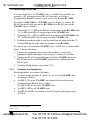
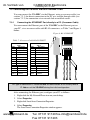
Connect the audio signals (see section 6.2)
Set the dipswitches (see section 6.3)
6.1 Connecting the VS-42HC Rear Panel
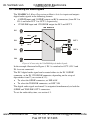
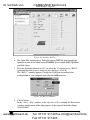
To connect the VS-42HC, as the example in Figure 3 illustrates, do the
following1:
1. Connect up to four component video sources2 (for example, four DVD
players) to the three IN RCA connectors Y, Pb/Cb and Pr/Cr (from IN 1
to IN 4) and connect the corresponding digital audio sources to the
S/PDIF3 RCA connectors (see section 6.2).
2. Connect4 the three OUT 1 RCA connectors Y, Pb/Cb and Pr/Cr to the
video acceptor (for example, a plasma display) and connect the
corresponding OUT 1 S/PDIF RCA connector (see section 6.2) to the
digital audio acceptor (for example, an AV receiver).
3. Connect the three OUT 2 RCA connectors Y, Pb/Cb and Pr/Cr to the
video acceptor (for example, a plasma display) and connect the
corresponding OUT 2 S/PDIF RCA connector and OUT 2 (TOSLINK)
connector (see section 6.2) to the digital audio acceptor (for example, the
audio connector on the digital display).
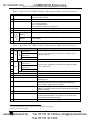
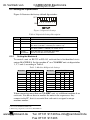
4. Set the dipswitches (see section 6.3).
5. If required, connect a PC and/or controller to the RS-232 port (see
section 7.1) and/or the RS-485 port (see section 7.2) and/or the
ETHERNET port (see section 7.3).
6. Connect the power cord5.
1 Switch OFF the power on each device before connecting it to your VS-42HC. After connecting your VS-42HC, switch on
its power and then switch on the power on each device. DO NOT push in the rear panel Flash Program “Flash Upgr.” button
(see Table 3) and DO NOT switch the ETH Flash switch. These are only used for upgrading to the latest Kramer firmware
(see section 9)
2 Although in this example four inputs are connected, you can connect less inputs
3 Or TOSLINK connector for IN 2
4 You do not need to connect both outputs
5 We recommend that you use only the power cord that is supplied with this machine
8
www.camboard.de
KRAMER: SIMPLE CREATIVE TECHNOLOGY
Tel. 07131 911201
[email protected]
Fax 07131 911203