1
im Vertrieb von
6.3.2
CAMBOARD
Electronics
Controlling the VS-42HC
Setting the IN 2 Audio Signal
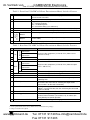
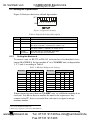
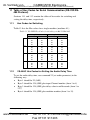
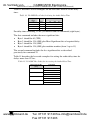
You can set the IN 2 digital audio signal to either an S/PDIF digital audio
signal or a TOSLINK optical digital audio signal, as Table 6 defines1.
Table 6: Digital Audio IN 2 Signal Setting
IN 2 Digital
Audio Signal
S/PDIF
7
DIPSWITCH
6
7
ON
OFF
TOSLINK
OFF
ON
None
OFF
OFF
Controlling the VS-42HC
You can control the VS-42HC via:
RS-232 (see section 7.1)
RS-485 (see section 7.2)
The Ethernet (see section 7.3)
The IR remote control transmitter (see the separate user manual)
7.1 Controlling via RS-232 (for example, using a PC)
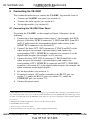
To connect a PC to the VS-42HC unit, using the Null-modem adapter
provided with the machine (recommended):
Connect the RS-232 DB9 rear panel port on the Master VS-42HC unit to
the Null-modem adapter and connect the Null-modem adapter with a
9-wire flat cable to the RS-232 DB9 port on your PC
To connect a PC to the VS-42HC unit, without using a Null-modem adapter:
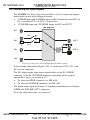
Connect the RS-232 DB9 port on your PC to the RS-232 DB9 rear panel
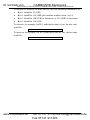
port on the Master VS-42HC unit, as Figure 6 illustrates
PIN 5 Connected to PIN 5 (Ground)
PIN 3 Connected to PIN 2
PIN 2 Connected to PIN 3
Male DB9
Female DB9 (From PC)
PIN 4 Connected to PIN 6
PINS 8, 7, 1 Connected together
If a Shielded cable is used, connect the shield to PIN 5
Figure 6: Connecting a PC without using a Null-modem Adapter
1 You cannot set both DIP 6 and DIP 7 ON
12
www.camboard.de
KRAMER: SIMPLE CREATIVE TECHNOLOGY
Tel. 07131 911201
[email protected]
Fax 07131 911203