1
im Vertrieb von
CAMBOARD
Electronics
Contents
Contents
1
2
3
3.1
4
5
6
6.1
6.2
6.3
Introduction
Getting Started
Overview
Terminology Used in this User Manual
Your VS-42HC 4x2 Home Entertainment Matrix Switcher
Installing the VS-42HC on a Rack
Connecting the VS-42HC
Connecting the VS-42HC Rear Panel
Connecting the Audio Signals
Setting the Dipswitches
1
1
2
3
3
7
8
8
10
11
6.3.1
6.3.2
Setting the Machine #
Setting the IN 2 Audio Signal
11
12
7
7.1
7.2
Controlling the VS-42HC
Controlling via RS-232 (for example, using a PC)
Controlling via RS-485
12
12
13
7.2.1
Configure the Dipswitches
13
7.3
Controlling the VS-42HC via the ETHERNET Port
15
7.3.1
7.3.2
Connecting the ETHERNET Port directly to a PC (Crossover Cable)
Connecting the ETHERNET Port via a Network Hub (Straight-Through Cable)
15
17
7.4
Configuring the Ethernet Port
17
7.4.1
7.4.2
Setting a Virtual Port
Setting an Ethernet Connection
19
20
8
8.1
8.2
8.3
9
9.1
Operating the VS-42HC
Switching OUT-IN Combinations
Setting and Adjusting the Audio Delay Time
Locking the Front Panel
Flash Memory Upgrade
Switcher Flash Memory Upgrade
21
21
21
23
24
24
9.1.1
9.1.2
9.1.3
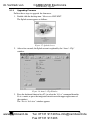
Downloading from the Internet
Connecting the PC to the RS-232 Port
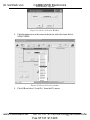
Upgrading Firmware
24
24
25
9.2
Ethernet Flash Memory Upgrade
29
9.2.1
9.2.2
9.2.3
Downloading from the Internet
Connecting the PC to the RS-232 Port
Upgrading Firmware
29
29
30
10
11
11.1
11.2
Technical Specifications
Table of Hex Codes for Serial Communication (RS-232/RS-485 Protocol)
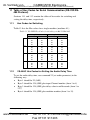
Hex Codes for Switching
VS-44HC Hex Codes for Setting the Audio Delay Time
31
32
32
32
www.camboard.de
i
Tel. 07131 [email protected]
Fax 07131 911203