1
im Vertrieb von
CAMBOARD
Electronics
Controlling the VS-42HC
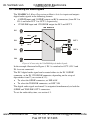
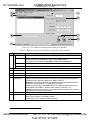
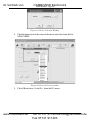
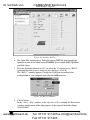
Figure 11: The Ethernet Configuration Manager Window
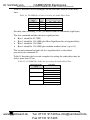
Table 9: Ethernet Configuration Manager Window Functionality
#
Feature
Menu bar
1
Function
File
The Exit command closes the Configuration Manager application
Action
The Search Board command seeks the VS-42HC device that connects to the PC via
the ETHERNET port, and displays it and its corresponding settings;
The Config command adjusts the VS-42HC according to the displayed data
For factory use only (click the Password command to enter the password)
1
Set MAC
About
2
3
4
5
6
Device List
Progress Bar
Status Bar
Version
Device Network
Settings Area
7
8
Exit Button
Action Buttons
Displays software information, including the software version
Displays the MAC Address
Shows the progress
Shows the status
Displays the firmware version
1
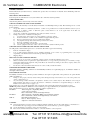
DHCP Mode Check Box: When selected, configures the Ethernet port to obtain an IP
address automatically from the DHCP server. When cleared, manual configuration of
the Ethernet port is required to obtain an IP address (Static IP)
IP Address: A 32-binary digit number obtained from your Network Administrator that
identifies the Ethernet port that is currently being configured
Subnet: A 32-binary digit number obtained from your Network Administrator, which
combined with the IP Address, identifies which network your device is on
Gateway: A network position serving as an entry to another network or to the Internet
(only relevant in the Active Routing mode)
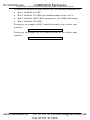
Closes the Configuration Manager application
Search: seeks the devices that connect to the PC via the ETHERNET port, and
displays them and their corresponding settings
Config: adjusts the according to the displayed data
1 See the definition in Table 1
18
www.camboard.de
KRAMER: SIMPLE CREATIVE TECHNOLOGY
Tel. 07131 911201
[email protected]
Fax 07131 911203