1
Chapter 13: Creating Your Graphic Presentation
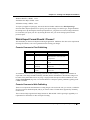
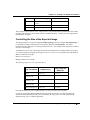
Formats Common to Web Publishing
Extension
Format Name
Features
JPG
Joint Photographic
Experts Group
Raster, Grayscale or True Color,
Adjustable compression (lossy)
GIF
Graphics Image
Format
Raster, 256 color, Lossless
compression
PNG
Portable Network
Graphics
Raster, Monochrome, 16 or 256
colors, or True Color (24 bit RGB),
Lossless compression
Note that you must balance color and detail with download speed; the lower the color density and
resolution, the faster the download speed. However, there may be times when you decide to sacrifice some
download speed for more color or sharpness.
Origin provides a default color palette of 24 colors chosen from colors found on the Windows palette. So,
unless you need custom or True Color, GIF and 256 Color PNG images are a logical choice for web
publishing.
If custom colors are needed, (you can add a limited number of colors to your Origin palette up to a
maximum of 40), or you are setting color by RGB value, then you will do better with True Color. In such
cases, PNG or JPG would be the better choices.
Since web pages are viewed on a computer screen, export at a resolution that approximates that of a
computer monitor – 72 to 96 dots per inch (dpi).
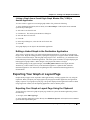
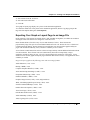
Formats for Use by Other Applications
If you intend to edit your graphic file in another application, then you should choose that application's
native file format or one of its supported formats.
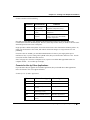
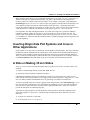
Formats for Use by Other Applications
Extension
Format Name (type)
Owner Application
AI
Adobe Illustrator (vector)
Abobe Illustrator
BMP
Bitmap (raster)
Windows Paint
CGM
Computer Graphics Metafile
(vector)
Wordperfect
DXF
AutoCAD Drawing
Interchange (vector)
AutoCAD
EMF
Enhanced Metafile (vector)
MS Office Applications
PCX
Zsoft PC Paintbrush Bitmap
(raster)
PC Paintbrush
Exporting Your Graph or Layout Page • 415