1
QNX ® Momentics ® Tool Suite
QNX ® Momentics ® Tool Suite
Integrated Development Environment
User's Guide
©2002–2014, QNX Software Systems Limited, a subsidiary of BlackBerry Limited.
All rights reserved.
QNX Software Systems Limited
1001 Farrar Road
Ottawa, Ontario
K2K 0B3
Canada
Voice: +1 613 591-0931
Fax: +1 613 591-3579
Email: [email protected]
Web: http://www.qnx.com/
QNX, QNX CAR, Momentics, Neutrino, and Aviage are trademarks of BlackBerry
Limited, which are registered and/or used in certain jurisdictions, and used
under license by QNX Software Systems Limited. All other trademarks belong
to their respective owners.
Electronic edition published: Wednesday, July 23, 2014
Integrated Development Environment
Table of Contents
About This Guide .....................................................................................................................11
Typographical conventions ...............................................................................................13
Technical support ...........................................................................................................15
Chapter 1: Overview of the IDE ..................................................................................................17
Get to know Eclipse ........................................................................................................18
The Workbench User Guide ....................................................................................18
The C/C++ Development User Guide ........................................................................19
The Subversive User Guide .....................................................................................20
Start the IDE ..................................................................................................................22
Start the IDE from the command line ......................................................................22
Set the workspace location .....................................................................................22
Setting IDE Preferences ..................................................................................................23
Where Files Are Stored ....................................................................................................24
Environment variables .....................................................................................................25
Version coexistence .........................................................................................................26
Utilities used by the IDE .................................................................................................28
Chapter 2: Preparing Your Target ...............................................................................................29
Create a QNX Target System Project .................................................................................30
Move files between the host and target .............................................................................31
Move files to the target ..........................................................................................31
Move files from the target to the host ......................................................................32
Host-target communications ............................................................................................33
IP communications ................................................................................................33
Serial communications ...........................................................................................34
qconn over Qnet ....................................................................................................36
Securing qconn ....................................................................................................36
Install the qconn update ........................................................................................37
Copy a new version of qconn to a target system ........................................................37
Network QNX Neutrino using PPP ....................................................................................39
Verify a serial connection .......................................................................................39
Prepare an embedded system for a Windows target ...................................................40
QNX Neutrino Networking ......................................................................................40
Link an embedded system running QNX Neutrino to a Windows network
connection .......................................................................................................42
Verify a network connection ....................................................................................43
Chapter 3: Managing projects ....................................................................................................45
Supported project types in the IDE ...................................................................................46
Table of Contents
How the IDE characterizes projects using natures ..............................................................48
Considerations for project development .............................................................................49
Creating a project in the IDE ............................................................................................51
Scenarios for creating a project for the first time ......................................................51
Creating a C/C++ project ........................................................................................52
Create a Makefile project with existing code .............................................................56
Create an empty Makefile project ............................................................................56
Allow a Makefile project to be launched outside the IDE ...........................................57
QNX C/C++ container projects ................................................................................57
Converting projects ................................................................................................62
Importing and exporting projects ......................................................................................66
Import an existing container project into a workspace ...............................................66
Import a QNX Source Package and BSP (archive) .....................................................67
Import a QNX mkifs Buildfile ..................................................................................69
Projects within projects ..........................................................................................69
Setting build properties for a project .................................................................................75
Share projects ................................................................................................................77
Opening header files .......................................................................................................78
Set the include paths and define directives (C/C++ Makefile project) ..........................78
Project and Wizard Properties Reference ...........................................................................79
Introduction ..........................................................................................................79
Wizard properties ..................................................................................................84
Make Builder tab .................................................................................................102
Error Parsers tab .................................................................................................103
Project properties ................................................................................................104
Chapter 4: Writing Code in the C/C++ Perspective .....................................................................129
Build projects ...............................................................................................................130
Configure automated builds ...........................................................................................131
Add a use message .......................................................................................................132
Add a usage message when using a QNX C/C++ Project ...........................................132
Add a usage message when using a Makefile Project ...............................................132
Chapter 5: Preparing to Run or Debug Projects .........................................................................135
Create a QNX Target System Project ...............................................................................136
Create and run a launch configuration ............................................................................137
Launch configuration types ..................................................................................137
Create a launch configuration ...............................................................................139
Import launch configurations ................................................................................139
Manage launch configurations ..............................................................................140
Launch Group type ..............................................................................................141
Launch configuration options ................................................................................143
Chapter 6: Debugging a Program in the IDE ..............................................................................157
Integrated Development Environment
Build an executable for debugging ..................................................................................159
Debugging frameworks ..................................................................................................160
Change the debugging framework ..........................................................................160
Interact with GDB .........................................................................................................162
Enable the QNX GDB Console view ........................................................................162
Use the QNX GDB Console view ............................................................................162
Debug a child process ...................................................................................................164
Chapter 7: Using Code Coverage ..............................................................................................169
Enable code coverage for a project .................................................................................172
Enable code coverage for Makefile projects ............................................................173
Create a launch configuration to start a coverage-enabled program ....................................176
Save code coverage data to an XML file ..........................................................................180
Import gcc code coverage data from a project ..................................................................181
Associated views ...........................................................................................................183
Code Coverage Sessions view ................................................................................183
Combine Code Coverage sessions ..........................................................................185
Examine data line-by-line .....................................................................................185
Code Coverage Properties view ..............................................................................186
Code Coverage Report view ...................................................................................187
Chapter 8: Getting System Information ....................................................................................189
What the System Information perspective reveals .............................................................190
Associated views .................................................................................................192
Control your system information session ..........................................................................194
Send a signal ......................................................................................................196
Log system information ........................................................................................196
Examine your target system's attributes ..........................................................................200
System Specifications pane ..................................................................................201
System Memory pane ...........................................................................................201
Processes panes ..................................................................................................201
Managing Processes ......................................................................................................202
Thread Details pane .............................................................................................202
Environment Variables pane .................................................................................205
Process Properties pane .......................................................................................205
Examine target system memory (inspect virtual address space) .........................................206
Track heap usage ..........................................................................................................209
Observe changes in memory usage (allocations and deallocations) ............................211
Examine process signals ................................................................................................215
Get channel information ................................................................................................216
Track file descriptors .....................................................................................................218
Track resource usage .....................................................................................................219
Track the use of adaptive partitions ................................................................................222
Table of Contents
Chapter 9: Using JTAG Debugging ...........................................................................................227
JTAG: Using the Abatron BDI2000 JTAG Debugger with a QNX Neutrino kernel image .........229
Prerequisites .......................................................................................................229
Connect the Abatron BDI2000 JTAG Debugger to your host .....................................230
Update the Abatron firmware ................................................................................231
Connect the Abatron BDI2000 Debugger to your target ...........................................233
Build a system image ...........................................................................................234
Create a launch configuration ...............................................................................236
Debug the startup binary ......................................................................................239
JTAG: Using the Lauterbach Trace32 In-Circuit Debugger with a QNX Neutrino kernel
image .....................................................................................................................241
Prerequisites .......................................................................................................242
Install the Lauterbach Trace32 In-Circuit Debugger software ...................................242
Install the Lauterbach Trace32 Eclipse plug-in software ..........................................244
Connect the Lauterbach Trace32 In-Circuit Debugger .............................................246
Configure the Lauterbach Trace32 In-Circuit Debugger ...........................................247
Create a launch configuration for the target hardware ..............................................248
Create a startup script for the Lauterbach Trace32 In-Circuit software ......................251
Use the debugger ................................................................................................252
JTAG: Using the Macraigor Usb2Demon Debugger with a QNX Neutrino kernel image ..........255
Prerequisites .......................................................................................................255
Install the Macraigor hardware support package .....................................................256
Connect the Macraigor Usb2Demon Debugger to your host ......................................257
Connect the Macraigor Usb2Demon Debugger to your target ....................................257
Start the OCDremote ............................................................................................258
Build a system image ...........................................................................................258
Create a launch configuration ...............................................................................260
Debug a startup binary .........................................................................................263
Chapter 10: Maximizing Performance with Profiling ...................................................................267
Profiling an Application .................................................................................................269
Use Function Instrumentation with the Application Profiler .....................................269
Use Sampling and Call Count instrumentation mode ...............................................270
Use Function Instrumentation mode for a single application ....................................272
Use Function Instrumentation in the System Profiler ..............................................274
Create an Application Profiler session ....................................................................276
Create a profiler session by importing profiler data ..................................................277
Profile a single-threaded application .....................................................................277
Profile a running process for an existing project ......................................................279
Use postmortem profiling for Call Count and Sampling ............................................279
Postmortem profiling ...........................................................................................280
Run an instrumented binary with profiling from a command prompt (Function
Instrumentation mode) ....................................................................................281
Integrated Development Environment
Take a snapshot of a profiling session ....................................................................282
Compare profiles .................................................................................................282
Build a program for profiling ..........................................................................................286
Control profiling using environment variables .........................................................286
Profiling features .................................................................................................287
Run and profile a process .....................................................................................291
Profile a running process ......................................................................................292
Postmortem profiling for Call Count and sampling ..................................................295
Application Profiler tab ........................................................................................296
Manage profiling sessions ..............................................................................................301
Interpret profiling data ..................................................................................................304
Profiler Sessions view ..........................................................................................304
Execution Time view ............................................................................................306
Debug view .........................................................................................................320
Annotated source editor .......................................................................................320
Chapter 11: Analyzing Your System with Kernel Tracing .............................................................323
Overview of the QNX System Profiler ...............................................................................324
System Profiler perspective ..................................................................................325
Information Logging Process ..........................................................................................327
Create a log file ............................................................................................................329
Before you begin .................................................................................................330
Configure a target for system profiling (IDE) ...........................................................330
Create a kernel event trace launch configuration .....................................................331
View and interpret the captured data ..............................................................................340
System Profiler editor ..........................................................................................341
Filter profile data ................................................................................................355
Raw Event Data view ...........................................................................................357
Trace Event Log view ...........................................................................................357
Properties view ....................................................................................................358
Track events .................................................................................................................368
Trace Search .......................................................................................................368
Bookmarks view ..................................................................................................368
Gather statistics from trace data .....................................................................................369
General Statistics view .........................................................................................369
Event Owner Statistics view ..................................................................................370
Client/Server CPU Statistics view ..........................................................................370
Overview view .....................................................................................................371
Condition Statistics view ......................................................................................372
Thread Call Stack view .........................................................................................374
Determine thread state behavior .....................................................................................376
Thread State Snapshot view .................................................................................376
Why Running? view ..............................................................................................376
Analyze multiprocessor systems: CPU Migration pane .......................................................378
Table of Contents
Analyze systems with Adaptive Partitioning scheduling: Partition Summary pane ................379
Using Function Instrumentation mode with the System Profiler .........................................380
Import part of a kernel trace into the Application Profiler ........................................380
System Profiler use cases ..............................................................................................382
Locate sources of high CPU usage .........................................................................382
Map and isolate client CPU load from server CPU load ............................................386
Examine interrupt latency ....................................................................................388
Locate events of interest ......................................................................................393
Chapter 12: Analyzing Memory Usage and Finding Errors ..........................................................401
Memory management in QNX Neutrino ...........................................................................402
Virtual memory ....................................................................................................402
Memory optimization .....................................................................................................408
Process memory ..................................................................................................408
Performance of heap allocations ...........................................................................411
Analyze allocation patterns ...................................................................................412
Optimize heap memory ........................................................................................417
Types of allocation overhead .................................................................................419
Estimate the average allocation size ......................................................................419
Tune the allocator ................................................................................................421
Optimize static and stack memory .........................................................................421
Finding Memory Errors and Leaks ...................................................................................423
Test an application for memory leaks using the System Information Tool ...................423
Use Memory Analysis tooling ................................................................................424
Use Mudflap .......................................................................................................433
The Memory Analysis tool ..............................................................................................453
Advanced topics ..................................................................................................453
Launch your program with Memory Analysis ...........................................................458
View Memory Analysis data ...................................................................................467
Managing Memory Analysis sessions: The Session view ...........................................505
Import memory analysis data ................................................................................509
Export memory analysis data ................................................................................513
Chapter 13: Building OS and Flash Images ..............................................................................517
Introducing the QNX System Builder ..............................................................................519
Boot script files ............................................................................................................520
Overview of images .......................................................................................................521
Components of an image, in order of booting .........................................................521
Types of images you can create .............................................................................523
Project layout ......................................................................................................527
Workflow of image creation ...................................................................................527
Create a new QNX System Builder project for an OS image ...............................................528
Create a project for a flash filesystem image (an .efs file) .................................................529
Create a new image and Add it to your QNX System Build Project ......................................530
Integrated Development Environment
Build an OS image ..............................................................................................530
Combine images ..................................................................................................531
Use the Editor to modify your QNX System Builder projects ..............................................533
Configure project properties ..................................................................................533
Download an image to your target ...................................................................................535
Download ...........................................................................................................535
Open a terminal ..................................................................................................535
Communicate with your target ..............................................................................536
Use the QNX Send File button ..............................................................................536
Settings for the TFTP server .................................................................................537
Download using TFTP ..........................................................................................537
Transfer a file ......................................................................................................538
Transfer files that aren't in Images ........................................................................538
Transfer an image ................................................................................................539
Set font and color preferences ..............................................................................539
Download using other methods .............................................................................540
Chapter 14: Tutorials ..............................................................................................................541
Before you start ............................................................................................................542
Tutorial 1: Create a C/C++ project ...................................................................................543
Tutorial 2: Create a QNX C/C++ project ...........................................................................548
Tutorial 3: Import an existing project into the IDE ............................................................550
Tutorial 4: Import a QNX BSP into the IDE ......................................................................552
Chapter 15: Migrating from Earlier Releases .............................................................................555
Migration considerations ................................................................................................556
Coexistence ........................................................................................................556
Compiler versions ................................................................................................558
Binary compatibility .............................................................................................558
CDT impact on the IDE ........................................................................................559
Default workspace location ...................................................................................559
Old launch configurations don't switch perspectives automatically ...........................559
Missing features in context menus ........................................................................560
System Builder Console doesn't come to front ........................................................560
Reverting to an older version of the IDE .................................................................560
Migrate your projects .....................................................................................................562
Migrate from IDE 4.5, IDE 4.6 or IDE 4.7 to IDE 5.0 (SDP 6.6.0) ....................................563
Migrate from IDE 4.0.1 to IDE 5.0 (SDP 6.6.0) ...............................................................565
Chapter 16: Troubleshoot the IDE ............................................................................................567
Chapter 17: Glossary ..............................................................................................................571
Table of Contents
About This Guide
This User's Guide describes the Integrated Development Environment (IDE), which is
part of the QNX Momentics Tool Suite. The guide introduces you to the IDE and shows
you how to use it effectively to build your QNX Neutrino-based systems.
This guide assumes the following:
• On your host you've already installed the QNX Software Development Platform,
which includes the QNX Momentics tool suite. The QNX Momentics tool suite is a
complete QNX Neutrino development environment.
• You're familiar with the System Architecture guide of the QNX Neutrino.
• You can write code in C or C++.
This release of the IDE is based on Eclipse 4.2.1. If you have an older version
of the IDE, see the Migrating from Earlier Releases (p. 555) section in this
guide.
The following table may help you find information quickly:
To:
Go to:
Find information in the Eclipse
Get to know Eclipse (p. 18)
documentation
Connect your host and target
Preparing Your Target (p. 29)
Create and manage projects
Managing projects (p. 45)
Import a QNX source package and BSP
Import a QNX Source Package and BSP
(archive) (p. 67)
Import existing code into the IDE
Importing and exporting projects (p. 66)
Debug your program
Debugging a Program in the IDE (p. 157)
Run QNX Neutrino on your target
Building OS and Flash Images (p. 517)
Examine execution stats (e.g., call counts) Profiling an Application (p. 269)
in your programs
Exercise a test suite
Using Code Coverage (p. 169)
Find and fix a memory leak in a program Finding Memory Errors and Leaks (p. 423)
©
2014, QNX Software Systems Limited
See process or thread states, memory
What the System Information perspective
allocation, etc.
reveals (p. 190)
Examine your system's performance,
Managing Processes (p. 202) and Analyzing
kernel events, etc.
Your System with Kernel Tracing (p. 323)
11
About This Guide
To:
Go to:
Learn how to use one of the IDE's wizards Project and Wizard Properties Reference
(p. 79)
Set execution options for your programs
Launch configuration options (p. 143)
Run through the IDE tutorials
Tutorials (p. 541)
Learn where the IDE stores important files Where Files Are Stored (p. 24)
Learn what utilities the IDE uses
Utilities used by the IDE (p. 28)
Learn about migrating from earlier
Migrating from Earlier Releases (p. 555)
versions of the IDE
Find the meaning of a special term used Glossary (p. 571)
in the IDE
12
©
2014, QNX Software Systems Limited
Typographical conventions
Typographical conventions
Throughout this manual, we use certain typographical conventions to distinguish
technical terms. In general, the conventions we use conform to those found in IEEE
POSIX publications.
The following table summarizes our conventions:
Reference
Example
Code examples
if( stream == NULL)
Command options
-lR
Commands
make
Constants
NULL
Data types
unsigned short
Environment variables
PATH
File and pathnames
/dev/null
Function names
exit()
Keyboard chords
Ctrl–Alt–Delete
Keyboard input
someting you type
Keyboard keys
Enter
Parameters
parm1
Program output
login:
User-interface components
Navigator
Variable names
stdin
Window title
Options
We use an arrow in directions for accessing menu items, like this:
You'll find the Other... menu item under Perspective ➝ Show View.
We use notes, cautions, and warnings to highlight important messages:
Notes point out something important or
useful.
Cautions tell you about commands or procedures that may have unwanted
or undesirable side effects.
©
2014, QNX Software Systems Limited
13
About This Guide
Warnings tell you about commands or procedures that could be dangerous
to your files, your hardware, or even yourself.
Note to Windows users
In our documentation, we typically use a forward slash (/) as a delimiter in pathnames,
including those pointing to Windows files. We also generally follow POSIX/UNIX
filesystem conventions.
14
©
2014, QNX Software Systems Limited
Technical support
Technical support
Technical assistance is available for all supported products.
To obtain technical support for any QNX product, visit the Support area on our website
(www.qnx.com). You'll find a wide range of support options, including community
forums.
©
2014, QNX Software Systems Limited
15
Chapter 1
Overview of the IDE
The IDE is based on the Eclipse Platform developed by the Eclipse Foundation, an
open consortium of tools vendors (including QNX Software Systems).
Eclipse is built on a mechanism for discovering, integrating, and running modules
called plugins. The IDE incorporates several QNX-specific plugins as well as several
standard Eclipse plugins:
• The Eclipse workbench allows you to create and manage resources, and navigate
through your workspace. It also provides integration with CVS repositories.
• The C/C++ Development Toolkit (CDT) provides capabilites for developing, building,
and debugging C or C++ programs.
• Subversive provides integration with SVN repositories.
• EGit provides integration with the Git version control system.
The IDE is integrated with QNX utilities that perform a number of functions, including
building, compiling, and debugging projects, and providing communication between
the host and target. For a list of these utilities, see Utilities used by the IDE (p. 28).
The Momentics tool suite provides a single, consistent, integrated environment,
regardless of the host platform you're using (Windows or Linux). Through a set of
related windows, the IDE presents various ways of viewing and working with all the
components that comprise your system. In terms of the tasks you can perform, the
toolset lets you:
• organize your resources (projects, folders, files)
• edit resources
• collaborate on projects with a team
• compile, run, and debug your programs
• build OS and flash images for your embedded systems
• analyze and fine-tune your system's performance
The IDE doesn't require that you abandon the standard QNX Neutrino tools
and Makefile structure. On the contrary, it relies on those tools. If you
continue to build programs at the command line, you can also benefit from
the IDE tools, such as the QNX System Analysis tool and the QNX System
Profiler, which can show you in graphical ways what your system is doing.
©
2014, QNX Software Systems Limited
17
Overview of the IDE
Get to know Eclipse
If you're unfamiliar with Eclipse, you can find helpful information in the Eclipse
documentation included with the IDE:
• The Workbench User Guide describes the components that make up the workbench,
and provides both basic tutorials and detailed instructions for performing a variety
of tasks.
• The C/C++ Development User Guide has additonal information about creating,
editing, building, and debugging C/C++ projects.
• The Subversive User Guide describes how to share your project to an SVN repository
and work on it with your team.
The Workbench User Guide
To find out about:
Go to:
The Eclipse platform's basic design and
Eclipse platform overview
implementation
Perspectives, editors, views and other features
Concepts
of the Eclipse workbench
Creating, editing, and deleting projects, folders, Tasks ➝ Working with projects, folders and files
and files
Rearranging the toolbar, changing key bindings, Tasks ➝ Customizing the Workbench
and changing fonts and colors
Using hotkeys
Reference ➝ User interface information ➝ Development
environment ➝ List of key bindings
Hints for increasing your productivity
Tips and tricks
Local history and the log file
Reference ➝ Preferences ➝ Local History
and
Concepts ➝ Workbench ➝ Local history
Connecting to a CVS repository
Tasks ➝ Working in the team environment with CVS ➝ Working
with a CVS repository ➝ Creating a CVS repository location
Checking code out of CVS
Tasks ➝ Working in the team environment with CVS ➝ Working
with projects shared with CVS ➝ Checking out a project from a
CVS repository
18
©
2014, QNX Software Systems Limited
Get to know Eclipse
To find out about:
Go to:
Synchronizing with a CVS repository
Tasks ➝ Working in the team environment with CVS ➝
Synchronizing with the repository, particularly the Updating
section
Finding out who's also working on a file
Tasks ➝ Working in the team environment with CVS ➝ Finding
out who's working on what: watch/edit
Resolving CVS conflicts
Tasks ➝ Working in the team environment with CVS ➝
Synchronizing with the repository ➝ Resolving conflicts
Preventing certain files from being committed
Tasks ➝ Working in the team environment with CVS ➝
to CVS
Synchronizing with the repository ➝ Version control life cycle:
adding and ignoring resources
Creating and appling a patch
Tasks ➝ Working in the team environment with CVS ➝ Working
with patches
Tracking code changes that haven't been
Tasks ➝ Working with local history, especially the Comparing
committed to CVS
resources with the local history section
Viewing an online FAQ about the CVS Repository Reference ➝ Team Support with CVS ➝ CVS
Exploring perspective
The C/C++ Development User Guide
To find out about:
Go to:
An overview of the features of the CDT
Concepts ➝ CDT Overview
Perspectives for writing C/C++ code
Concepts ➝ Perspectives available to C/C++ developers
Working with the C/C++ editor
Tasks ➝ Writing code
Toolbar icons in the Debug view
Reference ➝ Debug views ➝ Debug view
Disassembly mode
Reference ➝ Debug views ➝ Disassembly view
Adding breakpoints
Tasks ➝ Running and debugging projects ➝ Debugging ➝ Using
breakpoints, watchpoints, and breakpoint actions ➝ Adding
breakpoints
Adding watchpoints
Tasks ➝ Running and debugging projects ➝ Debugging ➝ Using
breakpoints, watchpoints, and breakpoint actions ➝ Adding
watchpoints
Setting properties of breakpoints and
Concepts ➝ Perspectives available to C/C++ developers
watchpoints
©
2014, QNX Software Systems Limited
19
Overview of the IDE
To find out about:
Go to:
Removing breakpoints and watchpoints
Tasks ➝ Running and debugging projects ➝ Debugging ➝ Using
breakpoints, watchpoints, and breakpoint actions ➝ Removing
breakpoints and watchpoints
Inspecting variables
Concepts ➝ CDT Overview
Controlling the display of variables
Concepts ➝ Perspectives available to C/C++ developers
Changing a variable to a different type
Tasks ➝ Writing code
Viewing variables in memory
Reference ➝ Debug views ➝ Memory view
Evaluating expressions
Tasks ➝ Writing code
Inspecting registers
Concepts ➝ CDT Overview
Inspecting a process's memory
Concepts ➝ Perspectives available to C/C++ developers
Inspecting shared library usage
Tasks ➝ Writing code
Monitoring signal handling
Reference ➝ Debug views ➝ Signals view
Viewing output
Tasks ➝ Writing code
The Subversive User Guide
To find out about:
Go to:
An introduction to everyday work with SVN
Team support with SVN
Connecting to an SVN repository
Team support with SVN ➝ SVN Repository Location Wizard
Showing only those SVN repositories associated with Team support with SVN ➝ SVN Repository Browser View
your Workbench
Checking code out of SVN
Team support with SVN ➝ Actions ➝ Checking out
Synchronizing with an SVN repository
Team support with SVN ➝ SVN Workspace Synchronization
Ignoring some resources while synchronizing
Team support with SVN ➝ Actions ➝ Ignoring resources from
version control
Finding out who's also working on a file
Team support with SVN ➝ SVN History View
Seeing changes made by another user
Team support with SVN ➝ SVN Repository Browser View
Resolving SVN conflicts
Team support with SVN ➝ Actions ➝ Merging
Preventing certain files from being committed to SVN Team support with SVN ➝ Actions ➝ Locking and unlocking
resources
Creating and appling a patch
20
Team support with SVN ➝ Actions ➝ Patching
©
2014, QNX Software Systems Limited
Get to know Eclipse
To find out about:
Go to:
Tracking code changes that haven't been committed Team support with SVN ➝ Actions ➝ Extracting changes
to SVN
Changing a file to a base revision
©
2014, QNX Software Systems Limited
Team support with SVN ➝ Actions ➝ Reverting changes
21
Overview of the IDE
Start the IDE
Depending on which host you're using, after you install the QNX Software Development
Platform, you'll see a desktop icon and/or a menu item labeled QNX Momentics IDE
in the start or launch menu. To start the IDE, click the icon or select the menu item.
Start the IDE from the command line
You can start the IDE by running the qde command:
• For Windows, navigate to the default directory where the qde.exe executable is
located (for example, C:/QNX660/host/win32/x86/usr/qde/eclipse), and
run the following command: qde.exe
• For Linux, navigate to the default directory where the qde script resides, and run
this command: ./qde
For more information about starting the IDE, including advanced execution options
for developing or debugging parts of Eclipse itself, see Tasks ➝ Running Eclipse in
the Workbench User Guide.
Always use qde to start the IDE, instead of the eclipse command, because
qde configures the proper QNX-specific environment.
Set the workspace location
Your workspace is the directory where the IDE stores your projects. By default, the
workspace location is home_directory/ide-version-workspace on Linux, or
C:\ide-version-workspace on Windows.
To store your workspace in another location:
• On Windows:
1. Start the IDE from the launch icon or menu item, and when the Workspace
Launcher appears, click Browse and select a directory for your workspace.
2. If you always want to use the same workspace location, check the box labeled
Use this as the default and do not ask again.
3. Click OK to continue loading the IDE.
• On Linux:
1. Launch qde with the -data option:
qde -data workspace_path
where workspace_path is the path to your workspace directory.
22
©
2014, QNX Software Systems Limited
Setting IDE Preferences
Setting IDE Preferences
The Preferences dialog ( Window ➝ Preferences ) lets you customize the behavior of
your environment, such as when to build your projects, which target processors to
build for, and how to open new perspectives.
Besides global preferences, you can also set preferences on a per-project basis
using the Properties item in right-click menus.
On Ubuntu 9.10, icons inside menus aren't displayed if you use GTK 2.18;
see bug 293720 at http://www.eclipse.org.
Workaround: Turn on the Show icons in menus option (for example, under
System ➝ Preferences ➝ Appearance ➝ Interface on Ubuntu 9.10).
QNX preferences
This page ( Window ➝ Preferences ➝ QNX ) lets you specify which version of the QNX
Momentics IDEto use when developing your applications.
The SDK Selection options set the environment variables according to the version of
the QNX Momentics tool suite that you specify. The host uses these environment
variables to locate files on the host computer. By default, the IDE uses the last installed
version of the software that appears in the Select SDK list in this window.
Option
Description
Select SDK
The name of the software development kit you want to use, or
Use Environment Variables if you want to use the one specified
by the QNX_HOST and QNX_TARGET environment variables
Version
The version of the QNX Momentics tool suite. You can't modify
this field.
SDK Tools Path
The location of host-specific files
SDK Platform Path The location of target-specific files on the host machine
The default value for each is from the version of the QNX Momentics tool suite that
you last installed.
©
2014, QNX Software Systems Limited
23
Overview of the IDE
Where Files Are Stored
These are some of the more important files used by the IDE:
Type of file
Path
Location
Workspace folder
$HOME/ide-version-workspace
Host
.metadata folder (for
$HOME/ide-version-workspace/.metadata Host
personal settings)
Error log
$HOME/ide-version-workspace/.metadata/.log Host
In Windows XP, C:/ is used instead of the HOME environment variable or the
C:/Documents and Settings/userid directory (so the spaces in the path name
don't confuse any of the tools).
You can specify where you want your workspace folder to reside. For details,
see the section Running Eclipse in the Tasks chapter of the Workbench User
Guide. (To access the guide, open Help ➝ Help Contents , then select
Workbench User Guide from the list.)
24
©
2014, QNX Software Systems Limited
Environment variables
Environment variables
QNX Neutrino uses these environment variables to locate files on the host computer:
QNX_HOST
The location of host-specific files.
QNX_TARGET
The location of target backends on the
host machine.
QNX_CONFIGURATION
The location of the qconfig
configuration files.
MAKEFLAGS
The location of included *.mk files.
TMPDIR
A directory used for temporary files. The
gcc compiler uses temporary files for the
output of one stage of compilation used
as input to the next stage: for example,
the output of the preprocessor, which is
the input to the compiler proper.
The qconfig utility sets these variables according to the version of the QNX Momentics
IDE that you specified.
©
2014, QNX Software Systems Limited
25
Overview of the IDE
Version coexistence
You can have multiple versions of the software installed on the same computer. In
most cases, the IDE installed with the new version should work with the toolchains
from earlier releases.
When you install the QNX Software Development Platform, you receive a set of
configuration files that indicate where you've installed the software. The
QNX_CONFIGURATION environment variable stores the location of the configuration
files for the installed versions of QNX Neutrino.
By default, the IDE uses the last installed version of QNX software that appears in the
Select Install list on the Global QNX Preferences page (select Window ➝ Preferences
, and then select QNX).
For instructions about how to change versions of the QNX Momentics tool suite for
the IDE, see Coexistence (p. 556) in the Migrating from Earlier Releases section.
Windows hosts
On Windows hosts, run-qde sets up the development environment before starting
the IDE.
qconfig utility for non-Windows hosts
The qconfig utility lets you configure your computer to use a specific version of
QNX Neutrino:
• If you run it without any options, qconfig lists the versions installed on your
computer.
• If you specify the -e option, you can configure the environment for building software
for a specific version of the operating system. For example, if you're using the Korn
shell (ksh), you can configure your computer as follows: eval `qconfig -n
"QNX 6.4.1 Install" -e`
In the previous example, notice that you must use the back tick character (`),
not the single quote character (').
For more information about coexistence, see Coexistence (p. 556) in the Migrating from
Earlier Releases section.
Specify which OS version to build for
To specify which version of QNX Neutrino you want the IDE to build for:
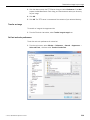
1. Open the Preferences dialog ( Window ➝ Preferences ).
2. Expand QNX.
26
©
2014, QNX Software Systems Limited
Version coexistence
3. From the Select Install list, select the OS version you want to build for.
4. Click Apply, then click OK.
©
2014, QNX Software Systems Limited
27
Overview of the IDE
Utilities used by the IDE
Here are the utilities used by the IDE:
• addr2line — Convert addresses into line number/file name pairs
• deflate — Compress files for flash filesystems
• gcc — Compile and link a program
• gdb — Debugger
• inflator — Inflate previously deflated files
• ld — Linker
• make — Maintain, update, and regenerate groups of programs
• mkefs — Build an embedded filesystem
• mkifs — Build an OS image filesystem
• mkimage — Build a socket image from individual files
• mkrec — Convert a binary image into ROM format
• objcopy — Copy the contents of one object file to another
• pdebug — Process-level debugger
• qcc — Compile command
• qconn — Provide service support to remote IDE components
• strip — Remove unnecessary information from executable files
• usemsg — Change the usage message for a command
For more information, see the Utilities Reference.
28
©
2014, QNX Software Systems Limited
Chapter 2
Preparing Your Target
Regardless of whether you're connecting to a remote or a local target, you have to
prepare your target machine so that the IDE can interact with the QNX Neutrino image
running on the target.
The host is the computer where the IDE resides (e.g. Windows, Linux). The target is
the computer where QNX Neutrino and your program run.
The qconn daemon is the target agent written specifically to support the IDE. It
facilitates communication between the host and target computers.
For more information about connection methods, see Create and run a launch
configuration (p. 137).
©
2014, QNX Software Systems Limited
29
Preparing Your Target
Create a QNX Target System Project
You must create a QNX Target System Project for every target you want to use with
the IDE. To create a QNX Target System Project:
1. From the menu, select File ➝ New ➝ Other….
2. In the list, expand QNX.
3. Select QNX Target System Project.
4. Click Next.
The New QNX Target dialog appears.
5. Type a name for your target.
6. Type your target's hostname or IP address.
When you update the Target properties from the Attributes pane, your
changes won't be updated if you modify the Hostname or IP address, and
then click Apply. You must click OK to confirm the changes and close the
properties window for the changes to take effect.
7. Click Finish.
You'll see your new QNX Target System Project in the Project Explorer view.
30
©
2014, QNX Software Systems Limited
Move files between the host and target
Move files between the host and target
The IDE's Target File System Navigator view lets you easily move files between your
host and a filesystem residing on your target.
If you haven't yet created a target system, you can do so right from within the
Target File System Navigator view.
To create a target system:
1. Right-click anywhere in the view, then select New QNX Target.
Note that the Target File System Navigator view isn't part of the default QNX System
Builder perspective; you must manually bring the view into your current perspective.
To see the Target File System Navigator view:
1. From the main menu, select Window ➝ Show View ➝ Other… .
2. Expand QNX Targets, and then double-click Target File System Navigator.
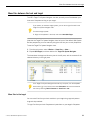
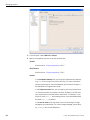
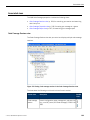
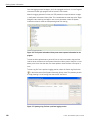
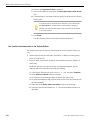
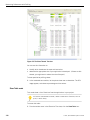
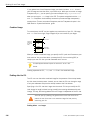
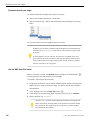
The view shows the target and directory tree in the left pane, and the contents of the
selected directory in the right pane:
If the Target File System Navigator view has only one pane, click the dropdown
menu button ( ) in the title bar, then select Show table. You can also customize
the view by selecting Table Parameters or Show files in tree.
Move files to the target
You can move files from your host machine to your target using copy-and-paste or
drag-and-drop methods.
To copy files from your host filesystem and paste them on your target's filesystem:
©
2014, QNX Software Systems Limited
31
Preparing Your Target
1. In a file-manager utility on your host (e.g. Windows Explorer), select your files,
then select Copy from the context menu.
2. In the left pane of the Target File System Navigator view, right-click your destination
directory and select Paste.
To convert files from DOS to Neutrino (or Unix) format, use the textto -l
filename command. For more information, see textto in the Utilities
Reference.
To drag and drop files to your target:
1. Drag your selected files from any program that supports drag-and-drop (e.g. Windows
Explorer), and then drop them in the Target File System Navigator view.
Move files from the target to the host
To copy files from your target machine and paste them to your host's filesystem:
1. In the Target File System Navigator view, right-click a file, then select Copy to ➝
File System. The Browse For Folder dialog appears.
To import files directly into your workspace, select Copy to ➝ Workspace.
The Select Target Folder dialog appears.
2. Select your desired destination directory and click OK.
To move files to the host machine using drag-and-drop:
1. Drag your selected files from the Target File System Navigator view and drop them
in the System Builder Projects view.
32
©
2014, QNX Software Systems Limited
Host-target communications
Host-target communications
For Windows and Linux hosts, the IDE supports host-target communications using
either an IP address or a serial connection; we recommend both. If you have only a
serial link, you'll be able to debug a program, but you'll need an IP link in order to use
any of the advanced diagnostic tools in the IDE.
Target systems need to run the target agent (qconn).
Ensure that you occasionally check the Download area on our website for
updated versions of qconn. You can use the IDE Software Updates manager
(Help ➝ QNX Software Updates; for more information see Install the qconn
update (p. 37).
IP communications
Before you can configure your target for IP communications, you must connect the
target and host machines to the same network. You must already have TCP/IP
networking functioning between the host and target systems.
To configure your target for IP communications, you must launch qconn on the target,
either from a command-line shell, or the target's boot script.
The version of the QNX Software Development Platform on your host must be
the same as or newer than the version of QNX Neutrino on your target, or
unexpected behavior may occur. Newer features won't be supported by an older
target.
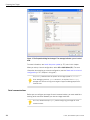
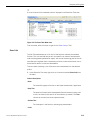
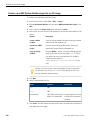
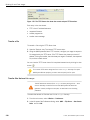
If your target's qconn is out of date, its listing in the Target Navigator view will notify
you to check the target properties:
©
2014, QNX Software Systems Limited
33
Preparing Your Target
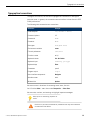
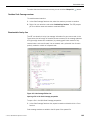
Figure 1: The Properties dialog for the target. The message indicates qconn is out of
date.
For more information, see Install the qconn update (p. 37), later in this chapter.
When you set up a launch configuration, select C/C++ QNX QConn (IP). (For more
information about setting up a launch configuration, see the Create and run a launch
configuration (p. 137) chapter in this guide.)
The pdebug command must be present on the target system in /usr/bin
for all debugging sessions; qconn launches it, as required. The devc-pty
manager must also be running on the target to support the Debug perspective's
Terminal view.
Serial communications
Before you can configure your target for serial communications, you must establish a
working serial connection between your host and target machines.
On Linux, disable and stop mgetty before configuring your target for serial
communications.
34
©
2014, QNX Software Systems Limited
Host-target communications
Configure a target for serial communication
To configure your target for serial communications:
1. If it's not already running, start the serial device driver that's appropriate for your
target. Typically, Intel x86-based machines use the devc-ser8250 driver.
2. Once the serial driver is running, you'll see a serial device listed in the /dev
directory. To confirm it's running, enter: ls /dev/ser*
You'll see an entry such as /dev/ser1 or /dev/ser2.
3. Type the following command to start the pseudo-terminal communications manager
( devc-pty ):
devc-pty &
4. Type the following command to start the debug agent (this command assumes that
you're using the first serial port on your target):
pdebug /dev/ser1 &
If you change the pdebug command to pdebug /dev/ser1,57600,
stty </dev/ser1 shows how ser1 is configured so that you can take
note of the baud rate, and then specify the same number in the launch
configuration. At pdebug launch time, the baud rate of the device that
pdebug uses can be specified for the launch configuration (in this example,
57600).
The target is now fully configured.
5. Determine the serial port parameters by entering the following command (again,
this command assumes the first serial port):
stty </dev/ser1
This command produces a lot of output. Look for the baud=baudrate entry; you'll
need this information to properly configure the host portion of the connection.
When you set up a launch configuration, select C/C++ QNX PDebug (Serial). For
information about launch configurations, see the Create and run a launch configuration
(p. 137) chapter in this guide.
After a debug session ends, you must restart pdebug on the target because
pdebug always exits. If you use qconn, you don't have to restart pdebug
because it will automatically restart pdebug with each new debug session.
However, if you use serial debug, you must manually restart pdebug, or use
the target reset if pdebug was initiated by the startup process.
©
2014, QNX Software Systems Limited
35
Preparing Your Target
The following shell script shows how to keep pdebug running so that it behaves
similar to qconn:
while true
do
pidin | grep -q pdebug
if [ $? -ne 0 ]
then
echo Start pdebug
pdebug /dev/ser1,115200
fi
sleep 1
done
qconn over Qnet
Suppose you have two targets running QNX Neutrino, such that:
• The first target can communicate with the IDE host via TCP/IP.
• The second target can communicate with the first target via Qnet.
To connect to the second target with the IDE, all you need to do is start qconn on
the second target, and instruct it to use the IP stack of the first target, like this:
SOCK=/net/ firstTargetName qconn
If you want to start qconn like this every time you boot the second target, add this
command to the file named /etc/rc.d/rc.local.
Securing qconn
By default, the traffic sent to qconn is unencrypted which leaves it vulnerable to
interception. You can encrypt this traffic by tunnelling it through ssh. This will ensure
that the traffic sent to qconn is secure.
To implement this security feature:
• The target has to have sshd installed and configured with either password
authentication or public key authentication for the root user.
• The host side has to have an ssh client.
Configuring a connection on the target
To Configure a connection on the target:
1. On the target, run sshd.
2. Run qconn with the -l option.
The -l option tells qconn to run in local mode, which means that it won't accept
outside connections.
Configuring a connection on the host
To configure a connection on the host:
36
©
2014, QNX Software Systems Limited
Host-target communications
1. Run the following command:
ssh root@target_host -N -L 9000:localhost:8000
where:
• -N — instructs ssh to not run a shell.
• -L <local_port>:localhost:<target_port> — <local_port> is the host port used
for tunneling purposes, which has to be "localhost" or 127.0.0.1, and
<target_port> is the port where qconn is running, usually 8000.
2. In the IDE, instead of specifying a target IP port in the target configuration, specify
the local IP/port, such as: localhost:9000.
That would open a connection redirection from this host to target, you will be
prompted for either a password, pass phrase or nothing if the target knows your
machine public key. Your connection will now be encrypted.
Install the qconn update
After you've installed the IDE, you may need to update qconn on your target systems
to take advantage of some additional features. The IDE will work with older versions
of qconn, but not all features will be available.
Only users with system administrator privileges can perform updates to
qconn.
To update qconn on your development system:
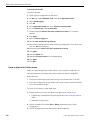
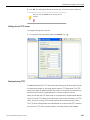
1. In the IDE, select Help ➝ QNX Software Updates ➝ Qconn Updates… .
2. Click OK to let the IDE update qconn on your host.
If you already have the latest version of qconn, or the next time you choose
QNX Software Updates ➝ Qconn Updates… from the Help menu, the IDE
offers to uninstall the qconn update.
After you update qconn on your Development system, you then need to update the
version of qconn on your target system. How you do this depends on your target
system; you might have to build a new image, or you might simply have to copy the
new version to your target.
Copy a new version of qconn to a target system
To copy a new version of qconn to a target system:
1. Use slay qconn on the target to stop any existing qconn.
©
2014, QNX Software Systems Limited
37
Preparing Your Target
2. Copy $QNX_TARGET/target/usr/sbin/qconn to your target system's /usr/sbin
directory.
3. Ensure that the qconn in the target's /usr/sbin directory is executable; if it
isn't, use chmod +x to make it executable.
4. On the target, launch the new qconn.
38
©
2014, QNX Software Systems Limited
Network QNX Neutrino using PPP
Network QNX Neutrino using PPP
PPP is a protocol for establishing a TCP/IP network between two computers over a
serial communication line. PPPD is the name for the daemon that interfaces the serial
line with the TCP/IP stack on a POSIX-like system.
Once networking is established, you can use the QNX Momentics IDE debugger as if
an Ethernet connection were available. In addition, you can use traditional client tools
that are available on Windows (such as FTP, telnet, and TCP/IP file sharing), to access
your embedded system.
For example, typical scenarios where PPP (serial) networking might be useful on an
embedded system are those that:
• have no Ethernet adapter
• need to be debugged before the Ethernet driver is functional
• have no functional USB (implying that an Ethernet dongle can't be used)
Verify a serial connection
To verify that your serial connection functions properly:
1. Open the Console view in the IDE and a command prompt window for Windows.
2. In the Console view, type the following command:
stty raw 115200 par=none bits=8 stopb=1 </dev/ser1
3. At a Windows command prompt, type the following command:
mode com1: baud=115200 parity=n data=8 stop=1
4. In the Console view, type the following command:
cat </dev/ser1
5. At the Windows command prompt, type the following command:
dir \*.* >com1:
In the Console view, you'll see a DOS directory listing.
6. At the Windows command prompt, type the following command:
copy com1: con:
7. In the Console view, type the following command:
ls /* >/dev/ser1
At the Windows command prompt, you'll see a QNX Neutrino directory listing.
Now, if you are successful, you were able to confirm that you have a working serial
connection between /dev/ser1 and COM1.
©
2014, QNX Software Systems Limited
39
Preparing Your Target
Prepare an embedded system for a Windows target
It is assumed that your embedded system has a serial driver running, and that the
port /dev/ser1 is available for connection to the Windows workstation COM1.
Typically, you'll utilize a cross-over serial cable for the connection.
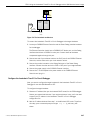
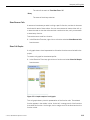
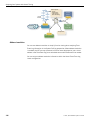
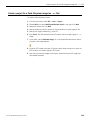
Embedded QNX Neutrino
system
/dev/ser2 -console
/dev/ser1 -pppd
Windows PC
Optional
COM2: teraterm
COM1: network
Network link
Figure 2: Configuring your embedded system for network communication.
If you have a second serial port for your embedded system, we strongly
recommend that you connect it to a terminal program (such as teraterm,
hyperterm, and so on) so that you can have a console (shell) for PPP debugging
purposes.
Some of the diagnostic discussions below assume that you have access to a
console (either the serial shown above, or a direct connect video and keyboard).
To ensure that the cable is correct and the systems are properly communicating, you
should verify that you have a working serial connection between /dev/ser1 and
COM1.
QNX Neutrino Networking
QNX Neutrino Networking
QNX Neutrino implements the TCP/IP stack in an executable module called io-pkt.
The versions of io-pkt are:
• io-pkt-v4
• io-pkt-v4-hc
• io-pkt-v6-hc — Note that the io-pkt-v6-hc version implements TCP/IP
version 6, and won't be discussed in the example below.
The io-pkt-v4-hc version is full-featured, while io-pkt-v4 eliminates some
functionality for environments that have insufficient RAM. However, both v4 versions
support PPP.
40
©
2014, QNX Software Systems Limited
Network QNX Neutrino using PPP
Multipoint PPP is supported only in io-pkt-v4-hc, but the example below
doesn't require multipoint PPP.
You can start the TCP/IP stack on your embedded system without a network driver as:
io-pkt-v4 &
Or
io-pkt-v4-hc &
You might notice that -ptcpip is appended to io-pkt in sample scripts, but io-pkt
functions the same with or without this postfix.
Additionally, you will typically see -dname included in scripts. This command starts
a particular network driver on the stack; however, in the example below, we don't use
network hardware, so we can start io-pkt without a driver.
In addition to your selected io-pkt binary, you should include the following binaries
in your image (.ifs):
• Required binaries: pppd. Note that -pppd needs to have the setuid (set user ID)
bit set in its permissions.
• Suggested binaries: stty, ifconfig, ping, qconn, telnetd, and ftpd.
Additionally, you must create a directory named /etc/ppp, and a file named
/etc/ppp/chap-secrets. Include the following code in the chap-secrets file:
#localhost root "foobar" *
*
*
"foobar" *
The purpose of the last line of code allows any user from any host to log in with the
password foobar.
Now, you can start PPPD for debugging purposes from a console using the command:
pppd debug nodetach crtscts auth +chap 10.0.0.1:10.0.0.2 \
netmask 255.255.255.0 /dev/ser1 115200
Or, from a startup script using this command:
pppd persist crtscts auth +chap 10.0.0.1:10.0.0.2 \
netmask 255.255.255.0 /dev/ser1 115200
For the previous command, we are specifying the network that will be established.
The embedded system will be 10.0.0.1 and the other end of the link will be 10.0.0.2;
it is a class C network, specified by netmask.
In addition, the auth +chap options indicate that the other end will be authenticated
with CHAP (which is supported by Windows networking). The system will reference
the chap-secrets file you created earlier to match the specified password.
Without the persist option in the command, the connection will terminate after a
timeout, or after one successful connection.
©
2014, QNX Software Systems Limited
41
Preparing Your Target
Use the debug nodetach command to view the diagnostic output on the terminal
where you started PPPD. You can also use Ctrl –C to stop PPPD in this mode.
Link an embedded system running QNX Neutrino to a Windows network connection
The following information provides the steps to link an embedded system running QNX
Neutrino to a Windows network connection. Windows networking is controlled from a
Network Connections panel. The following example shows you how to prepare your
target and host for debugging using a PPP connection.
To build a connection to your embedded system:
1. From the Start menu, select Settings ➝ Control Panel ➝ Network Connections .
2. Select New Connection Wizard.
3. Click Next to continue.
4. Select Set up an advanced connection, and then click Next.
5. Select Connect directly to another computer, and then click Next.
6. Select Guest, and then click Next.
7. In the Computer name field, type the name of the computer you want to connect,
and then click Next.
8. From the list, select the device that you want to use to make the connection, and
then click Next. For this example, we'll use the Communications cable between
two computer (COM1) device.
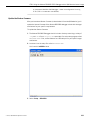
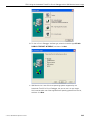
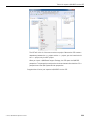
9. Select Anyone's use if it isn't currently selected, and then click Next.
10. Click Finish to create the connection.
Next, the network connections dialog is displayed. Now, you'll have to provide the
login credentials and configure the network connection to the machine you specified
earlier.
11. Type the User name and Password for the machine you want to connect to, and
then click Properties to configure.
12. Click Configure.
13. In the Maximum speed (bps) field, select 115200.
14. Deselect the option Enable hardware flow of control, and then click OK.
15. Click the Options tab.
16. In the Redial attempts field, change the value to 0.
17. Click the Security tab, and then click Settings.
18. Deselect the following options:
• Unencrypted password (PAP)
• Shiva Password Authentication Protocol (SPAP)
• Microsoft CHAP (MS-CHAP)
• Microsoft CHAP Version 2 (MS-CHAP-v2)
42
©
2014, QNX Software Systems Limited
Network QNX Neutrino using PPP
19. Click OK, and then click Yes to keep the settings.
20. Click the Networking tab.
21. Click Settings.
22. Ensure that Enable LCP extensions and Enable software compression are the only
options selected, and then click OK.
23. For the Internet Protocol (TCP/IP), select Properties.
24. Select Use the following IP address and type a value, such as 10.0.0.2.
25. Click Advanced.
26. Deselect the option Use default gateway on remote network.
27. Ensure that the Use IP header compression option is selected, and then click OK.
28. Click OK, and then select the Advanced tab.
29. No options should be selected on this dialog.
30. Click OK.
The Connect dialog is displayed.
31. Log in and click Connect.
While Windows waits to receive, the Connecting dialog is displayed. Once
communication begins, the dialog displays a “Verifying username and password”
message.
When the connection is established, the Connecting dialog closes, and a network icon
is added to the Taskbar. To disconnect, you can right-click on the Taskbar icon and
select Disconnect. You can reconnect as often as you wish without rebooting the target.
Verify a network connection
While connected, from Windows type ipconfig, and you should notice the following
output:
PPP adapter QNX:
Connection-specific
IP Address. . . . .
Subnet Mask . . . .
Default Gateway . .
DNS
. .
. .
. .
Suffix
. . . .
. . . .
. . . .
.
.
.
.
:
: 10.0.0.2
: 255.255.255.255
: 10.0.0.2
In addition, you should also be able to successfully ping 10.0.0.1.
If you started qconn on your target, you can now use QNX Momentics IDE to debug
a program for a qconn/IP debug session.
Before you configure this type of connection, you'll need to consider the
following:
• Use of the internet and/or corporate VPN connections will be disrupted
while the PPP connection is made unless you deselect the option Use
default gateway on remote network on the Advanced TCP/IP Settings
dialog.
©
2014, QNX Software Systems Limited
43
Preparing Your Target
• If you experience communications problems, it may be helpful to run
the following command, and or slay and restart the devc-ser* driver.
stty raw sane </dev/ser1
• If you experience communication problems on a 3-wire cable (no control
signals), ensure that you disable hardware flow control. (In all cases,
software flow control should be disabled since 8-bit binary data is being
sent.) Use the following command to disable hardware flow control: stty
115200 par=none bits=8 stopb=1 -isflow -osflow ihflow -ohflow </dev/ser1
44
©
2014, QNX Software Systems Limited
Chapter 3
Managing projects
Within the workspace are projects, which are containers for source and binary files
(together with some configuration files). Before you perform any work in the IDE, you
must first create projects to store your work.
Projects can be shared between users using a version control system. Projects
themselves are flat; one project cannot contain another project. However, there is a
concept of a working set that lets you filter and group projects in a workspace. There
is also a special QNX Container project that allows you to control or build sets of
projects at the same time.
The workspace directory should never be included as part of a revision control
system shared between users, nor should it be located on a shared drive (unless
you're certain that there will only ever be one person using it).
The frequent and large-scale development cycles in workspace metadata may
cause poor performance on network filesystems, particularly with large
workspaces.
Although the IDE might accept them, make doesn't allow directory and file
names that contain spaces and non-standard characters. Use standard
alphanumeric characters (for example, 0-9, A-Z, and a-z) where possible.
For projects, you need to have a directory in the filesystem that contains the project
root (source and build output), and use the same directory to contain the project
metadata. If you want to separate project metadata from the source directories, you'll
have to use linked folders. You have an option to include the project inside your
workspace, or outside the workspace. You can determine how to create the project
directory; you can check out the top level from one location and subdirectories from
another location, and you can also use OS soft links, or some other means to create
it.
©
2014, QNX Software Systems Limited
45
Managing projects
Supported project types in the IDE
The QNX Momentics IDE supports these project types:
Managed project
A managed project relies on the IDE to generate the Makefiles, and all of
the build settings are controlled by the GUI. If you us a managed project,
you shouldn't check the Makefiles into source control.
Most of the projects in the IDE are managed project.
This type of project can't be built from command line (although it's possible
in simple cases with some additional setup files). In addition, there are
restrictions on what you build and how, particularly if you use special steps
in the build that involve other tools.
Makefile project
Use a Makefile project if you will be creating your own Makefile. The
IDE starts make, and after make exits, the IDE refreshes the workspace so
you can see what was created. You can change the make command and/or
run specific make targets, but the IDE has no control over what make is
doing.
Since the IDE doesn't know what's being built, it can have problems parsing
source files (which it does internally to allow navigation, code completion,
syntax highlighting, code generation, and refactoring). Therefore, if you use
a Makefile project, you have to modify the Indexer (the internal parser)
to point it to the Includes, as well as what Defines your parser uses for
conditional compilation. The process of determining this is called Discovery,
and it can be controlled by right-clicking a project and selecting Properties
➝ C/C++ Build ➝ Discovery Options.
If you know what includes and defines you want to use, you can
specify them directly by right-clicking a project and selecting
Properties ➝ C/C++ General ➝ Path and Symbols ).
QNX project
A QNX project is a special kind of managed project with additional control
over the make utility. When you create a QNX project, the IDE automatically
creates a QNX recursive Makefile. QNX recursive Makefiles use specific
variables and a particular layout that allow the IDE to parse the common.mk
46
©
2014, QNX Software Systems Limited
Supported project types in the IDE
file, and to provide the GUI with control over the Makefile options and
build variants. Typically, a single QNX project is capable of building one
binary/library for several variants in debug and release modes.
In older versions of the IDE, there were two types of projects (Standard make
and Managed make) that were used to determine whether the IDE generated
the Makefiles. Currently, you can switch Makefile generation on and off by
changing the project's properties.
©
2014, QNX Software Systems Limited
47
Managing projects
How the IDE characterizes projects using natures
The IDE associates projects with natures that define the characteristics of a given
project. For example, a standard Makefile C Project has a C nature, whereas a QNX
C Project has a C nature as well as a QNX C nature, and so on.
QNX C or C++ projects use the QNX recursive Makefile hierarchy to support
multiple target architectures; standard Makefile C/C++ projects don't.
For more information about the QNX recursive Makefile hierarchy, see the
Conventions for Recursive Makefiles and Directories chapter in the QNX
Neutrino Programmer's Guide.
The natures of a project inform the IDE what can and can't be done. The IDE also
uses the natures to filter out projects that would be irrelevant in certain contexts (for
example, a list of QNX System Builder projects won't contain any C++ library projects).
The following table contains the most common projects and their associated natures:
Project
Associated natures
Simple project
None
C project
C
C++ project
C, C++
QNX C project
C, QNX C
QNX C Library project
C, QNX C
QNX C++ project
C, C++, QNX C
QNX C++ Library project
C, C++, QNX C
QNX System Builder
QNX System
project
Builder
The IDE saves these natures and other information in the files called .project and
.cproject in each project. To ensure that these natures persist in your source control
system, such as CVS or SVN, include these files when you commit the project.
48
©
2014, QNX Software Systems Limited
Considerations for project development
Considerations for project development
What is the difference between the The IDE has these project types:
project types?
• Makefile project — a project that can run the command line make.
Developers manage all of the build features in Makefiles, except for
those commands used to run make itself from IDE.
• Managed project — a CDT project that is entirely managed from the IDE.
In IDE 4.0.1 this type of project couldn't be built from the
command line; however, in IDE 4.5 and later, the Makefile can
be generated from this type of project in order to build it from the
command line.
• QNX Managed project — a project based on the QNX recursive Makefiles.
It is managed from either the IDE or from Makefiles; however,
Makefiles require minimal maintenance because most settings for this
type of project are automatic. You can build this project from the command
line.
How portable are the project types? The metadata files that should be stored with the project in source control
are:
• .project
• .cproject
• .cdtproject (for older projects only)
Metadata (workspace/.metadata) should never be stored in
source control.
©
Are projects portable between
Projects are portable between different versions of the IDE; however, see the
different versions of the IDE?
Release Notes for any known issues regarding the import process.
For an existing project without
To import an existing project into the IDE, use the Import wizard (File ➝
metadata, what's the best method
Import…). Alternately, you can create a linked folder; however, the IDE won't
to import it into the IDE?
copy any of its source code.
How should complex development
Typically, you should organize your projects such that there is one binary/shared
scenarios be organized?
library per project (including all multiplatform and debug variants).
How can I add dependencies
You can add multiple projects to a QNX C/C++ container project and set the
between projects?
order in which those projects build. You can also reference other projects or
2014, QNX Software Systems Limited
49
Managing projects
files. Typically, you should add an explicit dependency on particular types,
such as shared libraries.
50
Can more than one executable be
If you use a Makefile project, you can create more than one executable for the
created in the same project?
same project.
©
2014, QNX Software Systems Limited
Creating a project in the IDE
Creating a project in the IDE
To develop applications, you first need to create a project that will contain your source
code and related files. (The project will have an associated builder that incrementally
compiles source files as they change.)
Use the New Project wizard (File ➝ New ➝ Project) whenever you want to create a
new project in the IDE.
If you're creating an application from scratch, you'll probably want to create a QNX C
Project or QNX C++ Project, which rely on the QNX recursive Makefile hierarchy to
support multiple CPU targets. For more information about the QNX recursive Makefile
hierarchy, see the Conventions for Recursive Makefiles and Directories chapter in the
QNX Neutrino Programmer's Guide.
In earlier versions of the IDE (before 4.5), there were two different kind of
make projects: Managed make, which automatically generated a Makefile, and
Standard make, which required a Makefile in order to be built. Now, you select
a project type, and that determines the build system to use.
Scenarios for creating a project for the first time
Let's consider scenarios that can occur when you are creating a project for the first
time (as compared to checking out an existing project). When creating a new IDE
project, you have to determine what you'd like to do:
• Option #1: This is a new project with no existing source and you want to create all
of the source in the IDE
• Option #2: The source and structure currently exist in the file system, and you
want to attach them to an IDE project
• Option #3: The project source and structure already exist in version control
To create a project for the first time:
• Option #1: For a new project, select one of the project types described above (use
File ➝ New…, and then select C /C++, and then determine the type of project you
want to create:
• For a QNX Project, select QNX C Project (or for C++, select QNX C++ project),
click Next, select the build variant(s) (i.e. for x86, Debug and Release), and
then click Finish.
• For a Makefile, select C Project (or for C++, select C++ Project), click Next,
select Makefile on the left, select a QNX Toolchain on the right, and then click
Finish.
©
2014, QNX Software Systems Limited
51
Managing projects
• For a managed project, select C Project (or for C++, select "C++ Project"). Select
one the projects types or templates on the left, except Makefile. Select a
QNX Toolchain on the right. Click Finish.
• Option #2: To attach to an existing folder, select one of the project types described
above for your project, open the corresponding wizard as described in the steps for
Option #1, but don't proceed further. The first page of the wizard presents you
with the option to use a default location or to select one yourself. Deselect Use
default location. Select the location of your existing project using the Browse button.
Follow the wizard as in #1. Alternatively, you can create a project in the default
location, but later attach the other directory using linked folders.
• Option #3: If you want to check out source from version control, select one of the
project types described above for your project. If the entire project is in one directory
in your version control system, you can use the Check Out As… option from SVN
or CVS plugins to perform the check out. Use Check out as a project configured
using New Project Wizard option, and then select the wizard for the project type
you require. For a QNX project, make sure that you deselect the Generate default
file option.
For information about performing a partial checkout of the source, see the
Subversive User Guide.
Creating a C/C++ project
You use the New Project wizard to create a C or C++ project, which can be one of
these varieties:
QNX C Project/QNX C++ Project
A C or C++ project for multiple target platforms. It supports the QNX-specific
project structure using common.mk files to perform a QNX recursive make.
A QNX Project can automatically build either one executable or one library
object (in different formats). You can switch between application or library
nature by using the project properties.
C Project/C++ Project
Depending on the wizard you chose, the project types will include the
following:
• Executable — Provides an executable application. This project type folder
contains three templates.
• Empty Project — A single source project folder that doesn't contain
any files. After specifying an Executable template, the workbench
creates a project with only the metadata files required for your project
type. Now, you can modify these source files, as required, and provide
52
©
2014, QNX Software Systems Limited
Creating a project in the IDE
the source files for the project's target. Note that for an Executable
project type, a makefile is automatically created for you.
• Hello World C++ Project — A basic C or C++ application with main.
The result is a project that uses a standard Makefile and GNU make
to build the source files. You don't get the added functionality of the
QNX build organization and the common.mk file, but these projects
adapt well to your existing code that you wish to bring into the IDE.
(For more about Makefiles and the make utility, see the
Conventions for Recursive Makefiles and Directories chapter in the
QNX Neutrino Programmer's Guide.)
• Shared Library — An executable module compiled and linked separately.
When you create a project that uses a shared library (libxx.so), you
define your shared library's project as a Project Reference for your
application. For this project type, the CDT combines object files together
and joins them so they're relocatable and can be shared by many
processes. Shared libraries are named using the format
libxx.so.version, where version is a number with a default of 1.
The libxx.so file usually is a symbolic link to the latest version. The
makefile for this project type is automatically created by the CDT.
• Static Library — A collection of object files that you can link into another
application (libxx.a). The CDT combines object files (i.e. *.o) into
an archive (*.a) that is directly linked into an executable. The makefile
for this project type is automatically created by the CDT.
• Makefile Project — Creates an empty project without any metadata files.
This template type is useful for importing and modifying existing
makefile-based projects; a new makefile is not created for this project
type. By default, the Toolchain and template types that currently show
up in the lists are based on the language support for the project type that
you selected.
As a rule, the IDE provides UI elements to control most of the build
properties of QNX projects.
The module.dep and module.mk files are created for every
project subdirectory. These files are required for your managed make
projects to build successfully.
Create a C/C++ project
To create a C/C++ project:
1. From the menu, select File ➝ New ➝ Project….
©
2014, QNX Software Systems Limited
53
Managing projects
2. Select the project type according to this table:
If you want to build a:
Select:
C Project
C/C++ ➝ C Project
QNX C Project
QNX ➝ QNX C Project
C++ Project
C/C++ ➝ C++ Project
QNX C++ Project
QNX ➝ QNX C++ Project
3. Click Next.
4. In the Project name field, type a name for your project.
Although the wizard allows it, don't use any of the following characters in
your project name:
| ! $ ( " ) & ` : ; \ ' * ? [ ] # ~ = % < > { }
as they may cause problems later.
5. If you don't want to use the default location for the project, clear Use Default
Location checkbox and specify the path to your project's resources.
6. Click Next.
7. Select a type:
• For a QNX C or C++ Project:
• Application — A standalone executable.
• Static library (libxx.a) — Archive of binary objects (i.e. *.o) that are directly
linked against an executable.
• Shared library (libxx.so,libxxS.a) — Combines binary objects together and
joins them so that they are relocatable and can be shared by many processes.
• Static+Static shared library (libxx.a,libxxS.a) — From one set of sources,
creates static library libxxx.a and static library for shared objects
libxxS.a (the same as static library, but uses position-independent code
- PIC). Use this type if you want a library that will later be linked into a
shared object. The System Builder uses these types of libraries to create
new shared libraries that contain only the symbols that are absolutely required
by a specific set of programs.
• Shared library without export (xx.dll) — A shared library that you are not
going to link with another application. Instead, it is intended to be manually
opened at runtime using the dlopen function, and other specific functions
are to be looked up using the dlsym function.
If you're building a library, see Extra libraries (p. 97) and Extra library paths
(p. 95).
54
©
2014, QNX Software Systems Limited
Creating a project in the IDE
• For a C++ Project:
• Executable — Provides an executable application. This project type folder
contains three templates:
• Empty Project — A single-source project folder that doesn't contain any
files.
• Hello World C++ Project — A simple C++ application with main.
After specifying an Executable template, the workbench creates a project
with only the metadata files required for your project type, and automatically
creates a makefile for you. You can modify these source files, and provide
them for the project's target.
• Shared Library — An executable module compiled and linked separately.
For more information about this type, see Creating a C/C++ project (p. 52).
• Static Library — A collection of object files that you can link into another
application (libxx.a). For more information about this type, see Creating
a C/C++ project (p. 52).
• Makefile Project — Creates an empty project without any metadata files.
For more information about this type, see Creating a C/C++ project (p. 52).
When you create a shared library, its name is recorded in a special dynamic
section. You can display the information in this section to see a SONAME
record. For example, you can use the following:
ntoarmv7-readelf -d libname.so
When you link against this library, your application will look for that name.
When you perform a make install, the .so is copied to .so.1, and
a .so symbolic link is created to point to it. You'll also notice that .so
will get the right version. If you install a .so.2 (where the .so points to
it), your old version 1 clients can still run.
8. Select a required toolchain from the Toolchain list.
A toolchain represents the specific tools (such as a compiler, linker, and assembler)
used to build your project. Additional tools, such as a debugger, can also be
associated with a toolchain. Depending on the compilers installed on your system,
there might be several toolchains available to select from.
9. Click Next.
10. In the Basic Settings dialog, you can optionally specify basic properties for the
project. Click Next to proceed.
11. In the Select Configurations dialog, choose the types of platforms and configurations
you want to deploy this project with.
12. Optional: Click Advanced Settings... to edit the project's properties.
©
2014, QNX Software Systems Limited
55
Managing projects
a. Expand C/C++ Build and select Settings.
b. Click the Binary Parsers tab.
c. Select a parser.
After you select the correct parser for your development environment and build
your project, you can view the components of the .o file in the Project Explorer
view. You can also view the contents of the .o file in the C/C++ editor.
d. Click OK.
13. Click Finish.
The IDE creates your new project in your workspace. Your new project is listed in
the Project Explorer view. If a message box prompts you to change perspectives,
click Yes.
Depending on the type of project you choose, the New Project wizard shows a variety
of different tabs that you can use to configure your new C/C++ project. For information
about these tabs, see Project properties (p. 104).
Create a Makefile project with existing code
The working directory of the make should be the root folder of the project.
To create a C Makefile project:
1. Select File ➝ New ➝ Project, select C/C++ ➝ Makefile Project with Existing Code,
and then click Next.
2. In the Project name field, type a name for your project.
3. In the Toolchain list, select QNX QCC.
4. Click Finish.
Create an empty Makefile project
To create an empty Makefile project using the C or C++ wizard:
1. Select File ➝ New ➝ Project ➝ C/C++ , and then select either C Project or C++
Project. Click Next.
2. In the Project name field, type a name for your project.
3. In the Project Types area, expand Makefile project and select Empty project.
4. In the Toolchain list, select QNX QCC.
5. Do one of the following:
• Click Finish to complete the wizard and to create the project.
• Click Next, click Advanced settings, and then select your C/C++ Build and build
target properties, and any other options. Click Finish to create the project.
The result is an empty Makefile project.
56
©
2014, QNX Software Systems Limited
Creating a project in the IDE
Allow a Makefile project to be launched outside the IDE
To allow a Makefile project to be launched outside the IDE:
1. In the Project Explorer view, select a Makefile project, right-click and select
Properties.
2. On the left, select C/C++ Build.
3. In the group Makefile generation on the right, verify that Generate Makefiles
automatically and Expand Env. Variable Refs in Makefiles are selected.
4. On the left, expand C/C++ Build, and select Tool chain editor.
5. In the Current builder list, select the GNU Make Builder.
6. Specify any other desirable options for properties on the other panels.
7. Click OK.
As a result, the IDE generates a number of .mk files, and a top level Makefile
for each processed configuration (the last one in the configuration folder). This
Makefile can be processed from the command line using the make utility:
make -f [configuration]/makefile [target]
8. Every time any configuration is changed, updated, or deleted, you need to refresh
the project's make infrastructure either by regenerating the .mk files and
Makefile, or changing the existing files manually.
QNX C/C++ container projects
A QNX C/C++ container project (also referred to as a container) creates a logical
grouping of projects. Containers can ease the building of large multiproject systems.
You can have containers practically anywhere you want on the filesystem, with one
exception: containers can't appear in the parent folders of other projects. The IDE
doesn't support the creation of projects in projects.
Containers let you specify just about any number of build configurations (which are
analogous to build variants in C/C++ projects). Each build configuration contains a
list of projects and specifies which variant to build for each of those projects.
Each build configuration may contain a different list and combination of
projects (e.g. QNX C/C++ projects, Makefile C/C++ projects, or other
container projects).
Create a container project
To create a container, you must have at least one project that you want to
contain.
©
2014, QNX Software Systems Limited
57
Managing projects
To create a container project:
1. Select File ➝ New ➝ Project…, and then QNX ➝ QNX C/C++ Container Project.
2. Click Next.
3. Name the container.
4. Click Next.
5. In the New Project dialog, click Add Project….
6. Now select all the projects (which could be other containers) that you want to
include in this container, and then click OK.
Each project has an entry for make targets under the Target field. You can click
on an entry to get a menu that lets you change the selection. The Default entry
means don't pass any targets to the make command. QNX C/C++ projects interpret
this as rebuild. If a project is a container project, this field represents the build
configuration for that container.
You can set the default type for the build for QNX C/C++ projects by opening
the Preferences dialog box (Window ➝ Preferences in the menu), and then
choosing QNX ➝ Container properties.
7. If the project is a QNX C/C++ project, you can click its Variant entry to select the
build variant for each project you wish to build. You can choose All (for every variant
that has already been created in the project's folder) or All Enabled (for just the
variants you've selected in the project's properties). Note that the concept of variants
makes sense only for QNX C/C++ projects.
8. If you wish, click the Stop on error entry to determine whether an error in that
specific project causes the overall container build to fail and, therefore, to stop.
58
©
2014, QNX Software Systems Limited
Creating a project in the IDE
9. If you want to reduce clutter in the C/C++ Projects view, then create a working set
for your container.
The working set contains all the projects initially added to the container. Note that
the working set and the container have the same name.
If you later add elements to or remove elements from a container project,
the working set isn't updated automatically.
10. Click Finish. The IDE creates your container project.
11. To select a working set, click the down-arrow at the top of the Project Explorer
view, and then select Select Working Set….
Set up a build configuration
Just as QNX C/C++ projects have build variants, container projects have build
configurations. Each configuration can be entirely distinct from other configurations
in the same container. For example, you could have two separate configurations, say
Development and Released, in your top-level container. The Development configuration
would build the Development configuration of any included container projects, as well
as the appropriate build variant for any projects. The Released configuration would
be identical, except that it would build the Released variants of projects.
Note that the default configuration is the first configuration that was created
when the container project was created.
To create a build configuration for a container:
1. In the Project Explorer view, right-click the container.
2. Select Create Container Configuration….
3. In the Container Build Configuration dialog, name the configuration.
4. Click Add Project, then select all the projects to be included in this configuration
and click OK.
5. Change the Variant and Stop on error entries for each included project, as
appropriate.
If you want to change the build order, use the Shift Up or Shift Down
buttons.
6. Click OK.
©
2014, QNX Software Systems Limited
59
Managing projects
Edit existing configurations
There are two ways to change existing configurations for a container project, both of
which appear in the right-click menu:
• Properties
• Build Container Configuration
Although you can use either method to edit a configuration, you might find
changing the properties easier because it shows you a tree view of your entire
container project.
Note also that you can edit only those configurations that are immediate
children of the root container.
Edit using project properties
You can use the container project's properties to:
• add new configurations
• add projects to existing configurations
• specify which variant of a subproject to build
To edit a configuration:
1. Right-click the container project and select Properties.
2. In the left pane, select Container Build Configurations.
3. Expand the project in the tree view on the right.
4. Select the configuration you want to edit. Configurations are listed as children of
the container.
5. Click the Edit button at the right of the dialog. This opens the Container Build
Configuration dialog (from the New Container wizard), which you used when you
created the container.
6. Make any necessary changes — add, delete, reorder projects, or change which
make target or variant you want built for any given project.
While editing a configuration, you can include or exclude a project from
the build just by selecting or deselecting the project. If you exclude a project
from being built, it isn't removed from your container.
7. Click OK, then click OK again (to close the Properties dialog).
60
©
2014, QNX Software Systems Limited
Creating a project in the IDE
Edit using Build Container Configuration
You can access the Container Build Configuration dialog from the container project's
right-click menu.
Note that this method doesn't show you a tree view of your container.
To edit the configuration:
1. Right-click the container project, then select Build Container Configuration….
2. Select the configuration you want to edit from the list.
3. Click the Edit button. This opens the Container Build Configuration dialog (from
the New Container wizard), which you used when you created the container.
4. Make any necessary changes — add, delete, reorder projects, or change which
make target or variant you want built for any given project.
5. Click OK to save your changes and close the dialog.
6. Click Build or Cancel in the Build Container Configuration dialog.
Build a container project
Once you've finished setting up your container project and its configurations, it's very
simple to build your container:
To build a container project:
1. In the Project Explorer view, right-click your container project.
2. Select Build Container Configuration….
3. Choose the appropriate configuration from the dialog.
4. Click Build.
A project's build variant that's selected in the container configuration is built,
regardless of whether the variant is selected in the C/C++ project's properties.
In other words, the container project overrides the individual project's
build-variant setting during the build.
The one exception to this is the All Enabled variant in the container
configuration. If the container configuration is set to build all enabled variants
of a project, then only those variants that you've selected in the project's
build-variant properties are built.
To build the default container configuration, you can also use the Build item in the
right-click menu.
©
2014, QNX Software Systems Limited
61
Managing projects
Converting projects
In earlier versions of the IDE, there were two different project types: Managed
make, which automatically generated a makefile, and Standard make, which
required a makefile to build. Now, you are required to select a project type,
which determines the build system to use.
At various times, you may need to convert non-QNX projects to QNX projects (i.e. give
them a QNX nature). For example, suppose another developer committed a project to
CVS without the .project and .cproject files. The IDE won't recognize that project
as a QNX project when you check it out from CVS, so you'd have to convert it. Or, you
may wish to turn a Standard Make C/C++ project into a QNX C/C++ project in order
to take advantage of the QNX recursive Makefile hierarchy (a project with a QNX
nature causes the IDE to use the QNX make tools and structure when building that
project).
The IDE lets you convert many projects at once, provided you're converting all those
projects into projects of the same type.
Convert a QNX project to a Managed Project
The converter converts only projects created in IDE 4.5 or
later.
To convert a QNX project into a managed C/C++ project:
1. From the Project Explorer view, select a QNX project that you want to convert.
2. Right-click on the project and select Convert to Managed Project.
The IDE converts the selected QNX project to a managed project (a managed build
system project).
Convert a regular project to a C/C++ Project
The converter converts only regular projects created in IDE 4.5 or
later.
To convert to a regular project to a C/C++ Project:
1. From the main menu, select File ➝ New ➝ Other….
2. Expand C/C++, then select Convert to a C/C++ Project (Add C/C++ Nature).
3. Follow the instructions in the Conversion wizard.
62
©
2014, QNX Software Systems Limited
Creating a project in the IDE
Convert to a QNX project
To convert a non-QNX project into a QNX project:
1. From the menu, select File ➝ New ➝ Other… .
2. Expand QNX.
3. Select Convert to a QNX Project.
4. Click Next.
The Convert to a C/C++ Project wizard appears.
5. Select the project(s) you want to convert in the Candidates for conversion field.
6. Specify the language (C or C++).
7. Specify the type of project (QNX Application Project or QNX Library Project).
8. Click Finish.
Your converted project appears in the Project Explorer view.
9. For IDE 4.5 or later, you will also have to do the following steps in order to
successfully complete the conversion process:
a. After the conversion, right-click on the project and select Properties.
b. On the left, expand C/C++ Build and select Tool chain editor.
c. On the right, deselect the option Display compatible toolchains only.
The Current toolchain list shows the defined toolchains.
d. Select a tool chain, such as QNX QCC.
e. Click OK and exit the Project properties page.
f. Re-enter the project properties page to verify that all of the C/C++ build settings
are set to their default values, including the error parser.
You now have a project with a QNX nature, but you'll need to make further
adjustments (e.g. specify a target platform) via the Properties dialog if you
want it to be a working QNX project.
Convert a project to a different type
The conversion wizard gave your Standard Make project a QNX nature; you now need
to use the Properties dialog to fully convert your project to a working QNX project.
To open the Properties dialog for a project:
1. In the Project Explorer view, right-click your project.
2. Select Properties from the context menu. The Properties dialog appears:
©
2014, QNX Software Systems Limited
63
Managing projects
3. In the left pane, select QNX C/C++ Project.
4. Specify the properties you want using the available tabs:
Options
See the section “Project properties (p. 104).”
Build Variants
See the section “Project properties (p. 104).”
General
In the Installation directory field, you can specify the destination directory
(e.g. bin) for the output binary you're building. (For more information,
see the Conventions for Recursive Makefiles and Directories chapter in
the QNX Neutrino Programmer's Guide.)
In the Target base name field, you can specify your binary's base name,
i.e. the name without any prefixes or suffixes. By default, the IDE uses
your project name as the executable's base name. For example, if your
project is called Test_1, then a debug version of your executable would
be called Test_1_g by default.
In the Use file name, enter the name of the file containing the usage
message for your executable. (For more on usage messages, see the entry
for usemsg in the Utilities Reference.)
64
©
2014, QNX Software Systems Limited
Creating a project in the IDE
Compiler
See the section “Compiler tab (p. 89).”
Linker
See the section “Linker tab (p. 91).”
Make Builder
See the section “Project properties (p. 104).”
Error Parsers
See the section “Project properties (p. 104).”
5. When you've finished specifying the options you want, click Apply, then OK. The
conversion process is complete.
©
2014, QNX Software Systems Limited
65
Managing projects
Importing and exporting projects
In the IDE, you can:
• import and export projects
• import and build your existing source code into Makefile projects
Use the Import wizard to bring files or folders into an existing project from a variety
of different sources, such as:
• an existing container project (p. 66)
• a QNX Source Package and BSP (p. 67)
• a QNX mkifs buildfile (p. 69)
• an existing project, another filesystem, a team project, or an archive file (see the
Workbench User Guide).
You can also drag and drop from the filesystem or link files and folders into a project.
For more information, see:
• Workbench User Guide > Getting started > Basic tutorial > Importing files > Drag
and drop or copy and paste
• Workbench User Guide > Concepts > Workbench > Linked resources
Resolving problem markers
After you import a project, there may be problem markers throughout the project,
because the indexer needs a successful build to populate the index. To resolve the
problem markers, you must initiate a build.
If you're importing code that uses an existing build system, you may need to
provide a Makefile with all: and clean: targets that call your existing
build system.
For example, if you're using the jam tool to build your application, your IDE
project Makefile might look like this:
all:
jam -fbuild.jam
clean:
jam -fbuild.jam clean
Import an existing container project into a workspace
To import a container project and its associated C/C++ projects from another workspace:
1. In the Import wizard ( File ➝ Import ), expand QNX, choose Existing Container
Project into Workspace and click Next.
66
©
2014, QNX Software Systems Limited
Importing and exporting projects
The IDE shows the Import Container Project From File System panel.
2. Enter the full path to an existing container project directory in the Project contents
field, or click Browse… to select a container project directory using the file selector.
3. Click Next to continue. The IDE shows the Select components to install panel.
4. By default, every project referenced by the container project is also imported. To
exclude certain projects, expand the project tree and deselect projects you don't
want to import.
5. Click Finish to import the container project and its subprojects.
Import a QNX Source Package and BSP (archive)
QNX BSPs and other source packages are distributed as .zip archives. The IDE lets
you import both kinds of packages into the IDE:
When you import:
The IDE creates a:
QNX source package and BSP
System Builder project
QNX C/C++ source package
C or C++ application or library project
To import a BSP:
1. In the Import wizard ( File ➝ Import ), expand QNX, choose QNX Source Package
and BSP (archive), and then click Next.
The IDE shows the Importing QNX Source Packages panel.
2. Click Browse to locate an archive.
3. Click Finish to import the archive.
©
2014, QNX Software Systems Limited
67
Managing projects
4. After the BSP import completes, right-click on the BSP project and select Build
Project; the src project will be auto-built by the BSP project.
To continue working with the BSP, you can open the QNX BSP perspective, which
combines the minimum elements from both the C/C++ Development perspective and
the System Builder perspective.
To import a source package
1. In the Import wizard ( File ➝ Import ), expand QNX, choose QNX Source Package
and BSP (archive), and then click Next.
The IDE shows the Importing QNX Source Packages panel.
2. To select a package archive file, either specify a name in the File Name field, or
click Browse to locate and select a file.
3. Click Next.
4. The last page of the Import wizard lets you name your source projects. You can
specify:
• Project name — for BSPs, this becomes the name of the System Builder project;
for other source projects, this prefix lets you import the same source several
times without any conflicts.
• Working sets — to group all related imported projects together as a set.
5. To specify the settings for the project being created:
• Optional: To change the destination directory for the projects, enter a new path
in the Location field, or click Browse… to select one. The default is your IDE
workspace.
• Optional: If this project is to belong to a working set (meaning that you want to
group all related imported projects together as a set), select the Add project to
working sets option, and then select the name of the working set to use for the
BSP.
6. Click Finish to begin importing the package.
The IDE sets up the required project properties (compiler options, build targets, and
so on) so that the projects are able to build after the checkout process. In addition,
the IDE maintains the source tree layout (to preserve the current status of the checked
out source), sets up prebuilt and staging areas for the project, when necessary, and
also creates the BSP project.
If you plan to import a BSP into the IDE, remember to give each project a different
name.
When you finish with the wizard, it creates all the projects and brings in the source
from the archive. After the checkout of the BSP completes, right-click on the BSP
project and select Build; the src project will be auto-built by the BSP project. The
IDE will build all of the source under one project. Because the IDE creates a
68
©
2014, QNX Software Systems Limited
Importing and exporting projects
dependency between the BSP project and the src project, you don't need to build
the src project; only the BSP project.
If you answer Yes, the IDE begins the build process, which may take several
minutes (depending on how much source you've imported).
If you decide not to build now, you can always do a Rebuild All from the main toolbar's
Project menu at a later time.
Import a QNX mkifs Buildfile
The IDE can import the .build files used by mkifs into an existing System Builder
project.
To import a mkifs .build file:
1. In the Import wizard ( File ➝ Import ), expand QNX, choose QNX mkifs Buildfile,
and then click Next.
The IDE shows the Import mkifs Buildfile panel.
2. Click the Browse… button beside Select project to import to select a destination
for this import.
3. Enter the full path to a mkifs .build file in the Select the file to import to field,
or click the Browse… button to select one.
4. Select one or more projects, and then click OK.
The IDE imports the selected .build file's System Builder configuration.
Projects within projects
The source hierarchy for your code may be complex. For example, suppose the source
hierarchy looks like this:
Figure 3: Example of a source tree hierarchy.
To work efficiently with this source in the IDE, each component and subcomponent
should be a project. (You could keep an entire hierarchy as a single project if you wish,
but you'd probably find it cumbersome to build and work with such a monolith.)
©
2014, QNX Software Systems Limited
69
Managing projects
To import such a source tree, you would use the following process:
1. Create an initial project for your source code.
2. Create a new project for each existing project or component in your source code
tree.
3. Link the projects to a directory in the source tree.
4. Build the component project in the linked folder.
For information about container projects, see QNX C/C++ container projects (p. 57).
Step 1: Create a project for your source code
You need to create a project that will contain your source code and related files. The
project will have an associated builder that incrementally compiles source files.
To create a project for your source code:
1. In your workspace, you create a single project that reflects all the components that
reside in your existing source tree by selecting File ➝ New ➝ Project… .
2. Select the type of project you want to create. For example, expand C++ and select
C++ Project, then click Next.
By default, the windows will filter the Toolchain and Project types that show in the
resulting lists based on the language support for the project type you select.
3. Name your project (e.g. EntireSourceProjectA).
4. To tell the IDE where the resources reside in the filesystem (since they don't reside
in your workspace), disable the Use Default Location option.
5. In the Location field, type the path to your source (or click Browse…).
Next, you want to select a template for your project from the following:
• Executable — Provides an executable application. This project type folder
contains the following templates.
• Empty Project — a single source project folder that doesn't contain any files.
• QNX C++ Executable Project — a C++ executable project.
• Hello World C++ Project — a simple C++ application with main.
After specifying one of these templates, the workbench creates a project with
only the metadata files required for your project type. Now, you can modify
these source files, as required, and provide the source files for the project's
target. Note that for an Executable project type, a Makefile is automatically
created for you.
• Shared Library — An executable module compiled and linked separately.
• Static Library — A collection of object files that you can link into another
application (libxx.a).
• Makefile Project — Creates an empty project without any metadata files.
70
©
2014, QNX Software Systems Limited
Importing and exporting projects
By default, the Toolchain and template types that are currently shown in the
lists are based on the language support for the project type that you selected.
6. From the Project types list, expand Executable and select a project type. For
example, an Empty Project provides you with a simple application.
7. Select the QNX QCC toolchain from the Toolchain list.
8. Click Finish. If a message box prompts you to change perspectives, click Yes. You
should now have a project that looks something like this in the corresponding
Projects view:
©
2014, QNX Software Systems Limited
71
Managing projects
Step 2: Create a new project for each existing project or component in your source code tree
Now, you need to create an individual project (via File ➝ New ➝ Project…) for each
of the existing projects (or components) in your source tree. In this example, you'd
create a separate project for each of the following source components:
• ComponentA
• ComponentB
• SubcomponentC
• SubcomponentD
To create individual projects:
1. Select File ➝ New ➝ Project….
2. Select the type of project.
3. In the Project name field, type a descriptive name for your project (e.g.
Project_ComponentA).
4. Enable the Use default location option because you want the IDE to create a project
in your workspace for this and all the other components that comprise your project
EntireSourceProjectA. The IDE doesn't permit the project location to overlap
with another project. In the next step, you'll link each project to the actual location
of the directories in your source tree.
72
©
2014, QNX Software Systems Limited
Importing and exporting projects
The toolchain should be QNX QCC. If you didn't select a Makefile project (and
create your own Makefiles), then the IDE will create Debug, Release, and other
required output folders for the different project configurations.
5. Click Finish, and you'll see Project_ComponentA in the Project Explorer view.
Step 3: Link the projects to a directory in the source tree
Next, you'll link each individual project in the IDE to its corresponding directory in
the source tree:
To link projects:
1. Select File ➝ New ➝ Folder.
2. Select your new project (Project_ComponentA) as the parent folder.
3. Type a name for the folder (e.g. ComponentA).
4. Click Advanced>>.
5. Enable the Link to folder in the file system option.
6. Type the path to that folder in your source tree (or use Browse… to locate and
select one).
7. Click Finish. Now, your Project_ComponentA project should show a folder called
ComponentA, the contents of which actually reside in your source tree.
©
2014, QNX Software Systems Limited
73
Managing projects
Step 4: Build the component project in the linked folder
Now, you'll need to tell the IDE to build Project_ComponentA in the ComponentA
linked folder that you just created in your workspace.
To build the component project in the linked folder:
1. In the Project Explorer view, right-click Project_ComponentA, and then select
Properties from the context menu.
2. Select C/C++ Build on the left.
3. Select the Builder settings tab, and then set the build directory to ComponentA
in your workspace.
Now, when you start to build Project_ComponentA, the IDE builds it in the
ComponentA folder in your workspace (even though the source actually resides in a
folder outside your workspace).
Linked resources let you overlap files in your workspace, so files from one
project can appear in another project. If you change a file or other resource
in one location, the duplicate resource is also affected. For example, if you
delete a file in a linked folder, it's deleted and it will no longer be shown in
any of the locations in which it previously appeared.
Special rules apply when working with linked resources. If you delete a
linked resource from your project, the corresponding resource in the
filesystem isn't also deleted because this deletes only the link. But if you
delete child resources of linked folders, those child resources are deleted
from the filesystem.
74
©
2014, QNX Software Systems Limited
Setting build properties for a project
Setting build properties for a project
In the IDE, you can set build properties for the following types of projects:
• QNX C/C++ Project
You can modify the build properties for a QNX project using Project Properties
(right-click on a project in the Project Explorer view and select Properties), or by
modifying the common.mk. If you manually modify a common.mk, you might make
it unrecognizable by the IDE and it won't be able to properly update in the future.
Some of the Project Properties that you can set for a QNX project are:
• Add extra libraries and a library path (from the Linker tab, select Extra Libraries
from the dropdown list)
• Add extra includes (from the Compiler tab, select Extra Include from the
dropdown list)
• Define macro variables for the entire project
• Define macro and includes for one file (click Advanced, and select a file from
the left)
• Select additional platforms to build for (Build Variants tab)
• Create another build variant (such as Profiling)
• Change the make command (from the Make Builder tab, override the Build
Command, i.e. make DEBUG=1)
• Add custom compiler and linker options
• Change the name of the output binary or library
• C/C++ project
You can modify the build properties for managed projects using Project Properties
(right-click on a project in the Project Explorer view and select Properties). Some
of the Project Properties that you can set for a managed project are:
• Add extra libraries and library paths (select C/C++ Build ➝ Settings ➝ QCC
Linker ➝ Libraries ). Alternatively, you can click Open Add Library Wizard to
easily choose libraries and dependencies.
• Change the output options, such as adding Debug, or the Optimize or
Instrumentation options ( C/C++ Build ➝ Settings ➝ QCC Compiler ➝ Output
Control ). Some options require you to make the change in both the compiler
and the linker.
• Add custom linker or compiler options
• Add another build variant (build configuration) (Manage Configuration... button
in any page of C/C++ Build)
• To set individual files option use same Properties but on the file/folder.
©
2014, QNX Software Systems Limited
75
Managing projects
To exclude a file from a build, right-click the file and then select Exclude from
build. To include a folder into the build, it has to be a source folder, or you click
on a folder, select Properties, and then deselect the Exclude from build option on
the C/C++ Build page. You can use Internal Build or External Make build with the
make generation (select C/C++ Build ➝ Tool Chain Editor ➝ Current Builder ).
• Makefile project
For a Makefile project, you can change the location where the build starts from,
and the make arguments (as well as the command to launch make itself). In
addition, you can change the environment variables for the make invocation in the
environment subcategory of the C/C++ Build options. If you're using QNX naming
conventions for make variables, the same variable can be changed automatically
from the Settings tab. If they are defined in make itself, environment variables
can't override them unless you use make -e. For all of the other options, you set
them in your Makefile.
76
©
2014, QNX Software Systems Limited
Share projects
Share projects
When you create a project, you may want to share the settings so that the next person
can easily check it out as a project. If a given project root matches with exactly one
folder in the source control system, you can commit the project metadata files back
into source control (.project and .cproject). If your project is attached to a
version control system but you don't want it to be committed, you have to add those
files to the ignore list.
QNX projects share most of their options in common.mk itself. However, some options
(such as the current build variants) are user specific (i.e. not in the project metadata).
You can make them shared by enabling Share project properties on the Main tab for
the QNX project properties.
©
2014, QNX Software Systems Limited
77
Managing projects
Opening header files
To open a header file, right-click the file's name in the Outline view (for example
stdio.h), and then choose Open.
Many of the enhanced source navigation (including opening header files) and code
development accelerators available in the C/C++ editor are extracted from the source
code. To enable these features and provide the most accurate data representation,
you must properly configure the project with the include paths and define directives
used to compile the source.
For QNX projects, the include paths and definitions are set automatically based on
the compiler and architecture. You can set additional values in the project's properties.
For C/C++ Makefile projects, you must define the values yourself, either manually
using the Paths and Symbols tab of the project's properties, or automatically using
the Set QNX Build Environment… item in the project's context menu.
Set the include paths and define directives (C/C++ Makefile project)
To set the include paths and define directives for a C/C++ Makefile project:
1. In the Project Explorer view, right-click your project and select Properties. The
Properties dialog for the selected project appears.
2. On the left, expand C/C++ Build and select Settings. The Settings panel appears.
3. Select the Tool settings tab.
4. Select the appropriate compiler, language, and architecture for your project.
5. Click Apply.
6. In the left panel, expand C/C++ General and select Paths and Symbols.
The Paths and Symbols panel appears.
7. Specify any required include information.
8. Click OK.
78
©
2014, QNX Software Systems Limited
Project and Wizard Properties Reference
Project and Wizard Properties Reference
Wizards guide you through a sequence of tasks, such as creating a new project or
converting an existing non-QNX project to a QNX C/C++ application or library project.
Wizards aren't directly connected to any perspective. You can access all the project
creation wizards from the main menu by selecting File ➝ New ➝ Other… .
Introduction
In the New Project dialog, the wizards are categorized according to the nature of the
project. If you expand C/C++, you'll see all projects that have a C nature; expand QNX,
and you'll see all the projects with a QNX nature:
Notice the overlap: the C Project wizard appears in both C/C++ and QNX.
Besides the nature-specific wizards, the IDE also has simple wizards that deal with
the very basic elements of projects: Project, Folder, and File. These elements have no
natures associated with them. You can access these wizards by selecting File ➝ New
➝ Other… ➝ General .
Although a project may seem to be nothing other than a directory in your
workspace, the IDE attaches special meaning to a project — it won't
automatically recognize as a project any directory you happen to create in your
workspace.
Once you've created a project in the IDE, you can bring new folders and files
into your project folder, even if they were created outside of the IDE (e.g. using
Windows Explorer).
To have the IDE recognize new folders and files:
1. In the Project Explorer view, right-click and select Refresh.
New Project wizard: QNX C/C++ Project
If you select a QNX C/C++ project, the first panel in the wizard looks like this:
©
2014, QNX Software Systems Limited
79
Managing projects
Figure 4: The first panel in the New Project wizard for a QNX C/C++ project.
Field descriptions
Project name
Name for the QNX project.
Use Default Location
Use the current default workspace location to create the new project. If you
don't want to use the default location for the project, ensure that the Use
Default Location option is deselected, and specify where the resources reside
in the filesystem (if they don't reside in your workspace). The Location field
is required and must specify a valid location for the project when the Use
Default Location is not selected.
Type
Specifies the type for the QNX project:
• Application — A standalone executable.
• Static library (libxx.a) — Archive of binary objects (i.e. *.o) that are
directly linked against an executable.
80
©
2014, QNX Software Systems Limited
Project and Wizard Properties Reference
• Shared library (libxx.so,libxxS.a) — Combines binary objects together
and joins them so that they are relocatable and can be shared by many
processes.
• Static+Static shared library (libxx.a,libxxS.a) — From one set of sources,
creates a static library libxxx.a and a static library libxxS.a for
shared objects (the same as Static library, but it uses
position-independent code - PIC). Use this type if you want a library that
will later be linked into a shared object. The System Builder uses these
types of libraries to create new shared libraries that contain only the
symbols that are absolutely required by a specific set of programs.
• Shared library without export (xx.dll) — A shared library that you aren't
going to link with another application. Instead, it's intended to be
manually opened at runtime using the dlopen function, and you can use
the dlsym function to look up other specific functions.
If you're building a library, see Extra libraries (p. 97) and Extra library
paths (p. 95).
Generate default file
©
2014, QNX Software Systems Limited
81
Managing projects
Generate the default files associated with a project. If you want to check
out source from version control, for a QNX project, make sure that you
deselect the Generate default file option.
Add project to working sets
Set this project to belong to a working set, meaning that you want to group
all related projects together as a set. Select this option, and then click Select
to either choose an existing working set, or create a new working set. For
more information about working sets, see the Workbench User Guide.
New Project wizard: C++ Project
If you select a C/C++ project, the first panel in the wizard looks like this:
Figure 5: The first panel in the New Project wizard for a C++ project.
Field descriptions
Project name
Name for the QNX project.
Use Default Location
82
©
2014, QNX Software Systems Limited
Project and Wizard Properties Reference
Use the current default workspace location to create the new project. If you
don't want to use the default location for the project, ensure that the Use
Default Location option is deselected, and specify where the resources reside
in the filesystem (if they don't reside in your workspace). The Location field
is required and must specify a valid location for the project when the Use
Default Location is not selected.
Project type
Specifies the type for the QNX project:
• Executable — Provides an executable application. This project type folder
contains three templates:
• Empty Project — A single-source project folder that doesn't contain
any files.
• Hello World C++ Project — A simple C++ application with main.
After specifying an Executable template, the workbench creates a project
with only the metadata files required for your project type, and
automatically creates a makefile for you. You can modify these source
files, and provide them for the project's target.
• Shared Library — An executable module compiled and linked separately.
For more information about this type, see Creating a C/C++ project (p.
52).
• Static Library — A collection of object files that you can link into another
application (libxx.a). For more information about this type, see Creating
a C/C++ project (p. 52).
• Makefile Project — Creates an empty project without any metadata files.
For more information about this type, see Creating a C/C++ project (p.
52).
When you create a shared library, its name is recorded in a special
dynamic section. You can display the information in this section to
see a SONAME record. For example, you can use the following:
ntoarmv7-readelf -d libname.so
When you link against this library, your application will look for that
name.
When you perform a make install, the .so is copied to .so.1,
and a .so symbolic link is created to point to it. You'll also notice
that .so will get the right version. If you install a .so.2 (where
the .so points to it), your old version 1 clients can still run.
©
2014, QNX Software Systems Limited
83
Managing projects
Toolchain
Select a required toolchain from the Toolchain list. A toolchain represents
the specific tools (such as a compiler, linker, and assembler) used to build
your project. Additional tools, such as a debugger, can also be associated
with a toolchain. Depending on the compilers installed on your system, there
might be several toolchains available to select from.
Wizard properties
The IDE includes a rich wizard structure for creating your resources. The New Project
Wizard is particularly powerful, allowing you to configure every aspect of the project's
build process, from the environmental variables to source indexing.
Options tab
The Options tab lets you specify several attributes for the project you're building:
Figure 6: Specifying build options on the Options tab.
General options
84
©
2014, QNX Software Systems Limited
Project and Wizard Properties Reference
By default, some project properties (e.g. active targets) are local — they're
stored in the .metadata folder in your own workspace. If you want other
developers to share all of your project's properties, then set the Share all
project properties option. The IDE then stores the properties in a .cproject
file, which you can save in your version control system so that others may
share the project file.
Build Options
If you want to profile your application and take full advantage of the QNX
Application Profiler, then select from the following:
• Build for Profiling (Call Count Instrumentation) to provide per line
statistical coverage (see Maximizing Performance with Profiling (p. 267)).
• Build for Profiling (Function Instrumentation) to provide you with precise
function run time information for a project. (see Maximizing Performance
with Profiling (p. 267)).
• Build with Code Coverage to use the Code Coverage tool to provides an
overview to measure how much code a particular process executed during
a test or benchmark (see Using Code Coverage (p. 169)).
Build Variants tab
The Build Variants tab lets you choose the platforms to compile executables for, and
you can also click Add to specify your own custom variants, such as a unit testing
variant.
Figure 7: Selecting a build variant on the Build Variants tab.
By default, none of the platforms are enabled. You might want to change your
default preferences for all new QNX projects. To do this, open Window ➝
Preferences ➝ QNX ➝ New Project ➝ Build Variants .
©
2014, QNX Software Systems Limited
85
Managing projects
Select the specific architecture(s) and build variant(s) you want to build for your
project. Note that QNX projects are different from managed-build projects.
To make a change to your existing variant(s), you'll need to select File ➝ Clean and
then build again, or perform the clean before you make the change to the target
variant(s).
You can click the Select All button to enable all of the listed variants, or the Deselect
All button to disable all of the listed variants.
You can click the Add button to add a new variant under the currently selected target
architecture, or the Delete button to remove the currently selected variant.
To choose a build variant for the Indexer to use:
1. Select the build variant for the indexer to use.
2. Click the Set Indexer Variant button.
The variant's name changes to include >. This variant's symbols and include paths
will be used for source indexing. The impact on the C/C++ Editor is that it
determines the macro definitions, inclusion/exclusion of additional code, the
navigation to the deader files and so on.
General tab
Use this tab to specify some basic properties about your project.
86
©
2014, QNX Software Systems Limited
Project and Wizard Properties Reference
Figure 8: General tab for the C/C++ New Project Wizard
The field descriptions for this tab are:
Installation directory
The directory where the make install process copies the binaries that it
builds.
Target base name
The filename of the library or executable that you're creating. For example,
it's the name that will appear between the lib prefix and the “.” extension,
and it's typically suffixed by patterns such as _g for debug, _foo for a
variant named foo and so on. For more information about recursive
Makefile naming conventions, see the Conventions for Recursive Makefiles
and Directories chapter in the QNX Neutrino Programmer's Guide.
Use file name
The name of the usemsg file that puts the use message into the binary (the
header in the binary that the usemsg command looks for in order to print
out the message).
©
2014, QNX Software Systems Limited
87
Managing projects
Library tab
Use this tab to specify the kind of libraries that this project will generate.
Figure 9: Library tab for the C/C++ New Project Wizard
Not all QNX projects have a Library tab; executables (applications) don't. This
means that IDE won't display this tab for projects that don't build a library;
it's displayed only for QNX projects that build libraries.
The build target types for libraries are:
Static library (libxx.a)
Combine binary object files (i.e. *.o) into an archive that will later be directly
linked into an executable. A static library is a collection of object files that
you can link into another application (libxx.a). The IDE combines object
files (i.e. *.o) into an archive (*.a) that's directly linked into an executable.
The makefile for this project type is automatically created by the IDE.
Shared library (libxx.so, libxxS.a)
An executable module compiled and linked separately; it combines binary
objects together and joins them so they're relocatable and can be shared by
88
©
2014, QNX Software Systems Limited
Project and Wizard Properties Reference
many processes. Select this option if you want to statically link .so code
into an object, if you have code to reuse, and if you're interested in a
relocatable library. When you create a project that uses a shared library
(libxx.so), you define your shared library's project as a Project Reference
for your application. Shared libraries are named using the format libxx.so.
and libxxS.a version, where version is a number with a default of 1. The
libxx.so file will be a symbolic link to the latest version.
Shared+Static library (libxx.so, libxx.a, libxxS.a)
The same as selecting the Shared+Static shared library (libxx.a, libxxS.a)
option; however, it also builds a shared object. Selecting this option creates
every kind of library that exports its symbols.
Shared+Static shared library (libxx.a, libxxS.a)
Generate two types of static libraries: one with position independent code
(PIC - for linking into shared objects - .so), and one without (generally
linked into executable programs).
Shared library without export (xx.dll)
A shared library without versioning. It's used to discover extensions found
during runtime (i.e. driver modules that plug into hardware). Generally, you
write code to open the library with the dlopen function and look up specific
functions with the dlsym function.
Compiler tab
The Compiler tab changes depending on which of these categories you select:
• General options
• Extra source paths
• Extra include paths
©
2014, QNX Software Systems Limited
89
Managing projects
Compiler type
If you've selected General options, the first item to specify is a type of
compiler (automatically detected by the IDE), such as GCC 4.6. Note that
selecting Default is different from selecting the version that happens to be
the default.
Output options
Here you can specify the warning level (0 to 9), i.e. the threshold level of
warning messages that the compiler outputs. You can also choose to have
the preprocessor output intermediate code to a file; the IDE names the
output file your_source_file.i (C) or your_source_file.ii (C++), using the name
of your source file as the base name.
Code generation
For the Optimization level, you can specify four levels: from 0 (no
optimization) to 3 (most optimization). In the Stack size field, you can specify
the stack size, in bytes or kilobytes.
Definitions
Here you can specify the list of compiler defines to pass to the compiler
on the command line in the form -D name[=value]. You don't have to bother
with the -D part; the IDE adds it automatically.
90
©
2014, QNX Software Systems Limited
Project and Wizard Properties Reference
Other options
Here you can specify any other command-line options that aren't already
covered in the Compiler tab. For more information on the compiler's
command-line options, see qcc in the Utilities Reference.
Extra source paths
If you want to specify source locations other than your project's root directory,
select this category. Then click the appropriate button to specify the location:
• Project… — You can add source from another project in your current
workspace. Note that the IDE uses relocatable notation, so even if other
team members have different workspace locations, they can all work
successfully without having to make any additional project adjustments.
• QNX target… — You can add source from anywhere in or below the
${QNX_TARGET} directory on your host.
• Disk… — You can choose to add source from anywhere in your host's
filesystem.
Extra include paths
You can specify a list of directories where the compiler should look for in clude files. The options here are the same as for Extra source paths, except
that here you can change the order of directories in the list, which can be
important if you happen to have more than one header file with the same
name.
Linker tab
The appearance of the Linker tab changes depending on the type of category you
select:
• General options (p. 93) (C and C++)
• Extra library paths (p. 95) (C and C++)
• Extra libraries (p. 97) (C and C++)
• Extra object files (p. 99) (C++ only)
• Post-build actions (p. 101) (C and C++)
Advanced/Regular modes
The Properties dialog can appear in two different modes: regular and advanced. By
default, the dialog remembers your setting for the mode, and some tabs have either
more or less information, depending on the mode you select.
To activate Regular mode, click Regular at the bottom of the dialog.
©
2014, QNX Software Systems Limited
91
Managing projects
Figure 10: The basic mode for the Linker tab.
Click Advanced at the bottom to go to Advanced mode where you can override various
options that were set at the project level for the particular build variant you've selected.
The options that you can override are:
• platform (the one specified, or all supported platforms)
• build mode (e.g. debug, release, or user-defined)
• compiler options
• linker options
For example, you can change the optimization level for a particular C++ file, specify
which set of import libraries to use for a specific architecture, and so on.
92
©
2014, QNX Software Systems Limited
Project and Wizard Properties Reference
Figure 11: Changing the optimization level for a C++ file to use a specific architecture.
During the final build, the IDE merges the options you've set for the project's general
configuration with the advanced options, giving priority to the advanced settings.
General options
The General options category lets you specify various options for the linker.
©
2014, QNX Software Systems Limited
93
Managing projects
Figure 12: The default dialog for the General options category.
Field descriptions for the General options category
Generate map file
When set, the IDE prints a link map to the build console.
Stack size
Define the size of the stack as the number of bytes (in decimal) you want
for the stack.
Export symbol options
Define the level of final stripping for your binary, ranging from exporting all
symbols, to only removing the debugger symbols, to removing all of them.
Build goal name
Specify the output filename for an application or library project. The name
you specify in this field forces the library's shared-object name to match.
By default, a generated application has the same name as the project it's
built from. A library has prefix of lib and a suffix of .a or .so after the
94
©
2014, QNX Software Systems Limited
Project and Wizard Properties Reference
project name. In addition, debug variants of applications and libraries have
a suffix of _g.
Other options
Specify any other command-line options that aren't already covered on the
Linker tab. For more information about the linker's options, see the entry
for ld in the Utilities Reference.
Linker options
Shows the general linker options that you specified.
When a shared library is created, its name is documented in a special dynamic
section, and when you link against this library, your application will look for
that name.
When you perform a make install, the .so is copied to .so.1, and a
.so symbolic link is created to point to it. You'll also notice that .so will get
the right version. If you install a .so.2 (where the .so points to it), your old
version 1 clients can still run.
Extra library paths
Select this category to modify the list of library paths (to specify locations where the
linker should look for import libraries (.so or .a files), and change the order in which
they are referenced.
©
2014, QNX Software Systems Limited
95
Managing projects
Figure 13: The default dialog for the Extra paths category.
Field descriptions for the External library paths category
Library directory expression
Show the list of directory expressions for the library paths you specified.
Project…
Add a library project path by browsing your workspace for the library. When
you add a library from your workspace, the IDE uses a relocatable notation
so that other members with different workspace locations can all work
successfully without having to make any project adjustments.
QNX target…
Add a library path from an existing QNX target.
Disk…
Add a library path from the entire filesystem.
Delete
96
©
2014, QNX Software Systems Limited
Project and Wizard Properties Reference
Remove the selected library path reference from the list of library directory
expressions.
Up
Change the order by moving the currently selected library path up in the
list. Libraries are processed in the order in which they appear in the list. If
a static library references symbols defined in another static library, the library
containing the reference must be listed before the library containing the
definition. If you have cross references or circular references, you might not
be able to satisfy this requirement.
Down
Change the order by moving the currently selected library path down in the
list.
Extra libraries
You can add a list of libraries (.so or .a files) to search for unsatisfied references.
For each item in this list, you can define:
• Name — the stripped name, the base name without the lib prefix (which ld adds
automatically), and without the suffix (.so or .a).
• Type — the library type: Static, Dynamic, Stat+Dyn, or Dyn+Stat (this field is
optional because you can let the linker find the first available type). For descriptions
about theses types, see below.
• Use proper variant — A No or Yes in this field indicates whether or not the builder
matches the debug or release version of the library with the final binary's type. For
example, if you select Yes and you want to link against a debug version of the
library, the IDE appends _g to the library's base name. If you select No, then the
builder passes (to ld) the specified name, exactly as you entered it. Therefore, if
you want to use a release version of your binary and link against a debug version
of the library, for debug specify Yes.
Adding a new element to the extra library list automatically adds the directory
where this library resides to the Extra library paths list (see above), provided
that its path isn't already in the list. However, if you remove an item from the
list, its parent directory is not automatically removed.
You can add a library in three ways: the Add, Project…, and QNX target… buttons.
©
2014, QNX Software Systems Limited
97
Managing projects
Figure 14: Shows the additional library to use for given build configuration.
Field descriptions for the External libraries category
Name
The base library without the lib prefix or a suffix.
Type
Show the type for the library: Static (all the functionality of the static library
becomes part of your executable), Dynamic (routines are loaded into your
application at run time), Stat+Dyn, and Dyn+Stat. To modify the type, select
a cell in the Type column, and then click the arrow to select a different type
from the dropdown list.
Use proper variant
Indicate whether the matching variant is used for the library, for example,
The IDE uses a _g variant if the executable is a _g variant. To modify the
type, select a cell in the Use proper variant column, and then click the arrow
to select either Yes or No. Note that setting this value appears to create
errors with the library names in the common.mk file; however, the
qnx_internal.mk that is included with common.mk corrects this problem.
Add
98
©
2014, QNX Software Systems Limited
Project and Wizard Properties Reference
Add a new library by creating an empty element and allowing you to define
it manually.
Project…
Add a library project by browsing your workspace for the library. When you
add a library from your workspace, the IDE uses a relocatable notation so
other members with different workspace locations can all work successfully
without having to make any project adjustments.
QNX target…
Add a library from an existing QNX target.
Delete
Remove the selected library from the list of extra libraries. The library isn't
deleted from the system; only from the list.
Up
Change the order by moving the currently selected library up in the list.
Libraries are processed in the order in which they appear in the list. If a
static library references symbols defined in another static library, the library
containing the reference must be listed before the library containing the
definition. If you have cross references or circular references, you might not
be able to satisfy this requirement.
Down
Change the order by moving the currently selected library down in the list.
Extra object files
This category lets you link a project against any object file or library, regardless of the
filename.
The file-selection dialog may seem slow when adding new files. This is because
the system can't make assumptions about naming conventions and instead
must inspect a file to determine if a file is an object file or a library.
The Extra object files option is available for an individual platform only. If a
project has more than one active platform, you can't use this feature. In that
case, you can still specify extra object files using the Advanced mode for each
platform separately.
©
2014, QNX Software Systems Limited
99
Managing projects
Figure 15: The default dialog for the Extra object files category.
Field descriptions for the External object files category
Extra objects or libraries
Project…
Add a library or object by browsing your workspace. When you add a library
or object from your workspace, the IDE uses a relocatable notation so that
other members with different workspace locations can all work successfully
without having to make any project adjustments.
QNX target…
Add a library or object from an existing QNX target.
Disk…
Add a library or object from the entire filesystem.
Delete
Remove the selected library or object from the list of extra library or object
references.
Up
100
©
2014, QNX Software Systems Limited
Project and Wizard Properties Reference
Change the order by moving the currently selected library or object up in
the list. Objects are processed in the order in which they appear in the list.
Down
Change the order by moving the currently selected library or object down in
the list.
Post-build actions
Select this category to specify a list of the commands to apply (sequentially, in the
order given) after building your project.
Figure 16: The default dialog for the Post-build actions category.
The buttons let you add and delete actions and move them up and down in the list.
If you click Add, the resulting dialog lets you choose an action:
• copy a result to another location
• move a result to another location
• rename a result
• run another shell command
Depending on the action, additional fields let you specify what you want to copy or
move, the destination (in your workspace or filesystem), the new name, and the shell
command.
©
2014, QNX Software Systems Limited
101
Managing projects
Make Builder tab
The Make Builder tab lets you configure how the IDE handles make errors, what
command to use to build your project, and when to do a build:
Figure 17: Configuring make, build commands, and when to build on the Make Build
tab.
Build Setting
If you want the IDE to stop building when it encounters a make or compile
error, check Stop on first build error..
Build Command
If you want the IDE to use the default make command, check Use Default.
If you want to use a different utility, uncheck Use Default and enter your
own command in the Build Command field (e.g.
C:/myCustomMakeProgram). In addition, it is also useful if you want to
create custom arguments to use for make.
Workbench Build Behavior
102
©
2014, QNX Software Systems Limited
Project and Wizard Properties Reference
You can specify how you want the IDE to build your project. For example,
you can:
• check Build on resource save (Auto Build) to enable automatic building
• change the name of the Auto Build target (the default is all)
• change the name of the incremental build target (the default is all),
and it can also be used for a full build (there isn't really a distinction;
make is incremented by nature)
• change the name of the clean target (the default is clean)
Error Parsers tab
The Error Parsers tab lets you specify which build output parsers (e.g. CDT GNU
Assembler Error Parser, etc.) apply to this project and in which order. To change the
order, simply select an item, then use the Up or Down buttons to position the item
where you want in the list.
Figure 18: Specifying the build output parsers for a project and their order on the
Error Parsers tab.
©
2014, QNX Software Systems Limited
103
Managing projects
Project properties
The New Project Wizard is particularly powerful lets configure every aspect of the
project's build process, from the environmental variables to source indexing. Depending
on the type of project you choose, the New Project wizard shows a variety of different
tabs that you can use to configure your new C/C++ project.
Projects tab
In the Referenced C/C++ Projects list, you can set project dependencies for the new
project. In the list of other projects in the Workbench, you can select one or more
projects that the new project will depend on. Initially, no projects will be selected.
Figure 19: Setting project dependencies on the Projects tab.
For example, if you associate myProject with mySubProject, the IDE builds
mySubProject first, followed by your project (myProject). If you change mySubProject,
the IDE doesn't automatically rebuild myProject.
Resource panel
This window shows the resource information for the selected project.
104
©
2014, QNX Software Systems Limited
Project and Wizard Properties Reference
Figure 20: Showing resource information for the project.
Path
The location of the selected resource type within the workspace. For example,
similar to folders, projects map to directories in the file system.
Type
The type for the selected resource: Folder, Project, or File.
Location
The location of the selected resource within the filesystem.
Last modified
The date that the selected resource was last modified.
Text file encoding
Sets an alternate text encoding. Because text files are encoded differently
(depending on the locale and platform), use the default text file encoding
for the locale of your host operating system. However, if you want to work
with text files that originate from another source (for example, to work with
text files that use a different encoding scheme than your native one, so that
you can easily exchange files with another team), choose Other and select
an appropriate one from the list.
©
2014, QNX Software Systems Limited
105
Managing projects
Inherited from container
When enabled, the selected resource inherits the text encoding specified
for its container resource.
Other
When enabled, the selected resource uses an alternate text encoding other
than that specified for its container resource. You can enable this option if
you want to work with text files that originate from another source (ones that
use a different encoding scheme than your native one), so that you can easily
exchange files with others.
New text file line delimiter
Specifies the end of line character(s) to use for new text files being created.
Inherited from container
When enabled, the selected resource inherits the character line ending for
new text files from that specified for its container resource.
Other
When enabled, the selected resource uses an alternate end of line
character(s) for new text files other than that specified for its container
resource. For example, you can set the Text file encoding option to UTF-8,
and then set the line endings character for new files to Unix, so that text
files are saved in a format that is not specific to the Windows operating
system, and the files can easily be shared amongst various developer systems.
Builders panel
From the Builders panel, you can specify which Builders to enable for this project,
and in which order they are used.
106
©
2014, QNX Software Systems Limited
Project and Wizard Properties Reference
Figure 21: Specifying the builders to enable and their order for the selected project.
Configure the builders for the project
Selects which builders to enable from the list. You can disable the CDT
Builder and you can control when the CDT Builder runs with respect to the
project builders that you define.
New
Opens the Choose configuration type dialog so that you can add a new builder
to the list.
The Ant Builder option lets you configure and deploy projects; however, if
you want to use some other tool or prefer to do it yourself, you can set up a
©
2014, QNX Software Systems Limited
107
Managing projects
Program external tool project builder. This type allows you to customize the
deployment of your project as you require, while maintaining the convenience
of automatically running your script every time your project is built.
The Program option lets you to define an external tool for any executable
file that is accessible on your local or network file system. For example, if
instead of Ant you prefer to use your own shell scripts or Windows .bat
files to package and deploy your Eclipse projects, you can then create a
Program external tool that would specify where and how to execute that
script.
Import
Opens the Import launch configuration dialog so that you can import a builder
to include it in the list.
Edit
Opens the Configure Builder dialog that lets you specify when to run the
selected builder.
When you configure a builder, you have the following options:
• After a Clean — When enabled, the selected builder is scheduled to run
after a clean operation occurs.
• During manual builds - When enabled, the selected build is initiated
when you explicitly select a menu item or press its corresponding shortcut
key combination.
• During auto builds — When enabled, automatic builds are performed as
resources are saved (they are incremental and operate over an entire
workspace). Note that running your project builder during auto builds is
possible, although it is not recommended because of performance
concerns.
108
©
2014, QNX Software Systems Limited
Project and Wizard Properties Reference
• During a Clean — When enabled, the selected builder is scheduled to
run during a clean operation.
For program external tool types, clicking Edit lets you modify the properties
for the selected launch configuration:
Remove
Removes the selected builder from the list.
Up
Moves the currently selected builder higher in the list to change the builder
order.
Down
Moves the currently selected builder lower in the list to change the builder
order.
C/C++ Build panel
The C/C++ Build panel serves as the main window that contains all builder-specific
property pages. In addition, directly from this window you can define preferences for
the Builder settings and Behaviour properties. The C/C++ Build panel has the following
tabs:
• Settings panel (p. 119)
• Behaviour tab (p. 112)
Builder Settings tab
From the Builder Settings tab, you can define preferences for the builder specific
settings for your project.
©
2014, QNX Software Systems Limited
109
Managing projects
Figure 22: Setting builder preferences for your project.
Modifying some settings, such as the Generate makefiles automatically option,
might affect other parameters (setting them from enabled to disabled in some
situations) and, moreover, change the visibility of other property pages.
Configuration
Specifies the type of configuration(s) for the selected project. A Debug
configuration lets you see what's going on inside a program as it executes.
To debug your application, you must use executables compiled for debugging.
These executables contain additional debug information that lets the
debugger make direct associations between the source code and the binaries
generated from the original source. A Release configuration creates
applications with the best performance.
Builder type
Specifies the type of builder to use: Internal builder (builds C/C++ programs
using a compiler that implements the C/C++ Language Specification) and
External builder (external tools let you configure and run programs and Ant
buildfiles using the Workbench. These can be saved and run at a later time
to perform a build).
110
©
2014, QNX Software Systems Limited
Project and Wizard Properties Reference
Use default build command
When enabled, this option indicates that you want to use the default make
command. When disabled, it indicates the use of a new make command.
This option is only available when the Build type option is set to External.
Build command
Specifies the default command used to start the build utility for your specific
toolchain. Use this field if you want to use a build utility other than the
default make command (when the Use default build command is not selected
the field is active, and when you use an external builder or a custom makefile,
you can provide your specific commands).
Variables
Opens the Select build variable dialog where you can add environment
variables and custom variables to the build command.
Generate Makefiles automatically
When selected, Eclipse changes between two different CDT modes: it either
uses the customer's Makefile for the build if one exists, or it generate
Makefiles for the user. By default, this option is automatically set. Expand
Env. Variable Refs in Makefiles defines whether environment variables (
${xxx} ) should be expanded in Makefile. This option is set by default.
Build directory
Defines the location where the build operation takes place. This location
will contain the generated artifacts from the build process. This option is
disabled when the Generate Makefiles automatically option is enabled.
Workspace
Opens the Folder Selection dialog where you can select a workspace location
for the project. This is the directory that will contain the plug-ins and features
to build, including any generated artifacts. This button is only visible when
Generate makefiles automatically is not selected.
File system
Opens the file system navigator where you can specify another file system
to use. This button is only visible when Generate makefiles automatically is
not selected.
Variables
Opens the Select build variable dialog where you can select a variable to
specify as an argument, or create and configure simple build variables which
©
2014, QNX Software Systems Limited
111
Managing projects
you can reference in some build configurations. This button is only visible
when Generate makefiles automatically is set not selected.
Behaviour tab
From the Behaviour tab, you can define preferences for the build specific settings for
your project.
Figure 23: Setting build preferences on the Behavior tab.
Stop on first build error
Stops building when Eclipse encounters an error. Note that this option is
helpful for building large projects because it tells make to continue making
other independent rules even when one rule fails.
Use parallel build
This option enables parallel builds. If you enable this option, you must
determine the number of parallel jobs to perform:
• Use optimal jobs number — Lets the system determine the optimal
number of parallel jobs to perform.
• Use parallel jobs — Lets you specify the maximum number of parallel
jobs to perform.
112
©
2014, QNX Software Systems Limited
Project and Wizard Properties Reference
Workbench build behavior
By default, the builder uses these settings when instructed to build, rebuild,
clean, and so on. You can change these settings so that new projects can
use different targets if these defaults are not appropriate.
Build on resource save (Auto build)
When selected, builds your project whenever resources are saved. This option
is on by default. If you require more control over when builds occur (for
example, when a build should wait until you finish a large assortment of
changes), disable this option and manually invoke builds yourself.
make build target (for Build on resource save (Auto build))
To build your project when resources are saved and change the default make
build target, enable the Build on resource save (Auto Build) option, and
specify a new build target in the Make build target field.
Variables
Opens the Select build variable dialog where you can add variables to the
build command.
Build (Incremental build)
Defines what the builder calls when an incremental build is performed. When
this option is enabled, an incremental build occurs, meaning that only
resources that have changed since the last build are rebuilt. If this option
is disabled, a full build occurs, meaning that all resources within the scope
of the build are rebuilt.
make build target (for Build (Incremental build))
To change the build default make build target, enable the Build (Incremental
build) option, and specify a new build target in the Make build target field.
Clean
Defines what the builder calls when a clean is performed. The make clean
command is defined in the Makefile.
make build target (for Clean)
To change the rebuild default make build target, enable the Clean option,
and specify a new build target in the Make build target field.
Variables
Opens the Select build variable dialog where you can add variables to the
make build target command.
©
2014, QNX Software Systems Limited
113
Managing projects
Discovery options tab
If you're building a C/C++ project, this tab lets you control how include paths and
C/C++ macro definitions for this particular project are automatically discovered. Certain
features of the IDE (e.g. syntax highlighting, code assistance, etc.) rely on this
information, as do source-code parsers. You can configure various options for the
scanner configuration on the Discovery Options page of the Makefile Project panel in
the Preferences window.
Figure 24: Controlling how include paths and C/C++ macro definitions are automatically
discovered on the Discovery options tab.
At a later time, you can supply this data using the Search Paths item in the
project properties.
Configuration
Refer to the "Builder settings tab" section for more information about the
Configuration field.
Discovery Profiles Scope
Specifies the type of profile to set for discovery:
114
©
2014, QNX Software Systems Limited
Project and Wizard Properties Reference
• Per Language — Enables the association of different profiles with different
resource types (different tools and input types), to have different settings
discovered, e.g. for C and C++ source files and for different tools used
by the project. In addition, selecting this option lets you specify different
profile settings for different folders; however, only project profile types
are allowed.
• Configuration-wide — The Eclipse CDT uses only one profile for
discovering scanner information for the entire project (configuration).
This means that both the project and per-file discovery profiles are
allowed.
Left pane list (language specific)
Shows a list of language specific compilers. Select a language from the list.
Automate discovery of paths and symbols
Scans the build output to populate the path and symbol tables, such as
symbol definitions, system include directories, local include directories,
macros, and include files.
Report path detection problems
Sets the notification of diagnostic errors for include paths that the Eclipse
CDT is unable to resolve.
Discovery profile
Indicates the discovery profile to use for paths and symbol detection. The
type of configuration and Discovery Profile Scope you specify determine
which Discovery Profile options appear on this tab.
Enable build output scanner info discovery
Configures the scanner to parse build output for compiler commands with
options that specify the definition of preprocessor symbols, and include
search paths (for GCC compiler, -D and -I respectively). This button is only
visible when Configuration is set to Release and the Discovery Profiles Scope
is set to Configuration-wide.
Load
Lets you load a file to discover paths and symbols based on a previous builds'
output. To activate the discovery select a build log file and then click the
Load button. This button is only visible when Configuration is set to Release
and the Discovery Profiles Scope is set to Configuration-wide. Note that you
can click Variables to open the Select Variables window to define a build
output file.
©
2014, QNX Software Systems Limited
115
Managing projects
Load build output from file
Specifies the name of the file you selected to load the build output from.
This button is only visible when Configuration is set to Release and the
Discovery Profiles Scope is set to Configuration-wide.
Browse
Click to locate a previously built output file. This button is only visible when
Configuration is set to Release and the Discovery Profiles Scope is set to
Configuration-wide.
Variables
Click to specify an argument, or create and configure simple launch variables
which you can reference in some launch configurations. This button is only
visible when Configuration is set to Release and the Discovery Profiles Scope
is set to Configuration-wide.
Enable generate scanner info command
Enables the retrieval of information from the scanner. If it is not selected,
the includes will be populated with default gcc system includes. Eclipse
gathers the compiler settings based on the specified toolchain. This means
that the Eclipse CDT can obtain the default gcc system includes to associate
with the project. When selected, you can specify any required compiler
specific commands in the Compiler invocation command field.
Compiler invocation command
Indicates the compiler specific command used to invoke the compiler. For
example, the command gcc -E -P -v hello.c | hello.cpp reads
a compiler's configuration file and prints out information that includes the
compiler's internally defined preprocessor symbols and include search paths.
The information is complementary to the scanner configuration discovered
when the output is parsed (if you've enabled the Enable build output scanner
info discovery option), and is added to the project's scanner configuration.
You can click Browse to locate this command, if required.
The parsing of build output for scanner information is compiler specific. For
example, the GNU toolchain compilers (gcc and g++) use -I for include
paths, and -D for symbol definitions. Consult your compiler specific
documentation for more information about scanner information commands,
such as the following gcc commands:
• -D name
• -I
• -U name
116
©
2014, QNX Software Systems Limited
Project and Wizard Properties Reference
• -I• -nostdinc
• -nostdinc++
• -include file
• -imacros file
• -idirafter dir
• -isystem dir
• -iprefix prefix
• -iwithprefix dir
• -iwithprefixbefore dir
Browse
Browse for a file to include in the compiler invocation command. This button
is only visible when Configuration is set to Release and the Discovery Profiles
Scope is set to Configuration-wide.
Environment tab
This tab lets you customize the build environment for all projects in the workspace.
It also lets you control the environment variables used by the build.
Figure 25: Customizing the build environment for projects in the workspace on the
Environment tab.
Configuration
Refer to the "Builder settings tab" section for more information about the
Configuration field.
©
2014, QNX Software Systems Limited
117
Managing projects
Environment variables to set
Shows the current list of environment variables and their corresponding
value. These environment variable values are used at build time.
Variable
Specifies the name of the environment variable.
Value
Specifies the value of the environment variable.
Append variables to native environment
Appends the variables to the native environment during its execution.
Replace native environment with specified one
Replaces the native environment with the specified variables, and then
restores the native environment upon its completion.
New
Opens a dialog to create a new environment variable and value. Custom
environment variables that you create appear in bold within the list.
Click Variables to select variables to include in the value. Select Add to all
configurations to make this new environment variable available to all
configurations for the selected project; otherwise, the variable is only
available for the currently selected configuration.
Select Opens the Select variables dialog where you can choose from a list
of system variables.
118
©
2014, QNX Software Systems Limited
Project and Wizard Properties Reference
Edit Modifies the name and value of the selected environment variable.
Remove Removes the selected environment variables from the list.
Undefine
Undefines the currently selected variable; however, some variables, such as
the PATH variable, cannot be undefined.
Settings panel
The Settings panel lets you specify settings for your project. From this panel you can
set options from these tabs:
• Tool settings tab (p. 119)
• Build steps tab (p. 120)
• Build artifact tab (p. 122)
• Binary Parser tab (p. 124)
• Error parsers tab (p. 125)
Tool settings tab
This tab lets you customize the tools and tool options used in your build configuration.
©
2014, QNX Software Systems Limited
119
Managing projects
Figure 26: Customizing the tolls and their corresponding options on the Tools tab.
Configuration
Refer to the "Builder settings tab" section for more information about the
Configuration field.
(Left pane)
Show a list of tools and their option categories. Select a desired tool from
the list to modify its options.
(Right pane)
Show the options that you can modify for the selected tool. This list of options
changes depending on which options category you select for a specific tool
in the left pane.
Build steps tab
This tab lets you customize the selected build configuration. It allows you to set
user-defined build command steps as well as defining a descriptive message in the
build output, immediately before and after normal build processing executes.
120
©
2014, QNX Software Systems Limited
Project and Wizard Properties Reference
Figure 27: Customizing the build configuration on the Build steps tab.
To ensure reasonable custom build step behavior, sensible input must be
provided when specifying custom build step information. Custom build steps
are not verified for correctness and are passed exactly as entered into the build
stream.
In the descriptive text, below, the term "main build" is defined as the sequence
of commands to execute when a build is invoked, not including pre-build or
post-build steps.
Configuration
Refer to the "Builder settings tab" section for more information about the
Configuration field.
Pre-build Steps
Identifies any steps that must occur before the build takes place. Note that
the pre-build step is not executed if the state of the main build is up to date;
otherwise it is executed. An attempt to execute the main build will occur
regardless of the success or failure of the pre-build step.
Command
©
2014, QNX Software Systems Limited
121
Managing projects
Specifies one or more commands to execute immediately before the execution
of the build. Use semicolons to separate multiple commands.
Description
Specifies optional descriptive text associated with the pre-build step that is
shown in the build output immediately before the execution of the pre-build
step command (or commands).
Post-build steps
Identifies any steps that must occur after the build takes place. Note that
the post-build step is not executed if the state of the main build is
determined to be up to date. It will be executed only if the main-build has
executed successfully.
Command
Specifies one or more commands to execute immediately after the execution
of the build. Use semicolons to separate multiple commands.
Description
Specifies any optional descriptive text associated with the post-build step
that is shown in the build output immediately after the execution of the
post-build step command (or commands).
Build artifact tab
This tab lets you specify build artifact information, such as the type and name, that
gets built by the selected build configuration.
122
©
2014, QNX Software Systems Limited
Project and Wizard Properties Reference
Figure 28: Specify build information for the build configuration.
Configuration
Refer to the "Builder settings tab" section for more information about the
Configuration field.
Artifact Type
Shows the type for the selected artifact. Select an artifact type that is built
by the currently selected build configuration (such as an Executable, Static
library, and Shared library).
Artifact name
Indicates the name of artifact. By default, the name is the same as project
name.
Artifact extension
Specifies the file extension for the specified artifact type.
Output prefix
Indicates a prefix that you want to prepend to the output results.
©
2014, QNX Software Systems Limited
123
Managing projects
Binary Parser tab
You can select the Binary Parsers you require for a project to ensure the accuracy of
the Project Explorer view, and to successfully run and debug your programs. After you
select the correct parser for your development environment and build your project,
you can view the symbols of the object file using the Project Explorer view. If you're
building a C/C++ project, then this tab lets you define which binary parser (e.g. ELF
Parser) to use to deal with the project's binary objects.
Figure 29: Selecting binary parsers to ensure the accuracy of the Project Explorer view
and to successfully run and debug your programs on the Binary Parsers tab.
Configuration
Refer to the "Builder settings tab" section for more information about the
Configuration field.
Binary Parser (top pane)
Lists all of the binary parsers currently known to CDT. Select the parsers
that you want to use, and select the corresponding line to edit parser's
options, if required.
Binary Parser Option
124
©
2014, QNX Software Systems Limited
Project and Wizard Properties Reference
Shows the parameters for the currently selected parser in the list above.
Depending on the parser you select, the options in the list will be different
(in particular, some may have no options at all).
Move up
Moves the selected parser higher in list. Note that the order matters for
selected parsers only: they are applied to binaries in the same sequence as
defined by the user. The order is not preserved for unchecked parsers, so
you do not have to move them.
Move down
Move the selected parser lower in list. Note that the order matters for selected
parsers only: they are applied to binaries in the same sequence as defined
by the user. The order is not preserved for unchecked parsers, so you do not
have to move them.
Error parsers tab
Use this tab to customize the list of filters that detect error patterns in the build output
log.
Figure 30: Customizing the list of filters that detect error patterns in the build output
log on the Error Parsers tab.
©
2014, QNX Software Systems Limited
125
Managing projects
Configuration
Refer to the "Builder settings tab" section for more information about the
Configuration field.
Error Parsers
Lists all of the error parsers currently known to CDT.
Move up
Moves the selected parser higher in list. Note that the order matters for
selected parsers only: they are applied to error logs in the same sequence
as defined by the user. The order is not preserved for unchecked parsers,
so you do not have to move them.
Move down
Move the selected parser lower in list. Note that the order matters for selected
parsers only: they are applied to error logs in the same sequence as defined
by the user. The order is not preserved for unchecked parsers, so you do not
have to move them.
Check all
Selects all error parsers in the list.
Uncheck all
Makes all error parsers in the list unselected.
Indexer tab
If you're building a managed Make C/C++ project, then this tab lets you control the
C/C++ source code indexer. Certain features of the IDE rely on this information.
126
©
2014, QNX Software Systems Limited
Project and Wizard Properties Reference
Figure 31: Controlling the C/C++ indexer on the Indexer tab.
Enable project specific settings
Enables specific index settings for the selected project; otherwise, common
settings are applied (those defined in Preferences), and all controls below
are disabled.
Select indexer
Specifies the indexer to use for this project. The option No Indexer disables
indexing. Note that every indexer may have its own set of options.
Build configuration for the indexer
Since indexing takes a lot of time, using active configuration is not
recommended because a reindex operation occurs after each active
configuration change; the index source comes from the specified
configuration, or from the active one.
Variables
Environment variables to set
Refer to the "Builder settings tab" section for more information about the
Configuration field.
©
2014, QNX Software Systems Limited
127
Managing projects
Configuration
Specifies the type of configuration(s) for the selected project. A Debug
configuration lets you see what's going on inside a program as it executes.
To debug your application, you must use executables compiled for debugging.
These executables contain additional debug information that lets the
debugger make direct associations between the source code and the binaries
generated from the original source. A Release configuration provides the
tools with options set to create an application with the best performance.
(The variables table)
Lists the CDT build variables and system variables, by Name, Type, and the
Value. Custom build variable names are highlighted using a bold font.
Name
Indicates the name of the variable, either a user defined variable or a system
variable.
Type
Shows the type for the variable.
Value
Specifies the value of the variable.
Show system variables
When selected, system variables are included in the Variables table;
otherwise, they are excluded so that only user defined variables appear in
the Variables list.
Add
Creates a new variable and corresponding value.
Edit
Modifies the name and value of the selected variable.
Delete
Removes the selected variables from the list. Note that some variables are
read-only and cannot be removed.
128
©
2014, QNX Software Systems Limited
Chapter 4
Writing Code in the C/C++ Perspective
The C/C++ perspective is where you develop and build your projects. Besides writing
code and building your projects, you can also debug and analyze your programs from
the C/C++ perspective.
As you work in the editor, the IDE dynamically updates many of the other views (even
if you haven't saved your file).
You'll find complete documentation on the Eclipse C Development Toolkit (CDT),
including several tutorials to help you get started, in the core Eclipse platform
documentation set ( Help ➝ Help Contents ➝ C/C++ Development User Guide).
In particluar, see the sections of the Eclipse platform documentation listed in the The
C/C++ Development User Guide (p. 19) section.
©
2014, QNX Software Systems Limited
129
Writing Code in the C/C++ Perspective
Build projects
After you create an application, you need to build it. Note that the IDE uses the same
make utility and Makefiles that are used on the command line.
The IDE can build projects automatically (i.e. whenever you change your source), or
let you build them manually. When you do manual builds, you can also decide on the
scope of the build.
When you right-click on a project and select Build Project, there is a particular
scenario where the C/C++ perspective will ignore the Build Project command.
For example, if you build a Makefile project and then modify and build the
project outside the IDE (for a library that it needs to link against), when you
attempt to select Build Project in the IDE, it won't reissue the make all for
the project. The IDE ignores the explicit user-specified build request for this
particular scenario.
The IDE uses a number of terms to describe the scope of the build:
Build Project
Build only the components affected by modified files in that particular
project (i.e. make all).
Clean Project
Delete all the built components (i.e. .o, .so, .exe, and so on) without
building anything (i.e. make clean).
Rebuild
Build the project from scratch (i.e. make clean all).
You can watch a build's progress and see output from the build command in the
Console view. If a build generates any errors or warnings, you can see them in the
Problems view.
To build selected projects:
1. Open the Project Explorer view.
2. Right-click a project and select Build Project.
130
©
2014, QNX Software Systems Limited
Configure automated builds
Configure automated builds
To configure an automated build, you have to use make. If you're using a managed
project, you have to use Gnu Make Builder, which generates the Makefiles for you.
If the projects don't have any dependencies, you only have to run make in a root
directory (or other appropriate directory). If you want to build several projects, you
have to create an external Makefile that references all projects.
The generated Makefiles are hardcoded to the specific workspace location;
they don't work well with source control.
Example: the Makefile is in the root
For example, suppose your local C++ source files have the following structure:
-source -a +inc -b -mydir +src +out Makefile
In this example, we'll be working in a directory called mydir, where you can run make,
which will allow us to run the make command to collect the libraries from the other
parts of the filesystem, and obtain the includes (including the local ones from the
mydir directory).
To create and build this project:
1. In your filesystem, create a directory called mydir.
2. In the Project Explorer, select File ➝ New ➝ C++ Project.
3. Specify a name, such as mydir (or any name your choose).
4. Deselect the option Use default project location.
5. From the filesystem, browse to select the directory you just created (mydir).
6. Select Makefile ➝ Empty Project.
7. Select the QCC Toolchain.
8. Click Finish.
9. Select a new project, right-click and then selectProperties.
10. In the Properties dialog, select C/C++ General ➝ Paths and Symbols.
11. Select GNU C++, and then add a Directory(/source/a/inc) as your include
path.
This is a required step for the internal parser(for code navigation, refactoring, syntax
highlighting, and so on).
12. If you know the macro definitions used for the compiler (i.e. if you compiled using
qcc -DDEBUG foo.c, include the DEBUG macro), include those here.
13. Run the Build Project command.
©
2014, QNX Software Systems Limited
131
Writing Code in the C/C++ Perspective
Add a use message
Adding a helpful use message to your application lets people receive an instant online
reminder for command-line arguments and basic usage simply by typing use app_name.
Usage messages are plain text files, typically named app_name.use, which are
located in the root of your application's project directory. For example, if you had the
nodetime project open, its usage message might be in nodetime.use. This
convention lets the recursive Makefile system automatically find your usage message
data.
For information about writing usage messages, see usemsg in the Utilities Reference.
Add a usage message when using a QNX C/C++ Project
To add a usage message to your application when using a QNX C/C++ Project:
1. In the Project Explorer view, open your project's common.mk file. This file specifies
common options used for building all of your active variants.
2. Locate the USEFILE entry.
3. If your usage message is in app_name.use, where app_name is your executable
name, add a # character at the start of the USEFILE line. This lets the recursive
Makefile system automatically pick up your usage message.
If your usage message is in a file with a different name, or you want to explicitly
specify your usage message's file name, change the USAGE line as follows:
USAGE=$(PROJECT_ROOT)/
usage_message.use
where usage_message.use is the name of the file containing your usage message.
This also assumes that your usage message file is in the root of the project directory.
If the usage message file is located in another directory, include it instead of
$(PROJECT_ROOT).
4. Build your project as usual to include the usage message.
Add a usage message when using a Makefile Project
To add a usage message to your application when using a Standard C/C++ Project:
1. In the Project Explorer, open your project's Makefile.
2. Find the rule you use to link your application's various .o files into the final
executable.
3. Add the following command to the rule after the link command:
usemsg $@ usage_message.use
132
©
2014, QNX Software Systems Limited
Add a use message
where usage_message.use is the name of the file containing your usage message.
4. Build your project as usual to include the usage message.
Before running an application, you must prepare your target. If it isn't already
prepared, you must do so now. For information about configuring your target,
see the Preparing Your Target (p. 29) chapter in this guide.
After you build a project, you're ready to run it. The IDE lets you run or debug your
executables on a remote QNX Neutrino target machine. (For a description of remote
targets, see the Overview of the IDE (p. 17) chapter.)
To run or debug your program, you must create both of the following:
• a QNX Target System Project, which specifies how the IDE communicates with
your target; once you've created a QNX Target System Project, you can reuse it for
every program that runs on that particular target.
• a launch configuration, which describes how the program runs on your target; you'll
need to set this up only once for that particular program.
For a complete description of how to create a QNX Target System Project, see
the Project and Wizard Properties Reference (p. 79) chapter in this guide.
For a complete description of the Launch Configurations dialog and its available
options, see the Create and run a launch configuration (p. 137) chapter in this
guide.
©
2014, QNX Software Systems Limited
133
Chapter 5
Preparing to Run or Debug Projects
After you build a project, you're ready to run it.
To run or debug your program, you must create both of the following:
• a QNX Target System project, which specifies how the IDE communicates with
your target. Once you've created a target project, you can reuse it for every program
that runs on that particular target.
• a launch configuration, which describes how the program runs on your target.
Before running an application, you must prepare your target. If it isn't already
prepared, you must do so now. For information about configuring your target,
see Preparing Your Target (p. 29).
©
2014, QNX Software Systems Limited
135
Preparing to Run or Debug Projects
Create a QNX Target System Project
You must create a Target System Project for every target you want to use with the IDE.
To create a new target:
1. From the main menu, select File ➝ New ➝ Project… .
2. Expand QNX category.
3. Select QNX Target System Project.
4. Click Next.
The New QNX Target dialog appears.
5. Complete the fields described below:
Target Name
Type a descriptive name for your QNX Target System Project.
Hostname or IP
Enter your target's the hostname or IP address.
Port
Enter the port number for qconn. Leave this as the default (8000), if
you're running qconn with the default settings.
6. Click Finish.
You'll see your new QNX Target System Project in the Project Explorer view.
You can also reach the New Target System Project wizard from within the
Target Navigator view (right-click, then select Add New Target).
136
©
2014, QNX Software Systems Limited
Create and run a launch configuration
Create and run a launch configuration
To run or debug a program with the IDE, you must set up a launch configuration. A
launch configuration is a collection of settings (e.g., command-line parameters,
environment variables, and so on) that determine how your program starts. Each launch
configuration specifies a single program running on a single target. The configurations
also define which special tools to run with your program (e.g. the Code Coverage tool,
the Application Profiler, Kernel Logging, and the Memory Analysis tool). You enter
these settings once, and then you can use them again and again.
In the IDE, a launch configuration for running a program is called a run configuration
and a launch configuration for debugging a program is called a debug configuration.
We use the term launch configuration to refer to both.
If you want to run your program on a different target, you can copy and modify an
existing launch configuration. And you can use the same configuration for both running
and debugging your program, provided that your options are the same.
Launch configuration types
The IDE supports these default types of launch configurations:
C/C++ QNX QConn (IP) — (Profile, Run, and Debug)
If you're connecting to your target machine by IP, select this configuration
(even if your host machine is also your target). You'll have full debugger
control and can use the Application Profiler, Memory Analysis, Code Coverage,
APS Options, and Kernel Logging tools. Your target must be running qconn.
Typically, you'll use this type of launch configuration.
C/C++ Attach Local Application — (Debug)
If you're developing non-QNX C/C++ programs, you may create a C/C++
Attach Local Application launch configuration to attach gdb to the locally
running process. You don't need to use qconn; the IDE launches your
program through gdb .
C/C++ Local Application — (Run and Debug)
If you're developing non-QNX C/C++ projects, you may create a C/C++ Local
launch configuration. You don't need to use qconn; the IDE launches your
program through gdb .
C/C++ Postmortem debugger — (Debug)
©
2014, QNX Software Systems Limited
137
Preparing to Run or Debug Projects
This launch configuration comes directly from the Eclipse CDT, and requires
extra steps to function correctly. Use the C/C++ QNX Postmortem debugger
configuration instead.
C/C++ QNX Postmortem debugger — (Debug)
If your program produced a dump file (via the dumper utility) when it
faulted, you can examine the state of your program by loading it into the
postmortem debugger. This option is available only when you select Debug.
When you debug, you're prompted to select a dump file.
C/C++ QNX Attach to Remote Process via QConn (IP) — (Profile, Run, and Debug)
If you're connecting to your target machine by IP, select this configuration
to connect to a remote process that is already running. This option lets you
use the Application Profiler tool for profiling. Your target must be running
qconn .
C/C++ QNX PDebug (Serial) — (Debug)
If you can access your target only via a serial connection, select this
configuration. Rather than use qconn, the IDE uses the serial capabilities
of gdb directly. This option is available only when you select Debug.
GDB Hardware Debugging — (Debug)
If you want to connect to hardware debugging devices that support an
integration with GDB, such as JTAG. In addition, this launch configuration
lets you specify:
• commands that get executed when GDB connects to the device
• an image to load on the target
• commands that configure the target for execution
Launch Group — (Profile, Run, and Debug)
Lets you run multiple applications at the same time or in sequential order.
By default, it runs in the mode that you selected when launching the
application, and the IDE launches the applications in the order that they
appear in the Launches list. You can specify a different target for each
application; however, you must identify the target separately in each
individual launch configuration for the applications you include in the list.
In addition to these configurations, you can include other launch configuration
types, such as those for JTAG debugging. For general information about JTAG
debugging, see Using JTAG Debugging (p. 227).
138
©
2014, QNX Software Systems Limited
Create and run a launch configuration
The main difference between the C/C++ QNX QConn (IP) launch configurations and
the other types is that the C/C++ QNX QConn (IP) type supports the runtime analysis
tools (QNX System Profiler and the QNX Memory Trace).
Create a launch configuration
You must build your project before you can create a launch
configuration.
To create a launch configuration:
1. In the Project Explorer view, right-click a project and select either Debug As or
Run As, then click C/C++ QNX Application.
The IDE creates a default launch configuration and opens the Debug Configurations
or Run Configurations dialog (depending on which action you selected).
2. In the Name field, type a name for the launch configuration.
3. In the Build configuration drop-down, select the build configuration for this launch
configuration.
You can view the build configuration options for your project by right-clicking on
your project and selecting Build Configurations ➝ Set Active. The build configuration
type determines how the binary file is packaged and what type of target it will run
on.
4. In the Target Options section, select your target.
If necessary, you can create a target by clicking Add New Target..., filling in the
connection fields in the resulting dialog, and then clicking Finish to save the new
target information.
5. Click Apply to save the configuration.
Now that you've created the launch configuration, the configuration is listed in the
Run Configurations and Debug Configurations dialogs. By default, the application is
associated with this new launch configuration. You can run or debug the application
simply by clicking Run or Debug.
Import launch configurations
Use the Import wizard to import your existing launch configurations so you can quickly
reproduce the particular execution conditions of a setup you've done before, no matter
how complicated.
Each launch configuration specifies a single program running on a single target.
To run your program on a different target, modify any imported launch
configurations.
©
2014, QNX Software Systems Limited
139
Preparing to Run or Debug Projects
To import launch configurations:
1. In the Import wizard, ( File ➝ Import ), expand Run/Debug, choose Launch
Configurations, and then click Next.
The IDE shows the Import Launch Configurations panel.
2. Browse to the location that contains the launch configurations to import.
3. Select projects that contain the launch configurations you want to import.
4. Click Finish.
Manage launch configurations
To manage launch configurations:
1. In the Project Explorer view, select your project.
2. From the main menu, select Run ➝ Run Configurations… or Run ➝ Debug
Configurations….
3. To creat a new configuration, elect a launch configuration type and click the New
button. To edit and existing configuration, select it from the list in the left panel.
The dialog shows the various tabs for the launch configuration.
140
©
2014, QNX Software Systems Limited
Create and run a launch configuration
4. Fill in the details in the various tabs. For details about each tab, see the Launch
configuration options (p. 143) section in this chapter.
5. Click Run or Debug, depending on the configuration type. You can also click Close
to save the settings without running the configuration.
Launch Group type
In the IDE, you can launch multiple applications at the same time, or in sequential
order, using the launch configuration type called Launch Group.
Launches tab
For the Launch Group configuration type, the Launches tab lets you add and delete
launch configurations for a group. It also allows you to temporarily disable, reorder,
and edit properties of the elements in the group.
Component
Description
Name
Displays the name of the launch configuration and provides an
option for enabling or disabling the configuration.
Mode
Displays the mode that the configuration will run in when the
group is launched.
Action
Displays the optional action that will be carried out after the
configuration is launched.
Up
©
2014, QNX Software Systems Limited
Move the selected configuration(s) up in the list order.
141
Preparing to Run or Debug Projects
Component
Description
Down
Move the selected configuration(s) down in the list order.
Add…
Opens a dialog to add a new configuration to the group.
Edit…
Opens a dialog to edit values for configuration(s).
Remove
Removes selected configuration(s) from the list (the launch
group).
Common tab
The Common tab lets you select where the IDE stores the configuration. For information
about this tab, see Common tab (p. 150).
Edit Launch Configuration dialog
Component
Description
Launch Mode
The Launch Mode dropdown list at the top of the dialog indicates the desired mode
for the launch configuration being added, and it establishes a mode filter for the
launch configurations in the area below the dropdown list. For example, if you select
debug mode, only those launch configurations that support being invoked in debug
mode appear, and when the launch group is invoked, that particular launch
configuration will be invoked in debug mode.
Filter input
Filters the launch configuration in the Launch Group list. Type descriptive text to filter
the list of configurations by name.
Configurations tree
Lists all available launch configurations for the selected Launch Mode type, filtered
by Filter input.
Use default mode when
This option overrides whatever mode is set in the Launch Mode dropdown list. Selecting
launching
this option indicates that an individual launch configuration in the group should be
launched in the mode used to initiate the Launch Group launch. Note that a launch
configuration can be invoked from either the Debug or the Run actions (and some
comparable Profile action in certain configurations/products); the launch group itself
can be launched either in Debug or Run mode. If you select the Use default… option,
you're indicating to the IDE that you want to launch this particular configuration in
the mode that the Launch Group was launched with. If the option isn't selected, then
the configurations in the Launch Group will be invoked in whatever mode each
individual configuration is currently set to. Note that the Use default… option might
let you create a launch group that won't be successful. For example, an unsuccessful
launch can occur when one or more of the selected launch configurations can't be
launched in the mode dictated by the Launch Group mode.
Post launch action
There are several actions available that control what should be done after each launch:
Delay waits a specified number of second before launching the next configuration in
142
©
2014, QNX Software Systems Limited
Create and run a launch configuration
Component
Description
the group, Wait until terminated waits until the current launch is terminated, and
None proceeds to launch next configuration immediately.
Launch configuration options
Depending on the type of launch configuration you specify, the Launch Configurations
dialog has several tabs.
All of these tabs appear when you select the C/C++ QNX QConn (IP) type of
launch configuration; only some tabs appear when you select the other types.
Main tab
This tab lets you specify the project and the executable that you want to run or debug.
The IDE might fill in some of the fields for you:
Different fields appear in the Main tab, depending on the type of configuration you're
creating. Here are descriptions of all the fields:
Project
Click the Browse button and navigate to the project that contains the
executable you want to launch. You can create or edit launch configurations
only for open projects.
C/C++ Application
Type the relative path of the executable's project directory (e.g.
x86/o/Test1_x86). For QNX projects, an executable with a suffix of _g
indicates it was compiled for debugging. You may also locate an available
executable by clicking Search Project….
Priority/Scheduling Algorithm
Lets you specify the priority and scheduling for threads. Each thread can be
given a priority and will be able to access the CPU based on that priority. If
a low-priority thread and a high-priority thread both want to run, then the
high-priority thread will be the one that gets to run. If a low-priority thread
is currently running and then a high-priority thread suddenly wants to run,
then the high-priority thread will take over the CPU and run, thereby
preempting the low-priority thread.
For the scheduling options:
• SCHED_FIFO — a thread is allowed to consume CPU for as long as it
wants. This means that if that thread is performing a very long
©
2014, QNX Software Systems Limited
143
Preparing to Run or Debug Projects
mathematical calculation, and no other thread of a higher priority is
ready, that thread could potentially run forever. If another thread has the
same priority, it is locked out as well.
• SCHED_OTHER — provides a limit on the execution time of a thread
within a given period of time.
• SCHED_RR — is identical to SCHED_FIFO, except that the thread will
not run forever if there's another thread at the same priority; it runs only
for a system-defined timeslice.
Target Options
• If you want the IDE to create a pseudo terminal on the target that sends
terminal output to the console view on a line-by-line basis, then deselect
(uncheck) the Use terminal emulation on target option. To use terminal
emulation, your target must be running the devc-pty manager.
• If you want to filter out platforms that don't match your selected
executable, then set the Filter targets based on C/C++ Application
selection on.
• Select a target from the available list. If you haven't created a target,
click Add New Target. For more information about creating a target, see
the Project and Wizard Properties Reference (p. 79) chapter.
General Options
If you're creating a C/C++ QNX PDebug (Serial) launch configuration, then
you'll see the Stop in main option, which is selected by default. This means
that after you start the debugger, it stops in main and waits for your input.
For serial debugging, make sure that the pseudo-terminal
communications manager ( devc-pty ) is running on your target.
Serial Port Options
Here you can specify the serial port (e.g. COM1 for Windows hosts) and the
baud rate, which you select from the dropdown list.
Arguments tab
This tab lets you specify the arguments your program uses and the directory where it
runs.
C/C++ Program Arguments
144
©
2014, QNX Software Systems Limited
Create and run a launch configuration
Enter the arguments that you want to pass on the command line. For
example, if you want to send the equivalent of myProgram -v -L 7, type
-v -L 7 in this field. You can put -v and -L 7 on separate lines because the
IDE automatically strings the entire contents together.
The argument ${string_prompt} instructs the IDE to prompt you for an
argument for every launch so that you can specify something different each
time. You can have multiple ${string_prompt} entries in the arguments
list; each entry will cause a new prompt window to display in turn. You can
label your prompts with ${string_prompt : some_prompt_text},
where some_prompt_text is the display text you want to appear as the prompt.
Working directory on target
The option Use default working directory is set on by default. This means
the executable runs in the /tmp directory on your target. If you turn off this
option, you can click Browse… to locate a different directory.
Environment tab
The Environment tab lets you set the environment variables and values to use when
the program launches. Click New to add an environment variable.
Upload tab
The Upload tab lets you tell the IDE whether to transfer an executable from the host
machine to the target. You use this tab if libraries have to be uploaded every time an
application runs.
©
2014, QNX Software Systems Limited
145
Preparing to Run or Debug Projects
Figure 32: The Upload tab in the Launch Configurations dialog.
You also have the option of not downloading any shared libraries to your target.
Upload executable to target
Send the executable to the target every time you run or debug.
Use executable on target
Make the IDE use the existing version of the executable on the target. If you
select this option, you'll need to specify a Remote directory for the
executable.
Remote directory
Show the remote directory of /tmp on your target. You can also click
Browse… to locate a directory. Since the IDE doesn't know the location of
your shared library paths, you must specify the directory containing any
libraries.
Strip debug information before uploading
Remove the debug information from the executable being uploaded to the
target.
146
©
2014, QNX Software Systems Limited
Create and run a launch configuration
Use unique name
Append a number to make your executable's filename unique during each
download session.
Upload shared libraries to the target
Transfer a shared library from the host machine to the target.
Upload
Select the shared libraries your program needs from the list.
Local path
Shows the local path to the library.
Remote directory
Shows the remote directory of the library on your target.
Strip
Remove debug information before downloading. By default, the Strip debug
information before uploading option is selected. Deselect this option if you
don't want the IDE to strip the executable you're uploading to your target.
Auto
Attempts to automatically find the required libraries.
Project…
Open a dialog to look in your workspace for libraries.
Add…
Add a new shared library path to the list.
Delete
Remove the selected shared library path from the list.
Remove uploaded components after session
Remove files that the IDE downloaded after each session. If you don't want
the IDE to clean up after itself, then deselect this option.
Debugger tab
The Debugger tab lets you configure how your debugger works. To debug your
application, you must use executables that are compiled for debugging. These
executables contain additional debug information that let the debugger make direct
associations between the source code and binaries generated from the source.
©
2014, QNX Software Systems Limited
147
Preparing to Run or Debug Projects
These options on the Debugger tab change, depending on the type of debugger you
select.
The settings in the Debugger tab affect your executable only when you debug
it, not when you run it.
Generic debugger settings
Debugger
The debugger dropdown list includes the available debuggers for the selected
launch-configuration type. The list also varies depending on whether you're
debugging a remote or a local target.
Stop on startup at
By default, this option is selected and the default location is main. If you
deselect it, the program runs until you interrupt it manually, or until it
encounters a breakpoint.
Advanced
Click to show the Advanced Options dialog:
Enable these options if you want the system to track every variable and
register as you step through your program. Disable the Variables option to
manually select individual variables to work with in the Variables view in the
debugger. Disabling the Registers option works the same way for the Registers
View.
If you choose to track all the variables or registers, your program's
performance may decrease.
Use full path to set breakpoints
Set breakpoints if you have many files with the same base name in the
project. When file names are identical but their paths are different, setting
this option ensures that breakpoints are set for the appropriate file, as
expected.
Debugger Options
148
©
2014, QNX Software Systems Limited
Create and run a launch configuration
The Main tab and Shared libraries tabs let you specify specific options for the debugger
that you selected.
GDB command file
Specify a file for running gdb using the -command option (see the Utilities
Reference).
You can use this pane to select specific libraries or use the Auto button to
have the IDE attempt to select your libraries.
Verbose console mode
See all of the commands sent to GDB, and all of the responses returned
from GDB.
Load shared library symbols automatically
Watch line-by-line stepping of library functions in the C/C++ editor. You may
want to deselect this option if your target doesn't have much memory; the
library symbols consume RAM on the target.
Stop on shared library events
Choose this option if you want the debugger to break automatically when a
shared library or DLL is loaded or unloaded.
Source tab
The Source tab lets you specify where the debugger should look for source files. By
default, the debugger uses the source from your project in your workspace, but you
can specify source from other locations (e.g. from a central repository).
To specify a new source location:
1. On the Source tab, click Add…. The Add Source Location dialog appears.
2. Select the type of source that you want to add to the lookup source path from the
following:
Absolute File Path
An absolute path to a file in the local file system. This is the default
setting.
File System Directory
A directory in the local file system. If you wish to add source from outside
your workspace, select the File System Directory path type, and click
OK. Type the path to your source in the Select location directory field,
or use the Browse button to locate your source.
©
2014, QNX Software Systems Limited
149
Preparing to Run or Debug Projects
Path Mapping
A path mapping.
Project
A project in the workspace.
Workspace
All projects in the workspace. If you wish to add source from your
workspace, select the Workspace path type, or from a specific folder
select Workspace Folder and then click OK.
Workspace Folder
A folder in the workspace.
If you want to specify a mapping between directories, choose the Associate with
option and enter the directory in the available field. For example, if your program
was built in the C:\source1 directory and the source is available in the
C:\source2 directory, enter C:\source2 in the first field and associate it with
C:\source1 using the second field.
If you want the IDE to recurse through the subdirectories to find the source, then
select the Search subfolders option.
3. After you click OK, you can remove or modify a source path by selecting a source
lookup path from the list, and then clicking Remove or Edit.
4. To change the order of source lookup paths by selecting a type, and then clicking
Up or Down. To search for duplicates in your source locations, select the Search
for duplicate source files on the path checkbox.
5. Click Finish. The IDE adds the new source location.
Common tab
The Common tab lets you define where the launch configuration is stored, how you
access it, and what perspective you change to when you launch.
Save as
When you create a launch configuration, the IDE saves it as a .launch file.
If you select Local, the IDE stores the configuration in one of its own plugin
directories. If you select Shared file, you can save it in a location you specify
(such as in your project). Saving as a shared file lets you commit the
.launch file to source control, such as CVS or Subversion, which allows
others to run the program using the same configuration.
Local file
150
©
2014, QNX Software Systems Limited
Create and run a launch configuration
Saves the launch configuration locally.
Shared file
Specifies a workspace to store the launch configuration file, and
be able to commit it to CVS.
Display in favorites menu
Add a configuration name to Run, Debug, or Profile menus for easy selection.
You can have your launch configuration displayed when you click the Run,
Debug, or Profile dropdown menus in the toolbar. To do so, check the Run,
Debug, or Profile options under the Display in favorites menu heading.
Console Encoding
Specify the encoding scheme to use for console output.
Allocate Console (necessary for input)
Check to assign a console view to receive the output.
File
Specify a file name to save the output to.
Workspace
Specifies a workspace to store the output file.
File System
Specifies a file system directory to store the output file.
Variables
Select variables by name to include in the output file.
Append
Select this option to append program output to the output file. Deselect this
option to overwrite the output file each time the program launches.
Launch in background
Select this option to launch configuration in background mode. This option
is enabled by default, letting the IDE launch applications in the background
so that you can continue to use the IDE while waiting for a large application
to be transferred to the target.
©
2014, QNX Software Systems Limited
151
Preparing to Run or Debug Projects
Tools tab
The Tools tab lets you add runtime analysis tools to the launch. To do this, click the
Add/Delete Tool button at the bottom of the tab
You can add the following tools (some launch options affect which tools are available):
Application Profiler
Lets you count how many times functions are called, who called which
functions, and so on. For more information about this tool, see the Profiling
an Application (p. 269) chapter.
Memory Analysis
Lets you track memory errors. For more information about this tool, see the
Finding Memory Errors and Leaks (p. 423) chapter.
152
©
2014, QNX Software Systems Limited
Create and run a launch configuration
For detailed information about the fields on this tab, see Launch your
program with Memory Analysis (p. 458).
Kernel Logging
Lets you perform a system wide profile to monitor all processes that execute
on a specific set of CPUs.
Shared Libraries
Lets you add paths to shared library references.
©
2014, QNX Software Systems Limited
153
Preparing to Run or Debug Projects
APS Options
Lets you select the partition that the program runs in.
Selecting Join Partition indicates that you want so specify a specific partition
in which to run the program.
The Select Partition list shows the available partitions that you can use to
run your program.
Code Coverage
154
©
2014, QNX Software Systems Limited
Create and run a launch configuration
Lets you measure what parts of your program have run, and what parts still
need to be tested. For more information about this tool, see the Using Code
Coverage (p. 169) chapter.
If you want the IDE to open the appropriate perspective for the tool during the launch,
then check Switch to this tool's perspective on launch.
©
2014, QNX Software Systems Limited
155
Chapter 6
Debugging a Program in the IDE
Once you have successfully built your project, you're ready to debug it. Some debugging
techniques that you might use include stepping through your code as it executes,
stopping your program at various code points when specific conditions are met, and
reviewing and changing your data.
The IDE supports the following types of debugging:
• single-threaded process
• multithreaded process
• multiprocess
• multitarget
• postmortem
The IDE debugger uses the GNU debugger (GDB) as the underlying debug engine. It
translates each GUI action into a sequence of GDB commands, and then processes
the output from GDB to show the current state of the program that it is debugging.
The IDE updates the views in the Debug perspective only when the program
is suspended. Editing your source after compiling causes the line numbering
to be out of step because the debug information is tied directly to the source.
Similarly, debugging an optimized binary can also cause unexpected jumps in
the execution trace.
Target debugging utilitites (qconn and pdebug)
The qconn utility provides information and performs tasks for the IDE. When you
debug your app, you should have qconn running on your target and we recommend
that it be running with root privilege (where the user ID is 0).
The pdebug utility is a debug agent that is the interface between the GDB/IDE and
the process being debugged. Typically, qconn starts the pdebug utility as needed.
It requires pseudo-terminals (ptys), i.e. devc-pty must be running, and it requires
a shell (e.g. ksh ) to be available on the target system.
To use the Debug perspective, you must use executables that are compiled for
debugging. These executables contain information that lets the debugger make
associations between the source code and binaries. For information about compiling
your program for debugging, see Build an executable for debugging (p. 159).
©
2014, QNX Software Systems Limited
157
Debugging a Program in the IDE
Lazy binding
By default, lazy binding — the process by which symbol resolution isn't done until a
symbol is actually used — is turned off ( pdebug sets LD_BIND_NOW to 1). Without
LD_BIND_NOW, you'll see a different backtrace for the first function call into the
shared object as the runtime linker resolves the symbol. You can prevent pdebug
from setting LD_BIND_NOW by specifying the -l (“el”) option. For more information
about lazy binding, see the Compiling and Debugging chapter in the QNX Neutrino
Programmer's Guide.
158
©
2014, QNX Software Systems Limited
Build an executable for debugging
Build an executable for debugging
The debug process requires you to create executables compiled specifically for
debugging. These executables contain additional debug information that lets the
debugger make direct associations between the source code and the binaries generated
from that original source. The IDE uses different icons to distinguish between they
types of builds: an arrowhead icon for executables that weren't compiled for debugging,
or a bug for those that were.
Although you can debug a regular executable, you'll get much more information and
control by building debug variants of the executables. To build an executable with
debugging information, you must pass the -g option to the compiler. If you're using a
QNX-type project, the filename for the debug variant has _g appended to it.
To specify the -g option from the IDE for a C/C++ QNX project:
1. In the Project Explorer view, right-click the project and select Properties.
2. In the left pane, select QNX C/C++ Project.
3. In the right pane, select the Build Variants tab.
4. Under your selected build variants, make sure Debug is enabled.
5. Click Apply.
6. Click OK.
7. Rebuild your project (unless you're using the autobuild feature).
For more information about setting project options, see Project properties (p. 104).
Before you can begin to debug your program, you must have a debug launch
configuration configured because the IDE needs to know some basic information in
order to debug your program. For information about creating a debug launch
configuration, see Create a launch configuration (p. 139).
©
2014, QNX Software Systems Limited
159
Debugging a Program in the IDE
Debugging frameworks
The IDE proveides the following debugging frameworks:
• DSF — The Debugger Services Framework (DSF) synchronizes communication
between the IDE and gdb to ensure proper debugger commands without serializing
requests, and it lets you use gdb features such as multicore and multiprocess
support. It also uses a flexible hierarchy for those views associated with stack
frames, threads, processes, and so on. DSF is the default debugging framework
used by the IDE. Note that in the IDE, serial port debugging isn't currently
implemented with the DSF debugging framework.
• CDI — The C/C++ Debugger Framework (CDI) lets the IDE access external
debuggers. It serializes communication between the IDE and gdb, and it uses a
fixed information hierarchy. For this framework, events will cause all debug views
in the IDE to update.
Change the debugging framework
You can change the debugging framework launcher type only when multiple launchers
are available for a configuration and launch mode. You can change between the DSF
and CDI debugging frameworks for the following launch configuration types (otherwise
DSF isused):
• C/C++ QNX Attach to Remote Process via QConn (IP)
• C/C++ QNX PDebug (Serial)
• C/C++ QNX QConn (IP)
To change the debugging framework:
1. Right-click on a project in the Project Explorer view, and then select Debug As ➝
C/C++ QNX Application Dialog .
2. Select the launch configuration for your project, and then on the Main tab, click
Select other at the bottom of the window.
3. If no launchers are available for selection, select Use configuration specific settings.
4. In the Launchers window, select either CDI Debugging Framework (Traditional)
Launcher or DSF Debugging Framework (New) Launcher.
5. Click OK to save the framework setting.
6. Click Debug to switch the Debug perspective for the project.
To change the global default for the debugging framework used:
1. Select Window ➝ Preferences .
2. Expand Run/Debug ➝ Launching and then select Default Launchers.
160
©
2014, QNX Software Systems Limited
Debugging frameworks
3. Expand a launch configuration type, and then click [Debug] to see the available
debugging frameworks for your selected launch configuration type.
4. Select the preferred launcher and click OK.
©
2014, QNX Software Systems Limited
161
Debugging a Program in the IDE
Interact with GDB
The IDE lets you use a subset of the commands that the gdb utility offers.
To learn more about the gdb utility, see its entry in the Utilities Reference and the
Using GDB section of the QNX Neutrino Programmer's Guide.
Enable the QNX GDB Console view
The QNX GDB Console view is part of the regular Console perspective. It appears as
soon as the data is sent to it.
To switch to the QNX GDB Console view:
1. In the Debug view, select a debug session.
2. Click the arrow beside the Display Selected Console button.
3. Choose the console whose name includes gdb.
The Console view changes to the QNX GDB Console view.
Use the QNX GDB Console view
The QNX GDB Console view lets you bypass the IDE and talk directly to GDB; the IDE
is unaware of anything done in the QNX GDB Console view. Items such as breakpoints
that you set from the QNX GDB Console view don't appear in the C/C++ editor.
You can't use the Tab key for line completion because the commands are sent
to GDB only when you press Enter.
To use the QNX GDB Console view:
In the QNX GDB Console view, enter a command (e.g. nexti to step one instruction):
162
©
2014, QNX Software Systems Limited
Interact with GDB
Figure 37: The Console view: using with GDB.
To enter commands, you must be on the last line of the Console
view.
©
2014, QNX Software Systems Limited
163
Debugging a Program in the IDE
Debug a child process
On most systems, GDB has no special support for debugging programs that create
additional processes using the fork function. By default, when a program forks, GDB
continues to debug the parent process, while the child process runs unimpeded. If
you set a breakpoint in any code that the child then executes, the child will get a
SIGTRAP signal that causes it to terminate (unless it catches the signal).
To debug the child process, include a call to sleep in the code that the child process
executes after the fork. It may be useful to sleep only if a certain environment variable
is set, or a certain file exists, so that the delay doesn't occur when you don't want to
run GDB on the child. While the child is sleeping, use the pidin utility to get its
process ID, and then instruct GDB to attach to the child process (use a new invocation
of GDB if you're also debugging the parent process). From that point on, you can debug
the child process like any other process that you attach to.
The modes available are:
set follow-fork-mode mode
Set the debugger response to a program call of fork or vfork. A call to fork
or vfork creates a new process. If you want to follow the child process instead
of the parent process, use this command. The type can be one of the
following:
parent — The original process is debugged after a fork. The child process
runs unimpeded. This type is the default type.
child — The new process is debugged after a fork. The parent process runs
unimpeded.
ask — The debugger will prompt you for either parent or child.
show follow-fork-mode
Display the current debugger response to a fork or vfork call.
If you ask to debug a child process and a vfork is followed by an exec, GDB executes
the new target up to the first breakpoint encountered in the new target. If there's a
breakpoint set on main in your original program, the breakpoint will also be set on the
main function for the child process.
When a child process is spawned by vfork, you can't debug the child or parent until
an exec call completes.
If you issue a run command to GDB after an exec call executes, the new target restarts.
To restart the parent process, use the file command with the parent executable
name as its argument.
164
©
2014, QNX Software Systems Limited
Debug a child process
You can use the catch command to make GDB stop whenever a fork, vfork, or exec
call is made.
For additional information about catchpoints, see the C/C++ Development User Guide.
For more information about starting your programs and the launch configuration
options, see the Create and run a launch configuration (p. 137) chapter.
After building a debug-enabled executable, your next step is to create a launch
configuration for that executable so you can run and debug it:
To launch your program:
1. From the main menu, select Debug As ➝ Debug Configurations (alternatively, you
can select Run ➝ Run Configurations… to open the dialog directly). You'll be
prompted to select a configuration type for new projects.
The launch configuration dialog appears.
2. Create a launch configuration as you normally would, but don't click OK.
For information about creating a launch configuration, see Launch configuration
types (p. 137).
3. Select the Debugger tab.
4. Optional: For GDB, select Verbose console mode to see all of the commands sent
to GDB, and all of the responses returned from GDB.
5. Optional: Set Use full path to set breakpoints to set breakpoints if you have many
files with the same base name in the project. When file names are identical but
their paths are different, setting this option ensures that breakpoints are set for
the appropriate file, as expected.
©
2014, QNX Software Systems Limited
165
Debugging a Program in the IDE
This feature works only when you use gcc 4.6 or higher and gdb 7.3 or
higher.
6. Click Apply.
7. Click Debug.
The IDE changes to the Debug perspective.
Figure 38: The default view of the Debug perspective for a simple HelloWorld QNX
C++ project.
If launching a debugging session doesn't work when connected to the target with
qconn, ensure that pdebug is on the target, and it is located in one of the directories
in the PATH that qconn uses (typically /usr/bin).
By default:
• For serial debugging on a Windows host, the specification for the serial port
has changed. When specifying a device name, you have to set COM1 instead
of /dev/com1; otherwise, you'll receive an error similar to the following:
Debug session is not started - error:
Failed Launching Serial Debugger
Error initializing: /dev/com1: No such file or
directory.
The device name /dev/com1 would no longer be considered a valid name
for a device. You would instead set COM1 in the Serial Port option in Debug
Configuration dialog.
• The IDE automatically changes to the Debug perspective when you debug
a program. If the default is no longer set, or if you wish to change to a
166
©
2014, QNX Software Systems Limited
Debug a child process
different perspective when you debug, you can change the setting on in
Tools tab Debug Configuration dialog.
• The IDE removes terminated debugging sessions from the Debug view when
you launch a new session. This frees resources on your development host
and your debugging target. You can retain the completed debug sessions
by deselecting the Remove terminated launches when a new launch is
created box in the Run/Debug ➝ Launching pane of the Preferences dialog.
©
2014, QNX Software Systems Limited
167
Chapter 7
Using Code Coverage
Use code coverage to measure how much code a particular process executes during
a test or benchmark. This means that code coverage finds those areas of code that
were not covered by one or more test cases.
Test Case
Peform using
coverage tool.
Coverage results
Was coverage
acceptable?
Yes
Done
No
Improve test plan or
execute additional test plan.
After you run code coverage, you can use the resulting analysis to create additional
test cases that increase coverage. You can also use the analysis to determine a
quantitative measure of code coverage, which is a direct measure of the quality of
your tests. This means that if an area of code is not being covered by any test case,
it could contain a bug that won’t be revealed.
Block coverage
The code coverage tool uses the gcov metrics that the gcc compiler produces. The
IDE presents these metrics as line coverage, and shows which lines are fully covered,
partially covered, and not covered at all. The IDE also presents percentages of coverage
in terms of the actual code covered, and not just lines. Although the gcc compiler
produces metrics for branch coverage, the IDE doesn't provide this information.
The coverage metrics provide basic block coverage, or line coverage, which describes
whether a block of code is executed. A block of code does not have any branch point
within it, so that the path of execution enters from the beginning and exits at the end.
The IDE tracks the number of times that the block of code has been executed, and
uses this information to determine the total coverage for a particular file or function.
It also uses this information to show line coverage by analyzing the blocks on each
line and determining the level of coverage for each line.
How the coverage tool works
The code coverage tool works in conjunction with the compiler (gcc), the QNX C library
(libc), and optionally the remote target agent (qconn). When code coverage is enabled
for a program, the compiler instruments the code so that at run time, each branch
execution to a basic block is counted. During the build, the IDE produces data files
©
2014, QNX Software Systems Limited
169
Using Code Coverage
in order to recreate the program's flow graph and to provide line locations of each
block.
Since the IDE creates secondary data files at compilation time, you must
be careful when building your programs in a multitargeted build environment,
such as the QNX Neutrino.
You must either:
• ensure that the last compiled binary is the one you're collecting coverage
data on,
or:
• enable only one architecture and one variant (debug or release).
Note also that the compiler's optimizations could produce unexpected results,
so you should perform coverage tests on an unoptimized, debug-enabled
build.
When you build an application with the Build with Code Coverage build option enabled
and then launch it using a C/C++ QNX Qconn (IP) launch configuration, the
instrumented code linked into the process connects to qconn, allowing the coverage
data to be read from the process's data space. However, if you launch a coverage-built
process with coverage disabled in the launch configuration, this causes the process
to write the coverage information to a data file (.gcda) at run time, rather than read
it from the process's data space. Later, you can import the data into the code coverage
tool. For information about importing gcc coverage data from a project, see Import
gcc code coverage data from a project (p. 181).
If you want to instrument a static library with code coverage, you must also
instrument your binary with code coverage, or link with the code coverage
library using the following option in the linker command:
-lgcov
This option will link in the
${QNX_HOST}/usr/lib/gcc/target/version/libcov.a library.
Once a coverage session has begun, you can immediately view the data. The QNX
Code Coverage perspective contains a Code Coverage Sessions view that lists previous
as well as currently active sessions. You can explore each session and browse the
corresponding source files that have received coverage data.
Code Coverage might not work as expected because the code coverage data
for C++ projects includes other functions that are also in the source file, such
as static initializer and global constructor functions. In addition, the files
included by include statements aren't included in the overall coverage total;
170
©
2014, QNX Software Systems Limited
only those functions that are in the original source are included for code
coverage.
©
2014, QNX Software Systems Limited
171
Using Code Coverage
Enable code coverage for a project
You can create a new project or use an existing project to build with code coverage
enabled.
Code coverage uses a signal to tell the application to deliver its information
back to the IDE. Depending on the design of the application, there are
several possible risks that can result from running code coverage from the
IDE:
• It can modify or break the behavior of applications that are monitored
by code coverage.
• It can cause code to run that a test suite does not actually test.
• It can result in data not actually being collected at all.
1. In the Project Explorer view, right-click your project, and then click Properties. The
properties dialog for your project appears.
2. In the left pane, expand QNX C/C++ project, and then select the Options tab.
3. Select Build with Code Coverage.
4. Click Apply and then select the Compiler tab.
5. In the Code generation area, for the Optimization level select the No optimize from
the dropdown list.
Coverage data matches the source files more closely if you do not
optimize.
6. In the Other options area, you'll want to add - Wc ,- fprofile -arcs - Wc
,- ftest -coverage. The result will appear in the Compilation options area
and will look similar to the following:
-O0 -Wc,-fprofile-arcs
-Wc,-ftest-coverage
where:
-fprofile-arcs
Add code to ensure that program flow arcs are instrumented. During
execution, the program records how many times each branch and call is
executed, as well as the number of times it's taken or returned from that
branch.
-ftest-coverage
172
©
2014, QNX Software Systems Limited
Enable code coverage for a project
An option for test coverage analysis that generates a notes file that the
gcov code coverage utility uses to show program coverage.
7. Click Apply and then select the Linker tab.
8. In the Other options area, you'll want to add -fprofile-arcs -ftest-cover age -p . The result will appear in the Linker options area where:
-fprofile-arcs
Same as above.
-ftest-coverage
Same as above.
-p
Generate additional code to write profile information suitable for the
analysis program. This is a required option when compiling the source
files you want data for, and you must also use it when linking.
9. Click the OK.
10. When prompted to rebuild a project, click Yes if this is the first time building this
project; otherwise, click No because you'll want to clean your project before build
it with code coverage enabled.
11. If you clicked No in the previous step, in the Project Explorer view, right-click your
project and select Clean Project.
12. In the Project Explorer view, right-click your project and select Build Project.
Enable code coverage for Makefile projects
If you're using your own custom build environment, rather than the QNX project build
environment, you'll have to manually pass the coverage option to the compiler.
To enable code coverage for non-QNX projects:
• If you're using qcc/gcc, compile and link with the following options:
-fprofile-arcs -ftest-coverage
For example, your Makefile might look something like the Makefile below, which
belongs to the Code Coverage example project included with the IDE (although, this
example includes additional comments):
DEBUG = -g
CC = qcc
LD = qcc
CFLAGS += -Vgcc_ntox86 $(DEBUG) -c -Wc,-Wall -I. -O0 -Wc,-ftest-coverage
-Wc,-fprofile-arcs
LDFLAGS+= -Vgcc_ntox86 $(DEBUG) -ftest-coverage -fprofile-arcs
# CC refers to the program for compiling C programs (the default is
# qcc. Use
# CXX as the program for compiling C++ programs.
©
2014, QNX Software Systems Limited
173
Using Code Coverage
# CFLAGS are additional flags to give to the C compiler. Use CFLAGS
# for the C++ compiler.
#
#
#
#
-c compiles or assemble the source files, but doesn't link, and the
-Wc captures the warning messages. The linking stage isn't done.
The ultimate output is in the form of an object file for each
source file.
#
#
#
#
-Wall turns on all optional warnings that are desirable for normal
code. -I. adds the current directory to the list of directories to
search for header files. Directories named by -I are searched before
the standard system include directories.
# -O0 is an optimization flag that indicates 'Do not optimize.'
# LDFLAGS are additional flags to give to compilers when they invoke
# the ld linker.
# -ftest-coverage -Wc means that Code Coverage is enabled for your
# project, and the data is used for test coverage analysis.
#
#
#
#
#
#
#
#
-fprofile-arcs adds code so that program flow arcs are instrumented.
During execution, the program records how many times each branch and
call is executed and how many times it is taken or returns, and it
saves this data to a file with the extension .gcda for each source
file.
For Code Coverage, you'll need the -fprofile-arcs -ftest-coverage
options in both the compile and link lines.
dir := $(shell pwd)
BINS = rbt_client rbt_server
#
#
#
#
#
This next line is the rule for <cmd>all</cmd> that
incrementally builds your system by performing a <cmd>make</cmd>
of all the top-level targets the Makefile knows about. It does this by
expressing a dependency on the results of that system, which in turn
have their own rules and dependencies.
all: $(BINS)
# The following line shows a simple rule for cleaning your build
# environment. It cleans your build environment by deleting all files
# that are normally created by running make.
# It has a Target named <cmd>clean</cmd> to left of the colon,
# no dependencies (to the right of the colon), and two commands that are
# indented by tabs on the lines that follow.
clean:
rm -f *.o *.img *.gcno *.gcda $(BINS)
#
#
#
#
The following lines are Dependency Rules, which are rules without any
command. If any file to the right of the colon changes, the target to
the left of the colon is no longer considered current (out of date).
Dependency Rules are often used to capture header file dependencies.
rbt_server: rbt_server.o
# Alternatively, to manually capture dependencies, several automated
# dependency generators exist.
rbt_server.o : rbt_server.c rbt_server.h
$(CC) $(CFLAGS) $(dir)/$<
rbt_client: rbt_client.o
rbt_client.o: rbt_client.c rbt_server.h
$(CC) $(CFLAGS) $(dir)/$<
To enable Code Coverage for your project, you must use the options -fprofile-arcs
-ftest-coverage when compiling and linking.
174
©
2014, QNX Software Systems Limited
Enable code coverage for a project
For example, in the Makefile, you'll have the following gcc options set for
Code Coverage:
CFLAGS += -g -fprofile-arcs -ftest-coverage
LDFLAGS+= -g -fprofile-arcs -ftest-coverage
©
2014, QNX Software Systems Limited
175
Using Code Coverage
Create a launch configuration to start a coverage-enabled program
To start a program and measure the code coverage:
1. Create a C/C++ QNX IP launch configuration as you normally would, but don't click
OK yet.
2. On the launcher, click the Tools tab.
3. Click Add/Delete Tool. The Tools selection dialog appears.
4. Select the Code Coverage tool.
When you build an application with the Build with Code Coverage build option
enabled (set for the project earlier) and then later launch it using a C/C++ QNX
Qconn (IP) launch configuration, the instrumented code linked into the process
connects to qconn, allowing the coverage data to be read from the process's data
space. However, if you launch a coverage-built process with coverage disabled in
the launch configuration, this causes the process to write the coverage information
to a data file (.gcda) at run time, rather than read it from the process's data space.
Later, you can import the data into the code coverage tool. For information about
importing and interpreting data from a project, see Import gcc code coverage data
from a project (p. 181).
5. Click OK.
6. Click the Code Coverage tab, and fill in any required fields:
176
©
2014, QNX Software Systems Limited
Create a launch configuration to start a coverage-enabled program
Code Coverage data format
Select gcc 4.3 or later to enable code coverage metrics collection if your
application was compiled with gcc 4.3 or later.
Comments for this Code Coverage session
Your notes about the session, for your own personal use. The comments
appear at the top of the generated reports.
Code Coverage data scan interval (sec)
Sets how often the Code Coverage tool polls for data. A low setting can
cause continuous network traffic. The default setting of 5 seconds should
be sufficient.
Collect data for
By default, all code coverage data built with code coverage in a project
is included in the current Code Coverage session. To include referenced
projects or to only collect data from certain sources, disable the option
All Sources in this application compiled with code coverage, and then
click Select to select the projects or files that you want to collect code
coverage data for.
Select
©
2014, QNX Software Systems Limited
177
Using Code Coverage
Opens the Projects to include Code Coverage data from dialog so you can
choose projects to include your coverage data (projects and files). Select
any project from this list that you wish to gather code coverage data for.
Note that projects must be built with code coverage enabled to capture
data.
7. Optional: Click Advanced to define a signal to enable the dynamic collection of
code coverage data. The IDE will send a signal to suspend the application thread
so that it can perform data collection.
8. Check Switch to this tool's perspective on launch if you want to automatically go
to the QNX Code Coverage perspective when you run or debug.
9. Click Apply.
10. Click Run or Debug.
178
©
2014, QNX Software Systems Limited
Create a launch configuration to start a coverage-enabled program
In the IDE, the QNX Code Coverage perspective shows the code coverage information
for the project you specified:
©
2014, QNX Software Systems Limited
179
Using Code Coverage
Save code coverage data to an XML file
The IDE lets you save your code coverage information to import this data into the Code
Coverage tool at a later time. The IDE generates an XML report with supporting files
that can be viewed with most web browsers.
To save code coverage data for a project:
1. Create and build a project with code coverage enabled. For information about
enabling code coverage, see Enable code coverage for a project (p. 172).
2. Create a launch configuration where code coverage is enabled.
3. Run this configuration.
4. Right-click on a code coverage session, and select Save Report.
5. Specify the name of the file you want to save and click Save.
180
©
2014, QNX Software Systems Limited
Import gcc code coverage data from a project
Import gcc code coverage data from a project
Previously, and for older compilers, if you launched a code coverage-enabled build
process and chose to disable code coverage in the launch configuration, the process
wrote the coverage information to a data file (.gcda) at run time, rather than read it
from the process's data space. This meant that you could choose to import this data
into the Code Coverage tool at a later time. The newer gcc compiler doesn't stream
the data coverage; the IDE waits for the generation of the data file before it copies it
back to host machine.
In addition, the IDE generates notes files (.gcno) when it compiles projects that have
enabled code coverage.
There are multiple ways to import a file.
It isn't necessary to move the file you want to import into the Workspace
location.
By default, the .gcda files for gcc are located in a folder structure created
under /tmp.
When copying a project_name.gcda file into your workspace, you must
copy it to the top level of the directory structure. In this case, it is the
variant_name/o_g directory.
To import gcc code coverage data from a project:
1. If you don't currently have one or more saved code coverage data files, you'll need
to create one:
1. Create and build a project with code coverage enabled. For information about
enabling code coverage, see Enable code coverage for a project (p. 172).
2. Create a launch configuration where code coverage is enabled.
3. Run this configuration.
2. Select File ➝ Import ➝ QNX ➝ GCC Coverage Data and click Next.
3. Specify the name of the session, project, and platform used to generate the code
coverage data. Click Next.
Now, you'll browse on the remote target to the folder that contains the data file.
4. Optional: If you want to browse the remote file system for the Coverage protocol
type (i.e. .gdca), browse to the location where the data files are located (such as
on the remote target, within the workspace, or on the filesystem).
©
2014, QNX Software Systems Limited
181
Using Code Coverage
5. Optional: If there are referenced projects to include data for, select the referenced
projects to import code coverage data from. Also specify a comment about the
import session, if desired.
6. Optional: To select protocol type and coverage data location, click Next, deselect
the Look up in the project option, and then select one of Remote target, Workspace
or File System to browse for the coverage data location.
7. Click Finish.
Now, the Code Coverage tab shows the session name and imported gcc code
coverage data for the selected project.
After you run the configuration in Step 3, you can choose to do the following:
1. Optional: Observe the target's directory using the Target File System Navigator tab
in the Tasks view (bottom of the Workbench window) in the location where the file
project_name.gcda resides.
By default, you won't have the Target File System Navigator tab in your Tasks view.
To add this tab to your view:
a. Select Window ➝ Show View ➝ Other .
b. Expand QNX Targets.
c. Select Target File System Navigator.
d. Click OK.
For a QNX project, if a project is built using gcc version 4.6, the files are
created under the variant_name/o_g directory.
2. Optional: For the target, right-click on the file project_name.gcda and select
Copy to ➝ Workspace .
3. Optional: In the Select Target Folder window, specify a folder location to copy the
file, and click OK.
The project_name.gcda will be visible under the C/C++ tab for the corresponding
project.
182
©
2014, QNX Software Systems Limited
Associated views
Associated views
The QNX Code Coverage perspective includes the following views:
• Code Coverage Sessions view (p. 183) for controlling your session and examining
data line-by-line
• Code Coverage Properties view (p. 186) for seeing your coverage at a glance
• Code Coverage Report view (p. 187) for examining your coverage report
Code Coverage Sessions view
The Code Coverage Sessions view lets you control and display multiple code-coverage
sessions:
Figure 39: Viewing Code coverage sessions in the Code Coverage Sessions view.
The view shows the following as a hierarchical tree for each session:
Session item
Description
Possible
icons
Code coverage
Launch configuration name, coverage tool, and start time
session
(e.g. ccov102_factor [GCC Code Coverage] (7/2/03 2:48
PM))
©
2014, QNX Software Systems Limited
183
Using Code Coverage
Session item
Description
Possible
icons
Project
Project name and amount of coverage (e.g.
ccov102_factor [ 86.67% ])
File
Filename and amount of coverage (e.g. ccov102_factor.c
[ 86.67% ])
Function
Function name and amount of coverage (e.g. main [
100% ])
The IDE uses several icons in this view:
Icon
Icon Color
Meaning
White
No coverage
Yellow
Partial coverage
Green
Full (100%) coverage
(cell is
Out-of-date source file
highlighted)
x
Red
Code not executed, or an error marker to indicate some
type of error (e.g. a code coverage data file was not
found, or an error reading data or notes files).
The IDE also adds a coverage markup icon ( ) to indicate source markup in the editor.
(See the Examine data line-by-line (p. 185) section, below.)
184
©
2014, QNX Software Systems Limited
Associated views
To reduce the size of the hierarchical tree, you can click the Collapse All (
) button.
Combine Code Coverage sessions
To combine several sessions:
1. In the Code Coverage Sessions view, select the sessions you want to combine.
2. Right-click your selections and select Combine/Copy Sessions. The IDE prompts
you for a session name and creates a combined session.
Examine data line-by-line
The IDE can show the line-by-line coverage information for your source code. In the
Figure below, the left margin of the editor shows a summary of the coverage (whereas
the right margin shows color-coded bars), by showing green check marks for fully
covered code, a red cross for each line not covered, and a yellow ball icon for each
partially covered or a block of collapsed code.
Figure 40: Code Coverage Editor view
Opening a file in the Code Coverage perspective
To open a file in the QNX Code Coverage perspective:
1. In the Code Coverage Sessions view, expand a session and double-click a file or
function.
Code coverage markers are added to the left pane of the opened file.
©
2014, QNX Software Systems Limited
185
Using Code Coverage
Showing coverage information for a specific session
To show coverage information from a particular session:
1. In the Code Coverage Sessions view, select a session. The IDE shows all of the
various markers.
Showing coverage information when opening a file
To automatically show coverage information when opening a file:
1. Open the Preferences dialog (Window ➝ Preferences).
2. In the left pane, select QNX ➝ Code Coverage.
3. In the right pane, check the desired markers in the Coverage markup when file is
opened field.
4. Click OK. The next time you open a file, the markers appear automatically. To add
markers from another session, add them manually, as described above.
Removing coverage markers
To remove all coverage markers:
1. In the Code Coverage Sessions view's title bar, click the Remove All Coverage
Markers button (
).
Code Coverage Properties view
The Code Coverage Properties view shows a summary of the code coverage for a project,
file, or function you've selected in the Code Coverage Sessions view. This view tells
you how many lines were covered, not covered, and so on:
Figure 41: The Properties view showing the summary of the code coverage results for
a selected project.
186
©
2014, QNX Software Systems Limited
Associated views
Code Coverage Report view
The Code Coverage Report view provides a summary (in XML) of your session. The
view lets you drill down into your project and see the coverage for individual files and
functions:
Figure 42: Code Coverage Report view summary.
Generating a report
To generate a report, simply right-click a coverage session and select Generate Report.
By default, the IDE shows reports in the Code Coverage Report view, but you can also
have the IDE show reports in an external browser. Using an external browser lets you
compare several reports simultaneously.
Changing views
To toggle between viewing reports in the Code Coverage Report view and in an external
browser:
1. Open the Preferences dialog (Window ➝ Preferences).
2. In the left pane, select General ➝ Web Browser.
3. In the right pane, enable or disable the Use external Web browser check box.
4. Click OK.
Saving a report
To save a report:
1. Right-click in the Code Coverage Report view to show the context menu.
2. Click Save As... to save the report.
Refreshing a report
To refresh a report:
©
2014, QNX Software Systems Limited
187
Using Code Coverage
1. In the Code Coverage Report view's title bar, click the Refresh button (
).
Printing a report
To print a report:
1. In the Code Coverage Report view's title bar, click the Print button ( ).
Setting report options
By default, the report generated by the IDE doesn't include the code coverage
information from other included files; however, you can choose to view this information,
if desired.
1. Select Window ➝ Preferences.
2. In the left pane, expand QNX and select Code Coverage.
3. In the right pane, select Show code coverage information from included files.
4. Click OK.
188
©
2014, QNX Software Systems Limited
Chapter 8
Getting System Information
The IDE provides a rich environment not only for developing and maintaining your
software, but also for examining the details of your running target systems.
Within the IDE, you'll find several views whose goal is to provide answers to such
questions as:
• Are my processes running?
• What state are they in?
• What resources are being used, and by which processes?
• Which processes/threads are communicating with which other processes/threads?
Such questions play an important role in your overall system design. The answers to
these questions often lie beyond examining a single process or thread, as well as
beyond the scope of a single tool, which is why a structured suite of integrated tools
can prove so valuable.
The tools discussed in this chapter are designed to be mixed and matched with the
rest of the IDE development components to help you gain insight into your system and
thereby develop better products.
©
2014, QNX Software Systems Limited
189
Getting System Information
What the System Information perspective reveals
The System Information perspective provides a complete and detailed report on your
system's resource allocation and use, along with key metrics such as CPU usage,
program layout, the interaction of different programs, and more:
Figure 43: The System Information perspective shows a detailed report of the system's
resource allocation, CPU usage, and more.
The perspective's metrics may prove useful throughout your development cycle, from
writing and debugging your code through your quality-control strategy.
Key terms
Before we describe how to work with the System Information perspective, let's first
briefly discuss the terms used in the perspective itself. The main items are:
thread
The minimum unit of execution that can be scheduled to run.
process
A container for threads, defining the virtual address space within which
threads execute. A process always contains at least one thread. Each process
has its own set of virtual addresses, typically ranging from 0 to 4 GB.
Threads within a process share the same virtual memory space, but have
their own stack. This common address space lets threads within the process
190
©
2014, QNX Software Systems Limited
What the System Information perspective reveals
easily access shared code and data, and lets you optimize or group common
functionality, while still providing process-level protection from the rest of
the system.
scheduling priority
QNX Neutrino uses priorities to establish the order in which threads get to
execute when multiple threads are competing for CPU time.
Each thread can have a scheduling priority ranging from 1 to 255 (the highest
priority), independent of the scheduling policy. The special idle thread (in
the process manager) has priority 0 and is always ready to run. A thread
inherits the priority of its parent thread by default.
You can set a thread's priority using the pthread_setschedparam
function.
scheduling policy
When two or more threads share the same priority (i.e. the threads are directly
competing with each other for the CPU), the OS relies on the threads'
scheduling policy to determine which thread should run next. Three policies
are available:
• round-robin
• FIFO
• sporadic
You can set a thread's scheduling policy using the
pthread_setschedparam function or you can start a process with a
specific priority and policy by using the on command (see the Utilities
Reference for details).
state
Only one thread can actually run at any one time. If a thread isn't in this
RUNNING state, it must either be READY or BLOCKED (or in one of the
many blocked variants).
message passing
The most fundamental form of communication in QNX Neutrino. The OS
relays messages from thread to thread via a send-receive-reply protocol. For
example, if a thread calls MsgSend, but the server hasn't yet received the
message, the thread would be SEND-blocked; a thread waiting for an answer
is REPLY-blocked, and so on.
channel
©
2014, QNX Software Systems Limited
191
Getting System Information
Message passing is directed towards channels and connections, rather than
targeted directly from thread to thread. A thread that wishes to receive
messages first creates a channel; another thread that wishes to send a
message to that thread must first make a connection by attaching to that
channel.
signal
Asynchronous event notifications that can be sent to your process. Signals
may include:
• simple alarms based on a previously set timer
• a notification of unauthorized access of memory or hardware
• a request for termination
• user-definable alerts
The OS supports the standard POSIX signals (as in UNIX) as well as the
POSIX realtime signals. The POSIX signals interface specifies how signals
target a particular process, not a specific thread. To ensure that signals go
to a thread that can handle specific signals, many applications mask most
signals from all but one thread.
You can specify the action associated with a signal by using the sigaction
function, and block signals by using sigprocmask. You can send signals
by using the raise function, or send them manually using the Target
Navigator view (see Send a signal (p. 196) below).
For more information on all these terms and concepts, see the QNX Neutrino
Microkernel chapter in the System Architecture guide.
Associated views
You use the views in the System Information perspective for these main tasks:
To:
Use this view:
Control your system information session
Target Navigator
(p. 194)
Examine your target system's attributes
System Summary
(p. 200)
Managing Processes (p. 202)
Process Information
Examine target system memory (inspect
Memory Information
virtual address space) (p. 206)
Track heap usage (p. 209)
192
Malloc Information
©
2014, QNX Software Systems Limited
What the System Information perspective reveals
To:
Use this view:
Examine process signals (p. 215)
Signal Information
Get channel information (p. 216)
System Blocking Graph
Track file descriptors (p. 218)
Connection Information
Track resource usage (p. 219)
System Resources
Track the use of adaptive partitions (p.
APS View
222)
©
2014, QNX Software Systems Limited
193
Getting System Information
Control your system information session
The selections you make in the Target Navigator view control the information you see
in the System Information perspective:
Figure 44: The Target Navigator view shows the system information.
You can customize the Target Navigator view to:
• sort processes by PID (process ID) or by name
• group processes by PID family
• control the refresh rate
To access the Target Navigator view's customization menu, click the menu button ( )
in the Target Navigator view's title bar.
You can reverse a selected sort order by clicking the Reverse sort button (
) in the
view's title bar.
You can enable or disable the automatic refresh by clicking the Automatic Refresh
button (
) in the view's title bar. Entries in the Target Navigator view are gray when
their data is stale and needs refreshing.
If you've disabled automatic refresh, you can refresh the Target Navigator view by
right-clicking and choosing Refresh from the context menu.
The Target Navigator view also let you control the information shown by the following
views:
• Connection Information
• Malloc Information
194
©
2014, QNX Software Systems Limited
Control your system information session
• Memory Information
• Process Information
• Signal Information
To control the display in the Information views:
1. In the Target Navigator view, expand a target and select a process:
Figure 45: Selecting a process in the Target Navigator view.
The currently-displayed Information view is updated to show information about the
selected process.
Updating the views
To update the views in the System Information perspective:
1. In the Target Navigator view, expand a target and select a process. (You can also
select groups of processes by using the Ctrl or Shift keys.) The views reflect
your selection.
The data shown in the System Information perspective is updated automatically
whenever new data is available.
Adding views to the System Information perspective
By default, some views don't appear in the System Information perspective. To add a
view to the perspective:
1. From the main menu, select Window ➝ Show View , and then select a view.
2. The view appears in your perspective.
3. If you want to save a customized set of views as a new perspective, select Window
➝ Save Perspective As from the main menu.
Some of the views associated with the System Information perspective can
add a noticeable processing load to your host CPU. You can improve its
performance by:
• closing the System Information perspective when you're not using it
• closing unneeded views within the perspective. You can instantly reopen
all the closed views by selecting Window ➝ Reset Perspective from the
main menu
• reducing the refresh rate (as described above)
©
2014, QNX Software Systems Limited
195
Getting System Information
• minimizing or hiding unneeded views
Send a signal
The Target Navigator view lets you send signals to the processes on your target. For
example, you can terminate a process by sending it a SIGTERM signal.
To send a signal to a process:
1. In the Target Navigator view, right-click a process and select Deliver Signal.
2. Select a signal from the dropdown menu.
3. Click OK. The IDE delivers the signal to your selected process.
Delivering a signal to a process usually causes that process to
terminate.
Log system information
You can gather system information from a QNX Neutrino target and log it to a file, and
then view it later in the IDE. Here's how:
1. Right-click your target in the Target Navigator view, and then choose Log With...
➝ Log Configurations… from the menu.
2. Select System Information Logging Configuration, and then select the New launch
configuration icon ( ) to create a Log configuration.
196
©
2014, QNX Software Systems Limited
Control your system information session
3. On the Main tab of the log configuration, select the location where you'd like to
store the log file.
4. Select the mode to use:
• Snapshot mode collects all the requested data, and then stops.
• Continuous mode collects the data, and then continues to collect any changes
to the data for the requested period of time at an interval provided (the default
is 1 second).
5. Select the QNX Neutrino target and any processes you want to collect data for.
6. If you wish, select the Logging Options tab and select the level of information you
require.
7. Select Log.
Here are a few things to consider when setting up your log configuration:
• In order to log some types of data, you need to log, monitor, or include other types
of data. For example, if you want to collect any of the process-level data, you must
select Processes in the list of system-level data. Similarly, if you want to collect
thread-level data, you must select Threads in the list of process-level data.
• If you select specific processes for logging, the IDE doesn't log process data for
any new processes that are created by the logging session (e.g. process IDs show
as -1). If you wish to log all processes, including those created during the logging
operation, don't select any processes in the process-selection area on the Main tab
of the log configuration.
Viewing captured system information
©
2014, QNX Software Systems Limited
197
Getting System Information
Once the logging process has begun, you'll see a progress monitor for it in the Progress
view and the lower right progress area of the main IDE window.
When the logging operation finishes, the IDE presents the captured data as a target
in the System Information History View. This view behaves the same way as the Target
Navigator view; selecting the target or one or more processes causes the System
Information views to show the corresponding data from the log.
Figure 46: The System Information History view shows captured information for the
program.
To view the data captured over a period of time in continuous mode, drag the time
index slider at the bottom of the System Information History view to the point in time
where you'd like to view the data; the views update to show the data at that point in
time.
To view a log file from a previous logging session, select the Search log files button
(
) in the toolbar area of the System Information History view. This presents you with
a dialog showing a list of the log files that the IDE has found:
Figure 47: Opening a log file from a previous logging session.
198
©
2014, QNX Software Systems Limited
Control your system information session
In the Open System Information Log File dialog, you can set search paths for the IDE
to use to find log files, and you can load these log files into the System Information
perspective. By default any existing log configurations that you've used to gather
information are shown. To load a log file, select it in the tree, and then select Open
Log. When the file is loaded, the data from the log file appears as a target in the
System Information History view.
©
2014, QNX Software Systems Limited
199
Getting System Information
Examine your target system's attributes
The System Summary view shows a listing of your target's system attributes, including
your target's processor(s), memory, active servers, and processes:
Figure 48: The System Summary view shows the attributes for the target.
In addition to the System Summary view, the other views include the following:
• System Specifications pane (p. 201)
• System Memory pane (p. 201)
• Processes panes (p. 201)
Click the Highlight button
in the view's toolbar to highlight changes to the
display since the last update.
You can change the highlight color in the Colors and Fonts preferences ( Window
➝ Preferences ➝ General ➝ Appearance ➝ Colors and Fonts ).
200
©
2014, QNX Software Systems Limited
Examine your target system's attributes
System Specifications pane
The System Specifications pane shows your system's hostname, board type, OS version,
boot date, and CPU information. If your target is a multicore system, the pane lists
CPU information for each core or processor.
System Memory pane
The System Memory pane shows your system's total memory and free memory in
numerical and graphical form.
Processes panes
The Processes panes show the process name, code and data size, the data usage delta,
total CPU usage since starting, the CPU usage delta, and the process's start date and
time for the processes running on your selected target. The panes let you see application
processes, server processes, or both. Server processes have a session ID of 1;
application processes have a session ID greater than 1.
©
2014, QNX Software Systems Limited
201
Getting System Information
Managing Processes
The Process Information view shows information about the processes that you select
in the Target Navigator view. The view shows the name of the process, its arguments,
environment variables, and so on. The view also shows the threads in the process and
the state of each thread:
Figure 49: The Process Information view shows process-specific information.
The Process Information view includes the following other views:
• Thread Details pane (p. 202)
• Environment Variables pane (p. 205)
• Process Properties pane (p. 205)
Click the Highlight button (
) in the view's toolbar to highlight changes to the
display since the last update.
You can change the highlight color in the Colors and Fonts preferences ( Window
➝ Preferences ➝ General ➝ Appearance ➝ Colors and Fonts ).
Thread Details pane
The Thread Details pane shows information about your selected process's threads,
including the thread's ID, priority, scheduling policy, state, and stack usage.
The Thread Details pane shows a substantial amount of information about your threads,
but some of the column entries aren't shown by default.
202
©
2014, QNX Software Systems Limited
Managing Processes
To configure the information shown in the Thread Details pane:
1. In the Process Information view, click the menu dropdown button (
).
2. Select Configure. The Configure dialog appears:
3. You can:
• Add entries to the view by selecting items from the Available Items list and
clicking Add.
• Remove entries from the view by selecting items in the New Items list and
clicking Remove.
• Adjust the order of the entries by selecting items in the New Items list and
clicking Shift Up or Shift Down.
4. Click OK. The view shows the entries that you specified in the New Items list.
If you right-click on a thread in the Thread Details pane, the menu includes items that
let you specify the thread's priority and scheduling algorithm, name, CPU affinity, and
inherited CPU affinity:
Setting the priority and scheduling algorithm:
©
2014, QNX Software Systems Limited
203
Getting System Information
For more information about the available priorities and scheduling algorithms, see
Thread scheduling in the QNX Neutrino Microkernel chapter of the System Architecture
guide.
You can give the thread a name:
You can also set the runmask that the thread's children will inherit:
and its own runmask:
For more information, see the Multicore Processing User's Guide.
204
©
2014, QNX Software Systems Limited
Managing Processes
If you right-click on a process in the Target Navigator view or the Thread Details pane,
you get similar options, except for setting the thread name. The Thread Details pane
enables you to modify thread and process information for individual threads.
Environment Variables pane
The Environment Variables pane provides the values of the environment variables that
are set for your selected process. (For more information, see the Commonly Used
Environment Variables section in the Utilities Reference.)
Process Properties pane
The Process Properties pane shows the process's startup arguments, and the values
of the process's IDs: real user, effective user, real group, and effective group.
The process arguments are the arguments that were used to start your selected process
as they were passed to your process, but not necessarily as you typed them. For
example, if you type ws *.c, the pane might show ws cursor.c io.c my.c
phditto.c swaprelay.c, since the shell expands the *.c before launching the
program.
The process ID values determine which permissions are used for your program. For
example, if you start a process as root, but use the seteuid and setegid functions
to run the program as the user jsmith, the program runs with jsmith's permissions. By
default, all programs launched from the IDE run as root.
©
2014, QNX Software Systems Limited
205
Getting System Information
Examine target system memory (inspect virtual address space)
The following views in the QNX System Information perspective are especially useful
for examining the memory of your target system:
• Finding Memory Errors and Leaks (p. 423)
• Virtual address space
Virtual address space
The Memory Information view shows the memory used by the process you select in
the Target Navigator view:
The view shows the following major categories of memory usage:
• Stack (red)
• guard (light)
• unallocated (medium)
• allocated (dark)
• Program (royal blue)
206
©
2014, QNX Software Systems Limited
Examine target system memory (inspect virtual address space)
• data (light)
• code (dark)
• Heap (blue violet)
• Objects (powder blue)
• Shared Library (green)
• data (light)
• code (dark)
• Unused (white)
If you don't specify the name of any special version of libc, the System
Information perspective in the IDE shows incorrect memory information because
it can't find the correct malloc information. To specify the name of any special
version of libc that you're using (e.g.
QCONN_ALT_MALLOC=libspecialLib.so.2 qconn), when starting qconn,
use the QCONN_ALT_MALLOC environment variable.
The Process Memory pane shows the overall memory usage. To keep large sections of
memory from visually overwhelming smaller sections, the view scales the display
semilogarithmically and indicates compressed sections with a split.
Below the Process Memory pane, the Process Memory subpane shows your selected
memory category (e.g. Stack, Library) linearly. The subpane colors the memory by
subcategory (e.g. a stack's guard page), and shows unused memory.
The Memory Information view's table lists all the memory segments and the associated
virtual address, size, permissions, and offset. The major categories list the total sizes
for the subcategories (e.g. Library lists the sizes for code/data in the Size column).
The Process Memory pane and subpane update their displays as you make selections
in the table.
The Memory Information view's table includes the following columns:
Name
The name of the category.
V. Addr.
The virtual address of the memory.
Size
The size of the section of memory. For the major categories, the column
lists the totals for the minor categories.
Map Flags
©
2014, QNX Software Systems Limited
207
Getting System Information
The flags and protection bits for the memory block. See the mmap function's
flags and prot arguments in the QNX Neutrino Library Reference.
Offset
The memory block's offset into shared memory, which is equal to the mmap
function's off argument.
To toggle the Memory Information view's table arrangement between a flat list and a
categorized list:
1. Select the dropdown menu ( ) in the Memory Information view's title bar and select
Categorize.
Stack errors
Stack errors can occur if your program contains functions that are deeply recursive or
use a significant amount of local data. Errors of this sort can be difficult to find using
conventional testing; although your program seems to work properly during testing,
the system could fail in the field, likely when your system is busiest and is needed
the most.
The Memory Information view lets you see how much stack memory your program and
its threads use. The view can warn you of potential stack errors.
Inefficient heap usage
Your program can experience problems if it uses the heap inefficiently.
Memory-allocation operations are expensive, so your program may run slowly if it
repeatedly allocates and frees memory, or continuously reallocates memory in small
chunks.
The Malloc Information view shows a count of your program's memory allocations; if
your program has an unusually high turnover rate, this might mean that the program
is allocating and freeing more memory than it should.
You may also find that your program uses a surprising amount of memory, even though
you were careful not to allocate more memory than you required. Programs that make
many small allocations can incur substantial overhead.
The Malloc Information view lets you see the amount of overhead memory the malloc
library uses to manage your program's heap. If the overhead is substantial, you can
review the data structures and algorithms used by your program, and then make
adjustments so that your program uses its memory resources more efficiently. The
Malloc Information view lets you track your program's reduction in overall memory
usage.
To learn more about the common causes of memory problems, see Heap
Analysis: Making Memory Errors a Thing of the Past in the QNX Neutrino
Programmer's Guide.
208
©
2014, QNX Software Systems Limited
Track heap usage
Track heap usage
The following views in the QNX System Information perspective are especially useful
for examining the memory of your target system:
• Malloc Information view
• Finding Memory Errors and Leaks (p. 423)
Malloc Information view
The Malloc Information view shows statistical information from the general-purpose,
process-level memory allocator:
When you select a process in the Target Navigator view, the IDE queries the target
system and retrieves the allocator's statistics. The IDE gathers statistics for the number
of bytes that are allocated, in use, as well as overhead.
The view includes the following panes:
Total Heap
The Total Heap pane shows your total heap memory, which is the sum of the following
states of memory:
• used (dark blue)
• overhead (turquoise)
• free (lavender)
©
2014, QNX Software Systems Limited
209
Getting System Information
The Total Heap number in the Malloc Information view is an accurate number that
the IDE gets from the librcheck.so library; however, the heap size number in the
Memory Information view and System Resource view is an estimated number. To get
the actual heap size allocated by a process, see the Malloc Information view. To get
an overview about what the memory allocation pattern looks like for a process, see the
Memory Information view.
The bar chart shows the relative size of each heap.
Calls Made
The Calls Made pane shows the number of times a process has allocated, freed, or
reallocated memory by calling malloc , free , and realloc functions. (See the
QNX Neutrino C Library Reference.)
Core Requests
The Core Requests pane shows the number of allocations that the system allocator
automatically made to accommodate the needs of the program you selected in the
Target Navigator view. The system allocator typically dispenses memory in increments
of 4 KB (one page).
The number of allocations never equals the number of deallocations, because when
the program starts, it allocates memory that isn't released until it terminates.
Distribution
The Distribution pane shows a distribution of the memory allocation sizes. The pane
includes the following columns:
Byte Range
The size range of the memory blocks.
Allocations
The total number of calls that allocate memory.
Deallocations
The total number of calls that free memory.
Outstanding
The remaining number of allocated blocks. The value is equal to the number
of allocated blocks minus the number of deallocated blocks.
% Returned
The ratio of freed blocks to allocated blocks, expressed as a percentage. The
value is calculated as the number of deallocations divided by the number
of allocations.
Usage (min/max)
210
©
2014, QNX Software Systems Limited
Track heap usage
The calculated minimum and maximum memory usage for a byte range. The
values are calculated by multiplying the number of allocated blocks by the
minimum and maximum sizes of the range. For example, if the 65–128 byte
range had two blocks allocated, the usage would be 130/160. You should
use these values for estimated memory usage only; the actual memory usage
usually lies somewhere in between.
History
The History pane shows a chronology of the heap usage shown in the Total Heap pane.
The pane automatically rescales as the selected process increases its total heap.
The History pane updates the data every second, with a granularity of 1 KB. Thus, two
512-byte allocations made over several seconds trigger one update.
You can choose to hide or show the Distribution and History panes:
1. In the Malloc Information view's title bar, click the dropdown menu button
, followed by Show.
2. Click the pane you want shown.
Observe changes in memory usage (allocations and deallocations)
It is important for you to know when and where memory is being consumed within an
application. The Memory Analysis tool includes several views that use the trace data
from the Memory Analysis session to help extract and visually show this information
to determine memory usage (allocation and deallocation metrics). Showing this
information using various charts helps you observe the changes in memory usage
The IDE includes the following tabs to help you observe changes in memory over time:
• Outstanding allocations (p. 212)
• Allocation deltas (p. 213)
• Deallocation deltas (p. 213)
• Outstanding allocation deltas (p. 214)
To access these tabs:
1. Select Window ➝ Show View ➝ Other .
2. Select QNX System Information ➝ Malloc Information .
3. Click OK.
To begin to view data on your graphs, you need to set logging for the target,
and you need to select an initial process from the Target Navigator view.
©
2014, QNX Software Systems Limited
211
Getting System Information
These charts show the memory usage and the volume of memory events over time (the
allocation and deallocation of memory). These views reflect the current state of the
active editor and active editor pane. You can select an area of interest in any of the
charts; then, using the right-click menu, zoom in to show only that range of events to
quickly isolate areas of interest due to abnormal system activity.
Outstanding allocations
This graph shows the total allocation of memory within your program over time for the
selected process.
If you compare it to the Overview History tab, you can see the trend of how memory
is being allocated within your program.
212
©
2014, QNX Software Systems Limited
Track heap usage
Allocation deltas
This graph shows the changes to the allocation of memory within your program over
time for the selected process. From this type of graph, you can observe which band(s)
has the most activity.
Deallocation deltas
This graph shows the changes to the deallocation of memory within your program over
time for the selected process from the Target Navigator view. From this type of graph,
you can observe which band(s) has the least activity.
©
2014, QNX Software Systems Limited
213
Getting System Information
Outstanding allocation deltas
This graph shows the differences between the memory that was allocated and
deallocated for the selected process; it shows a summary of the free memory. From
this graph, you can observe which band(s) might be leaking memory, and by how
much.
214
©
2014, QNX Software Systems Limited
Examine process signals
Examine process signals
The Signal Information view shows the signals for the processes selected in the Target
Navigator view.
The view shows signals that are:
• blocked — applies to individual threads
• ignored — applies to the entire process
• pending
You can send a signal to any process by using the Target Navigator view (see the
section Send a signal (p. 196)).
©
2014, QNX Software Systems Limited
215
Getting System Information
Get channel information
The System Blocking Graph view presents a color-coded display of all the active
channels in the system and illustrates the interaction of threads with those channels.
Interaction with resource objects are such that a thread can be blocked waiting for
access to the resource or waiting for servicing (i.e. the thread is SEND-blocked on a
channel).
The thread could also be blocked waiting for a resource to be released back to the
thread or waiting for servicing to terminate (i.e. the thread is REPLY-blocked).
Clients in such conditions are shown on the left side of the graph, and the resource
under examination is in the middle. Threads that are waiting to service a request or
are active owners of a resource, or are actively servicing a request, are shown on the
right side of the graph:
216
©
2014, QNX Software Systems Limited
Get channel information
In terms of classical QNX terminology, you can think of the items in the legend at the
top of the graph like this:
Legend item
Thread state
Servicing request
Not RECEIVE-blocked (e.g. RUNNING,
blocked on a mutex, etc.)
©
2014, QNX Software Systems Limited
Waiting for request
RECEIVE-blocked
Waiting for reply
REPLY-blocked
Waiting for service
SEND-blocked
217
Getting System Information
Track file descriptors
The Connection Information view shows the file descriptors, server, and connection
flags related to your selected process's connections. The view also shows (where
applicable) the pathname of the resource that the process accesses through the
connection:
The information in this view comes from the individual resource manager servers that
are providing the connection. Certain resource managers may not have the ability to
return all the requested information, so some fields are left blank.
The IOFlags column describes the read (r) and write (w) status of the file. A double
dash (--) indicates no read or write permission; a blank indicates that the information
isn't available.
The Seek Offset column indicates the connector's offset from the start of the file.
Note that for some file descriptors (FDs), an s appears beside the number. This means
that the FD in question was created via a side channel — the connection ID is returned
from a different space than file descriptors, so the ID is actually greater than any valid
file descriptor.
For more information on side channels, see connectattach in the QNX Neutrino
C Library Reference.
To see the full side channel number:
1. In the Connection Information view, click the menu dropdown button ( ).
2. Select Full Side Channels.
218
©
2014, QNX Software Systems Limited
Track resource usage
Track resource usage
The System Resources view shows various pieces of information about your system's
processes. You can choose one of the following displays:
To select which display you want to see, click the menu dropdown button ( ) in the
System Resources view.
System Uptime display
The System Uptime display provides information about the start time, CPU usage
time, and the usage as a percent of the total uptime, for all the processes running on
your selected target:
©
2014, QNX Software Systems Limited
219
Getting System Information
Click the Highlight button (
) in the view's toolbar to highlight changes to the
display since the last update.
You can change the highlight color in the Colors and Fonts preferences ( Window
➝ Preferences ➝ General ➝ Appearance ➝ Colors and Fonts ).
General Resources display
The General Resources display provides information about CPU usage, heap size, and
the number of open file descriptors, for all the processes running on your selected
target.
Click the Highlight button (
) in the view's toolbar to highlight changes to the
display since the last update.
You can change the highlight color in the Colors and Fonts preferences ( Window
➝ Preferences ➝ General ➝ Appearance ➝ Colors and Fonts ).
220
©
2014, QNX Software Systems Limited
Track resource usage
Memory Resources display
The Memory Resources display provides information about the heap, program, library,
and stack usage for each process running on your selected target:
Click the Highlight button (
) in the view's toolbar to highlight changes to the
display since the last update.
You can change the highlight color in the Colors and Fonts preferences ( Window
➝ Preferences ➝ General ➝ Appearance ➝ Colors and Fonts ).
To learn more about the meaning of the values shown in the Memory Resources display,
see the Finding Memory Errors and Leaks (p. 423) chapter in this guide.
©
2014, QNX Software Systems Limited
221
Getting System Information
Track the use of adaptive partitions
This view displays information about the adaptive partitioning scheduling (APS) on
the target system.
For more information about adaptive partitioning, see:
• the Adaptive partitioning chapter of the System Architecture guide
• the aps chapter in the Adaptive Partitioning User's Guide.
The APS view shows the budget pie chart as well as the APS System parameters and
Partition Information:
If you expand the APS System information item, the view shows the following:
The Partitions item includes the following:
222
©
2014, QNX Software Systems Limited
Track the use of adaptive partitions
You can drag and drop processes or threads to move them from one partition to another.
This might cause other processes or threads to move as well.
The Partition Statistics item shows the following information:
The APS Bankruptcy item shows information about bankruptcies:
The pane at the bottom of the view shows graphical information:
• Partition budgets (in percentages):
©
2014, QNX Software Systems Limited
223
Getting System Information
• CPU usage by partition (in percentages):
• Critical time usage (in milliseconds):
If you right-click on your target, the menu includes some options for the adaptive
partitioning scheduler:
224
©
2014, QNX Software Systems Limited
Track the use of adaptive partitions
This menu includes:
• Set APS Security:
For information about the flags, see Scheduling policies in the entry for SchedCtl
in the QNX Neutrino Library Reference.
• Set APS Parameters:
©
2014, QNX Software Systems Limited
225
Getting System Information
These parameters control:
• the length of the sliding averaging window over which the adaptive partitioning
scheduler calculates the CPU usage
• how the scheduler handles bankruptcies. For more information, see Handling
bankruptcy in the entry for SchedCtl in the QNX Neutrino Library Reference.
• Modify Existing Partition:
The partition's budget is a percentage of CPU usage, while the critical budget is
in milliseconds.
• Create New Partition:
The new partition's budget is taken from its parent partition's budget.
You can also get information about the usage of adaptive partitioning on your system
over a specified period of time through the System Profiler perspective's Analyze
systems with Adaptive Partitioning scheduling: Partition Summary pane (p. 379) pane.
For more information, see the Analyzing Your System with Kernel Tracing (p. 323)
chapter in this guide.
226
©
2014, QNX Software Systems Limited
Chapter 9
Using JTAG Debugging
JTAG debuggers use a connector to write an image directly into RAM, setting the
machine to the start address, and then resuming the processor. The launch
configurations for a JTAG device let you select which image to use (the supported
types are ELF and SRecord).
The QNX Momentics IDE supports a number of JTAG debuggers. Each of these
debuggers (each of which has an associated launch configuration type) writes a QNX
Neutrino image directly into RAM in a slightly different way:
• For the Abatron BDI2000 Debugger, the default GDB Hardware Debugging contains
the init commands dialog. From this dialog, you can browse the filesystem to
select an image (using the Automatically load image dialog.)
• The Lauterbach Trace32 In-Circuit Debugger requires you to write a startup script
in a specialized scripting language, called PRACTICE, to provide all of the setup.
In particular, loading the image is done through the Data.load.<type> <file>
<addr> command. In addition, the Lauterbach device has its own plugin that adds
a Trace32 Debugger launch configuration type to the debug dialog.
• For the Macraigor Usb2Demon device, the debugger also uses the default GDB
Hardware Debugging that contains a textbox for init commands to use with GDB,
where you type the GDB command restore <file> <addr> and the launcher
would execute this command before passing control of the debugger over to the
IDE. In addition, the Macraigor Usb2Demon Debugger sends GDB commands to
a process called OCDremote that converts them into JTAG commands, which are
then understood by the JTAG device.
Updates to the launch configuration types
These launch configuration types are used for JTAG debugging in the IDE:
• GDB Hardware Debugging — currently included as part of the IDE application, and
is used by the Abatron BDI2000 Debugger and the Macraigor Usb2Demon Debugger
• Lauterbach Trace32 Debugger — an optional plugin that you can install (see Install
the Lauterbach Trace32 Eclipse plug-in software (p. 244))
Updates to the Debug perspective
In the IDE, the Debug perspective includes buttons to control the processor state
through the JTAG device. These buttons start, reset, and halt the device, and link to
the corresponding GDB commands for the Abatron and Macraigor devices, and the
corresponding PRACTICE command for the Lauterbach Trace32 Debugger.
©
2014, QNX Software Systems Limited
227
Using JTAG Debugging
The Lauterbach Trace32 In-Circuit Debugger plugin doesn't include a Debug
perspective; it launches its own Trace32 software that contains its own buttons for
performing actions.
228
©
2014, QNX Software Systems Limited
JTAG: Using the Abatron BDI2000 JTAG Debugger with a QNX Neutrino kernel image
JTAG: Using the Abatron BDI2000 JTAG Debugger with a QNX Neutrino kernel
image
The Abatron BDI2000 JTAG Debugger supports various architectures and connector
types, as well as providing GDB Remote Protocol support. The BDI2000 device
enhances the GNU debugger (GDB), with JTAG debugging for various targets with the
IDE.
To use the features of this JTAG Debugger with the IDE, you'll need to go through the
process of installing, configuring, and using the Abatron BDI2000 JTAG Debugger
with a QNX Neutrino kernel image.
For a list of topics that describe the steps necessary to debug an IPL and startup for
a BSP, see the links below.
Prerequisites
Before you begin to install, configure, and use the Abatron BDI2000 Debugger, you'll
need to verify that you have the following required hardware and software:
• Hardware requirements:
• Abatron BDI2000 JTAG device
• an appropriate JTAG debug cable for your target architecture
• an Ethernet cable — a debug cable that connects the Abatron Debug Module
to the debug interface on your target and it's suitable for your specific target
architecture
• a switch to your local network
For the list of supported target boards for Abatron, see the Abatron website at:
www.abatron.ch/products/debugger-support/gnu-support.html
• Software requirements:
• Abatron BDI2000 Firmware appropriate for your target architecture
• QNX Momentics IDE version 4.5 or higher
The following Abatron configuration files, register definitions, and supporting
documentation files are also available after you log on to Foundry27 at:
http://community.qnx.com/sf/frs/do/viewRelease/projects.
internal_toolsfrs.jtag_utilities.abatron_configuration_files
http://community.qnx.com/sf/frs/do/viewRelease/projects.internal_tools/frs.
jtag_utilities.abatron_configuration_files
• 83xx.rar
©
2014, QNX Software Systems Limited
229
Using JTAG Debugging
• 85xx.rar
Connect the Abatron BDI2000 JTAG Debugger to your host
The Abatron BDI2000 JTAG Debugger enhances the GNU debugger with JTAG
debugging for various targets.
The following illustration shows how the Abatron BDI2000 JTAG Debugger is connected
to your host:
Target system
Specific target
JTAG
interface
BDI2000
Abatron BDI2000
debugger module
Router/
switch
Host system
Figure 50: Architecture for connecting the Abatron BDI Debugger to your host machine.
The BDI2000 box implements the interface between the JTAG pins of the target CPU
and the Ethernet connector. Later, you'll install the specific Abatron firmware, and
configure the programmable logic of the BDI2000 Debugger device.
To physically connect the Abatron BDI2000 Debugger to your host machine:
1. Connect one end of an Ethernet cable into the RJ45 jack of the Abatron BDI2000
Debugger, and the other end into a network switch connected to your LAN.
2. Connect the female end of a serial cable to the serial port of the Abatron BDI2000
Debugger device, and then connect the other end to a COM port on the host
machine.
Don't connect a JTAG debug cable into the Abatron BDI2000 Debugger.
The debugger shouldn't be connected to the target until after you've updated
the Abatron firmware for that architecture.
3. Connect the power adapter to the Abatron BDI2000 device, and then plug it in.
At this point, the BDI2000 module should visibly power on.
The flash memory of the Abatron BDI2000 JTAG Debugger stores the IP address
of the debugger as well as the IP address of the host, along with the
configuration file and the name of the configuration file. Every time you turn
230
©
2014, QNX Software Systems Limited
JTAG: Using the Abatron BDI2000 JTAG Debugger with a QNX Neutrino kernel image
on the Abatron BDI2000 JTAG Debugger, it reads the configuration file using
TFTP (TFTP is included with the software).
Update the Abatron firmware
After you've received Abatron firmware (or downloaded it from the QNX website), you'll
update the internal firmware of the Abatron BDI2000 debugger to deal with the target
architecture for your specific requirements.
To update the Abatron firmware:
1. The Abatron BDI2000 Debugger should include a directory containing a variety of
.cfg and .def files, a tftpsrv.exe executable file, and a setup program called
B20COPGD.EXE. If not, contact Abatron for a BDI setup kit for your specific target
architecture.
2. Locate and run the setup file called B20COPGD.EXE.
You'll see this bdiGDB window.
3. Select Setup ➝ BDI2000 .
©
2014, QNX Software Systems Limited
231
Using JTAG Debugging
4. In the Channel section of the Setup dialog, set the Port to the COM port on your
host machine, which is connected to the BDI2000.
5. Set the Speed to the highest allowed value of 115200.
6. Click Connect. After a few seconds, the status text at the bottom of the dialog
should indicate “Connection passed”. If it reads “Cannot connect to the BDI
loader!”, ensure that the serial cable is securely connected to the COM port, the
BDI2000 is powered on, and that no other application is currently using the serial
port.
7. In the BDI2000 Firmware/Logic section of the dialog, click Update if it is enabled.
After a few minutes, the status text at the bottom of the dialog will notify you that
the firmware was successfully updated.
If the Update button wasn't enabled, then the BDI2000 module already contained
the latest version of the Abatron firmware for your target architecture.
8. In the Configuration section of the dialog, set the BDI IP Address field to the IP
address assigned to the MAC address of your BDI2000 device. The MAC address
is derived from the device serial number. For the MAC address: 00-0C-01-xx-xx-xx,
you need to replace the xx-xx-xx with the 6 left digits of the device serial number.
Contact your network administrator if you need help with this step.
9. In the Configuration section of the dialog, fill in the IP address of your host machine
in the Config - Host IP Address field. You can use Windows's ipconfig tool, or
Linux's ifconfig tool to obtain this value.
232
©
2014, QNX Software Systems Limited
JTAG: Using the Abatron BDI2000 JTAG Debugger with a QNX Neutrino kernel image
10. In the Configuration section of the dialog, fill in the Configuration file field with
the full path to the .cfg file in the BDI2000 setup directory corresponding to your
particular target hardware architecture.
For example, for an MPC8349EQS target board, use the full path to the
mpc8349e.cfg file. If your target board doesn't have a corresponding .cfg file,
contact Abatron to provide you with the latest files for your hardware.
11. Click Transmit at the bottom of the dialog to store the configuration in the BDI2000
flash memory.
After a few seconds, you should receive the message Transmit passed.
12. Click OK to exit the BDI2000 setup utility completely.
Connect the Abatron BDI2000 Debugger to your target
After you upload the firmware to the BDI200 module (previously, you used a serial
line communication, which is used only for the initial configuration of the BDI2000
Debugger system), the host is then connected to the BDI20000 through the serial
interface (using one of COM1 through COM4).
The following illustration shows how the Abatron BDI2000 JTAG Debugger is connected
between the host and the target for debugging purposes:
Target system
Specific target
Optional: Connect host
and target for
terminal connection
to target
COP or
RISCWATCH
Serial
cable
BDI2000
Initial upload
of firmware
Abatron BDI2000
debugger module
Host
(GNU Debugger: gdb )
Figure 51: Architecture for connecting the Abatron BDI2000 Debugger to your target
machine.
To physically connect the Abatron BDI2000 to your target board:
1. Unplug the Abatron BDI2000 Debugger module, because it should be powered off
before you connect it to the target board.
Remove the serial cable from the BDI2000 and your host machine; you need it
only for the firmware update.
2. At this point, you can connect a serial cable to your target board.
©
2014, QNX Software Systems Limited
233
Using JTAG Debugging
3. Connect one end of the JTAG debugger cable into the BDI2000, and the other into
the JTAG port of your target machine. The JTAG port may also be labeled COP or
RISCWATCH, depending on the hardware.
4. Run the tftpsrv.exe file in the BDI setup directory prior to plugging the
BDI2000 back in. The TFTP server is responsible for passing the register definition
files (.def) to the BDI2000 every time it powers on.
5. Plug the BDI2000 back in.
6. Open a terminal window and type telnet BDI_IP_ADDRESS, where
BDI_IP_ADDRESS is the IP address assigned to the device during the previous
step. You should be greeted with a listing of all the possible monitor commands.
7. If you chose to connect a serial board to your target hardware previously, you can
now open a console connection to your hardware and type reset run into the
telnet session with the BDI2000 Debugger. You should see your target board booting
up on the console.
Build a system image
Next, you can use the QNX Momentics IDE to build an image file that can be loaded
onto the target board, and debugged by the Abatron BDI2000 Debugger.
To build a system image:
1. Download a BSP (Board Support Package) corresponding to your target hardware.
You can find BSPs for a wide variety of architectures from the QNX Foundry27
BSP Directory (after you log on) at:
http://community.qnx.com/sf/wiki/do/viewPage/projects.bsp/wiki/BSPAndDrivers
Ensure that you download a version of the BSP installer appropriate for your host
machine as well.
2. Install the BSP downloaded in the previous step.
3. Launch the QNX Momentics IDE and switch to the System Builder perspective.
4. In the System Builder Projects view, right-click and select Import.
5. Select QNX ➝ QNX Board Support Package as an import source.
234
©
2014, QNX Software Systems Limited
JTAG: Using the Abatron BDI2000 JTAG Debugger with a QNX Neutrino kernel image
6. Click Next.
7. Select a BSP package to import, and click Finish. If you're prompted with the
message, Build the projects from the imported package?, click Yes. Wait for the
build to finish before proceeding. Note that the import process may take several
minutes, depending on the BSP you selected.
8. Open the project.bld file from the System Builder Projects view, and from the
new view that appears, select the image that corresponds to your board.
9. In the Properties view on the right, ensure that the Create startup sym file? property
is set to Yes, and that the Boot file type is set to elf or set to a supported type
such as elf. Also, make note of the Image Address value, as you'll need it later.
10. Open the Project Explorer view.
Steps 10 to 13 are only relevant if your BSP is not imported as one managed
project; that is, if _libstartup is a separate project.
11. Right-click on the project whose name ends with _libstartup, and select
Properties.
12. From the menu on the left, select QNX C/C++ Project, and click the Compiler tab.
13. In the Code generation section, ensure that the Optimization level is set to No
optimize, and add -g to the end of the Other Options field to build with no
optimization and the debug variant.
©
2014, QNX Software Systems Limited
235
Using JTAG Debugging
Occasionally, you might have to specify a -O0 in the Other Options field in order
to overwrite the macros defined, which could contain optimization. Click OK, and
when prompted to rebuild the C++ project, click Yes and wait for the build to finish.
14. Return to the System Builder Projects view and rebuild the image by right-clicking
on the project and selecting Build Project.
15. In the Console view, you'll observe some output. For example, scroll up to locate
a line that looks similar to this:
400280 d188 403960 --- startup-bios.sym
Or something like this:
200280 10188 202244 --- startup-mpc8349e-qs.sym
The exact numerical values and filename will differ; however, you want to
focus on the line ending with .sym. Take note of the first and third
numerical values on this line, as you'll need them later.
Now, in the System Builder Projects view, if you expand the Images directory, it
should contain an .elf file and a .sym file. This is the QNX Neutrino image that is
ready to be uploaded and debugged. However, before you can continue with the
debugging process, you'll need to create a launch configuration.
Create a launch configuration
To begin debugging using the Abatron BDI2000 JTAG Debugger, you'll need to create
a debug configuration in the QNX Momentics IDE to upload an image into the target
board's RAM, and debug it through the JTAG pins.
To create a launch configuration for the Abatron BDI2000 Debugger:
1. In the Images directory in the System Builder Projects view, right-click on the
.elf file and select Debug As ➝ Debug Configurations….
2. Create a new instance of the GDB Hardware Debugging debug configuration.
3. On the Main tab, specify the name of your project, and select the .elf file as the
C/C++ Application. You want to select the .srec or .elf image file that will be
uploaded straight to the target board's RAM through the JTAG pins.
4. Click the Debugger tab.
236
©
2014, QNX Software Systems Limited
JTAG: Using the Abatron BDI2000 JTAG Debugger with a QNX Neutrino kernel image
5. Change the GDB Command field to the path of a gdb debugger appropriate for
your target architecture (e.g. ntoppc-gdb.exe).
6. In the Remote Target area, select the Use remote target checkbox, ensure that the
JTAG Device combo box is set to Abatron BDI2000. From this list, you can select
which of the supported types of JTAG devices you want to use.
7. Verify that the Host name or IP address field is the IP address assigned to the
BDI2000 Debugger device. Unless otherwise specified on the Debugger tab, the
port number to use is 2001.
8. Click the Startup tab.
©
2014, QNX Software Systems Limited
237
Using JTAG Debugging
9. Select the Reset and Delay (seconds) checkbox, and type an integer representing
the number of seconds to wait between resetting the target board and halting it to
send the image. You should allow enough time to bring up all the hardware.
Since just about every board loaded with a U-Boot, IPL, or a ROM Monitor needs
to wait a few seconds for the prompt before halting the processor to send the image,
a delay of 3 seconds is sufficient for waiting between resetting the board and
starting to load the image.
10. Select the Halt checkbox to stop the target in order to start sending the image.
11. If there are any monitor commands you would like to execute before sending the
image to the target, type those commands in the Halt field, separated those
commands by newlines, making sure to prefix them with the keyword monitor and
a space. You don't need to add commands to restart or halt the board here, as that
is done automatically.
12. Check the Load image checkbox, and browse to the location of the image file
(i.e..elf). You want to select the .srec or .elf image file that will be uploaded
straight to the target board's RAM through the JTAG pins.
13. In the Image Offset (hex) field, type the number previously noted in the Properties
view of the System Builder project.
14. Select the Load symbols checkbox, and browse to the location of the Symbols file
name .sym file in the textbox below.
238
©
2014, QNX Software Systems Limited
JTAG: Using the Abatron BDI2000 JTAG Debugger with a QNX Neutrino kernel image
The symbols file provides symbols for source-level debugging. For most BSPs, the
symbol file has the same filename as the image file, except for the file extension
(.sym). Note that the IDE would issue a warning message if you didn't build the
image with debug symbols. Leaving this textbox blank would result in no debug
symbols being loaded, resulting in assembly-level debugging only.
Each of these two textboxes (the Symbols file name and the Symbols offset (hex))is
paired with a Symbol offset field. In the case of .elf files, the offset for the image
can be parsed from the binary itself; you'll need to manually specify the offset by
looking at the BSP-provided value.
15. In the Symbol offset (hex) field, type the value in the first column in the console
output, noted earlier.
16. Select the Set program counter at (hex) checkbox and type the value in the third
column of the console output noted earlier.
17. Select the Set breakpoint at checkbox and type the name of the function you want
to set the initial break point, for example _main.
18. Select the Resume checkbox.
19. In the Run Commands field, type any GDB commands that you would like to have
automatically executed after the image and symbols have been successfully
uploaded to the target. For example, you can type the si command at the end of
this box in order to start stepping.
20. Click Apply.
21. Click Debug and begin debugging.
Debug the startup binary
Using the Debug perspective from the QNX Momentics IDE, you can debug the startup
binary of the QNX Neutrino image.
To debug the startup binary:
1. Change to the Debug perspective if it is not currently open.
The first thing you will notice is that the target board has been automatically
restarted. After waiting a certain number of seconds as specified in the Reset and
Delay (seconds) checkbox on the Startup tab of the Debug launch configuration,
the IDE will begin uploading the image to the target through the JTAG pins.
After the image has been successfully uploaded, startup will commence until it
hits a breakpoint.
Once the IDE encounters a breakpoint, you will see several things at once. In the
top-left portion of the Debug perspective, you will see a stack trace for the current
location of the code.
©
2014, QNX Software Systems Limited
239
Using JTAG Debugging
In your debug results, it might appear to be more shallow than the stack traces
that you would typically see because the code is not running in a complicated
environment, but rather directly on the hardware.
You can use the Registers view to expand and show all of the processor registers
on your target board, and their contents over time. While stepping through, register
rows will change color to indicate a changed value.
You can also select the Variables tab to view the value of local and global variables
for which symbols exist, and you'll see the Code view and Disassembly view. The
Disassembly view will incorporate the source code into its display, allowing you to
easily see which machine instructions correspond to which lines of code.
2. In either the Code view or the Disassembly view, you can set and remove breakpoints
by double-clicking on the margin. You can use the Step and Continue tools at the
top of the screen to resume execution.
Once you've finished your debugging session, you should remove all breakpoints and
click Continue to let startup finish booting up. A quick look at the serial console will
show a fully-booted QNX Neutrino image.
240
©
2014, QNX Software Systems Limited
JTAG: Using the Lauterbach Trace32 In-Circuit Debugger with a QNX Neutrino kernel image
JTAG: Using the Lauterbach Trace32 In-Circuit Debugger with a QNX Neutrino
kernel image
The following topics discuss the process of installing, configuring, and using the
Lauterbach Trace32 In-Circuit Debugger with a QNX Neutrino kernel image, as well
as describing the steps necessary to debug using the Debugger:
• Prerequisites (p. 242)
• Install the Lauterbach Trace32 In-Circuit Debugger software (p. 242)
• Install the Lauterbach Trace32 Eclipse plug-in software (p. 244)
• Connect the Lauterbach Trace32 In-Circuit Debugger (p. 246)
• Configure the Lauterbach Trace32 In-Circuit Debugger (p. 247)
• Create a launch configuration for the target hardware (p. 248)
• Create a startup script for the Lauterbach Trace32 In-Circuit software (p. 251)
Currently, the Lauterbach TRACE In-Circuit Debugger doesn't integrate with
gdb.
The JTAG integration in the IDE is limited to source-level debugging of the
source code only.
Since the Lauterbach Trace32 In-Circuit Debugger doesn't support Linux or
QNX Neutrino hosts, your host must run with Microsoft Windows.
The proper powering-up/down sequence is to power up the debugger first, and
then the target, and the powering-down sequence is to power down the target,
and then the debugger.
When prompted to specify a directory location, if you don't want to use the
default directory specified, we recommended that you not use the system
directory itself.
The IDE contains built-in support for the Abatron BDI2000 and Macraigor
USB2Demon JTAG devices, with other device support through self-defined
hardware-specific command sets.
The JTAG debug launch configuration supports GDB Hardware Debug through
the JTAG interface.
For more information about the Lauterbach Trace32 In-Circuit Debugger, see the
Lauterbach documentation and refer specifically to the ICD Debugger User's Guide,
ICE User's Guide, and ICE User's Guide. Descriptions for all of the general commands
are found in the IDE Reference Guide and General Reference Guide.
©
2014, QNX Software Systems Limited
241
Using JTAG Debugging
Prerequisites
Before you begin to install, configure, and use the Lauterbach Trace32 In-Circuit
Debugger, you'll need to verify that you have the following required hardware and
software:
• Hardware requirements:
• the Lauterbach Power Debug Module
• the Lauterbach PODBUS Ethernet Controller
• a JTAG debug cable — a debug cable that connects the Debug Module to the
debug interface on your target and is suitable for your specific target
architecture.
• an Ethernet cable
• a switch to your local network. For the list of supported target boards for
Lauterbach, see the Lauterbach website at www.lauterbach.com.
• Software requirements:
• the Lauterbach Trace32 Installation CD-ROM dated September 2006 or later
• QNX Momentics IDE version 4.5 or higher
Since the Lauterbach Trace32 In-Circuit Debugger doesn't support Linux
or QNX Neutrino hosts, your host must run with Microsoft Windows.
Install the Lauterbach Trace32 In-Circuit Debugger software
Once you've verified that you have the correct hardware and software, you're ready to
install the Lauterbach Trace32 In-Circuit Debugger software onto your host development
machine.
To install the Lauterbach Trace32 In-Circuit Debugger software:
1. Insert the Lauterbach Trace32 installation CD into the CD drive of the host
development machine.
2. The InstallShield should have automatically started once you inserted the CD. If
it did not start, open Windows Explorer, navigate to the CD drive (typically D:\)
and then select AutoPlay from the right-click menu.
3. Follow the steps in the installer to complete the installation of the Lauterbach
Trace32 In-Circuit Debugger software on the host development machine. However,
for these steps, you want to make the following selections:
a. For the Product Type, select the ICD In-Circuit Debugger, and then click Next.
242
©
2014, QNX Software Systems Limited
JTAG: Using the Lauterbach Trace32 In-Circuit Debugger with a QNX Neutrino kernel image
b. For the In-Circuit Debugger interface type, select the interface type ICD with
PODBUS ETHERNET INTERFACE, and then click Next.
c. QNX Neutrino isn't one of the host operating systems supported by the
Lauterbach Trace32 In-Circuit Debugger, but you can use it as your target.
You'll need to select one of the supported host operating systems from the list,
and then click Next.
©
2014, QNX Software Systems Limited
243
Using JTAG Debugging
d. Select the CPU items that you want installed that are specific for your
architecture, and then click Next.
4. Continue with the remaining steps of the installation process, and install any other
components that you require. Ensure that you install the API when prompted.
5. When prompted, specify another location for the PRACTICE script directory.
Now, you are ready to continue with installing the Lauterbach Trace32 Eclipse plug-in
software.
Install the Lauterbach Trace32 Eclipse plug-in software
The Lauterbach Trace32 Eclipse plug-in software links the IDE and the Trace32
Debugger; it provides the connection between both development environments. The
plugin adds a launch configuration to the IDE that you can use to start existing Trace32
244
©
2014, QNX Software Systems Limited
JTAG: Using the Lauterbach Trace32 In-Circuit Debugger with a QNX Neutrino kernel image
installations; however, it doesn't let you use Trace32 debug functionality from within
the IDE, such as using watch variable values, or using the step and go functionality.
To install the Lauterbach Trace32 Eclipse plug-in software:
1. Launch the QNX Momentics IDE on the host development machine.
2. Select Help ➝ Check For Updates ➝ Find and Install.
3. Select Search for new features to install, and then click Next.
4. Click New Remote Site.
5. In the Name field, type a name for the update site.
6. In the URL field, type the URL http://www.Lauterbach.com/eclipse, and
then click OK.
7. Verify that the newly added site is selected, and then click Finish.
©
2014, QNX Software Systems Limited
245
Using JTAG Debugging
8. From the remote site, install the Lauterbach Trace32 In-Circuit Debugger Integration
feature. Follow the instructions and, if required, restart the IDE for the changes to
take effect.
Now, the Lauterbach Trace32 Debugger appears in the list of configuration types.
Figure 52: The Lauterbach Trace32 Debugger launch configuration type.
In addition, the Lauterbach Trace32 In-Circuit Debugger icon is added to the Toolbar.
You can use this icon to conveniently launch the Lauterbach CMM PRACTICE script
from the latest open launch configuration dialog.
Figure 53: The Lauterbach Trace32 CMM icon.
Connect the Lauterbach Trace32 In-Circuit Debugger
Now, you want to physically connect the Debugger to the target hardware.
246
©
2014, QNX Software Systems Limited
JTAG: Using the Lauterbach Trace32 In-Circuit Debugger with a QNX Neutrino kernel image
Target system
Debug
connector
Debug
cable
Lauterbach
PODBUS
module
Lauterbach
(power)
Debug
module
Host
interface
Host system
AC/DC
power
supply
Figure 54: The Lauterbach architecture.
To connect the Lauterbach Trace32 In-Circuit Debugger to the target hardware:
1. Locate your PODBUS Ethernet Controller and the Power Debug Interface hardware
for the debugger.
The Ethernet Controller should have a PODBUS OUT female port, and the Debug
Interface should have a PODBUS In male port. Connect these two hardware
components together through this port.
2. Connect one end of your ethernet cable to the RJ45 jack of the PODBUS Ethernet
Controller, and the other end to your local network's switch.
3. Connect the parallel connector to the Debug Cable port of the Power Debug
Interface. Connect the other end to the JTAG or COP port of your target hardware.
4. Connect the power supply to the PODBUS Ethernet interface.
5. Connect the 7.5V AC adapter to the power socket on the PODBUS Ethernet
Controller and plug it in.
Configure the Lauterbach Trace32 In-Circuit Debugger
Next, you want to configure the target hardware for the Lauterbach Trace32 In-Circuit
Debugger for use with QNX Momentics IDE.
To configure the target hardware:
1. Choose an IP address (from your local network DHCP server) for the JTAG debugger.
Contact your system Administrator if you require assistance. Later, you'll also need
to specify this IP address in the Lauterbach Trace32 In-Circuit Debugger
configuration file.
2. Add the IP address obtained from step 1 to the Window's ARP cache. To perform
this step, open a command prompt and type arp -s ip_addr mac_addr
where:
©
2014, QNX Software Systems Limited
247
Using JTAG Debugging
• ip_addr is the IP address from your local network DHCP server from step 1.
• mac_addr is the address printed on a sticker on the back side of the PODBUS
Ethernet Controller (e.g. 00-C0-8A-80-42-23).
3. Open the configuration file called config.t32 located in (by default) C:\T32\.
If you specified another installation location, this location will be different.
4. Edit the line NODE=ip-addr and replace ip-addr with your IP address.
5. Add the following lines to the end of the config.t32 file:
RCL=NETASSIST PACKLEN=1024 PORT=20006
Ensure that you include a blank line before the first line, after the last line,
and in between each of the lines.
Now, your Lauterbach Trace32 In-Circuit Debugger is connected to the target hardware.
Next, you are ready to create a launch configuration.
Create a launch configuration for the target hardware
Earlier, you installed the Lauterbach Trace32 In-Circuit plugin to start the Trace32
Powerview using the QNX Momentics IDE launch configurations.
To create a launch configuration:
1. Launch configurations are set up in the usual Launch Configurations dialog
(accessible from Debug As ➝ Debug Configurations…).
2. In the opening dialog select Lauterbach TRACE32 Debugger and add a new
configuration.
It is mandatory to have a project to use the Lauterbach Trace32 In-Circuit
Debugger plugin. Breakpoint synchronization and edit-source functionality
work only with files contained in a project; otherwise, the plugin doesn't
know which Trace32 instance it belongs to.
The Lauterbach Trace32 In-Circuit Debugger launch configuration type contains
these tabs: the Trace32 Debugger, Edit Configuration File, and Common.
248
©
2014, QNX Software Systems Limited
JTAG: Using the Lauterbach Trace32 In-Circuit Debugger with a QNX Neutrino kernel image
3. In the T32 executable field, type the path to the Trace32 application that you want
to associate with this launch configuration.
By default, the Trace32 installation process will have located the executable in
the folder c:\T32; however, the executable depends on your target architecture
(e.g. T32MARM.EXE for ARM).
4. In the Configuration File field, type the name of the Trace32 configuration file
to use with the executable.
After specifying the configuration file, you may conveniently edit this file on the
Edit configuration File tab.
5. If not already present, add the following lines to your configuration file, including
the empty lines at the beginning and end of the block:
<- mandatory empty line RCL=NETASSIST PACKLEN=1024 Eclipse Plugin for
Coupling
with TRACE32 6 Creation of Launch Configurations
PORT=20006
<- mandatory empty line
This configures Trace32 to accept commands via the built-in socket API which is
a prerequisite for connecting with the plugin. Note that the port number used in
the example (20006) is rather arbitrary, but must be unique among all concurrently
active connections between Trace32 and the IDE and must not be used by other
programs on the host. You don't need to configure the plugin; it will parse the
chosen configuration file and extract the relevant parameters.
6. To start the Lauterbach Trace32 In-Circuit Debugger, click Debug.
©
2014, QNX Software Systems Limited
249
Using JTAG Debugging
Next, you'll want to create a launch configuration for the target hardware. The
following steps describe how to create a launch configuration for a C++ Project
written for the target hardware.
To create a launch configuration:
a. Open the Project Explorer view and select a project that you want to debug.
b. Right-click on the project icon, and select Debug As ➝ Debug Configurations….
c. Create a new instance of the Lauterbach Trace32 Debug Configuration. Give it
an appropriate name, and ensure that the Project field is correctly set to the
project you're debugging.
250
©
2014, QNX Software Systems Limited
JTAG: Using the Lauterbach Trace32 In-Circuit Debugger with a QNX Neutrino kernel image
d. Under Debugger Setting, select the T32 executable option, browse to the
Trace32 installation directory, and select the appropriate executable for your
target hardware architecture.
e. Set the Configuration File to the name of your Trace32 configuration. Unless
you have created your own, this file will usually be named config.t32 and
will be located in the root of your TRACE32 installation directory.
f. Click Apply to save the configuration, and then click Close to exit the debug
dialog.
Create a startup script for the Lauterbach Trace32 In-Circuit software
You can create a startup script for the Trace32 Debugger software, which can bring
up the target hardware and load the image into RAM.
To create a startup script:
1. Do one of the following:
• From the Lauterbach TRACE32 launch configuration, select the Edit
Configuration File tab.
Or:
• Locate and open the T32.cmm file located in the root of your TRACE32
installation directory.
2. Locate the enddo line of the file. Usually, this is the last nonempty line. All of the
extra lines appear directly before this line.
©
2014, QNX Software Systems Limited
251
Using JTAG Debugging
3. Add a line:
sys.cpu _CPU_
where _CPU_ is your architecture. For example, sys.cpu MPC8349.
4. Add the following lines, in this order, directly after the previous one:
sys.reset sys.up go wait 5000.ms break
5. Locate the image file you want to load onto the target on your hard drive. It should
be in either .srec, .elf, or .ifs format.
6. Add the line:
data.load._FORMAT__IMAGE
where:
• _FORMAT_ is one of ELF (.elf), S1record (.srec), or Binary (.ifs)
• _IMAGE_ is the full path to the image from the previous step.
7. Add the following lines, in order:
step,
Data.List,
Register/SpotLight
8. Either click Apply if you edited the file within the IDE; otherwise, save and close
the file T32.cmm.
Create multicore launch configurations
For each of your cores, you'll need to create a separate project in the IDE because
each core will execute its own specific application. For handling multicore systems,
the launch configuration lets you select a master project from the Master Launch field
on the Trace32 Debugger tab.
Whenever the master project starts, the associated slave projects are also launched
to ensure the correct start order. The type of a launch configuration (master vs slave)
is indicated in the top left corner of the launch configuration dialogue.
For information about creating more complicated launch configuration and using
Trace32Start, see the Lauterbach documentation included with the software.
Use the debugger
A typical use case is to implement a new feature inside the IDE and build the
executable file. After the Trace32 launch configuration starts, through the use of a
PRACTICE script, it automatically downloads the modified binary to the target.
The program is then started and debugged inside the Trace32 Debugger. When an
error is detected and its location identified, you can right-click inside any window with
source code and select Edit source to return to the IDE. The IDE will open the requested
file and position the cursor on the correct line.
252
©
2014, QNX Software Systems Limited
JTAG: Using the Lauterbach Trace32 In-Circuit Debugger with a QNX Neutrino kernel image
After you correct the error, you can set a breakpoint at the same location from within
IDE. The breakpoint is communicated to the TRACE32 Debugger. After rebuilding
and reloading the program, you can restart it again; the processor will stop at the
breakpoint you set earlier.
As is common for IDE-based projects, all source code needs to be organized within
projects. If a source file isn't part of a project, the plugin can't communicate
breakpoints, or provide the required functionality.
If you need to change the IP address, add a static arp entry on the Windows host:
arp -s ip-addr 00-C0-8A-80-42-23
And edit the NODE=ip-addr line in c:\t32\config.t32 before running
t32w95.exe.
To obtain basic access:
sys.reset sys.up go
Programming flash example
FLASH.RESET
FLASH.Create 1. 0xFF800000--0xFF80FFFF 0x02000 AM29LV100B Byte
FLASH.Create 1. 0xFF810000--0xFFFEFFFF 0x10000 AM29LV100B Byte
FLASH.Create 1. 0xFFFF0000--0xFFFFFFFF 0x02000 AM29LV100B Byte
flash.erase 0xfff00000--0xfff1ffff
flash.program 1.
data.load h:\ipl.bin # SREC Format
flash.program
PRACTICE startup scripts
The Trace32 debugger software uses a simple startup script in the Lauterbach scripting
language called PRACTICE. The software includes a few PRACTICE scripts to boot
some boards in common use at QNX Software Systems. The file called T32.CMM is
available from:
http://community.qnx.com/sf/frs/do/viewRelease/projects.ide/frs.ide.jtag_utilities
http://community.qnx.com/sf/frs/do/viewRelease/trace32_practice_scripts
/projects.internal_tools/frs.jtag_utilities.
;Default startup program for TRACE32
;
;This startup program can be modified according to your needs.
;choose hex mode for input
radix hex
;Add some extra buttons to the toolbar
menu.rp
(
add
toolbar
(
separator
toolitem "Source/List" "list" "Data.List"
toolitem "Memory Dump" "dump" "Data.dump"
©
2014, QNX Software Systems Limited
253
Using JTAG Debugging
toolitem "Register" "reg" "Register /SpotLight"
separator
toolitem "Watch" ":var" "Var.Watch"
toolitem "Stack" ":varframe" "Var.Frame /l /c"
toolitem "Automatic Watch" ":varref" "Var.Ref"
separator
toolitem "List Breakpoints" "break" "Break.List"
toolitem "List Symbols" "symbols" "sYmbol.Browse"
separator
)
)
;Recall and Define History File
autostore , history
enddo
254
©
2014, QNX Software Systems Limited
JTAG: Using the Macraigor Usb2Demon Debugger with a QNX Neutrino kernel image
JTAG: Using the Macraigor Usb2Demon Debugger with a QNX Neutrino kernel
image
The Macraigor JTAG debugger allows a host computer to control and debug an
embedded target processor. Through the process of installing, configuring, and using
the Macraigor Usb2Demon Debugger with a QNX Neutrino kernel image, you'll be able
to write the image directly into RAM
The following topics discuss the process of installing, configuring, and using the
Macraigor Usb2Demon Debugger with a QNX Neutrino kernel image, as well as
describing the steps necessary for debugging using the Macraigor debugger:
• Prerequisites (p. 255)
• Install the Macraigor hardware support package (p. 256)
• Connect the Macraigor Usb2Demon Debugger to your host (p. 257)
• Connect the Macraigor Usb2Demon Debugger to your target (p. 257)
• Start the OCDremote (p. 258)
• Build a system image (p. 258)
• Create a launch configuration (p. 260)
• Debug a startup binary (p. 263)
Prerequisites
Before you begin to install, configure, and use the Macraigor Usb2Demon Debugger,
you'll need to verify that you have the following required hardware and software:
• Hardware requirements:
• Macraigor Usb2Demon Debugger
• USB cable
For the list of supported target boards for Macraigor, see the Macraigor website
at www.macraigor.com/cpus.htm.
• Software requirements — although the Macraigor debugger has very light hardware
requirements, it does depend on a large amount of software. On the host machine,
ensure you've installed:
• Cygwin environment (containing libexpat and make)
• Sun Java Runtime
• Macraigor hw_support package containing the OCDremote utility:
hw_support_2.25.exe
• QNX Momentics IDE version 4.5 or higher
©
2014, QNX Software Systems Limited
255
Using JTAG Debugging
Installing the Macraigor hardware support package
To install the hardware support package:
1. Download the Macraigor hw_support package containing the OCDremote utility
and run the file hw_support_2.25.exe.
2. Click Install, and when it's completed, you'll click Finish. You'll be prompted to
restart your system for the changes to take effect.
For detailed information about using the Macraigor JTAG/BDM devices and GNU Tools,
see www.abatron.ch/fileadmin/user_upload/products/pdf/ManGdbCOP-2000C.pdf.
Install the Macraigor hardware support package
To install the hardware support package:
1. Download the Macraigor hw_support package containing the OCDremote utility
and run the file hw_support_2.25.exe.
256
©
2014, QNX Software Systems Limited
JTAG: Using the Macraigor Usb2Demon Debugger with a QNX Neutrino kernel image
2. Click Install, and when it's completed, you'll click Finish. You'll be prompted to
restart your system for the changes to take effect.
For detailed information about using the Macraigor JTAG/BDM devices and GNU Tools,
see www.abatron.ch/fileadmin/user_upload/products/pdf/ManGdbCOP-2000C.pdf.
Connect the Macraigor Usb2Demon Debugger to your host
Now, you want to physically connect the Macraigor Usb2Demon Debugger to your host
machine.
Connect one end of the provided USB cable into the Usb2Demon device, and the
other end into a USB port on your host machine. If all of the required software has
already been installed, Windows should recognize it as a Macraigor device, and the
green LED on the Usb2Demon should come on.
Connect the Macraigor Usb2Demon Debugger to your target
Connect the JTAG cable into the JTAG port of your target machine. The JTAG port
may also be labeled COP or RISCWATCH, depending on the hardware.
After you've connected the device to the board and to your host machine, you
have to install the Macraigor USB driver when Windows recognizes a new USB
device.
To verify that the Macraigor device is recognized by the Windows host, run the
UsbDemon Finder utility included with the software. This utility is available
by double-clicking the following icon on your desktop:
©
2014, QNX Software Systems Limited
257
Using JTAG Debugging
In addition, run the JTAG Scan Chain Analyzer utility. This utility is available
by double-clicking the following icon on your desktop:
Select Usb2Demon from the dropdown list, click the Analyze Scan Chain
button. You'll see the output for the JTAG ID and probable CPU type.
Start the OCDremote
After connecting the device to the board and to your host machine, you need to start
OCDremote listening on a local port for incoming GDB client connections. OCDremote
is a server that translates incoming gdb commands into instructions understood by
the JTAG device.
To start the OCD remote, obtain the appropriate flags for your JTAG device, USB port,
and target board. A complete reference can be found in Appendix A of the Using
Macraigor JTAG/BDM Devices with Eclipse and the Macraigor GNU Tools Suite on
Windows Hosts documentation from Macraigor.
For example, you can start the OCDremote utility at the command prompt using the
following command:
-c ppc405 -d usb -s 2
You'll notice that GDB is bound to port 8888.
As an external tool, or from the command line, start OCDremote on a local port.
Build a system image
Next, you can use the QNX Momentics IDE to build an image file that can be loaded
onto the target board, and be debugged by the Macraigor Usb2Demon Debugger.
To build a system image:
1. Download a BSP (Board Support Package) corresponding to your target hardware.
You can find BSPs for a wide variety of architectures from the QNX Foundry27
BSP Directory at:
http://community.qnx.com/sf/wiki/do/viewPage/projects.bsp/wiki/BSPAndDrivers.
Ensure that you download a version of the BSP installer appropriate for your host
machine.
258
©
2014, QNX Software Systems Limited
JTAG: Using the Macraigor Usb2Demon Debugger with a QNX Neutrino kernel image
2. Install the BSP downloaded in the previous step.
3. Launch the QNX Momentics IDE and switch to the System Builder perspective.
4. In the System Builder Projects view, right-click and select Import.
5. Select QNX ➝ QNX Board Support Package as an import source.
6. Click Next.
7. Select a BSP package to import, and click Finish. If you're prompted with the
message, Build the projects from the imported package?, click Yes. Wait for the
build to finish before proceeding. Note that the import process may take several
minutes, depending on the BSP you selected.
8. Open the project.bld file from the System Builder Projects view, and from the
new view that appears, select the image that corresponds to your board. In the
Properties view on the right, ensure that the Create startup sym file? property is
set to Yes, and that the Boot file type is set to elf. Also, make note of the Image
Address value, as you'll need it later.
9. Open the Project Explorer view.
10. Right-click on the project whose name ends with _libstartup, and select
Properties.
11. From the menu on the left, select QNX C/C++ Project, and then click the Compiler
tab.
©
2014, QNX Software Systems Limited
259
Using JTAG Debugging
12. In the Code generation section, ensure that the Optimization level is set to No
optimize, and add -g to the end of the Other Options field.
Occasionally, you might have to specify a -O0 in the Other Options field in order
to overwrite the macros defined, which could contain optimization. Click OK, and
when prompted to rebuild the C++ project, click Yes and wait for the build to finish.
13. Return to the System Builder Projects view and rebuild the image by right-clicking
on the project and selecting Build Project.
14. In the Console view, you will observe some output. Scroll up to locate a line that
looks similar to this, for example:
400280 d188 403960 --- startup-bios.sym
Or:
200280 10188 202244 --- startup-mpc8349e-qs.sym
The exact numerical values and filename will differ, but it will be the only
line ending with .sym. Take note of the first and third numerical values
on this line, as you'll need them later.
Now, in the System Builder Projects view, expand the Images directory; it should
contain an .elf file and a .sym file. This is the QNX Neutrino image that is ready
to be uploaded and debugged. However, before you can continue with the debugging
process, you'll need to create a launch configuration.
Create a launch configuration
To begin debugging using the Macraigor Usb2Demon Debugger, you need to create a
debug configuration in the QNX Momentics IDE to upload an image into the target
board's RAM, and debug it through the JTAG pins.
To create a launch configuration:
1. In the Images directory in the System Builder Projects view, right-click on the
.elf file, and then select Debug As ➝ Debug Configurations….
2. Create a new instance of the GDB Hardware Debugging debug configuration.
3. On the Main tab, specify the name of your project, and select the .elf file as the
C/C++ Application.
4. Click the Debugger tab.
260
©
2014, QNX Software Systems Limited
JTAG: Using the Macraigor Usb2Demon Debugger with a QNX Neutrino kernel image
5. Change the GDB Command field to the path of a gdb debugger appropriate for
your target architecture (e.g. ntoppc-gdb.exe).
6. Select the Use remote target checkbox, and ensure that the JTAG Device combo
box is set to Macraigor USB2Demon. From this list, you can select which of the
supported types of JTAG devices you want to use.
7. Verify that the Host name or IP address field is the IP address assigned to the
USB2Demon Debugger device. It's usually localhost if you run OCD Remote at
the same machine from where you launch the debugging. The port number, unless
you have manually changed it, is 8888.
8. Click the Startup tab.
©
2014, QNX Software Systems Limited
261
Using JTAG Debugging
9. Select the Reset and Delay (seconds) checkbox, and type an integer representing
the number of seconds to wait between resetting the target board and halting it to
send the image. You should allow enough time to bring up all the hardware.
Since just about every board loaded with a U-Boot, IPL, or a ROM Monitor needs
to wait a few seconds for the prompt before halting the processor to send the image,
a delay of 3 seconds is sufficient for waiting between resetting the board and
starting to load the image.
10. Select the Halt checkbox to stop the target in order to start sending the image.
11. If there are any monitor commands you'd like to execute before sending the image
to the target, type those commands in the Halt field, separated them by newlines,
making sure to prefix them with the keyword monitor and a space. You don't need
to add commands to restart or halt the board here, as that's done automatically.
12. Check the Load image checkbox, and browse to the location of the image file
(i.e..elf). Select the .srec or .elf image file that will be uploaded straight to
the target board's RAM through the JTAG pins.
13. In the Image Offset (hex) field, type the number previously noted in the Properties
view of the System Builder project.
14. Select the Load symbols checkbox, and browse to the location of the Symbols file
name .sym file in the textbox below.
262
©
2014, QNX Software Systems Limited
JTAG: Using the Macraigor Usb2Demon Debugger with a QNX Neutrino kernel image
The symbols file provides symbols for source-level debugging. For most BSPs, the
symbol file has the same filename as the image file, except for the file extension
(.sym). Note that the IDE would have issued a warning message if you didn't build
the image with debug symbols. Leaving this textbox blank would result in no debug
symbols being loaded, resulting in assembly-level debugging only.
Each of these two textboxes (the Symbols file name and the Symbols offset (hex)
is paired with a Symbol offset field. In the case of .elf files, the offset for the
image can be parsed from the binary itself; you'll need to manually specify the
offset by looking at the BSP-provided value.
15. In the Symbol offset (hex) field, type the value in the first column in the console
output, described earlier.
16. Select the Set program counter at (hex) checkbox and type the value in the third
column of the console output noted earlier.
17. Select the Set breakpoint at checkbox and type the name of the function you want
to set the initial break point, for example _main.
18. Select the Resume checkbox.
19. In the Run Commands field, type any GDB commands that you'd like to have
automatically executed after the image and symbols have been successfully
uploaded to the target. For example, you can type the si command at the end of
this box in order to start stepping.
20. Click Apply and begin debugging.
Debug a startup binary
Using the Debug perspective from the QNX Momentics IDE, you can debug the startup
binary of the QNX Neutrino image created earlier.
To debug the startup binary:
1. Change to the Debug perspective if it isn't currently open.
The first thing you'll notice is that the target board has been automatically restarted.
After waiting a certain number of seconds as specified in the Reset and Delay
(seconds) checkbox on the Startup tab of the Debug launch configuration, the IDE
will begin to upload the image to the target through the JTAG pins.
After the image has been successfully uploaded, startup will commence until it
hits a breakpoint.
Once the IDE encounters a breakpoint, you'll see several things at once. In the
top-left portion of the Debug perspective, you will see a stack trace for the current
location of the code.
©
2014, QNX Software Systems Limited
263
Using JTAG Debugging
In your debug results, it might appear to be more shallow than the stack traces
that you would typically see because the code isn't running in a complicated
environment, but directly on the hardware.
2. You can also select the Variables tab to view the value of local and global variables
for which symbols exist, and you'll see the Code view and Disassembly view. The
Disassembly view will incorporate the source code into its display, allowing you to
easily see which machine instructions correspond to which lines of code.
3. In either the Code view or the Disassembly view, you can set and remove breakpoints
by double-clicking on the margin. You can use the Step and Continue tools at the
top of the screen to resume execution.
Once you've finished your debugging session, you should remove all breakpoints and
click Continue to let startup finish booting up. A quick look at the serial console will
show a fully-booted QNX Neutrino image.
Support for Mudflap has been removed in the upstream FSF gcc, and therefore
future releases of the QNX Neutrino version of gcc won't support it either.
264
©
2014, QNX Software Systems Limited
JTAG: Using the Macraigor Usb2Demon Debugger with a QNX Neutrino kernel image
Mudflap provides runtime pointer checking capability to the GNU C/C++ compiler
(gcc). It adds runtime error checking for pointers that are typically the cause for many
programming errors in C and C++. Since Mudflap is included with the compiler, it
doesn't require any additional tools in the tool chain, and it can be easily added to a
build by specifying the necessary GCC options (see Options for Mudflap (p. 441).)
Mudflap instruments all of the risky pointer and array dereferencing operations, some
standard library string/heap functions, and some other associated constructs with
range and validity tests. Instrumented modules will detect buffer overflows, invalid
heap use, and some other classes of C/C++ programming errors. The instrumentation
relies on a separate runtime library (libmudflap), which will be linked into a program
when the compile option (-fmudflap) and linker option (-lmudflap) are provided for
the build.
©
2014, QNX Software Systems Limited
265
Chapter 10
Maximizing Performance with Profiling
The QNX Application Profiler lets you perform:
• Statistical sample profiling (sampling)
• Function Instrumentation profiling
• Sampling and Call Count Instrumentation profiling
• Postmortem profiling for Call Count and Function Instrumentation profiling
Sampling doesn't require instrumentation, and has low overhead, but your application
needs to run for a long time for you to get sound data.
Sampling and Calls Count requires a compiler and linker flag, and has more overhead.
Function Instrumentation requires a compiler flag and linker flag, and even more
overhead.
Statistical sample profiling (sampling)
The QNX Application Profiler takes a snapshot of your program's execution position
every millisecond and records the current address being executed. By sampling the
execution position at regular intervals, the profiling tool quickly builds a summary of
where the system is spending its time in your code.
With statistical sample profiling, you don't need to use instrumentation, change your
code, or to perform any special compilation. The profiling tool profiles your programs
unobtrusively, which means that it doesn't bias the information it's collecting.
Note, however, that the results are subject to statistical inaccuracy because the profiling
tool works by sampling. Therefore, the longer a program runs, the more accurate the
results are.
Function Instrumentation profiling
This method provides you with precise function run time information for your project.
It performs better on one thread, because with many threads, the overhead of such
measurement can change the application's behavior.
To enable instrumentation, compile each source file with the option
-finstrument-functions. This gcc option instructs the compiler to generate a call to
the profiling function just after the entrance to, and just before the exit from every
application function, which permits the collection of profiling information. Profiling
functions are defined in the libprofilingS.a library; to access these, link the
binary or library with the -lprofilingS option.
©
2014, QNX Software Systems Limited
267
Maximizing Performance with Profiling
For an application that intends to use an instrumented library as a DLL (i.e.
using a dlopen call), compile the library and the binary with the -Wl,-E linker
option.
Sampling and Call Count instrumentation profiling
This type of profiling is a combination of sampling mode and Call Count instrumentation
data, and it provides per line statistical coverage (as well as a call graph at the same
time), with relatively small overhead.
To instrument a binary or library in this mode, use the -p option for both compiling
and linking. The -p option for the compiler prepares the binary for profiling (the
compiler will then insert code before each function to gather call information); however,
it won't cause the profiling versions of the libraries to be linked in. To link in the
profiling versions from the libc library, use the -p option for the linker.
If you compile and link with either the -pg or -p option, when the executable program
runs, either gprof or prof monitors the program and produces a report file called
gmon.out. The gprof utility can't report information about program calls to routines
from a precompiled library (such as libc) that weren't compiled with the -pg option.
Consequently, the resulting profiling information won't include data about calls made
to those routines (for example printf).
If most of the execution time occurs in various library routines, then this fact will likely
reduce the value of the profiling results, since there is no indication in the results of
where the call was made. In this case, you can use Function Instrumentation profiling,
which causes this additional time to be charged to the higher-level routine that called
the library function.
Postmortem profiling for Call Count and Function Instrumentation profiling
The IDE lets you examine profiling information from an output file produced by an
instrumented application (i.e. gmon.out). The tool provides you with all of the
information collected at runtime, but in a graphical format.
Postmortem profiling supports data generated by gprof (gmon.out), the QNX profiler
library (.ptrace), and the trace logger (.kev).
For more information about the gprof utility, go to www.gnu.org, see the Utilities
Reference.
268
©
2014, QNX Software Systems Limited
Profiling an Application
Profiling an Application
The QNX Application Profiler perspective lets you examine the overall performance of
programs, no matter how large or complex, without following the source one line at a
time. Where a debugger helps you find errors in your code, the QNX Application Profiler
helps you pinpoint inefficient areas of your code that could run more efficiently.
Figure 55: The QNX Application Profiler perspective.
By default, the Application Profiler perspective includes these main views:
• Profiler Sessions view (p. 304)
• Interpret profiling data (p. 304)
• Debug view (p. 320)
• Properties view (p. 358)
• Execution Time view (p. 306)
Use Function Instrumentation with the Application Profiler
When you profile a project, you can choose Function Instrumentation to obtain detailed
information about the functions within your application. Each function entry and exit
©
2014, QNX Software Systems Limited
269
Maximizing Performance with Profiling
is instrumented with a call. The purpose of this is to record the entry and exit time of
each function and call sequence.
The profiling options available to you are:
• Use Sampling and Call Count instrumentation mode (p. 270)
• Use Function Instrumentation mode for a single application (p. 272)
• Use Function Instrumentation in the System Profiler (p. 274)
Use Sampling and Call Count instrumentation mode
Sampling mode provides you with profiling information for your project at a specific
time interval (the Application Profiler takes samples from processes at given rate).
The information is recorded into a sample that you can use for comparison purposes.
When you use sampling mode to obtain only data, you'll notice the following:
• To use basic sampling, you're not required to recompile your application.
• This mode won't provide you with you precise function times, but you can
use the data for comparison purposes.
• The profile will run and gather sample data for a long period of time.
Launching from the IDE
To prepare your binary for Call Count instrumentation:
1. Optional: Depending on your type of project, do one of the following to prepare
your binary:
• For a QNX C/C++ project:
• In the Project Explorer view, right-click your project and select Properties.
• In the left pane, select QNX C/C++ project.
• In the right pane, select the Options tab.
• Select Build for Profiling (Call Count Instrumentation).
270
©
2014, QNX Software Systems Limited
Profiling an Application
• For a managed project:
• Right-click on a project and select Properties.
• From the menu, select C/C++ Build ➝ Settings ➝ Tools settings.
• From the list on the right for your compiler (i.e. QCC Compiler), select an
item from the list and select Output Control.
• Select the Enable call count profiling (-p) option.
• From the list on the right for your linker (i.e. QCC Linker), select an item
from the list, then select Output Control.
• Select the Build for Profiling (Call Count) (-p) option.
• For a Makefile:
To build a C/C++ project for profiling, compile and link using the -p option. For
example, your Makefile might have a line like this:
CFLAGS=-p CXXFLAGS=-p LDFLAGS=-p
2. Create a launch configuration for your application, add click the Tools tab.
3. Select Application Profiler and click OK.
4. From the Application Profiler tab, select Sampling and Call Count Instrumentation.
5. Select the Single Application option.
6. Select the Switch to this tool's perspective on launch checkbox.
7. Run the configuration to begin the profiling process.
Now, your application is launched, as well as the Application Profiler tool. The
Application Profiler perspective opens and the Execution Time view shows data from
the current session; the view is automatically refreshed.
To customize your Execution Time view if you're running in this mode:
1. In the Execution Time view, select Tools ➝ Preferences from the menu.
2. Deselect the following columns because they aren't applicable:
• Deep Time
• Average
• Max
• Min
3. Deselect the option Show percent in the Name column.
4. Click OK.
5. Click the Show Table button. This is the recommended mode to start the Sampling
and Call Count mode.
6. Click the Shallow Time column to sort by time.
©
2014, QNX Software Systems Limited
271
Maximizing Performance with Profiling
Use Function Instrumentation mode for a single application
This method lets you obtain precise function information at runtime. It performs best
for one thread because when there is more than one thread, the overhead measurement
from multiple threads can change the application's behavior.
To compile an application with Function Instrumentation:
1. Depending on your type of project, do one of the following:
• For a QNX C/C++ project:
1. In the Project Explorer view, right-click your project and select Properties.
2. In the left pane, select QNX C/C++ project.
3. In the right pane, select the Options tab.
4. Select Build for Profiling (Function Instrumentation).
• For a managed project with a QNX toolchain:
1. Right-click on a project and select Properties.
2. From the menu, select C/C++ Build ➝ Settings ➝ Tools settings.
3. From the list on the right, select QCC Compiler.
4. From the list on the right, for your compiler (i.e. QCC Compiler), select an
item from the list and select Output Control.
5. Select the Build for Profiling (Function Instrumentation) option.
6. From the list on the right for your linker (i.e. QCC Linker), select an item
from the list, then select Output Control.
7. Select the Build for Profiling (Function Instrumentation) (-lprofilingS) option.
• For a Makefile:
1. To compile the application or library with Function Instrumentation, add the
option -finstrument-functions.
2. For linking, add the option -lprofilingS.
For a standard Makefile that uses default rules, your file would have
the -finstrument-functions and -lprofilingS options for profiling, and it
would look similar to this:
CFLAGS += -g -O0 -finstrument-functions
LDLIBS += -lprofilingS
If the Makefile doesn't use the default linking and compile rules,
flags and/or library, for profiling you'll need to manually add the
-finstrument-functions and -lprofilingS options as in the following
example:
main.o
qcc -g -O0 -finstrument-functions -o main.o main.c
272
©
2014, QNX Software Systems Limited
Profiling an Application
binary:
qcc -o binary main.o -lprofilingS
For QNX recursive Makefiles, you would also have the
-finstrument-functions and profilingS options, and the Makefile would
look similar to the following:
CFLAGS += -g -O0 -finstrument-functions
LIBS += profilingS
The LIBS variable adds the list of libraries to include into the appropriate
compiler options for profiling; you don't use LDFLAGS or LDOPTS to
add libraries.
Notice that in the examples above, the -l option appears at the end of
each statement. This positioning occurs because qcc doesn't understand
the -l option before source and objects files; it must appear at the end.
2. To launch a profiling session:
• For a single application with Function Instrumentation (your code exists in an
IDE project, as well as any binary and library files):
1. Create a new Launch configuration.
2. On the Tools tab, select Add/Delete Tool…, select Application Profiler, and
click OK.
3. On the Application Profiler tab, select Functions Instrumentation.
4. For the Profiling Scope, select Single Application.
5. Click Apply, and then click Run.
If the process doesn't finish, you'll have to terminate it manually. Instead
of terminating the process, you can terminate the Application Profiler
service in the Debug view; the IDE will download the current state of
the data.
The Application Profiler isn't optimized for data transfer; each second
of application running time can generate up to 2 MB of data.
• From the command line on target machine:
1. Set QPROF_FILE environment variable to /tmp/profiler.ptrace.
2. Launch the application, and then stop the application after some time,
because the trace can't contain more than several seconds (minutes at most)
of data.
3. In the IDE, copy the file $QPROF_FILE into the IDE workspace (i.e. into the
target project) using Target File System Navigator view.
©
2014, QNX Software Systems Limited
273
Maximizing Performance with Profiling
4. Switch to the Application Profiler perspective.
5. In the Profiler Sessions view, select the Import Application Profiler Session
icon.
6. Follow the steps in the Import wizard to specify the binary and any Shared
Library paths.
If the binary wasn't compiled on the same host, you'll need to edit
the Source Path tab to add the source search path or mapping
between the compiled code location and the location of the source
on the host machine.
7. Click Finish.
The IDE creates a profiler session and automatically selects it.
Use Function Instrumentation in the System Profiler
By using the data from the Function Instrumentation mode in System Profiler, you
can:
• See the function entry and exit event information, in addition to other types of
events in Timeline view
• See a full stack frame of each thread for each timeframe (open the Thread Call
Stack view)
By default, you won't see function names, only addresses; however, you can
manually add binary information by doing the following:
1. In the Project Explorer view, right-click on a .kev file, and select Properties.
2. Select Address Translation from the left panel.
3. On the Binary Locations page, select the path to your binary files.
4. On the Binary Mappings page, type the name of your binary and libraries with
the load addresses.
5. Select the option Enable address translation at the top of the dialog.
6. You must close and then reopen the .kev file for the address translation to
take effect.
274
©
2014, QNX Software Systems Limited
Profiling an Application
Figure 56: Application Profiler data in the System Profiler timeline.
If you're missing function names in the System Profiler Timeline view, you may
want to consider adding this information by instrumenting your binaries with
the Function Instrumentation library, and running in Kernel Events mode. For
additional information, see Use Function Instrumentation mode for a single
application (p. 272).
Launching from the command line on the target machine
To launch from the command line:
1. Set the environment variable to the following:
QPROF_KERNEL_TRACE=1
Set this environment variable for each process, or export it for all processes; it
won't affect uninstrumented binaries.
2. Launch one or more processes on the target.
3. In the IDE, open the System Profiler perspective and run Kernel Logging for several
seconds.
You can use tracelogger to capture events generated by programs
compiled with Function Instrumentation.
4. Open the resulting .kev file in System Profiler editor.
5. Optional: You can import the .kev file into the Application Profiler perspective
from the Profiler Sessions view (Import Application Profiler Session icon), or by
using File ➝ Import to open the Import wizard.
©
2014, QNX Software Systems Limited
275
Maximizing Performance with Profiling
Launching from the IDE
To profile a process:
1. Create a launch configuration for the binary.
2. On Tools tab, select Add/Delete Tools, then select Application Profiler.
3. Select Kernel Logging.
4. Click OK
5. On the Application Profiler tab, select Functions Instrumentation.
6. For the Project Scope, select System Wide.
7. Disable the option Switch to this tool's perspective on launch if it's currently
selected.
8. Click Apply.
9. Switch to Kernel Logging tab.
10. Select Launch with Kernel Log capturing.
11. Select one of existing System Profiler Kernel Log configurations. If you don't have
any, click Edit and create one.
12. Select the option Switch to this tool's perspective on launch.
13. Click Apply.
14. Click the Upload tab.
15. Deselect Use unique name for the uploaded binary.
16. Click Apply.
17. Click Run.
Create an Application Profiler session
When you create an Application Profiler session, you can profile an application to
capture performance information after you've created your launch configuration.
Before you start:
• The project containing the application's binary must currently exist in the IDE.
• The launch configuration for the remote launch must currently exist and be ready
to run for the selected project.
To profile in this scenario, follow these steps:
1. Prepare projects and launch configuration for Application Profiler to run:
• Enable binary instrumentation for profiling (see Build with profiling enabled (p.
288)).
• Recompile the application.
2. Launch the session (click either Run or Debug, depending on your launch
configuration).
3. The IDE changes focus to the Application Profiler perspective.
276
©
2014, QNX Software Systems Limited
Profiling an Application
Now, the Application Profiler session is ready for you to use.
Create a profiler session by importing profiler data
You can create a profiler session by importing .gmon, .kev, or .ptrace files using
the Import action from the Profiler Sessions view.
Before you start, you must:
• compile the binary with instrumentation enabled
• transfer the binary to the target machine
To profile in this scenario, follow these steps:
1. Run the instrumented binary on the target with profiling enabled (see Build with
profiling enabled (p. 288)).
2. Transfer the output file to the host machine.
3. Open the Application Profiler perspective.
4. In the Profiler Sessions view, perform an Import.
The IDE creates a new Application Profiler session and populates it with the imported
data, as well as the Execution Time view. Now, your Application Profiler session is
ready for inspection.
Profile a single-threaded application
For this particular situation for example, you might have a single-threaded application
that performs badly for a specific test case, and you want to understand the reason(s)
why, and try to attempt to optimize it, if possible.
Before you start:
• The application you use must have been compiled from an IDE project.
• You must have a launch configuration that runs the application with some existing
test data.
To profile the application, follow these steps:
1. Create an Application Profiler session using the IDE launch configuration:
1. Enable instrumentation for profiling for your project (see Profiling features (p.
287)).
2. Open your desired launch configuration.
3. Click the Tools tab.
4. Click Add/Delete Tool….
5. Select Application Profiler and click OK.
6. In the Application Profiler options, enable Function Instrumentation, and click
Apply.
©
2014, QNX Software Systems Limited
277
Maximizing Performance with Profiling
7. Return to the Application Profiler tab in the Launch configuration dialog and
click Run again. There will be no error message this time.
The IDE changes to the Application Profiling perspective, populates the session
view, and shows the Execution Time view, which dynamically changes.
2. After the application terminates, inspect the Application Profiler results:
1. In the Execution Time view, click the Menu icon and select Show Caller Tree.
The active page shows the Tree containing the list of functions being called.
2. Expand the root node and observe the functions it called with times, percentages,
and call times.
3. Continue expanding until you encounter any suspicious functions that consume
the CPU time.
Now, you can investigate why the certain functions consume the CPU time.
3. Select the function and perform the Show Caller Tree action.
4. View the changes to show the function that you want to investigate as the root, and
its callers as children (Caller Tree mode).
Now, you might notice that this function is called from other places as well; however,
you need to investigate its total contributions versus the amount of CPU it consumes.
5. Select another function from the list, right-click on the function and select Show
Reverse Calls from the menu.
6. View the changes to show this function as the root in the hierarchy, and its calling
functions as children (Show Call Tree mode).
7. Observe the number of times that this function is called, the percentage of CPU
time it consumes, the number of times its child (children) is called, and the total
time.
8. Open the source code for the function to confirm any suspicions, and to perform
any necessary edits to the code.
Next, you can confirm your results by running another profiling session, and then
using the Compare profiles (p. 282) feature to compare the results.
1. Run the launch configuration again.
2. Wait until the application terminates.
3. In the Profile Sessions view, right-click on a session and select Compare.
The IDE opens a view where you can see the total time compared to the other
session time with the percentage of improvements (a green arrow pointing
downward).
9. Return to your normal development cycle by disabling the Application Profiler tool
in the launch configuration.
278
©
2014, QNX Software Systems Limited
Profiling an Application
There's no need to change your compile
options.
Profile a running process for an existing project
You can profile an application to capture performance information for an existing
project.
Before you start:
• The process must be running on the target with profiling enabled.
To profile a process from an existing QNX C/C++ project that's already running on your
target:
1. While the application is running, open the Launch Configurations dialog by choosing
Run ➝ Profile… from the menu.
2. Select C/C++ QNX Attach to Remote Process via QConn (IP) from the list on the
left.
3. Click the New button to create a new attach-to-process configuration.
4. Configure things as you normally would for launching the application with
debugging.
5. On the Tools tab, click Add/Delete Tool…. The Tools Selection dialog is shown.
6. Select the Application Profiler tool, then click OK. The Application Profiler tab is
displayed on the launcher.
7. Select Switch to this tool's perspective on launch.
8. Click Apply, and then click Debug. The Select Process dialog shows all of the
currently running processes.
9. Select the running process you want to profile, then click OK. Now, you can begin
to analyze the profiler data.
Use postmortem profiling for Call Count and Sampling
You can change the configuration options to profile an application to capture
performance information whereby profiling is done by code linked into the process,
and after the process exits normally (without error). Data, which is the function
information (such as call counts, callers, and statistics), is written to a file that you
can then load into the IDE.
To configure postmortem profiling:
1. In the Project Explorer view, right-click your project and select Properties.
2. In the left pane, select QNX C/C++ project.
3. In the right pane, select the Options tab.
©
2014, QNX Software Systems Limited
279
Maximizing Performance with Profiling
4. Select Build for Profiling (Call Count).
5. Select the Build Variants tab and select the Debug variant for your target(s).
6. Click OK.
7. When prompted, click Yes to rebuild your project.
8. Create a launch configuration for a debuggable executable.
9. Select the Environment tab.
Profiling information is written to a file in the location you specify with the PROFDIR
environment variable. If you don't set PROFDIR, the information is written to a file
called gmon.out in the directory the process was run from.
10. In the Name field, type PROFDIR.
11. In the Value field. Type a valid path to a directory on your target machine, (i.e.
/tmp).
12. Click OK.
13. Run the program.
14. When the execution finishes, import a data file, such as gmon.out, by doing the
following:
1. Select Window ➝ Show View ➝ Other ➝ QNX Targets ➝ Target File System
Navigator.
2. In the Select target folder dialog, select the project related to your program.
3. Click OK.
15. In the Project Explorer view, right-click the imported file and rename it, i.e. to
gmon.out.
16. To start a postmortem profiling session, do the following:
1. In the Project Explorer view, right-click on the file gmon.out and select the
Import/Open action in the QNX Application Profiler.
2. In the Import from gmon.out file window, browse to set the location of the
executable file.
3. Click Finish.
Now, you can begin to analyze the profiler data.
Postmortem profiling
When it's not possible to run an application from the IDE, but it's possible to re-compile
application, run it on a target and transfer results back to host machine, you can use
the results of postmortem profiling to transfer the results using the Import wizard.
To profile the application, follow these steps:
1. Enable binary instrumentation for profiling (see Profiling features (p. 287)).
2. Recompile the application and transfer the binary to a target machine.
280
©
2014, QNX Software Systems Limited
Profiling an Application
Next, create a profiler session by importing profiler data. Ensure that you compile
the binary with instrumentation enabled.
3. Run the instrumented binary on the target with data collection enabled.
4. Transfer the output file to the host machine.
5. Open the Application Profiler perspective.
6. In the Profiler Sessions view, click the Import Application Profiler Session icon to
import the data:
The Application Profiler Import wizard opens.
7. Select a file to import, and then click Next.
8. Select the name of a session that you want to import.
9. Click Finish.
The IDE creates a new Application Profiler session and populates it with the
imported data, as well as populating the Execution Time view with data.
The Application Profiling session is ready to use.
Run an instrumented binary with profiling from a command prompt (Function Instrumentation
mode)
To run an instrumented binary with profiling from the command prompt:
©
2014, QNX Software Systems Limited
281
Maximizing Performance with Profiling
1. To start the Application Profiler immediately after the application starts, set
environment variable QPROF_AUTO_START:
QPROF_AUTO_START=1
2. To redirect the gmon output to a file, set the environment variable: QPROF_FILE
QPROF_FILE=/tmp/myapp.ptrace
3. To change to kernel trace logging, set the environment variable
QPROF_KERNEL_TRACE=1:
4. To include the shared library path used for profiling, set the environment variable
LD_LIBRARY_PATH:
LD_LIBRARY_PATH=.../profiling_lib:$LD_LIBRARY_PATH
5. To run the application, set the following:
QPROF_AUTO_START=1 QPROF_FILE=/tmp/myapp.ptrace \
LD_LIBRARY_PATH=.../profiling_lib:$LD_LIBRARY_PATH ./myapp
Take a snapshot of a profiling session
A snapshot of a profiling session provides you with a record of the current state of the
session data from the moment you select the capture option. You can then use the
snapshot to look for differences in CPU time between the time of the snapshot and
the running time of the profiling session that followed.
To take a snapshot of a profiling session, follow these steps:
1. Prepare projects and launch the configuration for an Application Profiler run. For
information, see Create an Application Profiler session (p. 276).
2. Launch the application.
3. In the Execution Time view, while the program is being profiled, click the Take
Snapshot and Watch Difference button.
The snapshot capture freezes the current state of the Application Profiler data;
meanwhile the actual profile session data keeps changing. Now, you can begin to
analyze the profiler data to compare the snapshot data against the changing data.
Compare profiles
When you complete optimizing, it's useful to see what progress you've made. The
comparison mode lets you easily see the difference between two profile sessions. You
can continue to view data as a Call Tree or a Table, but instead of absolute time values,
you see time differences.
For example, you can compare two profiles to evaluate results before and after function
optimization. In Compare mode, each column shows the change in values compared
to the other session. Time and Count columns show the new value minus the old value.
282
©
2014, QNX Software Systems Limited
Profiling an Application
If there's no new value match for an item, its old value is used. If no old value match
exists, the item will have a + indicator beside the new value.
Figure 57: Comparing two profiler sessions.
In this case, you must have at least two Application Profiler sessions to compare.
To profile in this case, follow these steps:
1. In the Profiler Sessions view, select the two sessions that you want to compare.
2. Right-click to open the context menu and select Compare menu time.
View the changes based on the results of the Comparison mode.
3. The IDE shows colored arrows to indicate the old and new results for the selected
sessions.
4. Optional: You can use filters to remove insignificant results (<1% of difference),
using Filter By:
©
2014, QNX Software Systems Limited
283
Maximizing Performance with Profiling
a. From the Execution Time view toolbar menu, select Filters to open the Filter
dialog.
b. Specify any filtering criteria.
c. Click OK.
After you profile
The Execution Time view shows the difference between two selected sessions, and
you can observe these differences by:
• viewing the tooltips with the old and new values
• observing the icons that indicate whether the element exist only in previous session
(gray X), or new in the second session (marked with an orange +)
284
©
2014, QNX Software Systems Limited
Profiling an Application
In the Profiler Sessions view, you can use the Take Snapshot feature to freeze
the current state of the Application Profiler data while the actual session data
keeps changing. The snapshot data remains frozen and can later be compared
with the final results, or other snapshots of the same session. In the Execution
Time view, this action also automatically switches to view a Comparison mode
to dynamically show the updated difference between the current state and the
snapshot.
©
2014, QNX Software Systems Limited
285
Maximizing Performance with Profiling
Build a program for profiling
Whether you plan to do profiling in real time or postmortem, you'll need to build your
programs with profiling enabled before starting a profiling session (for Instrumented
profiling).
If you already have a gmon.out, .kev, or .ptrace file, you're ready to start
a Postmortem profiling for Call Count and sampling (p. 295) session.
Control profiling using environment variables
You can control the behavior of a profiling session by using environment variables. If
you are using the IDE, you can specify environment variables using the Environment
tab in your launch configuration.
For sampling only, no modification is required.
For sampling and call count, the application must be instrumented with call count,
and the environment variable QCONN_PROFILER must be set to /dev/profiler.
For example:
QCONN_PROFILER=/dev/profiler ./appname
For a call count instrumented binary, the following environment variables affect
application behavior at runtime:
• PROFDIR=dir — turn on data collection. Data is stored in a file
dir/processId.binaryName. For example if you run PROFDIR=/tmp
./myapp, the data would be available in the file named /tmp/12345.myapp.
Use this option for postmortem profiling.
• QCONN_PROFILER=/dev/profiler — setting this variable to a fixed value
causes data collection to be turn on, and data is sent to the /dev/profiler
resource manager, which sends it to the IDE. Use this option to attach to a process
from the IDE.
For a function instrumented binary, the following environment variables affect
application behavior:
• QPROF_AUTO_START=value — if value is 0, do not start profiling automatically.
If value is 1, start profiling automatically. The default is 1.
• QPROF_FILE=file — enable the profiler data capture process and store output to
the file/device. By default, profiling is turned off. The QPROF_FILE variable
should be set to /tmp/app.ptrace (the path to the file or target; the same value
must be used later when attaching).
• QPROF_KERNEL_TRACE=1 — use kernel trace events instead of the profiler trace.
286
©
2014, QNX Software Systems Limited
Build a program for profiling
• QPROF_METHOD=0 — Use ClockCycles() for single-core and realtime clock for
multi-core (default).
• QPROF_METHOD=1 — Use ClockCycles() (fast, better resolution) for multi-core,
requires threads to be bounded to the same CPU.
• QPROF_METHOD=2 — Use the realtime clock.
• QPROF_METHOD=3 — Use the process time clock.
• QPROF_SIG_STOP_PROFILING=signum — install the stop profiling handler for
the signum signal. By default, it isn't installed. The recommended value is 15.
• QPROF_SIG_CONT_PROFILING=signum — install the resume profiling handler
for the signum handler. By default, it isn't installed. The recommended value is
16.
• QPROF_HELP=1 — prints profiler help and exits the application.
Profiling features
Although you can profile any program, you'll get the most useful results by profiling
executables built for debugging and profiling. The debug information lets the IDE
correlate executable code and individual lines of source; the profiling information
reports call graph data or precise function time measurements.
Sampling and Call Count profiling is handled by functions in libc; Function
Instrumentation profiling is handled by functions in libprofilingS.a;
occasionally check our website for any updates to these libraries.
Profiling features associated with build variants
This table shows the Application Profiling features supported with the various profiling
modes:
Feature
Sampling Sampling and Function-Instrumentation
Call Count
Own Function Time
Yes
Yes
Yes
Thread Time
Yes
Yes
Yes
Start/Stop Profiling
Yes
Yes
Yes
Source Location (if compiled
Yes
Yes
Yes
Line level editor annotations
Yes
Yes
No
Function calls editor
No
No
Yes
Yes
Yes
Yes
with debug)
annotations
Thread tree mode
©
2014, QNX Software Systems Limited
287
Maximizing Performance with Profiling
Feature
Sampling Sampling and Function-Instrumentation
Call Count
Table mode
Yes
Yes
Yes
Call graph mode
No
Yes
Yes
Who calls/Who called
No
Yes
Yes
Calls Count
No
Yes
Yes
No recompile
Yes
No
No
Function backtrace
No
No
Yes
Deep Function time (own +
No
No
Yes
Timed stack tree
No
No
Yes
Max/Min Time
No
No
Yes
descendants)
Build with profiling enabled
For an existing project, when you build your project to profile an application to capture
performance information, profiling can provide you with decision-making capabilities
to help discover functions that consume the most CPU time. However, to instrument
your code, you'll need to change the existing configuration options so that you can
build your project with profiling enabled. The IDE will then insert code before each
function to gather call information (Call Count instrumentation) or just after the function
enters, and just before the function exits (Function Instrumentation).
To configure profiling for the selected project, depending on your type of project, do
one of the following:
• For a QNX C/C++ project:
1. In the Project Explorer view, right-click your project and select Properties.
2. In the left pane, select QNX C/C++ project.
3. In the right pane, select the Options tab.
4. Do one of the following:
• Select Build for Profiling (Function Instrumentation) to enable Function
Instrumentation mode.
• Select Build for Profiling (Call Count Instrumentation) to enable Call Count
mode.
288
©
2014, QNX Software Systems Limited
Build a program for profiling
5. Click OK.
6. When prompted, click Yes to rebuild your project.
• For a managed project:
1. Right-click on a project and select Properties.
2. From the menu, select C/C++ Build ➝ Settings ➝ Tools settings.
3. Switch to the Profile configuration using the Manage Configurations button, or
create a new configuration if one doesn't currently exist.
4. From the list on the right, for your compiler from the list, i.e. QCC Compiler,
select an item from the list and select Output Control.
5. Do one of the following:
©
2014, QNX Software Systems Limited
289
Maximizing Performance with Profiling
• To enable Function Instrumentation mode, select the Build for Profiling
(Function Instrumentation) option.
• To enable Call Count Instrumentation mode, select the Enable call count
profiling (-p) option.
6. From the list on the right, for your linker in the list (i.e. QCC Linker), select an
item from the list, then select Output Control.
7. Do one of the following:
• To enable Function Instrumentation mode, select the Build for Profiling
(Function Instrumentation) (-lprofilingS) option.
• To enable Call Count Instrumentation mode, select the Build for Profiling
(Call Count) (-p) option.
8. Click OK.
9. Run a project Clean for your project, and then build the project.
• For a Makefile:
• For Function Instrumentation:
1. To compile the application or library with Function Instrumentation, add the
option -finstrument-functions.
2. For linking, add the argument -lprofilingS.
• For Call Count instrumentation, use the -p option for compiling and linking.
For example, your Makefile might have a line like this:
CFLAGS=-p CXXFLAGS=-p LDFLAGS=-p
For a standard Makefile that uses default rules, your file would have
the -finstrument-functions and -lprofilingS options for profiling, and it
would look similar to this:
CFLAGS += -g -O0 -finstrument-functions
LDLIBS += -lprofilingS
If the Makefile doesn't use the default linking and compile rules,
flags and/or library, for profiling you'll need to manually include the
-finstrument-functions and -lprofilingS options as in the following
example:
main.o
qcc -g -O0 -finstrument-functions -o main.o main.c
binary:
qcc -o binary main.o -lprofilingS
For QNX recursive Makefiles, you would also have the
-finstrument-functions and profilingS options, and the Makefile would
look similar to the following:
CFLAGS += -g -O0 -finstrument-functions
LIBS += profilingS
290
©
2014, QNX Software Systems Limited
Build a program for profiling
The LIBS variable adds the list of libraries to include into the appropriate
compiler options for profiling; you don't use LDFLAGS or LDOPTS to
add libraries.
Notice that in the examples above, the -l option appears at the end of
each statement. This positioning occurs because qcc doesn't understand
the -l option before source and objects files; it must appear at the end.
The QNX Application Profiler uses the information in the debuggable
executables to correlate lines of code in your executable and the source
code. To maximize the information you get while profiling, use executables
with debug information for both running and debugging.
Run and profile a process
To run and profile a process, with qconn on the target:
1. Create a QNX Application launch configuration for an executable with debug
information as you normally would, but don't click OK. You may choose either a
Run or a Debug session.
Debug mode isn't recommend for running Function Instrumentation mode,
because it can skew the profiling data results.
2. In your launch configuration, click the Tools tab.
3. Click Add/Delete Tool…. The Select tools to support dialog appears.
4. Select the Application Profiler tool.
5. Click OK.
6. In the Application Profiler mode, select your profiler method, profiler mode, and
other options, if applicable.
To run in Sampling mode, select Sampling and Call Count Instrumentation;
to run in Sampling and Call Count mode, select Sampling and Call Count
Instrumentation; to run in Function Instrumentation mode, select Function
Instrumentation and Single Application.
For descriptions about these options, see Application Profiler tab (p. 296).
7. If you want the IDE to automatically change to the QNX Application Profiler
perspective when you run or debug, check the Switch to this tool's perspective on
launch box.
8. Click Apply.
©
2014, QNX Software Systems Limited
291
Maximizing Performance with Profiling
9. Click Run or Debug.
The IDE starts your program and begins to profile it.
To produce full profiling information with function timing data, you need to run the
application as root; this is required when running through qconn.
If you run the application as a normal user, the Application Profiler tool can generate
only call-chain information.
You have to specify the Shared library path in two locations: use the Uploads tab in
the launch configuration if libraries have to be uploaded every time an application
runs, and use the Shared Libraries tab on the Tools tab to specify the host location
of libraries so that the IDE can read their debug symbols to show their symbol
information.
Since the dynamic library isn't included with the IDE, there is an issue caused by the
static linkage of the profiling library. To solve this problem, you'll need to do the
following:
• When profiling with Function Instrumentation with dlopen, you'll need to build the
application with the options -Wl,-E. To set these options:
• To update the build property, select the Linker tab.
• In the Export symbol options dropdown list, select Export all symbols.
Make sure that the text box for Linker options includes the -Wl,-E options.
• Click OK.
• Verify that the DLL library is instrumented.
• If you open the Filter dialog, you can enable the option Show unresolved symbols
to see the calls that were made. If you don't see any calls, this means that the
library symbols can't be read, and that the DLL library is likely not instrumented.
To make sure the symbols can be seen, you need to add the path to this library in
the Shared Library area in the Launch Configuration, and ensure that the file name
is the same as the one you specified. If it isn't the same, you'll need to recompile
your library with the appropriate name set.
Profile a running process
You can run a process on the target (without the IDE) and collect the profiling
information while it's running. In order to collect profiling information, you have to
modify the way you normally launch your application by adding environment variables:
If you're launching using the IDE, you can specify the environment variables
on the Environment tab in the launch configuration.
• For Sampling only — no modification is required.
292
©
2014, QNX Software Systems Limited
Build a program for profiling
• For Sampling and Call Count — the application has to be instrumented with Call
Count, and the environment variable QCONN_PROFILER has to be set to
/dev/profiler. For example:
QCONN_PROFILER=/dev/profiler ./appname
• For a Call Count instrumented binary, the following environment variables affect
application behavior at runtime:
• PROFDIR=dir — turn on data collection. Data is stored in a file
dir/processId.binaryName. For example if you run PROFDIR=/tmp
./myapp, the data would be available in the file named /tmp/12345.myapp.
Use this option for postmortem profiling.
• QCONN_PROFILER=/dev/profiler — setting this variable to a fixed value
causes data collection to be turn on, and data is then sent to the
/dev/profiler resource manager, which sends it to the IDE. Use this option
when attaching to a process from the IDE.
• For a Function Instrumented binary, the following environment variables affect
application behavior:
• QPROF_AUTO_START=0 — don't start profiling automatically; instead, wait
for a signal. The default is 1 (start).
• QPROF_FILE=file — enable the profiler data capture process and store output
to the file/device. By default, profiling is turned off. The QPROF_FILE
variable should be set to /tmp/app.ptrace (the path to the file or target; the
same value must be used later when attaching).
• QPROF_KERNEL_TRACE=1 — use kernel trace events instead of the profiler
trace.
• QPROF_SIG_STOP_PROFILING=signum — install the stop profiling handler
for the signum signal. By default, it isn't installed. The recommended value is
15.
• QPROF_SIG_CONT_PROFILING=signum — install the resume profiling handler
for the signum handler. By default, it isn't installed. The recommended value
is 16.
• QPROF_HELP=1 — prints profiler help and exits the application.
When you profile a running process, you can't use the Console view in the IDE
to interact with this process. If your running process requires user input through
the Console view, use a shell to interact with the process.
To profile a process that's already running on your target:
1. While the application is running, open the Launch Configurations dialog by choosing
Run ➝ Profile from the menu.
©
2014, QNX Software Systems Limited
293
Maximizing Performance with Profiling
2. Select C/C++ QNX Attach to Remote Process via QConn (IP) from the list on the
left.
3. Click the New button to create a new attach-to-process configuration.
4. Configure things as you normally would for launching the application with
debugging.
5. On the Tools tab, click Add/Delete Tool…. The Tools Selection dialog is displayed.
6. Select the Application Profiler tool, then click OK. On the launcher, the Application
Profiler tab is displayed.
For descriptions about the options, see Application Profiler tab (p. 296).
7. If you're using Function Instrumentation, make sure that the value in the Path on
target for profiler trace field matches the value of QPROF_FILE that you used to
run the application.
8. Select Switch to this tool's perspective on launch.
9. Optional: In the launcher, click the Shared Libraries tab.
The IDE doesn't know the location of your shared library paths, so you must specify
the directory containing any libraries that you wish to profile.
10. Click Apply, and then click Run. The Select Process dialog shows all of the currently
running processes:
294
©
2014, QNX Software Systems Limited
Build a program for profiling
11. Select the process you want to profile, and then click OK.
Postmortem profiling for Call Count and sampling
Postmortem profiling lets you profile your application (the data generated by the
profiling process) at a later time. The IDE lets you profile your program after it
terminates, using the traditional gmon.out file; however, postmortem profiling doesn't
provide as much information as profiling a running process because:
• multithreaded processes aren't supported by this mode, so the totals of all your
program's threads are combined as one thread
• call-pair information from shared libraries and DLLs isn't shown
Profiling a gmon.out file involves the following tasks:
• Use postmortem profiling for Call Count and Sampling (p. 279)
• Create a profiler session by importing profiler data (p. 277)
Gathering profiling information
To gather profiling information in a gmon.out file, you need to specify the PROFDIR
environment variable before launching your application.
If you're launching from the command line, type the following:
PROFDIR=/tmp ./appname
To launch from the IDE:
1. Create a launch configuration for a debuggable executable as you normally would,
but don't click Run or Debug.
You must have the QNX Application Profiler tool disabled in your launch
configuration.
©
2014, QNX Software Systems Limited
295
Maximizing Performance with Profiling
2. Click the Tools tab and deselect the Application Profiler tool, and click OK.
3. Select the Environment tab.
4. Click New.
5. In the Name field, type PROFDIR.
6. In the Value field, enter a valid path to a directory on your target machine.
This path must be a valid location on the target machine; otherwise, you'll
receive a warning message indicating that the IDE was unable to open the
gmon.out file for output.
7. Click OK.
8. Run your program. When your program exits successfully, it creates a new file in
the directory you specified. The filename format is pid.fileName (e.g.
3047466.helloworld_g). This is the gmon.out profiler data file.
Transferring a file
You can import .gmon, .kev, .ptrace, or .xml data files using the Import action
from the session view, or using the Import wizard:
1. Open the Target File System Navigator view (Window ➝ Show View ➝ Other… ➝
QNX Targets ➝ Target File System Navigator).
2. In the Target File System Navigator view, right-click your file and select Copy to…
➝ Workspace. The Select target folder dialog appears.
3. Select the project related to your program.
4. Click OK.
5. In the Project Explorer view, right-click your file and select Import into QNX
Application Profiler. The Program Selection dialog appears.
6. Select the binary that generated the file.
7. Click OK. You can now profile your program in the QNX Application Profiler
perspective.
Application Profiler tab
The descriptions for the launch options for the Application Profiler tab are:
Functions Instrumentation
Capture detailed information about function behavior in the runtime. When
selected, the profiling method is considered instrumented (function
instrumented).
Sampling and Call Count Instrumentation
Provide statistical information based on probes driven by the timer interrupt.
296
©
2014, QNX Software Systems Limited
Build a program for profiling
Single Application
Profile a single process for a specific period of time; however, information
about the context switches is not available.
System Wide
Generate profiling events as kernel log events so that later you can use the
System Profiler tool to navigate the data. This means that the IDE doesn't
monitor a specific program; it monitors all the processes that execute on a
specific set of CPUs. Selecting this option generates only a few seconds'
worth of data because of the large amount of data captured within that period
of time. In order to capture kernel log events, you must enable System
Profiling at the same time. To enable System Profiling, from the Tools tab
for your launch configuration, Click Add/Delete Tool…, select the Kernel
Logging tool, and then click OK.
Save on the target, then upload
Save the data by transferring it to the target machine, and then uploading
the results.
Upload while running
Transfer the data while the process is currently running.
Path on the target for profiler trace
Define the location on the target machine of the profiler trace results file.
The string ${random} would be substituted by a random number; this
substitution runs for several sessions simultaneously.
Remove on Exit
Remove the resulting profiler trace file from target after the session ends.
Use Pipe
Create a pipe file on the target machine instead of a regular trace file. To
use this option, the pipe daemon must be running on the target machine,
and the file can only be created on the real filesystem (i.e. not /dev/shmem).
Install start/stop hooks
In function instrumentation mode, install signal handler to support profiler
start/stop.
Automatically start profiling
When disabled, profiling won't start until profiling is explicitly started user
intervention.
©
2014, QNX Software Systems Limited
297
Maximizing Performance with Profiling
Pause signal number
Signal pauses the profiling data capture process.
Resume signal number
Signal resumes profiling data capturing.
The Profiler Sessions view ( Window ➝ Show View ➝ Other… ➝ QNX Application
Profiler ➝ Profiler Sessions ) lets you control multiple profiling sessions simultaneously.
You can:
• export or import profiler data (see “Exporting a profiler session” in Profiler Sessions
view (p. 304))
• rename a session
• open or close a session
• compare sessions (see Compare profiles (p. 282))
• create a sample session (see “Creating a sample profile session” in Profiler Sessions
view (p. 304))
• start and stop the profiling of a running application
• take a snapshot of a running session (see “Taking a snapshot of a profile session”
in Profiler Sessions view (p. 304))
Figure 58: The Profiler Sessions view.
From the Debug tab, you can see more detail about the session:
298
©
2014, QNX Software Systems Limited
Build a program for profiling
Figure 59: The Debug tab for profile sessions.
The Profiler Sessions view shows the following as a hierarchical tree for each profiling
session:
Type
Description
Session ID
A consecutive identifier assigned to each profiler session.
Session Name
Launch instance name (i.e. ApplicationProfiling).
Session State
The current state of the session (open, closed)
Session
The date and time the session was created.
Timestamp
The icons that appear in the Profiler Sessions view are:
Name
Icon
Running
Process
Executable
Shared libraries
DLLs
Unknown
A node named Unknown refers to a container for code that doesn't belong to
any binary or library. Usually, this type refers to kernel code mapped to process
virtual memory.
©
2014, QNX Software Systems Limited
299
Maximizing Performance with Profiling
For Sampling and Call Count profiling, not all shared libraries or the binary
appear in the tree view. The view can include only those libraries and binaries
that were instrumented with Call Count instrumentation, or those that have
corresponding samples during the execution. If the application runs for a short
period of time (less than ten seconds), a library might not even have a single
probe.
For Function Instrumentation, profiling only an instrumented binary and libraries
would be displayed in the tree view. System libraries, such as libc, would
never appear in the view.
To choose which executable or library to show information for in the Execution Time
view:
1. In the Profiler Sessions view, click one of the following:
• a session
• an executable
• a shared library
• a DLL
To terminate an application running on a target:
1. In the Debug view, select a launch configuration.
2. Click the Terminate button (
) in the title bar of the corresponding Console view.
To clear old launch listings from this view, click the Remove All Terminated
Launches button (
).
To disconnect from an application running on a target:
1. In the Debug view, select a running profiler session.
2. Select a QNX Application Profiler Service.
3. Click the Disconnect button (
) in the view's title bar.
To clear old launch listings from this view, click the Remove All Terminated
Launches button (
).
Other views within the QNX Application Profiler perspective show the profiling
information for each item you select in the Profiler Sessions view.
300
©
2014, QNX Software Systems Limited
Manage profiling sessions
Manage profiling sessions
The Profiler Sessions view ( Window ➝ Show View ➝ Other… ➝ QNX Application
Profiler ➝ Profiler Sessions ) lets you control multiple profiling sessions simultaneously.
You can:
• export or import profiler data (see Export a profiler session (p. 305))
• rename a session
• open or close a session
• compare sessions (see Compare profiles (p. 282))
• create a sample session (see Create a sample profile session (p. 305))
• start and stop the profiling of a running application
• take a snapshot of a running session (see Take a snapshot of a profiling session
(p. 282))
Figure 60: The Profiler Sessions view.
From the Debug tab, you can see more detail about the session:
Figure 61: The Debug tab for profile sessions.
©
2014, QNX Software Systems Limited
301
Maximizing Performance with Profiling
The Profiler Sessions view shows the following as a hierarchical tree for each profiling
session:
Type
Description
Session ID
A consecutive identifier assigned to each profiler session.
Session Name
Launch instance name (i.e. ApplicationProfiling).
Session State
The current state of the session (open, closed)
Session
The date and time the session was created.
Timestamp
The icons that appear in the Profiler Sessions view are:
Name
Icon
Running
Process
Executable
Shared libraries
DLLs
Unknown
A node named Unknown refers to a container for code that doesn't belong to
any binary or library. Usually, this type refers to kernel code mapped to process
virtual memory.
For Sampling and Call Count profiling, not all shared libraries or the binary
appear in the tree view. The view can include only those libraries and binaries
that were instrumented with Call Count instrumentation, or those that have
corresponding samples during the execution. If the application runs for a short
period of time (less than ten seconds), a library might not even have a single
probe.
For Function Instrumentation, profiling only an instrumented binary and libraries
would be displayed in the tree view. System libraries, such as libc, would
never appear in the view.
To choose which executable or library to show information for in the Execution Time
view:
302
©
2014, QNX Software Systems Limited
Manage profiling sessions
1. In the Profiler Sessions view, click one of the following:
• a session
• an executable
• a shared library
• a DLL
To terminate an application running on a target:
1. In the Debug view, select a launch configuration.
2. Click the Terminate button (
) in the title bar of the corresponding Console view.
To clear old launch listings from this view, click the Remove All Terminated
Launches button (
).
To disconnect from an application running on a target:
1. In the Debug view, select a running profiler session.
2. Select a QNX Application Profiler Service.
3. Click the Disconnect button (
) in the view's title bar.
To clear old launch listings from this view, click the Remove All Terminated
Launches button (
©
2014, QNX Software Systems Limited
).
303
Maximizing Performance with Profiling
Interpret profiling data
Other views within the QNX Application Profiler perspective show the profiling
information for each item you select in the Profiler Sessions view.
This view:
Shows:
Profiler Sessions view (p. 304)
Application Profiler sessions
Execution Time view (p. 306)
Function Instrumentation or Call Count
Debug
Target debugging in a Debug view (p. 320)
Annotated source editor (p. 320)
The amount of time your program spends
on each line of code and in each function
Properties view (p. 358)
Session or item properties
After you profile
After gathering the profiling data, you can change to the Application Profiler
perspective, and begin to analyze the data. In the Execution Time view, after profiling
a project, the results show as precise function execution time, and a runtime call
graph for Function Instrumentation. The results show the time for each function when
Call Count profiling is enabled.
Profiler Sessions view
The Profiler Sessions view contains the sessions for the profiler instances. The other
views within the QNX Application Profiler perspective are updated to show the profiling
information for each item that you select from this Profiler Sessions view.
Toolbar options
Icon
Name
Go to
Resume Profiling
Pause and resume a profiling session (p. 305)
Pause Profiling
Pause and resume a profiling session (p. 305)
Take Snapshot of the
Take a snapshot of a profile session (p. 305)
running session
Create a Sample
Create a sample profile session (p. 305)
Session
Export Application
Export a profiler session (p. 305)
Profiler Session
304
©
2014, QNX Software Systems Limited
Interpret profiling data
Icon
Name
Go to
Import Application
Create a profiler session by importing profiler
Profiler Session
data (p. 277)
Pause and resume a profiling session
Occasionally, having too much data is the same as having no data at all. You can take
control of when to enable profiling during the execution of an application using the
Pause and Resume icons in the toolbar.
Take a snapshot of a profile session
This feature lets you freeze the current state of the Application Profiler data while the
actual session data keeps changing. The snapshot data remains frozen and can later
be compared with the final results, or other snapshots of the same session. However,
in the Execution Time view, this action also automatically switches to a comparison
mode to dynamically show the updated difference between the current state and the
snapshot.
To take a snapshot:
1. In the Profiler Sessions view, select a running profile and click the icon from the
toolbar Take Snapshot of the running session.
Create a sample profile session
A sample profile session will provide you with sample data to quickly evaluate features
of the application profiler.
To create a sample profile session:
1. In the Profiler Sessions view, select a running profile and click the icon Create
Sample session from the toolbar.
Export a profiler session
In the IDE, you can export your profile data information from the Profile Sessions view.
When exporting your profiling analysis information, the IDE lets you export the results
in the format you specified during export.
To export a profiler session:
1. In the Profiler Session view, select a profiler session and right-click.
2. Select Export.
©
2014, QNX Software Systems Limited
305
Maximizing Performance with Profiling
3. Select the session(s) that you want to export.
4. In the Output File field, specify the name and location for the output file.
5. In the Output area, select the output type: .csv or .xml.
6. Click Finish.
Later, you can import data (see Create a profiler session by importing profiler data (p.
277)).
Execution Time view
This view provides you with valuable decision-making capabilities in that it helps you
identify those functions that clearly consume the most CPU time, making them
candidates for optimization. This type of instrumentation is the most effective way of
optimizing bottlenecks in a single application. This data-collection technique lets you
gather precise information about the duration of time that the processor spends in
each function, and provides stack trace and Call Count information at the same time.
306
©
2014, QNX Software Systems Limited
Interpret profiling data
Figure 62: The Execution Time view in the Application Profiler perspective.
Using a call tree, you can see exactly where the application spends its time, and which
functions are used in the process.
By default, the selected preferences provide you with the basic columns containing
valuable profiling data; however, you can specify additional columns and display
settings (see Column descriptions (p. 307) and Toolbar options (p. 310)), if desired.
The Execution time view supports the following tree views and graph:
• Show Table mode (p. 312) — shows a list of functions.
• Show Calls (p. 313) — shows root node(s), and usually what this node calls or what
is inside it.
• Show Reverse Calls (p. 315) — shows root function(s), and functions calling it,
including grouping where possible.
• Show Call Graphs (p. 315) — shows the calling functions, and the functions called
by this function, in a graphical mode.
• Show Source (p. 316) — shows the source for the selected function, where possible.
Column descriptions
Name
The name of the function. In addition, you can view who called the function,
and how much time each function took to execute in the context of a caller.
Deep Time
The time it took to execute the function and all of its descendants. It is the
pure real time interval from the time function starts until it ends, which
includes the shallow time of this function, the sum of the children's deep
times, and all time in which the thread isn't running while blocked in this
function. For sampling mode, it's not used. It's also referred as the Total
Function Time. When this function is called more than once, it's the sum
of all the times it's called from a particular stack frame, or from a particular
function.
Shallow Time
©
2014, QNX Software Systems Limited
307
Maximizing Performance with Profiling
For Function Instrumentation mode, it's the deep function time minus the
sum of total for its children's calculated times. It roughly represents the
time that the processor spent in a particular function only; however, for this
type of analysis, it also includes the time for kernel calls, the time for
instrumented library calls, and the time for profiling the code. For Sampling
mode, it's an estimated time, calculated by multiplying an interval time for
the count of all samples with a given function.
Count
The number of times the function was called.
Location
The location in the code where the function can be found.
Percent
The percentage of Deep Time compared to the Total Time (or compared to
the Root node time).
Average
The average time spent in the function.
Max
The maximum time spent in the function.
Min
The minimum time spent in the function.
Time Stamp
A time stamp assigned to the function, if any (the last time the function was
called).
Binary
The file name for the binary.
Interpret Tree mode column information by profiling type
The following table describes the meanings for time columns for all data source
combinations with visual modes:
Mode
Node
Sampling
Function (All) Same as Shallow
and/or Call
Count
308
Deep Time
Time, invisible
Shallow Time
Count
Average
Max (Min)
The sum of all
The sum of
Shallow
N/A
probes for a given
Count for all
Time /
function
Call Samples
Count, or
©
2014, QNX Software Systems Limited
Interpret profiling data
Mode
Node
Deep Time
Shallow Time
Count
Average
where given
Shallow
function is to
Time if
Max (Min)
count is 0
Sampling
Addressable
Same as Shallow
The sum of all
The sum of
Shallow
and/or Call
(All)
Time, invisible
probes for a given
Count for all
Time /
address, or 0 if
Call Samples
Count, or
Count
there are no probes where given
Shallow
for a given address function is to
Time if
(but it exists in the
count is 0
N/A
Call Counts tree)
Sampling
Line Probe
Same as Shallow
The sum of all
0
Same as
and/or Call
(Call Tree
Time, invisible
probes for a given
Shallow
Count
mode)
address
Time
Sampling
Call Pair (Call N/A
N/A
and/or Call
Tree mode,
Counts a for
Count
Reverse Call
given pair
The sum of Call N/A
N/A
N/A
Tree mode)
Sampling
Group Node
Same as Shallow
The sum of
The sum of
Deep Time / Max (Min) of
and/or Call
(Reverse Call
Time
Shallow Time for
Count for the
Count
Count,
Tree Mode,
the children
children
Function
Table Mode)
The sum of the
The sum of all
(Deep Time The Max
Total Deep Function Shallow Function
counts to this
+ Rec.
(Min) of the
Time for each
Time for all
function in the
Time) /
Total Deep
occurrence of this
occurrences of this call tree
Count
Function
children
Instr.
Function
Function (All) The sum of the
Instr.
function in a timed function in a call
Time
call tree, excluding tree. The Shallow
between all
inner recursive
Function Time for
occurrences
frames
the call tree is the
Total Deep
Function Time
minus the sum of
the Total Deep
Function Time for
all descendants.
Function
Thread (Call
The sum of the total Same as Total
Instr.
Tree mode)
for entry functions
1
N/A
N/A
(only one entry, but
©
2014, QNX Software Systems Limited
309
Maximizing Performance with Profiling
Mode
Node
Deep Time
Shallow Time
Count
Average
Max (Min)
N/A
Call Count of
Deep Time / Max (Min) of
there might be
some unattached
calls)
Function
Call Pair (Call The sum of the
Instr.
Tree mode)
Total Deep Function
this call pair for Count
this call
Time for all
a given parent
pair's Total
occurrences of this
backtrace
Deep Time
call pair for a given
for a given
parent backtrace
parent
backtrace
Function
Self (Call Tree Same as Shallow
The parent Total
Count of a
Shallow
Max (Min) of
Instr.
mode)
minus the sum of
parent
Time /
this call
Count
pair's
Time
the Total for the
Shallow
siblings
Time for a
given parent
backtrace
Function
Recursive Call N/A
N/A
The sum of Call N/A
Instr.
Pair (Reverse
Counts for a
Call Tree
given pair
N/A
mode)
Function
Call Pair,
The sum of Total
N/A
The sum of Call Deep Time / N/A
Instr.
Thread,
Call Pair time for
Counts for the
Process
the Root function
Root function
(Reverse Call
for a given
for a given
Tree mode)
stackframe (the
stackframe
Count
child in this tree
represents the
parent in the call
stack)
Toolbar options
Icon Name
Scroll Lock
Description
Pauses the current view of the data to show the results to you in a frozen
state until you unlock the window.
Refresh
310
Updates the current view to show the most recent profiling information.
©
2014, QNX Software Systems Limited
Interpret profiling data
Icon Name
Description
Take Snapshot and Watch Difference Take Snapshot and Watch Difference (p. 311)
Go Back
Moves up one level in the tree view hierarchy.
Go Forward
Moves down one level in the Tree view hierarchy.
Show Threads Tree
Show Threads Tree (p. 311)
Show Table
Show Table mode (p. 312)
Menu
Shows the menu of options for this window.
Context menu navigation options
An easy to use context navigation menu is available for each node of the tree, table,
or call graph. The options available from the context menu are:
• Show Calls shows the functions that are called by the selected function.
• Show Reverse Calls lists the functions that called the selected function.
• Show Call Graph shows an illustration of the runtime call graph.
Take Snapshot and Watch Difference
Use the Take Snapshot and Watch Difference icon to create another profiler session
that's a snapshot of your program. Later, you can use the Compare profiles (p. 282)
feature to compare the profile session data, and then continue to monitor the results
as your application runs in another pane.
To access this feature:
1. From the toolbar menu in the Execution Time view, click the Take Snapshot and
Watch Difference icon.
Show Threads Tree
The Show Threads Tree option lets you show a graphical representation of the threads
and calling functions within your application. You can drill down to see the detail of
the lowest function calls.
To access this tree:
1. From the toolbar menu in the Execution Time view, click the Show Threads Tree
icon.
©
2014, QNX Software Systems Limited
311
Maximizing Performance with Profiling
Figure 63: The Show Threads Tree view.
You can use this information to:
• identify which threads are the most and least active
• determine the appropriate size of your application's thread pool. (If there are idle
threads, you might want to reduce the size of the pool.)
To view quantitative profiling values:
1. In the annotated source editor, let the pointer hover over a colored bar. The CPU
usage appears, and shows as percentage and time values.
Show Table mode
This mode shows a list of functions from the applications in your project.
In Function Instrumentation mode, it doesn't show calls to functions, such as
printf, in the C library.
To access this table:
1. From the toolbar menu in the Execution Time view, click the Show Table icon.
312
©
2014, QNX Software Systems Limited
Interpret profiling data
A list of functions for the selected profile is displayed in the Execution Time view.
Figure 64: The Show Table Mode view.
From this table, select a function a right-click to Show Calls (p. 313).
Show Calls
The Call Tree mode shows you a list of all of the functions called by the selected
function. This call tree view lets you drill into specific call traces to analyze which
ones have the greatest performance impact. You can set the starting point of the call
tree view by drilling down from a thread entry function to see how the actual time is
distributed for each of its function descendants.
To show a table containing a list of functions and its descendants for the selected
profile:
1. In the Execution Time view, right-click on a function and select Show Calls from
the menu.
Column Descriptions
Name
The name of the group or function, or self name and decorator, if applicable.
Deep Time
The duration of time that the thread spends from the moment it enters, until
it exits, the function (the sum for all occurrences, by context). The Time
column can contain time bar and percent values.
Shallow Time
The time spent in the function, excluding only descendants.
Count
©
2014, QNX Software Systems Limited
313
Maximizing Performance with Profiling
The number of time function calls (the calls count).
Location
The file or line location for the function.
Percent
The value of the result of: (Deep Time/Current Total Time×100)
Average
The Deep Time column divided by the Count column.
Min
The minimum time in the function.
Max
The maximum time in the function.
Timestamp
The timestamp of the last entry to the function.
Binary
The name of the executable for the function.
Time columns contain the following features, which you can customize using the
Preferences menu option:
Time %
The value of Root Ratio for Time based columns, and the value of Total Ratio
for the Own Time based columns.
Timebar
A visual bar occupying a percentage of the column equal to the total amount
of time that a thread spends in a function.
Additional columns:
Own Total Ratio
The value of the result of: (Own Time/Total App. Time×100)
Parent Ratio
The percentage of time for a child node compared to the parent node; not
the total time.
Root Ratio
314
©
2014, QNX Software Systems Limited
Interpret profiling data
The value of the result of: Time/Root Time×100
Binary
The name of the binary container.
Show Reverse Calls
A reverse call tree shows you what is calling a specific function, and how its time was
distributed for each of those callers. You can use a reverse call tree to either drill up
or down the stack to view the callers and their contribution time, until you encounter
a thread entry function.
To show the source code for a function:
1. In the Execution Time view, right-click on a function and select Show Reverse Calls
from the menu.
Show Call Graphs
A call graph shows a visual representation of how the functions are called within the
project.
To create a call graph for the selected profile:
1. In the Execution Time view, right-click on a function and select Show Call Graphs
from the menu.
Figure 65: A simple example of a call graph.
This call graph shows a pictorial representation of the function calls. The selected
function appears in the middle, in blue. On the left, in orange, are all of the functions
that called this function. On the right, also in orange, are all of the functions that this
function called.
©
2014, QNX Software Systems Limited
315
Maximizing Performance with Profiling
To see the calls to and from a function:
1. Click on a function directly in the call graph.
You can show the call graph only for functions that were compiled with profiling
enabled.
If you position your cursor over a function in the graph, you will see Deep Time,
Percent, and Count information for that function, if any.
For descriptions about these fields, see Column descriptions (p. 307).
Show Source
Occasionally, you'll want to view the source code for a particular function that might
require further investigation. You can easily jump to the source code and compare the
profiling results against the actual code to determine if the data is acceptable, or if
it's a candidate for further optimization.
To show the source code for a function:
1. In the Execution Time view, right-click on a function and select Show Source from
the menu.
Context menu navigation options
An easy to use context navigation menu is available for each node of the tree, table,
or call graph. The options available from the context menu are:
• Show Calls — shows the functions that are called by the selected function.
• Show Reverse Calls — lists the functions that called the selected function.
• Show Call Graph — shows an illustration of the runtime call graph.
Duplicate a view
You can create a second Execution Time view to see data side-by-side in another
window using the menu option Duplicate View. The new view is disconnected from
Profiler Sessions view; however, it maintains its own history. You can use this feature
to observe a snapshot of your program, and then continue to monitor the results as
your application runs in another pane.
To duplicate a view:
1. In the Execution Time view, click the Menu icon from the toolbar and select
Duplicate View.
316
©
2014, QNX Software Systems Limited
Interpret profiling data
View history
The Execution Time view keeps track and maintains a record of where have been. You
can use the Go Back and Go Forward icons from the toolbar, or select a particular
entry in the navigation history. You can set the navigation history size in the preferences
for the view.
Grouping
The grouping feature helps for the organization of large function tables, and for
improved navigation and analysis. This is the most efficient method to observe
aggregated time results for each software component (binary or file).
To access data grouping:
1. In the Execution Time view, click the Menu icon from the toolbar and select Group
By.
Figure 66: Menu options for grouping.
Set preferences
You can use the Execution Time View Preference Page to customize the number of
columns you want to have in the view, their order, and the format of the data they
show in the view.
To set preferences:
©
2014, QNX Software Systems Limited
317
Maximizing Performance with Profiling
1. In the Execution Time view, click the Menu icon from the toolbar and select
Preferences.
Figure 67: Setting user preferences.
For example, you might want to select more columns to add more detail information
to your view:
Figure 68: Additional columns selected for the view.
318
©
2014, QNX Software Systems Limited
Interpret profiling data
Copy to the clipboard
At any time, if you want to see the table or tree data in textual format, use your
development host's method of copying to obtain the text version of the visible data,
which will be copied to your clipboard.
Filter
When grouping doesn't help reduce the amount of profiling data from the results, you
can use filters to remove some rows from the table. Component filtering lets you see
only those records related to the specified component, or you can use Data filtering
to filter based on timing values.
When filtering is applied, the <filtered> element remains in the view as a remainder
of the filtered elements, and the total number of these elements is visible in the Count
column.
To filter results:
1. In the Execution Time view, click the Menu icon from the toolbar and select Filters.
Figure 69: The Filtering dialog.
Search
You can perform a text search on the data results from the profile. The Find feature
includes a Find bar at the bottom of the Execution Time view. The view automatically
expands and highlights the nodes in the tree when the search locates results matching
the search criteria.
©
2014, QNX Software Systems Limited
319
Maximizing Performance with Profiling
To search results:
1. In the Execution Time view, click the Menu icon from the toolbar and select Search.
Debug view
The Debug view shows the target debugging information in a tree hierarchy.
Figure 70: The Debug view.
The number displayed after a thread label is a reference counter, not a thread
identification number (TID).
The IDE shows stack frames as child elements, and it shows the reason for the
suspension beside the thread, (such as the end of the stepping range, a breakpoint
was encountered, or a signal was received). When a program exits, the IDE also shows
the exit code.
Annotated source editor
The annotated source editor lets you see the amount of time your program spends on
each line of code and in each function.
To open the editor:
1. Launch a profile session for a debuggable (i.e. _g) executable.
2. In the Profiler Sessions view, select your program by selecting an Application
Profiler instance (
) or an executable (
).
3. In the Execution Time view, double-click a function that you have the source for.
The IDE opens the corresponding source file in the annotated source editor:
320
©
2014, QNX Software Systems Limited
Interpret profiling data
You may receive incorrect profiling information if you change your source after
compiling because the annotated source editor relies on the line information
provided by the debuggable version of your code.
The annotated source editor shows a solid or graduated color bar graph on the left
side, as well as providing a Tooltip with information about the total number of
milliseconds for the function, the total percentage of time in this function, and for
children, the percentage of time in the function as it relates to the parent.
The length of the bar represents the percentage. On the first line of the function
declaration, that bar provides the total for all time spent in the function. The totals
include:
• The amount of time for the inline sampling or call-pair data.
• CPU time spent on a line of code as a percentage of the program's total CPU time.
Within a function, the lengths of the yellow bars add up to the length of the green
bar.
• The total function time, usually on the first line of the function declaration.
The colors on the bars represent:
©
2014, QNX Software Systems Limited
321
Maximizing Performance with Profiling
Green-Yellow
The amount of time for the inline sampling or call-pair data.
Blue-Yellow
The time it took to execute the function and all of its descendants. For the
function, it includes the period from the time function starts until it ends,
which includes the shallow time of this function, the sum of the children's
deep times, and all time in which the thread isn't running while blocked in
this function.
To view quantitative profiling values:
1. In the annotated source editor, let the pointer hover over a colored bar. The CPU
usage appears, shown as percentage and time values.
Figure 71: The QNX annotated source editor.
322
©
2014, QNX Software Systems Limited
Chapter 11
Analyzing Your System with Kernel Tracing
System profiling lets you analyze detailed data gathered about many activities from
the kernel, all the way down to the interrupt and kernel call level. The instrumented
kernel can gather a variety of events, including:
• kernel calls
• process manager activities
• interrupts
• scheduler changes
• context switches
• user-defined trace data
©
2014, QNX Software Systems Limited
323
Analyzing Your System with Kernel Tracing
Overview of the QNX System Profiler
The System Profiler is a tool that works in concert with the QNX Neutrino instrumented
kernel (procnto*-instr) to provide insight into the operating system's events and
activities. Think of the System Profiler as a system-level software logic analyzer. Like
the Application Profiler, the System Profiler can help pinpoint areas that need
improvement, but at a system-wide level. With the system Profiler, you can specify
what types of events are logged and where to store the data.
The System Profiler consists of an instrumented kernel that logs many different types
of events as they occur, it contains the tools for capturing and analyzing that log, and
it has an optional API for controlling logging. The System Profiler lets you:
• analyze how the different processes and/or threads in your system interact, which
goes beyond traditional debugging (giving you a process level view)
• gather data for post-mortem analysis
Instrumented
kernel
Controlling
API
Data
capture
tool
Your
process
Data
analysis
tool
You might use the System Profiler to solve such problems as:
• IPC bottlenecks (by observing the flow of messages among threads)
• resource contention (by watching threads as they change states)
• cache coherency in a multicore machine (by watching threads as they migrate from
one CPU or core to another)
Some event types captured by the System Profiler include:
• kernel calls
• process manager activity (e.g, process creation)
• interrupts
• rescheduling (thread state changes)
• context switches
• user-defined trace events
324
©
2014, QNX Software Systems Limited
Overview of the QNX System Profiler
Details on kernel instrumentation (such as types and classes of events) are
more fully covered in the System Analysis Toolkit (SAT) User's Guide .
System profiling lets you analyze how the different processes and/or threads in your
system interact, and it gathers data for postmortem analysis. You can choose the types
of events that get logged as well as determine where to store the resulting data.
System Profiler perspective
The QNX System Profiler perspective includes the following views:
• System Profiler editor (p. 341) — This editor provides the graphical representation
of the instrumentation events in the captured log file. Like all other Eclipse editors,
the System Profiler editor shows up in the editor area and can be brought into any
perspective. This editor is automatically associated with .kev files.
• Bookmarks view (p. 368) — bookmark particular locations and event ranges.
• Client/Server CPU Statistics view (p. 370) — tracks the amount of client/server time
spent in the running state.
• Condition Statistics view (p. 372) — A tabular or graphical statistical representation
of the conditions used in the search panel.
• CPU Migration pane (p. 378) — provides a display that draws attention to some of
the potential performance problems associated with multiple-CPU systems.
• Event Owner Statistics view (p. 370) — A tabular statistical representation of events
broken down per owner.
• File System Navigator — Events are stored in log files (with the extension .kev)
within projects in your workspace. These log files are associated with the System
Profiler editor.
• General Statistics view (p. 369) — A tabular statistical representation of events.
• Raw Event Data view (p. 357) — examine the data payload of a selected event.
• Overview view (p. 371) — shows two charts spanning the entire log file range that
display the CPU usage (per CPU) over time and the volume of events over time.
• Analyze systems with Adaptive Partitioning scheduling: Partition Summary pane
(p. 379) — provides a summary of the entire log file, focused on QNX's adaptive
partitioning technology. For each distinct configuration of partitions detected in
the log file, the distribution of CPU usage used by those partitions is displayed,
along with a tabular display showing the distribution of CPU usage per event owner
per partition.
• Target Navigator view (p. 330) — create a Target System Project for each target you
want to use with the IDE, and when you right-click a target machine in the Target
Navigator view, you can select Log With ➝ Kernel Event Trace , which initiates
the Log Configuration dialog. You use this wizard to specify which events to capture,
the duration of the capture period, as well as specific details about where the
generated event log file is stored.
©
2014, QNX Software Systems Limited
325
Analyzing Your System with Kernel Tracing
• Thread State Snapshot view (p. 376) —for a given time/position, it determines the
state of all of the threads in the system.
• Timeline State Colors view (p. 354) — to change the color settings to something
more appropriate for your task.
• Trace Event Log view (p. 357) — This view lists instrumentation events, as well as
their details (time, owner, etc.), surrounding the selected position in the currently
active System Profiler editor.
• Why Running? view (p. 376) — works in conjunction with the System Profiler timeline
editor pane to provide developers with a single click to answer the question “Why
is this thread running?”, where this thread is the actively executing thread at the
current cursor position.
Other components help you determine why a given thread is running, examine the
migration of threads from one processor or core to another, and so on. For more details,
see Gather statistics from trace data (p. 369), later in this chapter.
The QNX System Profiler perspective may produce incorrect results when more
than one IDE is communicating with the same target system. To use this
perspective, make sure only one IDE is connected to the target system.
You can switch to different views in the System Profiler that will provide you different
methods for visualizing trace data:
• Summary view provides an overall picture of the log
• CPU Activity view tracks total CPU usage over time
• CPU Migration view provides information about how the kernel migrated threads
between CPUs in a multi-core or multi-CPU system
• CPU Usage view shows the average % CPU usage, per process (or thread), for the
time period in the display
• Inter-CPU Communication view indicates how many times the kernel migrated
threads due to message passing
• Partition Summary view shows how much CPU usage each scheduling partition
consumed
• Timeline view graphically shows the timing of events
326
©
2014, QNX Software Systems Limited
Information Logging Process
Information Logging Process
When you use the System Profiler to analyze how the different processes and/or threads
in your system interact, you specify the types events that are logged and where to store
the data for postmortem analysis. The logging of the information involves the following
process:
Data capture
- qconn
- tracelogger
- custom app
with tracevent()
System
profiler
Kernel
buffers
Filter
Log
file
OR
Filter
Processes
Custom app
using
Tracer API
procnto-instr
Traceprinter
Filter
Your application
Logging
To control the logging of information, you can use qconn, tracelogger, or a custom
application using TraceEvent().
Analyzing
To analyze the log, you can use the System Profiler perspective in the QNX Momentics
IDE, traceprinter, or a custom application that uses the traceparcer API.
Instrumented kernel
The instrumented kernel contains small event gathering modules. To change to the
instrumented kernel, you'll need an instrumented kernel in the boot image and you'll
need to replace procnto with procnto-instr in your buildfile:
[virtual=armle-v7,raw] .bootstrap = {
startup-omap4430
PATH=/proc/boot procnto-instr
}
To verify that you're using the instrumented kernel, in a terminal window on a running
system use the command ls /proc/boot. You should see a kernel name with the
postfix instr (procnto-instr).
Events
©
2014, QNX Software Systems Limited
327
Analyzing Your System with Kernel Tracing
An event will include the category the event belongs to (the event class, which includes
these event types: kernel call, interrupt servicing, process and thread management,
and user-generated events) and event-specific data. These events can be either fast
or wide, and each provides a different amount of information for the log:
Event type
Amount of
Work for kernel
Size of log file
information
Fast
Less
Less
Smaller
Wide
More
More
Larger
Class-specific
Less
Less
Smaller
Data capture process
The data capture process retrieves events logged in the kernel buffers. The process
can interface with the kernel, tell the kernel what sorts of events to log, and move
events from the kernel's event buffers into some other storage location. Data is captured
using the following:
• run qconn to provide data to the IDE
• run tracelogger for automated logging, or logging under program control
• create your own data capture process
Kernel buffer management
Events are stored in a circular list of buffers (a ring buffer). The data capture process
works with kernel to get information about your app. The buffer size is fixed at 16K,
and the number of buffers that can be successfully created may vary over time. The
kernel allocates buffers from physical contiguous memory; however, if there isn’t
enough for the requested number of buffers then it will use less memory.
Buffers
Reading
from a
buffer
Data capture
process
Log
file
procnto-instr
Writing to
a buffer
QNX
Momentics
IDE
Data analysis
tool
Traceprinter
There is nothing that prevents data loss if the capture process can’t keep up
with the kernel’s writing of data.
328
©
2014, QNX Software Systems Limited
Create a log file
Create a log file
A profiling session usually involves the following steps:
• Configure a target for system profiling (IDE) (p. 330) — configure a target for system
profiling. To allow the IDE to talk to your target, you'll need to create a QNX Target
System project.
• Capture instrumentation data in an event log file (p. 334) — capture data in log
files
• View and interpret the captured data (p. 340) — review the captured data and
understand where improvements should be made
To create a log file, you can gather trace events from the instrumented kernel in the
following ways:
• run a command-line utility (e.g. tracelogger) on your target to generate a log
file, and then transfer that log file back to your development environment for
analysis
• from the Target Navigator view in the IDE by capturing events directly from the
IDE using the Log Configuration dialog.
• run a custom application using TraceEvent().
In order to get timing information from the kernel, you need to run
tracelogger as the root user.
If you gather system-profiling data through qconn in the IDE, you're already
accessing the instrumented kernel as root.
If you want to use the System Profiler to analyze the a log file generated by
any of the methods indicated above, you must put the log file in an IDE project.
It doesn’t matter how the log was created because the System Profiler can
analyze the log from, for example, the tracelogger. The project is only a
directory, so you can put the log file into any project, such as your QNX Target
System Project, or a project relevant to your problem.
Using the command-line server currently offers more flexibility as to when the data is
captured, but requires that you set up and configure filters yourself using the
TraceEvent API. The Log Configuration dialog lets you set a variety of different static
filters and configure the duration of time that the events are logged for.
For more information on the tracelogger utility, see its entry in the Utilities
Reference. For traceevent , see the QNX Neutrino Library Reference.
When you chose which events to log, you may find that only some data is helpful to
you. In many cases, only some types of events are relevant and you might need only
©
2014, QNX Software Systems Limited
329
Analyzing Your System with Kernel Tracing
a subset of the event information. As a result, you can have procnto-instr filter
out some data, which will enable you to capture logs that are of a longer time duration,
and it will improve system performance during the capture process itself. In addition,
the reduction in data “noise” makes it easier for both you and the IDE to interpret the
information.
Before you begin
As mentioned earlier, to capture instrumentation data for analysis, the instrumented
kernel (procnto*-instr) must be running. This kernel is a drop-in replacement for
the standard kernel (though the instrumented kernel is slightly larger). When you're
not gathering instrumentation data, the instrumented kernel is almost exactly as fast
as the regular kernel.
To determine if the instrumented kernel is running, enter this command: ls
/proc/boot
If procnto*-instr appears in the output, then the OS image is running the
instrumented kernel.
To substitute the procnto*-instr module in the OS image on your board, you can
either manually edit your buildfile, then run mkifs to generate a new image, or use
the System Builder perspective to configure the image's properties.
Replacing the kernel using the System Builder
1. In the System Builder Projects view, double-click the build file for the image you
want to change.
2. In the System Builder editor, seach for procnto.
3. Replace the text procnto with procnto-instr, then save your change.
4. Rebuild your project, then transfer your new OS image to your board.
Assuming you're running the instrumented kernel on your board, you're ready to use
the System Profiler. A profiling session usually involves the following steps:
• Configure a target for system profiling (IDE) (p. 330) — configure a target for system
profiling
• Capture instrumentation data in an event log file (p. 334) — capture data in log
files
• View and interpret the captured data (p. 340) — review the captured data and
understand where improvements should be made
Configure a target for system profiling (IDE)
To create a log file from the IDE, you'll need a Target Navigator view that you can find
in the System Profiler perspective (later you'll want this perspective for the analysis),
330
©
2014, QNX Software Systems Limited
Create a log file
the System Information perspective, or any other perspective where you might have a
Target Navigator view.
To create a QNX Target System project:
1. In any perspective where you might have a Target Navigator view, right-click a
target, then select New QNX Target. If you don't have the Target Navigator view
open, select Window ➝ Show View ➝ Other… , and then QNX Targets ➝ Target
Navigator .
2. Specify a hostname or ID for your target and click Finish.
3. Create a launch configuration that is specific to the kernel event trace using the
instructions in Create a kernel event trace launch configuration (p. 331).
Consider deactivating Automatic Refresh during the data capture process to
ensure that the logging process doesn't encounter interference.
The System Profiler perspective also allows you to create Kernel Event Trace
log configurations using the log dropdown from the toolbar.
If you don't already have a target project, you'll have to create one.
To create a target project:
1. In the Target Navigator view, right-click and select New QNX Target.
2. Specify the required information for your new target.
3. Click Finish.
You can use this target project for a number of different tasks (debugging,
memory analysis, profiling), so once you create it, you won't have to worry about
defining your target again. Note also that the qconn target agent must be
running on your target machine.
Create a kernel event trace launch configuration
The IDE uses launch configurations to remember logging settings as well as running
programs.
To create a launch configuration specific to kernel event tracing:
1. In any perspective where you might have a Target Navigator view, right-click a
target, then select Log With ➝ Kernel Event Trace . You want to open the Log
Configurations dialog.
©
2014, QNX Software Systems Limited
331
Analyzing Your System with Kernel Tracing
The Log Configuration dialog takes you through the process of selecting:
• the location of the captured log file (both on the target temporarily and on the
host in your workspace)
• the duration of the event capture
• the size of the kernel buffers
• the number of qconn buffers
• the event-capture filters (to control which events are captured)
Figure 72: Capturing event-specific information using kernel logging.
2. On the Main tab, specify the location where you want the IDE to save the log file.
3. To share the resulting log file with others, in the Save Log Configuration as area,
select Shared.
4. In the Target Selection area, select the target you created earlier that's specific for
system profiling.
5. Click Apply and then select the Trace Settings tab.
6. In the Tracing duration area, choose one of the following options for your trace:
• Period of time: The duration of the capture of events as defined by a period of
time (a specified time is reached). This is the default.
• Iterations: The duration of the capture of events as defined by the number of
kernel event buffers (a specified amount of data is captured).
7. If you selected Period of Time, specify the Period length (a floating-point value in
seconds) that representing the length of time to capture kernel events on the target;
otherwise, for Iterations, specify the total number of full kernel event buffers to
log on the target.
8. In the Trace file area, select a Mode type:
• Save on target then upload: In this mode, kernel event buffers are first saved
in a file on the target, then uploaded to your workspace. This is the default. In
the Filename on target field specify the name and location of the file used to
save the kernel event buffers on the target.
• Stream: In this mode, no file is saved on the target. Kernel event buffers are
directly sent from qconn to the IDE.
9. In the Trace statistics file area, select a Mode type:
• Generate only on the target: The information file is generated only on the target.
This is the default. In the Filename on target field specify the name and location
of the file used to save the statistical information on the target.
• Do not generate: No file is generated.
332
©
2014, QNX Software Systems Limited
Create a log file
If your target is running earlier versions of QNX Neutrino, you must use
this option instead of Generate only on the target because the trace
statistics file may not be supported.
• Save on target then upload: The statistical information is first saved in a file
on the target, then uploaded to your workspace. In the Filename on target field
specify the name and location of the file used to save the statistical information
on the target.
10. In the Buffers area, specify the following:
• Number of kernel buffers: Size of the static ring of buffers allocated in the
kernel. The default is 32.
• Number of qconn buffers: Maximum size of the dynamic ring of buffers allocated
in the qconn target agent. The default is 128.
11. Click Apply and select the Event Filters tab.
An event includes the category the event belongs to (the event class, which includes
these event types: kernel call, interrupt servicing, process and thread management,
and user-generated events), and event-specific data. These events can be either
fast or wide, and each provides a different amount of information for the log:
12. In the Mode field, select a type of mode to use based on the following:
Event type
Amount of
Work for kernel
Size of log file
information
Fast
Smaller
Smaller
Smaller
Wide
Larger
Larger
Larger
Class-specific
Smaller
Smaller
Smaller
Disable
None
None
None
13. If you selected Event-specific, follow the instructions in Capture instrumentation
data in an event log file (p. 334) to configure the type of events you want to include
in your log file.
14. If you want to set address translation information within the Kernel Event Trace
Log launch configuration, follow the instructions in Address Translation (p. 336).
15. Click Log to begin the logging process.
Now that the IDE captured the event trace data, you are ready to view and interpret
this captured information.
16. Click Open to begin viewisng the logged results in the QNX IDE System Profiler.
©
2014, QNX Software Systems Limited
333
Analyzing Your System with Kernel Tracing
Capture instrumentation data in an event log file
Regardless of how your log file is captured, you have a number of different options for
regulating the amount of information actually captured:
• On/Off toggling of tracing
• Static per-class Off/Fast/Wide mode filters
• Static per-event Off/Fast/Wide mode filters
• User event-handler filters
(For more information, see the SAT User's Guide.)
The IDE lets you access the first three of the above filters. You can enable tracing
(currently done by activating the Log Configuration dialog), and then select what kind
of data is logged for various events in the system.
The events in the system are organized into different classes (kernel calls,
communication, thread states, interrupts, etc.). You can toggle each of these classes
in order to indicate whether or not you want to generate such events for logging.
The data logged with events comes in the following modes:
Disable
334
©
2014, QNX Software Systems Limited
Create a log file
This mode lets you select disable (no data is collected), Fast, Wide, or Event
Specific.
Fast mode
A small-payload data packet that conveys only the most important aspects
of the particular event. Better for performance.
Wide mode
A larger-payload data packet that contains a more complete event definition,
with more context. Better for understanding the data.
Event Specific
This mode lets you select specify what data to collect for each of the following
event classes:
• Interrupts
• Process and Thread
• System
• Communication
Depending on the purpose of the trace, you'll want to selectively enable different
tracing modes for different types of events so as to minimize the impact on the overall
system. For its part in the analysis of these events, the IDE does its best to work with
whatever data is present. (But note that some functionality may not be available for
post-capture analysis if it isn't present in the raw event log.
By default, the IDE logs all events in Fast mode, except for Thread Running
events, which it logs in Wide mode.
Click Set All Selected Properties to set all currently selected events to a single
mode type.
The following illustration shows how this type of filtering affects the logging process
for procnto-instr:
©
2014, QNX Software Systems Limited
335
Analyzing Your System with Kernel Tracing
Data capture
- qconn
- tracelogger
- custom app
with tracevent()
System
profiler
Kernel
buffers
Filter
Log
file
OR
Filter
Processes
Custom app
using
Tracer API
procnto-instr
Traceprinter
Filter
Your application
Address translation
You can use address translation to simplify function tracing when analyzing Trace
Event Log information in the System Profiling perspective. When address translation
is enabled, the IDE can map (translate) a function event (displayed as just a virtual
address in the Trace Event Log) to an associated source code filename and line number.
You can set your address translation information within the Kernel Event Trace Log
launch configuration.
336
©
2014, QNX Software Systems Limited
Create a log file
Figure 73: Address translation in Log Configuration dialog.
To enable address translation:
1. From the Target Navigator view, select a target, right-click, and select Log With
➝ Kernel Event Trace .
2. For a Kernel Event Trace configuration, select the Address Translation tab.
3. Select Enable address translation, and then click Apply.
The address translation Binary Locations lets you specify the search locations to use
for your binaries.
The Binary Mappings tab lets you specify the name of your binary (it will use the
default load address). Click Add Binary to manually provide a binary name if your
binary is not found. If you click Import, the Address Translation's pidin mem import
lets you import only binaries that are contained within the defined binary search paths.
You can use the output from pidin to populate the binary mappings. The
output will help you determine the load addresses of any libraries your
application is using. To use this output, while your application is running, run
the pidin command with the mem option, and output the results to a file
(i.e. pidin mem > pidin_results). Use the Import button to select the
results file.
©
2014, QNX Software Systems Limited
337
Analyzing Your System with Kernel Tracing
For Address translation (for interrupt IP events), the log file must be matched
with the binary files in your workspace for address decoding to occur.
When a new kernel trace that contains address translation information is
generated using Kernel Event Trace logging, the kernel trace automatically
contains the address translation information. If you launch an application using
a launch configuration that has the Kernel Logging tool enabled, the address
translation information for the generated kernel trace comes from the settings
of the Kernel Event Trace configuration (specified by the Kernel Logging tool).
Additionally, address translation information for the binary being launched will
be added to the kernel trace (set using Window ➝ Preferences , and then
select QNX ➝ System Profiler ➝ Address Translation Configuration ).
Trace event labels for address translation
The Trace Event Label selection dialog includes address translation related keys (select
System on the Select Event Data Key dialog) for Function Entry and Function Exit
events. These address translation keys are:
• srcfile — The name of the source file where the called function resides.
• srcline — The line within the source file where the called function resides.
• srcfunction — The name of the called function.
• callsitesrcfile — The name of the source file from which the function was called.
• callsitesrcline — The line within the source where the function was called.
• callsitesrcfunction — The name of the function that called the function.
Automatic discovery of library addresses
Address translation allows for the automatic discovery of library load addresses by
analyzing the log file for events. By default, the Add Library dialog in the Address
Translation dialog lets you specify that the library address should be discovered
automatically. When kernel logging is used in conjunction with a C/C++ launch
configuration and the Application Profiler tool, the address translation for the generated
kernel trace will have address translation information.
338
©
2014, QNX Software Systems Limited
Create a log file
Figure 74: Address translation: adding a library.
If you open a log file that has address translation information with libraries set to
auto-discover, the log file will be analyzed and the library addresses determined for
address translation. If library addresses are discovered, they're persisted to the trace
log so that the lookup doesn't occur the next time you open the log. If the auto-discovery
of library addresses isn't successful (i.e. generation of MMAPNAME events was disabled
in the kernel trace log launch configuration), you'll receive a warning that you'll need
to manually set this information.
You have the option to disable the warning, or by using the System Profiler address
translation preference page (set using Window ➝ Preferences , and then select QNX
➝ System Profiler ➝ Address Translation Configuration , and set the option Provide
a warning if address translation auto-discovery fails while opening a trace log):
The libraries associated with the launch are also added to the address translation,
along with the binary. These libraries will be set to auto-discover, meaning that under
most scenarios when running a C/C++ launch in combination with the Application
Profiler and System Profiler tools, address translation will automatically function
without requiring user intervention.
©
2014, QNX Software Systems Limited
339
Analyzing Your System with Kernel Tracing
View and interpret the captured data
After the system data has been captured, you'll want to analyze it either at runtime or
offline. You can use the following tools to help you with your analysis:
• IDE (a graphical analysis tool)
The Log Configuration dialog lets you set a variety of different static filters
and configure the duration of time that the events are logged for.
• traceprinter (a command line utility that sends to standard output a text
description of the events captured
The traceparser*() library lets you interpret logged data, within your own
programs.
Using the command-line server currently offers more flexibility as to when the data is
captured, but requires that you set up and configure filters yourself using the
TraceEvent API.
For more information on the tracelogger utility, see its entry in the Utilities
Reference. For traceevent , see the QNX Neutrino Library Reference.
Once the IDE generates an event log file and transfers it back to the development host
for analysis (whether it was done automatically by the IDE or generated by using
tracelogger and manually imported into the IDE), you can then launch the System
Profiler editor.
340
©
2014, QNX Software Systems Limited
View and interpret the captured data
If you receive a “Could not find target: Read timed out” error while capturing
data, it's possible that a CPU-intensive program running at a priority the same
as or higher than qconn is preventing qconn from transferring data back to
the host system.
If this happens, restart qconn with the qconn_prio= option to specify a higher
priority. You can use hogs or pidin to see which process is keeping the target
busy, and discover its priority.
If you specified a project (location) in the Log Configuration dialog for the log file, this
file will be in that project. To open the log file at any time, double-click the file name
in the Project Explorer, and the file opens in Summary view in the System Profiler
editor.
The IDE includes a custom perspective for working with the System Profiler. This
perspective sets up some of the more relevant views for easy access.
System Profiler editor
The System Profiler editor is the center of all of the analysis activity. It provides
different visualization options for the event data in the log files:
©
2014, QNX Software Systems Limited
341
Analyzing Your System with Kernel Tracing
Figure 75: The System Profiler editor.
The System Profiler editor panes include the following:
Summary pane (the default)
Shows a summary of the activity in the system, accounting for how much
time is spent processing interrupts, running system-level or kernel-level
code, running user code, or being idle.
The IDE generates an overview of the CPU and trace event activity over the
period of the log file. This overview contains the same information displayed
in the System Profiler Overview view (p. 371).
The process activity (amount of time spent RUNNING or READY, number
of kernel calls) displayed in the Summary pane contains the same information
as can be extracted by drilling down for a particular time range of the event
log using the General Statistics view (p. 369).
The System Activity area of the Summary pane shows the following:
342
©
2014, QNX Software Systems Limited
View and interpret the captured data
• Idle — the time that the idle thread (or threads) was (were) executing.
• User — the time spent in threads in processes.
• System — the time spent in the kernel.
• Interrupts — the time spent handling interrupts. Typically, this value is
low; however, a high value might indicate faulty hardware, a bad driver,
or profiling for too many applications.
• System Time — the sum of Idle, System, and Interrupts from the pie
chart.
The Process and Thread Activity area of the Summary pane shows the
following:
• a change in CPU usage and event rate.
• metrics on how busy each individual process/thread was.
CPU Activity pane
Shows the CPU activity associated with a particular thread or process. For
a thread, CPU activity is defined as the amount of runtime for that thread.
For a process, CPU activity is the amount of runtime for all of the process's
threads combined.
CPU Migration pane
Show the potential performance problems that are associated with
multiple-CPU systems.
CPU Usage pane
Show the percent of CPU usage associated with all event owners. CPU usage
is the amount of runtime that event owners get. CPU usage can also be
displayed as a time instead of a percentage.
Inter CPU Communication pane
Show CPU communication analysis for multi-core systems.
Partition Summary pane
Show adaptive partition usage and summary information.
Timeline pane
Graphically show events associated with their particular owners (i.e.
processes, threads, and interrupts) along with the state of those particular
owners (where it makes sense to do so).
To choose one of the other types, right-click in the editor, then select Display ➝
Switch Pane , or click this icon:
©
2014, QNX Software Systems Limited
343
Analyzing Your System with Kernel Tracing
You can choose a specific display type from the dropdown menu associated with this
menu item or icon.
For the CPU Activity pane is not customizable. The CPU Usage pane is configurable
(the graph types are line and area) by selecting Window ➝ Preferences ➝ QNX ➝
System Profiler ➝ CPU Usage .
3D versions of some charts, such as CPU activity, are also available.
Each of these visualizations is available as a pane in a stack of panes. Additionally,
the visualization panes can be split — you can look at the different sections of the
same log file and do comparative analysis.
All panes of the same stack share the same display information. A new pane inherits
the display information from the previous pane, but becomes independent after it's
created.
To split the display, right-click in the editor, then select Display ➝ Split Display , or
click this icon:
You can lock two panes to each other. From the Split Display submenu, choose the
graph you want to display in the new pane, or click this icon:
You can have a maximum of four panes displayed at
once.
For the Timeline pane, a number of different features are available from within the
editor:
Event owner selection
If you click on event owners, they're selected in the editor. These selected
event owners can then be used by other components of the IDE (such as
Find).
If an owner has children (e.g. a parent process with threads), you'll see a
plus sign beside the parent's name. To see a parent's children, click the
plus sign.
Click the Next event by owner icon ( ) to skip over events to focus on a
single owner, which allows to you easily navigate through events of the same
owner in the timeline.
Find
Pressing Ctrl F (or selecting Edit ➝ Find/Replace ) opens a dialog that
lets you quickly move from event to event. This is particularly useful when
following the flow of activity for a particular event owner or when looking for
particular events. Additionally, you can also use the Owners tab to help you
sort through many different processes.
344
©
2014, QNX Software Systems Limited
View and interpret the captured data
On the Events tab, the Class and Code fields are populated with values from
the currently selected event in the Timeline view.
Click the Owners tab and select from the list of available owners from the
current trace to find an owner on the timeline that isn't visible.
Bookmarks
You can place bookmarks in the timeline editor just as you would to annotate
text files. To add a bookmark, click the Bookmark icon in the toolbar (
),
or right-click in the editor and choose Bookmark from the menu.
These bookmarks show up in the Bookmarks view and can represent a range
of time or a single particular event instance.
©
2014, QNX Software Systems Limited
345
Analyzing Your System with Kernel Tracing
Cursor tracking
The information from the System Profiler editor is also made available to
other components in the IDE such as the Trace Event Log view (p. 357) and
the General Statistics view (p. 369). These views can synchronize with the
cursor, event owner selections, and time ranges, and can adjusts their content
accordingly.
IPC representation
The flow of interprocess communication (e.g. messages, pulses) is
represented by a vertical arrow between the two elements.
You can toggle IPC tracing on/off by clicking this button in the toolbar:
By default, this displays the IPC trace arrows for all event owners. You can
choose to display only the arrows for the selected owners by choosing
Selection from the button's dropdown menu.
Display Event Labels
The Display Event Labels button in the toolbar (
) lets you display labels in the timeline; open the button's dropdown menu
and select the type of labels you want to display:
• Priority Labels — display the thread's priority
• State Labels — display the thread's state as a label
• State Icons — display the thread's state as an icon above the thread
• IPC Labels — add text boxes to the IPC lines to indicate which thread
or process you're communicating with
• Event Labels — display labels for kernel events, including I/O and memory
events
If you haven't expanded a process in the display, the labels for all of its
threads are displayed. By default, no labels are displayed.
346
©
2014, QNX Software Systems Limited
View and interpret the captured data
Types of selection
For the Timeline pane, within the editor you can select either of the following:
• an owner (e.g. a process or thread)
• a point in time
Owners
To select a single owner, simply click the owner's name. To unselect an owner, press
and hold the Ctrl key, then click each selected owner's name.
To select multiple owners, press and hold the Ctrl key, then click each owner's name.
Time
To select a point in time, click an event on the timeline.
To select a range, click the start point on the timeline, then drag and release at the
end point.
Or, select the start point, then hold down the Shift key and select the end point.
Scrolling
You can use these keys to scroll through time:
©
2014, QNX Software Systems Limited
To move:
Use this key:
The selection to the left by one event
Ctrl The selection to the right by one event
Ctrl The display to the left
The display to the right
The selection for the current owner to the left by one event
Ctrl Shift The selection for the current owner to the right by one event
Ctrl Shift 347
Analyzing Your System with Kernel Tracing
You can use these keys to scroll through the owners:
To move the display:
Use this key:
Up by one owner
Down by one owner
Up by one page (horizontal scrollbar thumb size)
Page Up
Down by one page (horizontal scrollbar thumb size)
Page Down
To the top of the owner list
Home
To the bottom of the owner list
End
Hovering
When you pause your mouse pointer over an owner or an event, you'll see relevant
information (e.g. PID, timestamps, etc.).
By default the preferences show only the name. You can change this preference
setting (to display the name, ID, or both) on the System Profiler preference
page ( Window ➝ Preferences ➝ QNX ➝ System Profiler ➝ Event Owner Label
Format ).
Timeline view
The timeline provides a detailed view of elements in the trace, and its related states
and events, as shown below. The Timeline view shows the timing of:
• QNX native message passing
• thread states
• events that occurred, such as interrupts, entry into all kernel calls made, and so
on
• events (represented by vertical ticks marks)
348
©
2014, QNX Software Systems Limited
View and interpret the captured data
Figure 76: The System Profiler's Timeline view.
The Timeline also serves to populate many of the other views and panes within System
Profiler. For example, other panes and views generally react to the selected time in
System Profiler to populate their data.
You can click the plus sign (+) to show threads. Click a process or thread to select it
in order to perform a specific operation on it. Use SHIFT + CTRL to select multiple
items.
The timeline is laid out vertically as a sequence of timeline drawers. Each drawer
corresponds to details about the log file, laid out horizontally along a time axis. There
are two types of timeline drawers: processes and threads. Threads are grouped under
their parent process. The name of each process or thread is displayed along with a
line that follows the time axis. The line is populated with markings for each event that
occurred for the thread, and colored areas to indicate which state the thread was in
during a given point in time. The following image shows an example of a thread shown
on the timeline.
Figure 77: A Timeline drawer.
You zoom the timeline using the toolbar menu actions or key shortcuts. The timeline
range, shown at the top of the timeline, displays which portion of the log file is currently
displayed, relative to the full log file. To zoom in, select a range on the timeline you
want to magnify and the timeline will enlage to the nearest event.
The scrollbar that appears above the shaded area allows you to quickly modify which
portion of the trace is being displayed. By dragging the scrollbar left or right, the
shaded area is updated, along with the end points in the header of the Processes and
©
2014, QNX Software Systems Limited
349
Analyzing Your System with Kernel Tracing
Threads section. The Processes and Threads section updates once you release the
scrollbar.
In addition, the Timeline is annotated with details such as Event Labels (described
below) and lines indicating IPC activity between different threads.
Figure 78: An example of IPC activity between three threads on the Timeline.
You can configure the timeline information that's shown in the search result view to
show only the interesting trace event fields. The content of this table can be cut and
pasted to the system clipboard as CSV-formatted data.
Using Event labels
Timeline event labels distinguish between different types of events (the label only
shows the data for the event and its type). In addition, you can also set the Timeline
view to display address translation information, such as the function name. By using
event labels, you can quickly differentiate between different types of events, or display
multiple data values for the same event. The purpose of event labels is to annotate
function entry and exit events in the Timeline pane with their corresponding function
names.
To access the label options, select the Toggle Labels icon in the System Profiler
perspective:
The Timeline event label data selection dialog is available by clicking the Toggle labels
icon, and then selecting Configuring Event Labels:
350
©
2014, QNX Software Systems Limited
View and interpret the captured data
Figure 79: Setting event labels in the System Profiler's Timeline view.
The data selection list lets you select multiple data keys. In addition, the dialog lets
you define whether you want to customize the display pattern for the corresponding
label. By default, a default display pattern is provided and consists of the event type
label, followed by a comma separated list of data keys. The display pattern supports
the following replacement patterns:
• Data keys are specified by using $data_key_name$, and in the Timeline view,
they're replaced by the actual value in the event for the given data key.
• To allow labels to span multiple lines, use the \n option.
For a list of event data keys specific to address translation, see Address translation
(p. 336).
The Timeline event preference page and the property page show the new properties
of the labels (select Window ➝ Preferences and then expand QNX ➝ System Profiler
and select Timeline Event labels):
©
2014, QNX Software Systems Limited
351
Analyzing Your System with Kernel Tracing
Figure 80: Setting preferences for the System Profiler's Timeline view.
Once you specify any event labels, the Timeline view shows the display pattern for the
label and displays multiple keys.
Adding labels to the Timeline
Figure 81: The System Profiler's Timeline view that includes labels.
352
©
2014, QNX Software Systems Limited
View and interpret the captured data
In the Preferences dialog, click Edit to edit any existing labels, or click Add to select
an event type for which a label had already been defined. Any changes you make
change the previously defined label, for which you'll receive a notification message.
The IDE performs kernel tracing events as background tasks. You can monitor
the progress of the trace by opening the Progress view.
Renaming processes and threads
Renaming processes and threads allows you to identify threads under a different
process because they are often not named, or if you record using ring mode, because
names are lost, you can assign your own name.
To rename a process or thread, right-click on a process or thread in the Timeline view
and select Rename (or press F2), and then type a new name.
Navigating to events in a Timeline
In the System Profiler editor's Timeline view, you can navigate to the next or previous
event for a specific event owner only. This lets you follow a sequence of events
generated by a particular set of event owners (for example finding the next event owned
by a thread, or the messages generated by a client and server).
In locations where single events have been identified (for example, the Trace Log view,
Search Results view), you can navigate directly to the event location in the System
©
2014, QNX Software Systems Limited
353
Analyzing Your System with Kernel Tracing
Profiler Timeline editor pane by double-clicking. The selection marker is moved to the
event location and, if possible, the specific event owner is scrolled into view in the
Timeline editor pane.
The Navigate menu contains a Go To Event command that lets you jump directly to a
specific event. This command allows developers to collaborate more easily with one
another by providing direct event navigation by event index, event cycle, or natural
time.
Figure 82: The System Profiler's Go To Event command.
Add bookmarks
You can place bookmarks in the timeline editor just as you would to annotate text
files. To add a bookmark, click the Bookmark icon in the toolbar (
), or right-click
in the editor and choose Bookmark from the menu. These bookmarks show up in the
Bookmarks view and can represent a range of time or a single particular event instance.
To add a bookmark to a Timeline:
1. From the System Profiler editor, open a trace file (.kev) by selecting it from the
Navigator view.
2. Select the Switch to the next display type icon, and select Timeline to change to
the Timeline pane.
3. Click the mouse to position the vertical line indicator vertically through the timeline
region, or use the mouse to highlight a range.
4. Right-click anywhere on that gray line and select Bookmark.
5. In the Enter Bookmark Description field, enter a name for the bookmark and click
OK.
Timeline State Colors view
You can use the Timeline State Colors view ( Window ➝ Show View ➝ Other… ➝ QNX
System Profiler ➝ Timeline State Colors ) if you're unfamiliar with the System Profiler
timeline editor pane state colorings, or if you'd like to change the color settings to
something more appropriate for your task.
The view displays a table with all of the color and height markers that are used when
drawing the timeline display. These settings can be bulk imported and exported using
354
©
2014, QNX Software Systems Limited
View and interpret the captured data
the view's dropdown menu based on particular task requirements. The default settings
generally categorize states with similar activities together (synchronization, waiting,
scheduling, etc.).
Figure 83: The System Profiler's Timeline State Colors view.
Zoom
When you zoom in, the display centers the selection. If a time-range selection is smaller
than the current display, the display adjusts to the range selection (or by a factor of
two).
When you zoom out, the display centers the selection and adjusts by a factor of two.
When you're using a preset zoom factor (100% to 0.01%), the display centers the
current selection and adjusts to the new factor.
There are various ways to zoom:
• right-click menu ( Zoom Level ➝ Custom )
• toolbar icons
• hotkeys (+ to zoom in; - to zoom out)
Filter profile data
The IDE lets you filter profile data during your data analysis so that you can look at a
subset of the captured information. The IDE lets you filter out events based on type,
time, and various other parameters. You can specify filtering on the following items:
• processes
• events
©
2014, QNX Software Systems Limited
355
Analyzing Your System with Kernel Tracing
• saved filters
A System Profiler filter is different from a kernel filter. Events filtered out at
this stage are not lost, unless you save the filtered log file.
An event owner filter filters in or out those events based on the owner of the
event (processes, threads, and interrupts). For example, you can filter such
that only events for procnto and myApp appear, or remove events for qconn
and procnto.
An event filter filters in or out certain types of events, such as message-passing
events.
To access some built-in filters, right-click in the Timeline area in the Summary
pane, and then expand either Show More or Show Only, and then select those
items for your desired display:
• Critical Threads (owner) and Critical Events (events)— for finding areas of
concern in a system with Adaptive Partitioning.
• State Activity (owners) — threads that changed state e.g. SEND->REPLY.
• IPC Activity — threads that were involved in message passing.
• CPU Usage - All (owners) — threads that consumed CPU time.
• MsgSend Family (owners) — threads that a selected thread sent messages
to; includes nested messages.
To filter profile data:
1. After you've begun running your process(es) and started kernel logging for a project,
you can select System Profiler ➝ Display ➝ Switch Pane ➝ Timeline to change
to the Timeline editor state.
2. Right-click on the Timeline canvas and select Filter.
3. Specify your desired filtering options on the following tabs:
• On the Owners tab, select for only those processes that you want to observe
system profile data. Click Deselect All to quickly deselect all of the processes.
You can then select only those that you want to monitor.
• On the Events tab, you can specify the events that you want to filter on, such
as interrupts, communication, kernel calls, and various other events. Click
Deselect All to quickly deselect all of the events. You can then select only those
that you want to monitor.
• In the Filters view, click the down arrow in the top right corner and select a
preconfigured filter from the menu. You can also configure your own filters here.
Notice that the Timeline will dynamically change (for the specified time range) based
on the filtering selections you make.
356
©
2014, QNX Software Systems Limited
View and interpret the captured data
You can use the data from the Function Instrumentation mode in System Profiler. For
information about the benefits of using Function Instrumentation mode and for
instructions about using this feature, see Use Function Instrumentation in the System
Profiler (p. 274).
Raw Event Data view
The Raw Event Data view ( Window ➝ Show View ➝ Other… ➝ QNX System Profiler
➝ Raw Event Data ) lets you examine the data payload of a particular selected event.
It shows a table of event data keys and their values. For example if an event is selected
in the Trace Log view, rather than attempting to look at all of the data in the single
line entry, you can open the Raw Event Data view to display the data details more
effectively.
Figure 84: The System Profiler's Raw Event Data view.
Trace Event Log view
This view can display additional details for the events surrounding the cursor in the
editor. The additional detail includes the event number, time, class, and type, as well
as decoding the data associated with a particular event.
To set the format for event data, select Windows ➝ Preferences , expand QNX, and
then select User Events Data.
The following is an example of an event configuration file that has been documented
to describe its contents:
<?xml version="1.0" encoding="UTF-8" ?>
<!-Root tag for the event definition file format
-->
<eventdefinitions>
©
2014, QNX Software Systems Limited
357
Analyzing Your System with Kernel Tracing
<!-Events definitions are broken down by the event class.
The user event class is '6' (from <trace.h>); all event codes
in this section are part of this event class.
-->
<eventclass name="User Events">
<!-The user
the user
(32 bit)
string.
event we want to describe is coded as event #12 within
event class (6). It is composed of a single 4 byte
unsigned integer that is followed by a null terminated
In C the structure might look something like:
struct event_twelve {
uint32_t myvalue;
char
mystring[28];
};
/* Null Terminated */
And be emitted using code:
stuct event_twelve event;
... /* Fill event */
TraceEvent(_NTO_TRACE_INSERTCUSEREVENT, 12, &event, sizeof(event));
-->
<event sformat="%4u1x myvalue %1s0 mystring" />
<!-In general an event is described as a serial series of event
payload definitions:
%<size><signed><count><format> <label>
Where:
<size>
Is the size in bytes (1,2,4,8)
<signed>
Is the signed/unsigned attribute of the value (s,u)
<count>
Is the number of items to read (ie an array). There is a
special case where if the <size> is 1 and there is _NO_
format then the <count> can be 0 to accomodate NULL
terminated strings.
<format> (optional)
Is a hint as to how to format this value: d=decimal,
x=hexadecimal, o=octal, c=character
<label>
Is a string label that can't contain the % character
-->
</eventclass>
</eventdefinitions>
Properties view
This view shows the properties for the currently selected and loaded trace file (.kev),
including information about the log file that was captured (such as the date and time),
as well as the machine the log file was captured on.
358
©
2014, QNX Software Systems Limited
View and interpret the captured data
Figure 85: The Properties view for a log file.
Trace Header tab
This tab shows the trace header attributes for the selected trace file. Click Add to
include custom keys to insert metadata into the log file, click Edit to modify a value
for those keys that are editable, or click Remove to remove a key from the log file.
The following keys are not
editable:
• CPU_NUM
• CYCLES_PER_SEC
• ENCODING
• LITTLE_ENDIAN
• SYSPAGE_LEN
Figure 86: The Trace Header tab (Properties view) for a log file.
©
2014, QNX Software Systems Limited
Property
Value
BOOT_DATE
Boot date of the target system where the trace was logged.
359
Analyzing Your System with Kernel Tracing
Property
Value
CPU_NUM
Number of the CPUs (for multicore machines) on the target
system.
CYCLES_PER_SEC
Clock resolution of the CPU on the target system.
DATE
Date and time the trace (log file) was last updated.
ENCODING
Encoded format for the trace file.
FILE_NAME
Name of the file generated for the trace on the target system.
LITTLE_ENDIAN
The Endianness of the target system.
MACHINE
The type of hardware the trace file was generated with.
NODENAME
Network node name of the target system where the trace file
was generated.
SYSNAME
Name of the operating system.
SYSPAGE_LEN
The length of the system page (in bytes) contained within
the trace file.
SYS_RELEASE
Release ID of the operating system on the target system.
SYS_VERSION
Version of the release on the target system.
VER_MAJOR
Major version of the trace file format.
VER_MINOR
Minor version of the trace file format.
Address Translation tab
This tab lets you specify the name of your binary (the Binary Mappings tab, which
uses the default load address), and to specify the search locations to use for your
binaries (Binary Locations).
To enable address translation, select Enable address translation.
360
©
2014, QNX Software Systems Limited
View and interpret the captured data
Figure 87: The Address Translation tab - Binary Locations (Properties view) for a log
file.
On the Binary Locations tab, to specify a search location, click Add Binary. Adding a
search location will manually provide a binary name if your binary isn't found. If you
click Import, the Address Translation's pidin mem import lets you import only binaries
that are contained within the defined binary search paths.
Figure 88: The Address Translation tab - Binary Mappings (Properties view) for a log
file.
You can use the output from pidin to populate the binary mappings. The
output will help you determine the load addresses of any libraries your
application is using. To use this output, while your application is running, run
the pidin command with the mem option, and output the results to a file
(i.e. pidin mem > pidin_results). Use the Import button to select the
results file.
For Address translation (for interrupt IP events), the log file must be matched
with the binary files in your workspace for address decoding to occur.
When a new kernel trace that contains address translation information is
generated using Kernel Event Trace logging, the kernel trace automatically
contains the address translation information. If you launch an application using
©
2014, QNX Software Systems Limited
361
Analyzing Your System with Kernel Tracing
a launch configuration that has the Kernel Logging tool enabled, the address
translation information for the generated kernel trace comes from the settings
of the Kernel Event Trace configuration (specified by the Kernel Logging tool).
Additionally, address translation information for the binary being launched will
be added to the kernel trace (set using Window ➝ Preferences , and then
select QNX ➝ System Profiler ➝ Address Translation Configuration ).
Start Date tab
This tab allows you to modify the start date of the log file so that the dates appear
relative to that start date. This means that you can set the start date for the log file
in order to synchronize and timestamp the events in the log in relation to real time,
from the QNX system clock on the target system.
Figure 89: The Address Translation tab - Binary Locations (Properties view) for a log
file.
where:
• yyyy - year
• MM - month
• dd - day
• HH - hour
• mm - minute
• ss - second
• SSS - millisecond
• us - microsecond
• ns - nanosecond
This feature is useful if you intend to use your own logging system with timestamped
events, and want to compare what was going on in a trace log when a particular event
or series of events were generated in your log file, or in the QNX logger, slog.
362
©
2014, QNX Software Systems Limited
View and interpret the captured data
Timeline Event Labels tab
Timeline event labels distinguish between different types of events (the label only
shows the data for the event and its type). In addition, you can also set the Timeline
view to display address translation information, such as the function name. By using
event labels, you can quickly differentiate between different types of events, or display
multiple data values for the same event. The purpose of event labels is to annotate
events in the Timeline pane with their corresponding label names.
Figure 90: Timeline Event labels tab (Properties view) for a log file.
You can access the label options by selecting the Toggle Labels icon in the
System Profiler perspective:
The Timeline event label data selection dialog is available by clicking Add:
©
2014, QNX Software Systems Limited
363
Analyzing Your System with Kernel Tracing
Figure 91: Setting event labels in the System Profiler's Timeline view.
The data selection list lets you select multiple data keys. In addition, the dialog lets
you define whether you want to customize the display pattern for the corresponding
label. By default, a default display pattern is provided and consists of the event type
label, followed by a comma separated list of data keys. The display pattern supports
the following replacement patterns:
• Data keys are specified by using $data_key_name$, and in the Timeline view,
they're replaced by the actual value in the event for the given data key.
• To allow labels to span multiple lines, use the \n option.
For a list of event data keys specific to address translation, see Address translation
(p. 336).
The Timeline event preference page and the property page show the new properties
of the labels (select Configure Global Preferences QNX System Profiler):
364
©
2014, QNX Software Systems Limited
View and interpret the captured data
Figure 92: Setting preferences for the System Profiler's Timeline view.
Once you specify any event labels, the Timeline view refreshes to show the display
pattern for the label, and displays multiple keys.
User Event Data tab
This tab lets you specify the format for user event data.
©
2014, QNX Software Systems Limited
365
Analyzing Your System with Kernel Tracing
Figure 93: The User Event Data tab (Properties view) for a log file.
The following is an example of an event configuration file that has been documented
to describe its contents:
<?xml version="1.0" encoding="UTF-8" ?>
<!-Root tag for the event definition file format
-->
<eventdefinitions>
<!-Events definitions are broken down by the event class.
The user event class is '6' (from <trace.h>); all event codes
in this section are part of this event class.
-->
<eventclass name="User Events">
<!-The user
the user
(32 bit)
string.
event we want to describe is coded as event #12 within
event class (6). It is composed of a single 4 byte
unsigned integer that is followed by a null terminated
In C the structure might look something like:
struct event_twelve {
uint32_t myvalue;
char
mystring[28];
};
/* Null Terminated */
And be emitted using code:
stuct event_twelve event;
... /* Fill event */
TraceEvent(_NTO_TRACE_INSERTCUSEREVENT, 12, &event, sizeof(event));
-->
<event sformat="%4u1x myvalue %1s0 mystring" />
<!-In general an event is described as a serial series of event
payload definitions:
%<size><signed><count><format> <label>
Where:
<size>
Is the size in bytes (1,2,4,8)
<signed>
Is the signed/unsigned attribute of the value (s,u)
<count>
Is the number of items to read (ie an array). There is a
special case where if the <size> is 1 and there is _NO_
format then the <count> can be 0 to accomodate NULL
terminated strings.
<format> (optional)
Is a hint as to how to format this value: d=decimal,
x=hexadecimal, o=octal, c=character
<label>
Is a string label that can't contain the % character
-->
366
©
2014, QNX Software Systems Limited
View and interpret the captured data
</eventclass>
</eventdefinitions>
©
2014, QNX Software Systems Limited
367
Analyzing Your System with Kernel Tracing
Track events
The IDE includes the following features for tracking down events:
Trace Search
Invoked by Ctrl H (or via Search ➝ Search… ), this dialog lets you execute more
complex event queries than are possible with the Find dialog.
You can define conditions, which may include regular expressions for matching
particular event data content (e.g. all MsgSend events whose calling function
corresponds to mmap). You can then evaluate these conditions and place annotations
directly into the System Profiler editor. The results are shown in the Search view.
Unlike the other search dialogs in the IDE, the Trace Search can search for events
only in the currently active System Profiler editor. You use this search to build
conditions and then combine them into an expression. A search iterates through the
events from the active log file and is applied against the expression; any hits appear
in the Search Results view and are highlighted in the System Profiler editor.
By default, the Trace Search returns up to 1000 hits. You can change this maximum
in the Preferences dialog (choose Window ➝ Preferences ➝ QNX ➝ System Profiler
).
Bookmarks view
Just as you can bookmark lines in a text file, in the System Profiler editor, you can
bookmark particular locations and event ranges displayed, and then see your
bookmarked events in the Bookmarks view.
368
©
2014, QNX Software Systems Limited
Gather statistics from trace data
Gather statistics from trace data
Filtering using partitions
For traces which contain APS information, you can filter the contents of your trace to
only show events and owners related to given partitions. If your trace contains APS
information, the Filters view will have a Partitions tab, with a list of partitions, allowing
you to select the type of partition data that should be shown.
Figure 94: Using partition filters to filter data based on selected partitions.
General Statistics view
This view provides a tabular statistical representation of particular events, and statistics
regarding states. The statistics can be gathered for the entire log file or for a selected
range.
©
2014, QNX Software Systems Limited
369
Analyzing Your System with Kernel Tracing
You'll need to click the Refresh button (
) to populate this view with
data.
When selected, the Include Idle Threads icon (
) updates the statistics to include
the time spent in the idle threads.
Event Owner Statistics view
This view provides a tabular statistical representation of particular events. The statistics
are organized and detailed by event owner.
You'll need to click the Refresh button (
When selected, the Include Idle Threads icon (
) to populate this view with data.
) updates the statistics to include
the time spent in the idle threads.
Client/Server CPU Statistics view
The Client/Server CPU Statistics view ( Window ➝ Show View ➝ Other… ➝ QNX
System Profiler ➝ Client/Server CPU Statistics ) tracks the amount of client/server
time spent in the RUNNING state. In a message-passing system, it may be that a
particular thread is consuming a large amount of CPU time, but that CPU time is being
consumed based on requests from one or more clients. In these cases, in order to
achieve a higher performance, the client requests on the server must be reduced
(assuming that the server is identified as a bottleneck).
This panel provides a tabular display of threads that spend time in a RUNNING state
(slightly different from pure CPU usage) and breaks down the display such that for
each thread there is a summary of how much time it spent directly in the RUNNING
state and how much RUNNING time it imposed on other threads in the system and
the total of those two times.
370
©
2014, QNX Software Systems Limited
Gather statistics from trace data
Figure 95: The System Profiler's Client/Server CPU Statistics view.
You can expand the table, via the View menu, to show how much time the client
imposed on various server threads. The imposed time is cumulative: if client A sends
to server B, then until B replies to A, any time that B consumes is seen as imposed
on time. If during that time B sends to server C, then server C is also billed time as
imposed on by A. The rationale here is that B would not have engaged with server C
were it not for the initial message from A.
By sorting by imposed time, it is possible to identify which clients are predominantly
driving the system and which servers may be bottleneck points.
Overview view
The Overview view ( Window ➝ Show View ➝ Other… ➝ QNX System Profiler ➝
Overview ) shows two charts spanning the entire log file range.
Figure 96: The System Profiler's Overview view.
These charts display the CPU usage (per CPU) over time and the volume of events
over time. The Overview reflects the current state of the active editor and active editor
pane. You can select an area of interest in either one of the charts; then, using the
right-click menu, zoom in to display only that range of events to quickly isolate areas
of interest due to abnormal system activity.
©
2014, QNX Software Systems Limited
371
Analyzing Your System with Kernel Tracing
Condition Statistics view
This view provides a tabular statistical representation of particular events. The statistics
can be gathered for the entire log file or for a selected range.
When you first open the Condition Statistics view, it contains no data:
You must configure conditions and the table to view condition statistics.
Configuring conditions
To configure conditions for the Condition Statistics view:
1. Click the Configure Conditions… button, or select Configure Conditions… from the
view's dropdown menu ( ). The IDE displays the Modify Conditions dialog.
2. Click Add to open the Trace Condition Wizard. The IDE displays the Trace Condition
Wizard dialog:
372
©
2014, QNX Software Systems Limited
Gather statistics from trace data
3. Give your condition a unique name and select the appropriate class and code. For
example, select Process and Thread from the Class dropdown menu, then select
Mutex under the Code dropdown menu.
4. Click Finish.
5. Click OK in the Modify Conditions dialog.
6. Click the Configure Table Condition Contents (
) button, or choose Configure Table... from the view's dropdown menu.
The IDE displays the Condition Selection dialog:
7. Add a check mark beside the conditions that you want to list in the table.
8. Press OK to confirm your selections.
You'll need to click the Refresh button (
) to populate this view with
data.
©
2014, QNX Software Systems Limited
373
Analyzing Your System with Kernel Tracing
Thread Call Stack view
The Thread Call Stack view displays the current thread call stack at a given point in
time for all instrumented threads.
When you profile an application with function instrumentation, the profiler records
function enter and function exit events, and uses events to determine the stack at any
point in a program.
Only processes that have been instrumented will appear in the Thread Call
Stack view.
Double-clicking on an entry in the Thread Call Stack view opens the associated source
file. If one of the events in the Trace Event Log view is selected, it will appear
highlighted in the Thread Call Stack view, and in the Timeline view. Double-click a
stack entry to open the corresponding source file in the editor.
374
©
2014, QNX Software Systems Limited
Gather statistics from trace data
If the address translation (the property page of the .kev file) is properly configured
for the trace, the call stack shows the function names, source files and line numbers.
If it's not configured, the view shows only addresses.
Function and source file names won't appear unless address translation is
currently configured. For information about enabling and configuring address
translation, see Address translation (p. 336).
On the Thread Call Stack view, there are two buttons:
Icon
Name
Description
Synchronize with editor Adjusts the current data with the setting specified
©
2014, QNX Software Systems Limited
filters
in the filters.
Export to application
Takes the data from a .kev trace file and exports it
profiler session
to an Application Profiler session.
375
Analyzing Your System with Kernel Tracing
Determine thread state behavior
The IDE includes the following features for determining thread state behavior:
Thread State Snapshot view
In addition to asking why a particular process's thread may be running, developers are
often faced with the task of understanding what the rest of the system is doing at a
particular point in time. This question can easily be answered using the Thread State
Snapshot view ( Window ➝ Show View ➝ Other… ➝ QNX System Profiler ➝ Thread
State Snapshot ).
Thread State Snapshot view is determined by the current cursor position in the System
Profiler editor Timeline pane. For a given time/position, it determines the state of all
of the threads in the system.
Figure 97: The System Profiler's Thread State Snapshot view.
Note that when you select a point in the Timeline, you must click the Refresh icon in
the Thread State Snapshot view's toolbar to update the contents of the Thread State
Snapshot view .
Why Running? view
The Why Running? view ( Window ➝ Show View ➝ Other… ➝ QNX System Profiler
➝ Why Running? ) works in conjunction with the System Profiler timeline editor pane
to provide developers with a single click to answer the question “Why is this thread
running?”, where this thread is the actively executing thread at the current cursor
position.
By repeating this action (or generating the entire running backtrace) developers can
get a clearer view of the sequence of activities leading up to their original execution
position. Not to be confused with an execution backtrace, this running backtrace
highlights the cause/effect relationship leading up to the initial execution position.
376
©
2014, QNX Software Systems Limited
Determine thread state behavior
Figure 98: The System Profiler's Why Running? view.
©
2014, QNX Software Systems Limited
377
Analyzing Your System with Kernel Tracing
Analyze multiprocessor systems: CPU Migration pane
The CPU Migration pane provides a display that draws attention to some of the potential
performance problems that are associated with multiple-CPU systems.
Figure 99: The System Profiler's CPU Migration pane.
There are two migration details that are currently charted over the period of the log
file:
• The upper part of the pane provides a display showing the number of CPUscheduling migrations over time. The count is incremented each time a thread
switches CPUs. The peaks in this graph indicate areas where there's a high level
of contention for particular CPUs. This type of cross-CPU migration can reduce
performance because the instruction code cache is flushed, invalidated, and then
reloaded on the new CPU.
• The lower part of the pane shows the count of cross-CPU communication, where
the sending client thread and the receiving server thread are running on different
CPUs. This type of cross-CPU communication on the initial message-sends is a
potential performance problem since the data that is associated with the
message-pass can't be maintained in the processor data cache. The caches must
be invalidated, as the data transfer is moved to the new CPU.
This pane contains valid data only when the log file contains events from a system
where there are multiple CPUs.
378
©
2014, QNX Software Systems Limited
Analyze systems with Adaptive Partitioning scheduling: Partition Summary pane
Analyze systems with Adaptive Partitioning scheduling: Partition Summary pane
The Partition Summary pane provides a summary of the entire log file, focused on
QNX's adaptive partitioning technology. For each distinct configuration of partitions
detected in the log file, the distribution of CPU usage used by those partitions is
displayed, along with a tabular display showing the distribution of CPU usage per
event owner per partition.
You can use this information in conjunction with the CPU Usage editor pane to drill
down into areas of interest. This pane contains valid data only when the log file contains
partition information, and the process and thread states are logged in wide mode (so
the partition thread scheduling information is collected).
Figure 100: The System Profiler's Partition Summary pane.
You can also get snapshots of the usage of the adaptive partitioning on your system
through the System Information perspective's System Profiler editor (p. 341) view. For
more information, see the Getting System Information (p. 189) chapter.
Notice that this pane displays its summary information based on a time range selection
specified in the Timeline pane. At the bottom of the pane, the Status Bar indicates
for which time range the data is being presented. By default, you'll see partition
information for the full event log range; however, you can use the toggle button in the
toolbar of the pane to indicate that you want the information filtered for a specified
range.
Since the calculations in the Partition Summary pane are intensive, you'll need
to use the Refresh button to update the statistics each time you change the
toggle, or adjust the range in the Timeline pane.
©
2014, QNX Software Systems Limited
379
Analyzing Your System with Kernel Tracing
Using Function Instrumentation mode with the System Profiler
You can use the data from the Function Instrumentation mode in System Profiler. For
information about the benefits of using Function Instrumentation mode and for
instructions about using this feature, see Use Function Instrumentation in the System
Profiler (p. 274).
Import part of a kernel trace into the Application Profiler
The IDE lets you import only a portion of a kernel trace into Application Profiler;
however, you can also continue to import the entire kernel trace, if required. When
you use the import action from the System Profiler editor, only the portion of the kernel
trace that is currently selected will be imported into the Application Profiler. This
means that the Application Profiler only considers a single process from the trace; it
chooses the process that is associated with the binary selected by the user.
To import a selected portion of the kernel trace into Application Profiler:
1. Highlight an area in the Timeline view.
2. Right-click and select Open with QNX Application Profiler.
After you select the menu option, the Import dialog is displayed.
380
©
2014, QNX Software Systems Limited
Using Function Instrumentation mode with the System Profiler
3. In the Executable field, select the executable file you want to associate with the
import.
4. Click Next
5. If required, in the Source Lookup Path area, select a search path for sources, if
the source isn't compiled on the same host.
6. Click Finish.
The IDE opens the Application Profiler perspective.
©
2014, QNX Software Systems Limited
381
Analyzing Your System with Kernel Tracing
System Profiler use cases
This section describes some cases where you'd use the System Profiler:
Locate sources of high CPU usage
You might want to know where in time your CPU cycles are being consumed and who
is doing the consuming. The System Profiler provides several tools to help extract this
information and drill down to quickly and easily determine the source and distribution
of CPU consumption.
Requirements
To extract CPU usage metrics using the System Profiler tools, the captured log file
must contain at a minimum, the QNX Neutrino RUNNING thread state. If the RUNNING
thread state is logged in wide mode, then additional information regarding CPU usage
distribution over priority and partitions can also be calculated.
In order to determine the CPU load caused by interrupts, you must also log the Interrupt
Entry/Exit events.
Procedure
To start, open the target log file in the System Profiler editor. By default, the initial
view should show the Summary editor pane; if this isn't the case, then you can get to
the Summary editor pane via the menu item System Profiler ➝ Display ➝ Switch
Pane ➝ Summary .
The Summary editor pane shows a high-level overview of the log file contents:
382
©
2014, QNX Software Systems Limited
System Profiler use cases
The System Activity section shows the distribution of time spent in the log file,
separated into these categories:
Idle
The amount of time that the idle thread(s) spent running in this log file.
Interrupts
The amount of time that has been spent servicing hardware interrupts in
this log file.
Kernel
The amount of time that has been spent making kernel calls (measured
between kernel entry and exit events). This time doesn't include any of the
time spent handling hardware interrupts.
User
The amount of time that non-idle threads spend in the QNX Neutrino
RUNNING state, minus the time spent performing kernel calls or in interrupt
handlers.
Using these metrics, you can get a rough estimate of how efficiently your system is
performing (e.g. amount of idle time, ratio of system to user time, possible interrupt
flooding).
The distribution of CPU usage over the time of the entire log file is shown graphically
in the Process & Thread Activity section overlaid with the volume of events that have
©
2014, QNX Software Systems Limited
383
Analyzing Your System with Kernel Tracing
been generated. This same data is also available as the Overview view accessed via
Window ➝ Show View ➝ Other … ➝ Overview .
The peaks of these results indicate areas of particularly intense CPU usage and are
the areas of most interest.
To focus on the particular threads that are causing these spikes, switch the editor
display pane to the CPU Usage editor pane. You can do this via the menu item System
Profiler ➝ Display ➝ Switch Pane ➝ CPU Usage or by using the editor pull down.
The CPU Usage editor display charts the CPU usage of consuming elements (threads
and interrupts) over time and provides a tabular view showing the sum of this usage
categorized by CPU, priority, or partition.
384
©
2014, QNX Software Systems Limited
System Profiler use cases
By selecting multiple elements in the table, you can stack the CPU usage to see how
threads and interrupts are interacting. For example, selecting the first few non-idle
CPU consumers in this example provides the following result:
By selecting a region of the display, you can zoom in to the area of interest to further
drill down into selected areas to better examine the profile of the CPU execution. As
the display zooms in, the editor panel's time bar is updated to show the new range of
time being examined.
This example has shown the CPU usage for process threads, but this technique applies
equally well to individual interrupt handlers, which show up as CPU consumers in the
same manner as threads.
The CPU Usage editor pane lets you isolate and assign CPU consumption behavior to
specific threads very quickly and easily. With this information, you can generally use
a more specialized, and application centric, tool such as the Application Profiler to
©
2014, QNX Software Systems Limited
385
Analyzing Your System with Kernel Tracing
look more closely at execution behavior and to drill down directly to the application
source code.
Map and isolate client CPU load from server CPU load
There are many cases where high CPU load is traced back to server activity. However,
in most cases what is required to reduce this CPU load isn't to make the servers more
efficient, but to look more closely at the client activity that is causing the servers to
run.
Requirements
Make sure you've read and understood Locate sources of high CPU usage (p.
382) before examining this use case.
In addition to the QNX Neutrino RUNNING thread state, the log must contain the
communication events SEND/RECEIVE/REPLY|ERROR. These communication events
are used to establish the relationship between clients and servers.
Procedure
QNX Neutrino systems rely heavily on client/server communications most often
performed via message passing. In these systems, clients send requests to servers
asking them to do work on their behalf such as shown:
Here, A's real CPU usage would be considered to be 2 units of time, B's as 10, and
C's as 2 units of time. Since B and C are both acting as servers, they really execute
only when there are clients generating requests for action. Most standard CPU Usage
metrics don't take this type of on behalf of work into consideration. However, if the
goal of a kernel log file investigation is to locate the source or sources of CPU load,
then this type of metric is invaluable in assigning blame for high CPU usage.
The System Profiler provides the Client/Server CPU Statistics view to help extract this
type of on behalf of metric. You can activate this view via the Window ➝ Show View
➝ Other… ➝ Client/Server CPU Statistics .
Once activated, the Client/Server CPU Statistics are gathered on demand, by default,
targeting the full range of the target log file:
386
©
2014, QNX Software Systems Limited
System Profiler use cases
The default display of this view shows the simplified view that displays the RUNNING
time (slightly different from the CPU Usage in that it doesn't remove the time spent
interrupted by interrupt handlers) that CPU consumers are consuming directly,
indirectly, and summed together as a total:
In this case, it's clear that while the qconn- Thread 1 isn't consuming much CPU on
its own, it's imposing a significant amount of time on the system indirectly. If you
compare this data to what the CPU Usage editor pane displays, you'll see the difference
in what's reported:
In the CPU Usage table, procnto- Thread 8 ranks ahead of qconn- Thread 1 in its
usage. However, procnto is a pure server process, so we know that it consumes no
CPU resources without being solicited to do so. We suspect that perhaps qconn- Thread
1 is driving procnto- Thread 1.
We can confirm this suspicion by looking at which servers qconn- Thread 1 is imposing
CPU usage on. You can configure the Client/Server CPU Usage view to display all of
the CPU consumers that are being imposed on (and by whom) by selecting Show all
times from the view's dropdown menu:
©
2014, QNX Software Systems Limited
387
Analyzing Your System with Kernel Tracing
The Client/Server CPU Usage view table changes to show all of the imposed-on servers
that clients are communicating with. The servers are listed in the columns and the
clients in the Owner column. Note that this may result in a table with many columns
(imposed on servers):
Here we can see that in fact nearly all of the time that procnto- Thread 8 is spending
consuming CPU is due to requests coming from qconn- Thread 1, with only a minimal
amount being imposed on it by another qconn thread, qconn- Thread 6.
This is to be expected, since in order to query the system, the qconn process must
communicate with the kernel to extract the system state and all the process and thread
information.
Examine interrupt latency
There are several different types of interrupt latency that you can measure in a system:
• the time from the HW signal generation to the start of software processing
• the time it takes before a non-OS control function can be invoked in response to
the interrupt
• the time it takes for a user thread to be activated in response to this type of external
event
388
©
2014, QNX Software Systems Limited
System Profiler use cases
The System Profiler, as a type of software logic analyzer, helps you look at the timing
of activities once the interrupt has been acknowledged by the operating system. In
order to accurately measure the time between the signal generation and the
acknowledgment of it, you need additional hardware tools.
Requirements
To measure interrupt service time (the time taken for the operating system to
acknowledge the interrupt, handle it, and return to normal processing), you must log
the QNX Neutrino Interrupt Entry/Exit events.
If you're interested in the time from the operating system's acknowledgment to a
service handling routine, then you also need to capture the Interrupt Handler Entry/Exit
events in the log file.
To properly gauge the latency in triggering a response in user code, you should also
log the QNX Neutrino thread READY and RUNNING states, in addition to the
communication PULSE events, since these are often used to trigger a user application's
behavior in response to an interrupt.
Procedure
Interrupt activity is best viewed in the System Profiler editor using the Timeline editor
pane. Open the target log file in the System Profiler editor. Switch to the Timeline
editor pane via the menu item System Profiler ➝ Display ➝ Switch Pane ➝ Timeline
.
You should see a display that resembles the following. The details will of course be
different, but the layout similar:
This display shows the various event owners/sources (interrupts, interrupt handlers,
processes and threads) as a tree with their associated events arranged horizontally as
a timeline.
If you've logged Interrupt Handler Entry/Exit events, then you should be able to expand
the interrupt entries to show the various handlers (more than one handler can be
attached to service an interrupt source), such as the following:
©
2014, QNX Software Systems Limited
389
Analyzing Your System with Kernel Tracing
Here you can see that the io-pkt process has attached to Interrupt 0x8c and that
procnto has attached to Interrupt 0x800000000, which on this system is the timer
interrupt firing once every millisecond or so.
You can determine how many interrupt events are occurring in this log file by using
the General Statistics view. This view is part of the default System Profiler perspective,
and you can also access it via Window ➝ Show View ➝ Other… ➝ General Statistics
.
If you use the refresh button, this view extracts the event statistics for the entire log
file (default), or for only a selected area if specified. This results in the following
display:
This table provides a breakdown for all of the event sources, showing the number of
raw events and also the maximum, minimum, average, and total duration of the various
QNX Neutrino thread states in this log file.
If you're interested in only the events associated with the timer interrupt (Interrupt
0x80000000), you can select that event owner in the Timeline editor pane:
390
©
2014, QNX Software Systems Limited
System Profiler use cases
Next, uncheck the Show statistics for all elements check box at the bottom of the
General Statistics view:
The General Statistics view tables will show the content limited to just the selected
event owners.
Using this technique, you can get an estimate of the rough order of magnitude of how
many events you're looking at in a log file, and in the case of interrupts, you can see
some of the statistics about what the maximum, minimum, average, and total times
spent were.
This display also lets you drill down further into the results, by allowing navigation in
the Timeline editor pane directly to the maximum and minimum times, where you can
look at the exact timing sequences. To do this, select one of the entries in the States
table, and then right-click or use the toolbar to jump to the appropriate selection.
In order to look at the timing sequence of an interrupt, you usually have to zoom in
on the timeline a significant amount to achieve an adequate level of visual detail,
since interrupt processing is typically fast compared to the length of the log files. If
you zoom into an area where a networking interrupt is being processed, the Timeline
editor pane will change to look something like:
At this level of granularity, it also helps to see the trace event log concurrently with
the Timeline editor pane. This is part of the standard System Profiler perspective, and
you can access it using Window ➝ Show View ➝ Other… ➝ Trace Event Log . The
Trace Event Log and the Timeline editor pane are synchronized; when you change your
cursor in the editor, the selection in the Trace Event Log view also changes.
©
2014, QNX Software Systems Limited
391
Analyzing Your System with Kernel Tracing
The selection synchronization is shown here. In the Trace Event Log view, we've
selected the Interrupt 0x8c Entry event through to the Interrupt 0x8c Exit event. This
represents the start to end of the processing of the interrupt event. In the timeline
display, this selection is made and the timing measurement of 11.304 microseconds
is displayed:
So the total interrupt handling time from start to end of the operating system interrupt
service routine, including the event handler was 11.304 microseconds. If you want
to just look at the handling time for interrupt handler attached by the io-pkt process,
you can see that this time is only 8 microseconds. These times represent the earliest
and latest points in time that can be measured before entering/exiting control of the
software.
You can also see in this example that the io-pkt interrupt handler is returning a
pulse that's triggering something in the user's application (event 13515) and that an
io-pkt thread is then scheduled to service that request. You can also measure this
latency to determine how long it takes to go from operating system awareness of the
interrupt to eventual application processing, using the same selection technique:
There are many different choices in terms of what time ranges are of interest to
measure. Here we've decided to measure from the time that the operating system is
aware of the interrupt (event 13511) through to the point at which the user process
has started to respond to the signal generated by the io-pkt interrupt handler. Since
the interrupt handler communicates using a pulse (event 13515), then the earliest
that the user code can respond is when the MsgReceive kernel call exits (event 13519)
with the received pulse. In this case, we can see that the end-to-end latency from OS
awareness to the start of user processing (nonprivileged) is 46.304 microseconds:
392
©
2014, QNX Software Systems Limited
System Profiler use cases
Alternate measurements that could be of interest and that you can easily examine
include:
• The time that it takes for the user process to be scheduled rather than the time
for it to start processing. This would be signified by a transition of one of the
receiving process's (io-pkt) threads to a READY or RUNNING state (event 13516
for example). This time may be significantly different from the actual start of
processing time in busy systems with execution taking place with mixed priorities.
• The time between the end of specific interrupt handler processing, and the
awareness of the user process (either the scheduling or the start of processing) of
the interrupt's occurrence. This timing can be quite relevant when there are multiple
interrupt-handling routines sharing the interrupt that may skew the time before the
interrupt handler starts its processing of the interrupt.
Locate events of interest
Trace event log files contain a wealth of information, but unfortunately that information
is often buried deep in among thousands, if not millions, of other events. The System
Profiler tooling helps provide tools to reduce and remove some of this noise to help
you focus on the areas of a log that are important to you.
Requirements
There are no specific requirements for this use case, but some of the topics may not
apply, depending on the types of events that have been captured.
Procedure
We'll walk through some of the tools available to help you to reduce and filter the data
contained in a trace event file. Where this information is most useful is during
investigations involving the Timeline editor pane. The timeline displays information
with a very fine granularity and is often the display that users turn to in order to single
step through the execution flow of an activity of interest. To open the Timeline editor
pane, select System Profiler ➝ Display ➝ Switch Pane ➝ Timeline .
Timeline editor pane filters
The first level of data reduction is to use the Filters view to remove information that
isn't significant for the tracing of the problem you're interested in. By using filters in
conjunction with zooming and searching capabilities, you can quickly reduce the
overall data set.
©
2014, QNX Software Systems Limited
393
Analyzing Your System with Kernel Tracing
The Filters view is synchronized with the active System Profiler editor; you can display
it via the menu Window ➝ Show View ➝ Other… ➝ Filters or by right-clicking
Filters… in the Timeline editor pane.
This view provides you with the following types of filtering:
• The Owners tab shows a list of event owners/sources, letting you select or unselect
event owners to be displayed. Unselecting an event owner in the list removes that
owner from the Timeline editor pane.
• The Events tab is similar to the Owners tab, but it provides filtering capabilities
for individual trace events rather than for the owners of those events.
394
©
2014, QNX Software Systems Limited
System Profiler use cases
For information about types of events, see Classes and events in the chapter Events
and the Kernel in the System Analysis Toolkit.
• The Partitions tab provides filtering capabilities that only show data related to the
partitions that you specify.
Select the context menu in the Filters view to access additional filter options. Select
Configure Filters… from the Filters view menu to configure the filters for System
Profiler.
©
2014, QNX Software Systems Limited
395
Analyzing Your System with Kernel Tracing
Figure 101: Configuring filters for System Profiler.
The Configure System Profiler Filters dialog provides a listing of preconfigured filters
that are available for use. These filters are often based on more sophisticated criteria
for determining if events, event owners, or partitions are to be displayed.
Trace event log filter synchronization
By default, the Trace Event Log view presents a display that uses the same filters as
the currently active editor. However, there are times when it's useful to be able to
temporarily unfilter the Trace Event Log view display to see the raw content of the log
file. You can accomplish this by toggling the editor's Synchronize button on the Trace
Event Log view display:
Timeline find
There are times when you're looking at an event stream and want to quickly navigate
through it. One mechanism for doing this is to move to the next or previous event,
using the toolbar commands (Next, Previous, Next Event In Selection, Previous Event
In Selection).
Another, more flexible, alternative is to use the Find functionality of the Timeline
editor pane. Selecting Edit ➝ Find/Replace opens a dialog similar to the one found
in many text editors:
396
©
2014, QNX Software Systems Limited
System Profiler use cases
The dialog supports searching a restricted set of event owners (based on the selection
made in the Timeline editor pane) as well as searching forwards and backwards through
the log file. This is convenient when you know specifically what type of event you're
looking for in a sequence of events (e.g. the next RUNNING state for a thread).
The Find dialog moves the selection marker in the Timeline editor pane to the
appropriate event.
Trace Search
If you need to generate a collection of events matching a particular condition, or you
need to construct a more complicated expression (perhaps including event data) in
order to find the events you're looking for, you need the power of trace event conditions
and the Trace Search tool.
The Trace Search tool is invoked via the menu item Search ➝ Search . Opening this
up presents a dialog similar to the following:
Searching is based on trace conditions. Trace conditions describe a selection criterion
for matching an event and can be based on anything that an event provides (ownership,
data payload, and so on).
To add a condition that will locate all of the MsgSend calls that may have been made
for write system calls:
1. Add a new condition via the Add button in the search dialog. This brings up a new
condition dialog that you can fill in with the MsgSendv kernel call and the write
function entry to match. When matching string values (such as function names),
the matching is done based on a regular-expression match.
©
2014, QNX Software Systems Limited
397
Analyzing Your System with Kernel Tracing
2. Once you've defined the condition, it shows up in the Defined Conditions table
shown in the Trace Search panel. You can combine individual conditions to form
Boolean expressions if required.
3. Specifying the newly created condition in the Search Expression drop-down and
selecting Search automatically opens up the Search Results view. If the Timeline
editor pane is open, double-clicking on a search result (assuming that the result
isn't filtered) moves the timeline selection directly to that event:
398
©
2014, QNX Software Systems Limited
System Profiler use cases
Search results are also marked in the timeline to help show the event distribution over
the period of the log file:
Exporting filtered log files with Save As
Often the kernel event files that are captured are large and contain a significant amount
of nonessential data for the problem at hand. Of course, this is generally only
determined after the fact, once you've performed some basic analysis.
You can use the File ➝ Save As menu command to create a new log file that's based
on the current log file in the System Profiler editor.
You can restrict the new log file to just the selected area (if you've made a selection),
and you can also use the current filter settings (event and event owner) to reduce the
amount of additional data that's stored in the log file.
The new log file contains the same attribute information as the original log file
(including the system version, system boot time, number of CPUs, and so on). Any
event owners, such as interrupts, processes, and threads, which are referenced by
events in the new log file, are synthetically created with timestamps matching the
start time(s) of the new log file.
©
2014, QNX Software Systems Limited
399
Chapter 12
Analyzing Memory Usage and Finding Errors
QNX Neutrino consists of a microkernel (procnto) and various processes. Each
process runs in its own virtual memory space. The advantage of using virtual memory
is that one process can't corrupt another process's memory space.
©
2014, QNX Software Systems Limited
401
Analyzing Memory Usage and Finding Errors
Memory management in QNX Neutrino
By design, the QNX Neutrino architecture helps ensure that faults, including memory
errors, are confined to the program that caused them. Programs are less likely to cause
a cascade of faults because processes are isolated from each other and from the
microkernel. Even device drivers behave like regular debuggable processes:
User space
File
system
Programs
Microkernel
TCP/IP
stack
Device drivers
Figure 102: The microkernel architecture.
This robust architecture ensures that crashing one program has little or no effect on
other programs throughout the system. If a program faults, you can be sure that the
error is restricted to that process's operation.
The full memory protection means that almost all the memory addresses your program
encounters are virtual addresses. The process manager maps your program's virtual
memory addresses to the actual physical memory; memory that is contiguous in your
program may be transparently split up in your system's physical memory:
Virtual memory
Mapping
Physical memory
1
1
2
2
3
3
Figure 103: How the process manager allocates memory into pages.
The process manager allocates memory in small pages (typically 4 KB each). To
determine the size for your system, use the sysconf function.
Virtual memory
As you'll see when you use the Memory Information view of the QNX System Information
perspective, the IDE categorizes your program's virtual address space as follows:
• program
• stack
402
©
2014, QNX Software Systems Limited
Memory management in QNX Neutrino
• shared library
• object
• heap
0xFFFFFFFF
Reserved
Growth
Shared libraries
Growth
Objects
Growth
Heap
Program
Process base address
Growth
Stack
Guard page
Stack
0
Figure 104: Process memory layout on an x86.
The Memory Information and Malloc Information views of the QNX System Information
perspective provide detailed, live views of a process's memory. For more information,
see the Getting System Information (p. 189) chapter.
Program memory
Program memory holds the executable contents of your program. The code section
contains the read-only execution instructions (i.e. your actual compiled code); the
data section contains all the values of the global and static variables used during your
program's lifetime:
Program's
virtual memory
MyProgram (executable)
Mapping
Physical memory
int min=10;
int max = 50;
int main () {
Program
code
}
&min
&max
Program
data
Figure 105: The program memory.
Stack memory
Stack memory holds the local variables and parameters your program's functions use.
Each process in QNX Neutrino contains at least the main thread; each of the process's
©
2014, QNX Software Systems Limited
403
Analyzing Memory Usage and Finding Errors
threads has an associated stack. When the program creates a new thread, the program
can either allocate the stack and pass it into the thread-creation call, or let the system
allocate a default stack size and address:
Program's virtual
memory
Thread 1
stack
Thread 2
stack
Thread 3
stack
Thread 4
stack
Growth
Figure 106: The stack memory.
When your program runs, the process manager reserves the full stack in virtual memory,
but not in physical memory. Instead, the process manager requests additional blocks
of physical memory only when your program actually needs more stack memory. As
one function calls another, the state of the calling function is pushed onto the stack.
When the function returns, the local variables and parameters are popped off the
stack.
The used portion of the stack holds your thread's state information and takes up
physical memory. The unused portion of the stack is initially allocated in virtual address
space, but not physical memory:
Program's virtual
memory
Mapping
Physical memory
Allocated
A typical
thread's
stack
Unallocated
Guard page
(read-only)
Legend:
Used
Unused
Figure 107: Stack memory: virtual and physical.
At the end of each virtual stack is a guard page that the microkernel uses to detect
stack overflows. If your program writes to an address within the guard page, the
microkernel detects the error and sends the process a SIGSEGV signal.
As with other types of memory, the stack memory appears to be contiguous in virtual
process memory, but isn't necessarily so in physical memory.
Shared-library memory
Shared-library memory stores the libraries you require for your process. Like program
memory, library memory consists of both code and data sections. In the case of shared
404
©
2014, QNX Software Systems Limited
Memory management in QNX Neutrino
libraries, all the processes map to the same physical location for the code section and
to unique locations for the data section:
Program 1's
virtual memory
Mapping
Physical memory
Program 1
library code
Library
code
Program 1
library data
Data
Program 2's
virtual memory
Data
CommonLibrary.so
&loops
int loops = 0;
Counterfunction() {
for (loops= ; ;) {
...
}
}
Program 2
library code
&loops
Program 2
library data
Figure 108: The shared library memory.
Object memory
Object memory represents the areas that map into a program's virtual memory space,
but this memory may be associated with a physical device. For example, the graphics
driver may map the video card's memory to an area of the program's address space:
Video
screen
Graphics driver's
virtual memory
Mapping
Object
memory
Physical memory
Video
card
Video
memory
Figure 109: The object memory.
Heap memory
Heap memory represents the dynamic memory used by programs at runtime. Typically,
processes allocate this memory using the malloc, realloc, and free functions. These
calls ultimately rely on the mmap function to reserve memory that the malloc library
distributes.
The process manager usually allocates memory in 4 KB blocks, but allocations are
typically much smaller. Since it would be wasteful to use 4 KB of physical memory
when your program wants only 17 bytes, the malloc library manages the heap. The
library dispenses the paged memory in smaller chunks and keeps track of the allocated
and unused portions of the page:
©
2014, QNX Software Systems Limited
405
Analyzing Memory Usage and Finding Errors
Program's virtual
memory
malloc
library
Free
blocks: 4, 7, 9
Used
blocks: 1, 2, 3,
5, 6, 8, 7
malloc( ... )
9
8
7
6
Page block
5
4
3
Legend:
2
Used
1
Overhead
Free
Figure 110: The heap memory
Each allocation uses a small amount of fixed overhead to store internal data structures.
Since there's a fixed overhead with respect to block size, the ratio of allocator overhead
to data payload is larger for smaller allocation requests.
When your program uses the malloc function to request a block of memory, the malloc
library returns the address of an appropriately sized block. To maintain constant-time
allocations, the malloc library may break some memory into fixed blocks. For example,
the library may return a 20-byte block to fulfill a request for 17 bytes, a 1088-byte
block for a 1088-byte request, and so on.
When the malloc library receives an allocation request that it can't meet with its
existing heap, the library requests additional physical memory from the process
manager. These allocations are done in chunks called arenas. By default, the arena
allocations are performed in 32 KB chunks. The value must be a multiple of 4 KB,
and currently is limited to less than 256 KB. When memory is freed, the library merges
adjacent free blocks within arenas and may, when appropriate, release an arena back
to the system.
For detailed information about arenas, see Dynamic memory management in the QNX
Neutrino System Architecture guide.
406
©
2014, QNX Software Systems Limited
Memory management in QNX Neutrino
Program's virtual
memory
Mapping
Physical memory
Growth
Figure 111: How virtual memory is mapped to physical memory.
For more information about the heap, see Dynamic memory management in the QNX
Neutrino System Architecture guide.
©
2014, QNX Software Systems Limited
407
Analyzing Memory Usage and Finding Errors
Memory optimization
The term memory profiling refers to a wide range of application testing tasks related
to computer memory, such as identifying memory corruption, memory leaks and
optimizing memory usage. The QNX Momentics IDE includes tools to assist you with
all of these tasks. However, this article focuses on the optimization of memory usage
for better performance and smaller memory footprint. Memory efficiency is particularly
critical for embedded software, where memory resources are very limited, especially
with absence of swapping, and the need for processes that run continuously.
Before you continue, you'll need to have basic knowledge of the QNX Momentics
IDE (the Eclipse-based Integrated Development Environment), and you need
to know how to edit, compile, and run C/C++ applications on target hosts
running the QNX Neutrino.
Process memory
Typically, virtual memory occupied by a process can be separated into the following
categories:
• Code — Contains the executable code for a process and the code for the shared
libraries. If more than one process uses the same library, then the virtual segment
containing its code will be mapped to the same physical segment (i.e., shared
between processes).
• Data — Contains a process data segment and the data segments for the shared
libraries. This type of memory is usually referred to as static memory.
• Stack — This segment contains memory required for function stacks (one stack
for each thread).
• Heap — This segment contains all memory dynamically allocated by a process.
• Shared Heap — Contains other types of memory allocation, such as shared memory
and mapped memory for a process.
It is important to know how much memory each individual process uses,
otherwise you can spend considerable time trying to optimize the heap (i.e.,
if a process uses only 5% of the total process memory, is it unlikely to return
any noticeable result). Techniques for optimizing a particular type of memory
are also dramatically different.
For information about obtaining process memory distribution details, see Inspect your
process memory distribution (p. 409).
408
©
2014, QNX Software Systems Limited
Memory optimization
The main system allocator has been instrumented to keep track of statistics associated
with allocating and freeing memory. This lets the memory statistics module
unobtrusively inspect any process's memory usage.
When you launch your program with the Memory Analysis tool, your program uses the
debug version of the malloc library (librcheck.so). Besides the normal statistics,
this library also tracks the history of every allocation and deallocation, and provides
cover functions for the string and memory functions (e.g. strcmp, memcpy, memmove).
Each cover function validates the corresponding function's arguments before using
them. For example, if you allocate 16 bytes, then forget the terminating NULL character
and attempt to copy a 16-byte string into the block using the strcpy function, the
library detects the error.
The debug version of the malloc library uses more memory than the nondebug version.
When tracing all calls to malloc, the library requires additional CPU overhead to process
and store the memory-trace events.
Be sure to occasionally check the Downloads area on our website for updated
versions of the debug malloc library.
The QNX Memory Analysis perspective can help you pinpoint and solve various kinds
of problems, including:
• Memory leaks (p. 418)
• Memory errors (p. 429)
Inspect your process memory distribution
It is important to know how much memory each individual process uses, otherwise
you can spend considerable time trying to optimize the heap. Therefore, you can use
the System Information view to inspect the distribution and overall memory usage for
each process.
In order to complete this task, the IDE must be currently running, you must
have created a target project, and your target host must be connected.
To inspect the process memory distribution:
1. Run the process that you want to inspect on the target.
2. Switch to the System Information perspective.
3. In the Target Navigator view, select the target on which your process is running.
4. Switch to the System Summary view.
In this view, you can obtain an overview of the process memory.
5. On the All Processes tab, select a process.
©
2014, QNX Software Systems Limited
409
Analyzing Memory Usage and Finding Errors
From this illustration, you can see how much physical memory the selected process
occupies; in this example, it is 116 KB of Code, and 292 KB of Data.
6. Switch to the Memory Information view.
7. In the Target Navigator view, expand your target and select the same process you
selected earlier.
You can see a detailed map of the virtual memory for the process.
410
©
2014, QNX Software Systems Limited
Memory optimization
Based on the memory distribution information in the preceding example, you can
determine if it is ideal to allocate time to optimize the heap memory. If not, you might
want to consider optimizing something else, such as the stack or static memory.
Performance of heap allocations
Before you begin to profile, your application should run without memory errors.
You can use the IDE tools to find memory errors. For information about these
tools, see Finding Memory Errors and Leaks (p. 423).
You can perform heap memory profiling to achieve two goals: performance
improvements (because heap memory allocation/deallocation is one of the
most expensive ways of obtaining memory), and heap memory optimization.
The Memory Analysis tool can assist you with both of these goals.
Prepare for a memory profiling session
To prepare for a memory profiling session:
1. Compile the binary with debug options. This configuration is required in order to
link the results to source code.
2. Create a launch configuration to run your application on the target system.
©
2014, QNX Software Systems Limited
411
Analyzing Memory Usage and Finding Errors
3. In the Launch Configuration dialog, select the Tools tab
4. Click Add Tool, to enable the Memory Analysis Tooling option, and then click Ok.
5. Expand the Memory Errors folder and deselect all items in the list, except for
Perform leak check when process exits.
6. If your process never exits, edit the Perform check every (ms) option, and specify
an interval in milliseconds. This value will be used to periodically perform a
verification for memory leaks.
It is sufficient to check only once each time you run the application because
the leaks would be duplicated, and the leak detection process itself takes
a significant amount of time to complete.
7. Expand the Memory Tracing folder. Ensure that you enable the Enable memory
allocation/deallocation tracing option.
8. Expand the Memory Snapshots tab. Ensure that you enable the Memory Snapshots
option, and type an interval for the snapshots for your application (i.e., 10 to 20
snapshots during the entire application execution).
9. If you use custom shared libraries, expand the Library search paths tab, and specify
information so that the tool can also read symbol information from the libraries.
10. Enable the Switch to this tool's perspective on launch option at the bottom of the
page.
11. Launch the application.
The IDE switches to the Memory Analysis perspective. A new session is displayed in
the Session View. Let the application run for a desired amount of time (you may perform
a testing scenario), and then stop it (either it should terminate itself or you can stop
it from IDE).
Now, the Memory Analysis session will be ready, and we can begin to inspect the
results.
Analyze allocation patterns
After you have prepared a memory analysis (profiling) session, double-click on a session
to open the Memory Analysis Session viewer. The Allocations page shows the Overview:
Requested Allocations chart. For example, let's take a closer look at this chart.
412
©
2014, QNX Software Systems Limited
Memory optimization
This example chart shows memory allocation and deallocation events that are generated
by the malloc and free functions and their derivatives. The X-axis represents the event
number (which can change to a timestamp), and the Y-axis represents the size (in
bytes) of the allocation (if a positive value), or the deallocation (if a negative value).
Let's take a closer look at the bottom portion of the chart. The Page field shows the
scrollable page number, the Total Points field shows how many recorded events there
are, the Points per page field shows how many events can fit onto this page, and the
Total Pages field shows how many chart pages there are in total.
For this example, there are 202 events that fit within the chart; however for some
larger charts, all of them would not likely fit on this single chart. If that were the case,
there are several choices available. First, you can attempt to reduce the value in the
Points per page field to 50, for example.
However, in the case where the number of events is large (the X-axis value is a large
number, 1482 events), changing the value of Points per page field might not
significantly improve the visual appearance of the data in the chart. For this example,
there are 1482 events, and all of these events don't fit on a single chart:
©
2014, QNX Software Systems Limited
413
Analyzing Memory Usage and Finding Errors
If you reduce the value in the Points per page field to 500, the graphical representation
will be better; however, it's still not very useful.
Alternatively, you can use filters to exclude data from the chart. If you look at the
Y-axis of the following chart, notice some large allocations at the beginning. To see
this area more closely, select this region with the mouse. The chart and table at the
top change to populate with the data from the selected region.
Now, locate the large allocation and check its stack trace. Notice that this allocation
belongs to the function called monstartup, which isn't part of the user defined code;
meaning that it can't be optimized, and it can probably be excluded from the events
of interest.
You can use a filter to exclude this function. Right-click on the Overview chart's canvas
area and select Filters... from the menu. Type 1-1000 in the Requested Size Range
field. The overview will look like this:
414
©
2014, QNX Software Systems Limited
Memory optimization
From the filtered view, there is a pattern: the allocation is followed by a deallocation,
and the size of the allocations grows over time. Typically, this growth is the result of
the realloc pattern. To confirm the speculation, return to the Filters... menu option,
and disable (un-check) all of the allocation functions, except for the realloc-alloc
option. Notice that the growth occurs with a very small increment.
Next, select a region of the Overview chart and explore the event table. Notice the
events with the same stack trace; this is an example of a realloc call with a bad (too
small) increment (the pattern for a shortsighted realloc).
Notice that the string in the example was re-allocated approximately 400 times (from
11 bytes to 889 bytes). Based on that information, you can optimize this particular
call (for performance) by either adding some constant overhead to each realloc call,
or by double allocating the size. In this particular example, if you double allocate the
size, re-compile and re-run the application, and then open the editor and filter all but
the realloc events, you'll obtain the following:
©
2014, QNX Software Systems Limited
415
Analyzing Memory Usage and Finding Errors
The figure above shows only 12 realloc events instead of the original 400. This would
significantly improve the performance; however, the maximum allocated size is 1452
bytes (600 bytes in excess of what is required). You can adjust the realloc code to
better tune it for a typical application run. Normally, you should make realloc sizes
similar to the allocator block sizes.
To check other events, in the Filters menu, enable all functions, except for realloc.
Select a region in the overview:
In the Details chart, the alloc/free events have the same size. This is the typical pattern
for a short-lived object.
To navigate to the source code from the stack trace view, double-click on a row for
the stack trace.
416
©
2014, QNX Software Systems Limited
Memory optimization
This code has an object that allocates 11 bytes, and then it is freed at the end of the
function. This is a good candidate to put a value on the stack. However, if the object
has a variable size, and originates from the user, using stack buffers should be done
carefully. As a compromise between performance and security, you can perform a size
verification, and if the length of the object is less than the buffer size, it is safe to use
the stack buffer; otherwise, if it is more than the buffer size, the heap can be allocated.
The buffer size can be chosen based on the average size of allocated objects for this
particular stack trace.
Shortsighted realloc functions and short-lived objects are memory allocation patterns
which can improve performance of the application, but not the memory usage.
Optimize heap memory
You can use the following techniques to optimize memory usage:
• eliminate memory leaks
• shorten the life cycle of heap objects
• reduce the overhead of allocated objects
• configure the allocator
Another optimization technique is to shorten the life cycle of the heap object. This
technique lets the allocator reclaim memory faster, and allows it to be immediately
used for new heap objects, which, over time, reduces the maximum amount of memory
required.
Always attempt to free objects in the same function as they are allocated, unless it is
an allocation function. An allocation function is a function that returns or stores a
heap object to be used after this function exits. A good pattern of local memory
allocation will look like this:
p=(type *)malloc(sizeof(type));
do_something(p);
free(p);
p=NULL;
do_something_else();
After the pointer is used, it is freed, then nullified. The memory is then free to be used
by other processes. In addition, try to avoid creating aliases for heap variables because
it usually makes code less readable, more error prone, and difficult to analyze.
©
2014, QNX Software Systems Limited
417
Analyzing Memory Usage and Finding Errors
Memory leaks
A memory leak is a portion of heap memory that was allocated but not freed, and the
reference to that area of memory cannot be used by the application any longer.
Typically, the elimination of a memory leak is critical for applications that run
continuously because even a single byte leak can crash a mission critical application
that runs over time.
Memory leaks can occur if your program allocates memory and then forgets to free it
later. Over time, your program consumes more memory than it actually needs.
Enable memory leak detection
In a continuously running application, the following procedure enables memory leak
detection at any particular point during program execution:
1. Find a location in the code where you want to check for memory leaks, and insert
a breakpoint.
2. Launch the application in Debug mode with the Memory Analysis tool enabled.
3. Change to the Memory Analysis perspective.
4. Open the Debug view so it is available in the current perspective.
5. When the application encounters the breakpoint you specified, open the Memory
Analysis session from the Session View (by double-clicking) and select the Setting
page for the Session Viewer.
6. Click the Get Leaks button.
Before you resume the process, take note that no new data will be available in the
Session Viewer because the memory analysis thread and application threads are
stopped while the process is suspended by the debugger.
7. Click Resume in the Debug view to resume the process' threads.
If leaks did not appear on the Memory Problems tab of the Session Viewer, either
there were no leaks, or the time given to the control thread (a special memory
analysis thread that processes dynamic requests) to collect the leaks was not long
enough to perform the command; and was suspended before the operation
completed.
8. Switch to the Errors page of the viewer, to review information about collected
memory leaks.
Besides apparent memory leaks, an application can have other types of leaks
that the memory Analysis tool cannot detect. These leaks include objects with
cyclic references, accidental point matches, and left-over heap references
(which can be converted to apparent leaks by nullifying objects that refer to
the heap). If you continue to see the heap grow after eliminating apparent
leaks, you should manually inspect some of the allocations. You can do this
418
©
2014, QNX Software Systems Limited
Memory optimization
after the program terminates (completes), or you can stop the program and
inspect the current heap state at any time using the debugger.
Types of allocation overhead
Another large source of memory usage occurs from the following types of allocation
overhead:
User overhead
The actual data occupies less memory when requested by the user
Padding overhead
The fields in a structure are arranged in a way that the sizeof of a structure
is larger than the sum of the sizeof of all of its fields.
Heap fragmentation
The application takes more memory than it needs, because it requires
contiguous memory blocks, which are bigger than chunks that allocator has
Block overhead
The allocator actually takes a larger portion of memory than required for
each block
Free blocks
All free blocks continue to be mapped to physical memory
User overhead usually comes from predictive allocations (usually by realloc), which
allocate more memory than required. You can either tune it by estimating the average
data size, or - if your data model allows it - after the growth of data stops, you can
truncate the memory to fit into the actual size of the object.
Estimate the average allocation size
To estimate the average allocation size for a particular function call, find the backtrace
of a call in the Memory Backtrace view.
Padding overhead
Padding overhead affects the struct type on processors with alignment restrictions.
The fields in a structure are arranged in a way that the sizeof of a structure is larger
than the sum of the sizeof of all of its fields. You can save some space by re-arranging
the fields of the structure. Usually, it is better to group fields of the same type together.
You can measure the result by writing a sizeof test. Typically, it is worth performing
this task if the resulting sizeof matches with the allocator block size (see below).
©
2014, QNX Software Systems Limited
419
Analyzing Memory Usage and Finding Errors
Heap fragmentation
Heap fragmentation occurs when a process uses a lot of heap allocation and
deallocation of different sizes. When this occurs, the allocator divides large blocks of
memory into smaller ones, which later can't be used for larger blocks because the
address space isn't contiguous. In this case, the process will allocate another physical
page even if it looks like it has enough free memory. The QNX memory allocator is a
bands allocator, which already solves most of this problem by allocating blocks of
memory of constant sizes of 16, 24, 32, 48, 64, 80, 96 and 128 bytes. Having only
a limited number of possible sizes lets the allocator choose the free block faster, and
keeps the fragmentation to a minimum. If a block is more that 128 bytes, it's allocated
in a general heap list, which means a slower allocation and more fragmentation. You
can inspect the heap fragmentation by reviewing the Bins or Bands graphs. An
indication of an unhealthy fragmentation occurs when there is growth of free blocks
of a smaller size over a period of time.
Block overhead
Block overhead is a side effect of combating heap fragmentation. Block overhead
occurs when there is extra space in the heap block; it is the difference between the
user requested allocation size and actual block size. You can inspect Block overhead
using the Memory Analysis tool:
In the allocation table, you can see the size of the requested block (11) and the actual
size allocated (16). You can also estimate the overall impact of the block overhead by
switching to the Usage page:
You can see in this example that current overhead is larger than the actual memory
currently in use. Some techniques to avoid block overhead are:
You should consider allocator band numbers, when choosing allocation size, particularly
for predictive realloc. This is the algorithm that can provide you with the next highest
power or two for a given number m if it is less than 128, or a 128 divider if it is more
than 128:
int n;
if (m > 256) {
n = ((m + 127) >> 7) << 7;
} else {
n = m - 1;
n = n | (n >> 1);
n = n | (n >> 2);
n = n | (n >> 4);
n = n + 1;
}
It will generate the following size sequence: 1,2,4,8,16,32,64,128,256,384,512,640,
and so on.
You can attempt to optimize data structures to align with values of the allocator blocks
(unless they are in an array). For example, if you have a linked list in memory, and a
data structure does not fit within 128 bytes, you should consider dividing it into smaller
420
©
2014, QNX Software Systems Limited
Memory optimization
chunks (which may require an additional allocation call), but it will improve both
performance (since band allocation is generally faster), and memory usage (since there
is no need to worry about fragmentation). You can run the program with the Memory
Analysis tool enabled once again (using the same options), and compare the Usage
chart to see if you've achieved the desired results. You can observe how memory objects
were distributed per block range using Bands page:
This chart shows, for example, that at the end there were 85 used blocks of 128 bytes
in a block list. You also can see the number of free blocks by selecting a time range.
Free blocks overhead
When you free memory using the free function, memory is returned to the process
pool, but it does not mean that the process will free it. When the process allocates
pages of physical memory, they are almost never returned. However, a page can be
deallocated when the ratio of used pages reaches the low water mark. Even in this
case, a virtual page can be freed only if it consists entirely of free blocks.
Tune the allocator
Occasionally, application driven data structures have a specific size, and memory
usage can be greatly improved by customizing block sizes. In this case, you either
have to write your own allocator, or contact QNX Software Systems to obtain a
customizable memory allocator.
Use the Bin page to estimate the benefits of a custom block size. First, enter the bin
size in the Launch Configuration of the Memory Analysis tool, run the application, and
then open the Bins page to explore the results. The resulting graph shows the
distribution of the heap object per imaginary blocks, based on the sizes that you
selected.
Optimize static and stack memory
Previously, we explained tool-assisted techniques for optimizing heap memory, and
now we will describe some tips for optimizing static and stack memory:
©
2014, QNX Software Systems Limited
421
Analyzing Memory Usage and Finding Errors
Code
In embedded systems, it is particularly important to optimize the size of a binary, not
only because it takes RAM memory, but also because it uses expensive flash memory.
Below are some tips you can use to optimize the size of an executable:
• Ensure that the binary is compiled without debug information when you measure
it. Debug data is the largest contributor to the size of the executable, if it is enabled.
• Strip the binary to remove any remaining symbol information
• Remove any unused functions
• Find and eliminate code clones
• Try compiler performance optimization flags, such as -O and -O2
There is no guarantee that code would be smaller; it can actually be larger
in some cases.
• Do not use the char type to perform int arithmetics, particularly when it is a
local variable. Converting to int and back (code inserted by the compiler) affects
performance and code size (particularly on ARM).
• Bit fields are also very expensive in arithmetics on all platforms; it is better to use
bit arithmetics explicitly to avoid hidden costs of conversions.
Data
• Inspect global arrays that significantly contribute to static memory consumption.
In some cases, it may be better to use the heap, particularly when this object is
not used through the entire process life cycle.
• Find and remove unused global variables
• Be aware of structure padding; consider rearranging fields to achieve smaller
structure size.
Stack
In some cases, it is worth the effort to optimize the stack, particularly when the
application has some frequent picks of stack activity (meaning that a huge stack
segment would be constantly mapped to physical memory). You can watch the Memory
Information view for stack allocation and inspect code that uses the stack heavily.
This usually occurs in two cases: recursive calls (which should be avoided in embedded
systems), and heavy usage of local variables (keeping arrays on the stack).
Tasks such as finding unused objects, structures that are not optimal, and code clones,
are not automated in the QNX Momentics IDE. You can search for static analysis tools
with given keywords to find an appropriate tool for this task.
422
©
2014, QNX Software Systems Limited
Finding Memory Errors and Leaks
Finding Memory Errors and Leaks
Have you ever had a customer say, The program was working fine for days, then it just
crashed? If so, chances are good that your program had a memory error — somewhere.
Debugging memory errors can be frustrating; by the time a problem appears, often by
crashing your program, the corruption may already be widespread, making the source
of the problem difficult to trace.
Memory analysis is a key function to ensuring the quality of your systems. The QNX
Memory Analysis perspective shows you how your program uses memory, and can help
ensure that your program won't cause problems. The perspective helps you quickly
pinpoint memory errors in your development and testing environments before your
customers get your product.
The QNX Memory Analysis perspective may produce incorrect results when
more than one IDE is communicating with the same target system. To use this
perspective, make sure that only one IDE is connected to the target system.
Test an application for memory leaks using the System Information Tool
To test a running process for memory leaks:
1. In the System Information perspective, select the process to examine.
2. Switch to the Malloc Information view to compare memory usage at specific times.
3. Watch the Outstanding column and observe the value to see if it increases, or watch
the graph in the Overview History tab.
In the example below, notice the steady growth in the chart. If the memory usage
continues to increase over time, then the process is not returning some of the allocated
memory.
©
2014, QNX Software Systems Limited
423
Analyzing Memory Usage and Finding Errors
Since memory leaks can be apparent or hidden, to know exactly what's occurring in
your application, use the Memory Analysis tool to automatically find the apparent
memory leaks type. A memory leak is considered apparent when the binary address
of that heap block (marked as allocated) isn't stored in any of the process memory
and current CPU registers any longer.
Use Memory Analysis tooling
The QNX Memory Analysis perspective can help you pinpoint and solve various kinds
of problems, including Memory leaks (p. 418) and Memory errors (p. 429).
The main system allocator has been instrumented to keep track of statistics associated
with allocating and freeing memory. This lets the memory statistics module
unobtrusively inspect any process's memory usage.
When you launch your program with the Memory Analysis tool, your program uses the
debug version of the malloc library, librcheck.so. Besides the normal statistics,
this library also tracks the history of every allocation and deallocation, and provides
cover functions for the string and memory functions (e.g. strcmp , memcpy ,
memmove ). Each cover function validates the corresponding function's arguments
before using them. For example, if you allocate 16 bytes, then forget the terminating
NULL character and attempt to copy a 16-byte string into the block using the strcpy
function, the library detects the error.
The debug version of the malloc library uses more memory than the nondebug version.
When tracing all calls to malloc , the library requires additional CPU overhead to
process and store the memory-trace events.
424
©
2014, QNX Software Systems Limited
Finding Memory Errors and Leaks
You'll need to use different storage files if you intend to run simultaneous
Memory Analysis tooling sessions. For example, this means that if you want to
have two sessions running at the same time, you have to specify different files
to log the trace.
Memory leaks
A memory leak is a portion of heap memory that was allocated but not freed, and the
reference to that area of memory can't be used by the application any longer. Over
time, your program may consume more memory than it actually needs. Typically, the
elimination of a memory leak is critical for applications that run continuously because
even a single byte leak can crash a mission critical application that runs over time.
In its mildest form, a memory leak means that your program uses more memory than
it should. QNX Neutrino keeps track of the exact memory your program uses, so once
your program terminates, the system recovers all the memory, including the lost
memory.
If your program has a severe leak, or leaks slowly but never terminates, it could consume
all memory, perhaps even causing certain system services to fail.
There are two types of memory leaks: apparent and subtle. An apparent memory leak
is a chunk of heap memory that's never referred from active memory, a subtle leak is
memory that is still referred to but shouldn't be, i.e. a hash or dynamic array holds
the references.
The Memory Analysis tool can help you to detect both of these types of leaks.
Memory Analysis tooling consists of IDE Visualization tools and a runtime library called
librcheck.so. The library overrides the allocator and implements an algorithm
that's able to detect memory leaks in the runtime. You don't need to re-compile your
program to enable error detection; the library can be pre-loaded at runtime if you're
running your program with Memory Analysis enabled.
There are a few ways of finding memory leaks using the QNX Memory Analysis tool:
• See the “Perform leak check when process exits” option in Enable leak detection
(p. 427)
• See “Perform leak check every (ms)”in Enable leak detection (p. 427)
• See “Get Leaks button” in Enable leak detection (p. 427)
• See “Dumping leaks using an API” in The Memory Analysis tooling API (p. 466)
To enable leak detection from the IDE:
1. From an existing launch configuration, select the Tools tab.
2. Select Add/Delete Tool.
3. Select Memory Analysis and click OK.
©
2014, QNX Software Systems Limited
425
Analyzing Memory Usage and Finding Errors
4. The easiest way to detect leaks is to specify a time interval for leak detection. For
example, if you want to enable leak detection every minute, enter 60000 (for 60
seconds) in the Perform leak check every (ms) field.
5. Select the Switch to this tool's perspective on launch' option.
6. After enabling Memory Analysis in a launch configuration, run that configuration.
There are a few other ways to enable memory analysis, including attaching to a running
application or postmortem analysis. For more information about these and other launch
options, see Launch your program with Memory Analysis (p. 458).
The following tools in the Memory Analysis perspective can help you find and fix
memory leaks:
• Memory Problems view — shows you all found “apparent” memory leaks
(unreachable blocks).
• Memory Events view — shows you all of the instances where your program allocates,
reallocates, and frees memory. The view lets you hide allocations that have a
matching deallocation; the remaining allocations are either still in use or forgotten.
For detailed information, see Inspect outstanding allocations (p. 495).
For detail information about enabling memory leaks detection and understanding the
findings, see the information in the sections below.
426
©
2014, QNX Software Systems Limited
Finding Memory Errors and Leaks
Enable leak detection
To run leak a detection application and all user specific shared libraries, it should be
compiled with debug information, and the target should have librcheck.so library
installed.
To enable leak detection, from the IDE:
1. From an existing launch configuration, select the Tools tab.
2. Select Add/Delete Tool.
3. Select Memory Analysis and click OK.
4. On the Memory Analysis tab, expand Memory Errors.
5. The easiest way to detect leaks is to specify a time interval for leak detection. For
example, if you want to enable leak detection every minute, enter 60000 (for 60
seconds) in the Perform leak check every (ms) field.
6. On the Memory Analysis tab, expand Memory Tracing and ensure that tracing is
enabled. If tracing isn't enabled, leaks would be detected, but wouldn't carry out
the allocation backtrace, which makes it almost impossible to identify.
©
2014, QNX Software Systems Limited
427
Analyzing Memory Usage and Finding Errors
7. Select the Perform leak check when process exits option if your application exists
normally.
8. Select the Switch to this tool's perspective on launch' option.
9. After enabling Memory Analysis in a launch configuration, run that configuration.
There are a few other ways to enable memory analysis, including attaching to a running
application or postmortem analysis. For more information about these and other launch
options, see Launch your program with Memory Analysis (p. 458).
Detect leaks on demand during program execution
In a continuously running application, the following procedure enables memory leak
detection at any particular point during program execution:
1. Find a location in the code where you want to check for memory leaks, and insert
a breakpoint.
2. Launch the application in Debug mode with the Memory Analysis tool enabled.
3. Change to the Memory Analysis perspective.
4. Open the Debug view so it is available in the current perspective.
5. When the application encounters the breakpoint you specified, open the Memory
Analysis session from the Session View (by double-clicking) and select the Setting
page for the Session Viewer.
6. Click the Get Leaks button.
Before you resume the process, take note that no new data will be available in the
Session Viewer because the memory analysis thread and application threads are
stopped while the process is suspended by the debugger.
7. Click Resume in the Debug view to resume the process' threads.
If leaks did not appear on the Memory Problems tab of the Session Viewer, either
there were no leaks, or the time given to the control thread (a special memory
analysis thread that processes dynamic requests) to collect the leaks was not long
enough to perform the command; and was suspended before the operation
completed.
8. Switch to the Errors page of the viewer, to review information about collected
memory leaks.
Besides apparent memory leaks, an application can have other types of leaks
that the memory Analysis tool cannot detect. These leaks include objects with
cyclic references, accidental point matches, and left-over heap references
(which can be converted to apparent leaks by nullifying objects that refer to
the heap). If you continue to see the heap grow after eliminating apparent
leaks, you should manually inspect some of the allocations. You can do this
after the program terminates (completes), or you can stop the program and
inspect the current heap state at any time using the debugger.
428
©
2014, QNX Software Systems Limited
Finding Memory Errors and Leaks
Interpret leaks
The message for a memory leak includes the following type of useful information detail:
• Message: varies
• Severity: LEAK
• Pointer: lost pointer
• TrapFunction: blank
• Operation: malloc, realloc, alloc, calloc — how memory was allocated for this leak
• State: empty or in use
For a list of error messages returned by the Memory Analysis tool, see Summary of
error messages for Memory Analysis (p. 504).
How to address resource (memory) leaks
To address resource leaks in your program, ensure that memory is deallocated on all
paths, including error paths.
Example
The following code shows an example of a memory leak:
int main(int argc, char ** argv){
char * str = malloc(10);
if (argc>1) {
str = malloc(20);
// ...
}
printf("Str: %s\n",str);
free(str);
return 0;
}
Memory errors
Memory errors can occur if your process corrupts the memory or tries to free the same
memory twice, or uses a stale or invalid pointer. These silent errors can cause
surprising, random application crashes. The source of the error can be extremely
difficult to find, because the incorrect operation could have occurred in a different
section of code long before an innocent operation triggered a crash.
To learn more about the common causes of memory problems, see Heap Analysis:
Making Memory Errors a Thing of the Past chapter of the QNX Neutrino Programmer's
Guide.
To detect a memory error, you should launch your program with the Memory Analysis
tool enabled.
Memory Analysis tooling consists of IDE Visualization tools and a runtime library called
librcheck.so. The library overrides the allocator and standard str* and mem*
functions to insert trace collection and runtime correctness checks. You don't need
©
2014, QNX Software Systems Limited
429
Analyzing Memory Usage and Finding Errors
to re-compile you program to enable error detection; the library can be pre-loaded at
runtime if you're running your program with Memory Analysis enabled.
To enable memory analysis:
1. From an existing launch configuration, select the Tools tab.
2. Select Add/Delete Tool.
3. Select Memory Analysis and click OK.
4. Select desired options for the tool.
5. Select the Switch to this tool's perspective on launch' option.
6. After enabling Memory Analysis in a launch configuration, run that configuration.
There are a few other ways to enable memory analysis, including attaching to a running
application or postmortem analysis. For more information about these and other launch
options, see Launch your program with Memory Analysis (p. 458).
After you configure the IDE for memory analysis, you can begin to use the results to
identify memory errors in your programs, and then trace them back to your code.
To view the memory errors identified by the IDE:
1. Switch to the Memory Analysis perspective.
2. In the Session view, click your desired launch configuration.
The Memory Problems view will open.
3. From the problems list, select a problem.
430
©
2014, QNX Software Systems Limited
Finding Memory Errors and Leaks
Notice that the information in the Memory Backtrace view dynamically updates to
reflect the error that you've selected.
4. Double-click on an error or backtrace line to navigate to that error in the code
editor.
5. Modify the code, as required, to correct the memory error for the selected problem.
For more information about how to interpret memory errors during memory analysis,
see Interpret errors during memory analysis (p. 495).
Configure the IDE for error analysis
• If your binary is instrumented with Mudflap, you can't run Memory Analysis
on it because there will be a conflict (trying to overload the same functions),
and it will cause the program to crash.
• Support for Mudflap has been removed in the upstream FSF gcc, and
therefore future releases of the QNX Neutrino version of gcc won't support
it either.
To configure for error analysis:
1. Create a Run or Debug type of QNX Application launch configuration as you normally
would, but don't click Run or Debug.
2. In the Create, manage, and run configurations dialog, click the Tools tab.
3. Click Add/Delete Tool.
4. In the Tools Selection dialog, check Memory Analysis:
5. Click OK.
6. Click the Memory Analysis tab.
©
2014, QNX Software Systems Limited
431
Analyzing Memory Usage and Finding Errors
7. To configure the Memory Analysis settings for your program, expand the groups to
view the appropriate set of options. For more information about these settings, see
Launch your program with Memory Analysis (p. 458).
8. If you want the IDE to automatically change to the QNX Memory Analysis perspective
when you run or debug, check Switch to this tool's perspective on launch.
9. Click Apply to save your changes.
10. Click Run, Debug, or Profile.
The IDE starts your program and lets you analyze your program's memory.
Don't run more than one Memory Analysis session on a given target at a time,
because the results may not be accurate.
Change error detection options at runtime
When you view a connected Memory Analysis session, the Memory Analysis perspective
opens that session in the main editor area of the IDE.
For more information about the error detection options, see Settings tab (p. 477).
432
©
2014, QNX Software Systems Limited
Finding Memory Errors and Leaks
Interpret memory errors
Although the QNX Memory Analysis perspective shows you how your program uses
memory, and can quickly direct you to memory errors in your development and testing
environments, you need to understand the types of memory errors that you might run
into. For detailed information about interpreting errors, see Interpret errors during
memory analysis (p. 495).
Use Mudflap
Support for Mudflap has been removed in the upstream FSF gcc, and therefore
future releases of the QNX Neutrino version of gcc won't support it either.
Mudflap provides runtime pointer checking capability to the GNU C/C++ compiler
(gcc). It adds runtime error checking for pointers that are typically the cause for many
programming errors in C and C++. Since Mudflap is included with the compiler, it
doesn't require any additional tools in the tool chain, and it can be easily added to a
build by specifying the necessary GCC options (see Configure Mudflap to find errors
(p. 436).)
Mudflap instruments all of the risky pointer and array dereferencing operations, some
standard library string/heap functions, and some other associated constructs with
range and validity tests. Instrumented modules will detect buffer overflows, invalid
heap use, and some other classes of C/C++ programming errors. The instrumentation
relies on a separate runtime library (libmudflap), which will be linked into a program
when the compile option (-fmudflapth) option is provided for the build.
If your binary is instrumented with Mudflap, you can't run Memory Analysis
on it because there will be a conflict (trying to overload the same functions),
and it will cause the program to crash.
For QNX and Managed projects that have multithreaded applications, you'll
need to use the -fmudflapth option for the compiler.
Prerequisites
The use of Mudflap requires GCC with Mudflap support. This means that you'll need
GCC 4.x with the Mudflap enabled flag, and you'll need to set appropriate configuration
settings (see Configure Mudflap to find errors (p. 436).) Once configured, the IDE adds
options to the Makefile: -fmudflapth to LD_SEARCH_FLAGS and -fmudflapth to
CFLAGS1.
Since Mudflap slows down your application, ensure that you disable Mudflap
during your final compilation.
©
2014, QNX Software Systems Limited
433
Analyzing Memory Usage and Finding Errors
Why use Mudflap?
Many runtime errors in C and C++ are caused by pointer errors. The most common
reason for this type of error is that you've incorrectly initialized or calculated a pointer
value and attempted to use this invalid pointer to reference some data. Since all
pointer errors might not be identified and dealt with at runtime, you might encounter
a situation where you go over by one byte (off-by-one error), which might run over some
stack space, or write into the memory space of another variable. You don't always
detect these types of errors because in your testing, they don't typically cause anything
to crash, or they don't overwrite anything significant. An off-by-one error might become
an off-by-1000 error, and could result in a buffer overflow or a bad pointer dereference,
which may crash your program, or provide a window of opportunity for code injection.
How Mudflap works in the IDE
Mudflap adds another pass to GCCs compiler sequence to add instrumentation code
to the resulting binary that encapsulates potentially dangerous pointer operations. In
addition, Mudflap keeps a database of memory objects to evaluate any pointer operation
against a known list of valid objects. At runtime, if any of these instrumented pointer
operations is invalid or causes a failure, then a violation is emitted to the stderr
output for the process. The violation specifies where the error occurred in the code,
as well as what objects where involved.
You don't have to use Telnet or a serial terminal window to obtain output from
Mudflap. Although it is available from the Command line, you can choose to
monitor the stdout or use it directly from within the IDE.
The IDE also includes a build integration that lets you select Mudflap as one
of the build variant build options.
The IDE includes a QNX launch tool that enables you to parse Mudflap errors (such
as buffer overflow on the stack or heap, or of a pointer, all the way to the target), and
the errors are displayed in a similar manner to that of the Memory Analysis Tool. For
example, during the Mudflap launch, the IDE creates a Mudflap session, and then
you can select an item to view the errors in the source code.
For example, if you specify the following code:
#include <stdlib.h>
#include <stdio.h>
void funcLeaks(void);
char funcError(void);
int main(int argc, char *argv[]) {
char charR;
funcLeaks();
charR = funcError();
return EXIT_SUCCESS;
}
void funcLeaks() {
float *ptrFloat = (float*)malloc(333 * sizeof(float));
if (ptrFloat==NULL) {
// memory could not be allocated
}
434
©
2014, QNX Software Systems Limited
Finding Memory Errors and Leaks
else {
// do something with memory but don't
// forget to free and NULL the pointer
}
}
char funcError() {
char charA[10];
int i;
for(i=0; i<10; i++)
charA[i] = 'A';
return charA[11];
}
The example code will generate the following output in the Console view:
*******
mudflap violation 1 (check/read): time=1255022555.391940 ptr=0x8047e72 size=12
pc=0xb8207c0b location=`C:/worksp_IDE47/z_x/z_x.c:35:2 (funcError)' thread=1
libmudflapth.so.0(__mfu_check+0x599) [0xb8207b8d]
libmudflapth.so.0(__mf_check+0x3e) [0xb8207c06]
z_x_g(funcError+0x10c) [0x804922d]
z_x_g(main+0xe) [0x80490fa]
Nearby object 1: checked region begins 0B into and ends 2B after
mudflap object 0x80d5910: name=`C:/worksp_IDE47/z_x/z_x.c:29:7 (funcError) charA'
bounds=[0x8047e72,0x8047e7b] size=10 area=stack check=3r/1w liveness=4
alloc time=1255022555.391940 pc=0xb82073d7 thread=1
number of nearby objects: 1
Leaked object 1:
mudflap object 0x80d5290: name=`malloc region'
bounds=[0x80d5248,0x80d525b] size=20 area=heap check=0r/0w liveness=0
alloc time=1255022555.387941 pc=0xb82073d7 thread=1
libmudflapth.so.0(__mf_register+0x3e) [0xb82073d2]
libmudflapth.so.0(__real_malloc+0xb9) [0xb8208b51]
libc.so.3(atexit+0x19) [0xb032ae29]
libc.so.3(dlopen+0x15f3) [0xb0343fe3]
Leaked object 2:
mudflap object 0x80d53c8: name=`malloc region'
bounds=[0x80d5380,0x80d5393] size=20 area=heap check=0r/0w liveness=0
alloc time=1255022555.388941 pc=0xb82073d7 thread=1
libmudflapth.so.0(__mf_register+0x3e) [0xb82073d2]
libmudflapth.so.0(__real_malloc+0xb9) [0xb8208b51]
libc.so.3(atexit+0x19) [0xb032ae29]
z_x_g(_start+0x42) [0x804902a]
Leaked object 3:
mudflap object 0x80d5498: name=`malloc region'
bounds=[0x80d5450,0x80d5463] size=20 area=heap check=0r/0w liveness=0
alloc time=1255022555.389941 pc=0xb82073d7 thread=1
libmudflapth.so.0(__mf_register+0x3e) [0xb82073d2]
libmudflapth.so.0(__real_malloc+0xb9) [0xb8208b51]
libc.so.3(atexit+0x19) [0xb032ae29]
z_x_g(_start+0x61) [0x8049049]
Leaked object 4:
mudflap object 0x80d52f8: name=`malloc region'
bounds=[0x80dc038,0x80dc237] size=512 area=heap check=0r/0w liveness=0
alloc time=1255022555.388941 pc=0xb82073d7 thread=1
libmudflapth.so.0(__mf_register+0x3e) [0xb82073d2]
libmudflapth.so.0(__real_malloc+0xb9) [0xb8208b51]
libc.so.3(pthread_key_create+0xc9) [0xb0320549]
libc.so.3(dlopen+0x1610) [0xb0344000]
Leaked object 5:
mudflap object 0x80d58a8: name=`malloc region'
bounds=[0x80e1688,0x80e1bbb] size=1332 area=heap check=0r/0w liveness=0
alloc time=1255022555.391940 pc=0xb82073d7 thread=1
libmudflapth.so.0(__mf_register+0x3e) [0xb82073d2]
libmudflapth.so.0(__real_malloc+0xb9) [0xb8208b51]
z_x_g(funcLeaks+0xd) [0x8049117]
z_x_g(main+0x9) [0x80490f5]
number of leaked objects: 5
Process 81942 (z_x_g) exited status=0.
The IDE will populate the Mudflap Violations view with the contents of Mudflap log
file (specified in the Launch Configuration). It provides you with additional information
about the violation(s) that Mudflap detected, from which you can select an item to
view the error in the source code.
©
2014, QNX Software Systems Limited
435
Analyzing Memory Usage and Finding Errors
The top level of the main view shows the errors, and if you expand a particular violation,
you'll receive information about nearby objects, a backtrace, similar errors, as well as
other useful detailed information.
For detailed information about the results generated by Mudflap output, see Mudflap
Violations view (p. 444).
Configure Mudflap to find errors
To use Mudflap in the IDE, you'll need to select Mudflap options to add the -fmudflapth
option to the compiler command line for your application. There is a runtime library
attached to the process called libmudflap that is controlled by runtime options that
are automatically set in the MUDFLAP_OPTIONS environment variable (set when the
Mudflap tool is added to the Launch Configuration; the Mudflap options are set there.)
The instrumentation relies on this separate libmudflap runtime library that is linked
into a program when the compile option (-fmudflap) is selected for the application.
Note that both the QNX and Managed projects use the -fmudflapth option for the
compiler and linker because this option supports threads (-fmudflap doesn't work with
threaded programs.) This means that for multithreaded applications, you'll use
-fmudflapth for the compiler.
There are many options available for violation handling, checking and tracing,
heuristics, tuning, and introspection (introspection provides insight into the
cause of the error). For more details about these options, see
http://gcc-uk.internet.bs/summit/2003/mudflap.pdf .
To configure Mudflap to help you identify errors in your code:
1. To instrument a binary with Mudflap, do the following steps:
436
©
2014, QNX Software Systems Limited
Finding Memory Errors and Leaks
If your binary is instrumented with Mudflap, you can't run Memory Analysis
on it because there will be a conflict (trying to overload the same functions),
and it will cause the program to crash.
• For a QNX project:
1. In the Project Explorer, right-click on a project and select Properties.
2. On the left, select QNX C/C++ Project to open the properties page.
3. On the Options tab, select the option Build with Mudflap by doing the
following steps:
4. On the Options tab, select Build with Mudflap.
5. click OK.
6. Rebuild the project ( File ➝ Build Project ).
• For a Managed C/C++ project with a QNX toolchain:
1. In the Project Explorer, right-click on a project and select Properties.
2. Select C/C++ Build, and then select Settings to open the properties page.
3. On the Tool Settings tab, expand QCC Compiler, and then select Output
Control.
4. Select the option Build with Mudflap.
©
2014, QNX Software Systems Limited
437
Analyzing Memory Usage and Finding Errors
5. On the Tool Settings tab, expand QCC Linker, and then select Output Control.
6. Select the option Build with Mudflap.
7. Click OK.
8. Rebuild the project ( File ➝ Build Project ).
2. To launch the instrumented binary with Mudflap enabled, do these steps:
a. Right-click on a project and open a Launch Configuration dialog.
b. Select the Tools tab, and then click Add/Delete Tool.
c. Select Mudflap from the list.
The IDE displays a Mudflap options page that lists the options that this
Mudflap-enabled application can run with.
438
©
2014, QNX Software Systems Limited
Finding Memory Errors and Leaks
d. Select any desired Mudflap options. For detailed information about additional
Mudflap options, see Options for Mudflap (p. 441).
Enable Mudflapping
Sets the Mudflap feature to check for errors. Since Mudflap adds
extra code to the compiled program to check for buffer overruns,
Mudflap slows a program's performance (at build time, the compiler
needs to process the instrumentation code). Consequently, you should
only use Mudflap during testing, and turn it off in your production
version.
Output File
Specify the location for the Mudflap output log file. Click Workspace…
to specify a location in your workspace, or Filesystem… to specify a
location your filesystem.
Do not print read access violations
Read access violations are not recorded. The Mudflap option for this
feature is -ignore-reads.
Print memory leaks at program exit
©
2014, QNX Software Systems Limited
439
Analyzing Memory Usage and Finding Errors
When the program shuts down, print a list of memory objects on the
heap that have not been deallocated. The Mudflap option for this
feature is -print-leaks.
Enabled memory violation protection
Trigger a violation for every main call. This option is useful as a
debugging aid. The Mudflap option for this feature is -mode-violate.
Perform more expensive internal checking
Periodically traverse the internal structures to assert the absence of
corruption. The Mudflap option for this feature is -internal-checking.
Detect uninitialized object reads
Verify that the memory objects on the heap have been written to before
they are read. The Mudflap option for this feature is
-check-initialization.
Print report upon SIGUSR1
Handle signal SIGUSR1 by printing the similar report that will be
printed at shutdown. This option is useful for monitoring interactions
of a long running program. The Mudflap option for this feature is
-sigusr1-report.
Wipe stack objects at unwind
Clear each tracked stack object when it goes out of scope. This options
is useful as a security or debugging measure. The Mudflap option for
this feature is -wipe-stack.
Wipe heap objects at free
Clear each tracked heap object being deallocated when it goes out of
scope. This option is useful as a security or debugging measure. The
Mudflap option for this feature is -wipe-heap.
Action when violation found
Select a specific action for Mudflap to take when it encounters a
violation.
violations do not change program execution — Violations don't change
the program execution. This means that this option will do nothing
and the program may continue with the erroneous access; however,
this action may corrupt its own state, or the state of libmudflap.
The Mudflap option for this feature is -viol-nop.
440
©
2014, QNX Software Systems Limited
Finding Memory Errors and Leaks
violations cause a call to abort() — A call is made to the abort function
when a violation is encountered, which then requests a core dump
and exit. The Mudflap option for this feature is -viol-abort.
violations are promoted to SIGSEGV signals — Generate a SIGSEGV,
which a program may choose to catch. The Mudflap option for this
feature is -viol-segv.
Keep an N-level stack trace of each call context
Record N levels of tack backtrace information for each allocation,
deallocation, and violation. The Mudflap option for this feature is
-backtrace=N.
Other Mudflap options (space separated)
A field where you can specify additional Mudflap options. For
information about these options, see Options for Mudflap (p. 441)
3. Launch the application.
The Mudflap session opens and shows the Mudflap Violation view that contains
any errors that it encountered (the errors are recorded in the Mudflap output log
file).
4. Select an error from the list to navigate to the location of that error in the source
code.
Options for Mudflap
For Mudflap, you can set the following additional options:
• Violation options — these options control what action takes place when a violation
has occurred:
-mode-check
Mudflap checks for memory violations. By default, this option is active.
-mode-nop
Mudflap does nothing. Since all main Mudflap functions are disabled,
this mode is useful to count the total number of checked pointer accesses.
-mode-populate
Behave like each check succeeds. This mode populates the lookup cache,
but doesn't actually track any objects. With this mode, performance
measured is a rough upper bound of an instrumented program running
an ideal implementation.
©
2014, QNX Software Systems Limited
441
Analyzing Memory Usage and Finding Errors
• Additional checking and tracing options — these options add a variety of extra
checking and tracing:
-collect-stats
Print a collection of statistics when the program shuts down. This
statistical data includes the number of calls to the various main functions,
and an assessment of the lookup cache utilization.
-trace-calls
Print a line of text to stderr for each Mudflap function.
-verbose-trace
Add more tracing to the internal Mudflap events.
-verbose-violations
Print the details for each violation, including nearby recently valid objects.
-persistent-count=N
Keep the descriptions of N recently valid (but now deallocated) objects
in the event that a later violation may occur near them. This option is
useful to help debug the use of buffers after they are freed.
-abbreviate
Abbreviate repeated detailed printing of the same tracked memory object.
-free-queue-length=N
Defer an intercepted free for N rounds, to ensure that immediately
following malloc calls, new memory will be returned. This option is useful
for finding bugs in routines that manipulate tree-like structures.
-crumple-zone=N
Create extra inaccessible regions of N bytes before and after each
allocated heap region. This option is useful for finding assumptions of
contiguous memory allocation that contain bugs.
• Introspection options — these options provide additional services to applications
or developers trying to debug.
__mf_watch
Given a pointer and a size, all objects overlapping this range are
specifically marked. When accessed in the future, a special violation is
signaled. This options is similar to a GDB watchpoint.
__mf_unwatch
442
©
2014, QNX Software Systems Limited
Finding Memory Errors and Leaks
Undo the marking added by the __mf_watch option.
__mf_report
Print a report similar to the one shown at program shut down or upon
receipt of SIGUSR1.
__mf_set_options
Parse a given string as if it were provided at startup in the
MUDFLAP_OPTIONS environment variable, to update the runtime options.
• Tuning options — to tune the performance sensitive behaviors of Mudflap. Choosing
better parameters than default ones should only be done if -collect-stats indicates
many unreasonable cache misses, or the application's working set changes much
faster or slower than the defaults accommodate.
-age-tree=N
For tracking a current working set of tracked memory objects in the binary
tree, Mudflap associates a value with each object, and this value is
increased or decreased to satisfy a lookup cache miss. This value is
decreased every N misses in order to deal with objects that haven't been
accessed in a while.
-lc-mask=N
Set the lookup cache mask value to N.
-lc-shift=N
Set the lookup cache shift value to N. The value of N should be slightly
smaller than the power of 2 alignment of the memory objects in the
working set.
-lc-adapt=N
Adapt the mask and shift parameters automatically after N lookup cache
misses. Set this value to zero if you're hard coding them with the above
options.
• Heuristics options —to be used when a memory access violation is suspected, and
are only useful when running a program that has some uninstrumented parts.
-heur-proc-map
For Linux, the special file /proc/self/map contains a tabular
description of all the virtual memory areas mapped into the running
process. This heuristic looks for a matching row that may contain the
current access. If this heuristic is enabled, then (roughly speaking)
©
2014, QNX Software Systems Limited
443
Analyzing Memory Usage and Finding Errors
libmudflap will permit all accesses that the raw operating system kernel
would allow (i.e., not earn a SIGSEGV).
-heur-start-end
Permit accesses to the statically linked text, data, bss (holds information
for the program's variables) areas of the program.
-heur-stack-bound
Permit accesses within the current stack area. This option is useful if
uninstrumented functions pass local variable addresses to instrumented
functions they call.
-heur-argv-environ
Add the standard C startup areas that contain the argv and environ strings
to the object database.
Mudflap Violations view
The Mudflap Violations view is populated based on the contents of Mudflap log file
that you specified during the Launch Configuration setup. If the Mudflap log file is
updated, the Mudflap Violation view automatically refreshes to reflect the modified
data.
444
©
2014, QNX Software Systems Limited
Finding Memory Errors and Leaks
Figure 112: The Mudflap Violations view, displaying data collected in the Mudflap log
file.
Since Mudflap provides pointer debugging functionality, including buffer overflow
detection, leak detection, and reads to uninitialized objects, the Mudflap Violations
view will contain a comprehensive list of these errors (data from the output log). You
can double-click an error to locate its corresponding source code.
Icons
The Mudflap Violations view has the following icons:
Icon
Name
Description
Open Log
If a session view is not
currently open, open or
import a log file from the
system or remote target.
Scroll Lock
Prevent the view from
refreshing the data
currently displayed.
Refresh
Perform a manual refresh
to update the data in the
view.
©
2014, QNX Software Systems Limited
445
Analyzing Memory Usage and Finding Errors
Icon
Name
Description
Menu
The menu options for
setting preferences for the
Mudflap Violations view
(Preferences), opening a
Mudflap log file (Opening
Mudflap Log…), and
locating a specific error or
object.
If you double-click on an item in the view, you'll obtain the source navigation
for that item.
If you click a column heading, the data in the list is sorted according to the
column you selected.
The main view shows the unique errors, and if you expand a particular violation, you'll
receive information about nearby objects, a backtrace, similar errors, as well as other
detailed information.
For a description about the errors returned by Mudflap, see Interpret Mudflap output
(p. 446).
Interpret Mudflap output
The type of errors that Mudflap detects includes overflow/underflow (running off the
ends of buffers and strings) and memory leaks.
446
©
2014, QNX Software Systems Limited
Finding Memory Errors and Leaks
Figure 113: Sample Mudflap outputs results in the Mudflap Violations view.
For example, the following Mudflap output results are the result of an illegal
deallocation of memory, which is illustrated by the following code segment:
#include <stdio.h>
#include <stdlib.h>
#include <string.h>
int main(int argc, char ** argv){
char * str = "";
if (argc>1) {
str = malloc(10);
// ...
}
printf("Str: %s\n",str);
free(str);
return 0;
}
The object name includes the name identified by Mudflap (i.e. if it's a local variable);
otherwise, it can include the area, size and/or reference number (a pointer).
©
2014, QNX Software Systems Limited
447
Analyzing Memory Usage and Finding Errors
The output from the Console for this example looks like this:
Str: ******* mudflap violation 1 (unregister): time=1238449399.353085
ptr=0x804a4b0 size=0 pc=0xb8207109, thread=1
libmudflapth.so.0(__mfu_unregister+0xa8) [0xb8206d2c]
libmudflapth.so.0(__mf_unregister+0x3c) [0xb8207104]
libmudflapth.so.0(__real_free+0xad) [0xb82091c9]
AQNXCProject(main+0x41) [0x804902d]
Nearby object 1: checked region begins 0B into and ends 0B into mudflap
object 0x8055500: name=`string literal'
bounds=[0x804a4b0,0x804a4b0] size=1 area=static check=0r/0w liveness=0
alloc time=1238449399.352085 pc=0xb8207593 thread=1
number of nearby objects: 1
Leaked object 1:
mudflap object 0x8055290: name=`malloc region'
bounds=[0x8055248,0x805525b] size=20 area=heap check=0r/0w liveness=0
alloc time=1238449399.350085 pc=0xb8207593 thread=1
libmudflapth.so.0(__mf_register+0x3e) [0xb820758e]
libmudflapth.so.0(__real_malloc+0xba) [0xb8208b6a]
libc.so.3(atexit+0x19) [0xb032ac99]
libc.so.3(_init_libc+0x33) [0xb03641b3]
Leaked object 2:
mudflap object 0x8055360: name=`malloc region'
bounds=[0x8055318,0x805532b] size=20 area=heap check=0r/0w liveness=0
alloc time=1238449399.351085 pc=0xb8207593 thread=1
libmudflapth.so.0(__mf_register+0x3e) [0xb820758e]
libmudflapth.so.0(__real_malloc+0xba) [0xb8208b6a]
libc.so.3(atexit+0x19) [0xb032ac99]
AQNXCProject(_start+0x42) [0x8048f2a]
Leaked object 3:
mudflap object 0x8055430: name=`malloc region'
bounds=[0x80553e8,0x80553fb] size=20 area=heap check=0r/0w liveness=0
alloc time=1238449399.351085 pc=0xb8207593 thread=1
libmudflapth.so.0(__mf_register+0x3e) [0xb820758e]
libmudflapth.so.0(__real_malloc+0xba) [0xb8208b6a]
libc.so.3(atexit+0x19) [0xb032ac99]
AQNXCProject(_start+0x61) [0x8048f49]
Leaked object 4:
mudflap object 0x80576a0: name=`malloc region'
bounds=[0x805a098,0x805a09f] size=8 area=heap check=0r/0w liveness=0
alloc time=1238449399.352085 pc=0xb8207593 thread=1
libmudflapth.so.0(__mf_register+0x3e) [0xb820758e]
libmudflapth.so.0(__real_malloc+0xba) [0xb8208b6a]
libc.so.3(_Initlocks+0x4c) [0xb0357aac]
libc.so.3(__pthread_once+0x92) [0xb0320e32]
Leaked object 5: mudflap object 0x8057708: name=`malloc region'
bounds=[0x8063bd8,0x8063fd7] size=1024 area=heap check=0r/0w liveness=0
alloc time=1238449399.353085 pc=0xb8207593 thread=1
libmudflapth.so.0(__mf_register+0x3e) [0xb820758e]
libmudflapth.so.0(__real_malloc+0xba) [0xb8208b6a]
libc.so.3(_Fbuf+0x4a) [0xb0352dea]
libc.so.3(_Fwprep+0x73) [0xb0353433]
number of leaked objects: 5
And this information from the console for the example above can be explained as
follows:
448
©
2014, QNX Software Systems Limited
Finding Memory Errors and Leaks
•
mudflap violation 1 (unregister): time=1238449399.353085 ptr=0x804a4b0
size=0
This output refers to the first violation encountered by Mudflap for the example.
It was attempting to deallocate a memory object with base pointer 0x804a4b0.
The timestamp can be decoded as 353 milliseconds on Monday March 30.
•
pc=0xb8207109 thread=1
libmudflapth.so.0(__mfu_unregister+0xa8)[0xb8206d2c]
libmudflapth.so.0(__mf_unregister+0x3c)[0xb8207104]
libmudflapth.so.0(__real_free+0xad) [0xb82091c9]
AQNXCProject(main+0x41) [0x804902d]
The pointer access occurred at the given PC value in the instrumented program,
which is associated with the project AQNXCProject in the main function. The
libmudflapth.so.0 lines provide a few levels of stack backtrace information,
including PC values in square brackets, and occasionally module and function
names.
•
Nearby object 1: checked region begins 0B into and ends 0B into
There was an object near the accessed region, and in fact, the access is entirely
within the region, referring to its byte #0.
•
mudflap object 0x8055500: name=`string literal'
bounds=[0x804a4b0,0x804a4b0] size=1 area=static check=0r/0w liveness=0
The result indicates a string literal, and the object has the specified bounds and
size. The check part indicates that it has not been read (0r for this current access),
and never written (0w). The liveness portion of the results relates to an
assessment of how frequently this object has been recently accessed; in this case,
no access.
If the result indicated a malloc region, then the object would have been created
by the malloc wrapper on the heap.
•
alloc time=1238449399.350085 pc=0xb8207593 thread=1
libmudflapth.so.0(__mf_register+0x3e) 0xb820758e]
libmudflapth.so.0(__real_malloc+0xba) [0xb8208b6a]
libc.so.3(atexit+0x19) [0xb032ac99]
libc.so.3(_init_libc+0x33) [0xb03641b3]
The moment of allocation for this object is described by the time and stack
backtrace. If this object was also deallocated, there would be a similar deallocation
clause. Because a deallocation clause doesn't exist, this means that the object is
still alive, or available to access.
To summarize a conclusion for the information above, some code in the main function
for the project called AQNXCProject contains an illegal deallocation of memory
because an operation is being performed on a pointer that doesn't point to an
appropriate heap memory segment (a heap-allocated block that has not yet been
properly deallocated). This situation is detected by the -internal-checking option.
Descriptions of Mudflap results
In the Mudflap Violations view, you might see errors similar to the following:
• bad free (non-heap pointer) — this type of error occurs:
©
2014, QNX Software Systems Limited
449
Analyzing Memory Usage and Finding Errors
• When a program attempts to tell the system to release a memory block that has
already been freed, thereby causing a subsequent reference to pick up an invalid
pointer. You'll need to locate the code where the actual error occurred, ensure
that the size of the memory region is always accompanied by the pointer itself,
verify all unsafe operations, and verify that the memory region is large enough
to accommodate the data going into that location.
• The illegal deallocation of memory occurs when you perform a free operation
on a pointer that doesn't point to an appropriate heap memory segment. This
type of error can occur when you free a NULL pointer, free a pointer to stack
or static memory, free a pointer to heap memory that doesn't point to the
beginning of an allocated block, or perform a double free (when free) is
performed more than once on the same memory location).
The illegal deallocation of memory can generate a memory corruption (a stack,
heap, or static segment) or immediate segmentation fault runtime errors.
To address the illegal deallocation of memory, you can: add a condition to test
for a NULL as a pointer and verify that it can be freed; ensure that the same
pointer can never point to different types of memory so that you don't free stack
and static memory; never reassign an allocated pointer (except for a NULL or
other allocation); nullify the pointer immediately after deallocation, unless it is
a local variable that is out of scope.
If you need to iterate over allocated memory, use another pointer (alias),
or just use an index.
The following code shows an example:
#include <stdio.h>
#include <stdlib.h>
#include <strings.h>
main()
{
char foo[30];
strcpy(foo, "hello world\n");
printf("%s", foo);
free(foo); // error generated here
}
• write out of bounds violation — this type of buffer overflow error occurs when a
program unintentionally writes to a memory area that's out of bounds for the buffer
it intended to write to, which in turn generates the memory corruption (with an
unpredictable failure in the future) and segmentation fault runtime errors.
For example, the following code shows an example of a buffer overflow trapped by
a library function:
#include <stdio.h>
#include <stdlib.h>
#include <string.h>
450
©
2014, QNX Software Systems Limited
Finding Memory Errors and Leaks
int main(int argc, char ** argv){
char * ptr = NULL;
ptr = malloc(12);
strcpy(ptr,"This is a Mudflap example!");
return 0;
}
• write to unallocated memory (<type> violation) — occurs when you attempt to read
or write to memory that was previously freed (using freed memory). The result will
be a conflict and the program will generate a memory error. For example, if a
program calls the free function for a particular block, and then continues to use
that block, it will create a reuse problem when a malloc call is made. Using freed
memory generates a memory corruption (results in an unpredictable future failure)
or a random data read (when the heap is re-used, other data can be in that location)
runtime errors.
For example, the following code shows an example of an uninitialized memory read.
#include <stdio.h>
#include <stdlib.h>
#include <string.h>
int main(int argc, char ** argv){
char * ptr = NULL;
ptr = malloc(13);
free(ptr);
strcpy(ptr,"This is a Mudflap example!");
return 0;
}
• read out of bounds (<type> violation) — occurs when an attempt is made to access
the elements of an array that don't exist.
For example, the following code shows an example of a memory leak:
#include <stdlib.h>
#include <stdio.h>
int main(int argc, char *argv[]) {
char charA[10];
int i;
for(i=0; i<10; i++)
charA[i] = 'A';
printf("value of out of bounds element of array: %c", charA[11]);
return EXIT_SUCCESS;
}
• memory leak of size (<memorySize>) — the most common way that memory leak
is created occurs when allocated memory is not deallocated.
For example, the following code shows an example of a memory leak:
#include <stdio.h>
#include <stdlib.h>
int main(int argc, char ** argv){
float *ptrFloat = (float*)malloc(444 * sizeof(float));
if (ptrFloat==NULL) {
// memory could not be allocated
}
else {
©
2014, QNX Software Systems Limited
451
Analyzing Memory Usage and Finding Errors
// do something with memory but don't forget to free and NULL the
pointer
}
return 0;
}
452
©
2014, QNX Software Systems Limited
The Memory Analysis tool
The Memory Analysis tool
The main system allocator keeps track of statistics associated with allocating and
freeing memory such that the memory statistics module can unobtrusively inspect any
process's memory usage. To extract the most information from your program, launch
it with the Memory Analysis tool enabled, and then your program will use the debug
version of the malloc library (librcheck.so).
• If your binary is instrumented with Mudflap, you can't run Memory Analysis
on it because there will be a conflict (trying to overload the same functions),
and it will cause the program to crash.
• Support for Mudflap has been removed in the upstream FSF gcc, and
therefore future releases of the QNX Neutrino version of gcc won't support
it either.
Advanced topics
With the Memory Analysis tool enabled, when you launch a program, your program
uses the debug version of the malloc library (librcheck.so). This library tracks
the history of every allocation and deallocation, and provides cover functions for the
string and memory functions to validate the function's arguments before using them.
Analyze a running program
Once the program is running, you can attach the Memory Analysis perspective and
gather your data. For more information, see Attach to a running process (p. 465).
To disable the control thread option for memory analysis:
1. From an existing launch configuration, select the Tools tab.
2. If the Memory Analysis tool is not currently enabled, select Add/Delete Tool, select
Memory Analysis, then click OK.
3. Expand Advanced Settings.
4. Disable the Create control thread option if it is currently enabled.
5. Click Apply.
6. Click Run.
For information about the Create control thread option, see Memory analysis
of shared objects (p. 454).
©
2014, QNX Software Systems Limited
453
Analyzing Memory Usage and Finding Errors
Memory analysis of shared objects
To see symbol information for shared libraries used by your application, you must add
the Shared Libraries tab in your launch configuration, and add the shared libraries
search path like this:
1. Open a Run or Debug launch configuration that is configured for memory analysis
(see Launch your program with Memory Analysis (p. 458)).
2. In the Create, manage, and run configurations dialog, click the Tools tab.
3. Click Add/Delete Tool.
4. In the Tools Selection dialog, select Shared Libraries.
5. Click OK.
6. Click the Shared Libraries tab.
7. Click Add… to add a path to the shared libraries, which is located on your host.
If you're importing an existing trace file, you have to specify the search libraries path
in the Import dialog. See Import event information (p. 511).
To be able to see file names and line numbers in the backtrace, shared libraries
have to be compiled with debug information and not stripped on the host. It
has to be equivalent to the target library, except debug symbols section.
Otherwise, the backtrace would appear to be showing random locations. If the
shared library isn't found on the host, the backtrace would contain only binary
addresses.
454
©
2014, QNX Software Systems Limited
The Memory Analysis tool
In the Session View, you can expand your session, expand your process, and then
select a shared object to view its memory events and traces in an editor or views.
Memory Analysis Tool options and environment variables
The following table shows a summary of Memory Analysis Tool (MAT) graphical user
interface options (flags) and their corresponding environment variables:
Environment variable
Where to find in What option to set
Additional information
Memory Analysis
Tool GUI
LD_PRELOAD= librcheck.so
MALLOC_ACTION=<number>
Memory Analysis Runtime library
A supported option for the
➝ Advanced
rcheck library. The library file
Settings
is librcheck.so.
Memory Analysis When an error is
Set the error action behavior
➝ Memory
to: 0 to ignore, 1 to abort, 2 to
detected
Errors
exit, 3 for core, and 4 to stop.
A supported option for the
rcheck library.
MALLOC_CKACCESS=1
Memory Analysis Verify parameters in
Check strings and memory
➝ Memory
string and memory
functions for errors. A
Errors
functions
supported option for the
rcheck library.
MALLOC_CKBOUNDS=1
MALLOC_CKALLOC=1
MALLOC_CKCHAIN=1
Memory Analysis Enable bounds
Check for out of bounds errors.
➝ Memory
checking (where
A supported option for the
Errors
possible)
rcheck library.
Memory Analysis Enable check on
Check alloc and free functions
➝ Memory
realloc()/free()
for errors. A supported option
Errors
argument
for the rcheck library.
Memory Analysis Perform a full heap
Check the allocator chain
➝ Memory
integrity check on
integrity for every
Errors
every
allocation/deallocation. A
allocation/deallocation supported option for the
rcheck library.
MALLOC_CTHREAD=<1,2>
Memory Analysis Create control thread Start a control thread. Set to
➝ Advanced
1 to allow the IDE to send
Settings
commands to the application
through /dev/rcheck. Set to 2
to allow the IDE to send
commands using signals. A
©
2014, QNX Software Systems Limited
455
Analyzing Memory Usage and Finding Errors
Environment variable
Where to find in What option to set
Additional information
Memory Analysis
Tool GUI
supported option for the
rcheck library.
MALLOC_CTRL_FILE=<file>
N/A
N/A
Specify a file for the control
command (to use with the
control signal). You can use
${pid} in the filename to
replace with process Id and
escape $ if running from the
shell. A supported option for
the rcheck library.
MALLOC_CTRL_SIG=<sigs>
N/A
N/A
Override the default signals
(for example, "con trol:41,leaks:42,
start:44,stop:43,
marker:45"). A supported
option for the rcheck library.
MALLOC_DUMP_ LEAKS=1
Memory Analysis Perform leak check
Enable the dumping of leaks
➝ Memory
on exit. A supported option for
when process exits
Errors
the rcheck library.
MALLOC_ERRFILE= /dev/null
N/A
N/A
MALLOC_EVENTBTDEPTH=<number>
Memory Analysis Limit back-trace
Set the error traces depth to a
➝ Memory
specific number. A supported
depth to: 5
Tracing
MALLOC_FATAL=0
MALLOC_FILE=<file>
Error file location.
option for the rcheck library.
Memory Analysis When an error is
➝ Memory
detected: report the
Errors
error and continue
Memory Analysis Target output file or
Re-direct output to a file. You
➝ Advanced
can use ${pid} in the
device
Settings
filename to replace with
process Id and escape $ if
running from the shell. A
supported option for the
rcheck library.
MALLOC_HANDLE_SIGNALS=0
N/A
N/A
When the value is 0, don't
install signal handlers. A
456
©
2014, QNX Software Systems Limited
The Memory Analysis tool
Environment variable
Where to find in What option to set
Additional information
Memory Analysis
Tool GUI
supported option for the
rcheck library.
MALLOC_SAMPLING=<millis>
N/A
N/A
Run sampling thread to
produce heap statistics every
<millis> milliseconds. A
supported option for the
rcheck library.
MALLOC_START_TRACING=1
MAL Memory Analysis Enable memory
allocation/deallocation disable). A supported option
Tracing
tracing
for the rcheck library.
Memory Analysis Bin counters (comma Set custom bins. A supported
LOC_STAT_BINS=<bin1>,<bin2>,... ➝ Memory
Snapshots
MALLOC_TRACEBTDEPTH=<number>
Enable memory tracing (0 to
➝ Memory
separated) e.g. 8, 16, option for the rcheck library.
32, 1024
Memory Analysis Limit back-trace
Set the allocation traces depth
➝ Memory
to a specific number. A
depth to
Tracing
supported option for the
rcheck library.
MALLOC_TRACEMAX=<number>
Memory Analysis Maximum allocation
Only trace the allocation for
➝ Memory
the <= <number> of bytes. A
to trace
Tracing
supported option for the
rcheck library.
MALLOC_TRACEMIN=<number>
Memory Analysis Minimum allocation
Only trace the allocation for
➝ Memory
the >= <number> of bytes. A
to trace
Tracing
supported option for the
rcheck library.
MALLOC_TRUNCATE=1
N/A
N/A
Truncate the output files
before writing. A supported
option for the rcheck library.
MALLOC_USE_CACHE=<number>
N/A
N/A
Set to 0 to disable
optimization. The default is
32. A supported option for the
rcheck library.
MALLOC_VERBOSE=1
Memory Analysis Show debug output
When set to 1, it enables the
➝ Advanced
debug output. A supported
Settings
©
2014, QNX Software Systems Limited
on console
option for the rcheck library.
457
Analyzing Memory Usage and Finding Errors
Environment variable
Where to find in What option to set
Additional information
Memory Analysis
Tool GUI
Memory Analysis When an error is
MALLOC_WARN=0
➝ Memory
detected: report the
Errors
error and continue
Launch your program with Memory Analysis
To launch your program with memory analysis from the IDE:
1. Create a Run or Debug type of QNX Application launch configuration as you normally
would, but don't click Run or Debug.
2. In the Create, manage, and run configurations dialog, click the Tools tab.
3. Click Add/Delete Tool.
4. In the Tools Selection dialog, check Memory Analysis:
5. Click OK.
6. Click the Memory Analysis tab.
458
©
2014, QNX Software Systems Limited
The Memory Analysis tool
7. To configure the Memory Analysis settings for your program, expand the groups to
view the appropriate set of options:
• Memory Errors
This group of configuration options controls the Memory Analysis tool's behavior
when memory errors are detected.
Enable error detection
Check this to detect memory allocation, deallocation, and access
errors:
• Verify parameters in string and memory functions
When enabled, check the parameters in calls to str* and mem*
functions for sanity.
• Perform full heap integrity check on every allocation/deallocation
When enabled, check the heap's memory chains for consistency
before every allocation or deallocation. Note that this type of
checking comes with a performance penalty.
©
2014, QNX Software Systems Limited
459
Analyzing Memory Usage and Finding Errors
• Enable bounds checking (where possible)
When enabled, check for buffer overruns and underruns. Note that
this is possible only for dynamically allocated buffers.
When an error is detected
Memory Analysis takes the selected action when a memory error is
detected. By default, it reports the error and attempts to continue,
but you can also choose to launch the debugger or terminate the
process.
Limit trace-back depth to
Specify the number of stack frames to record when logging a memory
error.
Perform leak check every (ms)
Specify how often you want to check for leaks. Note that this type of
checking comes with a performance penalty. The control thread must
be enabled for this option to work.
Perform leak check when process exits
When checked, prints memory leaks when the process exits, before
the operating system cleans up the process's resources. For this option
to work, the application must exist cleanly, i.e. using the exit
method.
• Memory Tracing
This group of configuration options controls the Memory Analysis tool's memory
tracing features.
Enable memory allocation/deallocation tracing
When checked, trace all memory allocations and deallocations. Tracing
is required to provide backtrace of allocation for memory leaks and
errors. It can also can be used on its own to inspect allocations.
Limit back-trace depth to
Specify the number of stack frames to record when tracing memory
events. A higher number significantly increases memory consumption
for the application.
Minimum allocation to trace
The size, in bytes, of the smallest allocation to trace.
460
©
2014, QNX Software Systems Limited
The Memory Analysis tool
Maximum allocation to trace
The size, in bytes, of the largest allocation to trace. Use 0 for
unlimited.
• Memory Snapshots
Controls the Memory Analysis tool's memory snapshot feature.
Memory Snapshots
Enable memory snapshots. Memory snapshots include total memory
usage, bins and bands statistics.
Perform snapshot every (ms)
Specify the number of milliseconds between each memory snapshot.
Recommended minim settings is 1000 ms (= 1 sec)
Bins counters (comma separated) ex: 10,100,1000,...
A comma-separated list of the memory bins you want to trace. A bin
is a container for memory blocks of the same size (within a bin range).
In comparison, for “band”, bin is a user-defined value.
• Advanced Settings
These settings let you specify details about how memory debugging will be
handled on the target system.
Runtime library:
The full path on the target to the memory-debugging library, usually
$QNX_TARGET/target_architecture/usr/lib/librcheck.so.
• Use regular file
The data will be stored in the file specified in Target output file or device field.
The default is /var/tmp/traces.rmat. If more than one person using the
same target, change the file name to be user specific, or add ${pid} as part
or a name, which would be replaced by the process ID of a running process.
When this option is used, the user process won't be blocked when writing data,
however if data file exceeds 2G, the remaining log would be lost. For more
information, see Perform a postmortem memory analysis (p. 464).
• Use streaming device
Data is collected and streamed directly to the IDE using a "device" created by
qconn agent. The Target output file or device field contains the full path to
the device that will receive memory events. The default is
/dev/rcheck/traces.rmat. If this option is used qconn would require
more memory to operate (for a data buffer) and the application will be blocked
©
2014, QNX Software Systems Limited
461
Analyzing Memory Usage and Finding Errors
if it sends data faster than the IDE can read it. But in this case, there is no
limit of the size of the data transferred to the IDE.
• Create control thread
Enable this if you want to control data collection at runtime (such as dumping
leaks or snapshots).
• Use dladdr to find dll names
Deprecated. Provide backtrace information from shared objects that were built
with debugging information.
This option isn't available for the newer library file librcheck.soand
it also depends on which library was specified as a Runtime library.
• Show debug output on console
Enable this to show messages from the memory-debugging library in the Console
view.
8. If you want the IDE to automatically change to the QNX Memory Analysis perspective
when you run or debug, select Switch to this tool's perspective on launch.
9. Click Apply to save your changes.
10. Click Run, Debug, or Profile. The IDE starts your program and lets you analyze your
program's memory.
Launch from the command line with Memory Analysis enabled
To start a program with Memory Analysis enabled, you should preload the
librcheck.so library and set other environment variables to configure Memory
Analysis options. Below is an example of running with the minimum settings:
1. To start attaching from the IDE:
LD_PRELOAD=librcheck.so MALLOC_CTHREAD=1 MALLOC_FILE=/tmp/trace.rmat ./my_app
2. To start for postmortem analysis with allocations tracing:
LD_PRELOAD=librcheck.so MALLOC_FILE=/tmp/trace.rmat MALLOC_START_TRACING=1 ./my_app
3. To start for postmortem analysis with API control:
LD_PRELOAD=librcheck.so MALLOC_FILE=/tmp/trace.rmat MALLOC_START_TRACING=0
./my_app
4. To set environment for launch ALL subsequent processes with Memory Analysis to
only find errors:
export LD_PRELOAD=librcheck.so
export MALLOC_FILE=/tmp/trace\${pid}.rmat
export MALLOC_TRUNCATE=1
./my_app1
./my_app2
5. To obtain a list of the environment variables for librcheck, use this command:
LD_PRELOAD=librcheck.so MALLOC_HELP=1 ./my_app
462
©
2014, QNX Software Systems Limited
The Memory Analysis tool
Environment variable
Description
MALLOC_START_TRACING=1
Enable memory tracing on start (0 to
disable). If memory tracing is disabled,
errors can't report allocation/deallocation
backtraces for memory chunk involved in
error condition.
MALLOC_FILE=file
Re-direct output to a file, can use ${pid}
in the file name to replace it with process
Id, escape $ if running from shell. Can
use "-" to redirect to standard output.
MALLOC_VERBOSE=1
Enable debug output.
MALLOC_HANDLE_SIGNALS=0
Don't install signal handlers for reporting
errors on SIGSEGV, SIGBUS, etc.
MALLOC_TRACEBTDEPTH=number
Set alloc traces depth to number (the
larger the depth, the more memory it takes
to store the backtrace - the default is 5)
MALLOC_EVENTBTDEPTH=number
Set error traces depth to number (the
default is 5)
MALLOC_CKCHAIN=1
Check the allocator chain integrity on
every allocation/deallocation (very
expensive).
MALLOC_CKBOUNDS=1
Check for out of bounds errors.
MALLOC_CKACCESS=1
Check strings and memory functions for
errors (1 is default, use 0 to disable).
MALLOC_CKALLOC=1
Check alloc and free functions for errors
(1 is default, use 0 to disable).
MALLOC_TRACEMIN=number
Only trace allocation >= number bytes
(allows you to filter in advance to reduce
the amount of stored data).
MALLOC_TRACEMAX=number
Only trace allocation <= number bytes.
MALLOC_STAT_BINS=bin1,bin2,...
Set the custom bins. Bins are used to
define a bucket, for which Memory
Analysis can collect usage statistics. For
example, you can check how many
allocation are done for 40, 80, and 120
byte bins.
©
2014, QNX Software Systems Limited
463
Analyzing Memory Usage and Finding Errors
Environment variable
Description
MALLOC_USE_CACHE=number
Set to 0 to disable optimization. The
default is 32 (turn off optimization if the
application crashes during the run).
MALLOC_ACTION=number
Set error action behavior: 0 - ignore (report
an error and continue), 1 - abort, 2 - exit
(no core), 3 - dump core, 4 - stop (send
SIGSTOP to itself, later it can attach with
debugger).
MALLOC_DUMP_LEAKS=1
Enable dumping leaks on exit (only works
for normal exit, if you want to dump a leak
on an abnormal exit, such as SIGTERM,
you should install a handler to “exit” on
that signal).
MALLOC_TRUNCATE=1
Truncate output files before writing
(otherwise it appends to a trace file).
MALLOC_CTHREAD=1
Start control thread, and allows the IDE
to send commands to the application.
MALLOC_HELP=1
Print a list of used environment variables.
Perform a postmortem memory analysis
You can perform memory analysis on a running program, or you can log the trace to
a file on the target system. The advantage of logging the trace is that doing so frees
up qconn resources; you run the process now, and perform the analysis later. Also,
if your target is not connected to the network, it's the only way you can do memory
analysis.
You'll need to use different storage files if you intend to run simultaneous
Memory Analysis tooling sessions. For example, this means that if you want to
have two sessions running at the same time, you'll have to specify different
files to log the trace.
1. To start the program from command line, see Launch from the command line with
Memory Analysis enabled (p. 462).
2. Copy the file back to the host, then right-click inside the Session view and click
Import.
An Import dialog is displayed:
464
©
2014, QNX Software Systems Limited
The Memory Analysis tool
3. Choose an existing session, or click Create Session to create a new one. If you
choose an existing session, the data would be merged.
4. Browse to the file that you copied from the target, and then click OK. The IDE will
parse the file for viewing.
The memory analysis session would be created and populated with the data, click on
session to start the analysis, see View Memory Analysis data (p. 467).
For the supported options of the rcheck library, see the summary of Memory
Analysis Tool (MAT) graphical user interface options (flags) and their
corresponding environment variables at Memory Analysis Tool options and
environment variables (p. 455).
Attach to a running process
To attach to an already running process, you'll need to create a “profile” launch
configuration as follows:
1. If the Run menu doesn't include a Profile entry, add it like this:
a. Select Customize Perspective ... from the Window menu.
b. Select the Command Groups Availability tab.
c. In the list of checkboxes, ensure that the Profile checkbox is enabled.
©
2014, QNX Software Systems Limited
465
Analyzing Memory Usage and Finding Errors
d. Click OK.
2. Choose Run ➝ Profile Configurations... .
3. The process you want to attach has to be running on the target with Memory Analysis
enabled, see Launch your program with Memory Analysis (p. 458).
4. Set up the launch configuration as in View Memory Analysis data (p. 467).
5. Make sure that Memory Analysis log file (MALLOC_FILE) value, which you used
when running process on the target is the same in Advanced Settings section of
launch configuration.
After launching, a dialog appears with a list of all the running processes on the target.
Choose the process you want to attach to; the Session view then lists the new session.
To analyze shared objects, you should add a path to your host shared libraries into the
Shared Libraries tab, of the Tools tab.
In the Session View, you can expand your session, expand your process, and then
select a shared object to view its memory events and traces in a new tab in the editor.
The Memory Analysis tooling API
For a large application, memory analysis usually generates and excessive amount of
data that's often hard to comprehend. One method of dealing with this data is to use
runtime control options for the application; however, that might not always be feasible.
In this case, the program can be manually instrumented with calls to memory analysis
tooling to control parameters at runtime.
The Memory Analysis API lets you:
• enable and disable memory tracing
• change the backtrace depth options
• change the minimum and maximum size for a traced allocation
• calculate and print memory leaks
There is only one API function that can be used: (see
mallopt()).
The Memory Analysis library supports extra options that can be set using this API. To
include definitions of extra commands, use #include <rcheck/malloc.h>;
otherwise, you can use numeric constants. If the debug library isn't preloaded, its
specific option flags won't have any effect.
The following example shows how to use the API tool to collect any allocation from a
specific function call, and then check for leaks afterward:
#include <malloc/malloc.h>
#include <rcheck/malloc.h>
void bar() {
char * p = malloc(30); // irrelevant malloc
free(p);
466
©
2014, QNX Software Systems Limited
The Memory Analysis tool
}
char * foo() {
char * p = malloc(20); // relevant malloc
return p;
}
int main(){
bar();
mallopt(MALLOC_TRACING,1); // start tracing
foo();
mallopt(MALLOC_TRACING,0); // stop tracing
mallopt(MALLOC_DUMP_LEAKS, 1); // dump memory leaks
return 0;
}
To run the example application above, you'd use the command such as:
LD_PRELOAD=librcheck.so MALLOC_FILE=/tmp/trace.rmat \
MALLOC_TRACEBTDEPTH=10 MALLOC_START_TRACING=0 my_foo_app
Then, you can load the resulting trace file into IDE. The result should report the
following:
• 1 allocation of 20 bytes
• one memory leak
View Memory Analysis data
To work with data produced by memory analysis tooling, use the QNX Memory Analysis
perspective.
The following views are available in this perspective:
©
2014, QNX Software Systems Limited
467
Analyzing Memory Usage and Finding Errors
View
Description
Session view
Provide control for the memory analysis sessions, and to select
a data set to inspect (see Managing Memory Analysis sessions:
The Session view (p. 505)).
Memory Problems
A table of problems found in the current session (see Memory
view
Problems view (p. 480)).
Memory Events view A table of memory events (allocations and deallocations) found
in the current session (see Memory Events view (p. 486)).
Memory Analysis
Charts for memory events, and to provide control for a running
editor
session (see Memory Analysis editor (p. 468)).
Debug view
Inspect and control running processes.
Console view
Inspect the process output when running.
Memory Backtraces Inspect backtraces for memory problems and events (see
view
Memory Backtrace view (p. 494)).
Memory Analysis editor
Double-clicking on a session name opens the Memory Analysis editor for the selected
session.
The top part of the editor shows the details for the data selected in the bottom part.
The bottom part shows an overview of the entire memory analysis session data set:
468
©
2014, QNX Software Systems Limited
The Memory Analysis tool
If the process does many allocations and deallocations, it could take some
time for the traces and events to be registered, indexed, and shown.
The tabs at the bottom let you switch between several different data views:
• Allocations tab (p. 473) — trace information about allocations and deallocations.
• Bins tab (p. 475) — counters that track the general size of allocations and
deallocations.
• Bands tab (p. 476) — counters that track the allocator's preallocated memory bands.
• Usage tab (p. 477) — information about the application's memory usage over time.
• Settings tab (p. 477) — settings for the running process.
Select data
To select data in the overview, click and drag over the region you're interested in.
The Memory Analysis perspective updates the details to reflect the data region you've
selected.
©
2014, QNX Software Systems Limited
469
Analyzing Memory Usage and Finding Errors
Control the page layout
The Memory Analysis editor has several icons that you can use to control the view:
Use this
To:
icon:
Set the Chart and Detail Pane to a horizontal layout, one beside the
other
Set the Chart and Detail Pane to a vertical layout, one above the
other
Shows the Detail Pane if it's currently hidden
Hide the Detail Pane so the Chart pane has more display room
Hide the Chart pane so the Detail Pane has more display room
Toggle the Overview pane on and off
Control the overview
Right-click on the Overview pane to change the view options.
This menu includes:
By Timestamp
Show the events sorted by their timestamp. Because several memory events
can occur with the same time stamp, this might present the events in a
confusing order (for example, a buffer's allocation and deallocation events
could be shown in the wrong order if they happen during the sampling
interval).
By Count
Show events sorted by their event index. This is the default ordering in the
Overview pane.
Filters...
470
©
2014, QNX Software Systems Limited
The Memory Analysis tool
Filter the events that are shown by size, type, or both. You can also hide the
matching allocations and deallocations, so that you see only the unmatched
ones:
©
2014, QNX Software Systems Limited
471
Analyzing Memory Usage and Finding Errors
Zoom In
Zoom in on the selected range of events.
Zoom Out
Zoom out to the set of memory events that you previously zoomed in on.
Control the detail pane
To control the Detail view through its context menu:
1. Right-click on the Detail pane.
2. Choose a graph from the Chart Types menu:
Options
Description
BarChart — a
plain bar chart
BarChart_3D —
a 3D bar chart
472
©
2014, QNX Software Systems Limited
The Memory Analysis tool
Options
Description
Differentiator —
a plain
differentiator
chart
Differentiator_3D
— a 3D
differentiator
chart
Allocations tab
The Allocations tab shows allocation and deallocation events over time. Select a range
of events to show a chart and details for that specific range of events. Details (list of
allocations and deallocations) are shown in the Memory Events view (p. 486).
©
2014, QNX Software Systems Limited
473
Analyzing Memory Usage and Finding Errors
The Allocations Overview can be very wide, so it could be divided into pages. You can
use the Page field to move from one page to another, and you can specify the number
of points to show on each page.
By changing the chart type and selecting a specific region to view, you con observe
more information.
474
©
2014, QNX Software Systems Limited
The Memory Analysis tool
Bins tab
The allocator keeps counters for allocations of various sizes to help gather statistics
about how your application is using memory. Blocks up to each power of two (2, 4,
8, 16, etc. up to 4096) and large blocks (anything over 4 KB) are tracked by these
counters.
The Bins tab shows the values for these counters over time:
©
2014, QNX Software Systems Limited
475
Analyzing Memory Usage and Finding Errors
The counters are listed at the top of the Bins tab. Click the circle to the left of each
counter to enable or disable the counter in the current view.
When the Bins tab is shown, the Chart pane shows allocations and deallocations for
each bin at the time selected in the Details pane. The Details pane lists the memory
events for the selected region of the Bins tab.
The Bins tab includes these additional buttons:
Play the selected range of the Use Bins; the Bins Statistics chart shows the
usage dynamically.
Stop.
Because of the logging that's done for each allocation and deallocation, tracing can
be slow, and it may change the timing of the application. You might want to do a first
pass with the bins snapshots enabled to determine the hot spots or ranges, and on
the second pass reduce the tracing to a certain range (minimum, maximum) to filter
and reduce the log set.
Bands tab
For efficiency, the QNX allocator preallocates bands of memory (small buffers) for
satisfying requests for small allocations. This saves you a trip through the kernel's
memory manager for small blocks, thus improving your performance.
The bands handle allocations of up to 16, 24, 32, 48, 64, 80, 96, and 128 bytes in
size, any activity in these bands is shown on the Bands tab:
476
©
2014, QNX Software Systems Limited
The Memory Analysis tool
Usage tab
The Usage tab shows your application's overall memory usage over time.
Settings tab
You can configure the Memory Analysis settings for a running program from the Settings
tab:
©
2014, QNX Software Systems Limited
477
Analyzing Memory Usage and Finding Errors
Icons
Icon
Description
Update the current display with the latest data.
Determine whether the IDE automatically refreshes the displayed information
when streaming data from the target. When selected, you'll need to click
Refresh to update the information.
Gather information about any memory leaks encountered.
Take a snapshot of the current results.
Obtain a stack trace.
Field descriptions
Group/Field
Description
Memory Errors group
This group of configuration options
controls the Memory Analysis tool's
behavior when memory errors are
detected.
478
©
2014, QNX Software Systems Limited
The Memory Analysis tool
Group/Field
Description
Enable error detection
Detect memory allocation, deallocation,
and access errors:
• Verify parameters in string and memory
functions
When enabled, check the parameters
in calls to str* and mem* functions for
sanity.
• Perform full heap integrity check on
every allocation/deallocation
When enabled, check the heap's
memory chains for consistency before
every allocation or deallocation. Note
that this checking comes with a
performance penalty.
• Enable bounds checking (where
possible)
When enabled, check for buffer
overruns and underruns. Note that this
is possible only for dynamically
allocated buffers.
When an error is detected
Memory Analysis takes the selected action
when a memory error is detected. By
default, it reports the error and attempts
to continue, but you can also choose to
launch the debugger or terminate the
process.
Limit trace-back depth to
Specify the number of stack frames to
record when logging a memory error.
Perform leak check every (ms)
Specify how often you want to check for
leaks. Note that this checking comes with
a performance penalty.
Perform leak check when process exits
When selected, look for memory leaks
when the process exits, before the
operating system cleans up the process's
resources.
©
2014, QNX Software Systems Limited
479
Analyzing Memory Usage and Finding Errors
Group/Field
Description
Memory Tracing group
This group of configuration options
controls the Memory Analysis tool's
memory tracing features.
Enable memory allocation/deallocation
When selected, trace all memory
tracing
allocations and deallocations.
Limit back-trace depth to
Specify the number of stack frames to
record when tracing memory events.
Minimum allocation to trace
The size, in bytes, of the smallest
allocation to trace. Use 0 to trace all
allocations.
Maximum allocation to trace
The size, in bytes, of the largest allocation
to trace. Use 0 to trace all allocations.
Perform tracing every (ms)
How often to collect information about
your program's allocation and deallocation
activity. When setting this, consider how
often your program allocates and
deallocates memory, and for how long you
plan to run the program.
Memory Snapshots group
Control the Memory Analysis tool's
memory snapshot feature to capture
memory information at a specific time.
Memory Snapshots
Enable the capture of memory information
to create a snapshot.
Perform snapshot every (ms)
Specify the number of milliseconds
between each memory snapshot.
Bins counters (comma separated) ex: 8,
A comma-separated list of the memory
16, 32, 1024 ...
bins you want to trace.
Memory Problems view
Use this view to show any memory leaks and errors in your program found by memory
analysis tooling. The following are some of the problems that can appear in the Memory
Problems view:
• heap memory is corrupted
• an attempt to free a non-heap pointer
• writing to previously freed memory
• a memory leak of a specific size
480
©
2014, QNX Software Systems Limited
The Memory Analysis tool
The following example shows some typical memory problems that you might encounter
using the Memory Problems view.
If you want to capture the memory error data and review these results outside
of the IDE, press CTRL-A to select all of the information contained within
the table, and then press Ctrl-C to copy it as text to the clipboard.
For a description about the error message text, and for more information about the
particular error, see Summary of error messages for Memory Analysis (p. 504). For
information about the general error categories, why the errors occur, and how to fix
them, see Interpret errors during memory analysis (p. 495) .
To show the problems, click on session or session element (such as a thread, file, and
so on) from the Session View (see Managing Memory Analysis sessions: The Session
view (p. 505)), or activate the memory analysis editor (see Memory Analysis editor (p.
468)).
The Memory Problems view provides the following columns in the problems table (not
all columns are present by default, you can select columns using the view preferences):
Type
Description
Severity
LEAK or ERROR with corresponding icon.
Description
An Error message.
Pointer
A pointer is involved in the error or leak.
Tid
The thread ID of the thread that was running in which
and error was detected.
Pid
The process ID.
Binary
The binary for the top frame of a backtrace.
Location
The source location (file:line) for the top frame of a
backtrace.
©
2014, QNX Software Systems Limited
Timestamp
The library timestamp (can be wrapped data).
Event id
A unique event ID, ordered by error occurrence.
Trap Function
A function that was checked when an error is detected.
481
Analyzing Memory Usage and Finding Errors
Type
Description
Alloc Kind (prev. Operation) A type of heap allocation involved in an error.
Count
When grouped, it represents a count of the grouped
errors.
State - "in use" - pointer is The pointer is freed.
used, "freed"
The Memory Analysis view provides the following functionality and features:
• Double-click a particular problem in the list, and then the IDE highlights the
corresponding source code line (if it exists).
• Click a particular problem in the list, the problem is selected, and the IDE updates
problem backtrace in Memory Backtrace view (p. 494).
• Click on a column header, and then the IDE sorts the data by the column value.
• Drag and drop columns by their header to rearrange the column order.
• Press Ctrl-C (or use your specific platform copy command). The IDE copies the
text representation of the problem to the clipboard.
• Double-click the view header to maximize the view (or return to normal when
currently maximized).
• Right-click in the table to open the context menu. For a list of context menu items,
see below.
View action bar
• Remove Events - remove (by filtering) the current events from the view. Enabled
when running.
• Dump Leaks - execute the dump leaks command (the application has to run the
control thread). Enabled when running.
• Open Filter Dialog - open the Filter dialog (see description below).
• Prevent Auto-Refresh - don't perform a refresh automatically. Enabled when running.
• Refresh - force a refresh.
• View Menu - open the View menu (see description below).
• Minimize - minimize the view.
• Maximize - maximize the view (or return to normal size when currently maximized).
Memory Problems view context menu
• Filter… - opens the traces filter.
• Quick Filter
• Up to Event - show all errors up to this current error (by time occurrence).
• From Event - show only the errors from this current error (by time occurrence).
• Same backtrace - show only errors with the same backtrace.
482
©
2014, QNX Software Systems Limited
The Memory Analysis tool
• Show All - reset the filter.
• Group By
• None - no grouping is done.
• Type - group by error type.
• Backtrace - group errors with the same backtrace under a single group. For
group entries, the non-aggregated column shows a value for the first entry.
• Thread - group by thread ID.
• Severity - group by error severity.
• Show Backtrace - activates the Memory Backtrace view and shows the current
backtrace in the view.
• Show Source - show the context menu and double-click, then go to the selected
event source location.
• Preferences… - open the view preferences dialog to set the column selection and
order.
Memory Problems Filter
The Memory Problems filter lets you filter data by certain fields, such as a pointer, a
range, a file, a binary or a thread. You can open the Memory Problems filter by running
the Filter… action from the Memory Problems view (from context menu, action menu,
or action toolbar).
©
2014, QNX Software Systems Limited
483
Analyzing Memory Usage and Finding Errors
Field
Description
Pointer
Filter field based on the pointer value involved in the error condition
(usually a pointer to the heap). This field accepts the individual
pointer values, such as 0x8023896 or ranges such as
0xb34000-0xb44000.
Backtrace Id
This field is automatically set when you select quick for errors of the
same backtrace.
Time Stamp
Filter based on the timestamp. This filter can accept individual values
Range
or a range of values. The range can be open-ended, such as
100000-*.
Event Id
Filter based on the error ID (the Event ID column). It accepts
Range
individual values or ranges. The range can be open-ended, such as
25-*.
Files
Select a file where the error occurred, and all files referenced in the
backtrace of the error.
484
Binaries and
Filter based on the binary or library where the error occurred, and all
Libraries
binaries referenced in the backtrace of the error.
©
2014, QNX Software Systems Limited
The Memory Analysis tool
Field
Description
Threads
When a problem is detected, filter errors based on the thread ID of
a running thread.
Memory Problems Preferences
Memory Problems Preferences lets you control the look of the Memory Problems view
(p. 480). You can select the columns you want to see in the view, as well as other
preferences. You can open view preferences from global preferences ( Window ➝
Preferences ➝ QNX ➝ Memory Analysis ➝ Memory Problems View , or from the view
Preferences… action.
©
2014, QNX Software Systems Limited
Field
Description
Show full
Show the full file path location in the Location column. The default is
path
only the base name.
Visible
Show the selected columns to display in the view, and the order in
Columns
which to display them. You can select columns and rearrange them
485
Analyzing Memory Usage and Finding Errors
Field
Description
using the Up and Down buttons, or by using drag-and-drop in the view
itself.
Max rows
Limit the maximum amount of rows to display in the view. For
performance purposes, a maximum limit of 1000 is recommended;
however, if you have more rows, use grouping or filtering to reduce the
number.
View statistics for memory problems
To view statistics for memory problems (by error type):
1. From the Memory Problems view, right-click anywhere on the table to open the
context menu.
2. Select Preferences…
3. In the Preferences dialog, select the Expand, Severity, Description and Count
columns, and then deselect all of the remaining options.
4. Click OK.
5. Right-click, and then select Group By ➝ Type .
The memory problems are grouped by their type, as in example above. The column
Count shows the number of problems in the group. The non-aggregate columns without
a count show the value of the first problem in the group.
Memory Events view
Use this view to show the memory events (allocation and deallocation) that are found
in your program by memory analysis tooling.
486
©
2014, QNX Software Systems Limited
The Memory Analysis tool
To populate the view, click on a session or session element (such as a thread, file,
and so on) from the Session View (see Managing Memory Analysis sessions: The Session
view (p. 505)), or activate the memory analysis editor (see Memory Analysis editor (p.
468)), and then select a region in the allocations chart (when the view is synchronized).
If you want to capture the memory event data and review these results outside
of the IDE, press CTRL-A to select all of the information contained within
the table, and then press Ctrl-C to copy it as text to the clipboard.
The Memory Events view provides the following columns in the events table (not all
columns are present by default, you can select columns using the view's preferences):
Column
Description
Kind
A kind of allocation (malloc, calloc, new, free, etc.) with a matched
icon (the icon has checkmark if the allocation has a corresponding
free.)
Requested
The size of memory in bytes requested.
Size
Actual Size
The size of the memory block allocator used.
Pointer
A pointer value.
Tid
The thread ID of thread that did the allocation.
Pid
The process ID.
CPU
The CPU on which the allocation or deallocation occurred.
Binary
The binary or library name of the requester (the top frame of a
backtrace).
Location
The file:line of the requester (the top frame of a backtrace).
Timestamp
The timestamp of an allocation (the timestamp can wrap around).
Event id
The unique ID in the order of appearance.
Average size When grouped, it refers to the average size of the requested allocations.
Max size
When grouped, it's the maximum size of the requested allocations.
Count
When grouped, it's the count of the grouped allocations.
The icons in the table indicate the type of allocation or deallocation:
An allocation with a matching deallocation.
©
2014, QNX Software Systems Limited
487
Analyzing Memory Usage and Finding Errors
A deallocation with a matching allocation.
An allocation without a matching deallocation.
A deallocation without a matching allocation.
Non-aggregated columns show data for the first event in the group when the events
are grouped. You can use your mouse to resize, hide and rearrange columns using
standard drag-and-drop commands on table header. To hide the column, resize it to
none. To make a column more visible, use the Prefereces… dialog.
The Memory Analysis view provides the following features:
• Double-click a particular event in the list, and the IDE highlights the corresponding
source code line (if it exists).
• Click a particular event in the list, the problem is selected, and then the IDE
updates the problem backtrace in Memory Backtrace view (p. 494).
• Click a column header, and the IDE sorts the data by the column value.
• Drag-and-drop columns by their header to rearrange the column order.
• Press Ctrl-C (or your specific platform copy command), and then the IDE copies
the text representation of the event to the clipboard.
• Double-click on the view header to maximize the view (or return to normal when
currently maximized).
• Right-click in the table to open the context menu (see below for descriptions).
View action bar
• Remove Events - remove (by filtering) the current events from the view. Enabled
when running.
• Start/Stop memory tracing - Start or stop tracing.
• Open Filter Dialog - open the Filter dialog (see below for descriptions). This item
is disabled when the view is synchronized with the editor selection; the IDE uses
the editor filter for this situation.
• Synchronize with Editor Selection - when enabled, the view shows the selection
details from the editor allocations page, and uses the editor filters.
• Prevent Auto-Refresh - don't automatically perform a refresh. Enabled when running.
• Refresh - update the data in the view.
• View Menu - open the view menu (see description below).
• Minimize - minimize the view.
• Maximize - maximize the view (or return to normal when currently maximized).
Memory Events view context menu
488
©
2014, QNX Software Systems Limited
The Memory Analysis tool
• Filter... - opens the traces filter.
• Find matching event
• Quick Filter
• Up to Event - show only events up to this current event (by time occurrence).
• From Event - show only events from this event (by time occurrence).
• Matching with Event - show only this event and the matching event (the
allocation and deallocation pair).
• Same pointer - show only events that have the same pointer.
• Same size - show only events that have same size of allocation.
• Same band - show only events that are allocated in the same band.
• Same backtrace - show only events with the same allocation backtrace.
• Show All - reset the filter (show all events).
• Group By
• None - no grouping is performed in the view.
• Kind - group by allocation kind (e.g. malloc, calloc, etc.)
• Size - group by the requested size.
• Band Size - group by band size (events from the non-band allocator aren't
grouped).
• Pointer - group by the same pointer.
• Backtrace - group events with the same backtrace under one group. For the
group row ,non-aggregated columns show the value of the first entry.
• Thread - group by thread ID.
• Show Backtrace - activate the Memory Backtrace view and show the current
backtrace in the view.
• Show Source - show the context menu and double-click to select an event source
location.
• Preferences... - open the view Preferences dialog to set the column selection and
order.
Memory Events Filter
The Memory Events filter lets you filter a large amount of data to find specific events
you are interested in. You can open the Memory Events filter from the Filter… action
from Memory Events view (p. 486).
©
2014, QNX Software Systems Limited
489
Analyzing Memory Usage and Finding Errors
490
©
2014, QNX Software Systems Limited
The Memory Analysis tool
Field
Description
Hide matching
Show outstanding allocations when enabled (some might
allocation/deallocation be memory leaks).
pair
Show only events for
Hide all historical allocations and deallocations; only show
retained objects
events for recent allocations and deallocations for a given
pointer.
Requested Size Range Set a filter for the range (or a single value) of the requested
allocation size (in bytes).
Band Size
Set a filter for the band size. All allocations that didn't band
for a given size would be hidden.
Pointer
Set the allocation pointer or range.
Memory Events Kind
Select only events generated by specific functions.
Backtrace Id
Set automatically when the Show only same backtrace quick
filter is used.
Time Stamp Range
Filter based on the timestamp. This filter can accept
individual values or a range of values. The range can be
open-ended, such as 100000-*.
Event Id Range
Filter based on the error ID (the Event ID column). It accepts
individual values or ranges. The range can be open-ended,
such as 25-*.
Files
Select a file where the error occurred, and all files
referenced in the backtrace of the error.
Binaries and Libraries
Filter based on the binary or library where the error occurred,
and all binaries referenced in the backtrace of the error.
Threads
When a problem is detected, filter errors based on the thread
ID of a running thread when allocation or deallocation
occurred.
Memory Events Preferences
Memory Events Preferences lets you control the look of the Memory Events view (p.
486). You can select the columns you want to see in the view, as well as some other
preferences. You can open the view preferences from global preferences ( Window ➝
Preferences… ➝ QNX ➝ Memory Analysis ➝ Memory Events View , or from the view
Preferences… action.
©
2014, QNX Software Systems Limited
491
Analyzing Memory Usage and Finding Errors
Field
Description
Show full
Show the full file path location in the Location column. The default is
path
only the base name.
Visible
Show the selected columns to display in the view, and the order in
Columns
which to display them. You can select columns and rearrange them
using the Up and Down buttons, or by using drag-and-drop in the view
itself.
Max rows
Limit the maximum amount of rows that display in the view. For
performance purposes, a maximum limit of 1000 is recommended;
however, if you have more rows, use grouping or filtering to reduce the
number.
View statistics for memory events
To view statistics for memory events (by allocation kind):
1. Right-click anywhere on the table to open the context menu.
492
©
2014, QNX Software Systems Limited
The Memory Analysis tool
2. Select Preferences…
3. In the Preferences dialog, select the options Expand, Kind, Average Size, Max Size,
and Count columns, and deselect all of the other options.
4. Click OK.
5. Right-click, and then select Group By ➝ Kind .
Events are grouped by the kind, as in example shown above. The column Count shows
the number of events in the group. The non-aggregated columns show the value of
the first problem in the group.
Similar statistics by size can be obtained by selecting Group By ➝ Band Size (and
then by adding the Actual Size column using Preferences…).
And you can obtain statistics by its backtrace by selecting Group By ➝ Backtrace .
©
2014, QNX Software Systems Limited
493
Analyzing Memory Usage and Finding Errors
Memory Backtrace view
The purpose of this view is to provide backtracing capability for debugging your
applications. Select a error from the Memory Problems view to display a call stack
trace leading up to your selected memory error.
The Memory Backtrace view lets you:
• backtrace the calling thread
• backtrace a thread within the same process
• backtrace a thread in another process
• backtrace C code
• backtrace C++ code
When you select a particular event, the Memory Backtrace view shows the event’s
details. If you double-click a particular event, the IDE highlights the event’s
corresponding source code line (if it exists).
Backtracing is a best effort, and may at times be inaccurate due to the nature
of backtracing (e.g. optimized code can confuse the backtracer).
You can't currently backtrace a thread on a remote node (i.e. over Qnet).
494
©
2014, QNX Software Systems Limited
The Memory Analysis tool
Backtracing a corrupt stack could cause a fatal SIGSEGV because
libbacktrace doesn't trap SIGSEGV.
Inspect outstanding allocations
Outstanding allocations are memory allocations that are currently active (i.e. not freed).
Sometimes, they are valid allocations, and sometimes they are implicit memory leaks.
Since an allocation pointer is used, it can't be detected as a memory leak; to validate
that an allocation is required, you have to manually inspect it.
To manually inspect outstanding allocations:
1. Open the Memory Events view and click on a desired session to populate it.
2. Select the Filter… option from the context menu.
3. Select the Hide matching allocation/deallocation pair option and click OK.
4. Select the Group By Backtrace option from the context menu.
5. Review the results (only those allocations that remain in memory, or were in memory
at the moment of the exit).
6. Select one allocation from the table.
The Memory Backtrace view becomes populated with the current stack trace for
the selected event.
7. Optional: To inspect allocations that only occurred between certain time intervals,
use the Quick Filter option from the context menu to restrict the events range.
Interpret errors during memory analysis
Although the QNX Memory Analysis perspective can quickly direct you to memory
errors in your application, you need to understand the types of memory errors that you
might run into.
During memory analysis, you may encounter the following types of memory errors:
• Runtime errors (Memory Problems)
• Illegal deallocation of memory (p. 496)
• NULL pointer dereference (p. 497)
• Buffer overflow (p. 499)
• Use freed memory (p. 501)
• Read uninitialized memory (p. 502)
• Resource (memory) leaks (p. 503)
©
2014, QNX Software Systems Limited
495
Analyzing Memory Usage and Finding Errors
Illegal deallocation of memory
The illegal deallocation of memory occurs when a free operation is performed on a
pointer that doesn't point to an appropriate heap memory segment. This type of error
can occur when you attempt to do any of the following activities:
• free a NULL pointer (not detected)
• free a pointer to stack or static memory
• free a pointer to heap memory that does not point to the beginning of an allocated
block
• perform a double free (when free) is performed more than once on the same memory
location)
Consequences
The illegal deallocation of memory can generate the following runtime errors:
• memory corruption (a stack, heap, or static segment)
• immediate segmentation fault
Detecting the error
In the IDE, the Memory Analysis tool detects this error (if error detection is enabled),
and it traps the illegal deallocation error when any of the following functions are called:
• free
• realloc
For instructions about enabling error detection in the IDE, see Enable memory
leak detection (p. 418).
Enabling error detection for the illegal deallocation of memory
To enable error detection for the illegal deallocation of memory:
1. In the Launch Configuration window, select the Tools tab.
2. Expand Memory Errors and select the Enable error detection checkbox.
3. Select the Enable check on realloc()/free() argument checkbox.
4. Click OK.
Message returned to the IDE
In the IDE, you can expect the message for this type of memory error to include the
following types of information and detail:
• Message: Pointer does not point to heap area
• Severity: ERROR
• Pointer: 0 (typically 0 for most messages)
• TrapFunction: shows the free or realloc function where the error occurred.
• Operation: shown, where applicable
496
©
2014, QNX Software Systems Limited
The Memory Analysis tool
For a list of error messages returned by the Memory Analysis tool, see Summary of
error messages for Memory Analysis (p. 504).
How to address the illegal deallocation of memory
To help address this memory problem, try the following:
• Add a condition to test that when a NULL is a pointer, to verify that it can be freed.
• Don't free stack and static memory. Ensure that the same pointer can never point
to different types of memory.
• Never reassign an allocated pointer (except for a NULL or other allocation). If you
need to iterate over allocated memory, use another pointer (alias), or just use an
index.
• Nullify the pointer immediately after deallocation, unless it is a local variable which
is out of scope.
Example
The following code shows an example of the illegal deallocation of memory:
#include <stdio.h>
#include <stdlib.h>
#include <string.h>
int main(int argc, char ** argv){
char * str = "";
if (argc>1) {
str = malloc(10);
// ...
}
printf("Str: %s\n",str);
free(str);
return 0;
}
NULL pointer dereference
A NULL pointer dereference is a sub type of an error causing a segmentation fault. It
occurs when a program attempts to read or write to memory with a NULL pointer.
Consequences
Running a program that contains a NULL pointer dereference generates an immediate
segmentation fault error.
For instructions about enabling error detection in the IDE, see Enable memory
leak detection (p. 418).
When the memory analysis feature detects this type of error, it traps these errors for
any of the following functions (if error detection is enabled) when they are called within
your program:
• free
• memory and string functions:
©
2014, QNX Software Systems Limited
497
Analyzing Memory Usage and Finding Errors
strcat strdup strncat strcmp strncmp strcpy strncpy strlen strchr strrchr index rindex
strpbrk strspn (only the first argument) strcspn strstr strtok
The memory analysis feature doesn't trap errors for the following functions when they
are called:
memccpy memchrv memmove memcpy memcmp memset bcopy bzero memccpy
memchrv memmove memcpy memcmp memset bcopy bzero bcmp bcmp
Enabling error detection for a NULL pointer dereference
To enable error detection for the NULL pointer dereference:
1. In the Launch Configuration window, select the Tools tab.
2. Expand Memory Errors and select the Enable error detection checkbox.
3. To detect the passing of a zero (0) pointer to string and memory functions, select
Verify parameters in string and memory functions.
4. To detect the freeing of a zero (0) pointer, select Enable check on realloc()/free()
argument.
Message returned to the IDE
In the IDE, you can expect the message for this type of memory error to include the
following types of information and detail:
• Message: various types of messages expected
• Severity: ERROR
• Pointer: 0
• TrapFunction: shows the memory or string function where the error occurred.
• Operation: shown, where applicable
For a list of error messages returned by the Memory Analysis tool, see Summary of
error messages for Memory Analysis (p. 504).
How to address a NULL pointer dereference
You can perform an explicit check for NULL for all pointers returned by functions that
can return NULL, and when parameters are passed to the function.
Example
The following code shows an example of a NULL pointer dereference:
int main(int argc, char ** argv){
char buf[255];
char * ptr = NULL;
if (argc>1) {
ptr = argv[1];
}
strcpy(str,ptr);
return 0;
}
498
©
2014, QNX Software Systems Limited
The Memory Analysis tool
Buffer overflow
A buffer overflow error occurs when a program unintentionally writes to a memory area
that's out of bounds for the buffer it intended to write to.
Consequences
A buffer overflow generates the following runtime errors:
• memory corruption (with an unpredictable failure in the future)
• segmentation fault
Detecting the error
The Memory Analysis tool can detect a limited number of possible buffer overflows
with following conditions:
• when the overflow buffer belongs to the heap area
• when the overflow occurred within the block's memory overhead (typically, the
overflow is over by 1, and the overflow is trapped in the free function)
• when the overflow is corrupting the heap. Typically, with a large enough index (or
negative index), you can write data into next block area, thereby making all of the
heap unusable. This error is trapped in the following allocation functions: malloc,
calloc, realloc, free.
• when the overflow occurred in a library function:
strcat strdup strncat strcmp strncmp strcpy strncpy strlen strchr strrchr index rindex
strpbrk strspn strcspn strstr strtok memccpy memchr memmove memcpy memcmp
memset bcopy bzero bcmp
Enabling error detection
To enable error detection for a buffer overflow or underflow:
1. In the Launch Configuration window, select the Tools tab.
2. Select Enable error detection checkbox.
3. To detect an immediate overflow, select Verify parameters in string and memory
functions.
4. To detect a small overflow in block's memory overhead area, select Enabled bounds
checking (where possible).
5. To detect a corrupted heap, caused by overflowing other regions, select Perform
full heap integrity check on every allocation/deallocation.
Message returned to the IDE
In the IDE, you can expect the message for this type of memory error to include the
following types of information and detail:
• Messages
©
2014, QNX Software Systems Limited
499
Analyzing Memory Usage and Finding Errors
• allocator inconsistency - Malloc chain is corrupted,
pointers out of order
• allocator inconsistency - Malloc chain is corrupted, end
before end pointer
• pointer does not point to heap area
• possible overwrite - Malloc block header corrupted
• allocator inconsistency - Pointers between this segment
and adjoining segments are invalid
• data has been written outside allocated memory block
• pointer points to heap but not to a user writable area
• allocator inconsistency - Malloc segment in free list is
in-use
• malloc region doesn't have a valid CRC in header
• Other parameters
• Severity: ERROR
• Pointer: pointer that points outside of buffer
• TrapFunction: memory or string function where the error was trapped (the error
can also occur before the actual function in error)
• Operation: UNKNOWN, malloc, malloc-realloc, calloc — how memory was
allocated for the memory region we are referencing
• State: In Use or FREED
For a list of error messages returned by the Memory Analysis tool, see Summary of
error messages for Memory Analysis (p. 504).
How to address buffer overflow errors
Locate the code where the actual overflow occurred. Ensure that the size of the memory
region is always accompanied by the pointer itself, verify all unsafe operations, and
that the memory region is large enough to accommodate the data going into that
location.
Example
The following code shows an example of a buffer overflow trapped by a library function:
int main(int argc, char ** argv){
char * ptr = NULL;
ptr = malloc(12);
strcpy(ptr,"Hello World!");
return 0;
}
The following code shows an example of a buffer overflow trapped by a post-heap
check in a free function:
int main(int argc, char ** argv){
char * ptr = NULL;
ptr = malloc(12);
500
©
2014, QNX Software Systems Limited
The Memory Analysis tool
ptr[12]=0;
free(pre);
return 0;
}
Use freed memory
If you attempt to read or write to memory that was previously freed, the result will be
a conflict and the program will generate a memory error. For example, if a program
calls the free function for a particular block and then continues to use that block, it
will create a reuse problem when a malloc call is made.
Consequences
Using freed memory generates the following runtime errors:
• memory corruption (results in an unpredictable future failure)
• random data read — when the heap is re-used, other data can be in that location
Detecting the error
The Memory Analysis tool can detect only a limited number of situations where free
memory is read/written with following conditions:
• where library functions read a pointer that is already known to be free, those
functions are:
strcat strdup strncat strcmp strncmp strcpy strncpy strlen strchr strrchr index rindex
strpbrk strspn strcspn strstr strtok memccpy memchr memmove memcpy memcmp
memset bcopy bzero bcmp
• The newly allocated block contains altered data; it was modified after deallocation.
The memory errors are trapped in the following memory functions:
malloc calloc realloc free
Enabling error detection
To enable error detection when using freed memory:
1. In the Launch Configuration window, select the Tools tab.
2. Expand Memory Errors and select the Enable error detection checkbox.
3. To detect usage of freed memory, select Verify parameters in string and memory
functions.
4. To detect writing to a freed memory area, select Enabled bounds checking (where
possible).
Message returned to the IDE
In the IDE, you can expect the message for this type of memory error to include the
following types of information and detail:
• Messages: data in freed memory block has been modified
• Severity: ERROR
©
2014, QNX Software Systems Limited
501
Analyzing Memory Usage and Finding Errors
• Pointer: not specified
• TrapFunction: shows the memory or string function where the error occurred (where
the error was trapped).
• Operation: In Use or Free — indicates whether the memory region is being used
or is available.
For a list of error messages returned by the Memory Analysis tool, see Summary of
error messages for Memory Analysis (p. 504).
How to address freed memory usage
Set the pointer of the freed memory to NULL immediately after the call to free, unless
it is a local variable that goes out of the scope in the next line of the program.
Example
The following code shows an example using already freed memory:
int main(int argc, char ** argv){
char * ptr = NULL;
ptr = malloc(13);
free(ptr);
strcpy(ptr,"Hello World!");
return 0;
}
Read uninitialized memory
If you attempt to read or write to memory that was previously allocated, the result will
be a conflict and the program will generate a memory error because the memory is
not initialized.
Consequences
Using an uninitialized memory read generates a random data read runtime error.
Detecting the error
Typically, the IDE does not detect this type of error; however, the Memory Analysis
tool does trap the condition of reading uninitialized data from a recently allocated
memory region.
For a list of error messages returned by the Memory Analysis tool, see Summary of
error messages for Memory Analysis (p. 504).
How to address random data read issues
Use the calloc function, which always initializes data with zeros (0).
Example
The following code shows an example of an uninitialized memory read:
int main(int argc, char ** argv){
char * ptr = NULL;
ptr = malloc(13);
if (argc>1)
strcpy(ptr,"Hello World!");
ptr[12]=0;
502
©
2014, QNX Software Systems Limited
The Memory Analysis tool
printf("%s\n",ptr);
return 0;
}
Resource (memory) leaks
Memory leaks can occur if your program allocates memory and then does not free it.
For example, a resource leak can occur in a memory region that no longer has references
from a process.
Consequences
Resource leaks generate the following runtime errors:
• resource Exhaustion
• program termination
Detecting the error
This error would be trapped during the following circumstances:
• a typical program exit (versus an abnormal program exit/termination)
• routine investigation (set by the programmer or tester) at regular intervals
Enabling error detection
In the IDE, you can expect the message for this type of memory error to include the
following types of information and detail:
1. In the Launch Configuration window, select the Tools tab.
2. Expand Memory Errors and select the Perform leak check when process exits
checkbox.
3. Optional: Specify how often to check for leaks in the Perform leak check every (ms)
field. The minimum depends on target speed; however, on average, it should be
no less than 100 ms.
Message returned to the IDE
In the IDE, you can expect the message for this type of memory error to include the
following types of information and detail:
• Message: varies
• Severity: LEAK
• Pointer: lost pointer
• TrapFunction: blank
• Operation: malloc, realloc, alloc, calloc — how memory was allocated for this leak
• State: empty or in use
For a list of error messages returned by the Memory Analysis tool, see Summary of
error messages for Memory Analysis (p. 504).
How to address resource (memory) leaks
©
2014, QNX Software Systems Limited
503
Analyzing Memory Usage and Finding Errors
To address resource leaks in your program, ensure that memory is deallocated on all
paths, including error paths.
Example
The following code shows an example of a memory leak:
int main(int argc, char ** argv){
char * str = malloc(10);
if (argc>1) {
str = malloc(20);
// ...
}
printf("Str: %s\n",str);
free(str);
return 0;
}
Functions checked for memory errors during memory analysis
During memory analysis, the following functions are checked for memory errors:
• string functions:
strcat strdup strncat strcmp strncmp strcpy strncpy strlen strchr strrchr index rindex
strpbrk strspn strcspn strstr strtok
• memory copy functions:
memccpy memchr memmove memcpy memcmp memset bcopy bzero bcmp
• allocation functions:
malloc calloc realloc free
Summary of error messages for Memory Analysis
The following table shows a summary of potential error messages you might encounter
during memory analysis:
Message
Caused by
Description
no errors
No errors
No errors
allocator inconsistency - Malloc A buffer overflow occurred in the The heap memory is corrupted.
chain is corrupted, pointers out heap.
of order
allocator inconsistency - Malloc A buffer overflow occurred in the The heap memory is corrupted.
chain is corrupted, end before
heap.
end pointer
504
pointer does not point to heap
The illegal deallocation of
You attempted to free non-heap
area
memory.
memory.
possible overwrite - Malloc
A buffer overflow occurred in the The heap memory is corrupted.
block header corrupted
heap.
©
2014, QNX Software Systems Limited
The Memory Analysis tool
Message
Caused by
Description
allocator inconsistency - Point A buffer overflow occurred in the The heap memory is corrupted.
ers between this segment and ad heap.
joining segments are invalid
data has been written outside
A buffer overflow occurred in the The program attempted to write data
allocated memory block
heap.
to a region beyond allocated
memory.
data in free'd memory block has Attempting to use memory that
was previously freed.
been modified
The program is attempting to write
to a memory region that was
previously freed.
data area is not in use (can't
A buffer overflow occurred in the The heap memory is corrupted.
be freed or realloced)
heap.
unable to get additional memory All memory resources are
There are no more memory resources
from the system
exhausted.
to allocate.
pointer points to the heap but
A buffer overflow occurred in the The heap memory is corrupted.
not to a user writable area
heap.
allocator inconsistency - Malloc A buffer overflow occurred in the The heap memory is corrupted.
segment in free list is in-use
heap.
malloc region doesn't have a
A buffer overflow occurred in the The heap memory is corrupted.
valid CRC in header
heap.
free'd pointer isn't at start of An illegal deallocation of
allocated memory block
memory.
An attempt was made to deallocate
the pointer that shifted from its
original value when it was returned
by the allocator.
Managing Memory Analysis sessions: The Session view
The Session view lets you manage your memory analysis sessions, which keep historical
data. Session elements allow you to quickly filter data by this element, for example
by file or by tid. Double-clicking on a session opens the Memory Analysis editor for
this session.
©
2014, QNX Software Systems Limited
505
Analyzing Memory Usage and Finding Errors
The view lists all of the memory analysis sessions that you've created in your workspace
while running programs with the Memory Analysis tool active. Each session is identified
by a name, date stamp, and an icon that indicates its current state.
The icons indicate:
This memory analysis session is open and can be viewed in the Memory
Analysis editor.
This session is closed and cannot currently be viewed.
This session is still running on the target; you can select the session and
view its incoming traces. You also can change settings dynamically and run
leak detection or dump memory usage statistics from the IDE.
The traces and events are being indexed. This icon appears only if you stop
the memory analysis session or your process terminates. If your process
terminates, the running icon may still be shown while the database is
registering the events and traces; when this is done, the indexing icon
appears. Wait until indexing is finished, or the information might be
incomplete.
Right-clicking on an open session (
) shows a menu with several options:
• View
• Close
• Delete
• Rename...
506
©
2014, QNX Software Systems Limited
The Memory Analysis tool
• Properties...
• Import...
• Export...
Right-clicking on a closed session (
) shows a menu with several options:
• Open
• Delete
• Rename...
• Properties...
• Import...
• Export...
Open a session
Memory Analysis sessions must be open before they can be viewed in the Memory
Analysis editor (open session is loaded in memory).
To open to a session:
1. Right-click the session in the Session view.
2. Choose Open from the context menu.
After a moment, the session is opened (
).
Delete a session
To delete a session:
1. Do one of the following:
• Right-click the session in the Session view
• Select several sessions in the Session view, then right-click.
2. Choose Delete from the context menu.
The IDE deletes the memory analysis session(s).
Close a session
To close a session and recover the resources it uses while opened:
1. Right-click the session in the Session view.
2. Choose Close from the context menu.
After a moment, the session is closed(
©
2014, QNX Software Systems Limited
).
507
Analyzing Memory Usage and Finding Errors
Export session data
You'll use the Export… command to export your session information from a Memory
Analysis session view. When exporting memory analysis information, the IDE lets you
export the event-specific results in .csv format, or all session trace data in .xml
format. Later, you can import the event-specific results into a spreadsheet, or you can
choose to import the other session data into a Memory Analysis session view.
For more information about exporting session information in CSV or XML format, see
Export memory analysis data (p. 513).
Filter information for a session
Occasionally, there may be too much information in a Memory Analysis session, and
you might want to filter some of this information to narrow down your search for memory
errors, events, and traces.
To filter out Memory Analysis session information:
1. Expand your Memory Analysis session in the session view.
2. Select specific session components, such as a library, thread, or both, that you
want to filter on. You can double-click any of the session components to open a
corresponding Memory Analysis Allocations pane containing memory events and
traces that belong to the selected component.
Import session information
You can import session data from a Memory Analysis session view. When importing
memory analysis session information, the IDE lets you import results from a memory
analysis trace file in .rmat format, or a previously exported session in .xml format.
You can use this import after you've logged trace events to a file on the target system,
and copy the file to your host system.
For more information about importing memory analysis event data or XML data see
Import memory analysis data (p. 509).
Show information about a session
To view information about a session :
1. Right-click the session in the Session view.
2. Choose Properties from the context menu.
The IDE shows a Properties dialog for that memory analysis session:
508
©
2014, QNX Software Systems Limited
The Memory Analysis tool
Rename a session
To rename a memory analysis session:
1. Right-click the session in the Session view.
2. Choose Rename from the pop-up menu.
The IDE shows the Rename Session dialog.
3. Enter a new name for the session, then click OK to change the session's name.
Import memory analysis data
To import data from an .xml or memory analysis trace file (.rmat) format:
1. Click File ➝ Import .
2. Select QNX ➝ Memory Analysis Data , and then click Next.
3. Select a session to import. You can choose to import data from the following two
formats (the format is determined by the file extension):
• Import session information from an XML file (p. 510)
• Import event information (p. 511)
©
2014, QNX Software Systems Limited
509
Analyzing Memory Usage and Finding Errors
4. Click Finish to perform the import.
Import session information from an XML file
To import data from an XML file:
1. For the Input File field, click Browse to select an .xml input file.
You don't need to select any sessions from the list because they were
automatically created (using the same names) when they were exported
with the prefix imported:.
2. Click Finish.
When the import process completes, you can open a Memory Analysis session
and view the results.
After importing, you can rename the session by right-clicking in the session
and selecting Rename.
510
©
2014, QNX Software Systems Limited
The Memory Analysis tool
Import event information
The import of memory analysis data is useful in two cases. If it isn't possible to start
a Memory Analysis session using the IDE, for example, when there is no network
connection between a target and host machine, or if qconn isn't running on the target
machine, you can start memory analysis on the target (see Launch from the command
line with Memory Analysis enabled (p. 462)), and then transfer the data file to your
host to perform a postmortem memory analysis. If you want to share a session, you
can export it in XML format, and then later it can be imported to view the data.
Compared to a trace file, the XML format is self-contained and doesn't require binaries
and libraries to be present at import time.
To import a memory analysis trace file:
1. Click File ➝ Import .
2. Select QNX ➝ Memory Analysis Data , and then click Next.
3. For the Input File field, click Browse to select an input file.
4. Choose a session from the Session to import list, or click Create New Session to
create a new session to import data into.
You can select only one session for the import process.
5. Click Next.
©
2014, QNX Software Systems Limited
511
Analyzing Memory Usage and Finding Errors
6. On this page, you can select an executable for the application. Click From
Workspace or From File System to select an executable file.
Although this step is optional, you should select a binary for the application;
otherwise, reported events won't have a connection to the source code, and traces
won't have navigation data.
The executable you select should be exactly the same as the one running on the
target machine.
7. Optional: Add locations for the source folders. This step is required only if you
intend to navigate to the editor from the memory analysis tables. Click Add from
File System or Add From Workspace to add a source lookup path to the list.
8. Click Finish, to begin importing.
When the importing process completes, you can open the Memory Analysis session to
view the results.
512
©
2014, QNX Software Systems Limited
The Memory Analysis tool
Export memory analysis data
In the IDE, you can export your session data from a Memory Analysis session view.
When exporting memory analysis information, the IDE lets you export the event-specific
results in .csv format, or all of the session data in .xml format (for sharing). Later,
you can import the event-specific results into a spreadsheet, or perhaps you can import
it to a different IDE.
Export memory analysis session data
To export memory analysis data:
1. Click File ➝ Export .
2. Select QNX ➝ Memory Analysis Data , and then click Next.
The list shows all of the memory analysis sessions that you accumulated.
3. You can choose to export the data in the following two formats:
• To export data in XML format, from the list, select one or more memory analysis
sessions that you want to export, or from the Options area, select Select All to
choose all the sessions at once.
• To export data in CSV format (for descriptions about the format type, see Memory
result formats (p. 515)):
©
2014, QNX Software Systems Limited
513
Analyzing Memory Usage and Finding Errors
1. From the list, select one or more memory analysis sessions that you want to
export, and from the Options area, select an event type that you want to
export.
Memory events — export the allocation and deallocation of events over time.
Runtime errors — export runtime errors; these are the memory errors or leaks
detected during the session.
Band events — export band events. The QNX allocator preallocates small
buffers of memory for satisfying requests for small allocations, thereby
improving your performance. These bands can handle allocations of up to
16, 24, 32, 48, 64, 80, 96, and 128 bytes in size. Band events would
contain information about how many of these blocks are used and freed at
any given time. In the Memory Analysis tool, the Bands pane shows a
graphical representation for the activity in these bands.
Bin events — export the bin events information from the allocator. This
allocator maintains counters to help gather statistics about how your
application uses memory. Bins are user defined buckets of memory that the
allocator keeps track of. Bin events are the number of bins of a given size
that are used and freed at any given time. In the Memory Analysis tool, the
Bins pane shows a graphical representation of the values for these counters
over time.
2. To include column headers for the data in the exported file, select the
Generate header row checkbox.
4. In the Output File field, click Browse to select the output file you want to save the
XML or CSV results in, or specify a new location and file name.
If you select an output file that currently exists, you're prompted during
the export process to click Yes to overwrite this file.
5. To begin the export process, click Finish.
The resulting output file contains all of the memory analysis data for the selected
session(s), based on your selected options.
When you export session information and then import it into a Memory Analysis
session view to review the results, the session is the same; however, the name,
date, and some other properties that are unique to a session will be different.
CSV file format
When the IDE exports the event data in CSV format, the resulting data for the exported
file contains different information depending on the type of event selected for export.
For information about the detailed file format, see Memory result formats (p. 515).
514
©
2014, QNX Software Systems Limited
The Memory Analysis tool
Memory result formats
Memory event results format
For a memory event (allocation/deallocation events), the data in the results file appears
in the following order:
• SESSION NAME: name of the session
• SESSION TIME: time that the session was created. For an imported session, it is
the time of the import; not the time the session was created.
• EVENT ID: a unique ID for the memory event
• TIME STAMP: timestamp of when the event occurred on the target machine
• PROCESS ID: an ID for the process
• THREAD ID: an ID for the thread
• CPU: CPU number for multicore machines
• ALLOC KIND: the type of allocation
• ACTUAL SIZE: number of bytes in the allocated block
• REQUESTED SIZE: the number of bytes that were requested
• DEALLOCATED: indicates whether the memory block was freed
• POINTER: pointer value associated with the event
• SOURCE LOCATION: a source location where memory was allocated
• ROOT LOCATION: specifies the source location for the stacj trace; typically main
or a thread entry function
• FULL TRACE: a full trace for the allocation
Bin event results format
For a bin event, the data in the results file appears in the following order:
• SESSION NAME: name of the session
• SESSION TIME: time that the session was created. For an imported session, it is
the time of the import, not the time the session was created.
• EVENT ID: a unique ID for the bin event
• TIME STAMP: timestamp of when the event occurred on the target machine
• PROCESS ID: an ID for the process
• SIZE: size of the memory (in bytes, by powers of two — 2, 4, 8, 16, and so on, up
to 4096, including larger blocks such as anything over 4 KB) in this bin
• ALLOCATION: the number of allocations in this bin
• DEALLOCATIONS: the amount of free memory in this bin
Runtime error event results format
For a runtime error event, the data in the results file appears in the following order:
• SESSION NAME: name of the session
©
2014, QNX Software Systems Limited
515
Analyzing Memory Usage and Finding Errors
• SESSION TIME: time that the session was created. For an imported session, it is
the time of the import; not the time the session was created.
• EVENT ID: a unique ID for the runtime error event
• TIME STAMP: timestamp of when the event occurred on the target machine
• PROCESS ID: an ID for the process
• THREAD ID: an ID for the thread
• CPU: CPU number for multicore machines
• MESSAGE: error message returned
• POINTER: pointer value associated with the error argument
• TRAP FUNCTION: identifies where the error was caught
• ALLOC KIND: specifies the type of allocation for the argument (pointer) being
validated
• SEVERITY: error severity
• MEMORY STATE: indicates whether the pointer memory was used, or is free
• SOURCE LOCATION: specifies the source location where the error occurred (trapped)
• ROOT LOCATION: specifies the source location for the stacj trace; typically main
or a thread entry function
• FULL TRACE: a full trace for the error
• FULL ALLOC TRACE: a full allocation trace for the pointer
Band event results format
For a band event, the data in the results file appears in the following order:
• SESSION NAME: name of the session
• SESSION TIME: time that the session was created. For an imported session, it is
the time of the import, not the time the session was created.
• EVENT ID: a unique ID for the band event
• TIME STAMP: timestamp of when the event occurred on the target machine
• PROCESS ID: an ID for the process
• SIZE: size of the block (in bytes — 16, 24, 32, 48, 64, 80, 96, and 128 bytes in
size) for this band
• TOTAL BLOCKS: the total number of blocks in the band
• FREE BLOCKS: the amount of free blocks in the band
In the IDE, you can import trace data session information from a Memory Analysis
session view. When importing memory analysis session information, the IDE lets you
import the event-specific results for events in .csv format, and the other session
trace data in .xml format.
To include column headers for the event data in the exported CSV file, select
the Generate header row checkbox in the Exporting Memory Analysis Data
wizard.
516
©
2014, QNX Software Systems Limited
Chapter 13
Building OS and Flash Images
One of the more distinctive tools within the IDE is the QNX System Builder perspective,
which simplifies the job of building OS images for your embedded systems.
Before we can begin to understand how to create an OS image, we must first understand
the steps that occur when the system starts up:
1. The processor begins executing at the reset vector.
2. The Initial Program Loader (IPL) locates the image and transfers control to the
startup program in the image.
3. Startup program configures the system and transfers control to the procnto module
(combined microkernel and process manager).
4. The procnto module loads additional drivers and any application programs.
The reset vector is the address at which the processor begins executing instructions
after the processor's reset line has been activated. On the x86, for example, this is
the address 0xFFFFFFF0.
The IPL minimally configures the hardware to create an environment that allows the
startup program microkernel to run.
An image is a file that contains the OS, your executables, and any data files that might
be related to your programs. You can think of the image as a filesystem; it contains a
directory structure and some files.
To begin to create an image for your platform, you'll first need to understand the
components of an image and the boot process. The following illustration shows the
boot sequence.
Start
OS image file
Startup header
IPL code
(from BSP)
ROM
monitor
BIOS &
extension
OR
Startup code
procnto
Boot script
Files
OR
Directory structure
CPU
Done
Flash driver
TCP/IP stack
Hard disk driver
Configuration
etc.
When the bootup process starts, the CPU executes code at the reset vector, which
could be a BIOS, ROM monitor, or an IPL. If it's a BIOS, then it'll find and jump to a
BIOS extension (for example, a network boot ROM or disk controller ROM), which will
©
2014, QNX Software Systems Limited
517
Building OS and Flash Images
load and jump to the next step. If it's a ROM monitor, typically uboot, then the ROM
monitor jumps to the IPL code.
The IPL code does chip selects and sets up RAM, then jumps to the startup code. In
either case, the next thing that runs is some startup code that sets up some hardware
and prepares the environment for procnto to run.
The procnto module sets up the kernel and runs a boot script that contains drivers
and other processes (which may include those you specify), and any additional
commands for running anything else. The files included will be those as specified by
the mkifs buildfile.
A buildfile specifies any file and commands to include in the image, the startup order
for the executables, the loading options for the files and executables, as well as the
command-line arguments and environment variables for the executables.
518
©
2014, QNX Software Systems Limited
Introducing the QNX System Builder
Introducing the QNX System Builder
When you open the QNX System Builder to create a project, you have the option to:
• create a default buildfile from scratch
• import from an existing BSP project (select a buildfile)
• copy an existing buildfile
The QNX System Builder perspective contains a Serial Terminal view for interacting
with your board's ROM monitor or QNX Initial Program Loader (IPL) and for transferring
images (using the QNX sendnto protocol). It also has an integrated TFTP Server that
lets you transfer your images to network-aware targets that can boot via the TFTP
protocol.
Using standard QNX embedding utility (mkifs, mkefs), the QNX System Builder can
generate configuration files that can be used outside of the IDE for scripted/automated
system building. As you do a build, a Console view shows the output from the underlying
build command.
©
2014, QNX Software Systems Limited
519
Building OS and Flash Images
Boot script files
All QNX BSPs ship with a buildfile, which is a type of control file that provides
instructions to the mkifs command-line utility to generate an OS image. The buildfile
specifies the particular startup program, environment variables, drivers, etc. to use
for creating the image. The boot script portion of a buildfile contains the sequence of
commands that the Process Manager executes when your completed image starts up
on the target.
For details about the components and grammar of buildfiles, see the section
“Configuring an OS image” in the chapter Making an OS Image in Building
Embedded Systems, as well as the entry for mkifs in the Utilities Reference.
The QNX System Builder perspective stores the boot script for your project in a .bsh
file. If you double-click a .bsh file in the System Builder Projects view, you'll see its
contents in the editor.
520
©
2014, QNX Software Systems Limited
Overview of images
Overview of images
Before you use the QNX System Builder to create OS and flash images for your
hardware, let's briefly describe the concepts involved in building images so you can
better understand the QNX System Builder in context.
Components of an image, in order of booting
QNX Neutrino supports a wide variety of CPUs and hardware configurations. Some
boards require more effort than others to embed the OS. For example, x86-based
machines usually have a BIOS, which greatly simplifies your job, while other platforms
require that you create a complete IPL. Embedded systems can range from a tiny
memory-constrained handheld computer that boots from flash, to an industrial robot
that boots through a network, to a multicore system with lots of memory that boots
from a hard disk.
Whatever your particular platform or configuration, the QNX System Builder helps
simplify the process of building images and transferring them from your host to your
target.
For a complete description of OS and flash images, see the Building Embedded
Systems guide.
The goal of the boot process is to get the system into a state that lets your program
run. Initially, the system might not recognize disks, memory, or other hardware, so
each section of code needs to perform whatever setup is needed in order to run the
subsequent section:
1. The IPL initializes the hardware, makes the OS image accessible, and then jumps
into it.
2. The startup code performs further initializations, and then loads and transfers
control to the microkernel/process manager (procnto), the core runtime component
of QNX Neutrino.
3. The procnto module then runs the boot script, which performs any final setup
required and runs your programs.
IPL (at
reset vector)
Startup
procnto
Boot script
Drivers
and your
program
Figure 114: Typical boot order.
At reset, a typical processor has only a minimal configuration that lets code be executed
from a known linearly addressable device (e.g., flash, ROM). When your system first
©
2014, QNX Software Systems Limited
521
Building OS and Flash Images
powers on, it automatically runs the IPL code at a specific address called the reset
vector.
IPL
When the IPL loads, the system memory usually isn't fully accessible. It's up to the
IPL to configure the memory controller, but the method depends on the hardware —
some boards need more initialization than others.
When the memory is accessible, the IPL scans the flash memory for the image
filesystem, which contains the startup code (described in the next section). The IPL
loads the startup header and startup code into RAM, and then jumps to the startup
code.
The IPL is usually board-specific (it contains some assembly code) and is as small as
possible.
Startup
The startup code initializes the hardware by setting up interrupt controllers, cache
controllers, and base timers. The code detects system resources such as the
processor(s), and puts information about these resources into a centrally accessible
area called the system page. The code can also copy and decompress the image
filesystem components, if necessary. Finally, the startup code passes control, in virtual
memory mode, to the procnto module.
The startup code is board-specific and is generally much larger than the IPL. Although
a larger procnto module could do the setup, we separate the startup code so that
procnto can be board-independent. Once the startup code sets up the hardware,
the system can reuse a part of the memory used by startup because the code won't
be needed again.
If you're creating your own startup variant, its name must start with startup
or the QNX System Builder perspective won't recognize it.
The procnto module
The procnto module is the core runtime component of QNX Neutrino. It consists of
the microkernel, the process manager, and some initialization code that sets up the
microkernel and creates the process-manager threads. The procnto module is a
required component of all bootable images.
The process manager handles (among other things) processes, memory, and the image
filesystem. The process manager lets other processes see the image filesystem's
contents. Once the procnto module is running, the operating system is essentially
up and running. One of the process manager's threads runs the boot script.
Several variants of procnto are available (e.g., procnto-smp for x86 multicore
machines, etc.).
522
©
2014, QNX Software Systems Limited
Overview of images
If you're creating your own procnto variant, its name must start with
procnto- or the QNX System Builder perspective won't recognize it.
For more information, see the System Architecture Guide, as well as procnto in
the Utilities Reference
Boot script
If you want your system to load any drivers or to run your program automatically after
powering up, you should run those utilities and programs from the boot script. For
example, you might have the boot script:
• run a devf driver to access a flash filesystem image, and then run your program
from that flash filesystem
• create adaptive partitions, run programs in them, and set their parameters:
#
#
#
#
Create an adaptive partition using the thread scheduler
named "MyPartition" with a budget
of 20%: sched_aps MyPartition 20
Start qconn in the Debugging partition:
[sched_aps=Debugging]/usr/sbin/qconn
# Use the recommended security level for the partitions:
ap modify -s recommended
For more information about these commands, see Adaptive PartitioningUser's
Guide.
When you build your image, the boot script is converted from text to a tokenized form
and saved as /proc/boot/.script. The process manager runs this tokenized script.
Types of images you can create
The IDE lets you create the following images:
OS image (.ifs file)
An image filesystem. A bootable image filesystem holds the procnto
module, your boot script, and possibly other components such as drivers
and shared objects.
Flash image (.efs file)
A flash filesystem. (The “e” stands for embedded.) You can use your flash
memory like a hard disk to store programs and data.
Combined image
An image created by joining together any combination of components (IPL,
OS image, embedded filesystem image) into a single image. You might want
to combine an IPL with an OS image, for example, and then download that
©
2014, QNX Software Systems Limited
523
Building OS and Flash Images
single image to the board's memory via a ROM monitor, which you could
use to burn the image into flash. A combined image's filename extension
indicates the file's format (e.g. .elf, .srec, etc.).
If you plan on debugging applications on the target, you must include pdebug in
/usr/bin. If the target has no other forms of storage, include it in the OS image or
flash image.
BSP filename conventions
In our BSP documentation, buildfiles, and scripts, we use a particular filename
convention that relies on a name's prefixes and suffixes to distinguish types:
Part of filename
Description
Example
.bin
Suffix for binary format file ifs-artesyn.bin
.build
Suffix for buildfile
sandpoint.build
efs-
Prefix for QNX Embedded
efs-sengine.srec
Filesystem file; generated
by mkefs
Suffix for ELF (Executable ipl-ifs-mbx800.elf
.elf
and Linking Format) file
Prefix for QNX Image
ifs-
ifs-800fads.elf
Filesystem file; generated
by mkifs
Prefix for IPL (Initial
ipl-
ipl-eagle.srec
Program Loader) file
.openbios
Suffix for OpenBIOS format ifs-walnut.openbios
file
.prepboot
Suffix for Motorola
ifs-prpmc800.prepboot
PRePboot format file
.srec
Suffix for S-record format
ifs-malta.srec
file
The QNX System Builder uses a somewhat simplified convention. Only a file's
three-letter extension, not its prefix or any other part of the name, determines
how the QNX System Builder should handle the file.
For example, an OS image file is always an .ifs file in the QNX System
Builder, regardless of its format (ELF, binary, SREC, etc.). To determine a
file's format in the IDE, you'll need to view the file in an editor.
524
©
2014, QNX Software Systems Limited
Overview of images
OS image (.ifs file)
The OS image is a bootable image filesystem that contains the startup header, startup
code, procnto, your boot script, and any drivers needed to minimally configure the
operating system:
Startup header
Startup
procnto
Boot script
Image
filesystem
devf-*
Generally, we recommend that you keep your OS image as small as possible to realize
the following benefits:
• Memory conservation — When the system boots, the entire OS image gets loaded
into RAM. This image isn't unloaded from RAM, so extra programs and data built
into the image require more memory than if your system loaded and unloaded them
dynamically.
• Faster boot time — Loading a large OS image into RAM can take longer to boot
the system, especially if the image must be loaded via a network or serial
connection.
• Stability — Having a small OS image provides a more stable boot process. The
fewer components you have in your OS image, the lower the probability that it fails
to boot. The components that must go in your image (startup, procnto, a flash
driver or network components, and a few shared objects) change rarely, so they're
less subject to errors introduced during the development and maintenance cycles.
If your embedded system has a hard drive or CompactFlash (which behaves like an
IDE hard drive), you can access the data on it by including a block-oriented filesystem
driver (e.g. devb-eide) in your OS image filesystem and calling the driver from your
boot script. For details on the driver, see devb-eide in the Utilities Reference.
If your system has an onboard flash device, you can use it to store your OS image and
even boot the system directly from flash (if your board allows this — check your
hardware documentation). Note that an OS image is read-only; if you want to use the
flash for read/write storage, you'll need to import to create a flash filesystem image
(.efs file).
Flash filesystem image (.efs file)
Flash filesystem images are useful for storing your programs, extra data, and any other
utilities (e.g. qconn, ls, dumper, and pidin) that you want to access on your
embedded system.
©
2014, QNX Software Systems Limited
525
Building OS and Flash Images
If your system has a flash filesystem image, you should include a devf* driver in
your OS image and start the driver in your boot script. While you can mount an image
filesystem only at /, you can specify your own mountpoint (e.g. /myFlashStuff)
when you set up your .efs image in the IDE. The system recognizes both the .ifs
and .efs filesystems simultaneously because the process manager transparently
overlays them. To learn more about filesystems, see the Filesystems chapter in the
QNX Neutrino System Architecture guide.
Combined image
For convenience, the IDE can join together any combination of your IPL, OS image,
and .efs files into a single, larger image that you can transfer to your target:
IPL
Alignment
(blocksize
of onboard
flash)
Final IPL size
Padding
IFS
Padding
EFS starts
a new block
EFS
When you create a combined image, you specify the IPL's path and filename on your
host machine. You can either select a precompiled IPL from an existing BSP, or
compile your own IPL from your own assembler and C source.
The QNX System Builder expects the source IPL to be in ELF
format.
Padding separates the IPL, .ifs, and .efs files in the combined image.
Padding after the IPL
The IPL can scan the entire combined image for the presence of the startup header,
but this slows the boot process. Instead, you can have the IPL scan through a range
of only two addresses and place the startup header at the first address.
Specifying a final IPL size that's larger than the actual IPL lets you modify the IPL
(and change its length) without having to modify the scanning addresses with each
change. This way, the starting address of the OS image is independent of the IPL size.
You must specify a padding size greater than the total size of the IPL to
prevent the rest of the data in the combined image file from partially
overwriting your IPL.
Padding before .ifs images
526
©
2014, QNX Software Systems Limited
Overview of images
If your combined image includes one or more .efs images, specify an alignment
equal to the block size of your system's onboard flash. The optimized design of the
flash filesystem driver requires that all .efs images begin at a block boundary. When
you build your combined image, the IDE adds padding to align the beginning of the
.efs image(s) with the address of the next block boundary.
Project layout
A single QNX System Builder project can contain your .ifs file and multiple .efs
files, as well as your startup code and boot script. You can import the IPL from another
location or you can store it inside the project directory.
By default, your QNX System Builder project includes the following parts:
Item
Description
Images directory
The images and generated files that the
IDE creates when you build your project,
as well as a Makefile.
src directory
Contains the resulting buildfile.
.project file
Information about the project, such as its
name and type. All IDE projects have a
.project file.
project.bld file
Information about the structure and
contents of your .ifs and .efs files.
This file also contains your boot script file.
Workflow of image creation
The main tasks involved in using the IDE to create an image are:
• Create a new QNX System Builder project for an OS image (p. 528) a QNX System
Builder project for an OS or a flash image for your board. The process is very simple
if a BSP exists for your board. If an exact match isn't available, you may be able
to modify an existing BSP to meet your needs.
• Building your project to create the image.
• Download an image to your target (p. 535) the OS image to your board. You might
do this initially to verify that the OS image runs on your hardware, and then again
(and again) as you optimize your system.
• Use the Editor to modify your QNX System Builder projects (p. 533) your projects.
©
2014, QNX Software Systems Limited
527
Building OS and Flash Images
Create a new QNX System Builder project for an OS image
To create a new QNX System Builder Project:
1. From the main menu, select File ➝ New ➝ Project .
2. Expand QNX System Builder, and then select QNX System Builder Project. Click
Next.
3. Type a name in the Project name field, and then click Next.
4. At this point, you can do one of the following to initialize the new buildfile for the
project:
Options
Description
Create a default
If you're creating a default buildfile, select your desired
buildfile
platform from the dropdown list.
Import from a BSP
If you're using an existing BSP project, select your
project
desired BSP project from the dropdown list.
Copy an existing
Click the Browse… button to locate an existing buildfile.
buildfile
Refer to your BSP docs for the proper .build file for
your board. You can find buildfiles for all the BSPs
installed on your system in
$QNX_TARGET/processor/boot/build/ on your
host.
Creating a buildfile requires a working knowledge of boot script grammar
(as described in the entry for mkifs in the Utility Reference and in the
Building Embedded Systems manual).
5. Click Next.
6. Select a template from the list:
Name
Platform
Description
apic
x86
bios
x86
(no template)
x86, ARM (Little-endian), Creates a generic minimal
ARM v7 (Little-endian)
buildfile for the selected
platform
7. Click Finish. The IDE creates your new project, which includes all the components
that make up the OS image.
528
©
2014, QNX Software Systems Limited
Create a project for a flash filesystem image (an .efs file)
Create a project for a flash filesystem image (an
.efs
file)
To create a flash filesystem project:
1. From the main menu, select File ➝ New ➝ Project.
2. Expand QNX, then select QNX System Builder Project in the right. Click Next.
3. Name your project and click Next.
4. Specify whether you want to import an existing buildfile or create a generic file.
5. Specify your target hardware (e.g., armle-v7).
6. Click Finish. The IDE creates your new IFS project, which includes a generic .ifs
image.
7. In the editor, use the Add New Image icon in the System Builder editor's toolbar
to create a new image element:
8. To add an EFS image to the new IFS project, select either the option to import an
EFS buildfile, or to create a generic EFS model.
9. Now, that you have two images in the project, remove the empty IFS image that
was created by default.
©
2014, QNX Software Systems Limited
529
Building OS and Flash Images
Create a new image and Add it to your QNX System Build Project
To create a new image for your QNX System Builder project, use the Add New Image
icon in the System Builder editor's toolbar:
To create a new image:
1. Click the Add New Image icon in the toolbar.
2. Use the Create New Image dialog to:
• Duplicate Selected Image — create a duplicate of the currently selected image
with the given name.
• Import Existing IFS Buildfile — generate the new IFS image using an existing
buildfile.
• Import Existing EFS Buildfile — generate the new EFS image using an existing
buildfile.
• Create Generic IFS image — create an empty IFS for the specified platform.
• Create Generic EFS image — create an empty EFS for the specified platform.
3. Click OK to create the new image and add it to your project.
Build an OS image
To build your QNX System Builder projects using the standard Eclipse build mechanism:
1. Select Project from the main menu.
2. Select Build Project.
You can also build projects using the context menu:
1. In the System Builder Projects view, right-click the project.
2. Select Build Project.
The System Builder Console view shows the output produced when you build your
images.
Output can come from any of these utilities:
• mkefs
• mkifs
• mkrimage
• mkrec
• objcopy
For more information, see their entries in the Utilities Reference .
530
©
2014, QNX Software Systems Limited
Create a new image and Add it to your QNX System Build Project
You can clear the view by clicking the Clear Output button.
Combine images
These settings control how images are combined with your System Builder project.
For example, you can control how the EFS is aligned, what format the resulting image
is, the location of the IPL, its image offset, and whether or not the IPL is padded to
a certain size or not.
IPL file
The fully qualified name of a file that is concatenated to the front of an IFS
image.
Pad IPL to
The amount of padding that is required for the IPL file you want to append
to the front of an IFS image. If you need to accommodate an IPL file, the
IPL plus the padding amount will provide the start of the IFS image. You
need to select a value where the padding is equal to or greater than the size
of your IPL
If the padding is less than the size of the IPL, the image won't
contain the complete IPL.
Align file system to
Indicates the sector size that you want to align the file system to. Use this
setting if you want to combine an EFS image. This image must be aligned
to a sector size for the hardware (NOR flash).
Offset
Enter the board-specific offset. This setting is generally used for S-Record
images. A hexadecimal amount that indicates the distance (displacement)
from the beginning of the image up until the IFS image starts.
Many boards have a ROM monitor, a simple program that runs when you
first power on the board. The ROM monitor lets you communicate with your
board via a command-line interface (over a serial or Ethernet link), download
images to the board's system memory, burn images into flash, etc.
The QNX System Builder has a TFTP server that you can use to communicate
with your board.
©
2014, QNX Software Systems Limited
531
Building OS and Flash Images
If your board doesn't have a ROM monitor, you probably can't use
the download services in the IDE; you'll have to get the image onto
the board some other way (e.g. JTAG). To learn how to connect to
your particular target, consult your hardware and BSP documentation.
ROM size
A numerical value for the size of the ROM. To determine the amount of ROM
you'll require, you can compile the code to create a hexadecimal file of the
code, and then the size of the hexadecimal file is the size of the ROM you
require.
Combined image format
Indicates the type of image format. If you want to download to the target,
the resulting file will be copied to the type specified here.
Images to combine with
A list of the fully-qualified file names for the IFS and EFS images. The IFS
and EFS images are appended in the order specified in this comma-separated
list.
532
©
2014, QNX Software Systems Limited
Use the Editor to modify your QNX System Builder projects
Use the Editor to modify your QNX System Builder projects
Using the QNX System Builder editor, you can manually incorporate any required
components into your system image. As you add a component, the QNX System Builder
does not automatically add any shared libraries required for runtime loading. For
example, if you add the telnet application to a project, the QNX System Builder will
not automatically include libsocket.so, therefore, you must manually add it to
ensure that telnet can run. In addition, the QNX System Builder won't automatically
include the necessary DLLs, you'll need to ensure you do that yourself.
Configure project properties
The Properties dialog for your QNX System Builder project (right-click the project, and
then select Properties) lets you view and change the overall properties of your project.
For example, you can add dependent projects and configure search paths.
Search Paths
The Search Paths pane lets you configure where the IDE looks for the files you specified
in your project.bld file:
The IDE provides separately configurable search paths for:
• binaries
• shared libraries
©
2014, QNX Software Systems Limited
533
Building OS and Flash Images
• DLLs
• other files
• system files
To add a search path:
1. In the System Builder Projects view, right-click your project and select Properties.
2. In the left pane, select Search Paths.
3. In order to add a new path, select Enable Project-Specific settings.
• Browse Folder — a hard-coded path
• Browse Target — a path with a $QNX_TARGET prefix
• Search Project — a path with a $WORKSPACE/projectName prefix
• Search Workspace — a path with a $WORKSPACE prefix
4. Click Add.
Another dialog appears.
5. Click OK. The IDE adds your path to the end of the list.
Search path variables
You can use any of the following environment variables in your search paths; these
are replaced by their values during processing:
• CPU
• CPUDIR
• PLATFORM
• PROJECT
• QNX_TARGET
• QNX_TARGET_CPU
• VARIANT
• WORKSPACE
534
©
2014, QNX Software Systems Limited
Download an image to your target
Download an image to your target
Many boards have a ROM monitor, a simple program that runs when you first power
on the board. The ROM monitor lets you communicate with your board via a
command-line interface (over a serial or Ethernet link), download images to the board's
system memory, burn images into flash, etc.
The QNX System Builder has a TFTP server that you can use to communicate with
your board.
If your board doesn't have a ROM monitor, you probably can't use the download
services in the IDE; you'll have to get the image onto the board some other
way (e.g. JTAG). To learn how to connect to your particular target, consult your
hardware and BSP documentation.
Download
The QNX System Builder includes a Terminal view so that you don't need to leave the
IDE and open a serial communications program (e.g., HyperTerminal) in order to talk
to your target, download images, etc.
Using the Terminal view, you can:
• Change between different targets in telnet, or SSH mode; it can be done through
a relogin process, or from logging in on another instance of a Terminal view (click
New Terminal button).
• Change to another target in serial mode if there's more than one serial port on the
host, and the second port (or subsequent ones) is connected to another target. If
the last condition is satisfied, you can change the port number and settings from
the current terminal, or open a new instance of the Terminal view, and then connect
it to another port (target).
Open a terminal
To open a terminal:
1. From the main menu, select Window ➝ Show View ➝ Other… .
2. Select Terminal ➝ Terminal .
3. Click OK.
By default, the Terminal View is at the bottom right, and you can now set standard
communications parameters (baud rate, parity, data bits, stop bits, and flow control),
choose a port (COM1 or COM2), send a BREAK command, and so on.
©
2014, QNX Software Systems Limited
535
Building OS and Flash Images
Communicate with your target
To communicate with your target over a serial connection: :
1. Connect your target and host with a serial cable.
2. Specify the device (e.g., COM 2) and the communications settings in the view's
menu:
You can now interact with your target by typing in the view.
By default on Linux hosts, the owner (root) and the group (uucp) have read-write
permission on all /dev/ttyS* serial devices; users outside this group have
no access.
If you're logged in as a non-root user, and you aren't a member of the uucp
group, then the Terminal view doesn't show any serial devices to select from,
since you don't have access rights to any of them. To work around this problem,
add non-root users to the uucp group.
Use the QNX Send File button
When a connection is made, the Send File button changes to its enabled state (
),
indicating that you can now transfer files to the target.
To transfer a file using the Terminal view:
1. Using either the Terminal view or another method (outside the IDE), configure your
target so that it's ready to receive an image. For details, consult your hardware
documentation.
2. In the Terminal view, click the Send File button (
).
3. In the Select File to Send dialog, enter the name of your file (or click Browse).
4. Select a protocol (e.g. sendnto).
The QNX sendto protocol sends a sequence of records (including the start
record, data records, and a go record). Each record has a sequence number
and a checksum. Your target must be running an IPL (or other software)
that understands this protocol.
536
©
2014, QNX Software Systems Limited
Download an image to your target
5. Click OK. The QNX System Builder transmits your file over the serial connection.
You can click the Cancel button to stop the file
transfer:
Settings for the TFTP server
To configure settings for a terminal:
1. From the Terminal view toolbar, select the Connect icon (
).
Download using TFTP
The QNX System Builder's TFTP server eliminates the need to set up an external server
for downloading images (if your target device supports TFTP downloads). The TFTP
server knows about all QNX System Builder projects in the system and automatically
searches them for system images whenever it receives requests for service.
When you first open the TFTP Server view (in any perspective), the QNX System Builder
starts its internal TFTP server. For the remainder of the current IDE session, the TFTP
server listens for incoming TFTP transfer requests and automatically fulfills them.
The TFTP Server view provides status and feedback for current and past TFTP transfers.
As the internal TFTP server handles requests, the view provides visual feedback:
©
2014, QNX Software Systems Limited
537
Building OS and Flash Images
Figure 115: The TFTP Server view shows the current and past TFTP transfers.
Each entry in the view shows:
• TFTP client IP address/hostname
• requested filename
• transfer progress bar
• transfer status message
Transfer a file
To transfer a file using the TFTP Server view:
1. Open the Terminal view. The internal TFTP server starts.
2. Using the QNX System Builder's TFTP terminal, configure your target to request a
file recognized by the TFTP server. (The TFTP Server view shows your host's IP
address.) During the transfer, the view shows your target's IP address, the requested
file, and the transfer status.
You can clear the TFTP Server view of all completed transactions by clicking its clear
button (
).
The internal TFTP server recognizes files in the Images directory of all open
QNX System Builder projects; you don't need to specify the full path.
Transfer files that aren't in Images
The IDE deletes the content of the Images directory during builds — don't
use this directory to transfer files that the QNX System Builder didn't
generate. Instead, configure a new path, as described in the following
procedure.
To enable the transfer of files that aren't in the Images directory:
1. From the main menu, select Window ➝ Preferences .
2. In the left pane of the Preferences dialog, select QNX ➝ Tftp Server ➝ User Search
Paths and click OK.
538
©
2014, QNX Software Systems Limited
Download an image to your target
3. Click the down arrow on the TFTP Server dialog and select Preferences. Click New
to open the Add New Search Path dialog, and then browse to select your directory
for your image.
4. Click OK.
5. Click OK. The TFTP server is now aware of the contents of your selected directory.
Transfer an image
To transfer an image to the target machine:
1. From the Terminal view toolbar, select Transfer image to target icon.
Set font and color preferences
To set font and color preferences for a terminal:
1. From the main menu, select Window ➝ Preferences ➝ General ➝ Appearance ➝
Colors and Fonts , and then select Terminal Console Font.
©
2014, QNX Software Systems Limited
539
Building OS and Flash Images
Download using other methods
If your board doesn't have an integrated ROM monitor, you may not be able transfer
your image over a serial or TFTP connection. You'll have to use some other method
instead, such as:
• CompactFlash — copy the image to a CompactFlash card plugged into your host,
then plug the card into your board to access the image.
Or:
• Flash programmer — manually program your flash with an external programmer.
Or:
• JTAG/ICE/emulator — use such a device to program and communicate with your
board.
For more information, see the documentation that came with your board.
540
©
2014, QNX Software Systems Limited
Chapter 14
Tutorials
The IDE tutorials will help you learn some of the key concepts about the IDE. These
tutorials should get you up to speed quickly.
©
2014, QNX Software Systems Limited
541
Tutorials
Before you start
Before you begin the tutorials, we recommend that you first familiarize yourself with
the IDE's components and interface by reading the “IDE Overview (p. 17)”.
You might also want to look at the core Eclipse basic tutorial on using the workbench
in the Workbench User Guide ( Help ➝ Help Contents ➝ Workbench User Guide ,
then Getting started ➝ Basic tutorial ).
542
©
2014, QNX Software Systems Limited
Tutorial 1: Create a C/C++ project
Tutorial 1: Create a C/C++ project
In this tutorial, you'll create a simple Makefile project.
You use the New Project wizard whenever you create a new project in the IDE. Follow
these steps to create a simple “Hello world” project:
1. To open the New Project wizard, from the workbench main menu, select File ➝
New ➝ C Project
2. Name your project (e.g. MyFirstProject).
3. In the Project type list, expand Makefile Project and select Empty Project.
©
2014, QNX Software Systems Limited
543
Tutorials
4. Select the QNX toolchain to build and execute on QNX Neutrino.
A toolchain represents the specific tools (such as a compiler, linker, and assembler)
used to build your project. Additional tools, such as a debugger, can also be
associated with a toolchain. Depending on the compilers installed on your system,
there might be several toolchains available to select from.
5. Click Next, then Finish.
544
©
2014, QNX Software Systems Limited
Tutorial 1: Create a C/C++ project
The IDE creates your new project in your workspace. Your new project shows in the
Project Explorer view. If a message box prompts you to change perspectives, click
Yes.
If you don't see your project, click on the Project Explorer tab.
Next, you'll create a Makefile for your project.
6. In the Project Explorer view, highlight your project.
7. Click the New C/C++ Source File button on the toolbar:
8. Name your file Makefile, make sure the Template is set to <none>, then click
Finish.
©
2014, QNX Software Systems Limited
545
Tutorials
9. Double click on your new file to open it in the editor and write what you need in
the file.
Here's a sample Makefile you can use:
CC:=qcc
all: hello
hello: hello.c
clean:
rm -f hello.o hello
Use Tab characters to indent commands inside of Makefile rules, not
spaces.
10. When you're finished editing, save your file (right-click, then select Save, or click
the Save button in the tool bar).
11. Finally, you'll create your hello world C (or C++) source file. Again, click the New
C/C++ Source File button on the toolbar, select Source File and the Default C
source template, and name your file hello.c.
546
©
2014, QNX Software Systems Limited
Tutorial 1: Create a C/C++ project
12. Open the file and write your “Hello world!” program.
Your hello.c file might look something like this when you're done:
#include <stdlib.h>
#include <stdio.h>
int main(int argc, char *argv[]) {
printf("Hello, world!\n");
return EXIT_SUCCESS;
}
Congratulations! You've just created your first Make C/C++ project in the IDE.
For instructions about building your program, see the section Build projects (p. 130)
in the Developing C/C++ Programs chapter.
In order to run your program, you must first set up a QNX Neutrino target
system. For details, see the “Preparing Your Target (p. 29)” chapter.
©
2014, QNX Software Systems Limited
547
Tutorials
Tutorial 2: Create a QNX C/C++ project
Unlike C/C++ projects, QNX C/C++ projects rely on the QNX recursive Makefile
system to support multiple CPU targets. (For more information about the QNX recursive
Makefile system, see the “Conventions for Recursive Makefiles and Directories”
chapter in the QNX Neutrino Programmer's Guide.)
Follow these steps to create a simple QNX C (or C++) hello world project:
1. From the workbench main menu, select File ➝ New ➝ QNX C (or C++) Project .
The QNX New Project wizard appears.
2. Name your project, then select the type (e.g. Application).
3. Click Next.
4. On the Build Variants tab, expand the build variant that matches your target type,
such as X86 (Little Endian), then select the appropriate build version (release or
debug).
548
©
2014, QNX Software Systems Limited
Tutorial 2: Create a QNX C/C++ project
5. Click Finish.
The IDE creates your QNX project and shows the source file in the editor.
Congratulations! You've just created your first QNX project.
For instructions about building your program, see the section “Build projects (p. 130)”.
In order to run your program, you must first set up a QNX Neutrino target
system. For details, see “Preparing Your Target (p. 29)”.
©
2014, QNX Software Systems Limited
549
Tutorials
Tutorial 3: Import an existing project into the IDE
In this tutorial, you'll use the IDE's Import wizard, which lets you import existing
projects and files (including files from ZIP archives) into your workspace.
You can use various methods to import source into the IDE. For details, see
“Importing and exporting projects (p. 66)”.
Follow these steps to bring one of your existing C or C++ projects into the IDE:
1. Select File ➝ Import… to open the Import wizard.
2. In the Import wizard, select General ➝ Existing Projects into Workspace .
3. Click Next.
The IDE shows the Import Project From Filesystem panel.
4. Do one of the following:
a. Enter the full path to an existing project directory in the Select root directory
field, or click Browse… to select a project directory using the file selector. This
location refers to the Root directory in the File System to start scanning for
projects to import.
b. For archived files, in the Select archive file field, type in the full path or click
Browse to select the path on the file system. This archive file refers to the
location to scan for projects to import.
550
©
2014, QNX Software Systems Limited
Tutorial 3: Import an existing project into the IDE
5. In the Projects list, select the projects that you want to import from the location
you specified.
Use the following buttons to help you make your selections:
• Filter Types ... — Open list of extensions to filter imported files by their
extensions (e.g. Import only files with the .c extension.)
• Select All — Select all of the projects that were found for import.
• Deselect All — Deselect all projects in the list.
6. Click Finish to import the selected project into your workspace.
Congratulations! You've just imported one of your existing projects into the IDE.
©
2014, QNX Software Systems Limited
551
Tutorials
Tutorial 4: Import a QNX BSP into the IDE
QNX BSPs and other source packages are distributed as .zip archives. The IDE lets
you import both kinds of packages into the IDE:
When you import:
The IDE creates a:
QNX source package and BSP
System Builder project
QNX C/C++ source package
C or C++ application or library project
For more information about System Builder projects, see the “Building OS and Flash
Images (p. 517)” chapter.
The current IDE doesn't support importing BSPs directly from Foundry27.
To import a BSP:
1. Download the BSP .zip file to your system.
2. Click File ➝ Import , and then expand QNX.
3. After the BSP import completes, click Finish to save the imported BSP.
4. Right-click on the new BSP project and select Build Project; the src project will
be auto-built by the BSP project.
552
©
2014, QNX Software Systems Limited
Tutorial 4: Import a QNX BSP into the IDE
The IDE will build all of the source under one project. Because the IDE creates a
dependency between the BSP project and the src project, you don't need to build
the src project; only the BSP project.
When you import a QNX Board Support Package, the IDE opens the QNX BSP
perspective. This perspective combines the minimum elements from both the C/C++
perspective and the QNX System Builder perspective.
Congratulations! You've just imported a QNX BSP into the IDE.
©
2014, QNX Software Systems Limited
553
Chapter 15
Migrating from Earlier Releases
The QNX Momentics tool suite lets you install and work with multiple versions of QNX
Neutrino (from 6.2.1 and later). Whether you're using the command line or the IDE,
you can choose which version of the OS to build programs for.
Only versions of QNX Momentics with different medial version numbers can
coexist. For example, QNX SDP 6.3.2 can coexist with 6.2.1, but not with
6.3.0. However, 6.4.0 can coexist with QNX SDP 6.4.1, as well as 6.5.0 and
6.6. Coexistence with QNX SDP 6.2.1 is supported only on Windows hosts.
When you install QNX Momentics, you get a set of configuration files that indicate
where you've installed the software. On some platforms, the location of the configuration
files for the installed versions of QNX Neutrino are stored in the QNX_CONFIGURATION
environment variable.
Upgrading to QNX SDP 6.6 (IDE 5.0) of the IDE involves two basic steps:
1. Step 1 — converting your development workspace to be compliant with the latest
version of the IDE framework. The IDE performs this process automatically at
startup when it detects an older workspace version.
2. Optional Step 2 — converting your individual managed make projects. For more
information, see Create an empty Makefile project (p. 56).
Upgrading from versions before SDP 6.3.2 requires that you upgrade your
projects to IDE 4.0.1, and then follow the two step migration process (above)
to upgrade to IDE 5.0. For additional information about migrating, see
Migrate from IDE 4.0.1 to IDE 5.0 (SDP 6.6.0) (p. 565).
©
2014, QNX Software Systems Limited
555
Migrating from Earlier Releases
Migration considerations
For IDE 5.0, you need to be aware of the following when you migrate:
• Depending on the installations options you chose, the IDE may present a drop-down
menu which you can use to select the target version you want to use.
• If you're using the command-line tools, use the qconfig utility to configure your
machine to use a specific version of QNX Neutrino. This command affects only the
shell in which you ran qconfig. Other windows, for example, won't be unaffected.
To change environments in all your windows, you can run the command in your
shell-initialization script or in your .profile. You can also define separate users
who use different coexisting versions.
• In most cases, the IDE installed with QNX SDP 6.6.0 should work with the
toolchains from earlier releases (6.5.0, 6.4.1, 6.3.x and 6.2.x).
• You can't link old C++ libraries into new C++ programs.
• You can now get Board Support Packages from our website. For information about
porting BSPs from 6.5.0 to the current release, see QNX SDP 6.6.0 BSPs Guide.
BSPs for earlier releases can't be ported because this release doesn't support the
older CPU architectures.
• You'll need to recompile ATAPI drivers that are BSP-specific for QNX SDP 6.6.0
(the driver, io-blk, and the filesystems need to be in sync).
• 6.3.x USB drivers should be compatible with QNX SDP 6.6.0.
Coexistence
By default, the IDE uses the last installed version of the QNX software that appears
in the Select Install list on the Global QNX Preferences page.
Using toolchains from earlier releases
You can have a QNX SDP 6.6 installed on the same machine as QNX Momentics 6.5.0,
6.4.1, 6.3.x and 6.2.x, and in most cases, the IDE installed with version QNX SDP
6.6 should work with the toolchains from these earlier releases.
Changing versions of the QNX Momentics tool suite
To change versions of the QNX Momentics tool suite for the IDE:
1. For Windows, run-qde sets up the development environment before starting the
IDE, or use qconfig for other hosts in order to set the version of the QNX
Momentics tool suite for the IDE you want to use.
2. Start the IDE.
556
©
2014, QNX Software Systems Limited
Migration considerations
3. From the drop-down list on the IDE title bar (QNX Software Developement Platform
6.6), select Use Environment Variables.
4. Restart the IDE so that the changes made to the environment variables in Step 1
are recognized by the IDE.
When the IDE restarts, it always uses your current qconfig setting as the
default version of the operating system (run-qde sets up the development
environment before starting the IDE).
You can have QNX SDP 6.6.0 installed on the same machine as QNX Momentics
6.5.0, 6.4.1, 6.4.0, 6.3.x and 6.2.x; however, the IDE installed with version 6.5.0
doesn't necessarily work with the tool chains from these earlier releases.
Starting the IDE
Once you specify the Use Environment Variables option, when you start the IDE, it
uses your current qconfig choice as the default version of the OS. If you haven't
chosen a version, the IDE chooses an entry from the directory identified by
QNX_CONFIGURATION. If you want to override the IDE's choice, you can choose the
appropriate build target.
Before starting the IDE to set up the current development environment:
• On a Linux host, use qconfig.
• On a Windows host, use run-qde.
Environment variables
The configuration program sets the environment variables (listed below) according to
the version of the QNX Momentics tool suite that you specify. The host uses these
environment variables to locate files on the host computer:
Environment variable
Description
QNX_CONFIGURATION
The location of the qconfig
configuration files.
QNX_HOST
The location of host-specific files.
QNX_JAVAHOME
A directory used for temporary files. The
gcc compiler uses temporary files for the
output of one stage of compilation used
as input to the next stage. For example,
the output of the preprocessor is the input
to the compiler.
©
2014, QNX Software Systems Limited
557
Migrating from Earlier Releases
Environment variable
Description
QNX_TARGET
The location of target backends on the
host machine.
MAKEFLAGS
The location of included *.mk files.
Compiler versions
The IDE includes the following changes to its compilers:
• We've discontinued the Intel 8.1 compiler, icc.
• We've updated gcc to version 4.8, and we no longer ship versions 2.95.3 or 3.3.5.
After you import an earlier project, if the compiler is not 4.8, the IDE will detect
this and automatically update it.
Binary compatibility
When migrating, you need to be aware of the following information:
• Binaries created with QNX Momentics 6.3.x and later should be compatible with
QNX SDP 6.6, but note that the same C++ ABI change between gcc 2.95.3 and
3.3.5 exists between 2.95.3 and 4.4.1.
• Older C++ binaries linked against libcpp.so.3 and libstc++.so.5 will
continue to work because we ship those legacy C++ libraries in 6.5.0. You can't
link old C++ libraries into new C++ programs.
• Serial drivers are statically linked, so there's no issue running binaries from 6.6.0
on 6.3.x. If you want to compile a 6.6.0 serial driver on 6.3.x, you'll need the QNX
SDP 6.6 versions of libio-char.a, <io-char.h>, and dcmd_chr.h.
• Since gcc modified the way it handles its runtime support routines, we've had to
change the version number of libc.so to version 3 to support old binaries on a
QNX SDP 6.6.0 system. This means that binaries created with QNX Momentics
6.3.x and later should be compatible with version 6.6; however, you'll need to
update your buildfiles because the version number of libc.so was incremented
to 3 in order to support these older binaries.
To use the new version of libc.so, you'll need to update your buildfiles to use
libc.so.3 instead of libc.so.2. For additional information, see the Release
Notes.
• All 6.3.x and later driver binaries should be compatible with 6.6.0, except audio
(deva-*) and block I/O (devb-*). The audio and block I/O drivers should compile
on 6.6.0 with minor code changes. The QNX SDP 6.5.0 graphics drivers run on
top of io-display.
558
©
2014, QNX Software Systems Limited
Migration considerations
CDT impact on the IDE
In addition to the many fixes and enhancements to the QNX IDE plugins, this version
of the QNX IDE tool suite includes the features from the Eclipse 3.7 and CDT 8.0
integration.
When you create a project, you need to be aware of the difference between managed
and make projects. If you aren't using QNX projects, you'll have to select between the
managed or the make project type. Once you select a C or C++ project type, the IDE
launches the New Project wizard. In this wizard, you select between a managed or
Makefile project (the managed project includes templates for an executable, and
for a static and shared library). For both managed and Makefile projects, you can
select a toolchain; however, with a Makefile project, you'll have to supply your own
makefile; a managed project can build using the internal builder.
If you use make projects, you have to manually create a Makefile for that
project type.
When upgrading your older IDE 4.0.1 projects to IDE 5.0, all 4.0.1 projects
should successfully upgrade except for make projects. For your make projects,
you'll receive an error message. For information about creating this type of
project, see Create an empty Makefile project (p. 56) and Allow a Makefile
project to be launched outside the IDE (p. 57).
Default workspace location
In earlier versions of the IDE the default workspace location was different:
• in 6.4.1, your default workspace location was
home_directory/ide-4.6-workspace on Linux, and C:\ide-4.6-workspace
on Windows
• in 6.4.0 it was $HOME/QNX640/ide-4.5-workspace
• in 6.3.2 it was $HOME/QNX630/ide-4-workspace
Now, the IDE is installed as part of the QNX Software Development Platform and the
default workspace location is home_directory/ide-version-workspace on both
Linux and Windows.
Old launch configurations don't switch perspectives automatically
Because of the internal data structure changes, launch configurations created with
an older version of the IDE won't automatically switch to the Debug perspective when
used as a debug configuration.
To fix this problem:
©
2014, QNX Software Systems Limited
559
Migrating from Earlier Releases
1. Choose Run ➝ Debug… to open the Debug configuration dialog.
2. Change any of the settings for this launch configuration, then click Apply to save
the change.
3. Change the setting back to the way you had it before, then click OK to revert your
change and close the dialog.
Missing features in context menus
If you're missing new features in context menus, such as the ones available in the
C/C++ Projects perspective, or if you're missing views, you need to reset your
perspective.
To reset your perspective, select Windows ➝ Reset Perspective .
System Builder Console doesn't come to front
By default, the QNX System Builder perspective's Console view doesn't automatically
switch to the front when building.
If you prefer the old behavior and want the Console view to automatically come to the
front during a build:
1. Choose Window ➝ Preferences to open the Preferences dialog.
2. Expand the C/C++ entry in the list, then choose Build Console to display the console
preferences.
3. Check Bring console to top when building (if present), then click the OK button to
save your changes and close the Preferences dialog.
Reverting to an older version of the IDE
When you load an existing project that was created with an older version of the IDE,
the IDE updates the project to take advantage of the new features. This can cause
problems if you try to load the same project into your older version of the IDE.
If you plan to revert to an older version of the IDE, make a backup copy of your
workspace before using the new version.
Don't use cp to back up your workspace under Windows; use xcopy or an
archiving/backup utility.
Import projects into an older IDE
You can also import an existing project into an older version of the IDE:
• Make a backup copy of your workspace.
• Remove the .cproject and .project files from your project's directory.
560
©
2014, QNX Software Systems Limited
Migration considerations
• Import your project into the older version of the IDE.
©
2014, QNX Software Systems Limited
561
Migrating from Earlier Releases
Migrate your projects
Like your existing workspace, your projects are automatically upgraded to take
advantage of the new IDE, except for managed make projects.
If you want to use any of your existing managed make projects created in earlier
versions of the IDE in QNX Momentics IDE version 4.0, these projects can't
automatically be converted. You'll need to create a new managed make project
for each project you want to convert, and then copy the source code directly
to the new project.
To complete the migration of your projects to the new IDE:
1. If your project is a QNX C/C++ project:
a. Select QNX C/C++ Project in the list on the left, then the Make Builder tab to
display the Make Builder settings:
b. Check the Clean box in the Workbench Build Behavior group, and enter clean
in the text field.
c. Click Apply to save your settings, or OK to save your settings and close the
dialog.
d. Repeat this process for each of your projects.
2. If your project was a Make C/C++ project:
a. Follow the instructions in Create an empty Makefile project (p. 56).
b. Import your project data into the newly created project.
c. Follow these steps for each make project.
562
©
2014, QNX Software Systems Limited
Migrate from IDE 4.5, IDE 4.6 or IDE 4.7 to IDE 5.0 (SDP 6.6.0)
Migrate from IDE 4.5, IDE 4.6 or IDE 4.7 to IDE 5.0 (SDP 6.6.0)
About migrating
When you migrate your workspace and projects fromIDE 4.5 (SDP 6.4.0) , IDE 4.6
(SDP 6.4.1), or IDE 4.7 (SDP 6.5.0) to IDE 5.0 (SDP version 6.6.0), there are two
areas that require updating: your workspace and the migration of your existing projects.
Migrate your workspace
Your workspace is automatically upgraded the first time you launch the new IDE. This
process is entirely automated and cannot be prevented. If you need to revert to an
older version of the IDE, be sure to read Reverting to an older version of the IDE (p.
560).
Note the following:
• By default, the IDE offers to put your workspace in
home_directory/ide-5.0-workspace on Windows, whereas in 6.5.0 it was
ide-4.7-workspace, in 6.4.1 it was ide-4.6-workspace, in 6.4.0 it was
ide-4.5-workspace, and earlier the default was workspace, so now there's
less chance of accidentally migrating your old workspace.
• When you import existing projects, you now have the option of making a copy of it
in your workspace. This is preferable because it leaves the original untouched as
a backup.
Migrate your projects
Your projects are automatically upgraded to take advantage of the new IDE features,
except for your managed make projects.
If you want to use any of your existing managed make projects (created in
earlier versions of the IDE) in QNX Momentics IDE version 4.6 and later, these
projects can't automatically be converted. You'll need to create a new managed
make project in QNX Momentics IDE version 5.0 for each project you want to
convert, and then copy the source code directly to the new project.
To complete the migration of your projects to the new IDE:
If your project is a QNX C/C++ project:
1. Select QNX C/C++ Project in the list on the left, then the Make Builder tab to
display the Make Builder settings:
2. Check the Clean box in the Workbench Build Behavior group, and enter clean in
the text field.
©
2014, QNX Software Systems Limited
563
Migrating from Earlier Releases
3. Click Apply to save your settings, or OK to save your settings and close the dialog.
4. Repeat this process for each of your projects.
If your project was a Make C/C++ project:
1. Follow the instructions in Create an empty Makefile project (p. 56).
2. Import your project data into the newly created project.
3. Follow these steps for each make project.
When you migrate your workspace and projects, you might need to perform some
additional updates (see Migrate your projects (p. 562); which is done automatically by
the IDE, except for managed make projects.)
564
©
2014, QNX Software Systems Limited
Migrate from IDE 4.0.1 to IDE 5.0 (SDP 6.6.0)
Migrate from IDE 4.0.1 to IDE 5.0 (SDP 6.6.0)
About migrating
When you migrate your workspace and projects from IDE 4.0.1 (SDP 6.3.2) to IDE
5.0 (SDP 6.6.0), there are two areas that require updating: your workspace and the
migration of your existing projects.
Migrate your workspace
Your workspace is automatically upgraded the first time you launch the new IDE. This
process is entirely automated and can't be prevented.
If you need to revert to an older version of the IDE, be sure to read the Reverting
to an older version of the IDE (p. 560) section.
You might receive an error message during this process with the following text:
Could not restore Workbench layout.
Reason: Problems occurred restoring workbench.
This message is caused by internal changes to many of the perspectives commonly
used for C/C++ development. You can safely ignore this error.
To prevent this error from being displayed when you load the IDE (and to prevent a
similar error when you exit the IDE):
1. Switch to the IDE workbench, if necessary.
2. Choose Window ➝ Reset Perspective from the menu.
3. Switch to each of your open perspectives, and repeat step 2.
This error reappears later if you open a perspective that's currently closed, but
that had been used at some point in the older IDE. Use this same process to
remove the error message.
Resetting the existing perspectives also gives you full access to all of the new features
available in views that were open in those perspectives.
Note the following:
• By default, the IDE offers to put your workspace in
home_directory/ide-5.0-workspace on Linux and on Windows (whereas in
QNX SDP 6.5.0 it was ide-4.7-workspace, in 6.4.1 it was
ide-4.6-workspace, in 6.4.0 it was ide-4.5-workspace, in 6.3.2 it was
ide-4-workspace, and earlier the default was workspace), so now there's less
chance of accidentally migrating your old workspace.
©
2014, QNX Software Systems Limited
565
Migrating from Earlier Releases
• When you import existing projects, you now have the option of making a copy of it
in your workspace. This is preferable because it leaves the original untouched as
a backup.
Many project options have changed from the QNX Momentics Development
Suite version 6.3.x (and earlier) to QNX SDP 6.6. Although the conversion
process attempts to maintain configuration options, you should verify your
individual project files to make sure any new settings have been initialized to
the values you want.
Migrate your projects
Like your existing workspace, your projects are automatically upgraded to take
advantage of the new IDE, except for managed make projects.
If you want to use any of your existing managed make projects created in earlier
versions of the IDE in QNX Momentics IDE version 4.0, these projects can't
automatically be converted. You'll need to create a new managed make project
in QNX Momentics IDE version 5.0 for each project you want to convert, and
then copy the source code directly to the new project.
To complete the migration of your projects to the new IDE:
If your project is a QNX C/C++ project:
1. Select QNX C/C++ Project in the list on the left, then the Make Builder tab to
display the Make Builder settings:
2. Check the Clean box in the Workbench Build Behavior group, and enter clean in
the text field.
3. Click Apply to save your settings, or OK to save your settings and close the dialog.
4. Repeat this process for each of your projects.
If your project was a Make C/C++ project:
1. Follow the instructions in Create an empty Makefile project (p. 56).
2. Import your project data into the newly created project.
3. Follow these steps for each make project.
566
©
2014, QNX Software Systems Limited
Chapter 16
Troubleshoot the IDE
The following table answers some IDE questions you might encounter:
Table 1: Troubleshooting issues in the IDE
Question
Answer
Why is nothing being displayed in the IDE? Since one of the goals of the IDE is to simplify and automate work for
developers, it needs to be told what to do. There are two settings (per
project and global default settings) that are important:
• The binary parser setting lets IDE tools (like the Debug Launcher)
filter binary code from source code. When you see the Binary Parser
task running in the progress bar, that's the background thread
iterating over the project content; its attempting to determine which
files are binaries and which aren't. When you select Search (vs
Browse), that's what provides the (virtual) content for the binaries
folder in the Project Explorer view, as well as the content for the
Debug Launcher file selection dialog . If you don't see anything in
the Project Explorer view or the Debug Launcher, then the binary
search has not come across anything yet and/or is not complete, or
the binary parser is mis-configured (it should be QNX ELF).
• The debugger setting. There are many debuggers available for use
in different situations, and while all of the QNX configurations should
have an appropriate default setting. However, if your debugger is not
behaving as expected (particularly with local or gdb remote target
configurations), ensure that the debugger is set as a QNX gdb type.
Do I need to convert my build process to For nearly every type of existing code with a build process, you'll want
match an IDE project?
to choose the standard C (or C++) Make Project type because it simply
calls out to an external build program to build the source (typically, it's
make, but it could be JAM, ANT, dmake, or any other builder.)
If you start a project from scratch, using a QNX Projects allows you to
build for multiple processors (referred to as variants, including OS types)
with a single build based on the QNX recursive make framework
(however, they won't port well to other systems.)
Managed make Projects provide a full IDE graphical control and
configuration, and they take advantage of the Eclipse framework (i.e.
incremental compiles, links, and so on).
©
2014, QNX Software Systems Limited
567
Troubleshoot the IDE
Question
Answer
If you never intend to run your build from the IDE, only use the standard
make type to identify the source as C/C++ source, and to identify the
binary types.
Do I need to convert my build to a QNX
The IDE wants you to narrow down the scope of what it needs to know
Momentics style project to use the IDE?
about source, binaries, and so on. Therefore, you'll need to create a
project associated with your specific requirements (source/binaries) and
this project is in turn associated with a workspace; however, this project
doesn't have to be in the workspace; it can be anywhere you want.
The following are all valid locations:
• The source can reside in a project that is in the workspace, which
is the default location when you create a new project, when you
import source into the IDE using File ➝ Import from the filesystem
(which can perform a copy, but it's not necessary to do so), or by
using a version control plugin, such as SVN.
• The source exists somewhere in the filesystem, and you want to
overlay a project at that location. You can achieve this by creating
a project and changing the default location from the workspace to
the location of the source.
• The source is somewhere in the filesystem, but you don't want to
create any metadata files in that particular location. In this case,
you want to create an empty project (either in the workspace, or
another location). Next, you want to create a folder in that project
and make the folder location point to the source in the filesystem
using the >>Advanced section of the Import dialog. This is similar
to a symlink in Unix, but this link only exists in the IDE workspace.
Why does the debugger not stop on
This generally occurs because gdb can't load symbols for this library.
breakpoints in my shared library code (or To check to see if symbols are loaded, open the Modules view. If your
does not "step in" to functions from my
library appears in the view without a bug icon, its symbols are not loaded.
library)?
Why does the debugger not load symbols First, it needs to find this library in your shared library path on the host.
for my shared library?
You usually have to explicitly specify this on the Shared Libraries tab
in the Debug tab of the launch configuration. Second, the library file
name must be the same as the so name with a lib prefix. You can
check the so name if you open the Properties view for the library (.so
file) or open it in the Binary editor. For example, if your name is
aaa.so.1 and your library name is libaaa.so, gdb will be unable
to match the two, because of the extra version number. To avoid this
problem when debugging, do not use the so version number when you
568
©
2014, QNX Software Systems Limited
Question
Answer
generate the so name for your library. Third, the library has to be
compiled with debug information.
After attempting to launch a debug session Most likely, when you created an image for the target board you did not
from IDE, you receive the error, “Target is include pdebug program in /usr/bin. This binary is required to be
not responding (time out)”. Why would you on the target for remote debugging. Also make sure that the qconn
be unable to debug?
process has permissions to run it.
You attempted to launch a debug session If you have a lot of sources in your project, this may cause some gdb
from the IDE, but it does not break on
misbehavior while the IDE attempts to set search paths. If you compile
main, and the program appears to continue on the same machine as you run it (the same host), in Launch
to run. After a short time, the IDE shows Configuration, open the Source tab, delete the “Default” source lookup
an error, “Launch timeout” and you can't entry, and then add an Absolute Path.
debug.
Can you use the gdb command line
Yes, gdb console is provided and will redirect user input to the gdb
console, when the IDE is missing
command interpreter during a debugging session. To access the console,
functionality provided by gdb?
open the Console view from Windows ➝ Show View , and then click on
the gdb target of the current debugging session in the Debug view.
Optionally, you can click on the Display Selected Console button (looks
like a blue monitor) in a Console view, and then select a gdb console
from the dropdown list. To execute gdb commands, type the command
in the console, such as show version. An example of this functionality
would be setting address breakpoints and catchpoints.
How can I attach the debugger to a
First you need to create a launch configuration, select Run ➝ Debug
running process?
, select Attach to Process, and then click New (top left). Specify the
project and binary for the configuration, select the target, and click
Debug. The IDE will prompt you to select a process running on the
selected target. Choose a process and click Ok to create the debug
session. Now, you can use the regular debugger commands, such as
resume, suspend, and step. You can reuse the same launch
configuration for future use, you'' only be required to reselect the process
Id (note that the binary also has to match).
©
2014, QNX Software Systems Limited
569
Chapter 17
Glossary
console
Name for a general view that displays output from a running program. Some
perspectives have their own consoles (e.g. C-Build Console, Builder Console).
drop cursors
When you move a floating view over the workspace, the normal pointer
changes into a different image to indicate where you can dock the view.
Eclipse
Name of a tools project and platform developed by an open consortium of
vendors (www.eclipse.org), including QNX Software Systems.
The QNX Momentics IDE consists of a set of special plugins integrated into
the standard Eclipse framework.
editors
Visual components within the workbench that let you edit or browse a
resource such as a file.
Project Explorer
One of the main views in the workbench, the Project Explorer shows you a
hierarchical view of your available resources.
outline
A view that shows a hierarchy of items, as the functions and header files
used in a C-language source file.
perspectives
Visual containers that define which views and editors appear in the
workspace.
plugins
In the context of the Eclipse Project, plugins are individual tools that
seamlessly integrate into the Eclipse framework. QNX Software Systems and
other vendors provide such plugins as part of their IDE offerings.
profiler
©
2014, QNX Software Systems Limited
571
Glossary
A QNX perspective that lets you gather sample snapshots of a running process
in order to examine areas where its performance can be improved. This
perspective includes a Profiler view to see the processes selected for profiling.
project
A collection of related resources (i.e. folders and files) for managing your
work.
resources
In the context of the workbench, resources are the various projects, folders,
and files that you work with.
In the context of the QNX System Information Perspective, resources are
the memory, CPU, and other system components available for a running
process to use.
script
A special section within a QNX buildfile containing the command lines to
be executed by the OS image being generated.
stream
Eclipse term for the head branch in a CVS repository.
host
The host is the computer where the IDE resides (e.g. Windows, Linux).
target
Has two meanings:
As a software term, refers to the file that the make command examines and
updates during a build process. Sometimes called a make target.
As a hardware term, refers to the QNX Neutrino-based PC or embedded
system that's connected to the host PC during cross-development.
tasks
A view showing the resources or the specific lines within a file that you've
marked for later attention.
UI
User interface.
views
572
©
2014, QNX Software Systems Limited
Alternate ways of presenting the information in your workbench. For example,
in the QNX System Information perspective, you have several views available:
Memory Information, Malloc Information, etc.
workbench
The Eclipse UI consisting of perspectives, views, and editors for working
with your resources.
©
2014, QNX Software Systems Limited
573
Integrated Development Environment
Index
.cproject file 48, 62, 84
.efs file (QNX System Builder) 525
.fev file 277
importing 277
.ifs file (QNX System Builder) 525
.kev file 286, 296
importing 296
.kev files (System Profiler) 325
.launch file 151
.metadata folder 24, 84
.project 48, 62, 527
.ptrace file 277, 286, 296
importing 277, 296
.sysbldr_meta file 527
A
Abatron BDI2000 Debugger 229, 231, 233, 234, 236, 239
build system image 234
connecting to target 233
creating a launch configuration 236
debugging startup binary 239
hardware requirements 229
MAC address 231
software requirements 229
adaptive partitioning 222
information about 222
adaptive partitions 225, 226, 379, 523
creating 226
interactively 226
creating at boot time 523
information about 379
parameters, setting 225, 523
programs, running in 523
Add New Target dialog 31
addr2line 28
address translation 336, 337, 338, 339, 361
adding a library 338
pidin 337, 361
setting preferences 339
trace event labels 338
Advanced mode (Linker tab) 91
All Processes pane (System Summary view) 201
allocate console 151
allocations 470, 472, 473, 475, 476, 477
Allocations tab 473
Bands tab 476
Bins tab 475
by count 470
by timestamp 470
Detail pane 472
filtering 470
Usage tab 477
Allocations tab 473
analysis tools 152
specifying for launch 152
©
2014, QNX Software Systems Limited
annotated source editor 321
colors used in 321
Application Processes pane (System Summary view) 201
Application Profiler 152, 269, 322
specifying for launch 152
aps 523
utility 523
APS 222
view 222
APS Options tool 154
Arguments (Process Information view) 205
Arguments tab (Launch Configurations dialog) 143, 144
Associated views (code coverage) 183
assumptions, IDE User's Guide 11
attaching 465
running process 465
B
back-trace depth 460, 480
band event results format 516
Bands tab 476
bin event results format 515
Binary Inspector 519
view 519
Binary Parser tab 124
Bins tab 475
block coverage 169
defined 169
block overhead 420
bookmarks 345
timeline 345
Bookmarks view 368
boot order 521
boot scripts 523
branch coverage 169
currently not provided in IDE 169
defined 169
BSPs 67, 68, 520, 524
buildfiles ship with 520
filename conventions in 524
importing 67
perspective 68
buffer overflow errors (MAT) 499
build 57, 130, 172
automatic feature 130
configurations 57
executables with code coverage enabled 172
selected projects 130
terminology 130
Build Command field (New Project wizard) 102
build goal name 94
Build Setting field (New Project wizard) 102
Build Variants tab (New Project wizard) 85
buildfile 69, 520, 528
defined 520
575
Index
buildfile (continued)
importing a 528
importing QNX mkifs 69
C
C Makefile project 56
C project 48
standard Makefile, as distinct from a QNX multivariant
project 48
C/C++ Attach Local launch configuration 137
C/C++ editor 129
C/C++ Indexer tab 126
C/C++ Local launch configuration 137
C/C++ perspective 129
C/C++ Postmortem debugger launch configuration 138
C/C++ QNX Attach to Remote Process via QConn (IP) launch
configuration 138
C/C++ QNX PDebug (Serial) launch configuration 138
C/C++ QNX QConn (IP) launch configuration 137
Calls Made pane (Malloc Information view) 210
channels 192, 216
shown in System Blocking Graph view 216
clean 130
defined 130
Client/Server CPU Statistics view 370
code 521
startup 521
code coverage 155, 169, 172, 173, 176, 177, 180, 181,
183, 184, 185, 186, 187
associated views 183
block coverage 169
branch coverage 169
changing views 187
combining sessions 185
defined 169
enabling 172
for non-QNX projects 173
icons 184
IDE as a visual font end to gcov 169
importing gcc code 181
launch, specifying for 155
line-by-line information 185
markers 186
measures quality of tests 169
measuring 176
printing a report 187
refreshing a report 187
saving a report 187
saving gcc code 180
scan interval 177
summary report 186
viewing reports in browser 187
Code Coverage Report view 187
Code Coverage Sessions view 183
coexistence 556
changing version 556
coexistence of OS versions 26, 556
colors 215, 354
for signals 215
Timeline editor 354
combined image 524, 526
576
Common tab (Launch Configurations dialog) 143, 150
communications 33
IP 33
serial 33
compiler 90, 91
optimization levels 90
specifying command-line options 91
specifying defines to be passed to 90
warning levels 90
Compiler tab (Properties dialog) 89
Condition Statistics view 325, 372
Connection Information 192, 194, 218
view 192, 194, 218
console 151
allocating 151
encoding 151
console encoding 151
Console view 130
container projects 57
containers 58, 59, 60, 61
build configurations 59, 60
creating 59
editing 60
build configurations for 59
building 61
creating 58
editing configurations for 60
conventions 524
for filenames in QNX BSPs 524
for filenames in QNX System Builder 524
Core Requests pane (Malloc Information view) 210
count (events) 470
CPU 534
CPU Migration pane 378
CPUDIR 534
Create control thread 453
Create New Image dialog (QNX System Builder) 530
creating 51
project 51
cursor tracking 346
CVS 514
file format (data export) 514
D
data 300, 304
interpreting profiling results 300, 304
deallocations 211, 213
deltas (Memory Analysis) 213
observing changes (Memory Analysis) 211
debug configurations 137
debugger 149, 163
options 149
options in launch configuration 149
specifying source locations for 149
Debugger tab (Launch Configurations dialog) 143, 148
debugging 35, 159, 239, 247
Abatron BDI2000 Debugger 239
agent 35
building an executable for 159
Lauterbach Trace32 In-Circuit Debugger 247
deflate 28
©
2014, QNX Software Systems Limited
Integrated Development Environment
deleting 507
session (Memory Analysis) 507
Detail pane 472
devc-pty 144
disconnecting 300, 303, 507
application running on target 300, 303
session (Memory Analysis) 507
Discovery Options tab (New Project wizard) 114
Distribution pane (Malloc Information view) 210
Download tab (Launch Configurations dialog) 143, 145
drag and drop 66
E
Eclipse 17
Consortium 17
Platform 17
editors 78, 129, 321, 325, 341, 394, 468
Application Profiler 321
C/C++ 78, 129
enhanced source navigation 78
Memory Analysis 468
opening headers (Ctrl Shift o) 78
System Profiler 325, 341
Timeline pane 394
EFS 529
creating image 529
Element Statistics view 325
Environment tab (Launch Configurations dialog) 145
Environment tab (New Projects wizard) 117
environment variables 24, 25, 26, 36, 91, 145, 166, 205,
295, 463, 534, 556
CPU 534
CPUDIR 534
global preferences 556
HOME 24
LD_PRELOAD 463
MAKEFLAGS 25
MALLOC_CTHREAD 463
PATH 166
PLATFORM 534
PROFDIR 295
PROJECT 534
QNX_CONFIGURATION 25, 26
QNX_HOST 25
QNX_TARGET 25, 91, 534
QNX_TARGET_CPU 534
setting in Launch Configurations dialog 145
SOCK 36
TMPDIR 25
VARIANT 534
WORKSPACE 534
Environment Variables pane (Process Information view) 205
error 24, 103, 208
log file 24
parsers 103
stack 208
Error Parsers tab (New Project wizard) 103
event 396, 511, 515, 516
band result format 516
bin result format 515
importing information 511
©
2014, QNX Software Systems Limited
event (continued)
memory result format 515
runtime error event result format 515
Trace event log filter synchronization 396
Event Owner Statistics view 370
events 393
locating (System Profiler) 393
executables 146, 147, 159
building for debugging 159
sending clean version for run or debug 146
stripping debug information before downloading 146
unique name for download session 147
execution options (Launch Configurations dialog) 143
export 66
project 66
exporting 94, 399, 508, 513
data (Memory Analysis) 513
filtered log files 399
memory analysis trace data 508, 513
symbol options 94
Extra library paths (Linker tab) 95, 97
field descriptions 95, 97
Extra object files (Linker tab) 99
field descriptions 99
F
FDs 218
side channels shown for 218
file name conventions 524
in QNX BSPs 524
in QNX System Builder 524
files 24, 25, 31, 78, 79, 147
bringing into a project folder 79
created outside the IDE 79
host-specific 25
IDE removes from target after downloading 147
locations in workspace 24
moving between host and target 31
opening headers 78
target-specific 25
filtering 355, 369, 394, 396, 399, 470, 508
allocations 470
exporting filtered log files 399
partitions 369
profile (System Profiler) 355
session information (Memory Analysis) 508
Timeline editor pane 394
Trace event log filter synchronization 396
filters 470
free blocks overhead 421
Function Instrumentation profiling 85, 267
G
gcc 25, 28, 169, 177, 180, 181
importing code (code coverage) 181
saving code (code coverage) 180
gcov 169
gdb 28, 138, 149, 157, 162
GDB 162
using directly from the IDE 162
577
Index
GDB Hardware Debugging launch configuration 138
General options (Linker tab) 93
field descriptions 93
General Resources display (System Resources view) 220
General Statistics view 325, 369
global preferences 556
Use environment variables 556
gmon.out 295
gmon.out file 277, 286, 296
importing 277, 296
goal name 94
gprof 268
H
header files, opening 78
heap 417
optimizing memory 417
heap fragmentation 420
heap memory 405
heap usage 208, 209
colors used 209
tracking 209
hello world project (IDE) 51
History pane (Malloc Information view) 211
HOME 24
host 32
moving files from target to host 32
hosts 25
host-specific files, location of 25
hovering (in System Profiler editor) 348
I
icons 184
in Code Coverage Sessions view 184
IDE 22, 28, 555, 556
changing versions 556
migrating to current version 555
starting 22
starting using qde command 22
utilities 28
workspace 22
Identification Details pane (Process Information view) 205
image 521, 523, 524, 525, 526, 529, 530, 531, 535
adding (QNX System Builder) 530
booting 521
combine 526
combined 524
creating EFS 529
downloading 531, 535
flash filesystem 523, 525
OS 523, 525
types in QNX System Builder 523
Images directory 527
import 66
drag and drop 66
link resources 66
project 66
resolving problem markers 66
Import wizard 66
578
importing 66, 67, 69, 139, 277, 296, 508, 509, 510, 511,
516
.kev file (profiling) 277, 296
.ptrace file (profiling) 277, 296
BSP 67
event information 511
existing container into workspace 66
gmon.out file (profiling) 277, 296
launch configurations 139
memory analysis trace data 508, 509, 516
QNX mkifs buildfile 69
QNX Support Package and BSP 67
session information 510
source package 67
trace data from an XML file 509
include paths 78, 91
adding includes and defines 78
specifying 91
indexer 126
inflator 28
Initial Program Loader 519
See also IPL
instrumented 323, 330
kernel 323, 330
interrupt latency 388
IOFlags column (Connection Information view) 218
IP communications 33
IPC representation 346
IPL 517, 519, 521, 522
J
JTAG 227, 255
Abatron BDI2000 Debugger 227
debugging 227
launch configuration types 227
Lauterbach Trace32 In-Circuit Debugger 227
Macraigor Usb2Demon Debugger 227, 255
supported image types 227
JTAG Scan Chain Analyzer utility 258
K
kernel 330
instrumented 330
performance (instrumented) 330
kernel event trace 336
address translation 336
Kernel Logging tool 153
L
launch configuration 139, 236, 248, 260
for Abatron BDI2000 Debugger 236
for Macraigor Usb2Demon Debugger 260
importing 139
Lauterbach Trace32 In-Circuit Debugger 248
launch configurations 133, 135, 137, 140, 143, 144, 145,
148, 149, 150, 151, 152, 155, 165, 252, 300,
303
Arguments tab 144
©
2014, QNX Software Systems Limited
Integrated Development Environment
launch configurations (continued)
Common tab 150
debugger options 149
Debugger tab 148
dialog 143
tabs in 143
Downloads tab 145
Environments tab 145
execution options 143
for a debug executable 165
GDB Hardware Debugging 137
Launch Group 137
launch in background 151
list of favorites 151
Local 137
Main tab 143
managing 140
multicore 252
old, removing 300, 303
PDebug 137
PhAB Application 137
QConn 137
Source tab 149
Tools tab 152
types 137
Launch Group Configuration 138
launching 465
attaching a running process 465
Lauterbach Trace32 debugger 252
multicore launch configuration 252
Lauterbach Trace32 In-Circuit Debugger 242, 245, 247,
248, 251, 253
configuring the debugger 247
creating a launch configuration 248
hardware requirements 242
installing Eclipse plugin 245
installing software 242
PRACTICE scripts 253
software requirements 242
startup script 251
ld 28
LD_PRELOAD 463
libraries 95, 97, 338
address translation 338
order of 97
specifying extra libraries 97
specifying locations of for the linker 95
library search paths 454
link map 94
generating a 94
stack size 94
link resources 66
linker 95
command-line options 95
Linker tab 91, 93, 95, 97, 99, 101
Advanced mode 91
Extra libraries 91
Extra library paths 91, 95, 97
Extra object files 91, 99
General options 91, 93
Post-build actions 91, 101
Regular mode 91
©
2014, QNX Software Systems Limited
Linker tab (continued)
setting library order 97
Linker tab (Properties dialog) 91
log file 196, 197, 198, 325, 334, 357, 399
capturing instrumentation data (System Profiler) 334
considerations for System Information log 197
exporting filtered files 399
for System Information 196
System Profiler 325
Trace Event Log view 357
viewing for System Information 198
M
MAC address (Abatron BDI2000 Debugger) 231
Macraigor Usb2Demon Debugger 255, 257, 258, 260
building an image 258
connecting to host 257
connecting to target 257
creating a launch configuration 260
hardware requirements 255
JTAG Scan Chain Analyzer utility 258
OCDremote 258
software requirements 255
UsbDemon Finder utility 257
Main tab (Launch Configurations dialog) 143
make 28
Make Builder tab (New Project wizard) 102
Makefile 51
recursive hierarchy 51
MAKEFLAGS 25
Malloc Information 192, 194, 208, 209, 210, 211
calls made 210
core requests 210
distribution 210
heap usage, colors used 209
history 211
view 192, 194, 208, 209
MALLOC_CTHREAD 463
map file 94
memory 206, 208, 402, 403, 404, 405, 417, 418, 423,
426, 429, 453, 460, 480, 495, 496, 497, 499,
501, 502, 503, 515
buffer overflow error 499
categorized as 402
error types 495
errors 208, 423, 429, 453
errors (when detected) 429, 453
event results format 515
examining target (Process Information) 206
heap 405
illegal deallocation of 495, 496
leaks 418, 426
management 402
NULL pointer dereference 497
optimizing heap 417
program 403
reading uninitialized memory 502
resource leaks 495, 503
shared-library 405
stack 404
tracing 460, 480
579
Index
memory (continued)
using freed memory 501
Memory Analysis 409, 424, 425, 427, 430, 453, 455, 459,
460, 461, 468, 478, 480, 495, 496, 497, 498,
499, 501, 502, 503, 504, 505, 506, 507, 508,
509, 510, 513, 514, 515, 516
band event results format 516
bin event results format 515
buffer overflow 499
CVS file format (data export) 514
deleting a session 507
disabling 453
disconnecting from a session 507
editor 468, 505
enabling 425, 427, 430
enabling error detection 496, 498
environment variables 455
error messages 504
error types 495
exporting data 513
exporting trace data 508, 513
filtering session information 508
functions checked for memory errors 504
icons 506
illegal deallocation of memory 496
importing from XML file 509
importing session information 510
importing trace data 508, 509, 516
interpreting errors 495
memory errors 459, 461, 478, 480
memory event results format 515
memory leaks 503
memory tracing 460, 480
navigating to errors 430
NULL pointer dereference 497
opening a session 507
perspective 409, 424
reading uninitialized memory 502
resource leaks 495
runtime error event results format 515
runtime errors 495
session 505
session information 510
showing session information 508
tool 409, 424
using 453
using freed memory 501
Memory Analysis tool 152, 429, 453
launching a program to use 429, 453
specifying for launch 152
Memory Information 192, 194, 206, 208
colors defined (for view) 206
heap usage 208
stack errors 208
view 192, 194, 206, 208
memory problems 429
Memory Resources display (System Resources view) 221
message passing 191
migrating 555, 562, 563, 566
to current version of IDE 555
to the current version of the IDE 562, 563, 566
using two steps 555
580
mkefs 28, 519
mkifs 28, 519
mkimage 28
mkrec 28
Mudflap 436
multithreading 436
multithreading 436
Mudflap 436
multivariant project 48
distinct from a standard Makefile C project 48
N
natures 48
defined 48
for projects 48
New Project wizard 51, 52, 56, 104
tabs in 56, 104
NULL pointer dereference 497
O
objcopy 28
object files (Linker tab) 99
object memory 405
OCDremote (JTAG debugging) 258
opening 78
headers (IDE) 78
Options tab (New Project wizard) 84
OS 521
image 521
components of 521
OS versions 26, 556
coexistence of 26, 556
Overrides directory 527
P
padding (QNX System Builder) 526
padding overhead 419
parsers 124
Partition Summary pane 379
partitions 369, 379
filtering 369
PATH 166
pdebug 28, 35, 138, 166
perspectives 68, 129, 155, 190, 324, 409, 423, 424, 517
C/C++ 129
Memory Analysis 409, 424
QNX BSP 68
QNX Memory Analysis 423
QNX System Builder 517
specifying which to switch to during launch 155
System Information 190
System Profiler 324
PLATFORM 534
platforms 85
all are enabled by default 85
how to specify which to build for 85
Post-build actions (Linker tab) 101
field descriptions 101
©
2014, QNX Software Systems Limited
Integrated Development Environment
postmortem profiling session 268, 296, 298, 301
controlling 298, 301
starting 296
preferences 23
Problems view 130
process 190
Process Information 192, 194, 202, 205, 206, 208, 209
environment variables 205
examining memory 206
Malloc Information view 208, 209
Memory Information view 206
process properties 205
thread details 202
view 192, 194, 202
watching processes 202
process properties 205
Processes pane (System Summary view) 201
procnto 517, 521, 522, 523
naming convention 523
starting 517
variants 523
procnto*-instr 330
PROFDIR 295
profiling 85, 267, 268, 271, 277, 279, 286, 287, 290,
291, 292, 293, 295, 296, 298, 300, 301, 303,
304, 320, 321, 334
a process 291
a running process 279, 293
building a program for 287
colors used in editor 321
data in log files 334
disconnect application running on a target 300
Function Instrumentation 85, 267
gathering information 295
importing a.kev file 277, 296
importing a.ptrace file 277, 296
importing agmon.out file 277, 296
interpreting the results 300, 304
non-QNX projects 271, 290
overview 286
per-line 320
postmortem 268, 295
running and profiling a process 291
running as root 292
sampling and Call Count 268
sessions 298, 301
how to control 298, 301
starting a postmortem session 296
statistical 267
terminate application running on a target 300, 303
transferring a file 296
types of 267
understanding the data 300, 304
programs 133, 135, 140, 403
debugging 135
manage launch configuration 140
memory 403
running 133, 135
project 51, 66, 527
creating 51
export 66
import 66
©
2014, QNX Software Systems Limited
project (continued)
layout 527
PROJECT 534
Project Explorer view 78
adding includes and defines 78
Project Name Prefix (BSP import wizard) 68
project.bld file (QNX System Builder) 527
projects 45, 47, 48, 51, 53, 57, 62, 66, 67, 69, 84, 136,
527, 528, 529, 530, 533
.cproject file 48, 62, 84
.project file 48, 62, 527
building 530
configuring (QNX System Builder) 533
container 57
converting to QNX type 62
creating a QNX C/C++ Project 51
creating in QNX System Builder 528
defined 45
flash filesystem 529
how to create 53
import 66
existing container into workspace 66
importing 67, 69
QNX mkifs buildfile 69
QNX Source Package and BSP 67
Managed make 47, 51
natures 48
QNX System Builder 527
QNX Target System 136
Standard make 47, 51
Projects tab (New Project wizard) 104
Properties dialog 63
used when converting a project 63
Properties view 359
Trace Header tab 359
Q
qcc 28, 91, 173, 268
specifying command-line options 91
qconfig 25, 26, 556
qconn 28, 29, 33, 36, 37, 137, 138, 169, 170, 291, 329,
331, 332, 333, 341
buffers, number of 332, 333
code coverage 169, 170
IP communications 33
launch configuration 137, 138
over Qnet 36
priority 341
processes, profiling 291
securing 36
system, profiling 329, 331
target agent 29, 33
updating 37
qde command 22
Qnet, running qconn over 36
QNX 51
recursive Makefile hierarchy 51
QNX Application Profiler perspective 291
configuring the IDE to automatically change to 291
QNX BSP Perspective 68
581
Index
QNX C or QNX C++ Project 51
relies on QNX recursive Makefile hierarchy 51
QNX C/C++ project 48
distinct from a standard Makefile C/C++ project 48
QNX GDB Console view 162
enabling 162
QNX Memory Analysis perspective 423, 432, 462
switching to automatically 432, 462
QNX Momentics 33
version of on host must be the same or newer than version
on target 33
QNX Neutrino 402
memory management in 402
robust architecture of 402
QNX System Builder 517, 528
creating a project 528
perspective 517
QNX System Profiler 324
QNX Target System Project 30, 136
creating 136
creating a 30
QNX Target System projects 135
QNX tools 17
overview 17
QNX_CONFIGURATION 25, 26
QNX_HOST 25
QNX_TARGET 25, 91, 534
QNX_TARGET_CPU 534
R
Raw Event Data pane 357
Reductions directory 527
Regular mode (Linker tab) 91
reset vector 517
resource leaks 495
ROM monitor 519, 531, 535, 540
root 205
programs launched from IDE run as 205
run configurations 137
runtime 515
error event results format 515
S
sampling and Call Count instrumentation profiling 268
saving 187
report (code coverage) 187
scan interval (code coverage) 177
sched_aps 523
scheduling policy 191
scheduling priority 191
scrolling (in System Profiler editor) 347
search paths (QNX System Builder) 533
securing qconn 36
Seek Offset column (Connection Information view) 218
selection 347
types of in the System Profiler editor 347
sendnto 519, 536
serial communications 34
Server Processes pane (System Summary view) 201
session information, importing 510
582
Shared Libraries tool 153
Shared library paths 146, 147
adding 147
auto 147
deleting 147
Local path 147
Project 147
Remote directory 147
removing 147
strip 147
upload 147
upload libraries to target 147
shared objects 454
shared-library memory 405
side channels 218
signal 192
Signal Information 192, 194, 215, 216
channel information 216
view 192, 194, 215
signals 196, 215
color-coding for 215
sending to running process 196
SOCK 36
source code 91
specifying locations of 91
Source tab (Launch Configurations dialog) 143, 149
specifying for build 26
stack errors 208
stack memory 404
stack size (link map) 94
startup 522
naming convention 522
variants 522
startup code 521, 522
startup script 251
state 191
statistical profiling 267
strip 28
support package 67
importing 67
symbol options 94
symbols 94
stripping from a binary 94
System Blocking Graph 192, 216
view 192, 216
System Builder Console view 530
System Builder Projects 520
view 520
System Information 190, 192, 194, 195, 196, 197, 198,
200
adding views to perspective 195
considerations for log file 197
controlling the session 194
logging into file 196
perspective 190, 192
views in 192
reviewing target system attributes 200
updating views in perspective 195
viewing captured information 198
System Information perspective 189, 190, 195
CPU processing load and 195
key terms used in 190
©
2014, QNX Software Systems Limited
Integrated Development Environment
System Memory pane (System Summary view) 201
System Profiler 324, 325, 329, 330, 331, 334, 340, 341,
356, 368, 376, 382, 388, 389, 393, 394, 396,
399
Associated views 325
capturing data in event log files 334
capturing instrumentation data 330
condition statistics 325
configuring a target 329
creating a launch configuration 331
creating a target project 331
editor 341
examining interrupt latency 388
exporting filtered log files 399
filtering profile data 356
general statistics 325
interpreting captured data 340
launch configuration 331
launching the Log Configuration dialog 331
locating events 393
locating sources of high CPU usage 382
Timeline pane 394
Timeline view 389
Trace event log filter synchronization 396
Trace Search dialog 368
use cases 382
viewing captured data 340
Why Running? view (why is thread running) 376
System Resources 192, 219
view 192, 219
System Resources view 219
selecting which display to see 219
System Specifications pane (System Summary view) 201
System Summary 192, 200
view 192, 200
System Summary view 201
All Processes pane 201
Application Processes pane 201
System Processes pane 201
System Uptime display (System Resources view) 219
T
target 29, 31, 32, 34, 136, 200, 329, 461
configuring for System Profiler 329
creating 136
machine 29
moving files from target to host 32
moving files to 31
reviewing system attributes 200
serial communications 34
settings 461
target agent 29
qconn 29
Target File System Navigator view 31
Add New Target option 31
Target Navigator 192
view 192
Target Navigator view 194, 196
customizing 194
sending a signal using 196
using to control Information views 194
©
2014, QNX Software Systems Limited
target-specific files, location of 25
Technical support 15
terminal 535, 536
choosing a device 536
communicating with your target 536
communication parameters 535
transferring files 536
terminal emulation 144
terminate application running on a target 300, 303
TFTP server 519, 531, 535, 537
view 519
thread 190
Thread Details pane 203
configuring 203
Thread Details pane (Process Information view) 202
Thread Information 192
view 192
Thread State Snapshot view 376
timeline 345, 354
bookmarks 345
colors for 354
Timeline State Colors view 354
Timeline view 389
timestamp 470
TMPDIR 25
Tools tab 152, 153, 154, 155
Application Profiler 152
APS Options 154
Code Coverage 155
Kernel Logging 153
Memory Analysis 152
Shared Libraries 153
Tools tab (Launch Configurations dialog) 143, 152
Total Heap pane (Malloc Information view) 209
trace event labels 338
Trace event log filter synchronization 396
Trace Event Log view 326, 357
Trace Header tab 359
Trace Search 368
Trace Search panel 368
tracing 460, 461, 480, 508, 509, 513, 516
exporting Memory Analysis trace data 508, 513
importing Memory Analysis trace data 508, 509, 516
memory 460, 480
send to 461
tracking 209, 219
heap usage 209
resource usage 219
transferring a file 296
Tutorial 543, 548, 550
creating a C/C++ project 543
creating a QNX C/C++ project 548
importing an existing project into the IDE 550
Typographical conventions 13
U
Upload tab (Launch Configurations dialog) 143
usage message 519
show in System Builder 519
Usage tab 477
UsbDemon Finder utility 257
583
Index
usemsg 28
utilities 28, 530
used by QNX System Builder 530
V
variables 25
VARIANT 534
verbose console mode 149, 165
versions 556
changing (IDE) 556
views 31, 130, 162, 183, 187, 192, 200, 202, 206, 208,
209, 215, 216, 218, 219, 222, 299, 302, 325,
326, 368, 369, 370, 372, 389, 470, 519, 520,
530
Application Profiler 299, 302
APS (adaptive partitioning thread scheduler) 222
Associated 325
Binary Inspector 519
Bookmarks 368
Client/Server CPU Statistics 370
Code Coverage Report 187
Code Coverage Sessions 183
Condition Statistics 325, 372
Connection Information 192, 218
Console 130
controlling (Memory Analysis editor) 470
Element Statistics 325
Event Owner Statistics 370
General Statistics 325, 369
Malloc Information 192, 208, 209
memory Information 206
Memory Information 192
Problems 130
Process Information 192, 202
QNX GDB Console 162
Signal Information 192, 215
System Blocking Graph 192, 216
System Builder Console 530
System Builder Projects 520
584
views (continued)
System Resources 192, 219
System Summary 192, 200
Target File System Navigator 31
Target Navigator 192
TFTP Server 519
Thread Information 192
Timeline 389
Trace Event Log 326
W
Why Running? view 376
wizards 51, 52, 56, 65, 79, 104
categorized according to natures 79
creating a new project 52
creating nature-free files, folders, or projects 79
general 79
how to access 79
New Project 51, 56, 104
Workbench Build Behavior field (New Project wizard) 103
working directory 145
on target machine 145
working set 59
Working Set Name (BSP import wizard) 68
working sets 82
workspace 22, 24, 84
.metadata folder 24, 84
defined 22
files 24
WORKSPACE 534
X
XML file (trace data) 509
Z
zooming (in System Profiler editor) 355
©
2014, QNX Software Systems Limited