1
Text and picture messaging
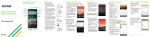
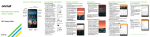
Send a text message
1.From the home screen, tap
Messaging
.
2.Tap Compose
to start a
new text message.
3.In the To field, enter a
number or a contact
name or tap Contacts
to access your contacts.
4.Tap the Enter message field
and enter your text.
5.Tap Send.
Send a picture message
1.Follow steps 1-4 above.
2.Tap Paperclip
.
3.Tap Image and follow
on-screen instructions to
select a picture.
4. Tap Send.
Please don’t text and drive.
Knock Code™ and
informative LED
Set Up Knock Code
Get direct access to the home
screen while keeping your
phone secure.
1.From the home screen,
tap the Menu key
, then
tap Lock screen settings,
then tap Select screen lock,
then tap Knock Code.
2.Using the quadrants on
the screen, tap to set your
pattern code.
3.Tap Continue, enter the pattern again, and then
tap Confirm.
4.Enter a backup PIN and tap Continue. Confirm
it and tap OK.
Informative LED
Receive color-coded, lighted
notifications on the home
button for alarms, missed calls,
reminders, and more.
•To turn the Home Button
LED on or off, tap the Menu
key
, then tap All settings,
then tap Display, then tap
Home button LED. Tap
On/Off Switch
.
•To enable/disable an alert,
tap the checkbox
next to it. You’ll see a
preview when you enable most alerts.
•Drag the Slider
to adjust the LED brightness.