1
Getting Started with Excel
1
PART I
4
chapter
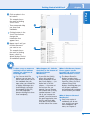
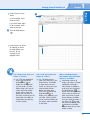
Press the up arrow key.
moves the active
• Excel
cell to the first cell in
•
the column containing
information.
You can press End with
any arrow key to move
to the first or last cell
in the row or column
containing information.
You can press
Ctrl+Home to move
to cell A1.
5
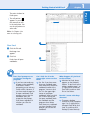
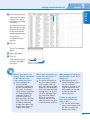
Press F5.
The Go To dialog box
opens.
6
7
Type a cell address.
Click OK.
Excel moves the active
cell to the cell address
you typed.
When I open Excel, I see
Sheet1, Sheet2, and Sheet3
at the bottom of the
screen. What are these?
Every workbook can
contain multiple
worksheets, represented
by tabs at the bottom of
the screen. The default
names for each worksheet
are Sheet followed by a
sequential number. To
view the content of a
particular sheet, click that
sheet’s tab. You can add
and delete worksheets,
change their names, and
move or copy them; see
Chapter 6 for more.
6
7
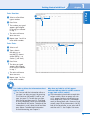
Where does Excel place the
active cell when I move a
screen at a time?
The active cell remains in
the same relative position
on the screen when you
press the Page Up or Page
Down keys. For example, if
D10 is the active cell while
viewing rows 1 to 27 and
you press the Page Down
key, then Excel displays
D37 as the active cell.
However, the active cell
does not move if you click
in the horizontal scroll bar.
What happens if I click the
Special button in the Go To
dialog box?
Excel opens the Go To
Special dialog box, where
you can set special
conditions for Excel to use
to go to a particular cell.
For example, you can opt
to select all cells that
contain formulas.
Is there an easy way to
move one screen to the
right or left?
Yes. You can click a blank
area in the horizontal scroll
bar that runs across the
bottom of the screen.
19