1
Understanding
the Excel Screen
E
ach time you open Excel, you see a new
workbook named Book1 that contains three
worksheets.
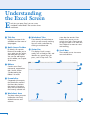
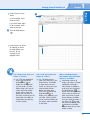
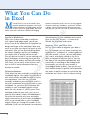
A Title Bar
Displays the name of the
workbook and the name of
the program.
B Quick Access Toolbar
By default, this contains
buttons that enable you to
save, undo your last action,
and redo your last action.
You can also add buttons
to this toolbar; see Chapter
30 for more.
F Worksheet Tabs
These identify the worksheet on
which you are currently working.
You can switch worksheets by
clicking a worksheet tab.
G Status Bar
This displays Excel’s current
mode, such as Ready or Edit, and
identifies any special keys you
press, such as Caps Lock. The
B
status bar also contains View
buttons that you can use to
switch views and a Zoom control
to help you zoom in or zoom out.
See Chapter 8 for more on views
and zooming.
H Scroll Bars
These enable you to view more
rows and columns.
A
C
D
C Ribbon
Contains most Excel
commands, organized on
tabs. See the section
“Understanding the
Ribbon” for more.
D Formula Bar
Composed of three parts,
the Formula Bar contains
the Name box, buttons
that pertain to entering
data, and the contents of
the currently selected cell.
E Worksheet Area
The place where you enter
information into Excel,
divided into rows and
columns.
8
E
F
H
H
G