1
Part I: Finding Your Way Around Windows PowerShell
Installing .NET Framework 2.0
At the time of writing, the 32-bit version of the .NET Framework 2.0 runtime is available for downloading from www.microsoft.com/downloads/details.aspx?FamilyID=0856eacb-4362-4b0d-8eddaab15c5e04f5&displaylang=en.
If you are using 64-bit Itanium processors, download the .NET Framework 2.0 runtime from www.microsoft
.com/downloads/details.aspx?familyid=53C2548B-BEC7-4AB4-8CBE-33E07CFC83A7&displaylang=en. Windows PowerShell is only available on Windows Server 2003 for Itanium processors.
If you are using AMD 64-bit processors, download the runtime from www.microsoft.com/downloads/
info.aspx?na=47&p=3&SrcDisplayLang=en&SrcCategoryId=&SrcFamilyId=F4DD601B-1B8847A3-BDC1-79AFA79F6FB0&u=details.aspx%3ffamilyid%3dB44A0000-ACF8-4FA1-AFFB-40E78D
0788B00%26displaylang%3den.
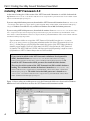
If you are unsure whether or not you have .NET Framework 2.0 installed, navigate to C:\Windows\
Microsoft.NET\Framework (if necessary substitute another drive letter if your system drive is not
drive C:). In that folder you will find folders that contain the versions of the .NET Framework that are
installed on your machine. If you see a folder named v2.0.50727, then you have the .NET Framework
2.0 installed. The .NET Framework 2.0 SDK, which you can download separately, is useful as a source
of information on .NET 2.0 classes that you can use with PowerShell.
If you want to install the 32 bit .NET Framework 2.0 Software Development Kit
(SDK), download it from www.microsoft.com/downloads/details.aspx?
FamilyID=fe6f2099-b7b4-4f47-a244-c96d69c35dec&displaylang=en. To
install the .NET Framework 2.0 SDK, you must first install the 32-bit runtime.
There are also 64-bit versions of the .NET Framework 2.0 SDK available for downloading. The version of the runtime for Itanium is located at www.microsoft.com/
downloads/details.aspx?familyid=F4DD601B-1B88-47A3-BDC1-79AFA79F6
FB0&displaylang=en. The 64-bit version for AMD processors is located at www
.microsoft.com/downloads/details.aspx?familyid=1AEF6FCE-6E06-4B66AFE4-9AAD3C835D3D&displaylang=en.
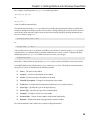
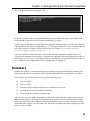
Figure 1-1 shows what you would expect to see in the Framework folder on a clean install of Windows
2003 Service Pack 1 which does not have the .NET Framework 2.0 runtime installed.
4
Figure 1-1