1
Chapter 1: Getting Started with Windows PowerShell
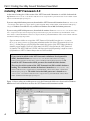
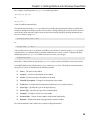
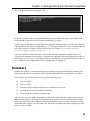
The result should look similar to Figure 1-20.
Figure 1-20
To run a PowerShell script in the current directory from the command line, type a period and a backslash followed by the name of the file (with or without the ps1 suffix).
If your script is in the current working folder, just typing the script name does not work. This is because,
with PowerShell, the current working folder (i.e., “.”) is not part of the path. To run a script from the current folder, you have to explicity state the folder name. For example: C:\PowerShellScripts\
StoreCountAndDate.ps1 or .\script.ps1.
If you have difficulty running the script, it may be that running unsigned PowerShell scripts is not
allowed on the computer you are using. If you follow the suggestion earlier in this chapter to set the execution policy to RemoteSigned, the script should run. Alternatively, you will need to sign the script in a
way acceptable to your organization. I discuss signing scripts in Chapter 15
Summar y
Windows PowerShell is a new command shell and scripting language for the Windows platform. This
chapter showed you how to install the .NET Framework 2.0 and how to install Windows PowerShell.
In this chapter, you also learned how to carry out the following tasks:
❑
Start PowerShell
❑
Exit PowerShell
❑
Find out what PowerShell commands are available on your system
❑
Get help on individual PowerShell commands
❑
Develop and run a simple PowerShell script
You can, of course, create much more complex scripts in PowerShell than the example I showed in this
chapter. Before going on, in Chapter 4, to begin to look in more detail at how some individual cmdlets
can be used, I will step aside in Chapter 2 to look at the broader of issues of what is lacking in existing
approaches and in Chapter 3 go on to look at the Windows PowerShell approach to improving on what
was previously available.
23