1
IMI89-260
Installing The Personal Computer Interface Unit
Detailing The PCIU Requirements
Minimum PC Requirements
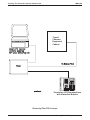
The user-supplied PC must be running the Windows95, 98 or NT operating systems and must provide a serial data
port (the PCIU includes a 9-pin to 9-pin serial data cable).
Proprietary Telephone Requirements
The PCIU operates properly with any Comdial Impact, Impression, or DigiTech LCD speakerphones that provide
interactive button support with exception of the large screen Impact SCS speakerphone. If using a regular Impact
SCS speakerphone, the INTERCOM button must be located in the default button-mapping location; that is, the
lower right-hand button of the 12 or 24 programmable buttons.
System Requirements
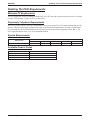
wideopen.call
System Software
DSU
18A
Minimum Software Requirements for Specific Systems
DSU II
DXP
DXP Plus
2A
8A
Available Product Codes
Comdial Product Code
PCIU–WOC–01
PCIU–WOC–06
PCIU–PK1
Product Description
one PCIU and wideopen.call software
six PCIUs and wideopen.call software
wideopen.call software for PCIU
2 — Detailing The PCIU Requirements
3A
All
FX