1
Using Time Synchronization in an Avid Interplay Environment
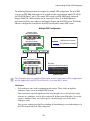
The following are the three typical ways of implementing Time Synchronization in an Interplay
environment:
•
In Interplay environments that use CaptureManager to capture material, a CaptureManager
system is usually designated as the Time Sync master. The CaptureManager system has an
Adrienne card. Install the Service Framework Time Synchronization service on the
CaptureManager system and configure it as a Time Sync master.
•
If you don’t use a CaptureManager system, do one of the following:
-
Designate another system with an Adrienne card as the Time Sync master. Install the
Service Framework Time Synchronization service on this system and configure it as a
Time Sync master.
-
Use an NTP server for Time Sync reference. Install the Service Framework Time
Synchronization service on a system on the network that does not need to be shut down
frequently and configure the service as a master. When you configure the master, point
to the NTP service for time sync.
-
Designate any system that rarely has to be shut down as the Time Sync master and set
the Time sync reference to the internal PC clock on that system.
It is important to use only one time synchronism mechanism to set the local PC clocks in the
Interplay environment. If a Time Synchronization Slave service is configured to set the local PC
clock and it detects that some other mechanism (such as Windows 32 Time Services) changes the
local clock, the Time Sync Slave service disables itself to avoid the local clock from jumping
back and forth. The Time Sync slave also posts a Warning in the Health Monitor.
When you install the Time Synchronization service on a system it runs as a Time Sync slave by
default. For information on how to configure a Time Sync master, see “Configuring the Time
Sync Master” on page 118.
Time Sync and Log Files
All “Framework enabled” services that produce log files listen to the timestamps sent out by a
Time Sync Master. They do this to produce a “Sync Time” field in the log files. So, even if the
local PC clocks on all the computers do not match, the “Sync Time” field in the log files is
always in sync across all the log files on all the machines.
Configuring the Time Sync Master
To configure the Time Sync Master:
1. Install the following Service Framework components on the system that will be used as the
master:
-
Core Components
-
Configuration Utility
118