1
ENGLISH
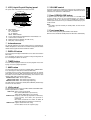
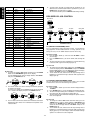
A: Select the preset number by turning the JOG control M right
for up or left for down or pressing the cursor @ # buttons n and
press the MEMORY G or MEMO , button or ENTER button M /
n.
B: Select the preset number by directly entering it with the
numeric buttons on the remote control.
TUNER OPERATION
TO LISTEN TO THE TUNER
Auto preset memory
This allows a band to be scanned automatically, a station with good
reception to be found and to be stored in the preset memory.
STANDBY
OPEN/CLOSE
MULTI JOG
(PUSH ENTER)
VOLUME
SURROUND
PHONES
TUNER
BAND
4-A 2
1.
2.
3.
4.
5.
DISPLAY
MEMORY
TIMER
AMP
+
3
-
4-B
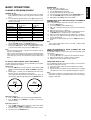
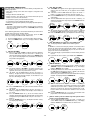
Press the power button A/z to turn the power ON.
Press the FM/AM c button twice or the TUNER button E.
To select the band of reception, press the BAND button F or the
FM/AM c button twice on the remote control.
Press the 1 (rewind) or ¡ (fast forward) button ⁄2 to scan the
frequency by remote control.
Scan frequency on the main unit as follows:
A: Press the TUNER button until the display indicates “FREQ” to
set the mode of JOG control M to frequency scan mode.
B: Turn the JOG control M clockwise to increase or counterclockwise to decrease the frequency.
C: To start the auto scan tuning, turn the JOG control M or press
and hold 1/¡ button on the remote control for fast a while
continuously.
Auto scan tuning stops automatically when a broadcasting station
is tuned in, and the “TUNED” or “STEREO” display lights up.
Adjust the volume with the VOLUME control N or VOLUME
buttons ⁄3. To receive sound in monaural, press the MODE button
⁄2 so that the “MONO” lights up.
STANDBY
1.
2.
3.
4.
5.
The PS2100 receiver can store up to 50 stations selected in the FM
and MW bands.
The preset memory function allows frequency, receiving mode
(STEREO or MONO) and also station name to be stored in the
memory. The preset memory can be stored in two ways:
Manual preset memory
OPEN/CLOSE
MULTI JOG
(PUSH ENTER)
VOLUME
SURROUND
TUNER
BAND
2
1.
2.
MEMORY
DISPLAY
TIMER
AMP
+
SURROUND
TUNER
BAND
MEMORY
2
PRESET MEMORY OPERATION
PHONES
(PUSH ENTER)
VOLUME
Note:
Muting of the FM band is not activated when the tuner mode is set
to MONO. Please take care with the volume.
STANDBY
OPEN/CLOSE
MULTI JOG
PHONES
-
2-A
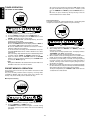
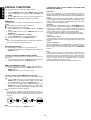
Select the desired station, referring to “TUNER OPERATION”.
Press the MEMORY G or MEMO button ,.
The MEMORY indicator will blink for approx. 5 seconds. During
this period, select the preset number with one of the following
procedures.
10
DISPLAY
TIMER
AMP
+
4
-
5
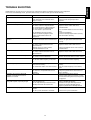
Select the desired band and set to the frequency mode.
While holding down the MEMORY G or MEMO , button for
more than 3 seconds.
The auto preset memory operation starts. The display indicates
“AUTOMEMO” and “AUTO” starts to blink.
Auto scanning will then start from the low-end of the band.
When a station is received, scanning pauses for 5 seconds. In this
period, you can change TUNER mode to STEREO or MONO.
If no button is pressed during 5 seconds, the frequency being
received is stored. If the JOG control is turned again within 5
seconds, scanning restarts and the frequency being received is
not stored in the memory.
When up to 50 stations have been preset or scanning of all bands
has been finished, the auto preset memory function automatically
stops and the unit tunes to the smallest preset memory.
To stop in mid-operation, press ENTER of JOG control M or the
“0” button on the remote control.