1
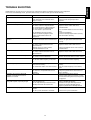
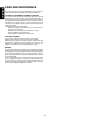
Should fault occur, in many cases it is not necessary to consult your dealer or a Marantz technical service department.
On the basis of the following checks, you will be able to rectify a number of faults yourself without difficulty.
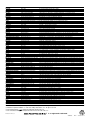
PROBLEM
POSSIBLE CAUSE
REMEDY
No power
The AC input cord is disconnected.
Poor connection at AC wall outlet or the
output is inactive.
Connect cord securely.
Check the outlet using lamp or other
appliance.
Sound from the speakers stops
The speaker cables are shorted.
Check the speaker connections.
No sound from the speakers
The speaker cables are disconnected.
The master volume is adjusted too low.
The surround volume is adjusted too low.
The center volume is adjusted too low.
The mute button is pressed to ON.
Check the speaker connections.
Adjust the master volume and center,
surround volume.
The headphone has been inserted.
Incorrect selection of program source.
Incorrect connections between the
components.
Press the MUTE button to cancel the muting
effect.
Pull out the headphone.
Select the desired program source correctly.
Make connections correctly.
Sound is only heard from one of the front
speakers.
The speaker cables are disconnected.
One of the connection cords is disconnected.
Make connections correctly
Connect the right and left connection cords
securely.
No sound from the rear speakers
Surround mode is not selected.
The master volume and rear level are
adjusted too low.
Monaural source, or source without
surround information is used.
Select the desired sound field mode correctly.
Adjust the master volume and rear level.
No sound from the center speaker
Surround mode is not selected.
The master volume and center level are
adjusted too low.
Select the desired mode.
Adjust the master volume and center level.
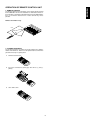
The remote control unit does not operate.
Batteries are not loaded or are exhausted.
The remote sensor is obstructed.
Replace with new batteries.
Remove the obstacle from the remote sensor.
Not receiving stations
No antenna is connected.
The desired station frequency is not tuned
in.
Connect an antenna.
Tune in the desired station frequency.
Not receiving the preset stations
An incorrect station frequency has been
entered in the memory.
The memorized stations have been cleared.
Enter the correct station frequency in the
memory.
Enter the station frequency in the memory
again.
Poor FM reception
No antenna is connected.
The antenna is not positioned for the best
reception.
Connect an antenna.
Change the position of the antenna to be as
high as possible.
Continuous hissing noise during FM
reception, especially when a stereo
broadcast is received.
Weak signal
Change the position of the antenna.
In areas remote from the transmitter, a 5 to 8
element antenna designed exclusively for FM
is suggested.
Continuous or intermittent hissing noise
during AM reception, especially at night
Noise is caused by motors, flourescent
lamps or lightning, etc.
The AC input cord may be too close to the
AM loop antenna or the antenna wire.
Keep the receiver away from noise sources.
Install an outdoor AM antenna.
Position the AC input cord away from the
antenna wire and the AM loop antenna.
Adjust the position of the AM loop antenna.
The system error display appears.
The system control switch is not set to INT
position.
The bus system connection is not made.
Check the system control switch.
17
Change the playback source to the stereo or
surround source.
Check the bus system connection.
ENGLISH
TROUBLE SHOOTING