1
RECEPTION OF RDS BROADCASTING
STATION NAME PRESET
The PS2100 receiver provides the following functions for use with the
RDS (Radio Data System).
The station name preset function allows the name of each preset
channel to be entered using alphabetic and numeric characters.
Before the station name preset operation, store stations with the
preset memory operation described on the previous page.
The operation procedure is as follows:
PTY (Program Type) Auto Seek
Automatic searching only for stations broadcasting the specified type
(genre) of programs.
RADIO TEXT display
Some RDS stations broadcast RADIO TEXT, which contains
additional information on the station and programme being
broadcasted.
RADIO TEXT information appears as ‘running’ text on the display.
RADIO TEXT is transmitted character-by-character by the radio
station. As a result, it may take some time until the entire text has been
received.
PS (Programme Service name) display
The name of the station being tuned is displayed automatically.
STANDBY
CT (Clock Time) display
The clock time is displayed from the broadcasted data. It is local area
time. This time can be copied to the unit’s clock display. Please refer
to page 16, “CT to CL”.
OPEN/CLOSE
MULTI JOG
(PUSH ENTER)
VOLUME
PHONES
SURROUND
TUNER
BAND
MEMORY
DISPLAY
2
1.
2.
3.
4.
5.
TIMER
AMP
+
4
-
RDS Display
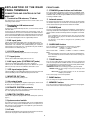
When a receiver is tuned to an FM station that is transmitting RDS
data, the display will automatically show the station name or RDS
TEXT.
5
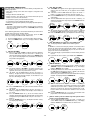
Tune to the desired preset channel. (It is not available if no station
is preset.)
Press and hold the MEMORY G or MEMO button , for more than
3 seconds.
The extreme left column of the station name indicator will flash,
indicating character entry ready status.
When the JOG control M is turned right or the right cursor button
n is pressed, alphabetic and numeric characters will be displayed
in the following order:
A → B → C ... Z → 1 → 2 → 3 ... 0 → space → ’ → , → / → + → – → A
← Left Right →
After selecting the first character to be entered, press the ENTER
button of JOG control M or ENTER button n.The entry in this
column is fixed and the next column starts to flash. Fill all columns,
and make sure all characters are flashing.
Press the ENTER button of JOG control M or ENTER button n to
confirm the entry.
To change the display, press the DISPLAY button J m in TUNER
mode. The display will change as follows:
PS (Programme Service) → RT (Radio Text) → PTY (Programme
Type) → CT (Clock Time) → PS
Note:
To display the clock (not RDS CT), press the AMP and DISPLAY
button in TUNER mode.
When no RDS station is received or the received station does not
broadcast the required data, the display will indicate as follows:
“NO NAME” for PS, “NO TEXT” for RADIO TEXT, “NO CT” for CT.
PTY AUTO SEEK
The PS2100 receiver automatically searches for stations transmitting
any of 29 different programme types. To search for a PTY, follow
these steps:
Note:
To finish entering during operation, press the ENTER button for
more than 3 seconds while all characters are blinking.
To confirm the station name, press the ENTER button M/n.
To change the character in the previous column, turn the JOG
control or press the cursor @ # button n and press the ENTER
button M/n while all characters are blinking.
By remote control
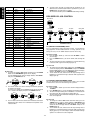
1. Press PTY./.. button ⁄2 on the remote control until “PTY SEEK”
appears on the display. If you press the ENTER button of JOG
control n, the current station’s program type will be displayed
when the RDS data is present, or the currently selected PTY
group will be displayed blinking if no station or the RDS data is
present.
2. To change to a new programme type, turn the JOG control n left
or right until the desired PTY is shown in the display.
3. To select a specified program type, use the ten keypad . on the
remote control by entering the corresponding number in the table
on the following page.
4. Once the desired PTY group or type has been selected, press the
ENTER button of JOG control n while the display is blinking
(approx. 5 seconds). The PTY Auto search will start, and the tuner
will detect all station broadcasting RDS whose PTY information
corresponds to the selected choice.
5. The auto search will stop at a station with the specified PTY. To
advance to the next RDS station, press the ENTER button n
again within 5 seconds.
To cancel this function, turn the JOG control n left or right.
RECALLING A STATION FROM THE PRESET MEMORY
1.
2.
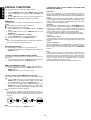
For direct selection, press numeric button.
It is possible to select a station by using the 4 ⁄0 or the ¢
button ⁄1 of the remote control, or by turning the JOG control M
left or right on the main unit in PRESET mode. To change the
mode of the JOG control M to PRESET mode, press the TUNER
button E on the main unit until “PRESET” appears in the display.
CLEARING THE PRESET MEMORY
The preset memory contents can be cleared with the following procedure.
1.
2.
Recall the preset number to be cleared by the way of the previous
page.
Press the MEMORY G or MEMO button ,, press 0 button . on
remote control more than 3 seconds. For example, when you want
to clear preset number 12, “CLEAR 12” is displayed.
COPYING THE PRESET MEMORY
The preset memory can copy to other preset number.
1.
2.
3.
Recall the original preset station.
Press the MEMORY G or MEMO button ,, and turn the JOG
control M until the desired preset number is displayed, or press
the desired number on the ten keypad ..
Press the ENTER button n to complete entry.
11
ENGLISH
ADVANCED OPERATIONS