1
Micron NetFRAME LV2000 Server System User’s Guide
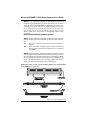
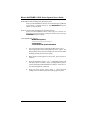
Step 1: Using both hands, carefully set the DIMM into the center of
the left and right latching levers. Center the module over the socket
so that the notches are aligned with the socket keys. Do not force it in
or damage may result. Note that the DIMM modules are keyed in
such a way that they cannot be inserted incorrectly (refer to the
figure below). If you are having difficulty placing them into the
socket, check to see that you are not attempting to insert them
backwards.
Do not lock the module into position at this time.
Step 2: Check to make sure the module is centered in the socket, and
that the connector pins of the module line up with the socket connector
pins.
A)
Be sure the module is centered and connector pins are
aligned.
B)
When the module is locked in place, be sure both latching
levers are fully seated into latching notches in the sides of
the DIMMs.
Step 3: Using both hands and applying equal pressure on each end
of the module, lock the module into the socket by pushing downward
with the thumbs and squeezing inward with the forefingers. Make
sure both latching levers have seated fully into the modules latching
notch. The module should now be standing upright in the socket.
Refer to the fully seated drawing on the following page.
WARNING: Failure to observe proper insertion guidelines may result in damage
to the DIMM and/or the socket.
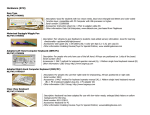
Figure 2-6. Proper DIMM Insertion
2-16
Micron Electronics, Inc.