1
Micron NetFRAME LV2000 Server System User’s Guide
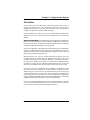
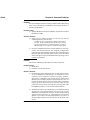
Advanced Menu
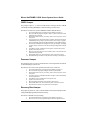
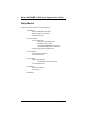
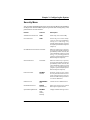
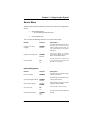
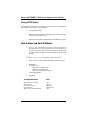
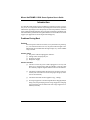
The Advanced Menu includes selections that take you to two other
configuration menus:
1.
PCI configuration, which includes the following submenus:
•
PCI Device, Embedded SCSI
•
PCI Device, Slot 1 - Slot 4
•
PCI/PNP/ ISA UMB Region Exclusion
•
PCI/PNP ISA IRQ Resource Exclusion
2.
Integrated Peripheral Configuration.
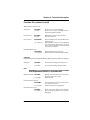
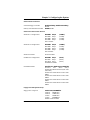
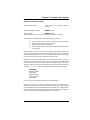
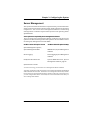
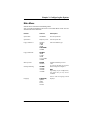
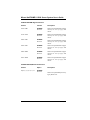
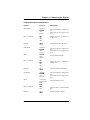
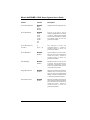
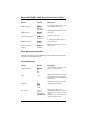
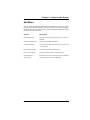
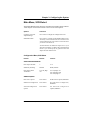
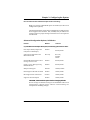
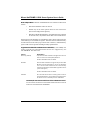
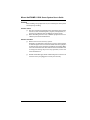
You can make the following selections on the Advanced Menu itself. Use the
submenus for the three other selections that appear on the Advanced Menu.
Feature
Choices
Description
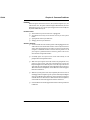
Plug and Play OS
No
Yes
Select Yes if you are booting a Plug
and Play capable operating system.
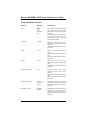
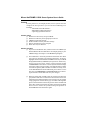
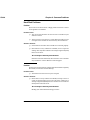
Reset Configuration Data
No
Yes
Select Yes if you want to clear the
system configuration data during
next boot. System automatically
resets to No in next boot.
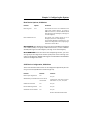
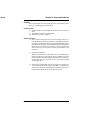
Use Multiprocessor
Specification
1.1
1.4
Selects the version of multiprocessor
specification to use. Some operating
systems require version 1.1.
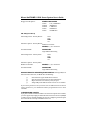
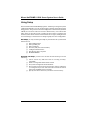
Large Disk Access Mode
DOS
Other
Select DOS if your OS is DOS, or
Other for UNIX, Novell† NetWare†,
or other OS.
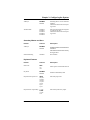
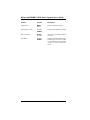
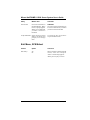
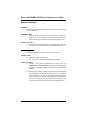
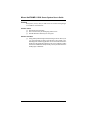
Enable Memory Gap
Disabled
Extended
Conventional creates a 128KB
system memory gap starting at
512KB.
Extended creates a 1MB extended
memory gap starting at 15MB.
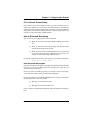
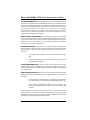
Delay on Option ROMs
Disabled
Enabled
Forces a short delay at the end of
each Option ROM scan.
3-26
Micron Electronics, Inc.