1
automatically in sequence by the Animation at a tempo determined by
the RATE control. Note that changing the ENVELOPE control affects
the shape that turns the filters up and down. The PATTERN rotary switch
selects different patterns that dictate the sequence that turns the Filters
up and down automatically. The MIX control is used to blend the direct
sound of your instrument with the effected sound.
8. If your MIDI controller can send MIDI Clock Messages, start sending
them. The Rate LED changes color to Orange when syncing to MIDI
Clock. The MIDI MuRF’s Pattern should be synced to the tempo set by
your MIDI controller. Try sending CC1 messages to the MIDI MuRF.
This will modify the ENVELOPE control. If you have downloaded the
MIDI MuRF controller software from the Moog Music website, you can
control the parameters of the MIDI MuRF and program new patterns.
See the program’s documentation for more information.
9. In the next sections we’ll explain exactly how the MIDI MuRF’s
Filters work and what the Animation does. For now, get a feel for the
controls by experimenting with different settings.
FREQUENCIES and FILTERS
Let’s start with some definitions. Please read this section carefully, as
it will help you to understand the basic ideas behind the MF-105M MIDI
MuRF’s filters.
Sound is a vibration of the air. The speed of vibration is called the
frequency. It is measured in Hertz (Hz). One Hz is one vibration per
second. We hear vibrations from 20 Hz to 20,000 Hz.
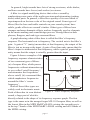
Musical sounds generally have many frequency components. They’re
called harmonics, or overtones, or partials. They are what give a sound
its characteristic tone color, or
timbre. A graph showing the strength
of each of a sound’s harmonics is
called a spectrum. A typical spectrum
of a musical sound is shown in
Figure 3.
Figure 3 - Harmonic Spectrum
page 5