1
Setup-F3_FM.book Page 45 Friday, October 5, 2001 8:27 PM
Installing the PostScript Printer Driver
Setting up options
Important
❒ If the printer is equipped with certain options, you should set up the options
with the printer driver.
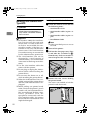
A Click [Start] on the taskbar, point to [Settings], and then click [Printers].
The [Printers] window appears.
B Click to select the icon of the printer you want to use.
C On the [File] menu, click [Properties].
The Printer Properties appear.
4
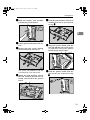
D Click the [Accessories] tab.
E Select options you have installed from the [Options] group.
F Click [OK].
Windows 2000 - Installing the PostScript Printer Driver
Installing the printer driver
Limitation
❒ Installing a printer driver requires Administrators permission. When you install a printer driver, log on using an account that has Administrators permission.
A Close all applications that are running.
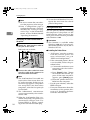
B Insert the CD-ROM into the CD-ROM drive.
Auto Run will start the installer.
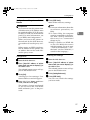
C Select a language to change the interface language, and then click [OK].
The following languages are available: Cestina (Czech), Dansk (Danish),
Deutsch (German), English (English), Espanol (Spanish), Francais (French),
Italiano (Italian), Magyar (Hungarian), Nederlands (Dutch), Norsk (Norwegian), Polski (Polish), Portugues (Portuguese), Suomi (Finnish), Svenska
(Swedish)
Default interface language is English.
Note
❒ The printer driver with the selected language will be installed.
❒ The printer driver will be installed in English if you select the following
languages: Cestina, Magyar, Polski, Portugues and Suomi.
45