1
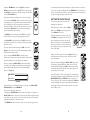
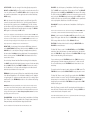
2. VIBROLAY
A spatial vintage style delay with triangle
wave vibrato added to the trails. Try quick
notes or chords combined with held notes.
Use the Rate and Amount knobs to add
different flavor and feel.
.3
.2
.6
.1
SHORT
LONG
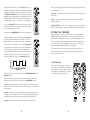
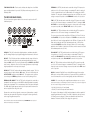
4. SQUARE ROOT
Prepare for octave action with this
awesome square wave mod. Each note
will rhythmically jump up and down a full
octave for percussive bliss. Assign Tap
Tempo to the LFO Rate and stomp away.
Note: If the pitch change is not quite an octave
.3
.2
.6
.1
SHORT
LONG
you might need to fine tune these settings slightly.
TIME
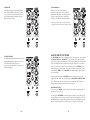
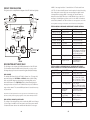
3. STAIR STEPPER
This Ramp modulated preset will have notes
working their way through the roof. Play a
note and let the delay do the rest.
Use the Short/Long switch for even more
musical mangling.
TIME
A NOTE ABOUT TAP TEMPO
.3
.2
.6
.1
SHORT
LONG
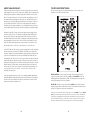
The TAP TEMPO switch on your Analog Delay can be used to control either
the DELAY TIME or the LFO RATE. To set a tempo, simply tap the switch
at the desired tempo, in quarter notes. After the third tap the MF-104M will
start calculating the tempo and keep the average tempo as you continue
to tap. To start over, wait five seconds and then press the TEMPO switch
three times to set a new tempo. To revert to using the front panel control,
turn either the TIME knob or LFO RATE knob (depending on which tempo
you are setting).
•Pressing and holding the TAP TEMPO control for at least one second
toggles the Tap Tempo function between the LFO RATE and DELAY TIME.
•The LED indicator for the function being controlled by Tap Tempo will
flash green and flash in sync with the chosen tempo.
TIME
SOME HELPFUL TIPS
•You can use the DRIVE control to create some warm analog distortion of
the input if you so choose.
•By using the TAP TEMPO control to tap very slowly or very quickly, you
can set “illegal” tempos that go outside of the designed ranges of the LFO
and BBD. Doing so creates aliasing artifacts that can sound like ring modulation. It isn’t pretty but it can sound very cool. Please use judiciously.
14
15