1
Essential Configuration Information
This section describes the configuration information associated with each Link Protocol/Network Protocol
combination and also provides configuration information for the Dual-Ethernet router.
If you are using Link and Network Protocols:
1.
Determine which Link Protocol/Network Protocol association you are using from your Network Service
Provider (NSP).
2.
Select (click) one of the following Link/Network information that applies to your situation:
PPP Link Protocol with:
•
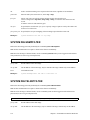
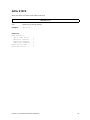
IP Routing Network Protocol, on page 27
•
IPX Routing Network Protocol, on page 29
•
Bridging Network Protocol, on page 31
RFC 1483 or RFC 1490 Link Protocol with:
•
IP Routing Network Protocol, on page 32
•
IPX Routing Network Protocol, on page 34
•
Bridging Network Protocol, on page 36
MAC Encapsulated Routing: RFC 1483MER or RFC 1490MER Link Protocol with:
•
IP Routing Network Protocol, on page 37
FRF8 Link Protocol with:
•
3.
IP Routing Network Protocol, on page 39
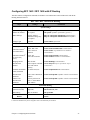
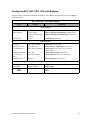
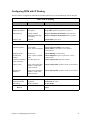
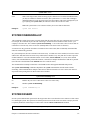
Collect the information applicable to your Link/Network Protocol association. This information will be used
later in conjunction with the Configuration Tables for easy configuration of your router based on your Link/
Network protocol. These configuration tables provide step-by-step instructions for a basic configuration for
each Link/Network protocol.
Note: Use the blank Network Information Worksheets in Appendix A to collect your network information.
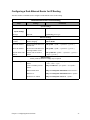
If you are using a Dual-Ethernet Router:
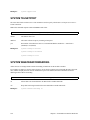
Select (click) one of the two following configurations that applies to your situation:
Configuring the Dual-Ethernet Router as a Bridge, on page 41
Configuring the Dual-Ethernet Router for IP Routing, on page 41
26
Chapter 2. Planning for Router Configuration