1
FlowPoint™ DSL Router Family
Command Line Interface Guide
P/N 222-00549-01
Third Edition (November 1999)
Copyright
FlowPoint provides this publication “as is” without warranty of any kind, either expressed or implied, including,
but not limited to, the implied warranties of merchantability or fitness for a particular purpose.
All rights reserved. No part of this book may be reproduced in any form or by any means without written
permission from FlowPoint .
Changes are periodically made to the information in this book. They will be incorporated in subsequent editions.
FlowPoint may make improvements and/or changes in the product described in this publication at any time.
© Copyright 1996-1999 FlowPointCorporation
Trademarks
FlowPoint is a trademark of FlowPoint Corporation.
All other trademarks and registered trademarks mentioned in this manual are the sole property of their respective
companies.
Cabletron Systems
35 Industrial Way
Rochester, NH 03867
U.S.A
Telephone: 603-332-9400
Monday - Friday; 8 a.m. - 8 p.m. Eastern Time
Fax: 603-337-2211
E-mail: [email protected]
Web Site: www.cabletron.com
FlowPoint Corporation
Cabletron Systems
5200 Great America Parkway
Santa Clara CA, 95054
U.S.A.
Telephone: (408) 364-8300
Fax: (408) 364-8301
Email: [email protected]
Web Site: www.flowpoint.com
FlowPoint is a wholly owned subsidiary of Cabletron Systems.
2
FlowPoint™ DSL Router Family Command Line Inter-
Federal Communications Commission (FCC)
Part 15 CLASS B Statement
Section 15.105(b) of the Code of Federal Regulations
NOTE: This equipment has been tested and found to comply with the limits for a Class B digital device, pursuant of Part 15 of the FCC Rules.
These limits are designed to provide reasonable protection against harmful interference in a residential installation. This equipment generates,
uses, and can radiate radio frequency energy and, if not installed and used in accordance with the instructions, may cause harmful interference
to radio communications. However, there is no guarantee that interference will not occur in a particular installation. If this equipment does
cause harmful interference to radio or television reception, which can be determined by turning the equipment off and on, the user is
encouraged to try to correct the interference by one or more of the following measures:
•
Reorient or relocate the receiving antenna.
•
Increase the separation between the equipment and receiver.
•
Connect the equipment into an outlet on a circuit different from that to which the receiver is connected.
•
Consult the dealer or an experienced radio/TV technician for help.
CAUTION: Any changes or modifications not expressly approved by the party responsible for this device could void the user’s
authority to operate this equipment.
Canadian D.O.C. Notice
This product conforms with Canadian Class B emissions regulations.
Ce produit se conforme aux réglements d’émission canadienne classe B.
Instructions for Trained Service Personnel Only
CAUTION: Danger of explosion if battery is incorrectly placed. Replace only with the
same or equivalent type recommended by the manufacturer. Dispose of used batteries
according to the manufacturer’s instructions.
Approvals
Safety: EN60950, UL 1950, CUL to CSA 22.2 No. 950
Emissions: FCC Part 15 Class B, EN55022/CISPR22 Class B
Immunity: EN50082-1
Exclusion of Warranty and Disclaimer of Liability
1. EXCLUSION OF WARRANTY. Except as may be specifically provided by FlowPoint in writing, FlowPoint makes no warranty,
expressed or implied, concerning the Program (including its documentation and media).
FLOWPOINT DISCLAIMS ALL WARRANTIES, OTHER THAN THOSE SUPPLIED TO YOU BY FLOWPOINT IN WRITING, EITHER
EXPRESS OR IMPLIED, INCLUDING BUT NOT LIMITED TO IMPLIED WARRANTIES OF MERCHANTABILITY AND FITNESS
FOR A PARTICULAR PURPOSE, WITH RESPECT TO THE PROGRAM, THE ACCOMPANYING WRITTEN MATERIALS, AND ANY
ACCOMPANYING HARDWARE.
2. NO LIABILITY FOR CONSEQUENTIAL DAMAGES. IN NO EVENT SHALL FLOWPOINT CORPORATION ("FLOWPOINT") OR
ITS SUPPLIERS BE LIABLE FOR ANY DAMAGES WHATSOEVER (INCLUDING, WITHOUT LIMITATION, DAMAGES FOR LOSS
OF BUSINESS, PROFITS, BUSINESS INTERRUPTION, LOSS OF BUSINESS INFORMATION, SPECIAL, INCIDENTAL,
CONSEQUENTIAL, OR RELIANCE DAMAGES, OR OTHER LOSS) ARISING OUT OF THE USE OR INABILITY TO USE THIS
FLOWPOINT PRODUCT, EVEN IF FLOWPOINT HAS BEEN ADVISED OF THE POSSIBILITY OF SUCH DAMAGES. BECAUSE
SOME STATES DO NOT ALLOW THE EXCLUSION OR LIMITATION OF LIABILITY FOR CONSEQUENTIAL OR INCIDENTAL
DAMAGES, OR IN THE DURATION OR LIMITATION OF IMPLIED WARRANTIES IN SOME INSTANCES, THE ABOVE
LIMITATION AND EXCLUSIONS MAY NOT APPLY TO YOU.
FlowPoint™ DSL Router Family Command Line Interface Guide
3
United States Government Retricted Rights
The enclosed product (a) was developed solely at private expense; (b) contains "restricted computer software" submitted with restricted rights
in accordance with section 52227-19 (a) through (d) of the Commercial Computer Software - Restricted Rights Clause and its successors, and
(c) in all respects is proprietary data belonging to FlowPoint and/or its suppliers.
For Department of Defense units, the product is licensed with "Restricted Rights" as defined in the DoD Supplement to the Federal Acquisition
Regulations, Section 52.227-7013 (c) (1) (ii) and its successors, and use, duplication, and disclosure by the Government is subject to
restrictions as set forth in subparagraph (c) (1) (ii) of the Rights in Technical Data and Computer Software clause at 252-227-7013.
Warranties
Limited Warranty on Media and Damages Disclaimer
FlowPoint or its distributors or resellers will repair or replace free of charge any defective recording medium on which the Software is
recorded if the medium is returned to FlowPoint or its distributor or reseller within ninety (90) days after the purchase of License for the
Software. This warranty does NOT cover defects due to accident, or abuse occurring after your receipt of the Software. THIS WARRANTY
GIVES YOU SPECIFIC LEGAL RIGHTS AND YOU MAY ALSO HAVE OTHER RIGHTS THAT MAY VARY FROM STATE TO
STATE.
4
FlowPoint™ DSL Router Family Command Line Inter-
Preface
About This Guide
The Command Line Interface guide contains information on the syntax and use of the Command Line Interface
for the family of DSL routers. It provides the steps and information needed to configure the router software and
troubleshoot problems using the Command Line Interface. Configuration of network connections, bridging,
routing, and security features are essentially the same for all DSL routers, unless otherwise noted. The guide also
provides detailed information about the system’s bridging, routing, addressing, and security operations.
This guide is intended for small and home office users, remote office users, and other networking professionals
who are installing and maintaining bridged and routed networks.
How This Guide is Organized
This guide is intended to help you configure and manage the router using the Command Line Interface. The guide
assumes that you have read the information about the router and installed the hardware using the Internet Quick
Start Guide. The guide is divided into eight parts:
Introduction. Describes the features of the Command Line Interface.
Advanced Topics. Contains additional information on topics such as interoperability, routing and bridging
operations, PAP/CHAP security negotiation, bandwidth management, protocol conformance, and the file system.
Planning for Router Configuration. Provides information unique to configuration using the Command Line
Interface including worksheets for collecting required information.
Configuring Router Software. Describes how to configure the router using the Command Line Interface.
Configuring Special Features. Describes how to configure features such as Bridging Filtering, RIP, DHCP,
NAT, Management Security, Software Options Keys, Encryption, IP Filtering, and L2TP Tunneling.
Command Line Interface Reference. Describes the syntax of each command and the results when the command
is entered.
Managing the Router. Describes SNMP management capabilities, TFTP client and server, TELNET support and
how to upgrade the system software, boot code, backup and restore configuration files, FLASH memory recovery
procedures, and batch file command execution.
Troubleshooting. Describes diagnostic tools used for identifying and correcting hardware and software problems.
References
User Guide. Contains an overview of the router’s software and hardware features and details on hardware
installation and software configuration using the Windows-based Configuration Manager.
Quick Start Guide. Describes the configuration process involved in setting up a specific router model.
Typographic Conventions
The following conventions are used in this guide:
Item
6
Type Face
Examples
Refer to Chapter 1. Advanced
Features
Book titles, command
reference parameters,
reference to a specific
section/chapter in this
guide, emphasis in text.
Italics
Keywords in command
reference instructions
Bold
save
Examples showing you what
to type and what is
displayed on the terminal.
Mono-spaced font
remote listIpRoute hq
File names
Upper case
Copy file CFGMGR.EXE
system name <name>
Preface
Table of Contents
Preface
About This Guide
How This Guide is Organized
References
Typographic Conventions
Table of Contents
5
5
5
6
6
7
Introduction
11
Chapter 1. Advanced Topics
Interoperability
Routing
Bridging
Bridging and Routing Operation
Bridging and Routing Configuration Settings
Point-To-Point Protocol (PPP)
PAP/CHAP Security Authentication
General Security Authentication
Security Configuration Settings
Authentication Process
Protocol Conformance
Protocol Standards
IP Routing
IPX Routing
Encapsulation Options
PPP
PPPLLC
RFC 1483 or RFC 1490
MAC Encapsulated Routing: RFC 1483MER (ATM) or RFC 1490MER (Frame Relay)
FRF8
rawIP
System Files
Bridge Filtering
Unique System Passwords
13
13
13
14
14
15
16
16
17
18
18
19
19
19
19
19
20
20
20
21
21
21
22
22
24
Chapter 2. Planning for Router Configuration
Important Terminology
Essential Configuration Information
PPP Link Protocol (over ATM or Frame Relay)
RFC 1483/RFC 1490 Link Protocols
MAC Encapsulated Routing: RFC 1483MER/RFC 1490MER Link Protocols
FRF8 Link Protocol
Dual-Ethernet Router Configuration
25
25
26
27
32
37
39
41
Chapter 3. Configuring Router Software
Configuration Tables
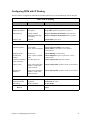
Configuring PPP with IP Routing
Configuring PPP with IPX Routing
Configuring PPP with Bridging
Configuring RFC 1483 / RFC 1490 with IP Routing
Configuring RFC 1483 / RFC 1490 with IPX Routing
Configuring RFC 1483 / RFC 1490 with Bridging
42
43
44
45
46
47
48
49
Table of Contents
7
Configuring MAC Encapsulated Routing: RFC 1483MER / RFC 1490MER with IP Routing
Configuring FRF8 with IP Routing
Configuring Mixed Network Protocols
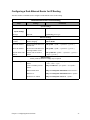
Configuring a Dual-Ethernet Router for IP Routing
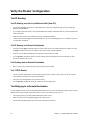
Verify the Router Configuration
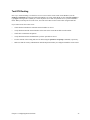
Test IP Routing
Test Bridging to a Remote Destination
Test IPX Routing
Sample Configurations
Sample Configuration 1: PPP with IP and IPX
Sample Configuration 2: RFC 1483 with IP and Bridging
Sample Configuration 3: Configuring a Dual-Ethernet Router for IP Routing
Chapter 4. Configuring Special Features
Bridge Filtering and IP Firewall
General Information
Configure Bridge Filtering
Enable/Disable Internet Firewall Filtering
IP (RIP) Protocol Controls
Dynamic Host Configuration Protocol (DHCP)
General Information
Manipulating Subnetworks and Explicit Client Leases
Setting Option Values
BootP
Defining Option Types
Configuring BootP/DHCP Relays
Other Information
Network Address Translation (NAT)
General NAT Rules
Masquerading
Classic NAT
Client Configuration
Management Security
Disable Telnet and SNMP
Restore Telnet and SNMP
Validation of Telnet and SNMP Clients
Restrict Remote Access
Changing the SNMP Community Name
Disable WAN Management
System Log
system syslogport default|disabled|<port>
system addSyslogFilter <first ip address>[<last ip addr>]
system addSyslogFilter LAN
Software Option Keys
Encryption
PPP DES (RFC 1969) Encryption
Diffie-Hellman Encryption
Configuring Voice
IP Filtering
Filters and Interfaces
Configuring Filters with Network Address Translation Enabled
Filter Actions
IP Filter Commands
Special Notes
8
50
51
52
53
54
54
54
55
56
56
64
70
71
71
71
71
72
73
74
74
75
77
79
81
82
82
82
82
83
86
87
89
89
89
89
90
90
90
91
91
91
91
91
91
92
94
96
98
98
99
99
100
100
Table of Contents
L2TP Tunneling — Virtual Dial-Up
Introduction
L2TP Concepts
Configuration
Sample Configurations
100
100
101
104
106
Chapter 5. Command Line Interface Reference
Command Line Interface Conventions
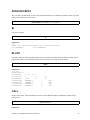
Command Input
Command Output
Command Organization
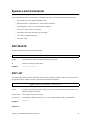
? or HELP
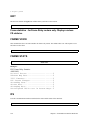
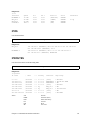
System-Level Commands
Frame statistics - for Frame Relay routers only. Displays various
FR statisics.
Router Configuration Commands
Target Router System Configuration Commands (SYSTEM)
Target Router Ethernet LAN Bridging and Routing (ETH)
Remote Router Access Configuration (REMOTE)
Asymmetric Digital Subscriber Line Commands (ADSL)
Asynchronous Transfer Mode Commands (ATM)
DMT Command
Dual-Ethernet Router Commands (ETH)
High-Speed Digital Subscriber Line Commands (HDSL)
ISDN Digital Subscriber Line (IDSL)
Symmetric Digital Subscriber Line Commands (SDSL)
Dynamic Host Configuration Protocol Commands (DHCP)
L2TP — Virtual Dial-Up Configuration (L2TP)
Bridge Filtering Commands (FILTER BR)
Save Configuration Commands (SAVE)
Erase Configuration Commands (ERASE)
File System Commands
120
127
128
141
151
174
176
179
180
184
187
189
193
204
212
215
217
219
Chapter 6. Managing the Router
Simple Network Management Protocol (SNMP)
Telnet Remote Access
Client TFTP Facility
TFTP Server
BootP Server
Boot Code
Manual Boot Menu
Identifying Fatal Boot Failures
Software Kernel Upgrades
Booting and Upgrading from the LAN
Upgrading from the WAN Line
Backup and Restore Configuration Files
Backup Configuration Files (Recommended Procedure)
Restore Configuration Files
FLASH Memory Recovery Procedures
Recovering Kernels for Routers with Configuration Switches
Recovering Kernels for Routers with a Reset Button
Recovering Passwords and IP Addresses
Routers with Configuration Switches
Routers with a Reset Button
223
223
224
224
224
225
225
225
229
229
229
231
232
232
232
233
233
234
235
235
236
Table of Contents
115
115
115
115
115
116
117
9
Batch File Command Execution
236
Chapter 7. Troubleshooting
Diagnostic Tools
Using LEDs
History Log
Ping Command
Investigating Hardware Installation Problems
Check the LEDs to Solve Common Hardware Problems
Problems with the Terminal Window Display
Problems with the Factory Configuration
Investigating Software Configuration Problems
Problems Connecting to the Router
Problems with the Login Password
Problems Accessing the Remote Network
Problems Accessing the Router via Telnet
Problems Downloading Software
System Messages
Time-Stamped Messages
History Log
How to Obtain Technical Support
239
239
239
240
241
242
242
242
242
243
243
243
244
246
246
246
247
249
249
Appendix A. Network Information Worksheets
Configuring PPP with IP Routing
Configuring PPP with IPX Routing
Configuring PPP with Bridging
Configuring RFC 1483 / RFC 1490 with IP Routing
Configuring RFC 1483 / RFC 1490 with IPX Routing
Configuring RFC 1483 / RFC 1490 with Bridging
Configuring RFC 1483MER / RFC 1490MER with IP Routing
Configuring FRF8 with IP Routing
Configuring a Dual-Ethernet Router for IP Routing
251
252
253
254
255
256
257
258
259
260
Appendix B. Configuring IPX Routing
IPX Routing Concepts
Configure IPX Routing
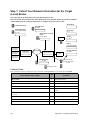
Step 1: Collect Your Network Information for the Target (Local) Router
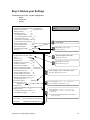
Step 2: Review your Settings
261
261
261
262
263
Appendix C. Access the
Command Line Interface
Connect the PC to the Console Port of the Router
Access the Command Line Interface
Terminal Window under Configuration Manager
Terminal Session under Windows (HyperTerminal)
Terminal Session for a Non-Windows Platform (Macintosh or UNIX)
Telnet Session
265
265
265
265
266
266
266
Index
267
10
Table of Contents
Introduction
This guide provides steps and information needed to configure the DSL or Dual-Ethernet router software using the
Command Line Interface1.
The Command Line Interface covers the following basic configuration topics:
•
Set names, passwords, PVC numbers, and link and network parameters
•
Configure specific details within a protocol, such as IP or IPX addresses and IP protocol controls
•
Activate bridging and routing protocols
•
Enable the Internet firewall filter with IP routing
The Command Line Interface also provides the following advanced features:
•
Manage the router’s file system
•
Set bridging filters
•
Configure the type of DSL technology specific to your router (e.g., ADSL, SDSL)
•
Configure the Dual-Ethernet router
•
Issue online status commands
•
Monitor error messages
•
Set RIP options
•
Configure DHCP
•
Configure NAT
•
Configure Telnet/SNMP security
•
Configure host mapping
•
Configure IP multicast
•
Create and execute script files
•
Configure encryption
•
Configure IP filtering
•
Configure L2TP tunneling
•
Enable software options keys
1. The Microsoft® Windows™-based Configuration Manager or Quick Start program (featuring an easyto-use, point-and-click GUI interface) provides another way to configure the router’s software. Please refer to
Access the Command Line Interface section in this guide if you intend to use Configuration Manager or Quick
Start as your primary configuration tool.
12
Introduction
Chapter 1. Advanced Topics
This chapter provides information on advanced topics useful to network administrators.
Interoperability
The router uses industry-wide standards to ensure compatibility with routers and equipment from other vendors.
To interoperate, the router supports standard protocols on the physical level, data link level for frame type or
encapsulation method, and network level. For two systems to communicate directly, they must use the same
protocol at each level. Most protocols do not support negotiable options, except for PPP.
The physical protocol level includes hardware and electrical signaling characteristics. This support is provided by
the router Ethernet and modem hardware interfaces.
The data-link protocol level defines the transmission of data packets between two systems over the LAN or WAN
physical link.
The frame type or encapsulation method defines a way to run multiple network-level protocols over a single LAN
or WAN link. The router supports the following WAN encapsulations:
•
PPP (VC multiplexing)
•
PPP (LLC multiplexing)
•
RFC 1483 (for ATM)
•
RFC 1483 with MAC encapsulated routing (for ATM)
•
FRF8 (for ATM)
•
RFC 1490 (for Frame Relay)
•
RFC 1490 with MAC encapsulated routing (for Frame Relay)
Routing
The network protocol provides a way to route user data from source to destination over different LAN and WAN
links. Routing relies on routing address tables to determine the best path for each packet to take.
The routing tables can be seeded; i.e., addresses for remote destinations are placed in the table along with path
details and the associated costs (path latency).
The routing tables are also built dynamically; i.e., the location of remote stations, hosts, and networks are updated
from broadcast packet information.
Routing helps to increase network capacity by localizing traffic on LAN segments. It also provides security by
isolating traffic on segmented LANs. Routing extends the reach of networks beyond the limits of each LAN
segment.
Numerous network protocols have evolved, and within each protocol are associated protocols for routing, error
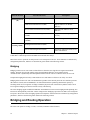
handling, network management, etc. The following chart displays the networking and associated protocols
supported by the router.
Chapter 1. Advanced Topics
13
Network Protocol
Internet Protocol
(IP)
Internet Packet
Exchange (IPX)
Associated Protocols
Description
Routing Information Protocol (RIP)
Maintains a map of the network
Address-Resolution Protocol (ARP)
Maps IP addresses to datalink
addresses
Reverse Address Resolution Protocol (RARP)a
Maps data-link addresses to IP
addresses
Internetwork Control Message Protocol
(ICMP)
Diagnostic and error reporting/
recovery
Simple Network Management Protocol
(SNMP)
Network management
Routing Information Protocol (RIP)b
Maintains a map of the network
Service Advertising Protocol (SAP)
Distributes information about service
names and addresses
a Used only during a network boot
b IPX-RIP is a different protocol from IP-RIP and it includes time delays
Most of the router’s operation on each protocol level is transparent to the user. Some functions are influenced by
configuration parameters, and these are described in greater detail in the following sections.
Bridging
Bridging connects two or more LANs so that all devices share the same logical LAN segment and network
number. The MAC layer header contains source and destination addresses used to transfer frames.
An address table is dynamically built and updated with the location of devices when the frames are received.
Transparent bridging allows locally connected devices to send frames to all devices as if they were local.
Bridging allows frames to be sent to all destinations regardless of the network protocols used. It allows protocols
that cannot be routed (such as NETBIOS) to be forwarded and allows optimizing internetwork capacity by
localizing traffic on LAN segments. A bridge extends the physical reach of networks beyond the limits of each
LAN segment. Bridging can increase network security with filtering.
The router bridging support includes the IEEE 802.1D standard for LAN-to-LAN bridging and the Spanning Tree
Protocol for interoperability with other vendors’ bridge/routers. Bridging is provided over PPP as well as adjacent
LAN ports. Most of the router’s bridging operation is transparent. Some functions are influenced by configuration
parameters, which are described in greater detail in the following sections.
Bridging and Routing Operation
The router can operate as a bridge, a router, or as both (sometimes called a brouter).
14
Chapter 1. Advanced Topics
•
•
•
•
The router will operate as a router for network protocols that are enabled for routing (IP or IPX).
The router will operate as a bridge for protocols that are not supported for routing.
Routing takes precedence over bridging; i.e., when routing is active, the router uses the packet’s protocol
address information to route the packet.
If the protocol is not supported, the router will use the MAC address information to forward the packet.
Operation of the router is influenced by routing and bridging controls and filters set during router configuration as
well as automatic spoofing and filtering performed by the router. For example, general IP or IPX routing, and
routing or bridging from specific remote routers are controls set during the configuration process.
Spoofing and filtering, which minimize the number of packets that flow across the WAN, are performed
automatically by the router. For example, RIP routing packets and certain NetBEUI packets are spoofed even if
only bridging is enabled.
Bridging and Routing Configuration Settings
The router can be configured to perform general routing and bridging while allowing you to set specific controls.
One remote router is designated as the outbound default bridging destination. All outbound bridging traffic with
an unknown destination is sent to the default bridging destination. Bridging from specific remote routers can be
controlled by enabling or disabling bridging from individual remote routers.
Routing is performed to all remote routers entered into the remote router database. All routing can be enabled or
disabled with a system-wide control.
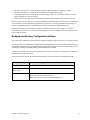
The following charts describe the operational characteristics of the router, based on configuration settings.
IP/IPX Routing On
Bridging to/from Remote Router Off
Data packets carried
IP (TCP, UDP), IPX
Operational
characteristics
Basic IP, IPX connectivity
Typical usage
When only IP/IPX traffic is to be routed and all other traffic is to be
ignored. For IP, used for Internet access.
Note: This is the most easily controlled configuration.
Chapter 1. Advanced Topics
15
IP/IPX Routing On
Bridging to/from Remote Router On
Data packets carried
IP/IPX routed; all other packets bridged.
Operational
characteristics
IP/IPX routing and allows other protocols, such as NetBEUI (that can’t
be routed), to be bridged.
Typical usage
When only IP/IPX traffic is to be routed but some non-routed protocol is
required. Used for client/server configurations.
IP/IPX Routing Off
Bridging to/from Remote Router On
Data packets carried
All packets bridged.
Operational
characteristics
Allows protocols, such as NetBEUI (that can’t be routed) to be bridged.
Typical usage
Peer-to-peer bridging and when the remote end supports only bridging.
Point-To-Point Protocol (PPP)
PPP is an industry standard WAN protocol for transporting multi-protocol datagrams over point-to-point
connections. PPP defines a set of protocols, such as security and network protocols, that can be negotiated over
the connection. PPP includes the following protocols:
•
Link Control Protocol (LCP) to negotiate PPP; i.e., establish, configure and test the datalink connection.
•
Network Control Protocols (NCPs), such as:
TCP/IP routing Internet Protocol Control Protocol (IPCP)
IPX routing Control Protocol (IPXCP)
Bridge Control Protocol (BNCP)
•
Security Protocols including PAP and CHAP
A more detailed description of the router’s implementation of some of these protocols appears the following
section. A list of PPP protocol conformance is included later in this section.
PAP/CHAP Security Authentication
Password Authentication Protocol (PAP) and Challenge Handshake Authentication Protocol (CHAP) under PPP
are supported by the router. However, security authentication may or may not be needed depending on the
requirements of the remote end.
The nature of the connection in a DSL environment (traffic occurs on a dedicated line/virtual circuit) does not
require authentication unless that is specifically required by the remote end, the ISP, or the NSP. When
authentication is not required, security can be disabled with the command remote disauthen.
16
Chapter 1. Advanced Topics
General Security Authentication
Security authentication may be required by the remote end. The following information describes how
authentication occurs.
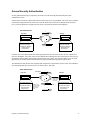
PAP provides verification of passwords between routers using a two-way handshake. One router (peer) sends the
system name and password to the other router. Then the other router (known as the authenticator) checks the
peer’s password against the configured remote router’s password and returns acknowledgment.
PAP Authentication
1
New York
Chicago
...New York & xyz.......
2
System Nam e=New York
System Password=xyz
System Nam e=Chicago
System Password=abc
.....Accepted/Rejected.......
Rem ote Router Database
Rem ote=Chicago
Password=abc
Rem ote Router Database
Rem ote=New York
Password=xyz
CHAP is more secure than PAP because unencrypted passwords are not sent across the network. CHAP uses a
three-way handshake. One router (known as the authenticator) challenges the other router (known as the peer) by
generating a random number and sending it along with the system name. The peer then applies a one-way hash
algorithm to the random number and returns this encrypted information along with the system name.
The authenticator then runs the same algorithm and compares the result with the expected value. This authentication method depends upon a password or secret known only to both ends.
CHAP Authentication
New York
1
CHALLENG E
...New York & random num ber.......
Chicago
Hashes random
number and
secret ‘abc’
2
System Nam e=New York
System Passw ord=xyz
Rem ote Router Database
Rem ote=Chicago
Passw ord=abc
Perform s sam e
hash w ith number
and secret ‘abc’
and com pares
results
System Nam e=Chicago
System Password=abc
.....Chicago & encrypted secret.......
3
Rem ote Router Database
Rem ote=New York
Password=xyz
.....Accepted/Rejected.......
Chapter 1. Advanced Topics
17
Security Configuration Settings
The router has one default system password used to access any remote router. This “system authentication
password” is utilized by remote sites to authenticate the local site. The router also allows you to assign a unique
“system override password” used only when you are connecting to a specific remote router for authentication by
that remote site. Each remote router entered in the remote router database has a password used when the remote
site attempts to gain access to the local router. This “remote authentication password” is utilized by the router to
authenticate the remote site.
Each remote router entered in the remote router database also has a minimum security level, known as the “remote
authentication protocol,” that must be negotiated before the remote router gains access to the local router. In
addition, a system-wide control, “system authentication protocol,” is available for overriding the minimum
security level in the entire remote router database.
Authentication Process
The authentication process occurs regardless of whether a remote router connects to the local router or vice versa,
and even if the remote end does not request authentication. It is a bi-directional process, where each end can
authenticate the other using the protocol of its choice (provided the other end supports it).
During link negotiation (LCP), each side of the link negotiates which protocol to use for authentication during the
connection. If both the system and the remote router have PAP authentication, then they negotiate PAP
authentication.
Otherwise, the router always requests CHAP authentication first; if CHAP is refused, PAP will be negotiated. If
the remote end does not accept either PAP or CHAP, the link is dropped; i.e., the router will not communicate
without a minimum security level. On the other hand, the router will accept any authentication scheme required by
the remote node, including no authentication at all.
During the authentication phase, each side of the link can request authentication using the method they negotiated
during LCP.
For CHAP, the router issues a CHAP challenge request to the remote side. The challenge includes the system
name and random number. The remote end, using a hash algorithm associated with CHAP, transforms the name
and number into a response value. When the remote end returns the challenge response, the router can validate the
response challenge value using the entry in the remote router database. If the response is invalid, the call is
disconnected. If the other end negotiated CHAP, the remote end can, similarly, request authentication from the
local router. The router uses its system name and password to respond to CHAP challenge.
For PAP, when a PAP login request is received from the remote end, the router checks the remote router PAP
security using the remote router database. If the remote router is not in the remote router database or the remote
router password is invalid, the call is disconnected. If the remote router and password are valid, the local router
acknowledges the PAP login request.
If PAP was negotiated by the remote end for the remote-side authentication, the router will issue PAP login
requests only if it knows the identity of the remote end. The identity is known if the call was initiated from the
router, or if the remote end returned a successful CHAP challenge response. For security reasons, the router will
never identify itself using PAP without first knowing the identity of the remote router.
If PAP was negotiated by the remote end for the local side of the authentication process and the minimum security
level is CHAP, as configured in the remote router database, the link will be dropped for a security violation.
18
Chapter 1. Advanced Topics
Protocol Conformance
Protocol Standards
The router conforms to RFCs designed to address performance, authentication, and multi-protocol encapsulation.
The following RFCs are supported:
•
•
•
•
•
•
•
•
•
•
•
•
•
•
•
•
RFC 1058 Routing Information Protocol (RIP)
RFC 1144 Compressing TCP/IP headers (Van Jacobson)
RFC 1220 Bridging Control Protocol (BNCP)
RFC 1332 IP Control Protocol (IPCP)
RFC 1334 Password Authentication Protocol and Challenge Handshake Authentication Protocol (PAP/
CHAP)
RFC 1483 Multiprotocol Encapsulation over ATM Adaptation Layer 5
RFC 1490 Multiprotocol Interconnect over Frame Relay
RFC 1552 Novell IPX Control Protocol (IPXCP)
RFC 1577 Classical IP and ARP over ATM
RFC 1661 Point-to-Point Protocol (PPP)
RFC 1723 RIP Version 2
RFC 1962 PPP Compression Control Protocol (CCP)
RFC 1973 PPP in Frame Relay
RFC 1974 Stac LZS compression protocol
RFC 1990 Multi-Link Protocol (MLP)
RFC 2131 and 2132 Dynamic Host Configuration Protocol (DHCP)
IP Routing
IP routing support, in conformance with RFC 791, provides the ability to process TCP/IP frames at the network
layer for routing. IP routing support includes the Routing Interface Protocol (RIP), in conformance with RFC
1058 (RIP v.1) and RFC 1723 (RIP v.2).
IPX Routing
IPX routing conforms to the Novell® NetWare™ IPX Router Development Guide, Version 1.10.
Encapsulation Options
This section describes in technical terms the format of each packet associated with a particular encapsulation
option supported by the router.
The encapsulation type for each remote entry is defined using the remote setProtocol command.
Chapter 1. Advanced Topics
19
PPP
Each packet begins with a one- or two-byte protocol ID. Typical IDs are:
0xc021—LCP
0x8021—IPCP
0x0021—IP
0x002d— Van Jacobson compressed TCP/IP
0x002f—Van Jacobson uncompressed TCP/IP
0x8031—Bridge NCP
0x0031—Bridge Frame
The command for this encapsulation option is: remote setProtocol PPP <remoteName>
Note: With PPP over ATM, the address and control fields (i.e., FF03) are never present; this also is the case for
LCP packets.
PPPLLC
This protocol (LLC-multiplexed) allows PPP traffic to be carried simultaneously with other traffic on a single
virtual circuit (as opposed to the PPP method of encapsulation—VC multiplexing—which dedicates a virtual
circuit to PPP traffic only).
Each PPP packet is prepended with the sequence 0xFEFE03CF. Thus, an LLC packet has the format:
0xFEFE03CF 0xC021.
The command for this encapsulation option is: remote setProtocol PPPLLC <remoteName>
RFC 1483 or RFC 1490
Bridging
User data packets are prepended by the sequence 0xAAAA0300 0x80c20007 0x0000 followed by the
Ethernet frame containing the packet.
802.1D Spanning Tree packets are prepended with the header 0xAAAA0300 0x80C2000E.
Routing
IP packets are prepended with the header 0xAAAA0300 0x00000800.
IPX packets are prepended with the header 0xAAAA0300 0x00008137.
The commands for this encapsulation option are:
remote setProtocol RFC1483 <remoteName> (for ATM)
remote setProtocol FR <remoteName> (for Frame Relay - RFC 1490)
20
Chapter 1. Advanced Topics
MAC Encapsulated Routing: RFC 1483MER (ATM) or RFC 1490MER
(Frame Relay)
MER encapsulation allows IP packets to be carried as bridged frames, but does not prevent bridged frames from
being sent as well, in their normal encapsulation format: RFC 1483 (ATM) or RFC 1490 (Frame Relay).
If IP routing is enabled, then IP packets are prepended with the sequence 0xAAAA0300 0x80c20007 0x0000 and
sent as bridged frames. If IP routing is not enabled, then the packets appear as bridged frames.
The commands for this encapsulation option are:
remote setProtocol RFC1483MER <remoteName> (for ATM)
remote setProtocol MER (for Frame Relay)
FRF8
IP packets have prepended to them the following sequence: 0x03CC.
The command for this encapsulation option is: remote setprotocol FRF8 <remoteName>
Note: This protocol allows sending ATM over Frame Relay.
rawIP
IP packets do not have any protocol headers prepended to them; they appear as IP packets on the wire. Only IP
packets can be transported since there is no possible method to distinguish other types of packets (bridged frames
or IPX).
The command for this encapsulation option is: remote setProtocol rawIP <remoteName>
Chapter 1. Advanced Topics
21
System Files
The router’s file system is a DOS-compatible file system, whose contents are as follows: :
SYSTEM.CNF: These are configuration files containing:
DOD
SYS
ETH
Remote Router Database
System Settings: name, message, authentication method, and passwords
Ethernet LAN configuration settings
DHCP.DAT: DHCP files.
FILTER.DAT: Bridge filters.
KERNEL.F2K: Router system software (KERNEL.FP1 for IDSL routers).
ETH.DEF: File used by the manufacturer to set a default Ethernet configuration.
ASIC.AIC: Firmware for the xDSL modem or ATM interface.
ATM.DAT: ATM configuration file.
I2TP Tunnening Database
ATOM.DAT
SDSL.DAT
DMT.DAT
IPSEC.DAT
IKE.DAT
AUTOEXEC.BAT - Autoexec file of commands to run on next reboot.
AUTOEXEC.OLD - Autoexec file that has run already
Note: Users should not delete any of these files, unless advised by Tech Support.
Any file contained within the system may be retrieved or replaced using the TFTP protocol. Specifically,
configuration files and the operating system upgrades can be updated. Only one copy for the router software is
allowed in the router’s FLASH memory.
Refer to Chapter 6. Managing the Router on page 223 for details on software upgrades, booting router software,
copying configuration files, and restoring router software to FLASH memory.
Bridge Filtering
You can control the flow of packets across the router using bridge filtering. Bridge filtering lets you “deny”or
“allow” packets to cross the network based on position and hexadecimal content within the packet. This feature
lets you restrict or forward messages with a specified address, protocol, or data content. Common uses are to
prevent access to remote networks, control unauthorized access to the local network, and limit unnecessary traffic.
22
Chapter 1. Advanced Topics
For example, it might be necessary to restrict remote access for specific users on the local network. In this case,
bridging filters are defined using the local MAC address for each user to be restricted. Each bridging filter is
specified as a “deny” filter based on the MAC address and position of the address within the packet. Deny
filtering mode is then enabled to initiate bridge filtering. No packet with one of the MAC addresses can be bridged
across the router until the deny filtering mode is disabled.
Similarly, protocol filtering can be used to prevent a specific protocol from being bridged. In this case, the
protocol ID field in a packet is used to deny or allow a packet. You can also restrict, for example, the bridging of
specific broadcast packets.
Chapter 1. Advanced Topics
23
Unique System Passwords
As described in Security Configuration Settings on page 18 of this chapter, you can specify a unique system
override password for a remote router with the command remote SetOurPasswd. This “system override
password” is used instead of the general system password only for connecting to a specific remote router. This
allows you to set a unique CHAP or PAP authentication password for authentication of the local site by the remote
site only when the router connects to that remote site.
A common use is to set a password assigned to you by Internet Service Providers (ISPs). Similarly, the system
name of the local router can be overridden for connecting to a specific remote with the command remote
setoursysname.
24
Chapter 1. Advanced Topics
Chapter 2. Planning for Router Configuration
This chapter describes the terminology and the information that you need to obtain before configuring the router.
The information needed to configure the router is contingent on the chosen Link Protocol. It is therefore important
to know which Link Protocol you are using (this is determined by your Network Service Provider) so that you can
refer to the configuration sections that apply to your setup.
When you configure the router using the Command Line Interface, the planning is similar to the process described
for Configuration Manager with very few exceptions.
Important Terminology
You should familiarize yourself with the following terminology as it will be used throughout this chapter.
Target router. Router that you are configuring. Also referred to as local router.
Remote routers. All the routers to which the target (local) router may connect.
Remote router database. Database which resides in the target router and contains information about the remote
routers to which the target router may connect.
Remote router entry. Entry about a remote router in the target router database. A remote router entry defines:
• Connection parameters
•
Security features
•
Route addressing and bridging functions
The following diagram illustrates these key words and concepts.
Configuration Process for Router A
TARGET ROUTER
REMOTE ROUTERS
Router A
Router B
DSL/ATM
Router C
Target Router:
System Settings
Remote Router Database
Remote Router B
Remote Router C
Remote Router D
Chapter 2. Planning for Router Configuration
Router D
25
Essential Configuration Information
This section describes the configuration information associated with each Link Protocol/Network Protocol
combination and also provides configuration information for the Dual-Ethernet router.
If you are using Link and Network Protocols:
1.
Determine which Link Protocol/Network Protocol association you are using from your Network Service
Provider (NSP).
2.
Select (click) one of the following Link/Network information that applies to your situation:
PPP Link Protocol with:
•
IP Routing Network Protocol, on page 27
•
IPX Routing Network Protocol, on page 29
•
Bridging Network Protocol, on page 31
RFC 1483 or RFC 1490 Link Protocol with:
•
IP Routing Network Protocol, on page 32
•
IPX Routing Network Protocol, on page 34
•
Bridging Network Protocol, on page 36
MAC Encapsulated Routing: RFC 1483MER or RFC 1490MER Link Protocol with:
•
IP Routing Network Protocol, on page 37
FRF8 Link Protocol with:
•
3.
IP Routing Network Protocol, on page 39
Collect the information applicable to your Link/Network Protocol association. This information will be used
later in conjunction with the Configuration Tables for easy configuration of your router based on your Link/
Network protocol. These configuration tables provide step-by-step instructions for a basic configuration for
each Link/Network protocol.
Note: Use the blank Network Information Worksheets in Appendix A to collect your network information.
If you are using a Dual-Ethernet Router:
Select (click) one of the two following configurations that applies to your situation:
Configuring the Dual-Ethernet Router as a Bridge, on page 41
Configuring the Dual-Ethernet Router for IP Routing, on page 41
26
Chapter 2. Planning for Router Configuration
PPP Link Protocol (over ATM or Frame Relay)
The PPP Link Protocol is an encapsulation method that can be used over ATM (for ATM routers) or Frame Relay
(for Frame-Relay routers)
Combined with the IP, IPX, or Bridging Network Protocols, PPP over ATM and PPP over Frame Relay share the
same configuration characteristics, except for the connection identifiers: VPI/VCI numbers are used for ATM, and
a DLCI number is used for Frame Relay.
Select the Network Protocol that applies to your situation: IP or IPX or Bridging. Collect the information
described in the appropriate section. This data will be later used to configure your router using the Command Line
Interface commands (see Configuration Tables, on page 43).
IP Routing Network Protocol
!
System Names and Authentication Passwords
For the Target Router
This information is defined by the user. You must choose a name and authentication password for the
target router. They are used by a remote router to authenticate the target router.
For the Remote Site(s)
This information is obtained from the Network Service Provider. For each remote site, you must have the
site name and its authentication password. They are used by the target router to authenticate the remote
end. The name and password are used in both PAP and CHAP authentication. Refer to the diagram under
General Security Authentication, on page 17 to see how this information is used.
Note 1: A sample configuration containing names and passwords is provided in the section Sample
Configuration 1: PPP with IP and IPX, on page 56 Chapter 3.
Note 2: If the ISP does not support the authentication of the ISP system by the caller, use the command
remote disauthen <remoteName> to disable the authentication.
!
VPI and VCI Numbers (for ATM routers)
Your router may have been preconfigured with VPI/VCI numbers. If not, you will have to obtain these
numbers from your Network Service Provider and then configure them.
If you are connecting to multiple remote sites, you will need to obtain additional VPI and VCI numbers
from your Network Service Provider and/or Network Access Provider. These numbers identify the
remote destination and must, therefore, be unique for each remote.
!
DLCI (for Frame Relay routers)
The DLCI number applies to Frame Relay routers only. Your Network Service Provider or your
Network Access Provider will provide you with a Data Link Connection Identifier (DLCI). The DLCI is
an address identifying your connection.
Chapter 2. Planning for Router Configuration
27
!
DNS Internet Account Information (optional)
This information is obtained from your Network Service Provider. Consult with you Network Service
Provider to find out if you need to enter the following information:
!
•
DNS server address
•
DNS second server address
•
DNS domain name
IP Routing Addresses
For the Ethernet Interface
This information is defined by the user or your Network Administrator.
Ethernet IP Address (local LAN)
An Ethernet LAN IP address and subnet mask are required for the router’s local Ethernet LAN
connection.
Note: An Ethernet route is usually defined when there are multiple routers on the Ethernet that cannot
exchange routing information. This feature is not normally used, except in special circumstances.
For the WAN Interface
This information is defined by the Network Service Provider.
Source (Target/Local) WAN Port Address
If Network Address Translation (NAT) is enabled, you must specify a source WAN IP address for the
WAN connection to the remote router if IP address negotiation under PPP does not provide one. Check
with your system administrator for details on whether the router must communicate in numbered or
unnumbered mode and which addresses are required.
Remote WAN Address
You may need to specify a remote WAN IP address for the WAN connection to the remote router
depending on IP address negotiation under PPP. Check with your system administrator for details on
whether the router must communicate in numbered or unnumbered mode and which addresses are
required.
TCP/IP Remote Routes
An IP route includes an IP address, subnet mask, and metric (a number representing the perceived cost in
reaching the remote network or station).
A TCP/IP Default Route should be designated in the routing table for all traffic that cannot be directed
to other specific routes. You will need to define the default route to a remote router or, in special
circumstances, define an Ethernet gateway. There can be only one default route specified.
28
Chapter 2. Planning for Router Configuration
IPX Routing Network Protocol
!
System Names and Authentication Passwords
For the Target Router
This information is defined by the user. You must choose a name and authentication password for the
target router. They are used by a remote router to authenticate the target router.
For the Remote Site(s)
This information is obtained from the Network Service Provider. For each remote site, you must have the
site name and its authentication password. They are used by this target router to authenticate the remote
end. The name and password are used in both PAP and CHAP authentication. Refer to the diagrams
under General Security Authentication, on page 17 to see how this information is used.
Note 1: A sample configuration containing names and passwords is provided in the section Sample
Configurations, on page 56.
Note 2: If the ISP does not support the authentication of the ISP system by the caller, use the command
remote disauthen <remoteName> to disable the authentication.
!
VPI and VCI Numbers
Your router may have been preconfigured with VPI/VCI numbers. If not, you will have to obtain these
numbers from your Network Service Provider and then configure them.
If you are connecting to multiple remote sites, you will need to obtain additional VPI and VCI numbers
from your Network Service Provider and/or Network Access Provider. These numbers identify the
remote destination and must, therefore, be unique for each remote.
!
DLCI (for Frame-Relay Routers)
The DLCI number applies to Frame-Relay routers only. Your Network Service Provider or your
Network Access Provider will provide you with a Data Link Connection Identifier (DLCI). The DLCI is
an address identifying your connection.
!
IPX Routing Entries
These numbers are defined by the Network Administrator. You will need to obtain the following
information (most likely from your network administrator) for IPX Routing.
Note: IPX routes define a path to a specific destination. They are primarily needed by the routers to
allow the servers and clients to exchange packets. A path to a file server will be based on the Internal
Network Number of the server. A path to a client will be based on the External Network Number
(Ethernet) of the client.
Chapter 2. Planning for Router Configuration
29
Internal Network Number
It is a logical network number that identifies an individual Novell server. It is needed to specify a route to
the services (i.e., file services, print services) that Novell offers. It must be a unique number.
External Network (a.k.a. IPX Network Number)
It refers to a physical LAN/wire network segment to which servers, routers, and PCs are connected
(Ethernet cable-to-router segment). It must be a unique number.
WAN Network Number
Important: This number is part of the routing information. It is only used to identify the WAN segment
between the two routers. Note that only those two routers need to have the WAN Network Number
configured.
Service Advertisement Protocol (SAP)
SAP entries should reflect primary logon servers for the clients on the local LAN. Only the servers on the
remote side of the link have to be entered. Local servers do not need to be entered.
Frame Type
With local servers on your LAN, make sure to select the proper frame type for the IPX network number.
To determine this, consult with your network administrator. When you have only NetWare clients on
your LAN, keep the default (802.2) selected as most clients can support any type. The frame type choices
are:
802.2 Default recommended by Novell
802.3 Other most common type
DIX
For DEC, Intel, Xerox; this setting is also referred to as “Ethernet II”, and it is rapidly
becoming obsolete.
Note: Appendix B provides step-by-step information on how to configure IPX routing.
30
Chapter 2. Planning for Router Configuration
Bridging Network Protocol
!
System Names and Authentication Passwords
For the Target Router
This information is defined by the user. You must choose a name and authentication password for the
target router. They are used by a remote router to authenticate the target router.
!
For the Remote Site(s)
This information is obtained from the Network Service Provider. For each remote site, you must have the
site name and its authentication password. They are used by the target router to authenticate the remote
end. The name and password are used in both PAP and CHAP authentication. Please refer to the diagram
under General Security Authentication, on page 17 to see how this information is used.
Note 1: A sample configuration containing Names and Passwords is provided in the section Sample
Configuration 1: PPP with IP and IPX, on page 56.
Note 2: If the ISP does not support the authentication of the ISP system by the caller, use the command
remote disauthen <remoteName> to disable the authentication.
!
VPI and VCI Numbers
Your router may have been preconfigured with VPI/VCI numbers. If not, you will have to obtain these
numbers from your Network Service Provider and then configure them.
If you are connecting to multiple remote sites, you will need to obtain additional VPI and VCI numbers
from your Network Service Provider and/or Network Access Provider. These numbers identify the
remote destination and must, therefore, be unique for each remote.
!
DLCI (for Frame-Relay Routers)
The DLCI number applies to Frame-Relay routers only. Your Network Service Provider or your
Network Access Provider will provide you with a Data Link Connection Identifier (DLCI). The DLCI is
an address identifying your connection.
!
DNS Internet Account Information (optional)
This information is obtained from the Network Service Provider. Consult with you Network Service
Provider to find out if you need to enter the following information:
•
DNS server address
•
DNS second server address
•
DNS domain name
Note: If you intend to connect to the Internet only, enter this information using the Internet Quick Start
configurator.
Chapter 2. Planning for Router Configuration
31
RFC 1483/RFC 1490 Link Protocols
The Link Protocol RFC 1483 is a multiprotocol encapsulation method over ATM and is used by ATM routers.
RFC 1490 is a multiprotocol encapsulation method over Frame-Relay and is used by Frame-Relay routers.
RFC 1483 and RFC 1490 combined with the IP, IPX, or Bridging Network Protocols share the same configuration
characteristics, except for the connection identifiers: VPI/VCI numbers are used for RFC 1483 and a DLCI
number is used for RFC 1490.
Obtain the information as described in the appropriate section. This data will be used later to configure your router
using the Command Line Interface (see Configuration Tables, on page 43).
IP Routing Network Protocol
!
VPI and VCI Numbers (for RFC 1483)
The VPI and VCI numbers apply to ATM routers only. Your router may have been preconfigured with
VPI/VCI numbers. If not, you will have to obtain these numbers from your Network Service Provider
and then configure them.
If you are connecting to multiple remote sites, you will need to obtain additional VPI and VCI numbers
from your Network Service Provider and/or Network Access Provider. These numbers identify the
remote destination and must, therefore, be unique for each remote.
!
DLCI (for RFC 1490)
The DLCI number applies to Frame-Relay routers only. Your Network Service Provider or your
Network Access Provider will provide you with a Data Link Connection Identifier (DLCI). The DLCI is
an address identifying your connection.
!
DNS Internet Account Information (optional)
This information is obtained from the Network Service Provider. Consult with you Network Service
Provider to find out if you need to enter the following information:
!
•
DNS server address
•
DNS second server address
•
DNS domain name
IP Routing Entries
For the Ethernet Interface
This information is defined by the user or the Network Administrator.
Ethernet IP Address (Local LAN)
An Ethernet LAN IP address and subnet mask are required for the router’s local Ethernet LAN
connection.
32
Chapter 2. Planning for Router Configuration
TCP/IP Ethernet Routes
You normally do not need to define an Ethernet IP route. An Ethernet IP route consists of an IP
address, a mask, a metric, and a gateway. An Ethernet route is usually defined when there are multiple
routers on the Ethernet that cannot exchange routing information.
For the WAN Interface
This information is obtained from the Network Administrator.
Source (Target/Local) WAN Port Address
If Network Address Translation (NAT) is enabled, you must specify a source WAN IP address for the
WAN connection to the remote router. Check with your system administrator for details.
If NAT is not enabled, you may need to specify a source WAN IP address for the WAN connection to
the remote router. Check with your system administrator for details.
TCP/IP Remote Routes
An IP route includes an IP address, subnet mask, and metric (a number representing the perceived cost
in reaching the remote network or station).
A TCP/IP Default Route default route should be designated in the routing table for all traffic that
cannot be directed to other specific routes. You will need to define the default route to a remote router
or, in special circumstances, define an Ethernet gateway. There can be only one default route specified.
Chapter 2. Planning for Router Configuration
33
IPX Routing Network Protocol
!
VPI and VCI Numbers (for RFC 1483)
The VPI and VCI numbers apply to ATM routers only. Your router may have been preconfigured with
VPI/VCI numbers. If not, you will have to obtain these numbers from your Network Service Provider
and then configure them.
If you are connecting to multiple remote sites, you will need to obtain additional VPI and VCI numbers
from your Network Service Provider and/or Network Access Provider. These numbers identify the
remote destination and must, therefore, be unique for each remote.
!
DLCI (for RFC 1490)
The DLCI number applies to Frame Relay routers only. Your Network Service Provider or your
Network Access Provider will provide you with a Data Link Connection Identifier (DLCI). The DLCI is
an address identifying your connection.
!
IPX Routing Entries
The user or the Network Administrator defines this information.
Note: IPX routes define a path to a specific destination. They are primarily needed by the routers to
allow the servers and clients to exchange packets. A path to a file server will be based on the Internal
Network Number of the server. A path to a client will be based on the External Network Number
(Ethernet) of the client.
Internal Network Number
This is a logical network number that identifies an individual Novell server. It is needed to specify a
route to the services (i.e., file services, print services) that Novell offers. It must be a unique number.
External Network (a.k.a. IPX Network Number)
This number refers to a physical LAN/wire network segment to which servers, routers, and PCs are
connected (Ethernet cable-to-router segment). It must be a unique number.
WAN Network Number
Important: This number is part of the routing information. It is only used to identify the WAN segment
between the two routers.
Note: Only the two routers need to have the WAN Network Number configured.
Service Advertisement Protocol (SAP)
SAP entries should reflect primary logon servers for the clients on the local LAN. Only the servers on the
remote side of the link have to be entered. Local servers do not need to be entered.
34
Chapter 2. Planning for Router Configuration
Frame Type
With local servers on your LAN, make sure to select the proper frame type for the IPX network number.
To determine this, consult with your network administrator. When you have only NetWare clients on
your LAN, keep the default (802.2) selected as most clients can support any type.
The frame type choices are:
802.2 Default recommended by Novell
802.3 Other most common type
DIX
For DEC, Intel, Xerox; this setting is also referred to as “Ethernet II”, and it is rapidly
becoming obsolete.
Chapter 2. Planning for Router Configuration
35
Bridging Network Protocol
!
VPI and VCI Numbers (with RFC 1483)
The VPI and VCI numbers apply to ATM routers only. Your router may have been preconfigured with
VPI/VCI numbers. If not, you will have to obtain these numbers from your Network Service Provider
and then configure them.
If you are connecting to multiple remote sites, you will need to obtain additional VPI and VCI numbers
from your Network Service Provider and/or Network Access Provider. These numbers identify the
remote destination and must, therefore, be unique for each remote.
!
DLCI (with RFC 1490)
The DLCI number applies to Frame-Relay routers only. Your Network Service Provider or your
Network Access Provider will provide you with a Data Link Connection Identifier (DLCI). The DLCI is
an address identifying your connection.
!
DNS Internet Account Information (optional)
This information is obtained from the Network Service Provider. Consult with your Network Service
Provider to find out if you need to enter the following information:
36
•
DNS server address
•
DNS second server address
•
DNS domain name
Chapter 2. Planning for Router Configuration
MAC Encapsulated Routing: RFC 1483MER/RFC 1490MER Link
Protocols
MAC Encapsulated Routing (MER) allows IP packets to be carried as bridged frames (bridged format). The Link
Protocol RFC 1483 with MER (referred to as RFC 1483MER) is a multiprotocol encapsulation method over ATM
used by ATM routers. RFC 1490 with MER (referred to as RFC 1490MER) is a multiprotocol encapsulation
method over Frame Relay used by Frame-Relay routers.
RFC 1483MER and RFC 1490MER combined with the IP, IPX, or Bridging Network Protocols share the same
configuration characteristics, except for the connection identifiers: VPI/VCI numbers are used for RFC 1483MER
and a DLCI number is used for RFC 1490.
Obtain the information as described in the appropriate section. This data will be later used to configure your router
using the Command Line Interface (see Configuration Tables, on page 43).
IP Routing Network Protocol
!
VPI and VCI Numbers (for RFC 1483MER)
The VPI and VCI numbers apply to ATM routers only. Your router may have been preconfigured with
VPI/VCI numbers. If not, you will have to obtain these numbers from your Network Service Provider
and then configure them.
If you are connecting to multiple remote sites, you will need to obtain additional VPI and VCI numbers
from your Network Service Provider and/or Network Access Provider. These numbers identify the
remote destination and must, therefore, be unique for each remote.
!
DLCI (for RFC 1490MER)
The DLCI number applies to Frame Relay routers only. Your Network Service Provider or your
Network Access Provider will provide you with a DLCI (Data Link Connection Identifier). The DLCI is
an address identifying your connection.
!
DNS Internet Account Information (optional)
This information is obtained from the Network Service Provider. Consult with your Network Service
Provider to find out if you need to enter the following information:
•
DNS server address
•
DNS second server address
•
DNS domain name
Note: If you intend to only connect to the Internet, enter this information using the Internet Quick Start
configurator.
Chapter 2. Planning for Router Configuration
37
!
IP Routing Entries
For the Ethernet Interface
This information is defined by the user or the Network Administrator.
Ethernet IP Address (Local LAN)
An Ethernet LAN IP address and subnet mask are required for the router’s local Ethernet LAN
connection.
TCP/IP Ethernet Routes
You normally do not need to define an Ethernet IP route. An Ethernet IP route consists of an IP address,
a mask, a metric, and a gateway. An Ethernet route is usually defined when there are multiple routers on
the Ethernet that cannot exchange routing information between them.
For the ATM WAN Interface
This information is obtained from the Network Administrator or the Network Service Provider.
Source (Target/Local) WAN Port Address and Mask
You must specify a Source WAN IP address for the WAN connection to the remote router (whether or
not Network Address Translation is enabled). The Source WAN Address is the address of the local router
on the remote network. The mask is the mask used on the remote network. Check with your system
administrator for details.
TCP/IP Remote Routes
If you are using RFC 1483MER or RFC 1490MER, the IP route includes an IP address, subnet mask,
metric (a number representing the perceived cost in reaching the remote network or station), and a
gateway. The gateway address that you enter is the address of a router on the remote LAN. Check with
your system administrator for details.
A TCP/IP Default Route should be designated in the routing table for all traffic that cannot be directed
to other specific routes. You will need to define the default route to a remote router or, in DLCI ( special
circumstances, define an Ethernet gateway. There can be only one default route specified.
38
Chapter 2. Planning for Router Configuration
FRF8 Link Protocol
The FRF8 Link Protocol is an encapsulation method that allows an ATM router to interoperate with a
Frame- Relay network.
FRF8 is only used in conjunction with the IP Network Protocol. Obtain the information described below. This
data will be used later to configure your router using the Command Line Interface (see Configuration Tables, on
page 43).
IP Routing Network Protocol
!
VPI and VCI Numbers
Your router may have been preconfigured with VPI/VCI numbers. If not, you will have to obtain these
numbers from your Network Service Provider and then configure them.
If you are connecting to multiple remote sites, you will need to obtain additional VPI and VCI numbers
from your Network Service Provider and/or Network Access Provider. These numbers identify the
remote destination and must, therefore, be unique for each remote.
!
DNS Internet Account Information (optional)
The following information is obtained from the Network Service Provider. Consult with your NSP to
find out if you need to enter the following information:
•
DNS server address
•
DNS second server address
•
DNS domain name
Note: If you intend to connect only to the Internet, enter this information using the Internet Quick Start
configurator.
!
IP Routing Entries
For the Ethernet Interface
This information is defined by the user or the Network Administrator.
Ethernet IP Address (Local LAN)
An Ethernet LAN IP address and subnet mask are required for the router’s local Ethernet LAN
connection.
TCP/IP Ethernet Routes
You normally do not need to define an Ethernet IP route. An Ethernet IP route consists of an IP address,
a mask, a metric, and a gateway. An Ethernet route is usually defined when there are multiple routers on
the Ethernet that cannot exchange routing information.
Chapter 2. Planning for Router Configuration
39
For the ATM WAN Interface
This information is obtained from the Network Administrator or the Network Service Provider.
Source (Target/Local) WAN Port Address and Mask
You must specify a Source WAN IP address for the WAN connection to the remote router (whether or
not Network Address Translation is enabled. The Source WAN address is the address of the local router
on the remote network. The mask is the mask used on the remote network. Check with your system
administrator for details.
TCP/IP Remote Routes
If you are using FRF8, the IP route includes an IP address, subnet mask, metric (a number representing
the perceived cost in reaching the remote network or station). Check with your system administrator for
details.
A TCP/IP Default Route should be designated in the routing table for all traffic that cannot be directed
to other specific routes.
You will need to define the default route to a remote router or, in special circumstances, define an
Ethernet gateway. There can be only one default route specified.
40
Chapter 2. Planning for Router Configuration
Dual-Ethernet Router Configuration
General Information on Dual Ethernet router
To configure the Dual-Ethernet router, access the router using the Command Line Interface (CLI). The CLI
can be accessed from a Telnet or a console session (using the console cable) connected to the router’s default
IP address of 192.169.254.254. You can also configure the router using the Web browser GUI. Refer to the
Dual-Ethernet Router Quick Start Guide.
The Dual-Ethernet router has two interfaces:
ETH/0—refers to the router’s hub with four 10Base-T connectors
ETH/1—refers to the single 10Base-T connector
Bridging is enabled by default when the router boots up. IP and IPX routing are disabled.
The router’s default IP address is 192.168.254.254.
DHCP is enabled by default and the router’s DHCP server issues IP addresses to any PC request. The DHCP
default IP pool is 192.168.254. 2 through 192.168.254.20.
To connect to the router, use the router’s default IP address using a Telnet session, for example, and any
10Base-T port on the router.
Warning: You cannot boot from the ETH/1 interface.
Configuring the Dual-Ethernet Router as a Bridge
This router is configured by default as a bridge and no configuration steps are needed. The user needs only
establish a connection to the remote location (to the Internet Service Provider, for example).
Bridging is enabled by default when the router boots up. IP and IPX routing are disabled.
Configuring the Dual-Ethernet Router for IP Routing
The eth commands are used to configure the Dual-Ethernet router for IP routing. Refer to the section DualEthernet Router Commands (ETH), on page 180, for usage and syntax information.
The last argument of each ETH command determines which interface is being configured (0 for ETH/0, 1 for
ETH/1).
Each interface (ETH/0 and ETH/1) must be set. A minimum of one route must be defined to have a working
configuration. This is generally a default route on the ETH/1 interface where all traffic otherwise specified is
automatically forwarded. This default route is: 0.0.0.0 255.255.255.255 1.
The Gateway address is the IP address supplied by your Internet Service Provider or Network Administrator.
You can customize your router by using the scripting feature, which loads batch files of preset configuration
commands into the router (refer to the Batch File Command Execution, on page 236 section).
A Dual-Ethernet router sample configuration with IP Routing is provided in the Sample Configuration 3:
Configuring a Dual-Ethernet Router for IP Routing, on page 70 section.
Chapter 2. Planning for Router Configuration
41
Chapter 3. Configuring Router Software
This chapter covers configuration tables and verifying the router configuration. It also provides sample
configurations.
Configuration commands are outlined for each Link Protocol/Network Protocol supported by the router.
The information needed to configure the router is contingent on the chosen Link Protocol. It is therefore
important to know which Link Protocol you are using (this is determined by your Network Service Provider)
to be able to refer to the configuration sections that apply to your setup.
A configuration table for the Dual-Ethernet Router (with IP routing enabled) is also provided.
The section on verifying the router configuration describes how to test IP, IPX, or Bridging.
In this chapter, you will find two sample configurations with diagrams, commands, and list outputs.
Note 1: For usage conventions and a complete description of the commands mentioned in this chapter, refer
to Chapter 5. Command Line Interface Reference on page 115.
Note 2: To configure the router software, the Command Line Interface is available to you at all times after
you have installed the router hardware, connected to the router with a terminal-emulation session (or ASCII
terminal), and powered the unit on. This chapter assumes that you have successfully installed the router
hardware as described in the Quick Start Guide.
If you intend to use the Command Line Interface through Configuration Manager, it is assumed that you have
installed the Configuration Manager software and can access the terminal window (refer to the Quick Start
Guide).
Note 3: Worksheets are provided in Appendix A so that you can enter details about your target router and
remote routers. The worksheets list the commands associated with setting the features.
To configure the target router, you need to fill out one chart for the target router and one remote router chart
for each remote router to be entered into the remote router database.
If you are setting up both ends of the network, you will need a mirror image of the information listed below
for configuring the router on the other end of the link.
Important: If you change any the of the following settings, you must use the commands reboot and save for the
changes to take effect:
Ethernet LAN: Ethernet IP or IPX address, TCP/IP routing, IPX routing
Bridging: Bridging, Filters
Remote Router: TCP/IP route addresses, IPX routes, IPX SAPs and bridging control, and enable, disable, or
add remote routers
42
Chapter 3. Configuring Router Software
Configuration Tables
The following tables give you step-by-step instructions for standard configurations of the following Network
Protocol/Link Protocol associations, as well as a configuration table for a Dual-Ethernet Router:
•
PPP Link Protocol with IP Routing Network Protocol
•
PPP Link Protocol with IPX Routing Network Protocol
•
PPP Link Protocol with Bridging Network Protocol
•
RFC 1483/RFC 1490 Link Protocols with IP Routing Network Protocol
•
RFC 1483/RFC 1490 Link Protocols with IPX Routing Network Protocol
•
RFC 1483/RFC 1490 Link Protocols with Bridging Network Protocol
•
RFC 1483MER/RFC 1490MER Link Protocols with IP Network Protocol
•
FRF8 Link Protocol with IP Routing Network Protocol
•
Mixed Network Protocols (combinations of two or three network protocols)
•
Dual-Ethernet Router with IP routing
Note: Blank Network Configuration Worksheets are available in Appendix A.
Using the tables:
1.
Find the configuration table that fits your particular Network Protocol/Link Protocol association. These tables
are designed to provide easy step-by-step instructions.
2.
Use the blank Network Configuration Worksheets provided in Appendix A to enter the commands in the
order that they are given in the Commands column of the configuration tables.
3.
You may want to refer to the sample configurations at the end of this chapter.
Chapter 3. Configuring Router Software
43
Configuring PPP with IP Routing
This table outlines configuration commands for the PPP Link Protocol with the IP Routing Network Protocol.
PPP with IP Routing
Steps
Settings
Commands
System Settings
System Name
Required
system name <name>
System Message
Optional
system msg <message>
Authentication Password
Required
system passwd <password>
Ethernet IP Address
As required
eth ip addr <ipaddr> <ipnetmask> [<port#>]
DHCP Settings
Already enabled; additional
settings may be required
dhcp set valueoption domainname
<domainname>
dhcp set valueoption domainnameserver <ipaddr>
Change Login
system admin <password>
Optional
Remote Routers
New Entry
Enter: Remote Name
remote add <remoteName>
Link Protocol/PVCa
Select: PPP
Enter: VPI/VCI numbers
remote setProtocol PPP <remoteName>
remote setPVC <vpi number>*<vci number>
<remoteName>
(for Frame Relay routers)
Select: PPP
Enter: DLCI number
remote setProtocol PPP <remoteName>
remote setDLCI <number> <remoteName>
Security c
Remote’s Password
Choose security level
Enter: password
remote setOurPasswd <password> <remoteName>
Bridging On/Off
Must be off
remote disBridge <remoteName>
TCP/IP Route Address
Enter: Explicit or default
route
remote addIproute <ipnet> <ipnetmask> <hops>
<remoteName>
If NAT is enabled:
To enable NAT, use:
remote setIpTranslate on <remoteName>
You may need to enter a
Source WAN Port Address
remote setSrcIpAddr <ipaddr> <mask>
<remoteName>
You may need to enter a
Source WAN Port Address
remote setSrcIpAddr <ipaddr> <mask>
<remoteName>
(for ATM routers)
Link Protocol/DLCIb
If NAT is not enabled:
remote setAuthen <protocol> <remoteName>
IP and IPX Routing
TCP/IP Routing
(Internet Firewall)
Must be enabled
(optional)
eth ip enable
eth firewall <on | off>
IPX Routing
Must be disabled
eth ipx disable
Store
Reboot
save
reboot
a Enter this information if you are using PPP in an ATM environment.
b Enter this information if you are using PPP in a Frame Relay environment.
c If the ISP does not support the authentication of the ISP system by the caller, use the command remote disauthen
<remoteName> to disable the authentication.
44
Chapter 3. Configuring Router Software
Configuring PPP with IPX Routing
This table outlines configuration commands for the PPP Link Protocol with the IPX Routing Network Protocol.
Note: Appendix B provides step-by-step information on how to configure IPX routing.
PPP with IPX Routing
Steps
Settings
Commands
System Settings
System Name
Required
system name <name>
System Message
Optional
system msg <message>
Authentication Password
Required
system passwd <password>
Ethernet IP Address
As required
eth ip addr <ipaddr> <ipnetmask>[<port#>]
Settings DHCP
Already enabled; addit.
settings may be required
dhcp set valueoption domainname <domainname>
dhcp set valueoption domainnameserver < ipaddr >
Change Login
Optional
system admin <password>
Ethernet IPX Network #
Enter: IPX network #
Frame Type (default: 802.2)
eth ipx addr <ipxnet> [<port#>]
eth ipx frame <type>
Remote Routers
remote add <remoteName>
New Entry
Enter: Remote Name
Link Protocol/PVCa
(for ATM routers)
Select: PPP
Enter: VPI/VCI numbers
Link Protocol/DLCIb
(for Frame Relay routers)
Select: PPP
Enter: DLCI number
remote setProtocol PPP <remoteName>
remote setDLCI <number> <remoteName>
Securityc
Remote’s Password
Choose security level
Enter: password
remote setAuthen <protocol> <remoteName>
remote setPasswd <password> <remoteName>
Bridging On/Off
Must be off
remote disBridge <remoteName>
IPX Routes
Add
Enter appropriate info
remote addIpxroute <ipxNet> <metric> <ticks>
<remoteName>
IPX SAPs
Add
Enter appropriate info
remote addIpxsap <servicename> <ipxNet>
<ipxNode> <socket> <type> <hops> <remoteName>
WAN Network #
Enter appropriate info
remote setIpxaddr <ipxNet> <remoteName>
remote setProtocol PPP <remoteName>
remote setPVC <vpi number>*<vci number>
<remoteName>
IP and IPX Routing
TCP/IP Routing
Must be disabled
eth ip disable
IPX Routing
Must be enabled
eth ipx enable
Store
Reboot
save
reboot
a Enter this information if you are using PPP in an ATM environment.
b Enter this information if you are using PPP in a Fram- Relay environment.
c If the ISP does not support the authentication of the ISP system by the caller, use the command:
remote disauthen <remoteName> to disable the authentication.
Chapter 3. Configuring Router Software
45
Configuring PPP with Bridging
This table outlines configuration commands for the PPP Link Protocol with the Bridging Network Protocol.
PPP with Bridging
Steps
Settings
Commands
System Settings
System Name
Required
system name <name>
System Message
Optional
system msg <message>
Authorization Password
Required
system passwd <password>
DHCP Settings
Already enabled; additional
settings may be required
dhcp set valueoption domainname <domainname>
dhcp set valueoption domainnameserver < ipaddr >
Change Login
Optional
system admin <password>
Remote Routers
New Entry
Enter: Remote Name
remote add <remoteName>
Link Protocol/PVCa
(for ATM routers)
Select: PPP
Enter: VPI/VCI
remote setProtocol PPP <remoteName>
Link Protocol/DLCIb
(for Frame Relay routers)
Select: PPP
Enter: DLCI number
remote setProtocol PPP <remoteName>
remote setDLCI <number> <remoteName>
Securityc
Remote’s Password
Choose security level
Enter: Password
remote setAuthen <protocol> <remoteName>
remote setOurPasswd <password> <remoteName>
Bridging On/Off
Must be ON
remote enaBridge <remoteName>
remote setPVC <vpi number>*<vci number> <remoteName>
IP and IPX Routing
IP Routing
Must be disabled
eth ip disable
IPX Routing
Must be enabled
eth ipx disable
Store
Reboot
save
reboot
a Enter this information if you are using PPP in an ATM environment.
b Enter this information if you are using PPP in a Frame-Relay environment.
c If the ISP does not support the authentication of the ISP system by the caller, use the command remote disauthen
<remoteName> to disable the authentication.
46
Chapter 3. Configuring Router Software
Configuring RFC 1483 / RFC 1490 with IP Routing
This table outlines configuration commands for the RFC 1483 and the RFC 1490 Link Protocols with the IP
Routing Network Protocol.
RFC 1483 / RFC 1490 with IP Routing
Steps
Settings
Commands
System Settings
System Message
Optional
system msg <message>
Ethernet IP Address
As required
eth ip addr <ipaddr> <ipnetmask> [<port#>]
DHCP Settings
Already enabled;
additional settings may
be required
dhcp set valueoption domainname <domainname>
dhcp set valueoption domainnameserver <ipaddr>
Change Login
Optional
system admin <password>
Remote Routers
New Entry
Enter: Remote Name
remote add <remoteName>
Link Protocol/PVCa
(for ATM routers)
Select: RFC 1483
Enter: VPI/VCI
Numbers
remote setProtocol RFC1483 <remoteName>
remote setPVC <vpi number>*<vci number>
<remoteName>
Link Protocol/DLCIb
Select: FR
Enter: DLCI number
remote setProtocol FR <remoteName>
remote setDLCI <number> <remoteName>
Bridging On/Off
Must be OFF
remote disBridge <remoteName>
TCP/IP Route
Address
Enter: Explicit or default
route with remote
gateway
remote addiproute <ipnet> <ipnetmask> <hops>
<remoteName>
If Address Translation
(NAT) is enabled:
To enable NAT, use:
remote setIpTranslate on <remoteName>
TCP/IP Route
Addresses
Enter: Source WAN Port
Address
remote setSrcIpAddr <ipaddr> <mask> <remoteName>
If NAT is off:
TCP/IP Route
Addresses
You may still need to
enter a Source WAN
Port Address
remote setSrcIpAddr <ipaddr> <mask> <remoteName>
(for Frame Relay
routers)
IP and IPX Routing
TCP/IP Routing
(Internet Firewall)
Must be enabled
(Optional)
eth ip enable
eth firewall <on | off >
IPX Routing
Must be disabled
eth ipx disable
Store
Reboot
save
reboot
a Enter this information if you are using RFC 1483 in an ATM environment.
b Enter this information if you are using RFC 1490 in a Frame-Relay environment.
Chapter 3. Configuring Router Software
47
Configuring RFC 1483 / RFC 1490 with IPX Routing
This table outlines configuration commands for the RFC 1483 and RFC 1490 Link Protocols with the IPX
Routing Network Protocol.
Note: Appendix B provides step-by-step information on how to configure IPX routing.
RFC 1483 / RFC 1490 with IPX Routing
Steps
Settings
Commands
System Settings
System Message
Optional
eth ip addr <ipaddr> <ipnetmask> [<port#>]
Ethernet IP Address
As required
dhcp set valueoption domainname <domainname>
dhcp set valueoption domainnameserver < ipaddr >
DHCP Settings
Already enabled;
additional settings may be
required
eth ipx addr <ipxnet> [<port#>]
Ethernet IPX Network #
Enter: IPX Network # Frame
Type (default is 802.2)
eth ipx frame <type>
Change Login
Optional
system admin <password>
Remote Routers
New Entry
Enter: Remote Name
remote add <remoteName>
Link Protocol/PVC
(for ATM routers)
Select: RFC 1483
Enter: VPI/VCI Numbers
remote setProtocol RFC1483 <remoteName>
Link Protocol/DLCIa
(for Frame Relay routers)
Select: FR
Enter: DLCI number
remote setProtocol FR <remoteName>
remote setDLCI < number> <remoteName>
Bridging on/off
Must be off
remote disBridge <remoteName>
IPX Routes
Add
Enter appropriate info
remote addIpxroute <ipxNet> <metric> <ticks>
<remoteName>
IPX SAPs
Add
Enter appropriate info
remote addIpxsap <servicename> <ipxNet>
< ipxNode> <socket> <type> <hops> <remoteName>
WAN Network Number
Enter appropriate info
remote setIpxaddr <ipxNet> <remoteName>
remote setPVC <vpi number>* <vci number>
<remoteName>
IP and IPX Routing
TCP/IP Routing
(Internet Firewall)
Must be disabled
(optional)
eth ip disable
eth firewall <on | off >
IPX Routing
Must be enabled
eth ipx enable
Store
Reboot
save
reboot
a Enter this information if you are using RFC 1490 in a Frame Relay environment.
48
Chapter 3. Configuring Router Software
Configuring RFC 1483 / RFC 1490 with Bridging
This table outlines configuration commands for the RFC 1483 and RFC 1490 Link Protocols with the Bridging
Network Protocol.
RFC 1483 / RFC 1490 with Bridging
Steps
Settings
Commands
System Settings
System Message
Optional
system msg <message>
DHCP Settings
Already enabled;
additional settings may be
required
dhcp set valueoption domainname <domainname>
dhcp set valueoption domainnameserver <ipaddr>
Change Login
Optional
system admin <password>
Remote Routers
New Entry
Enter: Remote Name
remote add <remoteName>
Link Protocol/PVC
(for ATM routers)
Select: RFC 1483
Enter: VPI/VCI Numbers
remote setProtocol RFC1483 <remoteName>
remote setPVC <vpi number>*<vci number>
<remoteName>
Link Protocol/DLCIa
Select: FR
Enter: DLCI number
remote setProtocol FR <remoteName>
remote setDLCI <number> <remoteName>
Must be on
remote enaBridge <remoteName>
(for Frame Relay
routers)
Bridging On/Off
IP and IPX Routing
IP Routing
Must be disabled
eth ip disable
IPX Routing
Must be disabled
eth ipx disable
Store
Reboot
save
reboot
a Enter this information if you are using RFC 1490 in a Frame-Relay environment.
Chapter 3. Configuring Router Software
49
Configuring MAC Encapsulated Routing: RFC 1483MER / RFC
1490MER with IP Routing
This table outlines configuration commands for the RFC 1483MER and RFC 1490MER Link Protocols with the
IP Routing Network Protocol.
RFC 1483MER / RFC 1490 MER with IP Routing
Steps
Settings
Commands
System Settings
System Message
Optional
system msg <message>
Ethernet IP Address
As required
eth ip addr <ipnet> <ipnetmask> [<port#>]
DHCP Settings
Already enabled;
additional settings may
be required
dhcp set valueoption domainname <domainname>
dhcp set valueoption domainnameserver <ipaddr>
Change Login
Optional
system admin <password>
Remote Routers
New Entry
Enter: Remote Name
remote add <remoteName>
Link Protocol/PVCa
(for ATM routers)
Select: RFC 1483MER
Enter: VPI/VCI Numbers
remote setProtocol RFC1483MER <remoteName>
remote setPVC <vpi number>*<vci number>
<remoteName>
Link Protocol/DLCIb
(for Frame Relay
routers)
Select: MER
Enter: DLCI number
remote setProtocol MER <remoteName>
remote setDLCI <number> <remoteName>
Bridging On/Off
Must be off
remote disBridge <remoteName>
TCP/IP Route
Address
Enter: Explicit or default
route with remote
gateway
remote addiproute <ipnet> <ipnetmask><ipGateway>
<ipGateway> <remoteName>
If NAT is enabled:
To enable NAT, use:
remote setIpTranslate on <remoteName>
If NAT is OFF:
Enter: Source WAN Port
Address + mask of the
remote network
remote setSrcIpAddr <ipaddr> <mask><remoteName>
TCP/IP Route
Addresses
Enter a Source WAN Port
Address + mask of the
remote network’s mask
remote setSrcIpAddr <ipaddr> <mask> <remoteName>
IP and IPX Routing
TCP/IP Routing
(Internet Firewall)
Must be enabled
(optional)
eth ip enable
eth firewall <on | off >
IPX Routing
Must be disabled
eth ipx disable
Store
Reboot
save
reboot
a Enter this information if you are using RFC 1483 in an ATM environment.
b Enter this information if you are using RFC 1490 in a Frame-Relay environment.
50
Chapter 3. Configuring Router Software
Configuring FRF8 with IP Routing
This table outlines configuration commands for the FRF8 Link Protocol with the IP Routing Network Protocol.
FRF8 with IP Routing
Steps
Settings
Commands
System Settings
System Message
Optional
system msg <message>
Ethernet IP Address
As required
eth ip addr <ipaddr> <ipnetmask> [<port#>]
DHCP Settings
Already enabled;
additional settings may
be required
dhcp set valueoption domainname <domainname>
dhcp set valueoption domainnameserver <ipaddr>
Change Login
Optional
system admin <password>
Remote Routers
New Entry
Enter: Remote Name
remote add <remoteName>
Link Protocol/PVC
Select: FRF8
Enter: VPI/VCI Numbers
remote setProtocol FRF8 <remoteName>
remote setPVC <vpi number>*<vci number>
<remoteName>
Bridging On/Off
Must be off
remote disBridge <remoteName>
TCP/IP Route
Address
Enter: explicit or default
route
remote addIproute <ipnet> <ipnetmask> <hops>
<remoteName>
If Address Translation
(NAT) is enabled:
To enable NAT, use:
remote setIpTranslate on <remoteName>
If NAT is OFF:
Enter: Source WAN Port
Address + mask of the
remote network
remote setSrcIpAddr <ipaddr> <mask><remoteName>
TCP/IP Route
Addresses
Enter a Source WAN Port
Address + mask of the
remote network
remote setSrcIpAddr <ipaddr> <mask><remoteName>
IP and IPX Routing
TCP/IP Routing
(Internet Firewall)
Must be enabled
(Optional)
eth ip enable
eth firewall <on | off >
IPX Routing
Must be disabled
eth ipx disable
Store
Reboot
Chapter 3. Configuring Router Software
save
reboot
51
Configuring Mixed Network Protocols
Several network protocols can be configured concurrently in the same router. The possible combinations are:
•
•
•
•
Bridging + IP routing
Bridging + IPX routing
Bridging + IP routing + IPX routing
IP routing + IPX routing
General configuration rules:
•
IP (and IPX) routing takes precedence over bridging.
•
Each network protocol in the combination is individually configured as described in the preceding tables.
•
When configuring multiple network protocols, make sure that they are all enabled (even though the
preceding individual configuration tables show them to be mutually exclusive).
Example:
To configuren bridging + IP routing (both with Link Protocol RFC 1483), refer to the preceding RFC 1483 with
Bridging and RFC 1483 with IP Routing tables. Follow the instructions described in the tables, except for the
Bridging and IP Routing settings. Since you are configuring both bridging and IP routing, make sure that these
two protocols are both enabled (even though the individual configuration tables you are referring to are showing
them to be mutually exclusive). Configure Bridging and then IP Routing. Remember that IP Routing has
precedence over Bridging.
52
Chapter 3. Configuring Router Software
Configuring a Dual-Ethernet Router for IP Routing
This table outlines commands used to configure a Dual-Ethernet router for IP routing.
Dual-Ethernet Router with IP Routing
Steps
Settings
Commands
System Settings
System Name
Optional
system name <name>
Optional
system msg <message>
System Settings
Message
Ethernet Settings
Routing/ Bridging
Controls
Enable IP routing
Disable bridging
eth ip enable
eth br disable
ETH/0 IP Address
Define ETH/0 IP address for
the hub side
eth ip addr <ipaddr> <ipnetmask> [<port#>]
ETH/1 IP Address
Define ETH/1 IP address for
the single 10Base-T side
eth ip addr <ipaddr> <ipnetmask> [<port#>]
TCP/IP default route
address
ETH/0 sends all traffic to
ETH/1
eth ip addroute <ipaddr> <ipnetmask> <gateway>
<hops> [<port#>]
DHCP Settings
Already enabled; additional settings may be required
DHCP Settings
Define DHCP network for
ETH/1
dhcp add | <net> <mask> | <ipaddr> | <code>
<min> <max> <type>
Create an address pool for
ETH/1
dhcp set addresses <first ipaddr> <last ipaddr>
DNS Domain Name
dhcp set valueoption domainname <domainname>
DNS Server
dhcp set valueoption domainnameserver <ipaddr>
WINS Server Address
dhcp set valueoption winsserver <ipaddr>
Chapter 3. Configuring Router Software
53
Verify the Router Configuration
Test IP Routing
Test IP Routing over the Local Ethernet LAN (from PC)
•
Use the TCP/IP ping command or a similar method to contact the configured target router specifying the
Ethernet LAN IP address.
•
If you cannot contact the router, verify that the Ethernet IP address and subnet mask are correct and check the
cable connections.
•
Make sure that you have saved and rebooted after setting the IP address.
•
Check Network TCP/IP properties under Windows 95. If you are running Windows 3.1, check that you have
a TCP/IP driver installed.
Test IP Routing to a Remote Destination
•
Using the TCP/IP ping command, contact a remote router from a local LAN-connected PC. When you enter
the ping command, the router will connect to the remote router using the DSL line.
•
If remote or local WAN IP Addresses are required, verify that they are valid.
•
Use the iproutes command to check, first, the contents of the IP routing table and, second, that you have
specified a default route as well.
Test Routing from a Remote Destination
•
Have a remote router contact the target router using a similar method.
Test TCP/IP Routes
•
Contact a station, subnetwork, or host located on the network beyond a remote router to verify the TCP/IP
route addresses entered in the remote router database.
•
Verify that you configured the correct static IP routes.
•
Use the iproutes command to check the contents of the IP routing table.
Test Bridging to a Remote Destination
Use any application from a local LAN-attached station that accesses a server or disk using a protocol that is being
bridged on the remote network beyond the remote router. If you cannot access the server:
•
Verify that you have specified a default destination remote router.
•
Make sure that you have enabled bridging to the remote router.
•
Check that bridge filtering does not restrict access from the local station.
54
Chapter 3. Configuring Router Software
Test IPX Routing
One way to test IPX routing is to check for access to servers on the remote LAN. Under Windows, use the
NetWare Connections selection provided with NetWare User Tools. Under DOS, use the command pconsole or
type login on the login drive (usually F:). Select the printer server and verify that the server you have defined is
listed. When you attempt to access the server, the router will connect to the remote router using the DSL line.
If you cannot access the remote server:
•
Check that the local Ethernet LAN IPX network number is correct.
•
Verify that the WAN link network number is the same as the remote WAN link network number.
•
Check cable connections and pinouts.
•
Verify that the IPX routes and IPX SAPs you have specified are correct.
•
List the contents of the routing and services tables using the ipxroutes and ipxsaps commands, respectively.
•
Make sure that the security authentication method and password that you configured match the remote router.
Chapter 3. Configuring Router Software
55
Sample Configurations
Sample Configuration 1: PPP with IP and IPX
This configuration example comprises:
•
A scenario describing the configuration
•
A diagram showing the configuration of the SOHO router
•
Tables containing the configuration settings for this example
•
Several list command outputs that are used to check the information entered for this particular configuration
•
Information about the names and passwords that are used in this configuration example (required for PPP)
Note: Blank Network Information Worksheets are available to fill in the information for your own configuration
in Appendix A. Also these samples and others are on the installation CD in the samples directory where the GUI
was installed.
Scenario:
In this configuration example of a hypothetical network, a small office/home office (SOHO) will access:
•
The Internet through an Internet Service Provider (ISP); it uses PPP as the link protocol with IP routing
as the network protocol. Network Address Translation (NAT) is enabled to the ISP, because the ISP
assigned the SOHO only one IP address.
•
A central site (HQ) through a Network Service Provider (NSP provides access to the DSL/ATM Wide
Area Network); it uses PPP as the Link Protocol with IP and IPX as its network protocols.
IP addresses are issued by the DHCP server. DHCP will be set up to issue DNS information to the SOHO LAN.
56
Chapter 3. Configuring Router Software
Sample Configuration 1: Diagram for Target Router (SOHO)
Small Home Office SOHO (Target/Local Router)
IPX = 456
0,39
(HQ)
SOHO
Target Router
IP:192.168.254.254
255.255.255.0
Workstation/Server
192.168.254.3
255.255.255.0
PC/Client
192.168.254.2
255.255.255.0
2 Virtual
Circuits
0,38
(ISP)
DSL / ATM
Network
PPP/IP
192.168.200.20
IPX WAN = 789
Remote Router
HQ
0.0.0.0
255.255.255.255
IP:172.16.0.1
255.255.255.0
ISP
PPP/IP and IPX
IPX NET = 123
Network Service
Provider
(ISP)
DNS: 192.168.200.1
DNS Domain: myISP.com
Server
SERV312_FP,
1001
NT Server/WINS Server
172.16.0.2
255.255.255.0
PC/Client
Network Service Provider
(HQ)
Chapter 3. Configuring Router Software
57
Sample Configuration 1: Tables for Target Router (SOHO)
SOHO System Settings
Configuration
Section
Item
Commands
System Settings
Name
System Name
system name SOHO
Message
Message (optional)
system msg Configured_Dec_1998
Authentication
Password
Authentication Password
system password SOHOpasswd
Ethernet IP Address
Ethernet IP Address and
Subnet Mask (default IP
eth ip addr 192.168.254.254 255.255.255.0
address)
Ethernet IPX
Network
Ethernet IPX Network
Number
eth ipx addr 456
DHCP Settings
DHCP Settings
58
DNS Domain Name
dhcp set valueoption domainname myISP.com
DNS Server
dhcp set valueoption domainnameserver
192.168.200.1
WINS Server Address
dhcp set valueoption winsserver 172.16.0.2
Chapter 3. Configuring Router Software
SOHO Remote Router Database
Entry: HQ
Configuration
Section
Item
Commands
Remote Routers
New Entry
Remote Router’s Name
remote add HQ
Link Protocol
Link Protocol
remote setProtocol PPP HQ
PVC
VPI Number/VCI Number
remote setPVC 0*39 HQ
Security
Minimum Authentication
(PAP is the default)
remote setauthen PAP HQ
Remote Router’s Password
remote setpasswd HQpasswd HQ
Bridging
Bridging on/off
(Bridging is off by default)
remote disbridge HQ
TCP/IP Route
Addresses
Remote Network’s IP
Addresses, Subnet Masks,
and Metric
remote addiproute 172.16.0.0 255.255.255.0 1 HQ
IPX Address
Network #, Hop Count, Ticks
remote addipxroute 1001 1 4 HQ
IPX SAPs
SAPS: Server Name, Server
Type, Network #, Node #,
Sockets, type, hops
remote addipxsap SERV312_FP 4 1001 00-00-0000-00-01 451 3 1 HQ
WAN Network #
remote setipxaddr 789 HQ
Note: Fill in one worksheet for each remote router in the remote router database.
Chapter 3. Configuring Router Software
59
SOHO Remote Router Database
Entry: ISP
Configuration
Section
Item
Commands
Remote Routers
New Entry
Remote Router’s Name
remote add ISP
Link Protocol
Link Protocol
remote setProtocol PPP ISP
PVC
VPI Number/VCI Number
remote setPVC 0*38 ISP
Security
Minimum Authentication
remote setauthen PAP ISP
(PAP is the default)
Remote Router’s Password
remote setpasswd ISPpasswd ISP
Bridging
Bridging on/off
(Bridging is off by default)
remote disbridge ISP
TCP/IP Route
Addresses
Remote Network’s IP
Addresses, Subnet Masks, and
Metric
remote addiproute 0.0.0.0 255.255.255.255 1 ISP
(Default Route)
Network Address Translation
remote setiptranslate on ISP
In Advanced:
Source WAN IP Address and
remote setsrcipaddr 192.168.200.20 255.255.255 255
ISP
Subnet Maska
a This is needed only if the ISP does not assign an IP address automatically.
Note: Fill in one worksheet for each remote router in the remote router database
SOHO Routing controls
Configuration
Section
Item
Commands
IP and IPX Routing
60
TCP/IP Routing on/off
eth ip enable
IPX Routing on/off
eth ipx enable
Internet Firewall on/off
(Firewall is on by default)
eth ip firewall on
Chapter 3. Configuring Router Software
Sample Configuration 1: Check the Configuration with the LIST Commands
Type the following commands to obtain a list of your configuration.
system list
GENERAL INFORMATION FOR <SOHO>
System started on....................
Authentication override..............
WAN to WAN Forwarding.................
BOOTP/DHCP Server address............
Telnet Port..........................
SNMP Port..............................
System message: configured Dec-1998
12/1/1998 at 17:41
NONE
yes
none
default (23)
default (161)
remote list
INFORMATION FOR <HQ>
Status............................... enabled
Protocol in use...................... PPP
Authentication....................... enabled
Authentication level required........ PAP
Connection Identifier (VPI*VCI)...... 0*39
IP address translation............... off
Compression Negotiation.............. off
Source IP address/subnet mask........ 0.0.0.0/0.0.0.0
Remote IP address/subnet mask........ 0.0.0.0/0.0.0.0
Send IP RIP to this dest............. no
Send IP default route if known..... no
Receive IP RIP from this dest........ no
Receive IP default route by RIP.... no
Keep this IP destination private..... yes
Total IP remote routes............... 1
172.16.0.0/255.255.255.0/1
IPX network number................... 00000789
Total IPX remote routes.............. 1
00001001/1/4
Total IPX SAPs....................... 1
SERV312_FP 00001001 00:00:00:00:00:01 0451 0003 1
Bridging enabled..................... no
Exchange spanning tree with dest... yes
INFORMATION FOR <ISP>
Status...............................
Protocol in use......................
Authentication.......................
Authentication level required........
Connection Identifier (VPI*VCI)......
IP address translation...............
Compression Negotiation..............
Source IP address/subnet mask........
Remote IP address/subnet mask........
Send IP RIP to this dest.............
Send IP default route if known.....
Receive IP RIP from this dest........
Receive IP default route by RIP....
Keep this IP destination private.....
Total IP remote routes...............
0.0.0.0/255.255.255.255/1
Chapter 3. Configuring Router Software
enabled
PPP
enabled
PAP
0*38
on
off
192.168.200.20/255.255.255.255
0.0.0.0/0.0.0.0
no
no
no
no
yes
1
61
IPX network number...................
Total IPX remote routes..............
Total IPX SAPs.......................
Bridging enabled.....................
Exchange spanning tree with dest...
00000000
0
0
no
yes
dhcp list
bootp server ................. none
bootp file ................... n/a
DOMAINNAMESERVER (6) ......... 192.168.200.1
DOMAINNAME (15) .............. myISP.com
WINSSERVER (44) .............. 172.16.0.2
Subnet 192.168.254.0, disabled - other DHCP servers detected
When DHCP servers are active . stop
Mask ......................... 255.255.255.0
first ip address ............. 192.168.254.2
last ip address .............. 192.168.254.20
lease ........................ default
bootp ........................ not allowed
bootp server ................. none
bootp file ................... n/a
eth list
ETHERNET INFORMATION FOR <ETHERNET/0>
Hardware MAC address.................
Bridging enabled.....................
IP Routing enabled...................
Firewall filter enabled ...........
Send IP RIP to the LAN.............
Advertise me as default router...
Process IP RIP packets received....
Receive default route by RIP.....
RIP Multicast address................
IP address/subnet mask...............
IP static default gateway............
IPX Routing enabled..................
External network number............
Frame type.........................
62
00:20:6F:02:A1:BF
no
yes
yes
rip-1 compatible
yes
rip-1 compatible
yes
default
192.168.254.254/255.255.255.0
none
yes
00000456
802.2
Chapter 3. Configuring Router Software
Information About Names and Passwords for Sample Configuration 1
In this configuration example, the PPP Link Protocol requires using systems names and passwords.
!
System Passwords
SOHO has a system password “SOHOpasswd,” which is used when SOHO communicates with HQ for
authentication by that site and at any time when HQ challenges SOHO.
HQ has a system password “HQpasswd,” which is, likewise, used when HQ communicates with site
SOHO for authentication by SOHO and at any time SOHO challenges HQ.
ISP has a system password “ISPpasswd” used for the same purpose.
!
Remote Passwords
Each router has a remote router’s password for each remote router defined in its Remote Router
Database. The router will use the remote password to authenticate the remote router when the remote
router communicates with or is challenged by the local site.
For example, SOHO has remote router entries for HQ and ISP; defined in each table entry is the
respective remote router’s password.
The following table shows the names and passwords for each router that must be defined for
authentication to be performed correctly. (This assumes that all three systems use some form of
authentication protocol.)
Note: If you experience trouble with passwords, we recommend that you set the remote router security to
disable authentication to simplify the process.
Names & Passwords
Configured in
SOHO Router
Names &
Passwords
Configured in
HQ Router
Names &
Passwords
Configured in
ISP Router
System
Name
SOHO
HQ
ISP
System
Password
SOHOpasswd
HQpasswd
ISPpasswd
Remote
Router
Database
HQpasswd
ISPpasswd
SOHOpasswd
SOHOpasswd
Chapter 3. Configuring Router Software
63
Sample Configuration 2: RFC 1483 with IP and Bridging
This configuration example comprises:
•
A scenario describing this configuration of the router SOHO
•
A diagram showing the configuration information needed for this example
•
Tables containing the configuration settings for this example
•
Several list command outputs that are used to check the information entered for this particular configuration
Note 1: Names and passwords are not required with the RFC 1483 Link Protocol.
Note 2: Blank Network Information Worksheets are available to fill in the information for your own configuration
in Appendix A.
Scenario:
In this configuration example of a hypothetical network, a small office/home office (SOHO) will access:
•
The Internet through an Internet Service Provider (ISP); it uses RFC 1483 as the Link Protocol with IP
routing as the network protocol. Network Address Translation (NAT) is enabled to the ISP, since the ISP
assigned SOHO only one IP address.
•
A central site (HQ) through a Network Service Provider (NSP provides access to the DSL/ATM Wide
Area Network); it uses RFC 1483 as the link protocol with bridging and IP routing as its network
protocols.
IP addresses are issued by the DHCP server. DHCP will be set up to issue DNS information to the SOHO
LAN.
64
Chapter 3. Configuring Router Software
Sample Configuration 2: Diagram for Target Router SOHO
Small Home Office SOHO (Target Router)
0,39
(HQ)
SOHO
Target Router
Workstation/Server
192.168.254.3
255.255.255.0
PC/Client
192.168.254.2
255.255.255.0
IP:192.168.254.254
255.255.255.0
2 Virtual
Circuits
0,38
(ISP)
DSL / ATM
Network
RFC 1483 / IP
192.168.200.20
Remote Router
HQ
0.0.0.0
255.255.255.255
IP:172.16.0.1
255.255.255.0
ISP
RFC 1483 / IP + Bridging
Network Service
Provider
(ISP)
DNS: 192.168.200.1
DNS Domain: myISP.com
PC/Client
Bridging Application
NT Server/WINS Server
172.16.0.2
255.255.255.0
Network Service Provider
(HQ)
Chapter 3. Configuring Router Software
65
Sample Configuration 2 : Tables for Target Router (SOHO)
SOHO System Settings
Configuration Section
Item
Commands
System Settings
Message
Message (optional)
system msg RFC1483_dec98
Ethernet IP Address
Ethernet IP Address and
Subnet Mask
eth ip addr 192.168.254.254 255.255.255.0
(default IP address)
DHCP Settings
DNS Domain Name
dhcp set valueoption domainname myISP.com
DNS Server
dhcp set valueoption domainnameserver
192.168.200.1
WINS Server address
dhcp set valueoption winsserver 172.16.0.2
SOHO Remote Router Database
Entry: HQ
Configuration Section
Item
Commands
Remote Routers
New Entry
Remote Router’s Name
remote add HQ
Link Protocol
Link Protocol
remote setProtocol RFC1483 HQ
PVC
VPI Number/VCI Number
remote setPVC 0*39 HQ
Bridging
Bridging on/off
remote enabridge HQ
TCP/IP Route Addresses
Remote Network’s IP
Addresses, Subnet Masks,
and Metric
remote addiproute 172.16.0.0 255.255.255.0 1 HQ
66
Chapter 3. Configuring Router Software
SOHO Remote Router Database
Entry: ISP
Configuration
Section
Item
Commands
Remote Routers
New Entry
Remote Router’s Name
remote add ISP
Link Protocol
Link Protocol
remote setProtocol RFC1483 ISP
PVC
VPI Number/VCI Number
remote setPVC 0*38 ISP
Bridging
Bridging On/Off
remote disbridge ISP
(Bridging is Off by default)
TCP/IP Route
Addresses
Remote Network’s IP
Addresses, Subnet Masks,
and Metric
remote addiproute 0.0.0.0 255.255.255.255 1 ISP
Network Address
Translation (NAT)
remote setiptranslate on ISP
In Advanced:
Source WAN IP Address
and Subnet Mask
remote setsrcipaddr 192.168.200.20
255.255.255.255 ISP
SOHO Routing Controls
Configuration Section
Item
Commands
IP and IPX Routing
IP and IPX Routing
TCP/IP Routingon/off
eth ip enable
IPX Routing on/off
(IPX routing is off by default)
eth ipx disable
Internet Firewall on/off
(Firewall is on by default)
eth ip firewall on
Chapter 3. Configuring Router Software
67
Sample Configuration 2: Check the Configuration with the LIST Commands
system list
GENERAL INFORMATION FOR <SOHO>
System started on....................
Authentication override..............
WAN to WAN Forwarding..................
BOOTP/DHCP Server address............
Telnet Port..........................
SNMP Port..............................
System message: ADSL RFC1483 sample
12/1/1998 at 17:48
NONE
yes
none
default (23)
default (161)
eth list
ETHERNET INFORMATION FOR <ETHERNET/0>
Hardware MAC address................. 00:20:6F:02:A1:BF
Bridging enabled..................... yes
IP Routing enabled................... yes
Firewall filter enabled ........... yes
Send IP RIP to the LAN............. rip-1 compatible
Advertise me as default router... yes
Process IP RIP packets received.... rip-1 compatible
Receive default route by RIP..... yes
RIP Multicast address................ default
IP address/subnet mask............... 192.168.254.254/255.255.255.0
IP static default gateway.......... none
IPX Routing enabled.................. no
External network number............ 00000000
Frame type.......................... 802.2
remote list
INFORMATION FOR <HQ>
Status...............................
Protocol in use......................
Connection Identifier (VPI*VCI)......
IP address translation...............
Compression Negotiation..............
Source IP address/subnet mask........
Remote IP address/subnet mask........
Send IP RIP to this dest.............
Send IP default route if known.....
Receive IP RIP from this dest........
Receive IP default route by RIP....
Keep this IP destination private.....
Total IP remote routes...............
172.16.0.0/255.255.255.0/1
IPX network number...................
Total IPX remote routes..............
Total IPX SAPs.......................
Bridging enabled.....................
Exchange spanning tree with dest...
INFORMATION FOR <ISP>
Status...............................
Protocol in use......................
Connection Identifier (VPI*VCI)......
IP address translation...............
68
enabled
RFC1483 (SNAP)
0*39
off
off
0.0.0.0/0.0.0.0
0.0.0.0/0.0.0.0
no
no
no
no
yes
1
00000000
0
0
yes
yes
enabled
RFC1483 (SNAP)
0*38
on
Chapter 3. Configuring Router Software
Compression Negotiation..............
Source IP address/subnet mask........
Remote IP address/subnet mask........
Send IP RIP to this dest.............
Send IP default route if known.....
off
192.168.200.20/255.255.255.255
0.0.0.0/0.0.0.0
no
no
Receive IP RIP from this dest......... .no
Receive IP default route by RIP.... no
Keep this IP destination private..... yes
Total IP remote routes............... 1
0.0.0.0/255.255.255.255/1
IPX network number................... 00000000
Total IPX remote routes.............. 0
Total IPX SAPs....................... 0
Bridging enabled..................... no
Exchange spanning tree with dest.... yes
dhcp list
bootp server ................. none
bootp file ................... n/a
DOMAINNAMESERVER (6) ......... 192.168.200.1
DOMAINNAME (15) .............. myISP.com
WINSSERVER (44) .............. 172.16.0.2
Subnet 192.168.254.0, disabled - other DHCP servers detected
When DHCP servers are active . stop
Mask ......................... 255.255.255.0
first ip address ............. 192.168.254.2
last ip address .............. 192.168.254.20
lease ........................ default
bootp ........................ not allowed
bootp server ................. none
bootp file .................... n/a
Chapter 3. Configuring Router Software
69
Sample Configuration 3: Configuring a Dual-Ethernet Router for IP
Routing
Scenario:
The following example provides a simple sample configuration for a Dual-Ethernet router (eth_router) with
IP routing enabled.
The router’s hub (ETH/0) belongs to the 192.168.254.0 subnet. The router’s ETH/1 belongs to the
192.168.253.0 subnet.
ETH/0 will route packets to ETH/1 at the address 192.168.253.254. DHCP is enabled for both subnets.
eth_router Configuration
Configuration
Section
Item
Commands
System Settings
Name
System Name (optional)
system name eth_router
Message
Message (optional)
system msg Configured_Jan_1999
Ethernet Settings
Enable IP routing
eth ip enable
Disable bridging
eth br disable
ETH/0 IP Address
Define ETH/0 IP address for
the hub side
eth ip addr 192.168.254.254 255.255.255.0 0
ETH/1 IP Address
Define ETH/1 IP address for
the single 10Base-T side
eth ip addr 192.168.253.254 255.255.255.0 1
TCP/IP default route
address
ETH/0 sends all traffic to
ETH/1
eth ip addroute 0.0.0.0 255.255.255.255
192.168.253.254 1 1
Routing/ Bridging
Controls
DHCP Settings
DHCP Settings
70
Define DHCP network for
ETH/1
dhcp add 192.168.253.0 255.255.255.0
Create an address pool for
ETH/1
dhcp set addresses 192.168.253.2 192.168.253.20
DNS Domain Name
dhcp set valueoption domainname myISP.com
DNS Server
dhcp set valueoption domainnameserver
192.168.200.1
WINS Server Address
dhcp set valueoption winsserver 172.16.0.2
Chapter 3. Configuring Router Software
Chapter 4. Configuring Special Features
The features described in this chapter are advanced topics. They are primarily intended for experienced users and
network administrators to perform network management and more complex configurations.
•
Bridge Filtering and IP firewall
•
IP protocol controls (RIP)
•
Dynamic Host Configuration Protocol (DHCP)
•
Network Address Translation (NAT )
•
Management security
•
Software options keys
•
Encryption
•
Configuring Voice
•
IP filtering
•
L2TP tunneling
Bridge Filtering and IP Firewall
General Information
You can control the flow of packets across the router using bridge filtering. Bridge filtering lets you “deny” or
“allow” packets to cross the network based on position and hexadecimal content within the packet. This enables
you to restrict or forward messages with a specified address, protocol, or data content. Common uses are to
prevent access to remote networks, control unauthorized access to the local network, and limit unnecessary traffic.
For example, it might be necessary to restrict remote access for specific users on the local network. In this case,
bridging filters are defined using the local MAC address for each user to be restricted. Each bridging filter is
specified as a "deny" filter based on the MAC address and position of the address within the packet. “deny”
filtering mode is then enabled to initiate bridge filtering. Every packet with one of the MAC addresses would not
be bridged across the router until “deny” filtering mode was disabled.
Similarly, protocol filtering can be used to prevent a specific protocol from being bridged. In this case, the
protocol id field in a packet is used to deny or allow a packet. You can also restrict, for example, the bridging of
specific broadcast packets.
Configure Bridge Filtering
Bridge filtering allows you to control the packets transferred across the router. This feature can be used to enhance
security or improve performance. Filtering will occur based on matched patterns within the packet at a specified
offset. Two filtering modes are available:
•
“Deny” mode will discard any packet matched to the “deny” filters in the filter database and let all other
packets pass.
Chapter 4. Configuring Special Features
71
•
“Allow” mode will only pass the packets that match the “allow” filters in the filter database and discard all
others.
Up to 40 “allow” filters or 40 “deny” filters can be activated from the filter database.
Enter the filters, including the pattern, offset, and filter mode, into a filter database. If you intend to restrict
specific stations or subnetworks from bridging, then add the filters with a “deny” designation. Then enable
filtering for “deny”. If you wish to allow only specific stations or subnetworks to bridge, then add the filters with
an “allow” designation and enable filtering for “allow”. Add each filter with the following command:
filter br add [pos][ data]deny|allow
where [pos] is the byte offset within a packet (number from 0-127) to a [data] (a hex number up to 6 bytes). This
data and offset number can be used to identify an address, protocol id, or data content. After you have entered all
the filters, verify your entries with the following command:
filter br list
If you have entered an incorrect filter, delete the filter using the filter br del command. When you are satisfied
with the filter list, save the filtering database with the save filter command. You must reboot the router to load the
filtering database. Then enable bridging filtering with the following command:
filter br use none|deny|allow
Test the filtering configuration by accessing a remote destination identified in the filter.
Enable/Disable Internet Firewall Filtering
The router supports IP Internet Firewall Filtering to prevent unauthorized access to your system and network
resources from the Internet. This filter discards packets received from the WAN that have a source IP address
recognized as a local LAN address. You can set Internet Firewall Filtering using the command:
eth ip firewall on|off|list
The Internet Firewall defaults to on during initial configuration and is active only when Ethernet LAN IP routing
is on.
As described earlier, Ethernet LAN IP routing is controlled by the commands:
eth ip enable
eth ip disable
Therefore, at initial configuration, you need only enable IP routing to activate the Internet Firewall Filter. If you
do not wish the router to perform IP Internet Firewall Filtering while doing IP routing, you must turn off the
firewall filter. Remember to save and reboot if you alter IP routing status.
72
Chapter 4. Configuring Special Features
IP (RIP) Protocol Controls
You can configure the router to send and receive RIP packet information, respectively, to and from the remote
router. This means that the local site will “learn” all about the routes beyond the remote router and the remote
router will “learn” all about the local site’s routes. You may not want this to occur in some cases. For example, if
you are connecting to a site outside your company, such as the Internet, you may want to keep knowledge about
your local site’s routes private.
The default is to not send or receive IP RIP packets. If RIP packets are not allowed to flow on the WAN link, you
must use the remote addiproute command to configure static routes for this WAN link. You can also advertise
the local site’s existence. The default is to keep the local site’s existence private.
If you wish to allow sending or receiving RIP packets or default routes or to advertise the local site’s existence,
use the following command:
remote setipoptions <option> [on|off] <remoteName>
where <option> is:
rxrip
Receive IP RIP packets from the remote destination
rxrip1
Receive and process RIP-1 packets only
rxrip2
Receive and process RIP-2 packet only
rxdef
Receive the remote site’s default route
txrip
Send IP RIP packets to the remote destination
txrip1
Send RIP-1 packets only
txrip2
Send RIP-2 packets only
txdef
Send the local site’s default route
private
Keep the local site’s existence private
RIP can be set on the LAN interface as well. See the eth ip options commands for more information.
Note: RIP can be set on the LAN interface as well. See the eth ip options commands for more information.
Chapter 4. Configuring Special Features
73
Dynamic Host Configuration Protocol (DHCP)
This section describes how to configure DHCP using the Command Line Interface. Configuring DHCP can be a
complex process; this section is therefore intended for network managers. Please refer to Chapter 5 for a complete
list and explanation of the DHCP commands.
General Information
The router supports DHCP and acts as the DHCP server. DHCP is a service that allocates IP addresses
automatically to any DHCP client (any device attached to your network such as your PC) requesting an IP
address.
DHCP is used to acquire IP addresses and options (such as the subnet mask, DNS, gateway) automatically. On the
practical level, acquiring these initialization parameters with DHCP translates into avoiding the more involved
router/PC manual initialization process (reconfiguration of router and/or PC addresses to be in the same network).
To configure DHCP for a network, the network administrator defines a range of valid IP addresses to be used in
the subnetwork as well as options and other parameters. Once DHCP is configured for the network, each DHCP
client (your PC, for example) can easily request an IP address from the pool of valid IP addresses. The DHCP
client will learn part or all of the network parameters automatically. IP addresses and options assigned to a client
are collectively called the “lease”. The lease is only valid for a certain period of time and is automatically renewed
by the client. Note that the Quick Start configurator does a basic configuration of the DHCP server by asking for
some common options.
Before becoming active, the router’s DHCP server attempts to locate other active DHCP servers on the network
such as Windows NT servers. If one is detected, the router’s DHCP server disables itself.
DHCP administration and configuration is divided into the following parts:
•
•
•
•
•
•
Manipulating subnetworks and explicit client leases
Setting option values
BootP
Defining option types
Configuring BootP/DHCP relays
Other information
Note 1: The TCP/IP stack has to be installed on the PCs for DHCP to work.
Note 2: In Windows, DHCP is enabled by selecting it on your PC (under Settings, Control Panel, Network, and
TCP/IP in the Configuration tab page).
Note 3: To save the DHCP configuration or changes to FLASH memory in the router, make sure to use the
command dhcp save.
74
Chapter 4. Configuring Special Features
Manipulating Subnetworks and Explicit Client Leases
Enabling/Disabling a subnetwork or a Client Lease
To enable/disable a subnetwork or a client lease, use the commands:
dhcp enable all | <net> <ipaddr>
dhcp disable all | <net> <ipaddr>
Example:
To enable the subnetwork 192.168.254.0 if that subnetwork exists, type:
dhcp enable 192.168.254.0
To enable the client lease 192.168.254.17 if that client lease exists, enter:
dhcp enable 192.168.254.17
To disable the client lease 192.168.254.18 if that client lease exists, type:
dhcp disable 192.168.254.18
To check the results of these commands, use:
dhcp list
If the client lease does not exist, it must be explicitly created.
Adding Subnetworks and Client Leases
!
Adding a Subnetwork
The following commands are used to add/delete subnetworks. Only one subnetwork with one pool of IP
addresses may be defined for a subnet.
To add a subnetwork, use:
dhcp add <net> <mask>
To remove a subnetwork, use:
dhcp del <net>
Note: All client leases associated with this subnetwork are automatically deleted.
Example 1:
The following command will create a subnetwork 192.168.254.0 with a subnet mask of 255.255.255.0:
dhcp add 192.168.254.0 255.255.255.0
Example 2:
The following command will delete the subnetwork 192.168.254.0 and will delete all client leases
associated with that subnetwork:
dhcp del 192.168.254.0
Chapter 4. Configuring Special Features
75
!
Adding Explicit or Dynamic Client Leases
Client leases may either be created dynamically or explicitly. Usually client leases are created
dynamically when PCs boot and ask for IP addresses.
Explicit client leases
To add an explicit client lease, a subnetwork must already exist (use dhcp add <net> <mask> to add the
subnetwork) before the client lease may be added. Use the command:
dhcp add <ipaddr>
To remove a client lease, use:
dhcp del <ipaddr>
Note: An administrator may create a client lease that is part of a subnet but does not fall within the pool
of IP addresses.
Example 1:
To explicitly add the client lease 192.168.254.31, type:
dhcp add 192.168.254.31
Example 2:
To delete the client lease 192.168.254.31, type:
dhcp del 192.168.254.31
Dynamic Client Leases
Dynamic client leases are created from the pool of IP addresses associated with that subnetwork.
To set or change the pool, use:
dhcp set addresses <first ip addr> <last ip addr>
To clear the values from the pool, use:
dhcp clear addresses <net>
Note: Any client leases that currently exist will not be affected.
To remove a client lease that was dynamically created, use:
dhcp del <ipaddr>
Caution: If <ipaddr> is a subnet, you will delete the entire subnet.
Setting the Lease Time
!
Concepts
The information given by the DHCP server (router) to your PC is leased for a specific amount of time.
The client lease has already been selected. The DHCP server will select the lease time based on the
option defined for the client lease as described by this algorithm:
76
1.
If the client lease option is a specific number or is infinite, then the server uses the specified lease
time associated with this client lease.
2.
If the client lease option is “default”, then the server goes up one level (to the subnetwork) and uses
the lease time explicitly specified for the subnetwork.
Chapter 4. Configuring Special Features
!
3.
If the client and subnetwork lease options are both “default”, then the server goes up one level
(global) and uses the lease time defined at the global level (server).
4.
Lease time:
The minimum lease time is 1 hour.
The global default is 168 hours.
Commands
The following commands are used by network administrators to control lease time.
To set the lease time explicitly for the client lease, use:
dhcp set lease <ipaddr> <hours>
To set the lease time explicitly for the subnetwork lease, use:
dhcp set lease <net> <hours>
To set the lease time explicitly for the global lease, use:
dhcp set lease <hours>
Example 1:
To set the lease time to “default” for the client 192.168.254.17, type:
dhcp set lease 192.168.254.17 default
Example 2:
To set the subnetwork lease time to infinite for the subnet 192.168.254.0, type:
dhcp set lease 192.168.254.0 infinite
Example 3:
To set the global lease time to 2 hours, type:
dhcp set lease 2
Manually Changing Client Leases
Administrators will generally not need to change client leases manually. However, if the need arises to do so,
use the following two commands.
Warning: The client will not be aware that the administrator has changed or released a client lease!
To change the client lease expiration time to a given value:
dhcp set expire <ipaddr> <hours>
Setting the expiration time to “default” will cause the server to compute the lease time using the algorithm as
described in Section C, Setting the lease time.
To release the client lease so it becomes available for other assignments:
dhcp clear expire <ipaddr>
Setting Option Values
Administrators will want to set the values for global options, for options specific to a subnetwork, or for options
specific to a client lease.
Note: See RFC 2131/2132 for the description of various options.
Chapter 4. Configuring Special Features
77
Concepts
The server returns values for options explicitly requested in the client request. It selects the values to return
based on the following algorithm:
1.
If the value is defined for the client, then the server will return the requested value for an option.
2.
If the value for the option has not been set for the client, then the server returns the value option if it has
been defined for the subnetwork.
3.
If the value option does not exist for the client and does not exist for the subnetwork, then the server
returns the value option if it has been defined globally.
4.
If the value option is not defined anywhere, the server will not return any value for that option in its reply
to the client request.
Important: When the server replies to a client:
•
It does not return any option values not requested by the client.
•
It does not support the definition of a “class” of clients.
•
It does not return any non-default option values unless the client requests the option value and the server
has a value defined for that option.
•
It does not return any non-default values on the clients subnet unless the client requests the value for that
option.
Commands for Global Option Values
To set the value for a global option, use:
dhcp set valueoption <code> <value>...
The code can be a number between 1 and 61 or a keyword.
To see the list of predefined and user-defined options, use:
dhcp list definedoptions
To clear the value for a global option, use:
dhcp clear valueoption <code>
Example:
To set the global value for the domain name server option, enter:
dhcp set valueoption domainnameserver 192.168.254.2 192.168.254.3
Commands for Specific Option Values for a Subnetwork
To set the value for an option associated with a subnetwork, use:
dhcp set valueoption <net> <code> <value>...
To clear the value for an option associated with a subnetwork, use:
dhcp clear valueoption <net> <code>
Examples:
dhcp set valueoption 192.168.254.0 gateway 192.168.254.254
dhcp set valueoption 6 192.84.210.75 192.84.210.68
78
Chapter 4. Configuring Special Features
Commands for Specific Option Values for a Client Lease
To set the value for an option associated with a specific client, use:
dhcp set valueoption <ipaddr> <code> <value>...
To clear the value for an option associated with a specific client, use:
dhcp clear valueoption <ipaddr> <code>
Example:
dhcp set valueoption 192.168.254.251 winserver 192.168.254.7
Commands for Listing and Checking Option Values
To list the values for global options as well as subnet and client lease information, use:
dhcp list
To list options that are set for that subnet/client lease as well as subnet/client lease information, use:
dhcp list <net>|<ipaddr>
This command lists all available options (predefined and user-defined options):
dhcp list definedoptions
This command lists all available options starting with the string “name”.
dhcp list definedoptions name
To list the lease time use:
dhcp list lease
Example:
This command lists the subnet 192.168.254.0 including any options set specifically for that subnet:
dhcp list 192.168.254.0
BootP
Administrators may wish to specify that certain client leases and certain subnetworks can satisfy BootP requests.
About BootP and DHCP
BootP and DHCP provide services that are very similar. However, as an older service, BootP offers only a
subset of the services provided by DHCP.
The main difference between BootP and DHCP is that the client lease expiration for a BootP client is always
infinite.
Caution: Remember that when BootP is enabled, the client assumes that the lease is infinite.
By default, the DHCP server will not satisfy BootP requests unless the administrator has explicitly enabled
BootP (at the subnetwork or lease level).
Chapter 4. Configuring Special Features
79
Enable/Disable BootP
To allow BootP request processing for a particular client/subnet, use the command:
dhcp bootp allow <net>|<ipaddr>
To disallow BootP request processing for a particular client/subnet, type:
dhcp bootp disallow <net>|<ipaddr>
Use BootP to Specify the Boot Server
The following commands let the administrator specify the TFTP server (boot server) and boot file name. The
administrator will first configure the IP address of the TFTP server and file name (kernel) from which to boot.
This is particularly useful if the kernel in the router’s flash is corrupt or does not exist.
To set the IP address of the server and the file to boot from, use the commands:
dhcp bootp tftpserver [<net>|<ipaddr>] <tftpserver ipaddr>
dhcp bootp file [<net>|<ipaddr>] <file name>
To clear the IP address of the server and the file to boot from, use:
dhcp bootp tftpserver [<net>|<ipaddr>] 0.0.0.0
Example 1:
To set the global BootP server IP address to 192.168.254.7:
dhcp bootp tftpserver 192.168.254.7
Example 2:
To set the subnet 192.168.254.0 server IP address to 192.168.254.8:
dhcp bootp tftpserver 192.168.254.0 192.168.254.8
Example 3:
To set the client 192.168.254.21 server IP address to 192.168.254.9
dhcp bootp tftpserver 192.168.254.21 192.168.254.9
Example 4:
To set the subnet 192.168.254.0 boot file to “kernel.100”:
dhcp bootp file 192.168.254.0 kernel.100
Example 5:
To clear the global BootP server IP address and file name:
dhcp bootp tftpserver 0.0.0.0
Example 6:
To clear the subnet 192.168.254.0 server IP address and file name:
dhcp bootp tftpserver 192.168.254.0 0.0.0.0
80
Chapter 4. Configuring Special Features
Defining Option Types
Concepts
A DHCP option is a code, length, or value. An option also has a “type” (byte, word, long, longint, binary, IP
address, string).
The subnet mask, router gateway, domain name, domain name servers, NetBios name servers are all DHCP
options. Refer to RFC 1533 if you require more information.
Usually users will not need to define their own option types. The list of predefined option types based on RFC
1533 can be shown by typing dhcp list definedoptions.
Commands
The following commands are available for adding/deleting option types:
dhcp add <code> <min> <max> <type>
To list option types that are currently defined, use:
dhcp list definedoptions...
To list the definitions for all known options, use:
dhcp list definedoptions
To get help information, use:
dhcp list definedoptions?
To list the definition for option 1, if option 1 is defined, type:|
dhcp list definedoptions 1
To list the definition for all options that are well-known AND have a name starting with “h”, type:
dhcp list definedoptions h
Example:
To define a new option with a code of 128, a minimum number of IP addresses of 1, a maximum number of
IP addresses of 4, of type “IP address”, type:
dhcp add 128 1 4 ipAddress
This information implies that:
•
Some DHCP client will know about the option with code 128.
•
Option 128 allows IP addresses.
•
The server can have a minimum of 1 IP address.
•
The server can have up to 4 IP addresses.
•
The administrator will still need to set the option value either globally, specific to a subnetwork, or
specific to a client for the option to have any meaning.
To delete the definition of the option with code 128, type:
dhcp del 128
Chapter 4. Configuring Special Features
81
The values for this option that have been set globally, specific to a subnetwork, or specific to a client will not
be removed. The administrator must remove those values explicitly. Well-known type option codes cannot be
changed or deleted.
Configuring BootP/DHCP Relays
BootP/DHCP Relays are used by system administrators when the DHCP configuration parameters are acquired
from a BootP/DHCP server other than the router’s DHCP server.
This feature allows configuration information to be centrally controlled. Enabling a BootP/DHCP Relay disables
DHCP on the router since (by definition) only one policy mechanism can be supported.
BootP/DHCP Relays are enabled and disabled using the command:
system bootpserver
Other Information
DHCP information is kept in the file DHCP.DAT, a self-contained file.
This file contains all DHCP information including:
•
the option definitions
•
the subnetworks that have been added
•
the client lease information
•
the option values that have been set
This file can be uploaded/downloaded from one router to another.
Network Address Translation (NAT)
The router supports classic NAT (one NAT IP address assigned to one PC IP address) and a NAT technique
known as masquerading (one single NAT IP address assigned to many PC IP addresses).
General NAT Rules
1.
IP routing must be enabled.
2.
NAT can be run on a per-remote-router basis.
3.
Any number of PCs on the LAN may be going to the same or different remote routers at the same time. In
reality, the number of PCs on the LAN that can be supported is limited by how much memory the router
consumes maintaining table information and by how many connections are currently active.
4.
Some operations will not work. Specifically, services that place IP address/port information in the data may
not work until the router examines their packets and figures out what information in the data needs to be
changed. Remember that the router is remapping both IP addresses and ports.
82
Chapter 4. Configuring Special Features
5.
When using NAT with a remote router, either the remote ISP must supply the IP address for NAT translation
or the user must configure the IP address for NAT translation locally.
6.
Any number of PCs on the LAN may have a connection to the same or different remote routers at the same
time. In reality, the number of PCs on the LAN that can be supported is limited by the amount of memory
consumed by the router to maintain table information and by the number of connections the router “thinks”
are currently active. Theoretically, up to 64,000 active connections per protocol type—TCP/UDP—can be
concurrently running, if the table space is available.
Masquerading
With masquerading, multiple local (PC) IP addresses are mapped to a single global IP address. Many local (PCs)
IP addresses are therefore hidden behind a single global IP address. The advantage of this type of NAT is that
users only need one global IP address, but the entire local LAN can still access the Internet. This NAT technique
requires not only remapping IP addresses but also TCP and UDP ports.
Each PC on the LAN side has an IP address and a mask. When the router connects to an ISP, the router appears to
be a “host” with one IP address and mask. The IP address that the router uses to communicate with the ISP is
obtained dynamically (with PPP/IPCP or DHCP) or is statically configured. When the PC connects to the ISP, the
IP address and port used by the PC are remapped to the IP address assigned to the router. This remapping is done
dynamically.
Client Configuration
!
Enable NAT
To enable NAT, use the commands:
remote setIpTranslate on <remoteName>
save
The save command makes the above changes persistent across boots; these changes turn NAT on when
you are connected to this remote router.
!
Obtain an IP Address for NAT
The IP address (the IP address “known” by the remote ISP) used for this type of NAT can be assigned in
two ways.
The ISP dynamically assigns the IP address. Use the commands:
remote setSrcIpAddr 0.0.0.0 0.0.0.0 <remoteName>
save
The IP address is assigned locally. Use the commands:
remote setSrcIpAddr ww.xx.yy.zz 255.255.255.255 <remoteName>
save
Note: ww.xx.yy.zz is the IP address that the user on the local LAN assigns.
Chapter 4. Configuring Special Features
83
Server Configuration
This section is intended for users and network administrators who wish to allow WAN access to a Web
server, FTP server, SMTP server, etc., on their local LAN, while using NAT.
NAT needs a way to identify which local PC [local IP address(es)] should receive these server requests.
The servers can be configured on a per-remote-router basis as well as globally.
!
Remote Commands
The following two commands are used to enable/disable a local IP address (on your LAN) as the server
for a particular protocol for the remote router <remoteName>.
remote addServer <ipaddr> |discard|me <protocolid> tcp|udp <first port> ftp|telnet|smtp|snmp|http
[<last port>[<first private port>]] <remoteName>
remote delServer <ipaddr> |discard|me <protocolid> tcp|udp <first port> ftp|telnet|smtp|snmp|http
[<last port>[<first private port>]] <remoteName>
where
first port: this is the first or only port as seen by the remote end.
last port: if specified, this is used with <first port> to specify a range of ports as seen by the remote end
for the server on your LAN.
first private port: if specified, this is a port remapping of the incoming request from the remote end.
first port maps to first private port.
first port + 1 maps to first private port + 1.
last port maps to first private port + last port - first port
first port through last port are the ports as seen by the remote end.
first private port through first private port + last port - first port are the equivalent ports through which
the server on your local LAN will receive the request.
This command is used to view all of the remote entries, including the changes.
remote list <remoteName>
Remember to type save to make the changes persistent across boots.
Example 1:
Assume that the local LAN network is 192.168.1.0 255.255.255.0. The following commands are typed to
enable a Telnet server on the local LAN with the IP address 192.168.1.3, and an FTP server with the IP
address 192.168.1.2.
remote addServer 192.168.1.3 tcp telnet router1
remote addServer 192.168.1.2 tcp ftp router1
When the local router receives a request from router1 to communicate with the local Telnet server, the
local router will send the request to 192.168.1.3. If router1 asks to talk to the local FTP server, the local
router will send the request to 192.168.1.2.
Example 2:
Assume that the local LAN network is 192.168.1.0 255.255.255.0. When the port value of 0 (zero) is
used, it directs all ports of the specified protocol to the IP address specified.
remote addServer 192.168.1.4 tcp 0 router1
84
Chapter 4. Configuring Special Features
Note: addserver commands using specific port numbers take priority over the port 0 setting.
192.168.1.4 will be asked to serve requests coming from router1 to the local router. If the local router
also has the same Telnet and FTP entries from the previous example, 192.168.1.3 will serve the Telnet
request, 192.168.1.2 will serve the FTP request, and 192.168.1.4 will serve any other request, including
HTTP, SMTP, etc.
Example 3:
remote addServer 192.168.1.10 tcp 9000 9000 telnet route-in
remote addServer 192.168.1.11 tcp 9001 9001 telnet route-in
In this example, an incoming request on TCP port 9000 will be sent to 192.168.1.10 with the port
changed from 9000 to the Telnet (port 23).
An incoming request on TCP port 9001 will be sent to 192.168.1.11 with the port changed from 9001 to
the telnet port.
“Failed to add server” error message
The error message Failed to add server is printed if a server entry could not be created. This can occur
for two reasons:
Port overlap: One or more of the ports would be visible to the remote end overlap. For example, you
enter:
remote addserver 192.168.1.10 tcp 9000 9000 telnet router1
Let us assume this command is accepted. Then you enter:
remote addserver 192.168.1.11 tcp 9000 9000 telnet router1
Let us assume this command gets an error. If the remote end sends a server request to port 9000, it cannot
know to which server, 192.168.1.10 or 192.168.1.11, to send the request, if both entries exist.
Not enough memory was available to create an entry. This condition should not ordinarily occur
because the amount of memory needed for a server entry is less than 30 bytes. Should this problem
occur, it may cause many related problems or failures.
!
System Commands
The following two commands are used to globally enable/disable a local IP address (on your LAN) as the
server for that particular protocol.
system addServer <ipaddr> discard|me <protocolid> tcp|udp <first port> ftp|telnet|smtp|snmp|http
[<last port>[<first private port>]]
system delServer <ipaddr> discard|me <protocolid> tcp|udp <first port> ftp|telnet|smtp|snmp|http [<last
port>[<first private port>]]
where
first port: this is the first or only port as seen by the remote end.
last port: if specified, it is used with <first port> to specify a range of ports as seen by the remote end for
the server on your LAN.
Chapter 4. Configuring Special Features
85
first private port: if specified, this is a port remapping of the incoming request from the remote end.
first port maps to first private port.
first port + 1 maps to first private port + 1
last port maps to first private port + last port - first port
first port through last port are the ports as seen by the remote end.
first private port through first private port + last port - first port are the equivalent ports the server on
your local LAN will receive the request.
Remember to type save to make the changes persistent across boots.
Examples:
system addserver 192.168.1.5 tcp smtp
system addserver 192.168.1.6 tcp 0
system addserver 192.168.1.6 udp 0
The router sends a server request for SMTP to 192.168.1.5 when such a request comes from any remote
router running NAT. The router sends any other server request (tcp or udp) to 192.168.1.6.
!
Server Request Hierarchy
When handling a request from a remote router (to which the local router has NAT enabled), the local
router selects a server based on the following priority algorithm:
1.
remote addserver — The local router selects a server for the remote router that handles that
particular protocol/port.
2.
system addserver — The local router selects a global server that handles that particular protocol/
port.
3.
remote addserver with port 0 — The local router selects a server for the remote router that handles
that particular protocol (such as tcp/udp) and any port.
4.
system addserver with port 0 — The local router selects a global server that handles that particular
protocol and any port.
5.
If an IP address is used for true NAT host remapping as well as for IP address/port translation, the IP
address of the local remapped host as the server is selected.
6.
Router’s IP address — The local router selects itself (the local router) as the server.
Classic NAT
With classic NAT, one PC IP address is translated to one NAT IP address. This NAT technique is primarily used
to make certain hosts on a private LAN globally visible and give them the ability to remap these IP addresses as
well.
86
Chapter 4. Configuring Special Features
Client Configuration
Classic NAT requires that you first enable NAT Masquerading (as described in the previous section); thus,
for the Classic and Masquerading forms of NAT, the clients are configured in the same way. Refer to the
Client Configuration, page 83 section.
Host Remapping
!
Remote Commands
Use the following two commands to enable or disable host remapping on a per-remote basis:
remote addHostMapping <first private addr> <second private addr> <first public addr>
<remoteName>
remote delHostMapping <first private addr> <second private addr> <first public addr>
<remoteName>
Use the command remote addHostMapping whenever a host on the local LAN is known by different IP
addresses to different remotes.
!
System Commands
Use these commands to enable or disable host remapping systemwide:
system addHostMapping <first private addr> <second private addr> <first public addr>
system delHostMapping <first private addr> <second private addr> <first public addr>
Use the command system addHostMapping whenever a host on the local LAN is known by the same IP
address on all remotes.
!
IP Address Range
The range of local LAN IP addresses to be remapped is defined by <first private addr> to <second
private addr> inclusive. These addresses are mapped one-to-one to the public addresses.
The range of public IP addresses is defined by <first public addr> only. The rest of the range is computed
automatically (from <first public addr> to <first public addr> + number of addresses remapped - 1)
inclusive.
Chapter 4. Configuring Special Features
87
!
Multiple-Host Remapping Entries
Users may enter as many host remapping entries as they wish.
Example:
remote addHostMapping 192.168.207.40 192.168.207.49 10.0.20.11
remoteName
remote addHostMapping 192.168.207.93 192.168.207.99 10.0.20.4
remoteName
remote addHostMapping 192.168.209.71 192.168.209.80 10.12.14.16
remoteName
The above entries create three mappings:
192.168.207.40 through 192.168.207.49 are mapped to 10.0.20.11 through 10.0.20.20
192.168.207.93 through 192.168.207.99 are mapped to 10.0.20.4 through 10.0.20.10
192.168.209.71 through 192.168.209.80 are mapped to 10.12.14.16 through 10.12.14.25
!
Range Overlap Rules
With remote addHostMapping, private IP address ranges cannot overlap for a remote router.
With remote addHostMapping, public IP address ranges cannot overlap for a remote router.
With system addHostMapping, private IP address ranges cannot overlap for a system.
With system addHostMapping, public IP address ranges cannot overlap for a system.
If a private IP address range for a remote router and a private IP address range for the system overlap, the
private IP address range for the remote has precedence.
If a public IP address range for a remote and the public IP address range for the system overlap, the
public IP address range for the remote has precedence.
Private IP addresses and public IP addresses can be the same.
For example, to enable IP/port translation to a remote router and make the IP addresses 10.1.1.7 through
10.1.1.10 globally visible, it is permissible to use either one of the following commands:
remote addHostMapping 10.1.1.7 10.1.1.10 10.1.1.7 remoteName
system addHostMapping 10.1.1.7 10.1.1.10 10.1.1.7
If the remapped host’s IP address (classic NAT, one-to-one IP address translation) and the masquerading
IP address (many-to-one IP address translation) are the same, then NAT masquerading has precedence
over classic NAT.
88
Chapter 4. Configuring Special Features
Management Security
With the following security control features, the user can prevent the router from being remotely managed via
Telnet and/or SNMP. Disabling SNMP will stop the Configuration Manager from accessing the router, which in
some environments is desirable.
Disable Telnet and SNMP
To completely disable remote management, the following commands should be entered from the command line.
login admin
system telnetport disable
system snmpport disable
save
reboot
Restore Telnet and SNMP
To reestablish the Telnet and SNMP services, the default values should be restored with the commands:
system telnetport default
system snmpport default
Validation of Telnet and SNMP Clients
The following commands are used to validate Telnet, SNMP, or HTTP clients. They define a range of IP
addresses that are allowed to access the router via Telnet, SNMP, or HTTP. Only the IP addresses in the range
specified for Telnet, SNMP, or HTTP can access the router via Telnet, SNMP, or HTTP. This validation feature is
off by default.
system addtelnetFilter <first ip addr> [<last ip addr>] | LAN
system addSNMPFilter <first ip addr> [<last ip addr>] | LAN
system addHTTPFilter <first ip addr> [<last ip addr>] | LAN
where:
first ip addr
last ip addr
LAN
First IP address of the client range
Last IP address of the client range. May be omitted if the range contains only one IP address.
Local Ethernet LAN
Example:
system addsnmpfilter 192.168.1.5 192.168.1.12
Multiple ranges can be specified for Telnet and SNMP clients. If no range is defined, then access to the router is
through the LAN or WAN.
Note 1: These commands do not require a reboot and are effective immediately.
Note 2: The following commands are used to delete client ranges previously defined by the system
addtelnetFilter, system addSNMPFilter, and system addHTTPFilter commands:
Chapter 4. Configuring Special Features
89
system deltelnetFilter <first ip addr> [<last ip addr>] | LAN
system delSNMPFilter <first ip addr> [<last ip addr>] | LAN
system delHTTPFilter <first ip addr> [<last ip addr>] | LAN
Note 3: To list the range of allowed clients, use the command system list when you are logged in with read and
write permission (login with password).
Restrict Remote Access
To allow management via SNMP or Telnet, while making it more difficult for non-authorized persons to access
the router, you may redefine the Telnet and SNMP ports to a non well-known value. When Network Address
Translation (NAT) is used, this port redefinition feature also allows you to continue using the standard Telnet and
SNMP ports with another device on the LAN (provided the appropriate NAT server ports commands are issued),
while simultaneously managing the router (with non-standard ports). The following commands show how this is
done.
Example:
login admin
system telnetport 4321
system snmpport 3214
Changing the SNMP Community Name
Changing the SNMP community name from its default value of “public” to another string may further enhance
SNMP security. This string then acts like a password, but this password is sent in the clear over the WAN/LAN, in
accordance with the SNMP specification.
Use the following commands to change the SNMP community name.
login admin
system community <snmp community name> -- (e.g., system community fred)
save
reboot
Disable WAN Management
You may wish to allow management of the router on the local LAN, but not over the WAN. If the router has been
configured to use NAT, you can define two servers that do not exist on the LAN side to handle WAN SNMP and
Telnet requests, and thus WAN management of the router cannot occur. The following commands show how this
could be done.
Example:
login admin
system addServer 192.168.254.128 udp snmp - (no computer at 192.168.254.128)
system addServer 192.168.254.128 tcp telnet
save
reboot
90
Chapter 4. Configuring Special Features
System Log
system syslogport default|disabled|<port>
To manage the system log default when the port becomes disabled.
system addSyslogFilter <first ip address>[<last ip addr>]
When system log is filtered from the ip address: first or last.
system addSyslogFilter LAN
The Filter allows LAN access while using the filter.
Software Option Keys
This router has several optional software features that can be purchased as software option keys, when ordering
the router. These optional features are:
•
DES encryption (for more information, refer to Encryption, page 91)
•
IP filters (for more information, refer to IP Filtering, page 98)
•
L2TP Tunneling (for more information, refer to L2TP Tunneling — Virtual Dial-Up, page 100)
These options are usually ordered with the router.
To find out which software options are installed on your router, use the vers command. A sample output of the
vers command follows:
Maximum users: unlimited
Options: SDSL, IP, ~IP FILTERING, IP TRANS, HOST MAPPING, DHCP, ~L2TP,
~ENCRYPT, BRIDGE, IPX
The features that are present in the firmware, but not are not enabled are preceded by a "~". These features can be
enabled a software key that can be purchased from your distributor.
To install a software options key that has been purchased separately, follow the instructions provided with that
key.
Encryption
Note: Encryption is a software option. The following section applies only for routers with this option.
For routers shipped with the following encryption options, two variants of encrypted data links over PPP have
been implemented:
•
PPP DES (Data Encryption Standard) (RFC1969)
Chapter 4. Configuring Special Features
91
•
Diffie-Hellman
Encryption requires PPP.
Caution: PPP DES and Diffie-Hellman encryption options may not be exported outside the United States or
Canada.
PPP DES (RFC 1969) Encryption
PPP DES (Data Encryption Standard) implementation uses a 56-bit key with fixed transmit and receive keys that
are specified in each router. With RFC 1969, users must manage the keys. This implementation has been tested for
interoperability with other PPP DES vendors such as IBM and Network Express (part of Cabletron).
Configuration Notes
Simply add the encryption commands to your standard configuration. For PPP DES, the encryption
commands are:
remote setEncryption dese rx <key> <remoteName>
remote setEncryption dese tx <key> <remoteName>
Observe the following guidelines:
•
PPP DES can only be configured using the Command Line Interface (CLI).
•
The choice of keys should be carefully considered: they must have eight hexadecimal digits, and values
that are considered cryptographically weak should be avoided. Consult a security expert for advice.
•
Use the console port or a Telnet port (use the system log command) to view error messages and progress.
If you see “Unknown protocol” errors, the router receive key and sender Tx key don't match.
•
Different keys may be used with different remote destinations.
•
For maximum security, as shown in the following configuration examples, Telnet and SNMP access
should be disabled, and PPP CHAP authentication should be used by both ends.
Sample Configuration
Refer to the section Sample Configurations 56, of this guide. The routers SOHO (the target router) and HQ
(the remote router) are configured in the same manner as shown in Chapter 3, but the following encryption
commands are added. Don’t forget to save the configuration and reboot the router (save and reboot
commands).
Remember that the transmit key (tx) of SOHO is the receive key (rx) of HQ. Inversely, the receive key of
SOHO is the transmit key of HQ.
Use this sample configuration with the additional encryption commands as a guideline to configure your own
routers.
!
Enable Encryption on the Router HQ
Sample:
login: *****
remote setEncryption dese rx 1111111111111111 SOHO
92
Chapter 4. Configuring Special Features
remote setEncryption dese tx 2222222222222222 SOHO
save
reboot
!
Enable encryption for the router SOHO
Sample:
remote setEncryption dese tx 1111111111111111 HQ
login: *****
remote setEncryption dese rx 2222222222222222 HQ
save
reboot
Chapter 4. Configuring Special Features
93
Diffie-Hellman Encryption
With Diffie-Hellman encryption, each router has an encryption file that is associated with a public key providing
768-bit security. The predefined keys can be replaced by the user. The key files have a suffix of “num” by
convention (e.g., dh96.num).
Configuration Notes
Simply add the encryption command to your standard configuration. For Diffie-Hellman, the encryption
command is:
remote setEncryption DESE_1_KEY|DESE_2_KEY [<fileName>]| <remoteName>
Observe the following guidelines:
•
DESE_1_KEY specifies that the same key is used in both directions, whereas DESE_2_KEY specifies
that the keys are different. Having the same keys in both directions can significantly reduce time needed
to compute the DES keys from the Diffie-Hellman exchange.
•
routers’ receive key and sender Tx key don't match.
•
Different keys and key files may be used with different remote destinations.
•
For maximum security, as shown in these examples, Telnet and SNMP access should be disabled, and
PPP CHAP should be used. Use the console port to view error messages and progress.
Sample Configuration
The sample configuration is the same as the one provided in the preceding PPP DES encryption example, but
the Diffie-Hellman encryption command is used instead of the PPP DES encryption commands.
Sample:
login admin
remote setEncryption DESE_1_KEY dh96.num SOHO
save
reboot
File Format for the Diffie-Hellman Number File
The file consists of 192 bytes, in binary format. There are two 96-byte numbers stored, with the most
significant byte in the first position. For example, the number 0x12345678 would appear as
000000...0012345678.
The first 96 bytes form the modulus. In the equation x' = g^x mod n, n is the modulus. According to Diffie
and Hellman, the modulus should be prime, and (n-1)/2 should also be prime.
The second 96 bytes form the generator, or g in the above equation. The generator should be a primitive root
mod n.
The remaining pieces of the encryption key (x and y) are randomly generated at connection time and will
change every time the device connects.
Contact an encryption expert to obtain cryptographically sound generator and modulus pairs if you wish to
change the default values.
94
Chapter 4. Configuring Special Features
!
Default Modulus
00000000:
00000010:
00000020:
00000030:
00000040:
00000050:
!
c9
e0
82
c9
8b
33
b4
2d
9a
6a
f4
92
ed
99
8c
3c
30
b9
33
44
2b
26
f2
5e
ba
e8
19
e5
28
d1
7f
8d
d0
b8
fc
b7
00
cd
56
1a
6b
20
9e
16
da
25
f1
8c
-
ce
02
9b
07
bf
92
e0
0e
5b
b8
a4
02
83
6c
a9
07
3e
cb
5d
26
cd
22
87
e5
a5
6d
cf
ed
f0
26
4c
15
fb
15
be
45
19
7c
45
8a
d6
02
25
95
2b
56
1c
1d
78
e8
fc
97
a1
12
cc
63
d2
e7
65
5a
23
0a
5f
48
f0
97
79
21
83
43
b4
f6
a8
67
e2
db
e6
c5
-
6c
5a
a7
62
47
31
23
f8
27
29
4d
b6
a8
0f
05
70
25
19
65
59
34
9e
23
fc
e0
84
17
7f
0b
67
dc
09
94
eb
20
22
0f
5c
1a
2c
b9
93
6d
da
4f
6e
93
f5
Default Generator
00000000:
00000010:
00000020:
00000030:
00000040:
00000050:
90
fb
ef
b2
5d
27
f0
a7
af
87
25
f0
09
26
af
76
1d
56
Chapter 4. Configuring Special Features
95
Configuring Voice
The ATM voice router supports 4 voice channels and multiplexes them over a single ATM stream which is
configured as a PVC. Each voice channel takes about 80kb of bandwidth (64kb PCM plus cell overhead). This
bandwidth is used as soon as the phone goes off hook. Voice has priority over data. The data path goes over a
second PVC.
This version of software does not support ADPCM, so be sure the voice gateway is set to PCM.
The voice PCV is automatically set, but can be changed with the following:
•
atom voicePVC <vpi number>*<vci number>
or if frame relay:
•
frame dlci <dlci number>
The defaults are:
•
atm - pvc = 0,39
•
fr - dlci = 22
The voice pvc goes through the ATM network to a voice gateway. There are two gateways currently supported.
Separate kernels are required for each gateway type. The version command tells you which gateway the kernel is
complied for, e.g.
•
# ver
•
FlowPoint/2200 SDSL [ATM] Router
•
FlowPoint-2000 BOOT/POST V5.5.0 (13-Oct-99 13:26)
•
Software version fp2200-1201 (BETA 3) v3.5.0 built Fri Oct 15 08:48:31 PDT 1999
•
Maximum users: unlimited
•
Options: SDSL, VOICE-JETSTREAM, RFC1483, IP, IP FILTERING, WEB, L2TP, ENCRYPT,
BRIDGE, IPX
The software version string displays the model number and goes as follows for SDSL:
2200V-xxyy - where xx is the DSLAM and yy is the voice gateway.
This release supports builds for:
•
2200V-1201 - Nokia and Jetstream
•
2200V-1202 - Nokia and Coppercom
•
2200V-1601 - Copper Mnt and Jetstream
•
2200V-1602 - Copper Mnt and Coppercom
If you use the default pvc, no configuration is required for voice. After the router WAN link activates (LINK LED
is green) you should get dial tone, even if the IP and bridge network settings are not configured. If this fails, the
DSLAM may not be configured for your voice PVC to the voice gateway. When you go off hook you should see
the WAN LED flash rapidly indicating voice cells are being sent.
The actual dial tone is provided by the a DMS500 switch via the voice gateway. All voice features of the switch
are passed through to the phone set. So features like call forwarding, caller id, transfer etc are all supported if they
are subscribed to. The actual phone numbers for each port are also set by the Voice Network Provider.
96
Chapter 4. Configuring Special Features
If you don't get a dial tone it could be one of the following:
•
Router is powered off or lost power
•
Local phone cord is not plugged in
•
Voice PVC is not set in the router or is wrong
•
WAN link is down (LINK LED should be solid green)
•
DSLAM is not provisioned for the second PVC
•
Voice gateway is not connected or provisioned
•
ATM network is down between the DSLAM and voice gateway
•
If you hear a surging sound the Gateway maybe sending compressed data (ADPCM). Have NSP change
to PCM.
The ifs command can be used to show the voice pvc and current bandwidth:
•
ifs
•
Interface Speed In % Out % Protocol State Connection
•
ETHERNET/0 10.0mb 0%/0% 0%/0% (Ethernet) OPENED
•
SDSL/0 384kb 0%/0% 0%/0% (ATM) OPENED
•
ATM-VC/1 384kb 0%/0% 0%/0% (ATM) OPENED to internet
•
ATM-VOICE/2 384kb 0%/0% 18%/12% (ATM) OPENED
•
CONSOLE/0 9600 b 0%/0% 0%/0% (TTY) OPENED
Debug commands:
•
ifs - shows if the data and Voice PCV's are configured and percent loading ato voice x*y - used to change
the voice PVC for ATM routers (ATM basedrouters)
•
frame voice x - used to set the DLCI for voice (Frame relay routers)
•
sd stats - Shows CRC and line errors if ATM
•
frame stats - Shows errors if Frame reply
You can use the Port Monitor GUI program to see the voice PVC and the last event message. Each voice call
takes about 80kb of bandwidth when the phone goes off hook
Chapter 4. Configuring Special Features
97
IP Filtering
Note: Filtering is a software option. The following section applies only for routers with this option.
IP Filtering is a type of firewall used to control network traffic. The process involves filtering packets received
from one interface and deciding whether to route them to another interface or discard them.
When it is filtering packets, the router examines information such as the source and destination address contained
in the IP packet, the type of connection, etc., and then screens (filters) the packets based on this information;
packets are either allowed to be forwarded from one interface to another interface or simply discarded.
IP filtering requires IP routing to be enabled. This type of filtering offers great flexibility and control of IP filters,
but configuration of this feature requires using a series of commands that may appear complex to a casual user.
Filters and Interfaces
Filters are commands used to screen IP packets: packets are simply matched against a series of filters. The result
is that packets are either allowed to come through the interface/link or they are dropped. If no filter “matches” the
incoming packet, the packet is accepted by default.
Filters operate at the interface level. Each interface has a series of IP filters associated with it and is defined by
three types of filters: Input filters, Output filters, and Forward filters. A list of filters is created for each interface.
The following illustrates the filter process.
Forward Phase
Input Phase
1
2
Input
Filter
N
A
T
3
IP-ES
Forward
Filters
ICMP
Redirect
Output Phase
4
5
N
A
T
Output
Filter
IP Routing
Table
Forward filters on
the input interface
Routing
Table
Processing
Forward filters on
the output interface
In the following description of the Input, Forward, and Output phases, the reference numbers associated with
filtering steps match the numbers used in the above illustration.
Input Phase
98
Chapter 4. Configuring Special Features
When an IP packet comes in through an interface (i.e., the Input interface), the router tries to recognize the
packet. The router then examines the Input filters for this interface and, based on the first Input filter that
matches the IP packet, it decides how to handle the packet (forward or discard it).
If NAT translation is enabled for the Input interface, NAT translation is performed.
Forward Phase
At this stage, the router determines to which interface or link the packets will be sent out using its routing
table. It then applies the Forward filters based on the Input interface information. Next the router applies the
Forward filters based on the Output interface information.
Output Phase
If NAT translation is enabled for the Output interface, then NAT translation is performed. The router
examines the Output filters for this interface and, based on the first Output filter that matches the IP packet, it
decides how to handle the packet.
Configuring Filters with Network Address Translation Enabled
General NAT Information
Network Address Translation is an IP address conversion feature that translates a PC’s local (internal) address
into a global (outside/Internet) IP address. NAT is needed when a PC (or several PCs) on a Local Area
Network wants to connect to the Internet or get to a remote network that uses global, registered addresses:
NAT swaps the local IP address with a global IP address: the IP address and port information that the PC uses
are remapped (changed) to the IP address that was assigned to the router and a new port number is assigned.
Note: The preceding section, Filters and Interfaces, describes how NAT “behaves” for each filtering phase.
Filter Actions
For an IP packet to be forwarded successfully, a filter at each implementation point (Input, Forward, and Output)
must accept the IP packet.
If no filter at a particular point matches the incoming IP packet, it is assumed that the packet is accepted.
Each IP filter can initiate one of the following three possible actions:
Accept
When the packet is accepted at a filter interface (Input, Forward, or Output), the router lets it proceed for
further processing.
Drop
With Drop, the packet is discarded.
Reject
Chapter 4. Configuring Special Features
99
With Reject, an ICMP REJECT (Internet Control Management Protocol) is sent to reject the packet.
IP Filter Commands
The following two commands are used respectively to define IP filters on the Ethernet interface and on the remote
interface. For extensive information on the syntax of these two commands, refer to the Command Line Interface
Reference chapter.
eth ip filter <command> <type> <action> <parameters> [<port#>]
remote ipfilter <command> <type> <action> <parameters> <remoteName>
Special Notes
IP filters of Input type are checked before the IP packet is redirected by ICMP. This could adversely affect local
LANs that use ICMP redirect to dynamically learn IP routes. IP filters of Input type are checked before the IP
packet is sent to the router itself as a host.
Example:
The following commands will stop any attempt by a host coming from the remote internet from sending an IP
packet to the telnet port. Hence, the router will not see the packet, and the packet will not be forwarded.
remote ipfilter insert input drop -p tcp -dp 23 internet
save
These commands will stop any attempt by a host coming from the remote internet from sending an IP packet to
the telnet port “through” the router to a different interface. The router itself could still receive the IP packet, hence
the remote host could Telnet to the router itself.
remote ipfilter insert forward drop -p tcp -dp 23 internet
save
L2TP Tunneling — Virtual Dial-Up
This section has four parts:
•
The Introduction provides a general overview of L2TP tunneling.
•
The L2TP Concepts section explains LNS, L2TP client, LAC, dial user, tunnels, and sessions.
•
Configuration describes preliminary configuration steps and verification steps and lists commands associated
with the configuration of L2TP and PPP sessions.
•
The Sample Configurations section provides two examples with step-by-step instructions: a simple L2TP
client configuration example and a complete LNS and L2TP client configuration example.
Introduction
L2TP (Layer 2 Tunneling Protocol) is used to forward a PPP link from a remote site to a corporate site across the
Internet, thus creating virtual paths called tunnels. Because tunneling involves encapsulating data, packets can be
100
Chapter 4. Configuring Special Features
transported across networks using different protocols. The advantages for tunneling the PPP protocol are listed
below:
•
Different network protocols such as NetBEUI, IPX, and Appletalk can be transported through the Internet
using a tunnel. The protocol packets are encapsulated and routed across the network through the Internet.
•
Tunnels provide a way to reduce costs and complexity associated with remote dial-up networking by using a
local ISP: users connect to the remote site by dialing into their local ISP and letting the Internet handle the
long-distance connections, thus avoiding long-distance phone charges.
•
Tunneling PPP allows compression of data through the entire tunnel, which translates into greater throughput.
•
By allowing encryption over the PPP link, L2TP contributes to more secure networks over the Internet.
•
Remote users can access the company network, even if there is a company firewall (provided, of course, that
tunnels can come through the firewall).
Note: This feature can interoperate with any vendor that supports L2TP - Draft II.
L2TP Concepts
This section defines the major L2TP concepts such as LNS, L2TP client, LAC, and Dial user. These concepts are
illustrated with L2TP client examples. Also described are tunnels and sessions’ creations and destructions.
Chapter 4. Configuring Special Features
101
LNS, L2TP Client, LAC, and Dial User
An L2TP tunnel is created between an L2TP client and LNS. The L2TP client and LNS control the tunnel
using the L2TP protocol.
Since routers are more often configured as L2TP clients or LNS than as LACs, this section, therefore,
emphasizes L2TP client- and LNS-related information.
!
LNS (L2TP Network Server)
The LNS is the point where the call is actually managed and terminated (e.g., within a corporate
network).
!
L2TP Client
With an L2TP client, the dial user and LAC are combined in the same hardware device. In this case, the
PPP session is between the LAC and the LNS.
As shown in the following illustration (Figure 1), an L2TP client is used to tunnel a PPP session between
a small office (our router) and a corporate office through the Internet.
!
LAC (L2TP Access Concentrator)
The LAC can be envisioned as the physical hardware (e.g., a router) used for placing and receiving phone
calls.
!
Dial User
A dial user is the remote system or router that is either placing the call to the LAC or receiving the call
from the LAC.
The dial user does not actually dial in to the LNS or receive a call from the LNS, since this is a virtual
connection.
The dial user is one end of a PPP session. The LNS is the other end of the PPP session.
L2TP Client Example
The tunnel uses UDP/IP traffic as the transport medium over IP. This implementation of L2TP as illustrated
below shows a tunnel from a remote user’s perspective.
Note: There is one PPP session over ISDN and another PPP session over the tunnel.
102
Chapter 4. Configuring Special Features
Figure 1
Company
Remote User
Logical Link
PPP session running over the tunnel
PC
L2TP Client:
Dial User+LAC
(ISDN router)
LNS Router
TUNNEL
Physical Link
Company
LAN/server
Physical Link
IP traffic to the Internet
PPP session
ISDN line
DSL/ATM traffic
INTERNET
LNS and L2TP Client Relationship
The LNS acts as the supervising system. The L2TP client acts both as the dial user and the LAC.
One end of the tunnel terminates at the L2TP client. The other end of the tunnel terminates at the LNS.
One end of the PPP session going through the tunnel terminates at the L2TP client acting as the dial user; the
other end terminates at the LNS.
Tunnels
Tunnels are virtual paths that exist between an L2TP client and LNS.
An LNS can communicate simultaneously with more than one L2TP client.
An L2TP client can communicate simultaneously with more than one LNS.
Some L2TP implementations including the one discussed in this section allow the same router to act as both
an L2TP client and LNS simultaneously, if so configured.
Caution: Verify that the IP address of the other end of the tunnel is correctly routed through the right, local
interface/remote and will not appear to be routed through the tunnel. An attempt to route the tunnel endpoint
within itself will fail.
Chapter 4. Configuring Special Features
103
Sessions
Sessions can be thought of as switched virtual circuit “calls” carried within a tunnel and can only exist within
tunnels. One session carries one “call”. This “call” is one PPP session. Multiple sessions can exist within a
tunnel. The following briefly discusses how sessions are created and destroyed.
!
Session creation
Traffic destined to a remote entry (located at the end of the tunnel) will initiate a tunnel session. When
the L2TP client wishes to establish a session to an LNS, the L2TP client assumes the role of a LAC and
sends control packets containing incoming call information to the LNS over the tunnel.
!
Session destruction
A tunnel session will automatically time out after the data session stops. When instructed to destroy a
session, the L2TP client closes any PPP session associated with that session. The L2TP client may also
send control messages to the LNS indicating that the L2TP client wishes to end the PPP session.
When the LNS wants to hang up the call, it sends control messages destroying the session.
Configuration
Preliminary Steps to Configure a Tunnel
The following logical steps should be considered before configuring a tunnel:
1.
Decide if the router will act as an L2TP Client or LNS.
2.
Decide if one side or both sides of the connection can initiate a tunnel.
3.
Create the L2TP Tunnel Entry with these characteristics:
4.
•
An L2TP client host name
•
An LNS host name
•
A Tunnel CHAP secret (both sides of the connection must use the same secret)
•
The IP address of the other party must be provided to the initiating side of the tunnel
•
Type of flow control (pacing, sequence numbers or not)
Create a remote entry for the PPP session. Associate the remote entry with the Tunnel.
Verification Steps
104
1.
Verify that the IP address of the other end of the tunnel is correctly routed through the right, local
interface/remote and will not appear to be routed through the tunnel. An attempt to route the tunnel
endpoint within itself will fail.
2.
Try to establish IP connectivity (using the ping or tracert commands).
Chapter 4. Configuring Special Features
a.
“Pinging” from the L2TP client or LNS to the opposite tunnel endpoint will succeed (this tests the
tunnel path).
b.
“Pinging” from a tunnel endpoint IP address to an IP address within the tunnel will probably fail due
to the existence of the IP firewall.
Configuration Commands
There are two categories of L2TP commands which are respectively associated with:
•
Tunnels and the L2TP protocol
•
The PPP session
!
Commands associated with tunnels and the L2TP Protocol
These commands are used to configure L2TP tunnels. For additional information on the syntax of the
commands listed below, please refer to the L2TP commands section in the Command Line Interface
Reference chapter.
L2TP tunnel entry:
l2tp add <TunnelName>
The remote tunnel host name:
l2tp set remoteName <name> <TunnelName>
The local tunnel host name:
l2tp set ourTunnelName <name> <TunnelName>
CHAP Secret:
l2tp set CHAPSecret <secret> <TunnelName>
Tunnel Authentication:
l2tp set authen on|off <TunnelName>
Type of L2TP support for tunnel:
A tunnel entry can be configured to act as a LAC, an LNS, both a LAC and LNS, or disabled.
l2tp set type all|lns|l2tpclient|disabled <TunnelName>
Remote tunnel IP address:
l2tp set address <ipaddr> <TunnelName>
Note: Verify that the IP address of the other end of the tunnel is correctly routed. It should not be routed
through the tunnel itself, but over a physical link.
Our PPP system name and secret/password:
The following commands specify the router’s name and password/secret for authentication purposes on a
per-tunnel basis.
l2tp set ourSysName <name> <TunnelName>
l2tp set ourPassword <password> <TunnelName>
Chapter 4. Configuring Special Features
105
Miscellaneous commands:
Commands used to delete a tunnel, close a tunnel, or set up advanced L2TP configuration features such
as traffic performance fine-tuning are discussed in the L2TP Commands section of Chapter 5.
PPP Session Configuration
Two commands are used to extend a PPP link from a remote site to a corporate site across the Internet and
establish a tunnel. For additional information on the syntax of the commands listed below, refer to the
Remote Commands section of Chapter 5.
remote setLNS <TunnelName> <remoteName>
remote setl2tpclient <TunnelName><remoteName>
Sample Configurations
Two sample configurations are described in this section:
•
A simple configuration. This example describes the information needed to configure one side of the tunnel
(the client side).
•
A complete configuration. This example describes the information needed to configure both sides of the
tunnel (client and server sides).
Simple L2TP Client Configuration Example
This example shows how a telecommuter working at home (client side) can configure his/her router SOHO to
tunnel to the company’s LAN (server side).
The information given in the Configuration Process section below provides a framework reference for this
type of L2TP Client configuration.
!
Assumptions
In this example, the following information is assumed:
•
The server side (the company) has an LNS router connected to the Internet.
•
The client side has an existing route to the Internet with the remote “Internet” (refer to the following
Note, if you need sample configuration commands).
•
IP routing is enabled (refer to the following Note, if you need sample configuration commands).
Note: Below is an example of configuration commands that can be used to enable IP routing and
establish a route to the Internet.
106
Chapter 4. Configuring Special Features
remote
remote
remote
remote
remote
remote
remote
eth ip
eth ip
!
add internet
disauthen internet
setoursysname name_isp_expects internet
setourpass secret_isp_expects internet
addiproute 0.0.0.0 0.0.0.0 1 internet
setphone isdn 1 5551000 internet
setphone isdn 2 5553000 internet
enable
address 192.168.254.254 255.255.255.0
Configuration Process
The following sets of questions, answers, and configuration commands specific to the L2TP tunnel and
the PPP remote will assist you in configuring the client side router SOHO (also referred to as home
router). Note that the server side is referred to as either company router or router at work.
L2TP tunnel configuration
L2TP tunnel-specific questions
1.
What is the host name of the router at home that the user is configuring?
2.
What is the host name of the company router at work to which the user will tunnel?
3.
What is the shared CHAP secret used for tunneling between the home router (client) and the
company router (server)?
4.
What is the IP address of the company router to which the user will tunnel?
L2TP tunnel answers. For our example, let’s assume the answers to the above tunnel-specific questions
are as follows:
1.
Home_Router
2.
Work_Router
3.
Shared_Secret
4.
10.0.0.1
L2TP tunnel configuration commands. These commands would be used to set up the L2TP tunnel
information for our example:
l2tp
l2tp
l2tp
l2tp
add
set
set
set
Work_Router
ourtunnel Home_Router Work_Router
chapsecret Shared_Secret Work_Router
address 10.0.0.1 Work_Router
Chapter 4. Configuring Special Features
107
PPP remote configuration
PPP remote-specific questions:
1.
What is the home router’s name for PPP authentication?
2.
What is the home router’s secret for PPP authentication?
3.
Does the home router need PPP authentication for the remote router (company router)?
If yes:
a. What is the remote router’s name for PPP authentication?
b. What is the remote router’s secret for PPP authentication?
If no:
a. Use the command remote disauthen <remoteName> where <remoteName> is the name used to
refer to the company’s router.
4.
Does the remote router dynamically assign an IP address for this PPP session?
If yes:
Use IP address translation (NAT)
If no and the home router is to behave as a LAN at home:
Which IP address and network mask does the home router use for its LAN at home? Use the eth ip
addr command to set the LAN at home. Do not enable IP address translation (NAT) for the remote
(company) router.
If no and the home router is to behave as a host at home:
Which IP address does it use at home? Assuming an IP address of www.xxx.yyy.zzz, use the
command:
remote setsrcipaddr www.xxx.yyy.zzz 255.255.255.255 <remoteName>
remote setiptranslate on <remoteName>
5.
Which IP and network addresses does the home router access at work through this PPP session?
PPP remote answers. For our example, let us assume the answers to the above PPP remote-specific
questions are as follows:
1.
ppp_soho
2.
ppp_soho_secret
3.
We assume that this router will authenticate the router at work with the following information:
a) the company router’s name is: ppp_work
b) the company router’s PPP secret is: ppp_work_secret
4.
We assume that the company’s router will dynamically assign an IP address to the home router.
5.
172.16.0.0/255.240.0.0
PPP remote configuration commands. For our example, these commands would be used to set up the
PPP remote information for tunneling to work:
108
Chapter 4. Configuring Special Features
remote
remote
remote
remote
remote
add ppp_work
setlns Work_Router ppp_work
setpasswd ppp_work_secret ppp_work
setiptranslate on ppp_work
addiproute 172.16.0.0 255.240.0.0 1 ppp_work
l2tp set oursysname ppp_soho Work_Router
l2tp set ourpassword ppp_soho_secret Work_Router
Complete LNS and L2TP Client Configuration Example
The following information and illustration (Figure 2) provide a configuration example of an LNS and L2TP
Client.
!
Assumptions
IP Addresses
The LNS server’s LAN IP address is 192.168.100.1 (LNSserver) with a mask of 255.255.255.0.
The LNS has a WAN IP address of 192.168.110.1, which is used as the tunnel endpoint.
The LNS connects to the remote internet.
The L2TP Client’s LAN IP address is 192.168.101.1 (soho) with a mask of 255.255.255.0. Additionally,
192.168.101.1 is also the tunnel endpoint within the L2TP client. The router soho connects to the remote
isp.
Secret/password
A shared tunnel secret of “tunnelsecret” will be used.
PPP Authentication
The LNS will authenticate the client using PPP. The client will not try to authenticate the LNS using
PPP. For PPP authentication, the L2TP client will be known as “lacclient” with a password of
“clientpassword”.
Tunnel
Only the L2TP client (soho) will initiate the tunnel and make the connection. The tunnel is routed
through the remote internet which is the default route. The LNS server never calls the L2TP client
(soho).
Chapter 4. Configuring Special Features
109
Figure 2
Remote User
Company
PPP session running over the tunnel
lacclient
(see Note 1)
L2TP Client:
TUNNEL
soho router
PC
lnsserver
(see Note 3)
tunnelAtHome
(see Note 2)
(ISDN)
tunnelAtWork
(see Note 2)
LNS:
LNSserver router
(DSL)
192.168.100.1
Router on the
LAN side:
192.168.101.1
CO
LAN
192.168.110.1
LAN:
192.168.10 0.0
IP traffic to the Internet
IP traffic to the Internet
LAN:
192.168.101.0
Frame Relay
ATM traffic
isp
router
172.16.0.254
INTERNET
internet
router
CO end:
172.16.0.1
Note 1: The CHAP secret is “clientPassword”.
Note 2: The CHAP secret is “tunnelSecret”.
Note 3: No CHAP secret is needed; the client does not authenticate the LNS server.
Configuration Process
The following sample scripts list the commands used to configure the routers soho (L2TP client), LNSserver
(LNS), internet, and isp.
!
Configuration commands for soho (L2TP client)
Note: soho is an ISDN router.
Define soho:
system
system
system
system
name soho
passwd sohopasswd
msg configured_12/15/98
securitytimer 60
Enable IP routing for soho:
eth ip enable
eth ip addr 192.168.101.1 255.255.255.0
110
Chapter 4. Configuring Special Features
Set up ISDN parameters:
isdn set switch ni1
isdn set dn 5551000 5553000
isdn set spids 0555100001 0555300001
Define DHCP settings for DNS servers, domain, wins server:
dhcp set value DOMAINNAMESERVER 192.168.100.68
dhcp set value DOMAINNAME flowpoint.com
dhcp set value WINSSERVER 192.168.100.73
Define a remote for the tunnel:
remote
remote
remote
remote
remote
remote
add lnsserver
disauthen lnsserver
setoursysname lacclient lnsserver
setourpasswd clientpassword lnsserver
setLNS tunnelAtWork lnsserver
addiproute 192.168.100.0 255.255.255.0 1 lnsserver
Define a remote isp:
remote
remote
remote
remote
add isp
setphone isdn 1 5552000 isp
setphone isdn 2 5554000 isp
disauthen internet remote addiproute 0.0.0.0 0.0.0.0 1 isp
Define the tunnel:
l2tp add
l2tp set
l2tp set
l2tp set
save
reboot
!
tunnelAtWork
chapsecret tunnelsecret tunnelAtWork
ourtunnelname tunnelAtHome tunnelAtWork
address 192.168.110.1 tunnelAtWork
Configuration commands for internet
Note: internet is a DSL router. The router internet establishes a link to the LNS.
Define internet:
system
system
system
system
name internet
passwd internet
msg configured_12/15/98
securitytimer 60
Enable IP routing and add routes:
eth
eth
eth
eth
ip
ip
ip
ip
enable
addr 172.16.0.1 255.255.255.0
opt rxdef off
addroute 192.168.101.1 255.255.255.0 172.16.0.254 1
Create a DHCP pool of addresses:
Chapter 4. Configuring Special Features
111
dhcp add 172.16.0.0 255.255.255.0
dhcp del 192.168.254.0
dhcp set addr 172.16.0.2 172.16.0.20
Set up DSL parameters:
sd term co sd speed 1152
Define a remote LNSserver
remote
remote
remote
remote
remote
remote
save
reboot
!
add lnsserver
setauthen chap lnsserver
setpasswd serverpassword lnsserver
addiproute 192.168.110.1 255.255.255.255 1 lnsserver
setprotocol ppp lnsserver
setpvc 0*38 lnsserver
Configuration commands for isp
Note: isp is an ISDN router. The router soho calls the router isp.
Define isp:
system
system
system
system
name isp
passwd isppasswd
msg configured_12/15/98
securitytimer 60
Enable IP routing:
eth ip enable
eth ip addr 172.16.0.254 255.255.255.0
Add a route to the other end of internet:
eth ip defgate 172.16.0.1
eth ip opt txdef off
Disable DHCP:
dhcp disable all
Set up ISDN parameters:
isdn set switch ni1
isdn set dn 5552000 5554000
isdn set spids 0555200001 0555400001
Define a remote (soho):
remote
remote
remote
remote
remote
remote
save
reboot
112
add soho
setauthen chap soho
setpassw sohopasswd soho
setphone isdn 1 5551000 soho
setphone isdn 2 5553000 soho
addiproute 192.168.101.0 255.255.255.0 1 soho
Chapter 4. Configuring Special Features
!
Configuration commands for LNSserver
Note: LNSserver is a DSL router.
Define LNSserver:
system
system
system
system
name lnsserver
passwd serverpassword
msg Script_for_LNS_called_HQ
securitytimer 60
Enable IP routing:
eth ip enable
eth ip addr 192.168.100.1 255.255.255.0
Define DHCP settings for DNS servers, domain:
dhcp set value domainname flowpoint.com
dhcp set value domainnameserver 192.168.100.68
Set up DSL parameters:
sd speed 1152
Define a remote for the Tunnel:
remote
remote
remote
remote
remote
add lacclient
setpass clientpassword lacclient
setLAC tunnelAtHome lacclient
setauthen chap lacclient
addiproute 192.168.101.0 255.255.255.0 1 lacclient
Define a remote (internet):
remote
remote
remote
remote
remote
remote
remote
remote
remote
remote
add internet
setphone isdn 1 5552000 internet
setphone isdn 2 5554000 internet
setauthen chap internet
setpasswd internet internet
addiproute 0.0.0.0 0.0.0.0 1 internet
setsrcipaddr 192.168.110.1 255.255.255.255 internet
addiproute 192.168.101.1 255.255.255.255 1 internet
setprotocol ppp internet
setpvc 0*38 internet
Define the actual tunnel:
l2tp add tunnelAtHome
l2tp set chapsecret tunnelsecret tunnelAtHome
l2tp set ourtunnelname tunnelAtWork tunnelAtHome
save
reboot
Chapter 4. Configuring Special Features
113
114
Chapter 4. Configuring Special Features
Chapter 5. Command Line Interface Reference
Command Line Interface Conventions
Command Input
The Command Line Interface follows these conventions:
•
Command line length may be up to 120 characters long.
•
The Command Line Interface is not case-sensitive except for passwords and router names.
•
Items that appear in bold type must be typed exactly as they appear.However, commands can be shortened to
just those characters necessary to make the command unique.
•
Items that appear in italics are placeholders representing specific information that you supply.
•
Parameters in between the characters < and > must be entered.
•
Parameters in between the characters [ and ] are optional.
•
All commands are positional; i.e., each keyword/parameter must be entered in the order displayed.
Command Output
After execution of most commands, the system will return either of the following command prompts:
#
when you are logged in as an administrator, to indicate the end of command execution.
>
to indicate the end of command execution when not you are not logged in.
Sample responses are shown in this chapter. In many cases, only the command prompt is returned. If you have not
entered the correct parameters, the syntax of the command will be displayed.
Command Organization
The commands are organized as follows:
•
System-level commands
•
Router configuration commands:
system
eth
remote
adsl
atm
eth (specific to the Dual- Ethernet router)
hdsl
isdn (specific to the IDSL router)
sdsl
Chapter 5. Command Line Interface Reference
115
dhcp
l2tp
filters
save
erase
•
File system commands
? or HELP
By entering ? or help, you can list the commands at the current level as well as subcommands. At the lowest
subcommand level, entering a ? may return the syntax of the command. Note that some commands require a
character string and the ? will be taken as the character string if entered in that position.
? or help
Example:
# ?
Top-level commands:
?
filter
exit
reboot
copy
rename
sync
ipifs
iproutes
system
erase
ping
I2tp
116
help
logout
reboot
mem
dir
execute
msfs
iproutes
ipxsaps
eth
remote
tcp
ipsec
version
logout
exit
ps
delet
format
ifs
arp
bi
save
call
dhcp
ike
Chapter 5. Command Line Interface Reference
System-Level Commands
These commands are online action and status commands. They allow you to perform the following functions:
•
log into and log out of configuration update mode
•
display the router’s configuration, the version and level numbers
•
list running tasks, memory, and communication interfaces
•
connect to a remote router to test the line
•
list IP routes, IPX routes and SAPs, and root bridge
•
save the new configuration image
•
reboot the system
ARP DELETE
Deletes the IP address of the entry in the ARP table.
arp delete <ipaddr>|all
ipaddr
IP address in the format of 4 decimals separated by periods.
all
Deletes all existing arp table entries
Example:
arp delete 128.1.2.0
ARP LIST
Lists Address Resolution Protocol (ARP) table entries in an IP routing environment. ARP is a tool used to find
the appropriate MAC addresses of devices based on the destination IP addresses.
arp list <ipaddr><InterfaceName> <InterfaceUnit>
ipaddr
IP address associated with a MAC address for a device on the local interface in the format of 4
decimals separated by periods.
InterfaceName
MAC address on the local network
InterfaceUnit
For an Ethernet interface, this can be a 1 or 0. For a DSL interface, this is a VPN number.
Example:
arp list
Response:
Chapter 5. Command Line Interface Reference
117
IP Addr
192.84.210.148
Mac Address
00:05:02:00:80:A8
Interface
ETHERNET/0
ATOM DUMPUNKNOWNCELLS
Looks at the content of an ATM cell. It will not affect normal operation performance.
atom dumpunknowncells [on|off]
Example:
atom dumpunknowncells on
ATOM ECHOPVC
The echoPVC will echo back any ATM cell received on the PVC exactly as received. This is useful where some
administrative service wishes to ensure ATM connectivity but cannot use ATM OAM F5 cells to achieve this
function.
atom echoPVC <vpi number> * <vci number>
ATOM FINDPVC
This command is normally used to find the ATM VPI*VCI number necessary for configuring a remote when the
Service Provider either has supplied the wrong value or simply is not able to supply one.This command should
only be used when there are no remotes defined or when the remote entries are disabled.
The command output is directed to the console. If Telnet is used to log into the router, then issue the system log
start command to direct the console output to the Telnet session.
atom findPVC [on|off]
Example:
atom findPVC on
Response:
No remote entry found with PVC (VPI*VCI) 1*2
In this case, an ATM VPI*VCI is found for which there is no remote defined.
1 is the number of the VPI as found in the ATM stream.
2 is the number of the VCI as found in the ATM stream.
The discovered number may be used as the VPI*VCI value in the remote, for determining whether
communications are possible.
118
Chapter 5. Command Line Interface Reference
ATOM VOICEPVC
The voice PVC is automatically set, but can be changed with the above command. The default value is 0*39. This
requires a save and reboot to take effect.
atom voicePVC <vpi number> * <vci number>
BI
Lists the root bridge.
bi
Response:
# bi
GROUP 0Our ID=8000+00206f0249fc Root ID=8000+00206f0249fc
Port ETHERNET/0
00+00 FORWARDING
BI LIST
Lists MAC addresses and corresponding bridge ports as learned by the bridge function. This list includes several
flags and the number of seconds elapsed since the last packet was received by the MAC address.
bi list
Response:
# bi list
BRIDGE GROUP 0:
00206F0249FC:
0180C2000000:
FFFFFFFFFFFF:
00206F024A4F:
00A024C6C594:
00206F200008:
0020AFC5697F:
P
US
SD
P
P FLD
ETHERNET/0
ETHERNET/0
ETHERNET/0
ETHERNET/0
A
A
A
MC
BC
1
1
1
11
FWD
FWD
FWD
FWD
CALL
Dials a remote router. This command can be used to test the ISDN link and the configuration settings for the
remote router.
call <remoteName>
Response:
Chapter 5. Command Line Interface Reference
119
# Request Queued
EXIT
Has the same function as logout, but will disconnect you from a Telnet session.
exit
Frame statistics - for Frame Relay routers only. Displays various
FR statisics.
FRAME VOICE
This command sets the Voice DLCI number for frame relay routers. The default value is 22. This requires a save
and reboot to take effect.
frame voice <DLCI number>
FRAME STATS
frame stats
Example:
FR/3 Frame Relay Statistics
ANSI LMI:
Protocol Errors........................
Unknown Msg Recv.......................
T391 Timeouts..........................
PVC Status Changes.....................
StatusEnq Sent.........................
Status Recv............................
StatusEnq Recv.........................
Unconfigured DLCIs recv in Status Msgs.
0
0
0
0
0
0
0
0
IFS
Lists the communication interfaces installed in the router and the status of the interfaces.
ifs
120
Chapter 5. Command Line Interface Reference
Response:
# ifs
Interface
ETHERNET/0
ATM_VC/1
ATM-25/0
CONSOLE/0
Speed
10.0mb
25.6mb
25.6mb
9600 b
In %
0%/0%
0%/0%
0%/0%
0%/0%
Out %
0%/0%
0%/0%
0%/0%
0%/0%
Protocol
(Ethernet)
(CLEAR)
(ATM)
(TTY)
State
OPENED
OPENED
OPENED
OPENED
Connection
to HQ
IPIFS
Lists the IP interface.
ipifs
Response:
ATM_VC/1
192.168.254.1 (FFFFFF00) dest 192.168.254.2 sub 192.168.254.0
net 192.168.254.0 (FFFFFF00) P-2-P
192.84.210.12 (FFFFFF00) dest 0.0.0.0 sub 192.84.210.0
net 192.84.210.0 (FFFFFF00) BROADCAST
ETHERNET/0
IPROUTES
Lists the current entries in the IP routing table.
iproutes
Response:
# iproutes
IP route
/
Mask
-->
Gateway
Interface
Hops Flags
0.0.0.0
192.84.210.0
192.84.210.12
192.168.254.0
192.168.254.1
192.168.254.2
224.0.0.9
255.255.255.255
/ffffffff
/ffffff00
/ffffffff
/ffffff00
/ffffffff
/ffffffff
/ffffffff
/ffffffff
-->
-->
-->
-->
-->
-->
-->
-->
0.0.0.0
0.0.0.0
0.0.0.0
0.0.0.0
HQ
HQ
0.0.0.0
0.0.0.0
[none]
ETHERNET/0
ETHERNET/0
[none]
ATM_VC/1
ATM_VC/1
[none]
[none]
0
1
0
0
0
1
0
0
Where:
NW
PERM
DOD
FW
DIR
ME
Chapter 5. Command Line Interface Reference
NW
NW
ME
NW
ME
FW
ME
NW
PRIV
FW DIR PERM
PRIV
DIR PRIV
PERM
Network
Permanent (static)
Initiate link dial-up
Forward
Direct
This router
121
IPXROUTES
Lists the current entries in the IPX routing table.
ipxroutes
Response:
# ipxroutes
Network
00001001:
00000456:
where:
Gateway
HQ
(DIRECT)
Interface
[down]
ETHERNET/0
Hops
1
0
STATIC
DOD
FORWARD
DIRECT
Static route
Initiate link dial-up
Ticks
4
1
Flags
STATIC FORWARD DOD
FORWARD
IPXSAPS
Lists the current services in the IPX SAPs table.
ipxsaps
Response:
# ipxsaps
Service Name
SERV312_FP
Type
4
Node number Network
Skt
000000000001:00001001:045
Hops
1
LOGIN
Login is required whenever you intend to change one or more configuration settings or save an entirely new
configuration.
login <password>
password
Mandatory password set using the system admin command or default (admin). If not
specified, you will be shown the command syntax. The password is case sensitive.
Response:
“ Logged in successfully!” or “
Wrong password! Try logging in again.”
After successfully logging in, the # is used as the prompt character to indicate that you are logged in as an
administrator.
122
Chapter 5. Command Line Interface Reference
LOGOUT
Logs out to reinstate administrative security after you have completed changing the router’s configuration.
logout
MEM
The mem command report the amount of ram installed in the router.
mem
Response:
# mem
Small buffers used.......18
Large buffers used.......41
Buffer descriptors used..59
Number of waiters s/l....0/0
(7% of 256 used)
(16% of 256 used)
(7% of 768 used)
Table memory allocation statistics:
Sizes 16
32
64
128
256
Used
34
18
12
3
8
Free
3
1
4
0
1
512
9
1
1024
8
1
2048
7
1
Sizes 4096
8192
Used
3
1
Free
1
0
Total in use: 51936, total free: 857368 (8272 + 849096)
MLP SUMMARY
Lists the status of the protocols negotiated for an active remote connection. The following are the most common
protocols:
•
•
•
•
•
MLP (Multilink Procedure)
IPNCP (IP routing Network Protocol)
CCP (Compression Control Protocol)
BNCP (Bridging Network Protocol)
IPXCP (IPX Network Protocol)
Open indicates that the protocol is in ready state.
Stopped means that the protocol is defined, but did not successfully negotiate with the remote end.
No message means that the link is not active.
mlp summary
Example:
mlp summary
Chapter 5. Command Line Interface Reference
123
PING
This is an echo message, available within the TCP/IP protocol suite, that is sent to a remote node and returned; it
is used to test connectivity to the remote node and is particularly useful for locating connection problems on a
network.
By default, the router will try to ping the remote device for five consecutive times and will issue status messages.
ping [-c count] [-i wait] [- s size (or -l size)] <ipaddr>
-c count
Number of packets; count is a value between 1 and 10.
-i wait
Wait period in seconds between packets; wait is a value between 1 and 10.
-s size
Packet data length “size” bytes; size is a value between 0 and 972.
-l size
Same as -s size
ipaddr
IP address in the format of 4 decimals separated by periods.
Example:
ping -c
8
-i
7 -s 34 192.168.254.2
Response:
ping:
ping:
ping:
ping:
ping:
ping:
ping:
ping:
ping:
reply from 192.168.254.2: bytes=34
reply from 192.168.254.2: bytes=34
reply from 192.168.254.2: bytes=34
reply from 192.168.254.2: bytes=34
reply from 192.168.254.2: bytes=34
reply from 192.168.254.2: bytes=34
reply from 192.168.254.2: bytes=34
reply from 192.168.254.2: bytes=34
packets sent 8, packets received 8
(data),
(data),
(data),
(data),
(data),
(data),
(data),
(data),
time<5
time<5
time<5
time<5
time<5
time<5
time<5
time<5
ms
ms
ms
ms
ms
ms
ms
ms
PS
Lists all of the tasks (processes) running in the system and the status of the tasks.
ps
Response:
# ps
TID:
1:IDLE
3:MSFS_SYNC
4:SYSTEM LOGGER
5:LL_PPP
6:NL_IP
7:TL_IP_UDP
124
NAME
FL
02
03
03
03
03
03
P
7
6
5
5
5
3
BOTTOM
1208f0
1224a0
122cd0
126750
126fe0
127460
CURRENT
121008
122ba8
1233d8
126e58
1272e0
127768
SIZE
2032
2032
2032
2032
1000
1000|
Chapter 5. Command Line Interface Reference
8:TL_IP_TCP
9:IP_RIP
10:TELNETD
11:DUM
12:ATM25
13:SNMPD
14:BOOTP
15:CMD
TID:
NAME:
FL:
P:
BOTTOM:
CURRENT:
SIZE:
03
03
03
03
03
03
03
01
3
4
5
5
1
5
5
6
1278c0
128120
128550
12b580
12c0a0
124b60
12e3d0
12cba0
127fd0
128420
128838
12bc88
12c790
125a70
12e6c0
12d9f8
2032
1000
1000
2032
2032
4080
1000
4080
task ID field
name of the task
flag field
number from 1 to 7 with the highest priority equal to 1
address of the task stack
current stack pointer
stack size in bytes
REBOOT
This command causes a reboot of the system. It is necessary to reboot after you have configured the router the
first time or whenever you modify the configuration. Reboot is always required when the following configuration
settings are modified:
•
System settings Ethernet IP address
•
Ethernet IPX network number
•
TCP/IP and IPX routing
•
Remote router default bridging destination
•
TCP/IP route addresses
•
IPX routes
•
SAPs and bridging
Reboot is also required when you add a new remote entry into the remote database. Reboot also ensures that all
file system updates are completed. There is a time lag between the save... commands and the time the data is
safely stored in FLASH memory. If the power goes off during this time, data can be lost. Always reboot before
powering off the router. Alternatively, you can use the sync command.
Caution: The reboot command erases all of the configuration data in the router.
reboot [default|factory]
default
This option deletes the system configuration file and restores the router to its original defaults
(before any configuration was entered).
Note: [Default] must be fully spelled out.
Chapter 5. Command Line Interface Reference
125
TCP STATS
Displays the TCP statistics and open connections.
tcp stats
Example:
tcp stats
VERS
Displays the software version level, source, software options, and amount of elapsed time that the router has been
running.
vers
Response:
FlowPoint/2025 ATM25 Router
FlowPoint-2000 BOOT/POST V3.0.0 (12-Dec-98 18:10)
Software version 3.0.1 (built Wed Jan 7 13:17:37 PST 1999
18:36:15 PST 1999
Maximum users: unlimited
Options: ATM25, IP, ~IP FILTERING, IP TRANS, HOST MAPPING, DHCP, ~L2TP,
~ENCRYPT, BRIDGE, IPX
Up for 0 days 0 hours 20 minutes (started 1/7/1999 at 13:28
Note: Features present in the firmware, but not yet enabled, are preceded by a "~". These features can be activated
by purchasing a software key from your distributor.
126
Chapter 5. Command Line Interface Reference
Router Configuration Commands
Configuration commands are used to set configuration information for each functional capability of the router.
Each functional capability has a specific prefix for its associated commands:
•
system
Target router system commands
•
eth ip
Ethernet IP routing commands
•
remote
remote router database commands
•
adsl
Asymmetric Digital Subscriber Line commands (ADSL routers only)
•
atm
Asynchronous Transfer Mode commands (ATM routers only)
•
eth
Dual-Ethernet router commands only
•
hdsl
High-speed Digital Subscriber Line commands (HDSL routers only)
•
isdn (for IDSL)
ISDN Digital Subscriber Line (IDSL routers only)
•
sdsl
Symmetric Digital Subscriber Line commands (SDSL routers only)
•
dhcp
Dynamic Host Configuration Protocol commands
•
l2tp
Layer-2 Tunneling Protocol commands
•
save
Save configuration to FLASH memory commands
•
filter
Filtering commands
•
? or help
Summary of available commands
Chapter 5. Command Line Interface Reference
127
Target Router System Configuration Commands (SYSTEM)
The following commands set basic router configuration information:
•
name of the router
•
optional system message
•
authentication password
•
security authentication protocol
•
management security
•
system administration password
•
IP address translation
•
NAT configuration
•
host mapping
•
WAN-to-WAN forwarding
•
filters
SYSTEM ?
Lists the supported keywords.
system ?
Response:
?
passwd
list
log
addServer
supportTrace
syslogport
addSNMPFilter
delSyslogFilter
blockNetBIOSDefault
securityTimer
msg
authen
admin
addHostMapping
delServer
telnetport
addTelnetFilter
delSNMPFilter
wan2wanforwarding
addUDPrealy
name
community
history
delHostMapping
bootServer
snmport
delTelnetFilter
addSyslogFilter
OneWANdialup
delUDPrelay
SYSTEM ADDHOSTMAPPING
This command is used to remap a range of local-LAN IP addresses to a range of public IP addresses on a systemwide basis. These local addresses are mapped one-to-one to the public addresses.
Note: The range of public IP addresses is defined by <first public addr> only. The rest of the range is computed
automatically (from <first public addr> to <first public addr> + number of addresses remapped - 1) inclusive.
128
Chapter 5. Command Line Interface Reference
system addHostMapping <first private addr> <second private addr> <first public addr>
first private addr
First IP address in the range of IP addresses to be remapped, in the format of 4 decimals
separated by periods.
second private addr
Last address in the range of IP addresses to be remapped, in the format of 4 decimals
separated by periods.
first public addr
Defines the range of public IP addresses, in the format of 4 decimals separated by periods.
The rest of the range is computed automatically.
Example:
system addHostMapping 192.168.207.40 192.168.207.49 10.1.1.7
SYSTEM ADDHTTPFILTER
This command is used to allow devices within the defined IP address range to use the HTTP protocol (for
example, to browse the Web). This command is useful to block devices on the WAN from accessing the Web
browser.
system addHTTPFilter <first ip addr> [<last ip addr>] | LAN
first ip addr
First IP address of the range.
last ip addr
Last IP address of the range. May be omitted if the range contains only one IP address.
LAN
Local Ethernet LAN.
Example:
system addHTTPFilter 192.168.1.5 192.168.1.12
SYSTEM ADDSERVER
This Network Address Translation (NAT) command is used to configure a local IP address as the selected server
on the LAN (FTP, SMTP, etc.) for the global configuration.
system addServer <ipaddr>|discard|me <protocolid> |tcp|udp <first port> |ftp|telnet|smtp|snmp|http [<last
port> [<first private port>]]
ipaddr
IP address of the host selected as server in the format of 4 decimals separated by periods.
discard
Used to discard the incoming server request.
me
Used to send the incoming server request to the local router, regardless of its IP address.
protocolid
Protocol used by the selected server; can be tcp or udp, or a numeric value.
Chapter 5. Command Line Interface Reference
129
first port
First or only port as seen by the remote end. Port used by the selected server; can be a string
such as ftp, telnet, smtp, snmp, or http, or a numeric value between 0 and 65,535. A numeric
value of 0 will match any port.
last port
If specified, this is used with <first port> to denote a range of ports as seen by the remote end
for the server on the LAN.
first private port If specified, this is a port remapping of the incoming request from the remote end.
Example:
system addServer 192.168.1.5 tcp smtp
SYSTEM ADDSNMPFILTER
This command is used to validate SNMP clients by defining a range of IP addresses that are allowed to access the
router via SNMP. This validation feature is off by default.
Note 1: This command does not require a reboot and is effective immediately.
Note 2: To list the range of allowed clients, use the command system list when you are logged in with read and
write permission (be sure to log in with password).
system addSNMPFilter <first ip addr> [<last ip addr>] | LAN
first ip addr
First IP address of the client range.
last ip addr
Last IP address of the client range. May be omitted if the range contains only one IP address.
LAN
Local Ethernet LAN.
Example:
system addSNMPFilter 192.168.1.5 192.168.1.12
SYSTEM ADDSYSLOGFILTER
Access to the system logging port can be controlled with the following filter command:
system addSyslogFilter <firstipaddr> [<last ip addr>] | LAN
SYSTEM ADDTELNETFILTER
This command is used to validate Telnet clients by defining a range of IP addresses that are allowed to access the
router via Telnet. This validation feature is off by default.
Note 1: This command does not require a reboot and is effective immediately.
Note 2: To list the range of allowed clients, use the command system list when you are logged in with read and
write permission (log in with password).
130
Chapter 5. Command Line Interface Reference
system addTelnetFilter <first ip addr> [<last ip addr>] | LAN
first ip addr
First IP address of the client range.
last ip addr
Last IP address of the client range. May be omitted if the range contains only one IP address.
LAN
Local Ethernet LAN.
Example:
system addTelnetFilter 192.168.1.5 192.168.1.12
SYSTEM ADDUDPRELAY
This command is used to create a UDP port range for packet forwarding. You can specify a port range from 0 to
65535; however, 137 to 139 are reserved for NetBIOS ports. Overlap of UDP ports is not allowed.
system addUDPrelay <ipaddr> <first port>|all [<last port>]
ipaddr
IP address of the server to which the UDP packet will be forwarded.
first port
First port in the UDP port range to be created.
all
Incorporates all the available UDP ports in the new range.
last port
Last port in the UDP port range to be created.
Example:
system addUDPrelay 192.168.1.5 all
SYSTEM ADMIN
Sets the administration password that is used to control write access to the target router configuration.
system admin <password>
password
Write-enable login password.
Example:
system admin adx1lp
SYSTEM AUTHEN
Forces the target router authentication protocol that is used for security negotiation with the remote routers when
the local side authentication is set. You should not need to issue this command as the best security possible is
provided with the none default.
Chapter 5. Command Line Interface Reference
131
system authen none | pap | chap
none
When set to none (the default), the authentication protocol is negotiated, with the minimum best
security level as defined for each remote router in the database.
pap
When set to pap, negotiation will begin with PAP (instead of CHAP) for those entries that have
PAP in the remote database and only when the call is initiated locally.
chap
Overrides all the remote database entries with chap; i.e., only CHAP will be performed.
Example:
system authen CHAP
SYSTEM BLOCKNETBIOS
The router can block all netbios and netbui requests from being sent over the wan. This command sets the
defaultvalue for the entire router when a remote router is defined.
system blockNetBIOS Default yes|no
After a remote device is defined, the command remote blockNetBIOS on|off <remoteName> can enable or disable
this feature.
SYSTEM BOOTPSERVER
Lets the router relay BootP or DHCP requests to a DHCP server on the WAN when a PC attempts to acquire an IP
address using DHCP. This command disables the router’s DHCP server.
system bootpServer <ipaddr>
ipaddr
IP address of the target router in the format of 4 decimals separated by periods.
Example:
system bootpServer 128.1.210.64
SYSTEM COMMUNITY
Enhances SNMP security by allowing the user to change the SNMP community name from its default value of
“public” to a different value. Refer to Management Security, on page 89.
Note: The command system community (with no value) will display the current community name.
system community [<SNMP community name>]
SNMP community name
132
String of up to 40 characters.
Chapter 5. Command Line Interface Reference
Example 1:
system community fred
Example 2:
system community
SYSTEM DELHOSTMAPPING
Undoes an IP address/host translation (remapping) range that was previously established with the command
remote addHostMapping on a per-systemwide basis.
system delHostMapping <first private addr> <second private addr> <first public addr>
first private addr
First IP address in the range of IP address, in the format of 4 decimals separated by periods.
second private addr
Last address in the range of IP address, in the format of 4 decimals separated by periods.
first public addr
Defines the range of public IP addresses, in the format of 4 decimals separated by periods.
The rest of the range is computed automatically.
Example:
system delHostMapping 192.168.207.40 192.168.207.49 10.1.1.7
SYSTEM DELHTTPFILTER
Deletes an IP address range created by the system addHTTPFilter command.
system delHTTPFilter <first ip addr> [<last ip addr>] | LAN
first ip addr
First IP address of the range.
last ip addr
Last IP address of the range. May be omitted if the range contains only one IP address.
LAN
Local Ethernet LAN.
Example:
system delHTTPFilter 192.168.1.5 192.168.1.12
SYSTEM DELSERVER
Is a Network Address Translation (NAT) command that can be used to delete an entry created by the system
addServer command.
system delServer <ipaddr>| discard|me <protocolid> |tcp|udp <first port> |ftp|telnet|smtp|snmp|http [<last
port> [<first private port>]] <remoteName>
ipaddr
IP address of the host selected as server in the format of 4 decimals separated by periods
discard
Used to discard the incoming server request.
Chapter 5. Command Line Interface Reference
133
me
Used to send the incoming server request to the local router, regardless of its IP address.
protocolid
Protocol used by the selected server; can be tcp or udp.
first port
First or only port as seen by the remote end. Port used by the selected server.
Can be a string such as ftp, telnet, smtp, snmp, or http, or a numeric value between 0 and
65,535.
A numeric value of 0 will match any port
last port
If specified, this is used with <first port> to specify a range of ports as seen by the remote end
for the server on the LAN.
first private port If specified, this is a port remapping of the incoming request from the remote end.
Example:
system delServer 192.168.1.5 tcp smtp
SYSTEM DELSNMPFILTER
Deletes the client range previously defined by the command system addsnmpfilter.
Note 1: This command does not require a reboot and is effective immediately.
Note 2: To list the range of allowed clients, use the command system list when you are logged in with read and
write permission (be sure to log in with password).
system delSNMPFilter <first ip addr> [<last ip addr>] | LAN
first ip addr
First IP address of the client range.
last ip addr
Last IP address of the client range; may be omitted if the range contains only one IP address.
LAN
Local Ethernet LAN.
Example:
system delsnmpfilter 192.168.1.5 192.168.1.12
SYSTEM DELTELNETFILTER
Deletes the client range previously defined by the command system addTelnetFilter.
Note 1: This command does not require a reboot and is effective immediately.
Note 2: To list the range of allowed clients, use the command system list when logged in with read and write
permission (be sure to log in with password).
system delTelnetFilter <first ip addr> [<last ip addr>] | LAN
first ip addr
First IP address in the client range.
last ip addr
Last IP address in the client range; may be omitted if the range contains only one IP address.
134
Chapter 5. Command Line Interface Reference
LAN
Local Ethernet LAN.
Example:
system deltelnetfilter 192.168.1.5 192.168.1.12
SYSTEM DELUDPRELAY
Deletes the port range that was previously enabled by the command system addUDPrelay.
system delUDPrelay <ipaddr> <first port>| all [<last port>]
ipaddr
IP address of the server.
first port
First port in the UDP port range to be deleted.
all
Deletes all existing UDP ports.
last port
Last port in the UDP port range to be deleted.
Example:
system delUDPrelay 192.168.1.5 all
SYSTEM DELSYSLOGFILTER LAN
This command deletes the specified Syslog filter.
system delSyslogFilter <firstipaddr> <lastipaddr>
SYSTEM HISTORY
Displays the router’s most recent console log.
system history
Example:
system history
SYSTEM LIST
Lists the target router’s system name, security authentication protocol, callerID and data-as-voice status, and
system message.
system list
Example:
system list
Chapter 5. Command Line Interface Reference
135
Response:
GENERAL INFORMATION FOR <SOHO>
System started on.................... 1/7/1998 at 13:29
Authentication override.......... NONE
WAN to WAN Forwarding.............. yes
BOOTP/DHCP Server address........ none
Telnet Port...................... default (23)
SNMP Port............................ default (161)
System message: Configured January 1998
SYSTEM LOG
Allows logging of the router’s activity in a Telnet session.
system log start | stop | status
start
Used to monitor router activity at all times.
Example:
system log start
stop
Used to discontinue the logging utility at the console.
Example:
system log stop
status
Used to find out if other users (yourself included) are using this utility.
Example:
system log status
SYSTEM MSG
Sets a message that is saved in the target router you are configuring.
system msg <message>
message
Message (character string. Space characters are not allowed within the message; you may use
underscore characters instead. If you do not enter a message, the current message is displayed.
The message may be no more than 255 characters.
Example:
system msg Configured _on_ 10/21/98
SYSTEM NAME
Sets the name for the target router that you are configuring. You must assign a name to the target router. This
name is sent to a remote router during PAP/CHAP authentication.
136
Chapter 5. Command Line Interface Reference
system name <name>
name
Name of the target router (character string). Space characters are not allowed within the name;
you may use underscore characters instead. (The system name is a “word” when exchanged
with PAP/CHAP.) If you do not enter a name, the current name of the router is displayed. If you
type anything after system name, the characters will be taken as the new name.
Note: The system name is case sensitive and may be no more than 50 characters.
Example:
system name Router1
SYSTEM ONEWANDIALUP
This command is useful when security concerns dictate than the router have only one connection active at a time.
For example, the command can prevent from connecting to the Internet and to another location such as your
company at the same time. The command system oneWANdialup on forces the router to have no more than one
connection to a remote entry active at one time. (Multiple links to the same remote are allowed.)
A connection is only generated when data is forwarded to the remote router (dial-on-demand); Permanent links
cannot be automatically generated.
At system startup time, the router examines each remote entry. If if finds one remote enabled, it leaves the remote
enabled. If it finds more than one remote entry enabled, then it disables every entry that does not have a protocol
of PPP or PPPLLC. It sets the minimum number of active links (remote minLink) to 0 (zero) on the enabled
entries; if the command did not perform this function, connections to multiple destinations would not be possible
(since the link to the destination with minLink=non-zero would be active).
The command allows multiple connections to the SAME location and supports PPP Mult-link protocol.
This system oneWANdialup command complements the system command that controls WAN-to-WAN
forwarding. That command allows multiple connections to different locations to be active at the same time but
stops traffic from passing from one WAN connection to another.
system oneWANdialup on|off
on
Enables only one active connection at a time to a remote entry.
off
Disables system oneWANdialup.
Example:
system oneWANdialup on
SYSTEM PASSWD
Sets the system authentication password for the target router that is used when the router connects to other routers
or is challenged by them. This password is a default password used for all remote sites unless a unique password
is explicitly defined for connecting to a remote router with the remote setOurPasswd command.
system passwd <password>
Chapter 5. Command Line Interface Reference
137
password
Authentication password of the target router.
Note: The password is case-sensitive and should be no more than 40 characters.
Example:
system passwd chwgn1
SYSTEM SECURITYTIMER
Automatically logs out a Telnet or console user out of privileged mode when no typing has occurred for 10
minutes. This command allows the user to change the 10-minute default to a different value.
system securityTimer <minutes>
minutes
Length of time in minutes.
Auto logout can be disabled by setting the <minutes> to zero.
Example:
system securityTimer 15
138
Chapter 5. Command Line Interface Reference
SYSTEM SNMPPORT
Manages SNMP port access including disabling SNMP, reestablishing SNMP services, or redefining the SNMP
port for security reasons. Refer to Chapter 4. Management Security on page 89.
Note: This command requires a save and reboot to take effect.
system snmpport default|disabled | <port>
default
Restores the default values to 161.
disabled
Disables remote management.
port
Used to define a new SNMP port number. Use this option to redefine the SNMP port to a
non- well-known value to restrict remote access.
Examples:
system snmpport default
system snmpport disabled
system snmpport 3333
SYSTEM SUPPORTTRACE
Lets you capture to a file all the configuration data that Technical Support may need to investigate configuration
problems. This exhaustive list command incorporates the following commands:
•
system history
•
vers
•
mem
•
system list
•
eth list
•
dhcp list (if DHCP is enabled)
•
remote list
•
ifs
•
bi (if bridging is enabled)
•
ipifs
•
iproutes
•
ipxroutes
system supporttrace
Chapter 5. Command Line Interface Reference
139
Example:
system supporttrace
SYSTEM TELNETPORT
The router has a built-in Telnet server. This command is used to specify which router’s TCP port is to receive a
Telnet connection.
Note: This command requires a save and reboot to take effect.
system telnetport default|disabled|<port>
default
The default value is 23.
disabled
The router will not accept any incoming TCP request.
port
Port number of the Ethernet LAN. It is recommended that this number be > 2048 if not 0
(disabled) or 23 (default).
Examples:
system telnetport default
system telnetport disabled
system telnetport 3333`
SYSTEM WAN2WANFORWARDING
Allows the user to manage WAN-to-WAN forwarding of data from one WAN link to another.
For example, an employee uses the router at home to access both a company network and the Internet at the same
time, and the company does not want its information to pass to the Internet, then this command is useful for
disabling WAN-to-WAN forwarding.
system wan2wanforwarding on|off
on
Allows data to be forwarded from one WAN link to another WAN link.
off
Stops data from being forwarded from one WAN link to another WAN link.
Example:
system wan2wanforwarding on
140
Chapter 5. Command Line Interface Reference
Target Router Ethernet LAN Bridging and Routing (ETH)
The following commands allow you to:
•
Set the Ethernet LAN IP address
•
List the current contents of the IP routing table
•
Enable and disable IP routing
•
List or save the current configuration settings
All of these commands require a reboot.
ETH ?
Lists the supported keywords.
eth ?
Examples:
eth ?
eth ip ?
Response:
eth commands:
?
list
ip
mtu
ipx
eth ip sub-commands
?
addr
options
enable
firewall
directedBcast
delroute
defgateway
unbindRoute
filter
ripmulticast
disable
addroute
bindRoute
ETH IP ADDR
Sets the IP address, subnet mask, and port number for the Ethernet LAN connection. After this command is
entered, Ethernet LAN IP routing is disabled.
eth ip addr <ipaddr> <ipnetmask> [<port#>]
ipaddr
Ethernet LAN IP address, in the format of 4 decimals separated by periods.
ipnetmask
IP network mask, in the format of 4 decimals separated by periods.
port#
Port number of the Ethernet LAN. This number must be 0 (default) or 1, or it may be omitted.
Example:
eth ip 128.1.2.0 255.255.255.0
Chapter 5. Command Line Interface Reference
141
ETH IP ADDROUTE
Defines IP routes reached via the LAN interface. This command is only needed if the system does not support
RIP.
Note: This command requires a reboot.
eth ip addRoute <ipaddr> <ipnetmask> <gateway> <hops> [<port#>]
ipaddr
Ethernet LAN IP address in the format of 4 decimals separated by periods.
ipnetmask
IP network mask in the format of 4 decimals separated by periods.
gateway
IP address in the format of 4 decimals separated by periods.
hops
Number of routers through which the packet must go to get to its destination.
port#
Port number of the Ethernet LAN; must be 0 or 1, or it may be omitted.
Example:
eth ip addRoute 128.1.2.0 255.255.255.0 128.1.1.17 1
ETH IP DEFGATEWAY
Assigns an Ethernet default gateway for packets that do not have a destination specified. This setting is most
useful when IP routing is not enabled, in which case the system acts as an IP host (i.e., an end system, as opposed
to an IP router).
Note: This command requires a reboot; it is also an alternative to:
eth ip addRoute 0.0.0.0 255.255.255.0 <gateway> 1
eth ip defgateway <ipaddr>[<port#>]
ipaddr
Ethernet LAN IP address in the format of 4 decimals separated by periods.
port#
Port number of the Ethernet LAN; must be 0 or 1, or it may be omitted.
Example:
eth ip defgateway 128.1.210.65
ETH IP DELROUTE
Removes IP routes reached via the LAN interface. It is only needed if the system does not support RIP.
Note: This command requires a reboot.
eth ip delRoute <ipaddr> <ipnetmask> [<port#>]
142
Chapter 5. Command Line Interface Reference
ipaddr
Ethernet LAN IP address in the format of 4 decimals separated by periods.
ipnetmask
IP network mask in the format of 4 decimals separated by periods.
port#
Port number of the Ethernet LAN; must be 0, or 1, or omitted.
Example:
eth ip delRoute 128.1.2.0 255.255.255.0 128.1.1.17 1
ETH IP DIRECTEDBCAST
Enables or disables the forwarding of packets sent to the network prefix-directed broadcast address of an interface.
A network prefix-directed broadcast address is the broadcast address for a particular network. For example, a
network’s IP address is 192.168.254.0 and its mask is 255.255.255.0. Its network prefix-directed broadcast
address is 192.168.254.255.
eth ip directedbcast on|off
on
Enables the forwarding of packets.
off
Disables the forwarding of packets.
Example:
eth ip directedbcast on
ETH IP DISABLE
Disables IP routing across the Ethernet LAN. This commands acts as a master switch allowing you to disable IP
Routing for testing or control purposes.
Note: A reboot is required after this command.
eth ip disable [port#]
port#
Port number of the Ethernet LAN. This number must be 0 or 1, or it may be omitted.
Example:
eth ip disable
Chapter 5. Command Line Interface Reference
143
ETH IP ENABLE
Enables IP routing across the Ethernet LAN. This command acts as a master switch allowing you to enable IP
routing.
eth ip enable [port#]
port#
Port number of the Ethernet LAN. This number must be 0 or 1, or it may be omitted.
Example:
eth ip enable
ETH IP FILTER
Defines an IP filter on the Ethernet interface of the connection. The filter is used to screen IP packets, and it
operates at the interface level. Each interface is defined by three types of filters: Input, Forward, and Output
filters. For more information about IP filters and Firewall, refer to Chapter 4. IP Filtering on page 98..
eth ip filter <command> <type> <action> <parameters> [<port#>]
command
append <type><action> <parameters>
insert <type> <action> <parameters>
delete <type> <action> <parameters>
flush <type>
check <type> <parameters>
list <type>
watch on | off
type
action
parameters
Append a filter to the end of this <type>.
Insert a filter at the front of this <type>.
Delete the first filter matching this filter.
Delete all filters of this <type> from this interface.
Check the action to take (Accept, Drop, Reject) based
on the parameters.
List all filters of a <type> on this interface.
Print out a message to the console if a packet to or
from this remote is dropped or rejected.
input
output
forward
accept
drop
reject
Each IP filter can have any combination of the following parameters used for matching against
the IP packet. Below are the option/value pairs currently possible:
p <protocol>|TCP|UDP|ICMP
where <protocol> is an IP protocol number or the string TCP, UDP, ICMP.
If <protocol> is 0 (or the -p option is not specified), this IP filter will match any protocol.
sa <first source ip addr>[:<last source ip addr>]
where <first source ip addr> defines the first or only source IP address and <last source ip
addr>, if present, defines the last source IP address in a range. If not specified, <first source ip
addr> is assumed to be 0.0.0.0, <last source ip addr> is assumed to be 255.255.255.255.
144
Chapter 5. Command Line Interface Reference
-sm <source ip mask>
where <source ip mask>, when present, defines a mask to use when comparing the <first source
ip addr>...<last source ip addr> with the source IP address in the IP packet. If not specified, the
source IP mask is set to 255.255.255.255.
-sp <first source port>[:<last source port>]
where <first source port> defines the first or only source port and <last source port>, if present,
defines the last source port in a range. If not specified, the <first source port> is assumed to be
0, the <last source port> is assumed to be 0xffff.
--da <first dest ip addr>[:<last dest ip addr>]
where <first dest ip addr> defines the first or only destination IP address and <last dest ip
addr>, if present, defines the last destination IP address in a range. If not specified, <first dest ip
addr> is assumed to be 0.0.0.0, <last dest ip addr> is assumed to be 255.255.255.255.
-dm <dest ip mask>
where <dest ip mask>, when present, defines a mask to use when comparing the <first dest ip
addr>...<last dest ip addr> with the destination IP address in the IP packet. If not specified, the
destination IP mask is set to 255.255.255.255.
-dp <first dest port>[:<last dest port>]
where <first dest port> defines the first or only destination port and <last dest port>, if present,
defines the last destination port in a range. If not specified, the <first dest port> is assumed to be
0, the <last dest port> is assumed to be 0xffff.
-b
This option indicates that this filter should be tested twice; the first time with the source filter
information matched against the source information in the IP packet and the destination filter
information matched against the destination information in the IP packet; and the second time
with the source filter information matched against the destination information in the IP packet
and the destination filter information matched against the source information in the IP packet.
-c <count of times rule used>
indicates how many IP packets have matched this filter since the router was rebooted.
-tcp syn|ack|noflag
where syn is the TCP SYN flag, ack is the TCP ACK flag, and noflag means that there is a
TCP packet and neither the SYN flag nor the ACK flag are set. This option is ignored if the IP
packet is not a TCP packet. Unless specified, the TCP SYN and TCP ACK flags are not
checked when the IP packet is matched with this filter.
Note: You may specify more than one -tcp option in an IP filter. For example, to match this IP
filter against the initiation of a TCP connection, use -tcp syn. The IP packets that will match
this IP filter have the TCP SYN flag set but not the TCP ACK flag .
To match the response to initiation of a TCP connection, -tcp syn -tcp ack are needed. Only IP
packets with both the TCP SYN and TCP ACK flags would this IP filter.
port#
Ethernet interface number. Can be 0 or 1.
Examples:
eth ip filter flush input 0
This command deletes all IP filters of type “Input” on the Ethernet interface 0.
Chapter 5. Command Line Interface Reference
145
eth ip filter append forward deny
This command denies the forwarding of all IP traffic. This IP filter is useful as the "last" IP filter in a
default action.
146
Chapter 5. Command Line Interface Reference
ETH IP FIREWALL
The router supports IP Internet Firewall Filtering to prevent unauthorized access to your system and network
resources from the Internet. This filter discards packets received from the WAN that have a source IP address
recognized as a local LAN address. This command sets Ethernet Firewall Filtering on or off and allows you to list
the active state.
Note 1: This command requires a reboot
Note 2: To perform Firewall Filtering, IP routing must be enabled.
eth ip firewall on|off|list
on
Sets firewall filtering on. IP routing must also be enabled for filtering to be performed.
off
Sets firewall filtering off.
list
Lists the current status of firewall filtering.
Example:
eth ip firewall list
Response:
The Internet firewall filter is currently on.
0 offending packets were filtered out.
ETH IP MTU
This sets the maximum transfer unit for the router. The default is 1500 bits.
eth ip mpu <size> [<port#>]
ETH IP OPTIONS
RIP is a protocol used for exchanging IP routing information among routers. The following RIP options allow you
to set IP routing information protocol controls on the local Ethernet LAN.
Note: This command requires a reboot.
eth ip options <option> on|off [<port#>]
option
rxrip
Must be one of the following:
Receive and process IP RIP-1 compatible and RIP-2 broadcast packets from the Ethernet LAN.
Also receive and process RIP-2 packets that are multicast as defined by the eth ip ripmulticast
command. Set this option if the local router is to discover route information from the Ethernet
LAN. The default is on.
Chapter 5. Command Line Interface Reference
147
rxrip1
Receive and process RIP-1 packets only.
rxrip2
Receive and process RIP-2 packets only.
rxdef
Receive the default route address from the Ethernet LAN. The default is on. This option is
useful if you do not want to configure your router with a default route.
txrip
Transmit RIP-1 compatible broadcast packets and RIP-2 multicast packets over the Ethernet
LAN. The default is on.
txrip1
Transmit broadcast RIP-1 packets only.
txrip2
Transmit multicast RIP-2 packets only.
txdef/avdfr
Advertise this router as the default router over the Ethernet LAN (provided it has a default
route!). The default is on. Set this to off if another router on the local LAN is the default router.
port#
Port number of the Ethernet LAN. This number must be 0 or 1, or it may be omitted.
Example:
eth ip options avdfr off
ETH IP RIPMULTICAST
Lets you change the multicast address for RIP-1 compatible and RIP-2 packets. The default address is 224.0.0.9.
eth ip ripmulticast <ipaddr> [<port#>]
ipaddr
IP address of the remote network or station, in the format of 4 decimals separated by periods.
port#
Port number of the Ethernet LAN. This number must be 0 or 1, or it may be omitted.
Example:
eth ip ripmulticast 128.1.210.64
ETH IPX ADDR
Sets the IPX network number for the Ethernet LAN connection.
eth ipx addr <ipxnet> [port#]
ipxnet
IPX network number represented by 8 hexadecimal characters.
port#
Port number of the Ethernet LAN. This number must be 0 or 1, or it may be omitted.
Example:
eth ipx addr 123
148
Chapter 5. Command Line Interface Reference
ETH IPX DISABLE
Disables IPX routing across the Ethernet LAN. This acts as a master switch allowing you to disable IPX Routing
for testing or control purposes.
Note: This command requires a reboot.
eth ipx disable [port#]
port#
Port number of the Ethernet LAN. This number must be 0 or 1, or it may be omitted.
Example:
eth ipx disable
ETH IPX ENABLE
Enables IPX routing across the Ethernet LAN. This acts as a master switch that allows you to enable IPX routing.
Note: This command requires a reboot.
eth ipx enable [port#]
port#
Port number of the Ethernet LAN. This number must be 0 or 1, or it may be omitted.
Example:
eth ipx enable
ETH IPX FRAME
Sets the frame encapsulation method. The default is 802.2.
eth ipx frame <type>
type
802.2 (DEC standard)
802.3 (Intel standard)
dix (Xerox/Ethernet II standard)
Example:
eth ipx frame 802.3
Chapter 5. Command Line Interface Reference
149
ETH LIST
Lists the Ethernet LAN port number, status of bridging and routing, IP protocol controls, and IP address and
subnet mask.
eth list
Example:
eth list
Response:
ETHERNET INFORMATION FOR <ETHERNET/0>
Hardware MAC address ..............
Bridging enabled ..................
IP Routing enabled ................
Firewall filter enabled .........
Send IP RIP to the LAN ..........
Advertise me as default router
Process IP RIP packets received .
Receive default route by RIP ..
RIP Multicast address .............
IP address/subnet mask ............
IP static default gateway .........
IPX Routing enabled ...............
External network number .........
Frame type ......................
150
00:20:6F:02:98:04
no
no
yes
rip-1 compatible
yes
rip-1 compatible
yes
default
192.168.254.254/255.255.255.0
none
no
00000000
802.2
Chapter 5. Command Line Interface Reference
Remote Router Access Configuration (REMOTE)
The following commands allow you to add, delete, and modify remote routers to which the target router can
connect. Remote router information that can be configured includes:
•
PVC numbers
•
Security authentication protocols and passwords
•
WAN IP/ IPX addresses
•
IP routes
•
IPX routes and SAPS
•
Remote bridging addresses and bridging control
•
Host mapping
•
Encryption (option)
•
IP filtering (option)
•
L2TP tunneling (option)
REMOTE ?
Lists the supported keywords.
remote ?
Response:
Sub-commands for remote:
?
help
del
delete
enable
disable
enaAuthen
disAuthen
setOutPasswd
delOurPasswd
delOurSysName
listPhones
setL2TPClient
setPhone
setBod
addCaller
setTimer
setSpeed
setPPPCallBack
delPPPCallBack
delHostMapping
addServer
setIPTranslate
setPslavePPP
blockNetBIOS
setCompression
statsclear
setRmtlpAddr
dellproute
bindlPVirtualRoute
setlpOptions
listlProutes
addlpxroute
dellpxroute
addlpxsap
dellpxsap
listBridge
setBrOptions
delBridge
enaBridge
Chapter 5. Command Line Interface Reference
add
list
setAuthen
setPasswd
setOurSysName
setLNS
delPhone
delCaller
setDialBack
addHostMapping
delServer
ipfilter
stats
addlproute
unbindlPVirtualRoute
setlPxaddr
listlpxroutes
listlpxsaps
addBridge
disBridge
151
REMOTE ADD
Adds a remote router entry into the remote router database.
remote add <remoteName>
remoteName
Name of the remote router (character string). The name is case-sensitive.
Example:
remote add HQ
REMOTE ADDHOSTMAPPING
Remaps a range of local LAN IP addresses to a range of public IP addresses on a per-remote-router basis. These
local addresses are mapped one-to-one to the public addresses.
Note: The range of public IP addresses is defined by <first public addr> only. The rest of the range is computed
automatically (from <first public addr> to <first public addr> + number of addresses remapped - 1) inclusive.
remote addHostMapping <first private addr><second private addr><first public addr><remoteName>
first private addr
First IP address in the range of local IP address to be remapped, in the format of 4 decimals
separated by periods.
second private addr
Last address in the range of local IP address to be remapped, in the format of 4 decimals
separated by periods.
first public addr
Defines the range of public IP addresses, in the format of 4 decimals separated by periods.
The rest of the range is computed automatically.
remoteName
Name of the remote router (character string).
Example:
remote addHostMapping 192.168.207.40 192.168.207.49 10.0.20.11 HQ
REMOTE ADDIPROUTE
Adds an IP address route for a network or station on the LAN connected beyond the remote router. The target
router’s routing table must be seeded statically to access networks and stations beyond this remote router. After
the connection is established, standard RIP update packets will dynamically add to the routing table. Setting this
address is not required if a target router never connects to the remote router and the remote router supports RIP.
Note: A reboot command must be issued on the target router for an added static route to take effect.
remote addIpRoute <ipnet> <ipnetmask> <hops> <ipgateway> <remoteName>
ipnet
152
IP address of the remote network or station, in the format of 4 decimals separated by periods.
Chapter 5. Command Line Interface Reference
ipnetmask
IP network mask of the remote network or station, in the format of 4 decimals separated by
periods.
hops
Number between 1 and 15 that represents the perceived cost in reaching the remote network or
station.
ipgateway
Enter a gateway address only if you are configuring RFC 1483MER. The gateway address that
you enter is the address of a router on the remote LAN. Check with your system administrator
for details.
remoteName
Name of the remote router (character string).
Examples:
remote
remote
remote
remote
remote
remote
addIpRoute
addIpRoute
addIpRoute
addIpRoute
addIpRoute
addIproute
128.1.210.64 255.255.255.192 1 HQ
128.1.210.032 255.255.255.224 1 HQ
128.1.206.0 255.255.255.0 2 HQ
128.1.210.072 255.255.255.255 1 HQ
0.0.0.0 255.255.255.255 1 HQ
0.0.0.0 255.255.255.255 1 187.12.10.1 HQ
The first two addresses in the list represent subnetworks, the third is a class B network, the fourth is a host, and the
fifth address is the default route.
REMOTE ADDIPXROUTE
Adds an IPX route for a network or station on the LAN network connected beyond the remote router. The target
router’s routing information table must be seeded statically to access networks and stations beyond this remote
router. After the connection is established, standard RIP update packets will dynamically add to the routing table.
(Setting this address is not required if a target router never connects to the remote router and the remote router
supports RIP.)
Note: A reboot command must be performed on the target router for the addition of a static route to take effect.
remote addIpxRoute <ipxNe#> <metric> <ticks> <remoteName>
ipxNe#
IPX network number represented by 8 hexadecimal characters.
metric
Number of routers through which the packet must go to get to the network/station.
ticks
Number in 1/8 seconds which is the estimated time delay in reaching the remote network or
station.
remoteName
Name of the remote router (character string).
Example:
remote addIpxRoute 456 1 4 HQ
REMOTE ADDIPXSAP
Adds an IPX SAP to the server information table for a service on the LAN network connected beyond the remote
router. The target router’s SAP table must be seeded statically to access services beyond this remote router. After
the connection is established, standard SAP broadcast packets will dynamically add to the table.
Note: A reboot must be performed on the target router for the addition of a SAP to take effect.
Chapter 5. Command Line Interface Reference
153
remote addIpxSap <servicename> <ipxNet > <ipxNode> <socket> <type> <hops> <remoteName>
servicename
Name of server.
ipxNet
IPX network number represented by 8 hexadecimal characters.
ipxNode
IPX node address represented by 12 hexadecimal characters.
socket
Socket address of the destination process within the destination node. The processes include
services such as file and print servers.
type
Number representing the type of server.
hops
Number of routers through which the packet must go to get to the network/station.
remoteName
Name of the remote router (character string).
Example:
remote addIpxSap Fileserver 010a020b 0108030a0b0c 451 HQ
REMOTE ADDSERVER
This Network Address Translation (NAT) command is used to add a server’s IP address (on the LAN) associated
with this remote router for a particular protocol.
remote addServer <ipaddr>|discard|me <protocolid> |tcp|udp<first port> |ftp|telnet|smtp|snmp|http [<last
port> [<first private port>]] <remoteName>
ipaddr
IP address of the host selected as server in the format of 4 decimals separated by periods
discard
Discards the incoming server request.
me
Sends the incoming server request to the local router, regardless of its IP address.
protocolid
Protocol used by the selected server; can be tcp or udp.
first port
First or only port as seen by the remote end. Port used by the selected server;
Can be a string such as ftp, telnet, smtp, snmp, or http, or a numeric value between 0 and
65,535. A numeric value of 0 will match any port.
last port
If specified, this parameter is used with <first port> to specify a range of ports as seen by the
remote end for the server on the LAN.
first private port If specified, this is a port remapping of the incoming request from the remote end.
remoteName
Name of the remote router (character string).
Example:
remote addServer 192.168.1.5 tcp smtp
remote addServer 192.168.1.10 tcp 9000 9000 telnet router2
REMOTE BLOCKNETBIOS
This command will filter out all NetBIOS packets over this WAN connection.
154
Chapter 5. Command Line Interface Reference
remote blockNetBIOS on|off <remoteName>
REMOTE DEL
Deletes a remote router entry from the remote router database.
remote del <remoteName>
remoteName
Name of the remote router (character string).
Example:
remote del HQ
REMOTE DELATMNASP
This command delets the atm snap setting.
remote delATMNasp <remoteName> ?? rfc 1577, classical ip
REMOTE DELENCRYPTION
Deletes encryption files associated with a remote router.
remote delEncryption <remoteName>
remoteName
Name of the remote router (character string).
Example:
remote delEncryption HQ
REMOTE DELHOSTMAPPING
Undoes an IP address/host translation (remapping) range that was previously established with the command
remote addhostmapping on a per-remote-router basis.
remote delHostMapping <first private addr> <second private addr> <first public addr> <remoteName>
first private addr
First IP address in the range of IP address, in the format of 4 decimals separated by periods.
second private addr
Last address in the range of IP address, in the format of 4 decimals separated by periods.
first public addr
Defines the range of public IP addresses, in the format of 4 decimals separated by periods.
The rest of the range is computed automatically.
Chapter 5. Command Line Interface Reference
155
remoteName
Name of the remote router (character string).
Example:
remote delHostMapping 192.168.207.40 192.168.207.49 10.0.20.11 HQ
REMOTE DELIPROUTE
Deletes an IP address for a network or station on the LANconnected beyond the remote router.
Note: the reboot command must be issued on the target router for a deleted static route to take effect.
remote delIpRoute <ipnet> <remoteName>
ipnet
IP address of the remote network or station, in the format of 4 decimals separated by periods.
remoteName
Name of the remote router (character string).
Example:
remote delIpRoute 128.1.210.64 HQ
REMOTE DELIPXROUTE
Deletes an IPX address for a network on the LAN connected beyond the remote router.
Note: The reboot command must be issued on the target router for a deleted static route to take effect.
remote delIpxroute <ipxNet> <remoteName>
ipxNet
IPX network number represented by 8 hexadecimal characters.
remoteName
Name of the remote router (character string).
Example:
remote delIpxRoute 010a020b HQ
REMOTE DELIPXSAP
Deletes an IPX service on the LAN network connected beyond the remote router.
Note: The reboot command must be issued on the target router for a deleted service to take effect.
remote delIpxSap <servicename> <remoteName>
servicename
Name of server
remoteName
Name of the remote router (character string).
Example:
remote delIpxSap Fileserver HQ
156
Chapter 5. Command Line Interface Reference
REMOTE DELOURPASSWD
Removes the unique CHAP or PAP authentication password entries established by the command remote
setOurPasswd.
remote delOurPasswd <remoteName>
remoteName
Name of the remote router (character string).
Example:
remote delOurPasswd HQ
REMOTE DELOURSYSNAME
Removes the unique CHAP or PAP authentication system name entries established by the command remote
setOurSysName.
remote delOurSysName <remoteName>
remoteName
Name of the remote router (character string).
Example:
remote delOurSysName HQ
REMOTE DELSERVER
This Network Address Translation (NAT) command deletes an entry created by the remote addServer command.
Refer to the section Server Configuration, on page 84, for detailed information.
remote delServer <ipaddr>|discard|me <protocolid> |tcp|udp <first port> |ftp|telnet|smtp|snmp|http [<last
port> [<first private port>]] <remoteName>
ipaddr
IP address of the host selected as server in the format of 4 decimals separated by periods.
discard
Discards the incoming server request.
me
Sends the incoming server request to the local router, regardless of its IP address.
protocolid
Protocol used by the selected server; can be tcp or udp.
first port
First or only port as seen by the remote end. Port used by the selected server. Can be as string
such as ftp, telnet, smtp, snmp, or http, or a numeric value between 0 and 65,535. A numeric
value of 0 will match any port.
last port
If specified, this is used with <first port> to specify a range of ports as seen by the remote end
for the server on the LAN.
first private port If specified, this is a port remapping of the incoming request from the remote end.
Chapter 5. Command Line Interface Reference
157
remoteName
Name of the remote router (character string).
Example:
remote delServer 192.168.1.5 tcp ftp router1
REMOTE DISABLE
Disables communications with the remote router. This command allows you to enter routers into the remote router
database, but it sets them inactive.
Note: The routing information defined for <routerName> is still in effect when the entry is disabled until you save
and reboot. However, no calls will be made to that remote router.
remote disable <remoteName>
remoteName
Name of the remote router (character string).
Example:
remote disable HQ
REMOTE DISAUTHEN
This command is intended for situations where third-party routers cannot be authenticate;: the target router will
not attempt to authenticate the remote router.
remote disAuthen <remoteName>
remoteName
Name of the remote router (character string).
Example:
remote disAuthen HQ
REMOTE DISBRIDGE
Disables bridging from the target router to the remote router.
Note: This command requires rebooting the target system for the change to take effect.
remote disBridge <remoteName>
remoteName
Name of the remote router (character string).
Example:
remote disBridge HQ
158
Chapter 5. Command Line Interface Reference
REMOTE ENAAUTHEN
With this command the target router will try to negotiate authentication as defined in the remote router's database.
remote enaAuthen <remoteName>
remoteName
Name of the remote router (character string).
Example:
remote enaAuthen HQ
REMOTE ENABLE
Enables communications with the remote router. This command allows you to activate the entry in the remote
router database when you are ready.
remote enable <remoteName>
remoteName
Name of the remote router (character string).
Example:
remote enable HQ
REMOTE ENABRIDGE
Enables bridging from the target router to the remote router. This command requires rebooting the target system
for the change to take effect.
remote enaBridge <remoteName>
remoteName
Name of the remote router (character string).
Example:
remote enaBridge HQ
REMOTE IPFILTER
This command is used to define an IP filter on the WAN interface of the connection to establish a firewall. The
filter screens IP packets and operates at the interface level. Each interface is defined by three types of filters:
Input, Forward, and Output. For more information about IP filters, refer to the section IP Filtering, on page 98.
remote ipfilter <command> <type> <action> <parameters> <remoteName>
Chapter 5. Command Line Interface Reference
159
command
append <type><action> <parameters>
insert <type> <action> <parameters>
delete <type> <action> <parameters>
flush <type>
check <type> <parameters>
list <type>
watch on | off
type
action
parameters
Append a filter to the end of this <type>.
Insert a filter at the front of this <type>.
Delete the first filter matching this filter.
Delete all filters of this <type> from this interface.
Check the action to take (Accept, Drop, Reject) based
on the parameters.
List all filters of a <type> on this interface.
Print out a message to the console if a packet to or
from this remote is dropped or rejected.
input
output
forward
accept
drop
reject
Each IP filter can have any combination of the following parameters used for matching against
the IP packet. Below are the option/value pairs currently possible:
-p <protocol>|TCP|UDP|ICMP
where <protocol> is an IP protocol number or the string TCP, UDP, ICMP.
If <protocol> is 0 (or the -p option is not specified), this IP filter will match any protocol.
-sa <first source ip addr>[:<last source ip addr>]
where <first source ip addr> defines the first or only source IP address and <last source ip
addr>, if present, defines the last source IP address in a range. If not specified, <first source ip
addr> is assumed to be 0.0.0.0, <last source ip addr> is assumed to be 255.255.255.255.
-sm <source ip mask>
where <source ip mask>, when present, defines a mask to use when comparing the <first source
ip addr>...<last source ip addr> with the source IP address in the IP packet. If not specified, the
source IP mask is set to 255.255.255.255.
-sp <first source port>[:<last source port>]
where <first source port> defines the first or only source port and <last source port>, if present,
defines the last source port in a range. If not specified, the <first source port> is assumed to be
0, the <last source port> is assumed to be 0xffff.
-da <first dest ip addr>[:<last dest ip addr>]
where <first dest ip addr> defines the first or only destination IP address and <last dest ip
addr>, if present, defines the last destination IP address in a range. If not specified, <first dest ip
addr> is assumed to be 0.0.0.0, <last dest ip addr> is assumed to be 255.255.255.255.
-dm <dest ip mask>
where <dest ip mask>, when present, defines a mask to use when comparing the <first dest ip
addr>...<last dest ip addr> with the destination IP address in the IP packet. If not specified, the
destination IP mask is set to 255.255.255.255.
160
Chapter 5. Command Line Interface Reference
-dp <first dest port>[:<last dest port>]
where <first dest port> defines the first or only destination port and <last dest port>, if present,
defines the last destination port in a range. If not specified, the <first dest port> is assumed to be
0, the <last dest port> is assumed to be 0xffff.
-b
This option indicates that this filter should be tested twice; the first time with the source filter
information matched against the source information in the IP packet and the destination filter
information matched against the destination information in the IP packet; and the second time
with the source filter information matched against the destination information in the IP packet
and the destination filter information matched against the source information in the IP packet.
-c <count of times rule used>
indicates how many IP packets have matched this filter since the router was rebooted.
-tcp syn|ack|noflag
where syn is the TCP SYN flag, ack is the TCP ACK flag, and noflag means that there is a
TCP packet and neither the SYN flag nor the ACK flag are set. This option is ignored if the IP
packet is not a TCP packet. Unless specified, the TCP SYN and TCP ACK flags are not
checked when the IP packet is matched with this filter.
Note: You may specify more than one -tcp option in an IP filter. For example, to match this IP
filter against the initiation of a TCP connection, use -tcp syn. The IP packets that will match
this IP filter have the TCP SYN flag set but not the TCP ACK flag .
To match the response to initiation of a TCP connection, -tcp syn -tcp ack are needed. Only IP
packets with both the TCP SYN and TCP ACK flags would this IP filter.
port#
Ethernet interface number. Can be 0 or 1.
Examples:
remote ipfilter flush forward internet
This command deletes all IP filters of type “forward” on the remote interface internet.
remote ipfilter append forward drop -da 192.168.0.0 -dm 255.255.0.0
internet
This command denies any IP traffic whose destination address is 192.168.0.0 masked with 255.255.0.0
(i.e., the command matches IP addresses 192.168.0.0 through 192.168.255.255) to the remote internet.
remote ipfilter append forward drop -da 192.168.0.0:192.168.255.255
internet
This command has the same effect as the previous filter.
remote ipfilter list forward internet
This command will list all IP filters defined of type “forward” on the remote internet.
REMOTE LIST
Lists the remote router entry (or all the entries) in the remote router database. The result is a complete display of
the current configuration settings for the remote router(s), except for the authentication password/secret.
remote list [<remoteName>]
Chapter 5. Command Line Interface Reference
161
remoteName
Name of the remote router (character string).
Example:
remote list HQ
Response:
INFORMATION FOR <HQ>
Status............................... enabled
Our Password used when dialing out... no
Protocol in use...................... RFC1483 (SNAP) - Frame Relay IP
Connection Identifier (VPI*VCI)...... 0*38
IP address translation............... off
Compression Negotiation.............. off
Source IP address/subnet mask........ 0.0.0.0/0.0.0.0
Remote IP address/subnet mask........ 0.0.0.0/0.0.0.0
Send IP RIP to this dest............. no
Send IP default route if known..... no
Receive IP RIP from this dest........ no
Receive IP default route by RIP.... no
Keep this IP destination private..... yes
Total IP remote routes............... 1
128.1.0.0/255.255.0.0/1
IPX network number................... 00000789
Total IPX remote routes.............. 1 00001001/1/4
Total IPX SAPs....................... 1
SERV312_FP 00001001 00:00:00:00:00:01 0451 0004 1
Bridging enabled..................... yes
Exchange spanning tree with dest... no
REMOTE LISTBRIDGE
Lists the bridging capability from the target router to the remote router.
remote listBridge <remoteName>
remoteName
Name of the remote router (character string).
Example:
remote listBridge HQ
Response:
BRIDGING INFORMATION FOR <HQ>
Bridging enabled.................... yes
Exchange spanning tree with dest.... yes
162
Chapter 5. Command Line Interface Reference
REMOTE LISTIPROUTES
Lists all network or station IP addresses defined for the LAN connected beyond the remote router. If the remote
name is not specified, a list of IP routes is displayed for each remote router in the database.
remote listIproutes [remoteName]
remoteName
Name of the remote router (character string).
Example:
remote listIproutes HQ
Response:
IP INFORMATION FOR <HQ>
Send IP RIP to this dest ............... rip-1 compatible
Send IP default route if known ..... no
Receive IP RIP from this dest ........ rip-2
Receive IP default route by RIP .... yes
Keep this IP destination private ..... no
Total IP remote routes................ 0
REMOTE LISTIPXROUTES
Lists all network IPX route addresses defined for the LAN connected beyond the remote router. The network
number, hop count, and ticks are displayed. If the remote name is not specified, a list of IPX routes is displayed
for each remote router in the database.
remote listIpxroutes [remoteName]
remoteName
Name of the remote router (character string).
Example:
remote listIpxroutes HQ
Response:
IPX ROUTE INFORMATION FOR <HQ>
Total IPX remote routes ........... 1
00001001/1/4
REMOTE LISTIPXSAPS
Lists all services defined for the LAN connected beyond the remote router. Each service includes the server name,
network number, node number, socket number, server type, and hop count. If the remote name is not specified, a
list of IPX SAPs is displayed for each remote router in the database.
remote listIpxsaps [remoteName]
Chapter 5. Command Line Interface Reference
163
remoteName
Name of the remote router (character string.)
Example:
remote listIpxsaps HQ
Response:
IPX SAP INFORMATION FOR <HQ>
Total IPX SAPs ................. 1
SERV312_FP 00001001 00:00:00:00:00:01 0451 0004 1
IPX SAP INFORMATION FOR <ISP>
Total IPX SAPs ................. 0
SERV312_FP 00001001 00:00:00:00:00:01 0451 0004 1
REMOTE LISTPHONES
Lists the PVC numbers available for connecting to the remote router.
remote listPhones <remoteName>
remoteName
Name of the remote router (character string).
Example:
remote listPhones HQ
Response:
PHONE NUMBER(s) FOR <HQ>
Connection Identifier (VPI*VCI)...... 0*38
Note: If the remote name is not specified, a list of phone numbers is displayed for each remote router in the
database.
REMOTE SETATMNSAP
RFC1577 (Classical IP over ATM) specifies a mechanism to map an ATM Name (called an NSAP) to a PVC.
NSAP's are normally not neeed, but if they are used they have a defined syntax defined by either the using ATM
or E164 encodings. By convention, octets 2-7 contain a unique identifier for the router such as a MAC address.
In the command remote setATMNSAP the complete 20 octets of the NSAP are specified. If Partial mode has been
selected, the router will substitute the MAC address of the router for Octets 2-7. In Full mode no change is made
to the NSAP.
remote setATMNSAP ATMF|E164 <nsap> <remoteName>
ATMF specifies ATM forum encoding
E164 specifies ITU E164.
164
Chapter 5. Command Line Interface Reference
REMOTE SETATMTRAFFIC SCR MBS
This command applies only to ATM routers. Refer to Asynchronous Transfer Mode Commands (ATM), on page
176 for more syntax information.
remote setATMTraffic scr mbs <remoteName>
REMOTE SETAUTHEN
Sets the authentication protocol used communicate with the remote router. The authentication protocol is the
minimum security level that the target router must use with the remote router; this level is verified during security
negotiation. The router will always attempt to negotiate the highest level of security possible (CHAP). The router
will not accept a negotiated security level less than this minimum authentication method.
The parameter in the remote router database is used for the local side of the authentication process; this isthe
minimum security level used by the target router when it challenges or authenticates the remote router.
remote setAuthen <protocol> <remoteName>
protocol
chap, pap, or none. The default is pap.
remoteName
Name of the remote router (character string).
Example:
remote setAuthen pap HQ
REMOTE SETBROPTIONS
Sets controls on the bridging process.
Warning: Do not change this setting without approval from your system administrator.
remote setBrOptions <option> on|off <remoteName>
option
stp
Use the spanning tree protocol for bridging. Set this option on only if the bridging peers support
the spanning tree protocol and you wish to detect bridging loops. The default is on.
Note: This adds a 40-second delay each time the ADSL or ATM link comes up; use only if
necessary.
remoteName
Name of the remote router (character string).
Example:
remote setBrOptions stp on HQ
Chapter 5. Command Line Interface Reference
165
REMOTE SETCOMPRESSION
Enables or disables compression between the local router and the remote router.
remote setCompression on|off <remoteName>
on
Compression will be negotiated between the local and the remote router if both routers are set to
perform compression and if they both share a common compression protocol.
off
Disables compression. The default is off.
remoteName
Name of the remote router (character string).
Example:
remote setCompression on HQ
REMOTE SETDLCI
Refer to the section ISDN Digital Subscriber Line (IDSL), on page 187 for further information regarding this
command.
REMOTE SETENCRYPTION (RFC 1969 Encryption)
This command is used to specify a PPP DES (Data Encryption Standard) 56-bit key with fixed transmit and
receive keys.
remote setEncryption DESE RX|TX <key> <remoteName>
RX
Receive key
TX
Transmit key
key
Key in the format of an eight-hexadecimal number.
remoteName
Name of the remote router (character string).
Example:
remote setEncryption dese tx 1111111111111111 HQ
remote setEncryption dese rx 2222222222222222 HQ
REMOTE SETENCRYPTION (Diffie-Hellman Encryption)
This command is used to specify encryption based on the Diffie-Hellman key-exchange protocol. Each router
possesses an internal encryption file that is associated with a public key providing 768-bit security. The predefined
keys can be replaced by the user. The configuration file on the router must have a “num” suffix (e.g., dh96.num).
remote setEncryption DESE_1_KEY|DESE_2_KEY [<filename>] <remoteName>
166
Chapter 5. Command Line Interface Reference
DESE_1_KEY
Specifies that the same key is used in both directions
DESE_2_KEY
Specifies that the keys are different
filename
Name of the file containing the Diffie-Hellman values. If the file is not specified, default values
built into the router’s kernel are automatically selected.
remoteName
Name of the remote router (character string).
Example:
remote setEncryption DESE_1_KEY dh96.num HQ
Chapter 5. Command Line Interface Reference
167
REMOTE SETIPOPTIONS
RIP is a protocol used for exchanging IP routing information among routers. The following RIP options allow you
to set IP routing information protocol controls over a point-to-point WAN.
remote setipoptions <option> on|off <remoteName>
option
Includes the following choices:
rxrip
Receive and process IP RIP-1 compatible packets and RIP-2 broadcast packets from the remote
site. Also receive and process RIP-2 multicast packets. Set this option if the local router is to
discover route information from other sites connected to the remote router. This is useful for
hierarchical organizations. If you are connecting to another company or an Internet Service
Provider, you may wish to set this option off. The default is off.
rxrip1
Receive and process RIP-1 packets only.
rxrip2
Receive and process RIP-2 packets only.
rxdef
Receive default IP route address. Set on, the local router will receive the remote site’s default IP
route. The default is off.
txrip
Transmit IP RIP-1 compatible broadcast packets and RIP-2 multicast packets to the remote site.
Set on, the local router will send routing information packets to the remote site. The default is
off.
txrip1
Transmit broadcast RIP-1 packets only.
txrip2
Transmit multicast RIP-2 packets only.
txdef
Transmit the local router’s default IP route. Set to on, the local router will send the default route
to the remote site. The default is off.
private
Keep IP routes private. Used to prevent advertisement of this route to other sites by the remote
router. Used as a security mechanism when the remote site is outside your company (an Internet
Service Provider, for example), or whenever you would prefer to keep the identify of the site
private. The default is yes.
multicast
Allows the remote router to send and receive IP multicast traffic.
remoteName
Name of the remote router (character string).
Example:
remote setipoptions private on HQ
168
Chapter 5. Command Line Interface Reference
REMOTE SETIPSSLAVEPPP
remote setIPsslavePPP yes|no <remoteName>
If SetIPSlaveModePPP is yes the router will accept the IP address that the remote end informs the router that it
has without reguard to how the router was previously configured. If setIPSlaveModePPP is no the router will try
to use the address that it was configured for.
Normally there is no need to change the default (no) value of this option, however, in certain situations where the
router is managed by another party, (as part of a managed service), it might make sense to set this value to yes to
ensure that the central management site always specifies the IP address of the router.
REMOTE SETIPTRANSLATE
This command is used to control Network Address Translation on a per remote router basis. It allows several PCs
to share a single IP address to the Internet. The remote router must assign the source WAN IP address to the
routers’ local WAN port. This command requires that you define a Source WAN IP Address with the command:
remote setSrcIpAddr
remote setIPTranslate on|off <remoteName>
remoteName
Name of the remote router (character string).
Example:
remote setIPTranslate on HQ
REMOTE SETIPXADDR
Sets the IPX network number for the remote WAN connection.
remote setIpxaddr <ipxNet> [port#]
ixpNet
IPX network number represented by 8 hexadecimal characters.
port#
Port number of the Ethernet LAN. This number must be either 0 or it may be omitted.
Example:
remote setIpxaddr 789 HQ
REMOTE SETL2TPCLIENT
This command is specific to L2TP tunnel configuration. Please, refer to the L2TP commands section, L2TP —
Virtual Dial-Up Configuration (L2TP), on page 204, for more usage information.
remote setl2tpclient <TunnelName><remoteName>
Chapter 5. Command Line Interface Reference
169
REMOTE SETLNS
This command is specific to L2TP tunnel configuration. Refer to the L2TP commands section, for usage
information.
remote setLNS <TunnelName><remoteName>
REMOTE SETOURPASSWD
Sets a unique CHAP or PAP authentication password for the local router that is used for authentication when the
local router connects to the specified remote router. This password overrides the password set in the system
passwd command. A common use is to set a password assigned to you by Internet Service Providers.
remote setOurPasswd <password> <remoteName>
password
Authentication password of the local router for use in connecting to the remote router.
Note: The password is case-sensitive.
remoteName
Name of the remote router (character string).
Example:
remote setOurPasswd s1dpxl7 HQ
REMOTE SETOURSYSNAME
Sets a unique CHAP or PAP authentication system name for the local router that is used for authentication when
the local router connects to the specified remote router. This system name overrides the system name set in the
system name command. A common use is to set a password assigned to you by Internet Service Providers.
remote setOurSysName <name> <remoteName>
name
System name of the target router.
Note: The system name is case-sensitive and may be no more than 50 characters.
remoteName
Name of the remote router (character string).
Example:
remote setOurSysName s1dpxl7 HQ
REMOTE SETPASSWD
Sets the CHAP or PAP authentication password that is used when the remote router establishes a connection or is
challenged by the target router.
170
Chapter 5. Command Line Interface Reference
remote setPasswd <password> <remoteName>
password
Authentication password of the remote router. Note that the password is case-sensitive.
remoteName
Name of the remote router (character string).
Example:
remote setPasswd s2dpxl7 HQ
REMOTE SETPROTOCOL
Sets the link protocol for the remote router.
remote setProtocol [PPP | PPPLLC | RFC1483 | RFC1483MER | FRF8 | RAWIP] <remoteName>
PPP
PPP protocol with no encapsulation.
PPLLC
PPP protocol with LLC SNAP encapsulation (used with frame relay internetworking units).
RFC1483
RFC 1483 protocol.
RFC1483MER
RFC 1483MER (MAC Encapsulated Routing) protocol.
FRF8
This protocol implements ATM to frame relay as defined in the Frame Relay Forum FRF.8
Interworking Agreement.
RAWIP
RawIP protocol.
remoteName
Name of the remote router (character string).
Example:
remote setProtocol ppp fp1
REMOTE SETPSLAVEPPP
If SetIPSlaveModePPP is yes, the router will accept the IP address that the remote end informs the router that it
has without reguard to how the router was previously configured. If setIPSlaveModePPP is no, the router will try
to use the address that it was configured for.
Normally there is no need to change the default (no) value of this option, however, in certain situations where the
router is managed by another party, (as part of a managed service), it might make sense to set this value to yes to
ensure that the central management site always specifies the IP address of the router.
remote setPslavePPP yes|no <remoteName>
REMOTE SETPVC
Specifies the PVC number for connecting to the remote router.
Chapter 5. Command Line Interface Reference
171
remote setPVC <vpi number>*<vci number> <remoteName>
vpi number
Virtual Path ID — number that identifies the link formed by the virtual path.
vci number
Virtual Circuit ID — number that identifies a channel within a virtual path in a DSL/ATM
environment.
remoteName
Name of the remote router (character string).
Example:
remote setPVC 0*38 HQ
REMOTE SETRMTIPADDR
Sets the WAN IP address for the remote router. This address is required only if the remote router does not support
IP address negotiation under PPP (i.e., numbered mode is required, and the remote router cannot specify a WAN
IP address for use during the negotiation process).
remote setRmtIpAddr <ipaddr> <mask> <remoteName>
ipaddr
IP address of the remote router, in the format of 4 decimals separated by periods.
mask
IP network mask of the remote router, in the format of 4 decimals separated by periods.
remoteName
Name of the remote router (character string).
Example:
remote setRmtIpAddr 128.1.210.65 255.255.255.192 HQ
REMOTE SETSRCIPADDR
Sets the IP address for the target WAN connection to the remote router. You may set this address when the remote
router requires the target and the remote WAN IP addresses to be on the same subnetwork. Another instance is to
force numbered mode and to prevent the remote router from changing the target WAN IP address through IPCP
address negotiation. The target WAN IP address defaults to the Ethernet LAN IP address.
remote setSrcIpAddr <ipaddr> <mask> <remoteName>
ipaddr
Target IP address of the WAN connection to the remote router, in the format of 4 decimals
separated by periods.
mask
IP network mask, in the format of 4 decimals separated by periods.
remoteName
Name of the remote router (character string).
Example:
remote setSrcIpAddr 128.1.210.151 255.255.255.192 HQ
172
Chapter 5. Command Line Interface Reference
REMOTE STATS
Shows the current status of the connection to the remote router, including the bandwidth and data transfer rate.
remote stats [<remoteName>]
remoteName
Name of the remote router (character string).
Example:
remote stats HQ
Response:
STATISTICS FOR <HQ>:
Current state ....................
Current output bandwidth ..........
Current input bandwidth ...........
Current bandwidth allocated .......
On port ATM_VC/1 ..................
Total connect time ................
Total bytes out ...................
Total bytes in ....................
currently connected
0 bps
0 bps
25600000 bps
0+01:02:36 (0%/0% of 25600000 bps)
0+01:11:48
15896
0
STATISTICS FOR <internet>:
Current state .....................
Current output bandwidth ..........
Current input bandwidth\ ..........
Current bandwidth allocated .......
Total connect time ................
Total bytes out ...................
Total bytes in ....................
not connected
0 bps
0 bps
0 bps
0+00:00:00
0
0
where:
Current state:
connected, not connected, currently connecting, currently attempting to connect, currently
closing, out of service, or not known.
Bandwidth state:
idle, increasing, decreasing, decreasing hold, unknown, or idle.
REMOTE STATSCLEAR
Allows the user to reset the statistics counter for a given remote router.
remote statsclear <remoteName>
remoteName
Name of the remote router (character string).
Example:
remote statsclear HQ
Chapter 5. Command Line Interface Reference
173
Asymmetric Digital Subscriber Line Commands (ADSL)
The following ADSL commands are used to manage the ADSL link for an ADSL router.
ADSL ?
Lists the supported keywords.
adsl ?
Response:
ADSL commands:
?
restart
stats
speed
ADSL RESTART
Resynchronizes the modem with the Central Office equipment.
adsl restart
Response:
# 12/02/1997-12:47:46:ADSL: Idle
12/02/1997-12:47:46:ADSL: Startup initiated
12/02/1997-12:47:48:ADSL: Startup training in progress
12/02/1997-12:47:54:ADSL: Modem started successfully
12/02/1997-12:47:54:ADSL: Near Avg SQ #: 44 dB [
3]
12/02/1997-12:47:54:ADSL: Far Avg SQ #: 44 dB [
3]
12/02/1997-12:47:54:ADSL: Downstream rate: 6272 Kb/s, Upstream rate:
1088 Kb/s
12/02/1997-12:47:54:DOD: connecting to internet @ 0*38 over ATM_VC/1
12/02/1997-12:47:56:ADSL: Data Mode
DUM: BR CHG ATM_VC/1 - to internet now forwarding
ADSL SPEED
Displays the current downstream and upstream rates.
adsl speed
Example:
adsl speed
Response:
downstream rate: 6272 Kb/s, upstream rate: 1088 Kb/s
174
Chapter 5. Command Line Interface Reference
ADSL STATS
Shows the current error status for the ADSL connection.
adsl stats [clear]
clear
Option used to reset the counters.
Example:
adsl stats
Response:
ASDL Statistics:
Out of frame errors ...
HEC errors received ...
CRC errors received ...
FEBE errors received ..
Remote Out-of-frame .....
Remote HEC errors .......
0
0
0
0
0
0
Chapter 5. Command Line Interface Reference
175
Asynchronous Transfer Mode Commands (ATM)
The following ATM commands are used to manage the ATM link for an ATM router.
ATM ?
Lists the supported keywords.
atm ?
Example:
atm ?
Response:
ATM commands:
?
help
echoPVC
voicePVC
findPVC
Note: Other ATM-specific commands are also included in this section:
atom dumpUnknownCells
atom findPVC
remote setatmtraffic
ATM PCR
Sets the speed of the ATM link in cells per second. This command is similar to atm speed (speed in kilobytes).
Refer to the command atm speed.
atm pcr <cells/seconds>
cells/second
number of cells per second
Example:
atm pcr 471
ATM RESET
Performs traffic shaping. It causes the ATM link to re-initialize.
atm reset
Example:
176
atm reset
Chapter 5. Command Line Interface Reference
ATM SAVE
Saves the ATM configuration settings.
atm save
Example:
atm save
ATM SPEED
Sets the speed of the ATM link in kilobits per second. This command is similar to atm pcr (speed in cells per
second). Refer to the command atm pcr.
The upstream speed default is 326 Kb/s. Use this command if the upstream speed exceeds 326 Kb/s. The speed
value is generally obtained from your Network Service Provider.
atm speed [upstream speed in Kb/S]
upstream speed in Kb/S
Number provided by the Network Service Provider. The default value for the
upstream speed is 326 Kb/s.
Example:
atm speed 326
Response:
ATM Upstream Rate:
326 Kb/S
REMOTE SETATMTRAFFIC
Sets ATM traffic-shaping on a remote router. ATM traffic-shaping allows the user to set the average rate at which
cells are sent , the Sustained Cell Rate (SCR) to a value lower than the ATM link speed, the Peak Cell Rate(PCR).
Note 1: This command can only apply to one remote router. ATM traffic-shaping must be used if more than one
remote router is defined.
Note 2: ATM traffic-shaping can be disabled with the command remote setATMTraffic 0 0 <remoteName>
remote setATMTraffic SCR MBS <remoteName>
SCR
Sustained Cell Rate (cells per second).
MBS
Maximum Burst Size (cells).
remoteName
Name of the remote router (character string).
Example:
Assume that the ATM link speed (upstream) is 200 Kb/s 471 cells/s and an average upstream
data rate of 20 Kb/s (47 cells/s) is desired, then you would issue the following command :
remote setATMtraffic 47 31 HQ
Chapter 5. Command Line Interface Reference
177
To disable ATM traffic-shaping on HQ, use:
remote setATMtraffic 0 0 HQ
178
Chapter 5. Command Line Interface Reference
DMT Command
DMT MODE
The dmt mode has three values.
dmt mode ansi|no_trellis_ansi|uawg
UAWG mode is becoming obsolete. No Trellis encoding for T1.413 ANSI ADSL is only
needed where auto-negotiation is not supported for Trellis.
Chapter 5. Command Line Interface Reference
179
Dual-Ethernet Router Commands (ETH)
The following Ethernet commands are used to manage the Ethernet interfaces for the Dual-Ethernet (Ethernet-toEthernet) router and thus are specific to this type of router only.
Note: For non-specific Ethernet commands, refer to Target Router Ethernet LAN Bridging and Routing (ETH), on
page 141.
General information
This Dual-Ethernet router may be configured via the Web Browser GUI or from the Command Line Interface
(CLI). You will need to use the CLI to set up any DHCP options as well as to configure optional features like
IP filtering.
The Dual-Ethernet router has two interfaces:
ETH/0 = Hub with four 10Base-T connectors
ETH/1 = Single 10Base-T connector
Note 1: For configuration information, refer to the Customer Release Notes provided with the Dual-Ethernet
router.
Note 2: If you use the Boot from Network option from the boot menu to perform a boot code update or
install a software key option, the boot request is sent from the ETH/0 interface only.
ETH BR ENABLE
Enables bridging in a Dual-Ethernet environment. This command requires rebooting the router for the change to
take effect.
eth br enable
Example:
eth br enable
ETH BR DISABLE
Disables bridging in a Dual-Ethernet environment.
Note: This command requires rebooting the router for the change to take effect.
eth br disable
Example:
180
eth br disable
Chapter 5. Command Line Interface Reference
ETH IP ADDHOSTMAPPING
Remaps a range of local LAN IP addresses to a range of public IP addresses on a per-interface basis. These local
addresses are mapped one-to-one to the public addresses.
Note: The range of public IP addresses is defined by <first public addr> only. The rest of the range is computed
automatically (from <first public addr> to <first public addr> + number of addresses remapped - 1) inclusive.
eth ip addHostMapping <first private addr><second private addr><first public addr><port#>>
first private addr
First IP address in the range of local IP address to be remapped, in the format of 4 decimals
separated by periods.
second private addr
Last address in the range of local IP address to be remapped, in the format of 4 decimals
separated by periods.
first public addr
Defines the range of public IP addresses, in the format of 4 decimals separated by periods.
The rest of the range is computed automatically.
port#
Ethernet interface number; can be 0 or 1.
Example:
eth ip addHostMapping 192.168.207.40 192.168.207.49 10.0.20.11 1
ETH IP ADDSERVER
This Network Address Translation (NAT) command is used to add a server’s IP address (on the LAN) associated
with this interface for a particular protocol.
eth ip addServer <ipaddr>|discard|me <protocolid> |tcp|udp<first port> |ftp|telnet|smtp|snmp|http [<last port>
[<first private port>]] <port#>
ipaddr
IP address of the host selected as server in the format of 4 decimals separated by periods
discard
Discards the incoming server request.
me
Sends the incoming server request to the local router, regardless of its IP address.
protocolid
Protocol used by the selected server; can be tcp or udp.
first port
First or only port as seen by the Ethernet interface. Port used by the selected server. Can be a
string such as ftp, telnet, smtp, snmp, or http, or a numeric value between 0 and
65,535. A numeric value of 0 will match any port
last port
If specified, this is used with <first port> to specify a range of ports as seen by Ethernet
interface end for the server on the LAN.
first private port If specified, this is a port remapping of the incoming request from the Ethernet interface.
port#
Ethernet interface number; can be 0 or 1.
Chapter 5. Command Line Interface Reference
181
Example:
eth ip addServer 192.168.1.5 tcp smtp 1
eth ip addServer 192.168.1.10 tcp 9000 9000 telnet 0
ETH IP DELHOSTMAPPING
Undoes an IP address/ host translation (remapping) range that was previously established with the command eth
ip addHostMapping on a per-interface basis.
eth ip delHostMapping <first private addr> <second private addr> <first public addr> <port#>
first private addr
First IP address in the range of IP address, in the format of 4 decimals separated by
periods.
second private addr
Last address in the range of IP address, in the format of 4 decimals separated by periods.
first public addr
Defines the range of public IP addresses, in the format of 4 decimals separated by periods.
The rest of the range is computed automatically.
port#
Ethernet interface number; can be 0 or 1.
Example:
eth ip delHostMapping 192.168.207.40 192.168.207.49 10.0.20.11 1
ETH IP DELSERVER
This Network Address Translation (NAT) command is used to delete an entry created by the eth ip addServer
command.
eth ip delServer <ipaddr>|discard|me <protocolid> |tcp|udp <first port> |ftp|telnet|smtp|snmp|http [<last port>
[<first private port>]] <port#>
ipaddr
IP address of the host selected as server in the format of 4 decimals separated by periods
discard
Discards the incoming server request.
me
Sends the incoming server request to the local router, regardless of its IP address.
protocolid
Protocol used by the selected server; can be tcp or udp.
first port
First or only port as seen by the Ethernet interface. Port used by the selected server.
Can be as string such as ftp, telnet, smtp, snmp, or http, or a numeric value between 0 and
65,535. A numeric value of 0 will match any port
last port
If specified, this is used with <first port> to specify a range of ports as seen by the Ethernet
interface for the server on the LAN.
first private port If specified, this is a port remapping of the incoming request from the Ethernet interface.
port#
182
Ethernet interface number; can be 0 or 1.
Chapter 5. Command Line Interface Reference
Example:
eth ip delServer 192.168.1.5 tcp ftp 0
ETH IP TRANSLATE
This command is used to control Network Address Translation on a per-interface basis. It allows several PCs to
share a single IP address to the Internet.
eth ip translate on|off <port#>
port#
Ethernet interface number. Can be 0 or 1.
Example:
eth ip translate on 0
Chapter 5. Command Line Interface Reference
183
High-Speed Digital Subscriber Line Commands (HDSL)
The following HDSL commands are used to manage the HDSL link for an HDSL router.
General Information about HDSL
!
Line activation
Line activation is independent of network settings. During activation, the Link light (on the front panel of
the router) first is yellow and then turns green when the link becomes active.
The router at the CPE end will try auto-speed detection, starting at 384 and then try to detect the next
higher speed (for about 30 seconds per speed). The WAN light should turn yellow, then green, when the
link has activated.
Auto-speed detection can be turned off with the command hdsl speed noauto.
If the line was previously set to “no auto-speed” (noauto), the Link light will be amber instead, when the
line tries to activate.
The ifs command displays the Link as either off or opened when successfully activated. Following is a
sample output.
Sample:
ifs
Interface
Connection
ETHERNET/0
HDSL/0
CONSOLE/0
!
Speed
In %
Out %
Protocol
State
10.0mb
384kb
9600 b
0%/0%
0%/0%
0%/0%
0%/0%
0%/0%
0%/0%
(Ethernet)
(HDSL)
(TTY)
OPENED
OPENED
OPENED
Auto-speed sequence
Auto-speed starts with the lower speed (384) and then tries to activate for 30 seconds. If no activation
takes place, it attempts the next higher speed. The time intervals between activation may change if the
modems don’t activate as expected. Following is a correct activation output.
03/09/1998-17:11:59:HDSL: Deactivated
03/09/1998-17:12:22:HDSL: CPE is Activating at 384 Kb/s
03/09/1998-17:13:00:HDSL: Deactivated
03/09/1998-17:13:01:HDSL: CPE is Activating at 1168 Kb/s
03/09/1998-17:13:32:HDSL: Deactivated
03/09/1998-17:13:32:HDSL: CPE is Activating at 1168 Kb/s
03/09/1998-17:14:11:HDSL: Deactivated
03/09/1998-17:14:12:HDSL: CPE is Activating at 384 Kb/s
03/09/1998-17:14:51:HDSL: Activated
03/09/1998-17:14:53:FRAMER: The framer is synchronized
184
Chapter 5. Command Line Interface Reference
HDSL ?
Lists the supported keywords.
hdsl ?
Example:
hdsl ?
Response:
HDSL commands:
?
help
save
speed
terminal
HDSL SPEED
CO end: Sets the speed manually on the Central Office (CO) end only.
CPE end: The router on the Customer Premises End (CPE) is always in auto-speed mode: it uses an auto-speed
algorithm to attempt to match the CO speed. The command hdsl speed noauto is used to override auto-speed.
Note 1: The command hdsl speed (with no option) displays the current speed if the modem has activated
successfully.
Note 2: hdsl speed noauto should be followed by the command hdsl save to be persistent across reboots.
Note 3: During auto-speed search, use the command hdsl speed <speed> to stop the search and restart it at the
speed you just entered.
hdsl speed [384 | 1168 | noauto]
384
Default speed for the CO.
1168
Authorized non-default speeds for the CO in Mbps.
noauto
Used to override auto-speed on the CPE.
Example:
hdsl speed 1168
hdsl speed noauto
hdsl speed
HDSL SAVE
Saves the HDSL-related changes across reboots.
hdsl save
Chapter 5. Command Line Interface Reference
185
Example:
hdsl save
HDSL TERMINAL
The router is by default configured as the Customer Premises Equipment (CPE). Use this command if you intend
to configure the router as the Central Office equipment (CO).
hdsl terminal cpe defines the CPE end (default configuration)
hdsl terminal co defines the CO end.
hdsl terminal displays the current settings.
hdsl terminal [cpe|co]
co
This option lets you define the router as the CO.
Example:
hdsl terminal
Response:
Customer Premises
Example:
186
hdsl terminal co
Chapter 5. Command Line Interface Reference
ISDN Digital Subscriber Line (IDSL)
General Information about IDSL
!
Data Link Connection Identifier (DLCI)
The IDSL router can support several DLCI virtual circuits over a Frame-Relay IDSL link. However, a
typical connection to the Internet will require only one DLCI. The DLCI number must match the DLCI
of the remote end. An activated router should all green lights for LINE, CH1, CH2, and NT1 LEDs. The
following IDSL commands are used to manage the IDSL link for an IDSL router.
ISDN ?
Lists the supported keywords.
isdn ?
Example:
isdn ?
Response:
ISDN commands:
?
help
save
set
list
ISDN LIST
Lists the current switch type information.
isdn list
Example:
isdn list
Response:
Switch type is Frame Relay IDSL 144k
ISDN SAVE
Saves the IDSL-related changes across reboots.
isdn save all | dod | sys | eth | filter | isdn | dhcp
Chapter 5. Command Line Interface Reference
187
Example:
isdn save
ISDN SET SWITCH
Specifies link speeds of 64, 128, or 144 Kbps for the IDSL connection.
isdn set switch [FR64 | FR128 | FR144]
FR64
Link speed of 64 Kbps
FR128
Link speed of 128 Kbps
FR144
Link speed of 144 Kbps
Example:
isdn set switch fr144
REMOTE SETDLCI
This command allows the user to set the Data Link Connection Identifier—an address identifying a logical
connection—in a Frame-Relay environment. This number is generally provided by the Network Service Provider.
remote setDLCI <dlcinumber> <remoteName>
dlcinumber
Frame-Relay number identifying the data-link connection.
remoteName
Name of the remote router (character string).
Example:
remote setDLCI 16 HQ
REMOTE SETPROTOCOL
This IDSL-specific command is used to select the appropriate link protocol for your IDSL connection. Your
Network Service Provider will tell you which link protocol to use.
remote setProtocol [PPP | FR | MER] <remoteName>
PPP
PPP protocol with no encapsulation.
FR
RFC 1490 protocol (Multiprotocol encapsulation over Frame Relay).
MER
RFC 1490 protocol with MAC Encapsulated Routing.
remoteName
Name of the remote router (character string).
Example:
remote setProtocol FR HQ
188
Chapter 5. Command Line Interface Reference
Symmetric Digital Subscriber Line Commands (SDSL)
The following SDSL commands are used to manage the SDSL link for an SDSL router.
General information about SDSL
!
Line activation
Line activation is independent of network settings. During activation, the Link light (on the front panel of
the router) first is yellow and then turns green when the link becomes active.
The router at the CPE end will try auto-speed detection starting at 384, and try to detect the next higher
speed (for about 30 seconds per speed). The WAN light should turn yellow, then green, when the link has
activated.
Auto-speed detection can be turned off with the command sdsl speed noauto. If the line was previously
set to “no auto-speed” (noauto), the Link light will be amber instead, when the line tries to activate.
The ifs command displays the Link as either off or opened when it has been successfully activated.
Following is a sample output.
Sample:
ifs
Interface
Connection
ETHERNET/0
SDSL/0
CONSOLE/0
!
Speed
In %
Out %
Protocol
10.0mb
384kb
9600 b
0%/0%
0%/0%
0%/0%
0%/0%
0%/0%
0%/0%
(Ethernet)
(ATM)
(TTY)
State
OPENED
OPENED
OPENED
Auto-speed sequence
Auto-speed start with the lower speed (384) and then tries to activate for 30 seconds. If no activation
takes place, it attempts the next higher speed. The time intervals between activation may change if the
modems don’t activate as expected. Following is a correct activation output.
03/09/1998-17:11:59:SDSL: Deactivated
03/09/1998-17:12:22:SDSL: CPE is Activating at 768 Kb/s
03/09/1998-17:13:00:SDSL: Deactivated
03/09/1998-17:13:01:SDSL: CPE is Activating at 1152 Kb/s
03/09/1998-17:13:32:SDSL: Deactivated
03/09/1998-17:13:32:SDSL: CPE is Activating at 1152 Kb/s
03/09/1998-17:14:11:SDSL: Deactivated
03/09/1998-17:14:12:SDSL: CPE is Activating at 384 Kb/s
03/09/1998-17:14:51:SDSL: Activated
03/09/1998-17:14:53:FRAMER: The framer is synchronized
03/09/1998-17:15:19:DOD: connecting to co @ 0*38 over ATM-VC/1
03/09/1998-17:15:35:DOD: link to co over ATM-VC/1 is now up
03/09/1998-17:15:57:SDSL: Line Rate at last activation saved
SDSL ?
Lists the supported keywords.
Chapter 5. Command Line Interface Reference
189
sdsl ?
Example:
sdsl ?
Response:
SDSL commands:
speed
stats
terminal
SDSL SPEED
CO end: Sets the speed manually on the Central Office (CO) end only.
CPE end: The router on the Customer Premises End (CPE) end is always in auto-speed mode: it uses an autospeed algorithm to attempt to match the CO speed. The command sdsl speed noauto is used to override autospeed.
Note 1: The command sdsl speed (with no option) displays the current speed if the modem has activated
successfully.
Note 2: sdsl speed noauto should be followed by the command sdsl save to be persistent across reboots.
Note 3: During auto-speed search, use the command sdsl speed <speed> to stop the search and restart it at the
speed you just entered.
sdsl speed [192 | 384 | 768 | 1152 | noauto]
384
Default speed for the CO.
192, 768, 1152
Authorized non-default speeds for the CO in Mbps. This will vary on SDSL model type.
noauto
Used to override auto-speed on the CPE.
Example:
sdsl speed 1152
sdsl speed noauto
sdsl speed
190
Chapter 5. Command Line Interface Reference
SDSL SAVE
Saves the SDSL-related changes across reboots.
sdsl save
Example:
sdsl save
SDSL TERMINAL
The router is by default configured as the Customer Premises End (CPE). Use this command if you intend to
configure the router as a Central Office equipment (CO).
sdsl terminal cpe defines the CPE end (default configuration).
sdsl terminal co defines the CO (central office) end.
sdsl terminal displays the current settings.
sdsl terminal [cpe | co]
co
This option lets you define the router as the central office
Example:
sdsl terminal
Response:
Customer Premises
Example:
sdsl terminal co
SD STATS
Displays SDSL frame statistics.
sd stats
FRAMER Statistics:
Framer Interrupts ......................26
Out of frame errors ....................0
HEC errors received ....................5
CRC errors received ....................21
FEBE errors received ...................0
Remote Out-of-frame ....................0
Remote HEC errors. .....................0
Chapter 5. Command Line Interface Reference
191
SD STATS CLEAR
This command displays and clears the frame statistics.
sd stats clear
192
Chapter 5. Command Line Interface Reference
Dynamic Host Configuration Protocol Commands (DHCP)
The following DHCP commands allow you to:
•
Enable and disable subnetworks and client leases.
•
Add subnetworks and client leases.
•
Set the lease time.
•
Change client leases manually.
•
Set option values globally, for a subnetwork, or for a client lease.
•
Enable/disable BootP.
•
Use BootP to specify the boot server.
•
Define option types.
DHCP ?
Lists the supported keywords.
dhcp ?
Response:
Sub-commands for dhcp
?
help
list
bootp
enable
add
disable
relay
set
clear
del
DHCP ADD
Adds a subnetwork, a client lease, or an option type.
dhcp add [<net> <mask> ]| <ipaddr> | <code><min><max><type>
net
IP address of the subnetwork lease in the format of 4 decimals separated by periods.
mask
IP network mask, in the format of 4 decimals separated by periods.
ipaddr
IP address of the client lease in the format of 4 decimals separated by periods.
code
The user-defined code can be a number between 128 to 254 or a keyword.
min
Minimum number of value(s).
max
Maximum number of value(s).
Chapter 5. Command Line Interface Reference
193
type
Byte | word | long | longint | binary | ipaddress | string
Example 1:
dhcp add 192.168.254.0.255.255.255.0
(adds this subnetwork)
Example 2:
dhcp add 192.168.254.31
(adds this client lease
Example 3:
dhcp add 128 1 4 ipAddress
(adds this option type
Note: In example 3, 128 allows IP addresses, the server has a minimum of one IP address, the
server can have up to four IP addresses, and the type is “ipaddress”).
DHCP BOOTP ALLOW
Allows a BootP request to be processed for a particular client or subnet.
dhcp bootp allow <net>|<ipaddr>
net
IP address of the subnetwork lease in the format of 4 decimals separated by periods.
ipaddr
IP address of the client lease in the format of 4 decimals separated by periods.
Example:
dhcp bootp allow 192.168.254.0
DHCP BOOTP DISALLOW
Denies processing of a BootP request for a particular client or subnet.
dhcp bootp disallow <net>|<ipaddr>
net
IP address of the subnetwork lease in the format of 4 decimals separated by periods.
ipaddr
IP address of the client lease in the format of 4 decimals separated by periods.
Example:
dhcp bootp disallow 192.168.254.0
DHCP BOOTP FILE
Specifies the boot file name (kernel).
Note: Be sure to the TFTP server IP address when you specify the file.
dhcp bootp file [<net>|<ipaddr>]<name>
194
Chapter 5. Command Line Interface Reference
net
IP address of the subnetwork lease in the format of 4 decimals separated by periods.
ipaddr
IP address of the client lease in the format of 4 decimals separated by periods.
name
Name of the file to boot from; the default name for this file is KERNEL.F2K.
Example:
dhcp bootp file 192.168.254.0 Kernel.f2k
DHCP BOOTP TFTPSERVER
Specifies the TFTP server (boot server).
dhcp bootp tftpserver [<net>|<ipaddr>]<tftpserver ipaddr>
net
IP address of the subnetwork lease in the format of 4 decimals separated by periods.
ipaddr
IP address of the client lease in the format of 4 decimals separated by periods.
tftpserver ipaddr
IP address of the TFTP server in the format of 4 decimals separated by periods. To clear the
IP address of the server, use 0.0.0.0.
Examples:
dhcp
dhcp
dhcp
dhcp
bootp
bootp
bootp
bootp
tftpserver
tftpserver
tftpserver
tftpserver
192.168.254.7
192.168.254.0 192.168.254.8
192.168.254.21 192.168.254.9
0.0.0.0
DHCP CLEAR ADDRESSES
Clears the values from a pool of addresses.
dhcp clear addresses <net>
net
IP address of the subnetwork lease in the format of 4 decimals separated by periods.
Example:
dhcp clear addresses 192.168.254.0
DHCP CLEAR EXPIRE
Releases the client lease. It then becomes available for other assignments.
dhcp clear expire <ipaddr>
ipaddr
IP address of the client lease in the format of 4 decimals separated by periods.
Example:
dhcp clear expire 192.168.254.12
Chapter 5. Command Line Interface Reference
195
Note: The client does not get updated; it will still have the old value.
DHCP CLEAR VALUEOPTION
Clears the value for a global option, for an option associated with a subnetwork, or with a specific client.
dhcp clear valueoption [<net>|<ipaddr>] <code>
net
IP address of the subnetwork lease in the format of 4 decimals separated by periods.
ipaddr
IP address of the client lease in the format of 4 decimals separated by periods.
code
Code can be a number between 1 and 61 or a keyword. Use the command dhcp list
definedoptions to list the codes and keywords.
Examples:
dhcp clear valueoption 4
dhcp clear valueoption 192.168.254.0 7
dhcp clear valueoption 192.168.254.2 gateway
DHCP DEL
Deletes a subnetwork lease, a specific client lease, or a code.
dhcp del <net |<ipaddr>|<code>
net
IP address of the subnetwork lease in the format of 4 decimals separated by periods.
ipaddr
IP address of the client lease in the format of 4 decimals separated by periods.
code
The user-defined code and can be a number between 128 to 254 or a keyword.
Example 1:
dhcp del 192.168.254.0
(deletes this subnetwork)
Example 2:
dhcp del 192.168.254.31
(deletes this client lease
Example 3:
dhcp del 128
(deletes this option with code 128)
DHCP DISABLE
Disables a subnetwork or a client lease.
dhcp disable all | <net> | <ipaddr>
196
Chapter 5. Command Line Interface Reference
all
Disables all subnets.
net
IP address of the subnetwork lease in the format of 4 decimals separated by periods.
ipaddr
IP address of the client lease in the format of 4 decimals separated by periods.
Examples:
dhcp disable 192.168.254.0
dhcp disable 192.168.254.17
DHCP ENABLE
Enables a subnetwork or a client lease.
dhcp enable all | <net>|<ipaddr>
all
Enables all subnets.
net
IP address of the subnetwork lease in the format of 4 decimals separated by periods.
ipaddr
IP address of the client lease in the format of 4 decimals separated by periods.
Examples:
dhcp enable 192.168.254.0
dhcp enable 192.168.254.17
DHCP LIST
Lists global, subnetwork, and client lease information.
dhcp list | <net>|<ipaddr>
net
IP address of the subnetwork lease in the format of 4 decimals separated by periods.
ipaddr
IP address of the client lease in the format of 4 decimals separated by periods.
Example 1:
To list global information, enter:
dhcp list
Response:
bootp server ...........
bootp file .............
DOMAINNAMESERVER (6) ...
DOMAINNAME (15) ........
WINSSERVER (44) ........
Subnet 192.168.254.0, Enabled
Mask ...................
first ip address .......
last ip address ........
lease ..................
bootp ..................
Chapter 5. Command Line Interface Reference
none
192.168.210.20 192.84.210.21
flowpoint.com
192.168.254.73
255.255.255.0
192.168.254.2
192.168.254.253
Default
not allowed
197
bootp server ............
none
bootp file ..............
GATEWAY (3) ................
192.168.254.254
client 192.168.254.2, Ena, jo-computer, Expired
client 192.168.254.3, Ena, Jo, 1999/5/16 11:31:33
Example 2:
To list information for client 192.168.254.3, enter
dhcp list 192.168.254.3
Response:
Client 192.168.254.3, Enabled
lease .........................
expires .......................
bootp .........................
bootp server ..................
bootp file ....................
HOSTNAME (12) .................
CLIENTIDENTIFIER (61) .........
Example 3:
Default
1998/5/16 11:31:33
not allowed
none
JO
1 2 96 140 76 149 180
To list information for the subnetwork 192.168.254.0, enter:
dhcp list 192.168.254.0
Response:
Subnet 192.168.254.0, Enabled
Mask ........................... 255.255.255.0
first ip address ............... 192.168.254.2
last ip address ................ 192.168.254.253
lease .......................... Default
bootp .......................... not allowed
bootp server ................... none
bootp file .....................
GATEWAY (3) .................... 192.168.254.254
client 192.168.254.2, Ena, Jo-computer, Expired
client 192.168.254.3, Ena, Jo, 1998/5/16 11:31:33
DHCP LIST DEFINEDOPTIONS
Lists all available predefined and user-defined options.
Note: For description of the predefined options listed below, refer to RFC 1533. A predefined code can be a
number between 1 and 61 or a keyword. A user-defined code can be a number between 128 and 254 or a keyword.
dhcp list definedoptions | <code> | <string>
code
198
Predefined or user-defined number or keyword.
Chapter 5. Command Line Interface Reference
string
Character string.
Example 1:
To list all available options (they may be predefined as in the list below, and/or user-defined),
enter:
dhcp list definedoptions
Response:
code TIMEOFFSET (2), 1 occurrence, type LONG
code GATEWAY (3), 1 to 63 occurrences, type IPADDRESS
code TIMESERVER (4), 1 to 63 occurrences, type IPADDRESS
code NAMESERVER (5), 1 to 63 occurrences, type IPADDRESS
code DOMAINNAMESERVER code SUBNETMASK (1), 1 occurrence, type IPADDRESS-RESERVED
(6), 1 to 63 occurrences, type IPADDRESS
code LOGSERVER (7), 1 to 63 occurrences, type IPADDRESS
code COOKIESERVER (8), 1 to 63 occurrences, type IPADDRESS
code LPRSERVER (9), 1 to 63 occurrences, type IPADDRESS
code IMPRESSSERVER (10), 1 to 63 occurrences, type IPADDRESS
code RESOURCELOCATION (11), 1 to 63 occurrences, type IPADDRESS
code HOSTNAME (12), 1 to 255 characters, type STRING
code BOOTFILESIZE (13), 1 occurrence, type WORD
code MERITDUMPFILE (14), 1 to 255 characters, type STRING
code DOMAINNAME (15), 1 to 255 characters, type STRING
code SWAPSERVER (16), 1 occurrence, type IPADDRESS
code ROOTPATH (17), 1 to 255 characters, type STRING
code EXTENSIONSPATH (18), 1 to 255 characters, type STRING
code IPFORWARDING (19), 1 occurrence, type BINARY
code NONCALSOURCERTE (20), 1 occurrence, type BINARY
code POLICYFILTER (21), 1 to 31 occurrences, type IPADDRESS
code MAXDGMREASSEMBLY (22), 1 occurrence, type WORD
code DEFAULTIPTTL (23), 1 occurrence, type BYTE
code PATHMTUAGETMOUT (24), 1 occurrence, type LONGINT
code PATHMTUPLATEAUTBL (25), 1 to 127 occurrences, type WORD
code INTERFACEMTU (26), 1 occurrence, type WORD
code ALLSUBNETSLOCAL (27), 1 occurrence, type BINARY
code BROADCASTADDRESS (28), 1 occurrence, type IPADDRESScode PERFORMMASKDSCVR
(29), 1 occurrence, type BINARY
code MASKSUPPLIER (30), 1 occurrence, type BINARY
code PERFORMRTRDSCVR (31), 1 occurrence, type BINARY
code RTRSOLICITADDR (32), 1 occurrence, type IPADDRESS
code STATICROUTE (33), 1 to 31 occurrences, type IPADDRESS
code TRAILERENCAP (34), 1 occurrence, type BINARY
code ARPCACHETIMEOUT (35), 1 occurrence, type LONGINT
code ETHERNETENCAP (36), 1 occurrence, type BINARY
code TCPDEFAULTTTL (37), 1 occurrence, type BYTE
code TCPKEEPALIVEINTVL (38), 1 occurrence, type LONGINT
code TCPKEEPALIVEGARBG (39), 1 occurrence, type BINARY
code NETINFOSVCDOMAIN (40), 1 to 255 characters, type STRING
code NETINFOSERVERS (41), 1 occurrence, type IPADDRESS
code NETTIMEPROTOSRVRS (42), 1 occurrence, type IPADDRESS
code VENDORSPECIFIC (43), 1 to 255 occurrences, type BYTE
code WINSSERVER (44), 1 to 63 occurrences, type IPADDRESS
code NETBIOSTCPDGMDIST (45), 1 to 63 occurrences, type IPADDRESS
code NETBIOSTCPNODETYP (46), 1 occurrence, type BYTE
Chapter 5. Command Line Interface Reference
199
code
code
code
code
code
code
code
code
code
code
code
code
code
code
code
code
code
code
code
code
code
code
code
code
code
code
code
code
code
code
NETBIOSTCPSCOPE (47), 1 to 255 characters, type STRING
XWSFONTSERVER (48), 1 to 63 occurrences, type IPADDRESS
XWSDISPLAYMANAGER (49), 1 to 63 occurrences, type IPADDRESS
REQUESTEDIPADDR (50), 1 occurrence, type IPADDRESS-RESERVED
IPADDRLEASETIME (51), 1 occurrence, type LONGINT-RESERVED
OPTIONOVERLOAD (52), 1 occurrence, type BYTE-RESERVED
MESSAGETYPE (53), 1 occurrence, type BYTE-RESERVED
SERVERIDENTIFIER (54), 1 occurrence, type IPADDRESS-RESERVED
PARAMREQUESTLIST (55), 1 to 255 occurrences, type BYTE-RESERVED
MESSAGE (56), 1 to 255 characters, type STRING-RESERVED
MAXDHCPMSGSIZE (57), 1 occurrence, type WORD-RESERVED
RENEWALTIME (58), 1 occurrence, type LONGINT
REBINDTIME (59), 1 occurrence, type LONGINT
CLASSIDENTIFIER (60), 1 to 255 occurrences, type BYTE
CLIENTIDENTIFIER (61), 2 to 255 occurrences, type BYTE
NOTDEFINED62 (62), 1 to 255 occurrences, type BYTE
NOTDEFINED63 (63), 1 to 255 occurrences, type BYTE
NISDOMAIN (64), 1 to 255 characters, type STRING
NISSERVERS (65), 1 to 63 occurrences, type IPADDRESS
TFTPSERVERNAME (66), 4 to 255 characters, type STRING
BOOTFILENAME (67), 1 to 255 characters, type STRING
MOBILEIPHOMEAGNT (68), 0 to 63 occurrences, type IPADDRESS
SMTPSERVERS (69), 1 to 63 occurrences, type IPADDRESS
POP3SERVERS (70), 1 to 63 occurrences, type IPADDRESS
NNTPSERVERS (71), 1 to 63 occurrences, type IPADDRESS
WWWSERVERS (72), 1 to 63 occurrences, type IPADDRESS
FINGERSERVERS (73), 1 to 63 occurrences, type IPADDRESS
IRCSERVERS (74), 1 to 63 occurrences, type IPADDRESS
STREETTALKSERVERS (75), 1 to 63 occurrences, type IPADDRESS
STREETTALKDASRVRS (76), 1 to 63 occurrences, type IPADDRESS
Example 2:
TTo list options starting with the string “ga”, use:
dhcp list definedoptions ga
Response:
code,
number of values,
type of value
code GATEWAY (3), occurrence 1, type IPADDRESS
DHCP LIST LEASE
Lists the lease time.
dhcp list lease
Example:
200
dhcp list lease
Chapter 5. Command Line Interface Reference
Response:
Default lease time ......... 168 hours
DHCP RELAY
Lets the router relay DHCP or BootP requests to a DHCP server on the WAN when a PC attempts to acquire an IP
address using DHCP. This command disables the router’s DHCP server.
dhcp relay <ipaddr>
ipaddr
IP address of the target router in the format of 4 decimals separated by periods.
Example:
dhcp relay 128.1.210.64
DHCP SET ADDRESSES
Creates or changes a pool of IP addresses that are associated with a subnetwork.
dhcp set addresses <first ipaddr> <last ipaddr>
first ipaddr
First address in a pool of addresses for a particular subnetwork.
last ipaddr
Last address in a pool of addresses for a particular subnetwork.
Example:
dhcp set addresses 192.168.254.1 192.168.254.250
DHCP SET EXPIRE
This command is used to manually change a client lease expiration time to a certain value.
Note 1: Changing a client lease time manually is rarely required.
Note 2: The client information does not get updated. It will still have the old value.
dhcp set expire <ipaddr><hours>|default|infinite
ipaddr
IP address of the client lease in the format of 4 decimals separated by periods.
hours
Lease time; minimum is 1 hour; the global default is 168 hours.
default
Lease time that has been specified at the subnetwork or global level.
infinite
No lease time limit; the lease becomes permanent.
Example:
dhcp set expire 192.168.254.18 8
Chapter 5. Command Line Interface Reference
201
DHCP SET LEASE
Controls lease time.
dhcp set lease [<net>|<ipaddr>]<hours>|default|infinite
net
IP address of the subnetwork lease in the format of 4 decimals separated by periods.
ipaddr
IP address of the client lease in the format of 4 decimals separated by periods.
hours
Lease time; minimum is 1 hour; the global d
efault is 168 hours.
default
Lease time that has been specified at the subnetwork or global level.
infinite
No lease time limit; the lease becomes permanent.
Example 1:
dhcp set lease 192.168.254.17 default
(sets client lease time to default)
Example 2:
dhcp set lease 192.168.254.0 infinite
(sets lease time to infinite for this subnet)
Example 3:
dhcp set lease 192.168.254.0 infinite
(sets lease time to infinite for this subnet)
DHCP SET OTHERSERVER
This command instructs the router’s DHCP server to either continue or stop sending DHCP requests when another
DHCP server is detected on the LAN. The default is stop.
dhcp set otherserver <net> continue|stop
net
IP address of the subnetwork lease in the format of 4 decimals separated by periods.
continue
The router’s DHCP server continues sending DHCP requests, even if another DHCP server is
detected on the LAN.
stop
The router’s DHCP server stops sending DHCP requests when another DHCP server is detected
on the LAN.
Example:
dhcp set otherserver 192.168.254.17 stop
202
Chapter 5. Command Line Interface Reference
DHCP SET MASK
Used to conveniently change the mask of a DHCP subnet without having to delete and recreate the subnet and all
its entries.
dhcp set mask <net> <mask>
net
IP address of the subnetwork lease in the format of 4 decimals separated by periods.
mask
IP network mask, in the format of 4 decimals separated by periods.
Example:
dhcp set mask 192.168.254.0 255.255.255.0
DHCP SET VALUEOPTION
Sets values for global options, options specific to a subnetwork, or options specific to a client lease.
dhcp set valueoption [<ipaddr>|<net> <code> <value>....
ipaddr
IP address of the client lease in the format of 4 decimals separated by periods.
net
IP address of the subnetwork lease in the format of 4 decimals separated by periods.
code
Code can be a number between 1 and 61 or a keyword. Use the command dhcp list
definedoptions to list the codes and keywords.
value
Can be a byte, word, signed long, unsigned long, binary, IP address, or string depending on the
type of option.
Example 1:
dhcp set value option 192.168.254.0 gateway 192.168.254.254
(sets the value for an option associated with a subnetwork).
Example 2:
dhcp set valueoption domainnameserver 192.168.254.2 192.168.254.3
(sets a global value for the domain name server option)
Example 3:
dhcp set valueoption 192.168.254.251 winserver 192.168.254.7
(sets a value for an option associated with a specific client)
Chapter 5. Command Line Interface Reference
203
L2TP — Virtual Dial-Up Configuration (L2TP)
The following L2TP commands allow you to add, delete, and modify tunnels. L2TP router information that can be
configured includes:
•
Names
•
Security authentication protocols and passwords
•
Addresses
•
Management of traffic performance
Note: Two remote commands specific to L2TP are also included in this section.
L2TP ?
Lists the supported keywords.
l2tp ?
Response:
L2tp Sub-commands:
?
add
forward
list
call
close
del
set
L2TP ADD
Creates a tunnel entry.
l2tp add <TunnelName>
TunnelName
Name of the tunnel (character string). The name is case sensitive.
Example:
l2tp add PacingAtWork
L2TP SET ADDRESS
Used to define the IP address of the other end of the tunnel, either the remote L2TP Access Concentrator (LAC) or
remote L2TP Network Server (LNS).
Caution: If the IP address of the remote tunnel is part of a subnet that is also reached through the tunnel, a routing
table entry for this address must be explicitly added. Normally, this routing entry will be added to remote entry,
which has the default route.
Note 1: When a remote router tries to create a tunnel, the remote router’s IP address is not authenticated .
204
Chapter 5. Command Line Interface Reference
Note 2: If this command is not used, then <ipaddr> defaults to 0.0.0.0, and this end cannot initiate the tunnel.
l2tp set address <ipaddr> <TunnelName>
ipaddr
IP address of the remote LAC or LNS.
TunnelName
Name of the tunnel (character string). The name is case-sensitive.
Example:
l2tp set address 192.168.100.1 PacingAtWork
L2TP SET AUTHEN
Enables or disables authentication of the remote router during tunnel establishment using the CHAP secret, if it
exists. If the remote router tries to authenticate the local end during tunnel authentication, the local router will
always attempt to respond, provided a CHAP secret has been configured.
l2tp set authen on|off <TunnelName>
on
Enables authentication.
off
Disables authentication.
TunnelName
Name of the tunnel (character string). The name is case-sensitive.
Example:
l2tp set authen PacingAtWork
L2TP CALL
This command is primarily used for debugging purposes and it establishes a tunnel without creating a session.
l2tp call <TunnelName>
TunnelName
Name of the tunnel (character string). The name is case sensitive.
Example:
l2tp call PacingAtWork
L2TP SET CHAPSECRET
Creates a CHAP secret. This CHAP secret is used to authenticate the creation of the tunnel and is used for hiding
certain control packet information. The LAC and the LNS can share a single CHAP secret for a given tunnel.
l2tp set CHAPSecret <secret> <TunnelName>
secret
CHAP secret (character string) used to authenticate the creation of the tunnel.
Chapter 5. Command Line Interface Reference
205
TunnelName
Name of the tunnel (character string). The name is case sensitive.
Example:
l2tp set CHAPSecret PacingAtWork
L2TP CLOSE
Closes an L2TP tunnel and/or session.
l2tp close <L2TP unit number>|-n<TunnelName>|-t<tunnelid>|-s<serialnum>|-c<callid>
L2TP unit number
-n TunnelName
Name of the tunnel (character string). The name is case sensitive.
-t tunnelid
Local tunnel id.
-s serialnum
Serial number of the call within the tunnel.
-c callid
ID of the local call for the session.
Note: Either <TunnelName> or <tunnelid> must be specified.
l2tp close -n PacingAtWork
Example:
L2TP DEL
Deletes a tunnel entry.
l2tp del <TunnelName>
TunnelName
Name of the tunnel (character string). The name is case-sensitive.
Example:
l2tp del PacingAtWork
L2TP FORWARD
The router can be configured to forward all incoming calls to an LNS without answering the incoming call. This
feature is normally used when the router is acting as a LAC or both a LAC and LNS.
Note: Only one tunnel entry can have this option set.
l2tp forward all|none <TunnelName>
all
Forward all incoming call through the tunnel to an LNS
none
No incoming calls are allowed to be forwarded through the tunnel to an LNS
206
Chapter 5. Command Line Interface Reference
TunnelName
Name of the tunnel (character string). The name is case-sensitive.
Example:
l2tp forward PacingAtWork
L2TP LIST
Provides a complete display of the current configuration settings for tunnel(s), except for the authentication
password/secret.
l2tp list |<TunnelName>|
TunnelName
Name of the tunnel (character string). The name is case sensitive.
Example:
l2tp list PacingAtWork
# l2tp list
INFORMATION FOR <pacingAtWork>
type ........................
All Incoming Calls Tunneled here
CHAP challenge issued .......
hidden AVPs used ............
sequencing/pacing ...........
sequencing/pacing is ......
window size for sequencing/pacing
ip address ..................
Our host name ...............
ACTIVE TUNNEL ...............
current state .............
LOCAL TUNNEL ID ...........
REMOTE TUNNEL ID ..........
remote firmware ...........
remote ip address .........
LAC SESSION serial number ‘
current state ...........
LOCAL CALL ID ...........
local window size .....
sequencing/pacing .....
sequencing/pacing is
REMOTE CALL ID ..........
remote window size ....
Chapter 5. Command Line Interface Reference
L2TPClient (LAC-will not dial)/LNS
no
yes
yes
window pacing
required
10
10.0.0.1
pacingAtHome
UNKNOWN
CLOSED
1
0
0
10.0.0.1
0
CLOSED
1
10
WINDOW PACING
required
0
0
207
L2TP SET DIALOUT
Lets the LNS instruct the L2TP client to use an ISDN phone line to place a call on its behalf.
l2tp set dialout yes|no <TunnelName>
yes
This option lets the router place outgoing calls.
no
This option prevents the router from placing outgoing calls.The default is no.
TunnelName
Name of the tunnel (character string). The name is case-sensitive.
Example:
l2tp set dialout yes PacingAtWork
L2TP SET HIDDENAVP
Configures the router to protect some L2TP control information (such as names and passwords for a PPP session)
using hidden AVPs. This command is often used to turn off hidden AVPs (no option), in cases where the other end
of the tunnel does not support hidden AVPs.
l2tp set hiddenAVP yes|no <TunnelName>
yes
This option lets the router hide AVPs. The default is yes.
no
This option disables hidden AVPs.
TunnelName
Name of the tunnel (character string). The name is case sensitive.
Example:
l2tp set hiddenAVP yes PacingAtWork
L2TP SET OURPASSWORD
Specifies the router’s secret/password for PPP authentication on a per-tunnel basis.
l2tp set ourpassword <password> <TunnelName>
password
Router’s secret/password used for authentication when challenged by another router.
TunnelName
Name of the tunnel (character string). The name is case-sensitive.
Example:
l2tp set ourpassword PacingAtWork
208
Chapter 5. Command Line Interface Reference
L2TP SET OURSYSNAME
Specifies the router’s name for PPP authentication on a per-tunnel basis.
l2tp set oursysname <name> <TunnelName>
name
Name of the router that is used for authentication when challenged by another router.
TunnelName
Name of the tunnel (character string). The name is case sensitive.
Example:
l2tp set oursysname myName PacingAtWork
L2TP SET OURTUNNELNAME
This command creates local router’s host name.
Note: If this command is not used, then, if it has been specified, the <name> from the l2tp set ourSysName
command or the <name> from the command system name <name> is used.
l2tp set ourTunnelName <name> <TunnelName>
name
Host name of the local router. This is the fully qualified domain name of the local router.
The name is case-sensitive
TunnelName
Name of the tunnel (character string). The name is case sensitive.
Example:
l2tp set ourTunnelName isp PacingAtWork
L2TP SET REMOTENAME
Creates the host name of the remote tunnel.
Note: If this command is not used, then <TunnelName> of the tunnel entry is used.
l2tp set remoteName <name> <TunnelName>
name
Host name of the remote tunnel. This is the fully qualified domain name of the remote host.
TunnelName
Name of the tunnel (character string). The name is case-sensitive.
Example:
l2tp set remoteName isp PacingAtWork
L2TP SET TYPE
Defines the type of L2TP support for the tunnel. The router’s role is defined on a per-tunnel basis.
Chapter 5. Command Line Interface Reference
209
l2tp set type all|lac|lns|l2tpclient|disabled <TunnelName>
all
The router is configured to act as both a LAC/L2TP client and an LNS server.
lac
The router is configured to act as a LAC for this tunnel.
lns
The router is configured to act as an LNS for this tunnel.
l2tpclient
The router is configured to act as an L2TP client for this tunnel.
disabled
The tunnel entry is disabled.
TunnelName
Name of the tunnel (character string). The name is case-sensitive.
Example:
l2tp set type l2tpclient PacingAtWork
L2TP SET WINDOW
Enhances traffic performance in a tunneling environment. The command’s options affect the way incoming
payload packets are processed. The router is configured with the following default options: sequencing, required,
and size 10.
l2tp set window sequencing|pacing|nosequencing|optional|required|size <TunnelName>
sequencing
Sequence numbers are placed in the L2TP payload packets. With this option, one end instructs
the other end to send sequence packets. No acknowlegments are issued for received packets.
pacing
Sequence numbers are placed in the L2TP payload packets. When a session is created, the
router specifies a window size. Acknowledgments for received packets are issued.
nosequencing
No sequence numbers are placed in the L2TP payload packets carrying the PPP packets. If the
remote end carries out sequencing or pacing, the router can still send and receive sequenced
packets.
optional
Allows dynamic switching of a session from pacing or sequencing to nosequencing.
required
Disables dynamic switching from pacing or sequencing to nosequencing.
size
Controls the size of the receive window for receiving packets for sequencing or pacing, when a
session is created. Size can be 0 for packet sequencing. Must be a non-zero value for window
pacing. Size must be less than or equal to 30.
TunnelName
Name of the tunnel (character string). This name is case-sensitive.
Example:
l2tp set window sequencing PacingAtWork
REMOTE SETL2TPCLIENT
With this command, this remote is the path to the L2TP client and accepts tunnel calls. Use this command if your
router acts as an LNS. You must also specify PPP authentication and IP routes for this remote.
210
Chapter 5. Command Line Interface Reference
remote setl2tpclient <TunnelName><remoteName>
TunnelName
Name of the tunnel (character string) associated with the remote LAC. The name is casesensitive.
remoteName
Name of the remote entry (character string). The name is case sensitive.
Example:
remote setl2tpclient PacingAtWork Router2
REMOTE SETLNS
With this command, this remote is the path to the LNS, and it will forward the incoming call (which matches this
remote entry) through the tunnel named <TunnelName> if your router is the client.
Note: The remote entry must also have appropriate information such as PPP authentication, IP routing, IPX
routing, bridging, or Caller ID.
remote setLNS <TunnelName><remoteName>
TunnelName
Name of the tunnel (character string). The name is case-sensitive.
RemoteName
Name of the remote entry (character string).
Example:
remote setLNS PacingAtWork lnsServer
Chapter 5. Command Line Interface Reference
211
Bridge Filtering Commands (FILTER BR)
Bridge filtering allows you to control the packets transferred across the router. This feature can be used to enhance
security or improve performance. Filtering is based on matched patterns within the packet at a specified offset.
Two filtering modes are available.
•
Deny mode will discard any packet that matches the deny filter database and let all other packets pass.
•
Allow mode will only pass the packets that match the allow filter database and discard all others.
Up to 40 deny and 40 allow filters can be activated from the filter database.
FILTER BR ?
Lists the supported keywords.
filter br ?
Response:
Bridge filter commands:
?
add
use
list
del
FILTER BR ADD
Adds a bridging filter to the filtering database.
filter br add [pos] [data] allow | deny
pos
Byte offset within a packet; number from 0-127.
data
Hexadecimal number up to 6 bytes.
Example:
filter br add 12 8035 deny
(This filter prevents forwarding of RARP packets across the bridge)
FILTER BR DEL
Deletes a bridging filter from the filtering database.
filter br del [pos] [data] allow | deny
pos
Byte offset within a packet; number from 0-127.
data
Hexadecimal number up to 6 bytes.
212
Chapter 5. Command Line Interface Reference
Example:
filter br del 12 8035 deny
Chapter 5. Command Line Interface Reference
213
FILTER BR LIST
Lists the bridging filters in the filtering database.
filter br list
Example:
filter br list
Response:
Allow Filter:
Deny Filter:
pos:12, len=2, <80><35>
FILTER BR USE
Sets the mode of filtering to either deny, allow, or none.
filter br use none | deny | allow
Example:
214
filter br use allow
Chapter 5. Command Line Interface Reference
Save Configuration Commands (SAVE)
These commands save the entire router’s configuration or parts of it to FLASH memory. The parts that can be
saved include:
•
System
•
Ethernet LAN
•
DHCP settings
•
Remote router database settings
•
Filters
SAVE ALL
Saves the configuration settings for the system, Ethernet LAN, DSL line, and remote router database into FLASH
memory. Note that there is a time lag between the response issued by a save command and the time the data is
actually stored in FLASH memory. Issue a sync command after a save command before powering off the router.
This commits the changes to FLASH memory.
save all
Example:
save all
SAVE ATM25
Saves the ATM configuration settings. All new entries and changed entries are erased from FLASH memory.
save atm25
Example:
save atm25
SAVE DHCP
Saves the DHCP configuration settings into FLASH memory.
save dhcp
Example:
save dhcp
Chapter 5. Command Line Interface Reference
215
SAVE DOD
Saves the current state of the remote router database. All new entries and changed entries are saved into FLASH
memory.
save dod
Example:
save dod
SAVE ETH
Saves the configuration settings for the Ethernet LAN into FLASH memory.
save eth
Example:
save eth
SAVE FILTER
Saves the bridging filtering database to FLASH memory. A reboot must be executed to load the database for
active use.
save filter
Example:
save filter
SAVE SYS
Saves the name, message, and authentication password system settings into FLASH memory.
save sys
Example:
216
save sys
Chapter 5. Command Line Interface Reference
Erase Configuration Commands (ERASE)
These commands can be used to erase the entire router’s configuration or parts of it from FLASH memory. The
parts that can be erased include:
•
System
•
Ethernet LAN
•
DSL and remote router database settings
•
DHCP settings
•
Filters
Once you erase part of the configuration, you will need to completely reconfigure that part.
Important: All of the following erase commands require a reboot without a save command to take effect.
ERASE ALL
Erases the configuration settings for the system, Ethernet LAN, DSL line, DHCP, and remote router database
from FLASH memory.
Note: There is a time lag between the response issued by the erase command and the time that the data is actually
deleted from FLASH memory. Issue a sync command after an erase command before powering off the router.
This commits the changes to FLASH memory.
erase all
Example:
erase all
ERASE ATM25
Erases the ATM configuration settings. All new entries and changed entries are erased from FLASH memory.
erase atm25
Example:
erase atm25
ERASE DHCP
Erases the DHCP configuration settings. All new entries and changed entries are erased from FLASH memory.
erase dhcp
Example:
erase dhcp
Chapter 5. Command Line Interface Reference
217
ERASE DOD
Erases the current state of the remote router database. All new entries and changed entries are erased from FLASH
memory.
erase dod
Example:
erase dod
ERASE ETH
Erases the configuration settings for the Ethernet LAN from FLASH memory.
erase eth
Example:
erase eth
ERASE FILTER
Erases the current bridging filtering database from FLASH memory. When you issue this command you must
reboot (without a save).
erase filter
Example:
erase filter
ERASE SYS
Erases the name, message, and authentication password system settings from FLASH memory.
erase sys
Example:
218
erase sys
Chapter 5. Command Line Interface Reference
File System Commands
The file system commands allow you to perform maintenance and recovery on the router. These commands allow
you to:
•
Format the file system
•
List the contents of the file system
•
Copy, rename, and delete files
The router file system is DOS-compatible, and the file system commands are similar to the DOS commands of the
same name.
COPY
Copies a file from the source to the destination. This command allows you to update the router software level or to
write configuration files to a TFTP server.
copy <srcfile> <dstfile>
srcfile
Filename of the source file to be copied.
dstfile
Destination filename to which the file is to be copied.
Example:
copy [email protected]:kernelnw kernel.f2k
Response:
Copying...
421888 bytes copied
A filename is either the name of a local file or a file accessed remotely via a TFTP server.
A local filename is in the format: yyyyyyyy.yyy.
A remotely accessed filename is specified as: [email protected]:yyyyyyyy.yyy
where xxx.xxx.xxx.xxx is the (optional) TFTP server address and yyyyyyyy.yyy is the name of the file to be copied.
If the TFTP server address is not specified, the address used is either the one from which the router booted or the
one permanently configured in the boot system. Issue a sync command after a copy command to commit the
changes to FLASH memory.
Caution: No warning message is issued if you copy over an existing file.
Chapter 5. Command Line Interface Reference
219
DELETE
Removes a file from the file system.
delete <filename>
filename
Name of the file to be deleted. The filename is in the format xxxxxxxx.xxx.
Example:
delete kernel.f2k
Response:
kernel.f2k deleted.
DIR
Displays the directory of the file system. The size of each file is listed in bytes.
dir
Example:
dir
EXECUTE
This command loads batch files of configuration commands into the router. This allows for customization and
simpler installation of the router. A script file can contain commands, comments (lines introduced by the # or ;
characters), and blank lines.
There are two kinds of script files:
•
A one-time script that is executed on startup (only once).
•
A group of commands that can be executed at any time from the Command Line Interface with the execute
<filename> command.
One-time scripts are useful to execute the complete configuration process from a default (unconfigured) state.
execute <filename>
filename
Name of the file to be executed.
Example:
execute script1
FORMAT DISK
Erases and reformats the router file system. This command should only be used when the file system is unusable.
If the router does not execute the POST test and software boot successfully, and the result of the dir command
220
Chapter 5. Command Line Interface Reference
indicates the file system is corrupted, you may wish to reformat the disk, reboot the router, and recopy the router
software.
format disk
Example:
format disk
Response:
NEWFS: erasing disk...
NEWFS: fs is 381k and will have 762 sectors
NEWFS: 128 directory slots in 8 sectors
NEWFS: 747 fat entries in 3 sectors
NEWFS: writing boot block...done.
NEWFS: writing fat tables...done.
NEWFS: writing directory...done.
Filesystem formatted!
MSFS
Checks the structure of the file system. This command performs a function similar to the DOS chkdsk command.
The router analyzes the File Allocation Table (FAT) and produces a file system status report.
Warning: When you specify fix, make sure that no other operation is being performed on the configuration files
at the same time by Configuration Manager.
msfs [fix]
fix
If fix is specified, errors are corrected in the FAT. This option should only be used when an
msfs command results in a recommendation to apply the fix option.
Example:
msfs
Response:
Filesystem 0, size=825k:
Checking filesystem...
Checking file entries...
SYSTEM
CNF ...
ATM25
DAT ...
DHCP
DAT ...
KERNEL
F2K ...
IDL_7
AIC ...
ASIC
AIC ...
FILTER
DAT ...
1097 fat(s) used,
561664 bytes used
2304
bytes .. ok.
20
bytes .. ok.
1536
bytes .. ok.
257014
bytes .. ok.
14828
bytes .. ok.
14828
bytes .. ok.
1284
bytes .. ok.
0 fat(s) unused, 0 fat(s) unref, 534 fat(s) free
by files, 9728 bytes by tables, 273408 bytes free
Chapter 5. Command Line Interface Reference
221
RENAME
Renames a file in the file system.
rename <oldName> <newName>
oldName
Existing name of the file. The filename is in the format xxxxxxxx.xxx.
newName
New name of the file. The filename is in the format xxxxxxxx.xxx.
Example:
rename ether.dat oldeth.dat
Response:
‘ether.dat’ renamed to ‘oldeth.dat’
SYNC
Commits the changes made to the file system to FLASH memory.
sync
sync
Example:
Response:
Syncing
Warning:
222
file systems...done.
Syncing is not complete until you see the message “done”.
Chapter 5. Command Line Interface Reference
Chapter 6. Managing the Router
This chapter describes the options available for booting software, tells you how to upgrade the router with new
releases of software, and explains the process for maintaining copies of configuration files.
Simple Network Management Protocol (SNMP)
SNMP, a member of the TCP/IP protocol suite, was designed to provide network management interoperability
among different vendors’ management applications and equipment. SNMP provides for the exchange of messages
between a management client and a management agent. The messages contain requests to get or set variables that
exist in network nodes, thus allowing a management client to obtain statistics, set configuration parameters and
monitor events. These variables (or objects) are defined in Management Information Bases (MIBs), some of
which are general or standard SNMP-defined bases. Other bases, such as Enterprise Specific MIBs are defined by
different vendors for specific hardware.
The router provides SNMP agent support and support for standard as well as Enterprise Specific MIBs. SNMP is
also used internally for configuration of the router. The active SNMP agent within the router accepts SNMP
requests for status, statistics, and configuration updates. Communication with the SNMP agent occurs over the
LAN or WAN connection.
The supported MIBs and a description of their contents are listed in the following table:
MIB II
Internet-standard MIB contains only essential elements such as system,
interface, addressing, protocol (e.g., IP) and SNMP objects
Bridge MIB
State/statistics (including spanning tree states) within bridging system
Ethernet MIB
State/statistics of Ethernet port (e.g., collisions)
IP Forwarding MIB
State of routing tables (updates MIB II)
PPP MIB For LCP
State/statistics for each PPP link
Enterprise MIB for configuration
Router-specific objects for configuration purposes
Any management application using SNMP over UDP/IP has access to the local SNMP agent. SNMP network
management tools vary but often have features to display network maps of SNMP nodes, poll nodes at intervals,
trigger alarms on thresholds, graph or list node statistic counters, view and edit individual MIB variables, and
print reports.
An example of useful information that can be obtained from a remote SNMP client would be the current status of
the router’s WAN link and Ethernet interfaces, including protocol (PPP, CSMA-CD), line speed, maximum frame
(transmission unit) size, physical address, operating status, or packet traffic rates.
Chapter 6. Managing the Router
223
Telnet Remote Access
The router supports Telnet access. Telnet allows you to log in to the router as if you are directly connected
through the Console port. You can issue commands, using the command line interface, to configure the router and
perform status monitoring from any remote location. You can use one of the available TCP/IP packages
containing the Telnet application. To access the router using Telnet, issue the appropriate command syntax and
assign the IP address of the router. You are then directly connected to the router and can issue commands. When
you wish to end the Telnet session, exit the application by entering logoff or another appropriate command.
A system security timer will log a user off a Telnet session after 10 minutes of inactivity. For more information,
refer to the system securitytimer command.
Use the command system telnetport to enable or disable Telnet access.
Client TFTP Facility
A client Trivial File Transfer Protocol (TFTP) facility is built into the router that is capable of reading from and
writing to the network. A TFTP server must be properly configured to communicate with the router for file
transfers to be successful. The client TFTP facility is employed to boot software from a TFTP server, perform
software upgrades and copy configuration files to a TFTP server. A TFTP server is integrated into the Windows’
Configuration Manager and can also be used as a stand-alone application.
TFTP Server
The TFTPD (Trivial File Transfer Protocol Daemon) program is installed on your PC as part of the DSL Tools
software. TFTPD waits for incoming TFTP requests from TFTP clients. It will put a file on your computer’s hard
disk or get one from it.
There is no security built into TFTPD, therefore it is important to specify a root directory where all the files that
can be accessed are located. When a file is requested, it must be at or below the level of this root directory on your
directory tree or the request will be denied. If a TFTP client wants to put a file on your PC, then the file must
already exist for writing.
The Options menu of the TFTPD program allows the user to configure additional parameters, such as the number
of retries and the time between retries. The root directory can also be specified from the Options menu.
The DOS command line usage for TFTPD is:
TFTPD rootdirectory
The TFTPD operational parameters are kept in the file ROUTER.INI in the form:
rootdir=rootdirectory
retries=maxtries
timeout=timeout
TFTPD is automatically called by BOOTP and Configuration Manager.
224
Chapter 6. Managing the Router
BootP Server
BootP is the Bootstrap Protocol server; it is installed on your PC with the DSL Tools software.
The BootP Server waits for incoming BootP broadcasts from BootP clients. The server looks up the MAC
addresses of the incoming BootP request in its database. If the MAC Address is found, the server normally
responds to the requestor with an IP address, the IP address of a TFTP server, and the name of a file to use for
booting.
Boot Code
The router provides a number of maintenance options for booting router software. You can boot from the router’s
FLASH memory, the most common option. Or, you can boot across the LAN network from a TFTP server,
perhaps to test a new level of router software before downloading it to FLASH memory. You can also boot
through a gateway to a WAN. The router allows you to set permanent network boot parameters used during
network booting, and it enables you to temporarily override those parameters. Finally, the router lets you define
the order in which the router boot procedures are performed. You can make changes to the boot procedures and
specify network boot parameters by entering manual boot mode.
This section provides Boot Mode information for models with configuration switches and models with a reset
button.
Manual Boot Menu
This information applies to most routers with configuration (DIP) switches.
Note: For routers with a reset button, see Recovering Kernels for Routers with a Reset Button, on page 234.
When the router is shipped, it is set for automatic boot from FLASH memory. If you wish to change the boot
options to allow for network booting, change the order of boot procedures, or perform a manual boot, you must
enter manual boot mode. Automatic and manual boot are controlled by Configuration Switches (on the back panel
of the router). The Options menu will be displayed if the router’s kernel is missing.
Access Manual Boot Mode
1.
Set switch 6 down for Manual Boot mode.
2.
Reboot the router by issuing the reboot command or by powering up the router.
The router then displays this menu of options:
1.
2.
3.
4.
5.
6.
7.
8.
Retry start-up
Boot from Flash memory
Boot from network
Boot from specific file
Configure boot system
Set date and time
Set console baud rate
Start extended diagnostics
Chapter 6. Managing the Router
225
To return to automatic boot mode
1.
When you are ready to return to automatic boot mode, set switch 6 up.
2.
Reboot by selecting options 1, 2, 3, or 4. If you reboot with switch 6 in the up position, the router will
boot router software automatically in the order and manner that you have specified.
Option 1: Retry Start-Up
If you are in Manual Boot mode, you can reboot the router in the boot procedure order by selecting option 1,
“Retry start-up”. The boot procedure order is either the one you have specified or the default order. The
default order is to boot from FLASH memory and then from the network (if defined). If you wish to boot
from the network and/or alter the boot procedure order, refer to Option 3: Boot from Network, on page 226.
Option 2: Boot from FLASH Memory
If you wish to perform a manual boot from FLASH memory, select option 2 from the main boot procedure
menu. The router will attempt to boot from FLASH memory. If the boot is unsuccessful, the router will return
to manual boot mode. (When you first receive the router, it will default to booting from FLASH during
power-up or automatic reboot.)
Option 3: Boot from Network
First, you need to define permanent network boot parameters using option 5. Then, select option 3 from the
main boot procedure menu to perform a manual boot from the network. The router will attempt to boot from
the network using the permanent network boot parameters you have specified.
If you have not defined network boot parameters, the router attempts to locate a BOOTP or RARP server on
the network.
BOOTP can be used to supply an IP address, a TFTP Server IP address, and a filename.
RARP is used to obtain an IP address, if it knows the MAC address. The router assumes that the RARP server
is also capable of performing the duties of a TFTP server and it will request the filename KERNEL.F2K or
the filename assigned when permanent network boot parameters are set.)
If a BOOTP or RARP server exists and is properly configured with the router’s MAC address, the router will
boot from the network. If unsuccessful, the router will return to manual boot mode.
Option 4: Boot from Specific File
You can temporarily override permanent network boot parameters when you perform a network boot. When
the router is in manual boot mode, select option 4, “boot from specific file”, from the main boot procedure
menu. Set the network boot parameters; the current default (permanent) parameters are as shown. After you
set the parameters, hit the return key and the router will boot from the network using the temporary boot
parameters. If the boot is unsuccessful, the router will return to manual boot mode.
Once you have installed router software on a network TFTP server, you can have the router boot across the LAN.
Network booting requires three parameters:
226
•
the boot IP address
•
the TFTP boot server address
Chapter 6. Managing the Router
•
the router software filename on the server
The boot IP address is the router LAN IP address used during the boot procedure. This address may differ from
the LAN IP address that the router is ultimately assigned. This address is different so that a system can be booted
from one subnetwork and then moved to its operational network, if necessary.
The boot IP address is in the form: zzz.zzz.zzz.zzz.
The TFTP boot server address is specified as: xxx.xxx.xxx.xxx (where xxx.xxx.xxx.xxx is the LAN IP address of the
boot server).
The filename must be in the format: yyyyyyyy.yyy (similar to the DOS filename format).
Note that once you have set a TFTP server address, it will be assigned to the router software TFTP facility. This
server address will then be used whenever a server address is not explicitly specified, including when the copy
command is in the form:
copy tftp:filename kernel.f2k
Option 5: Configure Boot System
a.
If you wish to specify permanent network boot parameters, boot the router in manual boot mode.
b.
Then select option 5, “Configure boot system”, from the main boot procedure menu to set permanent
values.
c.
Select options 21, 3, and 4 to set the three boot parameters described above. After you set permanent
network boot parameters, you can change the boot procedure order and/or perform a manual boot from
the network.
d.
Select option 4 to “Boot through the IP gateway”; in this procedure, the router on the local LAN can boot
from a boot server that is not connected directly. Instead, the path to the boot server can include other
networks (including WAN, if adequate routers exist). The gateway must be located on the local LAN and
reachable by the local router.
You can specify whether the router boots from FLASH first, a network TFTP server first, or never
automatically reboots.
1.
To set the order, select step A under Configure Boot System, option 5.
2.
To boot from FLASH first, enter option 1; to boot from the network first, enter option 2. If you enter
option 3, the router will always go into manual boot mode; i.e., you must select the boot procedure to be
performed.
Option 6: Set Time and Date
To set the current time and date, boot the router in manual boot mode, and select option 6 from the main boot
procedure menu. Set the new date in the format mm[/dd[/yy (or yyyy)]]. Set the new time in military format
hh[:mm[:ss]]). You are shown the current date and time. If you set the date to 0/0/0, the real-time clock will be
disabled.
Note: Your router is Y2K compliant. If you choose to enter only 2 digits to specify the year, values greater
than 93 translate to 19xx. Values less or equal to 93 translate to 20xx. The router has a one-hundred-year date
range (from 1994 to 2093).
1. To reset any parameter, press enter following the prompt.
Chapter 6. Managing the Router
227
If the date is set to zero, the real-time clock is disabled for long-term storage.
The time and date fields are overwritten by the GUI, when the router is configured by a PC. The time and
date values are then read from the PC.
Option 7: Set Console Baud Rate
Select option 7 to alter the baud rate that is used by the router to communicate over the Console port with the
terminal-emulation program. You can override the default rate of 9600. Remember to set the identical baud
rate in your terminal emulation program.
Option 8: Start Extended Diagnostics
Manual boot mode allows you to run extended diagnostics. You may want to run extended diagnostics if you
suspect a hardware problem. If you select option 8 from the main boot-procedure menu, you will see the
following display:
[1]
[2]
[3]
[4]
[5]
[6]
[7]
[8]
[9]
[a]
[b]
[-]
[+]
[.]
[#]
[/]
DRAM test
Parity test
POST firmware CRC test
Real-Time Clock chip test
Timers and Interrupts test
Multi-port UART (internal loopback) test
Multi-port HDLC (internal loopback) test
SCC2 External Loopback test
SCC3 External Loopback test
SCC4 External Loopback test
Ethernet Transceiver (internal loopback) test
Deselect all tests
Select all tests
Run selected tests
Enter debugger
Exit extended diagnostics (reboot)
Enter the number of each test that you would like to run, or select all tests. Then enter “.” to begin diagnostic
testing. (All of the tests automatically run when you power up or reboot the router.) A debugging mode is
available for use primarily when you encounter a serious problem, in consultation with customer support
services.
Boot diagnostics are only available on routers with the MC68EN360 processor.
228
Chapter 6. Managing the Router
Identifying Fatal Boot Failures
Fatal boot failures can be identified by the LEDs light patterns displayed on the front panel of the router.
Note: Normal LED states are described in the Hardware Reference section of the Quick Start Guide.
TEST, LNK, WAN, and LANT display these fatal errors according to the following LED patterns:
0-0-0-G
CPM fail
0-0-G-0
Timer fail
0-0-G-G
Bad FCS
0-G-0-0
DRAM fail
0-G-0-G
Interrupt fail
0-G-G-0
SCC fail
Y-0-0-0
CPU step fail
Y-0-0-G
Ethernet loop fail
FG-0-0-*
Wait stuck in the boot menu; kernel file could be missing (green LED blinking very rapidly)
G-0-0-*
Green occasionally blinks off (at 10-second intervals). The router is issuing BootP requests.
where
0 = the LED light is off
G = the LED light is on, blinking green
FG = the LED blinking fast
Y = the LED blinking yellow
* = the LED could be on, off, or blinking
Any other combinations of the four LEDs flashing in a regular pattern will indicate an internal error. Should this
occur, return the router to the factory for repair or replacement.
Note: Non-fatal errors are not displayed by the LEDs, but they do prompt the system to print explanatory
messages on the console.
Software Kernel Upgrades
Booting and Upgrading from the LAN
You can download a new version of the router software kernel using a TFTP server that already exists on the
LAN. The following steps demonstrate how to boot the router software from the network and copy the image from
Chapter 6. Managing the Router
229
the network into the router’s FLASH memory. When it first connects to the router, the GUI backs up all the files
to a directory called Sxxxxx, where x is the router’s serial number.
Note: We strongly recommend that you use the Configuration Manager’s Upgrade/Backup tool to upgrade or
back up the kernel. The Configuration Manager’s tool is more convenient to use than the Command Line
Interface.
Upgrade Instructions
Read the following steps very carefully before you perform an upgrade:
1.
Warning: Before performing this procedure, make sure that you can successfully boot from the network
using the manual boot procedure option 3 or 4. Refer to the section Option 3: Boot from Network, on
page 226.
2.
Copy the router software file KERNEL.F2K to a directory where it can be accessed by a TFTP server.
The TFTP server must be on the same LAN as the target router; i.e., there must not be a router or
gateway between the target system and the TFTP server. If the TFTP sever is not on the same network as
the target router, enter the gateway in the boot menu as described in the previous section.
3.
Log into the Command Line Interface.
4.
Enter reboot using the Command Line Interface to synchronize the file system and reboot the router.
Since the kernel is no longer stored in FLASH memory, the router will try to boot from the network. If
you have never set permanent boot parameters, the router attempts to locate a BOOTP or RARP server. If
the router successfully reboots from the server, go to step 7.
5.
Select option 4 to boot router software from the TFTP server using temporary network boot parameters.
You will be prompted for: the router’s boot LAN IP address, the TFTP server’s IP address, the load
address, and the filename of the router’s kernel saved on the server. Note that the LAN IP address is the
proper address to use during the network boot and this may differ from the IP address ultimately assigned
to the router. Enter the temporary network boot parameters (hit the return key for the load address). If all
entered information is valid, the router will boot from the network. An example follows:
Enter selection: 4
Enter my IP address:
128.1.210.65
Enter server IP address:
128.1.210.70
Enter load address [80100]:
Enter file name: kernel.f2k
Alternatively, select option 5 to set permanent network boot parameters and then boot from the network
using option 3. You would use this option if you wish to boot from the network for a period of time
before copying the software to FLASH memory.
6.
After the boot is complete, verify that the kernel is running successfully.
7.
When you are satisfied that the new kernel is performing as expected, copy the kernel into FLASH
memory in the router by typing the two following commands:
copy [email protected]:sfilename kernel.f2k
sync
230
Chapter 6. Managing the Router
where xxx.xxx.xxx.xxx is the TFTP server IP address, SFILENAME is the server filename of the kernel,
and KERNEL.F2K is the name of the file loaded from FLASH memory by the boot procedure. If you do
not specify the server address, a permanent or more recent override TFTP server address will be used, if
you have previously defined one. Enter the sync command to commit the changes to FLASH memory.
Warning: After the kernel is copied, do not power down the router until you have issued either a sync or
reboot command to reboot the router. Otherwise the file will not be written to FLASH memory.
8.
After successfully copying the kernel to the router, set Configuration switch 2 or 6 to the up position (if
you have set it down), and reboot the router from FLASH memory via the reboot command. If you have
altered the boot procedure order in any way, reset to boot from FLASH memory first. Verify the software
revision number by issuing the vers command.
The system is now ready to be re-configured, if necessary. The configuration files are unchanged by the
upgrade process.
Upgrading from the WAN Line
You can download a new version of the router software kernel by using a TFTP server over the WAN line. The
following steps show you how to copy the software across the WAN line into the router’s FLASH memory.
Warning: Before performing this procedure, make sure that you can successfully access the software across the
WAN line via a TFTP server.
1.
Copy router software KERNEL.F2K to a directory where it can be accessed by a TFTP server.
2.
Log in to the Command Line Interface.
3.
Copy the kernel into FLASH memory in the router typing the following commands:
copy [email protected]:sfilename kernel.f2k
sync
where xxx.xxx.xxx.xxx is the TFTP server IP address, sfilename is the server filename of the kernel, and
KERNEL.F2K is the name of the file. If you do not specify the server address, a permanent or more recent
override TFTP server address will be used, if you have previously defined one.
Warning: After the kernel is copied, do not power down the router until you have either issued a sync command
or rebooted the router. Otherwise the file is not written to FLASH memory.
4.
After successfully copying the kernel to the router, reboot the router from FLASH memory via the reboot
command. If a problem occurs during the upgrading process, try the command again (do not reboot until you
have successfully copied the kernel). If you have altered the boot procedure order in any way, be sure to reset
the router system to boot from FLASH memory first. Verify the software revision number by issuing the vers
command.
The router system is now ready to be re-configured if necessary. The configuration files are unchanged by the
upgrade process.
Chapter 6. Managing the Router
231
Backup and Restore Configuration Files
To successfully save configuration files to the server, those files must already exist and be writeable by everyone.
This restriction is part of the TFTP protocol. Moreover, all the files accessed by the TFTP server must be under a
single root directory. Multiple sub-directories can exist below this root directory, but they must be created
manually at the server. Neither the sub-directories nor the files can be created remotely.
Note: Remember to start the TFTP server from the DSL Tools menu.
The copy command lets you upload configuration files to the TFTP server where the destination is in the form:
[email protected]:filename.ext
Backup Configuration Files (Recommended Procedure)
1.
Create a directory under the TFTP root directory corresponding to the system name you want to back up.
2.
Create files called SYSTEM.CNF, DHCP.DAT, and FILTER.DAT in this subdirectory. The files can be
empty or not, but should be writeable by everyone.
To back up a copy of the configuration files, enter
copy system.cnf [email protected]:myname/system.cnf
copy filter.dat [email protected]:myname/filter.dat
copy dhcp.dat [email protected]:myname/dhcp.dat
where xxx.xxx.xxx.xxx is the IP address of the TFTP server and myname is the router name.
Note: SYSTEM.CNF, FILTER.DAT, and DHCP.DAT are three key files that should be backed up. To see
other files that you may also want to save, type the command dir.
Restore Configuration Files
To restore the configuration files, enter:
copy [email protected]:myname/system.cnf system.cnf
copy [email protected]:myname/filter.dat filter.dat
copy [email protected]:myname/dhcp.dat dhcp.dat
sync
232
Chapter 6. Managing the Router
FLASH Memory Recovery Procedures
Recovering Kernels for Routers with Configuration Switches
In the unlikely event that the FLASH file system should become corrupted, there is a series of steps that you can
take to attempt to recover. Perform the following procedures in the order listed:
1.
Try to repair the file system by issuing the msfs command. While logged in, issue a sync command followed
by an msfs command. If the display shows that the file system is corrupted, verify that no other console (via
Telnet) is currently modifying the file system with the ps command. Then attempt to repair the file system
typing the following commands:
msfs fix
sync
2.
If the file system is still corrupted (i.e., you cannot write a file) you will have to reformat the file system.
First, attempt to save your configuration files as explained in the section Backup and Restore Configuration
Files, on page 232. Then, while logged in, enter the following commands:
format disk
save
copy [email protected]:kernel.f2k kernel.f2k
sync
The above command sequence assumes that the software presently running from RAM is correctly configured
and is still functional. The save command re-creates all the configuration files (except the FILTER.DAT file,
which you may re-create manually by typing save filter). The copy command reinstalls the operational
software on the FLASH file system, and sync commits all this information to disk.
3.
In the event that the software running from RAM is not sufficiently functional to perform those steps, you
will have to boot from the network using a TFTP server, as explained in the section Software Kernel
Upgrades, on page 229.
If you cannot issue the format command (as explained in the previous step), you will have to erase the
FLASH file system from the boot code.
a.
Flip configuration switch 6 to the down position and reboot the router (by powering down and up again,
for example).
b.
At the manual boot menu, select 5. “Configure boot system”, and enter the “magical” number 98. Then,
move switch 6 back to its up position.
c.
Reboot from the network following the steps described in the Software Upgrade Procedure. You will
notice error messages indicating that the file system is not formatted. Then log in and enter:
format disk
d.
Recreate the configuration files either by re-entering the information or by restoring them from a TFTP
server. Re-install the operational software by entering the command:
copy [email protected]:kernel.f2k kernel.f2k
This assumes that TCP/IP routing is enabled and that an IP address has been assigned to the Ethernet
interface.
Chapter 6. Managing the Router
233
Recovering Kernels for Routers with a Reset Button
A router that fails to boot may be an indication that the kernel has been corrupted.
The following recovery steps can help, but you need to have a kernel for your particular router model. If you
installed the DSL Tools and successfully connected to the router, an automatic backup process was started that
saved a copy of the kernel and other files to the PC in a subdirectory under DSL Tools called Sxxxxxx, where
xxxxxx is the serial number of the unit. The file needed for this recovery is called KERNEL.F2K.
Before you proceed with the recovery steps described below, make sure that the router has a good Ethernet
connection to the PC. If a console cable is available, you may want to connect it and start a terminal emulator
session so you can see the router’s console messages.
Additionally, you can check the LEDs’ blinking patterns (on the front panel of the router), which help you identify
the state of the router.
234
Chapter 6. Managing the Router
Recovery Steps Using BootP
You may want to connect a console cable, if one is available, and start a terminal emulator session so that you
can see the router’s console messages.
1.
Make sure that the PC path and directory information to a valid kernel are correct.
2.
Start the Configuration Manager or Quick Start application (refer to your Quick Start Guide).
3.
Select Tools and BootP.
4.
In the BootP dialog box, enter the following information:
•
The path to the kernel file
•
The serial number of the router
•
The IP address to be used for the boot
Note: This IP address needs to belong to the same subnet as your PC and not be used by another device.
For a simple configuration, the IP address 192.168.254.254 will work if your PC already received an IP
address from the router when it was still functioning.
5.
In the BootP Setting dialog box, click OK. Configuration Manager writes the above settings to a file
called BOOTDBASE.TXT and calls the Bootp server.
6.
Power off the router.
7.
Insert a a small pen or pointed object into the small reset switch (unlabeled hole) on the back panel of the
router (to the right of the Ethernet hub connector). With the object still inserted in the reset switch,
power up the router. Wait until all the LED lights flash (about 10 seconds).
8.
Once this is accomplished, the BootP server should receive a BootP request and start the TFTPD server.
The TFTPD server will send the kernel to the router.
9.
Restart Configuration Manager and try to connect to the router. Using the following instructions, you will
attempt to write a new kernel to the flash system.
10. From the Configuration Manager’s Main Menu, select Tools and Upgrade/Backup.
11. Click Firmware and the Upgrade button.
12. Select a kernel file and click OK.
Wait until the file is copied, and click Yes to reboot the rooter.
Recovering Passwords and IP Addresses
Routers with Configuration Switches
Recover a password: Set switches 5 and 6 in the down position after the router has booted. With this step, the
system password is overridden, thus allowing a forgotten password to be re-entered.
Recover an IP address: Connect to the console terminal and type the eth list command to find out what the
router’s IP address is.
Chapter 6. Managing the Router
235
Routers with a Reset Button
The following step will assist you in recovering the router’s administrative password or IP address, should you
forget them.
Push the reset button and hold it for 3 seconds while the router is running. With this step, the following features
are enabled for a period of 10 minutes:
•
The system password can be overridden by using the router’s serial number as a password.
•
A DHCP client address is enabled or created, so that a connected PC can obtain an IP address from the router.
Batch File Command Execution
This feature is used to load batch files of configuration commands into the router. This allows the user to
customize and simplify installation of the router. A script file can contain commands, comments (lines introduced
by the # or ; characters), and blank lines.
There are two kinds of script files:
•
A one-time script that is executed on startup (only once).
•
A group of commands that can be executed at any time from the Command Line Interface with the execute
<filename> command.
One-time scripts are useful to execute the complete configuration process from a default (unconfigured) state.
The following steps describe how to proceed in order to create and execute a one-time script from the Quick Start
application.
•
Create the script on your PC using Notepad or other text editor. The command syntax can be found in the
Command Line Reference manual or enter ? on the router command line (assuming you have access to the
Command Line with the console or with Telnet).
•
Select the Tools | Execute Script menu item and choose the script file you just prepared. When you click
OK, the script file is loaded to the router (under the name AUTOEXEC.BAT) and the router is restarted, thus
executing the script.
Alternatively, you can manually transfer the script file from your PC to the router using the following method:
•
Start the TFTP server on your PC and set the root directory where the script file is located.
•
Use the following command to copy the script file to the router file system:
copy tftp@ <PC_IP_address>:<PC_file> <router_file>
•
To process the commands in the script file, you can either reboot your router (if the script file was copied
under the name AUTOEXEC.BAT onto the router) or use the command execute <file>.
Note: If present, the file AUTOEXEC.BAT is renamed AUTOEXEC.OLD before it is executed, so that it is only
run once. If you clear the router configuration with the Reset Defaults button of the Upgrade/Backup tool or the
reboot default command, the AUTOEXEC.OLD is renamed back to AUTOEXEC.BAT and re-run after the boot
up, thus restoring your configuration.
You can include the commands rename <autoexec.old> <autoexec.bat> or reboot in a script file; there is no
limitation on the commands that you might define in your scripts. The rename command is useful if you need the
script to execute on every startup, whereas the reboot command is useful to apply changes and have them take
effect (almost) immediately.
236
Chapter 6. Managing the Router
Caution: If you create a one-time script file (copied to the router under the name AUTOEXEC.BAT), do not
include the commands rename <autoexec.old> < autoexec.bat> and reboot at the same time. This will result in
an endless loop of starting the router, executing the script, restarting the router, re-executing the script.
Chapter 6. Managing the Router
237
238
Chapter 6. Managing the Router
Chapter 7. Troubleshooting
Software problems usually occur when the router’s software configuration contains incomplete or incorrect
information. This chapter discusses:
•
Diagnostic tools that are available to help identify and solve problems that may occur with your router
•
Symptoms of software configuration problems
•
Actions for you to take
•
System messages
Diagnostic Tools
Using LEDs
Most hardware problems can be diagnosed and solved by checking the LEDs on the front panel of your router.
The following table summarizes the normal LED sequence in the left column (five consecutive states) from
Power On to Ready State. The right column lists suggestions for problems reflected by an “abnormal” LED state
(no progression to the next state).
Note that this normal progression involves:
PWR LED (power LED)
TEST LED (self-test indicator LED)
LINK LED (modem link)
If the Power (PWR) light is off:
•
Check that the power cord is firmly plugged into the back panel of the router and the other end into an active
AC wall or power-strip outlet.
•
Check that the power switch is turned on.
Chapter 7. Troubleshooting
239
Normal LED
Sequence
State
Length
State 1
Power ON
PWR - green
TEST - amber
LINK - off
5 sec
State 2
All lights flash
Problem
If the LED sequence stops at this stage:
Hardware problem has been detected.
Contact Technical Support.
1 sec
State 3
PWR - green
TEST - green
LINK - off
5 sec
State 4
PWR - green
TEST - green
LINK - amber
5 to 10 sec
State 5
PWR - green
TEST - green
LINK - green
Ready State
1. Check that the DIP switches are all up.
2. Check that the correct software was loaded.
1. Check your DSL cable.
2. Check the physical connection from your router to the DSLAM (Central
Office).
3. Possible problem with DSLAM card.
Once the router is in Ready State, the other LEDs may indicate transmitting and receiving activity as follows:
The WAN LED indicates that the WAN is transmitting activity.
The LANT LED indicates that the Ethernet LAN is transmitting activity.
The LANR LED indicates that the Ethernet LAN is receiving activity.
History Log
The History Log utility is a troubleshooting tool which displays the router’s activity. It can be accessed from a
terminal emulation session (including Configuration Manager) or from TELNET.
Accessing History Log through Telnet
240
1.
Click Connect and then Remote System.
2.
Enter the router’s IP address.
3.
Click Connect.
Chapter 7. Troubleshooting
Accessing History Log through Configuration Manager
1.
Select Tools and Terminal Window (the console cable is required).
2.
Log in with your administration password into the router (e.g. “admin”).
3.
Use the command system history to view the buffer contents.
Other Logging Commands
•
If you wish to monitor your router activity at all times, use the command system log start to view a
continuous log, using Telnet. (This command will not work in a Terminal Window session, but only from
Telnet.)
•
The command system log status is used to find out if other users, including yourself, are using this
utility.
•
To discontinue the log at the console, use the command system log stop.
When you exit Telnet, you automatically stop any logging programs running in that session.
Note: History Log is preserved across reboots, but not across power outages or power down.
Ping Command
You can verify IP connectivity to the router by running a ping command. You will probably find a ping utility
bundled with your TCP/IP stack. In Microsoft Windows, the command is called PING.EXE and can be found in
your Windows directory.
Note: Before using the ping command to troubleshoot, make sure that the PWR, TEST, and LINK lights are
green.
Instructions for Windows 95
!
!
1. Start a DOS window:
a.
Select Start from the Windows 95 taskbar.
b.
Select Programs.
c.
Select MS-DOS Prompt.
2. Issue the ping command:
In the DOS window, type the command:
ping <IP address>
Example: ping 192.168.254.254
Chapter 7. Troubleshooting
241
Interpretation and Troubleshooting
To isolate a problem with the TCP/IP protocol, perform the following three tests:
1.
Try to ping the IP address of your PC. If you get a response, proceed directly with step 2. If you don’t get
a response, check that:
•
The network adapter card is installed.
•
The TCP/IP protocol is installed.
•
The TCP/IP protocol is bound to the network adapter.
2.
Try to ping the IP address of your router. If you get a response, proceed directly to step 3. If you don’t
get a response, the problem lies between your PC and router:
•
Check the cables.
•
Check the hub.
•
Make sure that your PC and the local router are in the same IP subnetwork.
3.
Try to ping the DNS server. Write the results down and call your Network Service Provider.
Investigating Hardware Installation Problems
Check the LEDs to Solve Common Hardware Problems
Refer to this chapter’s section entitled Diagnostic Tools, Using LEDs, for more information.
Problems with the Terminal Window Display
•
Ensure your console is plugged in and turned on.
•
Verify that you are on the right communications port (Com1, Com2).
•
Check the configuration parameters for speed, parity, etc. Make sure the console is not in an XOFF state. Try
entering a “ctrl q”.
•
Verify that the RS232 device attached to the console is configured as a DTE. If not, a crossover or null
modem adapter is required.
Problems with the Factory Configuration
•
Compare the router configuration with your router order.
•
Verify that the model number is correct (the number is displayed during the boot procedure). The model
number and serial number are also displayed on the main window of Configuration Manager.
242
Chapter 7. Troubleshooting
Investigating Software Configuration Problems
Problems Connecting to the Router
If you cannot connect your PC to the target router for configuration:
• For a LAN connection, verify that the router’s IP address matches the IP address previously stored into the
router’s configuration. You must have previously set the router’s Ethernet LAN IP address and subnet mask,
saved the Ethernet configuration changes, and rebooted the router for the new IP address to take effect.
•
Check that your LAN cable is pinned correctly and each pin end is securely plugged in.
Note: If you are using a straight-through cable, the colors for pins 1, 2, 3, and 6 should match on both
connectors. If you are using a crossover cable, the colors for pins 1, 2, 3, and 6 on one connector should
match respectively 3, 6, 1, and 2 on the other connector.
•
Make sure the PC and target router are on the same IP subnetwork or the target router is reachable through a
router on your LAN. They can, however, be on different networks if IP routing is off.
•
Check Network TCP/IP properties under Windows 95 and the control panel of the TCP/IP driver installed
under Windows 3.1.
•
Check if the LAN LED on the router’s front panel blinks when “pinged”.
•
Check your Ethernet board IRQ settings: the PC’s table may have become “confused”. If so, reboot your PC.
Problems with the Login Password
You have been prompted for the login password and received the following message: “Login Password is
invalid”.
•
Re-enter the correct password and press enter. Remember that the password is case-sensitive. Check that you
are entering admin in lowercase and that the Caps key is not active.
•
If you have forgotten the password, you must reset the login password. Refer to the User Guide, Changing
Configuration Switches, and perform the following procedure:
1.
Move switches 5 and 6 down.
2.
Type login <newpasswd>. Password checking is overridden.
3.
Move switches 5 and 6 up.
4.
Complete any configuration update that caused the prompt for login.
5.
Change your login password to a new password.
6.
Store the configuration and reboot the router.
Note: If you have not reset switches 5 and 6 to the up position and have rebooted, this will place the router in
maintenance mode. Set switches 5 and 6 up and turn the power off and then on again.
Chapter 7. Troubleshooting
243
Problems Accessing the Remote Network
Bridging
•
Make sure to reboot if you have made any bridging destination or control changes.
•
All IP addresses must be in the same IP subnetwork (IP is being bridged).
•
Check that a bridging default destination has been configured and is enabled.
•
Be sure to reboot if the bridging destination or status has been changed.
•
Check that bridging is enabled locally (use the remote listBridge command).
•
Verify that bridging is enabled by the remote router (use the remote list command).
•
Verify that the authentication passwords are correct.
•
Reboot your PC if you have Windows for WorkGroups.
•
In Windows 95, do not forget to declare shared disk directories. Check the sharing properties on your C:
drive.
•
In the Terminal Window, check that calls are answered from the remote router.
•
Check also for any PAP/CHAP errors for the remote router.
TCP/IP Routing
244
•
Check that Ethernet LAN TCP/IP Routing has been enabled (eth list command).
•
The IP addresses of the local and remote networks belong to different IP subnetworks.
•
Make sure that there is an existing route to the remote network.
•
Make sure that there is a route back from the remote network.
•
There must be a source WAN IP address defined if you are using NAT.
•
Check that, if required, the source and remote WAN IP addresses are on the same subnetwork
•
Reboot if you have made any IP address or control or protocol option changes.
•
Check that the IP address of the station/network connected to the LAN beyond the remote router is
correct, as well as the associated subnet mask.
•
If the remote router WAN IP address and subnet mask are required, check that they have been specified
correctly.
•
Check that a default route has been specified, if needed.
•
Be sure to reboot if IP addresses or control or protocol option changes have been made.
•
Check that you are using an Ethernet cable.
•
Check that IP routing is enabled at both ends.
•
The IP address must be within the valid range for the subnet.
•
Verify that the IP and gateway addresses are correct on the PC.
Chapter 7. Troubleshooting
•
Windows 95 may remember MAC addresses: if you have changed MAC addresses, reboot the router and
the PC.
•
In Windows 3.1., check that the TCP driver is installed correctly. Ping (ping command) your PC’s IP
address from the PC.
•
Successful “pinging” results let you know that the TCP driver is working properly.
•
If you have changed an IP address to map to a different MAC device, and ping or IP fails, reboot your
PC.
•
Use the iproutes command to verify which router’s name is the default gateway (this cannot be 0.0.0.0).
IPX Routing
•
Check that IPX routing has been enabled and that the remote end is enabled for IPX routing.
•
Validate that the IPX WAN network number matches the remote router’s WAN network number.
•
Check that IPX SAPs correctly identify the servers and applications on the remote network and have
valid network numbers, node numbers, etc.
•
Check that every SAP has a router to its internal network.
•
Check that the IPX routes (network numbers, hops, and ticks) seeded into the routing table for network
segments and servers beyond the remote router are correct.
•
Validate that the IPX WAN network number matches the remote router’s WAN network number.
•
Check that the IPX routes (network numbers, hops, and ticks) seeded into the routing table for network
segments and servers beyond the remote router are correct.
•
Check that IPX SAPs correctly identify the servers and applications on the remote network and have
valid network numbers, node numbers, etc.
•
Be sure to reboot if IPX addresses, routes, SAPs or control has been changed.
•
If the router fails to negotiate IPX:
•
•
Make sure that at least one WAN number is not equal to zero at one end of the link.
•
The server must have an IPX route to the remote LAN.
•
The Novell server needs to have burst mode turned on.
•
Large Internet packets have to be turned on:
Novell 3.12 and later:
•
•
Client needs VLM.EXE, net.cfg: large Internet packets=ON, Pburst=5
If you can’t see the server SAPs:
•
Check the frame types using the eth list command and ensure that they are the same on both routers.
•
Check that the Ethernet cable is correctly plugged in.
•
Make sure that the Novell server is up.
Chapter 7. Troubleshooting
245
Incorrect VPI/VCI (ATM Routers)
If you are given an incorrect VCI/VPI number or none at all to use for the remote, and you need to determine
what the possible value might be, refer to the command ATOM FINDPVC, on page 118, for more
information.
Problems Accessing the Router via Telnet
•
Ensure that the router has a valid IP address.
•
Check that the Ethernet cable is plugged in.
Problems Downloading Software
•
Ensure that a TFTP server is properly set up to locate the router software.
•
Verify that the router is loading from the network and not from FLASH memory.
System Messages
System messages are displayed on the terminal and sent to a log file (if you have opened one). The messages
listed in this section are time-stamped informational and error messages. The messages are in the following
format:
dd+hh:mm:ss:nn sysfunc: message
where:
dd
date in xx/xx/xx format as specified during router initialization
hh
number of hours (military format)
mm
number of minutes
ss
number of seconds
nn
hundredths of seconds
sysfunc
software function
message
message
The following are some examples of the messages:
12/05/1997-16:31:17:ADSL: Startup initiated
12/05/1997-16:36:26:ADSL: Startup handshake in progress
246
Chapter 7. Troubleshooting
Time-Stamped Messages
<router/user> didn't negotiate our IP address correctly
Explanation: The remote router did not negotiate the IP address options as was expected by the local router.
<router/user> terminated IPCP prematurely
Explanation: IP failed to negotiate. Try to change the remote or the source WAN IP address.
Far Avg SQ #: <2-digit number> dB [4-digit number]
Explanation: Message about the average signal quality for the remote router. This information appears during
modem startup and should be ignored unless requested by Technical Support.
Authorization failed
Explanation: PAP cannot be negotiated.
Can't agree with <router/user> on what their IP address should be
Explanation: The IP address entry for the remote router in the remote router database does not match with what
the local router expects.
Can't obtain an IP address from <router/user>: one is needed in single user mode
Informative message.
Can't supply an IP address to <router/user>
Explanation: The remote end requests an IP address from the local end, which cannot supply it.
Cannot remove SYSTEM.CNF
Informative message.
Connecting to <router/user> @ <number> over <link/number>
Explanation: The local router is trying to connect to the specified remote destination.
Data Mode
Explanation: The connection is established and operational.
Duplicate IPX route to <router/user>
Explanation: There exist two routes to the same IPX destination. One route needs to be removed.
Duplicate IPX SAP <SAP number> to <router/user>
Explanation: There exist two IPX SAPs for the same IPX destination. One SAP needs to be removed.
Duplicate route <IP route> found on remote <router/user>
Explanation: There exist two IP routes to the same IP destination. One route needs to be removed.
Idle
Explanation: Data is not being transmitted.
IP is configured for numbered mode with <router/user>, but no address for it
Explanation: On one end of the connection, remote entries have been configured for numbered mode. On the other
end, remote entries have been configured for unnumbered mode. Neither end cab communicate with the other.
No Signal Detected -- Check WAN Cable!
Explanation: (SDSL-specific error message) Your SDSL router cannot establish connectivity. Check your
physical line.
Chapter 7. Troubleshooting
247
No system name known - using defaults
Explanation: The router does not have a system name. For PAP/CHAP negotiation, the router will use a default
name and password.
Note: IPX is misconfigured for <router/user> - no IPX WAN network
Explanation: IPX WAN address is wrong or missing.
Note: There is no IPX route statically defined for <router/user>
Informational message.
PPP: Peer not negotiating <IP | BNCP | IPX | CCP> right now
Explanation: One end of the network is not negotiating the same protocol as the other end.
Remote <router/user> didn't accept our CHAP password
Informational message.
Remote <router/user> does not respond to LPC echo. Link closed
The connection was terminated.
Remote <router/user> on <channel> didn't authenticate in time
Explanation: PPP authentication protocol did not succeed.
Remote <router/user> refuses to authenticate
Informational message.
Remote <router/user> tried to use PAP when CHAP was expected
Explanation: The remote end negotiated PAP while its minimum security level in the remote database was set to
CHAP.
Remote <router/user> used wrong password <CHAP | PAP>
Explanation: The remote end has used an invalid password during CHAP or PAP security authentication.
Remote didn't accept our CHAP password
Explanation: The router attempted CHAP security authentication but the remote end rejected the password.
Remote on <interface> didn't authenticate in time
Informational message.
Remote on <interface> rejected our password with PAP
Informational message.
Remote on <interface> refuses to authenticate with us
Explanation: The remote destination refused to participate in the PAP/CHAP authentication process.
Startup failed
Explanation: The ATM modem could not synchronize with the remote end. Call Technical Support.
Startup failed: failure code = <number>, Status [code]
Explanation: The ATM modem could not synchronize with the remote end. Call Technical Support
TelnetD
Explanation: Connection accepted. A remote configuration session has been established.
User <router/user> is disabled in remote database
Informative message.
User <router/user> not found in remote database <PAP | CHAP>
Explanation: The authentication is coming from an unknown remote router.
248
Chapter 7. Troubleshooting
History Log
The History Log utility is a troubleshooting tool that displays the router’s activity. It can be accessed from a
terminal emulation session (including the Configuration Manager) or from Telnet. Follow the steps described
below:
1.
If you are accessing the logging utility through Telnet, enter the router’s IP address and connect.
If you are accessing the logging utility through the Configuration Manager, select Tools and Terminal
Window (the console cable is required).
2.
Log in with your administration password into the router (e.g.,admin).
3.
Enter the command system history to view the buffer contents.
There are three other logging commands:
•
If you wish to monitor your router activity at all times, use the command system log start to view a
continuous log. This command will not work in a Terminal Window session, only from Telnet.
•
system log status is used to find out if other users, including yourself, are using this utility.
•
To discontinue the log at the console, use the command system log stop.
When you exit Telnet, you automatically stop any logging programs running in that session.
Note: The log is preserved across reboots but not across power outages or power down.
How to Obtain Technical Support
Before you contact Technical Support, please have the following information ready:
•
Router model number
•
Router software version
•
Date of purchase
•
Type of operating system (Windows 95, 98, NT, or Windows for Workgroups)
•
Description of the problem
List of other equipment such as personal computers, modems, etc. and third-party software you are using,
including revision levels.
.
How to contact
Technical Support
in the U.S.
Telephone
Chapter 7. Troubleshooting
Addresses / Numbers
1-608-332-9400
7:30 a.m. - 5:30 p.m PST
249
[email protected]
E-Mail
Note: Please include “Remote
Access” in your subject line.
Fax
1-603-337-3075
Cabletron Systems
Address
35 Industrial Way
Rochester, NH 03867
Web Sites
250
http://www,cabletron.com
http://www.flowpoint.com
Chapter 7. Troubleshooting
Appendix A. Network Information Worksheets
To configure the target (local) router, you need to fill out one of the following blank worksheet(s) that applies to
your Link Protocol/Network Protocol situation:
•
PPP with IP routing configuration
•
PPP with IPX routing configuration
•
PPP with bridging configuration
•
RFC 1483/RFC 1490 with IP routing configuration
•
RFC 1483/RFC 1490 with IPX routing configuration
•
RFC 1483/RFC 1490 with bridging configuration
•
RFC 1483MER/ RFC 1490MER with IP routing configuration
•
FRF8 with IP routing configuration
A blank worksheet is also available to enter information needed to configure a Dual-Ethernet router with IP
routing enabled.
If you are connecting to more than one remote router:
You need to fill out one set of information for each remote router in the Remote Routers section of the worksheet.
If you are setting up both ends of the network:
You will need a mirror image of the information listed in your target router worksheet in order to configure the
router on the other end of the WAN link.
Note: You may want to review the Chapter 4. Sample Configuration on page 92.
Appendix A. Network Information Worksheets
251
Configuring PPP with IP Routing
PPP with IP Routing
Steps
Commands
Your settings
System Settings
System Name
system name <name>
..............................................
System Message
system msg <message>
..............................................
Authentication
system passwd <password>
..............................................
Ethernet IP Address
eth ip addr <ipaddr> <ipnetmask> [<port#>]
..............................................
DHCP Settings
dhcp set valueoption domainname <domainname>
dhcp set valueoption domainnameserver<ipaddr>
..............................................
Change Login
system admin <password>
..............................................
Password
Remote Routers
New Entry
remote add <remoteName>
..............................................
Link Protocol
remote setProtocol PPP <remoteName>
..............................................
PVC or DLCI
remote setPVC <vpi number>*<vci number>
<remoteName>
remote setDLCI <number><remoteName>
..............................................
Security
remote setAuthen <protocol> <remoteName>
..............................................
Remote’s Password
remote setOurPasswd <passwd> <remoteName>
..............................................
Bridging On/Off
remote disBridge <remoteName>
..............................................
TCP/IP Route Address
remote addIproute <ipnet> <ipnetmask> <hops>
<remoteName>
..............................................
If NAT is enabled:
To enable NAT -andYou may need to enter
a Source WAN Port
Address
remote setIpTranslate on <remoteName>
remote setSrcIpAddr <ipaddr> <ipnetmask>
<remoteName>
..............................................
If NAT is OFF:
You may need to enter
a Source WAN Port
Address
remote setSrcIpAddr <ipaddr> <ipnetmask>
<remoteName>
..............................................
IP and IPX Routing
TCP/IP Routing
(Internet Firewall)
eth ip enable
eth ip firewall <on | off>
..............................................
IPX Routing
eth ipx disable
..............................................
Store
Reboot
252
save
reboot
Appendix A. Network Information Worksheets
Configuring PPP with IPX Routing
PPP with IPX Routing
Steps
Commands
Your Settings
System Settings
System Name
system name <name>
...............................................
System Message
system msg <message>
...............................................
Authentication Passwd
system passwd <password>
...............................................
Ethernet IP Address
eth ip addr <ipnet> <ipnetmask> [<port#>]
...............................................
DHCP Settings
dhcp set valueoption domainname
<domainname>
...............................................
Change Login
dhcp set valueoption domainnameserver
<ipaddr>
...............................................
Ethernet IPX Network
#
system admin <password>
...............................................
eth ipx addr <ipxnet> [<port#>]
eth ipx frame <type>
Remote Routers
New Entry
remote add <remoteName>
...............................................
Link Protocol
remote setProtocol PPP <remoteName>
...............................................
PVC or DLCI
remote setPVC <vpi number>*<vci number>
<remoteName>
remote setDLCI <number> <remoteName>
...............................................
Security
remote setAuthen <protocol> <remoteName>
...............................................
Remote’s Password
remote setPasswd <password> <remoteName>
...............................................
Bridging On/Off
remote disBridge <remoteName>
...............................................
IPX Routes
Add
remote addIpxroute <ipxNet> <metric> <ticks>
<remoteName>
...............................................
IPX SAPs
Add
remote addIpxsap <servicename> <ipxNet>
<ipxNode> <socket> <type> <hops>
<remoteName>
remote setIpxaddr <ipxNet> <remoteName>
...............................................
IP and IPX Routing
TCP/IP Routing
eth ip disable
...............................................
IPX Routing
eth ipx enable
...............................................
Store
Reboot
save
reboot
Appendix A. Network Information Worksheets
253
Configuring PPP with Bridging
PPP with Bridging
Steps
Commands
Your Settings
System Settings
System Name
system name <name>
..............................................
System Message
system msg <message>
..............................................
Authorization
Password
system passwd <password>
..............................................
DHCP Settings
dhcp set valueoption domainname <domainname>
..............................................
dhcp set valueoptiondomainnameserver <ipaddr>
Change Login
system admin <password>
..............................................
Remote Routers
New Entry
remote add <remoteName>
..............................................
Link Protocol
remote setProtocol PPP <remoteName>
..............................................
PVC or DLCI
remote setPVC <vpi number>*<vci number>
<remoteName>
remote setDLCI <number> <remoteName>
..............................................
Security
remote setAuthen <protocol> <remoteName>
..............................................
Remote’s Password
remote setOurPasswd <password>
<remoteName>
..............................................
Bridging On/Off
remote enaBridge <remoteName>
..............................................
IP and IPX Routing
IP Routing
eth ip disable
..............................................
IPX Routing
eth ipx disable
..............................................
Store
Reboot
254
save
reboot
Appendix A. Network Information Worksheets
Configuring RFC 1483 / RFC 1490 with IP Routing
RFC 1483 / RFC 1490 with IP Routing
Steps
Commands
Your Settings
System Settings
System Message
system msg <message>
..............................................
Ethernet IP Address
eth ip addr <ipnet> <ipnetmask> [port#>]
..............................................
DHCP Settings
dhcp set valueoption domainname <domainname>
..............................................
dhcp set valueoption domainnameserver < ipaddr>
..............................................
system admin < password>
..............................................
Change Login
Remote Routers
New Entry
remote add <remoteName>
..............................................
Link Protocol/PVCa
(for ATM routers)
remote setProtocol RFC1483 <remoteName>
remote setPVC <vpi number> * <vci number>
<remoteName>
..............................................
Link Protocol /DLCIb
(for Frame Relay Routers)
remote setProtocol FR <remoteName>
remote setDLCI <number><remoteName>
..............................................
Bridging On/Off
remote disBridge <remoteName>
..............................................
TCP/IP Route Address
remote addiproute <ipnet> <ipnetmask>
<hops> <remoteName>
..............................................
If NAT is enabled:
To enable NAT
-andYou must enter a Source
WAN Port Address
remote setIpTranslate on <remoteName>
remote setSrcIpAddr <ipaddr> <ipnetmask>
<remoteName>
..............................................
If NAT is OFF:
You may need to enter a
Source WAN Port
Address
remote setSrcIpAddr <ipaddr> <ipnetmask>
<remoteName>
..............................................
IP and IPX Routing
TCP/IP Routing
(Internet Firewall)
eth ip enable
eth ip firewall <on | off>
..............................................
IPX Routing
eth ipx disable
..............................................
Store
Reboot
save
reboot
a Enter this information if you are using RFC 1483 in an ATM environment.
b Enter this information if you are using RFC 1490 in a Frame-Relay environment.
Appendix A. Network Information Worksheets
255
Configuring RFC 1483 / RFC 1490 with IPX Routing
RFC 1483 / RFC 1490 with IPX Routing
Steps
Commands
Your Settings
System Settings
System Message
system msg <message>
...............................................
Ethernet IP Address
eth ip addr <ipaddr> <ipnetmask> [port#>]
...............................................
DHCP Settings
dhcp set valueoption domainname <domainname>
dhcp set valueoption domainnameserver <ipaddr>
...............................................
Ethernet IPX
Network #
eth ipx addr <ipxnet> [>port#>]
eth ipx frame <type>
...............................................
Change Login
system admin <password>
...............................................
Remote Routers
New Entry
remote add <remoteName>
...............................................
Link Protocol/PVCa
(for ATM routers)
remote setProtocol RFC1483 <remoteName>
remote setPVC <vpi number>*<vci number>
<remoteName>
...............................................
Link Protocol/DLCIb
remote setProtocol FR <remoteName>
remote setDLCI <number><remoteName>
...............................................
(for Frame Relay Routers)
Bridging On/Off
remote disBridge <remoteName>
...............................................
IPX Routes
Add
remote addIpxroute <ipxNet> <metric> <ticks>
<remoteName>
...............................................
IPX SAPs
Add
remote addIpxsap <servicename> <ipxNet>
<ipxNode> <socket> <type> <hops>
<remoteName>
remote setIpxaddr <ipxNet> <remoteName>
...............................................
IP and IPX Routing
TCP/IP Routing
(Internet Firewall)
eth ip disable
eth ip firewall <on | off >
...............................................
IPX Routing
eth ipx enable
...............................................
Store
Reboot
save
reboot
a Enter this information if you are using RFC 1483 in an ATM environment.
b Enter this information if you are using RFC 1490 in a Frame-Relay environment.
256
Appendix A. Network Information Worksheets
Configuring RFC 1483 / RFC 1490 with Bridging
RFC 1483 / RFC 1490 with Bridging
Steps
Commands
Your Settings
System Settings
System Message
system msg <message>
..............................................
DHCP Settings
dhcp set valueoption domainname <domainname>
..............................................
dhcp set valueoption domainnameserver <ipaddr>
Change Login
system admin <password>
..............................................
Remote Routers
New Entry
remote add <remoteName>
..............................................
Link Protocol/PVCa
(for ATM routers)
remote setProtocol RFC1483 <remoteName>
remote setPVC <vpi number>*<vci number>
<remoteName>
..............................................
Link Protocol /DLCIb
remote setProtocol FR <remoteName>
remote setDLCI <number><remoteName>
..............................................
(for Frame Relay Routers)
Bridging On/Off
remote enaBridge <remoteName>
..............................................
IP and IPX Routing
IP Routing
eth ip disable
..............................................
IPX Routing
eth ipx disable
..............................................
Store
Reboot
save
reboot
a Enter this information if you are using RFC 1483 in an ATM environment.
b Enter this information if you are using RFC 1490 in a Frame-Relay environment.
Appendix A. Network Information Worksheets
257
Configuring RFC 1483MER / RFC 1490MER with IP Routing
RFC 1483MER/RFC 1490MER with IP Routing
Steps
Commands
Your Settings
System Settings
System Message
system msg <message>
....................................................
Ethernet IP Address
eth ip addr <ipaddr> <ipnetmask>[<port#>]
....................................................
DHCP Settings
dhcp set valueoption domainname < domainname>
dhcp set valueoption domainnameserver <ipaddr >
....................................................
Change Login
system admin <password>
....................................................
Remote Routers
New Entry
remote add <remoteName>
....................................................
Link Protocol/PVCa
(for ATM routers)
remote setProtocol RFC1483MER
<remoteName>
....................................................
remote setPVC <vpi number>*<vci number>
<remoteName>
Link Protocol /DLCIb
(for Frame Relay
Routers)
remote setProtocol MER <remoteName>
remote setDLCI <number><remoteName>
....................................................
Bridging On/Off
remote disBridge < remoteName>
....................................................
TCP/IP Route
Address
remote addIproute <ipnet>
<ipnetmask><ipgateway> <hops>
<remoteName>
....................................................
If NAT is enabled:
To enable NAT,enter:
-andEnter a Source WAN
Port Addr
remote setIpTranslate on <remoteName>
remote setSrcIpAddr <ipaddr> <ipnetmask>
<remoteName> c
....................................................
If NAT is not enabled:
You may need to enter
a Source WAN Port
Addr
remote setSrcIpAddr <ipaddr> <ipnetmask>
<remoteName> d
....................................................
IP and IPX Routing
TCP/IP Routing
(Internet Firewall)
eth ip enable
eth ip firewall <on | off>
....................................................
IPX Routing
eth ipx disable
....................................................
Store
Reboot
a
b
c
d
save
reboot
Enter this information if you are using RFC 1483 in an ATM environment.
Enter this information if you are using RFC 1490 in a Frame-Relay environment.
The mask is the mask of the remote network.
The mask is the mask of the remote network.
258
Appendix A. Network Information Worksheets
Configuring FRF8 with IP Routing
RFC 1483FR with IP Routing
Steps
Commands
Your Settings
System Settings
System Message
system msg <message>
..............................................
Ethernet IP Address
eth ip addr <ipaddr> <ipnetmask> [<port#>]
..............................................
DHCP Settings
dhcp set valueoption domainname < domainname>
dhcp set valueoption domainnameserver <ipaddr>
..............................................
Change Login
system admin <password>
..............................................
Remote Routers
New Entry
remote add <remoteName>
..............................................
Link Protocol/PVC
remote setProtocol FRF8 <remoteName>
remote setPVC <vpi number>*<vci number>
<remoteName>
..............................................
Bridging On/Off
remote disBridge <remoteName>
..............................................
TCP/IP Route
Address
remoteaddIproute <ipnet> <ipnetmask>
<hops><remoteName>
..............................................
If NAT is enabled:
To enable NAT
-ANDYou must enter a
Source WAN Port
Addr
remote setIpTranslate on <remoteName>
remote setSrcIpAddr <ipaddr> <mask>
<remoteName> a
..............................................
If NAT is not enabled:
You may need to enter
a Source WAN Port
Addr
remote setSrcIpAddr <ipaddr> <mask>
<remoteName> b
..............................................
IP and IPX Routing
TCP/IP Routing
(Internet Firewall)
eth ip enable
eth ip firewall <on | off>
..............................................
IPX Routing
eth ipx disable
..............................................
Store
Reboot
save
reboot
a The mask is the mask of the remote network
b The mask is the mask of the remote network
Appendix A. Network Information Worksheets
259
Configuring a Dual-Ethernet Router for IP Routing
This table outlines commands used to configure a Dual-Ethernet router for IP Routing.
Dual-Ethernet Router - IP Routing
Steps
Commands
Your Settings
System Settings
System Name
system name <name>
.............................................................
Message
system msg <message>
.............................................................
Ethernet Settings
Routing/ Bridging
Controls
eth ip enable
eth br disable
.............................................................
ETH/0 IP Address
eth ip addr <ipaddr> <ipnetmask> [<port#>]
.............................................................
ETH/1 IP Address
eth ip addr <ipaddr> <ipnetmask> [<port#>]
.............................................................
TCP/IP default route
address
eth ip addroute <ipaddr> <ipnetmask>
<gateway> <hops> [<port#>]
.............................................................
DHCP Settings
Define DHCP
network for ETH/1
dhcp add [<net> <mask> | <ipaddr> |
<code> <min> <max> <type>
.............................................................
Create an address
pool for ETH/1
dhcp set addresses <first ipaddr> <last
ipaddr>
.............................................................
DNS Domain Name
dhcp set valueoption domainname
<domainname>
.............................................................
DNS Server
dhcp set valueoption domainnameserver
<ipaddr>
.............................................................
WINS Server
Address
dhcp set valueoption winsserver <ipaddr>
.............................................................
Store
Reboot
260
save
reboot
Appendix A. Network Information Worksheets
Appendix B. Configuring IPX Routing
IPX Routing Concepts
To establish IPX Routing, you will need to enter all remote routers in the remote router database to which your
router will connect.
1.
For each remote router, enter the network addresses and services that may be accessed beyond the remote
router.
2.
Also enter a network number for the WAN link.
3.
After you have specified the route addressing and services, you can then enable IPX routing across the
Ethernet LAN.
Static Seeding: When IPX traffic is destined for network segments and servers beyond the remote router, the
target router’s routing information table must be statically seeded. Static seeding ensures that the target router
connects to the appropriate remote router. After the link is established, RIP broadcast packets will dynamically
add to the target router’s routing table. Seeding the routing table is not necessary for target routers that never
connect; they will discover remote networks beyond the calling router as soon as RIP updates arrive (provided the
remote router supports RIP). However, for watchdog spoofing to work, you will need to define the remote IPX
routes for network segments and servers.
Configure IPX Routing
Configuring your router for IPX routing can be rather complex. The following section will guide you through the
configuration process. Remember that PPP authentication configuration must be completed before you attempt
IPX routing configuration. The full router configuration for simple IPX routing includes the following:
•
PPP authentication
•
IPX routing (this section)
The following section, Step 1: Collect Your Network Information for the Target (Local) Router, on page 262,
provides a configuration diagram and a command table to assist you with the configuration of the target router.
Step 2: Review your Settings, on page 263 lists the commands used to review the IPX configuration and provides
a configuration example.
Appendix B. Configuring IPX Routing
261
Step 1: Collect Your Network Information for the Target
(Local) Router
The remote side of the WAN link has all of the file and print services.
Enter the needed network information in the blank boxes of the diagram. Then match the boxes’ numbers
with the numbers in the Command Table below to configure the target router for IPX.
1
2
Server Name
Enable IPX routing
External Network #
(Local Wire address)
Ex: 123
3
IPX Frame Type
Ex: 802.2
Server Type
Ex: 4
System Name of remote
router
Ex: ipx_server
4
SAP info
Socket #
Ex: 451
6
Node #
Ex: 00:00:00:00:00:01
Novell Client
Workstation
IPX router
Novell Client
Workstation
ISDN or DSL
(Target Router)
Name: "ipx_client"
IPX Router
(Remote Router)
Name: "ipx_server"
Internal Network #
Ex: 2002
Novell file
server
Novell Client
Workstation
5
WAN Network #
Ex: 456
9
7
Reboot the router
Route to server
through the remote
router
8
Command Table
These commands are used to configure the Target (client-side) router (ipx_client). Log in with the password admin.
IPX Commands with examples
Ref
#
Comments
eth ipx enable
1
Enable IPX Routing
eth ipx addr 123
2
Set the local ‘wire’ address
eth ipx frame 802.2
3
Set the Frame Type
remote add ipx_server
4
Add a connection name
remote setIpxaddr 456 ipx_server
5
Set the WAN network # (common to both
sides)
remote addIpxsap SERVER2 2002 00:00:00:00:00:01 0451 4 1
ipx_server
6
Add a file server (SAP)
remote addIpxroute 2002 1 4 ipx_server
7
Add a route to the server
save
8
Save your settings
reboot
9
Reboot for changes to take effect
262
Appendix B. Configuring IPX Routing
Step 2: Review your Settings
Commands used to review your IPX configuration:
– eth list
– remote list
– ipxsaps
> eth list
ETHERNET INFORMATION FOR <ETHERNET/0>
Hardware MAC address................. 00:20:6F:02:4C:35
Bridging enabled..................... no
IP Routing enabled................... no
Firewall filter enabled ........... yes
Process IP RIP packets received.... yes
Send IP RIP to the LAN............. yes
Advertise me as the default router. Yes
Receive default route using RIP.... yes
IP address/subnet mask............... 192.84.210.123/255.255.255.0
IP static default gateway............ none
IPX Routing enabled.................. yes
External network number............ 00000123
Frame type......................... 802.2
> remote list
INFORMATION FOR <ipx_server >
Status............................... enabled
Protocol in use.................…... PPP
Authentication....................... enabled
Authentication level required........ PAP
IP address translation............... on
Compression Negotiation.............. off
Source IP address/subnet mask........ 0.0.0.0/0.0.0.0
Remote IP address/subnet mask........ 0.0.0.0/0.0.0.0
Send IP RIP to this dest............. no
Receive IP RIP from this dest........ no
Send IP default route if known....... no
Receive IP default route using RIP... no
Keep this IP destination private..... yes
Total IP remote routes............... 0
IPX network number................... 00000456
Total IPX remote routes.............. 1
00002002/1/4
Total IPX SAPs....................... 1
SERVER2 00002002 00:00:00:00:00:01 0451 0004 1
Bridging enabled..................... no
Exchange spanning tree with dest... no
Mac addresses bridged.............. none
5
7
6
Commands used to set and modify your IPX
settings:
1
eth ipx enable
eth ipx addr <ipxnet> [port#]
2
Ex: eth ipx addr 123
3
eth ipx frame [802.2 | 802.3 | DIX]
Ex: eth ipx frame 802.2
4
remote add <remoteName>
Ex: remote add ipx_server
remote setipxaddr <ipxnet> <remoteName> [port#]
Ex: remote setipxaddr 456 ipx_server
rem ote ad d ip xrou te < ipxnet> < ticks> < rem oteN am e>
Ex: remote addipxroute 2002 1 4 ipx_server
rem ote addipxsap < servernam e> < Internal IP X net #>
<IPX node address> <socket> <server type> <hops>
<remoteName>
Ex: remote addipxsap SERVER2 2002 0:00:00:00:00:01
451 4 2 ipx_server
> ipxsaps
Service Name Type Node number Network Skt Hops
SERVER2
4 000000000001:00002002:0451 1
Appendix B. Configuring IPX Routing
263
264
Appendix B. Configuring IPX Routing
Appendix C. Access the
Command Line Interface
Th
This section provides step-by-step instructions on how to connect the PC to the Console Port of the router. It then
describes how to access the Command Line Interface from different environments.
Connect the PC to the Console Port of the
Router
For local access, the PC (or ASCII) terminal is connected to the Console port of the router.
To connect your PC to the console port of the router, you will need:
•
One TPE straight-through cable (red-labeled cable provided - if already in use, you need to obtain another
straight-through cable)
•
One RJ-45 to DB-9 adapter (provided)
1.
Connect the PC to the console port of the router as follows:
2.
Plug one of the TPE straight-through cable’s RJ-45 connectors into the console port (the rightmost port on the
back panel of the router).
3.
Attach the RJ-45 to DB-9 adapter to the cable’s other connector and connect it to your workstation’s serial
port (usually Com 1 or Com 2).
Access the Command Line Interface
Once the router is powered on and the PC is connected to the console port, you are ready to access the Command
Line Interface. It can be accessed from:
•
The terminal window from within the Configuration Manager application (for local access)
•
The terminal window from within the Quick Start application
•
A terminal session under Windows (for local access)
•
A terminal session under a non-Windows platform (for local access)
•
A Telnet session (for remote access)
Terminal Window under Configuration Manager
To access the terminal window from within the Configuration Manager application, click Tools and Terminal
Window from the main menu. The menu selection Commands provides shortcuts to most of the commands
described in this manual. These shortcuts will substantially reduce your amount of keying.
Access the Command Line Interface
265
Terminal Window under Quick Start
To access the terminal window from within the Quick Start application, click Tools and Terminal Window from
the main menu. The menu selection Commands provides shortcuts to most of the commands described in this
manual. These shortcuts will substantially reduce your amount of keying.
Terminal Session under Windows (HyperTerminal)
1.
To open the HyperTerminal emulator available in Windows, click Start on your desktop, select Programs,
Accessories, and HyperTerminal.
2.
Double-click Hypertrm.exe.
3.
Enter a name for the connection in Connection Description.
4.
In the Phone Number window, under Connect using, select Choose Direct to Com 1 (or 2).
5.
In the Com 1 (or 2) Properties page, enter the following port settings:
•
9600 baud
•
8 data
•
No parity
•
1 stop bit
Terminal Session for a Non-Windows Platform (Macintosh
or UNIX)
To open a terminal window emulation in a Macintosh or UNIX environment, you will need a VT100 terminal
emulation program. Refer to your system documentation to determine which communications programs to use to
communicate with the router’s console interface.
•
•
•
•
•
•
Start your VT100 terminal emulator and configure it with the following port settings:
9600 baud
8 data
No parity
1 stop bit
Appropriate Com port
Telnet Session
1.
Make sure that your PC and router’s addresses are in the same subnetwork. For example, the address of the
router is 192.168.254.254 and the address of the PC is 192.168.254.253.
2.
Click the Start button on your PC desktop, click Programs, Windows Explorer, Windows and
TELNET.EXE.
3.
Select Connect and Remote System from the menu.
4.
In the Connect window, enter the router’s IP address. Click Connect.
266
Access the Command Line Interface
Index
A
accessing the Command Line Interface, 265
B
boot code, 225
manual boot mode (configuration switches
models), 225
manual boot mode (reset button models), 234
boot failures, 229
boot options
baud rate for console, 228
booting from the network, 226
extended diagnostics, 228
manual boot mode, 225
time and date, 227
BootP server, 225
bridge filtering, 71
bridge filtering commands, 212
bridging
configuration information (for dual- Ethernet
router), 41
configuration information (with PPP), 31
configuration information (with RFC 1483), 36
configuration information (with RFC 1490), 36
configuration table (with PPP), 46
configuration table (with RFC 1483/RFC 1490), 49
general information, 14
test, 54
C
Command Line Interface
access, 265
commands
?, 116
adsl ?, 174
adsl restart, 174
adsl speed, 174
adsl stats, 175
arp delete, 117
arp list, 117
atm ?, 176
atm pcr, 176
atm save, 177
atm speed, 177
atom findPVC, 118
bi, 119
bi list, 119
call, 119
copy, 219
delete, 220
dhcp ?, 193
dhcp add, 193
dhcp bootp allow, 194
dhcp bootp disallow, 194
dhcp bootp file, 194
dhcp bootp tftpserver, 195
dhcp clear addresses, 195
dhcp clear expire, 195
dhcp clear valueoption, 196
dhcp del, 196
dhcp disable, 196
dhcp enable, 197
dhcp list, 197
dhcp list definedoptions, 198
dhcp list lease, 200
dhcp relay, 201
dhcp set addresses, 201
dhcp set expire, 201
dhcp set lease, 202
dhcp set mask, 203
dhcp set otherserver, 202
dhcp set valueoption, 203
dir, 220
erase all, 217
erase atm25, 217
erase dhcp, 217
erase dod, 218
erase eth, 218
erase filter, 218
erase sys, 218
eth ?, 141
eth br disable, 180
eth br enable, 180
eth ip addHostMapping, 181
eth ip addr, 141
eth ip addroute, 142
eth ip addServer, 181
eth ip delHostMapping, 182
eth ip delServer, 182
eth ip directedbcast, 143
eth ip disable, 143
eth ip enable, 144
eth ip filter, 144
eth ip firewall, 147
eth ip options, 147
eth ip translate, 183
eth ipx addr, 148
eth ipx disable, 149
eth ipx enable, 149
eth ipx frame, 149
eth list, 150
267
execute, 220
exit, 120
filter br ?, 212
filter br add, 212
filter br del, 212
filter br list, 214
filter br use, 214
format disk, 221
hdsl ?, 185
hdsl save, 185
hdsl speed, 185
hdsl terminal, 186
help, 116
ifs, 120
ipifs, 121
iproutes, 121
ipxroutes, 122
ipxsaps, 122
isdn ?, 187
isdn list, 187
isdn save, 187
isdn set switch, 188
l2tp ?, 204
l2tp add, 204
l2tp call, 205
l2tp close, 206
l2tp del, 206
l2tp forward, 206
l2tp list, 207
l2tp set address, 204
l2tp set authen, 205
l2tp set chapsecret, 205
l2tp set dialout, 208
l2tp set hiddenAVP, 208
l2tp set ourpassword, 208
l2tp set oursysname, 209
l2tp set ourTunnelName, 209
l2tp set remoteName, 209
l2tp set type, 209
l2tp set window, 210
login, 122
logout, 123
mem, 123
mlp summary, 123
msfs, 221
ping, 124
ps, 124
reboot, 125
remote ?, 151
remote add, 152
remote addHostMapping, 152
remote addIpRoute, 152
remote addIpxRoute, 153
remote addIpxSap, 153
268
remote addServer, 154
remote del, 155
remote delencryption, 155
remote delhostmapping, 155
remote delIpRoute, 156
remote delIpxRoute, 156
remote delIpxSap, 156
remote delOurPasswd, 157
remote delOurSysName, 157
remote delserver, 157
remote disable, 158
remote disAuthen, 158
remote disBridge, 158
remote enaAuthen, 159
remote enable, 159
remote enaBridge, 159
remote ipfilter, 159
remote list, 161
remote listBridge, 162
remote listIpRoute, 163
remote listIpxroutes, 163
remote listIpxSaps, 163
remote listPhones, 164
remote setATMtraffic, 177
remote setAuthen, 165
remote setBrOptions, 165
remote setCompression, 166
remote setDLCI, 188
remote setEncryption (Diffie-Hellman), 166
remote setEncryption (PPP DES), 166
remote setIpOptions, 168
remote setIPTranslate, 169
remote setIpxaddr, 169
remote setl2tpclient, 169, 210
remote setLNS, 170
remote setlns, 211
remote setOurPasswd, 170
remote setOurSysName, 170
remote setPasswd, 170
remote setProtocol, 171
remote setprotocol, 188
remote setPVC, 171
remote setRmtIpAddr, 172
remote setSrcIpAddr, 172
remote stats, 173
remote statsclear, 173
rename, 222
save all, 215
save atm25, 215
save dhcp, 215
save dod, 216
save eth, 216
save filter, 216
save sys, 216
sdsl ?, 189
sdsl save, 191
sdsl speed, 190
sdsl terminal, 191
sync, 222
system ?, 128, 130, 135
system addhostmapping, 128
system addhttpfilter, 129
system addserver, 129
system addsnmpfilter, 130
system addtelnetfilter, 130
system addudprelay, 131
system admin, 131
system authen, 131
system bootpserver, 132
system community, 132
system delhostmapping, 133
system delsnmpfilter, 134
system deltelnetfilter, 134
system deludprelay, 135
system history, 135
system list, 135
system log, 136
system msg, 136
system name, 136
system onewandialup, 137
system passwd, 137
system securitytimer, 138
system snmpport, 139
system supporttrace, 139
system telnetport, 140
system wan2wanforwarding, 140
tcp stats, 126
vers, 126
configuration examples
PPP with IP and IPX, 56
RFC 1483 with IP and Bridging, 64
configuration files
backup/restore, 232
configuration information
Dual-Ethernet router, 41
FRF8 + IP, 39
PPP + bridging, 31
PPP + IP, 27
PPP + IPX, 29
RFC 1483 + bridging, 36
RFC 1483 + IP, 32
RFC 1483 + IPX, 34
RFC 1483MER + IP, 37
RFC 1490 + bridging, 36
RFC 1490 + IP, 27, 29, 31, 32
RFC 1490 + IPX, 34
RFC 1490MER + IP, 37
configuration tables
dual-Ethernet router +IP routing, 53
FRF8 + IP routing, 51
mixed network protocols, 52
PPP + bridging, 46
PPP + IP routing, 44
PPP + IPX routing, 45
RFC 1483/RFC 1490 + bridging, 49
RFC 1483/RFC 1490 + IP routing, 47
RFC 1483/RFC1 490 + IPX routing, 48
RFC 1483MER/RFC 1490MER + IP routing, 50
connecting the PC to the console port, 265
D
DHCP commands, 193
DHCP configuration, 74
dual-Ethernet router, 180
E
encapsulation options, 19
encryption
Diffie-Hellman, 94
PPP DES (RFC 1969), 92
erase commands, 217
error messages, 246
Ethernet commands, 141, 180
F
file system commands, 219
filter br commands, 212
firewall, IP filtering, 98
FLASH memory
recovery procedures, 233
FRF8, 39
H
history log, 240, 249
I
IP filtering, 98
IP Firewall configuration, 72
IP routing
configuration information (for dual- Ethernet
router), 41
configuration information (with FRF8), 39
configuration information (with RFC 1483), 32
configuration information (with RFC 1483MER),
37
configuration information (with RFC 1490), 27,
29, 31, 32
configuration information (with RFC 1490MER),
37
configuration table (with FRF8), 51
configuration table (with MAC Encapsulated
269
Routing), 50
configuration table (with RFC 1483/RFC 1490), 47
configuration table (with RFC 1483MER/RFC
1490MER), 50
configuration tables (with PPP), 44
test, 54
IPX routing
concepts, 261
configuration information (with RFC 1483), 34
configuration information (with RFC 1490), 34
configuration table (with PPP), 45
configuration table (with RFC 1483/RFC 1490), 48
test, 55
K
kernel
upgrade from the LAN, 229
upgrade from the WAN line, 231
L
L2TP, 100
L2TP commands, 204
L2TP configurations, 104
LED sequence, 239
login password
reset, 243
M
MAC Encapsulated Routing, 37
management security, 89
minutes, 138
N
network Address Translation
classic NAT, 86
IP filtering, 99
masquerading, 83
network Address Translation configuration, 82
network information
example, 66
sample worksheets, 66
non-fatal errors, 229
P
PAP, 16
PAP/CHAP
general information, 16
password
example, 63
ping command, 241
PPP
general, 16
PPP Link Protocol, 27
270
protocol standards, 19
R
remote commands, 151
remote router database
definition, 25
RFC 1483, 27, 32
RFC 1483MER, 37
RFC 1490, 27, 32
RFC 1490MER, 37
RFCs, 19
routing
general information, 13
S
sample configuration, 64
sample configurations
dual-Ethernet router with IP, 70
PPP with IP and IPX, 56
RFC 1483 with IP and bridging, 64
save commands, 215
security
general information, 18
SNMP
features, 223
SNMP client validation, 89
software options
encryption, 91
IP filtering, 98
keys, 91
L2TP tunneling, 100
software options keys, 91
system commands, 128
system files, 22
system level commands, 117
system messages, 246
T
TCP/IP Routing
source and remote addresses, 33
TCP/IP routing
control, 60, 67
Telnet, 224
Telnet client validation, 89
TFTP, 224
TFTP server, 224
time-stamped messages, 246
troubleshooting
bridging, 244
console, 242
factory configuration, 242
hardware problems, 242
history log, 240
IP routing, 244
IPX routing, 245
login password, 243
normal LED sequence, 240
PC connection, 243
power light off, 239
remote network access, 244
terminal window display, 242
using history log, 249
using LEDs, 239
using ping, 241
tunneling, 100
Dial User, 102
L2TP, 102
LAC, 102
LNS, 102
tunneling configurations, 104
V
VPI/VCI
find value, 246
VPN, 100
Y
Y2K compliance, 227
271