1
MaxAttach NAS 6000 Administration Guide
Chapter #4 - Overview - NAS 6000 Disk Array
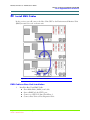
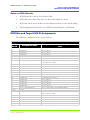
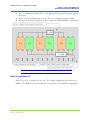
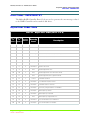
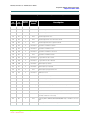
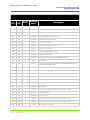
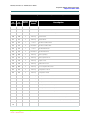
RAID Array Organization
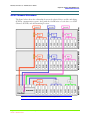
Base Unit Drive D:\ - System Backup O/S:
n
Factory configured
n
The array setup is identical to drive C:\
n
A first RAID 1 is striped across a partition on three drives with a second RAID 1
striped across another partition on three different drives.
n
The two RAID 1 arrays above are combined into a RAID 0 - Mirrored array.
n
This array cannot be changed without damaging the O/S image.
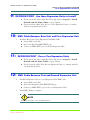
Base Unit Drive E:\ - User Data:
n
Factory configured
n
A RAID 5 striping with parity check array.
n
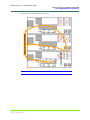
Drive E:\ is set across the same six disk drives used by Drives C:\ and D:\ but in
separate partitions.
n
This array cannot be changed without damaging the O/S images.
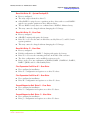
Base Unit Drive F:\ - User Data:
n
Factory configured
n
Default configuration is a RAID 5 - Striping with parity check array.
n
Drive F:\ is set across the remaining six drives in the Base Unit enclosure.
n
The drive configuration can be modified to suit user needs.
n
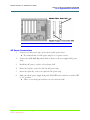
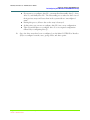
Drives can be set to any combination of RAID 0, RAID 1, RAID 0+1, RAID 3,
RAID 5, JBOD, and/or a Hot Standby Drive.
First Expansion Unit Drive G:\ - User Data:
n
User configured at installation
n
Drive G:\ configuration and options are as drive F:\ above.
First Expansion Unit Drive H:\ - User Data:
n
User configured at installation
n
Drive H:\ configuration and options are as drive G:\ above.
Second Expansion Unit Drive I:\ - User Data:
n
User configured at installation
n
Drive I:\ configuration and options are as drive G:\ above.
Second Expansion Unit Drive J:\ - User Data:
n
User configured at installation
n
Drive J:\ configuration and options are as drive G:\ above.
Chapter #4 - Overview - NAS 6000 Disk Array
11/07/01 -- Revision 2.0.03A
123
000001628