1
General Description
GCA40–242
Do Not Disturb (DND) Inhibit
The installer can inhibit DND on a station class of service basis.
Do Not Disturb (DND) Override
The installer can provide stations with a Do Not Disturb (DND) override capability that will allow
them to call a station that is set in the DND mode. The installer must also enable the executive
override feature for the DND override feature to function. Refer to the discussions titled: Do Not
Disturb and Executive Override.
DSS/BLF Console Support
The FX II supports the use of digital proprietary DSS/BLF consoles. The installer can place a
console at any station port and use database programming to identify it as a console port. The
installer then uses database programming to enable the console to be a companion to a telephone that
he or she has installed at any other station port. The system supports the use of up to four consoles
for each telephone, and there is no limit to the maximum number of consoles that it will support.
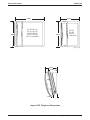
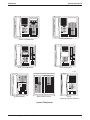
The DSS/BLF console provides a one-button direct station selection (DSS) intercom, an associated
busy lamp field (BLF), and additional autodial capability to the telephone user.
DSS Status Button
When the installer assigns the personal intercom number of one telephone to appear at a button on
another telephone, the button and its associated light provide a direct station select (DSS) busy lamp
field (BLF) feature. With this feature, the user can monitor the status of the appearing station. If the
installer also assigns a DSS status button to the telephone, the user can press it to select between
monitoring all of the telephone status or just its personal intercom status.
Also refer to the discussion titled Intercom Number.
Digital Voice Announce
The DVA is a line-powered device that provides voice prompts for auto-attendant and transfer, or
you can use it to enhance the operation of DISA and Tracker. However, you must have DISA
assigned for DVA to function. The DVA is designed to interface with a digital station port and is
easy to install and program. You perform all DVA programming through the “Attendant Level”
programming, though there are some FX II programming steps as well. It isn’t necessary to send
DTMF or ringing signals to the unit to activate it because the DISA programming determines the
DVA’s actions. When you use DVA in conjunction with DISA, the FX II automatically answers CO
lines and guides callers with voice prompts.
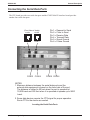
Connect the DVA to any vacant digital station port. The DVA self-identifies to the CPU in the FX II,
so you don’t have to do any phone-type programming.
The DVA accepts and stores up to four recorded messages, with a total maximum recorded time for
all messages of two minutes. The system attendant or installer can divide this two-minute period as
necessary among the four messages or use the entire two minutes for one message. These
pre-recorded messages play during an in-process call. Single digit dialing is allowed during each of
the four prompts. The system attendant or installer can store the customized messages (prompts) into
Understanding the Features – 87