1
Acrobat LCD
TM
Users Manual
FCC Compliance Notification
This device complies with Part 15 of the FCC Rules. Operation is
subject to the following two conditions: (1) This device may not cause
harmful interference, and (2) this device must accept any interference
received, including interference that may cause undesired operation.
This equipment has been tested and found to comply with the limits
for a Class B digital device, pursuant to Part 15 of the FCC Rules.
These limits are designed to provide reasonable protection against
harmful interference in a residential installation. This equipment
generates, uses, and can radiate radio frequency energy and, if not
installed and used in accordance with the instructions, may cause
harmful interference to radio communications. However, there is no
guarantee that interference will not occur in a particular installation. If
this equipment does cause harmful interference to radio or television
reception, which can be determined by turning the equipment off and
on, the user is encouraged to try to correct the interference by one or
more of the following measures:
– Reorient or relocate the receiving antenna.
– Increase the separation between the equipment and receiver.
– Connect the equipment into an outlet on a circuit different from that to which the receiver is connected.
– Consult the dealer or an experienced radio/TV technician for help.
Unauthorized changes or modification to this system can void the
user’s authority to operate this equipment.
If your Low Vision device has an option to connect to a TV, it must be
used with shielded interface cables in order to meet FCC emissions limits
for Class B digital devices. It is the responsibility of the user to use the
shielded interface cables supplied with the equipment.
About Acrobat LCD
Congratulations on your purchase of the Acrobat LCD. Enhanced
Vision products are designed to give you the highest quality and
convenience available.
The Acrobat LCD product can enable people with low vision to
read, write and to see objects at any distance. The unique design of
this product provides the ultimate in flexibility and offers a large
range of magnification with multiple viewing options that make
reading easier than ever. The Acrobat LCD is a fully integrated solution, offering the advantage of a built-in LCD screen.
Prior to using this system, please carefully read and follow the
instructions provided within this booklet. A thorough understanding
of the functionality will allow you to fully benefit from the flexibility and great features of this device.
If you have any questions, please contact the eyecare professional
or the supplier from whom you have acquired the unit.
Table of Contents
Important Safety Precautions................................................ 7-10
Acrobat LCD
Acrobat LCD Package Contents .................................... Acrobat LCD Setup........................................................ Using Acrobat LCD........................................................ 11-12
13
14-28
Advanced Programming........................................................ 29-30
Troubleshooting.................................................................... 31
Specifications........................................................................ 32
Warranty Statement.............................................................. 33
Other Enhanced Vision Products.......................................... 34-37
Contact Information............................................................. 37
Important Safety Precautions
For your safety and to obtain the most benefit and life from the
Acrobat LCD, please read these safety precautions very carefully.
The Acrobat LCD is designed to enlarge and enhance images in
order to improve the quality of life for people who are visually
impaired. The extent to which this product can improve the ability
to see images depends on a person’s individual condition and level
of visual impairment.
The Acrobat LCD is not designed to restore vision, correct eye conditions or halt degenerative vision loss. An eyecare professional
can determine the usefulness and suitability of the Acrobat LCD for
a patient’s individual condition. Please follow these safety precautions:
• Use the Acrobat LCD on a stable, level surface such as a solid desk or table, according to its intended design specifications.
• Avoid placing the Acrobat LCD on an unstable table, cart or stand. It may fall causing serious damage to the unit or bodily injury to the user.
• Use the Acrobat LCD indoors only – it should NOT be exposed to extreme or rapid changes in temperature or humidity. Do not place the Acrobat LCD near a radiator, heater or areas exposed to long hours of direct sunlight. • Always place the power cord away from traffic areas to avoid damage of power supply.
• Prevent the risk of electrical shock by NOT attempting to disassemble the unit. Please refer all service to an authorized repair facility.
7
Important Safety Precautions
To Move the Acrobat LCD to Another Location
• Use caution if you are repositioning the Acrobat LCD a short distance across a desk or table. Make sure you do not pull on any power cords or connector cables.
Caring for the Acrobat LCD
• Always turn the power OFF on the Acrobat LCD when the system is not in use.
• Always turn the power OFF before cleaning the Acrobat LCD.
• Clean the Acrobat LCD with a soft dry cloth or an electrostatic dusting wipe. DO NOT use liquid cleaners on its plastic surfaces.
• Clean the lens glass as needed with the lens cloth provided within the Acrobat LCD’s packaging (See figure 1).
Figure 1
8
Important Safety Precautions
• Follow all warnings, cautions, and instructions marked on the product.
• The attached power cord is a disconnect device for electrical equipment. The socket-outlet should be installed near the equipment and be easily accessible.
• This product is equipped with a 3-wire grounding type plug as a safety feature. This plug has a third (grounding) pin and can only be plugged into a grounding-type power outlet. If necessary, contact an electrician to replace your power outlet with a grounding-type power outlet.
• Do not use the Acrobat LCD in, near or around water. The Acrobat LCD is not designed to offer protection against contact with liquids of any kind.
• Do not use the Acrobat LCD near flammable liquids.
• At least once per week, clean the Acrobat LCD with a soft dry cloth or an electrostatic dusting wipe. DO NOT use liquid cleaners on its plastic surfaces. No additional methods of sterilization or cleaning are recommended or required.
9
Important Safety Precautions
• This product contains moving parts. Please use caution when moving the adjustable slide arm or when transporting the Acrobat LCD to avoid possible injury to hands and fingers.
• To avoid personal injury or damage to the Acrobat LCD, do not make any other type of connections to the camera input jacks other than those indicated in the photos below.
Susceptibility to Interference There may be temporary degradation of
the image when the Acrobat LCD is subjected to a strong radio frequency field, electro-static discharge or transient electrical noise. An
electro-static discharge (caused by static electricity) may cause the
screen to go blank. If this happens, switch the unit off and on again.
Medical Compliance Warnings
• Electromagnetic compatibility: The use of accessories and cables other than those specified by Enhanced Vision may result in increased emissions or decreased immunity of the Acrobat LCD.
• Placement of equipment: The Acrobat LCD should not be used adjacent to or stacked with other equipment.
10
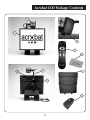
Acrobat LCD Package Contents
All required accessories for operation are included in your Acrobat LCD
package.
Acrobat LCD is comprised of the following items and features:
1.
19” or 22" LCD Screen: displays high quality image
2.
Camera: rotates 340 degrees to capture and enlarge the image
3.
Carrying Handle: used for lifting the Acrobat LCD
4.
Zoom Lens: used up close high magnification
5.
Arm: rotating arm that holds the camera
6.
Lock: used to lock arm from sliding horizontally
Accessories included:
7. Remote Control: (batteries included): allows the user to control the Acrobat LCD functions from a distance
8. Lens Cloth: permits cleaning of the LCD display
Accessories NOT included:
9. Rolling Case (optional): Provides protection for the Acrobat LCD and makes transportation even easier
10. VGA toggle box (optional): Allows the display of the Acrobat LCD to be shared along with a standard VGA output of a computer and permits switching between either source
11
Acrobat LCD Package Contents
2
1
4
7
8
3
5
9
6
10
12
Acrobat LCD Setup
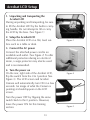
1. Unpacking and transporting the
Acrobat LCD
During unpacking and transporting, be sure
to lift the Acrobat LCD by the built-in carrying handle. Do not attempt to lift or carry
the LCD by the base. (See Figure 1)
2. Setup the Acrobat LCD
Place the Acrobat LCD on a flat, level surface such as a table or desk.
Figure 1
3. Connect the AC power
Connect the attached power cord to an
available wall outlet. (See Figure 2) To offer
additional protection during an electrical
storm, a surge protector may also be used
and is recommended.
4. Turn the power on
On the rear, right side of the Acrobat LCD,
flip the switch from the 0 to l position (See
Figure 3). The LCD screen and Acrobat
Camera will automatically turn ON in a few
seconds. An image of what the Camera is
pointing at should appear on the LCD
screen.
Turn the power OFF by flipping the same
switch back to the 0 position. However,
leave the power ON for this training section.
13
Figure 2
Figure 3
Using Acrobat LCD
Adjust the camera position
The Acrobat LCD camera is attached to a specially designed arm that
allows the camera to slide left or right, or to pivot in multiple directions.
(See Figure 1, 2, 3 and 4)
Figure 1
Figure 2
90°
Figure 3
Figure 4
14
Using Acrobat LCD
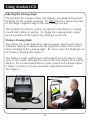
Adjusting the Viewing Angle
The Acrobat LCD Camera rotates 340 degrees, providing unsurpassed
flexibility for the visually impaired. Do NOT force the camera beyond
its 340-degree angular range as this may damage the unit.
The Acrobat LCD may be used to see objects in the distance, viewing
oneself and reading or writing. To change the viewing mode, simply
turn the position of the Camera by rotating it on the arm.
Distance Viewing Mode
The camera can rotate forward to capture people, objects and scenery.
“Distance Viewing” is displayed in the upper-left corner of the screen
when changing to this viewing angle. Be sure to open the Reading Lens
for Distance Viewing (See Figure 1).
This Distance mode enables up to 25X magnification for objects 3 feet
away. In this mode, although the camera can view objects at an infinite
distance, the recommended distance from camera to the distant object is within 3-30 feet to achieve maximum magnification benefit (See Figure 2).
3’ - 30’ (Recommended)
Figure 1
Figure 2
15
Using Acrobat LCD
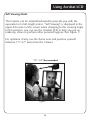
Self Viewing Mode
The Camera can be rotated backwards to provide you with the
equivalent of a full-length mirror. “Self Viewing” is displayed in the
upper-left corner of the screen when changing to this viewing angle.
In this position, you can use the Acrobat LCD to help you put on
make-up, shave or perform other personal hygiene (See Figure 1).
For optimum clarity, use the Zoom Lens and position yourself
between 7.5”-22” away from the Camera.
7.5” - 22” (Recommended)
Figure 1
16
Using Acrobat LCD
Reading and Writing Mode
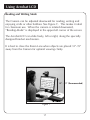
The Camera can be adjusted downward for reading, writing and
enjoying crafts or other hobbies (See Figure 1). This makes it ideal
for classroom use. When the camera is rotated downward,
“Reading-Mode” is displayed in the upper-left corner of the screen.
The Acrobat LCD can slide freely, left or right, along the specially
designed bracket mechanism.
It is best to close the Zoom Lens when objects are placed 12”-19”
away from the Camera for optimal viewing clarity.
12” - 19” (Recommended)
Figure 1
17
Using Acrobat LCD
Adjusting Magnification
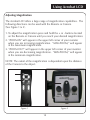
The Acrobat LCD offers a large range of magnification capabilities. The
following directions can be used with the Remote or Camera (See Figure 1 & 2).
1.To adjust the magnification press and hold the + or - buttons located on the Remote or Camera until you reach your desired magnification.
2. “ZOOM IN” will appear in the upper left corner of your monitor when you are increasing magnification. ”MAX ZOOM,” will appear at the maximum magnification.
3. “ZOOM OUT” will appear in the upper left corner of your monitor when you are decreasing magnification. “MIN ZOOM,” will appear at the minimum magnification.
NOTE: The extent of the magnification is dependent upon the distance
of the Camera to the object.
Figure 1
Figure 2
18
Using Acrobat LCD
Changing the Viewing Mode
The Acrobat LCD was designed to provide optimum viewing for people
with certain visual conditions by offering a range of choices in both text
and background colors. In addition, it will remember the viewing mode
selected for each viewing angle. The following directions can be used
with the Remote or Camera.
Adjusting Viewing Modes
1. You can choose a viewing mode by pressing the MODE button on the Remote or Camera (See figure 1 & 2).
2. Each push will allow you to cycle through all seven viewing modes (See next page).
Figure 1
Figure 2
19
Using Acrobat LCD
Viewing Modes
Full Color Image
This mode gives a true color representation of the image being magnified.
Black-and-White Image
This mode gives a black and white representation of the image being
magnified.
Enhanced-Positive Image
This mode provides a white background with
black text. It increases the contrast to offer
crisp text images for reading.
Enhanced-Negative Image
This mode provides a black background with
white text. It increases the contrast to offer
crisp text images for reading.
Crisp, Clear
Text Images!
Enhanced Positive
Crisp, Clear
Text Images!
Enhanced Negative
Color Select 1
This mode provides a blue background with yellow text. This is one of
the most commonly used color combinations.
Color Select 2
This mode provides a black background with green text.
Color Select 3
This mode provides a black background with yellow text.
20
Using Acrobat LCD
Adjusting the White Balance with the Remote Control
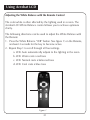
The color white is often affected by the lighting used in a room. The
Acrobat LCD White Balance control allows you to achieve optimum
clarity.
The following directions can be used to adjust the White Balance with
the Remote:
1. Press the White Balance “WB” button (See figure 1) on the Remote, and wait 2 seconds for the key to become active.
2. Repeat Step 1 to scroll through all four settings.
a. W.B. Auto automatically adjusts to the lighting in the room
b. W.B. Warm casts a red tone
c. W.B. Normal casts a balanced tone
d. W.B. Cool casts a blue tone
Figure 1
21
Using Acrobat LCD
Adjusting the White Balance with the Camera
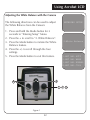
The following directions can be used to adjust
the White Balance from the Camera:
ENTERING SETUP
1. Press and hold the Mode button for 3 seconds to “Entering Setup” Menu.
2. Press the + to scroll to “2. White Balance”.
3. Press the Mode button to initiate the White Balance feature.
4. Press the +/- to scroll through the four
settings.
5. Press the Mode button to exit this feature.
2.White Balance
1.WHT
2.WHT
3.WHT
4.WHT
2
4
1 3 5
Figure 1
22
BAL
BAL
BAL
BAL
AUTO
WARM
NORMAL
COOL
Using Acrobat LCD
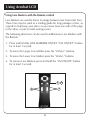
Using Line Markers with the Remote control
Line Markers are used to frame an image between two horizontal lines.
These lines may be used as a reading guide for long passages of text, as
a guide to help keep your place as you move from one side of the page
to the other, or just to make writing easier.
The following directions can be used to add/remove Line Markers with
the Remote:
1. Press and hold the LINE MARKERS ON/OFF (“LM ON/OFF”) button for at least 1 second.
2. To move the Upper Line Marker press the “ULM+/-” buttons.
3. To move the Lower Line Marker press the “LLM+/-” buttons.
4. To remove Line Markers press and hold the “LM ON/OFF” button for at least 1 second.
1 4
3
2
Figure 1
23
Using Acrobat LCD
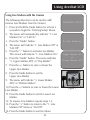
Using Line Markers with the Camera
The following directions can be used to add/
ENTERING SETUP
remove Line Markers from the Camera:
1. Press and hold the Mode button for at least 3 seconds to begin the “Entering Setup” Menu.
2. The menu will automatically indicate “1. Line Markers On” or “LM On”.
1.Line Markers
3. Press the “Mode” button.
4. The menu will indicate “1. Line Makers Off” or “LM Off”.
5. Press the “-” button to activate Line Marker. This screen will indicate “1. Line Markers On”. 2.Upper Marker ADJ
or
6. Press the “Mode” button. The menu indicates 3.Lower Marker ADJ
“2. Upper Marker ADJ” or “Top Marker”.
7. Press the +/- buttons to raise or lower the
Upper Line Marker.
8. Press the Mode button to set the Upper Line Marker.
9. The menu will indicate “3. Lower Marker ADJ” or “Bottom Marker”.
10.Press the +/- buttons to raise or lower the Lower Figure 1
Line Marker.
11.Press the Mode button to set the Lower Line Marker.
12. To remove Line Markers repeats steps 1-3.
13. Press the “+” button to return to the “1. Line Markers Off” Menu or “LM Off”.
14. Press the Mode button to exit the Menu.
24
Using Acrobat LCD
Using the Object Locator
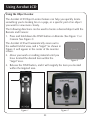
The Acrobat LCD Object Locator feature can help you quickly locate
something you're looking for on a page, or a specific part of an object
you want to view more closely.
The following directions can be used to locate a desired object with the
Remote and Camera:
1. Press and hold down the FIND button on Remote (See Figure 1) or Camera (See Figure 2).
The Acrobat LCD will automatically zoom out to
the widest field of view, and a "target" (as shown in
Figure 3) will appear in the center of the monitor
I---I
screen.
2. Move your work or reading material until you have located the desired item within the Figure 3
"target" area.
3. Release the FIND button, and it will magnify the item you located within the targeted area.
Figure 1
Figure 2
25
Using Acrobat LCD
Using Intelligent Focus Lock with the Remote Control
When The Acrobat LCD is turned on, it is automatically set on auto
focus. This is the most convenient setting for everyday activities, such as
reading from a single page to a book, reading a prescription bottle or
working with arts and crafts.
FOCUS LOCK allows you to maintain focus on a
specific object at a fixed distance, such as writing.
The Acrobat LCD INTELLIGENT FOCUS LOCK feature will automatically refocus on the object you are
viewing after changing the magnification size. The
Acrobat LCD will keep your writing in focus, rather
than your hand when it comes into the Camera's
frame.
The following directions can be used to apply the
Focus Lock feature using the Remote:
Figure 1
FL
1. Place your notepaper, stationery, checkbook or other writing material on the table.
2. Press the “LOCK” button on the Remote
(See Figure 1).
3. The letters "FL" will appear and remain in the upper left corner of the monitor
(See Figure 2).
Figure 2
AF
4. To Return to AUTO-FOCUS, press the “LOCK” button on the Remote (See Figure 1).
5. The letters "AF" will appear in the upper left corner of the monitor (See Figure 3).
26
Figure 3
Using Acrobat LCD
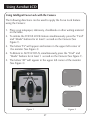
Using Intelligent Focus Lock with the Camera
The following directions can be used to apply the Focus Lock feature
using the Camera:
1. Place your notepaper, stationery, checkbook or other writing material on the table.
2. To initiate the FOCUS LOCK feature simultaneously press the “Find” and “Mode” buttons for at least 1 second on the Camera (See Figure 1).
3. The letters "FL" will appear and remain in the upper left corner of the monitor (See Figure 2).
4. To Return to AUTO-FOCUS, simultaneously press the “Find” and “Mode” buttons for at least 1 second on the Camera (See Figure 1).
5. The letters "AF" will appear in the upper left corner of the monitor (See Figure 3).
FL
2 4
Figure 2
AF
Figure 1
Figure 3
27
Using Acrobat LCD
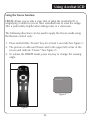
Using the Freeze Function
FREEZE allows you to take a snap shot of what the Acrobat LCD is magnifying in order for you to have extended time to view the image.
This is particularly helpful when taking notes in a classroom.
The following directions can be used to apply the Freeze mode using
the Remote control only:
1.
2.
3.
Press and hold the “Freeze” key for at least 2 seconds (See Figure 1).
The picture or video will freeze and in the upper left corner of the screen will indicate “Freeze” (See Figure 2).
To release the FREEZE mode, press any key or change the viewing angle.
Freeze
Figure 2
Figure 1
28
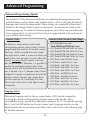
Advanced Programming
Advanced Programming Options
The Acrobat LCD has advanced capabilities for modifying the programming of the
included remote control (when using multiple units) as well as changing the default
language used within the setup menus. These settings are completely optional and
should not be changed under normal circumstances. The information listed on the
following pages are for technical reference purposes only. Please see your Enhanced
Vision representative or call our toll-free technical support should it be necessary for
you to modify these settings.
Remote Codes
Remote Control (Transmit) Code Change:
By default, a single remote control (and
corresponding remote control code) is factory
programmed and used for all Acrobat camera
functions. While acceptable for most singleuse applications, when 2 or more Acrobats are
used within close proximity to each other (lab
setting), exclusive remote control over each
unit may be desired. Therefore, it is possible to
modify the sending/receiving codes of the
remote control and Acrobat head for exclusive
use, if desired. Up to 15 unique codes can be
assigned. For proper communication, both the
Remote control (transmit) and camera head
(receive) must be set to matching ID codes.
Please refer to the chart on the right for more
information.
• #28 (default/factory reset):
Push MODE and FIND for 3 secs.
• #15: Push MODE and LLM- for 3 secs.
• #24: Push MODE and ULM- for 3 secs.
• #25: Push MODE and LLM+ for 3 secs.
• #27: Push MODE and ULM+ for 3 secs.
• #07: Push + and FIND for 3 secs.
• #11: Push + and LLM- for 3 secs.
• #14: Push + and ULM- for 3 secs.
• #23: Push + and LLM+ for 3 secs.
• #31: Push + and ULM+ for 3 secs.
• #08: Push - and FIND for 3 secs.
• #09: Push - and LLM- for 3 secs.
• #10: Push - and ULM- for 3 secs.
• #12: Push - and LLM+ for 3 secs.
• #13: Push - and ULM+ for 3 secs.
Language Select
The default language used for the on screen display (OSD) may be changed by
accessing the Advanced Programming Features menu on the Acrobat. This is
accomplished using a special key combination sequence (4321), accessed by pressing
the [+] and [MODE] buttons on Acrobat camera head. Language selection can be
adjusted within the second menu level. Please refer to the chart on the following page
for detailed reference.
29
Advanced Programming
30
Troubleshooting
Q. How can I adjust the LCD screen settings?
A. Normally, the setting for LCD brightness, contrast and color have been preset ideally from the factory and do not require modification. However, should these setting become modified accidentally, simply press the recessed [AUTO] button located on the bottom right corner of the LCD to return to factory default settings.
Q.
A.
How should I clean the Acrobat LCD?
At least once per week, clean the Acrobat LCD with a soft dry cloth or an electrostatic dusting wipe. DO NOT use liquid cleaners on any of the plastic surfaces.
Q.
A.
The Remote Control is not functioning properly. What should I do?
After ensuring you have fresh batteries installed in the remote control, please reset the remote control back to factory settings. Simply press and hold the [FIND] and [MODE] buttons on the remote control for at least 3 seconds, or until the LED indicator begins to flash. Then, attempt normal operation of the remote control functions.
Q. Can I use the Acrobat LCD with a computer?
A. Yes, the LCD of the Acrobat can be used along with a computer. Although the Acrobat will not magnify computer images, it is possible to use the Acrobat’s built-in LCD with either the Acrobat camera or a computer (equipped with a standard VGA connection). This permits a single LCD display to be used for either purpose. An optional VGA toggle box is specifically designed for this application. Please contact your local Enhanced Vision dealer for more details.
31
Acrobat LCD Specifications
Product Dimensions:
19” LCD: 21”H x 16”W x 8”D (53cm x 41cm x 20cm)
22” LCD: 21”H x 20”W x 8”D (53cm x 51cm x 20cm)
Product Weight:
19” LCD: 17 lbs. / 7.7 kg (without optional carrying case)
22” LCD: 18.6 lbs / 8.5 kg
Display:
Type: Standard Diagonal LCD, 5ms response time
Average lifetime: 10,000 hours
Camera: Removable CCD, Autofocus
Magnification range:
19” LCD: 2X (minimum) - 65X (maximum)
22” LCD: 2.3X (minimum) - to 75X (maximum)
19”/22” Field of View (Near Mode): 6 inches (min); .25 (max)
19”/22” Working Distance (Near Mode): 17 inches
Viewing Modes:
Color, Black & White, High Contrast
Positive/Negative, Digital Color Select (3 modes)
Power Supply:
Input voltage/current: 120-240 VAC / 0.3-0.5A (nominal)
Frequency: 60/50 Hz
Power usage: 60W (nominal)
Equipment Classification (IEC 601-1):
Type of Protection: Class 1
Degree of Protection: Type B
Mode of Operation: Continuous
Operating temperature range: 10-40°C / 50-104°F
Storage/transport temperature range: 0-60°C / 32-140°F
Warranty: 2 years
*Product specifications subject to change without notice
32
Warranty Statement
Enhanced Vision
Acrobat Video Magnifier Warranty Policy
Enhanced Vision products are designed to give you the highest quality image,
convenient features, ease of use and reliable service. The Acrobat LCD has been
inspected and tested prior to shipping. Enhanced Vision warrants the Acrobat LCD
against defects in material and workmanship under normal use for two years from
the date of original purchase. Enhanced Vision, at its option, will at no charge
either repair the product or replace it during the warranty period. There are no
other expressed or implied warranties accompanying this product.
This warranty does not cover: a) Defects or damage from misuse, use in other than
normal and customary manner, accident or neglect; b) Defects or damage from
improper operation, maintenance, installation, adjustment, alterations or
modification; c) Defects or damage from spills of food or liquid; d) All plastic
surfaces and all other externally exposed parts that are scratched or damaged due
to normal use; e) Damage due to operation of the Acrobat LCD with equipment
not supplied by Enhanced Vision.
• You must provide proof of purchase, bearing the date of purchase, in order to receive warranty service.
• Anyone using this product does so knowingly assuming certain risks, due to the
need to utilize vision enhancement devices.
• A 2-year extended warranty option is available within 12 months from the date
of purchase. Please contact Enhanced Vision for detailed information.
Service Process
In the event that technical support or repair service is needed, please contact your
local Enhanced Vision representative or the Enhanced Vision warranty service center.
If warranty service is required, please contact Enhanced Vision at (800)440-9476
Monday through Friday, between 8 a.m. and 5 p.m. Pacific Standard Time (PST) to
request a return authorization number. Warranty repairs will not be accepted
without a valid return authorization number.
You may wish to keep the original product packaging in case warranty service is
required. The manufacturer cannot provide packaging for warranty repairs.
NOTE: Please completely fill out and send in the enclosed warranty registration
card.
33
Other Enhanced Vision Products
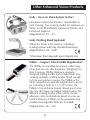
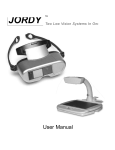
Jordy – Two Low Vision Systems in One!
Head-worn system for distance, intermediate &
near viewing. Four viewing modes for optimum visibility: Color, Black/White, Enhanced Positive and
EnhancedNegative
Magnification:1X–30
Jordy Docking Stand (optional)
Allow the Jordy to be used as a desktop
reading system with any standard television
Magnification:4X–40X*
*Maximum limit depends upon display size
Pebble – Compact, Ultra-Portable Magnification!
The Pebble is a handheld electronic video magnifier that you can take anywhere. Weighing less
than 8 ounces, Pebble features a uniquelydesigned folding handle and includes both nearviewing and table reading modes. Small enough
to fit in your pocket or purse, the Pebble is the
ideal companion to provide magnification, on the
go. Featuring a built-in 3 ½” LCD screen, the
Pebble's Freeze-Frame feature allows you to capture any still image and adjust magnification. Six
different viewing modes allow you to choose
alternate color combinations based on your personal preference. Pebble can be powered using
standard rechargeable batteries (included)
Magnification:2X–10X
34
Other Enhanced Vision Products
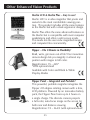
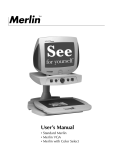
Merlin LCD & Merlin Plus – Easy to use!
Merlin LCD is a video magnifier that pivots and
swivels to the most comfortable viewing position. This product includes all the same features
as the Merlin but with a sleek ergonomic design.
Merlin Plus offers the same advanced features as
the Merlin but is compatible with most computer
workstations and offers a split screen mode.
This mode lets the user view magnified images
and computer files concurrently.
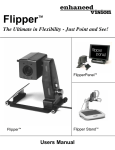
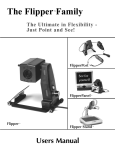
Flipper – The Ultimate in Flexibility!
Read, write, get more out of life! Our innovative
camera design lets you magnify in almost any
position with images in full color.
Magnification: 1X – 44X*
*With optional stand
Available with Color and Black & White
Display Modes
Flipper Panel – Integrated and Portable!
This powerful, portable magnifier integrates the
Flipper 225-degree rotating camera with a slim,
LCD platform. Powered by an innovative battery
pack, the Flipper Panel runs up to 4 hours on
a single charge. The discrete camera projects
a full-color, auto-focus image on the screen for
both near and distance viewing.
Magnification: 1X – 26.4X (with optional stand)
35
Other Enhanced Vision Products
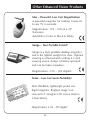
Max – Powerful, Low Cost Magnification
A powerful magnifier for reading. Connects
to any TV in seconds.
Magnification: 17X – 25X on a 20"
Television
Available in Color or Black & White
Amigo – Your Portable Friend!
Amigo is a truly portable desktop magnifier
and is the lightest weight it its class. Optimal
viewing is achieved with a tilting 6.5 inch
viewing screen. Amigo is battery operated
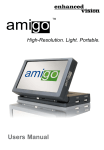
and can be taken anywhere.
Magnification: 3.5X – 14X (digital)
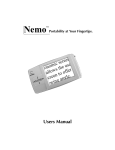
Nemo – Low Cost meets Portability!
Most affordable, lightweight pocket size
digital magnifier. Brightest image in its
class with 4” anti-glare LCD screen. Built-in
3-hour battery.
Magnification: 4.5X – 9X (digital)
36
Other Enhanced Vision Products
Accessories
VGA Toggle Box
Allows you to toggle between either the Acrobat LCD or your computer display (VGA connection).
Smart Video
Connects Enhanced Vision’s low vision devices to a computer monitor.
Carrying Cases
Convenient cases for storage and transport of all Enhanced Vision
products.
MaxTrak
An essential accessory to keep your Max straight while rolling across
a page.
Battery
Rechargeable batteries for Enhanced Vision’s low vision devices.
Contact information:
(US Office) Phone: (714)465-3400
(UK Office) Phone: +44 (0)115 9442317
www.enhancedvision.com
37
Fax: (714)374-1821
Fax: +44 (0)115 9440720
[email protected]
Notes
The Acrobat LCD video magnifier is designed to enlarge and
enhance images to improve the lives of people who have low
vision. The extent to which the Acrobat LCD can improve the
ability to see images and text depends on a person's individual
condition and level of visual impairment. The Acrobat LCD is
not designed to restore vision, correct eye conditions or halt
degenerative vision loss. An eye care professional can best determine the suitability of the Acrobat LCD for a patient's specific condition. For more information, please visit www.
enhancedvision.com.
www.enhancedvision.com
(714)465-3400 (US Office)
+44 (0) 9442317 (UK Office)
MAN-0002-01
April, 2009
Copyright © 2009 by Enhanced Vision. All rights reserved.