1
4. ESET Mail Security - Microsoft
Exchange Server protection
4.1.1.1
Adding new rules
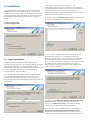
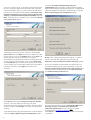
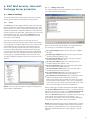
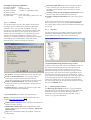
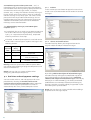
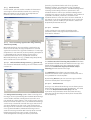
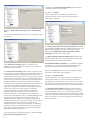
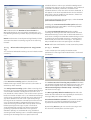
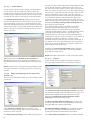
This wizard guides you through adding user-specified
rules with combined conditions.
4.1 General settings
This section describes how to administer rules, log files,
message quarantine and performance parameters.
4.1.1
Rules
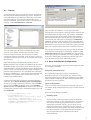
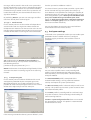
The Rules menu item allows administrators to manually
define email filtering conditions and actions to take with
filtered emails. The rules are applied according to a set of
combined conditions. Multiple conditions are combined
with the logical operator AND, applying the rule only if all
the conditions are met. The column Number (next to
each rule name) displays the number of times the rule
was successfully applied.
The rules are checked against a message when it is
processed by transport agent (TA) or VSAPI. When both
TA and VSAPI are enabled and the message matches the
rule conditions, the rule counter may increase by 2 or
more. This is because VSAPI accesses each part of the
message individually (body, attachment) meaning the
rules are consequently applied to each part individually.
Furthermore, rules are also applied during background
scanning (e.g. repeated mailbox-store scan after virus
signature database update), which can increase the rule
counter.
NOTE: You can also use system variables to apply Rules
(for example: %PATHEXT%).
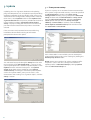
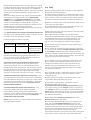
Note, that not all of the conditions are applicable when
the message is scanned by transport agent.
By target mailbox applies to the name of a mailbox
(VSAPI)
By message recipient applies to a message sent to a
specified recipient (VSAPI + TA)
By message sender applies to a message sent by a
specified sender (VSAPI + TA)
By message subject applies to a message with a
specified subject line (VSAPI + TA)
By message body applies to a message with specific
text in the message body (VSAPI)
By attachment name applies to a message with a
specific attachment name (VSAPI)
By attachment size applies to a message with an
attachment exceeding a defined size (VSAPI)
By frequency of occurrence applies to objects (email
body or attachment) for which the number of
occurrences within the specified time interval exceeds
the specified number (VSAPI + TA). This is particularly
useful if you are constantly spammed with emails with
the same email body or the same attachment.
When specifying the abovementioned conditions (except
the By attachment size condition) it is sufficient to fill in
only part of a phrase as long as the Match whole words
option is not selected. Values are not case-sensitive,
unless the Match case option is selected. If you are using
values other than alphanumerical characters, use
parentheses and quotes. You can also create conditions
using the logical operators AND, OR and NOT.
NOTE: Microsoft Exchange Server 2000 (VSAPI 2.0) only
evaluates displayed sender/recipient name and not the
email address. Email addresses are evaluated starting
with Microsoft Exchange Server 2003 (VSAPI 2.5) and
higher.
13