1
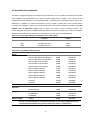
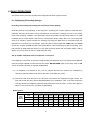
PAL System (For using with single camera)
Possible Recording Time HDD=20 Gigabytes
High
3.5 hr
Standard
Basic
7 hr
14 hr
28 hr
5.5 hr
11 hr
22 hr
7 hr
14 hr
28 hr
Refresh Rate (Field/Sec)
50
25
REC Time Mode
3 hr
6 hr
Image
Quality
56 hr
112 hr
196 hr
560 hr
840 hr
1120 hr
44 hr
88 hr
176 hr
56 hr
112 hr
224 hr
308 hr
880 hr
1320 hr 1760 hr
392 hr
1120 hr 1680 hr 2240 hr
12.5
6.25
3.13
1.56
0.89
0.31
0.21
0.16
12 hr
24 hr
48 hr
96 hr
168 hr
480 hr
720 hr
960 hr
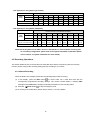
PAL System (For using with a multiplexer)
Possible Recording Time HDD=20 Gigabytes
Image
Quality
High
3.5 hr 10.5hr
24.5hr
38.5hr
73.5hr
Standard
5.5 hr 15.8hr
36.8hr
57.8hr
110.3hr 215.3hr
372.8hr 1055.3hr 1580.3hr 2105.3hr
Basic
143.5hr
248.5hr
703.5hr 1053.5hr 1403.5hr
7 hr
21.0hr
49.0hr
77.0hr
147.0hr 287.0hr
497.0hr 1407.0hr 2107.0hr 2807.0hr
Refresh Rate (Field/Sec)
(Figures on the setup menu)
50
(50)
16.7
(25)
7.14
(12.5)
4.55
(6.25)
2.38
(3.13)
1.22
(1.56)
0.70
(0.89)
0.25
(0.31)
0.17
(0.21)
0.12
(0.16)
REC Time Mode
3 hr
6 hr
12 hr
24 hr
48 hr
96 hr
168 hr
480 hr
720 hr
960 hr
NOTE: Recording times on the tables above are estimated. For actual available recording time
of a recording configuration, please refer to the system information of the DVR. (Please
refer to section 3.3 system information for more details.)
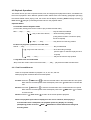
4.2 Recording Operations
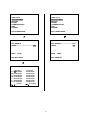
This section details the way to record video into hard-disk drives. Before commencing with the recording
function, please configure the recording setting properly according to your needs.
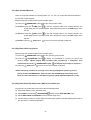
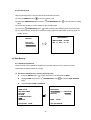
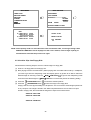
4.2.1 Manual Recording
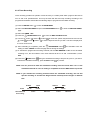
When the DVR is in live display mode, take the following steps to start recording:
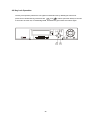
(1) In live display, press the REC button
to record video into a hard disk drive with the
corresponding programmed recording settings. The monitor should display a flashing REC
message and the REC button will light up indicating the DVR is in the recording status.
(2) Press the
STOP button
to stop recording any time.
(3) To access just recorded video, please refer to section 4.4 for more details.
15