1
Introduction
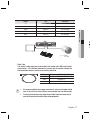
Back
➏
➐
➎
VIDEO
POWER
➑
<DC12V (SCB-2005D)>
➏
➐
➎
➑
CLASS 2 ONLY
VIDEO
POWER
<AC24V/DC12V (SCB-2005)>
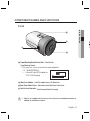
➎ Power input terminal : Connects to the power appropriate to each model.
➏ Video OUT Terminal : Sends video signal and connects to the video input terminal of
the monitor.
➐ Power LED : This lamp is lit when the camera is receiving power normally.
➑ Function Setup Button : Display the menu on the screen and move the cursor to four
directions to confirm ststus or after changing a selected item.
12_ Introduction