1
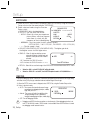
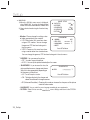
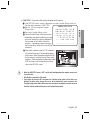
Setup 2. Select a desired mode using the Function Setup switch depending on the camera purpose. UseR blC : Enables a user to directly select a desired area from a picture, and to view the area more clearly. - LEVEL : Adjust level of the BLC function. - TOP/BOTTOM/LEFT/RIGHT : Adjust the area to be enhanced. HlC (High light Compensation) : This function masks the strong light to minimize white out due to over exposure and preserve much of the on-screen details when the camera aims a strong light source. - LEVEL : Adjusts the brightness level of a monitoring area. BLC SETUP ▶ 1.LEVEL 2.TOP 3.BOTTOM 4.LEFT 5. RIGHT 6. RETURN MIDDLE 9 24 IIIIIIIIIIIIIIIIIIIII 25 IIIIIIIIIIII IIIIIIIII 84 IIIIIIIIIIIIIIIIIIIII IIIIIIIIIIIIIIIIIIIII HLC SETUP MIDDLE ▶ 1. LEVEL NIGHT ONLY 2. LIMIT 3. MASK COLOR BLACK 4. RETURN - LIMIT : Enable to change the operating condition. - MASK COLOR : Change the color of the masking area. (Black, Red, Blue, Gray, Magenta) Off : Not being used 6615 This function reduces the background noise in a low luminance environment. 1. When the SETUP menu screen is displayed, select 'SSNR3' by using the Function Setup switch so that the arrow indicates 'SSNR3'. 2. Select a desired mode using the Function Setup SSNR3 switch. 22 ▶1. LEVEL Off : Deactivates SSNR3. Noise is not reduced. 2. RETURN ON : Activates SSNR3 so that noise is reduced. IIIIIIIIIIIIII IIIIIIIIIII 3. Set the SSNR3 mode to 'ON' and press the Function Setup switch. 4. Then you can adjust the noise reduction level. You cannot set the SSNR3 to 'ON' or 'OFF' when the AGC mode of the EXPOSURE menu is 'OFF'. When adjusting the noise reduction level of the SSNR3 mode, remember that the higher the level set, the more the noise level will be reduced but that after image may also occur. 22_ Setup