1
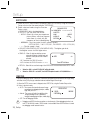
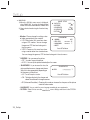
Setup IMAGE ADJ 1) When the SPECIAL menu screen is displayed, select ‘IMAGE ADJ’ by using the Function Setup switch so that the arrow indicates ’IMAGE ADJ‘. 2) Select a desired mode using the Function Setup switch. IMAGE SETUP ▶ 1.MONITOR LCD 2.REVERSE OFF 3.SHARPNESS ON ENGLISH 4.LANGUAGE 5.RETURN - monitor : Please change the settings value LCD MONITOR of video appropriate to your monitor. ▶ 1. GAMMA 0.55 LCD: Please select this menu item when IIIIIIIII*IIIIIIIIIIII 45 2. PED LEVEL using an LCD monitor. You can change 7 3. COLOR GAIN the gamma, PED level and color gain in 4. RESET the sub menus. Press SET to Return USER : Please use this menu item when using a monitor other than standard ones. You can change the gamma, PED level and color gain in the sub menus. III*IIIIIIIIIIIIIIIIII - ReVeRse : You can reverse the picture. OFF : You don’t reverse the picture. H-REV : You can flip the picture horizontally on the screen. - shARpNess : As you increase this value, the picture outline becomes stronger and clearer. Adjust this value appropriately depending on the sharpness of the picture. OFF: Turn off Sharpness function. SHARPNESS ▶ LEVEL III IIIIIIIIIIIIIIIIII 7 Press SET to Return ON : The higher the level is,the sharper and clearer the outline of the image becomes. ER (Enhanced Resolution) : Choosing this mode can increase the sharpness of the picture under the colour mode. - lANGUAGe : You can select the menu language according to your requirements. - RUTURN : Select this to save the IMAGE ADJ menu settings and return to the SPECIAL menu. 24_ Setup