1
Contents
RF Intrusion Detection/RF Containment .......................................... 12-3
Deploying BSAPs on the Same Layer-2 Subnet as the BSC ................... 12-3
Deploying BSAPs with Layer-3 Connectivity to the BSC........................ 12-4
How a BSAP Discovers BSCs ........................................................... 12-5
How a BSAP Selects a Home BSC .................................................... 12-6
Uploading BSAP Firmware Files ....................................................... 12-6
Configuring Global Miscellaneous Non-Radio Settings........................ 12-8
Configuring Global Radio Settings ................................................. 12-10
802.11b/g/n Radio Configuration............................................. 12-10
802.11a/n Radio Configuration ................................................ 12-18
Editing Settings for an Individual BSAP............................................ 12-19
Creating SSIDs............................................................................. 12-20
BSAP Authentication Options ..................................................... 12-20
BSAP Data Encryption Options ................................................... 12-21
SSID Configuration Procedure .................................................... 12-22
Creating BSAPs............................................................................ 12-24
Enabling BSAP Service.................................................................. 12-26
Displaying Configured BSAPs ........................................................ 12-29
Chapter 13
RF Intrusion Detection and Containment
Identifying Authorized RF Stations on Your Network ........................... 13-2
Configuring RF Alarms .................................................................... 13-3
Configuring Manual Containment .................................................... 13-6
Configuring Autocontainment........................................................... 13-6
Chapter 14
Secure Mobility® MatriX
An Overview of the Secure Mobility MatriX ....................................... 14-2
Reasons for Deploying a Secure Mobility MatriX ............................ 14-2
General Configuration Procedure ................................................. 14-3
Secure Mobility® ........................................................................... 14-3
How Secure Mobility Works ........................................................ 14-4
Network Requirements................................................................. 14-5
Step 1: Designate and Set Up the Mobility Node List Master............ 14-6
Step 2: Create a List of Nodes ..................................................... 14-7
Step 3: Set Up Secure Mobility® on the Nodes .............................. 14-8
Step 4: Restart Services on the Mobility Master and All Nodes ......... 14-9
Tracking Secure Mobility Status .................................................... 14-9
Enabling VLAN Roaming Across LSG BSCs .................................. 14-10
Replication .................................................................................. 14-10
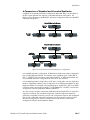
A Comparison of Standard and Cascaded Replication .................. 14-11
Step 1: Set Up Replication on the Master..................................... 14-12
Step 2: Create a List of Replication Nodes on Master.................... 14-12
Step 3: Set Up Replication on the Nodes ..................................... 14-13
Step 4: Set Up Cascaded Replication (More than Ten BSCs) .......... 14-14
Step 5: Restart Services on the Master and All Nodes ................... 14-15
Configuring a Replication Override............................................. 14-15
Tracking Replication Status ........................................................ 14-16
Load Sharing ............................................................................... 14-17
Typical Configuration ................................................................ 14-17
Network Requirements............................................................... 14-18
Configuring BSC Load Sharing (Single Subnet, NAT Enabled)........ 14-18
Configuring BSC Load Sharing (No NAT) .................................... 14-22
BlueSecure™ Controller Setup and Administration Guide
vii