1
Chapter 3
The User Interface
This chapter explains how to access and operate the dialog boxes that serve as the user interface for
the RingView component of SPECTRUM.
Accessing RingView Tools
Once a Token Ring LAN has been modeled in SPECTRUM either manually or
through a regular AutoDiscovery session, subsequent discovery sessions can
be invoked for that LAN through the RingView Tools dialog box, which is
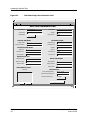
accessed from the LAN_802_5 model’s Information view (Figure 3-1). You can
access this view in either of two ways:
• click on the LAN_802_5 icon, then select the Model Information option
from the Icon Subviews menu.
or
• if the LAN_802_5 Topology view is already open, select the Current View
Information option from the File menu.
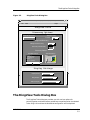
Clicking on the RingView Tools button in the bottom right corner of the LAN802_5 Information view brings up the RingView Tools dialog box shown in
Figure 3-2 .
9032585 E1
3-1