1
IB_DVD_KH6507_GB.qxd
19.10.2004
9:53 Uhr
Seite 10
7. Setting Up the DVD Player
Ú
in the immediate vicinity of heat sources. This includes
ovens, fan heaters and similar devices as well as ventilation openings of other electronic devices. Otherwise, the
DVD player may be irreparably damaged. The risk of
fire exists!
Ú
in damp environments. Otherwise, moisture may enter
the DVD player. This creates the risk of an electrical
shock and a fire!
Ú
in the immediate vicinity of water, such as bath tubs
or swimming pools. Never place containers filled
with water (e.g. flower vases) on the DVD player. If
water flows into the DVD player or the device falls
into water, the risk of an electrical shock exists!
7.1. Unpacking the Components
Remove the DVD player and accessories carefully from
the packaging. Always hold the DVD player with two
hands. Never let the DVD player or remote fall! This
could lead to irreparable damage.
7.2. Inserting the Batteries into the
Remote Control
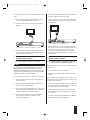
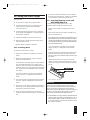
1 Open the battery compartment on the back side of
the remote control.
2 Remove the protective film from the two batteries of
type AAA/LR03/micro included with the DVD player.
Then insert both batteries into the battery compartment. Be sure to insert the batteries with the correct
polarity.The correct polarity is indicated inside the battery compartment.
Do not place any open flames – such as burning candles
– on the DVD player. Otherwise, the risk of fire exists!
| Warning!
Never place other devices or heavy objects (e.g. televisions) on the DVD player. This could lead to malfunctions and/or permenant damage to the DVD player!
3 Put the battery compartment cover back in place.
ô
Note:
Never place the DVD player in locations that are subject to
heavy shocks or constant vibrations. This could lead to
malfunctions and/or permenant damage to the DVD player!
To ensure faultless functioning of the remote control:
7.4. Connecting the DVD Player to a
Television
Ú
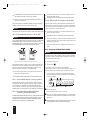
Always point the remote control directly at the DVD
player when using it.
Ú
Remain within 5 meters of the DVD player when
using the remote control.
After setting up the DVD player, you can now connect it to
a television.The DVD player can be connected to televisions with the television standards PAL, NTSC and multistandard televisions.
Ú
Make certain that no objects obstruct the reception between the remote control and the DVD player.
ô Note:
Otherwise, the remote control may function improperly.
7.3. Selecting a Suitable Setup Location for the DVD Player
Place the DVD player on a flat, level, scratch-proof and
slip-proof surface.
The DVD player does not function with televisions of
the television standard SECAM.
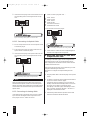
Depending on the features of the television, there are
various options for connecting the DVD player to it:
7.4.1. Connecting to a Television via ScartCable/RGB
† Danger!
ô Note:
Do not place the DVD player ...
Ú
in locations that are exposed to direct sunlight. Otherwise, it may overheat and be irreparably damaged. The
risk of fire exists!
10
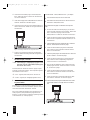
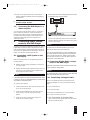
Connecting the television with a Scart-cable via the RGB
input is the connection option that offers the highest quality.
Select this connection option if the television has an RGB
input. In case of doubt, consult the operating manual of the
television.