1
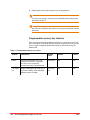
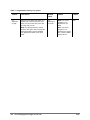
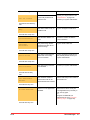
Phone Message
Cause
Resolution
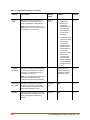
Call not allowed
The user does not have the
correct call permissions to
make the call..
“Permissions” on page 122.
Check your call permissions. See
Contact your system administrator.
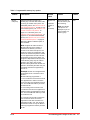
User will also hear fast busy
tone.
The device called is busy on
a different call
Try the call again at a later time.
Invalid Extension
The extension dialed is not
valid.
Check the number and dial the
correct extension.
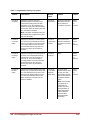
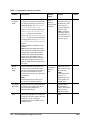
Subscriber
Unavailable
The person being called is
logged out and has not set
up call coverage
Try the call at a later time.
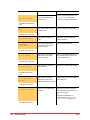
The device at the extension
dialed does not currently
have a connection.
Try the call again at a later time. If
the problem persists contact your
system administrator.
The device being called has
been disabled.
Contact your system administrator.
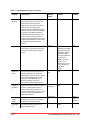
The maximum number of
times that the call can be
forwarded has been reached.
Advise caller that you are unable to
forward the call.
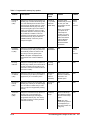
There is no Line Appearance
Available.
Disconnect a call on one of your
Line Appearance keys currently in
use, then try again.
or
Program an additional Line
Appearance key (see “Program
memory keys” on page 124).
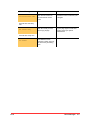
Busy
User will hear a busy tone.
User will hear a busy tone.
Device Offline
User will hear a busy tone.
Device Disabled
User will hear fast busy
tone.
Call Forward Max
Reached
User will hear busy tone.
No Lines Available
User will hear busy tone.
Final
Phone Messages 151